

Reseña de Xero: Ventajas, Desventajas, Funciones y Precios
Analizando Xero desde todos los ángulos, esta reseña cubre las características, concesiones y los tipos de negocios que pueden obtener el mayor valor de la plataforma.

Revisamos las herramientas de forma independiente, y las comisiones ayudan a financiar nuestras pruebas. Consulta nuestra política de transparencia, nuestra metodología o sugiere una herramienta.
Xero is a cloud-based accounting software for small and mid-sized businesses that need to manage invoicing, bank reconciliation, expense tracking, and financial reporting in one system. I'd especially consider it over QuickBooks Online if your team is growing—Xero includes unlimited users on every plan, while QuickBooks charges per seat, making Xero the more cost-predictable option as headcount scales.
Xero Evaluation Summary
4.4/5
- From $25/month
- 30-day free trial
Por qué confiar en nuestras recomendaciones de software
6,700+
Reviews
20
Industry experts
16+
Evaluation factors
14
Years
Nuestras reseñas reflejan nuestro criterio independiente, no un discurso de ventas. Descubra cómo mantenemos la transparencia.
Para esta guía, evaluamos las herramientas mediante pruebas prácticas e investigación independiente, puntuando las herramientas según nuestros criterios de selección.
Nuestras reseñas reflejan nuestro criterio editorial humano, no un discurso de ventas.
Xero Overview
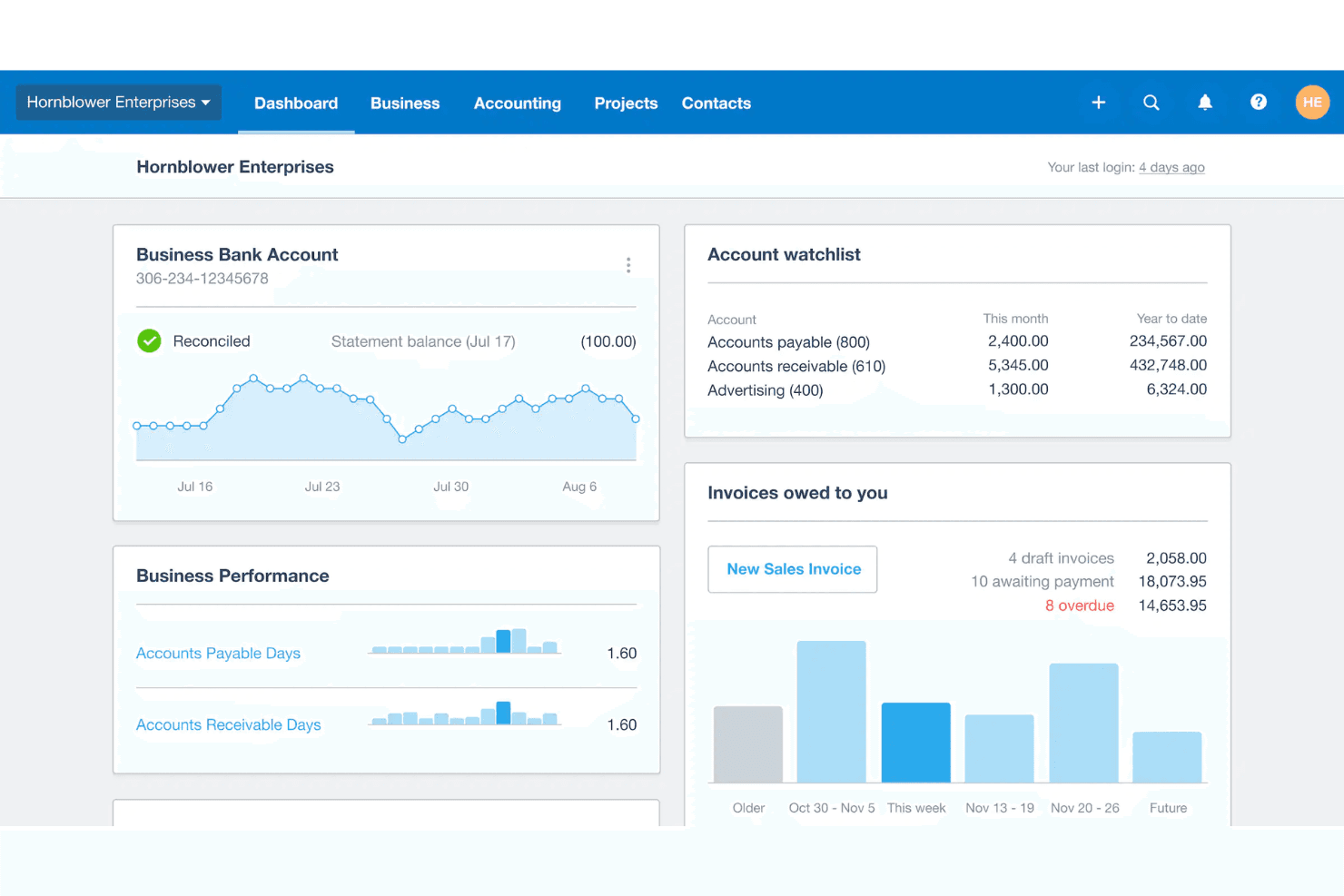
Xero simplifies your accounting tasks with its user-friendly interface and robust features, making it a top choice for small business owners.
Pros
- Xero's intuitive interface makes managing finances easy for you and your team.
- Its robust reporting tools give you clear insights into your business's financial health.
- Automatic bank feeds save you time by reducing manual data entry.
Cons
- Invoice and report customization options are restrictive.
- Some users report occasional lag in customer support response times.
- Advanced features may require additional training for effective use.
Is Xero Right For Your Needs?
Who Would be a Good Fit for Xero?
Small businesses, freelancers, and retail shops are a great match for Xero. Its user-friendly interface and strong reporting tools make it easy for you to manage finances without a dedicated finance team. If you’re in retail, Xero’s automatic bank feeds and inventory tracking can save you time and reduce errors. Freelancers will appreciate the invoicing features that streamline billing. Xero’s capabilities help you stay organized and informed, making it a smart choice for those who want to simplify their accounting processes.
- Small BusinessesXero’s intuitive interface and reporting tools make managing finances straightforward for your small team.
- FreelancersYou’ll love the invoicing features that simplify billing and help you get paid faster.
- Retail ShopsAutomatic bank feeds and inventory tracking save you time and reduce manual errors.
- ConsultantsXero’s expense tracking and project management features keep your client work organized.
- NonprofitsIts budgeting tools and reporting capabilities help you manage funds and demonstrate accountability.
- StartupsXero’s scalability and comprehensive financial insights support your growth and decision-making.
Who Would be a Bad Fit for Xero?
Large enterprises or complex manufacturing businesses might not find Xero suitable. Its features may lack the depth required for intricate financial management or large-scale operations. If your work involves complex supply chain logistics or vast data integration, Xero’s capabilities might fall short. Additionally, businesses needing highly customized financial solutions or advanced multi-currency handling could face limitations. Xero’s strengths lie in simplicity and ease, which might not align with the sophisticated needs of big corporations or industries requiring extensive customization.
- Large EnterprisesXero might not handle the complexity and scale of your large operations and diverse financial needs.
- Manufacturing IndustriesIts features may lack the depth you need for managing intricate supply chain logistics.
- International CorporationsWhile Xero handles multi-currency transactions, more advanced multi-currency handling isn’t Xero’s strong suit, posing challenges for your global operations.
- Highly Customized NeedsIf your business requires extensive customization, Xero’s standardized offerings might not suffice.
- Complex Financial StructuresXero’s simplicity might not support the intricate financial management your business demands.
- Data-Intensive CompaniesHandling vast data integration could be challenging with Xero’s capabilities.
Cómo probamos y puntuamos las herramientas
Hemos dedicado años a construir, perfeccionar y mejorar nuestro sistema de evaluación y puntuación de software. La rúbrica está diseñada para capturar los matices de la selección de software y lo que hace que una herramienta sea efectiva, enfocándose en los aspectos críticos del proceso de toma de decisiones. A continuación, puedes ver exactamente cómo funcionan nuestras pruebas y puntuación en siete criterios. Esto nos permite proporcionar una evaluación imparcial del software basada en la funcionalidad principal, características destacadas, facilidad de uso, onboarding, atención al cliente, integraciones, opiniones de clientes y relación calidad-precio.
Funcionalidad principal (25% de la puntuación final)
Nuestro punto de partida siempre es la funcionalidad principal de la herramienta. ¿Tiene las funciones básicas que un usuario esperaría ver? ¿Alguna de estas características principales está limitada a planes de precios superiores? En esencia, esperamos que una herramienta esté a la altura de las capacidades básicas de sus competidores.
Características destacadas (25% de la puntuación final)
A continuación, evaluamos las características únicas y sobresalientes que van más allá de la funcionalidad principal normalmente encontrada en herramientas de este tipo. Una puntuación alta refleja funciones especializadas o únicas que hacen el producto más rápido, eficiente o que aportan valor adicional al usuario. También evaluamos lo fácil que es integrarse con otras herramientas que normalmente forman parte del stack tecnológico para ampliar la funcionalidad y utilidad del software. Las herramientas que ofrecen numerosas integraciones nativas, conexiones con terceros y acceso API para crear integraciones personalizadas obtienen la mejor puntuación.
Facilidad de uso (10% de la puntuación final)
Consideramos cuán rápido y fácil es ejecutar las tareas definidas en la funcionalidad principal usando la herramienta. El software que obtiene la puntuación más alta está bien diseñado, es intuitivo, ofrece aplicaciones móviles, proporciona plantillas y hace que tareas relativamente complejas parezcan simples.
Onboarding (10% de la puntuación final)
Sabemos lo importante que es una adopción rápida del equipo para una nueva plataforma, por lo que evaluamos cuán sencillo es aprender y utilizar una herramienta con una formación mínima. Analizamos lo rápido que un miembro del equipo puede configurarse y empezar a usar la herramienta sin experiencia previa. Las soluciones con alta puntuación indican que se requiere poco o ningún soporte.
Atención al cliente (10% de la puntuación final)
Revisamos cuán rápido y sencillo es salir de un atasco y encontrar ayuda por teléfono, chat en vivo o base de conocimiento. Las herramientas y empresas que proporcionan soporte en tiempo real obtienen la mejor puntuación, mientras que los chatbots obtienen la peor.
Opiniones de clientes (10% de la puntuación final)
Además de nuestras propias pruebas y evaluaciones, consideramos el net promoter score de clientes actuales y anteriores. Revisamos la probabilidad de que, de tener la opción, elijan nuevamente la herramienta por su funcionalidad principal. Un software con alta puntuación refleja un alto net promoter score de clientes presentes o pasados.
Relación calidad-precio (10% de la puntuación final)
Por último, considerando todos los demás criterios, revisamos el precio medio de los planes de entrada frente a las funciones principales y analizamos el valor de los demás criterios de evaluación. El software que ofrece más por menos obtiene una puntuación superior.
Core Features
Invoicing
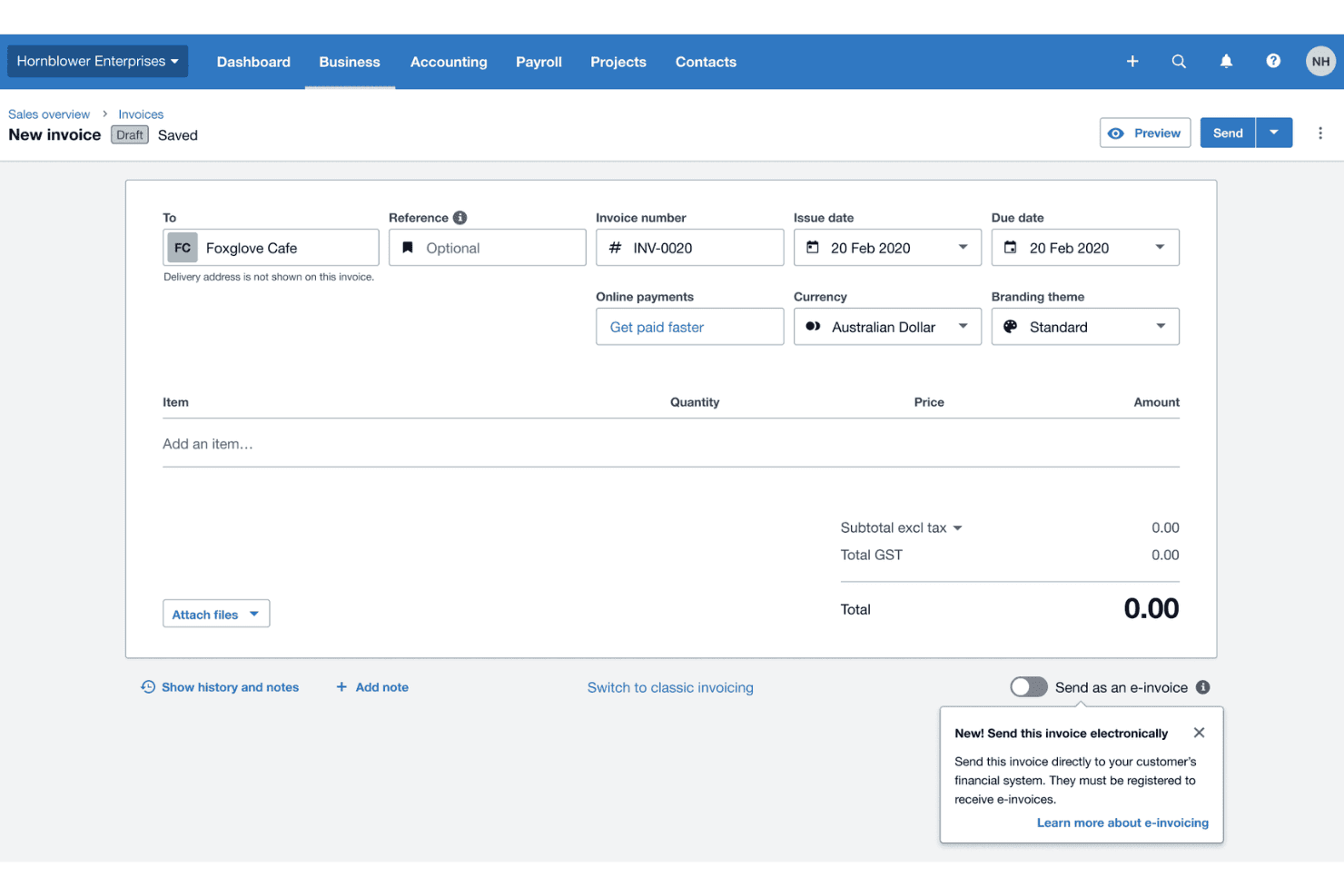
Xero lets you create and send professional invoices quickly. You can track payments in real time, helping you manage cash flow efficiently.
Bank Reconciliation
Automatically import and categorize your bank transactions. It saves you time and reduces errors by matching transactions with your records.
Expense Tracking
Capture and track expenses effortlessly with Xero's mobile app. This keeps your financial records organized and up-to-date.
Financial Reporting
Generate detailed financial reports with ease. It provides insights into your business's performance, aiding better decision-making.
Payroll Management
Process payroll smoothly and comply with tax requirements. You can handle employee payments and deductions without hassle.
Inventory Management
Keep track of stock levels and manage inventory efficiently. This feature helps you avoid overstocking and stockouts, optimizing your inventory.
Ease of Use
Xero’s user-friendly interface makes it a breeze for you and your team to navigate. Its intuitive design minimizes the learning curve, allowing you to quickly access core features like invoicing and expense tracking. Users appreciate how easy it is to manage finances without getting bogged down in complex menus. Automatic bank feeds and simple reconciliation processes enhance efficiency, letting you focus on what matters most—growing your business.
Integrations
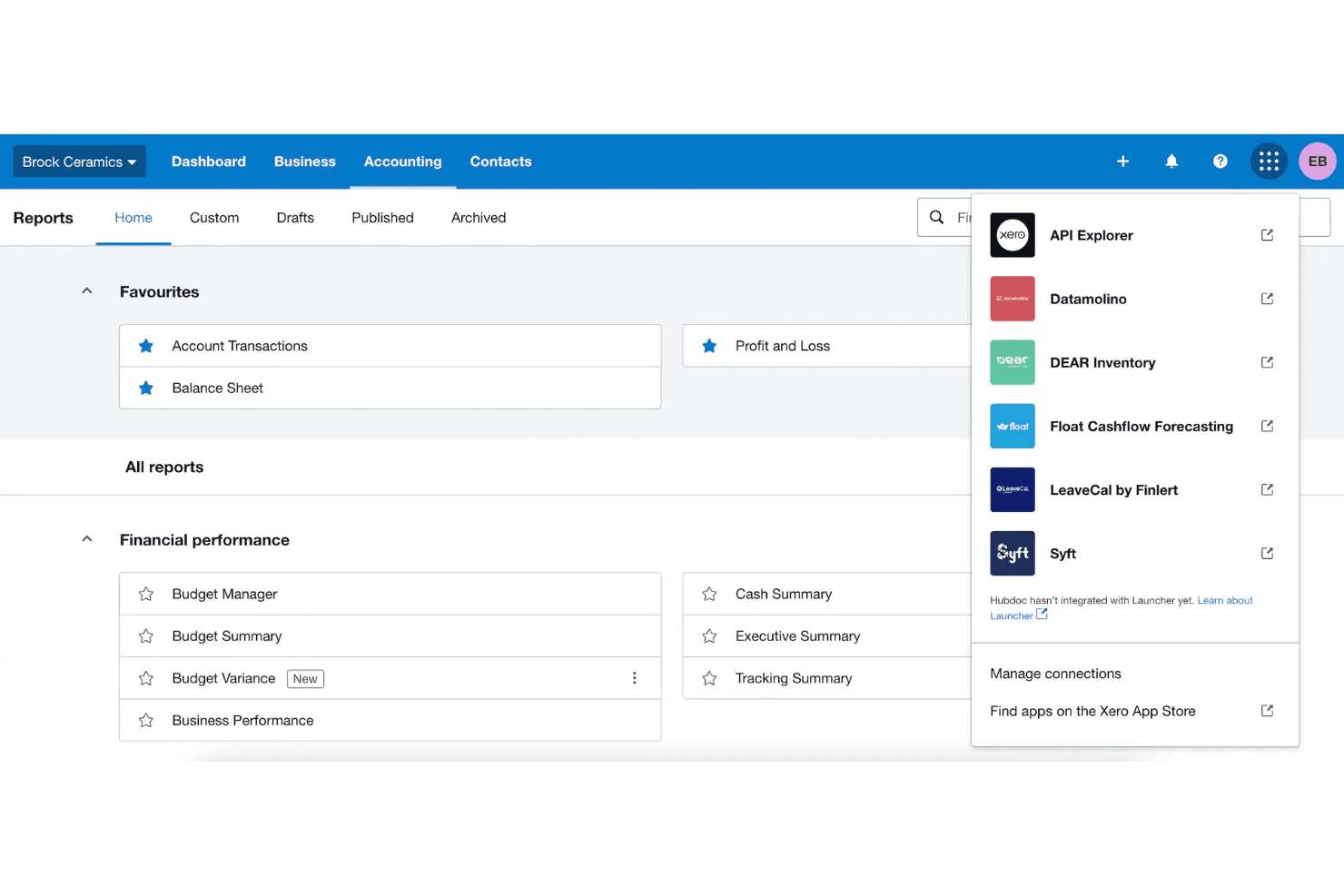
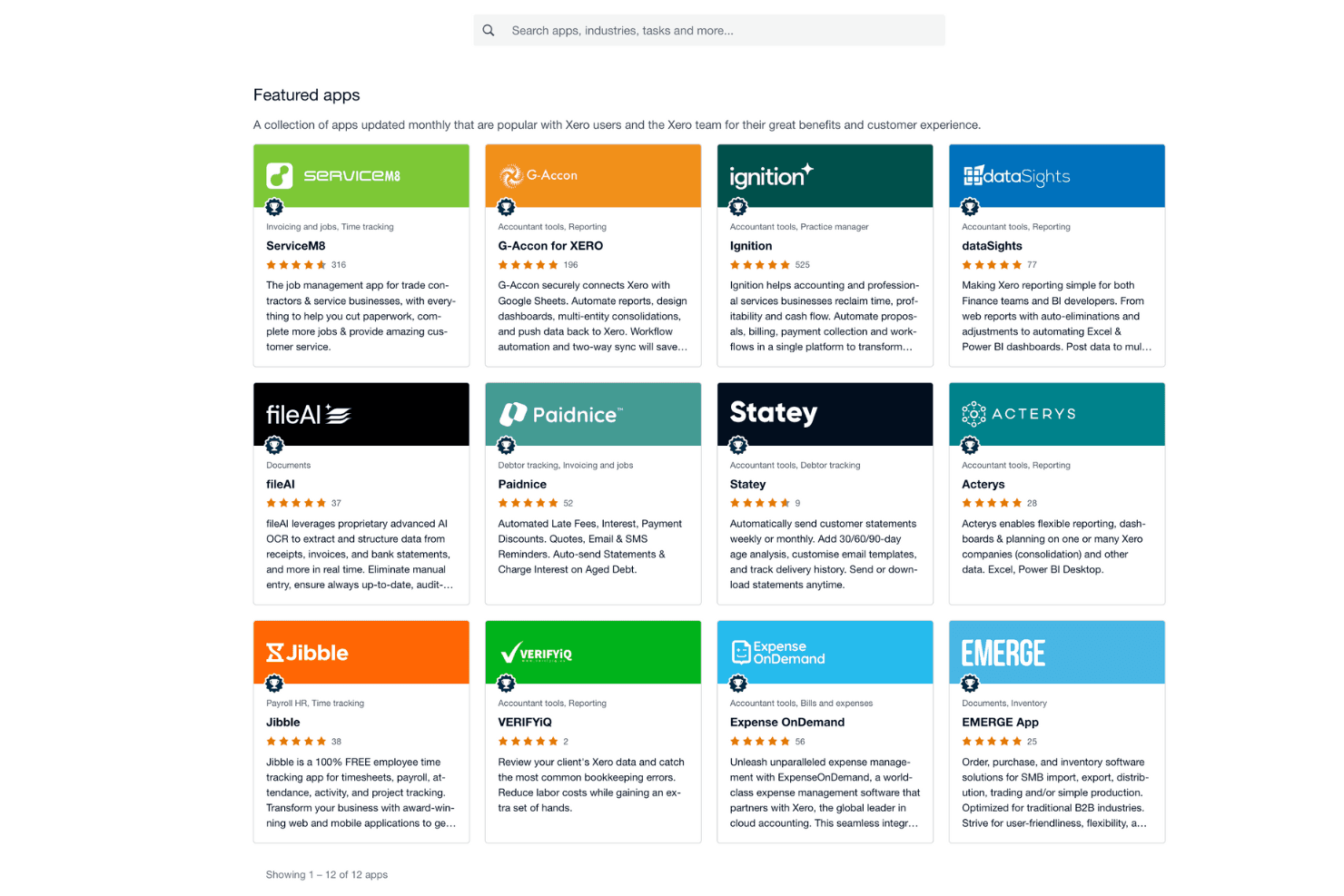
Integrations include Hubdoc, Stripe, Syft, Xero Inventory Plus, Shopify, Xero Practice Manager, HubSpot CRM, Xero Analytics Plus, Xero Workpapers, Gusto, PayPal, and Square.
New Product Updates from Xero
Xero Adds Supplier Days to Pay Detail Report
Xero adds a Supplier Days to Pay Detail report that shows how long each supplier bill took to pay across a selected period. Users can review payment-time categories and export the underlying data for further analysis or Fair Payment Code applications. Highlights include:
- Supplier Payment Tracking: View payment times for every supplier bill within a selected period.
- Payment Categories: Group bills into 0–30, 31–60, 61–90, and over 90-day ranges.
- Exportable Data: Export supplier payment details for reporting and further analysis.
- Fair Payment Code Support: Use report data as evidence when preparing a Fair Payment Code application.
Visit Xero’s official site for more details.
Xero Expands Claude Workflows and Adds ChatGPT Integration
Xero connects live financial data with Claude for Small Business and ChatGPT, supporting financial questions, reporting, and workflow preparation. Users can work with current Xero data without relying on manual exports. Highlights include:
- ChatGPT Integration: Brings live Xero data into ChatGPT for financial questions and workflows.
- Claude Workflows: Supports tasks such as cash flow snapshots, month-end preparation, and recurring reports.
- Live Financial Data: Uses current Xero information instead of exported data.
- Financial Insights: Supports data across profit and loss, balance sheets, invoices, bills, and more.
- Advisor Access: Lets accountants and bookkeepers work with client data through supported AI workflows.
- Review Controls: Keeps final review and decisions with the business owner or advisor.
Visit Xero’s official site for more details.
 Opens new window
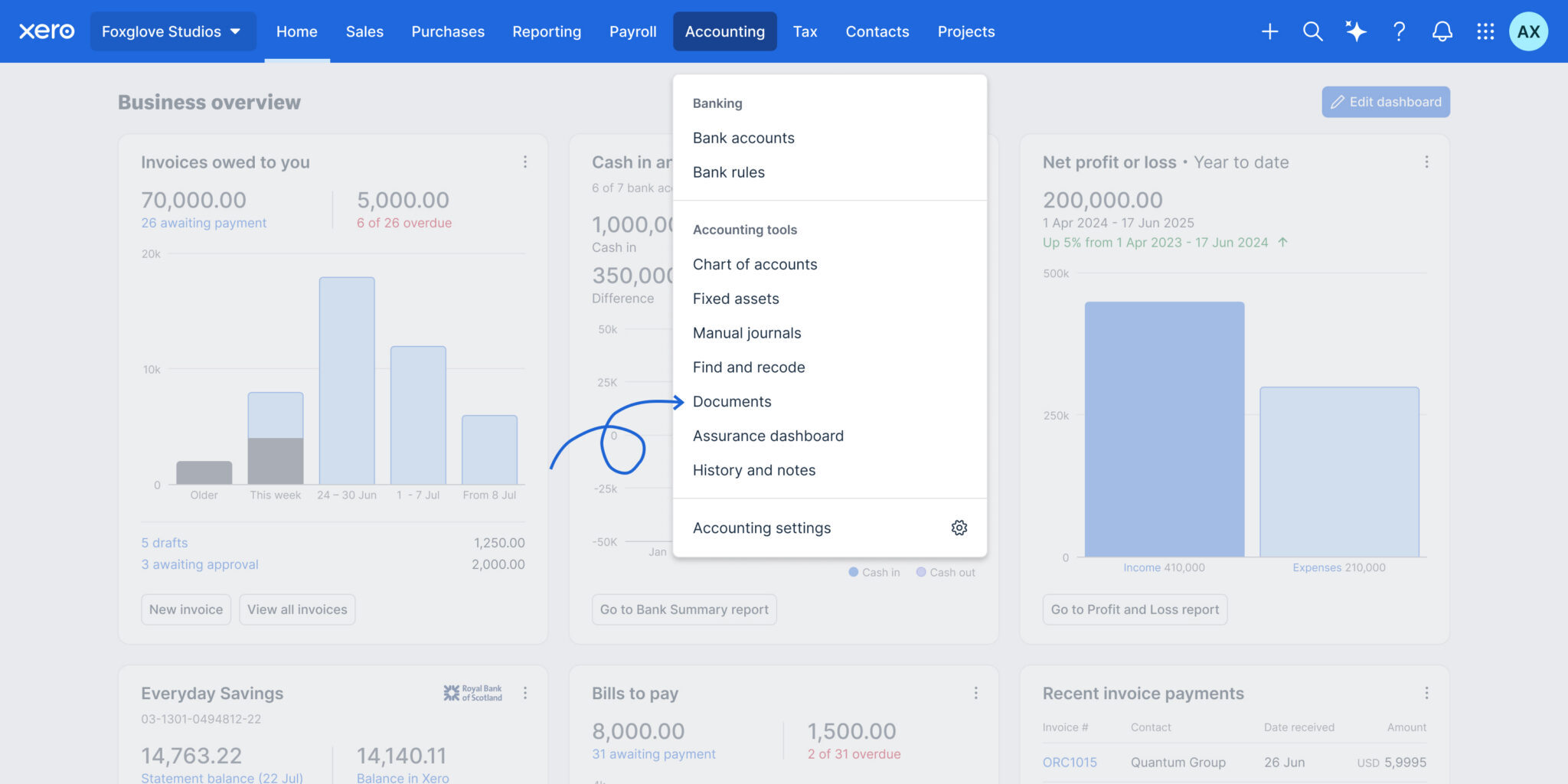
Files is now Documents in Xero
Xero has renamed Files to Documents and relocated it to the Accounting menu, making it easier to find where Smart Document Capture lives. The update also adds smarter automation and controls to improve accuracy, reduce manual work, and strengthen oversight. Highlights include:
- Automatic Tax Extraction: Pulls local tax rates from uploaded documents.
- Credit Note Support: Extracts credit note data and prepares draft transactions.
- Auto-Matching: Matches uploaded documents to existing transactions automatically.
- Document Permissions: Lets teams control upload and view-only access.
- Deletion Alerts: Warns users before removing documents linked to transactions.
- Accounting Menu Access: Moves Documents closer to other accounting workflows.
Visit Xero’s official site for more details.
 Opens new window
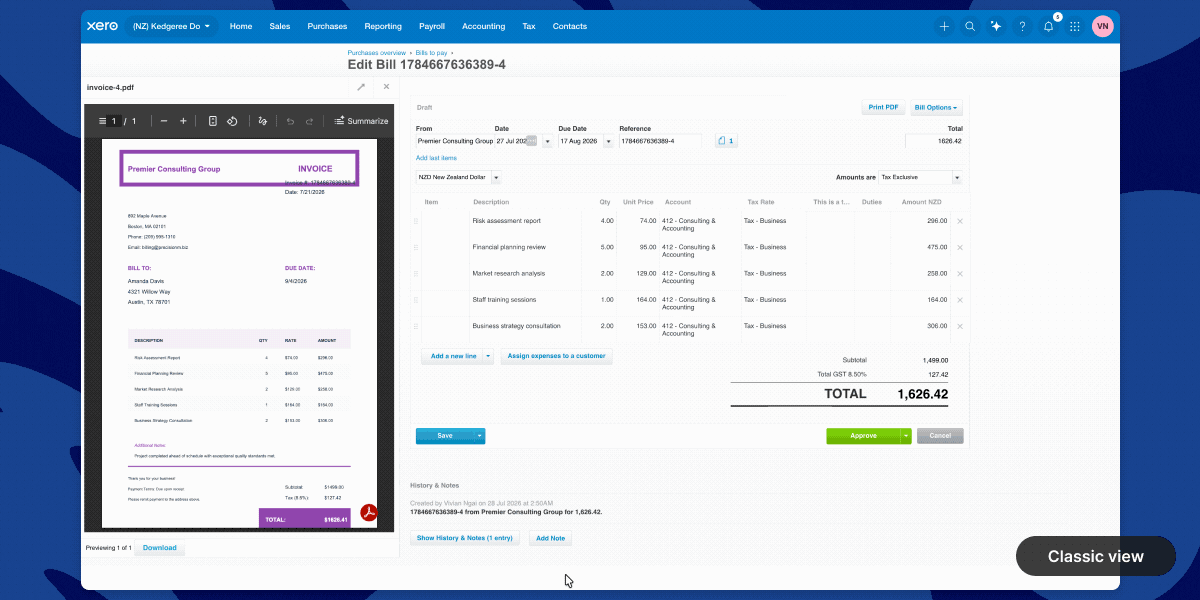
Xero Introduces a New Full-Page Bills Experience
Xero adds a modernized bills page with direct supplier editing, payment planning, billable expense assignment, customizable columns, and Approve & next navigation. These updates reduce back-and-forth between screens and help users review, update, and process bills faster. Highlights include:
- Direct Contact Editing: Updates supplier information without leaving the bill page.
- Planned Payment Dates: Adds payment scheduling directly within each bill to support cash flow planning.
- Custom Layouts: Lets users show or hide columns and resize the attached file preview.
- Billable Expense Assignment: Assigns customers or projects directly from the line item table.
- Approve & Next: Approves the current bill and moves directly to the next bill for faster processing.
- Instant Bill Payments: Lets eligible users in the UK and US pay bills from the bill detail page.
Visit Xero’s official site for more details.
Xero Launches Ultra in Australia With Multi-Entity Reporting
Xero launches Xero Ultra in Australia with multi-entity consolidated reporting, advanced forecasting, AI-powered insights, and enhanced support for growing businesses. The plan gives finance teams greater visibility and control while allowing them to keep working within the Xero platform. Highlights include:
- Multi-Entity Consolidated Reporting: View financial performance across multiple entities in one consolidated report.
- Advanced Forecasting: Use scenario modelling and four-way cash flow forecasting through Syft Advanced reporting.
- AI-Powered Insights: Access JAX for financial insights and support with routine finance workflows.
- Enhanced Support: Get priority access to Xero specialists, personalised onboarding, migration support, and targeted data restore.
- Governance Controls: Use flexible permissions to support stronger financial oversight and separation of duties when available.
Visit Xero’s official site for more details.
 Opens new window
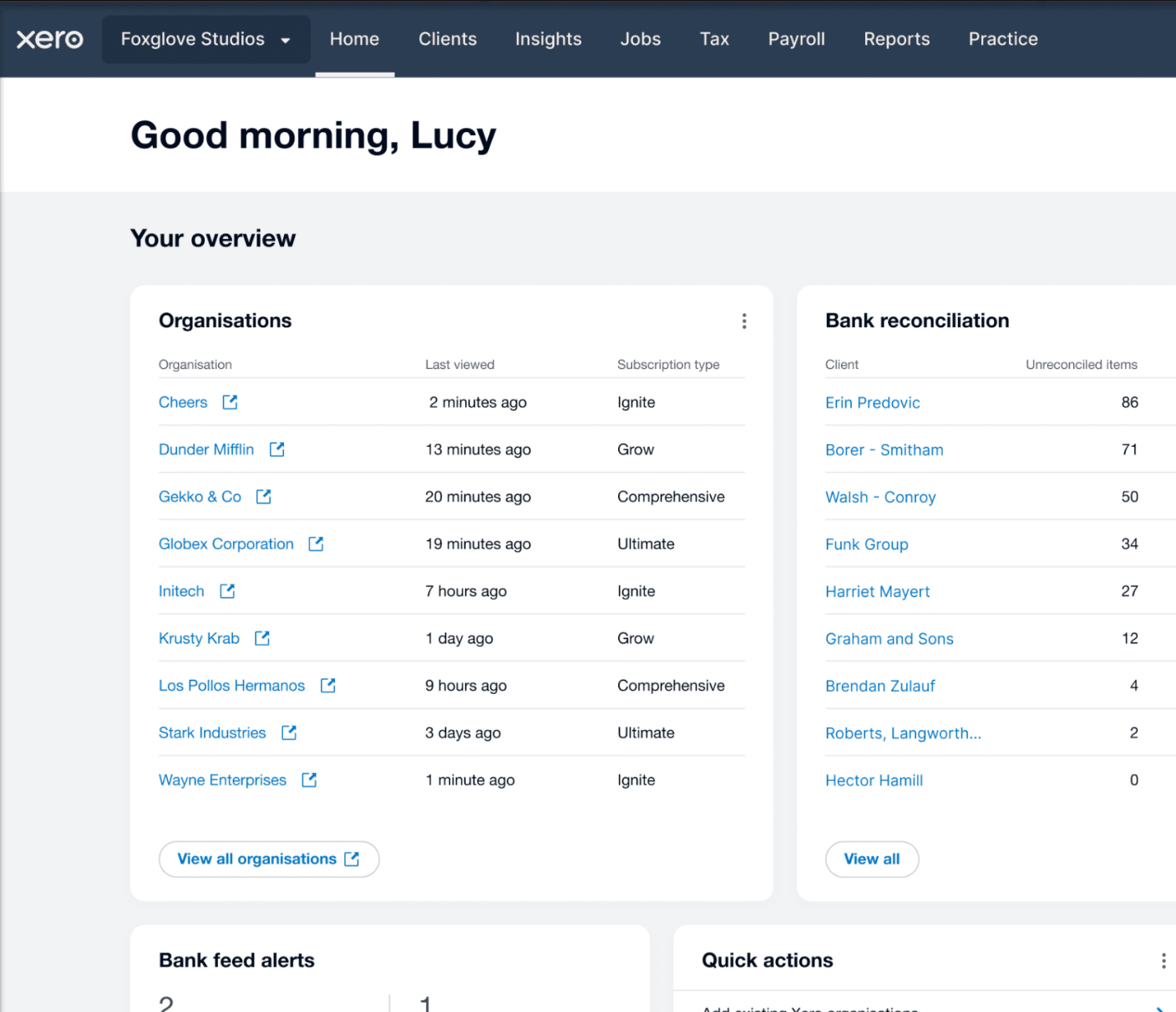
Xero Launches Partner Hub for UK Partners
Xero has launched Partner Hub for all UK partners, creating a single workspace to access key practice tools and information. The redesigned homepage and customizable widgets aim to make daily workflows faster and more personalized. Highlights include:
- Unified Workspace: Access practice tools, client information, and navigation from a single workspace.
- Customizable Homepage: Show, hide, and reorder widgets to personalize the homepage.
- Client and Practice Widgets: View organization watchlists, bank feed alerts, jobs, and productivity metrics at a glance.
- JAX Chat Integration: Use JAX to summarize client financials and generate insights directly from Partner Hub.
Visit Xero's official site for more details.
Xero Expands Wagepoint Integration for Canadian Payroll
Xero has enhanced its Wagepoint integration for Canadian small businesses, making it easier to run payroll while keeping accounting records accurate. With less manual re-entry and a more connected workflow, payroll and bookkeeping stay aligned. Highlights include:
- Single Sign-On: Access Wagepoint using existing Xero credentials without separate logins.
- Automatic Payroll Data Sync: Sync wages, taxes, deductions, and benefits from Wagepoint to Xero automatically.
- Connected Payroll and Accounting: Keep payroll and accounting records aligned through an integrated workflow.
Visit Xero's official site for more details.
Xero Specs
- 2-Factor Authentication: Yes
- Accounts Payable: Yes
- Accounts Receivable: Yes
- API: Yes
- Balance Sheet: Yes
- Billing/Invoicing: Yes
- BitCoin: Yes
- Budgeting: Yes
- Calendar Management: Yes
- Contact Management: Yes
- CRM Integration: Yes
- Customer Management: Yes
- Dashboard: Yes
- Data Export: Yes
- Data Import: Yes
- Data Visualization: Yes
- Expense Tracking: Yes
- External Integrations: Yes
- Forecasting: Yes
- General Account Ledger: Yes
- Inventory Tracking: Yes
- Multi-Currency: Yes
- Multi-User: Yes
- Notifications: Yes
- P&L: Yes
- PayPal: Yes
- Payroll: Yes
- SAP Integration: Yes
- Stripe: Yes
- Supplier Management: Yes
- Tax Management: Yes


