

Una valida alternativa a SAP Concur offre funzionalità affidabili per la gestione delle spese, controlli flessibili sulle policy e un'integrazione perfetta con i sistemi finanziari esistenti. Se stai cercando alternative a SAP Concur, probabilmente cerchi strumenti che semplifichino il monitoraggio delle spese, automatizzino le approvazioni e aiutino il tuo team a rimanere conforme, senza sacrificare usabilità o visibilità.
Con così tante opzioni disponibili, è essenziale trovare una soluzione che si adatti al flusso di lavoro, alle esigenze di reportistica e ai piani di crescita della tua azienda. Questo elenco ti aiuterà a confrontare le principali piattaforme per la gestione delle spese, così potrai prendere una decisione informata per il tuo team finanziario.
Cos'è SAP Concur?
SAP Concur è un software per la gestione delle spese che aiuta le aziende ad automatizzare la rendicontazione delle spese, gestire le spese e le prenotazioni di viaggio e applicare le policy di spesa. Centralizza i dati sulle spese, semplifica le approvazioni e si integra con i sistemi contabili per supportare una reportistica finanziaria accurata. I team finanziari utilizzano SAP Concur per migliorare la conformità, ottenere maggiore visibilità sulle spese aziendali e ridurre l'inserimento manuale dei dati.
Tabella di confronto delle alternative a SAP Concur
Questa tabella di confronto riassume i dettagli sui prezzi delle mie principali alternative a SAP Concur:
| Tool | Best For | Trial Info | Price | ||
|---|---|---|---|---|---|
| 1 | Ideale per la conformità automatica alle politiche di spesa | Demo gratuita disponibile | A partire da $11.99/utente/mese (fatturato annualmente) | Website | |
| 2 | Ideale per la gestione unificata di viaggi e spese potenziata dall'IA | Piano gratuito + demo gratuita disponibile | Prezzi su richiesta | Website | |
| 3 | Ideale per la reportistica spese automatizzata | Prova gratuita di 14 giorni | A partire da $3/utente/mese (fatturazione annuale) | Website | |
| 4 | Ideale per carte aziendali con monitoraggio spese integrato | Piano gratuito + demo gratuita disponibile | Da $12/utente/mese | Website | |
| 5 | Ideale per flussi di lavoro delle spese personalizzabili | Demo gratuita disponibile | Da $8.50 a $12/utente attivo | Website | |
| 6 | Ideale per la gestione delle spese in tempo reale con conformità globale | Demo gratuita disponibile | Da $8/utente/mese (fatturato annualmente) | Website | |
| 7 | Ideale per la gestione unificata della spesa con analisi avanzate | Demo gratuita disponibile | Prezzo su richiesta | Website | |
| 8 | Ideale per la scansione automatica delle ricevute e la rendicontazione delle spese per i team | Non disponibile | Da $5/utente/mese | Website | |
| 9 | Ideale per una gestione unificata di carte aziendali e delle spese | Demo gratuita disponibile | Da 1%/trasferimento in valuta estera | Website | |
| 10 | Ideale per carte aziendali con controlli di spesa automatizzati | Prova gratuita di 30 giorni + piano gratuito + demo gratuita disponibili | Da $15/utente/mese | Website |


Perché fidarsi dei nostri consigli sui software
6,700+
Reviews
20
Industry experts
16+
Evaluation factors
14
Years
Le nostre recensioni riflettono il nostro giudizio indipendente, non un discorso di vendita. Scopri come manteniamo la trasparenza.
Per questa guida, abbiamo valutato gli strumenti attraverso test pratici e ricerche indipendenti, assegnando un punteggio agli strumenti in base ai nostri criteri di selezione.
Le nostre recensioni riflettono il nostro giudizio editoriale umano, non un discorso di vendita.
Recensioni delle alternative a SAP Concur
Di seguito trovi i miei riepiloghi dettagliati delle alternative a SAP Concur incluse nel mio elenco. Le mie recensioni offrono uno sguardo approfondito sulle funzionalità, le integrazioni e i prezzi di ciascuna piattaforma per la gestione delle spese, per aiutarti a trovare quella più adatta a te.
 Ideale per la conformità automatica alle politiche di spesa
- Demo gratuita disponibile
- A partire da $11.99/utente/mese (fatturato annualmente)
Visit WebsiteCustomer Rating:4.6/5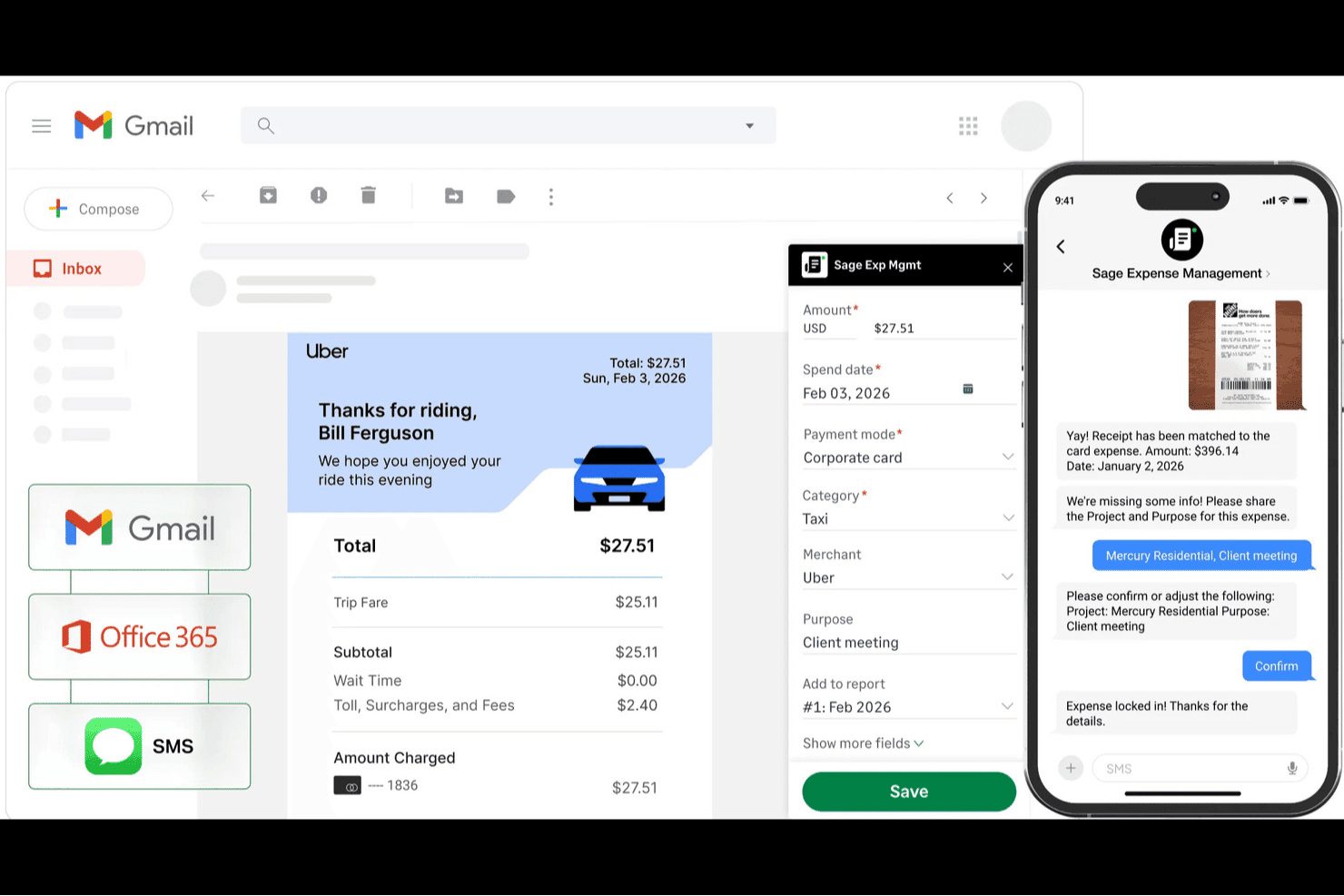
Sage Expense Management (precedentemente Fyle) aiuta i team a raccogliere le ricevute tramite Gmail, Office 365 e SMS, abbinare automaticamente le transazioni e monitorare i dettagli delle spese. Sage Expense Management (precedentemente Fyle) è una piattaforma di gestione delle spese per aziende alla ricerca di un'alternativa a SAP Concur che funzioni con le carte di credito esistenti, aiutando i team finanziari a gestire le spese dei dipendenti senza sostituire il programma di carte.
Per chi è più adatto Sage Expense Management?
I team finanziari che necessitano di controlli sulle politiche di spesa senza sostituire le carte aziendali esistenti troveranno in Sage Expense Management una soluzione pratica.
Perché ho scelto Sage Expense Management (precedentemente Fyle)
Ho scelto Sage Expense Management (precedentemente Fyle) come alternativa a SAP Concur perché supporta la conformità automatica alle politiche di spesa senza richiedere la sostituzione delle carte aziendali esistenti. Il suo motore per le politiche verifica in tempo reale le spese rispetto alle regole per categoria, dipendente o progetto. Gli avvisi tramite SMS consentono ai dipendenti di inviare foto delle ricevute per l'abbinamento alle transazioni, aiutando il reparto finanziario a individuare la documentazione mancante prima della chiusura del mese.
Funzionalità principali di Sage Expense Management (precedentemente Fyle)
- Integrazioni contabili: Sincronizza i dati delle spese con Sage, QuickBooks e Xero.
- Monitoraggio del chilometraggio: Registra i viaggi con Google Maps e calcola i rimborsi chilometrici.
- Flussi di approvazione: Configura catene personalizzate di approvazione delle spese a più livelli.
- Calcolo delle indennità giornaliere: Calcola le spese per le indennità giornaliere dei dipendenti nell'app mobile.
Integrazioni di Sage Expense Management (precedentemente Fyle)
Sage Expense Management offre integrazioni dirette e bidirezionali con sei prodotti contabili: QuickBooks Online, QuickBooks Desktop, Sage Intacct, Sage 300 CRE, Sage 50 e Xero. Si connette inoltre a Gmail, Outlook e Perk.
Pros and Cons
Pros:
- Funziona con le carte aziendali esistenti
- Segnala le violazioni delle politiche prima dell'invio
- Le ricevute inviate tramite SMS vengono abbinate alle transazioni delle carte
Cons:
- La scansione OCR delle ricevute può presentare problemi dopo gli aggiornamenti
- A volte le ricevute via email non si sincronizzano
Learn more about Sage Expense Management (formerly Fyle): Ideale per la gestione unificata di viaggi e spese potenziata dall'IA
- Piano gratuito + demo gratuita disponibile
- Prezzi su richiesta
Visit WebsiteCustomer Rating:4.7/5
Dashboard delle policy di spesa di Navan che mostra le regole di spese discrezionali per ruolo. Navan offre un software di gestione delle spese che unisce prenotazione viaggi e monitoraggio delle spese in un'unica piattaforma. È una soluzione ideale per le aziende che desiderano gestire insieme i viaggi di lavoro e le spese, in particolare per quelle con viaggiatori frequenti o team distribuiti. Se vuoi semplificare l'applicazione delle politiche e automatizzare la riconciliazione sia delle spese di viaggio che di quelle non legate ai viaggi, Navan è una scelta da considerare.
Per chi è più adatto Navan?
Navan è pensato per organizzazioni di medie e grandi dimensioni con frequenti viaggi di lavoro e che necessitano di una gestione unificata di spese e trasferte.
Perché Navan è una valida alternativa a SAP Concur
Ciò che distingue Navan come alternativa a SAP Concur è l'approccio unificato nella gestione di viaggi e spese, potenziato da un'automazione basata sull'intelligenza artificiale. Ho scelto Navan perché consente di prenotare viaggi e gestire le spese in un unico flusso di lavoro, eliminando la necessità di utilizzare sistemi separati. La piattaforma utilizza l'IA per categorizzare automaticamente le spese e segnalare le violazioni delle politiche aziendali, aiutando così i team finanziari a mantenere la conformità senza revisioni manuali. Se vuoi centralizzare la prenotazione dei viaggi, la raccolta delle spese e l'applicazione delle politiche, Navan offre una soluzione perfettamente integrata.
Caratteristiche principali di Navan
Altre funzionalità di Navan che potrebbero interessare ai team finanziari includono:
- Analisi della spesa in tempo reale: Accesso a dashboard aggiornati che suddividono la spesa per categoria, dipartimento o dipendente.
- Acquisizione ricevute da mobile: Scatta foto e carica le ricevute direttamente dall'app mobile per una più rapida rendicontazione delle spese.
- Controlli di policy personalizzati: Imposta regole dettagliate per limiti di spesa, flussi di approvazione e preferenze di viaggio per team o sedi diverse.
- Integrazione con carte aziendali: Emetti e gestisci carte fisiche o virtuali con controlli integrati per il tracciamento delle spese.
Integrazioni di Navan
Le integrazioni includono NetSuite, QuickBooks Online, Xero, Sage Intacct e Microsoft Azure.
Pros and Cons
Pros:
- App mobile che supporta acquisizione ricevute e approvazioni
- Analisi e reportistica delle spese in tempo reale
- Si integra con i principali sistemi ERP e HR
Cons:
- Richiede una configurazione separata per il programma carte aziendali
- Alcuni utenti segnalano tempi lenti di risposta dell'assistenza clienti
Learn more about Navan: Ideale per la reportistica spese automatizzata
- Prova gratuita di 14 giorni
- A partire da $3/utente/mese (fatturazione annuale)
Visit WebsiteCustomer Rating:4.5/5
Pannello di controllo Zoho Expense che mostra riepilogo spese, report e dati di rimborso. Zoho Expense è una piattaforma cloud per la gestione delle spese progettata per le aziende che desiderano automatizzare e controllare le spese dei dipendenti. È particolarmente adatta alle organizzazioni che cercano un'applicazione con controllo dettagliato delle politiche e workflow di approvazione personalizzabili. Se hai bisogno di una soluzione che riduca l'inserimento manuale e migliori la conformità, Zoho Expense merita sicuramente attenzione.
Per chi è ideale Zoho Expense?
Zoho Expense è indicato per piccole e medie imprese che necessitano di reportistica spese automatizzata e controlli rigidi delle policy aziendali.
Perché Zoho Expense è una valida alternativa a SAP Concur
Ciò che distingue Zoho Expense come alternativa a SAP Concur è la reportistica spese automatica combinata con un controllo approfondito delle politiche. Ho scelto Zoho Expense perché consente di impostare workflow di approvazione estremamente dettagliati e di applicare regole di spesa personalizzate su più livelli. La piattaforma offre inoltre scansione automatica delle ricevute e avvisi di violazione delle policy, aiutando i team finanziari a mantenere la conformità senza supervisione manuale. Se la tua azienda necessita di un controllo dettagliato sulle policy di spesa e verifiche di conformità automatizzate, Zoho Expense offre soluzioni mirate in queste aree.
Funzionalità principali di Zoho Expense
Altre funzionalità di Zoho Expense che possono interessare i team finanziari includono:
- Supporto multivaluta: Gestisci e rimborsa le spese in diverse valute per i team globali.
- Riconciliazione delle carte aziendali: Abbinamento automatico delle transazioni delle carte con le spese inserite per una chiusura di fine mese più rapida.
- Gestione delle indennità giornaliere: Imposta e applica tariffe giornaliere per i viaggi di lavoro in base a località e ruolo del dipendente.
- Tracciamento chilometraggio: I dipendenti possono registrare i chilometri percorsi tramite GPS integrato o inserimento manuale per un rimborso accurato.
Integrazioni di Zoho Expense
Le integrazioni includono QuickBooks Online, Xero, Sage Accounting, Zoho Books, Zoho People, Uber for Business, Lyft, Slack, Office 365 e G Suite.
Pros and Cons
Pros:
- App mobile altamente intuitiva
- Ottimi strumenti per il tracciamento chilometrico
- Fasce di prezzo molto convenienti
Cons:
- L'interfaccia può risultare a volte caotica
- Configurazione complessa per i grandi team
Learn more about Zoho Expense: 4Ideale per carte aziendali con monitoraggio spese integrato
Brex
- Piano gratuito + demo gratuita disponibile
- Da $12/utente/mese
Visit WebsiteCustomer Rating:4.5/5
La dashboard dei report Brex mostra le tendenze delle spese, la suddivisione per dipartimento e l'elenco dei fornitori. Brex offre un software di gestione delle spese progettato per aziende in rapida crescita e team finanziari che desiderano maggiore controllo sulle spese aziendali. La sua piattaforma è ideale per le imprese che cercano emissione di carte integrate, monitoraggio delle spese in tempo reale e applicazione automatica delle policy. Se hai bisogno di una soluzione che combina la gestione delle spese con controlli flessibili e integrazioni moderne, Brex merita considerazione.
Per chi è più adatto Brex?
Brex è adatto ai team finanziari di startup e aziende di medie dimensioni che hanno bisogno di una gestione integrata delle spese e di soluzioni per carte aziendali.
Perché Brex è una valida alternativa a SAP Concur
Brex si distingue per le sue carte aziendali che offrono monitoraggio delle spese e controlli sulle policy integrati. Ho scelto Brex perché permette di emettere carte fisiche e virtuali ai dipendenti, categorizzando e monitorando automaticamente le spese man mano che avvengono le transazioni. La piattaforma applica regole di spesa personalizzate a livello di carta, riducendo le revisioni manuali e aiutando il team a restare conforme alle policy. Queste caratteristiche rendono Brex una scelta solida se desideri gestire le spese e controllare i costi in un unico sistema integrato.
Funzionalità principali di Brex
Altre funzioni di Brex che possono interessare i team finanziari includono:
- Abbinamento automatico delle ricevute: La piattaforma abbina automaticamente le ricevute caricate alle transazioni, riducendo il lavoro manuale di riconciliazione.
- Analisi delle spese in tempo reale: Brex offre dashboard e analisi che mostrano la spesa aggiornata per team, categoria o progetto.
- Supporto multi-entità: Gestisci spese e carte attraverso più filiali o unità aziendali da un unico account.
- Integrazione con ERP: Brex si collega a sistemi contabili come NetSuite e QuickBooks per sincronizzare direttamente i dati delle spese nei tuoi flussi finanziari.
Integrazioni Brex
Le integrazioni includono NetSuite, QuickBooks Online, Xero, Sage Intacct e BambooHR.
Pros and Cons
Pros:
- Gestione multi-entità e filiali
- Integrazioni dirette ERP e HRIS
- Controlli di spesa personalizzabili a livello di carta
Cons:
- Nessuna gestione della prenotazione chilometrica o di viaggio
- Supporto limitato per valute internazionali
 Ideale per flussi di lavoro delle spese personalizzabili
- Demo gratuita disponibile
- Da $8.50 a $12/utente attivo
Visit WebsiteCustomer Rating:4.4/5
Dashboard di Webexpenses che mostra richieste, categorie di spesa e mappa delle aree di viaggio. Webexpenses offre un software di gestione delle spese progettato per le organizzazioni che desiderano automatizzare e controllare le spese aziendali. È una scelta solida per i team finanziari in aziende di medie e grandi dimensioni che necessitano di flussi di lavoro configurabili e di un'applicazione rigorosa delle politiche. Se vuoi ridurre gli errori manuali e migliorare la conformità rispetto agli strumenti tradizionali di gestione delle spese, Webexpenses merita un'attenta valutazione.
Per chi è ideale Webexpenses?
Webexpenses è adatto ad aziende di medie e grandi dimensioni che necessitano di una gestione delle spese configurabile e controlli sulle politiche aziendali in diversi reparti o sedi.
Perché Webexpenses è una valida alternativa a SAP Concur
Ciò che distingue Webexpenses come alternativa a SAP Concur sono le sue funzionalità di gestione unificata delle spese e di analisi avanzata. Ho scelto Webexpenses perché riunisce in un'unica piattaforma la gestione delle spese, delle fatture e degli approvvigionamenti, facilitando il monitoraggio e il controllo di tutte le spese aziendali. Il cruscotto di analisi fornisce informazioni in tempo reale sui modelli di spesa e aiuta i team finanziari a individuare rapidamente tendenze e rischi di non conformità. Per le organizzazioni che desiderano qualcosa in più del semplice monitoraggio delle spese, Webexpenses offre una soluzione centralizzata per gestire e analizzare le spese dell'intera azienda.
Funzionalità principali di Webexpenses
Altre funzionalità di Webexpenses che potrebbero interessare ai team finanziari includono:
- Acquisizione ricevute mobile: Gli utenti possono fotografare e caricare le ricevute direttamente dai propri dispositivi mobili per una presentazione delle spese più rapida.
- Applicazione automatica delle politiche: Il sistema segnala le spese non conformi alle regole aziendali e le invia per una revisione aggiuntiva prima dell'approvazione.
- Supporto multivaluta: Webexpenses gestisce spese in più valute, rendendolo adatto a team globali.
- Tracciabilità e controllo della conformità: Ogni azione viene registrata, a supporto della preparazione agli audit e della conformità normativa.
Integrazioni di Webexpenses
Le integrazioni includono NetSuite, Sage Intacct, Oracle, Microsoft Dynamics e Amazon.
Pros and Cons
Pros:
- Ottime integrazioni con ERP/contabilità
- Flussi di approvazione altamente personalizzabili
- Assistenza clienti molto reattiva
Cons:
- Occasionali problemi di sincronizzazione dell'app
- Può essere costoso per le piccole imprese
Learn more about Webexpenses: Ideale per la gestione delle spese in tempo reale con conformità globale
- Demo gratuita disponibile
- Da $8/utente/mese (fatturato annualmente)
Visit WebsiteCustomer Rating:4.4/5
Pagina di esportazione Rydoo che mostra i modelli di report spesa e le opzioni di esportazione. Rydoo è una piattaforma di gestione delle spese basata su cloud, progettata per aziende con operazioni internazionali e team distribuiti. È ideale per i professionisti della finanza che necessitano di monitoraggio delle spese in tempo reale e di conformità in diversi paesi. Se la tua azienda fatica con processi manuali o l'applicazione delle policy tra paesi diversi, Rydoo affronta queste sfide offrendo automazione e copertura globale.
Per chi è più adatto Rydoo?
Rydoo è indicato per aziende di medie e grandi dimensioni con attività internazionali che necessitano di gestione delle spese in tempo reale e conformità in più paesi.
Perché Rydoo è una valida alternativa a SAP Concur
Rydoo si distingue per la gestione delle spese in tempo reale e le robuste capacità di conformità globale. Ho scelto Rydoo perché consente ai team finanziari di monitorare e approvare le spese man mano che si verificano, riducendo i ritardi e migliorando la visibilità. La piattaforma supporta anche regole fiscali specifiche per paese e tariffe giornaliere (per diem), contribuendo a mantenere le organizzazioni multinazionali conformi alle normative locali. Se la tua azienda deve gestire spese oltre confine con applicazione aggiornata delle policy, Rydoo offre soluzioni mirate in questi ambiti.
Caratteristiche principali di Rydoo
Altre funzionalità di Rydoo che possono interessare i team finanziari includono:
- Scansione ricevute da mobile: I dipendenti possono acquisire e inviare ricevute istantaneamente tramite l'app mobile.
- Integrazione con carte aziendali: Sincronizza le transazioni delle carte aziendali direttamente nei report spese per una riconciliazione più rapida.
- Workflow di approvazione personalizzati: Configura catene di approvazione multilivello per adattarsi alle policy della tua organizzazione.
- Integrazione con sistemi ERP e contabili: Si collega nativamente con piattaforme come NetSuite, SAP e Xero per un trasferimento dati semplificato.
Integrazioni Rydoo
Le integrazioni includono SAP S/4HANA, NetSuite, QuickBooks, Xero, Sage e Uber.
Pros and Cons
Pros:
- Ottimi strumenti per il monitoraggio delle percorrenze
- Buona integrazione con ERP
- Approvazione delle spese in tempo reale
Cons:
- Strumenti limitati per la creazione di report personalizzati
- Bug occasionali di crash dell'app
Learn more about Rydoo: Ideale per la gestione unificata della spesa con analisi avanzate
- Demo gratuita disponibile
- Prezzo su richiesta
Visit WebsiteCustomer Rating:4.2/5
Dashboard di analisi Coupa che mostra le tendenze di spesa del CFO e i dati di spesa anno su anno. Coupa offre un software per la gestione delle spese progettato per le organizzazioni che desiderano unificare il controllo della spesa tra dipartimenti e filiali. È particolarmente indicato per i team finanziari di grandi imprese o aziende globali che necessitano di funzionalità avanzate di visibilità e conformità. Se desideri centralizzare le politiche di spesa e ottenere informazioni utili sulle spese aziendali complessive, Coupa è una scelta da considerare.
Per Chi è Adatto Coupa?
Coupa è adatto a grandi imprese e organizzazioni multinazionali che hanno bisogno di un controllo centralizzato e una visibilità sulla gestione globale delle spese.
Perché Coupa è una Buona Alternativa a SAP Concur
Ho scelto Coupa come alternativa a SAP Concur perché offre una gestione unificata della spesa e analisi avanzate in un'unica piattaforma. La soluzione di gestione delle spese di Coupa connette dati di spesa, fatturazione e approvvigionamento, offrendo ai team finanziari una visione completa della spesa aziendale. Apprezzo inoltre gli strumenti di analisi integrati nella piattaforma, che aiutano a individuare opportunità di risparmio e rischi di non conformità in tempo reale. Per le organizzazioni che vogliono andare oltre il semplice monitoraggio delle spese e ottenere informazioni utili su tutte le categorie di spesa, Coupa rappresenta una proposta interessante.
Funzionalità Principali di Coupa
Altre funzionalità di Coupa che possono interessare i team finanziari includono:
- Acquisizione Ricevute da Dispositivo Mobile: Gli utenti possono caricare ricevute e inviare note spese direttamente dai loro dispositivi mobili.
- Motore di Applicazione delle Regole: La piattaforma segnala automaticamente le spese fuori dalle regole per la revisione prima dell'approvazione.
- Supporto Multivaluta e Multilingue: Coupa si adatta a team globali grazie al supporto per più valute e lingue.
- Tracciabilità Audit e Monitoraggio della Conformità: Ogni azione sulle spese viene registrata per la preparazione agli audit e la conformità alle normative.
Integrazioni di Coupa
Le integrazioni includono NetSuite, Oracle, SAP, Workday e Slack.
Pros and Cons
Pros:
- Visibilità in tempo reale sulle spese di tutte le unità aziendali
- Applicazione automatica delle regole per la conformità globale
- Analisi avanzate per l'ottimizzazione della spesa
Cons:
- Il processo di implementazione può essere lungo
- Le opzioni di reportistica personalizzata sono limitate
Learn more about Coupa: Ideale per la scansione automatica delle ricevute e la rendicontazione delle spese per i team
- Non disponibile
- Da $5/utente/mese
Visit WebsiteCustomer Rating:4.5/5
Dashboard dei report Expensify che mostra spese, ricevute, categorie e approvazioni. Expensify offre un software di gestione delle spese progettato per le aziende che desiderano automatizzare l'acquisizione delle ricevute e la rendicontazione. È una scelta adatta per i team che vogliono semplificare la presentazione e l'approvazione delle spese senza una configurazione complessa. Se hai bisogno di uno strumento che aiuti a ridurre l'inserimento manuale dei dati e velocizzi il rimborso, Expensify merita attenzione.
Per chi è Expensify?
Expensify è adatto a piccole e medie imprese e ai team finanziari che vogliono automatizzare il rimborso e il monitoraggio delle spese, semplificando la gestione delle ricevute.
Perché Expensify è una valida alternativa a SAP Concur
Ho scelto Expensify come alternativa a SAP Concur perché automatizza la scansione delle ricevute e la rendicontazione delle spese in modo accessibile a team di qualsiasi dimensione. La funzione SmartScan consente agli utenti di scattare foto delle ricevute, che vengono poi automaticamente codificate e abbinate alle spese. Apprezzo inoltre che Expensify possa generare automaticamente report spese e instradarli per l'approvazione senza interventi manuali. Se desideri ridurre il tempo dedicato all'inserimento dati e ottimizzare i flussi di lavoro delle spese, l'automazione di Expensify si distingue.
Funzionalità principali di Expensify
Altre funzionalità di Expensify che possono interessare i team finanziari includono:
- Gestione Carte Aziendali: Emissione e gestione delle Expensify Card con controlli di spesa integrati e monitoraggio delle transazioni in tempo reale.
- Flussi di Approvazione Multi-livello: Creazione di catene di approvazione personalizzate in linea con la policy e la gerarchia organizzativa.
- Rimborso Automatico: Attivazione dei rimborsi tramite bonifico direttamente sui conti bancari dei dipendenti una volta approvate le spese.
- Strumenti di Applicazione delle Policy: Configurazione di regole per segnalare spese fuori policy e richiedere documentazione o giustificazione aggiuntiva.
Integrazioni di Expensify
Le integrazioni includono QuickBooks, Xero, NetSuite, Sage Intacct e TravelPerk.
Pros and Cons
Pros:
- Expensify Card offre controlli di spesa in tempo reale
- Flussi di approvazione multi-livello per le policy sulle spese
- L'app mobile permette di acquisire le spese ovunque ti trovi
Cons:
- Le opzioni di personalizzazione dei report sono limitate
- Problemi occasionali di sincronizzazione con il software contabile
 9Ideale per una gestione unificata di carte aziendali e delle spese
Rho
- Demo gratuita disponibile
- Da 1%/trasferimento in valuta estera
Visit WebsiteCustomer Rating:5/5
Dashboard conti da pagare di Rho che mostra fatture, report di scadenza e approvazioni. Rho offre una piattaforma integrata per la gestione delle spese e carte aziendali, progettata per i team finanziari che desiderano un controllo più rigoroso sulle spese aziendali. È ideale per le aziende che vogliono unificare l’emissione di carte, il monitoraggio delle spese e l’applicazione delle policy in un unico luogo. Se la tua organizzazione ha bisogno di visibilità in tempo reale e controlli automatizzati sulle spese dei dipendenti, Rho risponde direttamente a queste esigenze.
Per chi è più adatto Rho?
Rho si rivolge a medie e grandi aziende che desiderano una gestione unificata delle spese e il controllo delle carte aziendali su un’unica piattaforma.
Perché Rho è una valida alternativa a SAP Concur
Rho si distingue per la combinazione di emissione di carte aziendali e gestione delle spese in un’unica piattaforma. Ho scelto Rho perché consente ai team finanziari di emettere carte fisiche e virtuali, impostare controlli di spesa dettagliati e monitorare le spese in tempo reale, tutto da una sola dashboard. Questo approccio integrato riduce la necessità di più strumenti e di riconciliazioni manuali tra dati di carte e spese. Se si desidera centralizzare la gestione delle spese e l’applicazione delle policy, Rho offre una soluzione mirata, diversa dalle piattaforme tradizionali di gestione delle spese.
Caratteristiche principali di Rho
Altre funzionalità di Rho che potrebbero interessare i team finanziari includono:
- Abbinamento automatico delle ricevute: Rho abbina automaticamente le ricevute caricate alle transazioni, riducendo l’inserimento manuale e il lavoro di riconciliazione.
- Flussi di approvazione personalizzati: Imposta catene di approvazione multilivello in linea con le policy di spesa della tua organizzazione.
- Analisi della spesa in tempo reale: Accedi a dashboard e report che suddividono le spese per dipartimento, titolare della carta o categoria.
- Supporto per pagamenti ACH e bonifici: Avvia trasferimenti ACH e bonifici direttamente dalla piattaforma per pagamenti a fornitori e rimborsi.
Integrazioni di Rho
Le integrazioni includono QuickBooks, Xero, NetSuite, Sage Intacct, BambooHR e SAP Concur.
Pros and Cons
Pros:
- Nessuna commissione per ACH o per utente sulla piattaforma
- Supporto rapido ed estremamente reattivo
- Carta aziendale con cashback interessante
Cons:
- Le funzionalità di pagamento delle fatture possono risultare macchinose
- Non dispone di un sistema nativo per le buste paga
Learn more about Rho: 10Ideale per carte aziendali con controlli di spesa automatizzati
Ramp
- Prova gratuita di 30 giorni + piano gratuito + demo gratuita disponibili
- Da $15/utente/mese

Dashboard delle transazioni Ramp che mostra spese segnalate e azioni richieste. Ramp offre un software di gestione delle spese progettato per i team finanziari che desiderano automatizzare i controlli di spesa e ottenere una visibilità più approfondita sulle spese aziendali. È particolarmente adatto per medie imprese e aziende in crescita che vogliono sostituire i processi manuali con l'applicazione in tempo reale delle policy e l'analisi dei dati. Se hai bisogno di una soluzione che combini carte aziendali con flussi di lavoro automatizzati, Ramp merita sicuramente attenzione.
Per chi è ideale Ramp?
Ramp si rivolge a team finanziari di medie e grandi aziende che necessitano di controlli di spesa automatizzati e visibilità in tempo reale dei costi.
Perché Ramp è una valida alternativa a SAP Concur
Ramp rappresenta una valida alternativa a SAP Concur perché combina carte aziendali con controlli di spesa automatizzati e informazioni in tempo reale. Ho scelto Ramp per la sua capacità di applicare automaticamente le policy di spesa al momento dell'acquisto, aiutando così i team finanziari a ridurre le spese fuori policy. La piattaforma offre inoltre analisi dettagliate sulle spese aziendali, facilitando l'individuazione delle tendenze e l'ottimizzazione dei budget. Se desideri una soluzione che colleghi strettamente l'utilizzo della carta alla gestione delle spese, Ramp offre un approccio unificato.
Funzionalità principali di Ramp
Altre funzionalità di Ramp che potrebbero interessare i team finanziari includono:
- Raccolta automatica delle ricevute: Ramp richiede e abbina automaticamente le ricevute alle transazioni, riducendo il follow-up manuale.
- Flussi di approvazione multilivello: Imposta catene di approvazione personalizzate per le spese in base a importo, reparto o policy.
- Sincronizzazione contabile in tempo reale: Sincronizza le transazioni direttamente con piattaforme contabili come NetSuite e QuickBooks per una contabilità sempre aggiornata.
- Dashboard di gestione dei fornitori: Monitora e gestisci spesa, contratti e date di rinnovo dei fornitori da un unico posto.
Integrazioni di Ramp
Le integrazioni includono NetSuite, QuickBooks Online, Xero, Sage Intacct, Slack e Workday.
Pros and Cons
Pros:
- Carte aziendali con controlli di spesa in tempo reale
- Cattura e abbinamento automatico delle ricevute
- Flussi di approvazione spese personalizzabili
Cons:
- Reportistica spese meno dettagliata rispetto a SAP Concur
- Nessun monitoraggio chilometrico o gestione della diaria
Learn more about Ramp:
Altre alternative a SAP Concur
Ecco alcune ulteriori alternative a SAP Concur che non sono state incluse nel mio elenco, ma che vale comunque la pena prendere in considerazione:
- 11PayhawkIdeale per la gestione globale delle spese con pagamenti integrati
- 12BILL Spend & ExpenseIdeale per carte aziendali e gestione delle spese per PMI
- 13YokoyIdeale per la gestione delle spese guidata dall'IA e l'automazione
Come Valuto le Alternative a SAP Concur
Divido la mia valutazione in criteri di base che ogni strumento deve soddisfare—acquisizione delle spese, prenotazione viaggi, automazione dei processi AP—e fattori differenzianti che distinguono la soluzione migliore dalle altre.
Funzionalità Principali (Requisiti Fondamentali per Questa Lista)
Quando seleziono gli strumenti per la mia lista, valuto ciascuno su una scala da 0 (non offre la funzionalità) a 5 (eccelle in questo ambito) per ognuna delle funzionalità principali elencate di seguito. Successivamente, calcolo il punteggio totale di ciascuno strumento in percentuale. Ogni strumento deve ottenere un punteggio minimo totale del 75% per essere preso in considerazione.
- Gestione delle Note Spese: Verifico se i dipendenti possono scansionare ricevute con il proprio telefono, inviare note spese e farle approvare tramite procedure a più livelli senza dover sollecitare i manager via email.
- Prenotazione e Gestione Viaggi: Lo strumento dovrebbe permettere ai dipendenti di prenotare voli, hotel e noleggi direttamente dalla piattaforma mostrando limiti e regole aziendali prima della conferma del viaggio.
- Fatturazione e Automazione AP: Cerco la presenza di acquisizione OCR delle fatture, codifica e instradamento delle approvazioni che sostituiscono il ciclo di inoltro dei PDF tra i responsabili AP e i capi dipartimento per la firma.
- Integrazione con Carte Aziendali: Qui contano i feed delle transazioni in tempo reale e l’associazione automatica alle voci di spesa, sia che la piattaforma emetta carte proprie sia che si colleghi a fornitori come Visa o Mastercard.
- Controlli sulle Policy e sulle Approvazioni: Valuto quanto in dettaglio gli amministratori possono impostare limiti di spesa, segnalare elementi fuori policy e strutturare catene di approvazione condizionale in base a importo, categoria o dipartimento.
- Integrazione con Sistemi Contabili: Connessioni native con piattaforme come QuickBooks, NetSuite, Xero e Sage Intacct dovrebbero sincronizzare i dati di spese e AP con il libro mastro senza necessità di reinserimento manuale.
Una volta che dispongo di un elenco di strumenti che soddisfano questi criteri, considero cosa distingue realmente ciascuna piattaforma.
Fattori Differenzianti (Cosa Distingue i Fornitori)
Ecco come confronto e metto a paragone i diversi fornitori:
Funzionalità Distintive
Il rilevamento di anomalie basato su intelligenza artificiale è un grande fattore di distinzione. Cerco strumenti che individuano ricevute duplicate o schemi sospetti prima che arrivino all'approvatore. Anche le analisi della spesa in tempo reale sono fondamentali: un controller che esamina i costi di viaggio trimestrali ha bisogno di dashboard esplorabili per dipartimento o fornitore, non solo di esportazioni CSV statiche. Anche l’emissione di carte virtuali è una funzione che valuto con attenzione, poiché i team finanziari che possono creare una carta con limiti preimpostati per un determinato fornitore o progetto hanno un controllo molto maggiore sulle spese discrezionali.
Oltre le Funzionalità
La velocità di implementazione conta molto quando si migra da Concur. Verifico se una piattaforma può essere operativa per un team di medie dimensioni in settimane invece che mesi, grazie a connettori ERP preconfigurati e modelli di policy già pronti. Anche la conformità è un aspetto che valuto attentamente, in particolare la certificazione SOC 2 Type II e i log di controllo integrati che rispondono ai requisiti dei controlli interni nelle verifiche di fine anno. Considero anche come la tariffazione si adatti all’aumento dell’organico, poiché uno strumento adatto a un team da 50 persone non dovrebbe diventare troppo costoso quando l’azienda cresce fino a 500 dipendenti.
Perché cercare un'alternativa a SAP Concur?
Sebbene SAP Concur sia una buona scelta per la gestione delle spese, ci sono diversi motivi per cui alcuni utenti cercano soluzioni alternative. Potresti cercare un'alternativa a SAP Concur perché…
- Desideri un'interfaccia utente più semplice e moderna
- Hai bisogno di un'implementazione e di una configurazione iniziale più rapide
- Richiedi flussi di lavoro di approvazione più flessibili
- Desideri una migliore integrazione con il tuo sistema contabile
- Hai bisogno di prezzi più trasparenti o prevedibili
- Operi in regioni in cui il supporto di SAP Concur è limitato
Se ti riconosci in una di queste situazioni, sei nel posto giusto. Il mio elenco contiene diverse opzioni software per la gestione delle spese più adatte ai team che affrontano queste difficoltà con SAP Concur e cercano soluzioni alternative.
Funzionalità principali di SAP Concur
Ecco alcune delle funzionalità principali di SAP Concur, per aiutarti a mettere a confronto ciò che offrono le soluzioni alternative:
- Acquisizione automatica delle spese: SAP Concur utilizza il riconoscimento ottico dei caratteri (OCR) e le app mobili per estrarre automaticamente i dati dalle ricevute e compilare le note spese, riducendo l'inserimento manuale.
- Integrazione della prenotazione dei viaggi: Prenota voli, hotel e auto a noleggio direttamente all'interno della piattaforma, sincronizzando gli itinerari di viaggio con il monitoraggio delle spese.
- Applicazione delle policy: Configura policy di spesa personalizzate che segnalano o bloccano automaticamente le spese non conformi per consentirne la revisione o il rifiuto.
- Supporto multivaluta: Gestisci spese e rimborsi in più valute, con conversione automatica delle valute e monitoraggio della conformità.
- Flussi di approvazione: Configura catene di approvazione multilivello e personalizzabili in linea con il processo di autorizzazione delle spese della tua organizzazione.
- App mobile: Invia, esamina e approva le spese ovunque ti trovi utilizzando l'applicazione mobile dedicata di SAP Concur.
- Integrazioni con sistemi ERP e contabili: Collega SAP Concur ai principali sistemi ERP e contabili per sincronizzare i dati delle spese e semplificare la riconciliazione.
- Strumenti di audit e conformità: Utilizza registri di controllo integrati, verifiche di conformità e report per supportare i requisiti normativi e i controlli interni.
- Reportistica e analisi: Accedi a dashboard e report personalizzabili per analizzare i modelli di spesa, individuare opportunità di risparmio e monitorare la conformità.
- Integrazione delle carte aziendali: Collega le carte di credito aziendali per importare automaticamente le transazioni e associarle alle spese inviate.