

Gestire i budget dei progetti può essere un grattacapo per i CFO e i loro team. Tenere traccia delle spese, prevedere le stime dei costi ed evitare di superare il budget sono solo alcune delle sfide che affrontate quotidianamente. È qui che entra in gioco il software per la gestione del budget dei progetti.
Nella mia esperienza, questi strumenti possono fare davvero la differenza, aiutando voi e il vostro team a ottenere il controllo della pianificazione finanziaria e a migliorare il processo decisionale. Ho testato in modo indipendente diverse soluzioni software per fornirvi informazioni imparziali.
In questo articolo condividerò le mie scelte principali tra i migliori software per la gestione del budget dei progetti disponibili. Troverete informazioni pratiche che vi aiuteranno a scegliere lo strumento più adatto alle vostre esigenze. Iniziamo e troviamo la soluzione più adatta al vostro team.
Perché fidarsi dei nostri consigli sui software
6,700+
Reviews
20
Industry experts
16+
Evaluation factors
14
Years
Le nostre recensioni riflettono il nostro giudizio indipendente, non un discorso di vendita. Scopri come manteniamo la trasparenza.
Per questa guida, abbiamo valutato gli strumenti attraverso test pratici e ricerche indipendenti, assegnando un punteggio agli strumenti in base ai nostri criteri di selezione.
Le nostre recensioni riflettono il nostro giudizio editoriale umano, non un discorso di vendita.
Tabella comparativa dei software per la gestione del budget dei progetti
Questa tabella comparativa riassume i dettagli dei prezzi delle mie migliori selezioni di software per la gestione del budget dei progetti:
| Tool | Best For | Trial Info | Price | ||
|---|---|---|---|---|---|
| 1 | Ideale per la visibilità sul budget dei servizi professionali | Prova gratuita di 14 giorni + demo gratuita disponibile | A partire da $24/utente/mese | Website | |
| 2 | Ideale per progetti di costruzione | Prova gratuita + demo gratuita disponibili | A partire da $99/mese (fatturazione annuale) | Website | |
| 3 | Ideale per team da piccoli a medi | Demo gratuita disponibile | Da $3/utente/mese | Website | |
| 4 | Ideale per le aziende di servizi | Demo gratuita disponibile | Prezzo su richiesta | Website | |
| 5 | Ideale per la gestione dei costi | Prova gratuita di 14 giorni + demo gratuita disponibile | Da $9/utente/mese (fatturazione annuale) | Website | |
| 6 | Ideale per il supporto cloud | Prova gratuita + demo gratuita disponibile | Da $9/utente/mese (fatturazione annuale) | Website | |
| 7 | Ideale per dashboard personalizzabili | Prova gratuita di 14 giorni + piano gratuito disponibile | Da $10/utente/mese (fatturazione annuale) | Website | |
| 8 | Ideale per la riconciliazione delle risorse di progetto | Demo gratuita disponibile | Da $20/utente/mese | Website | |
| 9 | Ideale per il monitoraggio dei margini di profitto dell'agenzia | Prova gratuita di 14 giorni | Da $10/utente/mese | Website | |
| 10 | Ideale per la gestione dei cantieri | Demo gratuita disponibile | Prezzo su richiesta | Website |


Recensioni dei migliori software per la gestione del budget dei progetti
Di seguito sono riportati i miei riepiloghi dettagliati dei migliori software per la gestione del budget dei progetti inclusi nella mia selezione. Le mie recensioni offrono un’analisi approfondita delle funzionalità principali, dei pro e contro, delle integrazioni e dei casi d’uso ideali di ogni strumento, per aiutarvi a trovare quello più adatto a voi.
 Ideale per la visibilità sul budget dei servizi professionali
- Prova gratuita di 14 giorni + demo gratuita disponibile
- A partire da $24/utente/mese
Visit WebsiteCustomer Rating:4.5/5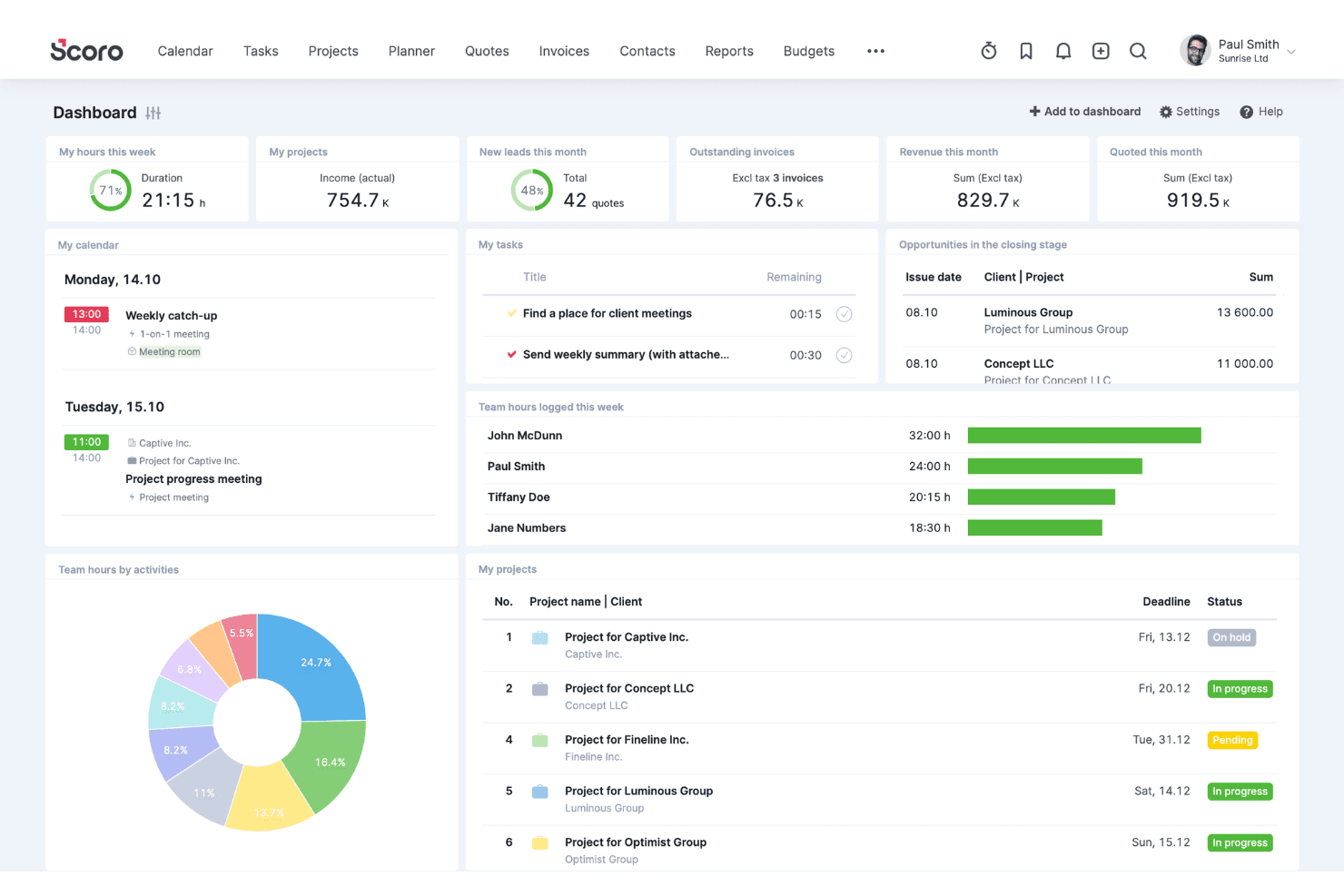
Scoro coordina clienti, vendite, progetti, risorse, tempi e fatturazione. Scoro è una piattaforma di automazione dei servizi professionali (PSA) che combina la definizione del budget dei progetti, la gestione delle risorse e dei costi del lavoro, il monitoraggio del tempo, la fatturazione e la reportistica finanziaria in un unico sistema.
Per chi è più adatto Scoro?
Scoro è particolarmente adatto ad agenzie, società di consulenza e aziende di servizi professionali che hanno bisogno di collegare in un unico luogo i budget dei progetti, i costi delle risorse e la fatturazione ai clienti.
Perché ho scelto Scoro
Ho scelto Scoro come una delle migliori soluzioni perché offre ai team di servizi professionali una visione davvero chiara delle finanze dei progetti, dal preventivo alla fattura. La matrice di stima dei preventivi consente di definire l'ambito del lavoro in base al ruolo e all'impegno richiesto, mostrando costi e margini prima dell'avvio di un progetto, così non devi stimare la redditività. La scheda Salute del budget monitora quindi in tempo reale il consumo rispetto ai dati effettivi a livello di servizio e di ruolo, evidenziando tempestivamente l'eccesso di servizi.
Funzionalità principali di Scoro
- Gestione finanziaria multivaluta: Gestisci le finanze dei progetti in più valute, con reportistica a livello di entità e consolidamento a livello di gruppo per le operazioni internazionali.
- Automazione del budget dei contratti continuativi: Configura budget ricorrenti per i contratti continuativi con cicli di fatturazione automatizzati, per gestire gli incarichi continuativi dei clienti senza attività manuali aggiuntive.
- Rilevazione dei ricavi e reportistica dei lavori in corso: Monitora il lavoro non fatturato e assegna i ricavi ai diversi periodi di fatturazione per supportare una reportistica finanziaria accurata basata sui periodi.
- Listini tariffari basati sui ruoli: Assegna tariffe di costo e fatturazione diverse in base al ruolo del team, con supporto per più listini tra clienti o tipologie di progetto.
Integrazioni di Scoro
Scoro offre integrazioni native con QuickBooks Online, Sage Intacct e Stripe, oltre a integrazioni con Xero, Exact e Salesforce. Fornisce inoltre un'API REST JSON per connessioni personalizzate e supporta Zapier.
Pros and Cons
Pros:
- Monitora in tempo reale i margini e il consumo dei progetti
- Supporta la gestione finanziaria dei progetti in più valute
- Automatizza i cicli di budget dei contratti continuativi e ricorrenti
Cons:
- I flussi di approvazione sono disponibili solo nel piano di livello più alto
- Nessun supporto nativo per la gestione del valore acquisito
 Ideale per progetti di costruzione
- Prova gratuita + demo gratuita disponibili
- A partire da $99/mese (fatturazione annuale)
Visit WebsiteCustomer Rating:4.5/5
Knowify supporta il calcolo dei costi dei lavori e il monitoraggio dei progetti per i team edili. Knowify è un software di gestione progetti pensato per le aziende del settore edile che necessitano di strumenti per il calcolo dei costi dei lavori e il monitoraggio dei progetti. Serve appaltatori e subappaltatori offrendo funzioni che ottimizzano la gestione dei progetti e la pianificazione dei budget.
Perché ho scelto Knowify: È particolarmente adatto ai progetti di costruzione, offrendo funzionalità che integrano il calcolo dei costi dei lavori con la gestione dei progetti. Il tuo team può utilizzare Knowify per monitorare i budget di progetto e le tempistiche.
Le funzionalità di gestione dei contratti e di fatturazione della piattaforma assicurano una gestione finanziaria fluida. L'attenzione di Knowify per il settore delle costruzioni lo rende una risorsa preziosa per la gestione di progetti complessi.
Funzionalità e integrazioni principali:
Le funzionalità includono strumenti per il calcolo dei costi dei lavori, la gestione dei contratti e la fatturazione. Queste funzioni aiutano a gestire progetti e finanze nel settore edile. Knowify offre anche il monitoraggio dei progetti per tenere aggiornato il team sui progressi e sulle scadenze.
Le integrazioni includono QuickBooks Online, Zapier, Xero, Stripe, PayPal, Docusign, Google Workspace, Outlook, Dropbox e Slack.
Pros and Cons
Pros:
- Strumenti di calcolo dei costi in tempo reale per monitorare i budget di progetto
- Strumenti per la creazione di proposte, offerte e preventivi
- Supporta metodi di fatturazione multipli
Cons:
- Opzioni limitate per creare report altamente personalizzati
- Dipendenza da QuickBooks
Learn more about Knowify: Ideale per team da piccoli a medi
- Demo gratuita disponibile
- Da $3/utente/mese
Visit WebsiteCustomer Rating:4.4/5
Project Insight aiuta i piccoli team a gestire attività, budget e risorse. Project Insight è un software di gestione dei progetti progettato per team da piccoli a medi che necessitano di strumenti per la pianificazione e l'esecuzione dei progetti. Aiuta a gestire attività, risorse e budget, rendendolo ideale per i team che cercano una soluzione di project management completa.
Perché ho scelto Project Insight: Project Insight è particolarmente adatto per team da piccoli a medi, offrendo funzionalità che facilitano una gestione efficiente dei progetti. Il tuo team può beneficiare delle sue capacità di gestione delle attività e di allocazione delle risorse.
La sua interfaccia intuitiva ti aiuta a monitorare l'avanzamento dei progetti e le scadenze. L'attenzione di Project Insight nel fornire strumenti per i team più piccoli assicura che tu abbia le risorse necessarie per avere successo senza complessità inutili.
Funzionalità e integrazioni principali:
Funzionalità includono la gestione delle attività, l'allocazione delle risorse e il monitoraggio delle scadenze. Queste caratteristiche aiutano il tuo team a rimanere organizzato e a raggiungere gli obiettivi di progetto. Project Insight offre anche strumenti di reportistica per tenerti informato sullo stato dei progetti.
Integrazioni includono QuickBooks, Salesforce, Microsoft Project, Jira, Slack, Google Drive, Box, Microsoft Teams, SharePoint e Dropbox.
Pros and Cons
Pros:
- Viste collaborative personalizzabili per la gestione delle attività
- Strumenti integrati per il monitoraggio del tempo e delle spese
- Portale per i clienti per condividere stati, documenti e approvazioni con i clienti
Cons:
- Configurazione complessa per i permessi di sicurezza avanzati
- Interfaccia utente datata
Learn more about Project Insight:

Accelo unifica il monitoraggio dei progetti e la gestione dei clienti per i team di servizi. Accelo è un software di gestione aziendale pensato per le imprese di servizi che necessitano di strumenti per la gestione dei progetti e delle relazioni con i clienti. Aiuta i team a organizzare le operazioni e a gestire le interazioni con i clienti.
Perché ho scelto Accelo: Accelo è particolarmente adatto alle aziende di servizi, offrendo funzionalità che integrano la gestione dei progetti con la gestione delle relazioni con i clienti. Il tuo team può utilizzare Accelo per monitorare le ore fatturabili e gestire facilmente le comunicazioni con i clienti.
Il monitoraggio automatico del tempo di Accelo garantisce una fatturazione accurata e un'allocazione ottimale delle risorse. La sua attenzione alle funzionalità orientate ai servizi lo rende ideale per le aziende che dipendono fortemente dalle interazioni con i clienti.
Funzionalità distintive & integrazioni:
Le funzionalità includono il monitoraggio automatico del tempo, la gestione delle comunicazioni con i clienti e strumenti di fatturazione. Queste caratteristiche ti aiutano a gestire progetti e relazioni con i clienti. Accelo offre anche strumenti di pianificazione dei progetti per mantenere i progetti sulla giusta strada.
Le integrazioni includono QuickBooks, Xero, Microsoft 365, Google Workspace, HubSpot, Zendesk, Mailchimp, Gusto e Salesforce.
Pros and Cons
Pros:
- Vista a 360 gradi sul cliente
- Integrazione tra fatturazione e gestione dei progetti
- Funzionalità dettagliate di pianificazione dei progetti
Cons:
- Difficoltà nel trovare alcune funzioni
- Esperienze contrastanti con il servizio clienti
Learn more about Accelo: Ideale per la gestione dei costi
- Prova gratuita di 14 giorni + demo gratuita disponibile
- Da $9/utente/mese (fatturazione annuale)

Birdview PSA gestisce i costi di progetto, le risorse e le tempistiche per i team. Birdview PSA è un software per l'automazione dei servizi professionali rivolto alle aziende che necessitano di soluzioni per la gestione dei costi di progetto. Aiuta i team a gestire budget di progetto, risorse e scadenze temporali.
Perché ho scelto Birdview PSA: Birdview PSA eccelle nella gestione dei costi, offrendo strumenti che aiutano il tuo team a mantenere il controllo sulle spese di progetto. Funzionalità come il monitoraggio del budget e la previsione delle spese garantiscono il rispetto dei limiti finanziari.
Le capacità di gestione delle risorse della piattaforma consentono di supervisionare l'allocazione dei membri del team. L'enfasi di Birdview PSA sulla supervisione finanziaria lo rende uno strumento prezioso per la gestione dei costi di progetto.
Funzionalità e integrazioni principali:
Le funzionalità includono monitoraggio del budget, previsione delle spese e gestione delle risorse. Queste funzionalità ti aiutano a mantenere i progetti nei limiti di budget e ad allocare le risorse. Birdview PSA offre anche la gestione delle tempistiche per assicurare che i progetti vengano completati nei tempi previsti.
Le integrazioni includono Salesforce, QuickBooks, Adobe, Microsoft Teams, Jira, SharePoint, HubSpot e Outlook.
Pros and Cons
Pros:
- Strumenti integrati di monitoraggio dei costi
- Gestione dei tempi e workflow di approvazione delle spese
- Previsione dettagliata delle spese
Cons:
- Le funzionalità complesse richiedono tempo per essere padroneggiate
- La complessità delle integrazioni richiede probabilmente supporto
Learn more about Birdview PSA: Ideale per il supporto cloud
- Prova gratuita + demo gratuita disponibile
- Da $9/utente/mese (fatturazione annuale)
Visit WebsiteCustomer Rating:4.5/5
Smartsheet offre strumenti di budgeting e collaborazione per team di progetto. Smartsheet è una piattaforma di gestione del lavoro progettata per i team che necessitano di strumenti per la gestione dei budget di progetto e la collaborazione. Serve diversi settori offrendo soluzioni per la gestione di progetti e portfolio.
Perché ho scelto Smartsheet: Smartsheet eccelle nel supporto cloud, consentendo al tuo team di accedere ai dati dei progetti e collaborare ovunque si trovi. Funzionalità come la collaborazione in tempo reale e l'automazione dei flussi di lavoro ne aumentano l'usabilità per i team remoti.
La piattaforma si integra con una vasta gamma di applicazioni, assicurando che il tuo team rimanga sempre connesso. L'attenzione di Smartsheet alla sicurezza e all'efficienza lo rende una scelta affidabile per la gestione dei progetti online.
Caratteristiche principali & integrazioni:
Caratteristiche includono dashboard di progetto, flussi di lavoro automatizzati e strumenti di collaborazione in tempo reale. Queste funzioni ti aiutano a monitorare l'avanzamento dei progetti e ad apportare modifiche secondo necessità. Smartsheet offre anche funzionalità AI per migliorare il processo decisionale e l'efficienza.
Integrazioni includono Microsoft Teams, Google Workspace, Slack, Dropbox, Salesforce, Jira, Docusign, Box, Tableau e Adobe Creative Cloud.
Pros and Cons
Pros:
- Partnership con AWS che sfrutta il supporto di livello enterprise
- Alta disponibilità e disaster recovery
- Ecosistema di integrazione esteso
Cons:
- Nessun salvataggio automatico
- Funzionalità disponibili solo in alcuni piani
Learn more about Smartsheet: Ideale per dashboard personalizzabili
- Prova gratuita di 14 giorni + piano gratuito disponibile
- Da $10/utente/mese (fatturazione annuale)
Visit WebsiteCustomer Rating:4.3/5
Wrike centralizza la gestione delle attività e la collaborazione per i team di progetto. Wrike è uno strumento di gestione progetti versatile progettato per team di diversi settori. Aiuta a gestire attività, progetti e collaborazioni, offrendo una piattaforma centralizzata per la pianificazione e l’esecuzione dei progetti.
Perché ho scelto Wrike: Conosciuto per i suoi dashboard personalizzabili, Wrike ti permette di adattare l’ambiente di lavoro alle esigenze del tuo team. Puoi facilmente modificare le visualizzazioni per tenere traccia dei progressi e delle priorità dei progetti.
Funzionalità come il monitoraggio del tempo e la gestione del carico di lavoro ne aumentano l’efficacia. La flessibilità nella personalizzazione dei dashboard di Wrike assicura che tu abbia sempre a portata di mano le informazioni necessarie.
Caratteristiche eccezionali & integrazioni:
Le caratteristiche includono monitoraggio del tempo, gestione del carico di lavoro e diagrammi di Gantt. Queste funzionalità aiutano a pianificare e monitorare i progetti in modo efficace. Con Wrike, puoi anche gestire le risorse e impostare le tappe fondamentali dei progetti.
Le integrazioni includono Microsoft Teams, Slack, Google Drive, Dropbox, Salesforce, Jira, Adobe Creative Cloud, Box, GitHub e Zendesk.
Pros and Cons
Pros:
- Dashboard altamente personalizzabili
- Varie opzioni di visualizzazione con widget dati
- Strumenti avanzati di pianificazione, inclusi diagrammi di Gantt e visualizzazioni del carico di lavoro
Cons:
- Manca il monitoraggio del tempo integrato nei livelli più bassi
- Interfaccia complicata
 Ideale per la riconciliazione delle risorse di progetto
- Demo gratuita disponibile
- Da $20/utente/mese
Visit WebsiteCustomer Rating:4.5/5
La dashboard di BigTime mostra la redditività dei progetti in tempo reale su tutto il tuo portafoglio. BigTime è una piattaforma di automazione per i servizi professionali (PSA) progettata per colmare il divario tra la consegna dei progetti e il controllo finanziario. Fornisce a CFO e responsabili finanziari un ambiente unificato per gestire il monitoraggio delle ore, la fatturazione complessa e l'allocazione delle risorse in un unico ecosistema.
Perché ho scelto BigTime: Ho scelto BigTime perché eccelle nel riconciliare i costi delle risorse con i budget di progetto. Mentre molti strumenti si concentrano sul completamento delle attività, BigTime collega ogni ora registrata direttamente alla logica di fatturazione e agli obiettivi di margine. Questo assicura che tu non stia solo verificando se un progetto è in tempo, ma anche se il modello di staffing attuale sta realmente proteggendo il tuo margine di profitto.
Funzionalità eccezionali e integrazioni:
Funzionalità includono budgeting multi-entità, reportistica WIP, livellamento delle risorse basato sulle competenze e AI per la proiezione dei ricavi.
Integrazioni includono QuickBooks, Sage Intacct, Salesforce, HubSpot, Jira, Slack, Zapier, Lacerte e altre ancora.
Pros and Cons
Pros:
- Logica di tariffazione estremamente flessibile
- Analisi dettagliata della redditività dei progetti
- Automazione dei workflow di generazione fatture
Cons:
- Processo di configurazione iniziale impegnativo
- Inserimento delle spese da mobile poco intuitivo
Learn more about BigTime: Ideale per il monitoraggio dei margini di profitto dell'agenzia
- Prova gratuita di 14 giorni
- Da $10/utente/mese
Visit WebsiteCustomer Rating:4.6/5
La vista di redditività di Productive monitora in tempo reale le ore fatturabili e le spese. Productive è una piattaforma di gestione per agenzie tutto-in-uno progettata per integrare la consegna dei progetti con un controllo finanziario approfondito. È pensata per aziende di servizi professionali, come agenzie creative e società di consulenza IT, collegando la programmazione delle risorse direttamente al consumo del budget e alla previsione dei ricavi.
Perché ho scelto Productive: Ho scelto Productive perché calcola i margini di profitto in tempo reale, confrontando le tariffe fatturabili con i costi interni e del personale. Questo lo rende una scelta eccellente per i leader di agenzia che hanno bisogno di sapere esattamente quali clienti o tipi di progetto sono i più redditizi.
Funzionalità e integrazioni principali:
Funzionalità includono budgeting multi-modello (prezzo fisso, orario o con retainer), heatmap automatiche per la disponibilità delle risorse e un CRM di vendita integrato che converte le opportunità direttamente nei budget di progetto.
Integrazioni comprendono QuickBooks Online, Xero, Slack, Jira, Google Calendar, Microsoft Outlook, Zapier, Memtime e HubSpot.
Pros and Cons
Pros:
- Monitoraggio in tempo reale dei margini e della redditività
- Supporta la gestione ricorrente dei retainer
- Transizione fluida dalla vendita al progetto
Cons:
- Curva di apprendimento impegnativa per i report
- Richiesto minimo di tre utenti
Learn more about Productive: 10Ideale per la gestione dei cantieri
Procore
- Demo gratuita disponibile
- Prezzo su richiesta
Visit WebsiteCustomer Rating:4.5/5
Il cruscotto budget di Procore monitora la prevedibilità dei costi in tempo reale su diversi cantieri. Procore è un’ampia piattaforma di gestione per l’edilizia progettata per collegare i team sul campo ai responsabili finanziari in ufficio. Serve sia gli appaltatori generali che gli sviluppatori di grandi progetti, offrendo una fonte centralizzata e affidabile per la salute dei progetti, la sicurezza e budget multimilionari.
Perché ho scelto Procore: Ho scelto Procore perché è lo standard di riferimento del settore per la gestione delle finanze nei progetti edilizi di grandi dimensioni. Eccelle nel collegare aggiornamenti dal campo, come le ore di lavoro e la consegna dei materiali, direttamente al budget principale, consentendo di visualizzare in tempo reale i costi impegnati rispetto a quelli effettivi. Questo livello di controllo dettagliato è fondamentale per le imprese che devono mitigare i rischi in portafogli complessi e pluriennali.
Funzionalità e integrazioni principali:
Le funzionalità includono il monitoraggio dei costi in tempo reale, la gestione automatica degli ordini di variazione e strumenti di fatturazione basata sull’avanzamento dei lavori. Queste caratteristiche aiutano a mantenere trasparenza finanziaria e a prevenire controversie grazie a una chiara tracciabilità di ogni modifica al budget.
Le integrazioni includono QuickBooks Online, Sage Intacct, Oracle Primavera, Microsoft Project, Docusign, Bluebeam, Xero e Salesforce.
Pros and Cons
Pros:
- Utenti illimitati per ogni licenza
- Supporta la comunicazione tra campo e ufficio
- Controllo documentale di livello enterprise
Cons:
- Costo iniziale elevato
- Curva di apprendimento ripida per gli amministratori
Learn more about Procore:
Come Valuto i Software per la Pianificazione del Budget di Progetto
Valuto gli strumenti di budgeting di progetto su due livelli: requisiti di base come il monitoraggio EAC e la sincronizzazione con il libro mastro che ogni strumento deve possedere, e fattori differenzianti che separano i migliori dagli altri.
Funzionalità di Base (Requisiti Fondamentali per Questa Lista)
Quando seleziono gli strumenti per la mia lista, classifico ognuno su una scala da 0 (non offre la funzionalità) a 5 (eccelle in quest'area) per ciascuna delle funzionalità di base elencate qui sotto. Poi calcolo il punteggio totale dello strumento in percentuale. Ogni strumento deve raggiungere un punteggio minimo totale del 65% per essere considerato per l'inclusione.
- Creazione del budget di progetto: Cerco budget multilivello suddivisi per categorie di costo, tariffe di manodopera e tipologie di spesa—ad esempio separare le commissioni dei collaboratori dai materiali in un contratto a prezzo fisso.
- Tracciamento Budget vs. Effettivo: Il monitoraggio delle variazioni in tempo reale è fondamentale qui, soprattutto la capacità di approfondire i dati a livello di singola transazione quando i valori effettivi iniziano a differire dal piano nel corso del progetto.
- Previsione dei costi & EAC: Valuto se lo strumento supporta i calcoli di “estimate-at-completion” e “estimate-to-complete”, poiché le previsioni continue sono essenziali per progetti suddivisi in più fasi.
- Gestione dei costi di risorse e manodopera: Ogni strumento dovrebbe collegare i timesheet ai budget con il monitoraggio delle tariffe fatturabili e non fatturabili, così da individuare i problemi di utilizzo prima che si erodano i margini.
- Reportistica finanziaria e dashboard: Controllo la presenza di report a livello di progetto su P&L, burn rate e margini che i team finanziari possono filtrare e condividere con gli stakeholder senza ricorrere a fogli di calcolo manuali.
- Integrazione con sistemi contabili: Lo strumento deve sincronizzarsi con il tuo GL o ERP—sia esso NetSuite, Sage Intacct, QuickBooks o un'altra piattaforma—per evitare l'inserimento duplicato dei dati e lacune nei processi di riconciliazione.
Dopo aver stilato una lista di strumenti che soddisfano i criteri, considero cosa distingue ciascuna piattaforma dalle altre.
Fattori Differenzianti (Cosa Distingue i Fornitori)
Ecco come confronto i diversi fornitori:
Funzionalità Distintive
La modellazione di scenari è un grande elemento distintivo—cerco strumenti che permettano di eseguire proiezioni di budget nei migliori e peggiori casi prima di destinare risorse a una nuova fase del progetto. Anche i riepiloghi a livello di portafoglio sono importanti, soprattutto se gestisci decine di progetti attivi e hai bisogno di una visione consolidata dei margini per i report di direzione. I workflow di approvazione con tracciabilità completa completano il quadro, poiché i processi di approvazione multilivello e i registri delle modifiche fanno la differenza durante audit interni ed esterni.
Oltre le Funzionalità
L'aderenza al settore è una delle prime cose che valuto—uno strumento sviluppato per studi di servizi professionali gestisce progetti T&M e a prezzo fisso in modo molto diverso rispetto a uno pensato per l'edilizia o lo sviluppo software. Anche l'integrazione con l'ERP e il resto della tecnologia aziendale pesa molto, poiché un software di budgeting di progetto che non si sincronizza agevolmente con il GL genera problemi di riconciliazione a fine mese. Considero inoltre la struttura dei prezzi, in particolare se la licenza cresce in base al numero di utenti, al volume dei progetti o ai moduli attivati, fattore che incide sul costo totale all'aumentare del portafoglio.
Come scegliere un software per la gestione del budget dei progetti
È facile perdersi in lunghi elenchi di funzionalità e strutture tariffarie complesse. Per aiutarvi a rimanere concentrati mentre affrontate il vostro processo di selezione del software, ecco una lista di controllo dei fattori da tenere a mente:
| Fattore | Cosa considerare |
|---|---|
| FattoreScalabilità | Cosa considerareIl software può crescere insieme alla vostra azienda? Valutate se supporta utenti o progetti aggiuntivi senza aumenti significativi dei costi. Cercate soluzioni che offrano livelli tariffari o moduli flessibili. |
| FattoreIntegrazioni | Cosa considerareFunziona con gli strumenti che utilizzate attualmente? Verificate se si integra con il vostro software di contabilità, CRM o altri sistemi essenziali. Cercate API o connettori predefiniti per ridurre l'inserimento manuale dei dati. |
| FattorePersonalizzazione | Cosa considerarePotete adattare il software ai vostri flussi di lavoro? Assicuratevi che consenta di personalizzare cruscotti, report e campi. Evitate gli strumenti con strutture rigide che non si adattano ai vostri processi. |
| FattoreFacilità d'uso | Cosa considerareÈ intuitivo per il vostro team? Testate l'interfaccia utente e la navigazione. Una curva di apprendimento ripida può rallentare l'adozione. Cercate recensioni degli utenti che mettano in evidenza l'usabilità, soprattutto per il personale non tecnico. |
| FattoreImplementazione e inserimento iniziale | Cosa considerareQuanto tempo occorrerà per essere operativi? Valutate il supporto fornito dal fornitore durante l'inserimento iniziale, i materiali di formazione e le risorse disponibili. Un'implementazione rapida riduce i tempi di inattività e accelera il ritorno sull'investimento. |
| FattoreCosto | Cosa considerareRientra nel vostro budget? Considerate sia i costi effettivi iniziali sia quelli ricorrenti, comprese eventuali tariffe nascoste per il supporto o gli aggiornamenti. Confrontate il valore offerto a ogni fascia di prezzo. |
| FattoreMisure di sicurezza | Cosa considerareCome protegge i vostri dati? Verificate la conformità a standard di settore come il GDPR o l'ISO. Controllate la presenza di funzionalità come la crittografia dei dati, le autorizzazioni degli utenti e verifiche di sicurezza regolari. |
| FattoreDisponibilità del supporto | Cosa considerareChe tipo di supporto offre il fornitore? Cercate un'assistenza 24 ore su 24, 7 giorni su 7, responsabili dedicati dell'account o forum della comunità. Considerate i tempi di risposta e la disponibilità dell'aiuto quando si verificano problemi. |
Che cos'è un software per la gestione del budget dei progetti?
Il software per la gestione del budget dei progetti è uno strumento progettato per aiutare i team a pianificare, monitorare e gestire i costi dei progetti. Professionisti come project manager, analisti finanziari e responsabili di team utilizzano generalmente questi strumenti per assicurarsi che i progetti rispettino il budget e che gli obiettivi finanziari vengano raggiunti.
Le funzionalità di monitoraggio del budget, previsione delle spese e allocazione delle risorse aiutano a gestire i costi e forniscono informazioni sulle finanze e sulle prestazioni finanziarie dei progetti. Nel complesso, questi strumenti offrono un valido supporto per mantenere il controllo finanziario, prendere decisioni informate e garantire il successo dei progetti.
Funzionalità
Quando selezioni un software per la gestione del budget dei progetti, presta attenzione alle seguenti funzionalità chiave:
- Monitoraggio del budget: consente di monitorare le spese rispetto al budget del progetto, assicurando di mantenere il controllo finanziario.
- Previsione delle spese: aiuta a prevedere i costi futuri in base agli attuali modelli di spesa, favorendo la pianificazione finanziaria e il processo decisionale.
- Allocazione delle risorse: gestisce l'assegnazione dei membri del team e delle risorse per ottimizzare la produttività e controllare i costi.
- Pannelli di controllo personalizzabili: consentono di adattare visualizzazioni e report alle esigenze specifiche del progetto, fornendo informazioni pertinenti e report in tempo reale a colpo d'occhio.
- Funzionalità di integrazione: si collegano ad altri strumenti, come software di contabilità e CRM, per semplificare il flusso dei dati e ridurre l'inserimento manuale.
- Monitoraggio del tempo: monitora le ore dedicate alle attività per migliorare la precisione della fatturazione e le tempistiche dei progetti.
- Report finanziari: genera report dettagliati che forniscono informazioni sulla salute finanziaria e sulle prestazioni dei progetti.
- Supporto per più valute: facilita la pianificazione del budget e la gestione finanziaria dei progetti in diversi Paesi e valute.
- Gestione dei contratti: supervisiona termini e condizioni contrattuali, garantendo la conformità e la responsabilità finanziaria.
- Misure di sicurezza: protegge i dati finanziari sensibili tramite la crittografia e garantisce la conformità agli standard del settore.
Vantaggi
L'implementazione di un software per la gestione del budget dei progetti offre diversi vantaggi al team e all'azienda. Ecco alcuni dei vantaggi che puoi aspettarti:
- Migliore controllo finanziario: il monitoraggio del budget e la previsione delle spese aiutano a gestire i costi ed evitare spese eccessive.
- Processo decisionale più efficace: i pannelli di controllo personalizzabili e i report finanziari forniscono informazioni utili per prendere decisioni aziendali migliori.
- Efficienza in termini di tempo: le funzionalità di integrazione e l'allocazione delle risorse riducono le attività manuali e ottimizzano la gestione dei progetti.
- Fatturazione accurata: il monitoraggio del tempo garantisce una fatturazione precisa, contribuendo a mantenere un budget accurato e la redditività complessiva del progetto.
- Riduzione dei rischi: la gestione dei contratti e le misure di sicurezza proteggono dai rischi finanziari e di non conformità.
- Gestione globale dei progetti: il supporto per più valute consente una gestione efficace dei progetti e dei budget internazionali.
Costi e prezzi
La selezione di un software per la gestione del budget dei progetti richiede la comprensione dei diversi modelli e piani tariffari disponibili. I costi variano in base alle funzionalità, alle dimensioni del team, ai componenti aggiuntivi e ad altri fattori. La tabella seguente riassume i piani più comuni, i relativi prezzi medi e le funzionalità tipicamente incluse nelle soluzioni software per la gestione del budget dei progetti:
Tabella di confronto dei piani per il software di gestione del budget dei progetti
| Tipo di piano | Prezzo medio | Funzionalità comuni |
|---|---|---|
| Tipo di pianoPiano gratuito | Prezzo medio$0 | Funzionalità comuniMonitoraggio di base del budget, report limitati e supporto della comunità. |
| Tipo di pianoPiano personale | Prezzo medio$5-$12/utente/mese | Funzionalità comuniMonitoraggio del budget, monitoraggio del tempo, opzioni di personalizzazione e integrazioni di base. |
| Tipo di pianoPiano aziendale | Prezzo medio$12-$55/utente/mese | Funzionalità comuniReport avanzati, allocazione delle risorse, supporto per più valute e integrazioni avanzate. |
| Tipo di pianoPiano aziendale avanzato | Prezzo medio$30+/utente/mese - Prezzo personalizzato | Funzionalità comuniPersonalizzazione completa, supporto dedicato, funzionalità di sicurezza e accesso API. |
Domande frequenti sul software per la gestione del budget dei progetti
Ecco alcune risposte alle domande più comuni sul software per la gestione del budget dei progetti:
In che modo il software per la gestione del budget dei progetti si integra con gli strumenti di contabilità?
Il software per la gestione del budget dei progetti spesso si integra con strumenti di contabilità diffusi come QuickBooks o Xero. Questa integrazione contribuisce ad automatizzare il flusso dei dati finanziari e a ridurre l’inserimento manuale e gli errori. Consente al team di sincronizzare budget e spese direttamente con il sistema di contabilità, garantendo report finanziari accurati.
Il software per la gestione del budget dei progetti può gestire progetti con più valute?
Sì, molti strumenti per la gestione del budget dei progetti supportano i progetti con più valute, una caratteristica essenziale per le aziende che operano a livello globale. Questa funzionalità consente di gestire i budget in valute diverse e converte automaticamente le spese utilizzando i tassi di cambio in tempo reale, aiutandoti a mantenere l’accuratezza finanziaria nei progetti internazionali.
Quali funzionalità di reportistica posso aspettarmi?
Cerca un software che offra funzionalità di reportistica personalizzabili, che consentano di generare report finanziari dettagliati. Questi report dovrebbero fornire informazioni sui budget dei progetti, sulle spese e sull’allocazione delle risorse. La possibilità di creare report visivi aiuta gli stakeholder a comprendere a colpo d’occhio le prestazioni finanziarie.
Quanto è sicuro il software per la gestione del budget dei progetti?
La maggior parte degli strumenti per la gestione del budget dei progetti dà priorità alla sicurezza implementando la crittografia dei dati, le autorizzazioni degli utenti e audit di sicurezza regolari. È importante verificare che il software sia conforme agli standard di settore come il GDPR o la norma ISO. In questo modo i dati finanziari rimangono protetti dagli accessi non autorizzati.
Come funziona il monitoraggio del tempo nel software per la gestione del budget dei progetti?
Il monitoraggio del tempo nel software per la gestione del budget dei progetti consente di controllare le ore dedicate a ciascuna attività. Questa funzionalità aiuta a gestire con precisione la fatturazione e le risorse, garantendo che i progetti rispettino le tempistiche e il budget. Fornisce informazioni sulla produttività del team e sulle tempistiche del progetto.
È disponibile l'assistenza clienti per la configurazione e la risoluzione dei problemi?
Sì, molti fornitori offrono assistenza clienti tramite chat dal vivo, e-mail e supporto telefonico. Alcuni forniscono anche risorse per l’inserimento, come webinar e video di formazione. L’accesso a un’assistenza tempestiva garantisce la possibilità di risolvere rapidamente eventuali problemi e di sfruttare al meglio il software.