

Gestire una piccola impresa è già abbastanza difficile. Trovare un software di contabilità è facile, ma trovare un software di contabilità con gestione paghe per piccole imprese è un problema completamente diverso.
In qualità di esperto di software digitali, ho testato moltissimi sistemi e so quanto possa essere estenuante la ricerca (soprattutto per qualcosa di così specifico). Per questo, ho fatto il lavoro al posto tuo.
Questo elenco si concentra su strumenti progettati per le esigenze delle piccole imprese: facili da configurare, con report chiari e una gestione delle paghe senza stress. Se sei stanco di mettere insieme soluzioni diverse, queste opzioni ti aiuteranno a trovare una soluzione che funzioni davvero.
Perché fidarsi dei nostri consigli sui software
6,700+
Reviews
20
Industry experts
16+
Evaluation factors
14
Years
Le nostre recensioni riflettono il nostro giudizio indipendente, non un discorso di vendita. Scopri come manteniamo la trasparenza.
Per questa guida, abbiamo valutato gli strumenti attraverso test pratici e ricerche indipendenti, assegnando un punteggio agli strumenti in base ai nostri criteri di selezione.
Le nostre recensioni riflettono il nostro giudizio editoriale umano, non un discorso di vendita.
Tabella comparativa: software di contabilità con gestione paghe per piccole imprese
Ho realizzato questo rapido riepilogo dei costi con informazioni sui prezzi e sulle prove gratuite dei miei software di contabilità con gestione paghe preferiti per piccole imprese.
| Tool | Best For | Trial Info | Price | ||
|---|---|---|---|---|---|
| 1 | Ideale per l'automazione della contabilità fornitori | Demo gratuita disponibile | Prezzo su richiesta | Website | |
| 2 | Ideale per la riconciliazione bancaria in tempo reale | Prova gratuita di 30 giorni disponibile | A partire da $5/mese | Website | |
| 3 | Ideale per soluzioni integrate di buste paga e HR | Piano gratuito + demo gratuita disponibile | Da $49/mese + $6/mese/persona | Website | |
| 4 | Ideale per unificare le paghe e i controlli sulle spese | Demo gratuita disponibile | Prezzi su richiesta | Website | |
| 5 | Ideale per la contabilità automatizzata dall'IA | Prova gratuita di 30 giorni | Da £7.50/utente/mese (fatturazione annuale) | Website | |
| 6 | Ideale per contabilità e stipendi gratuiti | Piano gratuito disponibile | Da $19/mese | Website | |
| 7 | Ideale per interfaccia intuitiva | Prova gratuita di 30 giorni + piano gratuito disponibile | Da $15/mese | Website | |
| 8 | Ideale per strumenti di contabilità personalizzabili | Piano gratuito + demo gratuita disponibile | A partire da $15/mese (fatturazione annuale) | Website | |
| 9 | Ideale per semplicità e automazione | Prova gratuita di 14 giorni disponibile | Da $30/mese | Website | |
| 10 | Ideale per la gestione finanziaria personalizzabile e integrata | Prova gratuita di 14 giorni + demo gratuita disponibile | A partire da £1.35/mese | Website |


Recensioni dei migliori software di contabilità con gestione paghe per piccole imprese
Se hai bisogno di maggiori informazioni, ecco un’analisi più approfondita di ciascuna delle mie opzioni di software di contabilità con gestione paghe per piccole imprese. Ho analizzato vantaggi e svantaggi, caratteristiche principali e il tipo di utente per cui ciascuna soluzione è più indicata.
 Ideale per l'automazione della contabilità fornitori
- Demo gratuita disponibile
- Prezzo su richiesta
Visit WebsiteCustomer Rating:4.5/5
La dashboard di Payouts facilita la gestione delle fatture in sospeso, permettendo agli utenti di monitorare i pagamenti in attesa e gestire efficacemente il flusso di cassa. Payouts è una piattaforma di automazione dei pagamenti focalizzata sulla contabilità fornitori, offrendo strumenti per la gestione dei pagamenti ai fornitori, approvazioni e flussi di lavoro di pagamento.
Per chi è migliore Payouts?
Payouts è adatta alle piccole imprese che gestiscono volumi elevati di pagamenti ai fornitori e hanno bisogno di flussi di lavoro di contabilità fornitori strutturati e controlli di approvazione.
Perché ho scelto Payouts
Ho scelto Payouts tra le migliori perché l'automazione della contabilità fornitori va ben oltre l'elaborazione basilare delle fatture. La cattura intelligente delle fatture utilizza la tecnologia OCR per estrarre dati da PDF, immagini scannerizzate e file EDI—così il mio team non deve inserire manualmente le fatture dei fornitori. Apprezzo anche la corrispondenza automatica delle fatture, che riconcilia le fatture con ordini di acquisto e ricevute senza intervento manuale. I flussi di lavoro di approvazione personalizzabili consentono di indirizzare le fatture in base all'importo, al fornitore o al reparto, mantenendo le persone giuste informate senza creare colli di bottiglia.
Caratteristiche principali di Payouts
- Motore fiscale dinamico: automatizza la raccolta dei moduli fiscali, valida le presentazioni e calcola le aliquote di ritenuta su più giurisdizioni.
- Portale fornitori: offre ai fornitori un'interfaccia self-service per inviare fatture, monitorare lo stato dei pagamenti e aggiornare autonomamente i propri profili.
- Dashboard di spesa in tempo reale: fornisce insight in tempo reale su cicli di pagamento, flusso di cassa e attività dei fornitori tramite strumenti di reportistica personalizzati.
- Pagamenti globali multi-valuta: gestisce pagamenti ai fornitori in oltre 150 paesi con instradamento automatico per commissioni e consegna ottimali.
Integrazioni di Payouts
Le integrazioni includono Everflow, CJ Affiliate, Awin, PayPal, Venmo, Payoneer, NetSuite, Priority, Workday, Skrill e Tune.
Pros and Cons
Pros:
- Supporta la scalabilità operativa
- Molteplici metodi di pagamento
- Automazione completa dei processi di contabilità fornitori
Cons:
- Potrebbe richiedere tempo per una completa personalizzazione
- Possibili difficoltà di integrazione con i sistemi esistenti
Learn more about Payouts: 2Ideale per la riconciliazione bancaria in tempo reale
Xero
- Prova gratuita di 30 giorni disponibile
- A partire da $5/mese
Visit WebsiteCustomer Rating:4.4/5
La riconciliazione bancaria in tempo reale di Xero abbina le transazioni istantaneamente garantendo precisione. Xero è una piattaforma di contabilità online per piccole imprese che combina fatturazione, gestione stipendi, flussi bancari, monitoraggio delle spese e report finanziari in un unico sistema.
Per chi è Xero?
Xero è adatto a titolari di piccole imprese e ai loro commercialisti o contabili che hanno bisogno di un sistema cloud per gestire le finanze quotidiane.
Perché ho scelto Xero
Xero si guadagna un posto nella mia lista grazie all’efficacia degli strumenti di riconciliazione bancaria nell’uso quotidiano. Le transazioni bancarie vengono importate direttamente in Xero tramite flussi bancari automatici e JAX, l’assistente finanziario AI di Xero, classifica e abbina automaticamente le transazioni quando è in grado di farlo in modo affidabile, quindi devo solo controllare le transazioni che richiedono la mia attenzione. Apprezzo anche la funzione di riconciliazione multipla, che mi permette di ordinare, raggruppare e codificare più transazioni contemporaneamente invece di gestirle una alla volta. Il cruscotto mostra inoltre il saldo dell’estratto conto di ciascun conto bancario accanto al saldo Xero, così le discrepanze sono visibili immediatamente appena si verificano, e non a fine mese.
Caratteristiche principali di Xero
- Report delle buste paga: Genera report per esaminare le buste paga e visualizzare la ripartizione degli importi pagati a tutti i dipendenti o a un singolo dipendente in un determinato periodo, pronti per l’invio alla CRA.
- Fatturazione online: Crea, invia e monitora le fatture dal desktop o dall’app mobile Xero Accounting, con calcoli automatici di GST/HST applicati mentre componi ogni fattura.
- Report fiscali sulle vendite: Genera riepiloghi di GST/HST e imposte provinciali direttamente dai tuoi registri così da semplificare la dichiarazione fiscale e rispettare gli obblighi CRA.
- Monitoraggio dell’inventario: Monitora in tempo reale i livelli di magazzino, cosa vende e ciò che necessita di riassortimento direttamente all’interno della tua organizzazione Xero.
Integrazioni Xero
Xero offre centinaia di integrazioni tramite il suo App Store, incluse integrazioni native con Stripe, GoCardless e Interac e-Transfer per i pagamenti. Un’API è disponibile per integrazioni personalizzate.
Pros and Cons
Pros:
- La riconciliazione bancaria in tempo reale migliora la precisione finanziaria
- L’app mobile consente accesso ai dati ovunque
- Supporta più valute per operazioni aziendali globali
Cons:
- Gli strumenti di gestione progetti richiedono piani di livello superiore
- Alcuni utenti segnalano occasionali problemi di prestazioni
Learn more about Xero: Ideale per soluzioni integrate di buste paga e HR
- Piano gratuito + demo gratuita disponibile
- Da $49/mese + $6/mese/persona
Visit WebsiteCustomer Rating:4.6/5
Gusto semplifica le attività legate a paghe e risorse umane, rendendo più semplici la gestione finanziaria e quella del personale. Gusto è una piattaforma cloud per la gestione delle paghe e delle risorse umane dedicata alle piccole imprese che integra elaborazione automatizzata delle buste paga, gestione delle tasse, amministrazione dei benefit e semplice rilevazione delle presenze in un unico sistema.
Per chi è ideale Gusto?
Gusto è indicato per i titolari di piccole imprese che hanno bisogno di gestire buste paga, tasse e HR in un'unica soluzione, anche senza un team HR dedicato.
Perché ho scelto Gusto
Gusto merita un posto nella mia shortlist perché paghe e risorse umane convivono nello stesso sistema, eliminando la necessità di sincronizzare manualmente strumenti separati. Apprezzo particolarmente la funzione AutoPilot™, che permette di programmare l’elaborazione automatica delle buste paga a una cadenza prefissata—così, se lavori con risorse ridotte, non ti troverai bloccato ad aspettare che qualcuno avvii manualmente ogni ciclo di pagamento. Trovo utilissime anche le checklist integrate per l’onboarding: i nuovi assunti possono completare l’auto-onboarding, firmare documenti online ed iscriversi ai benefit prima del primo giorno, tutto senza dover inseguire la documentazione su piattaforme diverse.
Caratteristiche principali di Gusto
- Gestione fiscale automatica: Gusto calcola, presenta e paga automaticamente le tasse federali, statali e locali sulle buste paga ogni volta che prepari le paghe.
- Gestione assicurazione infortuni sul lavoro: Configura e firma online una polizza per gli infortuni sul lavoro e paga i premi con la formula pay-as-you-go anziché in un'unica soluzione.
- Sistema di monitoraggio candidati: Pubblica annunci di lavoro, distribuisci gli annunci su bacheche come LinkedIn e Indeed, e gestisci i candidati da un'unica piattaforma.
- Avvisi di conformità: Gusto segnala i requisiti per la registrazione fiscale statale e i cambiamenti nelle normative sul lavoro per aiutarti a prevenire problemi di conformità.
Integrazioni di Gusto
Gusto offre integrazioni native con QuickBooks Online, Xero, FreshBooks, Expensify, Deputy e TSheets, oltre al collegamento tramite Zapier. È disponibile una API per integrazioni personalizzate.
Pros and Cons
Pros:
- Strumenti HR completi
- Elaborazione automatizzata delle buste paga
- Gestione dei benefit per i dipendenti
Cons:
- Opzioni di personalizzazione limitate
- Complessa configurazione iniziale
 Ideale per unificare le paghe e i controlli sulle spese
- Demo gratuita disponibile
- Prezzi su richiesta
Visit WebsiteCustomer Rating:4.8/5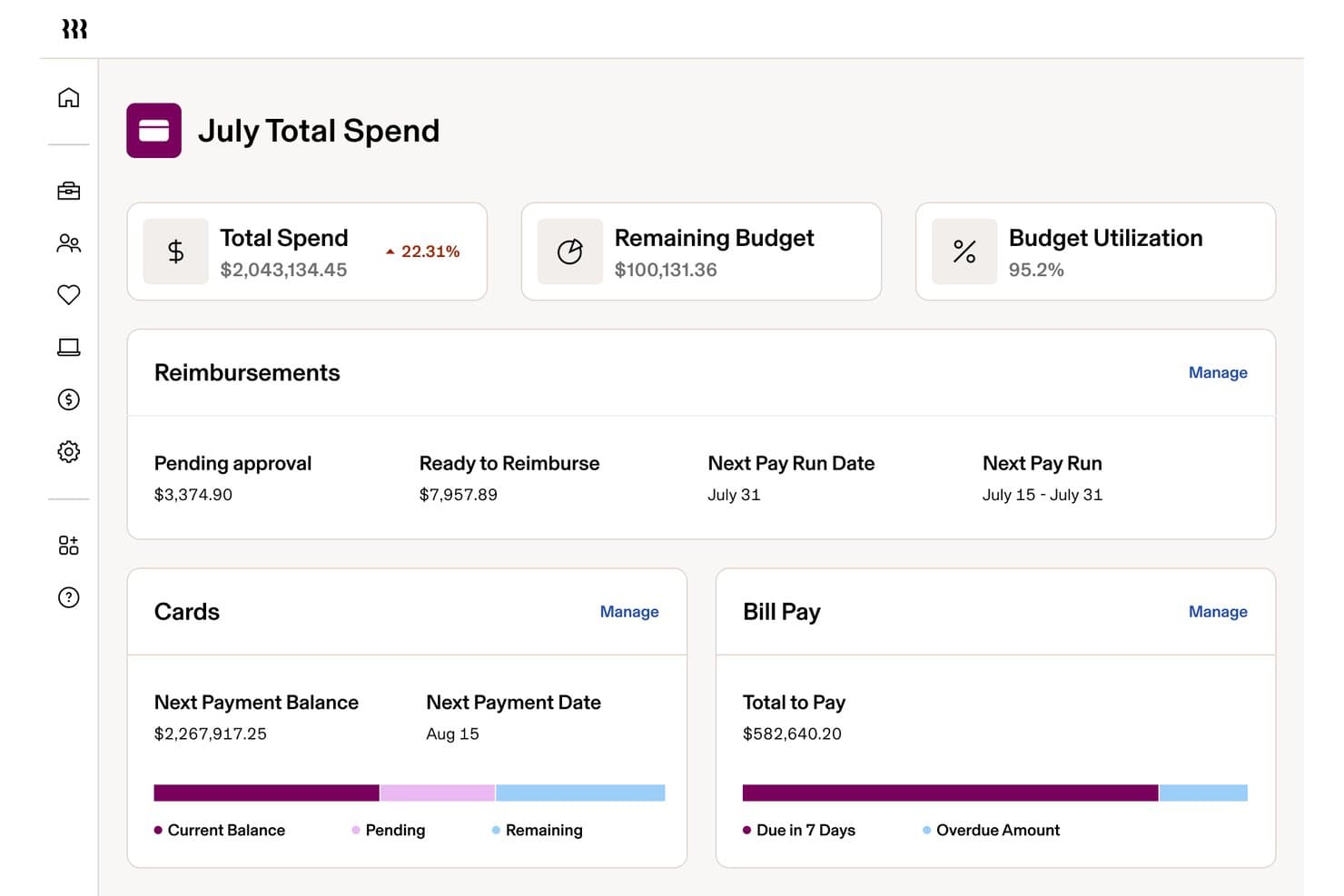
Rippling Spend monitora le spese totali, i budget e il pagamento delle fatture in un'unica dashboard. Rippling Spend è una piattaforma per la gestione delle paghe e delle spese che combina carte aziendali, monitoraggio delle spese, pagamento delle fatture ed elaborazione nativa delle paghe in un unico sistema.
Per chi è più adatto Rippling Spend?
Rippling Spend è particolarmente adatto alle aziende in crescita che già utilizzano, o intendono utilizzare, un sistema contabile esterno e desiderano riunire paghe, carte aziendali e gestione delle spese in un'unica piattaforma.
Perché ho scelto Rippling Spend
Ho incluso Rippling Spend tra le mie scelte principali perché è l'unico strumento di questo elenco che collega direttamente le paghe ai controlli sulle spese a livello di policy. Quando entra un nuovo dipendente, i limiti della sua carta e le categorie di spesa vengono impostati automaticamente in base al suo ruolo, quindi non è necessaria alcuna configurazione manuale tra risorse umane e finanza. Le paghe e i rimborsi vengono gestiti tramite lo stesso sistema, mentre gli adempimenti fiscali in tutti i 50 stati vengono gestiti senza uno strumento separato per la conformità.
Funzionalità principali di Rippling Spend
- Presentazione delle dichiarazioni fiscali sulle paghe in più stati: Rippling calcola e presenta automaticamente le imposte sulle paghe agli enti federali, statali e locali di tutti i 50 stati.
- Generazione automatizzata dei moduli W-2 e 1099-NEC: I moduli fiscali di fine anno per dipendenti e collaboratori vengono generati, presentati e archiviati automaticamente all'interno della piattaforma.
- Scansione delle fatture basata sull'intelligenza artificiale: Rippling analizza le fatture ricevute, assegna le fatture alle categorie corrette del libro mastro e segnala gli addebiti duplicati o potenzialmente fraudolenti.
- Controlli sulle spese delle carte aziendali: Le carte Visa fisiche e virtuali consentono di impostare limiti di spesa basati sul ruolo o sul reparto, bloccando in tempo reale gli addebiti non conformi alle policy.
Integrazioni di Rippling Spend
Rippling Spend supporta oltre 650 integrazioni, tra cui QuickBooks Online, Xero, NetSuite, Sage, Slack, Microsoft Teams, Salesforce, Google e Okta. Il portale per sviluppatori, gli SDK e l'App Shop supportano integrazioni personalizzate.
Pros and Cons
Pros:
- Presentazione automatizzata delle dichiarazioni fiscali sulle paghe in più stati
- Rimborsi e controlli sulle spese collegati alle paghe
- Depositi diretti per dipendenti e collaboratori
Cons:
- Nessun libro mastro generale o prospetto finanziario
- Nessuna fatturazione o riconciliazione bancaria
Learn more about Rippling Spend: Ideale per la contabilità automatizzata dall'IA
- Prova gratuita di 30 giorni
- Da £7.50/utente/mese (fatturazione annuale)
Visit WebsiteCustomer Rating:4.7/5
ClearBooks offre contabilità semplificata dall'IA, fatturazione professionale e opzioni flessibili di pagamento online. Clear Books è una piattaforma di contabilità e gestione paghe per piccole imprese che unisce in un unico sistema la contabilità, la fatturazione, l'elaborazione degli stipendi, la gestione delle spese e gli strumenti fiscali.
Per chi è più adatto Clear Books?
Clear Books è un'ottima scelta per i piccoli imprenditori con sede nel Regno Unito che necessitano di una piattaforma semplice per gestire in un unico luogo la contabilità, la gestione paghe e gli obblighi fiscali.
Perché ho scelto Clear Books
Clear Books si è guadagnato un posto nella mia selezione grazie ad Auto Code, il suo strumento di categorizzazione delle transazioni bancarie alimentato dall'intelligenza artificiale. Quando importi le transazioni bancarie—sia tramite connessione bancaria diretta che tramite file CSV—Auto Code assegna automaticamente il giusto codice contabile a ciascuna di esse, elaborando centinaia di voci in pochi secondi. Trovo questo particolarmente utile durante la chiusura di fine mese, quando la codifica manuale di un arretrato di transazioni è davvero l'ultima cosa che si vorrebbe fare. L'add-on Auto Bills lo integra perfettamente, utilizzando la tecnologia OCR per estrarre dati dalle fatture dei fornitori e dalle ricevute acquisite tramite telefono, email o caricamento file, abbinandole poi automaticamente al fornitore corretto.
Caratteristiche principali di Clear Books
- Integrazione tra paghe e contabilità: Quando elabori le paghe, Clear Books crea automaticamente le relative voci contabili, mantenendo la tua contabilità completa senza necessità di riconciliazione manuale.
- Invio RTI a HMRC: Invia le informazioni in tempo reale direttamente a HMRC con un solo clic, incluse le comunicazioni di pagamento completo e i resoconti dei pagamenti del datore di lavoro.
- Dichiarazione IVA MTD: Registra l'IVA e invia dichiarazioni direttamente a HMRC da Clear Books, pienamente conforme ai requisiti del Making Tax Digital.
- Gestione delle assenze dei dipendenti: I dipendenti possono richiedere permessi tramite un portale self-service e puoi monitorare i giorni di ferie residui e le assenze senza bisogno di fogli di calcolo.
Integrazioni di Clear Books
Le integrazioni includono PayPal, GoCardless, Stripe e altri ancora. È disponibile un'API per integrazioni personalizzate.
Pros and Cons
Pros:
- Contabilità gestita con l'intelligenza artificiale
- Fatturazione professionale
- Opzioni di pagamento flessibili
Cons:
- Le funzionalità avanzate possono risultare complesse
- Nessuna app mobile
Learn more about Clear Books: 6Ideale per contabilità e stipendi gratuiti
Wave
- Piano gratuito disponibile
- Da $19/mese
Visit WebsiteCustomer Rating:4.4/5
Wave offre un'interfaccia intuitiva, funzionalità avanzate e sicurezza di alto livello. Wave è una piattaforma software di contabilità per le piccole imprese che unisce fatturazione, monitoraggio delle spese, report finanziari e servizi integrati di gestione stipendi in un unico sistema.
Per chi è più adatto Wave?
Wave è l'ideale per freelance, lavoratori autonomi e microimprese che necessitano degli strumenti principali di contabilità e gestione stipendi senza dover investire un grande budget in software.
Perché ho scelto Wave
Wave è tra le mie scelte preferite perché apprezzo che il piano gratuito di contabilità sia davvero completo — non una versione limitata o promozionale. Si ottiene la contabilità a partita doppia, la registrazione di entrate e spese e report finanziari come i flussi di cassa e i bilanci senza alcun costo. Quando si è pronti per attivare la gestione stipendi, le registrazioni salariali automatiche di Wave si sincronizzano direttamente con i tuoi conti, evitando la riconciliazione manuale tra buste paga e libri contabili. Apprezzo anche che Wave gestisca in automatico W-2, 1099 e gli adempimenti fiscali in tutti i 50 stati USA, eliminando un vero onere di conformità per i titolari di piccole imprese con risorse limitate.
Caratteristiche principali di Wave
- Creazione di fatture: Crea e invia fatture professionali direttamente da Wave, con opzioni per aggiungere il tuo logo, impostare le condizioni di pagamento e accettare pagamenti online.
- Accesso multiutente: Invita il tuo commercialista, contabile o socio come collaboratore con accesso controllato al tuo account Wave.
- Bonifico diretto: Paga i dipendenti direttamente sui loro conti bancari ad ogni data di paga senza costi aggiuntivi per transazione.
- Portale self-service per i dipendenti: I dipendenti possono accedere a Wave per visualizzare le buste paga, accedere ai W-2 e aggiornare in autonomia le proprie informazioni bancarie e di contatto.
Integrazioni di Wave
Le integrazioni native non sono chiaramente documentate. Wave supporta l'importazione di dati da QuickBooks, FreshBooks e fogli di calcolo, e mette a disposizione un'API per integrazioni personalizzate.
Pros and Cons
Pros:
- Strumenti di contabilità gratuiti
- Interfaccia facile da usare
- Gestione finanziaria completa
Cons:
- Assistenza clienti limitata
- Personalizzazione limitata dei report
Learn more about Wave: Ideale per interfaccia intuitiva
- Prova gratuita di 30 giorni + piano gratuito disponibile
- Da $15/mese
Visit WebsiteCustomer Rating:4.6/5
ZipBooks semplifica la contabilità e la gestione delle paghe con la sua interfaccia intuitiva, funzionalità complete ed efficienza nella gestione delle operazioni finanziarie. ZipBooks è una piattaforma di contabilità online per piccole imprese che gestisce fatturazione, monitoraggio delle spese, riconciliazione bancaria, rilevazione del tempo e integrazioni con servizi di paghe esterni.
Per chi è ZipBooks?
ZipBooks è adatto a proprietari di piccole imprese e freelance che necessitano di strumenti contabili semplici senza una curva di apprendimento ripida.
Perché ho scelto ZipBooks
ZipBooks si è guadagnato un posto nella mia shortlist perché la sua interfaccia è davvero una delle più pulite che abbia visto nei software di contabilità per piccole imprese. Apprezzo in particolare la schermata delle transazioni singole, che permette di visualizzare, categorizzare e riconciliare tutto in un unico posto senza dover cambiare schermata. La funzione di auto-categorizzazione fa gran parte del lavoro pesante—ZipBooks apprende dalla cronologia delle tue transazioni e assegna automaticamente le categorie alle spese, riducendo l'inserimento manuale dei dati nella chiusura di fine mese. L'uso intuitivo dei colori nei report facilita anche l’individuazione immediata dei modelli, anche per chi non è un contabile esperto.
Caratteristiche principali di ZipBooks
- Fatturazione e pagamenti: Crea e invia fatture, accetta pagamenti con carta di credito e imposta fatturazioni ricorrenti con promemoria di pagamento automatici.
- Bank Connect: Collega il tuo conto bancario o la carta di credito così che ZipBooks importi giornalmente transazioni e saldi per la riconciliazione.
- Smart tagging: Assegna tag alle transazioni per cliente, progetto o località e genera rendiconti filtrati in base a questi tag.
- Rilevamento del tempo: Registra il tempo impiegato su progetti e attività e trasferisci le ore tracciate direttamente su una fattura cliente con un solo clic.
Integrazioni ZipBooks
ZipBooks offre integrazioni native con PayPal, Square, Stripe e Gusto. È disponibile un'API per integrazioni personalizzate.
Pros and Cons
Pros:
- Interfaccia intuitiva
- Fatturazione efficiente
- Monitoraggio intelligente delle spese
Cons:
- Funzionalità avanzate limitate
- Curva di apprendimento ripida
Learn more about ZipBooks: Ideale per strumenti di contabilità personalizzabili
- Piano gratuito + demo gratuita disponibile
- A partire da $15/mese (fatturazione annuale)
Visit WebsiteCustomer Rating:4.3/5
Zoho Books presenta una vasta gamma di funzionalità, un’interfaccia facile da usare e integrazioni fluide. Zoho Books è una piattaforma di contabilità per piccole imprese che include fatturazione, monitoraggio delle spese, riconciliazione bancaria, integrazione delle paghe e flussi di lavoro personalizzabili.
Per chi è ideale Zoho Books?
Zoho Books è particolarmente adatto a titolari di piccole imprese e contabili che vogliono personalizzare la propria configurazione contabile senza dipendere da uno sviluppatore.
Perché ho scelto Zoho Books
Zoho Books si guadagna un posto nella mia shortlist grazie alle sue possibilità di personalizzazione, che vanno ben oltre la semplice personalizzazione del marchio. Apprezzo in modo particolare la funzione dei campi personalizzati, che consente di aggiungere caselle di testo, menu a tendina, caselle di controllo e campi formula a qualsiasi registrazione di transazione, e perfino di impostare regole di validazione per bloccare l’inserimento di dati errati. Questo è davvero utile quando l’azienda tiene traccia di informazioni che non trovano spazio nei campi standard di fatture o bollette. Utilizzo anche l’automazione dei flussi di lavoro personalizzati per avviare azioni come l’invio di promemoria di pagamento o l’aggiornamento di campi in base a condizioni specifiche, senza scrivere alcun codice. Inoltre, i tag di reportistica personalizzati permettono di suddividere i report finanziari per divisione, progetto o centro di costo, rendendo l’analisi periodo su periodo molto più dettagliata.
Caratteristiche principali di Zoho Books
- Riconciliazione bancaria: Importa automaticamente le transazioni bancarie e usa regole bancarie per categorizzarle e abbinarle alle tue registrazioni per una chiusura di fine mese più rapida.
- Budgeting e fatturazione dei progetti: Imposta budget di costo e ricavo per progetto, traccia il tempo sulle attività e fattura i clienti in base a ore, compiti o costo totale.
- Tracciabilità delle verifiche: Monitora ogni transazione e modifica in un registro a prova di manomissione che mostra chi ha fatto cosa e quando, su tutte le registrazioni.
- Oltre 70 report integrati: Accedi a report predefiniti che coprono vendite, spese, acquisti, inventario e tasse, tutti aggiornati in tempo reale e pronti all’esportazione o alla programmazione.
Integrazioni di Zoho Books
Zoho Books offre integrazioni native con Zoho Payroll, Zoho CRM, Zoho Inventory, Stripe, PayPal, Square, Braintree, G Suite, Office 365 e Avalara. È disponibile un’API per integrazioni personalizzate.
Pros and Cons
Pros:
- Portale clienti integrato
- Flussi di lavoro personalizzati
- Fatturazione multilingue
Cons:
- Accesso offline limitato
- Assenza di gestione dei beni fissi
 Ideale per semplicità e automazione
- Prova gratuita di 14 giorni disponibile
- Da $30/mese
Visit WebsiteCustomer Rating:4.5/5
Kashoo offre un'interfaccia semplice e funzioni automatizzate che semplificano la gestione finanziaria per le piccole imprese. Kashoo è una piattaforma di contabilità online per piccole imprese che copre la fatturazione, la registrazione delle spese, la riconciliazione bancaria e la reportistica finanziaria di base.
Per chi è ideale Kashoo?
Kashoo è adatto ai titolari di piccole imprese e ai lavoratori autonomi che desiderano una contabilità semplice senza una curva di apprendimento ripida.
Perché ho scelto Kashoo
Kashoo si è guadagnato un posto nella mia selezione grazie alla quantità di lavoro manuale di contabilità che elimina tramite l'automazione. Mi piace il fatto che importi automaticamente le transazioni bancarie da oltre 5.000 banche e cooperative di credito in tempo reale, così non devo dedicare tempo ogni settimana all'inserimento manuale dei dati. L'integrazione con la gestione delle buste paga mi permette di collegare direttamente i dati del personale alla contabilità senza dover gestire esportazioni separate. Trovo anche molto utile la funzione di caricamento delle ricevute per mantenere pulito il registro delle spese senza dover utilizzare un flusso di lavoro separato.
Caratteristiche principali di Kashoo
- Creazione di fatture e riscossione dei pagamenti: Crea e invia fatture ai clienti e accetta i pagamenti direttamente da tali fatture tramite Stripe.
- Tracciamento dell'imposta sulle vendite: Tieni traccia dell'IVA sulle transazioni senza la necessità di strumenti separati o calcoli manuali.
- Supporto multivaluta: Registra e gestisci transazioni in più valute, utile per le piccole imprese con clienti internazionali.
- Libro mastro a partita doppia: Mantieni la correttezza dei libri usando un sistema di contabilità a partita doppia che rende i tuoi registri finanziari pronti per l'audit.
Integrazioni Kashoo
Le integrazioni includono Square, Stripe e altro.
Pros and Cons
Pros:
- Contabilità automatizzata
- Interfaccia intuitiva
- Supporto multivaluta
Cons:
- Funzionalità avanzate limitate
- Supporto internazionale limitato
Learn more about Kashoo: 10Ideale per la gestione finanziaria personalizzabile e integrata
KashFlow
- Prova gratuita di 14 giorni + demo gratuita disponibile
- A partire da £1.35/mese
Visit WebsiteCustomer Rating:4.1/5
KashFlow offre soluzioni di gestione finanziaria configurabili e solide funzionalità di integrazione. KashFlow è una piattaforma di contabilità e gestione delle paghe basata sul cloud per piccole imprese, che riunisce in un unico sistema contabilità, fatturazione, gestione dell'IVA e gestione integrata delle paghe.
Per chi è più indicato KashFlow?
KashFlow è una soluzione adatta ai proprietari di piccole imprese con sede nel Regno Unito che hanno bisogno di strumenti semplici per la contabilità e la gestione delle paghe, senza una curva di apprendimento ripida.
Perché ho scelto KashFlow
KashFlow si è guadagnato un posto nella mia selezione ristretta grazie alla sua capacità di riunire contabilità e gestione delle paghe in un unico ambiente, senza costringerti a destreggiarti tra piattaforme separate. Apprezzo in particolare la fatturazione personalizzabile: puoi aggiungere il tuo logo e il tuo marchio, convertire i preventivi in fatture con un solo clic e impostare promemoria automatici per i pagamenti. Questo tipo di flessibilità è importante quando gestisci una piccola impresa e hai bisogno che i tuoi documenti finanziari rispecchino il tuo marchio. Anche il pannello di controllo personalizzabile mi consente di tenere in primo piano le metriche che mi interessano davvero, invece di dover consultare dati non pertinenti per la mia attività.
Funzionalità principali di KashFlow
- Invio delle dichiarazioni IVA: Collegati direttamente all'HMRC per presentare le dichiarazioni IVA senza uscire dalla piattaforma, mantenendo la conformità ai requisiti di digitalizzazione fiscale.
- Collegamenti ai conti bancari: Collega più conti bancari per importare automaticamente i dati delle transazioni e riconciliare i pagamenti in tempo reale.
- Gestione delle paghe: Gestisci le paghe in conformità ai requisiti dell'HMRC, amministra le buste paga dei dipendenti e gestisci i contributi pensionistici aziendali da un unico ambiente.
- Monitoraggio degli acquisti e delle spese: Crea e invia tramite e-mail le fatture di acquisto ai fornitori, imposta acquisti ricorrenti e registra spese e ricevute anche in mobilità.
Integrazioni di KashFlow
KashFlow offre integrazioni dirette con PayPal, GoCardless, HMRC e Barclays, oltre a fornire un'API per integrazioni personalizzate.
Pros and Cons
Pros:
- Reportistica dettagliata
- Conforme all'IVA
- Funzionalità complete per la gestione delle paghe
Cons:
- Funzionalità per dispositivi mobili limitate
- Curva di apprendimento ripida per i nuovi utenti
Learn more about KashFlow:
Altri software di contabilità con gestione paghe per piccole imprese
Ecco alcuni altri software di contabilità con gestione paghe per piccole imprese che sono arrivati quasi nella mia prime 10. Non hanno superato la selezione finale, ma sono comunque opzioni valide e meritano sicuramente un’analisi più approfondita!
- 11MYOBIdeale per soluzioni aziendali scalabili
- 12PatriotIdeale per convenienza e valore
- 13AccountEdgeIdeale per la contabilità desktop
- 14HeardIdeale per supporto contabile pronto per la dichiarazione fiscale
Come valuto i software di contabilità con payroll per le piccole imprese
Scompongo la mia valutazione in due livelli: le funzioni di contabilità e payroll di base su cui una piccola impresa o il suo contabile fa affidamento per chiudere i libri e pagare i dipendenti, e poi i fattori distintivi che separano gli strumenti migliori.
Funzionalità fondamentali (Requisiti di base per questo elenco)
Quando seleziono gli strumenti per il mio elenco, valuto ognuno su una scala da 0 (non offre la funzionalità) a 5 (eccelle in quest'area) per ogni funzionalità di base elencata qui sotto. Poi calcolo il punteggio totale dello strumento in percentuale. Ogni strumento deve raggiungere un punteggio totale minimo del 65% per essere preso in considerazione per l'inclusione.
- Contabilità del libro mastro generale: Verifico la presenza di una vera contabilità a partita doppia con un piano dei conti adeguato, registrazioni di prima nota e la possibilità di generare report finanziari standard come conto economico e stato patrimoniale.
- Gestione integrata delle buste paga: Lo strumento dovrebbe includere un sistema di payroll nativo, non solo un'integrazione di terze parti. Controllo la capacità di gestire l'intero ciclo di pagamento con calcolo delle retribuzioni, trattenute e detrazioni integrati.
- Conformità fiscale sul payroll: Valuto se la piattaforma gestisce in automatico il calcolo delle imposte, le dichiarazioni e i versamenti, oltre alla generazione dei moduli di fine anno per W-2 e 1099.
- Contabilità clienti e fornitori: Emissione di fatture, monitoraggio dei crediti verso clienti e gestione delle bollette verso fornitori sono attività quotidiane per le piccole imprese. Controllo quanto bene ogni strumento gestisce entrambe le componenti.
- Connessione bancaria e riconciliazione: L'integrazione di conti bancari e carte di credito per importare automaticamente le transazioni fa risparmiare ore di inserimento manuale dei dati. Verifico come ogni strumento abbina e classifica quelle transazioni rispetto al libro mastro.
- Pagamenti a dipendenti e collaboratori: Le piccole imprese spesso pagano sia personale dipendente che freelance. Cerco il supporto a bonifici diretti sia per dipendenti W-2 che per collaboratori 1099, insieme a funzioni di onboarding e self-service.
Una volta definito l'elenco degli strumenti che soddisfano i criteri, considero ciò che distingue ogni piattaforma.
Fattori differenzianti (Cosa distingue i fornitori)
Ecco come confronto e metto a paragone i diversi fornitori:
Funzionalità distintive
La gestione multi-stato delle buste paga diventa fondamentale non appena una piccola impresa assume il primo dipendente remoto in una giurisdizione diversa. Verifico se uno strumento gestisce la registrazione nel nuovo stato e le tasse specifiche di ogni giurisdizione in modo automatico. Anche l'amministrazione dei benefit è un elemento distintivo: piattaforme come Gusto e QuickBooks Payroll che integrano l'assicurazione sanitaria e la gestione dei piani pensionistici con le detrazioni in busta paga evitano ai titolari di dover gestire broker separati. Cerco inoltre la presenza di rilevazione presenze integrata collegata direttamente ai pagamenti, che riduce l'inserimento manuale dei dati per le aziende con personale a ore.
Oltre le funzionalità
La trasparenza dei prezzi è un fattore importante: valuto se il payroll è incluso oppure venduto come aggiunta a pagamento, poiché le tariffe per dipendente possono rapidamente aumentare per i team in crescita. Anche le funzioni di collaborazione per i commercialisti sono rilevanti. Strumenti come Xero e QuickBooks offrono portali dedicati ai consulenti contabili, a cui il contabile o il commercialista può accedere con il proprio login, rendendo molto più semplice il passaggio di consegne a fine anno. Prendo inoltre in considerazione il supporto per la migrazione durante l’anno fiscale, poiché molte piccole imprese cambiano strumenti a metà esercizio e hanno bisogno di importare correttamente i dati delle buste paga precedenti.
Come scegliere un software di contabilità con gestione paghe per piccole imprese
È facilissimo perdersi tra elenchi infiniti di funzionalità e prezzi poco chiari. Per semplificare le cose mentre cerchi di capire quale soluzione sia giusta per la tua impresa, ecco una breve lista di controllo che ti aiuterà a non perdere la rotta:
| Fattore | Cosa considerare |
|---|---|
| FattoreScalabilità | Cosa considerareAssicurati che il software possa crescere insieme alla tua impresa, mentre passi da una piccola azienda a un'organizzazione di medie dimensioni. Cerca opzioni che consentano di aggiungere utenti e funzionalità man mano che aumentano le tue esigenze. |
| FattoreIntegrazioni | Cosa considerareVerifica se il software si integra con gli strumenti che già utilizzi, come i sistemi CRM o di gestione dell'inventario, per semplificare i processi. |
| FattorePersonalizzazione | Cosa considerareScegli una soluzione che ti permetta di adattare report e cruscotti alle esigenze della tua impresa, assicurandoti di avere a portata di mano i dati pertinenti. |
| FattoreFacilità d'uso | Cosa considerareScegli interfacce intuitive che rendano semplice per te e il tuo team gestire le attività di contabilità e di elaborazione delle paghe senza una formazione approfondita. |
| FattoreBudget | Cosa considerareConfronta i piani tariffari e assicurati che non ci siano costi nascosti. Considera il costo totale di proprietà, inclusi la configurazione e il supporto continuativo. |
| FattoreMisure di sicurezza | Cosa considerareVerifica che il software offra solide misure di sicurezza, come la crittografia e l'autenticazione a due fattori, per proteggere i tuoi dati finanziari. |
| FattoreAssistenza clienti | Cosa considerareCerca soluzioni che offrano un servizio clienti affidabile attraverso diversi canali, così da ricevere aiuto quando ne hai bisogno. |
| FattoreFunzionalità di reportistica | Cosa considerareAssicurati che il software offra funzionalità complete di reportistica, consentendoti di generare facilmente rendiconti finanziari e riepiloghi delle paghe. |
Tendenze dei software di contabilità con gestione paghe per piccole imprese
Ho tenuto d’occhio le tendenze dei software di contabilità con gestione delle paghe per le piccole imprese e alcune cose hanno davvero attirato la mia attenzione. Dopo aver esaminato un’enorme quantità di aggiornamenti dei prodotti, note sulle versioni e annunci, ho raccolto i punti principali e ciò che potrebbero significare in futuro.
- Soluzioni basate sul cloud: I sistemi per la gestione delle paghe basati sul cloud rappresentano una svolta per le piccole imprese. Sono flessibili, facili da ampliare e consentono di gestire gli stipendi senza dover disporre di hardware sofisticato. Inoltre, quando la gestione delle paghe è collegata agli strumenti di contabilità e risorse umane, tutto procede più facilmente: meno inserimenti manuali, meno errori e più tempo a disposizione durante la giornata.
- Applicazioni mobili: Sempre più titolari d’azienda si affidano alle app mobili per gestire le risorse umane e le paghe ovunque si trovino. Semplicemente, rendono la vita più facile. Che si tratti di approvare i timesheet o di elaborare le paghe dal telefono, offrono la libertà di lavorare da qualsiasi luogo e anche i team apprezzano la comodità.
- Sistemi integrati: Gli strumenti per la gestione delle paghe completamente integrati con le risorse umane e la contabilità sono sempre più diffusi. Questo perché avere tutto in un unico luogo semplifica le attività, ottimizza i processi, fa risparmiare tempo e aiuta a garantire il rispetto degli obblighi normativi senza dover passare da un sistema all’altro.
- Automazione e intelligenza artificiale: I software intelligenti diventano sempre più evoluti. Grazie all’automazione e all’intelligenza artificiale, le attività di routine come l’inserimento dei dati o la riconciliazione delle transazioni possono essere gestite automaticamente. Ciò significa meno errori e più tempo da dedicare agli aspetti dell’attività che richiedono davvero la tua attenzione.
- Conformità e sicurezza: Rimanere aggiornati sulle norme fiscali e sul diritto del lavoro è un lavoro a sé, ma il software per la gestione delle paghe può aiutarti. Lo strumento giusto si manterrà aggiornato e proteggerà i tuoi dati, consentendoti di concentrarti sulla gestione della tua attività senza preoccuparti dei problemi di conformità o dei rischi per i dati.
Cos’è un software di contabilità con gestione delle paghe per le piccole imprese?
Il software di contabilità con gestione delle paghe per le piccole imprese aiuta a gestire le transazioni finanziarie e i processi relativi alle paghe, consentendo ai titolari di piccole imprese e ai commercialisti di monitorare entrate e uscite, generare report finanziari e garantire pagamenti ai dipendenti puntuali e accurati.
In genere, questo software include componenti come un libro mastro generale, la gestione dei debiti verso i fornitori, la gestione dei crediti verso i clienti, l’elaborazione delle paghe e la conformità fiscale. Queste funzionalità consentono agli utenti di mantenere registri finanziari precisi, automatizzare i calcoli delle paghe e rispettare in modo efficiente le normative fiscali.
Funzionalità dei software di contabilità con gestione delle paghe per le piccole imprese
Scegliere il software di contabilità con gestione delle paghe giusto per le piccole imprese può semplificare notevolmente la tua attività, facendo risparmiare tempo, garantendo la conformità e aiutando tutto a funzionare meglio. Ecco alcune funzionalità chiave da tenere in considerazione:
- Funzioni contabili fondamentali: Le funzioni contabili fondamentali comprendono la registrazione delle transazioni, la gestione del libro mastro generale e la generazione dei rendiconti finanziari. Sono essenziali per monitorare ricavi, spese e flusso di cassa, garantendo la solidità finanziaria dell’azienda.
- Gestione delle paghe: La gestione delle paghe automatizza i calcoli degli stipendi, le ritenute fiscali e i benefit. Garantisce pagamenti puntuali e accurati ai dipendenti, un aspetto fondamentale per mantenere la soddisfazione dei dipendenti e la conformità alle leggi fiscali.
- Budget e previsioni: Gli strumenti per la definizione del budget e le previsioni aiutano le aziende a creare piani finanziari basati su dati storici e in tempo reale. Questa funzionalità è importante per monitorare i risultati rispetto ai budget e prendere decisioni finanziarie consapevoli.
- Fatturazione ed emissione delle fatture: La fatturazione automatizzata e l’emissione delle fatture semplificano il processo di generazione delle fatture e monitoraggio dei pagamenti. Questa funzionalità aiuta a mantenere il flusso di cassa e riduce il tempo dedicato alle attività di fatturazione manuale.
- Contabilità di progetto: La contabilità di progetto consente alle aziende di monitorare ricavi e spese per singolo progetto. È particolarmente utile per le aziende che svolgono attività basate su progetti, garantendo un monitoraggio finanziario e una fatturazione accurati.
- Monitoraggio dei beni: Il monitoraggio dei beni gestisce il valore e i dettagli delle attività a lungo e breve termine. Questa funzionalità è essenziale per mantenere registri accurati del valore dei beni, dell’ammortamento e dei livelli delle scorte.
- Report e analisi: I report e le analisi avanzati forniscono informazioni in tempo reale sulle prestazioni finanziarie. Dashboard e report personalizzabili aiutano le aziende a monitorare le metriche chiave e a prendere decisioni basate sui dati.
- Supporto per dispositivi mobili: Il supporto per dispositivi mobili consente di accedere ai dati finanziari da qualsiasi luogo, garantendo ai dipendenti la possibilità di gestire i flussi di lavoro ovunque si trovino. Questa funzionalità è particolarmente utile per le aziende con personale che lavora da remoto o in mobilità.
- Gestione fiscale: La gestione fiscale automatizza i complessi calcoli delle imposte e garantisce la conformità ai requisiti fiscali locali, nazionali e globali. Questa funzionalità riduce il rischio di errori e sanzioni associati alle dichiarazioni fiscali.
- Integrazione: L’integrazione con altre applicazioni aziendali, come i sistemi ERP e i software CRM, garantisce un flusso di dati uniforme all’interno dell’organizzazione. Questa funzionalità migliora l’efficienza e riduce la probabilità di errori nell’inserimento dei dati.
Vantaggi dei software di contabilità con gestione delle paghe per le piccole imprese
Quando scegli un software di contabilità con gestione paghe per le piccole imprese, vuoi qualcosa che renda la vita più semplice, non più complicata. Ecco alcuni dei principali vantaggi per i titolari di piccole imprese:
- Risparmio di tempo: L'automazione dei processi di gestione paghe riduce il tempo dedicato ai calcoli manuali e all'inserimento dei dati, consentendo ai titolari d'impresa di concentrarsi su altre attività essenziali.
- Precisione: Il software riduce al minimo gli errori umani nei calcoli delle paghe, garantendo che i dipendenti vengano pagati correttamente e puntualmente, contribuendo così a mantenere la soddisfazione dei dipendenti e la conformità alle normative fiscali.
- Efficienza dei costi: Riducendo la necessità di ricorrere a servizi esterni per la gestione paghe o a personale aggiuntivo, le imprese possono risparmiare denaro e allocare le risorse in modo più efficace.
- Conformità: Il software contribuisce a garantire che i processi di gestione paghe siano conformi alle leggi e alle normative fiscali più recenti, riducendo il rischio di sanzioni costose e verifiche fiscali.
- Integrazione dei dati: L'integrazione continua con le altre funzioni contabili offre una visione completa della salute finanziaria dell'impresa, favorendo decisioni migliori e una pianificazione finanziaria più efficace.
Costi e prezzi del software di contabilità con gestione paghe per le piccole imprese
Stai scegliendo un software di contabilità con gestione paghe per le piccole imprese? I prezzi e le funzionalità possono variare notevolmente. Ecco una tabella rapida per aiutarti a confrontare i tipi di piano, i costi medi e ciò che generalmente include ciascuno.
Tabella di confronto dei piani per il software di contabilità con gestione paghe per le piccole imprese
| Tipo di piano | Prezzo medio | Funzionalità comuni |
|---|---|---|
| Tipo di pianoPiano gratuito | Prezzo medio$0 | Funzionalità comuniFatturazione di base, transazioni limitate e supporto della comunità. |
| Tipo di pianoPiano personale | Prezzo medio$5-$25/utente/mese | Funzionalità comuniElaborazione di base delle paghe, calcolo delle imposte e supporto via e-mail. |
| Tipo di pianoPiano aziendale | Prezzo medio$25-$50/utente/mese | Funzionalità comuniReportistica avanzata, accesso per più utenti, supporto prioritario e integrazioni. |
| Tipo di pianoPiano per grandi imprese | Prezzo medioPrezzi personalizzati | Funzionalità comuniFlussi di lavoro personalizzati, responsabile del cliente dedicato, sicurezza avanzata e conformità. |
Software di contabilità con gestione delle paghe per le piccole imprese: domande frequenti
Ecco alcune domande frequenti sul software di contabilità con gestione delle paghe per le piccole imprese:
Come posso integrare il software di contabilità con il sistema di gestione delle paghe?
L’integrazione del software di contabilità con il sistema di gestione delle paghe generalmente prevede l’uso di funzionalità di integrazione integrate o di connettori di terze parti. La maggior parte delle moderne soluzioni di contabilità offre l’integrazione diretta con i servizi di gestione delle paghe più diffusi. Dovrai seguire le istruzioni specifiche fornite dal produttore del software, che di solito prevedono la configurazione delle chiavi API o l’uso di connettori preconfigurati. Assicurati che entrambi i sistemi siano compatibili e sincronizza regolarmente i dati per evitare discrepanze.
Quali funzionalità di conformità fiscale sono disponibili nei software di contabilità con gestione delle paghe?
I software di contabilità con gestione delle paghe spesso includono funzionalità di conformità fiscale, come il calcolo automatico delle imposte, la presentazione telematica delle dichiarazioni e gli aggiornamenti sulle modifiche alla normativa fiscale. Queste funzionalità contribuiscono a garantire che i processi di gestione delle paghe siano conformi alle normative fiscali federali, statali e locali. Alcuni software forniscono anche avvisi sulle prossime scadenze fiscali e generano i moduli fiscali necessari, come W-2 e 1099.
Come posso gestire le paghe dei dipendenti da remoto utilizzando un software di contabilità?
La gestione delle paghe dei dipendenti da remoto richiede di assicurarsi che il software di contabilità sia in grado di gestire le paghe multi-statali e di rispettare le diverse normative fiscali statali. Dovrai configurare le giurisdizioni fiscali corrette per ciascun dipendente da remoto e assicurarti che il software sia in grado di gestire le diverse ritenute fiscali statali. Inoltre, valuta la possibilità di utilizzare le funzionalità di deposito diretto per semplificare i pagamenti ai dipendenti da remoto.
È possibile gestire i benefit dei dipendenti tramite un software di contabilità con gestione delle paghe?
Sì, molte soluzioni di contabilità con funzionalità di gestione delle paghe consentono di amministrare i benefit dei dipendenti. Ciò include il monitoraggio dell’assicurazione sanitaria, dei piani pensionistici e di altri benefit. Di solito puoi configurare i piani di benefit all’interno del software, assegnarli ai dipendenti e gestire contributi e detrazioni. Alcuni software si integrano anche con i fornitori di benefit per semplificarne l’amministrazione.
Quanto sono sicuri i miei dati relativi alle paghe nel software di contabilità?
La sicurezza dei dati relativi alle paghe è una preoccupazione fondamentale e la maggior parte dei fornitori affidabili di software di contabilità applica solide misure di sicurezza. Queste misure includono in genere la crittografia dei dati, l’autenticazione sicura degli utenti, audit di sicurezza regolari e la conformità alle normative sulla protezione dei dati come il GDPR o il CCPA. Assicurati sempre che il fornitore del software segua le migliori pratiche del settore per la sicurezza dei dati e valuta misure aggiuntive come l’autenticazione a due fattori.
Quali opzioni di supporto sono disponibili se riscontro problemi con la gestione delle paghe nel mio software di contabilità?
Le opzioni di supporto variano a seconda del fornitore del software, ma generalmente includono risorse online come domande frequenti, guide per gli utenti e video tutorial. Molti fornitori offrono anche assistenza clienti tramite e-mail, telefono o chat dal vivo. Alcuni possono fornire account manager dedicati o piani di supporto premium per un’assistenza più personalizzata. Consulta la sezione del software dedicata al supporto per conoscere le opzioni disponibili e i tempi di risposta.