

10 Best General Ledger Software Reviewed in 2026

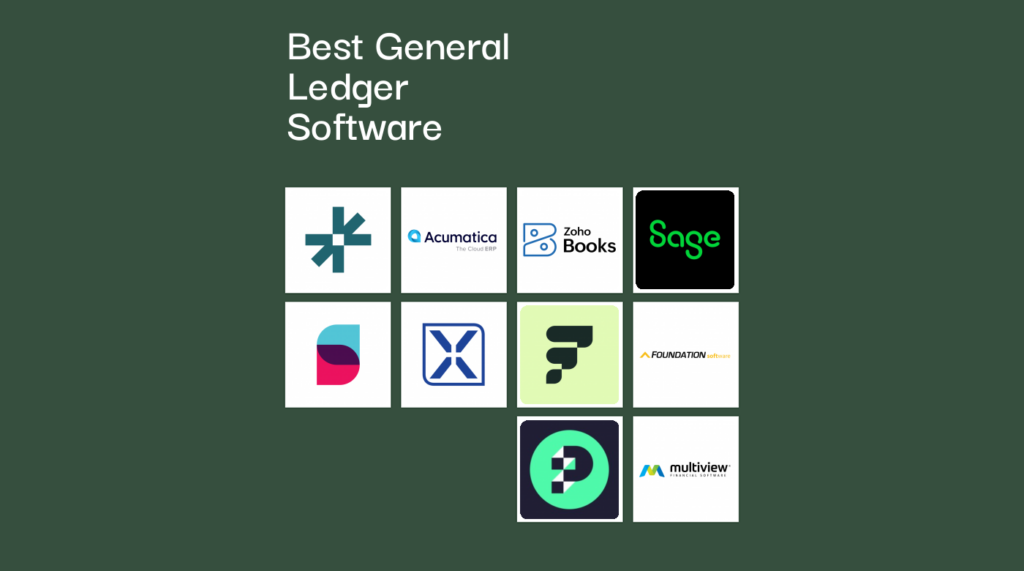
Best General Ledger Software Shortlist


The best general ledger software makes it easy to track assets, liabilities, equity, revenue, and expenses—without the messy subledger syncs, confusing discrepancies, or reporting delays that can throw off your entire close. If your current system can’t maintain a clean audit trail or keep multi-entity data aligned, it may be creating more drama than clarity.
With more than 15 years of experience in financial management and digital software, I’ve lived through the trial balances that don’t tie out, the multi-entity chaos, and the frantic month-end scrambles. I’ve also seen how the right ledger platform can automate journal entries, support dimensional reporting, and make audit season feel refreshingly uneventful.
To help you find that level of stability, I’ve tested and reviewed the top general ledger tools on the market. Here are the platforms that simplify daily accounting workflows, scale with your business, and deliver the accuracy you need—whether you’re managing IFRS/GAAP compliance, juggling multiple entities, or just want a system that keeps your debits and credits in line.
Why Trust Our Software Recommendations
Our team has been testing and reviewing software since 2012. As finance leaders ourselves, we know how difficult—and important—it is to choose the right software.
For this guide, we evaluated tools using hands-on testing and independent research, scoring tools using our selection criteria.
Our reviews reflect our human editorial judgment, not a sales pitch.
Best General Ledger Software Summary
I pulled together this general ledger software pricing chart to help you quickly compare top options and find the one that fits your workflow, budget, and compliance needs.
| Tool | Best For | Trial Info | Price | ||
|---|---|---|---|---|---|
| 1 | Best for AI-based anomaly detection | Free demo available | Pricing upon request | Website | |
| 2 | Best for cloud ERP integration | Free demo available | Pricing upon request | Website | |
| 3 | Best for affordability | Free plan + free demo available | From $15/month (billed annually) | Website | |
| 4 | Best for medium-sized businesses | Free demo available | Pricing upon request | Website | |
| 5 | Best for real-time updates | Free demo available | Pricing upon request | Website | |
| 6 | Best for multi-currency support | Free demo available | Pricing upon request | Website | |
| 7 | Best for retail and ecommerce businesses | Free demo available | Pricing upon request | Website | |
| 8 | Best for construction industry | Free demo available | Pricing upon request | Website | |
| 9 | Best AI-driven general ledger | 14-day free trial | From $25/month | Website | |
| 10 | Best for healthcare sector | Free demo available | Pricing upon request | Website |

Best General Ledger Software Review
I’ve narrowed down the best general ledger software for tracking assets, liabilities, equity, revenue, and expenses. Each summary highlights key features, pros and cons, integrations, and ideal use cases so it’s easy to compare and find the right fit for your workflow.

Best for AI-based anomaly detection

DualEntry is an AI-powered ERP system designed for mid-market businesses looking to scale efficiently. It includes robust financial management modules focused on accuracy, compliance, and real-time analytics.
Why I Picked DualEntry: I selected DualEntry because of its strong focus on ledger accuracy driven by AI-based anomaly detection and continuous auditing. These automated checks reduce manual errors and provide clear, precise financial data, supporting month-end closings. Additionally, its multi-entity consolidation supports complex corporate structures, making it ideal for growing organizations.
Standout Features & Integrations:
Features include customizable ledger fields tailored to your operational needs, real-time bank feeds that maintain current financial visibility, and dedicated CPA support available for expert assistance. DualEntry also offers automation for revenue recognition and subscription billing.
Integrations include BambooHR, Bill.com, Brex, Deel, Google SSO, Gusto, HubSpot, Ramp, Rippling, Salesforce, and Stripe.
Pros and Cons
Pros:
- Automated revenue recognition ensures compliance with standards
- Supports multi-entity and multi-currency operations
- Advanced AI features help with complex tasks
Cons:
- Customization options require careful setup
- Depth of the platform may not be suitable for smaller teams
Best for cloud ERP integration

Acumatica is a cloud-based ERP software designed for small to mid-sized businesses, offering advanced financial management solutions. It's ideal for industries like manufacturing, distribution, and retail, focusing on financial operations.
Why I picked Acumatica: Acumatica excels in cloud ERP integration, providing connectivity across various business functions. With features like multi-entity accounting and flexible deployment options, it caters to diverse business needs. Its real-time data access and user-friendly interface also enhance financial decision-making, making it a standout option for businesses seeking to scale processes.
Standout features & integrations:
Features include customizable dashboards that provide real-time insights into your financial data. You can also benefit from automated tax calculations, which help reduce manual errors. Additionally, it offers detailed audit trails, ensuring transparency and accuracy in your financial records.
Integrations include Salesforce, Microsoft Power BI, Avalara, Shopify, HubSpot, DocuSign, Magento, Adobe Sign, Smartsheet, and Microsoft Teams.
Pros and Cons
Pros:
- Real-time data access
- Automated tax calculations
- Detailed audit trails
Cons:
- Steep learning curve
- Limited mobile app features

Best for affordability

Zoho Books is an online accounting software designed for small to medium-sized businesses that need efficient financial management.
Why I picked Zoho Books: Zoho Book’s affordable pricing makes it accessible for businesses on a budget. In most plans, the software provides a user-friendly interface that simplifies accounting tasks for your team. It also offers automated workflows to reduce manual effort and improve efficiency. Overall, Zoho Books helps teams handle key functions such as invoicing, expense tracking, and tax management for a lower than average cost.
Standout features & integrations:
Features include automated bank feeds, which help you reconcile transactions quickly and accurately. You can also benefit from its time tracking capabilities, allowing you to manage billable hours effectively. Additionally, Zoho Books offers comprehensive financial reporting, giving you insights into your business's financial health.
Integrations include PayPal, Stripe, Square, Zoho CRM, Zoho Projects, G Suite, Slack, Office 365, Zapier, and Mailchimp.
Pros and Cons
Pros:
- User-friendly interface
- Comprehensive reporting options
- Effective time tracking
Cons:
- Limited advanced features
- Basic inventory management
Best for medium-sized businesses
Sage Intacct is a cloud-based financial management software designed for small to mid-sized businesses. It primarily serves industries like professional services, nonprofits, and healthcare, offering essential financial functions.
Why I picked Sage Intacct: Sage Intacct is particularly valuable for medium-sized businesses due to its multi-entity support and customizable reporting. The software provides detailed financial insights, which can be vital for growing companies. It also offers a user-friendly interface that helps ease the management of complex financial tasks. Combined together, these features make it ideal for organizations looking to enhance their overall financial operations.
Standout features & integrations:
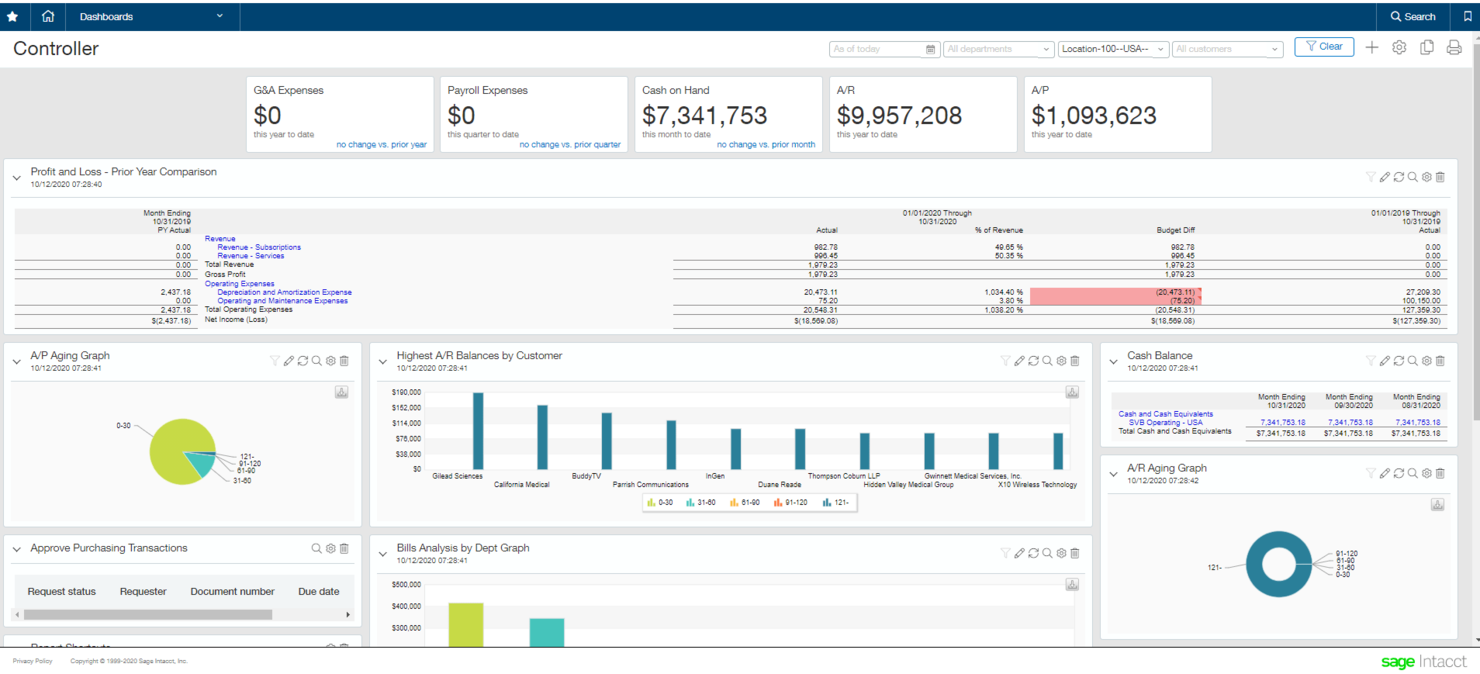
Features include multi-dimensional reporting, which allows you to track financials across various dimensions like departments and projects. It also offers configurable dashboards that provide real-time insights into your financial health. Another key feature is its advanced revenue management, which helps streamline revenue recognition processes.
Integrations include Salesforce, ADP, Expensify, Bill.com, Avalara, American Express, Stripe, PayPal, and Shopify.
Pros and Cons
Pros:
- Effective revenue recognition
- Multi-dimensional reporting
- User-friendly interface
Cons:
- Limited inventory features
- Challenges in report customization

Best for real-time updates

SoftLedger is a cloud-based accounting software designed for businesses that require real-time financial updates. It serves industries like finance, real estate, and cryptocurrency, providing essential financial management functions.
Why I picked SoftLedger: Real-time updates are crucial for businesses that need current data, and with SoftLedger, users gain access to consistently improved data. The software also provides automated consolidations, which help financial processes across multiple entities, and cryptocurrency accounting processes. With these features, SoftLedger is a unique choice for companies looking for up-to-date financial insights.
Standout features & integrations:
Features include flexible reporting options that allow you to customize financial reports to suit your needs. You can also benefit from its multi-entity management, which helps manage financials across different branches. Additionally, the software offers automated workflows, reducing the need for manual intervention.
Integrations include QuickBooks, Xero, Stripe, Coinbase, Plaid, Twilio, Slack, Amazon Web Services, Google Sheets, and HubSpot.
Pros and Cons
Pros:
- Cryptocurrency accounting support
- Automated consolidations
- Flexible reporting options
Cons:
- Complexity in setup
- Limited customization options

Xledger
Best for multi-currency support

Xledger is a cloud-based financial management solution designed for medium to large enterprises. It supports multiple business functions, including accounting, payroll, and expense management, offering value to international businesses.
Why I picked Xledger: Xledger’s multi-currency support is essential for companies operating in various countries. Along with this key feature, the software also provides automatic currency conversion, which simplifies international transactions, and consolidated financial statements. These capabilities make Xledger an excellent choice for businesses needing an advanced global accounting solution.
Standout features & integrations:
Features include automated bank reconciliation, which reduces manual effort in matching transactions. It also offers a fixed asset management module that helps track and manage your organization's assets. Additionally, the cloud-based design ensures that you can access your financial data from anywhere, providing flexibility for remote teams.
Integrations include Microsoft Dynamics, Salesforce, SAP, Oracle, QuickBooks, Sage, Xero, NetSuite, FreshBooks, and Zoho Books.
Pros and Cons
Pros:
- Automatic currency conversion
- Consolidated financial statements
- Automated bank reconciliation
Cons:
- Occasional system updates needed
- Dependence on internet connectivity

Fulfil
Best for retail and ecommerce businesses

Fulfil is a cloud-based ERP software designed for fast-growing retail and eCommerce businesses. It centralizes accounting, inventory, and operations so every financial transaction—from inventory receipt to customer payment—flows automatically into your books.
Why I Picked Fulfil: Fulfil stands out for businesses that need a general ledger system built around retail and eCommerce operations. Its automated transaction recording posts journal entries for every order, payment, and inventory movement without manual effort. Multi-entity accounting maintains separate books for different subsidiaries while consolidating financials across regions and currencies. The AI-powered Fulfil Copilot then analyzes data to highlight trends and anomalies, giving finance teams instant visibility into performance without hours of manual review.
Standout Features & Integrations
Features include real-time cost of goods sold tracking that updates automatically as inventory moves, keeping profitability analysis precise and current. The platform also offers department and business unit reporting so you can break down performance by channel, warehouse, or brand, eliminating the need for external spreadsheets. Automated revenue recognition and 3-way AP matching further reduce reconciliation errors and help ensure compliance.
Integrations include Amazon, Shopify, Etsy, eBay, FedEx, UPS, DHL, PayPal, Stripe, Avalara, Klarna, and Amazon Shipping.
Pros and Cons
Pros:
- Strong multi-entity and multi-currency support
- Real-time inventory movement feeds directly into financials
- Captures every transaction automatically, reducing manual journal entries
Cons:
- Because it’s an ERP with accounting built in, it lacks specialized accounting tools
- Limited focus beyond retail and ecommerce operations

Best for construction industry

FOUNDATION is a construction accounting software specifically designed for contractors and construction firms. It handles essential financial tasks such as job costing, payroll, and general ledger management.
Why I picked FOUNDATION: FOUNDATION is made for the construction industry, making it a perfect fit for contractors who need specialized financial management tools. The software offers job costing features that help track project expenses accurately. It also provides construction-specific payroll management, ensuring compliance with industry regulations. Together, these functionalities make it an invaluable tool for construction businesses seeking precise financial control.
Standout features & integrations:
Features include advanced job costing, allowing you to monitor project expenses in real-time. The software also supports certified payroll, which helps you stay compliant with government reporting requirements. Additionally, it offers equipment tracking, enabling you to manage and allocate resources efficiently.
Integrations include Procore, Viewpoint, QuickBooks, Sage 300, Microsoft Excel, Autodesk, Spectrum, Bluebeam, PlanGrid, and Acumatica.
Pros and Cons
Pros:
- Certified payroll support
- Equipment tracking capabilities
- Compliance with industry standards
Cons:
- Limited scalability for other industries
- Complex initial setup

Puzzle
Best AI-driven general ledger

Puzzle is AI-native ledger software designed to help startups and small businesses manage their accounting. It automates bookkeeping tasks, provides real-time financial insights, and supports both cash and accrual accounting methods.
Why I picked Puzzle.io: One of Puzzle's key features is its AI-powered transaction categorization, which automatically classifies most of a company's transactions without manual rule setup. This is facilitated by Puzzlebot, the platform's auto-categorizer, which learns and improves over time, enhancing financial management efficiency. Additionally, Puzzle's AI Lookup allows users to get assistance in categorizing transactions by summarizing vendor information and suggesting appropriate categories.
Standout features & integrations:
Features include an enhanced general ledger, which provides real-time insights and customizable views. Additionally, Puzzle.io has continuous accuracy reviews, where AI monitors financial statements to catch potential errors before they become problems. It even offers built-in accrual automation, enabling users to manage revenue recognition, prepaid expenses, fixed assets, accounts payable, and accounts receivable in one place.
Integrations include Stripe, Brex, Ramp, Rippling, Mercury, Gusto, Deel, Central, Every, Meow, Bill.com, and Runway.
Pros and Cons
Pros:
- Automated bank reconciliations ensure accuracy
- AI-powered transaction categorization
- Real-time dashboards provide immediate financial insights
Cons:
- Free trial requires users to connect a bank account
- Limited support for non-U.S. bank accounts

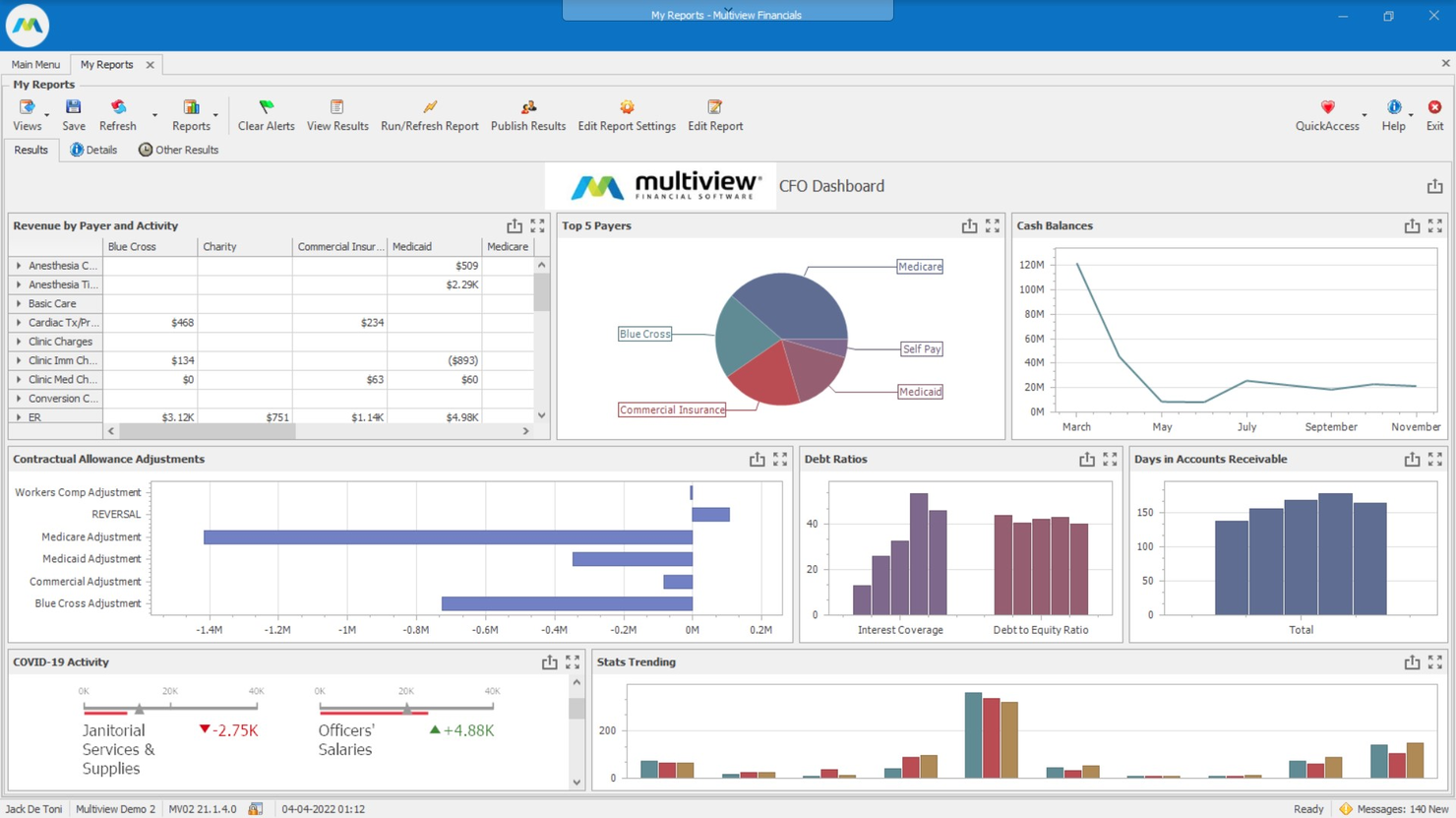
Multiview is a financial management software for the healthcare industry, providing essential accounting functions. It serves hospitals and healthcare organizations by offering tools for budgeting, financial reporting, and compliance management.
Why I picked Multiview: Multiview is specifically designed for the healthcare sector, providing features that address specific needs. The software offers detailed budgeting tools that help manage financial planning effectively. It also includes compliance management capabilities, adhering to healthcare regulations. Combined, these features make Multiview particularly suited for healthcare organizations needing specialized financial oversight.
Standout features & integrations:
Features include advanced budgeting capabilities, which allow you to create comprehensive financial plans. The software also offers real-time financial reporting, providing up-to-date insights into your organization's financial health. Additionally, it supports compliance tracking, helping you meet healthcare industry standards.
Integrations include Microsoft Dynamics, SAP, QuickBooks, Salesforce, Workday, NetSuite, Sage, IBM, and Tableau.
Pros and Cons
Pros:
- Detailed budgeting tools
- Real-time financial reporting
- Compliance management capabilities
Cons:
- Dependence on technical support
- Limited scalability for other industries
Other General Ledger Software
Here are some additional general ledger software options that didn’t make it onto my shortlist, but are still worth checking out:
- Flexi
For compliance needs
- Adagio Ledger
For recording recurring entries
- Eleven
For scalability
- Passport Business Solutions
For small businesses
- SapphireOne
For comprehensive modules
- Workday
For enterprise-level solutions
- QuickBooks
For small business accounting
- HighRadius
For automated reconciliation
- Allvue
For fund accounting
- NetSuite General Ledger
For real-time financial insights


How I Evaluate General Ledger Software
I look at GL tools in two layers: the baseline needed for journal entries, period close, and CoA management, and the differentiators—like consolidation depth—that separate the best picks.
Core Functionality (Table Stakes For This List)
When I'm selecting tools for my list, I rank each one on a scale from 0 (does not offer the functionality) to 5 (excels in this area) for each core functionality listed below. Then, I calculate the tool's total score into a percentage. Each tool needs to achieve a minimum total score of 65% to be considered for inclusion.
- Chart of Accounts Management: I look at how flexible the CoA structure is—whether you can build multi-segment hierarchies and map accounts across entities without starting from scratch.
- Journal Entry & Posting: Each tool should support manual, recurring, and reversing entries with audit trails. I check for approval workflows and bulk import options.
- Double-Entry Bookkeeping: Balanced debits and credits should be enforced at the point of entry. I evaluate whether validation extends across sub-ledgers and modules.
- Financial Reporting & Trial Balance: Standard statements matter, but I also look for drill-down from the balance sheet or P&L to the underlying journal entry detail.
- Multi-Entity & Multi-Currency Support: For teams managing subsidiaries, I evaluate consolidation depth—intercompany eliminations, FX revaluation, and unified reporting.
- Period Close & Reconciliation: The close process is where GL tools earn their keep. I look for guided checklists, sub-ledger reconciliation tools, and period lock controls.
Once I have a list of tools that meet this criteria, I consider what sets each platform apart.
Differentiating Factors (What Sets Vendors Apart)
Here's how I compare and contrast different vendors:
Standout Features
A native consolidation engine is a big differentiator for multi-entity teams. I look for built-in intercompany eliminations and minority interest handling that keep everything in one platform instead of exporting to a separate CPM tool. AI-powered anomaly detection also matters—tools that flag duplicate postings or unusual journal entries before the close save controllers real headaches. Dimensional reporting rounds things out, letting you tag transactions by department, project, or location for deeper analysis without inflating the CoA.
Beyond Features
Integration ecosystem is one of the first things I evaluate. A GL that doesn't connect to your AP/AR, payroll, and banking systems creates reconciliation bottlenecks at every close. I also consider industry and business size fit—a nonprofit running fund accounting has very different needs than a SaaS company handling ASC 606 revenue recognition. Implementation timelines matter too. I look at whether the vendor offers CoA mapping templates and data migration tools, since a complex mid-market rollout that drags on past your fiscal year cutover can stall the entire finance team.
How to Choose General Ledger Software
Choosing general ledger software can feel overwhelming with all the features and pricing details out there. To stay focused, I use a simple checklist to keep my priorities straight, so I can find a tool that actually fits how I work.
| Factor | What to Consider |
| Scalability | Ensure the software can grow with your business. Look for solutions that support additional users and transactions as your company expands. |
| Integrations | Check if the software integrates with your existing tools, like CRM or ERP systems, to streamline processes and improve data accuracy. |
| Customizability | Look for software that allows you to tailor reports and dashboards to fit your specific business needs and workflows. |
| Ease of Use | Choose software with an intuitive interface and easy navigation to reduce the learning curve for your team. |
| Budget | Compare pricing plans and ensure they fit within your financial constraints. Consider the total cost of ownership, including any hidden fees. |
| Security Safeguards | Ensure the software offers robust security measures like data encryption and user access controls to protect sensitive financial information. |
| Customer Support | Evaluate the availability and quality of support services, such as 24/7 assistance, to help resolve issues promptly. |
| Reporting Features | Look for advanced reporting capabilities to provide insights into financial performance and aid in decision-making. |
Trends in General Ledger Software
In my research, I dug through product updates, release logs, and vendor announcements from general ledger software providers. Here's what stood out to me:
- AI-Powered Insights: More vendors are using AI to offer predictive analytics and insights. This helps businesses forecast financial trends and make informed decisions. For example, some tools now analyze spending patterns to suggest budget adjustments.
- Blockchain Integration: Blockchain technology is being adopted to enhance transparency and security. By creating immutable records, it helps prevent fraud and ensures accurate financial reporting. Some vendors are even exploring blockchain for audit trails.
- Sustainability Reporting: There's a growing focus on features that track environmental impact and sustainability metrics. This trend is driven by businesses wanting to align financial reporting with corporate social responsibility goals.
- User-Centric Design: Vendors are starting to prioritize user experience with more intuitive interfaces and personalized dashboards. This makes software easier to use, reducing the learning curve for new users.
- Regulatory Compliance Automation: With ever-changing regulations, tools are now offering automated compliance updates. This ensures businesses stay up-to-date with legal requirements, reducing the risk of penalties.
What Is General Ledger Software?
General ledger software is a financial tool that centralizes and organizes all of a company’s accounting data in one system. It records, classifies, and summarizes transactions—from sales and expenses to assets and liabilities—to form the foundation of accurate reporting and audits.
Used by small businesses, accountants, and enterprise finance teams, it streamlines bookkeeping and reduces manual errors. With automated entries, real-time dashboards, and built-in audit trails, it replaces spreadsheets and ensures consistent compliance.
Features
When I’m comparing general ledger software, I look for features that make managing transactions easy, accurate, and compliant. Along with double-entry support and account reconciliation, here are a few other key features to look for:
- Automated Workflows: Streamline repetitive tasks to save time and reduce manual errors.
- Real-Time Reporting: Provide up-to-date financial data to help businesses make quick, informed decisions.
- Multi-Currency Support: Handle transactions in different currencies, ideal for businesses operating internationally.
- Compliance Tracking: Ensure adherence to industry regulations and reduce the risk of penalties.
- Customizable Dashboards: Allow users to tailor the interface to fit their specific needs and preferences.
- AI-Powered Insights: Offer predictive analytics to forecast trends and improve financial planning.
- Advanced Budgeting Tools: Help create detailed financial plans to manage resources effectively.
- Audit Trails: Maintain a clear record of all transactions to enhance transparency and accountability.
- User-Friendly Interface: Make the software easy to navigate, reducing the learning curve for new users.
Benefits
When I switched to general ledger software, I noticed the benefits right away. It streamlined my team’s workflow, kept our records tidy, and made compliance much easier. If you’re looking for more control over your accounts, here's what you can expect with the right general ledger accounting software:
- Improved Accuracy: Automated workflows and real-time reporting reduce manual errors and enhance financial precision.
- Enhanced Decision-Making: AI-powered insights and advanced analytics offer valuable data to guide strategic choices.
- Regulatory Compliance: Compliance tracking helps ensure your business adheres to industry regulations, minimizing risks.
- Time Savings: Features like automated processes and user-friendly interfaces speed up financial tasks and boost productivity.
- Customization: Customizable dashboards and reports allow you to tailor the system to fit your specific operational needs.
- Increased Transparency: Audit trails provide clear records of transactions, promoting accountability and trust within your team.
Costs and Pricing
Pricing for general ledger application software can be all over the place. Plans vary by features, users, and extras. I’ve broken down the most common options, average costs, and what’s typically included to help you compare and choose what fits your needs best.
Plan Comparison Table for General Ledger Software
| Plan Type | Average Price | Common Features |
| Free Plan | $0/user/month | Basic transaction tracking, limited reporting, and minimal support. |
| Personal Plan | $5-$25/user/month | Enhanced reporting, basic integrations, and user-friendly interface. |
| Business Plan | $30-$75/user/month | Multi-currency support, customizable dashboards, and advanced analytics. |
| Enterprise Plan | $80-$150/user/month | AI-powered insights, compliance tracking, and dedicated customer support. |
General Ledger Software FAQs
Here are some answers to common questions about general ledger software:
What are the 4 C's of the general ledger?
The 4 C’s of a general ledger refer to Chart of Accounts, Calendar, Currency, and accounting Convention. These elements ensure consistency in financial reporting. They help structure the financial data, set the timeline for financial periods, manage multiple currencies, and apply standardized accounting rules.
What are the 5 elements of the general ledger?
The five elements of a general ledger are assets, liabilities, owner’s equity, revenue, and expenses. These categories help organize financial data to reflect the company’s financial position. Understanding these elements allows you to track financial performance and prepare accurate financial statements.
What are the rules for general ledger?
A general ledger follows the double-entry bookkeeping method, where each transaction affects at least two accounts. One account is debited while another is credited, securing the total debits equal total credits. This rule maintains balance in your accounts and ensures accurate financial records.
How does general ledger software automate processes?
General ledger software automates processes like invoice capture, transaction recording, and financial reporting. This reduces manual data entry, minimizes errors, and saves time. By automating these tasks, your team can focus on analyzing financial data rather than inputting it.
How can general ledger software help with compliance?
General ledger software helps with compliance by providing accurate financial records and audit trails. It makes sure that all transactions are documented and easily accessible for audits. This can help your business adhere to industry regulations and avoid penalties.
Why is integration important in general ledger software?
Integration is important because it allows your general ledger accounting software to connect with other systems like CRM and ERP. This ensures data consistency across platforms, reduces duplicate data entry, and enhances overall efficiency in managing financial information.
What's Next?
If you're in the process of researching general ledger software, connect with a SoftwareSelect advisor for free recommendations.
You fill out a form and have a quick chat where they get into the specifics of your needs. Then you'll get a shortlist of software to review. They'll even support you through the entire buying process, including price negotiations.