

Programvare for automatisert finansiell rapportering lar deg generere, konsolidere og dele finansielle rapporter med minimal manuell innsats ved å koble seg direkte til regnskaps- og forretningssystemene dine. Hvis du leter etter måter å redusere rapporteringsfeil, korte ned avslutningssykluser og holde tritt med stadig nye krav til samsvar, kan den riktige plattformen utgjøre en stor forskjell. Denne listen hjelper deg med å sammenligne ledende alternativer for 2026, slik at du kan finne en løsning som dekker rapporteringsbehovene dine, integreres med de eksisterende verktøyene dine og støtter teamets nøyaktighet og effektivitet.
Hvorfor du kan stole på våre programvareanbefalinger
6,700+
Reviews
20
Industry experts
16+
Evaluation factors
14
Years
Teamet vårt har testet og anmeldt programvare siden 2012. Vi er selv økonomiledere, så vi vet hvor vanskelig og hvor viktig det er å velge riktig programvare.
I denne guiden har vi vurdert verktøyene gjennom praktisk testing og uavhengig research og gitt dem poeng ut fra våre utvelgelseskriterier.
Anmeldelsene våre bygger på vår egen redaksjonelle vurdering. De er ikke et salgsargument.
Sammenligningstabell for programvare for automatisert finansiell rapportering
Denne sammenligningstabellen oppsummerer prisopplysningene for mine beste utvalgte programmer for automatisert finansiell rapportering:
| Tool | Best For | Trial Info | Price | ||
|---|---|---|---|---|---|
| 1 | Best with customizable AI finance agents | Free plan available | Pricing upon request | Website | |
| 2 | Best for Excel-based financial automations | Free demo available | Pricing upon request | Website | |
| 3 | Best for connected data management across teams | Free demo available | Pricing upon request | Website | |
| 4 | Best for visual performance analytics | Free plan + free demo available | From $16/user/month (billed annually) | Website | |
| 5 | Best for enterprise-scale financial planning | Free demo available | Pricing upon request | Website | |
| 6 | Best for small business integration | 30-day free trial | From $38/month | Website | |
| 7 | Best for spreadsheet-native workflows | Free demo available | Pricing upon request | Website | |
| 8 | Best for multi-dimensional ledger insights | Free demo available | From £1,200/month | Website | |
| 9 | Best for agile scenario modeling | Free demo available | Pricing upon request | Website | |
| 10 | Best for multi-entity financial tracking | Free demo available | From $22,000/year (billed annually) | Website |


Anmeldelser av den beste programvaren for automatisert finansiell rapportering
Nedenfor finner du mine detaljerte oppsummeringer av programvaren for automatisert finansiell rapportering som kom med på kortlisten min. I anmeldelsene ser jeg nærmere på funksjonene, integrasjonene og de beste bruksområdene for hver plattform, slik at du kan finne den som passer best for deg.
 Best with customizable AI finance agents
- Free plan available
- Pricing upon request
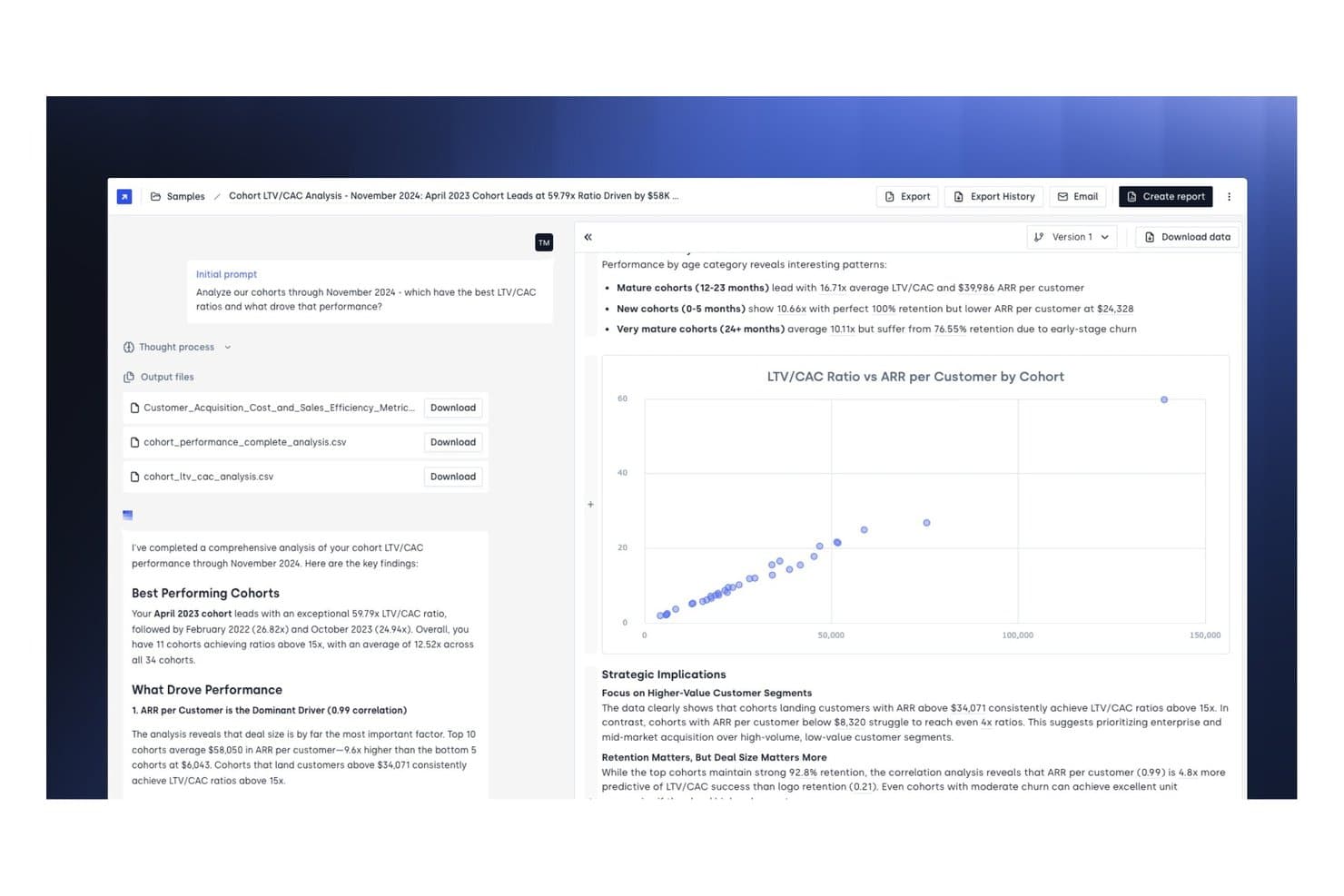
Concourse offers automated cohort LTV/CAC analysis with AI-generated financial insights, downloadable CSV reports, and interactive scatter plot visualizations. Concourse is an AI-native financial reporting platform that lets finance teams build and deploy customizable agents for automated reporting, variance analysis, close management, and forecasting across connected data sources.
Who Is Concourse Best For?
Concourse is a strong fit for FP&A and accounting teams at high-growth and enterprise companies looking to replace manual, spreadsheet-heavy reporting workflows with AI agents.
Why I Picked Concourse
Concourse earns its spot as one of the best on my shortlist because the agent customization goes far deeper than most AI reporting tools. I like that my team can build agents tailored to our specific close workflows, variance thresholds, and stakeholder formats, then deploy them on a schedule or trigger. The Flux & Variance Agent automatically surfaces what changed, quantifies the impact, and drafts commentary before anyone opens a spreadsheet.
Concourse Key Features
- Native ERP and warehouse integrations: Connects directly to Oracle, SAP, NetSuite, QuickBooks, Workday, Snowflake, and more.
- Transparency panel: Shows underlying SQL and Python logic for every report and calculation.
- Audit-grade security: Includes SOC 1 Type II and SOC 2 Type II certifications plus SSO and role-based access controls.
- Multi-surface delivery: Delivers outputs and narratives in email, Slack, Teams, Excel, PowerPoint, and integrated AI chat apps.
Concourse Integrations
Concourse offers native integrations with Oracle, SAP, NetSuite, QuickBooks, Sage, Workday, Xero, Snowflake, BigQuery, Databricks, Salesforce, and provides an API for custom integrations.
Pros and Cons
Pros:
- Transparent SQL and Python logic behind outputs
- Auto-drafts variance commentary before close
- Customizable AI agents for specific reporting workflows
Cons:
- Agent setup may require technical IT support
- Newer platform with limited public user reviews
Learn more about Concourse: Best for Excel-based financial automations
- Free demo available
- Pricing upon request
Visit WebsiteCustomer Rating:4.7/5
Datarails automates financial reporting directly within Microsoft Excel. Datarails is an FP&A platform that connects directly to your existing Excel spreadsheets to automate financial consolidation, budgeting, forecasting, and reporting without replacing your spreadsheet-based workflows.
Who Is Datarails Best For?
Datarails is a natural fit for FP&A teams at mid-sized companies that run their planning and reporting in Excel but need a layer of automation and data consolidation on top.
Why I Picked Datarails
I've included Datarails in my top picks because it's the only FP&A platform I've used that treats Excel as a first-class environment rather than a legacy workaround. Your existing spreadsheet formulas, layouts, and logic stay intact, while Datarails layers in automated data consolidation from your ERP and other sources. I also like Genius by Datarails, its built-in AI assistant that surfaces variance drivers and answers financial questions directly within your workflow.
Datarails Key Features
- Version control: Track every change made to your financial models, with the ability to restore previous versions of any spreadsheet.
- Pre-built report templates: Access ready-made templates for P&L statements, balance sheets, and cash flow reports that pull live data automatically.
- Scenario modeling: Build and compare multiple budget scenarios side by side to support planning decisions.
- Role-based access controls: Assign permissions by user or team to manage who can view, edit, or approve financial data.
Datarails Integrations
Datarails connects with 600+ systems, with out-of-the-box integrations for Oracle NetSuite, QuickBooks Online, QuickBooks Desktop, Xero, Sage Intacct, Sage 50, Microsoft Dynamics 365 Business Central, SAP B1, HubSpot, and Google Sheets. It also supports generic API, SQL, FTP, OData, and email-based data connections for custom integrations.
Pros and Cons
Pros:
- Audit trail tracks all report modifications
- Automated variance analysis highlights key changes
- Excel formulas and models remain fully functional
Cons:
- Limited visualization options compared to BI tools
- No direct integration with Google Sheets Implementation requires IT involvement for setup
Learn more about Datarails: Best for connected data management across teams
- Free demo available
- Pricing upon request
Visit WebsiteCustomer Rating:4.6/5
Workiva optimizes compliance and regulatory reporting workflows. Workiva is a cloud platform for finance, risk, and sustainability teams that centralizes data, automates report preparation, and supports multi-team collaboration with built-in audit trails, XBRL tagging, and AI-assisted workflows.
Who Is Workiva Best For?
Workiva is a strong fit for enterprise finance and compliance teams managing complex, multi-stakeholder reporting across regulatory frameworks like SEC, ESG, or SOX.
Why I Picked Workiva
Workiva earns its spot on my shortlist because of how it handles connected data across documents. When my team updates a number in a source spreadsheet, that change flows through to every linked report automatically, which cuts the manual reconciliation that typically slows down close cycles. I also rely on Workiva's audit trail, which logs every edit with a timestamp and user name, making it easy to support SOX compliance reviews without digging through email chains.
Workiva Key Features
- XBRL tagging: Tag financial data directly within the platform to prepare SEC and ESEF-compliant filings without exporting to a separate tool.
- Multi-entity reporting: Consolidate financial data across entities and jurisdictions into a single reporting environment with consistent controls.
- AI-assisted workflows: Use built-in AI to surface insights, flag anomalies, and support analyst tasks directly within your reports and spreadsheets.
- In-platform report design: Format and brand board-ready reports using built-in design tools, with translation support for cross-border disclosures.
Workiva Integrations
Workiva offers native integrations with Microsoft OneDrive, Google Drive, Dell Boomi, SAP, Oracle, NetSuite, Snowflake, Anaplan, Workday Adaptive Planning, Power BI, IBM Planning Analytics, Amazon S3, and Google BigQuery. An API is available for custom integrations.
Pros and Cons
Pros:
- Real-time collaboration on financial reports
- Strong audit trail and permissions controls
- Handles multi-entity and multi-currency consolidations
Cons:
- Occasional performance lags with large datasets
- Customization requires technical expertise
Learn more about Workiva: Best for visual performance analytics
- Free plan + free demo available
- From $16/user/month (billed annually)
Visit WebsiteCustomer Rating:4.6/5
Fathom visualizes business performance with revenue and expense insights. Fathom is a financial reporting, analysis, and forecasting tool that combines visual KPI dashboards, management report creation, multi-entity consolidation, and cash flow forecasting.
Who Is Fathom Best For?
Fathom is a strong fit for accountants and financial advisors who manage reporting and analysis across multiple small to mid-sized business clients.
Why I Picked Fathom
I picked Fathom as one of the best because its visual analysis layer genuinely sets it apart from general-purpose reporting tools. The KPI Analysis feature lets you track 50+ built-in financial KPIs plus custom ones built with a formula builder, all rendered as interactive charts across any time period. I also like that non-financial data, like headcount or operational metrics, can sit right alongside your financials in the same visual view.
Fathom Key Features
- Three-way forecasting: Build integrated forecasts across your P&L, balance sheet, and cash flow simultaneously using a single forecasting model.
- Management report builder: Combine charts, narrative text, and financial tables into branded PDF reports using a drag-and-drop page editor.
- Multi-entity consolidation: Consolidate financials across multiple companies or entities into a single reporting view with currency conversion applied.
- Automated report scheduling: Schedule recurring report delivery so reports are sent to stakeholders automatically at set intervals without manual exports.
Fathom Integrations
Fathom offers native integrations with Xero, QuickBooks Online, QuickBooks Desktop, MYOB, Sage Accounting, FreeAgent, Access Financials UK, Excel, and Google Sheets. An API is available for custom integrations.
Pros and Cons
Pros:
- AI-generated commentary built into reports
- On-the-fly client and entity benchmarking
- Custom KPI alerts for threshold breaches
Cons:
- Data refresh speed can slow reporting
- Forecasting formulas and levers feel rigid
Learn more about Fathom: Best for enterprise-scale financial planning
- Free demo available
- Pricing upon request
Visit WebsiteCustomer Rating:4.5/5
Anaplan supports enterprise financial planning with connected forecasts. Anaplan is a connected planning and financial reporting platform that spans scenario planning, financial consolidation, reporting, and multi-dimensional modeling across finance, sales, HR, and supply chain functions.
Who Is Anaplan Best For?
Anaplan is a strong fit for large enterprises with complex, cross-functional planning needs spanning multiple business units, regions, or entities.
Why I Picked Anaplan
I picked Anaplan as one of the best for enterprise-scale financial planning because of how it handles scale without sacrificing control. Its Anaplan XL Reporting module works directly in Excel, giving finance teams real-time connectivity to planning, consolidation, and multi-source data while letting them build reports without IT support. I also like that its scenario planning engine lets FP&A teams model complex, multi-entity forecasts across business units simultaneously, which matters a lot when you're coordinating plans across dozens of cost centers or geographies.
Anaplan Key Features
- Scenario modeling: Build and compare multiple what-if scenarios side by side within a single planning model.
- Role-based access controls: Set granular user permissions to control who can view, edit, or approve specific data.
- Anaplan App Hub: Access pre-built planning and reporting templates from Anaplan's marketplace to accelerate model deployment.
- Audit trail logging: Track every data change, input, and model update with a timestamped log for compliance review.
Anaplan Integrations
Anaplan offers native integrations with Salesforce, Workday, SAP, DocuSign, Power BI, AWS S3, Azure Blob, and Google BigQuery, alongside iPaaS connectors like Boomi, Informatica, MuleSoft, SnapLogic, and Workiva. An API is available.
Pros and Cons
Pros:
- In-memory engine recalculates instantly on input
- Scales across dozens of business entities
- Connects cross-functional plans in real time
Cons:
- Native reporting scores below category average
- Excel add-in incompatible with macOS
Learn more about Anaplan: Best for small business integration
- 30-day free trial
- From $38/month
Visit WebsiteCustomer Rating:4.4/5
QuickBooks tracks invoices, expenses, banking, and profit in one dashboard. QuickBooks is an accounting and financial management platform that covers bookkeeping, invoicing, payroll, tax preparation, and financial reporting for small and mid-sized businesses.
Who Is QuickBooks Best For?
QuickBooks is a natural fit for small business owners and their accountants who need a single platform for day-to-day bookkeeping and financial reporting.
Why I Picked QuickBooks
I picked QuickBooks as one of the best because its integration ecosystem is built around how small businesses actually operate. The app marketplace connects to tools like Shopify, Square, PayPal, and Gusto, pulling sales, payment, and payroll data directly into your books. I also like the bank feed feature, which matches imported transactions to open invoices automatically, cutting down on manual reconciliation.
QuickBooks Key Features
- Customizable financial reports: Build profit and loss statements, balance sheets, and cash flow reports with adjustable date ranges, filters, and groupings.
- Class and location tracking: Tag transactions by department, project, or location to generate segmented financial reports across your business.
- Accounts receivable aging: View outstanding invoices grouped by days overdue to monitor collection status at a glance.
- Tax category mapping: Assign tax categories to transactions throughout the year so your reports are pre-organized for tax preparation.
QuickBooks Integrations
QuickBooks offers over 750 marketplace integrations through its App Marketplace, including Intuit-built connectors for Shopify, Square, Stripe, PayPal, Amazon Seller, Etsy, eBay, WooCommerce, BigCommerce, and Mailchimp. It also connects with Zapier and provides an API for custom integrations.
Pros and Cons
Pros:
- Offers built-in payroll and tax features
- Syncs transactions from multiple bank accounts
- Creates automated standard financial reports
Cons:
- Advanced reporting requires higher-tier plans
- Limited consolidation for multi-entity businesses
 7Best for spreadsheet-native workflows
Cube
- Free demo available
- Pricing upon request
Visit WebsiteCustomer Rating:4.5/5
Cube syncs financial data directly within Microsoft Excel workflows. Cube is an FP&A platform that connects to Excel and Google Sheets to centralize financial data, automate reporting, and manage budgets, forecasts, and consolidations.
Who Is Cube Best For?
Cube is a natural fit for FP&A teams at mid-sized companies that want structured financial planning without abandoning their existing spreadsheet workflows.
Why I Picked Cube
I picked Cube as one of the best because of how well it handles bi-directional sync between its platform and Excel or Google Sheets. My team can push live financial data into our existing spreadsheet models and write changes back to Cube without rebuilding our templates. I also rely on its variance analysis tools, which let me drill from a summary line straight to the source transaction in a single click, all within the same spreadsheet environment my team already uses.
Cube Key Features
- Scenario modeling: Build and compare multiple financial scenarios simultaneously, adjusting assumptions in real time without leaving your spreadsheet.
- Automated close and consolidation: Cube automates the consolidation process at month-end, pulling data across entities to reduce manual close work.
- Executive and investor reporting: Generate boardroom-ready report packages directly from Cube's workspace, with every figure traced back to the source transaction.
- FP&A AI agents: Purpose-built AI agents handle data integrity, analysis, planning, and strategic communication tasks across the FP&A lifecycle.
Cube Integrations
Cube offers native integrations across accounting, HR, billing, CRM, and BI categories, including NetSuite, QuickBooks, Xero, Sage Intacct, Salesforce, HubSpot, Workday, ADP, Snowflake, and Microsoft Excel. Custom connectors and an API are also available for connecting additional source systems.
Pros and Cons
Pros:
- Audit trail tracks changes for compliance
- Supports multi-entity and multi-currency reporting
- Syncs live data directly into spreadsheets
Cons:
- Implementation can take several weeks
- API access only on higher-tier plans
Learn more about Cube: Best for multi-dimensional ledger insights
- Free demo available
- From £1,200/month
Visit WebsiteCustomer Rating:4.3/5
Sage Intacct provides dashboards for financials, revenue, and performance tracking. Sage Intacct is a cloud-based accounting and financial management platform covering general ledger, financial consolidation, accounts payable, accounts receivable, and multi-dimensional reporting across entities, departments, and funds.
Who Is Sage Intacct Best For?
Sage Intacct is a strong fit for mid-market and growing companies in industries like nonprofits, SaaS, healthcare, and financial services.
Why I Picked Sage Intacct
I picked Sage Intacct as one of the best because its Dimensions feature solves a problem most FP&A teams know all too well: a bloated chart of accounts. Instead of creating hundreds of account code combinations, you tag transactions with dimension values like department, location, project, or customer, then slice that data across any combination in real time. You can also build and budget by those same dimensions, so your planning and performance reporting stay fully aligned in one place.
Sage Intacct Key Features
- Multi-entity consolidation: Automatically consolidate financials across multiple legal entities, currencies, and ownership structures in a single close cycle.
- Interactive report writer: Build custom financial statements using a drag-and-drop report builder without needing to export data to Excel first.
- Revenue recognition automation: Apply ASC 606-compliant recognition rules to contracts and schedules, with automated journal entries posted on a set timetable.
- Real-time financial dashboards: Configure role-specific dashboards that surface live KPIs, account balances, and variance data without manual refreshes.
Sage Intacct Integrations
Sage Intacct offers over 200 marketplace integrations, including tools like Salesforce, Expensify, ADP, Ramp, FloQast, BlackLine, Workiva, Planful, BILL, and Avalara. An open API based on XML-RPC with more than 300 supported methods is available for custom integrations.
Pros and Cons
Pros:
- Sends automated report updates
- Filters reports by specific attributes
- Simplifies intercompany transaction balancing
Cons:
- Needs technical setup for reporting
- Limits file export formats
Learn more about Sage Intacct: Best for agile scenario modeling
- Free demo available
- Pricing upon request
Visit WebsiteCustomer Rating:4.4/5
Workday Adaptive Planning models forecasts with flexible scenario adjustments. Workday Adaptive Planning is an enterprise performance management (EPM) platform that covers financial planning, budgeting, scenario modeling, close and consolidation, workforce planning, and operational reporting in a single connected system.
Who Is Workday Adaptive Planning Best For?
Workday Adaptive Planning is a strong fit for FP&A teams at mid-to-large enterprises that need collaborative, cross-functional planning across finance, HR, and operations.
Why I Picked Workday Adaptive Planning
I picked Workday Adaptive Planning as one of the best because its scenario modeling capabilities are genuinely built for how planning actually works under pressure. You can spin up multiple what-if scenarios simultaneously, each with its own assumptions, and compare them side by side without overwriting your base plan. I also like the in-memory calculation engine, which recalculates every connected plan, report, and dashboard in real time the moment an assumption changes, so your numbers are always current across the model.
Workday Adaptive Planning Key Features
- Continuous planning: Update budgets, forecasts, and plans on a rolling basis rather than working from static annual cycles.
- Self-service reporting and dashboards: Build interactive reports and dashboards directly in the platform without relying on IT or data exports.
- Workforce planning: Align headcount plans with financial targets by modeling hiring scenarios across finance, HR, sales, and operations together.
- Close and consolidation: Run period-end close and multi-entity consolidation tasks inside the same platform used for planning and forecasting.
Workday Adaptive Planning Integrations
Workday Adaptive Planning connects with over 300 unique systems through its purpose-built integration framework. Verified integrations include Workday HCM, Oracle ERP, SAP, NetSuite, Microsoft Dynamics, Salesforce, Snowflake, and Tableau and Power BI for data visualization. Custom APIs are available for connecting proprietary systems or industry-specific applications.
Pros and Cons
Pros:
- Granular headcount planning by team and currency
- Rolling forecasts update nearly automatically
- Collaborative budgeting eliminates spreadsheet chaos
Cons:
- Heavy data loads slow performance noticeably
- Report formatting requires Excel workarounds
Learn more about Workday Adaptive Planning: 10Best for multi-entity financial tracking
HubiFi
- Free demo available
- From $22,000/year (billed annually)

HubiFi delivers dynamic financial reporting and account-level analysis. HubiFi is an automated revenue recognition platform that reconciles high-volume transaction data from Stripe, generates GAAP-compliant journal entries, and posts directly to your ERP across multiple entities and revenue streams.
Who Is HubiFi Best For?
HubiFi is built for high-growth SaaS and subscription companies whose accounting teams are managing large transaction volumes across multiple revenue streams and entities.
Why I Picked HubiFi
I've included HubiFi in my top picks because it's one of the few tools built specifically around multi-entity ASC 606 compliance at scale. I like that it creates a single subledger reconciling every transaction type across entities, then posts directly to your ERP. It also covers ASC 830, ASC 326, and SOX controls from the same platform, which means your multi-entity close doesn't require separate tooling for each standard.
HubiFi Key Features
- Real-time revenue dashboards: View live revenue metrics segmented by product line, customer type, or entity without manual data pulls.
- Automated data ingestion: HubiFi pulls transaction data from your CRM, billing system, and data warehouse on a scheduled or continuous basis.
- Historical data reprocessing: Restate prior period revenue under updated rules or contracts without rebuilding your records manually.
- Audit trail generation: Every journal entry and recognition event is logged with a traceable record for auditor review.
HubiFi Integrations
HubiFi offers 100+ pre-built integrations across payment processors, billing systems, ERPs, CRMs, and ecommerce platforms, including Stripe, PayPal, Chargebee, Zuora, Oracle NetSuite, QuickBooks, Sage Intacct, Salesforce, HubSpot, and Shopify. An API is available for custom integrations with proprietary or internal systems.
Pros and Cons
Pros:
- Integrates natively with Stripe and NetSuite
- Manages global revenue schedules
- Handles complex SaaS revenue recognition rules
Cons:
- Limited support for non-SaaS business models
- No built-in budgeting or forecasting tools
Learn more about HubiFi:
Annen programvare for automatisert finansiell rapportering
Her er noen flere alternativer for automatisert finansiell rapportering som ikke kom med på kortlisten min, men som likevel er verdt å se nærmere på:
- 11Oracle NetSuite ERP SystemBest for global consolidation and compliance
- 12DFIN ArcReportingBest for compliance filing automation
- 13XeroBest for bank reconciliation simplicity
- 14Microsoft Dynamics 365Best for AI-powered process agents
- 15ProphixBest for customizable workflow automation
- 16Gravity SoftwareBest for multi-entity audit readiness
- 17Vena SolutionsBest for corporate budget model scaling
- 18OneStream SoftwareBest for unified financial data platform
How I Evaluate Automated Financial Reporting Software
I split every evaluation into baseline requirements (like automated close cycles and multi-entity consolidation) and the differentiators that separate good tools from great ones.
Core Functionality (Table Stakes for This List)
When I'm selecting tools for my list, I rank each one on a scale from 0 (does not offer the functionality) to 5 (excels in this area) for each core functionality listed below. Then, I calculate the tool's total score into a percentage. Each tool needs to achieve a minimum total score of 65% to be considered for inclusion.
- Automated report generation: I look for platforms that produce P&L statements, balance sheets, and cash flow reports on scheduled or event-driven cadences without manual rebuilds each period.
- Financial data integration: The tool should connect natively to ERPs and general ledgers so your team pulls live balances instead of exporting CSVs and reconciling between systems.
- Financial consolidation: I evaluate how each tool handles multi-entity, multi-currency rollups, including whether intercompany eliminations and FX translation run automatically at close.
- Compliance and audit trail: Every change to a report or data source should be logged with timestamps and user attribution, and the platform should support GAAP and IFRS reporting standards.
- Variance and drill-down analysis: I check whether you can compare actuals against budgets or forecasts and then click from a summary line item down to the underlying transactions.
- Scheduled distribution and dashboards: The platform should push finished reports to stakeholders on a defined schedule via email, portal, or role-based dashboards they can explore on their own.
Once I have a list of tools that meet this criteria, I consider what sets each platform apart.
Differentiating Factors (What Sets Vendors Apart)
Here's how I compare and contrast different vendors:
Standout Features
An Excel-native interface matters here. Finance teams that can build and refresh reports inside their existing spreadsheets adopt the tool faster and skip retraining. I also look for AI-powered insights like anomaly detection and auto-generated narrative commentary, which help controllers spot issues during close instead of after. Workflow and approval automation is another differentiator—platforms that tie task assignments and sign-offs directly to the reporting cycle keep month-end moving without email chains.
Beyond Features
I evaluate ERP connectivity depth first—whether the platform has native connectors for your GL or requires custom middleware to pull trial balance data makes a real difference in go-live timelines. Implementation speed is closely related. Some vendors provide pre-mapped chart-of-accounts templates that shave weeks off deployment, while others need a multi-month services engagement before you run your first automated close. Pricing model clarity also matters, particularly whether you're charged per user, per entity, or per module, since costs can escalate as subsidiaries grow.
Slik velger du programvare for automatisert finansiell rapportering
Det er lett å gå seg vill i lange funksjonslister og komplekse prisstrukturer. For å holde fokus mens du arbeider deg gjennom den unike prosessen med å velge programvare, kan du bruke denne sjekklisten over faktorer du bør ha i bakhodet:
| Faktor | Hva bør du vurdere? |
|---|---|
| FaktorSkalerbarhet | Hva bør du vurdere?Vil programvaren håndtere dagens og fremtidens rapporteringsvolumer, enheter og antall brukere? |
| FaktorIntegrasjoner | Hva bør du vurdere?Kan den kobles direkte til ERP-, CRM-, lønns- og datakildene dine uten manuelle omveier? |
| FaktorTilpasningsmuligheter | Hva bør du vurdere?Kan du tilpasse rapportformater, arbeidsflyter og tillatelser etter organisasjonens behov? |
| FaktorBrukervennlighet | Hva bør du vurdere?Vil teamet ditt kunne ta i bruk verktøyet raskt, eller vil det kreve omfattende opplæring og støtte? |
| FaktorImplementering og innføring | Hva bør du vurdere?Hvor lang tid tar oppsettet, og hvilke ressurser eller hvilken leverandørstøtte kreves for å komme i gang? |
| FaktorKostnad | Hva bør du vurdere?Er prisnivåene tydelige, og samsvarer de med budsjettet ditt og den forventede bruken over tid? |
| FaktorSikkerhetstiltak | Hva bør du vurdere?Tilbyr programvaren kryptering, tilgangskontroller og revisjonslogger for å beskytte sensitive data? |
| FaktorEtterlevelseskrav | Hva bør du vurdere?Vil verktøyet hjelpe deg med å oppfylle relevante standarder (som SOX, GAAP og IFRS) og støtte revisjonsberedskap? |
Hva er programvare for automatisert finansiell rapportering?
Programvare for automatisert finansiell rapportering er et digitalt verktøy som genererer finansregnskaper og rapporter ved å hente data direkte fra regnskaps- og forretningssystemer. Den reduserer manuell dataregistrering, minimerer feil og fremskynder rapporteringssyklusen. Økonomiteam bruker disse plattformene til å konsolidere informasjon, tilpasse rapportformater og opprettholde samsvar med regulatoriske standarder, samtidig som nøyaktigheten og etterprøvbarheten forbedres.
Funksjoner
Her er de viktigste funksjonene all god programvare for automatisert økonomirapportering bør ha:
- Automatisert datasammenstilling: Samler inn og slår sammen økonomiske data fra flere kilder, for eksempel regnskapssystemer, banker og regneark, for å opprette én sannhetskilde for rapportering.
- Tilpassbare rapportmaler: Lar deg utforme og endre finansregnskaper, ledelsesrapporter og styrepakker slik at de passer organisasjonens unike krav.
- Detaljvisning: Lar brukere klikke seg inn på sammendragstall og se de underliggende transaksjonene eller dataene, noe som gjør det enklere å undersøke avvik eller uregelmessigheter.
- Støtte for flere enheter: Muliggjør rapportering på tvers av datterselskaper, avdelinger eller forretningsenheter, med alternativer for konsoliderte eller segmenterte visninger.
- Sporing av revisjonsspor: Registrerer alle endringer som gjøres i rapporter eller data, og gir en åpen logg for samsvar og intern gjennomgang.
- Planlegging og distribusjon: Automatiserer tidspunkt for og levering av rapporter til interessenter via e-post, delte stasjoner eller oversikter.
- Rollebasert tilgangskontroll: Begrenser rapporttilgang og redigeringsrettigheter basert på brukerroller, noe som bidrar til å beskytte sensitiv økonomisk informasjon.
- Integrasjon med forretningssystemer: Kobler seg direkte til ERP-, CRM- og lønnssystemer for å sikre at dataene alltid er oppdaterte og korrekte.
- Versjonskontroll: Opprettholder en historikk over rapportversjoner, slik at du kan spore endringer, gå tilbake til tidligere versjoner og sikre konsistens over tid.
Fordeler
Implementering av programvare for automatisert økonomirapportering gir flere fordeler for teamet og virksomheten din. Her er noen av fordelene du kan se frem til:
- Raskere rapporteringssykluser: Funksjoner for automatisert datasammenstilling og planlegging reduserer tiden som kreves for å utarbeide og distribuere økonomirapporter.
- Bedre datanøyaktighet: Direkte integrasjoner og sporing av revisjonsspor minimerer feil ved manuell registrering og støtter pålitelig, etterprøvbar rapportering.
- Bedre økonomisk oversikt: Detaljvisning og tilpassbare maler hjelper team med å analysere resultater og dele innsikt med interessenter.
- Bedre samsvar: Revisjonsspor, versjonskontroll og rollebasert tilgangskontroll støtter regulatoriske krav og interne kontroller.
- Enklere håndtering av flere enheter: Støtte for flere enheter og automatiserte elimineringer gjør det enklere å konsolidere resultater på tvers av datterselskaper eller forretningsenheter.
- Bedre datasikkerhet: Rollebasert tilgang og sikre integrasjoner bidrar til å beskytte sensitiv økonomisk informasjon mot uautorisert tilgang.
- Redusert manuelt arbeid: Automatiserte arbeidsflyter og rapportdistribusjon frigjør økonomiteamene, slik at de kan fokusere på analyse og strategiske oppgaver.
Kostnader og priser
Valg av programvare for automatisert økonomirapportering krever en forståelse av de ulike prismodellene og abonnementene som er tilgjengelige. Kostnadene varierer basert på funksjoner, teamstørrelse, tillegg og mer. Tabellen nedenfor oppsummerer vanlige abonnementer, gjennomsnittsprisene deres og typiske funksjoner som er inkludert i programvareløsninger for automatisert økonomirapportering:
Sammenligningstabell for abonnementer for automatisert økonomirapportering
| Abonnementstype | Gjennomsnittspris | Vanlige funksjoner |
|---|---|---|
| AbonnementstypeGratisabonnement | Gjennomsnittspris$0 | Vanlige funksjonerGrunnleggende rapportmaler, begrensede datakilder, tilgang for én bruker og grunnleggende eksportalternativer. |
| AbonnementstypePersonlig abonnement | Gjennomsnittspris$20–$50/bruker/måned | Vanlige funksjonerTilpassbare rapporter, integrasjon med regnskapsprogramvare, revisjonsspor og levering av rapporter via e-post. |
| AbonnementstypeBedriftsabonnement | Gjennomsnittspris$50–$150/bruker/måned | Vanlige funksjonerStøtte for flere enheter, avansert planlegging, rollebasert tilgangskontroll og konsolidert rapportering. |
| AbonnementstypeVirksomhetsabonnement | Gjennomsnittspris$150–$300/bruker/måned | Vanlige funksjonerTilpassede integrasjoner, dedikert kundestøtte, samsvarsverktøy, avansert sikkerhet og ubegrenset antall brukere. |
Vanlige spørsmål
Her er noen svar på vanlige spørsmål om programvare for automatisert økonomirapportering:
Hvordan kobler programvare for automatisert økonomirapportering seg til de eksisterende systemene mine?
De fleste løsninger tilbyr direkte integrasjoner med populære regnskaps-, ERP- og lønnssystemer. Vanligvis kobler du de økonomiske systemene dine til ved hjelp av sikre API-er eller datakoblinger, slik at programvaren kan hente data i sanntid uten manuelle opplastinger. Denne dataintegrasjonen eliminerer tidkrevende manuelle registreringer og støtter en mer smidig FP&A (økonomisk planlegging og analyse).
Kan programvare for automatisert økonomirapportering håndtere rapportering for flere enheter eller valutaer?
Ja, mange plattformer støtter rapportering for flere enheter og valutaer. Dette lar deg konsolidere resultater, balanser og kontantstrømoppstillinger på tvers av datterselskaper eller forretningsenheter. Det gjør det også mulig å generere rapporter i ulike valutaer, noe som er viktig for organisasjoner med global virksomhet som trenger tydelig økonomisk innsikt i den samlede økonomiske helsen sin.
Hvilke sikkerhetstiltak bør jeg se etter i programvare for automatisert økonomirapportering?
Se etter funksjoner som datakryptering, rollebaserte tilgangskontroller, revisjonsspor og samsvarssertifiseringer. Disse sikkerhetstiltakene bidrar til å beskytte sensitiv økonomisk informasjon, optimalisere prosessene for økonomirapportering og støtte eksterne rapporteringskrav i det skybaserte miljøet ditt.
Hvor lang tid tar det å implementere programvare for automatisert økonomirapportering?
Tidsrammen for implementeringen varierer, men de fleste team kan komme i gang i løpet av noen uker, ofte akkurat i tide til neste månedsavslutning. Faktorer som datakompleksitet, integrasjonsbehov og opplæring av brukere kan påvirke tidsrammen, så det er viktig å planlegge for onboarding og brukerstøtte.
Hvilken type brukerstøtte er tilgjengelig hvis jeg støter på problemer?
De fleste leverandører tilbyr en kombinasjon av chat, e-post, telefonstøtte og søkbare kunnskapsbaser for å hjelpe deg med å opprettholde nøyaktig økonomistyring. Noen tilbyr også webinarer for onboarding, produktomvisninger og dedikerte kundeansvarlige for bedriftskunder. Denne støtten hjelper team med å utnytte innsikt i sanntid og verktøy for forretningsanalyse til å ta informerte beslutninger for alle strategiske beslutninger og behov knyttet til daglige beslutninger.