

Programvare for betalingstildeling automatiserer prosessen med å koble innbetalinger til åpne fakturaer, noe som gjør avstemmingen raskere for økonomiteam som håndterer store transaksjonsvolumer. Hvis du trenger verktøy som eliminerer manuelt arbeid, fungerer med komplekse ERP-systemer og skalerer med virksomheten, er dette alternativene jeg anbefaler at du ser nærmere på.
Med så mange alternativer som hevder å tilby AI-basert matching, bankintegrasjoner og avansert rapportering, er det lett å ende opp med programvare som skaper flere problemer enn den løser. Denne veiledningen hjelper deg med å sammenligne de beste verktøyene for betalingstildeling, navigere trygt i kjøpsprosessen og finne en løsning som passer teamets spesifikke behov.
Hvorfor du kan stole på våre programvareanbefalinger
6,700+
Reviews
20
Industry experts
16+
Evaluation factors
14
Years
Teamet vårt har testet og anmeldt programvare siden 2012. Vi er selv økonomiledere, så vi vet hvor vanskelig og hvor viktig det er å velge riktig programvare.
I denne guiden har vi vurdert verktøyene gjennom praktisk testing og uavhengig research og gitt dem poeng ut fra våre utvelgelseskriterier.
Anmeldelsene våre bygger på vår egen redaksjonelle vurdering. De er ikke et salgsargument.
Sammenligningstabell: Programvare for betalingstildeling
Denne sammenligningstabellen oppsummerer prisdetaljene for mine utvalgte programvareløsninger for betalingstildeling.
| Tool | Best For | Trial Info | Price | ||
|---|---|---|---|---|---|
| 1 | Best for AR teams linking cash to collections | Free plan + free demo available | Pricing upon request | Website | |
| 2 | Best for multi-ERP enterprise environments | Free demo available | Pricing upon request | Website | |
| 3 | Best for mid-market AR teams | Free demo available | Pricing upon request | Website | |
| 4 | Best for AI matching | Free demo available | Pricing upon request | Website | |
| 5 | Best for complex multi-ERP environments | Free demo available | Pricing upon request | Website | |
| 6 | Best for end-to-end accounting closure | Free demo available | Pricing upon request | Website | |
| 7 | Best for AI-driven explainable payment matching | Free demo available | Pricing upon request | Website | |
| 8 | Best for advanced cash application reporting | Free demo available | Pricing upon request | Website | |
| 9 | Best for AI-driven enterprise automation | Free demo available | Pricing upon request | Website | |
| 10 | Best for native SAP ecosystem integration | Free demo available | Pricing upon request | Website |


Anmeldelser av programvare for betalingstildeling
Nedenfor finner du mine detaljerte sammendrag av de beste programvareløsningene for betalingstildeling som kom med på kortlisten. Anmeldelsene mine gir en detaljert oversikt over funksjonene, de beste bruksområdene og integrasjonene for hver programvare, slik at du kan finne den beste løsningen for deg.
 Best for AR teams linking cash to collections
- Free plan + free demo available
- Pricing upon request
Visit WebsiteCustomer Rating:4.5/5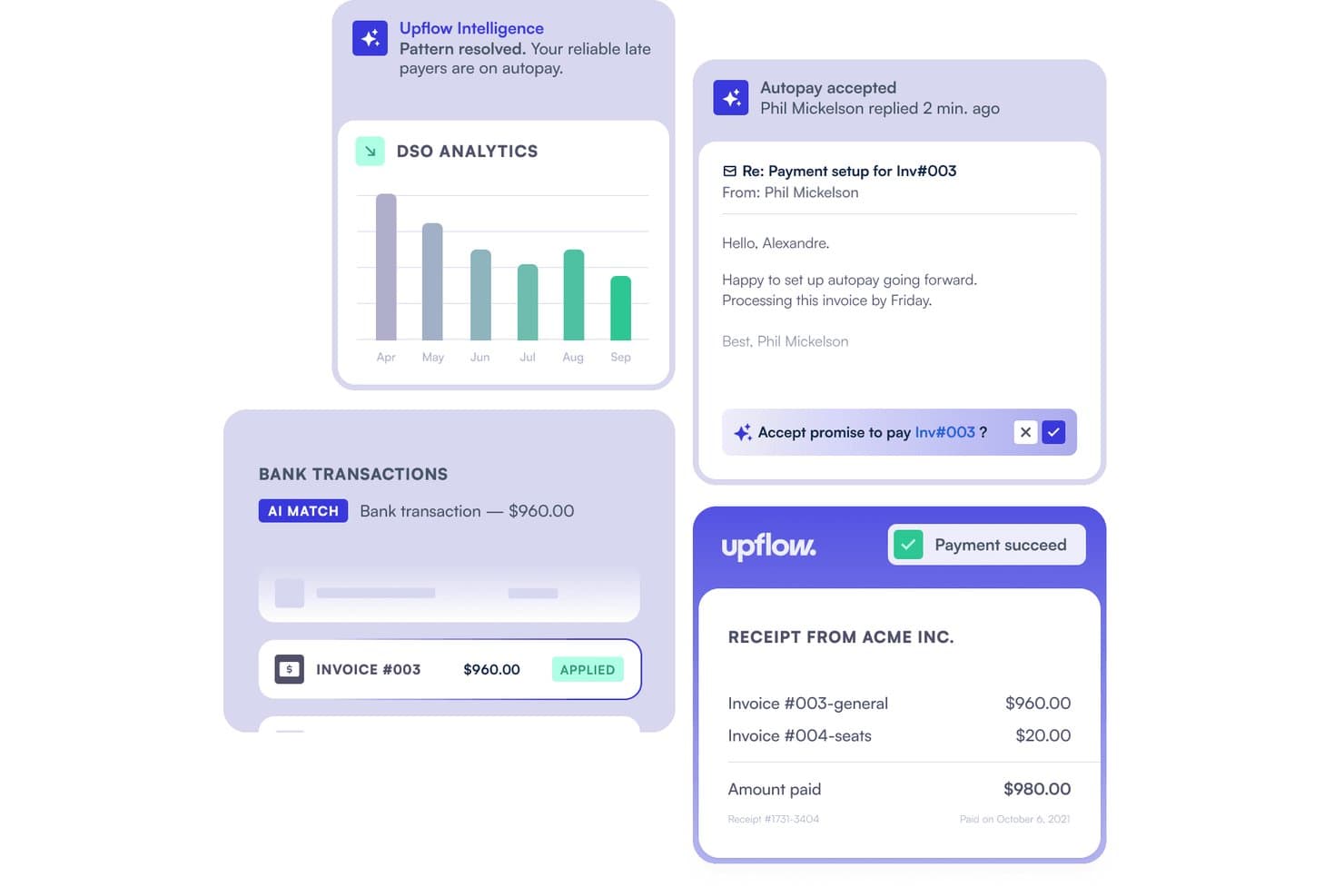
Upflow automates cash application by matching bank transactions to invoices. Upflow is a B2B accounts receivable platform that combines AI-powered cash application, automated collections, remittance capture, and ERP-connected payment matching across NetSuite, Sage Intacct, QuickBooks, SAP, and Dynamics 365.
Who Is Upflow Best For?
Upflow fits mid-market finance teams that want to connect cash application directly to collections, rather than treating them as separate workflows.
Why I Picked Upflow
I picked Upflow as one of the best because it's built around a principle most cash application tools ignore: applied cash should immediately inform what your collections team does next. The Cash App Agent posts confident matches automatically, and that reconciliation data feeds directly into AR aging and collections workflows, so there's no handoff lag between knowing a payment landed and acting on what's still outstanding. I also love that the AI surfaces bulk-payment combinations, grouping open invoices to match a single bank transfer when no invoice reference exists.
Upflow Key Features
- Exception workflow routing: Uncertain or unmatched transactions are sent to a built-in review queue where you can confirm, adjust, override, or unapply a match.
- Plaid-powered bank feeds: Upflow connects to 12,000+ financial institutions via Plaid, pulling transactions daily through a secure OAuth connection without storing your banking credentials.
- Six-month cash forecasting: The forecasting tool uses customer payment behavior, promise-to-pay dates, disputes, and upcoming billings to project expected cash inflows over the next six months.
- ERP write-back with audit trail: Matched payments sync to your ERP in real time, with auto-applied and manually applied transactions logged separately in a full audit trail.
Upflow Integrations
Upflow offers 14+ native integrations, including NetSuite, Sage Intacct, QuickBooks Online, Xero, SAP S/4HANA, and Microsoft Dynamics 365 Business Central. Its REST API, available from the Grow plan, supports custom integrations.
Pros and Cons
Pros:
- Collection workflows keep follow-ups visible
- Payment tracking clarifies invoice status
- Confident single-invoice matches auto-apply
Cons:
- Scanned and portal remittances aren’t documented
- Ambiguous matches still need manual review
Learn more about Upflow: Best for multi-ERP enterprise environments
- Free demo available
- Pricing upon request
Visit WebsiteCustomer Rating:3.5/5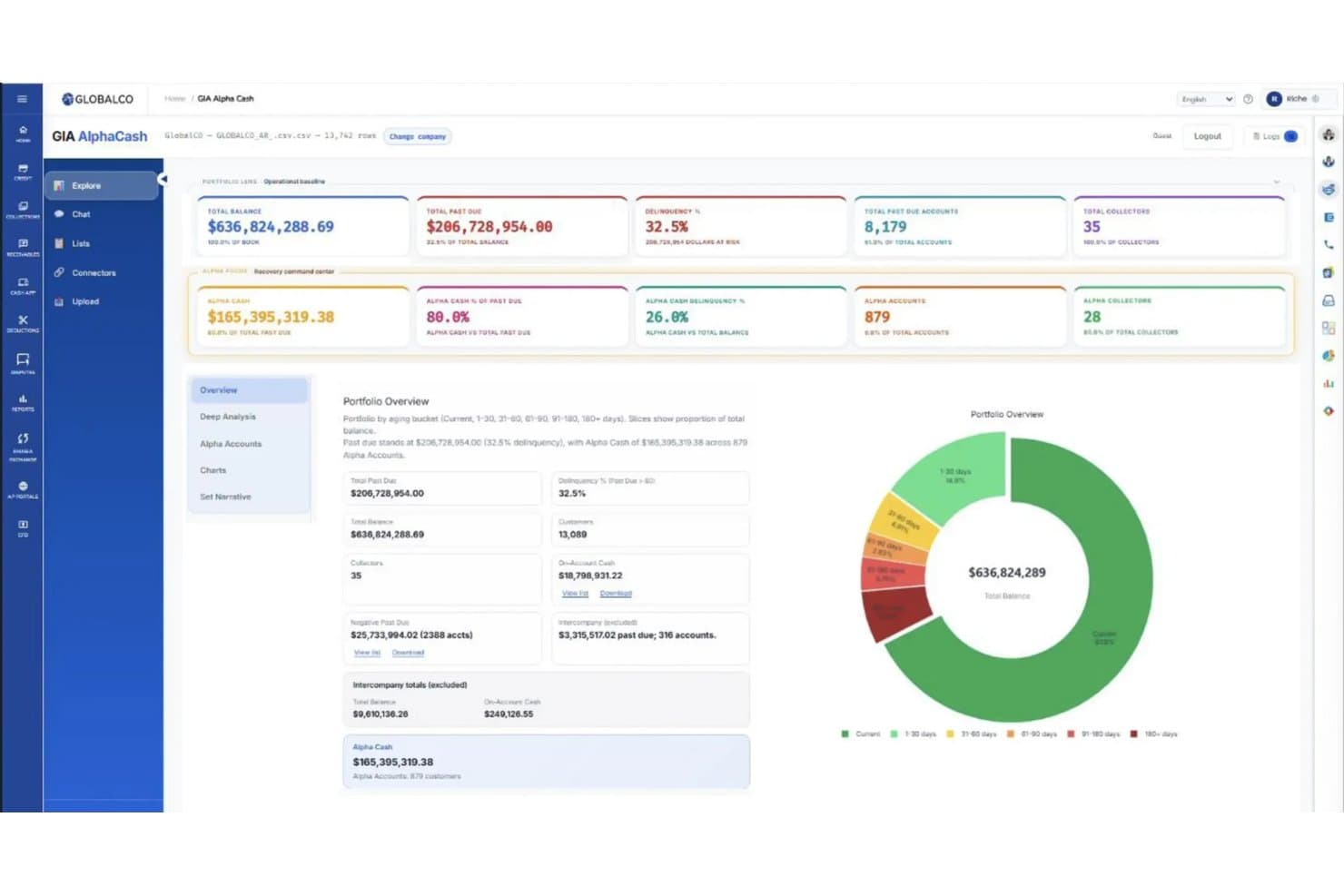
Emagia tracks past-due cash recovery across aging buckets in one view. Emagia is an AI-powered cash application platform that handles automated payment matching, remittance aggregation, deduction coding, and cash posting across 15+ ERP systems and 170+ global banking integrations.
Who Is Emagia Best For?
Emagia is a strong fit for large enterprises running multiple ERPs that need centralized cash application across complex, high-volume AR environments.
Why I Picked Emagia
I picked Emagia as one of the best because it's purpose-built to handle the exact complexity that breaks other cash application tools: running multiple ERPs at once. Its single-platform architecture supports 15+ ERP systems simultaneously, with AI managing the differences between them, so your team isn't manually reconciling data across SAP, Oracle, and NetSuite in parallel. I'm also impressed by the remittance auto-aggregation feature, which pulls remittance data from customer AP portals and logistics portals automatically, which is a real bottleneck in high-volume environments. ConvaTec processed $4B in receivables across 44 countries using Emagia, hitting over 95% automated cash application in 15 months.
Emagia Key Features
- Touchless data capture: Emagia automatically captures payment, remittance, and lockbox data from multiple sources and languages, covering over 97% of incoming items without manual input.
- Digital assistant Gia: An AI copilot that handles voice, chat, and email outreach to customers to collect missing remittance information directly.
- Intelligent exception handling: When a payment can't be matched automatically, Gia surfaces smart suggestions to help your team resolve exceptions and disputes faster.
- Multi-currency and multi-language support: Emagia processes payments across multiple currencies, languages, and lockboxes simultaneously within a single platform instance.
Emagia Integrations
Emagia offers pre-built native integrations with 15+ ERP systems, including SAP, Oracle, JD Edwards, PeopleSoft, Microsoft Dynamics, NetSuite, and Sage, plus connectivity to 170+ global and local banks through formats like Open Banking APIs, BAI2, MT940, CAMT.053, and EDI. It also connects with customer AP portals and logistics POD/BOL portals for remittance aggregation, and supports custom integrations through its API.
Pros and Cons
Pros:
- AI assistant manages unmatched payments outreach
- Automated remittance capture from customer portals
- Handles complex multi-ERP reconciliation workflows
Cons:
- Reporting dashboards lack advanced customization options
- Setup for highly custom ERP landscapes takes time
Learn more about Emagia: Best for mid-market AR teams
- Free demo available
- Pricing upon request
Visit WebsiteCustomer Rating:2.3/5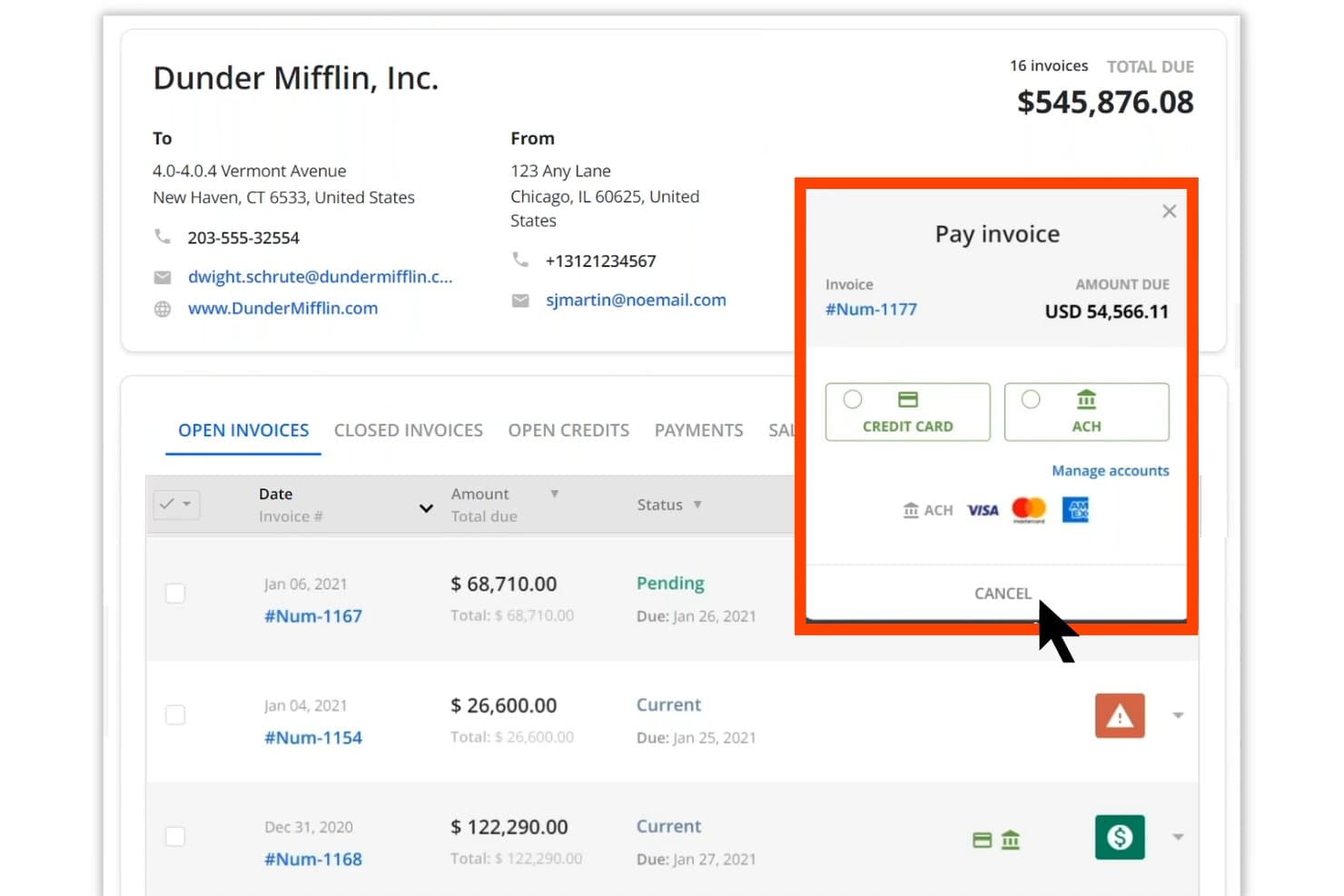
Quadient lets users pay invoices via credit card or ACH directly in the portal. Quadient AR Automation is an end-to-end accounts receivable platform that covers cash application, credit management, collections workflows, dispute management, and customer payment processing in one centralized system.
Who Is Quadient Best For?
Quadient AR is a strong fit for mid-market B2B finance teams that need a full order-to-cash platform with multi-ERP connectivity and structured collections workflows.
Why I Picked Quadient
Quadient AR earns its spot on my list because its AI-based cash application module handles one of the messiest parts of mid-market AR: matching payments when remittance data is incomplete. The machine learning engine analyzes payment type, amount, and any available remittance details to suggest a customer match, so your team reviews and approves rather than manually re-keys every transaction. Combined with collections workflows, dispute management, and credit controls in one platform, mid-market finance teams get full order-to-cash coverage without stitching together separate tools.
Quadient Key Features
- Customer self-service payment portal: Gives your customers a secure, branded portal to view invoices, schedule payments, and pay on their own timeline without contacting your team.
- Configurable rules engine: Lets you set automated reminder sequences and escalation triggers based on your own business rules, so follow-ups go out consistently without manual intervention.
- AI-powered payment behavior prediction: Analyzes historical payment data to flag at-risk accounts and surface collection priorities before invoices go overdue.
- Multi-ERP connectivity: Integrates natively with NetSuite, SAP, Microsoft Dynamics, Sage, QuickBooks, Acumatica, and Xero, so AR data syncs across your existing systems without manual exports.
Quadient Integrations
Quadient AR offers native integrations with major ERP and accounting systems, including NetSuite, SAP, Microsoft Dynamics, Sage Intacct, QuickBooks, Acumatica, and Xero. An API is available for custom integrations, and it connects to payment processors and banking data feeds to support cash application workflows.
Pros and Cons
Pros:
- Configurable workflows for mid-market requirements
- Full order-to-cash platform in one system
- AI-based payment matching reduces manual review
Cons:
- Dispute management features may lack depth
- Initial configuration can be time-consuming
Learn more about Quadient:
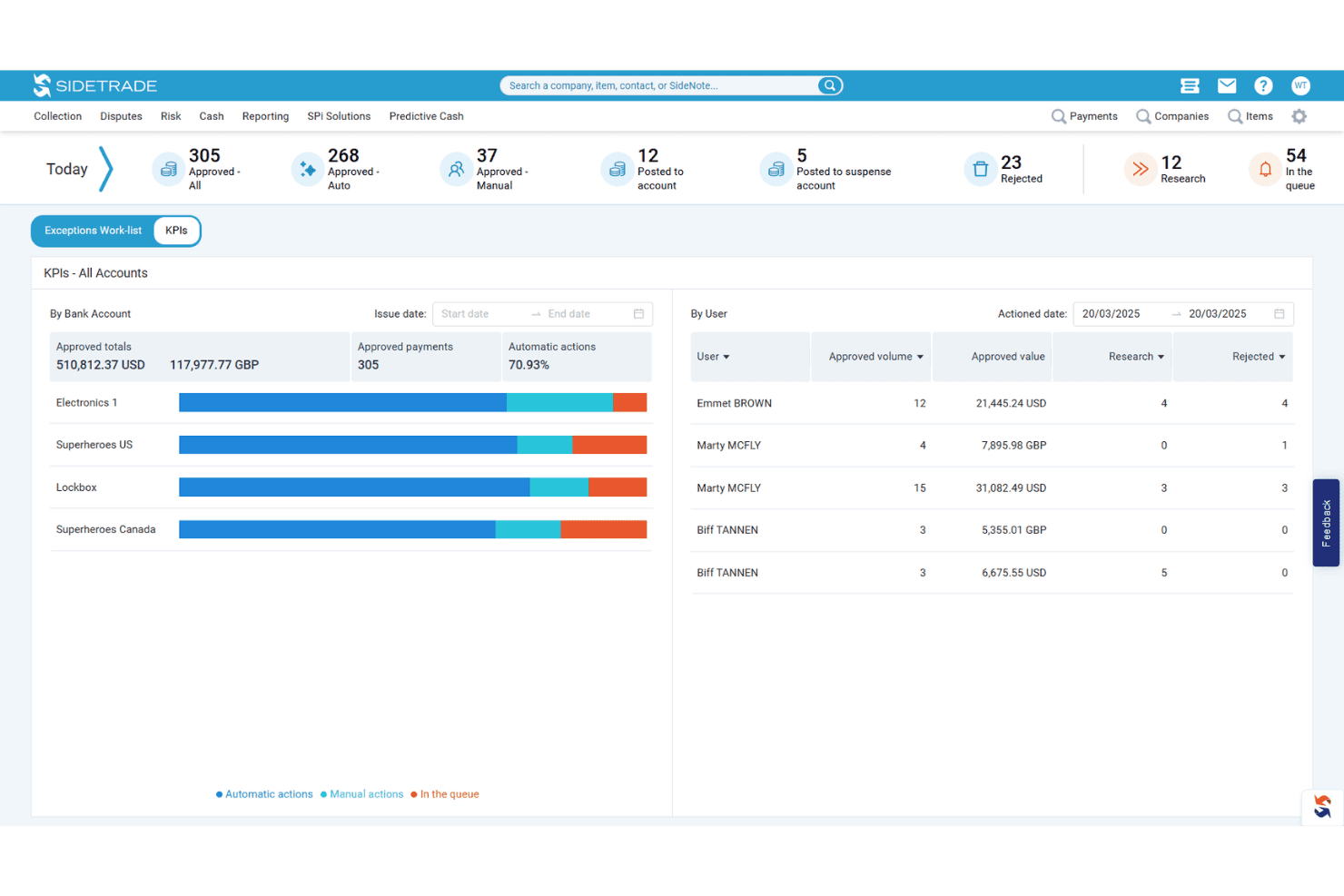
Sidetrade tracks daily cash application KPIs by user and bank account. Sidetrade Cash App is an AI-powered cash application platform that automates remittance consolidation, invoice matching, and payment posting directly to your ERP across multi-entity, multi-currency, and multi-channel payment environments.
Who Is Sidetrade Best For?
Sidetrade Cash App is a strong fit for mid-market and enterprise finance teams managing high payment volumes across multiple entities, currencies, and ERP systems.
Why I Picked Sidetrade
Sidetrade Cash App earns its spot on my list because its AI matching engine genuinely sets it apart from rules-based systems. The AI handles remittance data from virtually any source, including banks, email, portals, and EDI, without requiring template setup, then matches payments across partial, multi-currency, and multi-entity scenarios at 90%+ accuracy. I also like that the system continuously learns from historical match data, so it gets sharper over time rather than plateauing at a fixed hit rate.
Sidetrade Key Features
- Same-day ERP posting: Payments post directly to your ERP in real time, without manual data entry, enabling same-day cash application.
- Exception management workflow: Unmatched payments are flagged automatically and routed into guided workflows that surface contextual insights and suggested matches for resolution.
- Real-time dashboards: Built-in dashboards give your team live visibility into posted amounts, unapplied cash balances, and open exceptions across all entities.
- Audit trail tracking: The system maintains a complete audit trail across both automated and manually resolved transactions, supporting process controls and compliance.
Sidetrade Integrations
Sidetrade Cash App integrates with major ERP systems, including SAP, Oracle, NetSuite, Microsoft Dynamics, Workday, and Sage, through prebuilt bi-directional connectors, and it ingests remittance data from banks, AP portals, email, EDI, and PDF sources without template setup. A REST API is available for custom integrations.
Pros and Cons
Pros:
- Guided exception workflows speed up resolution
- Handles multi-entity, multi-currency environments reliably
- AI matches payments with minimal manual work
Cons:
- Dashboards could be more customizable
- Requires upfront configuration for exception routing
Learn more about Sidetrade: Best for complex multi-ERP environments
- Free demo available
- Pricing upon request
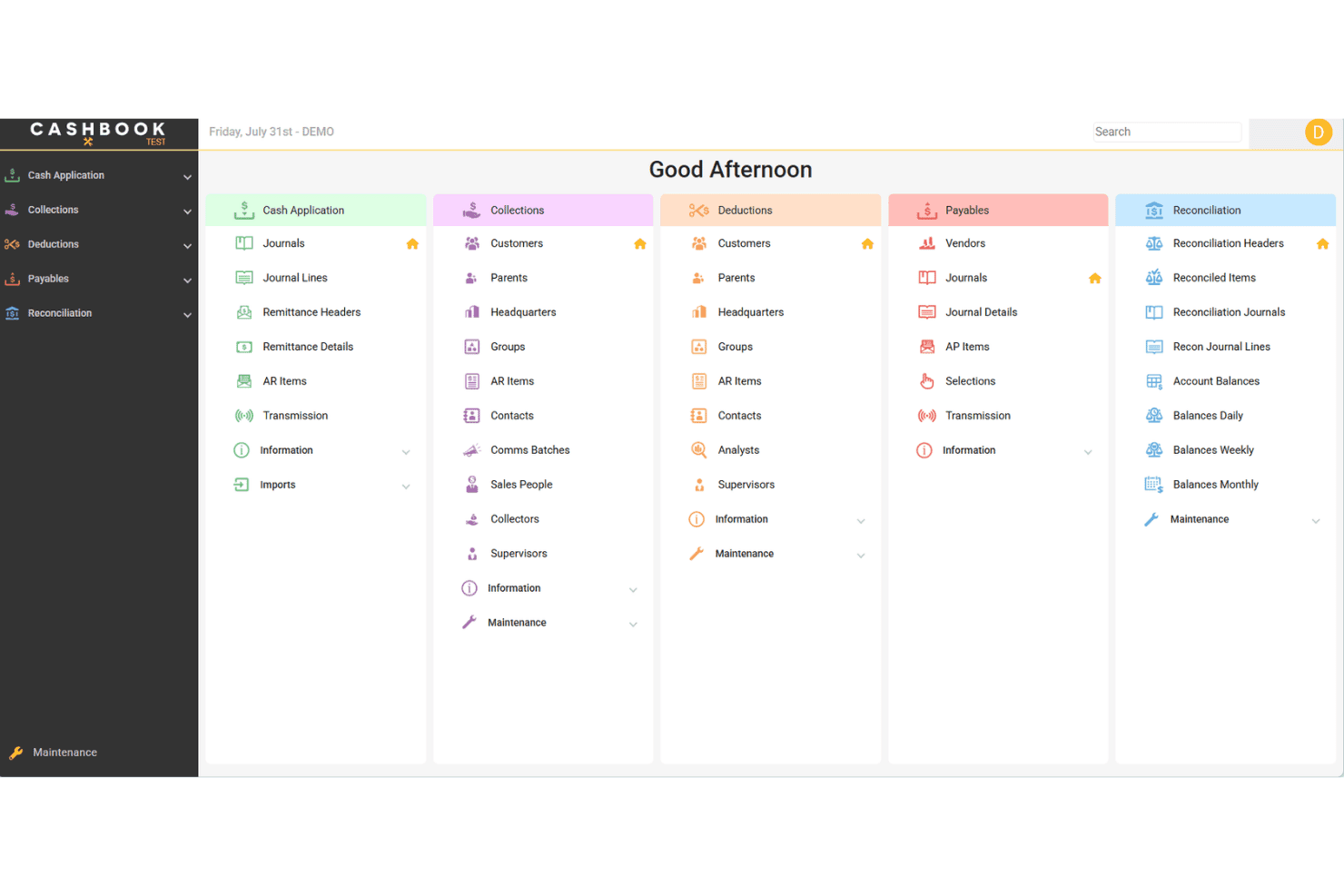
Cashbook provides AR workflows for cash, collections, deductions, and payables. Cashbook is a cash application and accounts receivable automation platform that handles cash matching, deductions management, bank reconciliation, and collections across multiple ERPs and bank formats.
Who Is Cashbook Best For?
Cashbook is a strong fit for large enterprises running multiple ERPs simultaneously and needing a single platform to handle cash matching and bank reconciliation across all of them.
Why I Picked Cashbook
Cashbook earns its spot on my shortlist because of how it handles cash application across 16 different ERPs without requiring your team to toggle between separate systems. I'm particularly impressed by its remittance-to-invoice auto-matching, which processes over 95% of transactions automatically, and its deductions engine that adapts to any bank file format and generates reason codes directly from remittance data. If your organization runs JD Edwards alongside Infor M3 or Dynamics 365, Cashbook is built specifically for that complexity.
Cashbook Key Features
- Collections management hub: Log notes, view lockbox images, add attachments, and track overdue accounts from a single interface linked to live AR data.
- Payment forecasting: Uses historical payment data to predict incoming payments, giving your team visibility into expected cash before it lands.
- Bank reconciliation automation: Applies configurable matching rules to auto-match bank and credit card statements against GL data, then auto-creates the corresponding GL entries.
- Accounts payable payment file automation: Generates electronic payment files for any ERP, bank, or geography, with built-in approval workflows and vendor bank account management.
Cashbook Integrations
Cashbook offers native integrations with 16 ERP systems, including Infor BPCS/LX, Infor M3, Infor MAPICS/XA, JD Edwards World, JD Edwards EnterpriseOne, Oracle, Microsoft Dynamics 365, Sun Systems, TIMS, and SmartStream. It also connects directly to bank systems for remittance and lockbox data ingestion, and APIs are available for custom integrations.
Pros and Cons
Pros:
- Flexible deductions engine for any bank file
- Auto-matches over 95% of transactions
- Handles cash matching across multiple ERPs
Cons:
- Implementation can require significant change management
- Best suited for large, complex enterprises
Learn more about Cashbook: Best for end-to-end accounting closure
- Free demo available
- Pricing upon request
Visit WebsiteCustomer Rating:4.5/5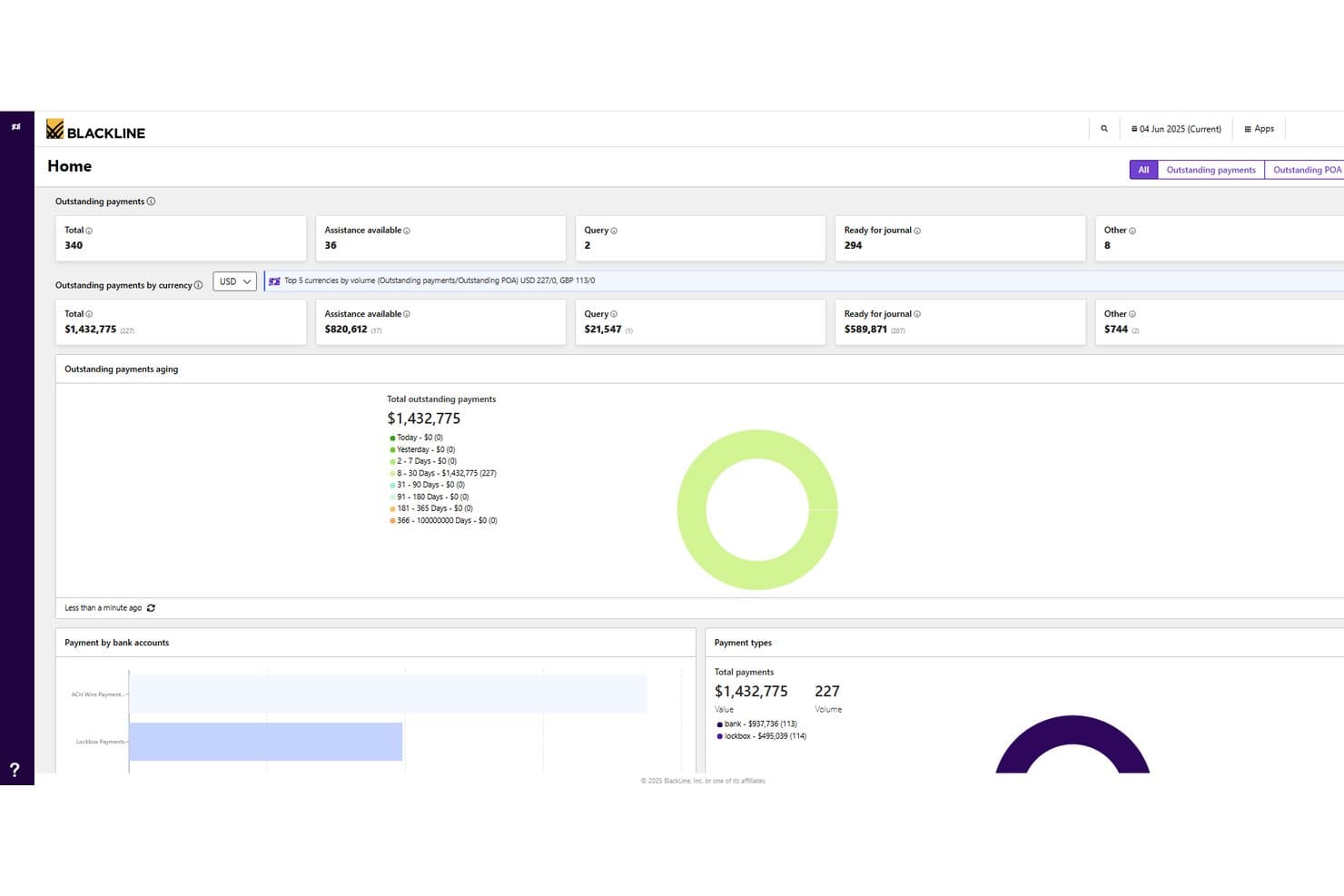
BlackLine tracks outstanding payments and aging across currencies in one dashboard. BlackLine is an AI-powered invoice-to-cash platform that covers cash application, collections management, disputes and deductions, credit and risk management, and AR intelligence across ERP, banking, and CRM systems.
Who Is BlackLine Best For?
BlackLine is a strong fit for enterprise finance teams that need to manage the full accounting close cycle, from cash application and collections to reconciliation and reporting, across multiple ERPs and systems.
Why I Picked BlackLine
BlackLine earns its spot on my shortlist because it covers the entire accounting close cycle, not just cash application in isolation. I'm particularly drawn to Verity AI, which automates remittance data capture and applies payments in real time by pulling banking and ERP data together, cutting unapplied cash by up to 99%. On top of that, the platform ties cash application directly into reconciliation, disputes, and AR intelligence, so my team isn't bouncing between disconnected tools at month-end.
BlackLine Key Features
- Verity Collect: Automates routine collections outreach based on customer payment behavior and risk data.
- Credit and risk management: Tracks real-time customer behavior changes using integrated external credit agency data.
- Self-service customer portal: Lets customers access invoices, statements, and make online payments through a dedicated portal.
- Dynamic task distribution: Automatically adjusts work assignments across your team based on staff availability and outstanding actions.
BlackLine Integrations
BlackLine offers native ERP connectors for SAP, Oracle, NetSuite, Microsoft Dynamics, Workday, Sage Intacct, and Acumatica, and it ingests bank files and remittance data to feed cash application and reconciliation workflows. An API is available for custom integrations, and Zapier support is not clearly documented.
Pros and Cons
Pros:
- Dynamic work assignment for high-volume teams
- AI remittance capture reduces unapplied cash
- Covers entire accounting close cycle
Cons:
- Full value realized mainly by large teams
- Requires ERP connectors for optimal results
Learn more about BlackLine: Best for AI-driven explainable payment matching
- Free demo available
- Pricing upon request
Visit WebsiteCustomer Rating:4.5/5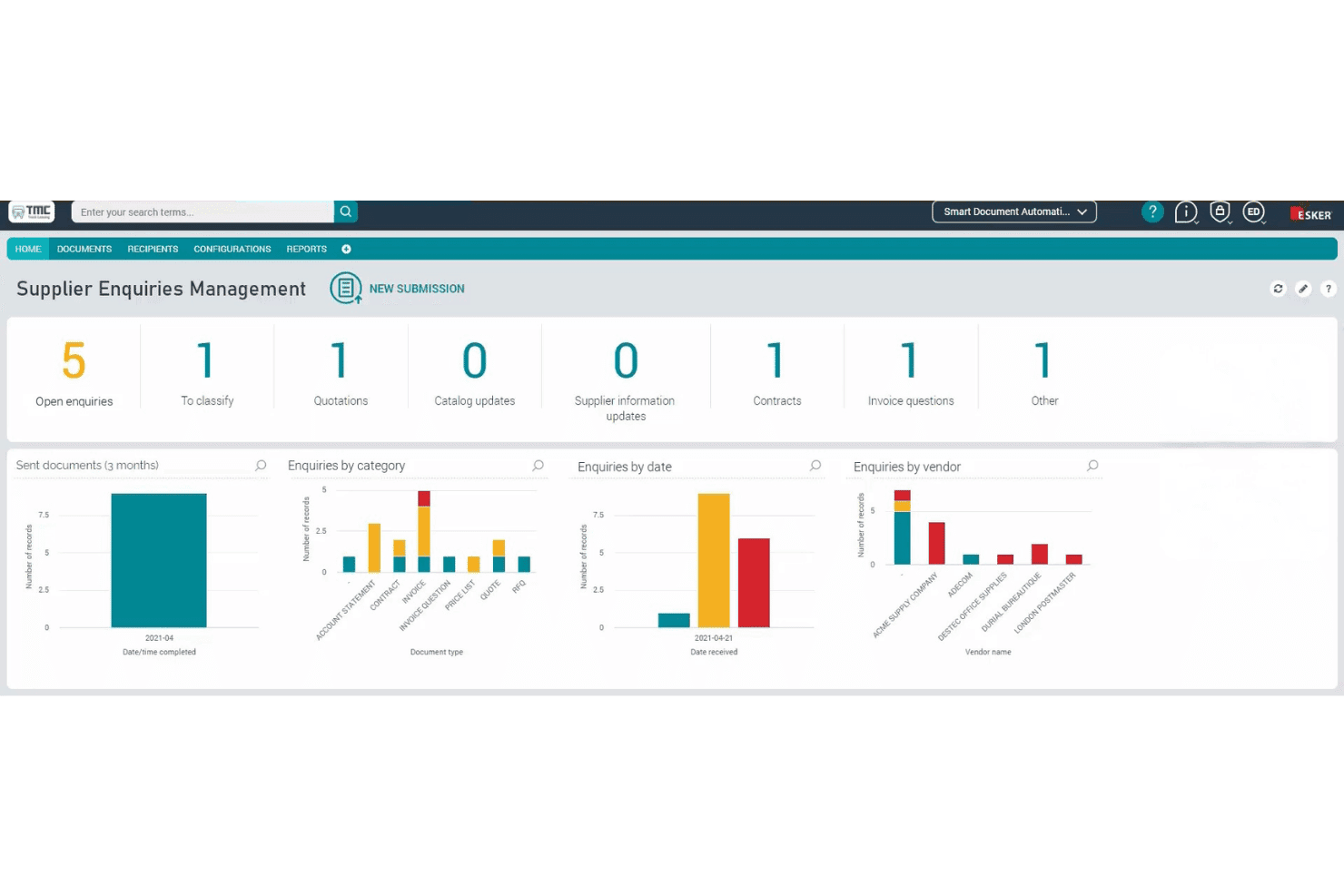
Esker organizes supplier enquiries with categorized dashboards and analytics. Esker is a cash application platform that automates remittance capture, payment matching, and exception handling using its Synergy AI engine, with built-in ERP reconciliation and a guided exception workspace for human-in-the-loop validation.
Who Is Esker Best For?
Esker is a strong fit for mid-to-large enterprises managing high payment volumes across multiple ERPs or customer payment channels.
Why I Picked Esker
I've included Esker in my top picks because its Synergy AI engine doesn't just match payments—it explains why it made each match, which makes exception review far faster and more auditable. I particularly like the guided exception workspace, where the AI surfaces intelligent suggestions so your team can resolve short payments, deductions, and multi-currency allocations without digging through raw remittance data. The real-time ERP reconciliation, including a prebuilt SAP connector, means matched payments post directly to customer accounts without manual rekeying.
Esker Key Features
- Centralized payment data capture: Pulls payment and remittance data from all incoming channels into a single, unified workflow for processing.
- Configurable automation rules: Handles discounts, short payments, cross-company allocations, and multi-currency scenarios through flexible, rule-based settings.
- Deductions management integration: Automatically extracts deductions from remittance data and triggers dedicated deduction workflows within the Esker AR suite.
- Customizable KPI dashboards: Tracks automation performance and receivables metrics in real time so your team can monitor touchless rates and unapplied cash at a glance.
Esker Integrations
Esker offers 100+ prebuilt ERP and back-end integrations, including native connectors for SAP, Microsoft Dynamics 365, Oracle, and Sage, plus partner-built integrations with QAD, Sage X3, Oracle JD Edwards, Oracle NetSuite, and Epicor Prophet 21. REST APIs and Esker File Exchange are available for custom integrations and legacy system connectivity.
Pros and Cons
Pros:
- Handles multi-currency and high payment volumes
- Offers guided exception workspace for faster review
- Explains payment matches with transparent AI logic
Cons:
- Some exception cases may still need manual input
- Demo required before seeing full functionality
Learn more about Esker: Best for advanced cash application reporting
- Free demo available
- Pricing upon request
Visit WebsiteCustomer Rating:4.4/5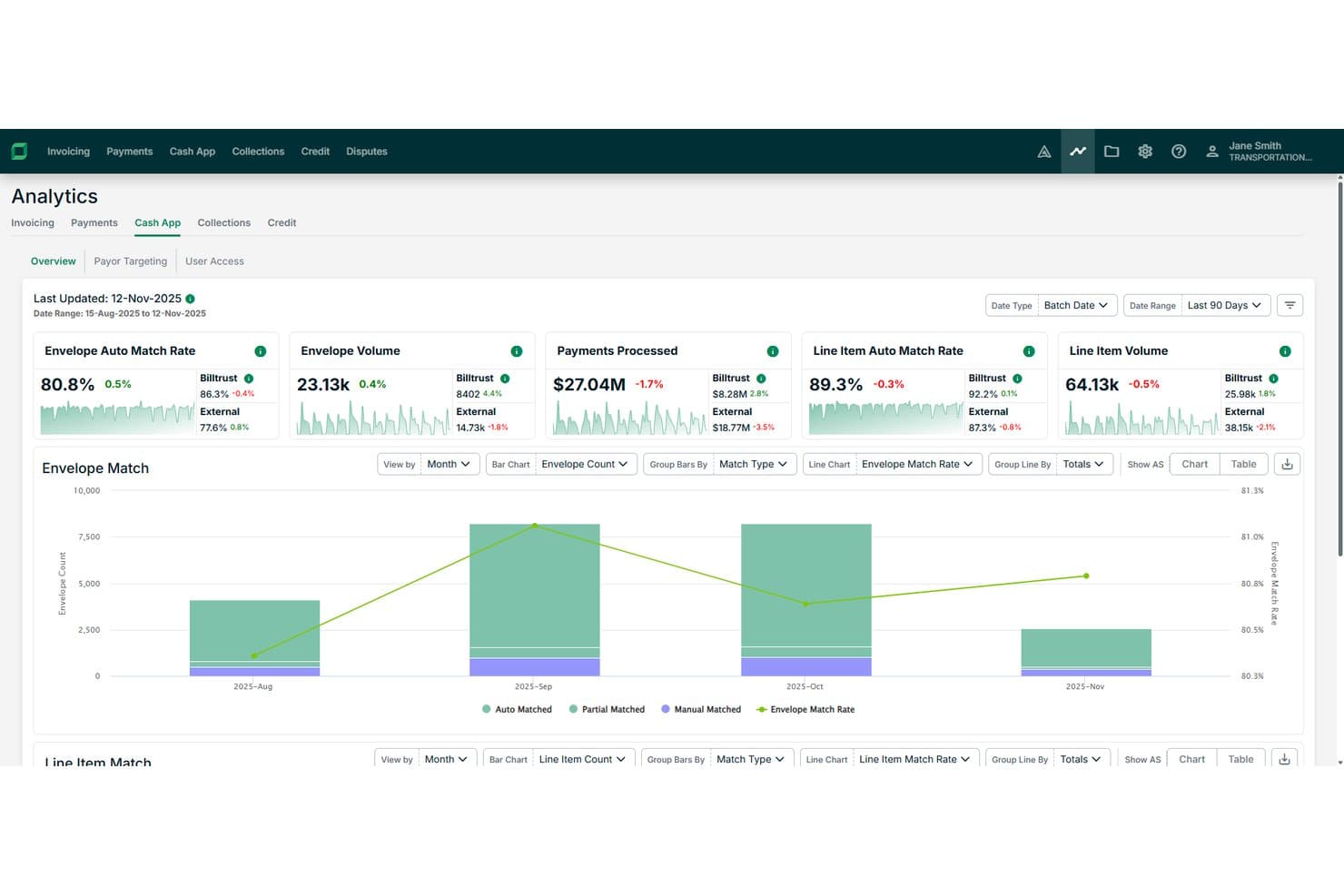
Billtrust tracks envelope and line item auto match rates across months. Billtrust is an AI-powered cash application platform that automates payment-to-invoice matching using confidence-based scoring, OCR, and machine learning, with built-in analytics that track KPIs like line-item match rates, exception volumes, and days to cash application.
Who Is Billtrust Best For?
Billtrust is a strong fit for mid-to-large finance teams that need detailed visibility into cash application performance across high transaction volumes.
Why I Picked Billtrust
I've included Billtrust in my top picks because its reporting capabilities go deeper than most cash application tools I've used. It tracks KPIs like line-item match rates, exception volumes, and days to cash application, giving finance teams a clear picture of where delays and errors are occurring. The confidence-based scoring engine also flags low-certainty matches before they hit the ledger, so your team isn't flying blind on high-volume days.
Billtrust Key Features
- Multi-format payment matching: Billtrust matches payments across ACH, wire, credit card, check, and AP portal payments to the correct invoice or account.
- OCR-based remittance capture: The platform uses optical character recognition to read and extract remittance data from varying invoice and payment formats.
- Exception queue management: Billtrust automatically categorizes and routes exceptions so your team can resolve mismatches faster without manual triage.
- Payor targeting: The system flags specific customers who generate the highest volume of manual work, so you can prioritize outreach and fix upstream data issues.
Billtrust Integrations
Billtrust offers 40+ ERP connectors and integrates with SAP, Oracle (including JD Edwards, PeopleSoft, and E-Business Suite), Infor, Epicor, Microsoft Dynamics, NetSuite, Acumatica, QAD, Karmak, and Procede, plus direct connections to 200+ banks and lockboxes (including Wells Fargo, US Bank, PNC, and Bank of America) and 260+ AP portals like SAP Ariba, Coupa, and Taulia. It also connects to Anthropic Claude and Microsoft Copilot through an MCP server, and supports custom integrations for ERPs not covered by ready-made connectors.
Pros and Cons
Pros:
- Flags customers driving high exception volume
- Tracks line-item match rates for KPIs
- Exception queue auto-routing reduces manual intervention
Cons:
- Confidence scoring may require manual review
- Detailed analytics can overwhelm new users
Learn more about Billtrust: Best for AI-driven enterprise automation
- Free demo available
- Pricing upon request
Visit WebsiteCustomer Rating:4.3/5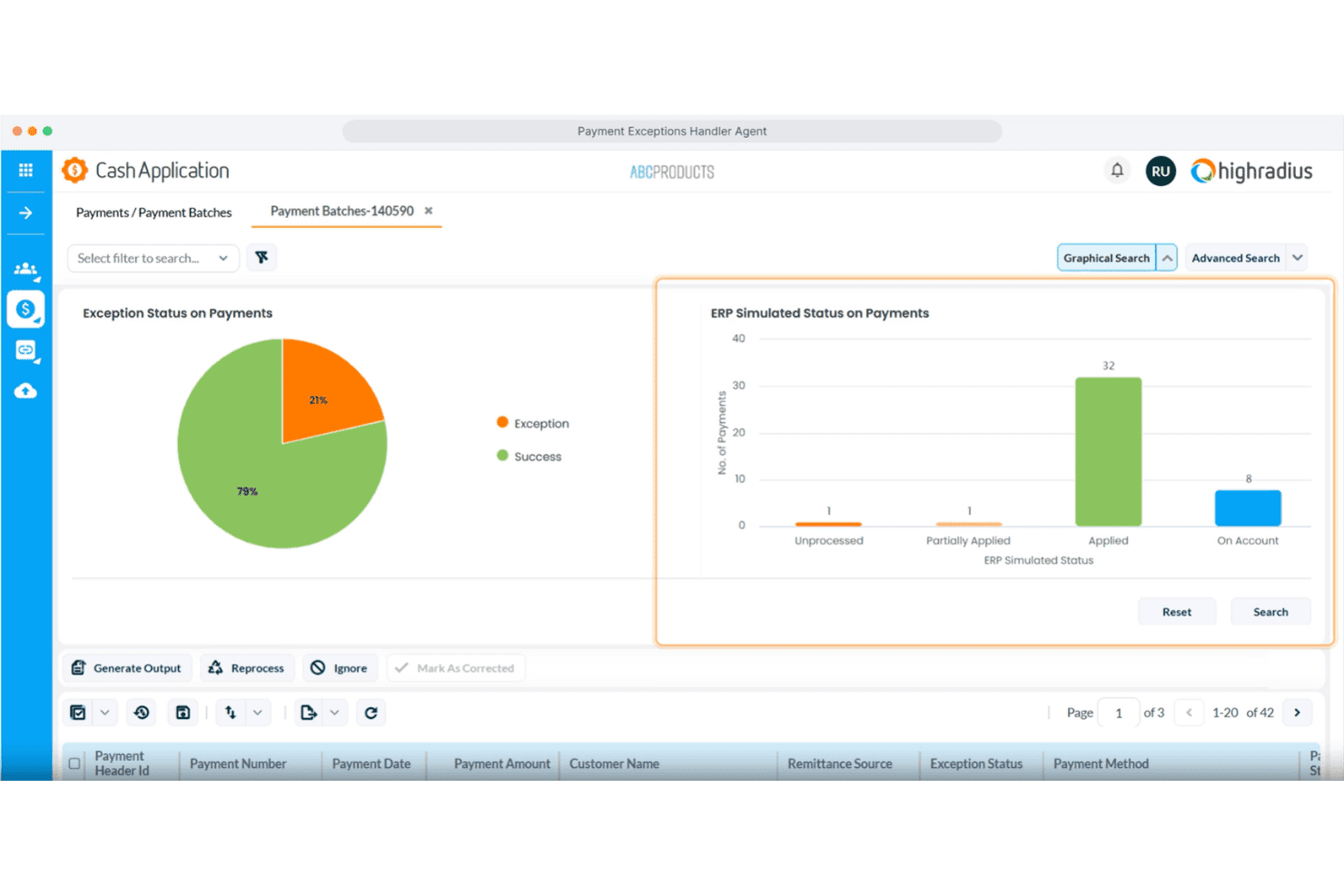
HighRadius visualizes payment exception statuses with charts and batch data. HighRadius is an AI-powered cash application platform that automates payment remittance aggregation, invoice matching, deductions coding, and exception handling across 300+ banks and ERP integrations.
Who Is HighRadius Best For?
HighRadius is built for large enterprises that need to automate high-volume cash application across multiple ERPs, banks, and payment channels.
Why I Picked HighRadius
HighRadius earns its spot on my shortlist because its AI-powered cash application goes beyond basic automation, deploying dedicated agents for each step of the process. I particularly like the AP Portal Remittance Capture agent, which pulls and parses remittance data from 500+ supplier portals automatically, and the Payment Invoice Matching agent, which resolves 87% of remittances that would otherwise require manual intervention. The Deductions Coding agent is also impressive, detecting short payments and mapping them directly to ERP reason codes without analyst involvement.
HighRadius Key Features
- Email remittance capture: Uses machine learning and NLP to extract invoice data from email bodies and attachments in PDF, Word, and Excel formats.
- Payment exceptions handler: Identifies missing remittances based on payment patterns and automatically sends information request emails to resolve gaps.
- EDI remittance processing: Parses and processes EDI remittance files directly, reducing manual handling for high-volume electronic payment formats.
- ERP and bank connectivity: Connects to 50+ ERP systems, 100+ banks, and 10+ payment processors through pre-built integrations, covering check, ACH, wire, and card payments.
HighRadius Integrations
HighRadius offers native integrations with 50+ ERP systems, 100+ banks, and 10+ payment processors, including SAP, Oracle, Microsoft Dynamics, NetSuite, Workday, JD Edwards, Sage, Bank of America, JPMorgan Chase, and Citibank. An API is available for custom integrations.
Pros and Cons
Pros:
- Handles high-volume email and EDI remittances
- Supports 300+ banks and ERPs
- Resolves most remittance exceptions automatically
Cons:
- Manual intervention needed for rare payment types
- Setup is complex for smaller organizations
Learn more about HighRadius:
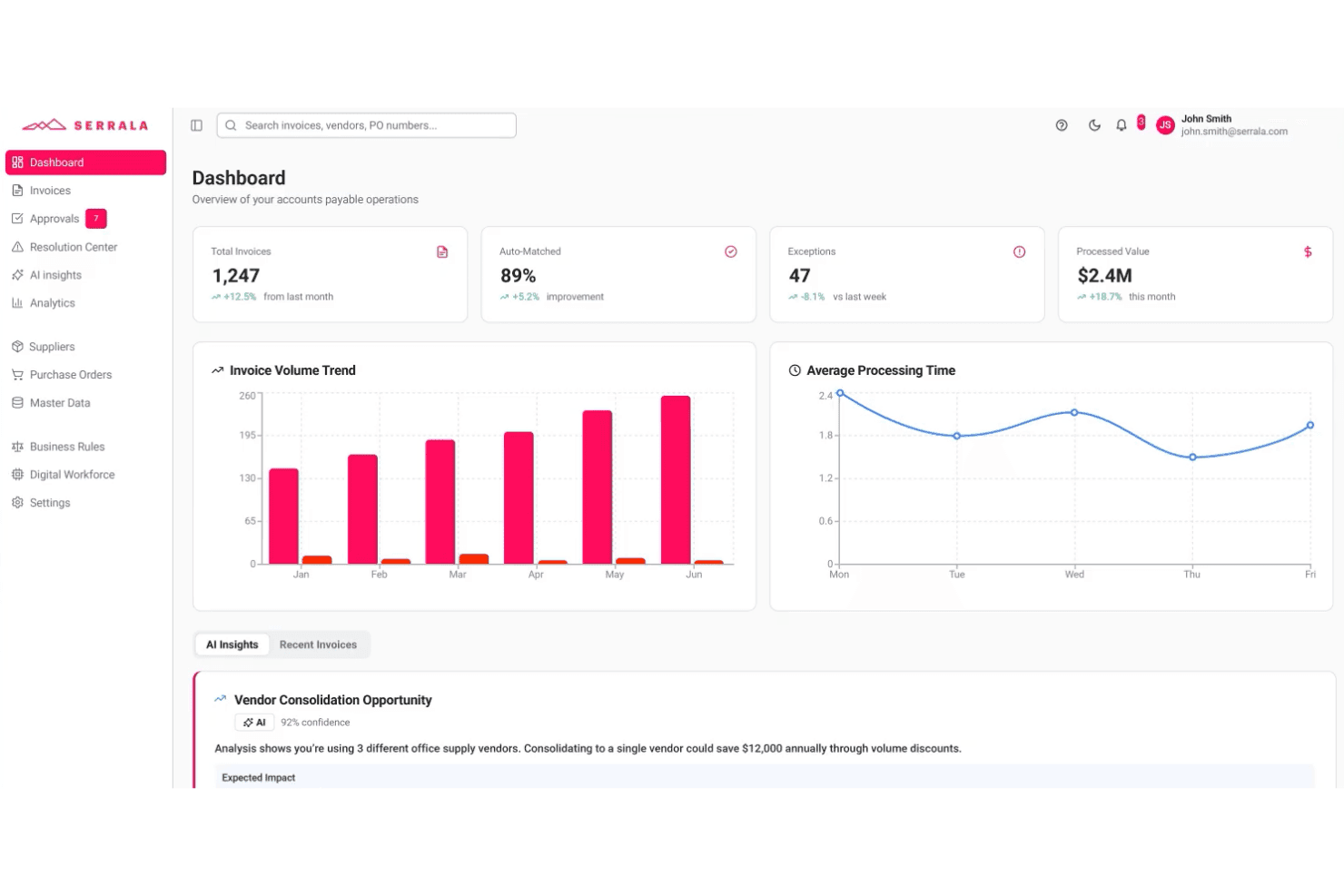
Serrala's dashboard gives AP teams real-time invoice and payment insights. Serrala is an AI-powered cash application platform that automates payment matching, remittance processing, and exception handling across bank file formats and ERP systems, with a native SAP-embedded deployment option.
Who Is Serrala Best For?
Serrala is a strong fit for large enterprises running SAP that need a cash application solution embedded directly in their ERP environment rather than bolted on.
Why I Picked Serrala
Serrala earns its spot on my shortlist because of how deeply it embeds into SAP rather than sitting alongside it as a separate layer. I like that the SAP-embedded deployment gives AR teams full native access to auto-matching and exception handling directly within the ERP, so there's no data handoff or reconciliation between systems. Serrala's smart data capture handles classification, extraction, and posting of payment data inside SAP, and real-time KPI monitoring surfaces cash application performance without leaving the environment your team already works in.
Serrala Key Features
- Multi-format payment support: Processes ACH, wire, and lockbox payment types across all bank file formats for payment identification and retrieval.
- Unapplied cash tracking: Surfaces real-time visibility into unmatched payment balances so your AR team can identify and resolve open items quickly.
- Compliance and audit controls: Built-in controls enforce accuracy and auditability at the payment posting level across all transactions.
- Customer self-service portal: Lets customers independently view invoices, check outstanding balances, and submit payments through a dedicated portal.
Serrala Integrations
Serrala integrates with major ERP systems, including SAP (with a native SAP-embedded deployment option), Microsoft Dynamics, Oracle NetSuite, and Sage, and it supports connectivity with all major bank file formats for payment retrieval. A Microsoft Teams app is also available, and Serrala can connect to additional systems through its cloud platform.
Pros and Cons
Pros:
- Built-in audit controls for compliance needs
- Real-time tracking of unapplied cash balances
- Native SAP-embedded deployment for AR teams
Cons:
- May be complex for smaller finance teams
- Initial SAP setup can require IT resources
Learn more about Serrala:
Annen programvare for betalingstildeling
Her er noen flere alternativer for programvare for betalingstildeling som ikke kom med på kortlisten min, men som likevel er verdt å se nærmere på:
- 11StuutBest for fast-deploying application
- 12Global PayEXBest for AI-driven multi-bank reconciliation
- 13VersapayBest for collaborative buyer-seller reconciliation
- 14TesorioBest for self-improving AR matching
- 15FlywireBest for cross-border B2B global payments
- 16PeakfloBest for growing APAC mid-markets
- 17KollenoBest for AI-native cash application across global AR
- 18GrowfinBest for NetSuite-anchored mid-market cash application
- 19CorcentricBest for guaranteed DSO results
- 20GavitiBest for cutting unapplied cash volume
How I Evaluate Cash Application Software
I split every evaluation into baseline criteria—the core capabilities a tool must cover, like multi-channel payment matching and ERP posting—and the differentiators that separate vendors worth recommending from those that just check boxes.
Core Functionality (Table Stakes for This List)
When I'm selecting tools for my list, I rank each one on a scale from 0 (does not offer the functionality) to 5 (excels in this area) for each core functionality listed below. I then calculate the tool's total score into a percentage, using 65% as a benchmark to help assess its overall fit for the list.
- Automated payment matching: I evaluate how well each tool handles one-to-one, one-to-many, and many-to-many invoice matching, including whether AI or ML models improve match rates over time.
- Remittance capture and processing: The tool should ingest remittance data from emails, PDFs, EDI feeds, lockbox files, and customer portals rather than relying on manual uploads or a single source.
- Multi-payment channel support: I check whether the platform reconciles across ACH, wire, check, lockbox, credit card, and virtual card payments, especially for teams handling multi-currency transactions.
- ERP and accounting integration: Pre-built connectors for systems like SAP, Oracle, NetSuite, and Microsoft Dynamics matter here, along with open API access for posting cash updates back to AR ledgers in real time.
- Deductions and exceptions management: I look at how each tool codes short pays, routes disputes to the right team members, and whether it offers root cause tracking to reduce repeat exceptions.
- Cash posting and AR reporting: Dashboards should cover match rates, AR aging, and exception volumes with drill-down capability, not just static exports that require manual cleanup before review.
Once I have a list of tools that meet the criteria, I consider what sets each platform apart.
Differentiating Factors (What Sets Vendors Apart)
Here's how I compare and contrast different vendors:
Standout Features
I check whether a tool's ML models actually learn from clerk decisions over time, improving match rates on recurring payment patterns without manual rule rewrites. Vendors like HighRadius and Versapay handle this differently, but the goal is the same: fewer exceptions each cycle. I also evaluate how well each platform scrapes remittance advice from buyer AP portals like Coupa or Ariba, since suppliers serving large retailers often lose days chasing ACH deposit details. Straight-through posting analytics round out my review—real-time dashboards that break down hit rates by clerk, customer, and payment channel help controllers spot exactly where unapplied cash is building up.
Beyond Features
I check whether a vendor holds SOC 1 Type II and SOC 2 Type II certifications, since any tool posting directly to your GL needs airtight audit trails and SOX-aligned role-based permissions. ERP connector depth matters just as much—certified, bi-directional integrations with your specific ERP determine posting reliability and how much manual reconciliation your team still carries. I also evaluate implementation timelines, because enterprise deployments with HighRadius or Serrala can run six to twelve months, while mid-market options like Versapay or Billtrust often go live in weeks.
Slik velger du programvare for betalingstildeling
Valget av riktig programvare for betalingstildeling avhenger av de viktigste driftsprioriteringene dine og kompleksiteten i økonomisystemene dine:
| Hvis prioriteten din er … | Se etter … |
|---|---|
| Hvis prioriteten din er …Global drift eller drift på tvers av flere enheter | Se etter …Ferdigbygde integrasjoner med flere ERP-systemer og valutaer |
| Hvis prioriteten din er …Å redusere manuell matching av betalinger | Se etter …AI-drevet avstemming og matchingslogikk basert på maskinlæring |
| Hvis prioriteten din er …Å avslutte regnskapet raskt | Se etter …Sanntidsføring av innbetalinger og dashbord for aldersfordeling av kundefordringer |
| Hvis prioriteten din er …Å håndtere store mengder betalinger og remitteringsinformasjon | Se etter …Automatisk innhenting av remitteringsinformasjon fra e-post, EDI og kundeportaler |
| Hvis prioriteten din er …Å håndtere samsvarskrav og strenge revisjonskrav | Se etter …SOC 1/SOC 2-sertifisering og detaljert revisjonslogging |
Slik vurderer du kortlisten din
- Test påstandene om integrasjon: Be om en demonstrasjon som viser direkte bokføring i ERP- eller regnskapssystemet ditt med 2 eksempler på remitteringsfiler.
- Valider treffprosenten for AI: Be om nylige rapporter fra kunder om treffprosent, eller gjennomfør en skriptbasert test med over 100 betalingsscenarier.
- Undersøk arbeidsflytene for avvik: Be leverandørene demonstrere hvordan verktøyet deres sender videre og sporer minst 10 eksempler på fradrags- eller tvistesaker.
- Kontroller sertifiseringene: Krev kopier av SOC 1/SOC 2-sertifikater og skjermbilder av interne revisjonsspor fra de siste 12 månedene.
- Velg kompromisset ditt: Velg mellom raskere implementering med begrenset ERP-dybde eller dypere, sertifiserte integrasjoner som krever lengre utrulling.
Hva er programvare for betalingstildeling?
Programvare for matching av innbetalinger er et økonomisk verktøy som automatisk kobler innkommende betalinger til tilsvarende fakturaer, slik at teamet ditt kan avstemme kundefordringer nøyaktig og raskt. Disse systemene henter inn betalings- og remitteringsdata fra flere kanaler, kobler seg til regnskaps- eller ERP-plattformen din og tilbyr oversiktlige dashbord for overvåking av kontantstrømmen. Økonomiteam bruker programvare for matching av innbetalinger til å redusere manuell dataregistrering, minimere uavklarte innbetalinger og forbedre hastigheten og nøyaktigheten ved månedsavslutningen.
Funksjoner i programvare for matching av innbetalinger
Når du velger programvare for matching av innbetalinger, bør du se etter følgende viktige funksjoner:
- Automatisk matching av betalinger: Kobler innkommende betalinger til åpne fakturaer basert på angitte regler og datamønstre, noe som reduserer den manuelle innsatsen som kreves for avstemming og minimerer risikoen for menneskelige feil.
- Innhenting av remitteringsdata: Samler inn remitteringsdetaljer fra flere kilder, for eksempel e-poster, portaler og opplastede filer, slik at teamet ditt kan koble betalinger til de riktige fakturaene.
- Støtte for betalinger fra flere kanaler: Avstemmer betalinger fra kilder som ACH, bankoverføring, kredittkort, sjekk og lockbox-tjenester, og støtter virksomhetens betalingsmiks og kundenes preferanser.
- Integrasjon med ERP- og regnskapssystemer: Kobler seg direkte til ERP- eller regnskapssystemet ditt for å oppdatere kundefordringer og kontantbeholdning i sanntid, slik at de økonomiske postene dine forblir korrekte.
- Håndtering av avvik og fradrag: Markerer underbetalinger, overbetalinger og uavstemte transaksjoner, og sender dem deretter til de riktige teammedlemmene for rask undersøkelse og løsning.
- Bokføring av innbetalinger: Bokfører automatisk avklarte betalinger i hovedboken eller reskontromodulen, noe som minimerer manuell registrering og bidrar til raskere avslutningssykluser.
- Revisjonsspor og tillatelser: Sporer hver matching, justering og bokføring med logger på brukernivå, noe som støtter ansvarlighet og etterlevelse av revisjonskrav.
- Rapportering og dashbord: Gir tydelig oversikt over matchingsgrad, utestående avvik og kontantbeholdning, slik at du alltid forstår prosessen for kundefordringer med et øyekast.
- Håndtering av flere valutaer: Støtter transaksjoner i ulike valutaer for selskaper som driver virksomhet på tvers av landegrenser, slik at du kan håndtere global drift uten bryderiet med manuell valutaomregning.
- Kontroller for brukertilgang: Lar deg tilpasse tillatelser slik at bare de riktige teammedlemmene kan godkjenne matchinger, redigere transaksjoner eller eksportere økonomiske data.
Vanlige KI-funksjoner i programvare for matching av innbetalinger
I tillegg til standardfunksjonene i programvare for matching av innbetalinger som er nevnt ovenfor, tar mange av disse løsningene i bruk KI med funksjoner som:
- Forutsigende matching av fakturaer: Bruker KI-modeller til å analysere historiske betalings- og remitteringsdata og forutsi hvilke fakturaer som mest sannsynlig samsvarer med innkommende betalinger – selv når remitteringsdetaljene er ufullstendige eller tvetydige.
- Automatisk uttrekking av remitteringsdata: Bruker naturlig språkbehandling på e-poster, PDF-filer og nedlastinger fra portaler, henter ut remitteringsdetaljer uten manuell gjennomgang og kobler dem til de riktige transaksjonene.
- Gjenkjenning av avviksmønstre: Identifiserer tilbakevendende avvikstyper og bakenforliggende årsaker ved å analysere store mengder uavstemte betalinger, slik at teamet ditt kan prioritere utbedringer og redusere fremtidige avvik.
- Dynamisk arbeidsflytruting: Lærer av brukerhandlinger og løsninger på avvik for automatisk å tilordne komplekse saker til de riktige teammedlemmene, noe som forbedrer hastigheten og nøyaktigheten ved håndtering av tvister eller fradrag.
- Kontinuerlig optimalisering av matchingsgrad: Overvåker matchingsresultater og manuelle inngrep, og trener algoritmene på nytt for å forbedre fremtidig matchingsgrad og redusere manuelle berøringspunkter over tid.
Fordeler med programvare for matching av innbetalinger
Implementering av programvare for matching av innbetalinger gir flere fordeler for teamet og virksomheten din. Her er noen av fordelene du kan se frem til:
- Raskere betalingsavstemming: Automatiser matching av innbetalinger mot fakturaer, slik at teamet bruker mindre tid på manuell dataregistrering og frigjør kontanter raskere.
- Redusert ikke-allokert likviditet: Bruk automatisert innhenting av remitteringsinformasjon fra e-post, EDI og portaler for å minimere uallokerte innbetalinger og forhindre forsinkelser i avslutningen av regnskapet.
- Forbedret AR-oversikt: Få tilgang til sanntidsdashbord som bryter ned treffprosent, forfalte poster og avvik, slik at du alltid vet hvor kontantbeholdningen din står.
- Færre manuelle feil: Ta i bruk AI-modeller som lærer av brukernes beslutninger og forbedrer treffnøyaktigheten over tid, slik at du unngår feil som fører til problemer med avstemmingen.
- Forbedret ERP-integrasjon: Stol på sertifiserte, toveis forbindelser med systemer som SAP, Oracle og NetSuite for å holde postene dine oppdaterte uten manuelle opplastinger.
- Bedre håndtering av avvik og fradrag: Marker og videresend automatisk tvister, underbetalinger eller poster uten treff, slik at de raskt kommer til riktig team for løsning.
- Bedre samsvar og revisjonsspor: Spor hver justering, godkjenning og bokføring av innbetalinger med detaljerte brukerlogger som støtter interne kontroller og revisjonskrav.
Kostnader og priser for programvare for betalingsavstemming
Valg av programvare for betalingsavstemming krever en forståelse av de ulike prismodellene og abonnementene som er tilgjengelige. Kostnadene varierer basert på funksjoner, teamstørrelse, tillegg og mer. Tabellen nedenfor oppsummerer vanlige abonnementer, gjennomsnittsprisene deres og typiske funksjoner som er inkludert i løsninger for programvare for betalingsavstemming:
Sammenligningstabell for abonnementer på programvare for betalingsavstemming
| Abonnementstype | Gjennomsnittspris | Vanlige funksjoner |
|---|---|---|
| AbonnementstypeGratisabonnement | Gjennomsnittspris$0 | Vanlige funksjonerGrunnleggende matching av innbetalinger, begrenset innhenting av remitteringsinformasjon og enkel AR-rapportering. |
| AbonnementstypePersonlig abonnement | Gjennomsnittspris$50-$150/bruker/måned | Vanlige funksjonerAutomatisert matching av innbetalinger, støtte for flere kanaler, ERP-integrasjon, grunnleggende avvikshåndtering og tilgang til dashbord. |
| AbonnementstypeForretningsabonnement | Gjennomsnittspris$200-$600/bruker/måned | Vanlige funksjonerAI-drevet matching, avansert uttrekking av remitteringsinformasjon, støtte for flere valutaer, forbedrede ERP-integrasjoner og rollebaserte tillatelser. |
| AbonnementstypeAbonnement for større virksomheter | Gjennomsnittspris$700-$2000+/bruker/måned | Vanlige funksjonerPrediktiv analyse, dynamisk arbeidsflytruting, tilpasset rapportering, SOC-samsvar, API-tilgang og dedikert brukerstøtte. |
Vanlige spørsmål om programvare for innbetalingsavstemming
Her er noen svar på vanlige spørsmål om programvare for innbetalingsavstemming:
Hvordan håndterer programvare for innbetalingsavstemming mangelfull betalingsinformasjon?
Det meste av programvaren for innbetalingsavstemming bruker AI-modeller til å matche betalinger selv når betalingsinformasjonen mangler eller er uklar. Dette omfatter prediktiv matching basert på historiske betalingsmønstre og kjøperatferd. Hvis det fortsatt er usikkerhet, flagger verktøyet ofte betalingen for gjennomgang av en bruker, slik at ingenting faller mellom to stoler.
Kan programvare for innbetalingsavstemming integreres med flere ERP-systemer samtidig?
Ja, mange verktøy for innbetalingsavstemming kobler seg til mer enn ett ERP- eller regnskapssystem, enten via ferdigbygde integrasjoner eller API-er. Dette er avgjørende for team som håndterer globale virksomheter eller drift på tvers av flere selskaper, og som trenger at hver betaling bokføres på riktig konto uten manuell inngripen.
Hvilke sikkerhetssertifiseringer bør jeg se etter i programvare for innbetalingsavstemming?
Se etter plattformer med SOC 1 Type II- og SOC 2 Type II-sertifiseringer. Disse viser at programvaren følger standarder for internkontroll, revisjon og sikkerhet ved håndtering av økonomiske data. Du bør også be om å få se nylige sertifiseringsrapporter og eksempler på revisjonslogger på brukernivå.
Hvor lang tid tar det vanligvis å implementere en løsning for innbetalingsavstemming?
Implementeringstiden kan variere fra noen uker til mer enn seks måneder. Verktøy for mellomstore bedrifter, som Versapay eller Billtrust, tas vanligvis i bruk på under to måneder, mens virksomhetsplattformer som HighRadius eller Serrala kan trenge seks til tolv måneder for full ERP-integrasjon og testing.
Kan jeg teste reelle AI-treffrater før jeg kjøper?
Ja, du bør be om en demonstrasjon med dine egne betalingsdata eller be om nylige rapporter over treffrater fra kunder før du kjøper. Noen leverandører gjennomfører også skriptbaserte tester med eksempelfiler for betalinger, slik at du kan kontrollere hvordan AI-en deres matcher i reelle, komplekse situasjoner.
Hva bør jeg be om under en demonstrasjon for å sikre at verktøyet håndterer prosessen for unntakene mine?
Be leverandøren rute og løse minst ti eksempler på avkortnings- eller tvistesaker ved hjelp av reelle eller anonymiserte data. Følg nøye med på hvordan unntakene kodes, hvordan verktøyet fordeler ansvaret, og om det viser tydelig sporing av grunnårsaker og trinnene for å løse sakene.
Støtter disse verktøyene transaksjoner i flere valutaer?
Ja, det meste av den ledende programvaren for innbetalingsavstemming støtter betalinger og rapportering i flere valutaer. Dette er et krav hvis virksomheten din opererer globalt eller fakturerer kunder i forskjellige land. Bekreft alltid at plattformen støtter de spesifikke valutaene og valutaarbeidsflytene dine.