

É uma história tão antiga como o tempo: a sua empresa está a crescer, mas o seu software de contabilidade não consegue acompanhar esse crescimento, deixando-o às escuras relativamente a alguns aspetos das suas finanças ou obrigando-o a fazer os cálculos manualmente.
Embora o FreshBooks seja uma escolha popular para PME, não é a solução perfeita para todos, especialmente se tiver uma empresa de maior dimensão. Talvez precise de relatórios mais avançados, de uma melhor automatização ou de um modelo de preços que acompanhe o crescimento da sua empresa. Seja como for, pode estar na altura de procurar uma alternativa ao FreshBooks.
Com base na minha experiência, a ferramenta certa pode ajudar a sua equipa a lidar com tarefas financeiras complexas, melhorar a precisão e poupar tempo precioso. Para o ajudar a encontrar o seu próximo software, analisei e testei várias opções de software para o ajudar a encontrar a solução mais adequada à sua organização.
Neste artigo, apresento-lhe as melhores alternativas ao FreshBooks, destacando as suas principais funcionalidades, preços e os utilizadores para os quais são mais adequadas. Quer esteja à procura de informações financeiras mais detalhadas, de melhores integrações ou de uma solução mais económica, este guia irá ajudá-lo a encontrar a ferramenta certa para a sua empresa.
O que é o FreshBooks?
O FreshBooks é uma ferramenta de contabilidade concebida para simplificar a gestão financeira das empresas. É habitualmente utilizado por contabilistas, técnicos de contabilidade e gestores financeiros que precisam de ferramentas eficientes para tratar das suas tarefas diárias.
O software acrescenta valor ao automatizar a faturação, o acompanhamento das despesas e os relatórios financeiros, tornando o trabalho da sua equipa mais fácil de gerir.
Tabela de comparação das alternativas ao FreshBooks
Esta tabela de comparação resume os detalhes dos preços das minhas principais alternativas ao FreshBooks.
| Tool | Best For | Trial Info | Price | ||
|---|---|---|---|---|---|
| 1 | Best for direct CPA-led support | Free demo available | Pricing upon request | Website | |
| 2 | Best for direct HMRC tax filing | Free plan + 30-day free trial + demo available | From £10/month | Website | |
| 3 | Best for small business accounting | 1-month free trial available | From $27/month | Website | |
| 4 | Best for multichannel inventory tracking | Free plan + 14-day trial + demo available | From $20/month | Website | |
| 5 | Best for project-based businesses | Free demo available | Pricing upon request | Website | |
| 6 | Best for integrated business apps | Free trial available | Free plan available | Website | |
| 7 | Best for comprehensive accounting needs | 30-day free trial | Pricing upon request | Website | |
| 8 | Best for startup financial planning | 30-day free trial | From $75/month (billed annually) | Website | |
| 9 | Best for enterprise resource planning | Free demo available | Pricing upon request | Website | |
| 10 | Best for detailed financial reports | Free plan + 30-day trial available | From $38/month | Website |


Why Trust Our Software Recommendations
6,700+
Reviews
20
Industry experts
16+
Evaluation factors
14
Years
Our team has been testing and reviewing software since 2012. As finance leaders ourselves, we know how difficult—and important—it is to choose the right software.
For this guide, we evaluated tools using hands-on testing and independent research, scoring tools using our selection criteria.
Our reviews reflect our human editorial judgment, not a sales pitch.
Análises das melhores alternativas ao FreshBooks
Apresentamos abaixo os meus resumos detalhados das melhores alternativas ao FreshBooks. As minhas análises oferecem uma visão aprofundada das principais funcionalidades, vantagens e desvantagens, integrações e casos de utilização ideais de cada ferramenta, para o ajudar a encontrar a melhor opção para si.
 Best for direct CPA-led support
- Free demo available
- Pricing upon request
Visit WebsiteCustomer Rating:4.9/5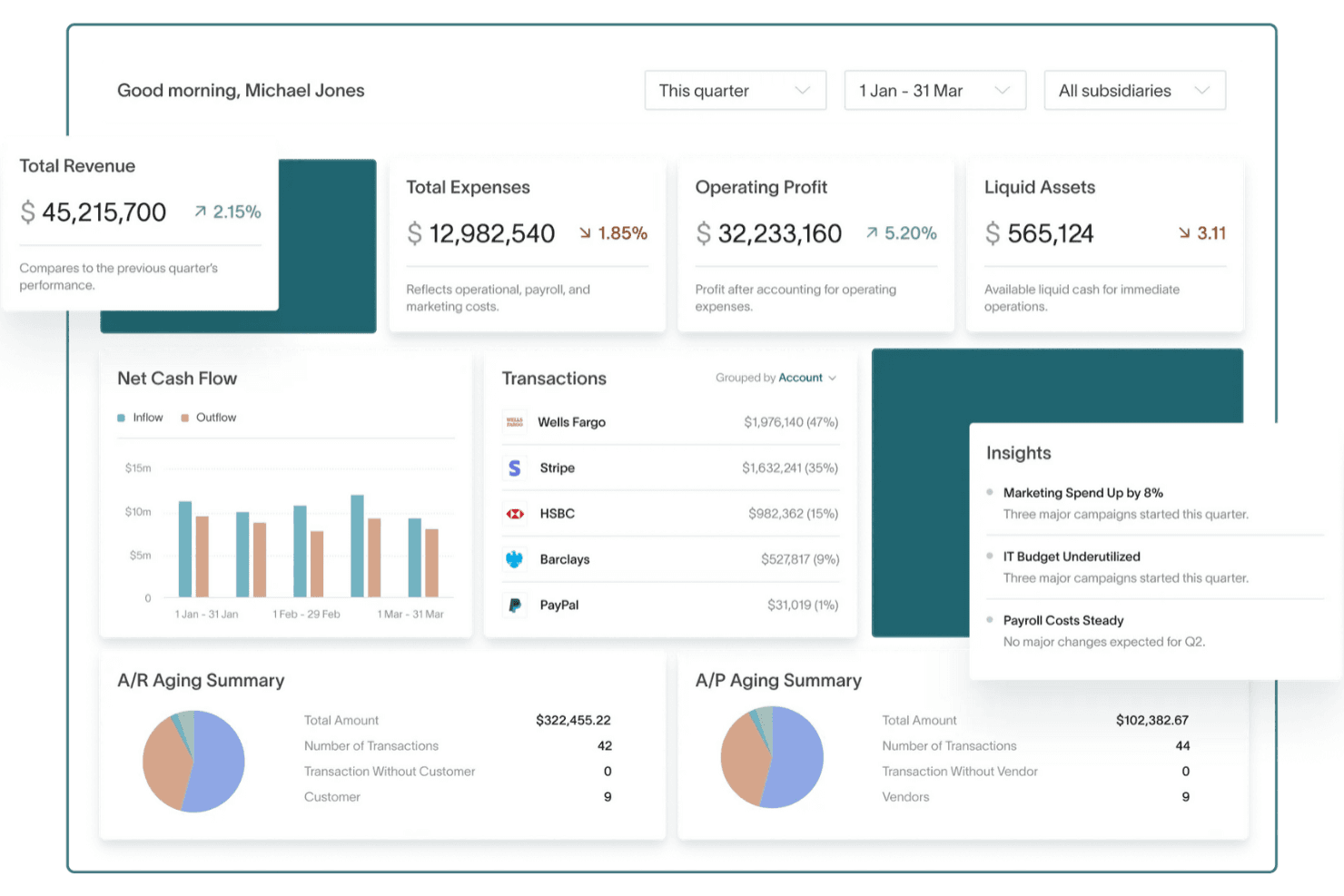
DualEntry gives users a real-time financial overview in one dashboard. DualEntry is an AI-driven ERP built for finance teams managing complex, multi-entity operations who need automated general ledger accounting, consolidated reporting across entities and currencies, and revenue recognition without the manual overhead of legacy systems.
Who Is DualEntry Best For?
DualEntry is a strong fit for finance teams and controllers managing multi-entity operations who need automated general ledger accounting and consolidated reporting at scale.
Why I Picked DualEntry
I picked DualEntry because its CPA-led support team is genuinely unusual: when my team has a compliance question, we're talking to a credentialed accountant through a dedicated Slack channel, not a general support queue. That's especially useful when dealing with complex scenarios like multi-book reporting across IFRS and GAAP simultaneously, or setting up automated intercompany eliminations across entities. The append-only general ledger with continuous anomaly detection catches errors before period close rather than after.
DualEntry Key Features
- Multi-book accounting: Record and report transactions side by side across IFRS, GAAP, tax, and cash-basis books within the same general ledger.
- Automated journal-entry posting: Configure rules to automate prepaid and accrual entries, automatic reversals, and approval workflows based on thresholds.
- Multi-entity consolidation: Automate currency translation, intercompany eliminations, and cumulative translation adjustments across up to unlimited entities depending on your plan.
- AI-assisted anomaly detection: Continuously review transactions against existing patterns and flag irregularities before they reach the approval stage.
DualEntry Integrations
DualEntry claims 13,000+ native integrations, including Stripe, PayPal, Ramp, Brex, Bill.com, Salesforce, HubSpot, Gusto, Deel, and Avalara. Its open API supports custom integrations.
Pros and Cons
Pros:
- Automated bank reconciliation
- Multi-book accounting handles IFRS and GAAP
- CPA-led support helps with compliance questions
Cons:
- FreshBooks migration requires manual mapping and balancing
- Expense capture depends on managed third-party workflows
Learn more about DualEntry: Best for direct HMRC tax filing
- Free plan + 30-day free trial + demo available
- From £10/month
Visit WebsiteCustomer Rating:4.4/5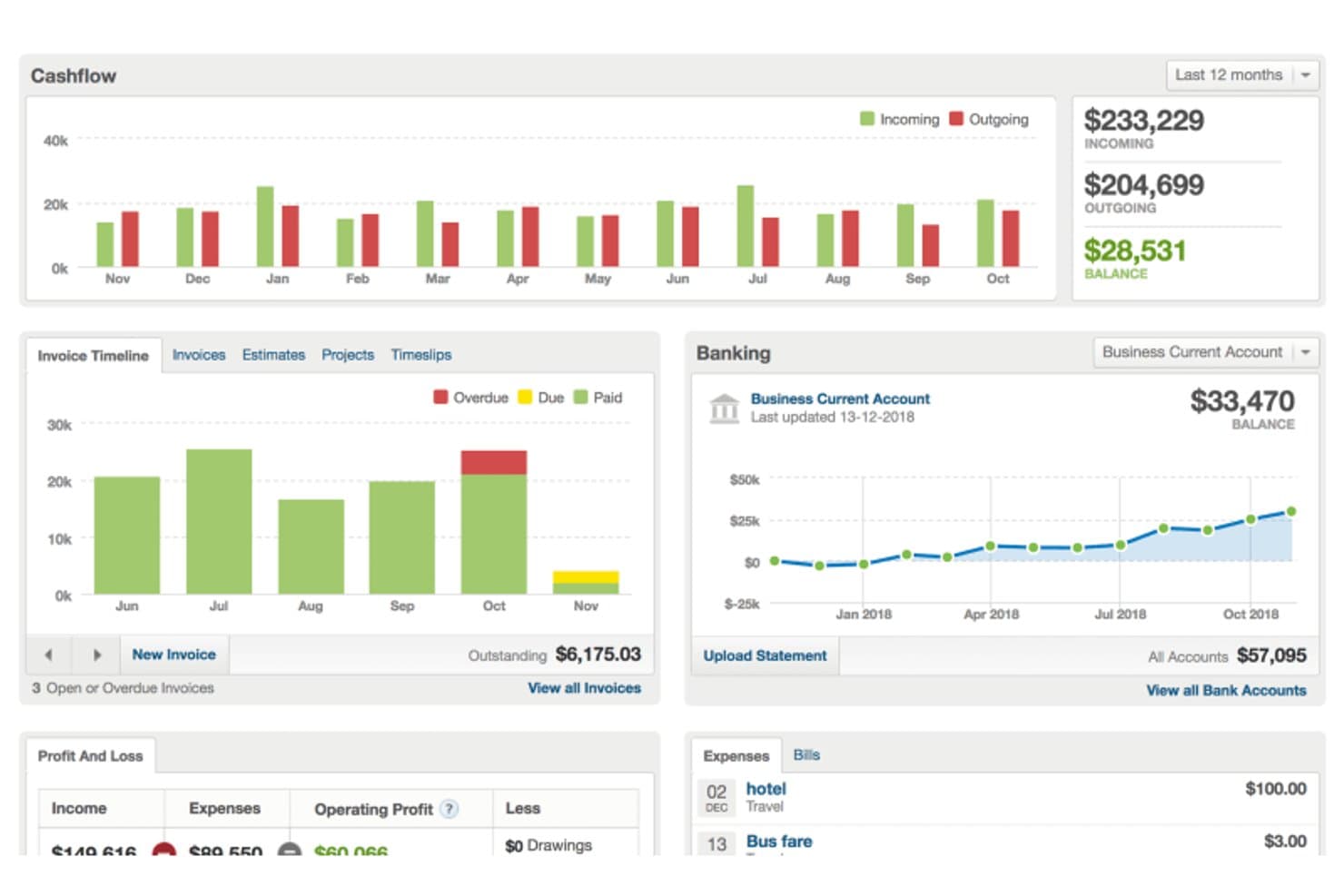
FreeAgent centralizes cashflow, invoicing, and banking in one dashboard. FreeAgent is UK-focused accounting software built for small businesses, sole traders, freelancers, and their accountants—covering invoicing, expense tracking, bank reconciliation, and tax filing in one place.
Who Is FreeAgent Best For?
FreeAgent is a strong fit for UK-based sole traders, freelancers, and small business owners who need built-in HMRC tax filing alongside their day-to-day accounting.
Why I Picked FreeAgent
I picked FreeAgent as one of the best because it handles HMRC tax filing directly from within the software, which is something most FreshBooks alternatives can't match. I particularly like that you can submit VAT returns, Self Assessment, and Making Tax Digital for Income Tax updates to HMRC without leaving the platform. For UK sole traders and small businesses juggling quarterly MTD obligations alongside day-to-day invoicing, that built-in compliance layer removes a lot of manual coordination.
FreeAgent Key Features
- Bank feeds with Smart bank categorisation: Machine learning automatically suggests transaction categories based on past entries, reducing manual data entry during reconciliation.
- Project profitability tracking: Track income, expenses, and time against individual projects, then convert logged hours directly into invoice line items.
- Payroll with HMRC RTI filing: Run payroll and automatically calculate and submit PAYE and National Insurance information to HMRC from within the platform.
- Practice Dashboard for accountants: Gives accountants and bookkeepers a central hub to view client financials, run cross-client reports, and perform bulk tasks.
FreeAgent Integrations
FreeAgent offers marketplace integrations with Stripe, PayPal, GoCardless, HubSpot, WooCommerce, BrightPay, and Pleo. It also provides a REST API with OAuth 2.0 and supports Zapier.
Pros and Cons
Pros:
- Matches bank transactions to invoices and bills
- Shares live records with your accountant
- Files UK tax returns directly with HMRC
Cons:
- Historical invoices may need third-party imports
- Reporting offers limited depth for analysis
 3Best for small business accounting
Xero
- 1-month free trial available
- From $27/month
Visit WebsiteCustomer Rating:4.4/5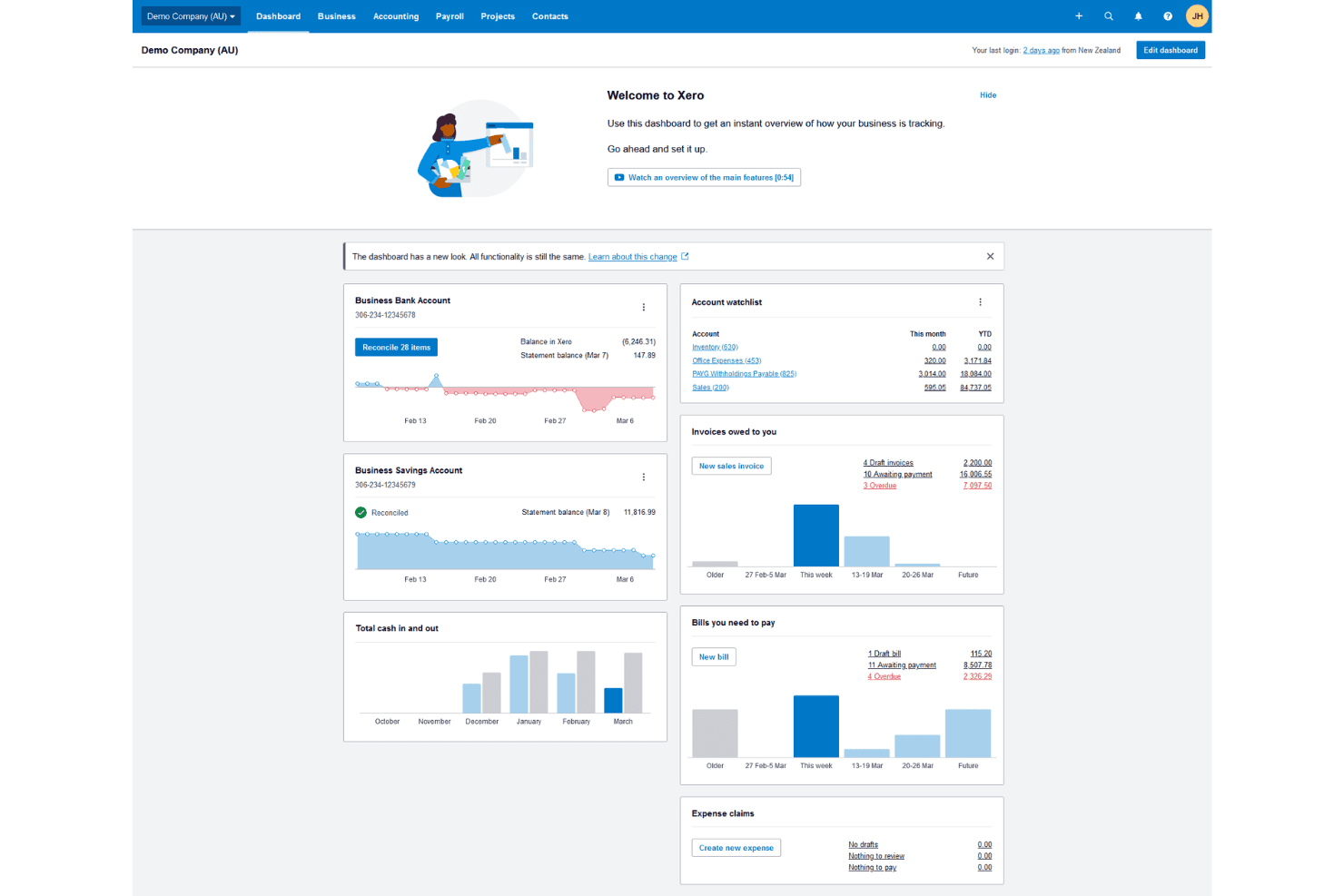
Xero gives users a real-time financial overview from one dashboard. Xero is accounting software that covers invoicing, bank reconciliation, financial reporting, and expense tracking—making it a natural fit for small business owners, freelancers, and bookkeepers who need a full-featured FreshBooks alternative with unlimited users.
Who Is Xero Best For?
Xero is a strong fit for small business owners and bookkeepers who need full-featured accounting—including bank reconciliation, unlimited users, and financial reporting—without paying per seat.
Why I Picked Xero
I picked Xero as one of the best because it's one of the few FreshBooks alternatives that handles genuine double-entry accounting while still feeling approachable for small business owners. I especially appreciate how bank reconciliation works across all plans: Xero connects to 21,000+ financial institutions, applies bank rules to recurring transactions in bulk, and uses AI-assisted matching to auto-reconcile confident matches. I also like that unlimited users are included at every tier, so I can invite my bookkeeper without worrying about per-seat costs adding up.
Xero Key Features
- Multi-currency support: Pay and receive payments in more than 160 currencies, with automatic exchange-rate updates and foreign-currency bank accounts included on the Established plan.
- Cash flow forecasting: View short- and long-term cash flow projections ranging from 30 days on Early up to 180 days on Established, directly from the accounting dashboard.
- Automated invoice reminders: Schedule and send automatic payment reminders for unpaid invoices across email, SMS, or online link without manual follow-up.
- W-9 and 1099 management: Track contractor details and manage W-9 and 1099 reporting for tax compliance, included on the Early plan and above.
Xero Integrations
Xero offers 1,000+ marketplace integrations, including Stripe, Gusto, Dext, Synder, and G-Accon for Google Sheets. Its OAuth 2.0 API, webhooks, and SDKs support custom integrations.
Pros and Cons
Pros:
- Automated reminders help track overdue invoices
- Unlimited users support growing teams
- Bank feeds cut manual reconciliation work
Cons:
- Detailed reports can require Excel exports
- Bank feeds sometimes disconnect or stop syncing
Learn more about Xero: Best for multichannel inventory tracking
- Free plan + 14-day trial + demo available
- From $20/month
Visit WebsiteCustomer Rating:4.3/5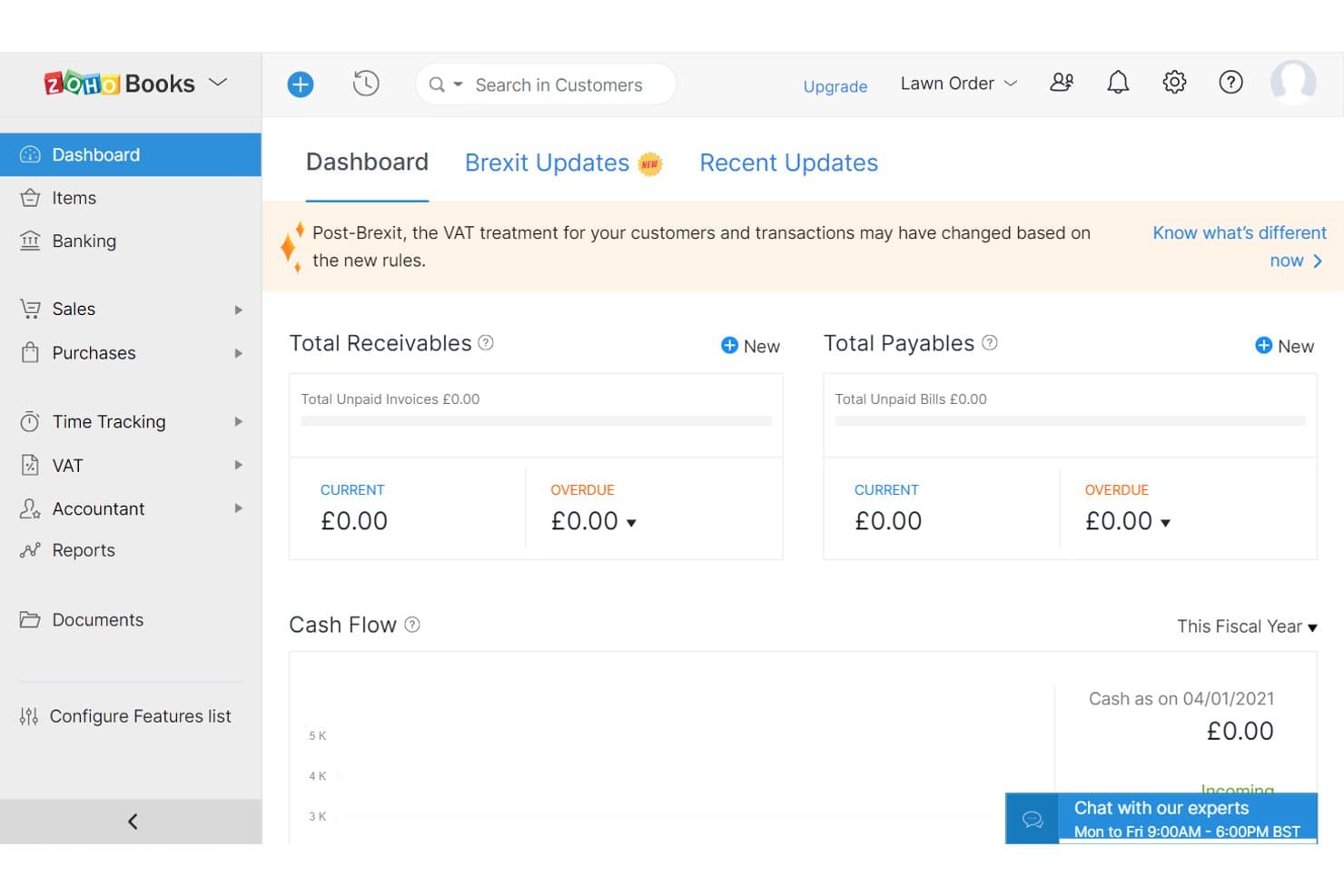
Zoho Books gives users a real-time financial overview dashboard. Zoho Books is a cloud accounting platform built for small businesses and growing teams that need more than basic invoicing, covering bank reconciliation, expense management, inventory tracking, and financial reporting in one place.
Who Is Zoho Books Best For?
Zoho Books is a strong fit for small businesses that sell across multiple channels and need inventory tracking built into their accounting software.
Why I Picked Zoho Books
I picked Zoho Books as one of the best because it handles multichannel inventory tracking in a way FreshBooks simply doesn't. I can track stock across Shopify, Amazon, Etsy, and eBay from within the same platform where I'm reconciling accounts and running P&L reports. The Elite plan adds serial and batch tracking, warehouse management, and FIFO cost lot tracking, so I always know what's on hand, where it is, and what it cost.
Zoho Books Key Features
- Bank reconciliation: Match imported bank and credit card transactions against your records using automated feeds, manual statement uploads, and customizable transaction rules.
- Customer portal: Give clients a branded self-service portal where they can view invoices, approve quotes, and make payments directly.
- Custom roles and permissions: Define granular user roles that control module access and restrict record visibility by location, reporting tag, or bank account.
- Sales and use tax tracking: Set up tax rates, groups, and treatments, and generate tax liability reports to stay on top of compliance obligations.
Zoho Books Integrations
Zoho Books has native integrations with Shopify, Etsy, eBay, Amazon, Stripe, PayPal, Zoho CRM, Zoho Inventory, and Google Drive. It connects to 500+ apps through cloud integrators, supports REST API and webhooks, and is also available on Zapier.
Pros and Cons
Pros:
- Recurring invoices simplify payment tracking
- FIFO costing clarifies inventory valuation
- Tracks stock alongside accounting records
Cons:
- FreshBooks payment history needs manual re-entry
- Bank feeds can drop transactions
 Best for project-based businesses
- Free demo available
- Pricing upon request
Visit WebsiteCustomer Rating:4.5/5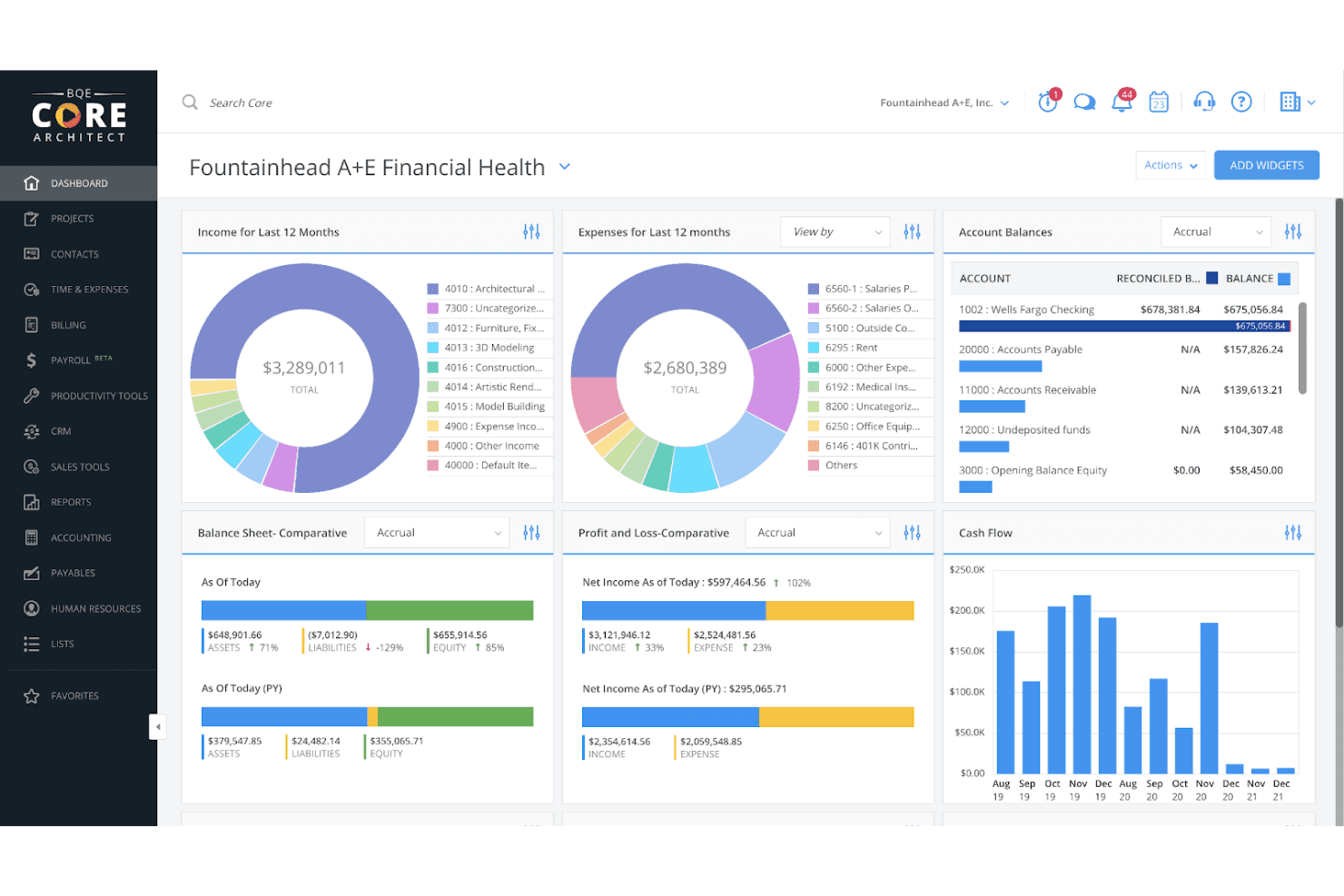
BQE Core centralizes financial health metrics in one dashboard. BQE CORE is an all-in-one firm management platform built for architecture, engineering, and professional services firms that need to connect project financials, time and expense tracking, and billing in a single system.
Who Is BQE CORE Best For?
BQE CORE is a strong fit for architecture, engineering, and professional services firms that need to manage project financials, billing, and time tracking in one place.
Why I Picked BQE CORE
I picked BQE CORE as one of the best because it's purpose-built for project-based businesses like architecture and engineering firms that need billing and time tracking tied directly to project financials. I love how it connects billable hours and expenses to specific project budgets in real time, so I can see exactly where a project stands financially before an invoice goes out. The batch invoicing tools let me bill multiple projects at once across different contract types, from fixed-fee to cost-plus, which is something FreshBooks simply can't match.
BQE CORE Key Features
- Resource planning: View team capacity and allocations across projects to identify overloaded staff and plan balanced workloads.
- Multi-contract billing types: Bill clients under hourly, fixed-fee, cost-plus, unit-cost, or percentage contract structures within the same platform.
- Automated invoice reminders: Schedule payment reminders before, on, or after an invoice's due date, with each sent reminder logged as a collection note.
- Customizable dashboards: Build unlimited dashboards with real-time KPIs covering utilization, realization, and project profitability.
BQE CORE Integrations
BQE CORE offers hundreds of pre-built integrations, including QuickBooks, Xero, Docusign, Power BI, Google, Microsoft, and Zapier. It also provides an open REST API for custom integrations.
Pros and Cons
Pros:
- Mobile receipt capture supports field teams
- Batch invoicing suits multi-project firms
- Project budgets expose profitability before billing
Cons:
- Project-specific invoice changes take extra steps
- Report filtering and saved views frustrate users
Learn more about BQE Core: Best for integrated business apps
- Free trial available
- Free plan available
Visit WebsiteCustomer Rating:4.2/5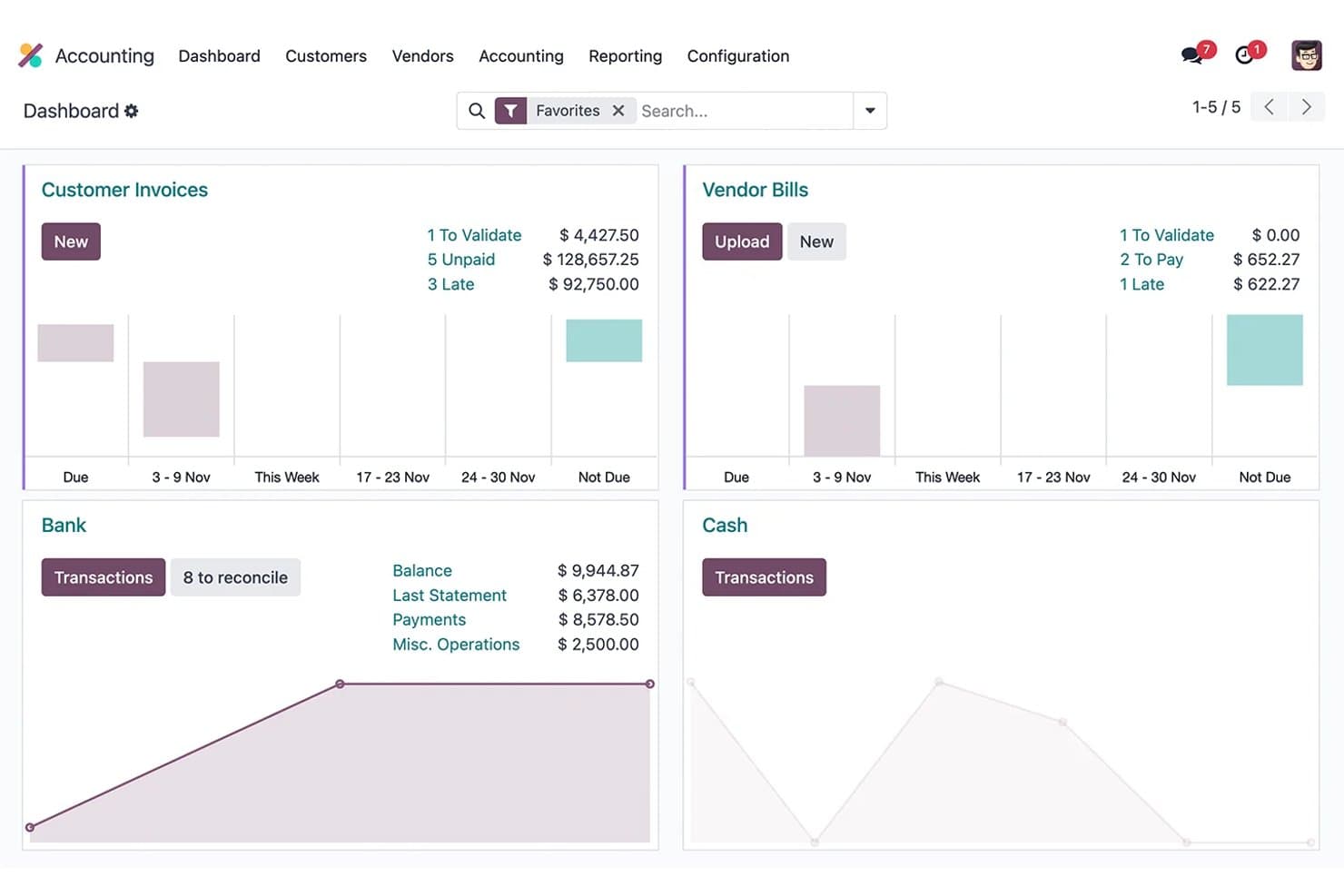
Odoo Accounting tracks invoices, vendor bills, and bank reconciliation. Odoo Accounting is a double-entry accounting app built into a broader business suite, making it a strong fit for small businesses and finance managers who want invoicing, bank reconciliation, expense tracking, and financial reporting connected to their sales, inventory, and operations in one platform.
Who Is Odoo Accounting Best For?
Odoo Accounting is a strong fit for small business owners who need accounting connected to sales, inventory, and operations in one platform.
Why I Picked Odoo Accounting
I picked Odoo Accounting because it's one of the few accounting tools where your books are genuinely connected to the rest of your business. When a sale is validated, inventory updates and an invoice generates automatically. I also like that the analytic accounting layer lets you track costs and revenue by project, department, or client, so your financial reports reflect what's actually happening operationally, not just what's been invoiced.
Odoo Accounting Key Features
- Multi-currency support: Records foreign-currency transactions alongside your main currency, with exchange-difference entries posted automatically and exchange rates updated daily, weekly, or monthly.
- Automated payment follow-ups: Sends payment reminders to customers via email, SMS, postal letter, or scheduled follow-up tasks when invoices go unpaid.
- Customer portal: Gives customers a self-service space to view, download, and pay invoices online without requiring back-and-forth communication.
- Fiscal localization packages: Preconfigures region-specific charts of accounts, taxes, fiscal positions, and legal reports for more than 100 countries.
Odoo Accounting Integrations
Odoo Accounting offers six documented native integrations, including Stripe, PayPal, Adyen, Authorize.net, Alipay, and AvaTax. Bank feeds connect through Plaid, Yodlee, Salt Edge, Ponto, Enable Banking, and Basiq; a Custom-plan API and marketplace FreshBooks connector support further connectivity.
Pros and Cons
Pros:
- Streamlined connection for business modules
- Project costs tied to analytic reporting
- Connected sales, inventory, and invoicing workflows
Cons:
- Somewhat lengthy setup and navigation difficulties
- FreshBooks migration needs field mapping and checks
Learn more about Odoo Accounting: Best for comprehensive accounting needs
- 30-day free trial
- Pricing upon request
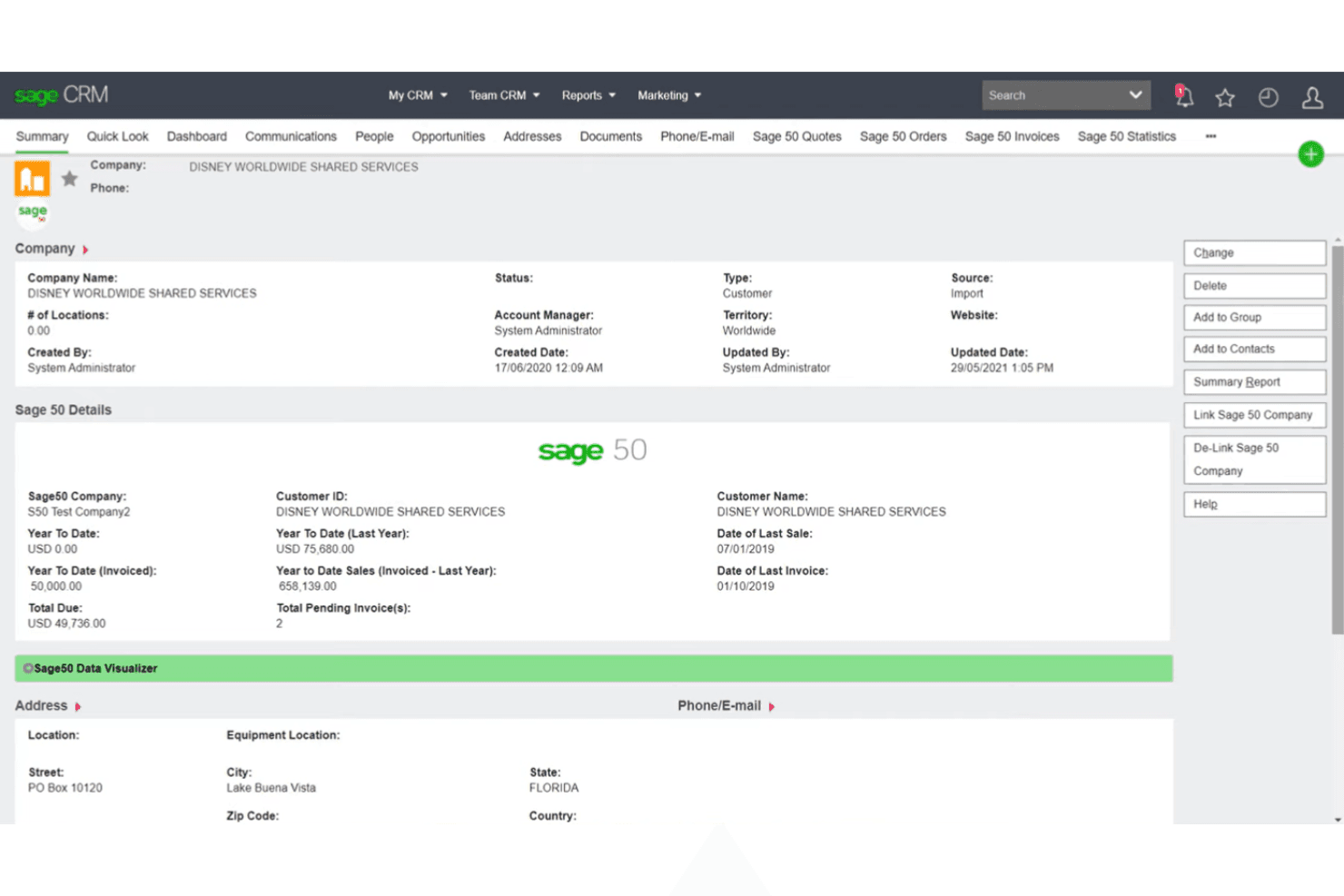
Sage 50 Accounting surfaces customer financials directly inside Sage CRM. Sage 50 Accounting is a small business accounting platform with deeper inventory management, job costing, and payroll capabilities than most FreshBooks alternatives, making it a strong fit for product-based businesses or service firms that track costs by project.
Who Is Sage 50 Accounting Best For?
Sage 50 Accounting is a strong fit for small businesses that sell physical products or run project-based services and need deeper inventory and job costing than FreshBooks offers.
Why I Picked Sage 50 Accounting
I picked Sage 50 Accounting because it covers accounting needs that FreshBooks simply can't match, particularly for businesses that track costs at the job level. I appreciate how its job costing module lets you assign labor, materials, and overhead to specific phases and cost codes, then pull a profitability report per job. Combined with its inventory management support for FIFO, assemblies, and serialized item tracking, it's the kind of depth I'd expect from a product-based or project-driven business that has outgrown FreshBooks.
Sage 50 Accounting Key Features
- Automated bank reconciliation: Bank Feeds imports transactions from your bank and credit card accounts and matches them to existing records in Sage 50.
- Customizable invoicing: Create branded invoices with payment terms, set up recurring invoices, and add a Pay Now option linked to Stripe or PayPal.
- Financial reporting suite: Run reports across the general ledger, payables, receivables, cash flow, sales taxes, and more, with drill-down and export options.
- Remote Data Access: Share your company file with an accountant or bookkeeper and sync changes in real time from a separate location.
Sage 50 Accounting Integrations
Sage 50 Accounting has native integrations with Microsoft 365 and AutoEntry, plus integrations with Stripe and PayPal through Sage Invoice Payments.
Pros and Cons
Pros:
- Job costing reveals project profitability
- Inventory costing tracks stock and assemblies
- Detailed financial reports support decisions
Cons:
- Remote accountant access can glitch
- Dated interface requires multiple screens
Learn more about Sage 50 Accounting: Best for startup financial planning
- 30-day free trial
- From $75/month (billed annually)
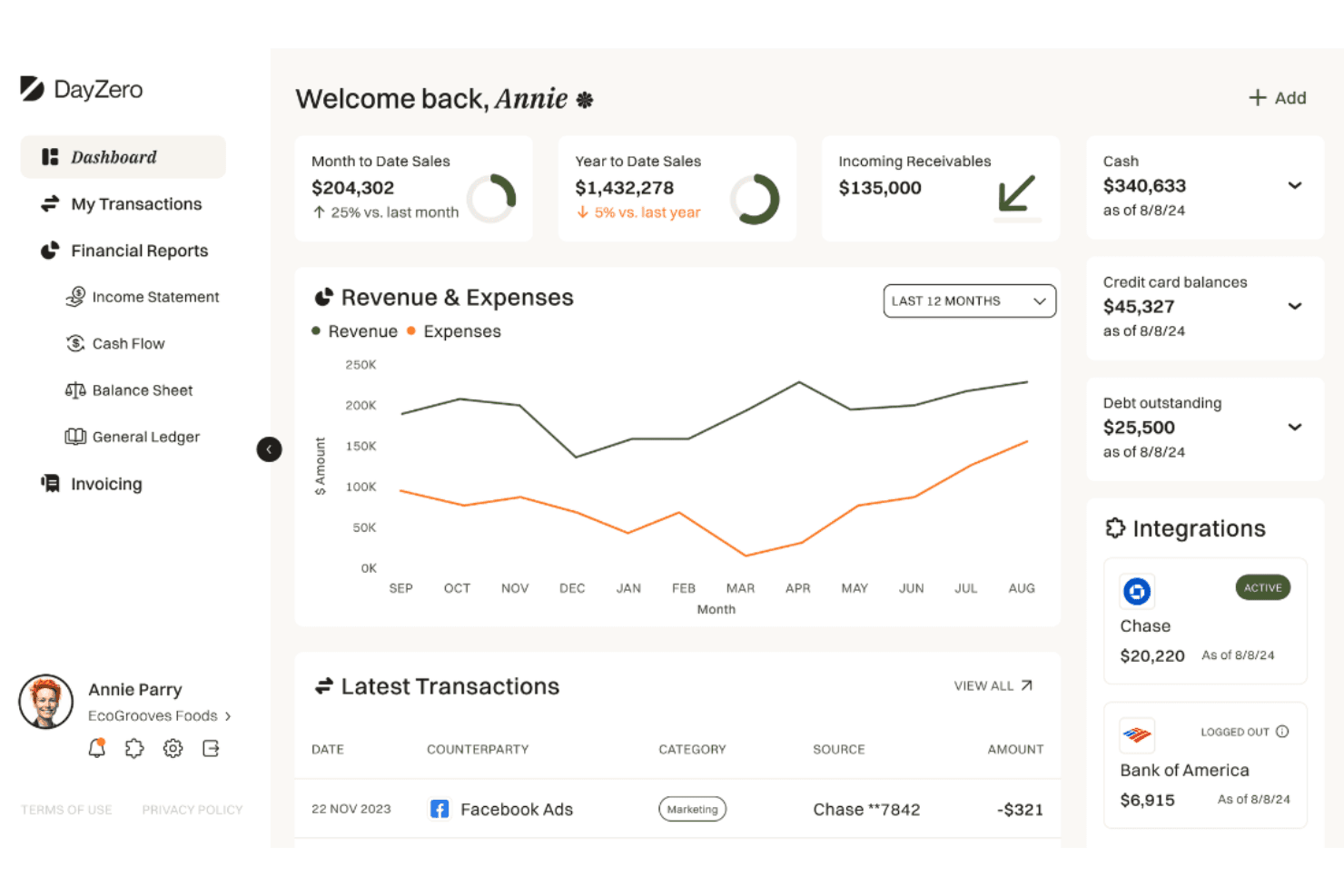
DayZero is an accounting platform for SMBs offering automation and invoicing. DayZero is an accounting platform built for small businesses and advisory firms that want AI-driven bookkeeping, double-entry ledger integrity, and financial close workflows without stitching together separate tools.
Who Is DayZero Best For?
DayZero is a strong fit for early-stage startups and small businesses that want AI-driven bookkeeping and a full double-entry ledger without hiring a full accounting team.
Why I Picked DayZero
I picked DayZero as one of the best because it's built specifically for early-stage startups that need a real double-entry ledger from day one, not a simplified cash-basis workaround. I love how the AI agent roles, like the Controller and Cash Analyst, actively monitor the books and surface budget-versus-actual gaps before they become problems. The pipeline and deals tracker, paired with a 13-week cash-inflow forecast, gives founders the financial visibility that actually drives planning decisions.
DayZero Key Features
- Double-entry ledger with closed-period controls: Lock accounting periods using a close checklist, two-reviewer sign-off, and an audited reopening process to protect finalized books.
- AI-assisted bank transaction categorization: Synced transactions are automatically normalized and categorized using AI and user-defined bank rules, with a review queue for items the AI can't resolve.
- Accounts payable approval workflow: Route vendor bills for approval using vendor, amount, and contract-match criteria, with Slack alerts, AI risk scores, and a full audit trail.
- Client collaboration portal: Give clients a live portal to view financials, track invoices and bills, upload documents, answer transaction clarifications, and communicate with their bookkeeping team.
DayZero Integrations
DayZero offers native integrations with Plaid, Stripe, Square, Shopify, Ramp, QuickBooks, Xero, Slack, Payliance, and Meta Ads. It also supports REST API access, webhooks, OAuth 2.1, and MCP connections for custom integrations and AI assistants.
Pros and Cons
Pros:
- Forecasting connects pipeline visibility with cash planning
- Firm portal supports client bookkeeping collaboration
- Full double-entry ledger with period controls
Cons:
- Lacks documentation for FreshBooks-specific migration path
- Less tailored to solo freelancers
Learn more about DayZero: Best for enterprise resource planning
- Free demo available
- Pricing upon request
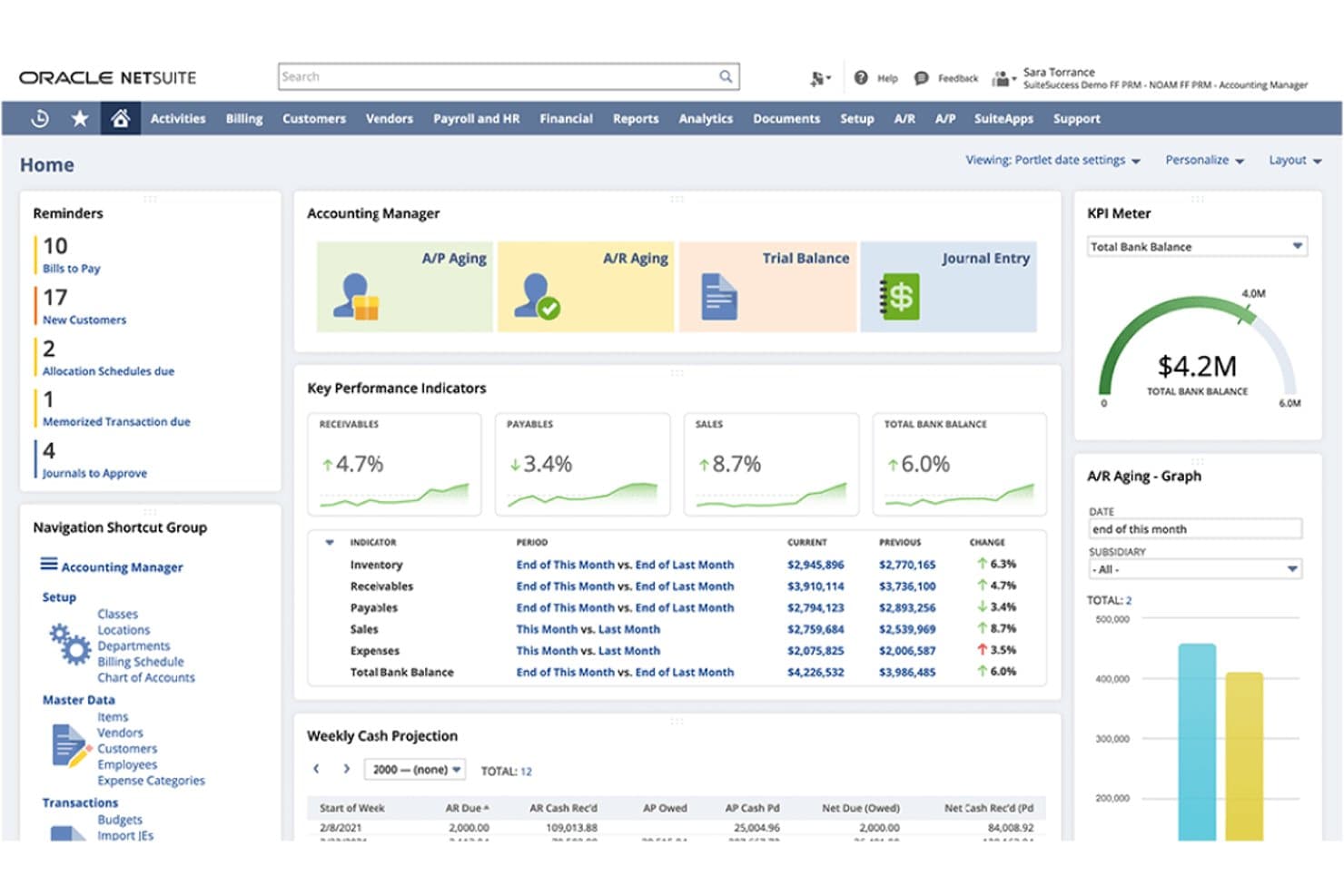
NetSuite gives accounting managers a centralized view of financial KPIs, accounts receivable and payable, cash projections, and outstanding tasks. NetSuite Cloud Accounting is an Oracle-backed ERP platform built for scaling and midmarket businesses that need a single system to manage financial close, multi-entity accounting, compliance reporting, and connected operations across invoicing, inventory, and payroll.
Who Is NetSuite Cloud Accounting Best For?
NetSuite Cloud Accounting is built for midmarket and scaling businesses that need a single system to manage multi-entity financials, compliance reporting, and connected operations.
Why I Picked NetSuite Cloud Accounting
I picked NetSuite Cloud Accounting because it's the clearest upgrade path for businesses that have outgrown FreshBooks and need a true ERP backbone. I particularly value how it handles multi-entity financials through OneWorld, letting me manage up to 250 subsidiaries with consolidated reporting across legal entities. The financial close automation, covering journal entries, intercompany transactions, and variance analysis, is something FreshBooks simply can't touch.
NetSuite Cloud Accounting Key Features
- Bank Feeds automation: Automatically imports bank transactions daily across multiple accounts and financial institutions for reconciliation.
- SuiteAccountants access: Grants external accountants a free single-seat license to review financial reports and monitor financial processes.
- Role-based permissions: Controls user access down to the field level with configurable standard and custom roles across the platform.
- Tax management reporting: Generates real-time transaction-level tax reports and manages local taxes across subsidiaries, including GST, VAT, and sales tax schedules.
NetSuite Cloud Accounting Integrations
Native integrations include Salesforce, ADP Workforce Now, Shopify, BigCommerce, WooCommerce, Square, and Amazon Seller Central. NetSuite supports REST, SOAP, custom REST endpoints, CSV import, and ODBC/JDBC interfaces for custom integrations.
Pros and Cons
Pros:
- Connects accounting with inventory operations
- Automates intercompany close and reconciliations
- Consolidates multi-entity financial reporting
Cons:
- Advanced reports take technical effort
- Implementation demands lengthy cross-team planning
Learn more about NetSuite Cloud Accounting: Best for detailed financial reports
- Free plan + 30-day trial available
- From $38/month
Visit WebsiteCustomer Rating:4/5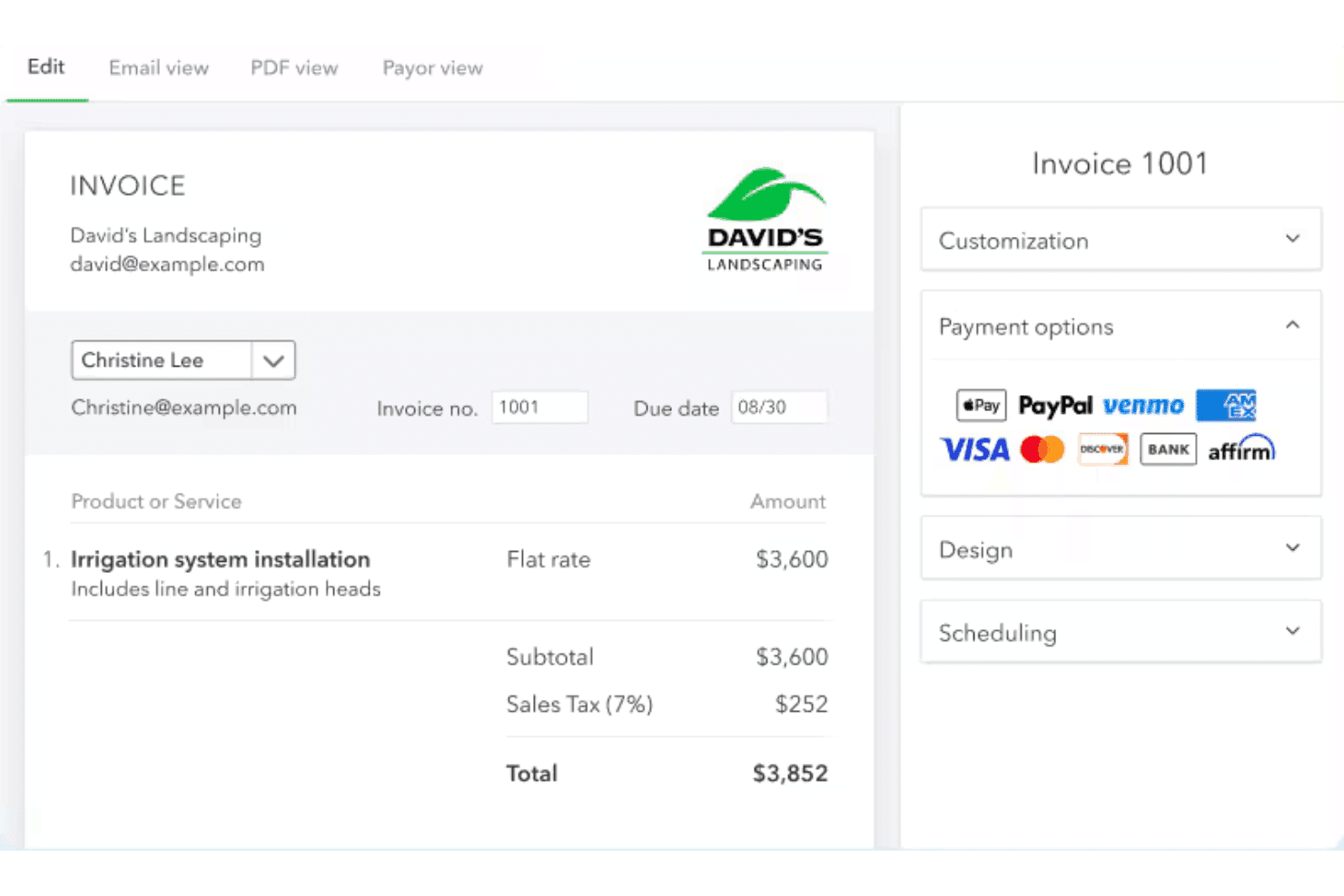
QuickBooks Online lets users create and send itemized invoices with tax. QuickBooks Online is Intuit's cloud-based accounting platform for small businesses, bookkeepers, and finance managers who need full double-entry accounting, bank reconciliation, invoicing, and financial reporting in one place.
Who Is QuickBooks Online Best For?
QuickBooks Online is a strong fit for small businesses and finance managers who need a full accounting suite with deep reporting capabilities.
Why I Picked QuickBooks Online
I picked QuickBooks Online because its financial reporting depth is genuinely hard to replicate elsewhere. I can pull profit-and-loss, balance-sheet, and cash-flow reports with custom filters, then export directly to Excel or PDF without any extra steps. On the Advanced plan, custom KPIs, report formulas, and real-time dashboards let me track the metrics that actually matter to my business, not just the defaults.
QuickBooks Online Key Features
- Bank reconciliation: Connect bank and credit card accounts to automatically download, match, and categorize transactions before they post to your books.
- Receipt capture: Upload receipt images from your computer or mobile device, and QuickBooks extracts the details to create a transaction for review.
- Multi-user roles: Assign defined roles, from bookkeeper, accounts-receivable manager, expense manager, and more, with plan-based user limits from 1 to 25.
- Inventory tracking: Monitor on-hand stock quantities, set reorder alerts, and view inventory value through built-in reports, available on Plus and Advanced plans.
QuickBooks Online Integrations
QuickBooks Online lists 800+ integrations, including native connectors for Shopify, Stripe, Square, PayPal, WooCommerce, and BigCommerce. Its marketplace includes BILL, Dext, Expensify, and Fathom, while its REST API with OAuth 2.0 supports custom integrations.
Pros and Cons
Pros:
- Online invoice payments simplify client collections
- Bank feeds cut transaction entry during reconciliation
- Detailed reports support tax prep and monitoring
Cons:
- Advanced reporting and controls require higher tiers
- Feed sync and suggested categories need checking
Learn more about QuickBooks Online:
Outras alternativas ao FreshBooks
Eis algumas alternativas adicionais ao FreshBooks que não entraram na minha lista final, mas que vale a pena conhecer:
- 11Sage Business Cloud AccountingBest for UK payroll and CIS compliance
- 12Sage IntacctBest for multi-entity financial consolidation
- 13ZarMoneyBest for multi-warehouse inventory accounting
- 14StrivenBest for accounting with inventory control
- 15KashooBest for simple bookkeeping
- 16WaveBest for free core bookkeeping and invoicing
- 17Patriot AccountingBest for accounting without per-user fees
- 18RampBest for multi-client accounting firms
- 19PuzzleBest for subscription revenue recognition
- 20SlashBest for accounting-linked business banking
How I Evaluate FreshBooks Alternatives
I split my evaluation into three parts. First—and most heavily weighted—core functionality: does the tool let you invoice clients and reconcile bank transactions? Second, I look at standout features like project profitability tracking or multi-entity support. Third, I consider pricing value and onboarding support.
Core Functionality (Table Stakes For This List)
When I'm selecting tools for my list, I score each one on a scale from 0 (does not offer the functionality) to 5 (excels in this area) for each core functionality listed below. I then convert the total into a percentage to help assess each tool's overall fit, with extra weight on any functionalities I’ve deemed essential.
- Invoicing & Payments (Essential): I look for recurring invoices, payment options, reminders, and clear status tracking so teams can follow client balances from issue to payment.
- Bank Reconciliation (Essential): I assess bank and card feeds, transaction matching, and categorization rules, including how much review is needed during a monthly close.
- Expense Tracking: I check receipt capture, categorization, and links to clients or projects, especially where teams need to bill expenses back to customers.
- Financial Reporting: I look for core statements, useful filters, and export options that support both period-end reporting and questions about business performance.
- Double-Entry Accounting: I evaluate whether transactions flow through a proper general ledger, with adjustments and records that support accurate reporting and review.
- User Access & Permissions: I consider role-based access for owners, finance staff, and external bookkeepers, including whether permissions suit the work each person handles.
Once I have a list of tools that meet the criteria, I consider what sets each platform apart.
Differentiating Factors (What Sets Vendors Apart)
Here's how I compare and contrast different vendors:
Standout Features
Project profitability tracking is the first thing I look for. I want to see time, expenses, and invoices tied to a specific project or client so I can evaluate true margins—not just revenue. Multi-entity and multi-currency support matters just as much, especially if you invoice clients in different currencies or run more than one legal entity. I also check whether each tool includes a dedicated accountant collaboration portal, since giving your external bookkeeper real-time access to the books cuts days off every close cycle.
Beyond Features
Pricing models matter because per-client billing can quietly double your costs as you grow. I check whether tiered plans scale without forcing a jump to an enterprise contract. I also evaluate how easy it is to import historical data from FreshBooks or another platform—losing old invoices or mismatched account mappings during migration can set a finance team back weeks. Finally, I look at integration depth with payment processors, payroll tools, and tax software, since a tool that can't connect to your existing stack creates manual work every close cycle.
Por que procurar uma alternativa ao FreshBooks?
Embora o FreshBooks seja um software de contabilidade útil, existem várias razões pelas quais alguns utilizadores procuram soluções alternativas. Pode estar à procura de uma alternativa ao FreshBooks porque…
- Não dispõe de funcionalidades avançadas de criação de relatórios
- A sua equipa precisa de ferramentas específicas do seu setor
- Está a ter problemas com o apoio ao cliente
- Não acompanha bem o crescimento das empresas
- Não está disponível na sua região
Se alguma destas situações lhe é familiar, veio ao lugar certo. A minha lista inclui várias opções de software de contabilidade mais adequadas para equipas que procuram soluções alternativas.
Principais funcionalidades das alternativas ao FreshBooks
Eis algumas das principais funcionalidades do FreshBooks que a sua solução alternativa deve oferecer:
- Faturação: Cria faturas profissionais rapidamente com modelos personalizáveis e lembretes de pagamento automáticos.
- Pagamentos: Aceita pagamentos com cartão de crédito, automatiza a faturação recorrente e gere os pagamentos com facilidade.
- Registo de Tempo: Regista eficientemente as horas faturáveis com o registo de tempo automatizado e a associação a projetos.
- Contabilidade e Impostos: Acompanha receitas e despesas, gera relatórios prontos para impostos e gere recibos sem esforço.
- Comunicação com Clientes: Gere projetos, propostas e orçamentos para garantir uma comunicação clara com os clientes.
- Gestão de Equipas: Integra o processamento salarial e gere a colaboração das equipas para apoiar os pagamentos aos funcionários e o trabalho em equipa.
- Acesso Móvel: Utiliza aplicações para iOS e Android para gerir faturas e pagamentos em movimento.
- Assinaturas Eletrónicas e Orçamentos: Permite aos clientes aprovar propostas online e converter orçamentos em faturas sem problemas.
- Gestão de Projetos: Colabora com a sua equipa, partilha ficheiros e gere os cronogramas e as discussões dos projetos num só lugar.
- Integrações: Liga-se a mais de 100 aplicações empresariais para aumentar a eficiência e a funcionalidade dos fluxos de trabalho.