

Ao contrário das ferramentas tradicionais, o software de contabilidade com IA não se limita a registar dados — ajuda a identificar padrões, detetar erros e automatizar as tarefas aborrecidas. No entanto, com tantas opções disponíveis, escolher a solução certa pode parecer uma aposta.
Enquanto especialista em software digital, experimentei muitas ferramentas para descobrir o que funciona realmente no trabalho financeiro do dia a dia. Reuni as minhas principais escolhas, que poupam tempo, reduzem erros e facilitam o seu trabalho. São ferramentas que recomendaria a qualquer equipa que queira trabalhar de forma mais inteligente, e não mais arduamente.
Why Trust Our Software Recommendations
6,700+
Reviews
20
Industry experts
16+
Evaluation factors
14
Years
Our team has been testing and reviewing software since 2012. As finance leaders ourselves, we know how difficult—and important—it is to choose the right software.
For this guide, we evaluated tools using hands-on testing and independent research, scoring tools using our selection criteria.
Our reviews reflect our human editorial judgment, not a sales pitch.
Tabela comparativa de software de contabilidade com IA
Esta tabela comparativa resume os detalhes de preços das minhas principais escolhas de software de contabilidade com IA:
| Tool | Best For | Trial Info | Price | ||
|---|---|---|---|---|---|
| 1 | Best for accounts payable automation | Free plan available | Pricing upon request | Website | |
| 2 | Best for multi-software accounting integrations | Free trial available | From $25.21/month (billed annually) | Website | |
| 3 | Best for automated bank matching | Free demo available | Pricing upon request | Website | |
| 4 | Best for AI-driven invoice data extraction | Free demo available | Pricing upon request | Website | |
| 5 | Best for auto-generating purchase orders | Free plan available; 30-day free trial | From $15/user/month | Website | |
| 6 | Best for tax practice management | Free demo available | From $58.33/user/month (billed annually) | Website | |
| 7 | Best for user-friendly interface | 1-month free trial available | From $27/month | Website | |
| 8 | Best for simple accounting solutions | 14-day free trial | From $30/month | Website | |
| 9 | Best for practice management for firms | 15-day free trial | From $22/user/month | Website | |
| 10 | Best for automated bookkeeping for firms | Not available | From $149/month | Website |


Avaliações do melhor software de contabilidade com IA
É aqui que analisamos tudo em pormenor. Vou explicar-lhe cada software de contabilidade com IA — aquilo que faz bem, os aspetos em que pode ficar aquém e quando é a escolha certa. Pense nisto como um guia acessível para o ajudar a perceber qual é a ferramenta que realmente facilita a sua vida.
 Best for accounts payable automation
- Free plan available
- Pricing upon request
Visit WebsiteCustomer Rating:4.5/5
Payouts' dashboard facilitates the management of pending invoices, allowing users to keep track of outstanding payments and manage cash flow. Payouts is an AI-driven accounts payable (AP) automation platform designed to help digital economy businesses handle invoice processing, vendor payments, and compliance tasks.
Why I picked Payouts: Payouts employs AI and OCR technologies to automate invoice processing. It captures data from various invoice formats, such as PDFs and scanned images, and converts them into digital files. This automation reduces manual data entry and speeds up the payment process, allowing your accounting team to focus on more strategic tasks. The platform also offers customizable approval workflows, allowing you to set up approvals based on criteria like amount, vendor, or department.
Standout features & integrations:
Features include real-time dashboards and custom reporting tools that offer visibility into your spending and cash flow. Additionally, the collaborative vendor portal enhances communication and transparency between your business and its vendors.
Integrations include Everflow, CJ Affiliate, Awin, PayPal, Venmo, Payoneer, NetSuite, Priority, Workday, Skrill, and Tune.
Pros and Cons
Pros:
- Comprehensive automation of accounts payable processes
- Multiple payout methods
- Supports scaling operations
Cons:
- Potential challenges integrating with existing systems
- Mostly geared towards digital economy businesses
Learn more about Payouts: 2Best for multi-software accounting integrations
Dext
- Free trial available
- From $25.21/month (billed annually)
Visit WebsiteCustomer Rating:4.5/5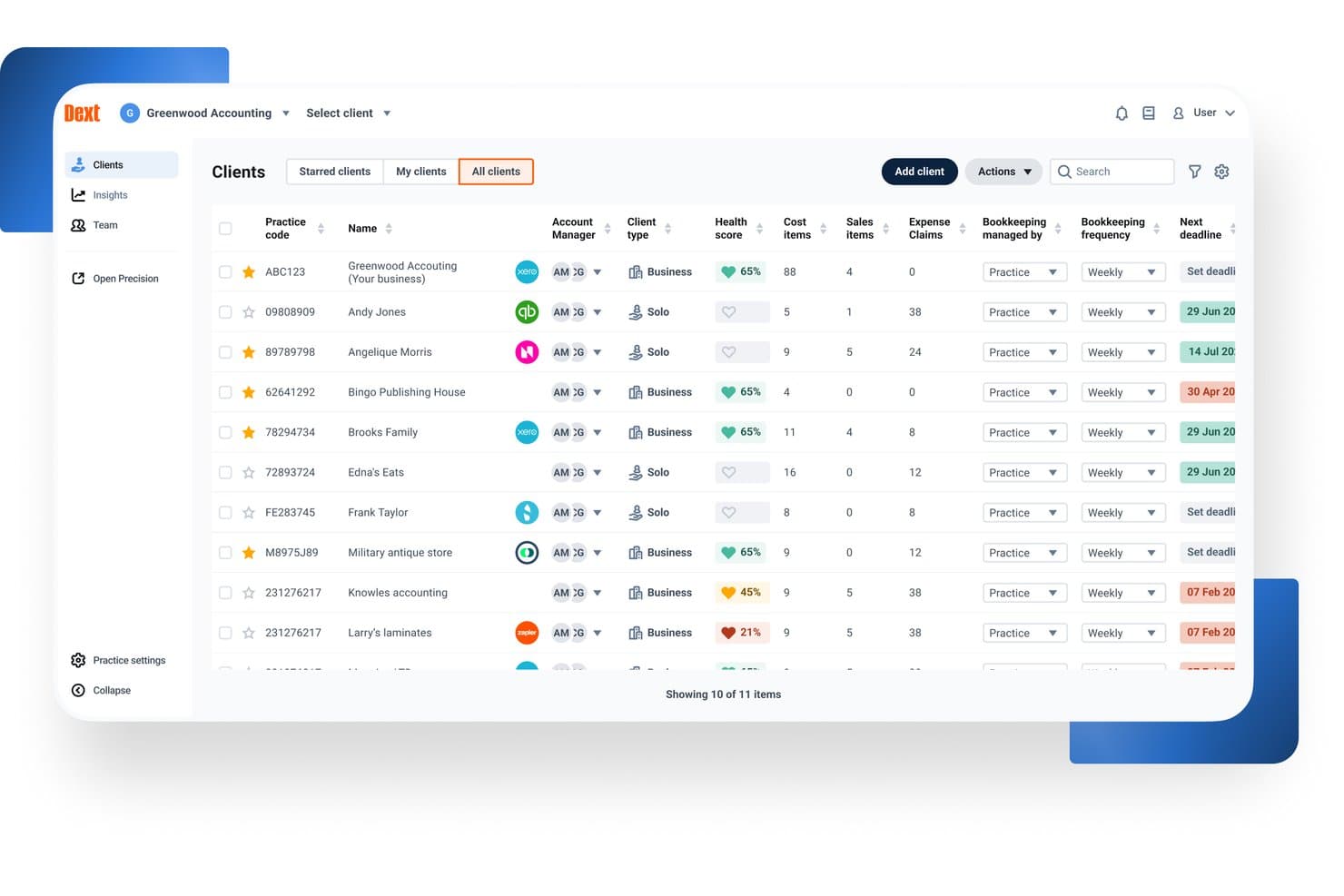
Dext offers a centralized client management dashboard where accountants can view health scores, cost items, deadlines, and bookkeeping frequency across all clients. Dext is an AI-powered pre-accounting automation platform that captures financial documents, extracts data from receipts, invoices, and bank statements, and syncs that data to your accounting software via automated categorization and reconciliation.
Who Is Dext Best For?
Dext is a strong fit for bookkeepers and staff accountants at accounting firms managing high document volumes across multiple clients and accounting platforms.
Why I Picked Dext
I picked Dext as one of the best because no other pre-accounting tool matches its integration depth. It syncs bi-directionally with 30+ accounting platforms, including Xero, QuickBooks, Sage, and NetSuite, so my team doesn't have to recode data when clients switch GLs mid-year. I especially like the auto-publish feature, which pushes extracted, coded documents directly to the correct ledger without a manual review step in between.
Dext Key Features
- AI document extraction: Captures and processes receipts, invoices, and bank statements from mobile, email, or direct upload.
- Supplier statement reconciliation: Matches supplier statements to transactions to help identify missing or mismatched records.
- Data health checks: Flags duplicate contacts, uncoded transactions, and out-of-date reconciliations in client accounting data.
- Practice insights dashboard: Provides client-level and practice-wide metrics to surface bookkeeping issues and track data cleanup.
Dext Integrations
Dext offers native integrations with Xero, QuickBooks Online, Sage Accounting, FreeAgent, NetSuite, and FreshBooks. An API is available for custom integrations.
Pros and Cons
Pros:
- Mobile capture app works reliably
- Handles high client document volumes well
- High-accuracy OCR across document types
Cons:
- Reporting features are basic and limited
- No native general ledger included
Learn more about Dext: Best for automated bank matching
- Free demo available
- Pricing upon request
Visit WebsiteCustomer Rating:4.9/5
DualEntry provides a real-time dashboard view of revenue, cash flow, and performance. DualEntry is an AI-native ERP platform designed to automate and optimize core financial operations for mid-market businesses. It offers a full suite of accounting tools, including general ledger, accounts payable, revenue recognition, and multi-entity management, all powered by AI.
Why I picked DualEntry: Its accounting intelligence tools automate tasks like bank matching, transaction categorization, and document processing. For example, the platform uses AI to automatically create and match transactions, allowing for faster reconciliation with just a few clicks. It also offers OCR technology that reads and logs documents such as bills and invoices, reducing manual data entry. Additionally, DualEntry's AI copilot provides tailored recommendations for handling transactions, offering instant insights and data-driven suggestions.
Standout features & integrations:
Features include multi-entity consolidation, enabling businesses to manage unlimited subsidiaries and automate intercompany transactions. It also offers automated journal entries with smart approval workflows that verify threshold amounts and approval limits, helping to centralize management and ensure compliance.
Integrations include BambooHR, Bill.com, Brex, Deel, Google SSO, Gusto, HubSpot, Ramp, Rippling, Salesforce, Stripe Billing, and Stripe Invoicing.
Pros and Cons
Pros:
- Advanced AI features help with complex accounting tasks
- Supports multi-entity and multi-currency operations
- Automated revenue recognition ensures compliance with standards
Cons:
- Initial data migration could be complex depending on existing systems
- No option to try the system before buying
Learn more about DualEntry: Best for AI-driven invoice data extraction
- Free demo available
- Pricing upon request
Visit WebsiteCustomer Rating:4.8/5
DOKKA Close automates expense reconciliation and suggests journal entries. DOKKA is an AI-powered document management and accounts payable automation platform built to streamline the bookkeeping lifecycle. It serves finance departments and accounting firms seeking to eliminate manual data entry and reduce processing errors. By leveraging advanced machine learning algorithms, the platform successfully tackles the challenge of digitizing, categorizing, and organizing high volumes of financial paperwork.
Who Is DOKKA Best For?
It is best suited for mid-sized enterprises and busy accounting practices that handle extensive daily invoice volumes across multiple client accounts.
Why I Picked DOKKA
I selected this platform because its optical character recognition capabilities are remarkably accurate right out of the box. It easily earns its title as the best for AI-driven invoice data extraction due to its ability to learn from user corrections over time. Furthermore, its side-by-side verification screen makes reviewing and approving parsed financial data incredibly efficient for busy controllers.
DOKKA Key Features
- Digital Filing Cabinet: Securely stores all financial documents in a centralized, cloud-based archive with easily searchable tags.
- Custom Workflow Routing: Facilitates multi-step rules based on specific amount thresholds or departments for authorizing vendor payments.
- Automated General Ledger Sync: Pushes approved transactions and their source documents directly to major accounting ERPs without manual export.
- Month-End Reconciliation: Generates automated working papers and suggests additional journal entries to speed up the financial close process.
DOKKA Integrations
Integrations include Xero, QuickBooks Online, NetSuite, SAP Business One, Acumatica, and Priority Software.
Pros and Cons
Pros:
- Smart learning algorithms improve
- Speeds up month-end reconciliation
- Eliminates manual data entry
Cons:
- Complex invoices can cause delays
- Initial setup requires data mapping
Learn more about DOKKA: 5Best for auto-generating purchase orders
Ramp
- Free plan available; 30-day free trial
- From $15/user/month
Visit WebsiteCustomer Rating:4.8/5
Ramp provides an automated accounting dashboard that categorizes transactions, syncs expenses, and flags missing memos for review. Ramp is a financial management platform that uses artificial intelligence to automate spend tracking, approvals, reimbursements, and vendor payments. It supports accounts payable, procurement, and expense workflows, making it a strong complement to existing accounting systems.
Why I picked Ramp: I picked Ramp because of how it simplifies key finance functions using automation and AI. You can auto-generate purchase orders, forward invoices for auto-processing, and approve payments with minimal manual effort. The platform’s AI flags potential issues in real time—helping you control costs before they happen. Ramp also stood out for its automatic coding of receipts and accounting entries, which helps speed up month-end close and reduces errors.
Standout features & integrations:
Features include AI-powered invoice processing, automatic expense categorization, policy-based spend controls, and purchase approval workflows. Ramp also offers built-in corporate cards with pre-approved limits and real-time tracking of spend, plus integrations with your ERP to sync bills and vendor records automatically.
Integrations include NetSuite, Sage, Xero, QuickBooks, Microsoft Dynamics Business Central, Acumatica, Uber, Lyft, Okta, Google, Rippling, and Gmail.
Pros and Cons
Pros:
- Automated expense reporting and receipt matching
- Ability to issue multiple virtual cards with customizable controls
- Comprehensive reporting features
Cons:
- Could offer more advanced accounting features
- Mostly focuses on accounts payable and spend management
 Best for tax practice management
- Free demo available
- From $58.33/user/month (billed annually)
Visit WebsiteCustomer Rating:4.7/5
TaxDome manages tax practices with workflows, client portals, and automation. TaxDome is an all-in-one platform designed for managing tax firms, providing tools for automating workflows, organizing client communications, and streamlining document management. It’s ideal for tax professionals looking to manage their entire operation in one place, from client onboarding to tax preparation and filing.
Why I picked TaxDome: TaxDome offers features like a customizable client portal, automated reminders, and task management that help your team keep everything on track. You can also manage secure document storage and e-signatures within the platform, reducing manual paperwork. Its workflow automation allows your team to handle repetitive tasks more efficiently, giving you more time to focus on client needs.
Standout features & integrations:
Features include built-in time tracking and invoicing tools, so you can manage billing without switching platforms. It also helps organize client information and track progress across jobs, while integrated email syncing keeps all communication in one place.
Integrations include QuickBooks, Zapier, Stripe, PayPal, Calendly, Google Drive, Dropbox, Docusign, Microsoft Outlook, and Slack.
Pros and Cons
Pros:
- Access to one-on-one setup support
- Highly customizable workflows
- Centralized platform for client management
Cons:
- Few advanced AI integrations for emails
- High upfront cost for smaller firms
 7Best for user-friendly interface
Xero
- 1-month free trial available
- From $27/month
Visit WebsiteCustomer Rating:4.4/5
Xero supports expense tracking and payroll with an easy-to-use interface. Xero is a cloud-based accounting software designed to simplify financial management for businesses. It helps users manage key tasks and is suitable for small to mid-sized businesses that need an easy-to-navigate system.
Why I picked Xero: Xero’s user-friendly interface allows you to quickly get up to speed with its features, making financial management straightforward. You can manage invoices, track expenses, and view real-time cash flow all in one place.
Xero also provides customizable financial reports, so your team can generate insights tailored to your business needs. The software supports automatic bank transaction imports, reducing manual data entry and letting your team focus on more critical tasks.
Standout features & integrations:
Features include multi-currency support, which is great if your business operates across different countries. Xero also supports payroll management, helping your team keep employee payments and taxes organized.
Integrations include PayPal, Stripe, HubSpot, Gusto, Square, Shopify, Mailchimp, GoCardless, WooCommerce, and Microsoft Dynamics 365.
Pros and Cons
Pros:
- Detailed financial reporting tools
- Strong recurring invoicing features
- Simplifies audit trails for tracking
Cons:
- Project tracking is limited to top plans
- Bulk reconciliation requires higher-tier plans
Learn more about Xero: Best for simple accounting solutions
- 14-day free trial
- From $30/month
Visit WebsiteCustomer Rating:4.5/5
Kashoo provides simple accounting for small businesses with real-time tracking. Kashoo is an easy-to-use accounting platform designed for small businesses, offering tools for managing financial tasks. It simplifies accounting processes by providing a user-friendly interface that helps businesses maintain accurate financial records with minimal effort.
Why I picked Kashoo: Kashoo offers straightforward accounting features that make it ideal for small business owners who need a simple solution. You can quickly generate invoices and track expenses in real time, ensuring that your financials are always up to date.
The platform also provides one-click reporting, which allows your team to produce financial statements with ease. Its simplicity and automation features help streamline your accounting without the need for complex setups or extensive training.
Standout Features & Integrations:
Features include real-time transaction tracking, which helps your team stay updated on all business expenses and income. The platform also offers automatic categorization of transactions, simplifying the bookkeeping process.
Integrations include Stripe, PayPal, Square, FreshBooks, Hubdoc, Google Workspace, BluePay, Plaid, Plooto, Wise, and RBC Banking.
Pros and Cons
Pros:
- Simplifies vendor management with automatic contact creation
- Offers advanced income and expense reporting
- Real-time bank feeds for quick updates
Cons:
- Lacks integration with certain invoicing tools
- No built-in payroll functionality
Learn more about Kashoo: Best for practice management for firms
- 15-day free trial
- From $22/user/month
Visit WebsiteCustomer Rating:4.6/5
Canopy enhances practice management with client communication and task tracking. Canopy is a cloud-based software designed to help accounting firms manage their day-to-day operations more effectively.
Why I picked Canopy: Canopy offers a full suite of practice management tools that allow your team to manage client communications, deadlines, and document storage all in one place. It helps automate tasks like client onboarding and billing, so your team can focus on more strategic work.
The platform also provides detailed reporting and time tracking, giving you better visibility into how your firm is performing. With built-in features for secure document sharing and e-signatures, Canopy simplifies compliance and client collaboration, making it an ideal solution for firms looking to optimize their workflows.
Standout features & integrations:
Features include AI-powered email generation, which helps your team craft and rephrase client communications efficiently. Canopy also offers a secure document management system, enabling your firm to store, organize, and share files seamlessly.
Integrations include QuickBooks, Zapier, Google Drive, Microsoft Outlook, Stripe, and FreshBooks.
Pros and Cons
Pros:
- Organizes tax resolution processes
- Customizable client communications and file sharing
- Provides real-time IRS transcript access
Cons:
- Lacks advanced reporting features
- Workflow regeneration can be unintuitive
Learn more about Canopy: Best for automated bookkeeping for firms
- Not available
- From $149/month
Visit WebsiteCustomer Rating:4.4/5
Botkeeper automates bookkeeping, transaction coding, and bank reconciliations. Botkeeper is a cloud-based platform that automates bookkeeping tasks for accounting firms, allowing them to manage finances without manual data entry. It is designed to support accounting professionals and firms by providing automated transaction classification, reconciliations, and financial reporting, making it easier to oversee financial workflows.
Why I picked Botkeeper: Botkeeper automates key bookkeeping tasks like transaction coding and bank reconciliations, saving your team time on manual data entry. Its real-time reporting capabilities let you track your financials as they happen, giving you better insights.
Additionally, the platform’s AI learns from user inputs, continuously improving accuracy over time. With automated workflows, your team can focus on higher-level tasks while Botkeeper handles routine bookkeeping.
Standout features & integrations:
Features include role-based access controls, so you can manage who sees what across your team. Its customizable dashboards make it easy to monitor the metrics that matter most to your firm. The platform also offers consolidated reporting for multi-entity businesses, streamlining insights across multiple locations or clients.
Integrations include QuickBooks, Xero, Sage, FreshBooks, BILL, Gusto, Expensify, PayPal, Stripe, and HubSpot.
Pros and Cons
Pros:
- Allows customization for financial reports
- Provides real-time transaction updates
- Automates manual bookkeeping tasks
Cons:
- Initial onboarding can be time-consuming
- AI sometimes needs manual correction
Learn more about Botkeeper:
Outras opções de software de contabilidade com IA
Eis algumas opções adicionais de software de contabilidade com IA que não entraram na minha seleção, mas que ainda assim vale a pena conhecer:
- 11CertiniaBest for integrated financial and operational data
- 12FulfilBest for AI-driven workflow automation
- 13HighRadiusBest for large-scale reconciliation processing
- 14PuzzleBest for real-time financial insights
- 15ClickUpBest for all-in-one productivity
- 16Vic.aiBest for autonomous invoice processing
- 17ZeniBest for AI-driven financial management
- 18TrullionBest for AI-powered lease accounting
- 19QuickBooks OnlineBest for complete financial management
- 20Zoho BooksBest for small business invoicing
Related Reviews
Related Reviews
Related Reviews
Related Reviews
Related Reviews
Related Reviews
Related Reviews
How I Evaluate AI Accounting Software
Every tool on this list has to deliver AI that actually saves time—auto-coding transactions, catching duplicate invoices, or speeding up reconciliations—not just surface-level branding. I split my evaluation into two layers: the core functionality a tool needs to qualify and the differentiating factors that separate one option from another.
Core Functionality (Table Stakes For This List)
When I'm selecting tools for my list, I rank each one on a scale from 0 (does not offer the functionality) to 5 (excels in this area) for each core functionality listed below. Then, I calculate the tool's total score into a percentage. Each tool needs to achieve a minimum total score of 65% to be considered for inclusion.
- AI Transaction Categorization: I look for ML that learns from corrections and auto-codes expenses, revenue, and transfers to the right GL accounts over time.
- Intelligent Document Capture: The tool should extract line-item detail from invoices, receipts, and bills with minimal manual cleanup before posting.
- Automated Reconciliation: I evaluate how well AI matches bank feed transactions against sub-ledger and GL entries, especially around month-end volume spikes.
- Anomaly & Error Detection: Flagging duplicate vendor payments or unusual posting patterns matters here—I check whether alerts include context, not just raw flags.
- Core Accounting Functions: Whether native or through deep integration, the platform needs to support GL, AP, AR, and standard financial statement generation.
- AI-Driven Reporting & Insights: I look for AI that goes beyond dashboards—tools that surface variance explanations, cash flow trends, or forecast adjustments proactively.
Once I have a list of tools that meet this criteria, I consider what sets each platform apart.
Differentiating Factors (What Sets Vendors Apart)
Here's how I compare and contrast different vendors:
Standout Features
Audit trail explainability is one of the first things I check—when AI auto-codes a transaction or flags an anomaly, your team and auditors need to see exactly why it made that call. A natural language copilot adds real value too, especially for controllers pulling ad hoc reports mid-close without building custom views. I also evaluate predictive cash flow forecasting, which helps CFOs model runway and working capital from live transaction data rather than static spreadsheets.
Beyond Features
AI model transparency matters a lot in this space—I look at whether vendors disclose how they handle your financial data and if it's used to train their models. Integration depth is equally important; a tool that doesn't sync bi-directionally with your ERP or bank feeds creates more manual work than it saves. I also evaluate time-to-value, specifically whether AI models come pre-trained or require months of transaction history before categorization accuracy becomes reliable.
Como escolher software de contabilidade com IA
É fácil perder-se entre funcionalidades intermináveis e planos de preços confusos. Para tornar o processo um pouco mais simples enquanto descobre o que funciona melhor para a sua equipa, eis uma lista de verificação simples que o ajudará a manter-se no caminho certo:
| Fator | O que considerar |
| Escalabilidade | O software acompanhará o crescimento da sua empresa e a evolução das suas necessidades contabilísticas? |
| Integrações | Integra-se sem problemas com os seus sistemas e ferramentas existentes (por exemplo, sistemas ERP e CRM)? |
| Personalização | Pode adaptar o software para responder aos fluxos de trabalho contabilísticos específicos da sua equipa? |
| Facilidade de utilização | Com que rapidez poderá a sua equipa adotar e utilizar eficazmente o software? |
| Orçamento | O software enquadra-se nas suas limitações financeiras sem sacrificar funcionalidades essenciais? |
| Medidas de segurança | Existem medidas sólidas para proteger os seus dados financeiros? |
Tendências no software de contabilidade com IA
Ao analisar as novidades mais recentes dos fornecedores de software de contabilidade com IA, examinei imensas atualizações de produtos, comunicados de imprensa e notas de lançamento. Há muita coisa a acontecer neste setor, mas algumas tendências destacaram-se realmente. Eis o que estou a acompanhar:
- Análise preditiva para previsões financeiras: Muitos fornecedores estão a adicionar ferramentas de IA que utilizam dados históricos para prever tendências financeiras futuras, ajudando as empresas a tomar melhores decisões sobre orçamentação, despesas e alocação de recursos.
- Monitorização da conformidade: Com o aumento da regulamentação, as ferramentas de contabilidade com IA estão a ser equipadas com funcionalidades que monitorizam automaticamente a conformidade com a legislação fiscal e os regulamentos financeiros, reduzindo o risco de erros humanos e penalizações.
- Deteção de anomalias em tempo real: A IA está agora a ser utilizada para assinalar transações invulgares em tempo real, ajudando as empresas a detetar mais rapidamente potenciais fraudes ou erros. Esta tendência é especialmente útil em ambientes com um elevado volume de transações.
- Algoritmos autodidatas: Algumas plataformas de contabilidade com IA estão a incorporar algoritmos de aprendizagem automática que melhoram a sua precisão ao longo do tempo, aprendendo com o comportamento dos utilizadores e tornando a categorização de transações e outras tarefas mais precisas e eficientes.
- Processamento de linguagem natural para relatórios: Os fornecedores estão a começar a integrar IA capaz de gerar relatórios financeiros fáceis de compreender através do processamento de linguagem natural, tornando os dados financeiros mais acessíveis a pessoas não especializadas nas empresas.
O que é o software de contabilidade com IA?
O software de contabilidade com IA é um tipo de tecnologia de IA que automatiza e melhora as tarefas de gestão financeira através da inteligência artificial. Os contabilistas, as equipas financeiras e os proprietários de empresas utilizam normalmente estas ferramentas para poupar tempo em processos manuais, reduzir erros e obter conhecimentos mais aprofundados sobre os seus dados financeiros.
A introdução automatizada de dados, a deteção de anomalias em tempo real e a análise preditiva ajudam em tarefas como a categorização de transações, a deteção de fraudes e as previsões financeiras. De um modo geral, estas ferramentas de automatização da contabilidade oferecem às empresas mais precisão e eficiência na gestão das suas finanças.
Funcionalidades do software de contabilidade com IA
Quando está a analisar software de contabilidade com IA, é útil saber o que realmente importa. Eis algumas funcionalidades essenciais a ter em conta que podem fazer uma grande diferença no seu dia a dia.
- Introdução automatizada de dados: Regista automaticamente as transações para poupar tempo e reduzir os erros manuais.
- Análise preditiva: Fornece informações sobre tendências financeiras futuras para ajudar na orçamentação e no planeamento.
- Deteção de anomalias: Assinala transações invulgares em tempo real, ajudando a prevenir fraudes e a detetar erros antecipadamente.
- Monitorização da conformidade: Garante que as suas operações financeiras cumprem os regulamentos fiscais e financeiros aplicáveis.
- Relatórios personalizáveis: Permite aos utilizadores criar relatórios financeiros adaptados às necessidades específicas da sua empresa.
- Algoritmos de aprendizagem automática: Melhoram continuamente a precisão, aprendendo com os dados introduzidos pelos utilizadores e com os padrões das transações.
- Painel de controlo em tempo real: Oferece uma visão abrangente da saúde financeira, com dados e visualizações atualizados.
- Processamento de linguagem natural: Gera relatórios financeiros fáceis de ler, tornando os dados mais acessíveis a pessoas não especializadas.
- Acompanhamento de despesas: Categoriza e acompanha automaticamente as despesas, garantindo registos financeiros precisos.
- Trilho de auditoria: Mantém um registo de todas as atividades financeiras para facilitar a auditoria e a verificação da conformidade.
Vantagens do software de contabilidade com IA
Integrar a IA nas suas ferramentas de contabilidade pode fazer uma grande diferença — para si, para a sua equipa e para a forma como trabalha. Eis algumas vantagens que pode esperar depois de fazer a mudança:
- Maior precisão: Automatiza a introdução de dados e os cálculos, reduzindo o risco de erros humanos nos seus registos financeiros.
- Poupança de tempo: Automatiza tarefas repetitivas, como a categorização de transações, os processos de contas a pagar e o acompanhamento de despesas, libertando tempo para atividades mais estratégicas.
- Melhoria da conformidade: Monitoriza as alterações regulamentares e garante que os seus processos financeiros continuam alinhados com os requisitos legais.
- Melhor tomada de decisões: Fornece informações em tempo real e análises preditivas para ajudar a tomar decisões financeiras fundamentadas.
- Prevenção de fraudes: Deteta precocemente anomalias nas transações, permitindo identificar mais rapidamente potenciais fraudes ou erros.
- Escalabilidade: Adapta-se ao crescimento das empresas, gerindo maiores volumes de dados sem introdução manual adicional.
- Relatórios melhorados: Gera rapidamente relatórios financeiros personalizados, ajudando a compreender a saúde financeira da sua empresa de relance.
Custos e preços do software de contabilidade com IA
Escolher o software de contabilidade com IA certo implica olhar para além das funcionalidades e analisar também os preços. Os planos podem variar bastante consoante as suas necessidades — o tamanho da equipa, as ferramentas avançadas ou os complementos adicionais podem alterar o custo. Para facilitar, preparei uma tabela rápida que apresenta os modelos de preços mais comuns, os custos médios e aquilo que normalmente obtém com cada plano.
Tabela de comparação de planos de software de contabilidade com IA
| Tipo de plano | Preço médio | Funcionalidades comuns |
| Plano gratuito | $0 | Faturação básica, acompanhamento simples de despesas e relatórios limitados. |
| Plano pessoal | $5-$25/utilizador/mês | Faturação automatizada, relatórios financeiros básicos, reconciliação bancária e captura de recibos. |
| Plano empresarial | $25-$75/utilizador/mês | Relatórios financeiros avançados, fluxos de trabalho automatizados, suporte para várias moedas e registos de auditoria. |
| Plano empresarial de grande dimensão | $75+/utilizador/mês | Relatórios personalizados, análises em tempo real, previsões baseadas em IA e suporte dedicado à conta. |
Perguntas frequentes sobre software de contabilidade com IA
Eis algumas respostas a perguntas comuns sobre software de contabilidade com IA:
Como é que a IA melhora a deteção de fraude na contabilidade?
A IA utiliza algoritmos avançados para monitorizar transações e dados financeiros em busca de padrões invulgares. Ao detetar anomalias ou inconsistências em tempo real, a IA ajuda a identificar potenciais fraudes mais rapidamente do que os métodos tradicionais, permitindo que a sua equipa atue rapidamente e reduza o risco financeiro.
O software de contabilidade com IA consegue lidar com várias moedas?
Sim, muitas plataformas de contabilidade com IA suportam transações em várias moedas. Esta funcionalidade é particularmente útil para empresas que operam a nível global, uma vez que automatiza a conversão de moeda, acompanha as taxas de câmbio e simplifica os relatórios financeiros internacionais.
Qual é o papel da IA na previsão financeira?
A IA analisa dados financeiros históricos, tendências de mercado e indicadores económicos para gerar previsões financeiras precisas. Isto ajuda a sua empresa a planear orçamentos, prever o fluxo de caixa e tomar decisões informadas sobre a distribuição de recursos com base em informações sustentadas por dados.
Quão seguro é o software de contabilidade com IA?
A maioria dos sistemas de contabilidade com IA inclui medidas de segurança robustas, como encriptação, autenticação multifator e conformidade com normas do setor, como a SOC 2. Estas salvaguardas ajudam a proteger dados financeiros sensíveis contra violações ou acessos não autorizados.
O software de contabilidade com IA consegue adaptar-se a diferentes setores?
Sim, as ferramentas de contabilidade com IA são altamente personalizáveis e podem ser adaptadas para responder às necessidades específicas de vários setores. Quer trabalhe no comércio a retalho, na área da saúde ou na indústria transformadora, o software pode adaptar os fluxos de trabalho, os relatórios e o acompanhamento da conformidade ao seu setor.
Como é que a IA ajuda na preparação de auditorias?
A IA simplifica a preparação de auditorias ao manter registos de auditoria detalhados e automatizar a categorização e documentação das transações financeiras. Isto não só garante a conformidade, como também ajuda a sua equipa a gerar rapidamente relatórios precisos para os auditores.