

Payroll software for small businesses automates employee payments, tax calculations, and filings. As a result, it can improve accuracy and reduce the work required to process payroll.
However, choosing the right platform can be difficult. This guide compares the leading options based on usability, integrations, and payroll reliability. It also highlights the tools I personally evaluated for different small business needs.
Why Trust Our Software Recommendations
6,700+
Reviews
20
Industry experts
16+
Evaluation factors
14
Years
Our team has been testing and reviewing software since 2012. As finance leaders ourselves, we know how difficult—and important—it is to choose the right software.
For this guide, we evaluated tools using hands-on testing and independent research, scoring tools using our selection criteria.
Our reviews reflect our human editorial judgment, not a sales pitch.
Comparison Table: Payroll Software for Small Businesses
This comparison table summarizes pricing details for my top payroll software for small businesses selections.
| Tool | Best For | Trial Info | Price | ||
|---|---|---|---|---|---|
| 1 | Best for integrated benefits and payroll | Free demo available | From $49/month + $6/person/month | Website | |
| 2 | Best for payroll bundled with time tracking and HR | 30-day free trial | From $50/month | Website | |
| 3 | Best for compliant global payroll | Free demo available | From $29/employee/month | Website | |
| 4 | Best for automated payroll across systems | Free demo available | Pricing upon request | Website | |
| 5 | Best for PEO payroll with employee benefits | Free demo available | From $599/user/month | Website | |
| 6 | Best for scalable payroll and HR support | Free demo available | Pricing upon request | Website | |
| 7 | Best for syncing POS timecards and tips | Not available | From $35/month + $6/person/month | Website | |
| 8 | Best for automatic scheduled pay runs | Not available | From $29/month | Website | |
| 9 | Best for payroll-linked bookkeeping | Free version available | From $19/month | Website | |
| 10 | Best for guided payroll setup | 30-day free trial | From $17/month | Website |


Best Payroll Software for Small Businesses Reviews
Below, you’ll find detailed reviews of the payroll tools on my shortlist. I cover each platform’s features, ideal use cases, integrations, and pricing. As a result, you can compare the options more easily.
 Best for integrated benefits and payroll
- Free demo available
- From $49/month + $6/person/month
Visit WebsiteCustomer Rating:4.6/5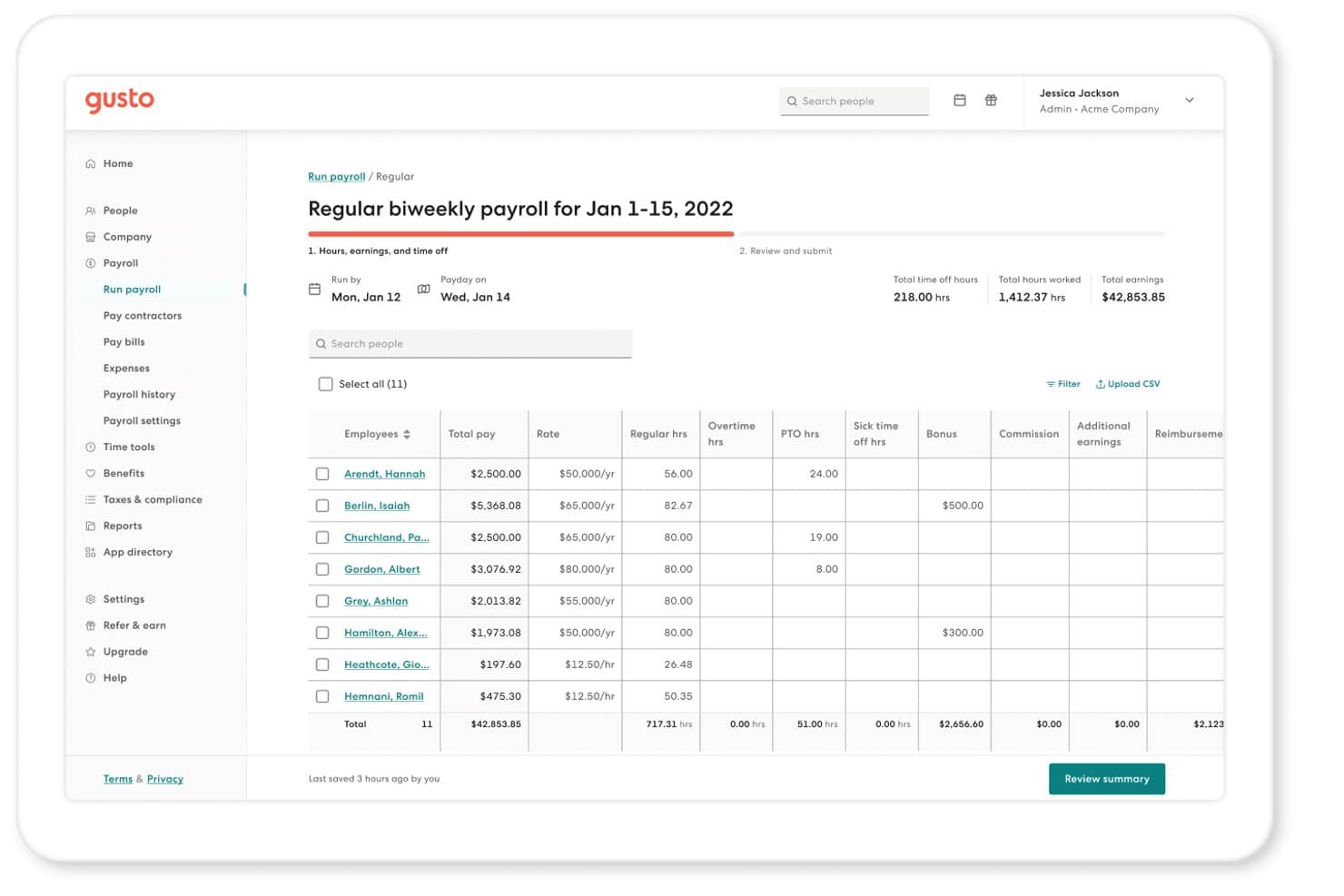
Gusto offers a detailed biweekly payroll run screen showing employee hours, earnings, PTO, bonuses, and total pay in one view. Gusto is a payroll and HR platform for small businesses that combines automated payroll runs, tax filing, benefits administration, and contractor payments in a single system.
Who Is Gusto Best For?
Gusto is a strong fit for small business owners and office managers who handle payroll and benefits without a dedicated HR or payroll specialist on staff.
Why I Picked Gusto
I picked Gusto as one of the best because of how tightly its benefits administration connects to payroll. When an employee enrolls in health insurance or a 401(k), those deductions flow into payroll automatically, with no manual entry required. I also appreciate AutoPilot, which lets me schedule payroll to run on a set cadence and flags exceptions before anything processes.
Gusto Key Features
- Unlimited payroll runs: Run payroll as often as needed each month without paying extra fees.
- Global contractor payments: Pay international contractors in over 120 countries directly through Gusto.
- Accounting software integrations: Sync payroll data with QuickBooks, Xero, FreshBooks, Aplos, and other small business accounting tools.
- Employee self-service portal: Employees can access pay stubs, tax forms, and update personal and banking details online or via the mobile app.
Gusto Integrations
Gusto offers native integrations with QuickBooks, Xero, FreshBooks, Aplos, Autobooks, ZipBooks, and When I Work, and provides an API for custom integrations.
Pros and Cons
Pros:
- Same-day and next-day direct deposit available
- Built-in benefits enrollment tied to payroll
- Automated tax filing across all jurisdictions
Cons:
- Phone support limited to higher-tier plans
- Per-person pricing gets costly as headcount grows
 Best for payroll bundled with time tracking and HR
- 30-day free trial
- From $50/month
Visit WebsiteCustomer Rating:4.5/5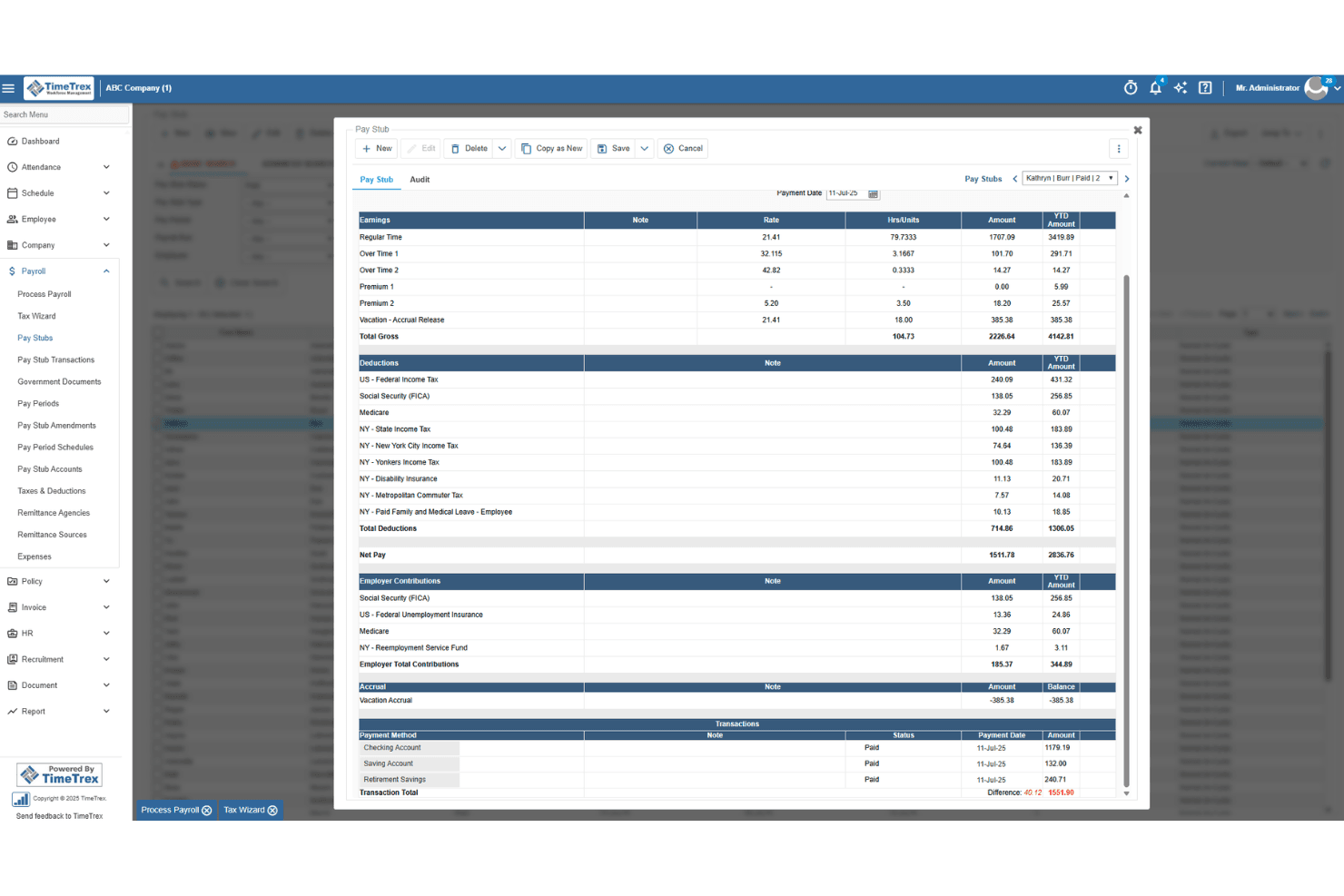
TimeTrex generates detailed pay stubs with earnings, deductions, and taxes. TimeTrex is a workforce management and payroll platform that combines time and attendance tracking, employee scheduling, leave management, HR tools, and integrated payroll processing in a single system.
Who Is TimeTrex Best For?
TimeTrex is a strong fit for small businesses that already rely on time clocks or shift-based scheduling and want payroll built into the same system.
Why I Picked TimeTrex
TimeTrex earns its spot on my shortlist because it's one of the few payroll tools that pulls time tracking and payroll into a single, genuinely connected system. I like that hours flow directly from timesheets into pay calculations, so there's no manual export or reconciliation step between the two. The AI-powered scheduling also helps avoid costly overtime before it happens. If your team punches in and out daily and you want payroll to reflect that automatically, TimeTrex is built for exactly that workflow.
TimeTrex Key Features
- Tax Wizard: Organizes remittance events by due date and walks you through the steps to review, verify, and process U.S. and Canadian payroll tax payments and filings.
- General ledger export: Exports payroll data in QuickBooks, Sage 50, Sage 300, Xero, and CSV formats so you can import it directly into your accounting software.
- Biometric facial recognition time clock: Lets employees clock in and out using facial recognition, capturing verified attendance data that feeds directly into payroll.
- Configurable deductions and tax formulas: Supports custom deduction rules with wage bases, annual limits, and eligibility dates, including a built-in 401(k) contribution formula example.
TimeTrex Integrations
TimeTrex lists integrations with Intuit QuickBooks, Sage, ADP, Paychex, Surepay, and Ceridian. It also offers a RESTful API for custom integrations.
Pros and Cons
Pros:
- Reviewers praise patient, prompt support
- Reviewers report fewer payroll errors
- Timesheets feed directly into payroll
Cons:
- Reviewers report cluttered setup screens
- Employers handle tax filing manually
Learn more about TimeTrex: Best for compliant global payroll
- Free demo available
- From $29/employee/month
Visit WebsiteCustomer Rating:4.7/5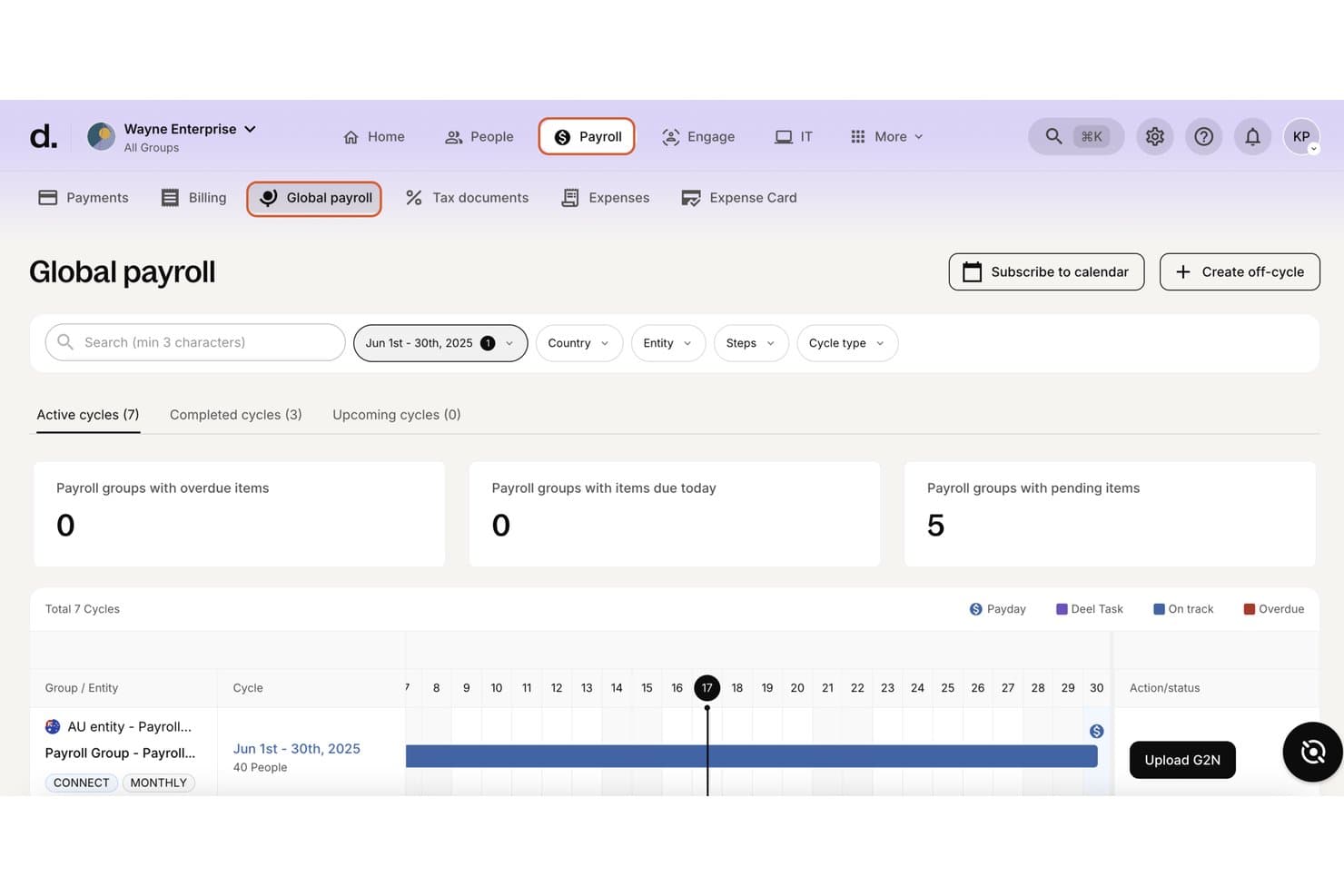
Deel Payroll includes active cycle tracking, payroll group summaries, and a visual timeline for managing multiple payroll cycles. Deel Payroll is a global payroll platform for international teams. It supports payroll processing, tax compliance, contractor payments, and employer of record services. Additionally, businesses can manage workers across more than 150 countries.
Who Is Deel Payroll Best For?
Deel Payroll suits small businesses and startups with international teams. It is particularly useful for companies managing contractors and employees across multiple countries.
Why I Picked Deel Payroll
I picked Deel Payroll because it automates cross-border compliance. Before each payroll run, the platform applies relevant tax rules and statutory requirements. I also like its anomaly detection, which flags missing data and potential misclassifications. As a result, teams can address errors before approving payroll.
Deel Payroll Key Features
- Support for multiple worker types: Pay employees, contractors, EOR, and PEO staff through one unified dashboard.
- Global accounting integrations: Sync payroll data directly with platforms like QuickBooks, NetSuite, and Xero.
- Employee and contractor self-service: Let team members access pay stubs, contracts, tax documents, and update details independently.
- 24/7 multi-channel support: Get help any time via live chat, phone, email, Slack, or Teams.
Deel Payroll Integrations
Deel Payroll offers native integrations with QuickBooks, Xero, NetSuite, Sage, SAP, and Oracle. An API is available for custom integrations.
Pros and Cons
Pros:
- Automatic tax filing across multiple jurisdictions
- Built-in EOR and contractor compliance tools
- Handles payroll across 150+ countries natively
Cons:
- Setup can be slow for first-timers
- Overkill for domestic-only small businesses
Learn more about Deel Payroll: Best for automated payroll across systems
- Free demo available
- Pricing upon request
Visit WebsiteCustomer Rating:4.9/5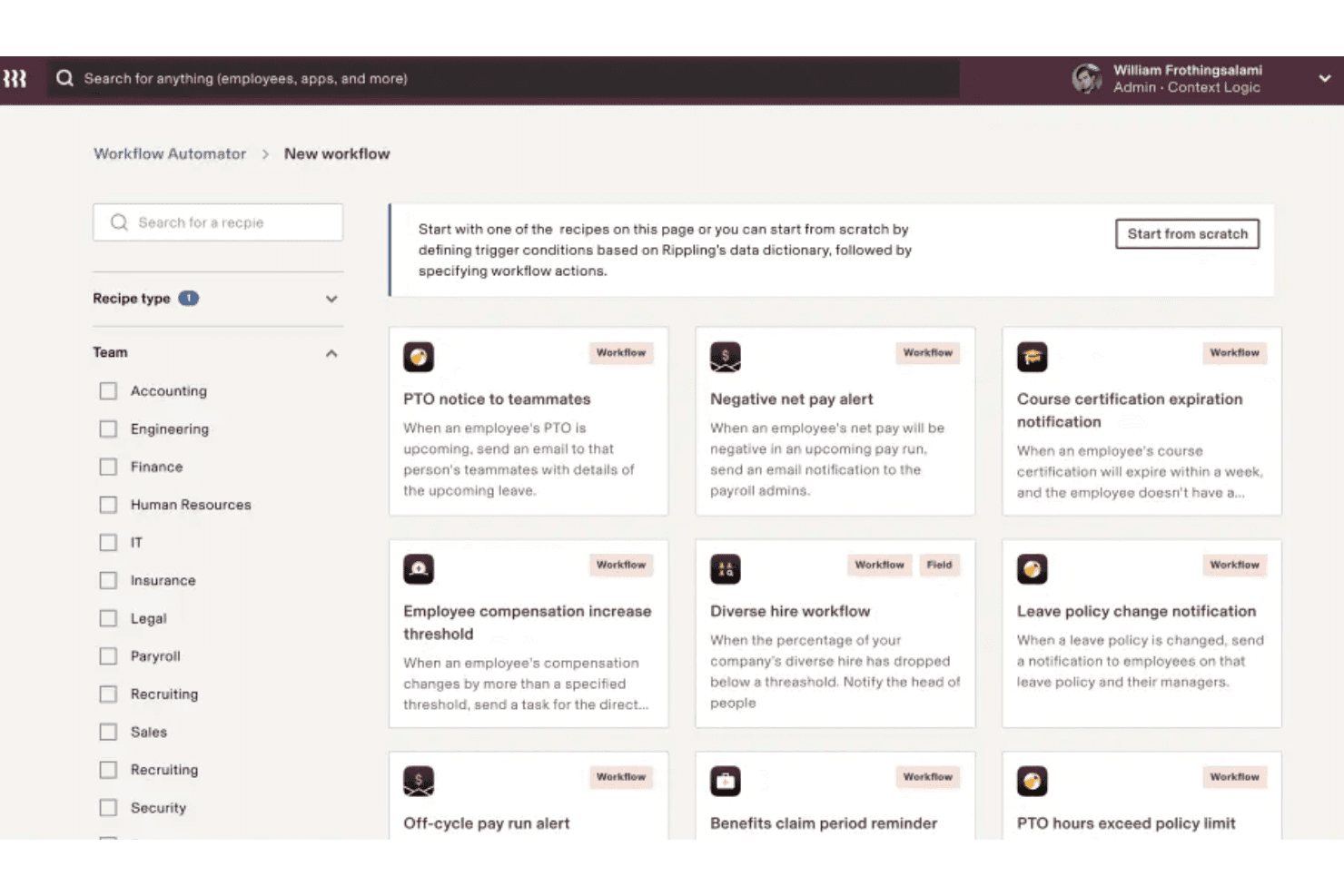
Rippling's Workflow Automator includes pre-built recipe templates for PTO notices, negative pay alerts, and diverse hire workflows to automate HR and payroll processes. Rippling is a payroll platform that connects payroll with HR, IT, and finance data. It automates pay runs and handles federal, state, and local tax filings. Additionally, businesses can pay W-2 employees and 1099 contractors through the same system.
Who Is Rippling Best For?
Rippling is a strong fit for growing small businesses that manage distributed teams, hire frequently, or pay a mix of domestic employees and international contractors.
Why I Picked Rippling
I picked Rippling because it connects payroll with HR, IT, and finance data. For example, salary details, benefit deductions, and tax withholdings flow into payroll during onboarding. I also like its pay-run comparison tool. It flags unexpected changes in gross pay or deductions before approval.
Rippling Key Features
- Native accounting integrations: Sync payroll data directly with QuickBooks, Xero, and NetSuite for accurate GL entries.
- Global contractor payments: Pay contractors internationally with built-in compliance for multiple currencies and tax codes.
- Custom pay types: Set up and automate unique pay codes like stipends, commissions, or bonuses within each payroll run.
- Self-service employee portal: Employees access pay stubs, tax forms, and update banking and personal details through a web or mobile app.
Rippling Integrations
Rippling offers native integrations with QuickBooks, Xero, NetSuite, Slack, Google Workspace, Microsoft 365, Expensify, and Zoom. An API is also available for custom integrations.
Pros and Cons
Pros:
- Pays W-2 employees and 1099 contractors together
- Full-service federal, state, and local tax filing
- Automated payroll runs across multiple pay schedules
Cons:
- Feature depth can overwhelm very small teams
- Setup requires time for multi-system configuration
 Best for PEO payroll with employee benefits
- Free demo available
- From $599/user/month
Visit WebsiteCustomer Rating:4.6/5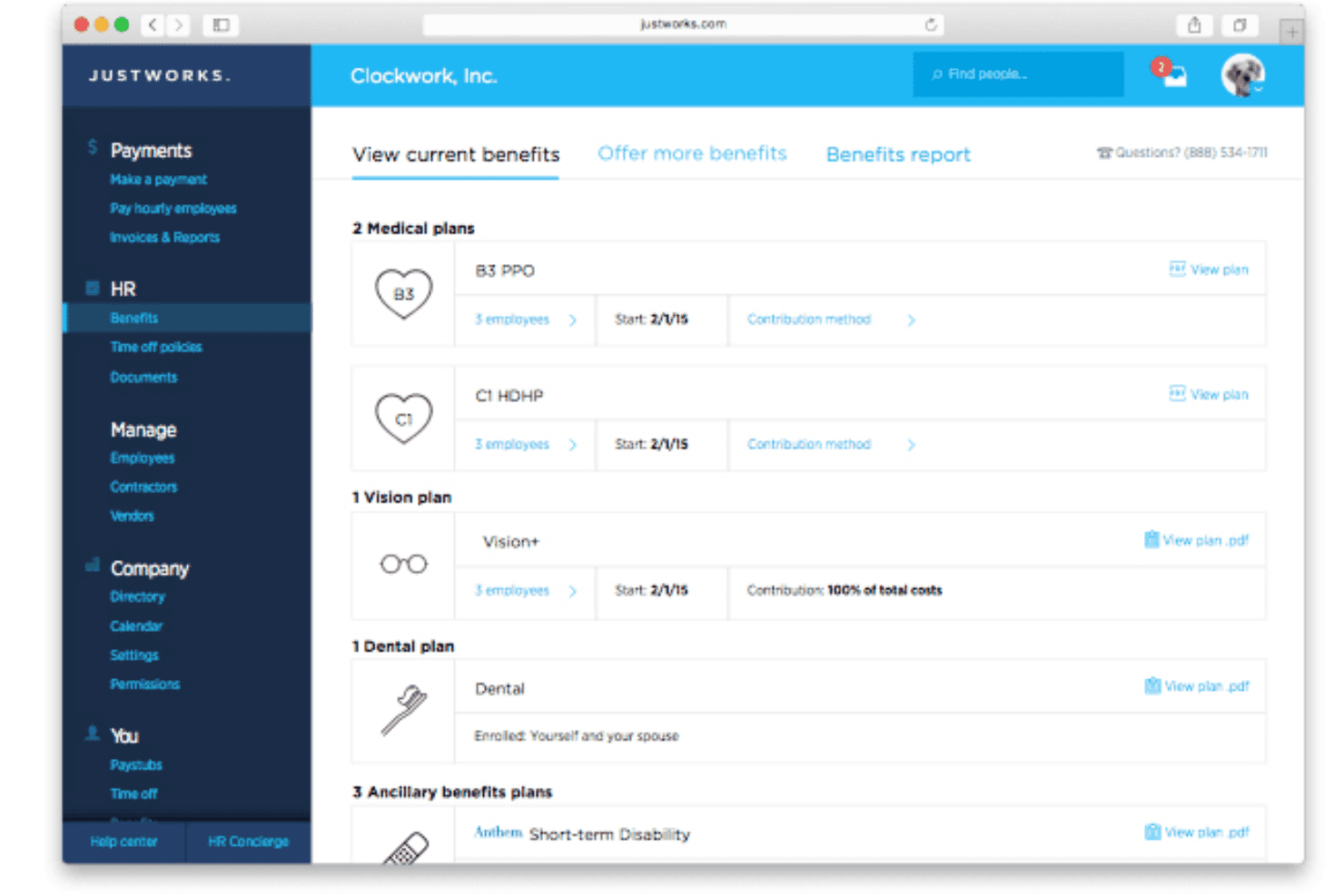
Justworks lets employers view and manage medical, vision, dental, and ancillary benefit plans for employees. Justworks is a PEO-based payroll platform for small businesses that combines automated payroll runs, multi-jurisdiction tax filing, benefits administration, and HR tools under a co-employment model.
Who Is Justworks Best For?
Justworks suits small businesses with 10 to 150 employees. In particular, it helps companies offer benefits without maintaining a dedicated HR team.
Why I Picked Justworks
I picked Justworks because it combines payroll with a PEO service. Through this model, small businesses can offer medical, dental, vision, and retirement benefits. Additionally, Justworks handles payroll tax filings across thousands of local jurisdictions. This reduces the need to manage separate providers.
Justworks Key Features
- Native accounting integrations: Sync payroll data with QuickBooks, Xero, NetSuite, and Sage Intacct for accurate GL entries.
- Employee self-service portal: Employees access pay stubs, tax documents, and update personal details any time online or via the mobile app.
- Multi-state payroll support: Process payroll and file taxes accurately for employees working in different states or local tax jurisdictions.
- Time tracking add-on: Track hourly work, manage approvals, and sync time data directly with payroll for hourly staff.
Justworks Integrations
Justworks offers native integrations with QuickBooks, Xero, NetSuite, and Sage Intacct. An API is available for custom integrations.
Pros and Cons
Pros:
- Benefits deductions sync directly with payroll runs
- Payroll taxes filed across all jurisdictions automatically
- Access to large-group health insurance rates
Cons:
- Not ideal for contractor-heavy small businesses
- Requires signing a co-employment agreement
Learn more about Justworks: Best for scalable payroll and HR support
- Free demo available
- Pricing upon request
Visit WebsiteCustomer Rating:4.7/5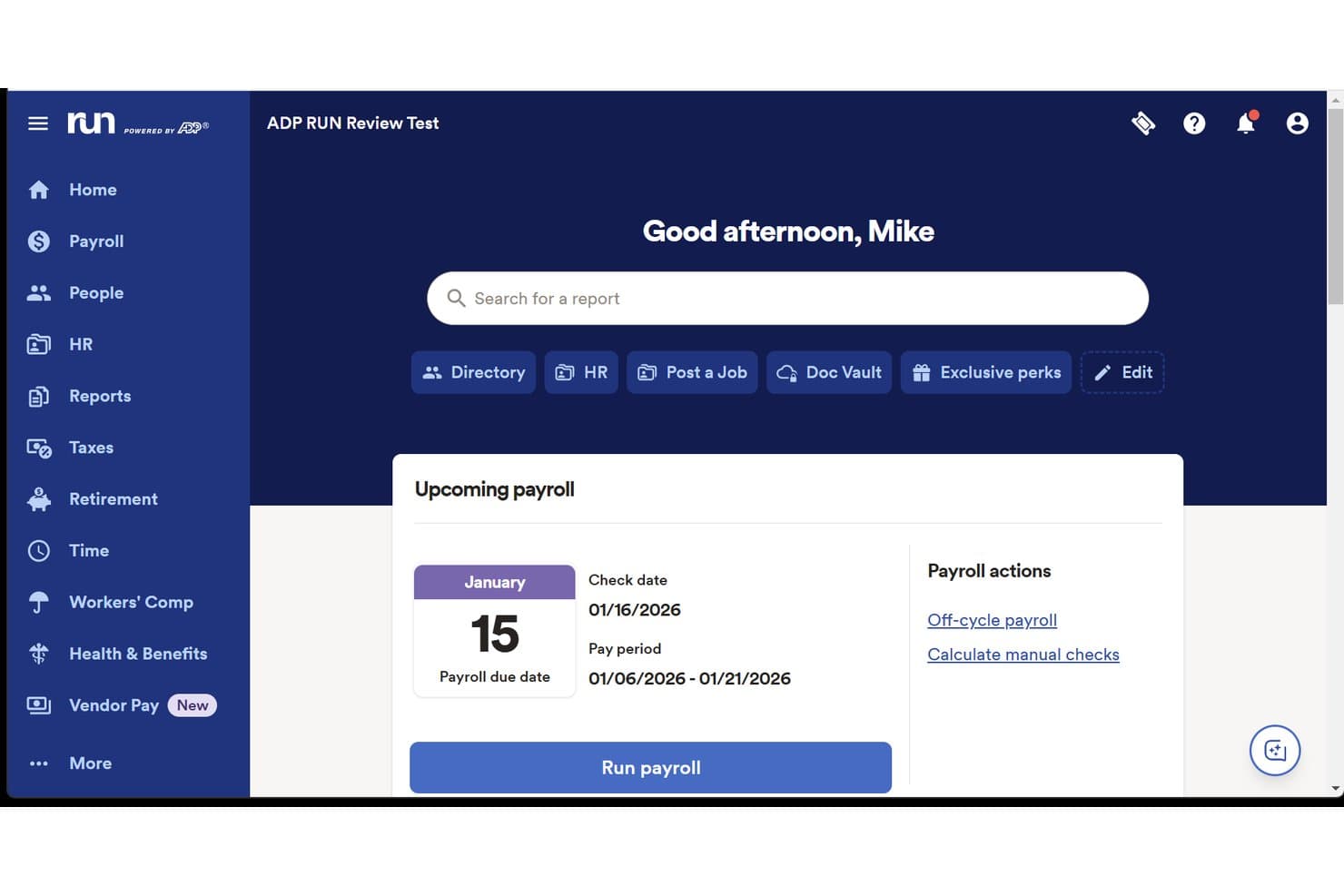
ADP Run offers a clean home dashboard displaying upcoming payroll details, pay period dates, and quick-action payroll buttons for small business owners. RUN Powered by ADP is a payroll and HR platform for small businesses that handles automated payroll runs, multi-jurisdiction tax filing, W-2 and 1099 processing, contractor payments, and HR tools like onboarding and benefits administration.
Who Is ADP Run Best For?
ADP Run is a strong fit for small businesses with 1–49 employees that anticipate growth and want a payroll provider they won't outgrow.
Why I Picked ADP Run
I've included ADP Run in my top picks because of how well it handles growth without forcing a platform switch. The tiered package structure lets you start on Essential Payroll and upgrade through to HR Pro as HR needs expand, then carry forward to ADP Workforce Now past 49 employees. I also rely on RUN & Done® for recurring salaried payroll automation and ADP Assist's AI error flagging to catch discrepancies before a payroll run is ever submitted.
ADP Run Key Features
- Full-service payroll tax filing: Automatically calculates, withholds, files, and remits payroll taxes for federal, state, and local jurisdictions.
- Employee self-service portal: Employees access pay stubs, tax forms, and update personal or banking information through a secure portal.
- Native accounting integrations: Synchronizes payroll data with QuickBooks, Xero, Sage, and other major small business accounting platforms.
- Contractor and 1099 management: Processes payments to contractors and generates required 1099 year-end forms within the same system.
ADP Run Integrations
ADP Run offers native integrations with QuickBooks, Xero, Sage, Wave, Acumatica, and Workday for accounting and payroll data sync. An API is available for custom integrations.
Pros and Cons
Pros:
- Built-in workers' comp and benefits administration
- Scales to enterprise without platform switching
- Automatic multi-jurisdiction payroll tax filing included
Cons:
- Advanced HR tools require plan upgrades
- Support quality varies by subscription tier
Learn more about ADP Run: Best for syncing POS timecards and tips
- Not available
- From $35/month + $6/person/month
Visit WebsiteCustomer Rating:4.2/5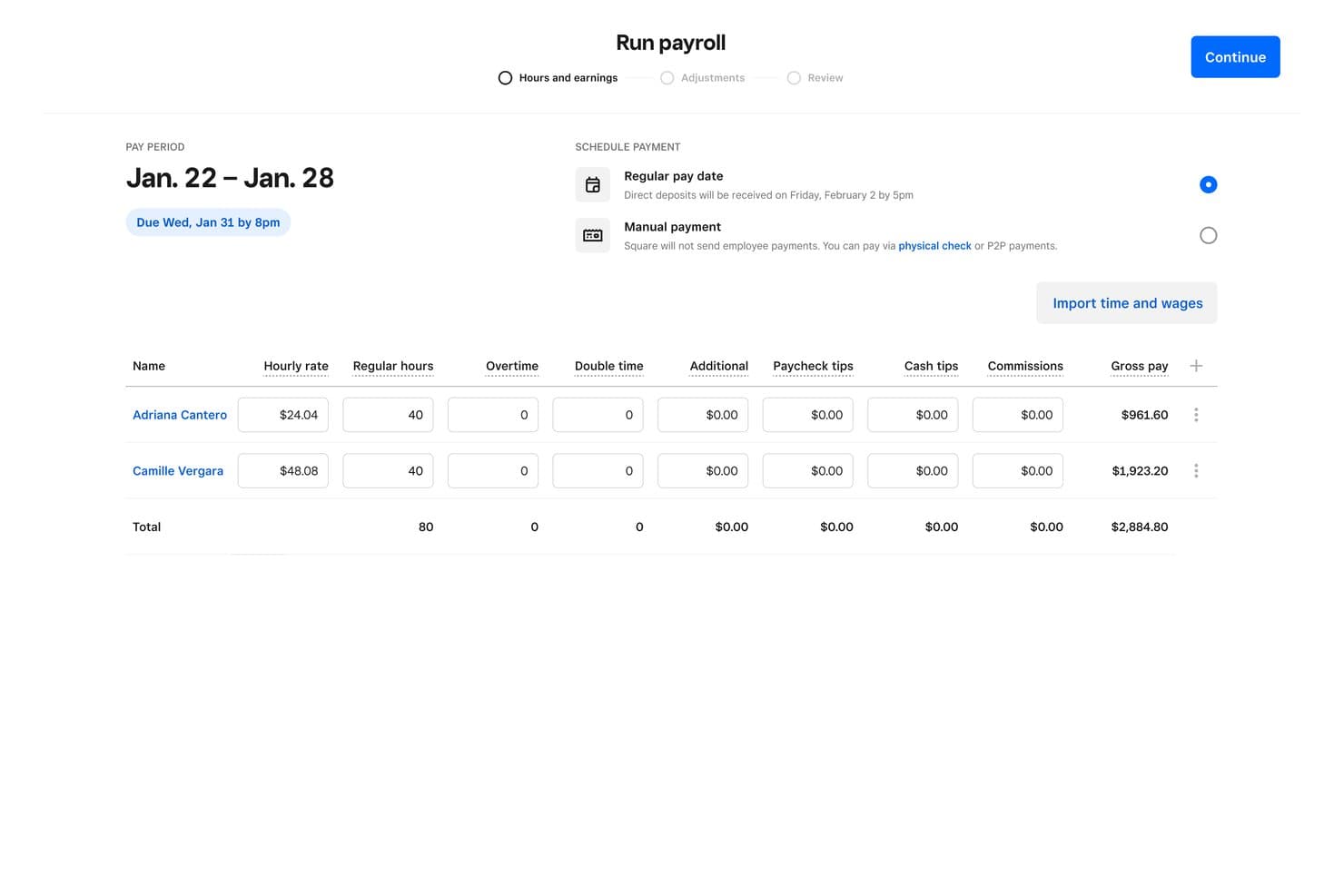
Square Payroll offers a clean run payroll interface where users can review employee hours, hourly rates, and gross pay before submitting payroll for the pay period. Square Payroll is a small business payroll platform built within the Square ecosystem, covering W-2 and 1099 payroll runs, automated tax filings, direct deposit, and timecard and tip imports from Square POS.
Who Is Square Payroll Best For?
Square Payroll is best for retail, food service, and hospitality businesses. It is especially useful for companies already using Square POS.
Why I Picked Square Payroll
Square Payroll earns its spot on my shortlist because of how cleanly it pulls timecard and tip data directly from Square POS into each payroll run. Staff hours and tip totals flow in automatically, so there's no manual reconciliation or re-entering of clock-in data before I process payroll. On top of that, the auto payroll feature runs payroll on schedule without requiring me to log in each pay period.
Square Payroll Key Features
- Automatic payroll tax filing: Calculates, withholds, and files federal and state payroll taxes for each pay run.
- Year-end tax form generation: Produces and distributes W-2 and 1099 forms for employees and contractors.
- QuickBooks Online integration: Connects payroll data directly to your accounting platform for GL sync.
- Employee self-service portal: Lets workers view pay stubs and update their information via web or mobile.
Square Payroll Integrations
Square Payroll offers native integrations with QuickBooks Online and the Square POS ecosystem. An API is available for custom integrations.
Pros and Cons
Pros:
- Runs auto-payroll on a set schedule
- Handles both W-2 and 1099 workers
- Automatic tip importing from Square POS
Cons:
- Customer support is hard to reach
- Limited usefulness outside the Square ecosystem
Learn more about Square Payroll:
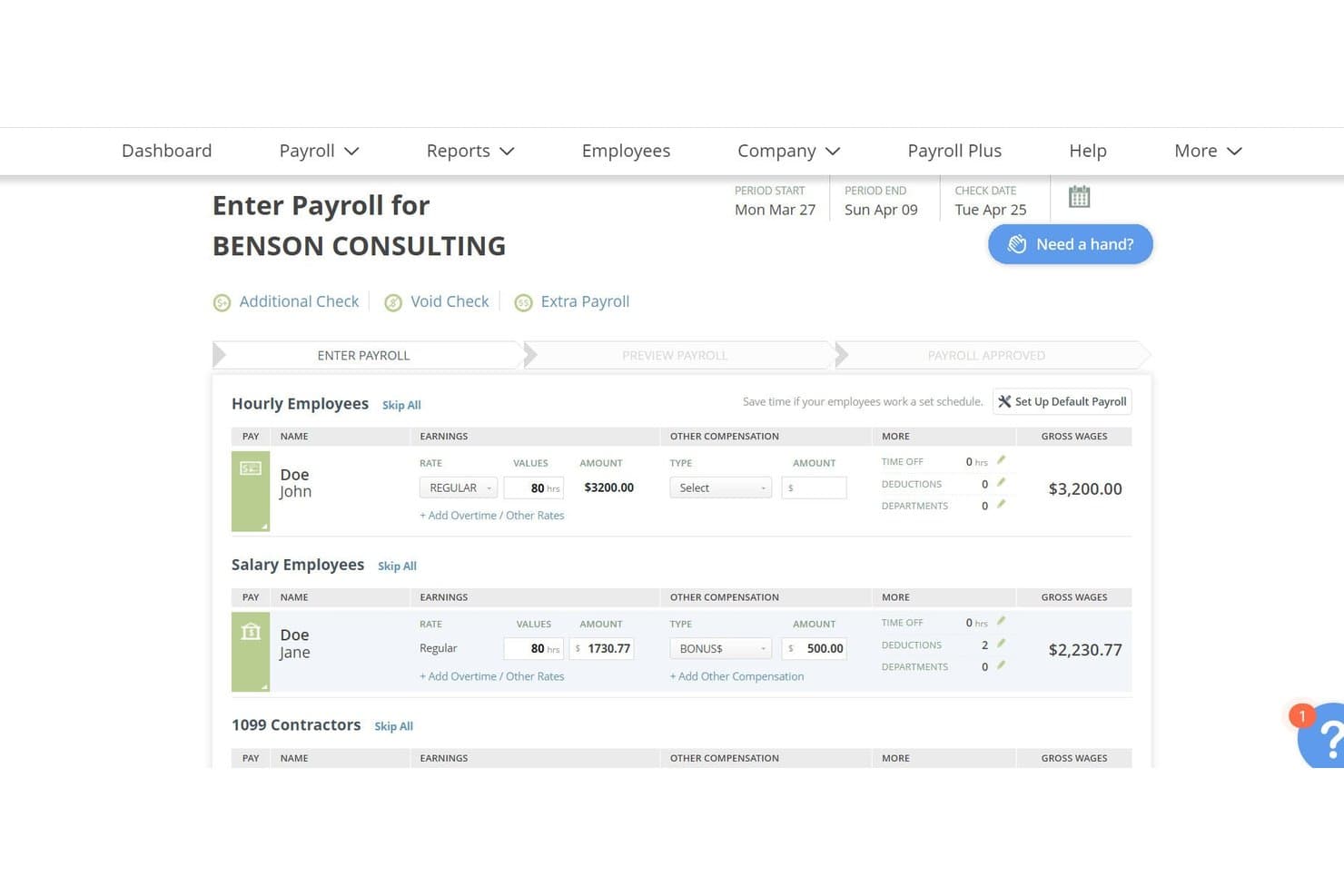
SurePayroll offers a clear payroll entry interface that separates hourly, salary, and 1099 contractor employees with earnings, deductions, and gross wages displayed per employee. SurePayroll is a small business payroll platform that handles automated pay runs, payroll tax calculation and filing, W-2/1099 support, and direct deposit for both employees and contractors.
Who Is SurePayroll Best For?
SurePayroll is a good fit for small business owners and household employers who want payroll to run on a set schedule without manual intervention each pay period.
Why I Picked SurePayroll
SurePayroll earns its spot on my shortlist because of AutoPayroll, which lets you set payroll to run on a fixed schedule without touching it each pay period. I like that it covers both hourly and salaried workers automatically, so mixed teams don't fall through the cracks. The tax penalty guarantee is also notable: if SurePayroll files incorrectly and a penalty results, they cover the cost.
SurePayroll Key Features
- Full-service tax filing: Handles calculation, filing, and payment of federal, state, and local payroll taxes with a penalty guarantee.
- Accounting software integration: Connects with QuickBooks, Xero, Sage 50, Zoho Books, and other major small business platforms.
- Employee self-service portal: Lets employees view pay stubs, access tax forms, and update personal info online or through the mobile app.
- Contractor and 1099 management: Supports contractor payments and automatically generates year-end 1099-NEC forms within the same platform.
SurePayroll Integrations
SurePayroll offers native integrations with QuickBooks, Xero, Sage 50, Zoho Books, AccountEdge, and Less Accounting. An API is available for custom integrations.
Pros and Cons
Pros:
- Tax penalty guarantee covers filing errors
- Includes nanny and household payroll support
- AutoPayroll runs on a fixed schedule automatically
Cons:
- Local tax filing requires an add-on purchase
- W-2 preparation and filing costs extra
Learn more about SurePayroll: Best for payroll-linked bookkeeping
- Free version available
- From $19/month
Visit WebsiteCustomer Rating:4.1/5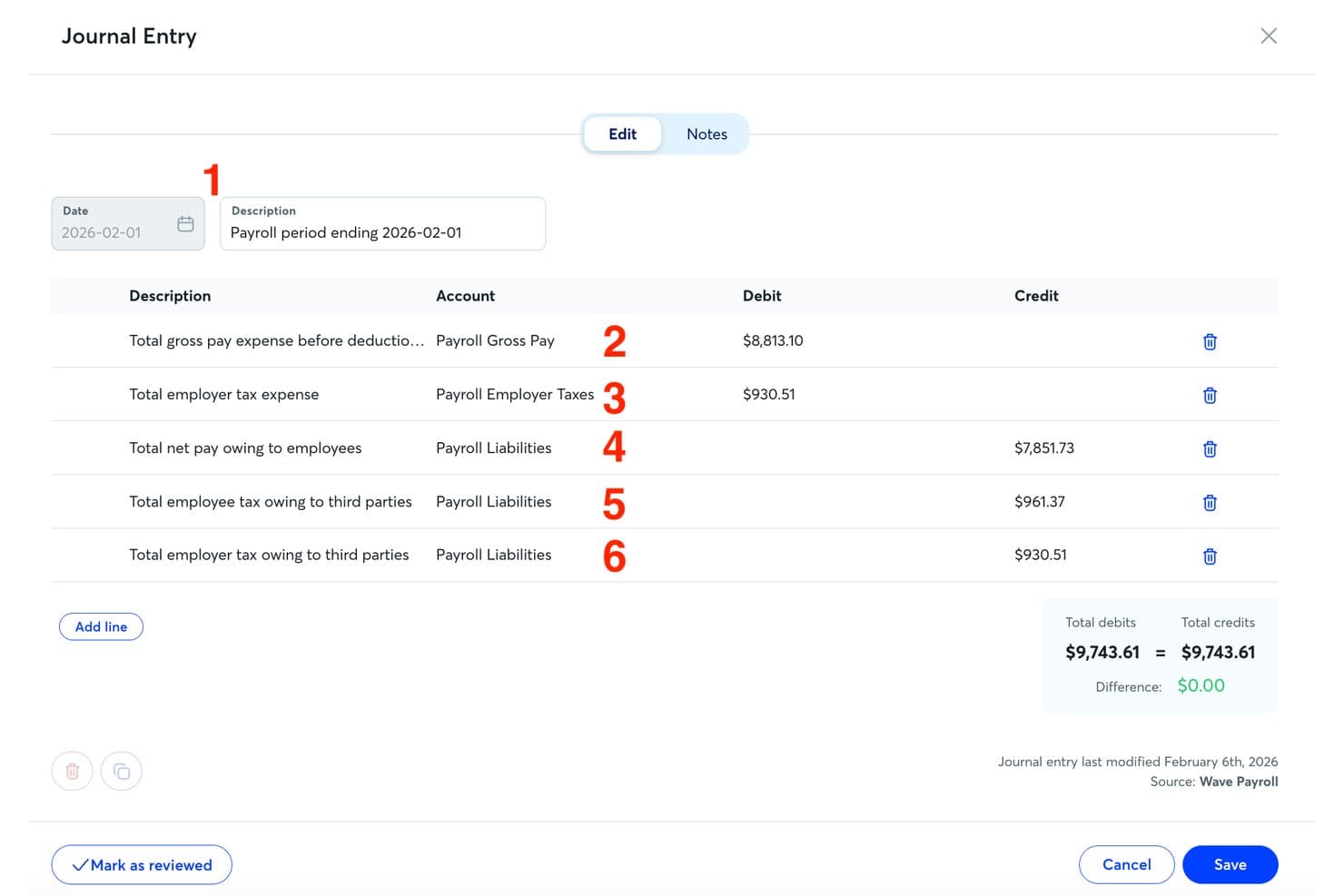
Wave Payroll offers a detailed payroll journal entry view that automatically records gross pay, employer taxes, and payroll liabilities with balanced debits and credits. Wave Payroll is a small business payroll tool built directly into the Wave accounting platform, covering automated payroll runs, tax filing across all 50 US states, W-2 and 1099 generation, and direct deposit for both employees and contractors.
Who Is Wave Payroll Best For?
Wave Payroll fits small business owners and freelancers who already use Wave Accounting and want payroll without switching platforms.
Why I Picked Wave Payroll
I picked Wave Payroll as one of the best because the payroll-to-bookkeeping link is genuinely built in, not bolted on. Every time I run payroll, Wave automatically generates the corresponding journal entries directly in Wave Accounting, so my books reflect payroll costs without any manual GL work. I also like that W-2s, W-3s, and 1099-NECs are generated within the same system, keeping year-end reconciliation contained in one place.
Wave Payroll Key Features
- Employee self-service portal: Employees can log in to access pay stubs, W-2s, and update their contact or banking details.
- Full-service tax filing in all 50 states: Wave handles federal and state payroll tax calculation, payment, and filing automatically.
- Support for both W-2 and 1099 payments: Pay employees and independent contractors in one unified system.
- Mobile payroll app: Run payroll and access pay cycles from your iPhone with the Wave payroll app.
Wave Payroll Integrations
Wave Payroll offers native integration with Wave Accounting. Native integrations with other accounting or business tools are not clearly documented. An API for custom integrations is not available.
Pros and Cons
Pros:
- Unified contractor and employee payment system
- Tax filing covers all 50 US states
- Journal entries auto-sync to Wave Accounting
Cons:
- Only available for US-based businesses
- No phone support for payroll questions
Learn more about Wave Payroll:
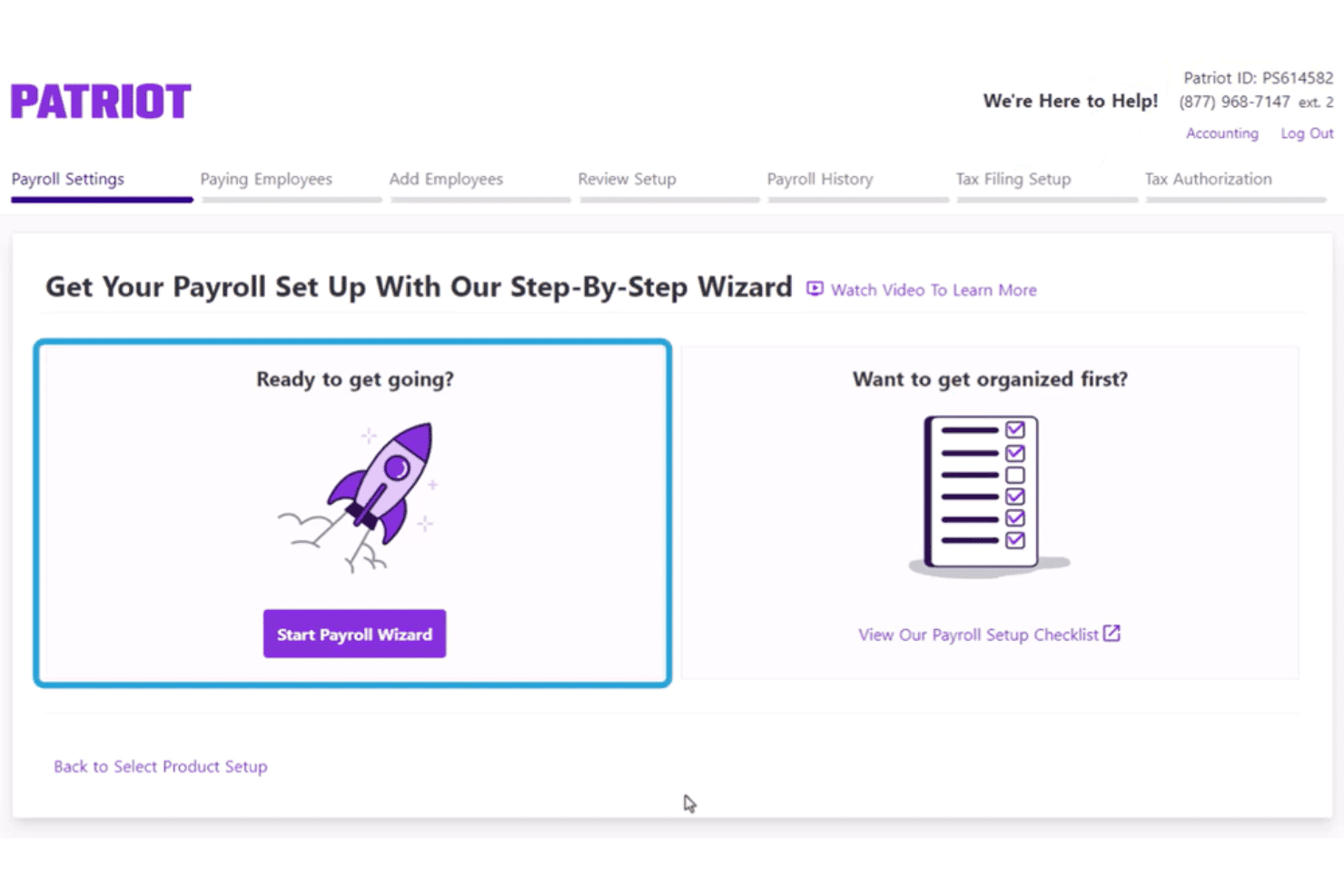
Patriot Software offers a step-by-step payroll setup wizard with options to start immediately or view a setup checklist. Patriot Software is a U.S.-based payroll platform for small businesses that handles automated payroll runs, direct deposit, payroll tax filing, contractor payments, and year-end tax form generation.
Who Is Patriot Software Best For?
Patriot Software suits small U.S. business owners and bookkeepers managing payroll for teams up to 500 employees without a dedicated payroll specialist.
Why I Picked Patriot Software
I picked Patriot Software as one of the best because its free assisted onboarding is genuinely hands-on: a USA-based team enters your employee data and year-to-date payroll figures for you. The guided setup wizard walks you through each configuration step in sequence, so nothing falls through the cracks. Once configured, the three-step payroll run takes under three minutes, and Auto Payroll handles recurring runs on schedule from there.
Patriot Software Key Features
- Two-way QuickBooks integration: Sync payroll data directly with QuickBooks Online or export to QuickBooks Desktop for accurate GL entries.
- Employee self-service portal: Employees can access pay stubs, tax documents, and update personal or banking info online or from a mobile device.
- Unified contractor and W-2 payroll: Pay and track both employee and contractor payments within the same payroll run, including 1099 e-filing.
- Multi-state payroll support: Handle federal, state, and local payroll taxes for remote and hybrid workforces across multiple states.
Patriot Software Integrations
Patriot Software offers native integrations with QuickBooks Online and QuickBooks Desktop. An API is available for custom integrations.
Pros and Cons
Pros:
- US-based phone and chat support available
- Unlimited payroll runs per month included
- Free assisted onboarding with live specialists
Cons:
- Time tracking requires a separate tool
- US-only, no international employee payroll
Learn more about Patriot Software:
Other Payroll Software for Small Businesses
Here are some additional payroll software for small businesses options that didn’t make it onto my shortlist, but are still worth checking out:
- 11Paychex FlexBest for dedicated payroll specialists
- 12QuickBooks PayrollBest for native QuickBooks accounting sync
- 13OnPayBest for one-price unlimited pay runs
- 14PaylocityBest for managed wage garnishments
- 15TriNetBest for flexible payroll service levels
- 16PaycorBest for proactive compliance alerts
- 17FingercheckBest for payroll tied to time tracking
- 18NetchexBest for guided implementation support
How I Evaluate Payroll Software for Small Businesses
I evaluate payroll tools in two stages. First, I assess essential functions such as tax filing and direct deposit. Then, I compare differentiators such as pricing transparency and multi-state coverage.
Core Functionality (Table Stakes For This List)
When I'm selecting tools for my list, I rank each one on a scale from 0 (does not offer the functionality) to 5 (excels in this area) for each core functionality listed below. Then I convert the tool's total score to a percentage. Each tool needs to achieve a minimum total score of 65% to be considered for inclusion.
- Automated Payroll Runs: I look for scheduled deposits, off-cycle payments, and automatic payroll for salaried and hourly workers.
- Payroll Tax Filing: Each tool should calculate, file, and remit federal, state, and local taxes automatically. In addition, I consider whether it provides penalty protection for filing errors.
- Employee and Contractor Payments: I check whether the platform pays W-2 employees and 1099 contractors through the same system.
- Year-End Tax Forms: The tool should generate and distribute W-2s, 1099s, and W-3s electronically. It should also support corrections when necessary.
- Accounting Integrations: I evaluate how well payroll data syncs with platforms such as QuickBooks and Xero. Additionally, I favor customizable general ledger mapping over basic CSV exports.
- Employee Self-Service: I look for portals where workers can access pay stubs and tax forms. Employees should also be able to update banking details independently.
Once I identify the tools that meet these requirements, I consider what distinguishes each platform.
Differentiating Factors (What Sets Vendors Apart)
Here's how I compare and contrast different vendors:
Standout Features
Direct deposit speed is an important differentiator. For example, same-day and next-day payments help businesses retain funds longer. However, employees still receive their pay on time.
I also evaluate built-in benefits administration. Health insurance, retirement, and workers’ compensation deductions should sync with payroll automatically. Finally, strong contractor management can reduce year-end work for businesses that regularly pay freelancers.
Beyond Features
Pricing transparency also affects my evaluation. I check whether tax filing, year-end forms, and new-hire reporting are included. Otherwise, paid add-ons can increase the actual cost.
Next, I assess multi-state tax coverage for businesses with remote employees. Strong platforms should handle reciprocity agreements and local taxes without manual workarounds.
Finally, I evaluate onboarding support. Guided setup is especially helpful for first-time payroll users. Likewise, migration assistance can make switching from another provider easier.
How to Choose Payroll Software for Small Businesses
It’s easy to get bogged down in long feature lists and complex pricing structures. To help you stay focused as you work through your unique software selection process, here’s a checklist of factors to keep in mind:
| Factor | What to Consider |
|---|---|
| FactorScalability | What to ConsiderWill the software support growth as you add locations or go from a few employees to many? Look for flexible pricing and user caps. |
| FactorIntegrations | What to ConsiderDoes the tool sync with your existing accounting, POS, or time-tracking systems to avoid double entry or manual uploads? |
| FactorCustomizability | What to ConsiderAre workflows, pay schedules, and reporting options configurable to match your unique needs, including split deposits or special deductions? |
| FactorEase of use | What to ConsiderIs the interface clear enough for a non-payroll specialist to run payroll confidently and handle exceptions without mistakes? |
| FactorImplementation and onboarding | What to ConsiderWhat support and training are available for switching mid-year or importing historical data? Are setup wizards included? |
| FactorCost | What to ConsiderHow predictable are the fees as your staff count changes? Watch for add-ons and per-pay-run charges that inflate the base price. |
| FactorSecurity safeguards | What to ConsiderDoes the vendor provide encryption, SOC audits, and permission controls to keep your sensitive payroll data protected? |
| FactorSupport availability | What to ConsiderWhen issues come up, can you get human support by phone, chat, or email during your actual working hours—not just standard business times? |
What Is Payroll Software for Small Businesses?
Payroll software helps small businesses pay employees and contractors. It also calculates taxes, manages deductions, and distributes tax forms. These platforms are generally designed for owners, bookkeepers, and office managers. As a result, businesses can process payroll without extensive manual calculations or a dedicated payroll department.
Features of Payroll Software for Small Businesses
When selecting payroll software for small businesses, keep an eye out for the following key features:
- Automated payroll runs: Scheduling and processing regular and off-cycle payroll for employees and contractors, eliminating manual calculations and reducing errors.
- Payroll tax filing: Automatically calculates, withholds, files, and pays federal, state, and local payroll taxes, helping you stay compliant without outside help.
- Year-end tax form generation: Creates and distributes W-2 and 1099 forms for your team and tax authorities, simplifying annual reporting obligations.
- Employee self-service portal: Gives employees secure access to their pay stubs, tax forms, and personal information, freeing you from daily document requests.
- Accounting software integration: Syncs payroll data with accounting platforms like QuickBooks or Xero, keeping your general ledger accurate and up to date.
- Multi-worker type support: Lets you pay W-2 employees and 1099 contractors through a single platform, streamlining mixed workforce management.
- Direct deposit and check options: Provides fast, reliable payment through direct deposit or printable checks, supporting different worker and business preferences.
- Customizable reporting: Offers configurable reports on payroll, taxes, benefits, and deductions so you can analyze labor costs and meet regulatory requirements.
- Time and attendance tracking: Integrates with time-tracking tools or provides built-in options, ensuring payroll is based on accurate hours and overtime.
- Compliance management: Flags potential wage, tax, or labor law issues and helps you keep up with changing regulations, especially for businesses with remote or multi-state teams.
Benefits of Payroll Software for Small Businesses
Implementing payroll software for small businesses provide several benefits for your team and your business. Here are a few you can look forward to:
- Faster payroll cycles: Automation features speed up every pay run, meaning employees and contractors get paid on time without manual interventions.
- Accurate tax compliance: Built-in tax filing tools help you calculate, file, and pay payroll taxes correctly, reducing the risk of costly penalties or compliance mistakes.
- Reduced administrative workload: Employee self-service portals, automated year-end forms, and integration with accounting platforms ease the everyday burden on owners or bookkeepers.
- Simpler multi-worker management: Supporting both W-2 employees and 1099 contractors in one place makes mixed workforce payroll far less confusing.
- Improved financial accuracy: Direct synchronization with your accounting system keeps ledgers accurate and makes reconciliation simple.
- More informed decision-making: Customizable payroll and labor cost reports unlock actionable insights that help guide your budgeting and business strategy.
- Enhanced employee satisfaction: Easy access to pay stubs, tax forms, and direct deposits leads to greater trust and fewer payroll questions from your team.
Costs and Pricing of Payroll Software for Small Businesses
Payroll software pricing depends on the number of workers, included features, and available support. Most providers charge a monthly platform fee plus a separate fee for each worker. However, tax filing, benefits administration, and multi-state payroll may cost extra. The table below compares common plans, average prices, and typical features.
Plan Comparison Table for Payroll Software for Small Businesses
| Plan Type | Average Price | Common Features |
|---|---|---|
| Plan TypeFree Plan | Average Price$0-$10/user/month | Common FeaturesBasic payroll processing, limited direct deposit, self-service portal, and minimal support. |
| Plan TypePersonal Plan | Average Price$10-$30/user/month | Common FeaturesAutomated payroll, tax calculations, employee and contractor support, basic reporting, and standard direct deposit. |
| Plan TypeBusiness Plan | Average Price$30-$50/user/month | Common FeaturesFull-service tax filing, year-end forms, integrations with accounting tools, customizable reporting, and live support. |
| Plan TypeEnterprise Plan | Average Price$50+/user/month | Common FeaturesAdvanced compliance, multilocation setup, dedicated onboarding, priority support, and advanced data security features. |
Payroll Software for Small Businesses FAQs
Here are some answers to common questions about payroll software for small businesses:
How does payroll software for small businesses simplify tax filing?
Payroll software for small businesses automate payroll tax calculations, filings, and payments for federal, state, and local authorities. This reduces manual effort, helps you avoid costly errors, and ensures compliance even if you lack a dedicated payroll tax specialist on staff.
Can payroll software handle both employees and independent contractors?
Yes, most payroll software for small businesses solutions support paying both W-2 employees and 1099 contractors. You can run payroll for a mixed workforce, and the system will auto-generate the required year-end tax forms for each type.
What if my staff work in multiple states or cities?
Many payroll software platforms manage multi-state and local tax requirements, including automatic calculations and filings for different jurisdictions. This simplifies compliance if you have remote employees or team members who relocate.
Is it easy to integrate payroll software with accounting platforms?
Yes, top solutions typically include direct integration with tools like QuickBooks or Xero. This means payroll data syncs automatically to your general ledger, reducing manual entry and reconciliation errors.
How secure is payroll software for small businesses?
Payroll software for small businesses uses encryption, role-based access, and compliance certifications like SOC 2 to protect your sensitive payroll, tax, and employee data. Always check what security standards each vendor meets before committing.
How do employee self-service portals benefit my team?
Self-service portals let employees access pay stubs, W-2s, and update their banking or personal info themselves. That saves you time on administrative requests and helps workers get what they need right away.