Mitratech Testbericht: Vorteile, Nachteile, Funktionen und Preise


Mitratech is a financial compliance software provider that helps financial services organizations manage regulatory requirements effectively. It best serves banks, insurers, credit unions, and healthcare organizations by helping teams streamline compliance processes, matter management, and risk management. Mitratech improves operational efficiency and simplifies financial compliance challenges.
Mitratech addresses common pain points such as regulatory changes, third-party risks, and performance management needs for compliance, risk, and HR professionals. In this article, I'll cover Mitratech’s features, pros and cons, use cases, and pricing, so you can decide if this software aligns with your compliance management needs and goals.
Mitratech Alyne Evaluation Summary
- Pricing upon request
- Free demo available
Why Trust Our Software Reviews
Mitratech Alyne Overview
In my opinion, Mitratech offers a solid financial compliance software solution that stands out in the market. It delivers strong core features, actionable insights, and robust functionality that support informed decision-making and continuous improvement.
While its interface may present a learning curve during onboarding, particularly for new Mitratech employees or HR professionals, the platform compensates with dependable customer success teams and technical support. Compared to the industry average, Mitratech provides good value for money for mid-sized to large enterprises seeking comprehensive compliance capabilities.
If your organization prioritizes strong compliance and metrics-driven performance management, Mitratech is worth considering.
pros
-
It provides efficient document management for your compliance needs.
-
The software offers robust reporting features to aid your team's decision-making.
-
You can easily manage compliance tasks within its user-friendly interface.
cons
-
You may experience occasional software glitches that disrupt your workflow.
-
Some users feel the customer support could be more responsive.
-
Your team might find the initial setup process time-consuming.
-

LiveFlow
Visit WebsiteThis is an aggregated rating for this tool including ratings from Crozdesk users and ratings from other sites.4.9 -
Float Financial
Visit WebsiteThis is an aggregated rating for this tool including ratings from Crozdesk users and ratings from other sites.4.1 -
Rippling Spend
Visit WebsiteThis is an aggregated rating for this tool including ratings from Crozdesk users and ratings from other sites.4.8


How We Test & Score Tools
We’ve spent years building, refining, and improving our software testing and scoring system. The rubric is designed to capture the nuances of software selection and what makes a tool effective, focusing on critical aspects of the decision-making process.
Below, you can see exactly how our testing and scoring works across seven criteria. It allows us to provide an unbiased evaluation of the software based on core functionality, standout features, ease of use, onboarding, customer support, integrations, customer reviews, and value for money.
Core Functionality (25% of final scoring)
The starting point of our evaluation is always the core functionality of the tool. Does it have the basic features and functions that a user would expect to see? Are any of those core features locked to higher-tiered pricing plans? At its core, we expect a tool to stand up against the baseline capabilities of its competitors.
Standout Features (25% of final scoring)
Next, we evaluate uncommon standout features that go above and beyond the core functionality typically found in tools of its kind. A high score reflects specialized or unique features that make the product faster, more efficient, or offer additional value to the user.
We also evaluate how easy it is to integrate with other tools typically found in the tech stack to expand the functionality and utility of the software. Tools offering plentiful native integrations, 3rd party connections, and API access to build custom integrations score best.
Ease of Use (10% of final scoring)
We consider how quick and easy it is to execute the tasks defined in the core functionality using the tool. High scoring software is well designed, intuitive to use, offers mobile apps, provides templates, and makes relatively complex tasks seem simple.
Onboarding (10% of final scoring)
We know how important rapid team adoption is for a new platform, so we evaluate how easy it is to learn and use a tool with minimal training. We evaluate how quickly a team member can get set up and start using the tool with no experience. High scoring solutions indicate little or no support is required.
Customer Support (10% of final scoring)
We review how quick and easy it is to get unstuck and find help by phone, live chat, or knowledge base. Tools and companies that provide real-time support score best, while chatbots score worst.
Customer Reviews (10% of final scoring)
Beyond our own testing and evaluation, we consider the net promoter score from current and past customers. We review their likelihood, given the option, to choose the tool again for the core functionality. A high scoring software reflects a high net promoter score from current or past customers.
Value for Money (10% of final scoring)
Lastly, in consideration of all the other criteria, we review the average price of entry level plans against the core features and consider the value of the other evaluation criteria. Software that delivers more, for less, will score higher.
Core Features
Compliance Tracking: Enables teams to monitor regulatory changes in real time and remain compliant.
Risk Management: Helps identify and mitigate organizational risk through detailed analysis tools.
Audit Management: Streamlines audits with automated tracking, reporting, and audit trail support.
Document Management: Organizes and secures compliance documentation for efficient recordkeeping.
Reporting Tools: Generates detailed compliance reports that support decision-making and review processes.
Workflow Automation: Automates workflows to reduce manual effort and streamline compliance tasks.
Ease of Use
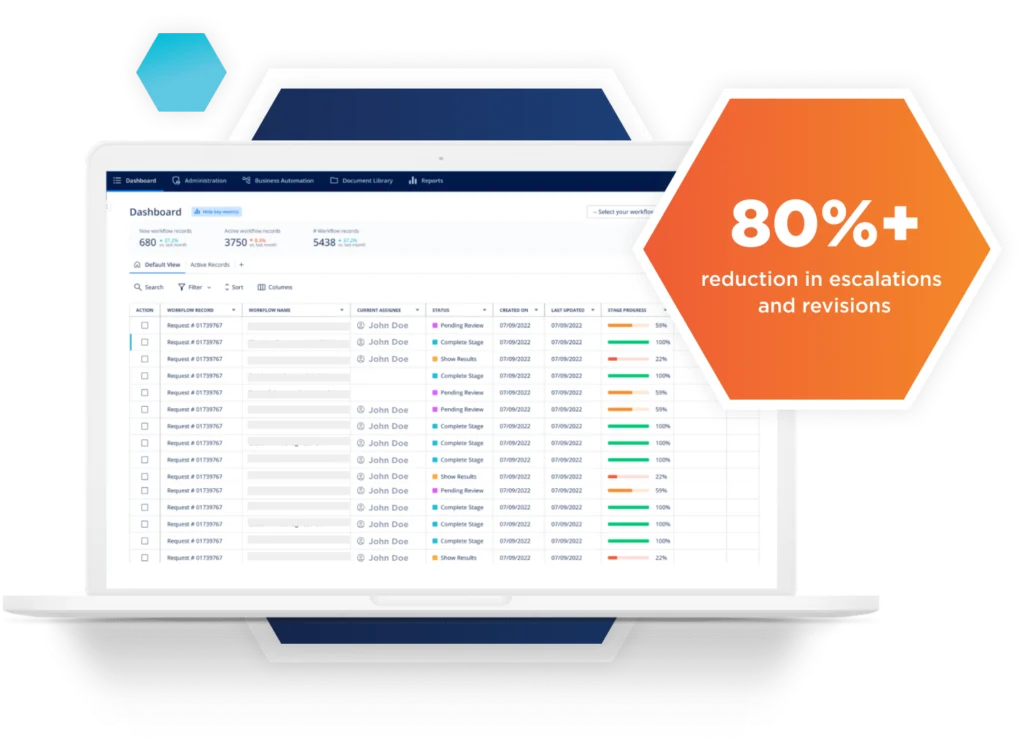
Mitratech can be challenging for new users due to its comprehensive feature set. Software engineers, account managers, and account executives may require training to navigate the platform effectively. While the learning curve can impact early ease of use, familiarity improves efficiency over time. User reviews suggest that dashboards help simplify navigation once onboarding is complete.
Integrations
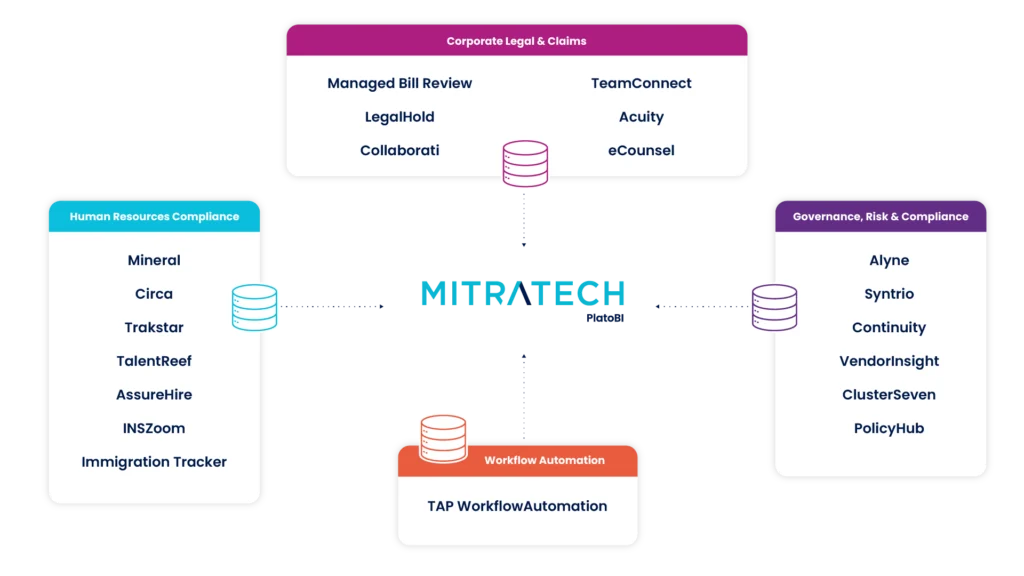
Mitratech integrates with Salesforce, DocuSign, Adobe Sign, Microsoft Office, Outlook, and other applications. Mitratech also provides an API, allowing for further customization and connectivity with third-party tools.
New Product Updates from Mitratech Alyne

Mitratech INSZoom Prepares Platform For H-1B FY-2027 Registration
Mitratech INSZoom is now fully equipped for the H-1B FY-2027 pre-registration phase. This will provide case managers with enhanced data collection capabilities to streamline application process. Here are details of the update:
- Pre-registration Readiness for FY-2027: Case managers can now utilize the H-1B Registration module tailored for FY-2027 for a smooth start to the application process.
- New Data Collection Tools: The introduction of a data collection Excel template and Import Beneficiaries feature facilitates efficient data gathering for applications.
- Module Updates: The H-1B Registration Process Module, H-1B Process Module, and the Questionnaire for I-129H have all been updated to align with FY-2027 requirements.
Visit Mitratech's official site for more details.
 for more details.
Mitratech Alyne Specs
- Access Management
- API
- Approval Workflows
- Audit Management
- Compliance Tracking
- Dashboards
- Data Export
- Data Import
- Document Management
- Environmental Management
- External Integrations
- Incident Management
- Multi-User
- Notifications
- Policy Management
- Regulatory Alerts
- Remediation
- Report & Compliance
- Reports
- Risk Assessment
- Safety Management
- Status Notifications
- Threat Detection