

Las aplicaciones de pago móvil son herramientas digitales que te permiten enviar, recibir y gestionar dinero mediante tu smartphone o tableta. Si buscas las mejores aplicaciones de pago móvil, probablemente quieras encontrar formas seguras y fiables de gestionar transacciones, respaldar las operaciones de tu negocio o simplificar los pagos personales, sin las complicaciones del efectivo o las tarjetas.
Con tantas opciones disponibles, es difícil saber qué aplicación se adapta a tus necesidades, ofrece las funciones adecuadas y mantiene tus datos protegidos. Esta lista te ayudará a comparar las principales aplicaciones de pago móvil para 2026, para que puedas tomar decisiones informadas y mantenerte al día en un panorama financiero en constante evolución.
Por qué confiar en nuestras recomendaciones de software
6,700+
Reviews
20
Industry experts
16+
Evaluation factors
14
Years
Nuestras reseñas reflejan nuestro criterio independiente, no un discurso de ventas. Descubra cómo mantenemos la transparencia.
Para esta guía, evaluamos las herramientas mediante pruebas prácticas e investigación independiente, puntuando las herramientas según nuestros criterios de selección.
Nuestras reseñas reflejan nuestro criterio editorial humano, no un discurso de ventas.
Tabla comparativa de aplicaciones de pago móvil
Esta tabla comparativa resume los detalles de precios de mi selección de las mejores aplicaciones de pago móvil:
| Tool | Best For | Trial Info | Price | ||
|---|---|---|---|---|---|
| 1 | Ideal para aprobar pagos globales desde un dispositivo móvil | Plan gratuito disponible | Precio bajo solicitud | Website | |
| 2 | Ideal para el seguimiento social de los pagos | Sin demo o prueba gratuita | Los planes comienzan desde 1.9% + $0.10 por transacción | Website | |
| 3 | Mejor para soporte de transacciones globales | Plan gratuito + demostración gratis disponible | Desde $0.30/transacción | Website | |
| 4 | La mejor opción para pagos internacionales de bajo costo | Plan gratuito disponible | Desde $0.43/transferencia (Varía según ubicación/moneda) | Website | |
| 5 | Ideal para autenticación biométrica segura | No disponible | Precio bajo solicitud | Website | |
| 6 | Mejor para procesamiento de pagos a nivel empresarial | No disponible | Precios a consultar | Website | |
| 7 | Ideal para transferencias directas de banco a banco | Plan gratuito disponible | Precios disponibles a solicitud | Website | |
| 8 | Ideal para integrarse con herramientas empresariales de Android | Gratis para usar | Gratis para usar | Website | |
| 9 | Mejor para transferencias instantáneas entre personas | Plan gratuito disponible | Gratis para usar | Website | |
| 10 | Mejor compatibilidad con terminales de banda magnética | Plan gratuito disponible | Gratis para usar | Website |


Reseñas de aplicaciones de pago móvil
A continuación encontrarás mis resúmenes detallados de las aplicaciones de pago móvil que han entrado en mi lista de selección. Mis reseñas ofrecen una visión detallada de las funciones, los casos de uso más adecuados y las integraciones de cada plataforma para ayudarte a encontrar la mejor opción para ti.
 Ideal para aprobar pagos globales desde un dispositivo móvil
- Plan gratuito disponible
- Precio bajo solicitud
Visit WebsiteCustomer Rating:4.5/5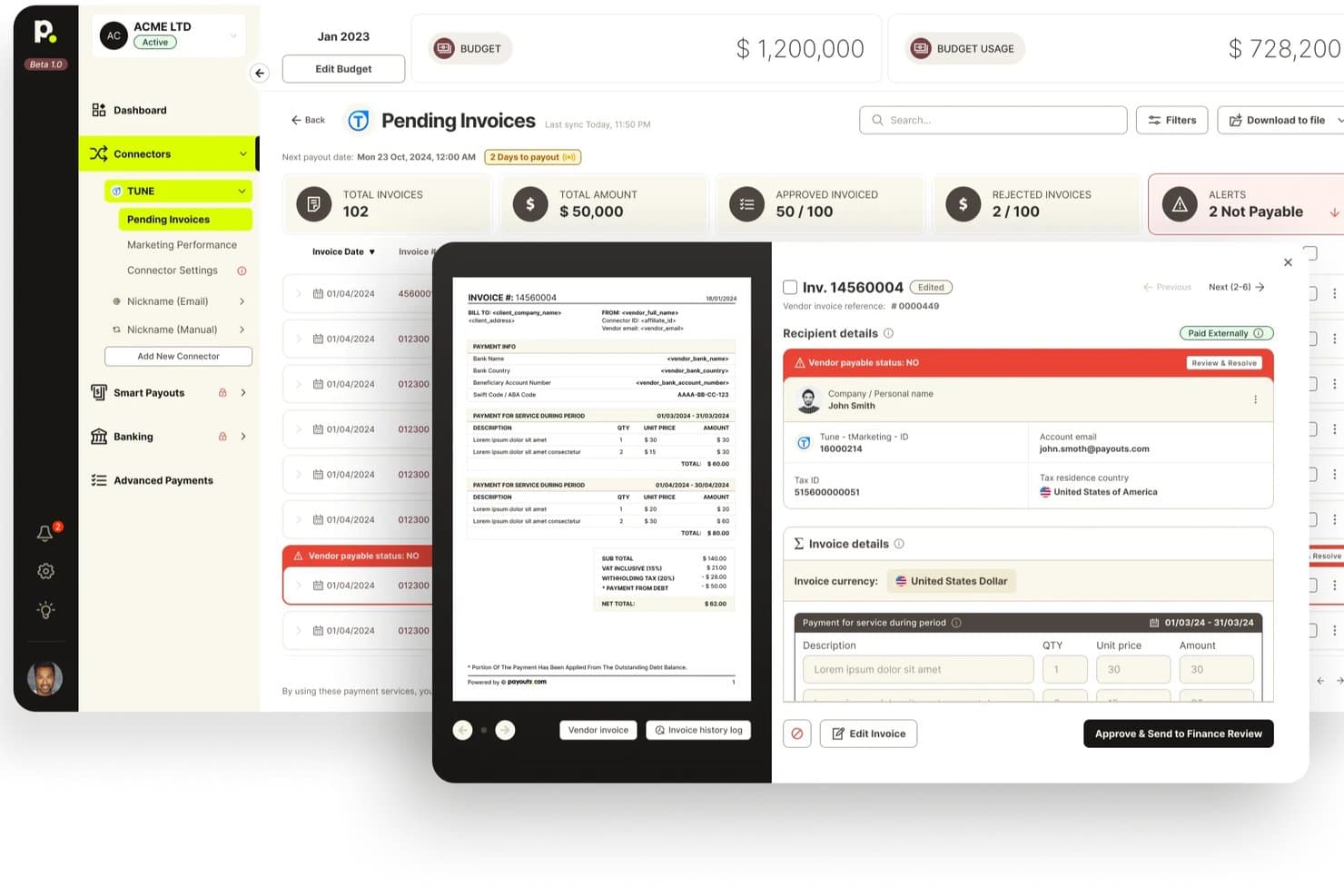
Payouts ofrece un panel de facturas pendientes con vistas previas de facturas, alertas sobre el estado de las cuentas por pagar de los proveedores y flujos de trabajo de aprobación para la gestión de facturación. Payouts es un sistema operativo financiero que combina la automatización global de cuentas por pagar, la ejecución de pagos a través de múltiples redes, los flujos de trabajo de aprobación móvil y la gestión de cuentas multidivisa en más de 190 países.
¿Para quién es más adecuado Payouts?
Payouts es una opción ideal para los equipos financieros de empresas del mercado medio y grandes empresas que necesitan aprobar y gestionar pagos globales de gran volumen estén donde estén.
Por qué elegí Payouts
Payouts ocupa un lugar en mi lista final por lo bien que gestiona las aprobaciones de pagos globales desde un dispositivo móvil. Me encanta que puedas configurar cadenas de aprobación multinivel con delegación y aplicación de aprobación dual, y luego gestionarlas desde el teléfono con autorización protegida por OTP. En la práctica, esto significa que un responsable de tesorería que viaje entre distintas zonas horarias puede aprobar en segundos un pago SWIFT o SEPA Instant de gran importe, con un registro de auditoría completo que captura automáticamente cada acción.
Características principales de Payouts
- Ejecución de pagos a través de múltiples redes: Envía pagos a través de más de 40 redes, incluidos ACH, SEPA Instant, SWIFT, RTP, FedNow, PayPal, Venmo y criptomonedas, desde una única plataforma.
- Emisión de tarjetas virtuales y prepago: Genera tarjetas virtuales Visa y Mastercard bajo demanda con límites de gasto por transacción, bloqueos por categoría de comerciante y límites de frecuencia en 38 monedas.
- Empleados digitales de IA: Agentes autónomos que pueden incorporar proveedores, realizar comprobaciones KYC/KYB, hacer seguimiento de facturas y programar pagos por correo electrónico, WhatsApp o voz.
- Informes fiscales de los formularios 1099 y de fin de año: Genera formularios fiscales para contratistas y declaraciones de fin de año directamente en la plataforma, sin necesidad de una herramienta de informes independiente.
Integraciones de Payouts
Payouts ofrece más de 50 integraciones prediseñadas, incluidas NetSuite, QuickBooks, Xero, SAP, Plaid, Salesforce, Slack, Persona y ComplyAdvantage. También admite conexiones mediante REST API, webhooks, CSV y SFTP para flujos de trabajo personalizados.
Pros and Cons
Pros:
- Las aprobaciones móviles incluyen autorización protegida por OTP
- Gestiona más de 40 redes de pago a nivel global
- Controles y registros de auditoría sólidos, de nivel empresarial
Cons:
- No dispone de una aplicación móvil nativa específica
- Accesibilidad limitada para pagos en puntos de venta móviles
Learn more about Payouts: Ideal para el seguimiento social de los pagos
- Sin demo o prueba gratuita
- Los planes comienzan desde 1.9% + $0.10 por transacción
Visit WebsiteCustomer Rating:4.7/5
Venmo ofrece un panel móvil con saldos, criptomonedas y división de gastos grupales. Si buscas una aplicación de pago móvil que facilite el seguimiento y el reparto de pagos con otras personas, Venmo merece la pena. Su feed social y las notas de pago hacen que para pequeños equipos, freelancers o grupos sea sencillo llevar registro de gastos compartidos y dividir costes de manera transparente. Este enfoque ayuda a los usuarios a gestionar pagos grupales y reembolsos de forma visible y fácil de consultar más adelante.
Por qué elegí Venmo
El seguimiento social de los pagos de Venmo lo diferencia de otras aplicaciones de pago móvil. El feed de transacciones de la app permite a los usuarios ver, comentar y conservar un registro de los pagos compartidos, lo que resulta especialmente útil para grupos que gestionan gastos juntos. Elegí Venmo porque sus notas de pago y las opciones públicas o privadas para compartir ayudan a aclarar el propósito de cada transacción y a mantener a todos informados. Para quienes necesitan transparencia y una manera sencilla de rastrear pagos grupales, las funciones sociales de Venmo lo convierten en una opción muy recomendable.
Funciones clave de Venmo
Otras características que hacen atractivo a Venmo para pagos móviles incluyen:
- Transferencia instantánea al banco: Transfiere fondos de tu saldo Venmo a tu cuenta bancaria en minutos por una pequeña comisión.
- Tarjeta de débito Venmo: Utiliza una tarjeta física vinculada a tu saldo Venmo para compras en tiendas y online.
- Perfiles de negocio: Crea un perfil dedicado para transacciones comerciales y acepta pagos de tus clientes.
- Pagos por código QR: Genera y escanea códigos QR para enviar o recibir pagos rápidamente en persona.
Integraciones de Venmo
Las integraciones incluyen PayPal, Braintree, Mastercard, Visa, Hulu, Uber, Shopify, The Bancorp Bank, Synchrony Bank, MoneyPass y aplicaciones y sitios web de comercios autorizados seleccionados.
Pros and Cons
Pros:
- El feed social hace transparente la actividad de pago
- Permite transferencias instantáneas a cuentas bancarias
- Ofrece perfiles de negocio para pequeños comerciantes
Cons:
- Límites de transacción en pagos grandes
- Sin protección para comprador o vendedor en compras
Learn more about Venmo: Mejor para soporte de transacciones globales
- Plan gratuito + demostración gratis disponible
- Desde $0.30/transacción
Visit WebsiteCustomer Rating:4.6/5
PayPal permite un pago móvil seguro con autenticación por código de un solo uso. Si tu empresa necesita enviar o recibir pagos a través de fronteras, PayPal ofrece una plataforma confiable para transacciones globales. Es especialmente útil para vendedores de comercio electrónico, trabajadores independientes y organizaciones que colaboran con clientes o proveedores internacionales. El soporte multimoneda y las funciones de protección para el comprador de PayPal ayudan a reducir la fricción y el riesgo al gestionar pagos en todo el mundo.
Por qué elegí PayPal
Cuando gestiono pagos que cruzan fronteras internacionales, busco herramientas que hagan las transacciones globales sencillas y seguras. PayPal es una excelente opción porque permite realizar pagos en más de 25 monedas y está disponible en más de 200 países, lo que facilita hacer negocios con clientes y proveedores en todo el mundo. Valoro que PayPal ofrezca protección integrada tanto para compradores como para vendedores, lo cual ayuda a reducir el riesgo para ambas partes en transacciones internacionales. Estas características hacen de PayPal una opción confiable para empresas y profesionales que necesitan gestionar pagos internacionales sin mayor complejidad.
Características clave de PayPal
Otras características que hacen útil a PayPal para pagos móviles incluyen:
- Pagos con código QR: Acepta pagos presenciales generando y escaneando códigos QR.
- Configuración de pagos recurrentes: Programa y administra pagos automáticos recurrentes para suscripciones o servicios.
- Enlaces PayPal.Me: Crea enlaces de pago personalizados para solicitar dinero a cualquier persona.
- Transferencia instantánea al banco: Mueve fondos instantáneamente de tu saldo PayPal a una cuenta bancaria o tarjeta de débito vinculada.
Integraciones de PayPal
Las integraciones incluyen BigCommerce, Etsy, QuickBooks, Salesforce, Paymentus, Woo, Miva, Wix, GoFundMe Pro y Otter.
Pros and Cons
Pros:
- Permite pagos en más de 25 divisas
- Ofrece políticas de protección para compradores y vendedores
- Se integra con las principales plataformas de comercio electrónico
Cons:
- Retiene fondos para verificación de cuenta
- Cobra tarifas elevadas por transferencias internacionales
Learn more about PayPal: 4La mejor opción para pagos internacionales de bajo costo
Wise
- Plan gratuito disponible
- Desde $0.43/transferencia (Varía según ubicación/moneda)
Visit WebsiteCustomer Rating:3.8/5
Wise ofrece un panel multidivisa con saldos, transacciones y opciones para generar ingresos. Si tu empresa necesita enviar o recibir pagos internacionales sin altas comisiones, Wise está diseñado para ti. Los equipos financieros y los responsables de operaciones en startups, pymes y empresas globales utilizan Wise para mover dinero internacionalmente a tipos de cambio reales. Su estructura de precios transparente y las funciones de cuenta multidivisa te ayudan a evitar costes ocultos y simplificar las transacciones globales.
Por qué elegí Wise
Lo que diferencia a Wise de las aplicaciones de pago móvil es su enfoque en minimizar el coste de las transferencias internacionales. Elegí Wise porque utiliza tipos de cambio reales y comisiones bajas y transparentes, lo cual es especialmente importante para empresas que realizan pagos transfronterizos frecuentes. La cuenta multidivisa te permite mantener y pagar en docenas de monedas, reduciendo la necesidad de múltiples cuentas bancarias. Para equipos financieros que gestionan proveedores globales o personal remoto, Wise ayuda a mantener los costes de pagos internacionales predecibles y fáciles de rastrear.
Características clave de Wise
Otras características que hacen que Wise sea útil para empresas que manejan pagos móviles incluyen:
- Pagos por lote: Envía pagos a múltiples destinatarios de una vez mediante la carga de un solo archivo.
- Tarjeta de débito empresarial: Emite tarjetas de débito físicas o virtuales para gastos del equipo en varias monedas.
- Integración con Xero y QuickBooks: Sincroniza transacciones directamente con los principales programas de contabilidad para facilitar la conciliación.
- Permisos de usuario: Establece diferentes niveles de acceso para los miembros del equipo y controla quién puede ver, enviar o aprobar pagos.
Integraciones de Wise
Las integraciones incluyen QuickBooks, Xero, Sage Business Cloud Accounting, Oracle NetSuite, Wave, Zoho Books, FreeAgent, Odoo y más.
Pros and Cons
Pros:
- Tipos de cambio medios transparentes
- Función de pagos por lote para pagos masivos
- La aplicación móvil permite gestión total de la cuenta
Cons:
- Capacidades limitadas de pago presencial
- Disponibilidad restringida de la tarjeta de débito
Learn more about Wise:

Apple Pay permite a los usuarios de iOS realizar pagos seguros en tiendas, aplicaciones y sitios web. Para empresas y profesionales que priorizan la seguridad, Apple Pay ofrece una solución de pago móvil basada en la autenticación biométrica. Es especialmente útil para equipos que utilizan iPhones o iPads, permitiendo a los usuarios autorizar pagos con Face ID o Touch ID. Este enfoque ayuda a las organizaciones a reducir el riesgo de fraude y agilizar las transacciones sin depender de tarjetas físicas.
Por qué elegí Apple Pay
La seguridad es una de las principales preocupaciones para muchas empresas que manejan pagos móviles, por lo que elegí Apple Pay por su avanzada autenticación biométrica. Con Face ID y Touch ID, los usuarios pueden autorizar pagos utilizando sus rasgos físicos únicos, lo que reduce el riesgo de transacciones no autorizadas. Apple Pay también utiliza números específicos del dispositivo y códigos de seguridad dinámicos para cada transacción, agregando otra capa de protección. Para las organizaciones que desean priorizar transacciones seguras y sin tarjeta, estas características hacen de Apple Pay una opción sólida.
Características clave de Apple Pay
Además de su autenticación enfocada en la seguridad, Apple Pay ofrece varias otras funciones destacables:
- Pagos sin contacto en tiendas: Realiza compras en terminales habilitadas con NFC usando tu iPhone o Apple Watch.
- Compras en línea y en apps: Paga rápidamente dentro de aplicaciones y sitios web compatibles sin ingresar los datos de la tarjeta.
- Almacenamiento de tarjetas de fidelidad y recompensas: Añade y utiliza tarjetas de fidelización y programas de recompensas directamente desde tu dispositivo.
- Pagos entre personas: Envía y recibe dinero a través de Apple Cash dentro de Mensajes.
Integraciones de Apple Pay
Las integraciones incluyen Apple Wallet, Apple Watch, iPhone, iPad, Mac, Safari, App Store, Apple Music, Apple TV+, iMessage y tarjetas de tránsito PRESTO.
Pros and Cons
Pros:
- Autenticación biométrica con Face ID o Touch ID
- No se comparten los datos de la tarjeta con los comercios
- Notificaciones en tiempo real para transacciones de pago
Cons:
- Solo está disponible en dispositivos Apple
- No se pueden almacenar tarjetas de transporte que no sean de Apple
Learn more about Apple Pay: Mejor para procesamiento de pagos a nivel empresarial
- No disponible
- Precios a consultar

Worldpay es un servicio global de procesamiento de pagos para empresas con múltiples métodos de pago. Worldpay está diseñado para grandes organizaciones que necesitan procesar volúmenes altos de pagos a través de múltiples canales y geografías. Los equipos financieros empresariales y los líderes de operaciones de pagos pueden utilizar Worldpay como un sistema de pagos para gestionar flujos complejos, admitir monedas globales y mantener el cumplimiento normativo. Sus avanzadas herramientas de prevención de fraude y liquidación de servicios financieros ayudan a las empresas a reducir riesgos y mantener las transacciones en movimiento de manera fluida a gran escala.
Por qué elegí Worldpay
Para las organizaciones que manejan necesidades de pago a gran escala y complejas, Worldpay destaca por sus capacidades de procesamiento a nivel empresarial. Elegí Worldpay porque admite transacciones en múltiples monedas y la aceptación de pagos omnicanal, aspectos esenciales para empresas que operan a nivel mundial o a través de varios canales de ventas. Sus herramientas avanzadas de detección de fraudes y gestión de riesgos ayudan a los equipos financieros a mantener la seguridad y el cumplimiento, incluso a medida que crecen los volúmenes de transacciones. Si necesita una solución capaz de manejar cargas de transacciones elevadas y adaptarse a requisitos empresariales, Worldpay está creado para esa escala.
Características clave de Worldpay
Otras características que hacen que Worldpay sea valioso para el procesamiento de pagos empresariales incluyen:
- Pasarelas de pago personalizables: Configure las pasarelas de pago para adaptarlas a requisitos comerciales y flujos de trabajo específicos.
- Soporte para facturación recurrente: Automatice pagos de suscripciones y membresías con herramientas integradas de facturación recurrente.
- Informes detallados de transacciones: Acceda a datos granulares de las transacciones y exporte informes para conciliaciones y análisis.
- Herramientas de gestión de contracargos: Realice el seguimiento, responda y gestione los contracargos directamente desde la plataforma.
Integraciones de Worldpay
Las integraciones incluyen Shopify, Sage Intacct, NMI Payments, AestheticsPro, CXT Software, HungerRush, Revaly, Juspay, Gr4vy y más.
Pros and Cons
Pros:
- Soporta pagos multidivisa y transfronterizos
- Herramientas avanzadas de detección de fraude
- Cumplimiento PCI DSS y tokenización para seguridad
Cons:
- Soporte limitado para casos de uso de pequeñas empresas
- Retrasos ocasionales en la liquidación de fondos
Learn more about Worldpay: Ideal para transferencias directas de banco a banco
- Plan gratuito disponible
- Precios disponibles a solicitud

Zelle es un servicio de pagos móviles para transferencias instantáneas entre bancos. Para equipos financieros y profesionales que necesitan mover dinero rápidamente entre cuentas bancarias, Zelle ofrece una solución de transferencia directa integrada en muchas aplicaciones bancarias. Sus pagos en tiempo real atraen a empresas e individuos que desean evitar billeteras de terceros o períodos de espera. Zelle es especialmente útil para quienes priorizan la velocidad y la simplicidad al enviar o recibir fondos directamente desde su banco.
Por qué elegí Zelle
Zelle destaca por su capacidad de enviar dinero directamente entre cuentas bancarias sin requerir una billetera o cuenta de depósito adicional. Elegí Zelle porque su integración con los principales bancos permite a los usuarios transferir fondos en tiempo real, a menudo en cuestión de minutos. Este enfoque directo de banco a banco elimina la necesidad de transferencias manuales o períodos de espera, lo cual es especialmente valioso para profesionales de finanzas que necesitan acceso inmediato a los fondos. Para cualquiera que valore la rapidez y la inmediatez en los pagos móviles, las funciones principales de Zelle lo convierten en una opción práctica.
Funciones clave de Zelle
Otras funciones que hacen de Zelle una herramienta útil para pagos móviles incluyen:
- No se comparten números de cuenta: Los usuarios solo necesitan una dirección de correo electrónico o número de teléfono móvil para enviar o recibir dinero.
- Acceso a través de la aplicación móvil: Zelle ofrece una app independiente para usuarios cuyos bancos no admiten Zelle de forma nativa.
- Funcionalidad de solicitud de pago: Los usuarios pueden solicitar pagos desde la propia app en su teléfono móvil o en la interfaz de su banco.
- Notificaciones de transacciones: Tanto los remitentes como los destinatarios reciben alertas en tiempo real para cada transacción.
Integraciones de Zelle
Las integraciones incluyen Bank of America, Wells Fargo, Chase, Capital One, U.S. Bank, PNC, Truist, TD Bank, Navy Federal Credit Union, QuickBooks Online, Expensify y más.
Pros and Cons
Pros:
- Sin comisiones para enviar o recibir dinero
- Disponible a través de la mayoría de aplicaciones bancarias principales
- Utiliza correo electrónico o número de teléfono para pagos
Cons:
- Solo funciona con cuentas bancarias en EE. UU.
- No se puede vincular a tarjetas de crédito para pagos
Learn more about Zelle: Ideal para integrarse con herramientas empresariales de Android
- Gratis para usar
- Gratis para usar

Google Wallet te permite almacenar y usar pases de eventos con códigos QR en las aplicaciones de Google. Si tu equipo depende de dispositivos Android, Google Wallet ofrece una solución de pagos que se integra perfectamente en tus flujos de trabajo existentes. Está diseñada para usuarios que desean gestionar pagos, tarjetas de fidelización, diferentes números de tarjeta y pases todo en un solo lugar, con una integración directa con la suite de herramientas empresariales de Google. Esta aplicación ayuda a empresas y profesionales a mantener todos los pagos digitales organizados y accesibles directamente desde sus teléfonos Android.
Por qué elegí Google Wallet
Elegí Google Wallet porque está diseñada para funcionar con las herramientas empresariales de Android, por lo que es una opción natural para equipos que ya utilizan el ecosistema de Google. La aplicación te permite almacenar y gestionar tarjetas de pago, programas de fidelización y pases de transporte, todo disponible desde tu dispositivo Android. Me gusta cómo se sincroniza con Google Workspace, lo que permite un fácil seguimiento de gastos e integración con otros servicios de Google. Para empresas que dependen de Android, estas funciones ayudan a centralizar la gestión de pagos y reducen la fricción en las transacciones diarias.
Funciones clave de Google Wallet
Otras funciones destacadas de Google Wallet para la gestión de pagos móviles incluyen:
- Pagos sin contacto: Realiza pagos seguros en terminales usando comunicación de campo cercano y tu dispositivo Android.
- Almacenamiento de tarjetas de regalo digitales: Guarda y accede a tarjetas de regalo digitales directamente en la app para canjearlas fácilmente.
- Historial de transacciones: Consulta un registro detallado de todos tus pagos y transferencias recientes para un mejor control.
- Controles de seguridad en la app: Configura autenticación por huella digital o PIN para añadir una capa extra de seguridad a tus transacciones.
Integraciones de Google Wallet
Las integraciones incluyen Google Pay, Google Maps, Gmail, Google Search, Family Link, Android, llaves digitales de coches BMW, entre otras.
Pros and Cons
Pros:
- Se integra directamente con herramientas empresariales de Android
- Permite pagar con solo acercar el dispositivo en la mayoría de teléfonos Android
- Ofrece sólidas funciones de seguridad a nivel de dispositivo
Cons:
- No está disponible en dispositivos iOS
- No incluye funciones integradas de facturación o cobros
Learn more about Google Wallet: Mejor para transferencias instantáneas entre personas
- Plan gratuito disponible
- Gratis para usar

Cash App te permite enviar y recibir dinero al instante con amigos y familiares. Si necesitas una aplicación de billetera móvil que se especialice en transferencias rápidas y directas, Cash App está diseñada para pagos instantáneos de persona a persona. Es una opción ideal para pequeñas empresas, autónomos o equipos que necesitan enviar o recibir dinero rápidamente sin esperar los tiempos de procesamiento bancario. Cash App también ofrece funciones como depósito directo y una tarjeta de débito vinculada, lo que la hace más versátil que las aplicaciones de transferencia básicas.
Por Qué Elegí Cash App
Para quienes necesitan transferir dinero al instante entre individuos, Cash App destaca por sus capacidades de transferencias en tiempo real de persona a persona. La elegí porque los usuarios pueden enviar y recibir fondos en segundos, lo que es especialmente útil para dividir gastos, pagar a contratistas o reembolsar colegas al instante. La aplicación también te permite acceder a los fondos transferidos al instante con una tarjeta de débito vinculada, así que no hay que esperar por el procesamiento bancario. Estas características hacen de Cash App una opción práctica para equipos y profesionales que valoran la rapidez y la comodidad en los pagos móviles.
Características Clave de Cash App
Otras características que hacen que Cash App sea atractiva para pagos móviles incluyen:
- Soporte para Depósito Directo: Recibe tu salario o cualquier depósito directamente en tu cuenta de Cash App.
- Compra y Venta de Bitcoin: Compra, vende y almacena Bitcoin dentro de la app.
- Integración de Cash Card: Usa una tarjeta de débito física o virtual vinculada a tu saldo de Cash App para tus compras.
- Enlaces de Pago Personalizables: Crea enlaces de pago únicos para solicitar dinero a otras personas.
Integraciones de Cash App
Las integraciones incluyen Square, Afterpay, Shopify, WooCommerce, Adobe Commerce, Jotform, y más.
Pros and Cons
Pros:
- Transferencias instantáneas entre usuarios sin demora
- Ofrece una Cash Card física para gastar
- Permite depósito directo de pagos de nómina
Cons:
- Limitado solo a usuarios en EE.UU. y Reino Unido
- No tiene funciones nativas de facturación para negocios
Learn more about Cash App: Mejor compatibilidad con terminales de banda magnética
- Plan gratuito disponible
- Gratis para usar

Samsung Pay ofrece varios métodos de verificación antes de activar tarjetas virtuales. Las empresas que necesitan una aplicación de pago móvil compatible con sistemas de punto de venta antiguos pueden considerar Samsung Pay. Su tecnología de transmisión magnética segura (MST) permite a los usuarios pagar en terminales que solo aceptan tarjetas de banda magnética, no solo NFC. Esto la convierte en una opción práctica para minoristas y proveedores de servicios que trabajan con hardware de pago heredado.
Por qué elegí Samsung Pay
A diferencia de la mayoría de las aplicaciones de pago móvil, Samsung Pay se destaca por su capacidad de funcionar con terminales de banda magnética, no solo con aquellas que habilitan NFC. Esto es posible gracias a su tecnología de transmisión magnética segura (MST), que permite a los usuarios pagar en lectores de tarjetas antiguos que no han sido actualizados para pagos sin contacto. Elegí Samsung Pay para esta lista porque ayuda a las empresas y profesionales a aceptar pagos móviles en entornos donde otras billeteras móviles podrían no funcionar. Para quienes necesitan una amplia compatibilidad con hardware de pago tanto nuevo como antiguo, esta característica puede ser una verdadera ventaja.
Funciones clave de Samsung Pay
Además de su compatibilidad con terminales de banda magnética, también encontré que estas características son destacables:
- Almacenamiento de tarjetas de fidelización: Guarda y accede a versiones digitales de tarjetas de fidelización y membresía en la aplicación.
- Programa de recompensas Samsung: Obtén puntos por cada compra realizada con Samsung Pay, que pueden canjearse por varias recompensas.
- Pagos en línea dentro de la app: Realiza compras directamente en aplicaciones y sitios web compatibles utilizando Samsung Pay.
- Autenticación biométrica: Utiliza escaneo de huellas dactilares o de iris para autorizar pagos de forma segura.
Integraciones de Samsung Pay
Las integraciones incluyen TD Bank, RBC, CIBC, Scotiabank, American Express, Mastercard, Visa, Interac, Tangerine y Simplii Financial.
Pros and Cons
Pros:
- Funciona con terminales NFC y MST
- Soporta los principales bancos de Canadá y del mundo
- Ofrece recompensas Samsung por las compras
Cons:
- Solo disponible en dispositivos Samsung
- No es aceptado por todos los comercios internacionales
Learn more about Samsung Pay:
Otras aplicaciones de pago móvil
Estas son algunas opciones adicionales de aplicaciones de pago móvil que no han entrado en mi lista de selección, pero que aún merece la pena consultar:
- 11Square PaymentsLa mejor para soluciones integradas de punto de venta
- 12MonzoIdeal para notificaciones de gasto en tiempo real
- 13CommBankMejor para integración con banca empresarial australiana
- 14Currency CloudIdeal para la gestión de cuentas multimoneda
Cómo evalúo las aplicaciones de pagos móviles
Ya sea que un controlador necesite aprobar un pago a un proveedor desde la carretera o que un equipo en campo deba aceptar pagos con tarjeta en el sitio, divido mi evaluación en requerimientos básicos imprescindibles y verdaderos diferenciadores.
Funcionalidad básica (criterios fundamentales para esta lista)
Cuando selecciono herramientas para mi lista, califico cada una en una escala del 0 (no ofrece la funcionalidad) al 5 (destaca en esta área) para cada funcionalidad principal que se menciona a continuación. Luego, calculo la puntuación total de la herramienta en porcentaje. Cada herramienta debe alcanzar una puntuación total mínima del 65% para ser considerada para su inclusión.
- Procesamiento de transacciones móviles: Verifico si la app permite enviar, recibir y solicitar pagos directamente desde iOS y Android, no solo a través de una versión móvil de un panel de escritorio.
- Soporte para múltiples métodos de pago: Cada app debe manejar tarjetas, transferencias ACH/bancarias y billeteras digitales para que tu equipo pueda pagar a proveedores o cobrar a clientes según prefieran.
- Seguridad y encriptación de pagos: Evalúo el nivel de cumplimiento PCI-DSS, tokenización y opciones de autenticación multifactor, ya que los equipos financieros que procesan transacciones en dispositivos personales necesitan protección en capas.
- Historial y reportes de transacciones: Los registros con búsqueda, filtros y reportes exportables son clave aquí: tu equipo de cuentas por pagar debe poder recuperar los pagos a proveedores del trimestre anterior en segundos, sin interminables desplazamientos.
- Integración con software contable: Busco conexiones nativas con plataformas como QuickBooks, Xero o NetSuite con sincronización bidireccional para que las transacciones se contabilicen en el libro mayor sin reingresos manuales.
- Notificaciones y confirmaciones en tiempo real: Las alertas push para pagos completados, transacciones fallidas y aprobaciones pendientes mantienen informados a los tesoreros sin la necesidad de abrir la app repetidamente.
Una vez que tengo una lista de herramientas que cumplen con estos criterios, considero qué distingue a cada plataforma.
Factores diferenciadores (lo que distingue a los proveedores)
Así es como comparo y contrasto a los diferentes proveedores:
Características destacadas
Los flujos de aprobación multinivel son muy importantes cuando los controladores o tesoreros deben autorizar pagos de manera remota antes de que se liberen los fondos. También busco soporte multimoneda con tasas de cambio en tiempo real, especialmente para equipos que pagan a proveedores o contratistas en el extranjero. La captura de recibos con OCR es otra función que evalúo de cerca; tomar una foto de una factura y que los datos de cada ítem se adjunten automáticamente a una transacción ahorra a cuentas por pagar el ingreso manual durante las conciliaciones.
Más allá de las características
La transparencia de precios es uno de los primeros aspectos que evalúo: las tarifas ocultas por transacción o los recargos por tipo de cambio pueden reducir sigilosamente los márgenes, así que reviso si los proveedores publican estructuras tarifarias claras y todo incluido. La velocidad de liquidación también es clave para prever flujos de caja; observo si una plataforma ofrece pagos el mismo día o instantáneos frente a los plazos estándar de varios días. Por último, considero la escalabilidad, en particular el soporte para múltiples entidades y permisos basados en roles, ya que una herramienta que sirve para un equipo de cinco personas pero se colapsa en operaciones multilocalización no servirá a una organización financiera en crecimiento por mucho tiempo.
Cómo elegir aplicaciones de pago móvil
Es fácil perderse entre largas listas de funciones y estructuras de precios complejas. Para ayudarte a mantener la atención mientras avanzas en tu proceso único de selección de software, aquí tienes una lista de factores que debes tener en cuenta:
| Factor | Qué debes tener en cuenta |
|---|---|
| FactorEscalabilidad | Qué debes tener en cuenta¿La aplicación admitirá el volumen de tus transacciones a medida que crezca tu negocio? Comprueba si existen límites de usuarios o transacciones. |
| FactorIntegraciones | Qué debes tener en cuenta¿La aplicación se conecta de forma nativa con tus sistemas de contabilidad, TPV o ERP? Las carencias en este ámbito pueden generar trabajo manual. |
| FactorPersonalización | Qué debes tener en cuenta¿Puedes adaptar los flujos de pago, la imagen de marca o los informes a las necesidades de tu negocio, o se trata de una experiencia fija? |
| FactorFacilidad de uso | Qué debes tener en cuenta¿Tu equipo y tus clientes considerarán intuitiva la interfaz? Haz pruebas con usuarios reales antes de comprometerte. |
| FactorImplementación e incorporación | Qué debes tener en cuenta¿Cuánto tiempo llevará ponerla en marcha? Busca guías de configuración claras, asistencia para la migración y recursos de formación. |
| FactorCoste | Qué debes tener en cuenta¿Son transparentes todas las tarifas, incluidas las comisiones por transacción, las cuotas mensuales y los cargos adicionales? Compara el coste total de propiedad. |
| FactorMedidas de seguridad | Qué debes tener en cuenta¿La aplicación cumple las normas PCI DSS y ofrece herramientas de prevención del fraude? Pregunta por el cifrado y el cumplimiento normativo. |
| FactorDisponibilidad de asistencia | Qué debes tener en cuenta¿Hay ayuda disponible cuando la necesitas, especialmente fuera del horario comercial o durante los periodos de mayor actividad? |
¿Qué son las aplicaciones de pago móvil?
Las aplicaciones de pago móvil son herramientas de software que permiten a las empresas aceptar pagos mediante smartphones o tabletas, normalmente a través de transacciones con tarjetas sin contacto o monederos digitales. Este tipo de plataforma de pago convierte los dispositivos móviles en terminales de pago, lo que permite aceptar pagos de forma rápida, segura y flexible. Se utilizan ampliamente en comercios minoristas, empresas de servicios y equipos que trabajan sobre el terreno y necesitan procesar transacciones sobre la marcha sin disponer de hardware específico.
Características
Al seleccionar aplicaciones de pago móvil, presta atención a las siguientes características clave:
- Aceptación de pagos sin contacto: Permite procesar pagos con tarjetas de pago sin contacto o monederos digitales mediante dispositivos compatibles con NFC, haciendo que las transacciones sean rápidas y cómodas tanto para las empresas como para los clientes.
- Recibos digitales: Envía recibos electrónicos a los clientes por correo electrónico o SMS, reduciendo el uso de papel y facilitando el seguimiento y almacenamiento de los registros de transacciones.
- Historial de transacciones: Proporciona registros consultables de todos los pagos, reembolsos y anulaciones, lo que ayuda con la conciliación, la elaboración de informes y los registros de auditoría.
- Gestión de reembolsos: Permite emitir reembolsos totales o parciales directamente desde la aplicación, agilizando el servicio de atención al cliente y la gestión de devoluciones.
- Acceso multiusuario: Admite varios inicios de sesión del personal o roles de usuario, de modo que los equipos pueden procesar pagos con una única cuenta empresarial manteniendo la supervisión.
- Controles de seguridad: Incluye funciones como protección mediante PIN, inicio de sesión biométrico y cifrado para proteger los datos de pago confidenciales y evitar accesos no autorizados.
- Integración con sistemas contables o de punto de venta: Se conecta directamente con el software empresarial existente, reduciendo la introducción manual de datos y mejorando la precisión financiera.
- Marca personalizable: Permite añadir el logotipo o el nombre de la empresa a los recibos y las pantallas de pago, reforzando la marca con cada transacción.
- Capacidad de pago sin conexión: Permite aceptar pagos incluso sin conexión a Internet y sincroniza las transacciones una vez restablecida la conectividad.
Ventajas
La implementación de aplicaciones de pago móvil ofrece varias ventajas para tu equipo y tu empresa. Estas son algunas de las que puedes esperar:
- Procesamiento de pagos más rápido: Aceptar pagos sin contacto y mediante monederos digitales acelera las transacciones y reduce los tiempos de espera de los clientes.
- Mayor movilidad: Los equipos pueden procesar pagos en cualquier lugar mediante teléfonos inteligentes o tabletas, lo que facilita las ventas sobre el terreno, los eventos y los servicios en movilidad.
- Mejor seguimiento de las transacciones: El historial de transacciones integrado y los recibos digitales facilitan la conciliación de pagos y el mantenimiento de registros precisos.
- Seguridad mejorada: Los controles de seguridad, como el cifrado, la protección mediante PIN y el cumplimiento de las normas de pago, ayudan a proteger los datos confidenciales.
- Reembolsos y devoluciones simplificados: La gestión de reembolsos desde la aplicación agiliza el servicio de atención al cliente y reduce el trabajo manual del personal.
- Integración sencilla con los sistemas empresariales: Las conexiones directas con el software contable o de punto de venta reducen la introducción manual de datos y mejoran la precisión financiera.
- Experiencia del cliente personalizable: Funciones como los recibos con la marca de la empresa y el acceso multiusuario permiten adaptar el proceso de pago a las necesidades de tu negocio.
Costes & precios
Seleccionar aplicaciones de pago móvil requiere comprender los distintos modelos de precios y planes disponibles. Los costes varían en función de las características, el tamaño del equipo, los complementos y otros factores. La siguiente tabla resume los planes habituales, sus precios medios y las características que suelen incluir las soluciones de aplicaciones de pago móvil:
Tabla comparativa de planes para aplicaciones de pago móvil
| Tipo de plan | Precio medio | Características habituales |
|---|---|---|
| Tipo de planPlan gratuito | Precio medio$0 | Características habitualesAcepta pagos básicos, proporciona recibos digitales, ofrece un historial de transacciones limitado y controles de seguridad básicos. |
| Tipo de planPlan personal | Precio medio$5-$15/usuario/mes | Características habitualesIncluye todas las funciones gratuitas, añade la gestión de reembolsos, admite integraciones limitadas y ofrece informes básicos. |
| Tipo de planPlan empresarial | Precio medio$20-$40/usuario/mes | Características habitualesAñade acceso multiusuario, historial avanzado de transacciones, integración con sistemas contables o de punto de venta y marca personalizable. |
| Tipo de planPlan corporativo | Precio medio$50-$100/usuario/mes | Características habitualesOfrece todas las funciones empresariales, proporciona seguridad avanzada, asistencia prioritaria, incorporación personalizada y gestión del cumplimiento normativo. |
Preguntas frecuentes sobre aplicaciones de pago móvil
Estas son algunas respuestas a preguntas frecuentes sobre las aplicaciones de pago móvil:
¿Son seguras las aplicaciones de pago móvil para las transacciones comerciales?
Sí, la mayoría de las aplicaciones de pago móvil utilizan cifrado y tokenización. La mayoría también cumple las normas PCI DSS para proteger los datos de pago confidenciales. Comprueba siempre que la aplicación ofrezca autenticación multifactor y actualizaciones de seguridad periódicas para reducir el riesgo de fraude o filtraciones de datos.
¿Pueden funcionar las aplicaciones de pago móvil sin conexión a Internet?
Sí, algunas aplicaciones de pago móvil ofrecen funciones de pago sin conexión, lo que permite aceptar pagos cuando no hay conectividad disponible. Las transacciones se almacenan localmente y se procesan cuando el dispositivo vuelve a conectarse a Internet, pero no todas las aplicaciones admiten esta función, por lo que debes confirmarlo antes de elegir una.
¿Cómo se integran las aplicaciones de pago móvil con los sistemas contables?
Muchas aplicaciones de pago móvil ofrecen integraciones directas u opciones de exportación para programas de contabilidad. Esto ayuda a automatizar la sincronización de transacciones, reduce la introducción manual de datos y mejora la precisión de las conciliaciones. Comprueba la compatibilidad con tus herramientas contables actuales antes de tomar una decisión.
¿Qué tipos de pagos puedo aceptar con las aplicaciones de pago móvil?
Normalmente puedes aceptar pagos con tarjeta de crédito, tarjetas de débito, pagos sin contacto y monederos digitales como Apple Pay o Google Pay. Algunas aplicaciones también admiten pagos mediante códigos QR o transferencias bancarias, así que revisa los métodos de pago compatibles para adaptarlos a las preferencias de tus clientes.
¿Las aplicaciones de pago móvil cobran comisiones por transacción?
Sí, la mayoría de las aplicaciones de pago móvil cobran una comisión por transacción, que puede variar según el tipo de pago y el plan. Algunas también pueden aplicar cuotas mensuales o cargos adicionales por funciones premium. Revisa la tabla completa de tarifas para conocer el coste total de propiedad.