El software de automatización de cuentas por pagar es una solución digital que agiliza el procesamiento de facturas, los flujos de trabajo de aprobación y los pagos. Sin él, los equipos financieros suelen acabar sepultados entre hojas de cálculo, persiguiendo firmas y apresurándose para solucionar pagos atrasados, en lugar de centrarse en la visión global.
Con experiencia en gestión financiera y años dedicados a analizar herramientas financieras, he probado más software de cuentas por pagar del que puedo contar. La solución adecuada no solo ahorra tiempo. También refuerza los controles, mejora la eficiencia del equipo y proporciona a la dirección la visibilidad en tiempo real que necesita para impulsar el negocio. Convierte las cuentas por pagar de una tarea administrativa desordenada en una operación fluida y estratégica.
Después de realizar numerosas pruebas prácticas y analizar los comentarios de los usuarios, he reducido la lista a las mejores plataformas de automatización de cuentas por pagar disponibles. Estas son las herramientas que realmente ayudan, tanto si tu empresa está creciendo rápidamente como si gestionas numerosos proveedores o simplemente estás preparado para dejar de perseguir aprobaciones y empezar a ganar control.
Por qué confiar en nuestras recomendaciones de software
6,700+
Reviews
20
Industry experts
16+
Evaluation factors
14
Years
Nuestras reseñas reflejan nuestro criterio independiente, no un discurso de ventas. Descubra cómo mantenemos la transparencia.
Para esta guía, evaluamos las herramientas mediante pruebas prácticas e investigación independiente, puntuando las herramientas según nuestros criterios de selección.
Nuestras reseñas reflejan nuestro criterio editorial humano, no un discurso de ventas.
Tabla comparativa de software de automatización de cuentas por pagar
Esta tabla comparativa resume los detalles de precios de mis principales selecciones de software de automatización de cuentas por pagar:
| Tool | Best For | Trial Info | Price | ||
|---|---|---|---|---|---|
| 1 | Ideal para empresas en rápido crecimiento | Demostración del producto disponible | Desde $25/mes (facturado anualmente) | Website | |
| 2 | Mejor con detección de fraude integrada | Demostración gratuita disponible | Precio a consultar | Website | |
| 3 | Ideal para el procesamiento automatizado de facturas | Demostración gratuita disponible | Precios bajo solicitud | Website | |
| 4 | Ideal para flujos de aprobación automatizados | Demo gratuita disponible | Desde $499/mes (facturación anual) | Website | |
| 5 | Mejor para introducción de facturas potenciada por IA | Prueba gratuita de 21 días disponible | Desde $99/mes | Website | |
| 6 | Ideal para conciliación automática de triple coincidencia | Demostración gratuita disponible | Precio bajo solicitud | Website | |
| 7 | Ideal para la automatización de facturas impulsada por IA | Demo gratuita disponible | Precio a petición | Website | |
| 8 | La mejor opción para startups | Plan gratuito disponible. | Precio bajo solicitud | Website | |
| 9 | Ideal para el soporte de pagos por múltiples métodos | Plan gratuito + 30 días de prueba gratis + demo gratuita disponible | Desde $15/usuario/mes | Website | |
| 10 | Ideal para información automática sobre el flujo de caja | Prueba gratuita de 30 días disponible | Desde $2.50/mes | Website |


Análisis del mejor software de automatización de cuentas por pagar
Descubre el mejor software de automatización de cuentas por pagar con mis análisis rápidos y claros. Conoce sus funciones, ventajas, desventajas e integraciones para encontrar la herramienta que te ayude a agilizar los flujos de trabajo, reducir los errores manuales y obtener un mayor control sobre tus cuentas por pagar.
 Ideal para empresas en rápido crecimiento
- Demostración del producto disponible
- Desde $25/mes (facturado anualmente)
Visit WebsiteCustomer Rating:4.2/5
En Melio, puedes combinar pagos y realizar pagos parciales, lo que te ofrece flexibilidad a la hora de pagar. Además, puedes usar tarjetas de crédito para pagar a proveedores a través de Melio, incluso si esos proveedores no aceptan tarjetas. Para pequeñas y medianas empresas que buscan optimizar las operaciones financieras, Melio ofrece una solución diseñada para simplificar la gestión de pagos a proveedores. Con funciones como el reconocimiento óptico de caracteres para extraer datos de facturas y la programación automatizada de pagos, Melio mejora tus procesos de pago y la gestión del flujo de caja. Esto permite a tu equipo centrarse más en oportunidades de crecimiento estratégico, reduciendo tareas manuales y mejorando la eficiencia general.
Por qué elegí Melio
Elegí Melio por su capacidad única para mejorar tu proceso de cuentas por pagar ofreciendo opciones de pago flexibles y flujos de trabajo automatizados. La capacidad de la plataforma para integrarse perfectamente con QuickBooks y otros sistemas de contabilidad proporciona una forma sencilla de gestionar pagos a proveedores y reducir errores de entrada manual. Además, la función de Melio que permite realizar pagos con tarjeta de crédito, incluso si los proveedores solo aceptan cheques o transferencias bancarias, ofrece una flexibilidad sin precedentes en la gestión del flujo de caja. Esto lo convierte en una opción llamativa para empresas que buscan optimizar sus operaciones financieras y mejorar la eficiencia.
Funciones clave de Melio
Además de sus opciones de pago flexibles y capacidades de integración sin fisuras, Melio ofrece una variedad de funciones que mejoran la experiencia de automatización de cuentas por pagar.
- Aplicación móvil: Gestiona los pagos fácilmente desde cualquier lugar, permitiéndote enviar y hacer seguimiento de pagos estés donde estés, ideal para propietarios de negocios que siempre están en movimiento.
- Tarjetas virtuales: Utiliza tarjetas virtuales para gastos empresariales en línea de forma segura, proporcionando una capa de protección contra el fraude y transacciones no autorizadas.
- Flujos de aprobación personalizables: Digitaliza tus procesos de aprobación asignando roles y permisos, asegurando transparencia y control sobre tus operaciones de pago.
- Pagos internacionales: Facilita pagos a proveedores en el extranjero, lo que es una función esencial para empresas que participan en comercio global.
Integraciones de Melio
Las integraciones incluyen QuickBooks Online, QuickBooks Desktop y Xero. También hay una API disponible para integraciones personalizadas.
Pros and Cons
Pros:
- Interfaz simple e intuitiva
- Permite pagar a proveedores con tarjetas de crédito aunque no las acepten
- Se pueden programar pagos con antelación
Cons:
- La configuración de nuevos proveedores podría mejorarse
- No tiene funciones de automatización más allá de lo básico
 Mejor con detección de fraude integrada
- Demostración gratuita disponible
- Precio a consultar
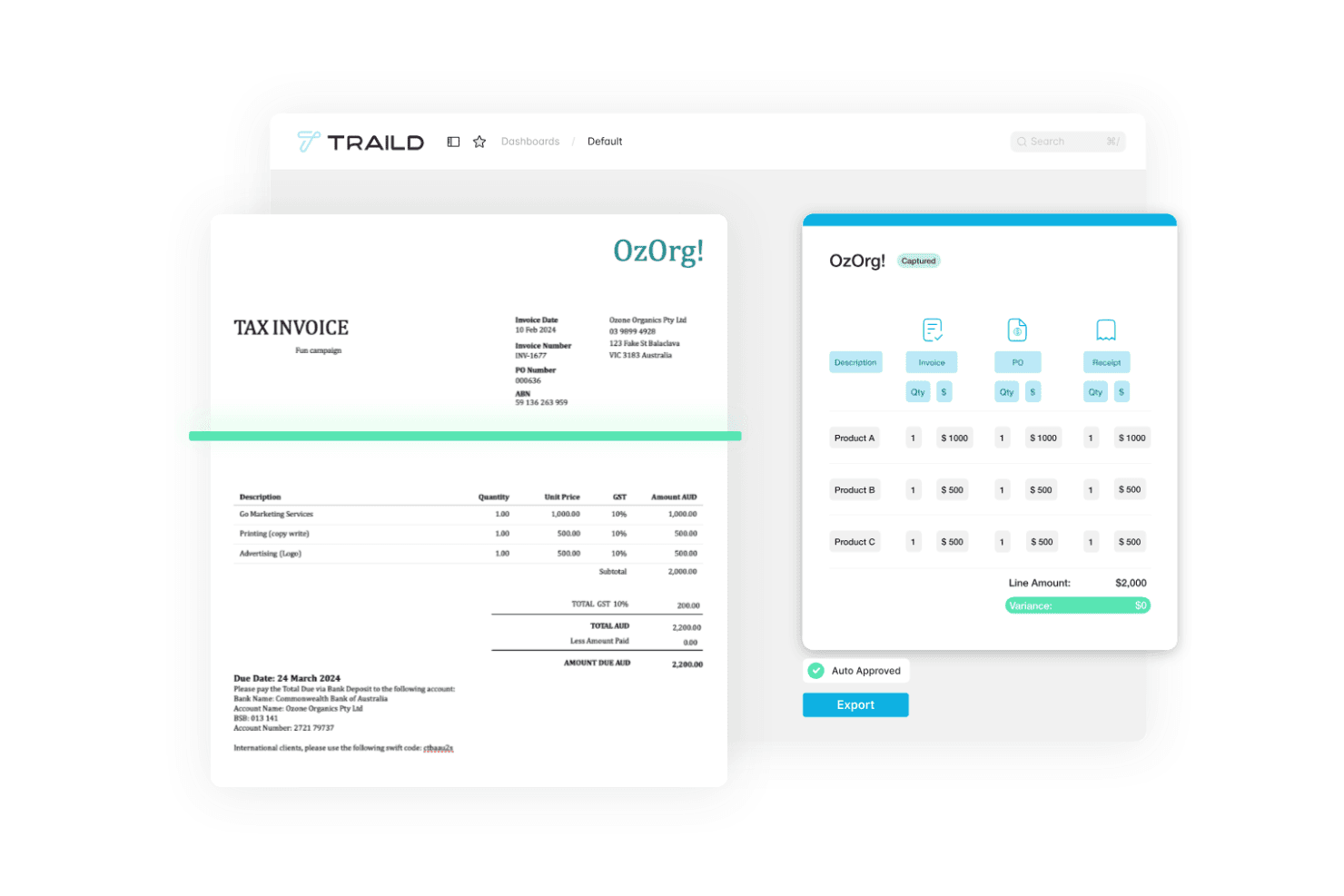
Traild muestra un panel de automatización de cuentas por pagar que captura datos de facturas, valida líneas de productos y automatiza aprobaciones de facturas. Traild es una plataforma de automatización de cuentas por pagar (AP) que gestiona la captura de facturas impulsada por IA, la conciliación con órdenes de compra, flujos de trabajo de aprobación multinivel, verificación de proveedores y detección de fraude a lo largo de todo el ciclo de facturación a pago.
¿Para quién es mejor Traild?
Traild es ideal para los equipos financieros de medianas empresas que necesitan controles estructurados de cuentas por pagar sin la complejidad de una implementación de nivel empresarial.
Por qué elegí Traild
He incluido Traild entre mis principales opciones porque su generador de flujos de trabajo de aprobación brinda a los equipos de cuentas por pagar un control real sobre cómo avanzan las facturas dentro de la empresa. Me gusta que puedas configurar plantillas con reglas de enrutamiento personalizadas según el tipo de factura, proveedor, centro de costos o umbral de gasto, de modo que diferentes categorías de facturas sigan caminos distintos sin intervención manual. También puedes añadir lógica condicional, lo que significa que una factura de servicios públicos se tramita de forma diferente a un gasto de capital sin tener que crear esas reglas desde cero cada vez.
Funciones clave de Traild
- Captura de facturas con IA: Extrae y clasifica automáticamente los datos de las facturas utilizando IA, reduciendo la entrada manual de datos en todos los formatos de factura.
- Conciliación de órdenes de compra 2-3 vías: Compara facturas con órdenes de compra y recibos para detectar discrepancias antes de la aprobación.
- Verificación de proveedores: Valida los datos bancarios y de contacto de los proveedores para reducir el riesgo de fraude en los pagos.
- Conciliación automática de estados de cuenta: Realiza la conciliación de los estados de cuenta de proveedores con tus registros de cuentas por pagar para detectar facturas faltantes o duplicadas.
Integraciones de Traild
Traild ofrece integraciones nativas con Acumatica, SYSPRO, IFS, NetSuite, SAP Business One, MYOB y Xero, proporcionando un flujo de datos bidireccional en tiempo real con cada ERP.
Pros and Cons
Pros:
- Detección de anomalías y fraude con IA integrada
- Gestiona bien flujos de trabajo de cuentas por pagar específicos del sector
- Gestión multiempresa en un solo inicio de sesión
Cons:
- Número limitado de integraciones ERP
- No hay prueba gratuita autogestionada disponible
Learn more about Traild: Ideal para el procesamiento automatizado de facturas
- Demostración gratuita disponible
- Precios bajo solicitud
Visit WebsiteCustomer Rating:4.3/5
El panel principal de Paylocity muestra flujos de facturación automatizados y visibilidad en tiempo real sobre la aprobación de pagos. Para las empresas que buscan simplificar las operaciones financieras, el Software de Automatización de Cuentas por Pagar de Paylocity ofrece un enfoque optimizado para gestionar los procesos de pago y mejorar la supervisión financiera. Resulta especialmente atractivo para las organizaciones que desean reducir errores manuales y tomar decisiones informadas al automatizar flujos de trabajo y proporcionar información en tiempo real sobre las transacciones. Al integrarse con soluciones de RR.HH. y TI, Paylocity permite que su equipo enfoque sus recursos en el crecimiento estratégico, posicionándose como un socio valioso en la gestión financiera.
Por qué elegí Paylocity
Elegí Paylocity por su capacidad para transformar las tareas tradicionales de cuentas por pagar en un proceso más eficiente y preciso mediante su automatización impulsada por IA. El software ofrece procesamiento de facturas y flujos de aprobación automatizados, lo que reduce la introducción manual de datos y minimiza los errores. Además, Paylocity permite el seguimiento en tiempo real y una integración fluida con los sistemas financieros existentes, dando a su equipo mayor visibilidad y control sobre las operaciones financieras. Estas funciones permiten a las empresas optimizar sus procesos de cuentas por pagar, lo que lleva a ahorros de costos y mejor relación con proveedores.
Características clave de Paylocity
Además de las razones mencionadas previamente, estas son otras características clave que hacen destacar al Software de Automatización de Cuentas por Pagar de Paylocity:
- Detección de fraudes: El software utiliza IA para monitorear transacciones e identificar actividades sospechosas, aumentando la seguridad y reduciendo el riesgo de fraude.
- Analítica de gastos: Esta función proporciona información detallada sobre los patrones de gasto, ayudando a su equipo a tomar decisiones basadas en datos e identificar áreas para optimización de costos.
- Cumplimiento de políticas: Las verificaciones automáticas aseguran que todas las transacciones se ajusten a las políticas de la empresa y normas regulatorias, facilitando auditorías y manteniendo el cumplimiento.
- Gestión de proveedores: La incorporación y gestión eficiente de proveedores mejora las relaciones y garantiza pagos a tiempo, aumentando la eficiencia del equipo en tareas relacionadas con proveedores.
Integraciones de Paylocity
Las integraciones incluyen AxisCare, BenefitsMe, CompareMedsRX, Crunchtime, 15Five, 3rd Degree Screening, 401GO, 4MyBenefits, 7shifts y ABG (Alliance Benefit Group).
Pros and Cons
Pros:
- Automatización de facturas impulsada por IA
- Analítica de gastos en tiempo real
- Integra flujos de trabajo de RR.HH. y finanzas
Cons:
- La configuración de informes puede requerir capacitación
- Conjunto de funciones complejo para equipos pequeños
Learn more about Paylocity: Ideal para flujos de aprobación automatizados
- Demo gratuita disponible
- Desde $499/mes (facturación anual)
Visit WebsiteCustomer Rating:4.8/5
El panel de Precoro centraliza todas las órdenes de compra e incluye estados, detalles del comprador y documentos relacionados. Para quienes buscan una solución confiable de automatización de cuentas por pagar, Precoro ofrece una plataforma que centraliza la gestión de facturas y aumenta la precisión financiera. Diseñada para empresas medianas, Precoro se integra con varios sistemas contables, proporcionando visibilidad en tiempo real y flujos de aprobación personalizables. Sus funciones impulsadas por IA minimizan las tareas manuales, previenen errores y garantizan pagos puntuales, convirtiéndola en una opción adecuada para equipos financieros que buscan mejorar sus procesos de cuentas por pagar.
Por Qué Elegí Precoro
Elegí Precoro por su capacidad para mejorar la precisión y el control en los procesos de cuentas por pagar mediante su captura de facturas impulsada por IA y flujos de aprobación personalizables. Estas características reducen significativamente la intervención manual, permitiendo que su equipo se enfoque en tareas estratégicas en lugar de ingresar datos repetitivos. La integración de Precoro con diversos sistemas contables también asegura una operación fluida, ofreciendo visibilidad en tiempo real a través de múltiples entidades y monedas. Esto lo convierte en una elección ideal para equipos financieros que buscan optimizar sus operaciones de cuentas por pagar sin la molestia de configuraciones complejas.
Funciones Clave de Precoro
Además de su captura de facturas y flujos de aprobación, Precoro ofrece varias otras funciones que mejoran el proceso de cuentas por pagar:
- Conciliación Triple: Esta función asegura que las facturas se concilien correctamente con las órdenes de compra y los recibos, reduciendo las posibilidades de errores y actividades fraudulentas.
- Portal de Proveedores: Permite una comunicación ágil con los proveedores, mejorando la gestión de relaciones y facilitando una resolución rápida de discrepancias.
- Controles de Gasto Integrados: Estos controles ayudan a su equipo a mantener el cumplimiento presupuestario estableciendo límites y alertas para el gasto, asegurando disciplina financiera.
- Visibilidad en Tiempo Real: Con paneles integrales, su equipo puede monitorear facturas, presupuestos y gastos en varios departamentos y entidades, mejorando la transparencia y la toma de decisiones.
Integraciones de Precoro
Las integraciones incluyen NetSuite, QuickBooks Online, QuickBooks Desktop, Xero, Sage Intacct y Microsoft Dynamics 365.
Pros and Cons
Pros:
- Flujos de trabajo personalizables que se adaptan a diversas necesidades empresariales
- Robusta conciliación triple
- Creación y seguimiento eficiente de órdenes de compra
Cons:
- La aplicación móvil podría mejorarse
- Dependencia de la tecnología para procesos de cuentas por pagar
Learn more about Precoro: Mejor para introducción de facturas potenciada por IA
- Prueba gratuita de 21 días disponible
- Desde $99/mes
Visit WebsiteCustomer Rating:4.9/5
Una factura digital de MakersHub que muestra detalles de compra itemizados, condiciones de pago y el monto total a pagar. Imagina transformar el flujo de trabajo del departamento de finanzas con una herramienta que se integra en tus sistemas existentes, eliminando la introducción tediosa de datos y reduciendo el tiempo de procesamiento hasta en un 90%. El Software de Automatización de Cuentas por Pagar de MakersHub está diseñado para industrias como la construcción y la manufactura, proporcionando un centro centralizado para gestionar aprobaciones y pagos. Esta plataforma inteligente captura automáticamente los detalles de las facturas, liberando a tu equipo para que se concentre en tareas más estratégicas mientras garantiza precisión y cumplimiento en los registros financieros.
Por qué elegí MakersHub
Elegí MakersHub por su innovadora tecnología WiseVision, que reduce drásticamente la introducción manual de datos al capturar toda la información relevante de varios formatos de facturas. Esta función es particularmente valiosa para las empresas que buscan optimizar sus procesos de cuentas por pagar, ya que mejora la precisión y ahorra tiempo considerablemente. Además, la integración fluida del software con QuickBooks permite una gestión eficiente de facturas y pagos, creando automáticamente proveedores y artículos para garantizar operaciones financieras fluidas. Los flujos de aprobación personalizables y el acceso de usuario granular favorecen una colaboración efectiva del equipo, dando respuesta a las necesidades de las organizaciones con flujos de trabajo complejos.
Funciones clave de MakersHub
Además de las razones por las que elegí MakersHub, existen varias funciones clave que lo convierten en una opción atractiva para la automatización de cuentas por pagar.
- Reglas de mapeo automático: Esta función te permite configurar las reglas de mapeo una vez, asegurando que los gastos se codifiquen correctamente y que los nuevos artículos se creen automáticamente en el Plan de Cuentas.
- Centro de colaboración de cuentas por pagar: Tu equipo puede colaborar con contexto agregando notas y documentos, facilitando un proceso de revisión ágil.
- Búsqueda y filtros potentes: Puedes localizar rápidamente facturas específicas usando varios filtros de búsqueda, mejorando la eficiencia en la recuperación de documentos.
- Acceso granular para usuarios: Establece permisos flexibles para que cada usuario acceda a la información necesaria sin comprometer la seguridad de tu sistema contable.
Integraciones de MakersHub
Las integraciones incluyen Sage Intacct y QuickBooks.
Pros and Cons
Pros:
- Automatización de facturas y pagos
- Proceso de aprobación multinivel
- Integración con QuickBooks
Cons:
- Curva de aprendizaje pronunciada para nuevos usuarios
- Ciertas funciones están limitadas a planes de nivel superior
Learn more about MakersHub: Ideal para conciliación automática de triple coincidencia
- Demostración gratuita disponible
- Precio bajo solicitud
Visit WebsiteCustomer Rating:4.6/5
El panel de control de Procurify ofrece una vista general del proceso de compra a pago, permitiendo a los usuarios gestionar y rastrear adquisiciones de forma eficiente. Para quienes buscan mejorar sus procesos de cuentas por pagar, Procurify ofrece una solución que integra funciones de compras y pagos, diseñada específicamente para empresas medianas. Incluye procesamiento de facturas impulsado por IA y acceso móvil, lo que ayuda a enfrentar desafíos como errores manuales y ciclos de pago lentos, asegurando que tus operaciones financieras sean precisas. Con capacidades de gestión de proveedores y supervisión de presupuestos, Procurify se integra con sistemas contables populares, convirtiéndose en una opción práctica para equipos que buscan optimizar la gestión financiera.
Por qué elegí Procurify
Elegí Procurify por su procesamiento de facturas basado en IA y su conciliación automatizada, que resuelven las tediosas tareas manuales que suelen enfrentar los equipos financieros. Estas funciones mejoran la precisión y reducen el riesgo de errores, permitiendo que tu equipo se enfoque en la planificación financiera estratégica. Además, su integración con sistemas contables populares como QuickBooks facilita la gestión de datos de manera fluida, siendo una opción práctica para empresas que buscan modernizar la gestión de gastos. El enfoque de Procurify para agilizar los procesos de compra a pago se ajusta bien a organizaciones que desean mejorar la eficiencia y precisión financiera.
Características clave de Procurify
Además de su procesamiento de facturas impulsado por IA y la conciliación automatizada, Procurify ofrece varias otras funciones destacables para la automatización de cuentas por pagar.
- Gestión de facturas: Esta función permite gestionar y rastrear facturas fácilmente, brindando visibilidad en tiempo real de tus obligaciones financieras y ayudando a mantener relaciones sólidas con los proveedores.
- Opciones de pago flexibles: Procurify admite múltiples métodos de pago, incluidos ACH, transferencias bancarias y cheques, garantizando que puedas realizar pagos a proveedores de la manera que mejor se adapte a las necesidades de tu empresa.
- Seguimiento en tiempo real: Con esta función, tu equipo puede monitorear acumulaciones y datos financieros a medida que ocurren, permitiendo una previsión presupuestaria y planificación financiera más precisa.
- Acceso móvil: La aplicación móvil de Procurify te permite gestionar solicitudes, gastos y aprobaciones desde cualquier lugar, asegurando que tus procesos de cuentas por pagar no se vean afectados por limitaciones de ubicación.
Integraciones de Procurify
Las integraciones incluyen QuickBooks Online, QuickBooks Desktop, NetSuite, Sage Intacct, Microsoft Dynamics 365 y compatibilidad con la API para integraciones personalizadas.
Pros and Cons
Pros:
- Seguimiento presupuestario en tiempo real
- Ofrece reportes personalizables
- La aplicación móvil permite aprobar y gestionar en cualquier lugar
Cons:
- Podría contar con funciones de análisis más avanzadas
- Editar las solicitudes de órdenes de compra puede ser tedioso
Learn more about Procurify: Ideal para la automatización de facturas impulsada por IA
- Demo gratuita disponible
- Precio a petición
Visit WebsiteCustomer Rating:4.8/5
La función de procesamiento automatizado de facturas de DOKKA agiliza y automatiza la extracción y organización de los datos de las facturas. Para quienes buscan una solución para automatizar sus procesos de cuentas por pagar, DOKKA ofrece una plataforma impulsada por IA diseñada para simplificar los flujos de trabajo financieros. Esta herramienta resulta atractiva para profesionales de finanzas como directores financieros (CFO) y responsables de cuentas por pagar que desean aumentar la eficiencia y mejorar la visibilidad del flujo de caja. Al integrarse con diversos sistemas ERP, DOKKA reduce tareas manuales y mitiga el fraude, proporcionando soluciones personalizadas que mejoran los resultados generales del negocio.
Por Qué Elegí DOKKA
Elegí DOKKA porque su plataforma potenciada por IA sobresale en la automatización de tareas de cuentas por pagar de principio a fin, convirtiéndola en una opción destacada para los equipos de finanzas. La avanzada tecnología de DOKKA permite una integración fluida con varios sistemas ERP, lo que significa que tu equipo puede adaptarla fácilmente a los flujos de trabajo existentes. Con funciones como el procesamiento automático de facturas y flujos de aprobación multinivel, DOKKA reduce significativamente las tareas manuales y los errores, lo que lleva a ciclos de pago más rápidos y una mejor gestión del flujo de caja. Este enfoque en la eficiencia y precisión permite que tu equipo enfoque su atención en iniciativas financieras más estratégicas en lugar de tareas rutinarias.
Características Clave de DOKKA
Además de sus sólidas capacidades de automatización, DOKKA ofrece varias funciones que optimizan el proceso de cuentas por pagar para tu equipo financiero:
- Búsqueda de Documentos Estilo Google: Localiza rápidamente facturas, comentarios o historiales de aprobación con potentes índices y búsquedas por palabras clave.
- Conciliación Automática de Órdenes de Compra: Reconcílialas adecuadamente con las facturas, minimizando errores de pago al visualizar discrepancias.
- Extracción de Ítems por Línea: Extrae sin esfuerzo información detallada de las facturas hacia asientos contables, agilizando el procesamiento y mejorando la precisión de registros.
- Espacio de Trabajo Centralizado: Facilita la colaboración en tiempo real, la gestión de documentos y la transparencia entre los miembros del equipo, asegurando que todos estén informados y alineados.
Integraciones de DOKKA
Las integraciones nativas de DOKKA incluyen QuickBooks Online, Xero, Sage 50, Sage 200, Microsoft Dynamics 365, Oracle NetSuite, SAP Business One, Priority ERP, Exact y Zoho Books.
Pros and Cons
Pros:
- Extracción de datos altamente precisa
- Proporciona flujos de trabajo personalizables
- Ofrece funciones avanzadas de colaboración
Cons:
- Escalabilidad limitada para grandes empresas
- Capacidades offline limitadas
Learn more about DOKKA: La mejor opción para startups
- Plan gratuito disponible.
- Precio bajo solicitud
Visit WebsiteCustomer Rating:4.8/5
Airbase te permite personalizar políticas de gastos y establecer reglas para automatizar gran parte de las tareas generales de gestión de gastos junto con cuentas por pagar. Para los profesionales de finanzas que buscan una solución fiable para optimizar la gestión de cuentas por pagar, Airbase ofrece una plataforma diseñada para agilizar el procesamiento de facturas, los flujos de aprobación y la gestión de proveedores. Su integración de tecnología de IA garantiza precisión y reduce errores manuales, proporcionando eficiencia operativa y visibilidad financiera. Al aprovechar Airbase, puedes transformar flujos de trabajo tradicionales propensos a errores en procesos eficientes, logrando así un mejor control financiero y apoyando el crecimiento de tu organización.
Por qué elegí Airbase
Elegí Airbase porque ofrece una solución especializada de automatización de cuentas por pagar que es especialmente beneficiosa para startups. Su captura de facturas impulsada por IA y la automatización de flujos de trabajo reducen significativamente la carga manual y mejoran el cumplimiento normativo. La integración del sistema con ERPs populares garantiza que tus datos financieros permanezcan sincronizados, proporcionando visibilidad y control en tiempo real sobre las operaciones. Esta combinación de características permite a las startups gestionar eficientemente sus procesos de cuentas por pagar mientras se enfocan en el crecimiento estratégico.
Características clave de Airbase
Además de ser ideal para startups, Airbase ofrece varias funciones clave que potencian la automatización de cuentas por pagar.
- Compra guiada: Esta función simplifica el proceso de compras para los empleados mediante un sistema de direccionamiento sin código que garantiza el cumplimiento sin complejidad técnica.
- Gestión de gastos: El sistema OCR basado en IA genera automáticamente informes de gastos a partir de imágenes de recibos, reduciendo la entrada manual de datos y asegurando el cumplimiento.
- Tarjetas corporativas: Airbase integra aprobaciones previas y detalles de gastos directamente en el libro mayor, con opciones para programas de tarjetas virtuales y físicas.
- Sincronización automática con el libro mayor: Esta función garantiza que todos los detalles de proveedores y pagos se sincronicen perfectamente con el libro mayor, aumentando la transparencia y eficiencia contable.
Integraciones de Airbase
Las integraciones incluyen Xero, NetSuite, Slack, QuickBooks Online, Sage Intacct, Indent, Microsoft Dynamics 365 Business Central y Intuit QuickBooks Desktop.
Pros and Cons
Pros:
- La aplicación móvil permite gestionar gastos sobre la marcha
- Informes en tiempo real para todos los gastos no relacionados con nómina
- Las tarjetas de crédito virtuales ofrecen un gasto seguro y controlado
Cons:
- Las capacidades de informes son limitadas
- La funcionalidad de la aplicación móvil es limitada
 9Ideal para el soporte de pagos por múltiples métodos
Ramp
- Plan gratuito + 30 días de prueba gratis + demo gratuita disponible
- Desde $15/usuario/mes
Visit WebsiteCustomer Rating:4.8/5
Ramp proporciona un panel automatizado de cuentas por pagar que categoriza transacciones, sincroniza gastos y señala memos faltantes para su revisión. Para quienes buscan optimizar sus procesos de cuentas por pagar, Ramp ofrece una solución innovadora dirigida a empresas que quieren agilizar sus operaciones financieras. Como herramienta diseñada con procesamiento de facturas impulsado por IA y capacidades de integración sin inconvenientes, resulta especialmente atractiva para los equipos de finanzas que desean eliminar las ineficiencias de los flujos de trabajo manuales. Al automatizar tareas como la captura de facturas y el enrutamiento de aprobaciones, Ramp no solo acelera los tiempos de procesamiento, sino que también proporciona información en tiempo real sobre el flujo de caja, ayudando a tu equipo a centrarse en la gestión financiera estratégica en lugar de tareas repetitivas.
Por qué elegí Ramp
Elegí Ramp por su capacidad única para abordar las ineficiencias en el proceso de cuentas por pagar con funciones como el reconocimiento óptico de caracteres (OCR) para una extracción precisa de datos y el enrutamiento automático de aprobaciones. Estas funcionalidades permiten que tu equipo procese facturas más rápido y reduzca errores, enfrentando los desafíos de los sistemas manuales. Además, la integración de Ramp con los sistemas financieros existentes mantiene un flujo de trabajo constante, mejorando la visibilidad y el control sobre el flujo de caja. Estas capacidades hacen de Ramp una solución atractiva para equipos financieros que buscan optimizar sus operaciones de cuentas por pagar.
Funciones clave de Ramp
Además de las características que inicialmente me atrajeron de Ramp, existen varias otras funcionalidades que pueden mejorar significativamente tus operaciones de cuentas por pagar.
- Informes en tiempo real: Proporciona paneles de control e informes que ofrecen información sobre tiempos de procesamiento, patrones de gasto y rendimiento de proveedores, permitiendo que tu equipo tome decisiones financieras informadas.
- Rastros de auditoría digitales: Mantiene registros exhaustivos de todas las acciones sobre las facturas, respaldando el cumplimiento y los controles internos, lo que puede ser crucial durante las auditorías.
- Detección de fraudes: Utiliza cotejo de dos y tres vías para identificar discrepancias y prevenir pagos no autorizados, asegurando la seguridad de tus transacciones financieras.
- Capacidades de pago global: Facilita pagos a proveedores en todo el mundo, permitiendo que tu equipo gestione transacciones internacionales de manera ágil y eficiente.
Integraciones de Ramp
Las integraciones incluyen Xero, QuickBooks, Netsuite, Sage y una API disponible para integraciones personalizadas.
Pros and Cons
Pros:
- Funciones de informes completas
- Posibilidad de emitir múltiples tarjetas virtuales con controles personalizables
- Informes de gastos automatizados y coincidencia de recibos
Cons:
- Funciones contables avanzadas limitadas
- Desafíos al integrarse con sistemas ERP menos comunes
 10Ideal para información automática sobre el flujo de caja
Xero
- Prueba gratuita de 30 días disponible
- Desde $2.50/mes
Visit WebsiteCustomer Rating:4.4/5
Xero le permite realizar un seguimiento y gestionar facturas de manera eficaz, proporcionando una visión clara de las cuentas por pagar y el flujo de caja. Para quienes buscan abordar los desafíos de cuentas por pagar, Xero ofrece una solución adaptada para pequeñas empresas. Automatiza tareas como el procesamiento de facturas y el seguimiento de pagos, ahorrando tiempo y reduciendo errores, al tiempo que proporciona una mejor visibilidad del flujo de caja. Esto lo convierte en una opción atractiva para propietarios de negocios enfocados en mejorar la eficiencia, reducir costos operativos y mantener relaciones sólidas con los proveedores.
Por qué elegí Xero
Elegí Xero por su capacidad para transformar los procesos de cuentas por pagar gracias a funciones como la carga automatizada de facturas mediante OCR e IA, y flujos de trabajo de aprobación simplificados. Estas funcionalidades abordan los desafíos de las entradas manuales que requieren mucho tiempo y los posibles errores. Los paneles en tiempo real del software mejoran la gestión del flujo de caja al permitir un seguimiento fácil de los pagos pendientes. Con Xero, no solo se beneficia de tiempos de procesamiento reducidos y una mayor precisión, sino también de mantener relaciones sólidas con proveedores mediante pagos a tiempo.
Funciones clave de Xero
Además de las funciones que mencioné anteriormente, Xero ofrece varias otras funcionalidades que lo convierten en un candidato sólido para automatizar sus procesos de cuentas por pagar.
- Captura automática de datos: Xero utiliza tecnología OCR e IA para cargar y procesar facturas automáticamente, reduciendo las tareas de ingreso manual de datos.
- Pagos electrónicos: Puede facilitar pagos a proveedores directamente desde el software, agilizando el proceso de transacciones financieras.
- Conciliación de facturas: El software compara automáticamente las órdenes de compra y las facturas para garantizar la consistencia y minimizar errores.
- Visibilidad en tiempo real: Xero ofrece paneles y reportes que le permiten seguir pagos pendientes y gestionar el flujo de caja más eficazmente.
Integraciones de Xero
Las integraciones incluyen Hubdoc, Syft, Stripe, Xero Inventory Plus, integración con Shopify, Xero Practice Manager, integración con HubSpot CRM, Xero Analytics Plus, Etsy y Xero Workpapers.
Pros and Cons
Pros:
- Acceso en la nube
- Buenos informes
- Interfaz fácil de usar
Cons:
- La app móvil no es tan robusta como la versión de escritorio
- Puede no ser adecuado para grandes empresas
Learn more about Xero:
Otras opciones de software de automatización de cuentas por pagar
Estas son otras excelentes opciones que no llegaron a formar parte de la lista del mejor software de automatización de cuentas por pagar, pero que aún merece la pena considerar:
- 11TipaltiMejor para organizaciones globales
- 12CentimeIdeal para la gestión integral de efectivo
- 13XledgerIdeal para la gestión financiera multi-entidad
- 14SettleIdeal para pequeñas empresas de CPG
- 15Quadient AP By BeanworksIdeal para gestionar múltiples ubicaciones
- 16SlashMejor para visibilidad en tiempo real del flujo de caja
- 17PairsoftMejor para empresas en rápido crecimiento
- 18RoutableIdeal para pagos a proveedores globales
- 19Rippling SpendIdeal para controles avanzados de políticas
- 20Doxis SpendControlIdeal para soporte multimoneda
- 21BILLIdeal para pagos internacionales
Software financiero relacionado
Si aún no has encontrado lo que buscas, echa un vistazo a otras herramientas estrechamente relacionadas que hemos probado y evaluado:
- Software de contabilidad
- Software de cuentas por pagar
- Software de informes de gastos
- Software de seguimiento de gastos
- Software de informes financieros
- Software ERP
- Sistemas de punto de venta
- Software de facturación
- Software de previsión
- Servicios de cuentas comerciales
Wie ich Software zur Automatisierung der Kreditorenbuchhaltung bewerte
Ich betrachte AP-Tools aus zwei Blickwinkeln: Grundanforderungen wie 3-Wege-Abgleich und ERP-Synchronisation sowie die Unterscheidungsmerkmale – wie globale Zahlungen oder KI-basierte Kontierung –, die das passende Tool von den anderen abheben.
Kernfunktionen (Grundvoraussetzungen für diese Liste)
Wenn ich Tools für meine Liste auswähle, bewerte ich jedes auf einer Skala von 0 (bietet die Funktionalität nicht an) bis 5 (überragt in diesem Bereich) für jede der unten aufgeführten Kernfunktionen. Anschließend berechne ich die Gesamtpunktzahl des Tools prozentual. Jedes Tool muss eine Mindestgesamtpunktzahl von 75 % erreichen, um in Betracht gezogen zu werden.
- Rechnungsverarbeitung & OCR: Ich prüfe, ob das Tool Rechnungen aus E-Mail, Upload und EDI einlesen kann und die Positionsdaten so genau extrahiert, dass manuelle Nachkorrekturen bei großen Mengen minimiert werden.
- Workflow-Automatisierung für Freigaben: Mehrstufige Weiterleitung mit Konditionsregeln ist hier wichtig – ich achte auf Vertretungsregelungen, mobile Freigaben und Benachrichtigungen, die verhindern, dass Rechnungen im Posteingang eines Einzelnen liegenbleiben.
- Abgleich von Bestellungen und Rechnungen: Ich bewerte, ob die Plattform den automatischen 2-Wege- und 3-Wege-Abgleich mit konfigurierbaren Toleranzen beherrscht, da selbst kleine Abweichungen zu Problemen bei der Monatsendabstimmung führen können.
- Integrierte Zahlungsabwicklung: Das Tool sollte es ermöglichen, Zahlungen per ACH, Scheck, Überweisung und virtueller Karte zentral zu planen und abzuwickeln, anstatt Ihr Team in ein separates Bankportal zu zwingen.
- ERP- & Buchhaltungsintegration: Bidirektionale Synchronisation mit Systemen wie NetSuite, QuickBooks, SAP oder Sage Intacct ist wichtig – Sachkonten, Lieferantenstammdaten und Bestelldaten sollten in Echtzeit in beide Richtungen fließen.
- Lieferantenmanagement & Compliance: Ich schaue mir an, wie die Plattform die Lieferantenanlage, das Sammeln von W-9/W-8-Dokumenten und die Dubletten-Erkennung handhabt und ob prüfungssichere Dokumentationen bereitgestellt werden, die Ihr Controller bei einer Prüfung abrufen kann.
Sobald ich eine Liste von Tools habe, die die Kriterien erfüllen, betrachte ich, wodurch sich jede Plattform hervorhebt.
Unterscheidungsmerkmale (Das macht Anbieter besonders)
So vergleiche und kontrastiere ich verschiedene Anbieter:
Herausragende Funktionen
KI-gestützte GL-Kontierung ist ein großes Unterscheidungsmerkmal. Ich suche nach Plattformen, bei denen maschinelles Lernen auf Basis historischer Daten automatisch Konten, Kostenstellen und Abteilungen zuweist. Das allein spart bei großen Buchungsvorgängen mehrere Stunden. Prämienprogramme mit virtuellen Karten sind ebenfalls einen Blick wert, da sie es dem AP-Team ermöglichen, Cashback für Lieferantenzahlungen zu generieren. Für Organisationen mit mehreren Tochtergesellschaften und grenzüberschreitenden Lieferanten machen globale Unterstützung mit nativen Mehrwährungszahlungen und lokaler Steuerkonformität einen echten Unterschied.
Mehr als nur Features
Die Unternehmensgröße ist wichtiger, als es vielen Käufern bewusst ist. Ich prüfe, ob das Preismodell der Plattform – pro Rechnung, pro Nutzer oder als Flatrate – zum Volumen Ihrer Kreditorenbuchhaltung passt, ohne das Wachstum zu bestrafen. Sicherheits- und Compliance-Zertifizierungen wie SOC 2 Typ II und PCI-DSS sollten Sie besonders beachten, wenn Ihr Team Zahlungen direkt über die Plattform ausführt. Auch Preistransparenz ist entscheidend: Ich achte auf eine klare Aufschlüsselung der Gebühren, inklusive Kosten für Zahlungswege und Implementierung, damit es nach Vertragsabschluss keine Überraschungen gibt.
Cómo elegir un software de automatización de cuentas por pagar
Elegir el software adecuado puede resultar abrumador debido a las largas listas de funciones y los confusos planes de precios. Para facilitar las cosas, estos son algunos factores clave que debes tener en cuenta mientras analizas las opciones disponibles.
| Factor | Qué tener en cuenta |
|---|---|
| FactorEscalabilidad | Qué tener en cuenta¿Este software crecerá junto con tu empresa? |
| FactorIntegraciones | Qué tener en cuenta¿Se integra con tus sistemas existentes (es decir, sistemas ERP y CRM)? |
| FactorPersonalización | Qué tener en cuenta¿Puedes adaptarlo para que se ajuste a tus necesidades específicas? |
| FactorFacilidad de uso | Qué tener en cuenta¿A las personas que lo utilizarán les resulta fácil de usar? |
| FactorPresupuesto | Qué tener en cuenta¿Se ajusta a tus limitaciones financieras? |
| FactorSeguridad de los datos | Qué tener en cuenta¿Existen medidas para proteger tus datos? |
| FactorAsistencia | Qué tener en cuenta¿Hay disponible un servicio de atención al cliente fiable? |
| FactorCumplimiento normativo | Qué tener en cuenta¿Te ayuda a cumplir la normativa? |
Tendencias del software de automatización de cuentas por pagar
El software de automatización de cuentas por pagar evoluciona rápidamente. Después de revisar las últimas versiones y actualizaciones de funciones, surgieron tres tendencias claras. Si estás buscando reducir costes, aumentar el control y disminuir los errores manuales, presta atención a estas tendencias:
- Inteligencia artificial y aprendizaje automático: Estas tecnologías están haciendo que la automatización de cuentas por pagar sea más inteligente al mejorar las predicciones del flujo de caja, reforzar la detección de fraudes y gestionar decisiones complejas de forma autónoma.
- Hiperautomatización: Va más allá de la automatización básica al combinar herramientas como la IA y RPA para automatizar tantos procesos de cuentas por pagar como sea posible. ¿El objetivo? Flujos de trabajo más rápidos, menos errores y una mayor eficiencia.
- Análisis avanzado de datos: Cada vez más soluciones de cuentas por pagar utilizan la analítica para ofrecer a las empresas información más profunda sobre los patrones de gasto y la salud financiera. NetSuite, por ejemplo, ayuda a las empresas a gestionar los gastos y el flujo de caja con sus potentes herramientas de análisis.
- Tecnología de cadena de bloques: Algunos proveedores están empezando a explorar la cadena de bloques como una forma de proteger los registros de transacciones, reducir los riesgos de fraude y garantizar la transparencia. Al crear un registro digital inalterable, la cadena de bloques podría hacer que el procesamiento de facturas fuera más seguro y eficiente.
- Funciones de prevención del fraude: La seguridad es más importante que nunca, y las herramientas automatizadas de detección de fraudes se están convirtiendo en imprescindibles. Estos algoritmos ayudan a las empresas a detectar y detener actividades fraudulentas antes de que se conviertan en un problema.
¿Qué es el software de automatización de cuentas por pagar?
El software de automatización de cuentas por pagar es una herramienta digital que automatiza el procesamiento, la aprobación y el pago de las facturas de proveedores.
Reemplaza los flujos de trabajo manuales de cuentas por pagar con funciones como la captura automatizada de facturas, la conciliación a tres bandas, el enrutamiento de aprobaciones y los pagos programados. Diseñado para equipos de contabilidad y directores financieros, este software reduce los errores humanos, acelera los ciclos de facturación y garantiza el cumplimiento de los controles internos.
Al proporcionar visibilidad en tiempo real sobre los pasivos y el flujo de caja, el software de automatización de cuentas por pagar ayuda a los responsables financieros a optimizar el capital circulante y ampliar las operaciones de forma eficiente.
Funciones del software de automatización de cuentas por pagar
Al seleccionar un software de automatización de cuentas por pagar, presta atención a las siguientes funciones clave:
- Procesamiento de facturas: Esta función permite capturar, escanear y digitalizar facturas, para que puedas prescindir de la introducción manual y reducir los errores humanos. Acelera las aprobaciones y se traduce en un ahorro de tiempo.
- Flujos de trabajo de aprobación automatizados: Puedes definir tus procesos de aprobación con reglas y enrutamiento personalizados. Esto significa que envías las facturas a las personas adecuadas en el momento adecuado, sin tener que perseguir firmas.
- Integración con sistemas contables: Conéctate directamente a tus herramientas contables o ERP existentes. De este modo, los datos fluyen sin problemas, se elimina la introducción duplicada y todas tus cifras permanecen sincronizadas.
- Detección de duplicados y fraudes: El software marca automáticamente las facturas sospechosas o duplicadas. Es una forma práctica de detectar posibles fraudes antes de que pasen desapercibidos.
- Programación de pagos: Programa y automatiza los pagos para no incumplir nunca una fecha de vencimiento ni pagar demasiado pronto. Esto mantiene estable tu flujo de caja y satisfechos a tus proveedores.
- Gestión documental: Almacena, organiza y recupera tus facturas y registros de pagos con unos pocos clics. Ya no tendrás que rebuscar entre montones de documentos cuando llegue la temporada de auditorías.
- Informes y análisis: Obtén una visión clara del gasto, los tiempos de aprobación y los cuellos de botella de los flujos de trabajo mediante paneles integrados e informes personalizables. Estos datos te ayudan a detectar tendencias y encontrar formas de ahorrar dinero.
- Controles de acceso de usuarios: Establece permisos para determinar quién puede consultar, aprobar o editar cada parte de tu proceso de cuentas por pagar. Así, la información confidencial queda en las manos adecuadas y se facilita el cumplimiento normativo.
- Accesibilidad móvil: Consulta las facturas o aprueba pagos mientras estás fuera de la oficina. Esta flexibilidad ayuda a que todo siga avanzando, estés donde estés.
Funciones comunes de inteligencia artificial del software de automatización de cuentas por pagar
Además de las funciones estándar del software de automatización de cuentas por pagar mencionadas anteriormente, muchas de estas soluciones están incorporando inteligencia artificial con funciones como:
- Extracción inteligente de datos: La inteligencia artificial escanea e interpreta los detalles de las facturas—como fechas, importes y proveedores—sin que tengas que introducir nada manualmente. Esto reduce drásticamente los errores y ahorra mucho tiempo.
- Detección automatizada de anomalías: El software utiliza inteligencia artificial para detectar patrones de pago inusuales, gastos que incumplen las políticas o posibles fraudes, señalando problemas que podrían pasar desapercibidos para el ojo humano.
- Análisis predictivo: La inteligencia artificial revisa el historial de tus facturas y anticipa las necesidades de flujo de caja o los riesgos de pagos atrasados, para que puedas tomar decisiones financieras más acertadas antes de que llegue el momento crítico.
- Enrutamiento inteligente de aprobaciones: Con inteligencia artificial, el sistema aprende los hábitos de tu empresa y sugiere o dirige automáticamente las aprobaciones según las tendencias reales del flujo de trabajo, reduciendo los cuellos de botella y ahorrando esfuerzo mental.
- Conciliación automatizada de proveedores: La inteligencia artificial compara las facturas con las órdenes de compra y los recibos, incluso cuando los detalles no coinciden perfectamente. Esto resuelve rápidamente las discrepancias y significa que tendrás que lidiar con menos problemas.
Beneficios del software de automatización de cuentas por pagar
Cambiar al software de automatización de cuentas por pagar puede marcar una gran diferencia para tu equipo y tu empresa. Estos son algunos de los principales beneficios que puedes esperar:
- Mayor visibilidad: Los datos centralizados y los informes en tiempo real proporcionan una mejor visión de tu proceso de cuentas por pagar y de la salud financiera general.
- Ahorro de tiempo: La automatización de tareas repetitivas, como la introducción de datos y el procesamiento de facturas, libera tiempo de tu equipo para dedicarlo a tareas más importantes.
- Reducción de errores: El software minimiza los errores humanos al capturar y comparar automáticamente los datos de las facturas con las órdenes de compra.
- Mejor gestión del flujo de caja: La supervisión en tiempo real de las facturas y los pagos te ayuda a gestionar mejor tu flujo de caja y a prever las necesidades futuras.
- Mayor cumplimiento normativo: La automatización garantiza que todas las facturas se procesen de acuerdo con los requisitos normativos, lo que reduce el riesgo de incumplimiento.
- Mejores relaciones con los proveedores: Un procesamiento de pagos más rápido y preciso mantiene satisfechos a los proveedores y puede dar lugar a mejores condiciones de pago o descuentos.
- Ahorro de costes: La reducción de los procesos manuales disminuye los costes administrativos y reduce la probabilidad de errores costosos.
Costes y precios del software de automatización de cuentas por pagar
El precio del software de automatización de cuentas por pagar suele variar según las funciones y el tamaño del equipo. La mayoría de las herramientas siguen una estructura escalonada predecible. Utiliza mi tabla siguiente para comparar rápidamente los planes habituales, los costes medios y las funciones principales, de modo que puedas elaborar tu presupuesto de forma inteligente y elegir la opción adecuada para tu equipo financiero.
| Tipo de plan | Precio medio (por usuario y mes) | Funciones habituales |
|---|---|---|
| Tipo de planGratuito | Precio medio (por usuario y mes)$0 | Funciones habitualesProcesamiento básico de facturas, almacenamiento limitado de documentos, asistencia por correo electrónico e informes básicos. |
| Tipo de planInicial | Precio medio (por usuario y mes)$20-30 | Funciones habitualesProcesamiento de facturas, almacenamiento de documentos, asistencia por correo electrónico y chat, integraciones básicas e informes. |
| Tipo de planEmpresarial | Precio medio (por usuario y mes)$50-70 | Funciones habitualesProcesamiento avanzado de facturas, almacenamiento mejorado de documentos, acceso multiusuario, integraciones avanzadas e informes detallados. |
| Tipo de planCorporativo | Precio medio (por usuario y mes)$100-150 | Funciones habitualesProcesamiento integral de facturas, almacenamiento ilimitado de documentos, asistencia exclusiva, integraciones personalizadas y análisis avanzados. |
Preguntas frecuentes sobre software de automatización de cuentas por pagar
¿Tienes más preguntas sobre automatización de cuentas por pagar o sobre qué debes tener en cuenta al buscar una solución? Estas son algunas preguntas y respuestas frecuentes:
¿Cuáles son las principales ventajas de automatizar las cuentas por pagar?
Esto es lo que el software de cuentas por pagar puede hacer por tu departamento financiero:
- Ahorrar tiempo: Tu equipo dedica mucho menos tiempo a la introducción manual de datos, las comunicaciones con proveedores y otras tareas similares.
- Reducir los costes laborales: No necesitas incorporar más miembros al equipo de cuentas por pagar a medida que crece tu empresa; el software ayuda a gestionar el aumento del volumen de pagos.
- Reducir los errores: La automatización reduce la posibilidad de que se produzcan errores derivados de la introducción manual de datos.
- Visibilidad de los datos: Los informes financieros se actualizan en tiempo real. Obtienes datos actuales para tomar decisiones, no datos desactualizados.
¿Qué tareas pueden gestionar las soluciones de automatización de cuentas por pagar?
Esto es lo que la automatización de cuentas por pagar puede gestionar por ti:
- Aprobación y enrutamiento de solicitudes de compra, pedidos de compra y facturas.
- Captura de datos de facturas mediante OCR e IA.
- Comunicaciones con proveedores y suministradores.
- Pagos, especialmente pagos recurrentes.
¿Cómo se implementa la automatización de cuentas por pagar?
Para implementar la automatización de cuentas por pagar, empieza por evaluar tus procesos actuales de cuentas por pagar e identificar tus necesidades. Elabora un caso de negocio para conseguir el apoyo de las partes interesadas. Documenta tus requisitos y elige un proveedor de automatización de cuentas por pagar que se adapte a tus necesidades. Crea y ejecuta un plan de implementación con pasos y plazos claros.
¿Cuánto tiempo ahorra la automatización de cuentas por pagar?
La automatización de cuentas por pagar puede ahorrar mucho tiempo al reducir las tareas manuales. De media, puedes esperar ahorrar entre un 60% y un 80% del tiempo que normalmente se dedica a la recepción de facturas y la captura de datos. Esta eficiencia permite que tu equipo se concentre en tareas de mayor valor.
¿Cómo se pueden utilizar RPA y la IA para automatizar las cuentas por pagar?
RPA (Automatización robótica de procesos) e IA (Inteligencia artificial) pueden automatizar tareas repetitivas como el procesamiento de facturas, la introducción de datos y la validación. Estas tecnologías hacen que tu flujo de trabajo de cuentas por pagar sea más eficiente y preciso, reducen los errores y aceleran los tiempos de procesamiento.
¿Cómo se gestionan las excepciones en la automatización de cuentas por pagar?
La gestión de excepciones en la automatización de cuentas por pagar implica configurar flujos de trabajo para gestionar discrepancias, como discrepancias entre facturas o información faltante. Tu equipo puede revisar y resolver estas excepciones manualmente o utilizar algoritmos de aprendizaje automático para identificar y corregir problemas habituales con el tiempo.
¿Qué medidas de seguridad incorpora el software de automatización de cuentas por pagar?
El software de automatización de cuentas por pagar suele incluir varias medidas de seguridad, como el cifrado de datos, controles de acceso de usuarios y registros de auditoría. Estas funciones ayudan a proteger tus datos financieros frente a accesos no autorizados y garantizan el cumplimiento de las normas del sector.