

Los 10 mejores programas de impuestos para pequeñas empresas analizados en 2026

Mejor software fiscal para pequeñas empresas: selección


Gestionar los impuestos puede ser un dolor de cabeza para cualquier pequeña empresa. Como director financiero, tienes que ocuparte de numerosas tareas, y la temporada de impuestos solo aumenta el estrés. Necesitas soluciones que simplifiquen los procesos de preparación de impuestos y garanticen la precisión.
Según mi experiencia, el software fiscal para pequeñas empresas puede suponer un verdadero cambio decisivo. Te ayuda a abordar la presentación de impuestos de manera eficiente y a mantener tus finanzas bajo control. He revisado y probado varias opciones para ofrecerte las mejores alternativas disponibles.
Este artículo te guiará por las principales opciones de software y destacará sus características y ventajas para ayudarte a decidir cuál se adapta a tus necesidades. Tanto si buscas soluciones rentables para hacerlo tú mismo como funciones especializadas, aquí encontrarás lo que necesitas.
Por qué confiar en nuestras recomendaciones de software
Nuestras reseñas reflejan nuestro criterio independiente, no un discurso de ventas. Descubra cómo mantenemos la transparencia.
Para esta guía, evaluamos las herramientas mediante pruebas prácticas e investigación independiente, puntuando las herramientas según nuestros criterios de selección.
Nuestras reseñas reflejan nuestro criterio editorial humano, no un discurso de ventas.
Resumen del mejor software fiscal para pequeñas empresas
Esta tabla comparativa resume los detalles de precios de mis principales selecciones de software fiscal para pequeñas empresas para ayudarte a encontrar la mejor opción según tu presupuesto y las necesidades de tu empresa.
| Tool | Best For | Trial Info | Price | ||
|---|---|---|---|---|---|
| 1 | Mejor para impuestos personales y empresariales | Plan gratuito disponible | Desde $29.99 por declaración | Website | |
| 2 | Mejor para declaraciones simples | Plan gratuito disponible | Desde $22.99/presentación | Website | |
| 3 | Mejor para usuarios conscientes del presupuesto | Presentación federal gratuita | Desde $15.99/declaración estatal | Website | |
| 4 | Mejor para la declaración guiada de impuestos | Plan gratuito disponible | Desde $99/declara | Website | |
| 5 | Ideal para flujos de trabajo impulsados por IA | Prueba gratuita disponible | Desde $3,525/100 declaraciones | Website | |
| 6 | Ideal para empresas en crecimiento | Plan gratuito disponible | Desde $74.99/presentación | Website | |
| 7 | Mejor para soporte en persona | No disponible | Desde $25 | Website | |
| 8 | Mejor para cumplimiento fiscal empresarial | Demostración gratuita disponible | Desde $2,606.10/año | Website | |
| 9 | Mejor para freelancers | Plan gratuito + prueba gratis de 30 días disponible | Desde $19/mes | Website | |
| 10 | Ideal para preparadores fiscales profesionales | Prueba gratuita disponible | Desde $1,395/año | Website |
Análisis del mejor software fiscal para pequeñas empresas
A continuación se presentan mis resúmenes detallados del mejor software fiscal para pequeñas empresas que llegó a mi selección. Mis análisis ofrecen una mirada detallada a las características principales, las ventajas y desventajas, las integraciones y los casos de uso ideales de cada herramienta para ayudarte a encontrar la mejor opción para tu pequeña empresa o tus ingresos por trabajo por cuenta propia.

Mejor para impuestos personales y empresariales

H&R Block ofrece una solución versátil para la declaración de impuestos tanto para particulares como para propietarios de pequeñas empresas. Brinda servicios fiscales que ayudan a los usuarios a gestionar el impuesto sobre la renta, la declaración de criptomonedas y otras obligaciones para las finanzas personales y empresariales.
Por qué elegí H&R Block: H&R Block cubre necesidades fiscales personales y empresariales, lo que la convierte en una opción versátil para usuarios con múltiples obligaciones tributarias. El software presenta una interfaz fácil de usar que te guía por el proceso de declaración de impuestos. También ofrece asesoría fiscal experta y soporte en auditorías, asegurando que cuentes con el respaldo necesario. La capacidad de alternar entre la declaración de impuestos personal y de negocios es una ventaja única.
Funciones destacadas e integraciones:
Funciones incluyen una guía paso a paso para simplificar el proceso, asesoría fiscal experta para asistirte y una garantía de reembolso máximo. El software también te permite subir documentos, asegurando que toda la información fiscal esté en un solo lugar.
Integraciones no están publicadas de forma pública.
Pros and Cons
Pros:
- Declaración personal y empresarial dual
- Carga de documentos sencilla
- Se ofrece garantía de reembolso
Cons:
- Se requiere registro anticipado
- Cuesta más que muchas plataformas competidoras

Mejor para declaraciones simples
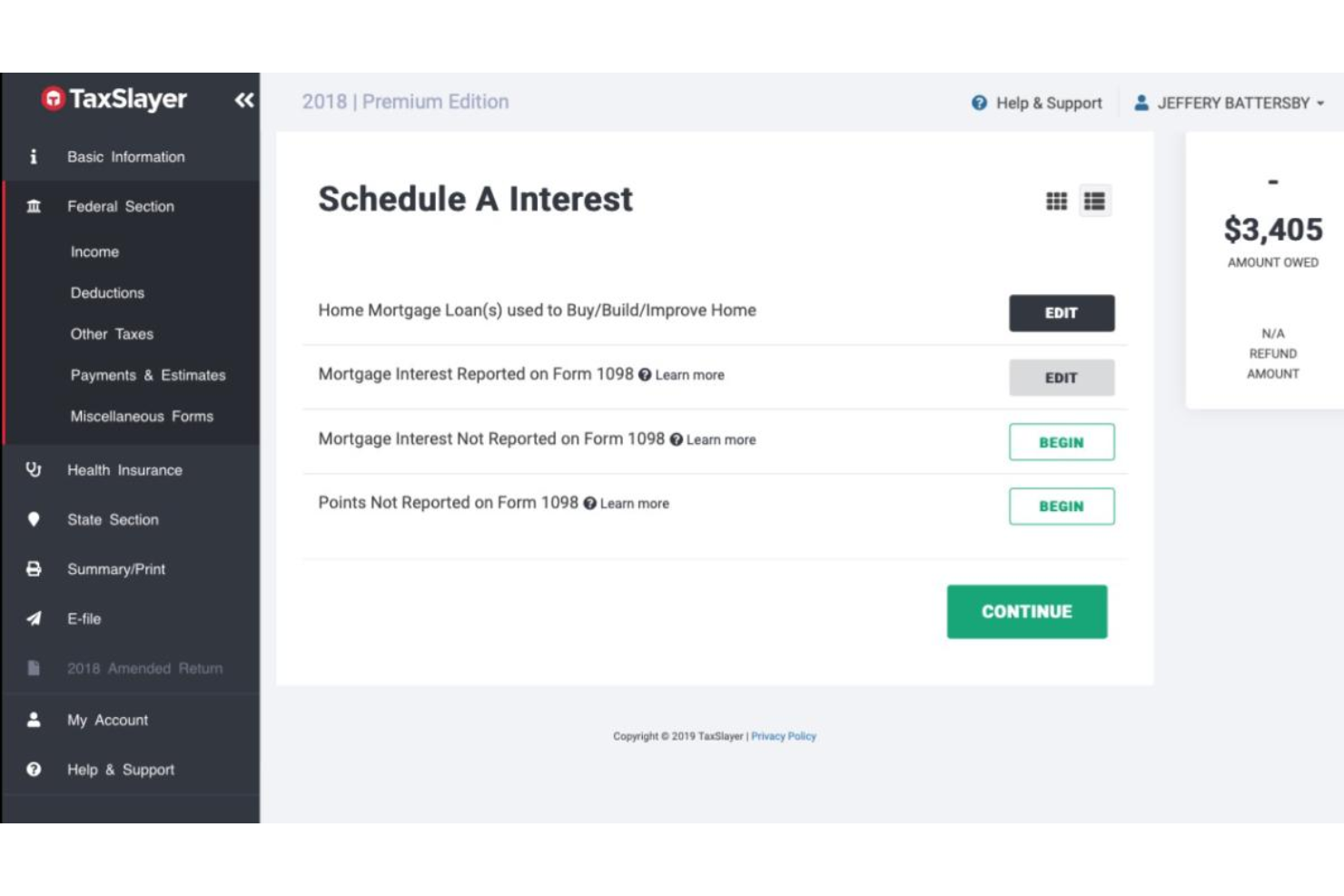
TaxSlayer es un software de preparación de impuestos diseñado para individuos y pequeñas empresas que buscan una forma sencilla de presentar sus impuestos. Ofrece funciones esenciales para la declaración de impuestos, lo que lo convierte en una opción accesible para usuarios con necesidades fiscales simples.
Por qué elegí TaxSlayer: TaxSlayer ofrece un enfoque sencillo para la declaración de impuestos, ideal si buscas simplicidad. Incluye instrucciones fáciles de seguir que te guían a lo largo del proceso de presentación. Su enfoque en declaraciones simples lo convierte en una elección sólida para usuarios con situaciones fiscales poco complicadas.
Funciones destacadas e integraciones:
Funciones incluyen un buscador de deducciones que te ayuda a descubrir ahorros, un calculador de reembolsos que estima rápidamente tu devolución de impuestos y un archivo de declaraciones para almacenar presentaciones pasadas de forma segura. El software también ofrece una guía paso a paso para asistirte durante todo el proceso de declaración.
Integraciones incluyen QuickBooks Online, TaxDome y más.
Pros and Cons
Pros:
- Flujo de trabajo simple para presentar impuestos
- Buscador de deducciones integrado
- Presentación gratuita para estudiantes
Cons:
- Funciones avanzadas limitadas
- Personalización mínima

Mejor para usuarios conscientes del presupuesto
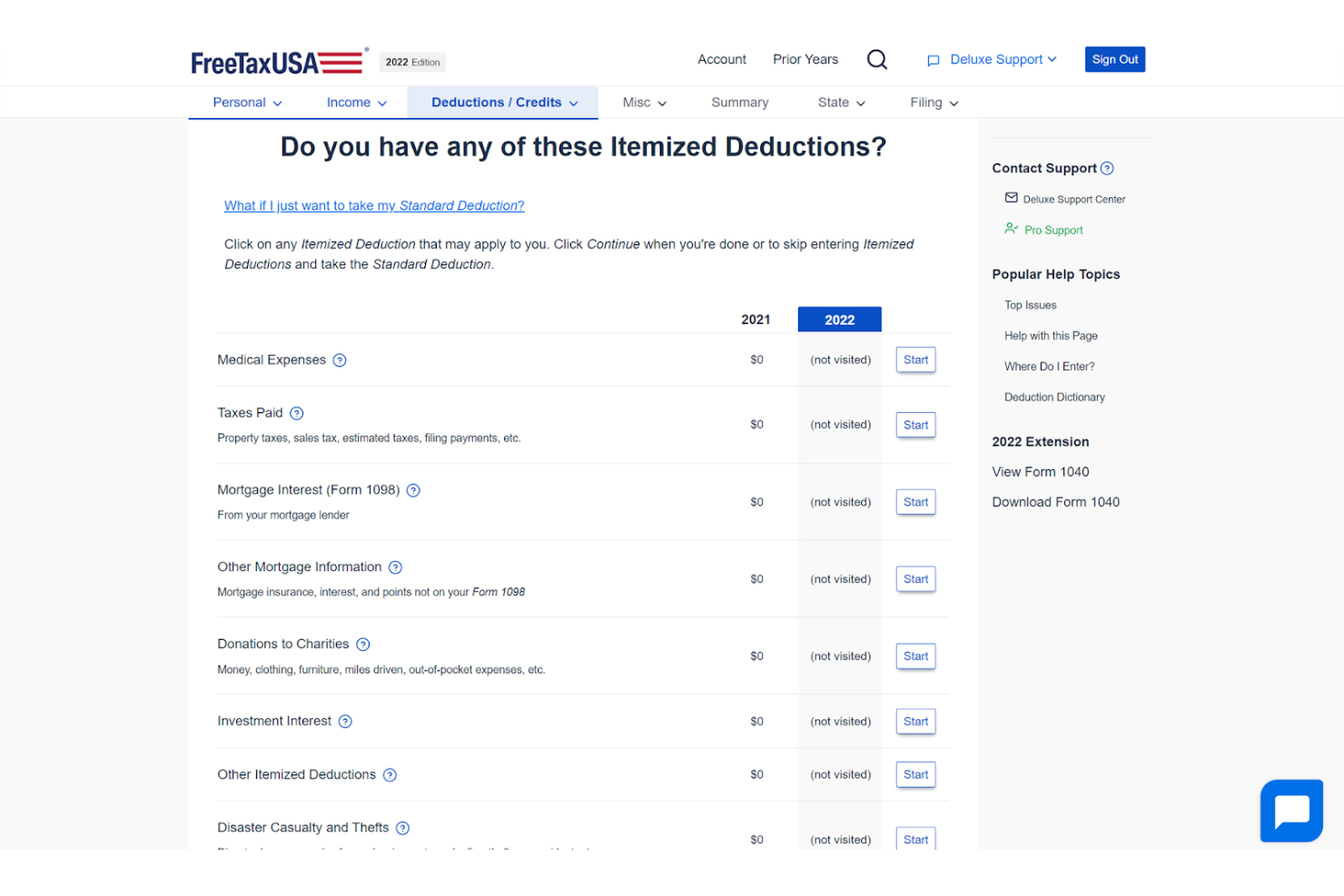
FreeTaxUSA es un software de declaración de impuestos ideal para individuos y pequeños empresarios que buscan una solución rentable. Ofrece servicios esenciales de declaración federal y estatal, enfocándose en la asequibilidad y la facilidad de uso.
Por qué elegí FreeTaxUSA: FreeTaxUSA es una opción económica. El software incluye todos los formularios fiscales principales, lo que te permite presentar impuestos federales y estatales. Su interfaz sencilla te asegura completar tus declaraciones de impuestos de manera eficiente. El servicio también admite la importación de declaraciones de años anteriores, lo que resulta particularmente útil para los usuarios recurrentes.
Características y integraciones destacadas:
Características incluyen una guía paso a paso para ayudarte durante el proceso de declaración, una calculadora de reembolso que estima tu devolución en tiempo real y la presentación gratuita de impuestos federales. El software también ofrece una edición deluxe con soporte y funciones adicionales.
Integraciones no se encuentran listadas públicamente.
Pros and Cons
Pros:
- Opción de declaración de bajo costo
- Declaraciones federales gratuitas
- Soporte para importación del año anterior
Cons:
- Integraciones limitadas
- Asistencia en vivo mínima

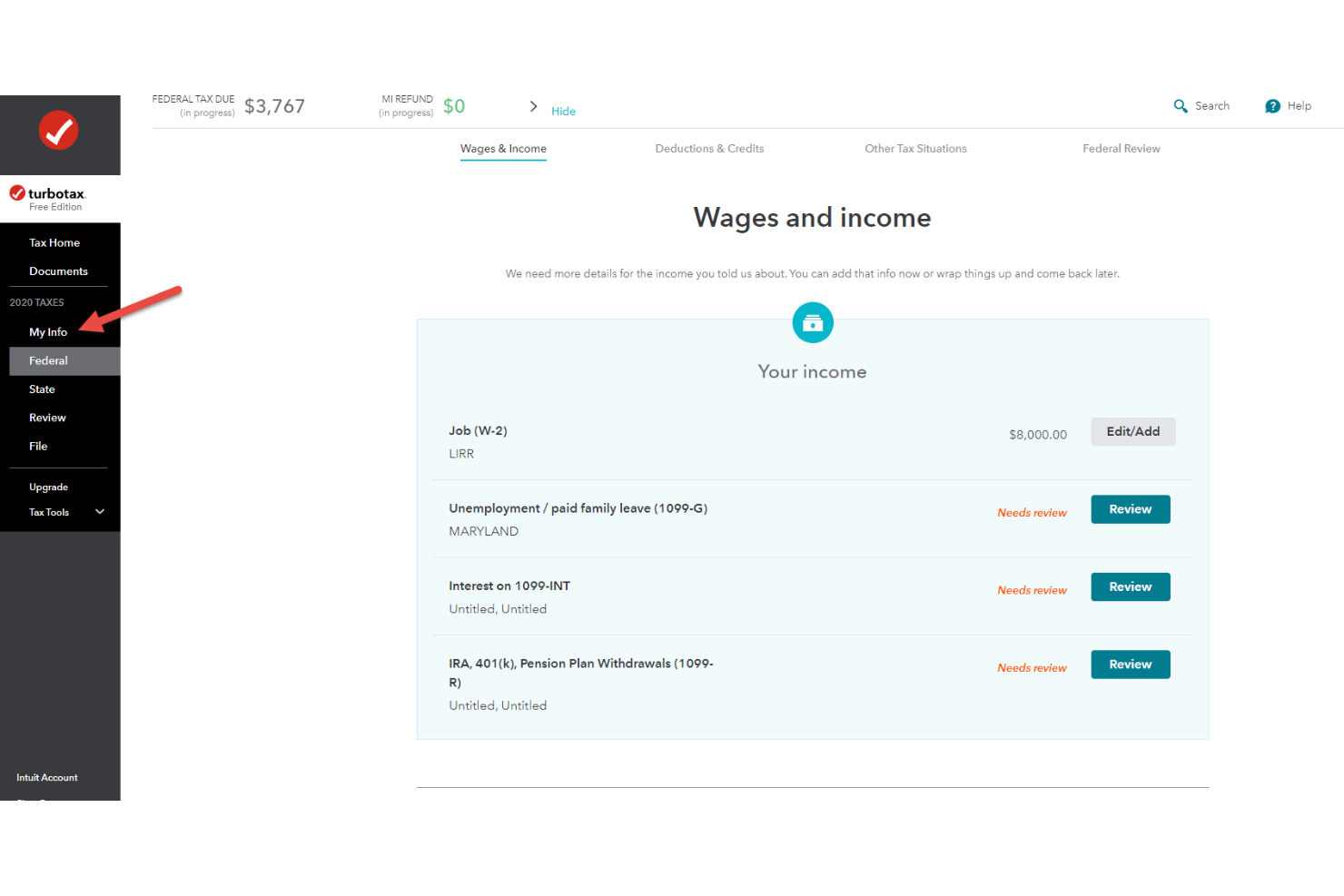
TurboTax es un software de impuestos para pequeñas empresas, autónomos y contribuyentes por cuenta propia. Simplifica el proceso de declaración de impuestos guiando a los usuarios en cada paso.
Por qué elegí TurboTax: TurboTax ofrece una interfaz fácil de usar que te guía durante la declaración de impuestos, asegurando que no te saltes ningún paso crucial. Su orientación paso a paso facilita la comprensión de tu situación fiscal. El software realiza cálculos en tiempo real, lo que te permite ver cómo los cambios afectan tu reembolso o el impuesto a pagar. Importar datos de QuickBooks es especialmente útil para propietarios de pequeñas empresas.
Funciones e integraciones destacadas:
Funciones incluye un buscador de deducciones que te ayuda a identificar posibles ahorros, una garantía de asistencia en auditorías para apoyarte si el IRS se comunica contigo, y una función de importación de W-2 que ahorra tiempo al ingresar automáticamente los datos.
Integraciones incluyen QuickBooks, Quicken y más.
Pros and Cons
Pros:
- Flujo de trabajo guiado de declaración
- Cálculos de impuestos en tiempo real
- Importación de datos de QuickBooks
Cons:
- Solo impuestos de EE. UU.
- Acceso a soporte solo en planes superiores

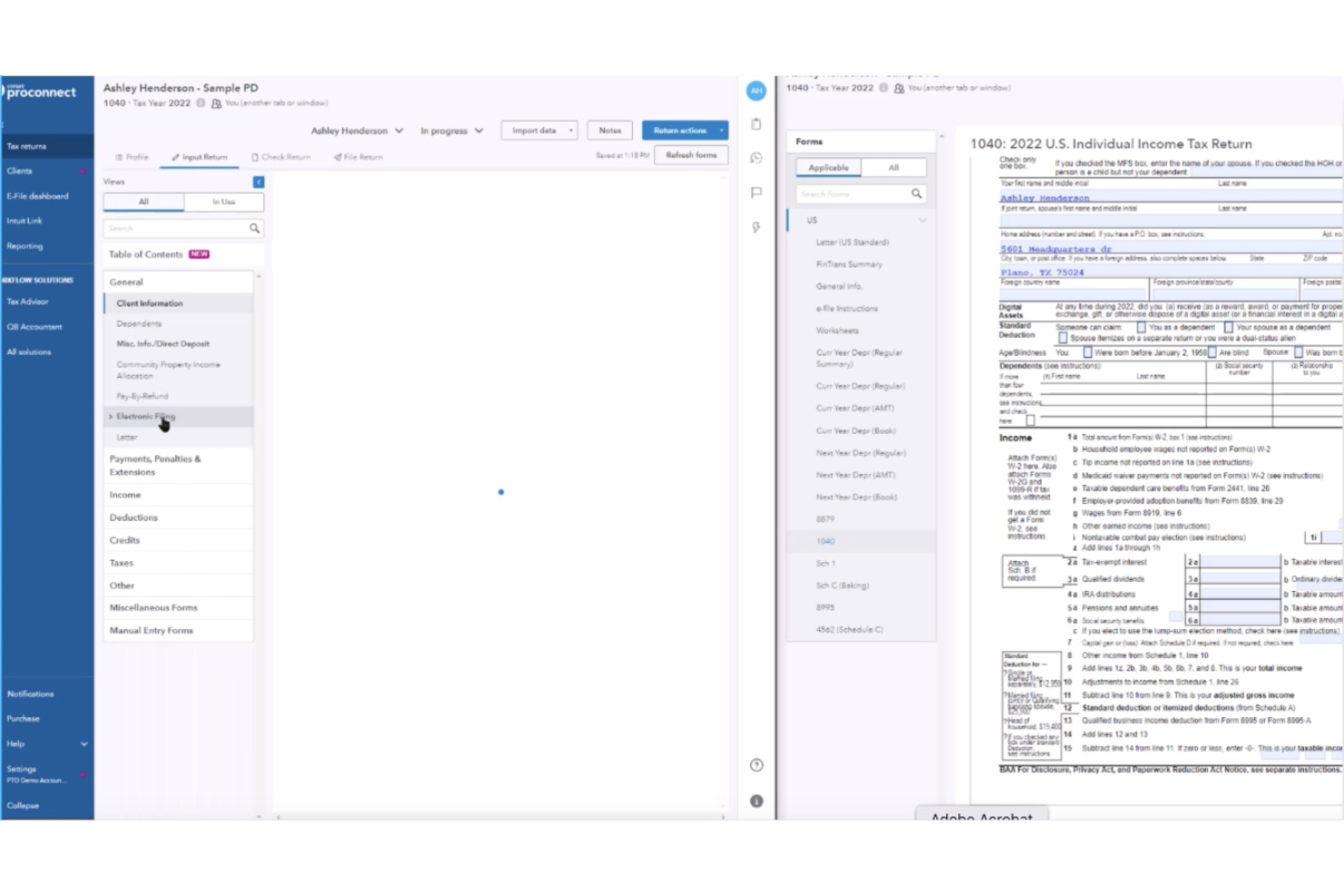
Intuit ProConnect Tax es un software de preparación de impuestos para profesionales fiscales y despachos contables. Ofrece una solución basada en la nube que facilita el acceso, la preparación y la gestión de declaraciones federales y estatales, incluyendo presentaciones más complejas, como ingresos y deducciones de propiedades en alquiler.
Por qué elegí Intuit ProConnect: Intuit ProConnect Tax ofrece una plataforma basada en la nube que permite que tu equipo de contadores públicos certificados trabaje de forma remota y acceda a los datos tributarios de manera segura. Incluye herramientas como la colaboración en tiempo real, permitiendo que trabajes junto a colegas. El software también proporciona formularios fiscales y capacidades de envío electrónico, asegurando que puedas gestionar diversas necesidades fiscales. Su enfoque en tecnología en la nube lo convierte en una opción flexible para prácticas fiscales modernas.
Funciones destacadas e integraciones:
Funciones incluye una herramienta de colaboración en tiempo real para trabajar con otros simultáneamente, un sistema seguro de almacenamiento de documentos para mantener tus archivos protegidos y un panel intuitivo que proporciona una visión clara de tus tareas. El software también ofrece actualizaciones automáticas para reflejar cambios en las leyes fiscales, asegurando una gestión precisa de los créditos fiscales.
Integraciones incluye QuickBooks Online Accountant, Karbon, Ignition, SmartVault y más.
Pros and Cons
Pros:
- Accesibilidad basada en la nube
- Colaboración en tiempo real del equipo
- Almacenamiento seguro de documentos
Cons:
- No disponible el acceso sin conexión
- Precios costosos para el nivel profesional
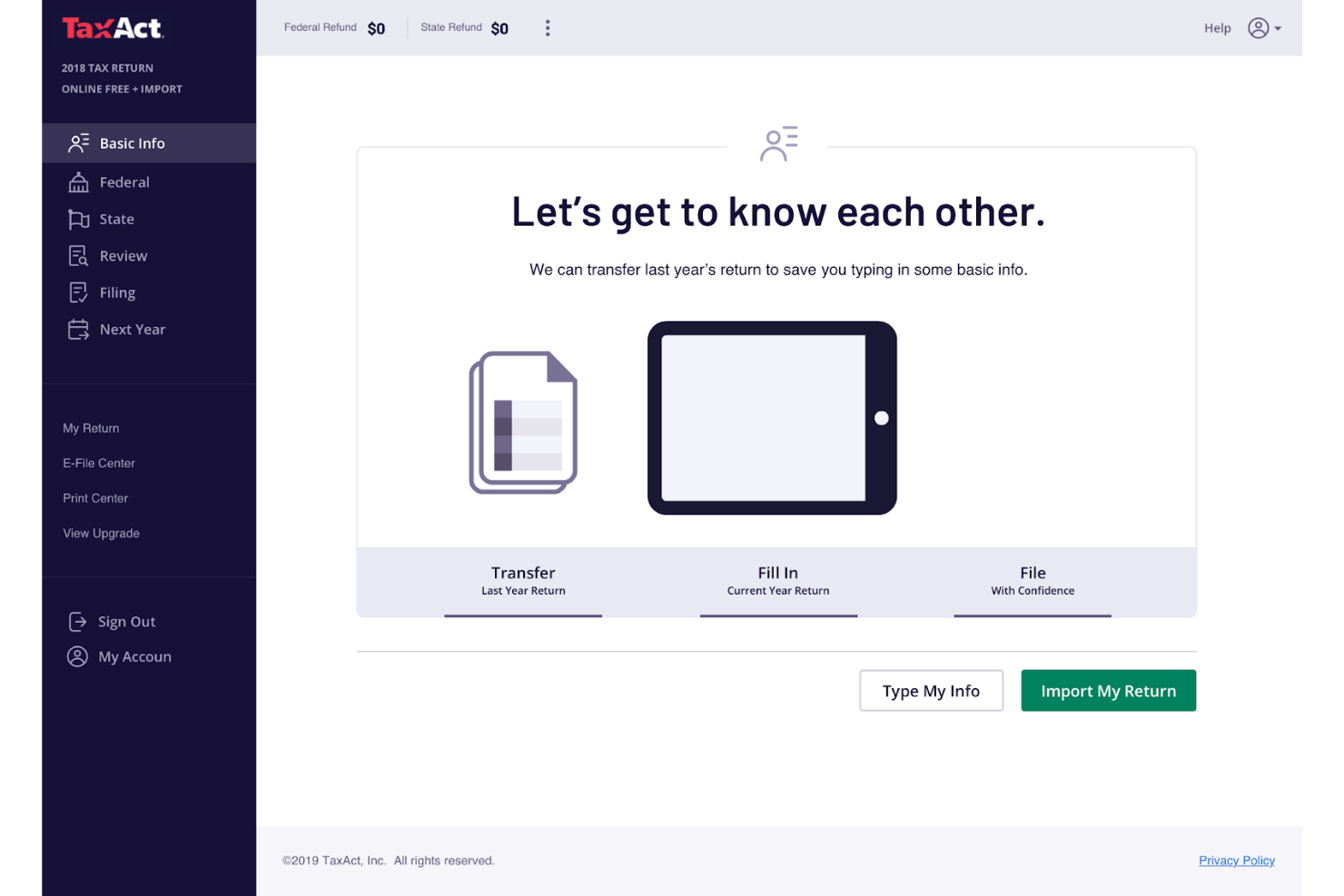
TaxAct Business es una solución de software fiscal para propietarios de pequeñas empresas y autónomos. Se centra en proporcionar servicios esenciales de presentación de impuestos adaptados específicamente a declaraciones empresariales.
Por qué elegí TaxAct Business: TaxAct Business puede manejar la complejidad de las declaraciones fiscales de pequeñas empresas, ofreciendo una variedad de formularios y anexos que se adaptan a tus necesidades. Con su interfaz fácil de usar, puedes navegar por el proceso de presentación de impuestos de manera eficiente. El software incluye un maximizador de deducciones para ayudarte a detectar posibles ahorros. También ofrece un sistema de soporte completo para ayudarte ante cualquier consulta o problema.
Funciones e integraciones destacadas:
Funciones incluyen un maximizador de deducciones que identifica todas las deducciones posibles, una guía paso a paso que simplifica el proceso de declaración, y un sistema de soporte que da acceso a expertos fiscales. El software también ofrece una herramienta de seguimiento de reembolsos que te mantiene informado sobre el estado de tu declaración.
Integraciones no están listadas públicamente.
Pros and Cons
Pros:
- Formularios fiscales enfocados en negocios
- Excelente para S Corps y empresas en crecimiento
- Seguimiento de reembolsos disponible
Cons:
- La interfaz parece anticuada
- El tiempo de respuesta del soporte varía

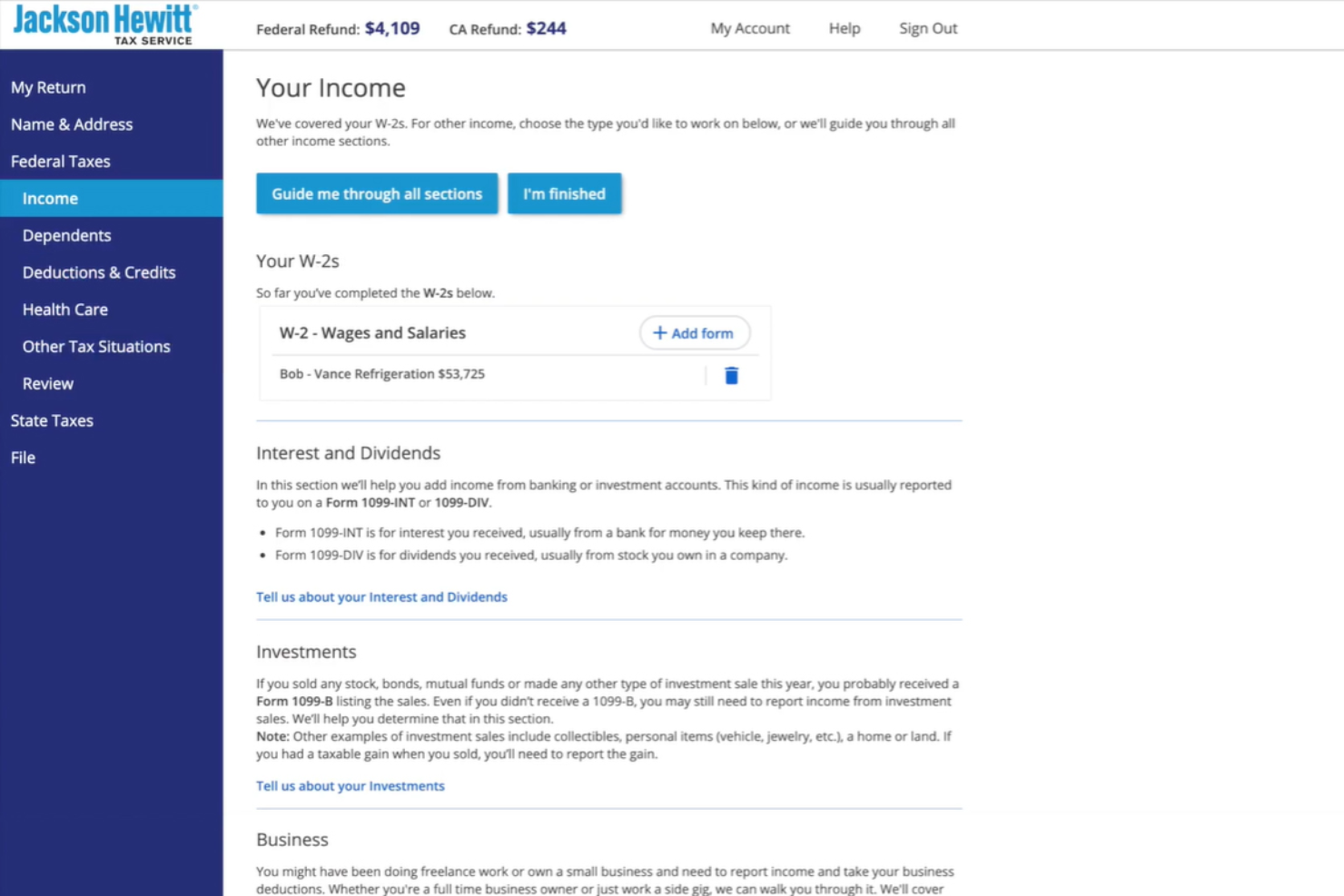
Jackson Hewitt ofrece servicios de preparación de impuestos enfocados en brindar asistencia personalizada a individuos y pequeñas empresas. Es ideal para usuarios que prefieren la interacción cara a cara y la orientación experta durante la temporada de impuestos.
Por qué elegí Jackson Hewitt: Jackson Hewitt proporciona soporte presencial, lo cual es excelente si valoras la interacción directa con profesionales en impuestos. El servicio cuenta con una red de oficinas donde puedes reunirte con expertos para abordar tus necesidades fiscales. Este enfoque asegura que cuentes con apoyo confiable durante todo el proceso de declaración de impuestos.
Características destacadas e integraciones:
Características incluyen una opción de adelanto de reembolso de impuestos que te permite acceder a fondos por adelantado, una garantía de reembolso máximo para asegurarte de recibir la mayor cantidad posible y una garantía de precisión de por vida que cubre sanciones e intereses. El servicio también ofrece programación flexible de citas.
Las integraciones no están listadas públicamente.
Pros and Cons
Pros:
- Asistencia cara a cara
- Opción de adelanto de reembolso
- Garantía de precisión de por vida
Cons:
- La disponibilidad para programar varía
- Se requieren seguimientos frecuentes


CCH Axcess Tax ofrece una solución de software fiscal diseñada para contadores y profesionales de pequeñas empresas que necesitan apoyo en el cumplimiento normativo. Ayuda a gestionar normativas fiscales complejas y garantiza una presentación precisa de los informes.
Por qué elegí CCH Axcess Tax: CCH Axcess Tax se especializa en proporcionar soporte de cumplimiento, una necesidad crítica para contadores y empresas que navegan por regulaciones fiscales complejas. El software ofrece herramientas de reporte detalladas que ayudan a cumplir con los requisitos normativos. También incluye una amplia biblioteca de contenidos y recursos fiscales. Este enfoque en el cumplimiento lo convierte en una herramienta esencial para profesionales que deben ajustarse a normativas estrictas.
Funciones destacadas e integraciones:
Funciones incluyen una herramienta de reportes detallados con información sobre tus obligaciones fiscales, una biblioteca de contenidos y recursos fiscales para mantenerte informado y un sistema de seguimiento de cumplimiento que asegura que cumplas con toda la normativa necesaria. El software también proporciona actualizaciones periódicas sobre cambios en la legislación fiscal.
Integraciones incluyen AuditMiner, Compass, Empire Suite, Ignition, QuickFee, SurePrep, SafeSend y más.
Pros and Cons
Pros:
- Amplio contenido normativo
- Monitoreo avanzado del cumplimiento
- Profundidad en los reportes empresariales
Cons:
- Puede no adaptarse a todas las industrias
- La gran demanda de recursos puede ralentizar otras aplicaciones
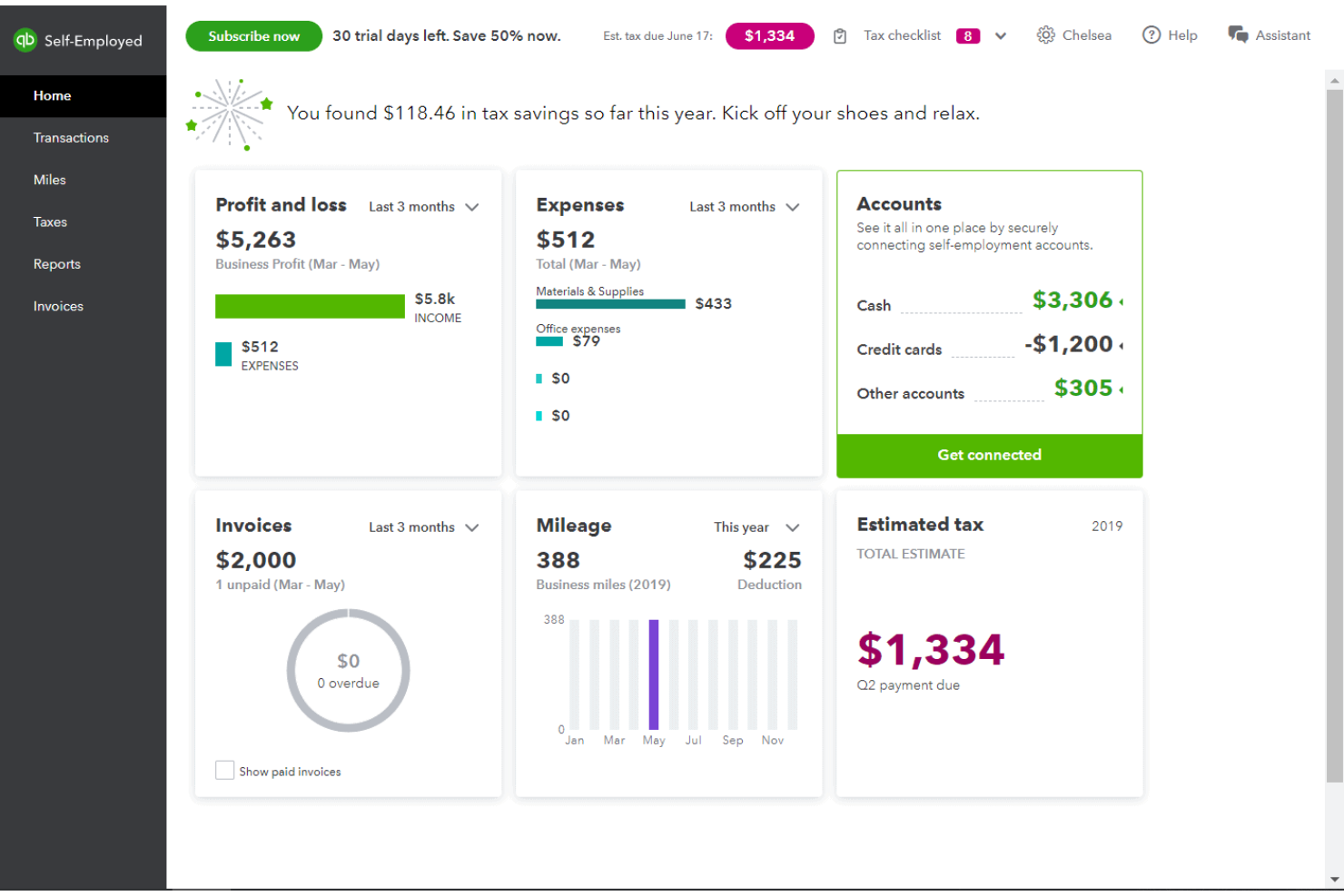
QuickBooks Solopreneur es una herramienta de gestión financiera para trabajadores autónomos y freelancers. Ayuda a los usuarios a rastrear ingresos, gastos y gestionar la presentación de impuestos de manera eficiente.
Por qué elegí QuickBooks Solopreneur: QuickBooks Solopreneur está específicamente dirigido a freelancers, ofreciendo herramientas para rastrear kilometraje, separar gastos personales y de negocios, y estimar impuestos trimestrales. La capacidad del software de sincronizarse con cuentas bancarias garantiza que tus datos financieros estén siempre actualizados. También proporciona un panel sencillo que facilita el monitoreo de las finanzas del negocio. Este enfoque en las necesidades únicas de los freelancers lo convierte en una excelente opción para los impuestos de trabajadores por cuenta propia.
Funciones y conectores destacados:
Funciones incluyen una herramienta de seguimiento de kilometraje que registra automáticamente los trayectos, una función para separar gastos personales y de negocios, y la capacidad de estimar impuestos trimestrales. El software también ofrece un informe resumen de fin de año que proporciona una visión clara de tus actividades financieras.
Conectores incluyen PayPal, Etsy, Amazon, Square, TurboTax y más.
Pros and Cons
Pros:
- Seguimiento automático de kilometraje con la app
- Sincronización bancaria automática
- Estimaciones de impuestos trimestrales
Cons:
- Enfocado solo en freelancers
- Escalabilidad empresarial limitada

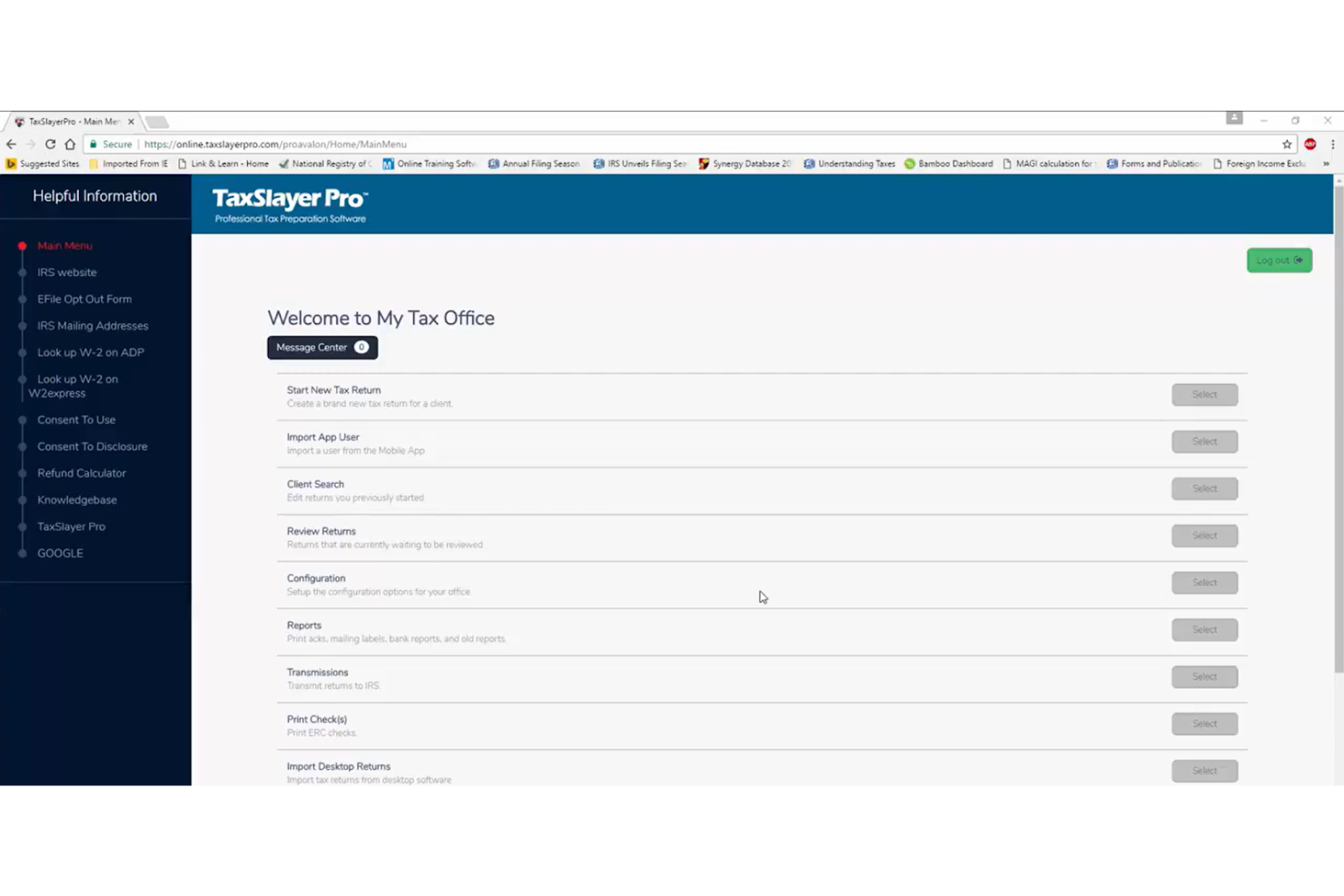
TaxSlayer Pro es un software de impuestos para preparadores fiscales profesionales y despachos de contabilidad. Ofrece un conjunto de herramientas para gestionar múltiples declaraciones de impuestos de clientes de manera eficiente y precisa.
Por qué elegí TaxSlayer Pro: TaxSlayer Pro proporciona a los preparadores fiscales profesionales software de planificación y preparación de impuestos para gestionar las declaraciones de varios clientes. Incluye funciones como acceso multiusuario, lo que permite que su equipo trabaje en diferentes declaraciones simultáneamente. El software también ofrece capacidades de presentación electrónica, facilitando el envío de declaraciones electrónicamente. Su sistema de gestión de clientes le ayuda a hacer seguimiento y organizar la información de sus clientes.
Funciones destacadas e integraciones:
Funciones incluyen una herramienta de comunicación integrada para facilitar la interacción con los clientes, un panel de control personalizable para adaptar su espacio de trabajo y una biblioteca fiscal para consulta. También proporciona herramientas de informes detallados para ayudarle a analizar los datos de los clientes.
Integraciones incluye QuickBooks Online, entre otras.
Pros and Cons
Pros:
- Colaboración multiusuario
- Aplicación nativa TaxesToGo
- Herramientas de gestión de clientes
Cons:
- Solo para uso profesional
- No permite presentar gratis
Otro software fiscal para pequeñas empresas
Estas son algunas opciones adicionales de software fiscal para pequeñas empresas que no llegaron a mi selección, pero que aún vale la pena considerar:
- CFS Small Business Tools
Ideal para formularios fiscales de nómina
- TaxAct Professional
Mejor para la gestión multicliente
- Taxumo
Mejor opción para trabajadores independientes en Filipinas


Cómo evalúo el software de impuestos para pequeñas empresas
Evalúo estas herramientas en dos niveles: los requisitos básicos—como el soporte para el formulario 1120-S y la presentación electrónica en varios estados—y los factores diferenciadores, como el acceso a un CPA en vivo, integraciones con sistemas de contabilidad y la transparencia en los precios.
Funcionalidad básica (puntos fundamentales para esta lista)
Cuando selecciono herramientas para mi lista, califico cada una en una escala del 0 (no ofrece la funcionalidad) al 5 (destaca en esta área) para cada funcionalidad básica que se menciona a continuación. Luego, convierto la puntuación total de la herramienta en un porcentaje. Cada herramienta necesita alcanzar una puntuación total mínima del 65% para ser considerada para su inclusión.
- Cobertura de formularios de impuestos empresariales: Verifico si una herramienta admite los tipos de entidad que las pequeñas empresas realmente utilizan—Schedule C para propietarios únicos, 1120-S para S-corps, 1065 para sociedades, etc.
- Capacidad de presentación electrónica: Cada herramienta debe permitirte enviar electrónicamente las declaraciones federales y estatales directamente, con un seguimiento claro de la presentación para que sepas cuándo el IRS acepta o rechaza una declaración.
- Guía de deducciones y créditos: Busco flujos de trabajo guiados que destaquen deducciones relevantes como gastos de oficina en el hogar, kilometraje de vehículos, depreciación y deducciones de ingresos comerciales calificados según el tipo de entidad.
- Importación de datos contables: Una buena herramienta de impuestos obtiene datos de donde ya llevas tu contabilidad. Evalúo si se conecta con plataformas como QuickBooks o Xero, y qué tan bien maneja importaciones por CSV o extractos bancarios.
- Presentación en varios estados y actualizaciones de cumplimiento: Para empresas que operan en varios estados, considero si la herramienta gestiona declaraciones multitestados y actualiza automáticamente los cambios en las leyes tributarias federales y estatales del año en curso.
- Soporte para impuestos trimestrales y de nómina: Muchas pequeñas empresas deben pagar impuestos estimados a lo largo del año. Busco herramientas que calculen pagos trimestrales y admitan formularios de nómina.
Una vez que tengo una lista de herramientas que cumplen con este criterio, considero qué diferencia a cada plataforma.
Factores diferenciadores (qué distingue a los proveedores)
Así es como comparo y contrasto a los diferentes proveedores:
Características destacadas
El acceso a CPAs en vivo o agentes inscritos puede marcar una gran diferencia cuando no estás seguro de cómo clasificar un gasto complejo o estructurar la declaración de una LLC con varios miembros. También busco herramientas de planificación fiscal durante todo el año—cosas como modelado de escenarios y estimaciones de obligaciones proyectadas—que te ayudan a tomar mejores decisiones antes de que llegue la temporada de presentación. La orientación específica por industria es otro factor que peso, ya que un consultor independiente y el dueño de una tienda minorista enfrentan panoramas de deducciones muy diferentes.
Más allá de las características
La transparencia en los precios es fundamental aquí. Algunas plataformas cobran extra por declaraciones estatales o tipos de entidades adicionales, así que reviso si el precio anunciado cubre realmente todo lo que una pequeña empresa necesita para presentar. El soporte al cliente es otro punto clave—busco proveedores que ofrezcan horarios extendidos durante la temporada de impuestos y te conecten con agentes certificados en impuestos, no solo representantes de soporte general. La seguridad también recibe mucha atención, especialmente el estatus de proveedor autorizado de presentación electrónica por el IRS y los estándares de cifrado para el manejo de documentos financieros sensibles.
Cómo elegir software fiscal para pequeñas empresas
Es fácil perderse entre largas listas de características y estructuras de precios complejas. Para ayudarte a mantener la atención mientras analizas tu proceso único de selección de software, aquí tienes una lista de factores que debes tener en cuenta:
| Factor | Qué tener en cuenta |
|---|---|
| Escalabilidad | ¿Puede el software crecer junto con tu empresa? Ten en cuenta las necesidades futuras y si la herramienta puede gestionar un aumento de las transacciones o de los usuarios sin problemas. |
| Integraciones | ¿Se integra con tus herramientas actuales, como QuickBooks o Xero? Comprueba que la transferencia de datos sea fluida para evitar errores de introducción manual. |
| Personalización | ¿Puedes adaptar el software para que coincida con tu flujo de trabajo específico? Busca configuraciones flexibles que te permitan ajustarlo a las necesidades únicas de tu empresa. |
| Facilidad de uso | ¿La interfaz es intuitiva para tu equipo? Evita curvas de aprendizaje pronunciadas eligiendo herramientas que ofrezcan una navegación sencilla e instrucciones claras. |
| Implementación e incorporación | ¿Cuánto tiempo llevará ponerlo en funcionamiento? Ten en cuenta el soporte proporcionado durante la configuración y si hay recursos de formación, como vídeos o guías. |
| Coste | ¿Hay tarifas ocultas o precios por niveles? Asegúrate de que el precio se ajuste a tu presupuesto y refleje claramente el valor de las funciones que necesitas. |
| Medidas de seguridad | ¿Cómo protege el software tus datos? Busca cifrado, actualizaciones periódicas y cumplimiento de las normativas de protección de datos. |
| Disponibilidad del soporte | ¿Hay ayuda disponible cuando la necesitas? Comprueba si ofrece opciones de soporte las 24 horas del día, los 7 días de la semana, y varios métodos de contacto, como chat, teléfono o correo electrónico, para garantizar una asistencia oportuna. |
¿Qué es el software fiscal para pequeñas empresas?
El software fiscal para pequeñas empresas es una herramienta que ayuda a las empresas a gestionar y presentar sus impuestos de forma precisa y eficiente. Los contables, tenedores de libros y propietarios de pequeñas empresas suelen utilizar estas herramientas para simplificar las tareas relacionadas con los impuestos y garantizar el cumplimiento. Funciones como la presentación electrónica, el seguimiento de deducciones y la integración con sistemas contables ayudan a garantizar una presentación precisa y una gestión financiera adecuada. En general, estas herramientas ahorran tiempo y reducen el riesgo de errores en las declaraciones de impuestos.
Funciones del software fiscal para pequeñas empresas
Al seleccionar un software fiscal para pequeñas empresas, presta atención a las siguientes funciones clave:
- Presentación electrónica: Permite enviar las declaraciones de impuestos electrónicamente, ahorrando tiempo y reduciendo el papeleo.
- Seguimiento de deducciones: Ayuda a identificar y realizar un seguimiento de las deducciones admisibles para maximizar el posible ahorro fiscal.
- Capacidades de integración: Se conecta con software contable como QuickBooks o Xero para sincronizar los datos.
- Actualizaciones en tiempo real: Te mantiene informado sobre los cambios en las leyes y normativas fiscales para garantizar el cumplimiento.
- Informes personalizables: Proporciona informes financieros adaptados a las necesidades y requisitos específicos de tu empresa.
- Almacenamiento seguro de datos: Garantiza la protección de tu información financiera mediante cifrado y actualizaciones de seguridad periódicas.
- Interfaz fácil de usar: Ofrece un diseño intuitivo que facilita la navegación y la presentación de impuestos.
- Acceso multiusuario: Permite que varios miembros del equipo trabajen simultáneamente en las declaraciones de impuestos, aumentando la eficiencia.
- Herramientas de gestión de clientes: Ayudan a organizar y mantener la información de los clientes para facilitar el acceso y la comunicación.
- Asistencia en auditorías: Proporciona ayuda durante una auditoría, ofreciendo tranquilidad y orientación durante todo el proceso.
Beneficios del software fiscal para pequeñas empresas
La implementación de un software fiscal para pequeñas empresas ofrece varios beneficios para tu equipo y tu empresa. Estos son algunos de los que puedes esperar:
- Ahorro de tiempo: Automatiza los cálculos y la presentación de impuestos, liberando tiempo para otras tareas empresariales.
- Precisión: Reduce los errores mediante funciones como la presentación electrónica y el seguimiento de deducciones, garantizando declaraciones de impuestos precisas.
- Eficiencia de costes: Ayuda a identificar deducciones y créditos, lo que puede reducir tu factura fiscal.
- Cumplimiento: Te mantiene al día sobre los cambios en la legislación fiscal en tiempo real, garantizando que cumplas todos los requisitos normativos.
- Seguridad de los datos: Protege la información financiera confidencial mediante cifrado y almacenamiento seguro.
- Colaboración: Admite el acceso multiusuario, lo que permite que tu equipo trabaje conjuntamente en las declaraciones de impuestos de forma eficiente.
- Tranquilidad: Ofrece asistencia y orientación durante las auditorías, proporcionando seguridad durante la temporada fiscal.
Costes y precios del software fiscal para pequeñas empresas
Seleccionar un software fiscal para pequeñas empresas requiere comprender los distintos modelos de precios y planes disponibles. Los costes varían en función de las funciones, el tamaño del equipo, los complementos y otros factores. La tabla siguiente resume los planes habituales, sus precios medios y las funciones típicas incluidas en las soluciones de software fiscal para pequeñas empresas:
Tabla comparativa de planes de software fiscal para pequeñas empresas
| Tipo de plan | Precio medio | Funciones habituales |
|---|---|---|
| Plan gratuito | $0 | Funciones básicas de presentación, asistencia limitada e informes básicos. |
| Plan personal | $22.99-$52.99/declaración $19-$137.50/mes | Presentación electrónica, seguimiento de deducciones, asistencia básica y almacenamiento seguro de datos. |
| Plan empresarial | $1,395-$1,695/año | Acceso multiusuario, capacidades de integración, informes avanzados y asistencia en auditorías. |
| Plan corporativo | $3,477-$9,744/año | Funciones personalizables, asistencia prioritaria, herramientas de cumplimiento y seguridad mejorada. |
Preguntas frecuentes sobre software fiscal para pequeñas empresas
Estas son algunas respuestas a preguntas frecuentes sobre software fiscal para pequeñas empresas:
¿Qué tipos de empresas se benefician del software fiscal?
Las pequeñas empresas de todos los tamaños se benefician del software fiscal, incluidos los empresarios individuales, las sociedades y las corporaciones. Si gestionas tus propias finanzas o tienes un equipo pequeño, el software fiscal puede simplificar el proceso. Te ayuda a mantenerte organizado y a realizar un seguimiento de los gastos, además de contribuir a garantizar el cumplimiento de las leyes fiscales. Tanto si eres autónomo como si diriges una pequeña empresa, utilizar software fiscal puede ahorrarte tiempo y reducir los errores.
¿Es seguro el software fiscal para los datos financieros confidenciales?
Sí, el software fiscal de buena reputación tiene en cuenta la seguridad. Asegúrate de que el software que elijas utilice cifrado para proteger tus datos. Busca proveedores que cumplan con las normativas de protección de datos y ofrezcan actualizaciones de seguridad periódicas. Es importante consultar las reseñas y las funciones de seguridad antes de comprar para garantizar que tu información financiera permanezca segura.
¿Con qué frecuencia se actualiza el software fiscal?
El software fiscal normalmente se actualiza una vez al año, aunque algunos proveedores ofrecen actualizaciones más frecuentes. Estas actualizaciones garantizan el cumplimiento de las leyes y normativas fiscales más recientes. Es importante elegir un proveedor que ofrezca actualizaciones periódicas, especialmente si gestionas situaciones fiscales complejas. Mantenerse al día con las actualizaciones garantiza que tus declaraciones sean precisas y cumplan con la normativa.
¿Puede el software fiscal integrarse con otras herramientas de contabilidad?
Sí, la mayoría del software fiscal puede integrarse con herramientas de contabilidad populares como QuickBooks y Xero. Estas integraciones permiten transferir datos fácilmente, lo que te ahorra tiempo y reduce los errores de introducción manual. Antes de comprar, comprueba la compatibilidad del software con tus herramientas actuales para garantizar un flujo de trabajo fluido. Esta integración puede mejorar considerablemente la eficiencia de tu equipo.
Qué sigue:
Si estás investigando software fiscal para pequeñas empresas, conecta con un asesor de SoftwareSelect para obtener recomendaciones gratuitas.
Rellenas un formulario y mantienes una breve conversación en la que profundizan en los detalles de tus necesidades. Después recibirás una lista corta de programas que podrás revisar. Incluso te apoyarán durante todo el proceso de compra, incluidas las negociaciones de precios.