

TaxSlayer Review: Pros, Cons, Features, and Pricing
TaxSlayer offers a user-friendly interface and competitive pricing, making it a standout choice for individuals and small businesses seeking efficient tax solutions.

We review tools independently, and commissions help fund our testing. See our transparency policy, our methodology, or suggest a tool.
TaxSlayer is tax software built for individuals and self-employed filers who need to file federal and state returns accurately without paying premium prices. It covers freelance income, deductions, and more complex filing situations that basic free tools won't handle well. I'd consider it a stronger pick than TurboTax if cost is a real factor for you—TaxSlayer offers comparable coverage for self-employed and 1099 filers at a noticeably lower price point, without stripping out the features that actually matter at filing time.
TaxSlayer Evaluation Summary
3.9/5
- From $22.99/filing
- Free plan available
Why Trust Our Software Recommendations
6,700+
Reviews
20
Industry experts
16+
Evaluation factors
14
Years
Our team has been testing and reviewing software since 2012. As finance leaders ourselves, we know how difficult—and important—it is to choose the right software.
For this guide, we evaluated tools using hands-on testing and independent research, scoring tools using our selection criteria.
Our reviews reflect our human editorial judgment, not a sales pitch.
TaxSlayer Overview
TaxSlayer is a solid choice for those seeking straightforward tax management without breaking the bank. It excels in both affordability and ease of use, making it an ideal choice for small businesses and freelancers.
However, its customer support and onboarding process could use some improvement. Compared to competitors like Intuit TurboTax, TaxAct, or H&R Block, TaxSlayer offers a good balance of features and price, but may lack some advanced functionalities needed by larger enterprises. If you're looking for an intuitive platform that won't overwhelm your team, TaxSlayer is worth considering.
Pros
- User-friendly and easy for your team to navigate
- Offers a straightforward tax filing process without unnecessary complexity
- Customer reviews often praise its efficient performance during tax season
Cons
- Customer support is not always as responsive as you might hope
- Onboarding can be challenging for some users
- Lacks some advanced features that larger businesses might need
Is TaxSlayer Right For Your Needs?
Who Would be a Good Fit for TaxSlayer?
TaxSlayer is perfect for small businesses, freelancers, and individual taxpayers who want an easy-to-use platform to manage simple tax returns. Your team will appreciate its straightforward tax filing process that saves time and reduces hassle.
Tax professionals looking for an efficient tool to handle multiple clients may also find it beneficial. Its user-friendly interface and practical features make it ideal for those who prefer simplicity over complexity.
- Small businessesTaxSlayer is great for small businesses due to its cost-effective solutions and easy navigation.
- FreelancersFreelancers benefit from TaxSlayer's straightforward interface and efficient tax filing process.
- Individual filersIf you're filing taxes for yourself or your dependents, TaxSlayer simplifies the process with its user-friendly design.
- Tax professionals and CPAsTax experts can manage multiple clients efficiently with TaxSlayer's practical features.
- Nonprofit organizationsNonprofits appreciate its affordability and ease of use for handling tax-related tasks.
- Remote workersRemote workers find it useful for managing taxes due to its accessible online platform.
Who Would be a Bad Fit for TaxSlayer?
TaxSlayer may not be suitable for large enterprises or complex businesses that require advanced features and integrations. If your work involves intricate tax scenarios or large-scale operations, you might find its functionalities lacking.
Teams needing comprehensive support and training may also struggle, as TaxSlayer's onboarding and customer support aren't its strongest points. Consider other solutions if your needs extend beyond basic tax filing.
- Large corporationsLarge corporations may find TaxSlayer lacking in advanced features needed for complex tax requirements.
- International businessesInternational businesses or tax service providers that require multi-country tax services won't find the necessary support with TaxSlayer.
- Enterprise-level accountingEnterprise-level accounting teams need more sophisticated tools than what TaxSlayer offers.
- Complex tax filersIf you have complex tax scenarios, TaxSlayer's basic offerings might not meet your needs.
- Training-intensive teamsTeams that need extensive training might struggle with TaxSlayer's limited onboarding resources.
- Tech-driven startupsTech-driven startups looking for cutting-edge integrations may find TaxSlayer's offerings too basic.
How We Test & Score Tools
We’ve spent years building, refining, and improving our software testing and scoring system. The rubric is designed to capture the nuances of software selection and what makes a tool effective, focusing on critical aspects of the decision-making process.
Below, you can see exactly how our testing and scoring works across seven criteria. It allows us to provide an unbiased evaluation of the software based on core functionality, standout features, ease of use, onboarding, customer support, integrations, customer reviews, and value for money.
Core Functionality (25% of final scoring)
The starting point of our evaluation is always the core functionality of the tool. Does it have the basic features and functions that a user would expect to see? Are any of those core features locked to higher-tiered pricing plans? At its core, we expect a tool to stand up against the baseline capabilities of its competitors.
Standout Features (25% of final scoring)
Next, we evaluate uncommon standout features that go above and beyond the core functionality typically found in tools of its kind. A high score reflects specialized or unique features that make the product faster, more efficient, or offer additional value to the user.
We also evaluate how easy it is to integrate with other tools typically found in the tech stack to expand the functionality and utility of the software. Tools offering plentiful native integrations, 3rd party connections, and API access to build custom integrations score best.
Ease of Use (10% of final scoring)
We consider how quick and easy it is to execute the tasks defined in the core functionality using the tool. High scoring software is well designed, intuitive to use, offers mobile apps, provides templates, and makes relatively complex tasks seem simple.
Onboarding (10% of final scoring)
We know how important rapid team adoption is for a new platform, so we evaluate how easy it is to learn and use a tool with minimal training. We evaluate how quickly a team member can get set up and start using the tool with no experience. High scoring solutions indicate little or no support is required.
Customer Support (10% of final scoring)
We review how quick and easy it is to get unstuck and find help by phone, live chat, or knowledge base. Tools and companies that provide real-time support score best, while chatbots score worst.
Customer Reviews (10% of final scoring)
Beyond our own testing and evaluation, we consider the net promoter score from current and past customers. We review their likelihood, given the option, to choose the tool again for the core functionality. A high scoring software reflects a high net promoter score from current or past customers.
Value for Money (10% of final scoring)
Lastly, in consideration of all the other criteria, we review the average price of entry level plans against the core features and consider the value of the other evaluation criteria. Software that delivers more, for less, will score higher.
Core Features
Simple tax filing: TaxSlayer provides a straightforward and user-friendly process for filing taxes. It saves your team time and reduces errors.
Deduction finder: This feature helps you identify potential deductions you might miss, ensuring you maximize your tax savings.
E-file capability: You can file your taxes electronically with ease. This speeds up the process and helps you file your returns faster.
State tax support: TaxSlayer offers support for state returns in conjunction with federal tax returns and keeps everything in one place for simplicity.
Tax Calculator: The tax calculator gives you a quick estimate of your tax situation. It also helps you plan better for the tax season.
Audit assistance: TaxSlayer offers guidance if you're audited. It gives you peace of mind knowing support is available when needed.
Ease of Use
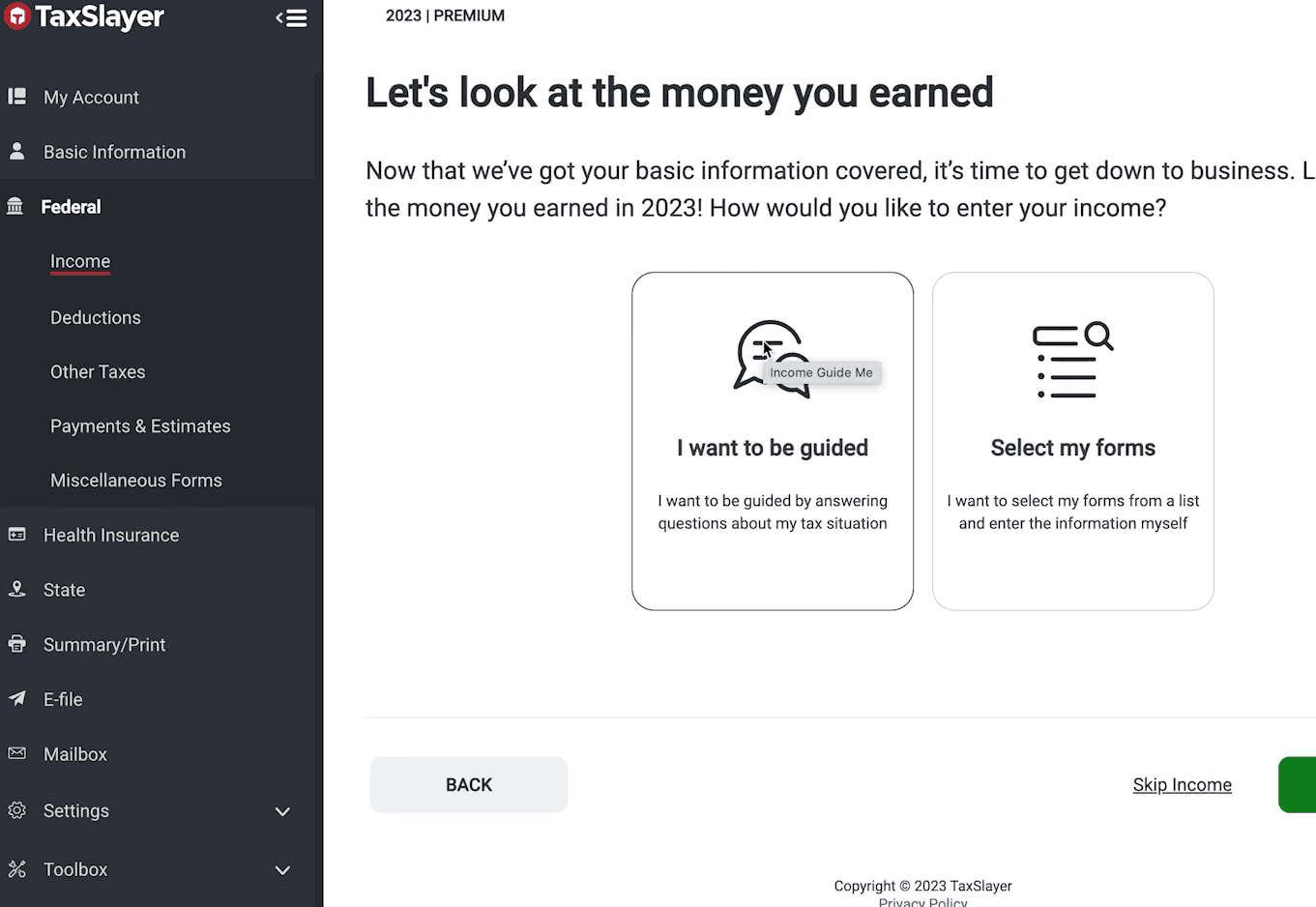
TaxSlayer is a user-friendly platform that makes tax filing straightforward for your team. Its simple navigation and clear instructions help even those with little income tax knowledge.
Users often mention how easy it is to find and use its features, like the deduction finder and e-file capability. Compared to other software, TaxSlayer stands out for its accessibility, making it a solid choice for those who prioritize ease of use.
Integrations
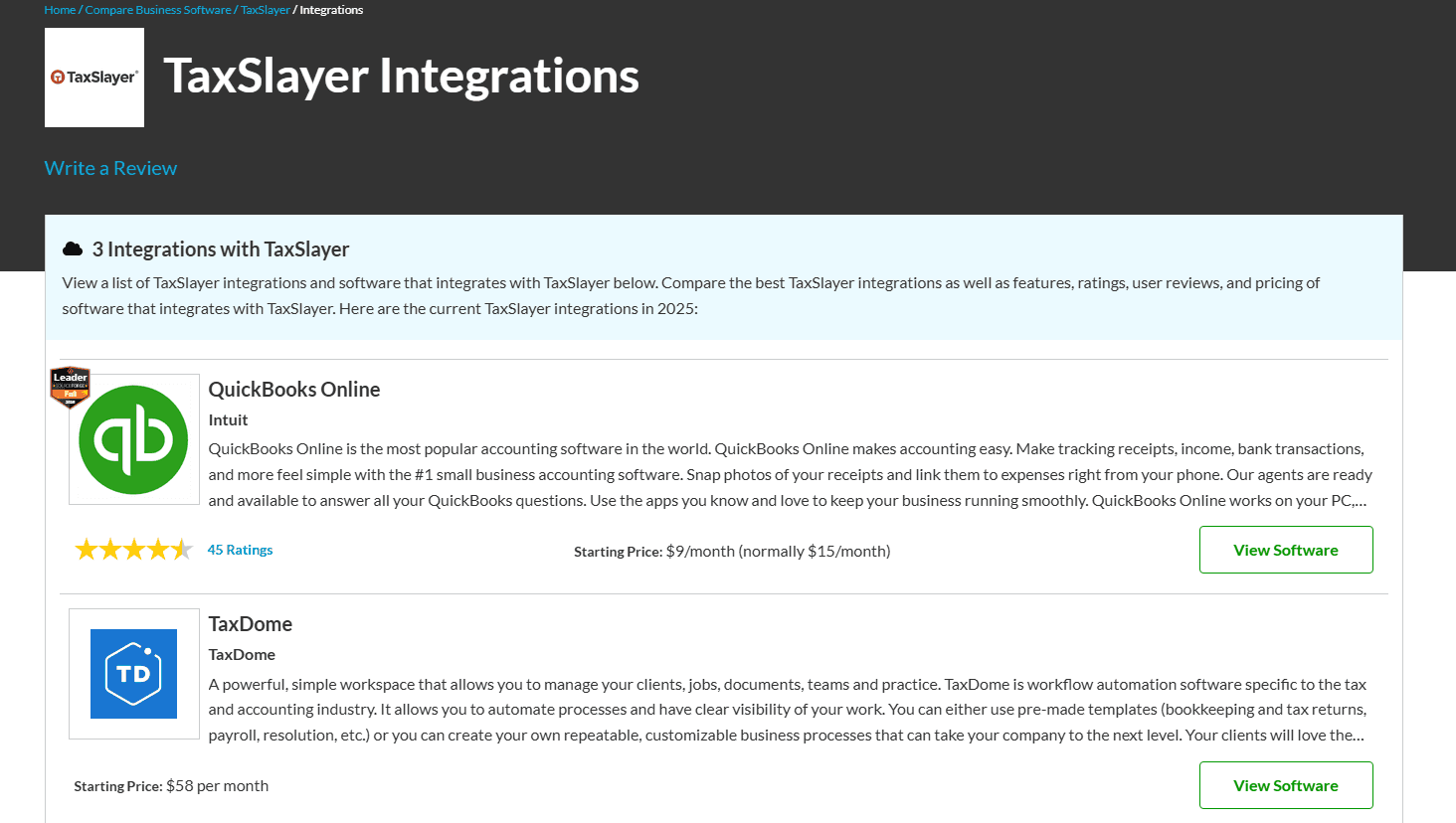
TaxSlayer integrates with QuickBooks Online, TaxDome, and QuickBooks Online Advanced.
TaxSlayer does not have a publicly available API or connect with third-party integration tools.
TaxSlayer Specs
- Accounts Payable: No
- Accounts Receivable: No
- API: No
- Balance Sheet: No
- Billing/Invoicing: No
- Budgeting: No
- Calendar Management: No
- CRM Integration: No
- Dashboard: No
- Data Export: Yes
- Data Import: Yes
- Data Visualization: No
- Expense Tracking: No
- External Integrations: No
- Forecasting: No
- General Account Ledger: No
- Multi-Currency: No
- Multi-User: No
- Notifications: Yes
- P&L: No
- Payroll: No
- Scheduling: No
- Tax Management: Yes


