

Como director financiero, tienes que gestionar el cumplimiento normativo, la gestión de riesgos y la eficiencia. Es mucho trabajo. El software de gestión de auditorías puede aliviar estas cargas organizando las auditorías, haciendo un seguimiento de los hallazgos y garantizando el cumplimiento de las normativas.
Pruebo y analizo el software de forma independiente, con un profundo conocimiento de los sectores financiero y contable. Mi objetivo es ofrecerte un análisis imparcial y bien documentado de las principales herramientas de gestión de auditorías disponibles.
En este artículo encontrarás información práctica sobre el software que mejor puede satisfacer las necesidades de tu equipo. Analizaré las funciones, los precios y las ventajas específicas que ofrece cada herramienta para ayudarte a tomar una decisión informada.
Por qué confiar en nuestras recomendaciones de software
6,700+
Reviews
20
Industry experts
16+
Evaluation factors
14
Years
Nuestras reseñas reflejan nuestro criterio independiente, no un discurso de ventas. Descubra cómo mantenemos la transparencia.
Para esta guía, evaluamos las herramientas mediante pruebas prácticas e investigación independiente, puntuando las herramientas según nuestros criterios de selección.
Nuestras reseñas reflejan nuestro criterio editorial humano, no un discurso de ventas.
Tabla comparativa de software de gestión de auditorías
Esta tabla comparativa resume los detalles de precios de mis principales selecciones de software de gestión de auditorías:
| Tool | Best For | Trial Info | Price | ||
|---|---|---|---|---|---|
| 1 | Ideal para evaluaciones de auditoría basadas en inteligencia artificial | Demostración gratuita disponible | Precios disponibles previa solicitud | Website | |
| 2 | La mejor opción para auditoría AD en tiempo real | Prueba gratuita de 30 días | Precio bajo consulta | Website | |
| 3 | Ideal para la colaboración | Demo gratuita disponible. | Precios a solicitud | Website | |
| 4 | Ideal para gestionar múltiples marcos de cumplimiento | Demostración gratuita disponible | Precio bajo consulta | Website | |
| 5 | Mejor para auditorías de TI | Prueba gratuita de 20 días | Precio a consultar | Website | |
| 6 | Mejores funciones de gobernanza, riesgo y cumplimiento | Demo gratuita disponible. | Precios bajo consulta | Website | |
| 7 | Mejor para la colaboración | Demo gratuita disponible. | Precio a consultar | Website | |
| 8 | Mejor para automatizaciones | Demo gratuita disponible. | Precios a consultar | Website | |
| 9 | Mejor para firmas de auditoría financiera y aseguramiento | Demo gratuita disponible. | Precio a consultar | Website | |
| 10 | Ideal para auditorías de seguridad de los trabajadores | Gratis para hasta 10 usuarios y demo disponible | Desde $19/mes por usuario "completo", con asientos gratuitos ilimitados | Website |


Análisis del mejor software de gestión de auditorías
A continuación encontrarás mis resúmenes detallados del mejor software de gestión de auditorías que ha llegado a mi lista de selección. Mis análisis ofrecen una visión detallada de las funciones principales, las ventajas & desventajas, las integraciones y los casos de uso ideales de cada herramienta para ayudarte a encontrar la mejor opción para ti.
 Ideal para evaluaciones de auditoría basadas en inteligencia artificial
- Demostración gratuita disponible
- Precios disponibles previa solicitud
Visit WebsiteCustomer Rating:4.1/5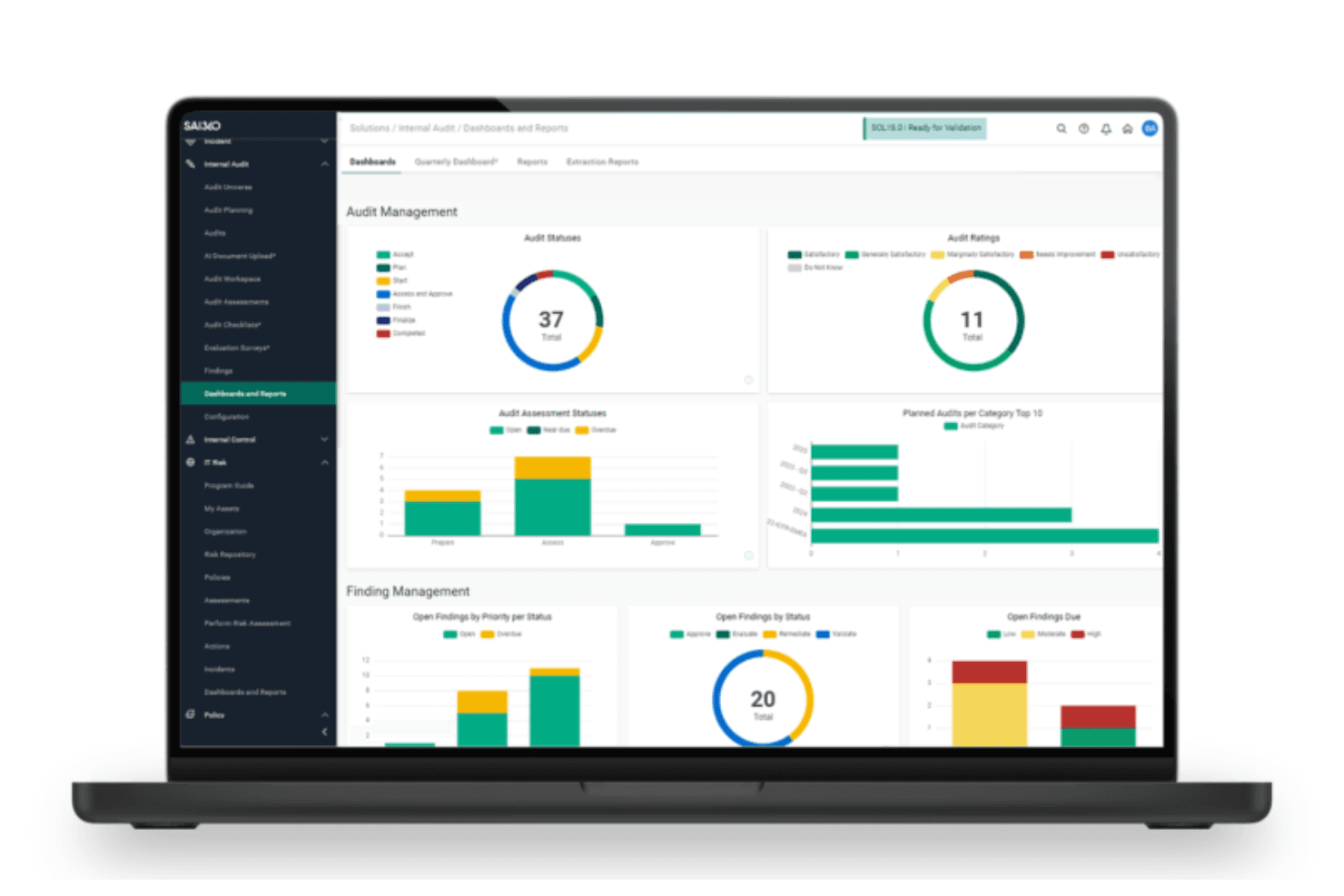
El panel de auditoría interna de SAI360 proporciona información visual en tiempo real sobre los estados de las auditorías, los hallazgos y las evaluaciones de riesgos. SAI360 es una suite GRC en la nube que reúne la auditoría interna, las pruebas de controles, el cumplimiento de SOX y la gestión de riesgos empresariales en una única plataforma conectada.
¿Para quién es más adecuado SAI360?
SAI360 es una opción sólida para los equipos de auditoría interna y cumplimiento de industrias reguladas, especialmente los servicios financieros, que necesitan conectar la auditoría, los controles y la gestión de riesgos en una sola plataforma.
Por qué elegí SAI360
SAI360 ocupa un lugar en mi lista de favoritos porque aprovecha la inteligencia artificial para analizar los dominios de riesgo empresarial y agrupar automáticamente las señales de auditoría relacionadas. Me gusta especialmente que puedo generar evaluaciones de riesgos en tiempo real y ejecutar escenarios automatizados sin consolidar manualmente los datos de control de varios departamentos. Su motor dinámico de puntuación de riesgos señala posibles brechas de cumplimiento antes de que comiencen las auditorías, lo que permite a los equipos abordar proactivamente los puntos de exposición.
Características principales de SAI360
- Definición del alcance de la auditoría basada en riesgos: Clasifica automáticamente las áreas de auditoría según la exposición, la frecuencia y el impacto, utilizando las calificaciones y los factores de riesgo anteriores.
- Mapeo de controles en múltiples marcos: Asigna controles simultáneamente en COSO, SOX, ISO y NIST para identificar coincidencias y cerrar brechas.
- Acceso sin conexión a los papeles de trabajo: Permite a los auditores completar y aprobar los papeles de trabajo sin conexión a Internet y luego sincroniza automáticamente los cambios.
- Paneles de auditoría en tiempo real: Ofrece vistas configurables y explorables de los hallazgos, el estado de las acciones correctivas y el rendimiento de las auditorías en toda la organización.
Integraciones de SAI360
SAI360 se conecta con más de 100 aplicaciones y proveedores de contenido, incluidos SAP, Oracle, NetSuite, Microsoft 365, SharePoint, ServiceNow, Salesforce, Power BI y DocuSign.
Pros and Cons
Pros:
- Los hallazgos se conectan directamente con los riesgos y los controles
- La revisión de evidencias asistida por inteligencia artificial reduce el trabajo de documentación
- Los papeles de trabajo sin conexión se sincronizan después del trabajo de campo
Cons:
- La compleja personalización de informes ralentiza la ejecución de las auditorías
- No dispone de un portal específico para el comité de auditoría
Learn more about SAI360: La mejor opción para auditoría AD en tiempo real
- Prueba gratuita de 30 días
- Precio bajo consulta
Visit WebsiteCustomer Rating:4.4/5
El sistema de ManageEngine ADAudit Plus proporciona a los usuarios alertas en tiempo real ante cualquier evento crítico. ManageEngine ADAudit Plus es una herramienta integral de auditoría de Active Directory diseñada para ayudar a las organizaciones a monitorear los cambios y actividades dentro de su ecosistema de Windows. Ofrece auditoría y alertas en tiempo real para Active Directory, Azure AD, servidores de archivos, servidores Windows y estaciones de trabajo.
Por qué elegí ManageEngine ADAudit Plus: Me gusta que proporciona auditoría y alertas en tiempo real para Active Directory, asegurando que cualquier cambio dentro del entorno de Windows sea detectado y atendido rápidamente. La capacidad de la herramienta para rastrear inicios de sesión de usuarios, monitorear cambios en archivos y gestionar permisos es crucial para mantener la seguridad y el cumplimiento. Además, su análisis de comportamiento de usuarios y las alertas de actividades sospechosas destacan en la prevención de posibles brechas de seguridad y el cumplimiento de normativas como GDPR y HIPAA.
ManageEngine ADAudit Plus Características destacadas e integraciones:
Características destacadas incluyen una auditoría detallada de servidores de archivos, seguimiento de accesos y modificaciones de archivos y carpetas en entornos Windows y NetApp. Su función de bloqueo y gestión de cuentas también ayuda a identificar y resolver problemas de bloqueo de cuentas de manera eficiente.
ADAudit Plus también incluye una auditoría integral de políticas de grupo y auditoría avanzada para estaciones de trabajo, capturando actividades de inicio y cierre de sesión de usuarios, instalaciones de software y cambios en usuarios y grupos locales.
Integraciones incluyen ManageEngine ServiceDesk Plus, ManageEngine OpManager, ManageEngine Log360, ManageEngine EventLog Analyzer, Microsoft SCOM, Microsoft Azure, VMware, Office 365 y soluciones SIEM como Splunk, IBM QRadar y ArcSight.
Pros and Cons
Pros:
- Ofrece informes de cumplimiento para satisfacer los requisitos regulatorios
- Los informes se pueden personalizar para satisfacer las necesidades específicas de la organización.
- Información detallada sobre el comportamiento del usuario y los cambios del sistema
Cons:
- Puede ser demasiado complejo para pequeñas empresas con recursos de TI limitados
- Soporte limitado para entornos que no sean Windows
Learn more about ManageEngine ADAudit Plus: Ideal para la colaboración
- Demo gratuita disponible.
- Precios a solicitud
Visit WebsiteCustomer Rating:4.6/5
Los paneles de control intuitivos de Workiva cuentan con impresionantes capacidades de visualización de datos. Workiva es una plataforma conectada de gestión de riesgos, informes financieros, auditoría y ESG para grandes empresas. Ayuda a conectar equipos en toda la organización para mejorar la colaboración y la eficiencia, alineando los proyectos diarios con los objetivos generales de la organización.
Por qué elegí Workiva: Seleccioné Workiva por sus funciones de colaboración y facilidad de uso, que combinadas hacen de esta herramienta una buena opción para la colaboración interna y la comunicación con auditores externos o reguladores.
Características destacadas e integraciones de Workiva:
Las características destacadas incluyen herramientas centralizadas de colaboración y comunicación dentro de la plataforma Workiva, además de la sincronización automática de fuentes de datos desde todas sus plataformas conectadas.
También me gusta cómo Workiva conecta los flujos de trabajo de auditoría y gestión de riesgos directamente con los informes financieros. El software también facilita la configuración de permisos basados en roles, lo que facilita un intercambio y colaboración más seguros.
Las integraciones incluyen BlackLine, Oracle, Google Drive, Excel, SAP, Microsoft Dynamics y Workday.
Pros and Cons
Pros:
- Más de 3.000 plantillas de auditoría predefinidas
- Funciones colaborativas
- Integraciones sencillas con docenas de herramientas empresariales populares
Cons:
- Excesivo para empresas pequeñas
Learn more about Workiva: Ideal para gestionar múltiples marcos de cumplimiento
- Demostración gratuita disponible
- Precio bajo consulta
Visit WebsiteCustomer Rating:4.6/5
Hyperproof ofrece paneles y reportes personalizables para brindar visibilidad en tiempo real sobre las actividades de auditoría. Hyperproof es una plataforma de operaciones de cumplimiento que ayuda a los usuarios a automatizar flujos de trabajo, prepararse para auditorías y gestionar riesgos. Proporciona herramientas para la gestión de riesgos, gestión de proveedores y gestión de auditorías, y ofrece funciones como el mapeo de controles a requisitos de cumplimiento, automatización de la recopilación de evidencias y monitoreo de la postura de cumplimiento.
Por qué elegí Hyperproof: Elegí Hyperproof porque admite más de 100 marcos de cumplimiento, incluidos SOC 2, ISO 27001, GDPR y HIPAA, y ofrece una plataforma centralizada para realizar el seguimiento y la gestión de todas las tareas y documentación necesarias de cumplimiento para ayudar en la preparación de auditorías.
Características destacadas e integraciones de Hyperproof:
Las características destacadas incluyen visibilidad de cumplimiento en tiempo real que ofrece monitoreo y actualizaciones continuas, manteniendo a los equipos de auditoría informados sobre su estado de cumplimiento en todo momento.
Además, la plataforma proporciona herramientas para recopilar, priorizar, rastrear y mitigar riesgos. Incluye un registro de riesgos, gestión de incidencias y funciones de informes.
Las integraciones incluyen Jira, Slack, Microsoft Teams, Okta, OneDrive, Google Drive, AWS, Azure, GitHub, GitLab, Confluence, ServiceNow, Microsoft 365, Zoom, Box, Dropbox, Asana, Trello, Salesforce y Smartsheet.
Pros and Cons
Pros:
- Automatiza la recopilación de evidencias para ahorrar tiempo en auditorías
- Marcos preconstruidos para la gestión de cumplimiento
- Diseño de interfaz intuitivo
Cons:
- Limitaciones en los informes
- Limitaciones en la personalización de la plataforma
Learn more about Hyperproof: Mejor para auditorías de TI
- Prueba gratuita de 20 días
- Precio a consultar
Visit WebsiteCustomer Rating:4.5/5
La interfaz de usuario de Netwrix es muy sencilla y un poco anticuada, pero es más fácil de usar que la mayoría de las otras herramientas. Netwrix Auditor es un software de auditoría de TI diseñado para ayudar a detectar amenazas de seguridad, garantizar el cumplimiento y asistir a los equipos de TI en el mantenimiento de implementaciones estables. Tiene una interfaz simple y directa que debería ser fácil de aprender para la mayoría de las personas.
Por qué elegí Netwrix: Seleccioné Netwrix Auditor por su enfoque en la seguridad de TI, el análisis de amenazas y la auditoría de TI.
Características destacadas e integraciones de Netwrix:
Las características destacadas incluyen la recopilación y auditoría de datos unificada y centralizada de muchos sistemas comunes de TI (Azure, Microsoft 365, etc.) para reducir el tiempo necesario para compilar datos de diferentes fuentes.
También me gustan los informes predefinidos diseñados para cumplir con los estándares de la industria y regulaciones legales (GDPR, HIPAA, CJIS, etc.)
Las integraciones incluyen SharePoint, Microsoft 365, Azure AD, Oracle Database y SQL Server.
Pros and Cons
Pros:
- Soporte para cumplimiento de regulaciones técnicas
- Identifica patrones de amenazas y posibles brechas
- Alertas de actividad anómala
Cons:
- Diseñado específicamente para auditorías de TI
Learn more about Netwrix Auditor: Mejores funciones de gobernanza, riesgo y cumplimiento
- Demo gratuita disponible.
- Precios bajo consulta
Visit WebsiteCustomer Rating:3.3/5
MetricStream cuenta con paneles intuitivos con sólidas analíticas y visualizaciones de datos. MetricStream es una solución de software de gobernanza, riesgo y cumplimiento (GRC). Su línea de productos conectados ofrece herramientas para GRC empresarial, gestión de auditoría interna, GRC ESG (ambiental, social y de gobernanza corporativa), y flujos de trabajo de Ciber GRC.
Por qué elegí MetricStream: Seleccioné MetricStream porque, además de ser una herramienta de gestión de auditoría, también cubre varios componentes de gobernanza, cumplimiento y gestión de riesgos tanto en las operaciones empresariales como en TI.
Características destacadas e integraciones de MetricStream:
Características destacadas incluyen funciones de auditoría habilitadas con IA, lo que permite a MetricStream seleccionar muestras aleatorias para pruebas, conciliar automáticamente cuentas de libros mayores y verificar la exactitud matemática de los rubros, totales y subtotales de los estados financieros.
Además de los paneles muy atractivos, también me gustan las herramientas y plantillas de informes de auditoría de MetricStream, que facilitan compartir los hallazgos con las partes interesadas.
Las integraciones incluyen escáneres de amenazas y vulnerabilidades, herramientas de cumplimiento normativo y herramientas de seguridad a través de las API de MetricStream.
Pros and Cons
Pros:
- Relativamente sencillo de usar
- Gestión conectada de riesgos, ciberseguridad, auditoría interna
- Excelentes informes y paneles
Cons:
- Integraciones limitadas
Learn more about MetricStream: Mejor para la colaboración
- Demo gratuita disponible.
- Precio a consultar
Visit WebsiteCustomer Rating:3.6/5
El software de auditoría de Archer adopta un enfoque basado en riesgos para la priorización. Archer Audit Management es un software de auditoría interna integrado en la plataforma Archer de gestión de riesgos. Está diseñado para servir como un sistema centralizado que gestiona todo el ciclo de vida de las auditorías internas.
Por qué elegí Archer Audit Management: Seleccioné Archer Audit Management por sus funciones de colaboración. En particular, me gusta que permite la colaboración interfuncional al incentivar a los equipos de auditoría, riesgos, cumplimiento y gestión a trabajar juntos. Para grandes multinacionales con equipos departamentales aislados, estas funciones colaborativas son un gran atractivo.
Funciones destacadas e integraciones de Archer Audit Management:
Las funciones destacadas incluyen flujos de trabajo incorporados para la gestión de incidencias, que permiten escalar problemas de auditoría y remediar hallazgos, herramientas para crear compromisos y papeles de trabajo de auditoría, y portales de información de autoservicio para auditores externos.
Me gusta que los planes de auditoría de Archer estén alineados con los estándares del Instituto de Auditores Internos (IIA) y el marco de trabajo del Comité de Organizaciones Patrocinadoras (COSO) para asegurar que los equipos aborden los controles internos y los riesgos operativos pertinentes.
Las integraciones incluyen la agregación interna de datos mediante importaciones directas, flujos de datos y la API de Archer.
Pros and Cons
Pros:
- Herramientas integradas interdepartamentales que fomentan la colaboración
- Implementación flexible
- Cumple con IIA y COSO
Cons:
- Integraciones limitadas
Learn more about Archer: Mejor para automatizaciones
- Demo gratuita disponible.
- Precios a consultar

SAP Internal Audit Management cuenta con flujos de trabajo centralizados para la planificación de auditorías y mejorar la eficiencia en auditoría. SAP Internal Audit Management es un software líder de gestión de auditorías que forma parte de la suite de herramientas empresariales de SAP. Está específicamente diseñado para equipos de auditoría interna.
Por qué elegí SAP Internal Audit Management: Elegí SAP Internal Audit Management por sus amplias funciones de automatización y su enfoque en el control interno. Me gusta cómo las herramientas impulsadas por IA y aprendizaje automático de SAP pueden ayudar a los equipos de auditoría interna a ahorrar tiempo automatizando algunos de los procedimientos de auditoría más rutinarios y repetitivos.
Características destacadas e integraciones de SAP Internal Audit Management:
Entre sus características destacadas se incluyen procedimientos automatizados de auditoría interna para la documentación de evidencias, organización de papeles de trabajo e informes de auditoría.
También me gusta la versatilidad del software de SAP: puede implementarse de forma local o en la nube, lo que permite a los equipos acceder a él desde cualquier dispositivo móvil o navegador web.
Las integraciones incluyen SAP Risk Management, SAP Process Control y otros productos de la suite SAP.
Pros and Cons
Pros:
- Implementación flexible vía nube o local
- Excelente infraestructura de seguridad de datos
- Herramientas de IA y aprendizaje automático
Cons:
- Curva de aprendizaje pronunciada
Learn more about SAP Audit Management: Mejor para firmas de auditoría financiera y aseguramiento
- Demo gratuita disponible.
- Precio a consultar

Los paneles de TeamMate son simples y fáciles de navegar TeamMate de Wolters Kluwer es un software de auditoría integral para grandes firmas de auditoría y prácticas de aseguramiento. Es utilizado por equipos de auditoría interna, así como por firmas de contabilidad pública y contratistas.
Por qué elegí TeamMate: Seleccioné TeamMate porque tiene una versión diseñada específicamente para equipos de auditoría interna y auditores independientes que realizan auditorías financieras y de cumplimiento para grandes instituciones financieras.
Las empresas que operan en la industria financiera hoy en día deben cumplir con estrictos requisitos regulatorios y estándares de control interno, y TeamMate ayuda a los auditores a garantizar el cumplimiento.
Funciones destacadas e integraciones de TeamMate:
Las funciones destacadas incluyen una biblioteca con más de 150 Herramientas de Auditoría Asistida por Computadora (CAATs) para análisis de datos. La función TeamMate Analytics está equipada con herramientas de manipulación de datos que formatean rápidamente los archivos de datos sin procesar para que los equipos puedan realizar análisis en profundidad.
También me gusta mucho la aplicación TeamMate University; reduce la curva de aprendizaje y ayuda a los equipos a integrarse y conocer a fondo las diferentes herramientas y funciones del software.
Las integraciones incluyen integraciones personalizadas a través de las API de TeamMate.
Pros and Cons
Pros:
- Amplias capacidades de análisis de datos
- Diseñado específicamente para la industria de servicios financieros
- Integración rápida
Cons:
- Costoso
- No es adecuado para empresas pequeñas
Learn more about TeamMate: Ideal para auditorías de seguridad de los trabajadores
- Gratis para hasta 10 usuarios y demo disponible
- Desde $19/mes por usuario "completo", con asientos gratuitos ilimitados

Las listas de verificación de SafetyCulture ayudan a los trabajadores a garantizar que se cumplan las normas de seguridad en el campo. SafetyCulture es un software de gestión de seguridad y cumplimiento diseñado pensando en la seguridad de los trabajadores.
El plan de pago incluye dos tipos diferentes de 'asientos': los asientos completos tienen acceso a todas las funciones, incluyendo gestión e inspecciones, pero los asientos gratuitos aún pueden crear y completar tareas y enviar mensajes.
Por qué elegí SafetyCulture: Seleccioné SafetyCulture porque está enfocado específicamente en la seguridad de los trabajadores y en asegurar el cumplimiento con OSHA y otras normativas.
Características destacadas e integraciones de SafetyCulture:
Las características destacadas incluyen listas de verificación fáciles para que los empleados las completen antes y durante el trabajo de campo.
Me gusta mucho cómo los empleados pueden usar la app móvil para tomar y subir fotos, asignar tareas a otros (incluso a personas que no usan SafetyCulture), y reportarse con los supervisores.
Las integraciones incluyen productos de Google y Microsoft, Salesforce, SAP y Zapier.
Pros and Cons
Pros:
- El diseño móvil es muy fácil de usar
- Fomenta una cultura laboral de seguridad y cumplimiento de políticas
- Muy asequible
Cons:
- Se centra más en la seguridad de los trabajadores que en la auditoría
- No es un software de auditoría interna independiente
Learn more about SafetyCulture:
Otros programas de gestión de auditorías
Estas son algunas opciones adicionales de software de gestión de auditorías que no llegaron a mi lista de selección, pero que aún merece la pena consultar:
- 11DiligentMejor para la gestión de controles internos
- 12AuditBoardMejor para auditorías operativas
- 13Ideagen Pentana AuditMejor para la planificación de auditorías
- 14MindBridgeMejor para auditorías financieras
- 15OnspringMejor para auditorías de gran volumen
- 16Mitratech AlyneIdeal para evaluaciones de riesgo impulsadas por IA
Cómo Evalúo el Software de Gestión de Auditorías
Evalúo cada herramienta en dos niveles: requisitos fundamentales como la planificación y gestión de papeles de trabajo, y diferenciadores que distinguen a las plataformas orientadas a SOX de las herramientas generales de GRC.
Funcionalidad Básica (Lo Fundamental para esta Lista)
Al seleccionar herramientas para mi lista, califico cada una en una escala del 0 (no ofrece la funcionalidad) al 5 (sobresale en esta área) para cada funcionalidad principal que se detalla a continuación. Luego, calculo la puntuación total de la herramienta como un porcentaje. Cada herramienta debe alcanzar una puntuación mínima total del 65% para ser considerada para su inclusión.
- Planificación y Programación de Auditorías: Busco herramientas que permitan crear un plan anual de auditoría basado en riesgos, asignar proyectos a los miembros del equipo y ajustar los cronogramas según cambien las prioridades a mitad de ciclo.
- Gestión de Papeles de Trabajo y Evidencias: Un repositorio estructurado de papeles de trabajo es esencial—verifico si se puede vincular evidencia a controles específicos, mantener el historial de versiones y enviar archivos para su revisión y aprobación.
- Evaluación de Riesgos y Controles: Cada herramienta debe admitir matrices de riesgos y controles y flujos de trabajo de pruebas de controles, especialmente para equipos que ejecutan programas alineados a SOX o COSO en varias unidades de negocio.
- Seguimiento de Hallazgos y Remediaciones: Evalúo cómo los hallazgos avanzan desde su identificación hasta la resolución—asignación de responsables, fechas límite, activadores de escalamiento y la capacidad de verificar la remediación antes de cerrar el hallazgo.
- Informes de Auditoría y Dashboards: Informes claros conectan a tu equipo de auditoría con la dirección. Busco tableros configurables y entregables listos para comités que resuman el estado, hallazgos y tendencias.
- Flujos de Trabajo y Aprobaciones de Revisión: Etapas estructuradas de revisión con autorizaciones según roles aseguran la coherencia metodológica. Verifico cadenas de aprobación multinivel y rastros de auditoría inmutables que documenten cada acción.
Una vez tengo una lista de herramientas que cumplen estos criterios, considero qué distingue a cada plataforma.
Factores Diferenciadores (Qué Distingue a los Proveedores)
Así es como comparo y distingo diferentes proveedores:
Características Destacadas
La monitorización continua de controles es un gran diferenciador. Busco herramientas que extraigan datos en tiempo real de tu ERP y detecten automáticamente excepciones de control en vez de depender de pruebas por muestreo trimestrales. También es importante el mapeo de cumplimiento con múltiples marcos normativos: cuando un solo control abarca SOX, ISO y COSO, se elimina la duplicidad de pruebas entre programas. Además, analizo si la plataforma utiliza análisis de riesgos impulsados por IA para detectar anomalías y recomendar áreas en las que enfocarse en los próximos ciclos de auditoría.
Más Allá de las Funcionalidades
Las integraciones con ERP y GRC son clave; verifico si una plataforma se conecta de forma nativa a sistemas como SAP, Oracle o NetSuite para extraer evidencia directamente durante el trabajo de campo. Las certificaciones de seguridad también tienen peso, especialmente SOC 2 Tipo II y opciones de residencia de datos para equipos que gestionan información financiera sensible en distintas regiones. El soporte en la implementación es otro aspecto que evalúo minuciosamente, incluyendo si el proveedor ofrece plantillas metodológicas preconfiguradas de IIA o IPPF que reducen el tiempo de configuración para nuevos equipos de auditoría.
Cómo elegir un software de gestión de auditorías
Es fácil perderse entre largas listas de funciones y complejas estructuras de precios. Para ayudarte a mantener la atención mientras avanzas en tu proceso específico de selección de software, aquí tienes una lista de factores que debes tener en cuenta:
| Factor | Qué debes considerar |
|---|---|
| FactorEscalabilidad | Qué debes considerar¿Crecerá el software junto con tu empresa? Considera si puede gestionar un mayor volumen de datos y de usuarios sin problemas de rendimiento. |
| FactorIntegraciones | Qué debes considerar¿Funciona con tus sistemas actuales? Asegúrate de que se conecta con herramientas como ERP, CRM y otras aplicaciones esenciales para tu flujo de trabajo. |
| FactorCapacidad de personalización | Qué debes considerar¿Puedes adaptar la herramienta a tus procesos? Busca opciones para ajustar los flujos de trabajo, los campos y los informes según tus necesidades específicas. |
| FactorFacilidad de uso | Qué debes considerar¿Qué tan intuitiva es para tu equipo? Una interfaz sencilla reduce el tiempo de formación y facilita una rápida adopción en todos los departamentos. |
| FactorImplementación e incorporación | Qué debes considerar¿Cuánto tiempo llevará la configuración? Comprueba qué asistencia está disponible durante la incorporación y si hay recursos como guías o sesiones de formación que faciliten la transición. |
| FactorCoste | Qué debes considerar¿Se ajusta a tu presupuesto? Compara los planes de precios y comprueba si existen tarifas ocultas o costes adicionales por incorporar funciones o usuarios. |
| FactorMedidas de seguridad | Qué debes considerar¿Cumple tus necesidades de seguridad? Busca estándares de cifrado, medidas de protección de datos y cumplimiento de las normativas pertinentes. |
| FactorRequisitos de cumplimiento | Qué debes considerar¿Se ajusta a los estándares del sector? Asegúrate de que la herramienta admite las auditorías y comprobaciones de cumplimiento necesarias específicas de tu sector. |
¿Qué es el software de gestión de auditorías?
El software de gestión de auditorías es una herramienta que te ayuda a planificar, llevar a cabo y hacer un seguimiento de las auditorías en el trabajo. Los auditores, responsables de cumplimiento y equipos de controles internos lo utilizan para gestionar los calendarios de auditoría, documentar los hallazgos y gestionar los seguimientos, lo que facilita la organización y el cumplimiento de las normas. Mantiene todo en un solo lugar, haciendo que resulte menos estresante realizar un seguimiento de lo que se ha hecho y de lo que aún requiere atención.
Características
Estas son las características principales que debería tener cualquier buen software de gestión de auditorías:
- Programación de auditorías: Automatiza la planificación y programación de auditorías, garantizando una ejecución puntual y organizada.
- Seguimiento de hallazgos: Permite a los usuarios documentar y supervisar los resultados de las auditorías, facilitando las acciones de seguimiento y la rendición de cuentas.
- Generación de informes: Produce informes de auditoría completos, lo que facilita el análisis de datos y el intercambio de hallazgos con las partes interesadas.
- Comprobaciones de cumplimiento: Favorece el cumplimiento de las normas y reglamentos del sector, reduciendo el riesgo de sanciones por incumplimiento.
- Capacidades de integración: Se conecta con sistemas existentes como ERP y CRM, mejorando el flujo de datos y la eficiencia operativa.
- Paneles personalizables: Proporcionan vistas e información adaptadas, ayudando a los usuarios a centrarse en la información de auditoría más relevante.
- Análisis en tiempo real: Ofrece información inmediata sobre los datos de auditoría, permitiendo tomar decisiones rápidas y gestionar los riesgos de forma proactiva.
- Acceso móvil: Permite a los usuarios realizar y revisar auditorías desde cualquier lugar, aumentando la flexibilidad y la capacidad de respuesta.
- Notificaciones automatizadas: Mantienen a los equipos informados sobre el progreso y los plazos de las auditorías, garantizando la finalización puntual de las tareas.
- Interfaz fácil de usar: Garantiza la facilidad de uso, reduce el tiempo de formación y fomenta la adopción generalizada en todos los equipos.
Ventajas
La implementación de un software de gestión de auditorías ofrece varias ventajas para tu equipo y tu empresa. Estas son algunas de las que puedes esperar:
- Mejora del cumplimiento: Ayuda a garantizar el cumplimiento de la normativa mediante comprobaciones de cumplimiento integradas y alertas automatizadas.
- Mayor eficiencia: Automatiza la programación y el seguimiento, reduciendo el trabajo manual y acelerando el proceso de auditoría.
- Mayor precisión: Proporciona una recopilación de datos y generación de informes fiables, minimizando los errores y mejorando la calidad de las auditorías.
- Mejor toma de decisiones: Ofrece análisis e información en tiempo real, permitiendo tomar decisiones rápidas y fundamentadas.
- Mayor flexibilidad: El acceso móvil permite realizar auditorías desde cualquier lugar, adaptándose al trabajo remoto y a las auditorías sobre el terreno.
- Ahorro de costes: Reduce la necesidad de procesos basados en papel y de mano de obra manual, disminuyendo los costes operativos.
- Colaboración más sólida: Facilita la comunicación y la rendición de cuentas mediante paneles compartidos y notificaciones automatizadas.
Costes y precios
La selección de un software de gestión de auditorías requiere comprender los distintos modelos de precios y planes disponibles. Los costes varían en función de las características, el tamaño del equipo, los complementos y otros factores. La tabla siguiente resume los planes habituales, sus precios medios y las características que suelen incluir las soluciones de software de gestión de auditorías:
Tabla comparativa de planes de software de gestión de auditorías
| Tipo de plan | Precio medio | Características habituales |
|---|---|---|
| Tipo de planPlan gratuito | Precio medio$0 | Características habitualesProgramación básica de auditorías, seguimiento limitado y funciones esenciales de generación de informes. |
| Tipo de planPlan personal | Precio medio$10-$30/usuario/mes | Características habitualesProgramación y seguimiento de auditorías, opciones básicas de integración y funciones estándar de generación de informes. |
| Tipo de planPlan empresarial | Precio medio$30-$60/usuario/mes | Características habitualesProgramación avanzada, seguimiento completo, generación de informes mejorada e integración con sistemas ERP. |
| Tipo de planPlan corporativo | Precio medio$60-$120/usuario/mes | Características habitualesPersonalización completa, análisis avanzados, acceso móvil y asistencia al cliente específica. |
Preguntas frecuentes
Aquí tienes algunas respuestas a preguntas frecuentes sobre el software de gestión de auditorías:
¿Cómo ayuda el software de gestión de auditorías a los equipos de auditoría interna?
El software de gestión de auditorías proporciona un lugar centralizado para planificar, ejecutar y supervisar todo el ciclo de vida de la auditoría. Las mejores herramientas también utilizan la automatización y el aprendizaje automático para detectar anomalías, implementar una priorización basada en reglas y probar controles. Además, estas soluciones de software pueden ayudar a alinear los procesos de auditoría interna con las políticas regulatorias y los estándares corporativos, mejorar la alineación organizativa y fomentar la colaboración y la sincronización de datos entre los equipos de auditoría y gestión.
¿Cómo se almacenan y acceden a los documentos de auditoría en el software de gestión de auditorías?
El software de gestión de auditorías almacena todos los documentos en un sistema centralizado con carpetas, etiquetas o filtros para facilitar el acceso. Tu equipo puede cargar papeles de trabajo, evidencias o informes, y controlar quién puede ver cada elemento. Esto reduce la confusión y evita la pérdida de archivos.
¿Pueden utilizar el software de gestión de auditorías los equipos ubicados en diferentes lugares?
La mayoría del software de gestión de auditorías funciona en línea, por lo que los equipos de distintas oficinas o zonas horarias pueden utilizarlo conjuntamente. Todos ven los mismos datos y las actualizaciones en tiempo real. Esto mantiene tus auditorías encaminadas independientemente de dónde trabaje tu equipo.
¿Cómo gestiona el software de gestión de auditorías el acceso basado en roles y los permisos de usuario?
El software de gestión de auditorías suele ofrecer acceso basado en roles, de modo que los distintos miembros del equipo tienen permisos adaptados a sus responsabilidades (por ejemplo, auditor, revisor o administrador). Tu equipo puede asignar quién puede ver, editar, aprobar o cerrar las tareas y los hallazgos de auditoría. Unos controles de acceso claros reducen el riesgo de cambios no autorizados y ayudan a mantener la integridad de la auditoría.