
14 alternatives à ClickUp en 2026 pour la gestion de projets et de tâches

10 Liste restreinte des alternatives à ClickUp
Here's my pick of the 10 best software from the 14 tools reviewed.


Une bonne alternative à ClickUp offre à votre équipe un suivi de projet flexible, des flux de travail personnalisables et des fonctionnalités de collaboration claires — sans sacrifier la facilité d’utilisation ni la visibilité. Si vous recherchez des alternatives à ClickUp, vous avez probablement besoin d’une solution qui s’adapte aux processus uniques de votre équipe, s’intègre à vos outils existants et accompagne la croissance de votre entreprise en terme d’évolutivité. Cette liste vous aidera à comparer les principales options, comprendre ce qui distingue chacune d’elles, et choisir la bonne plateforme pour soutenir vos besoins en gestion de projet et collaboration.
Qu’est-ce que ClickUp ?
ClickUp est une plateforme de gestion de projet qui aide les équipes à organiser leurs tâches, suivre l’avancement et collaborer au même endroit. Elle propose des fonctionnalités telles que des listes de tâches, l’automatisation des workflows, le partage de documents et des intégrations avec d’autres outils professionnels. Les équipes utilisent ClickUp pour gérer leurs projets, assigner des responsabilités et suivre les échéances. Sa flexibilité la rend adaptée à un large éventail de secteurs et de tailles d’équipes, des startups jusqu’aux grandes entreprises.
Résumé des meilleures alternatives à ClickUp
| Tool | Best For | Trial Info | Price | ||
|---|---|---|---|---|---|
| 1 | Best for customizable work management | 14-day free trial + free plan + free demo available | From $12/user/month (billed annually) | Website | |
| 2 | Best for database-driven task organization | Free plan + free demo available | From $20/user/month (billed annually) | Website | |
| 3 | Best for simple team communication tools | 30-day free trial + + free plan + free demo available | From $15/user/month | Website | |
| 4 | Best for Kanban-style task boards | 14-day free trial + free plan available | From $5/user/month (billed annually) | Website | |
| 5 | Best for cross-team task coordination | 30-day free trial + free plan available | From $10.99/user/month (billed annually) | Website | |
| 6 | Best for combining docs and project tracking | Free plan + free demo available | From $10/member/month (billed annually) | Website | |
| 7 | Best for built-in time tracking features | Not available | Pricing upon request | Website | |
| 8 | Best for spreadsheet-style project planning | Free trial + free demo available | From $9/member/month (billed annually) | Website | |
| 9 | Best for advanced workflow automation | Free plan + free demo + 14-day free trial available | From $10/user/month (billed annually) | Website | |
| 10 | Best for visual project dashboards | Free plan + free demo available | From $9/seat/month (billed annually) | Website |

Why Trust Our Software Reviews
-

LiveFlow
Visit WebsiteThis is an aggregated rating for this tool including ratings from Crozdesk users and ratings from other sites.4.9 -
Float Financial
Visit WebsiteThis is an aggregated rating for this tool including ratings from Crozdesk users and ratings from other sites.4.1 -
Creatio CRM
Visit WebsiteThis is an aggregated rating for this tool including ratings from Crozdesk users and ratings from other sites.4.7


Avis sur les alternatives à ClickUp
Vous trouverez ci-dessous mes résumés détaillés des alternatives à ClickUp qui figurent dans ma sélection. Mes avis proposent une analyse approfondie des fonctionnalités, des meilleurs cas d’usage et des intégrations de chaque plateforme pour vous aider à trouver celle qui vous conviendra le mieux.

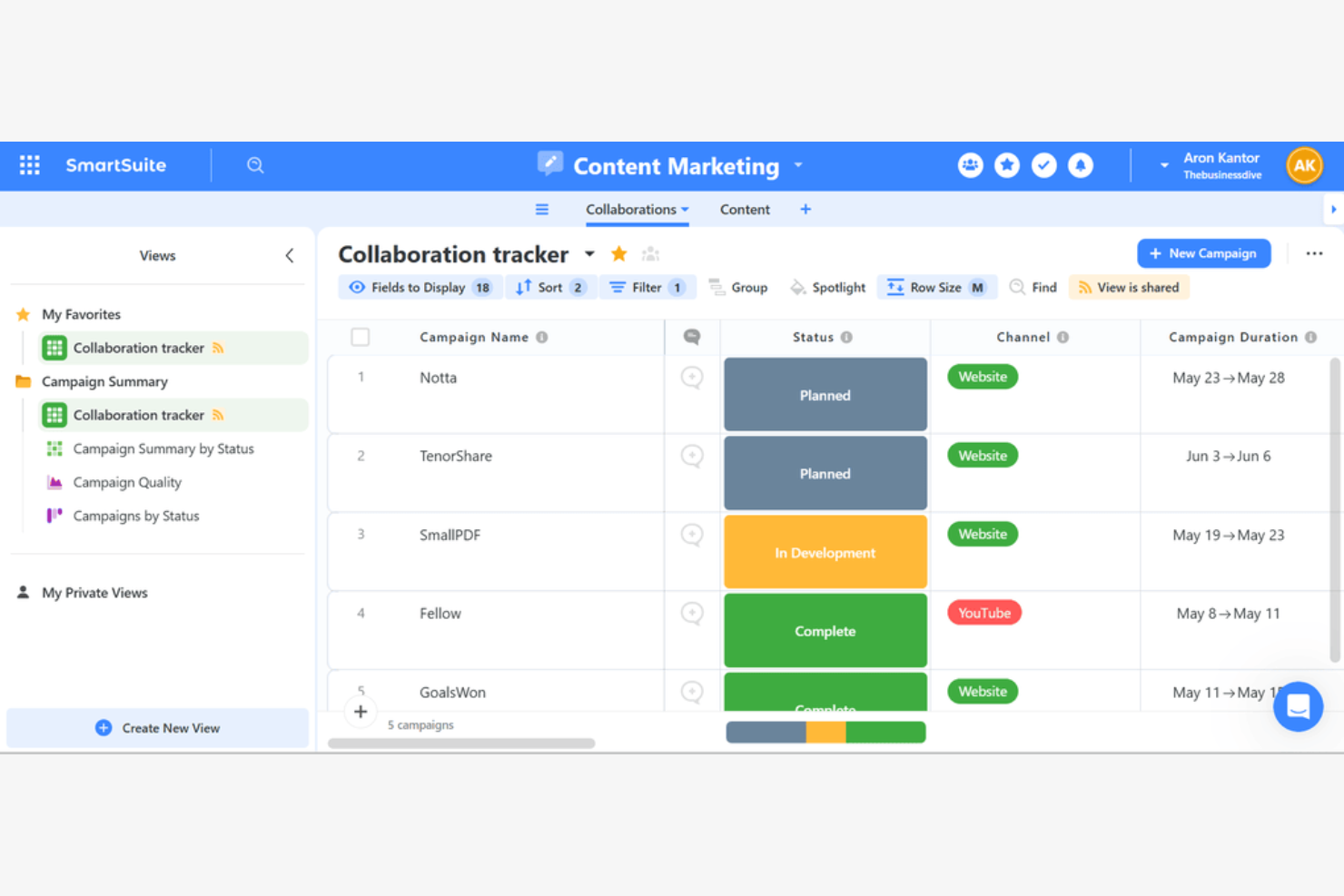
For teams that want to tailor every aspect of their work management, SmartSuite offers a highly customizable platform. It’s a strong fit for operations, finance, and project leads who need to adapt workflows, fields, and views to match unique business processes. Unlike many ClickUp alternatives, SmartSuite lets you build and modify solutions from the ground up without coding.
Why SmartSuite Is a Good ClickUp Alternative
If you need a work management tool that adapts to your processes, SmartSuite stands out for its deep customization options. I picked SmartSuite because you can design custom workflows, fields, and views for any business function without writing code. The platform also lets you create templates and automate processes to match your team’s exact needs. This flexibility makes it a strong ClickUp alternative for organizations with unique or evolving requirements.
SmartSuite Key Features
Some other features in SmartSuite help teams manage projects and data more efficiently:
- Multiple View Options: Switch between grid, kanban, calendar, timeline, and map views to visualize work in different ways.
- Role-Based Permissions: Set granular access controls for users, teams, and guests at the workspace or solution level.
- Document Management: Upload, organize, and collaborate on files directly within records.
- Built-In Reporting: Create dashboards and charts to track project metrics and performance in real time.
SmartSuite Integrations
Integrations include Salesforce, Gmail, Slack, Microsoft Teams, Google Drive, Google Sheets, HubSpot, Box, Dropbox, and Outlook Email.
Pros and Cons
Pros:
- Role-based permissions for controlled cross-team access
- Multiple view types, including grid, kanban, timeline, and map
- Deep workflow and field customization without coding
Cons:
- Fewer third-party integrations than larger competitors
- Limited native time tracking capabilities

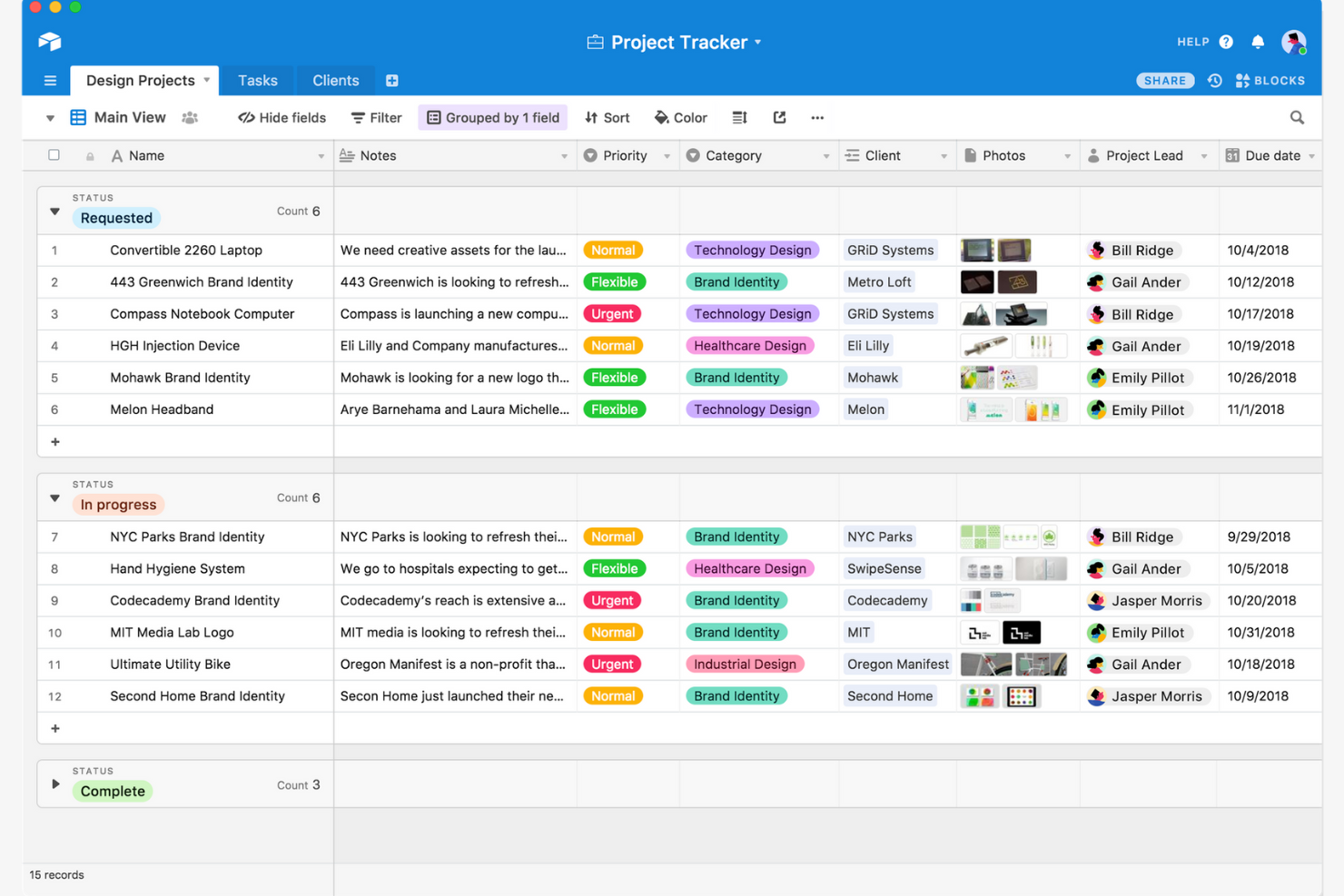
Airtable stands out for teams that need a flexible, database-style approach to organizing projects and tasks. It’s a strong fit for operations, marketing, and product teams that want to build custom workflows with relational data and advanced filtering. Unlike many ClickUp alternatives, Airtable lets you design your own task-tracking systems with linked records, formulas, and multiple view types.
Why Airtable Is a Good ClickUp Alternative
If you want more control over how you organize and relate your project data, Airtable is a strong choice. I picked Airtable because its database-driven structure lets you link tasks, projects, and resources in ways that go beyond standard lists or boards. You can create custom fields, set up relational tables, and use formulas to automate calculations or status updates. This flexibility makes Airtable especially useful for teams that need to manage complex workflows or track interconnected information.
Airtable Key Features
Some other features in Airtable help teams customize and collaborate on projects more easily:
- Kanban View: Visualize tasks as cards and move them through customizable workflow stages.
- Calendar View: Display records on a calendar to track deadlines and key dates.
- Interface Designer: Build custom dashboards and interfaces for different team roles or project needs.
- Revision History: Access a detailed log of changes made to records and tables.
Airtable Integrations
Integrations include Slack, Google Drive, Salesforce, Jira, Zendesk, Box, Dropbox, GitHub, Gmail, and Outlook Calendar.
Pros and Cons
Pros:
- Interface Designer builds tailored dashboards for stakeholders
- Formula fields automate calculations and status updates
- Relational databases link projects, tasks, and resources
Cons:
- Advanced reporting often requires external integrations
- Permission controls lack granular field-level settings

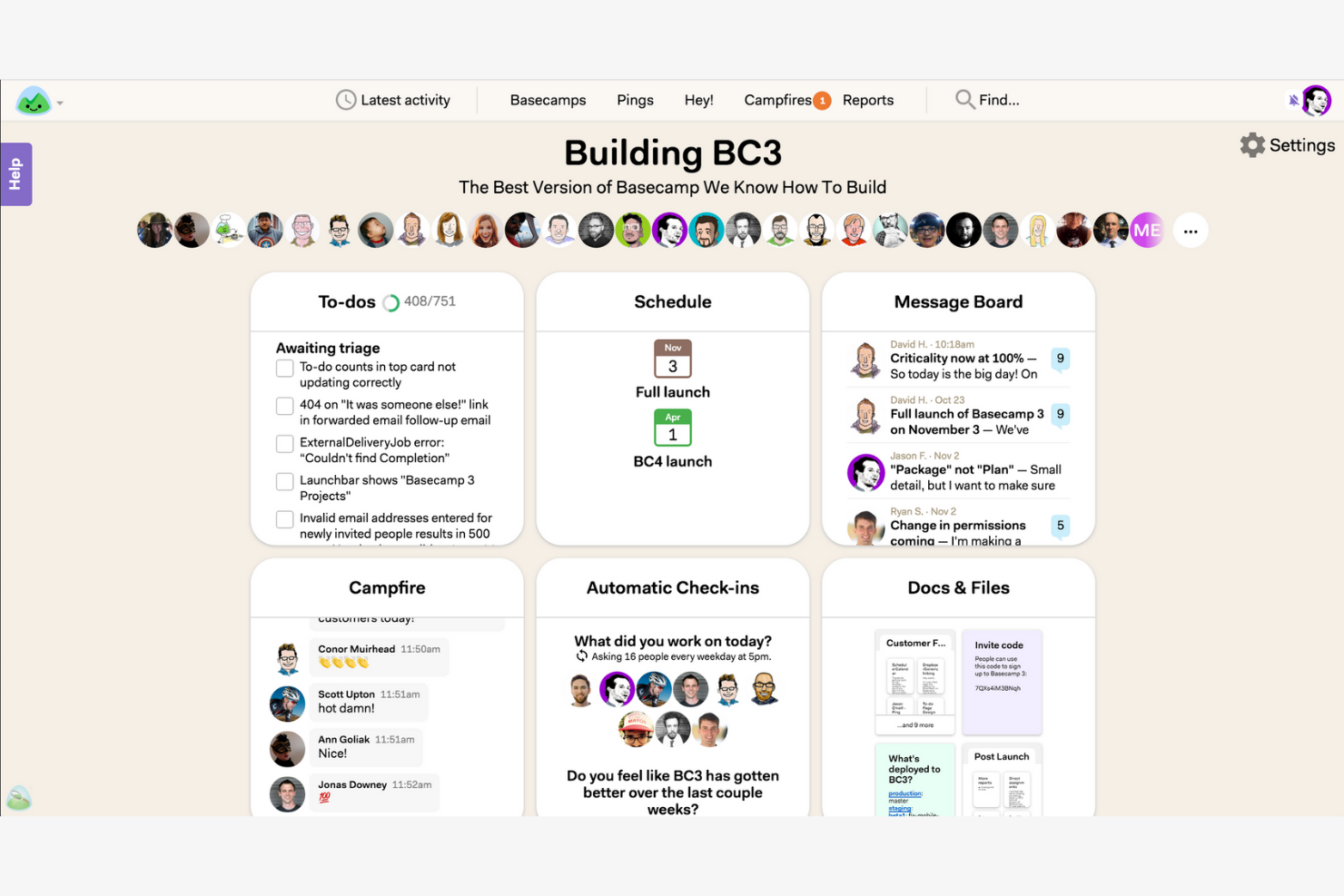
For teams that want to simplify communication and project updates, Basecamp offers a focused alternative to feature-heavy platforms. It’s especially useful for small businesses and agencies that need built-in chat, message boards, and shared schedules without complex task dependencies. Unlike many ClickUp alternatives, Basecamp keeps collaboration straightforward by centering everything around clear, team-wide conversations.
Why Basecamp Is a Good ClickUp Alternative
Basecamp stands out for teams that want simple, built-in communication tools without the clutter of advanced project management features. I picked Basecamp because its group chat, message boards, and automatic check-ins keep everyone in the loop without relying on external apps. The centralized schedule and document sharing features help teams coordinate work and share updates in one place. For businesses that value straightforward, transparent communication, Basecamp offers a focused alternative to more complex platforms.
Basecamp Key Features
Some other features in Basecamp help teams organize and manage their work more efficiently:
- To-Do Lists: Assign tasks, set due dates, and track progress for each project.
- Docs & Files: Store, organize, and share documents and files within each project space.
- Hill Charts: Visualize project progress and identify potential bottlenecks with a unique status view.
- Client Access: Invite clients to specific projects and control what they can see or interact with.
Basecamp Integrations
Integrations include Slack, Google Hangouts Chat, GitHub, Jira, Zendesk, Trello, Asana, Evernote, Clockify, and Harvest.
Pros and Cons
Pros:
- Client access controls support external collaboration
- Automatic check-ins encourage consistent status updates
- Message boards and group chat simplify team communication
Cons:
- Limited reporting and analytics functionality
- No native time tracking or task dependencies

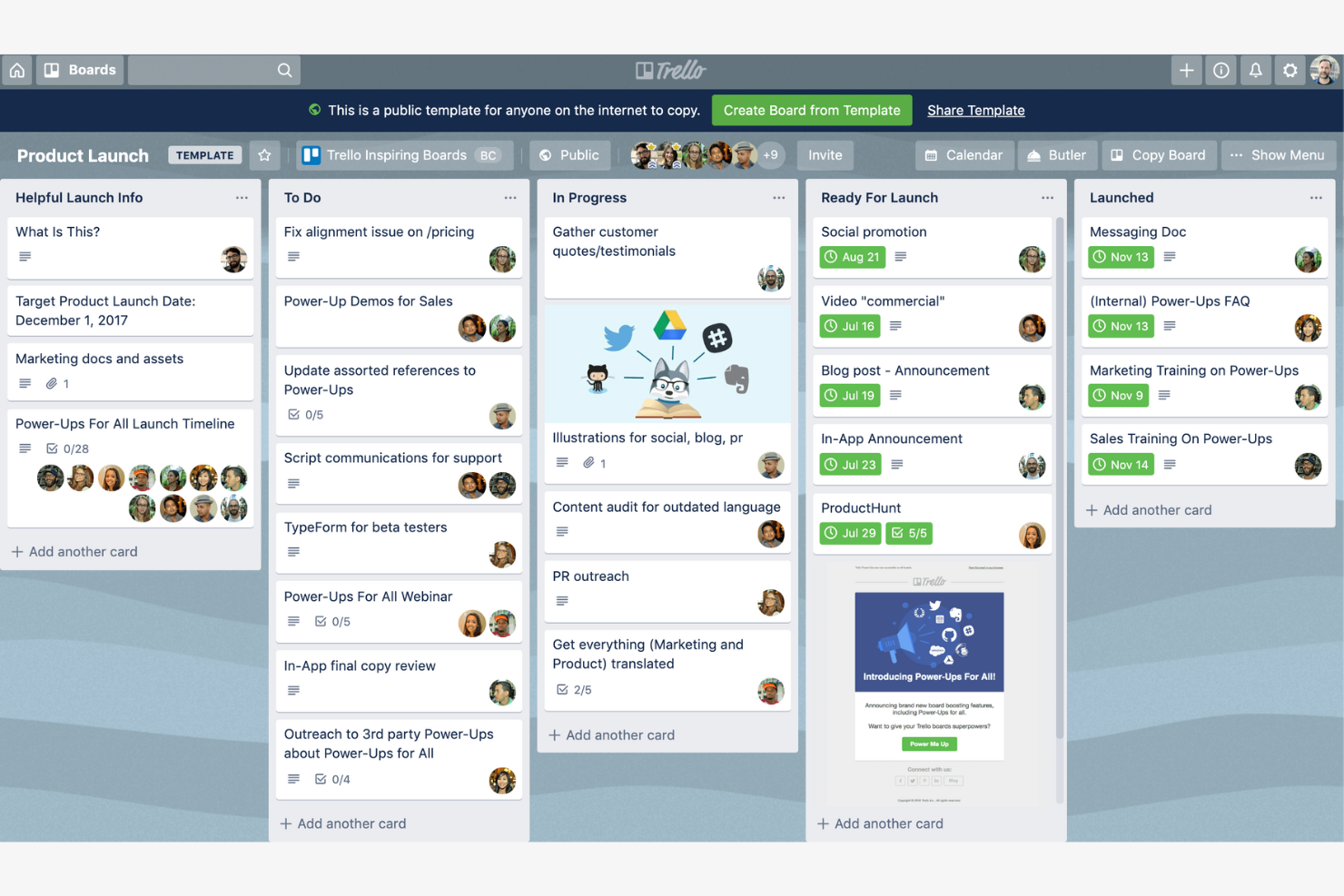
If you’re looking for a visual, card-based way to manage projects, Trello offers a flexible alternative to more structured platforms. Its Kanban-style boards appeal to teams that want to organize tasks, track progress, and collaborate without complex workflows. Trello stands out among ClickUp alternatives for its simplicity and adaptability to a wide range of project types.
Why Trello Is a Good ClickUp Alternative
For teams that want a straightforward, visual approach to project management, Trello’s kanban-style task boards offer a clear advantage over more complex tools. I picked Trello because its drag-and-drop cards, customizable lists, and board templates make it easy to map out workflows and track progress at a glance. You can quickly move tasks between stages, assign team members, and add checklists or attachments directly to cards. Trello is especially useful for teams that value flexibility and want to keep project tracking simple and visual.
Trello Key Features
Some other features in Trello help teams customize their boards and automate routine work:
- Power-Ups: Add extra functionality like calendar views, voting, or integrations with other tools.
- Butler Automation: Automate repetitive actions with rule-based triggers and custom buttons.
- Card Covers and Labels: Visually organize and prioritize tasks using color-coded labels and image covers.
- Activity Feed: Track all board activity and updates in a single, chronological stream.
Trello Integrations
Native integrations include Slack, Jira, Miro, Hubstaff, Evernote, Microsoft Teams, Google Drive, Dropbox, Planyway, and CloudApp.
Pros and Cons
Pros:
- Flexible card system supports checklists and attachments
- Butler automation reduces repetitive actions
- Kanban boards offer streamlined visual task management
Cons:
- Lacks user roles, meaning users can easily delete boards or move cards
- Reliance on Poer Ups to get advanced functionality (like calendar views or custom fields)
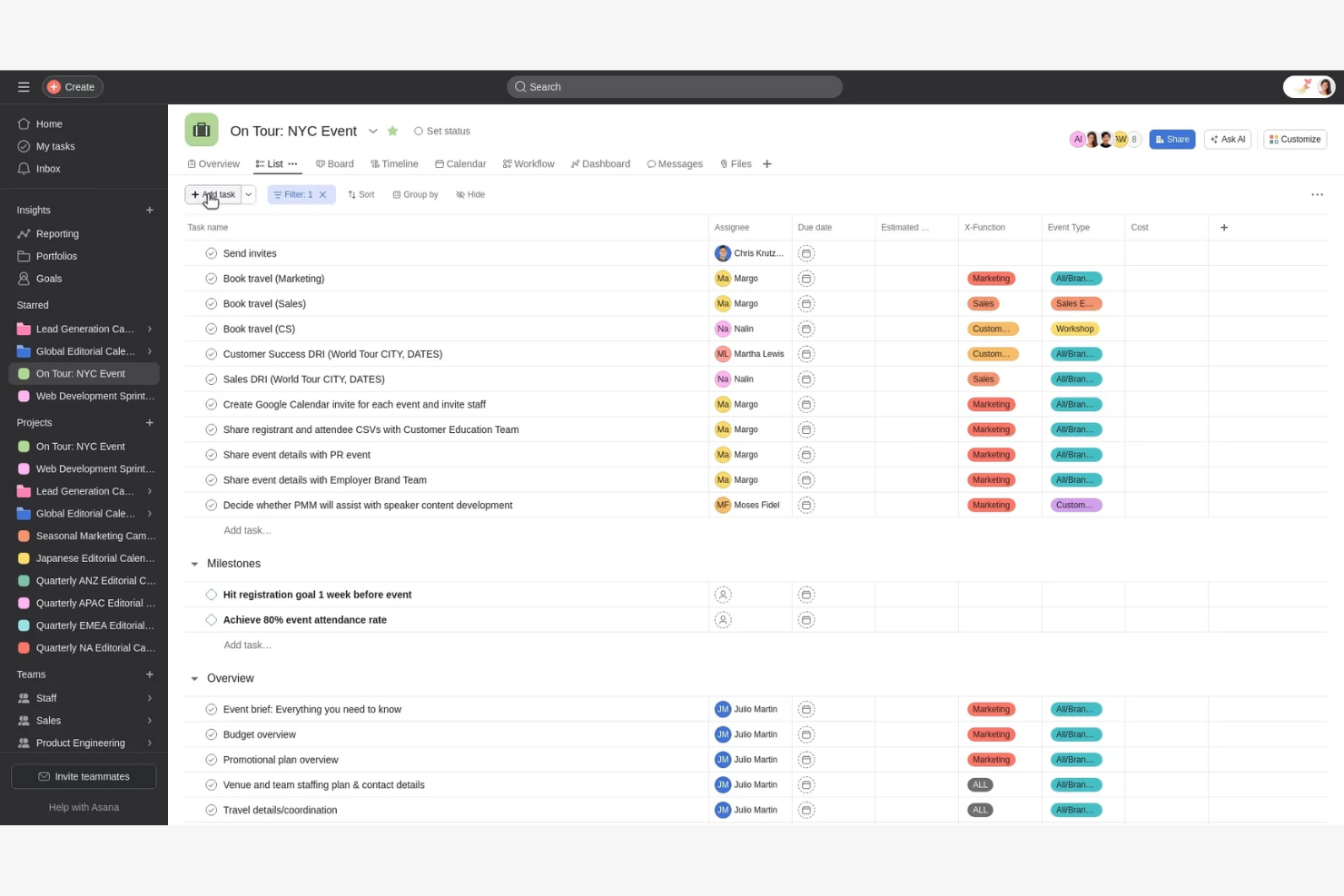
If your team needs to coordinate tasks across multiple departments, Asana offers structured project management with strong cross-team visibility. It’s especially useful for operations, marketing, and finance teams that need to align on shared goals and dependencies. Unlike many ClickUp alternatives, Asana’s timeline and workload features help you manage overlapping projects and resource allocation in one place.
Why Asana Is a Good ClickUp Alternative
For teams that need to coordinate work across departments, Asana offers features designed for cross-team alignment. I picked Asana because its timeline view and project dependencies make it easy to visualize how tasks connect across multiple groups. The workload management tool helps you balance assignments and avoid overloading team members. These features make Asana a strong ClickUp alternative for organizations focused on collaboration and resource planning.
Asana Key Features
Some other features in Asana help teams organize and track work more precisely:
- Custom Fields: Add specific data points to tasks for better tracking and reporting.
- Forms: Collect and route work requests directly into projects using customizable forms.
- Milestones: Mark key project checkpoints to track progress toward major goals.
- Task Comments: Collaborate and clarify details by adding comments directly to tasks.
Asana Integrations
Integrations include Slack, Google Drive, Microsoft Teams, Dropbox, Salesforce, Zoom, Gmail, Outlook, Jira, and HubSpot.
Pros and Cons
Pros:
- Built-in forms to standardize and automate work intake
- Task dependencies and workload management for resource planning
- Strong timeline view for cross-team project coordination
Cons:
- Advanced reporting requires higher-tier plans
- Limited native time tracking functionality

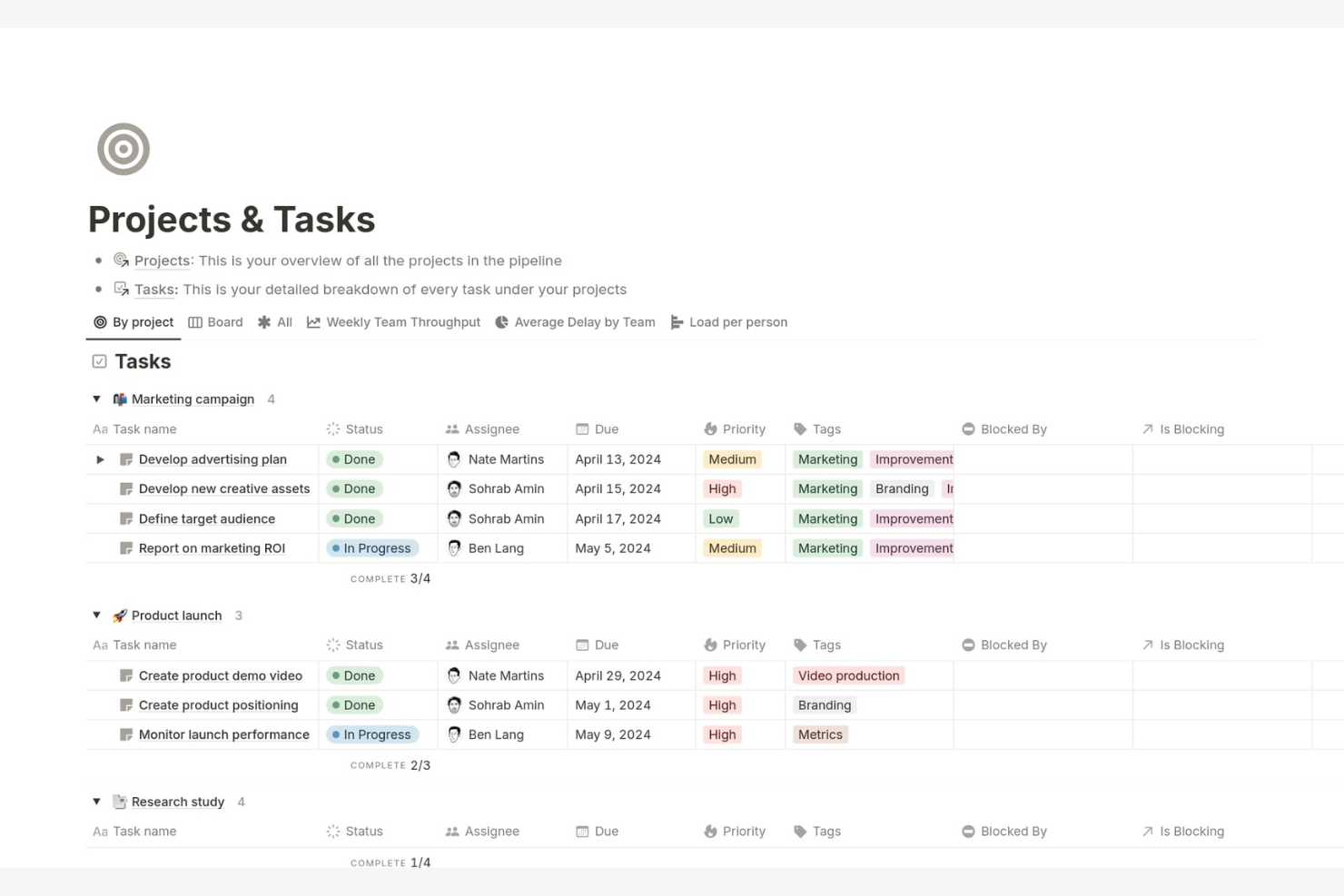
Notion blends document creation and project tracking in a single workspace, making it a strong fit for teams that want to manage knowledge and tasks side by side. If you need a flexible platform for building custom workflows and organizing both projects and documentation, Notion stands out from more rigid project management tools. Its modular approach lets you tailor pages, databases, and boards to match your team’s unique processes.
Why Notion Is a Good ClickUp Alternative
What sets Notion apart as a ClickUp alternative is its ability to combine project tracking with robust documentation features. I picked Notion for teams that want to keep meeting notes, project plans, and task boards all in one place. Its database-driven pages let you link tasks to docs, wikis, and knowledge bases, so everything stays connected. This flexibility makes it easy to build custom workflows that go beyond standard task lists.
Notion Key Features
Some other features in Notion make it a versatile choice for project management and collaboration:
- Custom Templates: Create and reuse templates for project plans, meeting notes, or task boards to standardize workflows across your team.
- Kanban Boards: Visualize tasks and projects using drag-and-drop kanban boards for easy status tracking.
- Calendar View: Organize and schedule tasks or events with a built-in calendar that syncs with your project databases.
- Permission Controls: Set granular access levels for pages and databases to manage who can view or edit specific content.
Notion Integrations
Integrations include Slack, Jira, GitHub, Asana, Google Drive, Figma, Trello, GitLab, Typeform, and Webex.
Pros and Cons
Pros:
- Strong internal knowledge management for content-heavy teams
- Highly customizable databases and layouts for tailored workflows
- Combines documentation, wikis, and task tracking in one workspace
Cons:
- No built-in time tracking for project billing
- Limited native Gantt and advanced dependency management
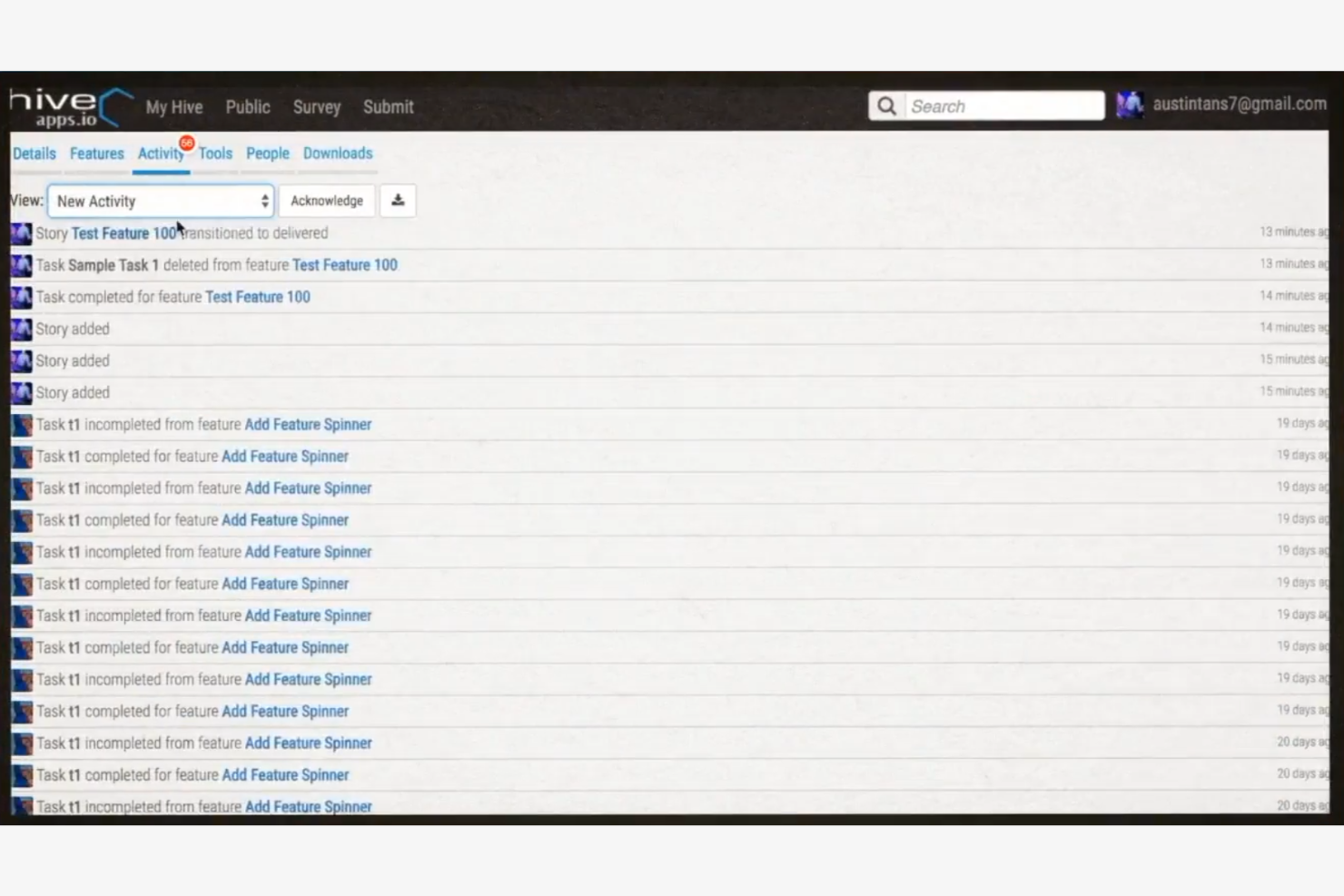
Teams looking for a ClickUp alternative with built-in time tracking will find Hive especially useful. It’s designed for project managers and operations leads who need to monitor hours spent on tasks without relying on third-party tools. Hive stands out by offering native time tracking alongside project management features, making it easier to manage productivity and billing in one place.
Why Hive Is a Good ClickUp Alternative
Unlike many ClickUp alternatives, Hive offers native time tracking built directly into its project management platform. I picked Hive because you can track time spent on tasks without needing external plugins or manual workarounds. The timesheet and reporting features let you monitor billable hours and analyze team productivity in real time. For teams that need to manage both projects and time tracking together, Hive provides a unified solution.
Hive Key Features
Some other features in Hive help teams manage projects and communication more efficiently:
- Action Cards: Assign, track, and update tasks with detailed cards that include attachments and comments.
- Gantt View: Visualize project timelines and dependencies using an interactive Gantt chart.
- Native Email Integration: Send and receive emails directly within Hive to keep all project communication in one place.
- Proofing and Approval Tools: Review, annotate, and approve files and documents without leaving the platform.
Hive Integrations
Integrations include Google Drive, Google Calendar, Dropbox, QuickBooks, Zoom, Microsoft OneDrive, Microsoft Teams, Outlook Calendar, Jira, and Slack.
Pros and Cons
Pros:
- Email integration centralizes project communication
- Proofing and approval tools for creative teams
- Native time tracking and timesheet reporting
Cons:
- Reporting customization options are limited
- Mobile app has reduced functionality compared to desktop

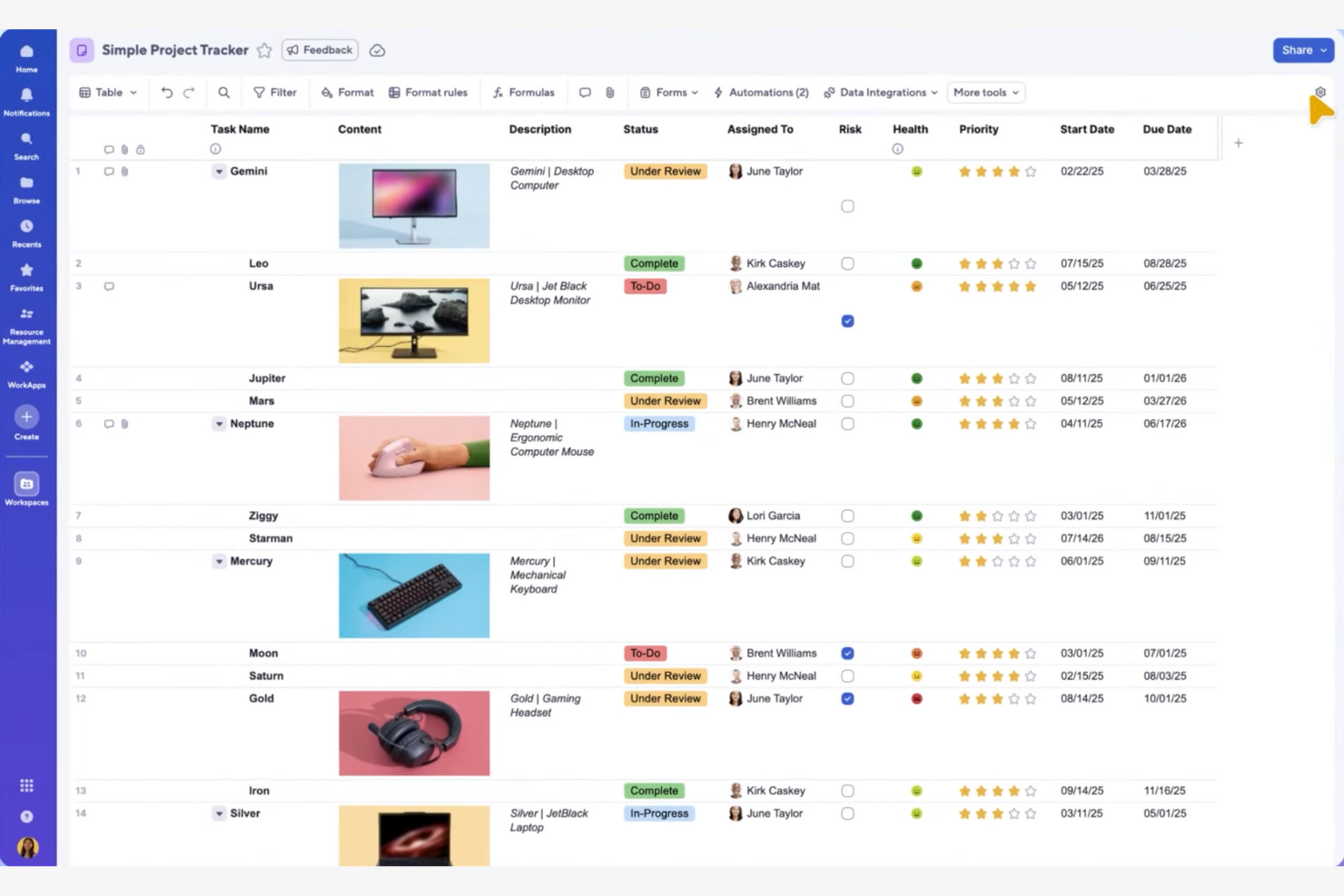
If your team prefers managing projects in a familiar spreadsheet format, Smartsheet offers a unique approach compared to other ClickUp alternatives. It’s especially useful for finance, operations, and project management professionals who rely on grid-based planning and data tracking. Smartsheet stands out by combining spreadsheet flexibility with project automation and collaboration tools.
Why Smartsheet Is a Good ClickUp Alternative
Unlike most ClickUp alternatives, Smartsheet gives you a spreadsheet-style interface for project planning and tracking. I picked Smartsheet because it lets you build custom grids, formulas, and conditional formatting directly into your project sheets. You can also automate workflows and set up approval processes using familiar spreadsheet logic. This approach is ideal for teams that want the structure of spreadsheets with the added power of project management features.
Smartsheet Key Features
Some other features in Smartsheet help teams coordinate and execute projects at scale:
- Gantt Chart View: Visualize project timelines and dependencies with interactive Gantt charts.
- Resource Management: Assign resources, monitor workloads, and forecast team capacity within projects.
- Cell Linking: Connect data across multiple sheets to keep information synchronized and up to date.
- Attachment Management: Store and share files directly within rows or sheets for easy reference.
Smartsheet Integrations
Integrations include Jira, Salesforce, Microsoft Teams, Slack, Google Drive, Power BI, Tableau, Adobe Creative Cloud, ServiceNow, and Docusign.
Pros and Cons
Pros:
- Interactive Gantt charts with dependency mapping
- Powerful formulas and cell linking for data-driven project tracking
- Spreadsheet-style interface familiar to operations and finance teams
Cons:
- Dashboards require separate configuration per project
- No built-in team chat or messaging tools
New Product Updates from Smartsheet

Smartsheet Adds Direct Data Import to Existing Sheets
Smartsheet introduces direct data import to existing sheets in table view. This update lets you import CSV, XLS, and XLSX files directly into sheets, reducing manual work and speeding up data setup. For more information, visit Smartsheet's official site.
 .
.
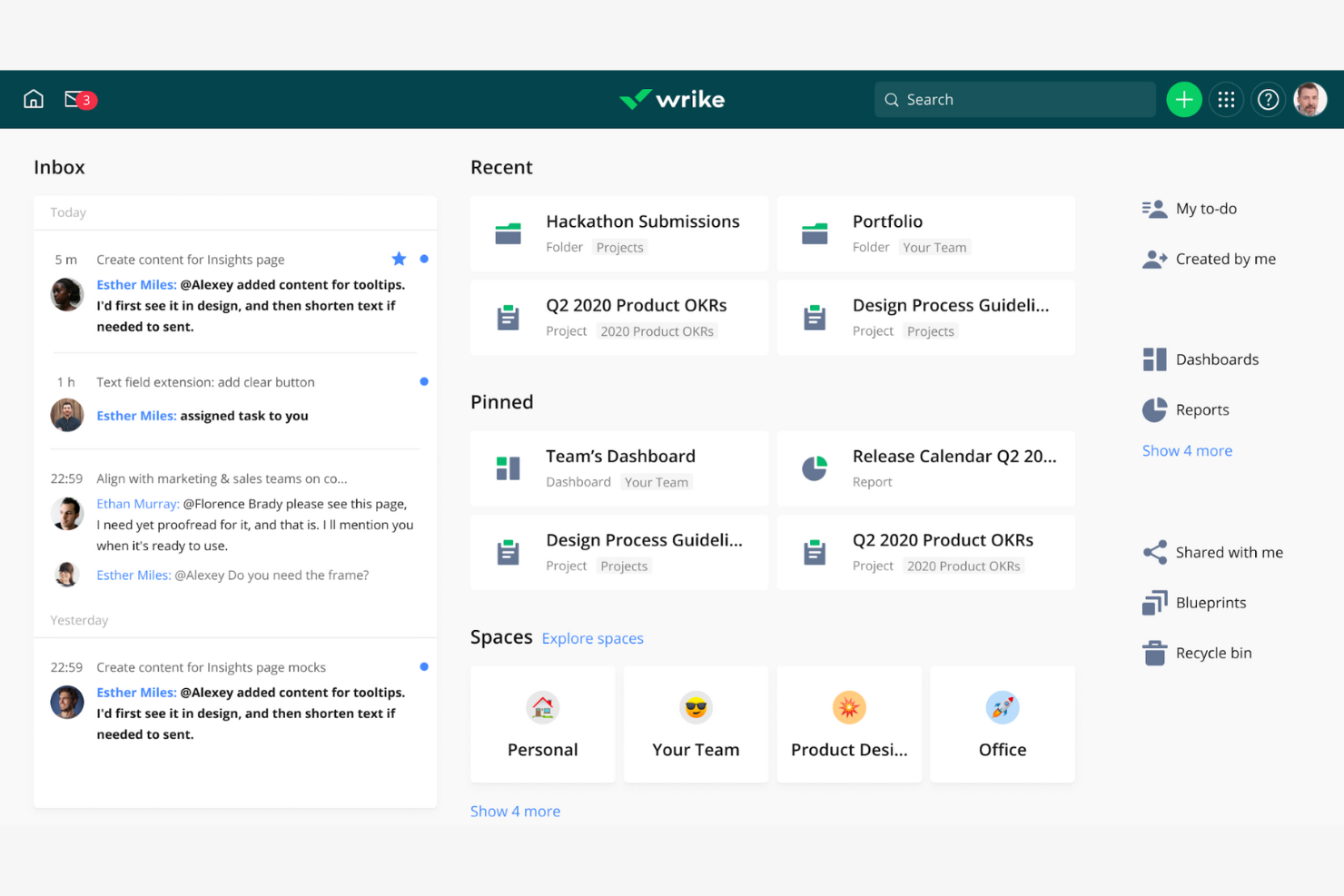
Wrike stands out for teams that need enterprise-grade workflow automation and detailed process control. If your business manages complex projects with multiple dependencies and approval steps, Wrike offers automation tools that go beyond most ClickUp alternatives. Its customizable workflows and automation rules help reduce manual work and keep projects moving without constant oversight — even at enterprise-level scale.
Why Wrike Is a Good ClickUp Alternative
For teams that need more advanced workflow automation than ClickUp provides, Wrike is a strong contender. I picked Wrike because its automation engine lets you set up custom triggers, actions, and approvals that fit complex business processes. You can automate repetitive tasks, route work based on status changes, and build multi-step approval chains without coding. This level of automation helps teams reduce manual intervention and maintain consistency across large projects.
Wrike Key Features
Some other features in Wrike help teams manage projects and collaborate more efficiently:
- Dynamic Request Forms: Collect project requests and automatically assign tasks based on form responses.
- Resource Management Tools: Allocate team members, track workloads, and forecast resource needs within projects.
- Document Versioning: Store, share, and manage multiple versions of files directly in project folders.
- Time Tracking: Log hours worked on tasks and generate time reports for billing or analysis.
Wrike Integrations
Integrations include Salesforce, Microsoft Teams, Google Drive, Slack, Zoom, Tableau, Power BI, QuickBooks, Jira, and Adobe Creative Cloud.
Pros and Cons
Pros:
- Custom request forms that auto-route work to the right teams
- Built-in resource management with workload visibility
- Advanced automation builder for complex, multi-step workflows
Cons:
- Interface can require a steep learning curve
- Key reporting and Gantt features are locked behind higher-tier plans
New Product Updates from Wrike

Streamlining Workspaces with New Updates
Wrike announces custom space templates, AI Agents in Wrike Labs, and a new Guage widget to improve project management. For more information, visit Wrike's official site.

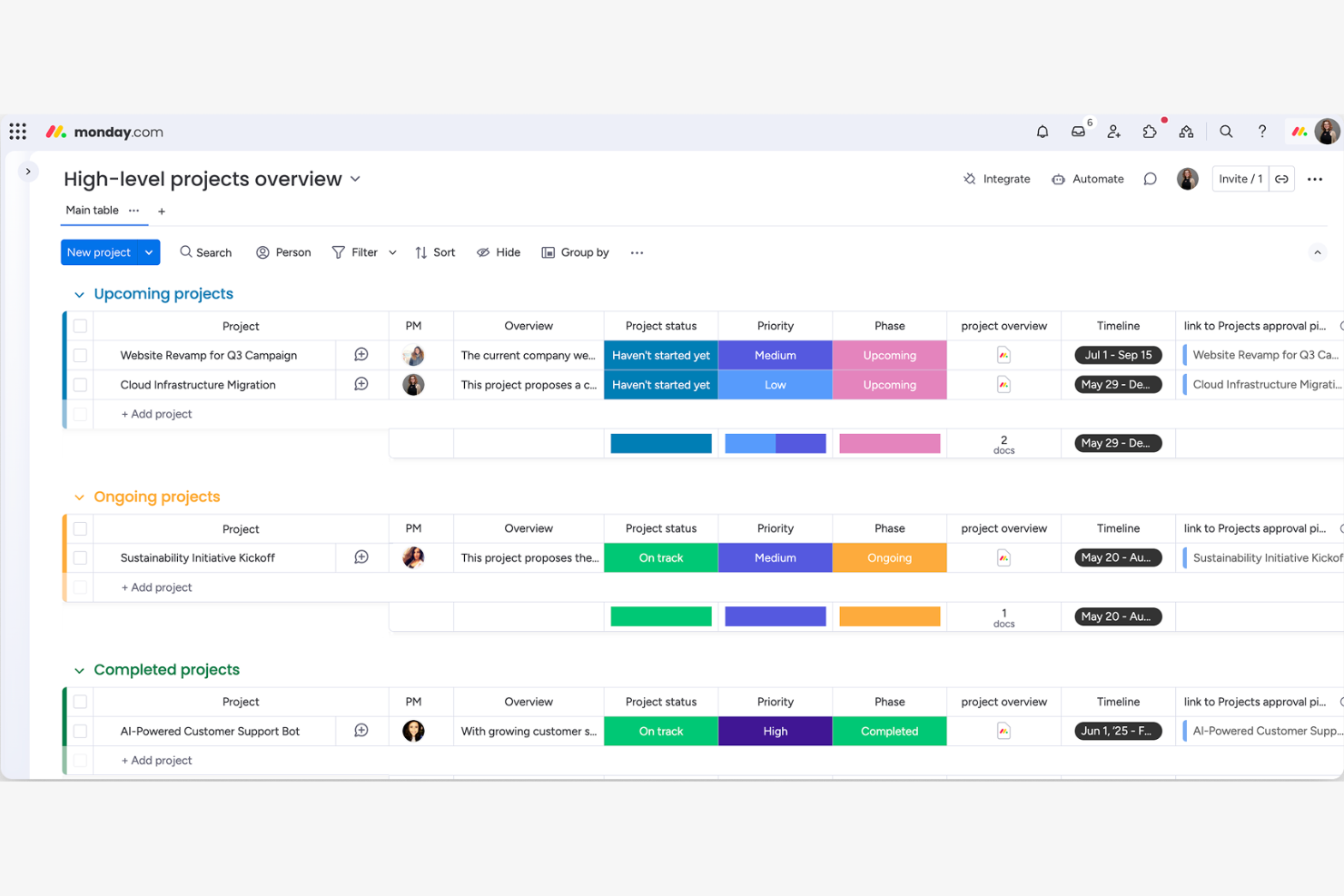
If you’re searching for a ClickUp alternative with standout visual dashboards, monday.com is worth a close look. It’s especially useful for teams that need to track projects, KPIs, and workflows at a glance. monday.com’s customizable boards and widgets make it easy to build visual overviews that help teams spot trends and bottlenecks quickly.
Why monday.com Is a Good ClickUp Alternative
For teams that want more visual control over their projects, monday.com offers a dashboard experience that’s hard to match. I picked monday.com because its dashboards let you combine charts, timelines, workload views, and custom widgets all in one place. You can tailor these dashboards to show project status, resource allocation, or key metrics at a glance. This level of visual customization helps teams quickly identify priorities and track progress in ways that ClickUp’s dashboards can’t always match.
monday.com Key Features
Some other features in monday.com help teams manage projects and collaboration more flexibly:
- Automations: Set up custom rules to automate repetitive tasks and notifications across your boards.
- Form Builder: Create shareable forms that feed responses directly into your project boards.
- File Management: Upload, organize, and share files within tasks and boards for easy access.
- Time Tracking: Track time spent on tasks directly from each item to monitor workloads and project hours.
monday.com Integrations
Integrations include Slack, Gmail, Microsoft Teams, GitLab, Mailchimp, Excel, Outlook, Docusign, Google Drive, and Trello.
Pros and Cons
Pros:
- Time tracking is integrated directly into task items
- Built-in automations for repetitive workflow actions
- Customizable visual dashboards for high-level project visibility
Cons:
- File storage limits vary significantly by pricing tier
- Advanced timeline and Gantt features require premium plans
Autres alternatives à ClickUp
Voici quelques autres options pour des alternatives à ClickUp qui n’ont pas été retenues dans ma sélection, mais qui méritent tout de même d’être étudiées :
- Teamwork.com
For billable-hour business models
- GoodDay
For built-in goal tracking features
- Screendragon
For managing complex approval workflows
- Backlog
For software development teams


Critères de sélection des alternatives à ClickUp
Pour sélectionner les meilleures alternatives à ClickUp, je me suis concentré sur ce qui importe réellement aux acheteurs de logiciels. Afin de garantir une évaluation cohérente et pratique, j’ai suivi le cadre suivant :
Fonctionnalité principale (25% de la note totale)
Pour figurer dans cette liste, chaque solution devait répondre à ces cas d’usage courants :
- Suivre l’avancement des projets avec des outils de visualisation clairs
- Définir des échéances et des rappels
- Permettre la collaboration en temps réel au sein des équipes
- Gérer le partage de fichiers et la pièce jointe de documents
Fonctionnalités distinctives supplémentaires (25% de la note totale)
Pour affiner davantage la sélection, j’ai également recherché des fonctionnalités uniques, telles que :
- Outils d’automatisation intégrés pour réduire le travail manuel
- Tableaux de bord personnalisables pour la visualisation des données
- Options natives de suivi du temps et de facturation
- Fonctionnalités avancées pour les rapports et l’analytique
- Fonctionnalité CRM pour les équipes en contact client ou marketing
Facilité d’utilisation (10% de la note totale)
Pour me faire une idée de la prise en main de chaque système, j’ai pris en considération les éléments suivants :
- Interface propre et conviviale
- Nombre minimal de clics pour accomplir les actions
- Structure de navigation logique et fluide
- Design réactif sur tous les appareils
- Hiérarchie visuelle claire
Intégration des nouveaux utilisateurs (10 % du score total)
Pour évaluer l’expérience d’intégration sur chaque plateforme, j’ai pris en compte les éléments suivants :
- Disponibilité de vidéos et tutoriels de formation
- Modèles préconstruits pour une configuration rapide
- Visites interactives du produit ou guides pas à pas
- Accès à des webinaires d’intégration ou à des sessions en direct
- Chatbots intégrés à l’application ou assistance guidée
Service client (10 % du score total)
Pour évaluer les services de support client de chaque fournisseur de logiciel, j’ai pris en compte les éléments suivants :
- Multiples canaux d’assistance disponibles
- Délais de réponse rapides
- Accès à un centre d’aide consultable
- Disponibilité du chat en direct ou du support téléphonique
- Qualité du dépannage et du suivi
Rapport qualité-prix (10 % du score total)
Pour évaluer le rapport qualité-prix de chaque plateforme, j’ai considéré les critères suivants :
- Plans tarifaires transparents et flexibles
- Fonctionnalités incluses à chaque niveau de prix
- Disponibilité d’un forfait gratuit ou d’une période d’essai
- Absence de frais cachés ou de coûts imprévus
- Réductions pour la facturation annuelle ou les associations à but non lucratif
Avis clients (10 % du score total)
Pour évaluer la satisfaction globale des clients, voici les points que j’ai pris en compte lors de la lecture des avis :
- Régularité des retours positifs
- Fréquence des plaintes concernant les bugs ou les interruptions
- Louanges pour des fonctionnalités ou un support spécifiques
- Retours sur la réussite de l’adoption par les équipes
- Avis sur les mises à jour et nouveautés
Pourquoi chercher une alternative à ClickUp ?
Bien que ClickUp soit un bon choix parmi les alternatives à ClickUp, il existe plusieurs raisons pour lesquelles certains utilisateurs recherchent d’autres solutions. Vous pourriez avoir besoin d’une alternative à ClickUp parce que…
- Vous souhaitez une interface plus simple, moins chargée en fonctionnalités
- Vous avez besoin de vues de projets ou de dispositions plus spécialisées
- Vous exigez le suivi du temps natif ou des rapports avancés
- Vous préférez un outil avec des modèles spécifiques à votre secteur
- Vous avez besoin d’un meilleur accès hors ligne ou de plus de fonctionnalités mobiles
- Vous recherchez un tarif plus transparent ou flexible
Si vous vous retrouvez dans l’un de ces cas, vous êtes au bon endroit. Ma liste contient plusieurs alternatives à ClickUp qui conviendront mieux aux équipes confrontées à ces difficultés et à la recherche d’autres solutions.
Principales fonctionnalités de ClickUp
Voici quelques-unes des principales fonctionnalités de ClickUp, pour vous aider à comparer ce que proposent les solutions alternatives :
- Gestion des tâches : Créez, assignez et organisez les tâches avec des statuts personnalisés, des priorités et des dates d’échéance pour garder les projets sur la bonne voie.
- Vues multiples de projet : Alternez entre les vues liste, tableau, calendrier, diagramme de Gantt et chronologie pour visualiser le travail selon le mode d’organisation de votre équipe.
- Champs personnalisés : Ajoutez des données spécifiques aux tâches, telles que des menus déroulants, des dates ou des chiffres, pour recueillir les informations propres à vos processus.
- Documents et wikis : Créez, partagez et collaborez sur des documents et bases de connaissances directement dans votre espace de travail.
- Automatisations : Configurez des déclencheurs et actions à base de règles pour automatiser les tâches répétitives et réduire le travail manuel.
- Suivi du temps : Enregistrez le temps passé sur les tâches de manière native ou via des intégrations pour surveiller la productivité et faciliter la facturation.
- Suivi des objectifs : Définissez, suivez et visualisez la progression vers les objectifs d’équipe ou individuels avec des cibles et des jalons mesurables.
- Rapports et tableaux de bord : Créez des tableaux de bord et des rapports personnalisés pour analyser la performance des projets, la charge de travail et les indicateurs de productivité.
- Intégrations : Connectez-vous aux outils populaires comme Slack, Google Drive, Zoom et GitHub pour centraliser le travail et la communication.
- Permissions et confidentialité : Contrôlez l’accès aux projets, tâches et documents grâce à des autorisations d’utilisateur et des paramètres de confidentialité détaillés.
Prochaine étape :
Si vous êtes en train de rechercher un logiciel de gestion de projet, contactez gratuitement un conseiller SoftwareSelect pour des recommandations personnalisées.
Vous remplissez un formulaire et avez une brève conversation où ils approfondissent vos besoins spécifiques. Vous recevrez ensuite une liste restreinte de logiciels à examiner. Ils vous accompagnent même tout au long du processus d’achat, y compris les négociations tarifaires.