

In qualità di CFO, devi destreggiarti tra conformità, gestione dei rischi ed efficienza. È davvero molto. Il software per la gestione degli audit può alleggerire questi oneri organizzando gli audit, monitorando i risultati e garantendo la conformità alle normative.
Testo e recensisco il software in modo indipendente, con una conoscenza approfondita dei settori finanziario e contabile. Il mio obiettivo è offrirti una recensione imparziale e ben documentata dei migliori strumenti disponibili per la gestione degli audit.
In questo articolo troverai informazioni pratiche sul software in grado di supportare al meglio le esigenze del tuo team. Analizzerò funzionalità, prezzi e vantaggi esclusivi offerti da ciascuno strumento, per aiutarti a prendere una decisione informata.
Perché fidarsi dei nostri consigli sui software
6,700+
Reviews
20
Industry experts
16+
Evaluation factors
14
Years
Le nostre recensioni riflettono il nostro giudizio indipendente, non un discorso di vendita. Scopri come manteniamo la trasparenza.
Per questa guida, abbiamo valutato gli strumenti attraverso test pratici e ricerche indipendenti, assegnando un punteggio agli strumenti in base ai nostri criteri di selezione.
Le nostre recensioni riflettono il nostro giudizio editoriale umano, non un discorso di vendita.
Tabella di confronto dei software per la gestione degli audit
Questa tabella di confronto riassume i dettagli sui prezzi delle mie migliori selezioni di software per la gestione degli audit:
| Tool | Best For | Trial Info | Price | ||
|---|---|---|---|---|---|
| 1 | Ideale per valutazioni degli audit basate sull'intelligenza artificiale | Demo gratuita disponibile | Prezzi su richiesta | Website | |
| 2 | Ideale per l'auditing AD in tempo reale | Prova gratuita di 30 giorni | Prezzo su richiesta | Website | |
| 3 | Ideale per la collaborazione | Demo gratuita disponibile. | Prezzo su richiesta | Website | |
| 4 | Ideale per la gestione di più framework di conformità | Demo gratuita disponibile | Prezzo su richiesta | Website | |
| 5 | Ideale per l'auditing IT | Prova gratuita di 20 giorni | Prezzo su richiesta | Website | |
| 6 | Le migliori funzionalità di governance, rischio e conformità | Demo gratuita disponibile. | Prezzo su richiesta | Website | |
| 7 | Ideale per le collaborazioni | Demo gratuita disponibile. | Prezzo su richiesta | Website | |
| 8 | Ideale per l'automazione | Demo gratuita disponibile. | Prezzo su richiesta | Website | |
| 9 | Ideale per società di revisione e assurance finanziaria | Demo gratuita disponibile. | Prezzo su richiesta | Website | |
| 10 | Ideale per l’audit sulla sicurezza dei lavoratori | Gratis fino a 10 utenti, e demo disponibile | Da $19/mese per ogni utente “completo”, con posti gratuiti illimitati | Website |


Recensioni dei migliori software per la gestione degli audit
Di seguito sono riportati i miei riepiloghi dettagliati dei migliori software per la gestione degli audit entrati nella mia selezione. Le mie recensioni offrono uno sguardo approfondito alle funzionalità principali, ai pro e ai contro, alle integrazioni e ai casi d’uso ideali di ogni strumento, per aiutarti a trovare quello più adatto a te.
 Ideale per valutazioni degli audit basate sull'intelligenza artificiale
- Demo gratuita disponibile
- Prezzi su richiesta
Visit WebsiteCustomer Rating:4.1/5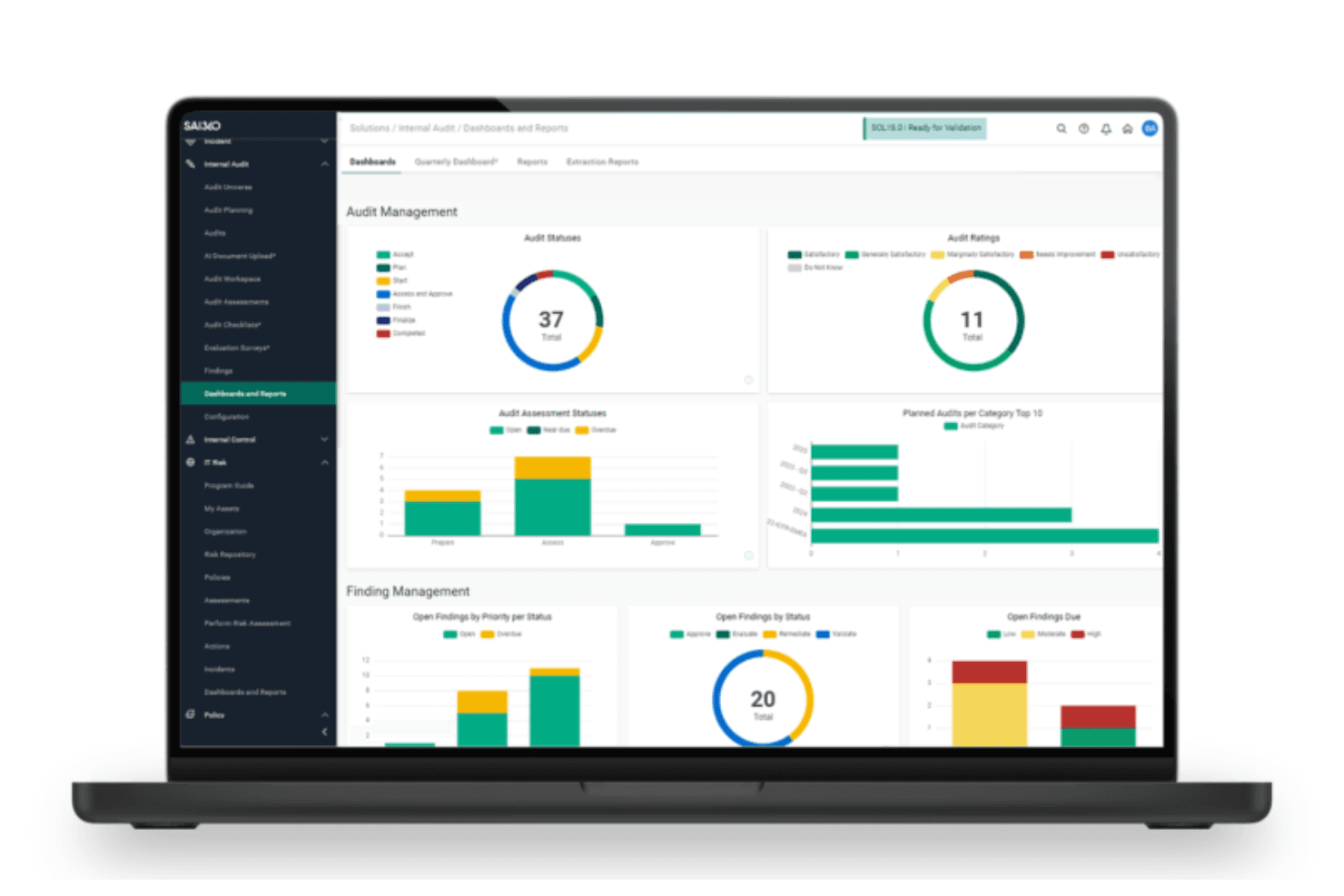
La dashboard dell'audit interno di SAI360 offre informazioni visive in tempo reale sugli stati degli audit, sui rilievi e sulle valutazioni dei rischi. SAI360 è una suite GRC cloud che riunisce audit interno, test dei controlli, conformità SOX e gestione dei rischi aziendali in un'unica piattaforma connessa.
Per chi è più adatto SAI360?
SAI360 è particolarmente adatto ai team di audit interno e conformità dei settori regolamentati, in particolare dei servizi finanziari, che necessitano di audit, controlli e gestione dei rischi connessi in un'unica piattaforma.
Perché ho scelto SAI360
SAI360 si è guadagnato un posto nella mia lista ristretta perché sfrutta l'intelligenza artificiale per analizzare i domini di rischio aziendale e raggruppare automaticamente i segnali di audit correlati. Apprezzo soprattutto la possibilità di generare valutazioni dei rischi in tempo reale ed eseguire scenari automatizzati senza dover consolidare manualmente i dati dei controlli provenienti da più reparti. Il suo motore dinamico di assegnazione dei punteggi di rischio segnala potenziali lacune di conformità prima dell'inizio degli audit, consentendo ai team di affrontare proattivamente i punti di esposizione.
Funzionalità principali di SAI360
- Definizione dell'ambito dell'audit basata sul rischio: classifica automaticamente le aree di audit in base a esposizione, frequenza e impatto, utilizzando valutazioni e fattori di rischio precedenti.
- Mappatura dei controlli su più framework: mappa simultaneamente i controlli tra COSO, SOX, ISO e NIST per identificare sovrapposizioni e colmare le lacune.
- Accesso offline alle carte di lavoro: consente agli auditor di completare e approvare le carte di lavoro senza una connessione Internet, sincronizzando poi automaticamente le modifiche.
- Dashboard di audit in tempo reale: offre viste dettagliate e configurabili dei rilievi, dello stato delle attività correttive e delle prestazioni degli audit in tutta l'organizzazione.
Integrazioni di SAI360
SAI360 si connette a oltre 100 applicazioni e fornitori di contenuti, tra cui SAP, Oracle, NetSuite, Microsoft 365, SharePoint, ServiceNow, Salesforce, Power BI e DocuSign.
Pros and Cons
Pros:
- I rilievi si collegano direttamente a rischi e controlli
- La revisione delle evidenze assistita dall'intelligenza artificiale riduce il lavoro di documentazione
- Le carte di lavoro offline vengono sincronizzate al termine del lavoro sul campo
Cons:
- La personalizzazione complessa dei report rallenta la consegna degli audit
- Nessun portale dedicato al comitato di audit
Learn more about SAI360: Ideale per l'auditing AD in tempo reale
- Prova gratuita di 30 giorni
- Prezzo su richiesta
Visit WebsiteCustomer Rating:4.4/5
Il sistema di ManageEngine ADAudit Plus fornisce agli utenti notifiche in tempo reale per qualsiasi evento critico. ManageEngine ADAudit Plus è uno strumento completo di auditing di Active Directory progettato per aiutare le organizzazioni a monitorare le modifiche e le attività all'interno dell'ecosistema Windows. Offre auditing e notifiche in tempo reale per Active Directory, Azure AD, file server, server Windows e workstation.
Perché ho scelto ManageEngine ADAudit Plus: Apprezzo il fatto che fornisca auditing e notifiche in tempo reale per Active Directory, garantendo che qualsiasi cambiamento nell'ambiente Windows venga prontamente rilevato e gestito. La capacità dello strumento di tracciare gli accessi degli utenti, monitorare le modifiche ai file e gestire le autorizzazioni è fondamentale per mantenere sicurezza e conformità. Inoltre, le sue analisi del comportamento degli utenti e gli avvisi di attività sospette si distinguono nella prevenzione di potenziali violazioni della sicurezza e nel garantire l'aderenza a regolamenti come GDPR e HIPAA.
ManageEngine ADAudit Plus Funzionalità principali e integrazioni:
Le funzionalità principali includono un auditing dettagliato dei file server, il tracciamento degli accessi e delle modifiche a file e cartelle su ambienti Windows e NetApp. La funzione di blocco e gestione degli account aiuta inoltre a identificare ed eliminare efficacemente i problemi di blocco degli account.
ADAudit Plus include anche un auditing completo delle group policy e audit avanzati per le workstation, rilevando le attività di accesso e disconnessione degli utenti, installazioni software e modifiche agli utenti e gruppi locali.
Le integrazioni includono ManageEngine ServiceDesk Plus, ManageEngine OpManager, ManageEngine Log360, ManageEngine EventLog Analyzer, Microsoft SCOM, Microsoft Azure, VMware, Office 365 e soluzioni SIEM come Splunk, IBM QRadar e ArcSight.
Pros and Cons
Pros:
- Offre report per la conformità ai requisiti normativi
- I report possono essere personalizzati in base alle esigenze specifiche dell'organizzazione.
- Approfondimenti dettagliati sul comportamento degli utenti e sulle modifiche al sistema
Cons:
- Può risultare troppo complesso per le piccolissime realtà con risorse IT limitate
- Supporto limitato per ambienti non Windows
Learn more about ManageEngine ADAudit Plus: Ideale per la collaborazione
- Demo gratuita disponibile.
- Prezzo su richiesta
Visit WebsiteCustomer Rating:4.6/5
Le dashboard intuitive di Workiva offrono potenti capacità di visualizzazione dei dati. Workiva è una piattaforma per la gestione integrata del rischio, la reportistica finanziaria, la revisione e l’ESG dedicata alle grandi aziende. Aiuta a collegare i team all’interno dell’organizzazione per migliorare la collaborazione e l’efficienza, allineando i progetti quotidiani agli obiettivi più ampi dell’azienda.
Perché ho scelto Workiva: Ho scelto Workiva per le sue funzionalità di collaborazione e facilità d’uso, due elementi che rendono questo strumento una buona opzione sia per la collaborazione interna sia per la comunicazione con revisori esterni o enti regolatori.
Funzionalità principali e integrazioni di Workiva:
Le funzionalità principali includono strumenti centralizzati di collaborazione e comunicazione all’interno della piattaforma Workiva, oltre al collegamento automatico dei dati provenienti da tutte le piattaforme integrate.
Mi piace anche come Workiva colleghi i flussi di lavoro di audit e gestione del rischio direttamente alla reportistica finanziaria. Il software semplifica inoltre la definizione dei permessi basati sui ruoli, facilitando così la condivisione e la collaborazione in modo più sicuro.
Le integrazioni comprendono BlackLine, Oracle, Google Drive, Excel, SAP, Microsoft Dynamics e Workday.
Pros and Cons
Pros:
- Oltre 3.000 modelli di revisione pre-costruiti
- Funzionalità collaborative
- Integrazioni semplici con decine di popolari strumenti aziendali
Cons:
- Eccessivo per le piccole aziende
Learn more about Workiva: Ideale per la gestione di più framework di conformità
- Demo gratuita disponibile
- Prezzo su richiesta
Visit WebsiteCustomer Rating:4.6/5
Hyperproof offre dashboard e report personalizzabili per fornire una visibilità in tempo reale sulle attività di audit. Hyperproof è una piattaforma per la gestione della conformità che aiuta gli utenti ad automatizzare i flussi di lavoro, prepararsi agli audit e gestire i rischi. Fornisce strumenti per la gestione del rischio, dei fornitori e degli audit, offrendo funzionalità come la mappatura dei controlli ai requisiti di conformità, l'automazione della raccolta delle prove e il monitoraggio dello stato di conformità.
Perché ho scelto Hyperproof: Ho scelto Hyperproof perché supporta oltre 100 framework di conformità, inclusi SOC 2, ISO 27001, GDPR e HIPAA, e offre una piattaforma centralizzata per tracciare e gestire tutte le attività e la documentazione necessarie per la conformità, aiutando nella preparazione agli audit.
Caratteristiche e integrazioni principali di Hyperproof:
Caratteristiche principali includono la visibilità in tempo reale della conformità, che offre monitoraggio continuo e aggiornamenti, mantenendo il team di audit sempre informato sullo stato di conformità.
Inoltre, la piattaforma offre strumenti per raccogliere, prioritizzare, tracciare e mitigare i rischi. Include un registro dei rischi, la gestione delle problematiche e funzioni di reporting.
Le integrazioni includono Jira, Slack, Microsoft Teams, Okta, OneDrive, Google Drive, AWS, Azure, GitHub, GitLab, Confluence, ServiceNow, Microsoft 365, Zoom, Box, Dropbox, Asana, Trello, Salesforce e Smartsheet.
Pros and Cons
Pros:
- Automatizza la raccolta delle prove per risparmiare tempo durante gli audit
- Framework predefiniti per la gestione della conformità
- Interfaccia utente intuitiva
Cons:
- Limitazioni nei report
- Limiti alla personalizzazione della piattaforma
Learn more about Hyperproof: Ideale per l'auditing IT
- Prova gratuita di 20 giorni
- Prezzo su richiesta
Visit WebsiteCustomer Rating:4.5/5
L'interfaccia utente di Netwrix è estremamente semplice e un po' datata, ma è più facile da usare rispetto alla maggior parte degli altri strumenti. Netwrix Auditor è un software di auditing IT progettato per aiutare a rilevare minacce alla sicurezza, garantire la conformità e supportare i team IT nel mantenimento di ambienti stabili. Dispone di un'interfaccia semplice e chiara che dovrebbe risultare facile da imparare per la maggior parte degli utenti.
Perché ho scelto Netwrix: Ho selezionato Netwrix Auditor per la sua attenzione alla sicurezza IT, all'analisi delle minacce e alle attività di auditing.
Caratteristiche principali e integrazioni di Netwrix:
Caratteristiche principali includono la raccolta e l'auditing centralizzati e unificati dei dati di molti sistemi IT comuni (Azure, Microsoft 365, ecc.) al fine di ridurre il tempo necessario per raccogliere dati da diverse fonti.
Apprezzo anche i report predefiniti progettati per rispettare standard di settore e normative legali (GDPR, HIPAA, CJIS, ecc.).
Le integrazioni includono SharePoint, Microsoft 365, Azure AD, Oracle Database e SQL Server.
Pros and Cons
Pros:
- Supporto per la conformità alle normative tecnologiche
- Identifica schemi di minacce e potenziali violazioni
- Avvisi di attività anomala
Cons:
- Progettato specificamente per audit IT
Learn more about Netwrix Auditor: Le migliori funzionalità di governance, rischio e conformità
- Demo gratuita disponibile.
- Prezzo su richiesta
Visit WebsiteCustomer Rating:3.3/5
MetricStream dispone di dashboard intuitivi con ottime analisi dei dati e visualizzazioni. MetricStream è una soluzione software per la governance, il rischio e la conformità (GRC). La sua linea di prodotti integrata offre strumenti per la GRC aziendale, la gestione degli audit interni, ES GRC (ambientale, sociale e corporate GRC), e flussi di lavoro Cyber GRC.
Perché ho scelto MetricStream: Ho selezionato MetricStream perché, oltre a essere uno strumento di gestione degli audit, copre anche vari componenti di governance, conformità e gestione dei rischi sia per le operazioni aziendali che per l’IT.
Caratteristiche distintive e integrazioni di MetricStream:
Le caratteristiche distintive includono funzionalità di auditing abilitate dall’IA, che consentono a MetricStream di selezionare campioni casuali per i test, riconciliare automaticamente i conti del libro mastro e verificare l’accuratezza matematica delle voci di bilancio, dei totali e dei subtotali.
Oltre ai dashboard dall’aspetto accattivante, apprezzo anche gli strumenti e i modelli di reportistica degli audit di MetricStream, che facilitano la condivisione dei risultati con le parti interessate.
Le integrazioni includono scanner di minacce e vulnerabilità, strumenti per la conformità normativa e strumenti di sicurezza tramite le API MetricStream.
Pros and Cons
Pros:
- Relativamente semplice da usare
- Gestione integrata del rischio, sicurezza informatica, audit interno
- Ottimi report e dashboard
Cons:
- Integrazioni limitate
Learn more about MetricStream: Ideale per le collaborazioni
- Demo gratuita disponibile.
- Prezzo su richiesta
Visit WebsiteCustomer Rating:3.6/5
Il software di auditing di Archer adotta un approccio basato sul rischio per la prioritizzazione. Archer Audit Management è un software di audit interno integrato nella piattaforma Archer per la gestione integrata del rischio. È progettato come sistema centralizzato per gestire l’intero ciclo di vita dell’audit interno.
Perché ho scelto Archer Audit Management: Ho selezionato Archer Audit Management per le sue funzionalità di collaborazione. In particolare, apprezzo che consenta la collaborazione trasversale promuovendo il lavoro congiunto tra i team di audit, rischio, conformità e management. Per le grandi multinazionali con team dipartimentali isolati, queste funzionalità di collaborazione rappresentano un punto di forza fondamentale.
Funzionalità principali e integrazioni di Archer Audit Management:
Le funzionalità principali includono flussi di lavoro integrati per la gestione delle problematiche di audit e la risoluzione delle non conformità, strumenti per la creazione di engagement e workpaper di audit, e portali di informazioni self-service dedicati agli auditor esterni.
Mi piace il fatto che i piani di audit di Archer siano allineati agli standard attuali dell’Institute of Internal Audit (IIA) e al framework del Committee of Sponsoring Organizations (COSO), per garantire che i team affrontino i controlli interni e i rischi operativi più rilevanti.
Le integrazioni comprendono la raccolta interna dei dati attraverso importazioni dirette, flussi di dati e l’API di Archer.
Pros and Cons
Pros:
- Strumenti trasversali integrati che favoriscono la collaborazione
- Implementazione flessibile
- Conforme a IIA e COSO
Cons:
- Integrazioni limitate
Learn more about Archer: Ideale per l'automazione
- Demo gratuita disponibile.
- Prezzo su richiesta

SAP Internal Audit Management offre flussi di lavoro centralizzati per la pianificazione degli audit al fine di migliorarne l'efficienza. SAP Internal Audit Management è uno dei migliori software di gestione degli audit, parte della suite di strumenti aziendali SAP. È progettato specificamente per i team di audit interno.
Perché ho scelto SAP Internal Audit Management: Ho selezionato SAP Internal Audit Management per le sue ampie funzionalità di automazione e l'attenzione al controllo interno. Apprezzo come gli strumenti SAP basati su intelligenza artificiale e machine learning possano aiutare i team di audit interno a risparmiare tempo automatizzando alcune delle procedure di audit più ripetitive e monotone.
Caratteristiche distintive e integrazioni di SAP Internal Audit Management:
Caratteristiche distintive includono procedure di audit interno automatizzate per la documentazione delle evidenze, l'organizzazione dei working paper e la reportistica d'audit.
Apprezzo anche la versatilità del software SAP: può essere implementato on-premise o in cloud, consentendo ai team di accedere tramite qualsiasi dispositivo mobile o browser web.
Le integrazioni includono SAP Risk Management, SAP Process Control e altri prodotti della suite SAP.
Pros and Cons
Pros:
- Implementazione flessibile tramite cloud o locale
- Eccellente infrastruttura per la sicurezza dei dati
- Strumenti di intelligenza artificiale e machine learning
Cons:
- Curva di apprendimento ripida
Learn more about SAP Audit Management: Ideale per società di revisione e assurance finanziaria
- Demo gratuita disponibile.
- Prezzo su richiesta

I dashboard di TeamMate sono semplici e facili da navigare TeamMate di Wolters Kluwer è un software di revisione completo, pensato per grandi studi di revisione e società di assurance. È utilizzato da team di audit interni, così come da società di contabilità pubblica e consulenti esterni.
Perché ho scelto TeamMate: Ho selezionato TeamMate perché offre una versione specificamente progettata per team di revisione interna e revisori indipendenti, che effettuano audit finanziari e di conformità per grandi istituti finanziari.
Le aziende che operano oggi nel settore finanziario devono soddisfare rigidi requisiti normativi e standard di controllo interno, e TeamMate aiuta i revisori a garantire la conformità.
Caratteristiche principali e integrazioni di TeamMate:
Le caratteristiche principali includono una libreria con oltre 150 Strumenti di Audit Assistito dal Computer (CAAT) per l'analisi dei dati. La funzione TeamMate Analytics è dotata di strumenti di manipolazione dati che formattano rapidamente file di dati grezzi affinché i team possano effettuare analisi approfondite.
Mi piace molto anche l'applicazione TeamMate University; riduce la curva di apprendimento e aiuta i team a iniziare rapidamente e a comprendere a fondo le diverse funzionalità e strumenti del software.
Le integrazioni includono possibilità di integrazione personalizzata tramite le API di TeamMate.
Pros and Cons
Pros:
- Capacità estese di analisi dati
- Progettato specificamente per il settore dei servizi finanziari
- Onboarding rapido
Cons:
- Costoso
- Non adatto a piccole aziende
Learn more about TeamMate: Ideale per l’audit sulla sicurezza dei lavoratori
- Gratis fino a 10 utenti, e demo disponibile
- Da $19/mese per ogni utente “completo”, con posti gratuiti illimitati

Le checklist di SafetyCulture aiutano i lavoratori ad assicurarsi che le normative di sicurezza vengano rispettate sul campo. SafetyCulture è un software per la gestione della sicurezza e della conformità progettato pensando alla sicurezza dei lavoratori.
Il piano a pagamento include due diversi tipi di “posti”—i posti completi hanno accesso a tutte le funzionalità, inclusa la gestione e le ispezioni, mentre i posti gratuiti possono comunque creare e completare attività e inviare messaggi.
Perché ho scelto SafetyCulture: ho selezionato SafetyCulture perché è specificamente focalizzato sulla sicurezza dei lavoratori e sull’assicurare la conformità con OSHA e altre normative.
Caratteristiche e integrazioni distintive di SafetyCulture:
Le caratteristiche distintive includono checklist facili da compilare per i dipendenti prima e durante il lavoro sul campo.
Apprezzo molto come i dipendenti possano usare l’app mobile per scattare e caricare foto, assegnare compiti ad altri (anche utenti non SafetyCulture) e fare il check-in con i supervisori.
Le integrazioni includono i prodotti delle suite Google e Microsoft, Salesforce, SAP e Zapier.
Pros and Cons
Pros:
- Il design orientato al mobile è molto intuitivo
- Favorisce una cultura aziendale della sicurezza e della conformità alle policy
- Molto conveniente
Cons:
- Più focalizzato sulla sicurezza dei lavoratori che sull’audit
- Non è un software di audit interno autonomo
Learn more about SafetyCulture:
Altri software per la gestione degli audit
Ecco alcune opzioni aggiuntive di software per la gestione degli audit che non sono entrate nella mia selezione, ma che vale comunque la pena prendere in considerazione:
- 11DiligentIdeale per la gestione dei controlli interni
- 12AuditBoardIdeale per audit operativi
- 13Ideagen Pentana AuditIdeale per la pianificazione degli audit
- 14MindBridgeIdeale per audit finanziari
- 15OnspringIdeale per audit ad alto volume
- 16Mitratech AlyneIdeale per valutazioni dei rischi basate sull’IA
Come Valuto i Software di Gestione degli Audit
Valuto ogni strumento su due livelli: le funzionalità indispensabili come la pianificazione degli audit e la gestione dei documenti di lavoro, e poi i fattori distintivi che mettono in risalto le piattaforme orientate alla SOX rispetto ai tool GRC generici.
Funzionalità Principali (Requisiti Minimi per Questa Lista)
Quando seleziono i tool per la mia lista, li valuto su una scala da 0 (non offre la funzionalità) a 5 (eccelle in quest'area) per ciascuna delle funzionalità principali elencate di seguito. Poi calcolo il punteggio totale del tool in percentuale. Ogni strumento deve raggiungere un punteggio minimo totale del 65% per essere preso in considerazione.
- Pianificazione e Programmazione degli Audit: Cerco strumenti che consentano di costruire un piano annuale di audit basato sul rischio, assegnare le verifiche ai membri del team e modificare le tempistiche quando le priorità cambiano a metà ciclo.
- Gestione dei Documenti di Lavoro e delle Evidenze: Un archivio strutturato dei documenti di lavoro è fondamentale: verifico se sia possibile collegare l'evidenza a controlli specifici, mantenere la cronologia delle versioni e inoltrare i file per la revisione e l'approvazione.
- Valutazione dei Rischi e dei Controlli: Ogni strumento dovrebbe supportare matrici rischio-controllo e workflow di test dei controlli, soprattutto per i team che gestiscono programmi SOX o allineati al COSO su più unità aziendali.
- Tracciamento delle Problematiche e delle Azioni Correttive: Valuto come le evidenze si muovono dall'identificazione alla risoluzione: assegnazione del responsabile, date di scadenza, trigger di escalation e la possibilità di verificare la risoluzione prima della chiusura.
- Reportistica e Dashboard degli Audit: Una reportistica chiara connette il team di audit alla leadership. Cerco dashboard configurabili e output pronti per il comitato che sintetizzino stato, risultati e tendenze.
- Workflow e Approvazione delle Revisioni: Fasi strutturate di revisione con autorizzazioni basate sui ruoli garantiscono la coerenza metodologica. Verifico la presenza di catene di approvazione multilivello e tracce di audit immutabili che documentano ogni azione.
Una volta ottenuta una lista di strumenti che soddisfano questi criteri, considero gli elementi che distinguono ciascuna piattaforma.
Fattori Differenzianti (Cosa Contraddistingue i Fornitori)
Ecco come confronto e metto a confronto i diversi fornitori:
Caratteristiche Distintive
Il monitoraggio continuo dei controlli è un fattore di forte differenziazione. Cerco strumenti che prelevino dati in tempo reale dal tuo ERP e segnalino automaticamente le eccezioni di controllo invece di affidarsi a test campionari trimestrali. Anche la mappatura multi-framework delle conformità è importante: quando un singolo controllo copre SOX, ISO e COSO, si elimina la duplicazione dei test tra programmi diversi. Valuto anche se una piattaforma utilizza analisi dei rischi basate sull’IA per evidenziare anomalie e consigliare dove concentrare i prossimi cicli di audit.
Oltre le Caratteristiche
Le integrazioni con ERP e GRC sono fondamentali: verifico se una piattaforma si collega nativamente a sistemi come SAP, Oracle o NetSuite per acquisire direttamente le evidenze durante il lavoro di campo. Anche le certificazioni di sicurezza hanno peso, specialmente SOC 2 Type II e opzioni di residenza dei dati per i team che gestiscono dati finanziari sensibili in più regioni. Il supporto all’implementazione è un altro aspetto che valuto con attenzione, inclusa la disponibilità di template metodologici preconfigurati secondo IIA o IPPF che riducono i tempi di setup per i nuovi team di audit.
Come scegliere il software per la gestione degli audit
È facile perdersi in lunghi elenchi di funzionalità e strutture tariffarie complesse. Per aiutarti a rimanere concentrato mentre affronti il tuo particolare processo di selezione del software, ecco una lista di fattori da tenere a mente:
| Fattore | Cosa considerare |
|---|---|
| FattoreScalabilità | Cosa considerareIl software crescerà insieme alla tua azienda? Valuta se è in grado di gestire un aumento del volume di dati e del numero di utenti senza problemi di prestazioni. |
| FattoreIntegrazioni | Cosa considerareFunziona con i sistemi già in uso? Assicurati che si colleghi a strumenti come ERP, CRM e altri elementi fondamentali del tuo flusso di lavoro. |
| FattorePersonalizzazione | Cosa considerarePuoi adattare lo strumento ai tuoi processi? Cerca opzioni per modificare flussi di lavoro, campi e report in base alle tue esigenze specifiche. |
| FattoreSemplicità d'uso | Cosa considerareQuanto è intuitivo per il tuo team? Un'interfaccia semplice riduce i tempi di formazione e favorisce una rapida adozione tra i vari reparti. |
| FattoreImplementazione e inserimento | Cosa considerareQuanto tempo richiederà la configurazione? Verifica la disponibilità di assistenza durante la fase di inserimento e di risorse come guide o sessioni di formazione per agevolare la transizione. |
| FattoreCosto | Cosa considerareRientra nel tuo budget? Confronta i piani tariffari e verifica la presenza di costi nascosti o spese aggiuntive per funzionalità o utenti extra. |
| FattoreMisure di sicurezza | Cosa considerareSoddisfa le tue esigenze di sicurezza? Cerca standard di crittografia, misure di protezione dei dati e conformità alle normative pertinenti. |
| FattoreRequisiti di conformità | Cosa considerareÈ in linea con gli standard del settore? Assicurati che lo strumento supporti gli audit e i controlli di conformità necessari e specifici per il tuo settore. |
Che cos'è il software per la gestione degli audit?
Il software per la gestione degli audit è uno strumento che aiuta a pianificare, svolgere e monitorare gli audit sul lavoro. Gli auditor, i responsabili della conformità e i team dei controlli interni lo utilizzano per gestire i calendari degli audit, documentare i risultati e gestire le attività successive, facilitando l'organizzazione e il rispetto degli standard. Mantiene tutto in un unico posto, rendendo meno stressante tenere traccia di ciò che è stato completato e di ciò che richiede ancora attenzione.
Funzionalità
Ecco le funzionalità principali che qualsiasi ottimo software per la gestione degli audit dovrebbe offrire:
- Pianificazione degli audit: automatizza la pianificazione e la programmazione degli audit, garantendo un'esecuzione puntuale e organizzata.
- Monitoraggio dei risultati: consente agli utenti di documentare e monitorare i risultati degli audit, agevolando le azioni successive e l'assunzione di responsabilità.
- Generazione di report: produce report completi sugli audit, semplificando l'analisi dei dati e la condivisione dei risultati con le parti interessate.
- Controlli di conformità: supporta il rispetto degli standard e delle normative di settore, riducendo il rischio di sanzioni per mancata conformità.
- Funzionalità di integrazione: si collega ai sistemi esistenti come ERP e CRM, migliorando il flusso dei dati e l'efficienza operativa.
- Pannelli di controllo personalizzabili: forniscono viste e informazioni personalizzate, aiutando gli utenti a concentrarsi sui dati degli audit più rilevanti.
- Analisi in tempo reale: offre informazioni immediate sui dati degli audit, consentendo di prendere decisioni rapide e gestire proattivamente i rischi.
- Accesso da dispositivi mobili: consente agli utenti di svolgere e rivedere gli audit ovunque si trovino, aumentando flessibilità e reattività.
- Notifiche automatizzate: mantengono i team informati sull'avanzamento degli audit e sulle scadenze, garantendo il completamento tempestivo delle attività.
- Interfaccia intuitiva: garantisce facilità d'uso, riducendo i tempi di formazione e incoraggiando un'ampia adozione tra i team.
Vantaggi
L'implementazione di un software per la gestione degli audit offre diversi vantaggi al team e all'azienda. Ecco alcuni dei vantaggi che puoi aspettarti:
- Maggiore conformità: aiuta a garantire il rispetto delle normative grazie a controlli di conformità integrati e avvisi automatizzati.
- Maggiore efficienza: automatizza la pianificazione e il monitoraggio, riducendo il lavoro manuale e accelerando il processo di audit.
- Maggiore accuratezza: offre una raccolta e una reportistica affidabili dei dati, riducendo al minimo gli errori e migliorando la qualità degli audit.
- Migliore processo decisionale: offre analisi e informazioni in tempo reale, consentendo di prendere decisioni tempestive e consapevoli.
- Maggiore flessibilità: l'accesso da dispositivi mobili consente di svolgere gli audit ovunque, supportando il lavoro da remoto e gli audit sul campo.
- Risparmio sui costi: riduce la necessità di processi basati su documenti cartacei e di lavoro manuale, diminuendo i costi operativi.
- Collaborazione più efficace: facilita la comunicazione e l'assunzione di responsabilità grazie a pannelli di controllo condivisi e notifiche automatizzate.
Costi e prezzi
La scelta di un software per la gestione degli audit richiede la comprensione dei diversi modelli e piani tariffari disponibili. I costi variano in base alle funzionalità, alle dimensioni del team, ai componenti aggiuntivi e ad altri fattori. La tabella seguente riassume i piani più comuni, i relativi prezzi medi e le funzionalità tipicamente incluse nelle soluzioni software per la gestione degli audit:
Tabella di confronto dei piani per il software di gestione degli audit
| Tipo di piano | Prezzo medio | Funzionalità comuni |
|---|---|---|
| Tipo di pianoPiano gratuito | Prezzo medio$0 | Funzionalità comuniPianificazione di base degli audit, monitoraggio limitato e funzionalità essenziali di reportistica. |
| Tipo di pianoPiano personale | Prezzo medio$10-$30/utente/mese | Funzionalità comuniPianificazione e monitoraggio degli audit, opzioni di integrazione di base e funzionalità standard di reportistica. |
| Tipo di pianoPiano aziendale | Prezzo medio$30-$60/utente/mese | Funzionalità comuniPianificazione avanzata, monitoraggio completo, reportistica migliorata e integrazione con i sistemi ERP. |
| Tipo di pianoPiano aziendale avanzato | Prezzo medio$60-$120/utente/mese | Funzionalità comuniPersonalizzazione completa, analisi avanzate, accesso da dispositivi mobili e assistenza clienti dedicata. |
Domande frequenti
Ecco alcune risposte alle domande più comuni sul software per la gestione degli audit:
In che modo il software per la gestione degli audit assiste i team di audit interno?
Il software per la gestione degli audit offre un luogo centralizzato per pianificare, eseguire e supervisionare l’intero ciclo di vita dell’audit. Gli strumenti migliori utilizzano inoltre l’automazione e l’apprendimento automatico per rilevare anomalie, applicare una prioritizzazione basata su regole e testare i controlli. Inoltre, queste soluzioni software possono contribuire ad allineare i processi di audit interno alle normative e agli standard aziendali, migliorare l’allineamento organizzativo e favorire la collaborazione e la sincronizzazione dei dati tra i team di audit e di gestione.
Come vengono archiviati e consultati i documenti di audit nel software per la gestione degli audit?
Il software per la gestione degli audit archivia tutti i documenti in un sistema centralizzato con cartelle, tag o filtri per facilitarne l’accesso. Il team può caricare carte di lavoro, evidenze o report e controllare chi può visualizzare ciascun contenuto. Questo riduce la confusione ed evita lo smarrimento dei file.
Il software per la gestione degli audit può essere utilizzato da team che operano in sedi diverse?
La maggior parte dei software per la gestione degli audit funziona online, quindi i team che lavorano in uffici o fusi orari diversi possono utilizzarlo insieme. Tutti visualizzano gli stessi dati e gli aggiornamenti in tempo reale. In questo modo gli audit restano nei tempi previsti, indipendentemente dal luogo in cui lavora il team.
In che modo il software per la gestione degli audit gestisce l'accesso basato sui ruoli e le autorizzazioni degli utenti?
Il software per la gestione degli audit offre generalmente un accesso basato sui ruoli, in modo che i diversi membri del team dispongano di autorizzazioni adeguate alle proprie responsabilità (ad es. auditor, revisore, amministratore). Il team può assegnare le autorizzazioni per visualizzare, modificare, approvare o chiudere le attività e i risultati degli audit. Controlli di accesso chiari riducono il rischio di modifiche non autorizzate e contribuiscono a mantenere l’integrità dell’audit.