

Una valida alternativa a Smartsheet offre al tuo team un monitoraggio flessibile dei progetti, collaborazione in tempo reale e flussi di lavoro personalizzabili, il tutto all’interno di una piattaforma software di gestione dei progetti basata sul cloud. Se stai cercando alternative disponibili a Smartsheet, probabilmente cerchi strumenti in grado di gestire attività di gestione del lavoro complesse, supportare team interfunzionali e adattarsi ai processi specifici della tua organizzazione. Molte piattaforme offrono anche accesso API, funzionalità di previsione e una combinazione di piani a pagamento o opzioni open source, a seconda delle tue esigenze tecniche e del tuo budget. Con così tante opzioni disponibili, è essenziale trovare un software adatto alle tue esigenze di reporting, che si integri con i sistemi esistenti e mantenga i tuoi progetti in movimento senza interruzioni. Questo elenco ti aiuterà a confrontare le principali alternative, così potrai scegliere con sicurezza la soluzione giusta per le esigenze di gestione del lavoro del tuo team nel 2026.
Che cos’è Smartsheet?
Smartsheet è una piattaforma di gestione del lavoro basata sul cloud, progettata per il monitoraggio dei progetti, la collaborazione e l’automazione dei flussi di lavoro. Aiuta i team a organizzare le attività, gestire le risorse e condividere aggiornamenti in tempo reale in un unico spazio centralizzato. Smartsheet supporta modelli personalizzabili, report e integrazioni con strumenti aziendali diffusi. I professionisti della finanza lo utilizzano spesso per coordinare i progetti, monitorare le scadenze e mantenere una visione d’insieme su più iniziative, rendendolo una scelta popolare per le organizzazioni che necessitano di una gestione del lavoro flessibile e scalabile.
Perché fidarsi dei nostri consigli sui software
6,700+
Reviews
20
Industry experts
16+
Evaluation factors
14
Years
Le nostre recensioni riflettono il nostro giudizio indipendente, non un discorso di vendita. Scopri come manteniamo la trasparenza.
Per questa guida, abbiamo valutato gli strumenti attraverso test pratici e ricerche indipendenti, assegnando un punteggio agli strumenti in base ai nostri criteri di selezione.
Le nostre recensioni riflettono il nostro giudizio editoriale umano, non un discorso di vendita.
Tabella di confronto delle alternative a Smartsheet
Questa tabella di confronto evidenzia i prezzi e le opzioni di prova gratuita delle principali alternative a Smartsheet da me selezionate, per aiutarti a trovare quella più adatta al tuo budget e alle esigenze della tua azienda.
| Tool | Best For | Trial Info | Price | ||
|---|---|---|---|---|---|
| 1 | Ideale per l’organizzazione semplice delle attività | Piano gratuito disponibile | Da $5/utente/mese (fatturato annualmente) | Website | |
| 2 | Ideale per combinare note, database e pianificazione progetti | Piano gratuito + demo gratuita disponibile | Da $10/utente/mese (fatturato annualmente) | Website | |
| 3 | Ideale per la gestione dei progetti focalizzata sul cliente | Prova gratuita + demo gratuita disponibili | Da $9.99/utente/mese (fatturazione annuale) | Website | |
| 4 | Ideale per la condivisione sicura di file nel cloud | Piano gratuito + demo gratuita disponibile | Da $8/utente/mese | Website | |
| 5 | Ideale per la comunicazione centralizzata del team | Prova gratuita di 30 giorni + demo gratuita disponibile | A partire da $25/mese (fatturato annualmente) | Website | |
| 6 | Ideale per il monitoraggio dei progetti in tempo reale | Prova gratuita di 30 giorni + demo gratuita disponibile | Da $15/utente/mese (fatturazione annuale) | Website | |
| 7 | Ideale per gestire attività e progetti con visualizzazione a cronologia | Piano gratuito disponibile | Da $10,99/utente/mese (fatturato annualmente) | Website | |
| 8 | Ideale per la gestione avanzata delle segnalazioni e dei progetti | Piano gratuito + prova gratuita di 14 giorni disponibile | Da $7.91/utente/mese (fatturato annualmente) | Website | |
| 9 | Ideale per la messaggistica di team con integrazioni a strumenti di progetto | Piano gratuito + demo gratuita disponibile | Da $7.25/utente/mese (fatturato annualmente) | Website | |
| 10 | Ideale per l'automazione dei flussi di lavoro finanziari basata sull'AI | Prova gratuita di 14 giorni | A partire da $9/utente/mese (con fatturazione annuale) | Website |


Recensioni delle alternative a Smartsheet
Di seguito trovi i miei riepiloghi dettagliati delle alternative a Smartsheet che sono entrate nel mio elenco ristretto. Le mie recensioni offrono uno sguardo approfondito sulle funzionalità, le integrazioni e i casi d’uso migliori di ciascuna piattaforma, per aiutarti a trovare quella più adatta a te.
 Ideale per l’organizzazione semplice delle attività
- Piano gratuito disponibile
- Da $5/utente/mese (fatturato annualmente)
Visit WebsiteCustomer Rating:4.5/5
Trello organizza attività e flussi di lavoro con un’interfaccia visiva e drag-and-drop. I team che cercano un approccio altamente visivo e basato su schede per la gestione del lavoro spesso scelgono Trello. Le sue bacheche in stile Kanban e l'interfaccia drag-and-drop lo rendono particolarmente attraente per piccoli team, team di marketing, agenzie creative e aziende che necessitano di flussi di lavoro flessibili. A differenza di Smartsheet, Trello si distingue per la sua interfaccia utente intuitiva e la capacità di automatizzare le attività ripetitive grazie a regole e trigger senza codice. Offre anche una versione gratuita per il monitoraggio base dei progetti. Sebbene non fornisca funzionalità avanzate come i database relazionali presenti in piattaforme più complesse, la sua semplicità comporta che per i nuovi utenti non esiste praticamente alcuna curva di apprendimento.
Perché Trello è una buona alternativa a Smartsheet
Se vuoi un modo più visivo per organizzare i progetti, le bacheche Kanban di Trello offrono una chiara alternativa agli strumenti in stile foglio di calcolo come Smartsheet. Ho scelto Trello perché il suo sistema basato su schede ti permette di mappare i flussi di lavoro, assegnare compiti e tracciare i progressi a colpo d’occhio. Puoi anche automatizzare le azioni ripetitive utilizzando le regole e i trigger integrati, il che aiuta i team a mantenere il lavoro in movimento senza aggiornamenti manuali. Per chi preferisce una gestione visiva dei progetti e un’automazione dei flussi di lavoro flessibile, Trello offre un approccio diverso alla gestione del lavoro in cloud.
Funzionalità principali di Trello
Altre funzionalità di Trello utili per la gestione del lavoro includono:
- Campi personalizzati: aggiungi dati extra alle schede per tracciare le informazioni specifiche del progetto.
- Vista calendario: visualizza attività e scadenze su un calendario condiviso.
- Checklist nelle schede: suddividi i compiti in passaggi più piccoli e azionabili all’interno di ogni scheda.
- Power-Ups Marketplace: amplia le funzionalità delle bacheche con componenti aggiuntivi per reportistica, comunicazione e altri scopi.
Integrazioni Trello
Le integrazioni includono Slack, Jira Cloud, Miro, Dropbox, Clockify, Twitter e molte altre.
Pros and Cons
Pros:
- I Power-Ups aggiungono calendario e reportistica
- Gli allegati alle schede consentono la condivisione di file
- I campi personalizzati tracciano i dati di progetto
Cons:
- La reportistica è limitata senza Power-Ups
- Le dipendenze tra compiti richiedono componenti aggiuntivi
Learn more about Trello: Ideale per combinare note, database e pianificazione progetti
- Piano gratuito + demo gratuita disponibile
- Da $10/utente/mese (fatturato annualmente)
Visit WebsiteCustomer Rating:4.6/5
Notion centralizza note, attività e progetti per una collaborazione flessibile in team. Notion riunisce documenti, gestione dei progetti e database in un unico spazio di lavoro flessibile. È una scelta ideale per i team che desiderano combinare il monitoraggio strutturato dei progetti con la condivisione della conoscenza non strutturata, come agenzie creative, team di prodotto e startup. A differenza di Smartsheet, Notion consente di creare flussi di lavoro personalizzati e basi di conoscenza affiancate, così puoi gestire progetti e documentazione senza dover cambiare strumento.
Perché Notion è una buona alternativa a Smartsheet
Se desideri uno spazio di lavoro che combini gestione dei progetti e documentazione flessibile, Notion si distingue come un'opzione valida. Ho scelto Notion perché permette di creare database personalizzati, wiki e bacheche di progetto tutto in un unico posto, così puoi gestire insieme lavoro strutturato e non strutturato. Il suo costruttore di pagine drag-and-drop e i database collegati facilitano la progettazione di flussi di lavoro adatti alle esigenze specifiche del tuo team. Per i team che cercano qualcosa di più di semplici fogli di calcolo, l'approccio all-in-one di Notion offre un livello di personalizzazione e gestione della conoscenza che Smartsheet non eguaglia.
Funzionalità principali di Notion
Altre funzionalità utili di Notion per la gestione del lavoro includono:
- Collaborazione in tempo reale: Più utenti possono modificare pagine e database contemporaneamente.
- Permessi e controlli di condivisione: Imposta livelli di accesso granulari per pagine, database e spazi di lavoro.
- Galleria di template: Accedi a una libreria di template predefiniti per gestione progetti, note riunioni e altro ancora.
- Cronologia delle versioni: Tieni traccia delle modifiche e ripristina versioni precedenti di qualsiasi pagina o database.
Integrazioni di Notion
Le integrazioni includono Box, Outlook, Slack, VibeFlow, Dropbox, GitHub, GitLab, Loom, Lucidchart e altro ancora.
Pros and Cons
Pros:
- I database collegati connettono informazioni tra le pagine
- Il testo arricchito incorpora immagini e contenuti multimediali
- La collaborazione in tempo reale consente la modifica simultanea
Cons:
- Le visualizzazioni Gantt sono meno avanzate
- I permessi sono complessi per team numerosi
Learn more about Notion: Ideale per la gestione dei progetti focalizzata sul cliente
- Prova gratuita + demo gratuita disponibili
- Da $9.99/utente/mese (fatturazione annuale)
Visit WebsiteCustomer Rating:4.4/5
Teamwork.com migliora la consegna dei progetti e la collaborazione con i clienti per i team di servizi. Se il tuo team gestisce progetti per clienti e ha bisogno di strumenti di fatturazione integrati, Teamwork.com merita sicuramente attenzione. Agenzie, società di consulenza e team finanziari che tengono traccia delle ore fatturabili o gestiscono la fatturazione ai clienti troveranno particolarmente utili le sue avanzate funzionalità di monitoraggio del tempo e fatturazione. A differenza di Smartsheet, Teamwork.com unisce la gestione dei progetti e gli aspetti finanziari dei clienti in un'unica piattaforma.
Perché Teamwork.com è una buona alternativa a Smartsheet
A differenza di molti strumenti di gestione del lavoro, Teamwork.com è progettato per la consegna di progetti focalizzati sul cliente. Ho scelto Teamwork.com perché combina il monitoraggio avanzato del tempo con la fatturazione e l’emissione di fatture integrate, qualcosa che Smartsheet non offre in modo nativo. Puoi registrare le ore fatturabili direttamente sulle attività, generare fatture dal tempo tracciato e gestire i budget dei clienti tutto all'interno della stessa piattaforma. Per i team che devono collegare il lavoro di progetto agli aspetti finanziari dei clienti, Teamwork.com integra questi flussi di lavoro in un modo difficile da trovare altrove.
Funzionalità principali di Teamwork.com
Altre funzionalità di Teamwork.com che potrebbero essere utili per i team basati su progetti includono:
- Vista portfolio: Visualizza l’avanzamento e lo stato di più progetti in un unico luogo.
- Dipendenze tra attività: Imposta e gestisci le relazioni tra le attività per controllare il flusso del progetto.
- Gestione documenti: Archivia, condividi e collabora sui file direttamente all’interno dei progetti.
- Pianificatore carico di lavoro: Visualizza la capacità del team e assegna le risorse in base alla disponibilità.
Integrazioni di Teamwork.com
Le integrazioni includono Harvest, Slack, ChatGPT, Whid, BugHerd, Xero, Stripe e altro.
Pros and Cons
Pros:
- La vista portfolio gestisce più progetti
- Le dipendenze tra le attività consentono una pianificazione dettagliata
- Il pianificatore carico di lavoro mostra la capacità del team
Cons:
- Le opzioni di personalizzazione delle notifiche sono limitate
- La visualizzazione Gantt è meno interattiva rispetto a Smartsheet
Learn more about Teamwork.com: 4Ideale per la condivisione sicura di file nel cloud
Box
- Piano gratuito + demo gratuita disponibile
- Da $8/utente/mese
Visit WebsiteCustomer Rating:4.3/5
Box protegge l'archiviazione e la condivisione di file nel cloud per supportare la collaborazione aziendale. Se la tua azienda necessita di una gestione centralizzata e sicura dei contenuti con controlli avanzati per la collaborazione, Box merita di essere considerato. Box è progettato per organizzazioni che gestiscono documenti sensibili e richiedono il rispetto di normative rigorose, risultando particolarmente adatto per team dei settori finanziario, legale e aziendale. A differenza di Smartsheet, Box si distingue per le sue autorizzazioni granulari sui file, i flussi di lavoro automatizzati e le integrazioni con strumenti di modifica dei documenti e firma elettronica.
Perché Box è una valida alternativa a Smartsheet
Quando la gestione sicura dei contenuti è la tua priorità principale, Box offre un approccio diverso rispetto agli strumenti di gestione del lavoro basati su fogli di calcolo. Ho scelto Box perché fornisce crittografia dei file a livello aziendale, impostazioni di autorizzazione granulari e registri dettagliati delle attività, elementi essenziali per i team che gestiscono informazioni sensibili o regolamentate. La piattaforma supporta anche flussi di lavoro automatici sui documenti e si integra con strumenti di firma elettronica, facilitando la gestione dei contratti e delle approvazioni in un unico ambiente. Se la tua organizzazione deve controllare l'accesso e mantenere la conformità durante la collaborazione nel cloud, Box offre funzionalità che vanno oltre ciò che offre Smartsheet.
Funzionalità principali di Box
Altre funzionalità di Box che possono risultare utili per la gestione del lavoro includono:
- Box Notes: Collabora in tempo reale su note di riunione, piani di progetto e documenti.
- Cronologia delle versioni: Traccia e ripristina le versioni precedenti dei file per prevenire la perdita di dati.
- Assegnazione dei compiti: Assegna compiti ai membri del team direttamente all'interno di file e cartelle.
- Accesso mobile: Accedi, modifica e condividi file in modo sicuro dai dispositivi mobili.
Integrazioni Box
Le integrazioni comprendono ServiceNow, Slack, Adobe, Salesforce, ChatGPT e altri.
Pros and Cons
Pros:
- Le certificazioni di conformità supportano i settori regolamentati
- La cronologia delle versioni traccia le modifiche ai file
- Le firme elettroniche native semplificano la gestione dei contratti
Cons:
- Nessuna griglia tipo foglio di calcolo per i dati
- Collaborazione focalizzata sui documenti
Learn more about Box: Ideale per la comunicazione centralizzata del team
- Prova gratuita di 30 giorni + demo gratuita disponibile
- A partire da $25/mese (fatturato annualmente)
Visit WebsiteCustomer Rating:4.2/5
Basecamp semplifica l'organizzazione dei progetti e la comunicazione del team in un'unica piattaforma. Basecamp offre uno spazio unificato per la comunicazione dei progetti, il monitoraggio delle attività e la condivisione dei file. È particolarmente utile per i team che desiderano mantenere tutte le discussioni, i documenti e le pianificazioni dei progetti in un unico luogo, senza affidarsi alle email o a strumenti frammentati. A differenza di Smartsheet, Basecamp pone l'accento sulla messaggistica centralizzata e sulla visibilità del team, risultando quindi ideale per agenzie, società di consulenza e gruppi interfunzionali che devono rimanere allineati. La sua interfaccia intuitiva e la facilità d'uso generale aiutano i team ad adottarlo rapidamente, mentre le integrazioni di terze parti e le funzionalità avanzate supportano flussi di lavoro più complessi man mano che i progetti crescono.
Perché Basecamp è una buona alternativa a Smartsheet
Per i team che desiderano centralizzare la comunicazione dei progetti e la gestione delle attività, Basecamp offre un approccio mirato, diverso da quello degli strumenti basati sui fogli di calcolo. Ho scelto Basecamp perché riunisce bacheche, elenchi di attività e archiviazione dei file in un unico spazio di lavoro, così il team può mantenere organizzati tutti i dettagli e le conversazioni dei progetti. La chat di gruppo integrata e i check-in automatici aiutano tutti a rimanere aggiornati senza affidarsi a email frammentate o ad app di chat esterne. Se cerchi un'alternativa a Smartsheet che dia priorità alla visibilità e alla comunicazione del team, la struttura di Basecamp rende semplice mantenere tutti sulla stessa lunghezza d'onda.
Funzionalità principali di Basecamp
Tra le altre funzionalità di Basecamp che possono essere utili per gestire il lavoro figurano:
- Strumento di pianificazione: Crea e condividi calendari dei progetti con date e traguardi chiave.
- Archiviazione di documenti e file: Carica, organizza e condividi i file direttamente all'interno di ciascun progetto.
- Accesso dei clienti: Invita i clienti a progetti specifici con autorizzazioni personalizzabili.
- Grafici a colline: Visualizza l'avanzamento dei progetti con uno strumento grafico unico per monitorare le fasi del lavoro.
Integrazioni
Le integrazioni non sono elencate pubblicamente.
Pros and Cons
Pros:
- Gli elenchi di attività tengono traccia delle attività assegnate
- I grafici a colline visualizzano l'avanzamento dei progetti
- L'accesso dei clienti consente di condividere i progetti esternamente
Cons:
- Nessuna dipendenza tra attività né automazione
- Nessuna visualizzazione a griglia dei fogli di calcolo
Learn more about Basecamp: Ideale per il monitoraggio dei progetti in tempo reale
- Prova gratuita di 30 giorni + demo gratuita disponibile
- Da $15/utente/mese (fatturazione annuale)
Visit WebsiteCustomer Rating:4.2/5
ProjectManager gestisce pianificazione dei progetti, monitoraggio del tempo, gestione delle risorse e collaborazione. ProjectManager offre monitoraggio dei progetti in tempo reale e gestione delle risorse, pensato per i team che necessitano di visibilità aggiornata al minuto su più progetti. È una soluzione ideale per professionisti della finanza e responsabili di progetto che gestiscono team distribuiti o flussi di lavoro complessi. Come soluzione completa di project management, fornisce report dettagliati, dashboard in tempo reale e una facile allocazione delle risorse, con piani che supportano utenti illimitati per ambienti di lavoro collaborativi.
Perché ProjectManager è una valida alternativa a Smartsheet
ProjectManager si distingue per i team che necessitano di monitoraggio in tempo reale dei progetti e gestione delle risorse, risultando una valida alternativa a Smartsheet. L'ho scelto perché i suoi dashboard in tempo reale permettono di monitorare l'avanzamento dei progetti e l'allocazione delle risorse mentre avvengono i cambiamenti, fondamentale per team finanziari e operativi dinamici. Gli strumenti di gestione del carico di lavoro della piattaforma ti aiutano a bilanciare le assegnazioni e prevenire colli di bottiglia su più progetti. Se cerchi una soluzione che mantenga tutti allineati con dati aggiornati, ProjectManager risponde perfettamente a questa esigenza.
Funzionalità principali di ProjectManager
Altre funzionalità di ProjectManager che potrebbero interessare i team finanziari e operativi includono:
- Diagrammi di Gantt: Crea e adatta visivamente le tempistiche dei progetti per mappare le dipendenze e monitorare le tappe fondamentali.
- Schede attività: Inserisci e approva le ore lavorate direttamente sulla piattaforma per una rendicontazione accurata dei costi di progetto.
- Gestione dei documenti: Archivia, condividi e collabora su file di progetto all'interno di una posizione sicura e centralizzata.
- Gestione del portfolio: Visualizza e gestisci più progetti contemporaneamente per prioritizzare le risorse e allineare gli obiettivi aziendali.
Integrazioni di ProjectManager
Le integrazioni includono Microsoft Teams, Slack, Power BI, Jira, Azure DevOps, Trello e molte altre.
Pros and Cons
Pros:
- Dashboard in tempo reale mostrano lo stato del progetto
- Strumenti di gestione delle risorse bilanciano il carico di lavoro del team
- I diagrammi di Gantt integrati supportano la pianificazione
Cons:
- I report personalizzati sono meno flessibili
- I file di grandi dimensioni vengono caricati lentamente
Learn more about ProjectManager: Ideale per gestire attività e progetti con visualizzazione a cronologia
- Piano gratuito disponibile
- Da $10,99/utente/mese (fatturato annualmente)

Asana coordina le attività, monitora i progressi e migliora la produttività del team. Pensata per i team che desiderano chiarezza e responsabilità, Asana offre un approccio visivo alla gestione di progetti e attività. È particolarmente utile per team interfunzionali, reparti marketing e organizzazioni che devono coordinare il lavoro su più progetti. A differenza di Smartsheet, Asana punta su un monitoraggio delle attività intuitivo, viste di progetto flessibili e strumenti di collaborazione integrati che aiutano i team a rimanere allineati senza dover ricorrere ai fogli di calcolo.
Perché Asana è una valida alternativa a Smartsheet
Per i team che desiderano un modo più visivo e collaborativo di gestire il lavoro, Asana offre un chiaro vantaggio rispetto agli strumenti basati su fogli di calcolo. Ho scelto Asana perché le sue funzionalità di gestione delle attività e dei progetti sono pensate per la trasparenza e la responsabilità, rendendo facile assegnare compiti, impostare scadenze e monitorare i progressi. Le viste a bacheca, elenco e cronologia della piattaforma ti permettono di organizzare i progetti nel modo che meglio si adatta al flusso di lavoro del tuo team. Se cerchi un'alternativa a Smartsheet che metta il monitoraggio intuitivo delle attività e la collaborazione tra i team al centro, Asana merita considerazione.
Funzionalità principali di Asana
Altre funzionalità utili di Asana per la gestione del lavoro includono:
- Campi personalizzati: aggiungi dati specifici alle attività per monitoraggio e reportistica.
- Gestione del carico di lavoro: visualizza la capacità del team e bilancia le assegnazioni tra i progetti.
- Regole automatiche: imposta trigger e azioni per automatizzare gli aggiornamenti di routine delle attività.
- Modelli di progetto: utilizza modelli preimpostati per avviare rapidamente nuovi progetti secondo le best practice.
Integrazioni di Asana
Le integrazioni includono Microsoft Teams, Okta, Claude, Salesforce, Power BI, Zapier, Looker, ServiceNow, Outlook e molte altre.
Pros and Cons
Pros:
- Viste multiple supportano elenco e bacheca
- Le regole di automazione riducono gli aggiornamenti ripetitivi
- Commenti e file centralizzano la comunicazione
Cons:
- La modifica dei fogli di calcolo è limitata
- I report mancano di personalizzazione avanzata
Learn more about Asana: 8Ideale per la gestione avanzata delle segnalazioni e dei progetti
Jira
- Piano gratuito + prova gratuita di 14 giorni disponibile
- Da $7.91/utente/mese (fatturato annualmente)
Visit WebsiteCustomer Rating:4.3/5
Jira supporta la pianificazione agile dei progetti, il tracciamento dei bug e la gestione dei rilasci per i team di sviluppo. Jira è stato creato appositamente per i team che necessitano di una gestione avanzata delle segnalazioni e della gestione dei progetti agili in un ambiente cloud. È particolarmente adatto per team di sviluppo software, IT e prodotto che devono gestire backlog complessi, sprint e rilasci. A differenza di Smartsheet, Jira offre un supporto approfondito per le metodologie agili, flussi di lavoro personalizzati e una tracciabilità dei problemi dettagliata, in grado di gestire anche i progetti più tecnici.
Perché Jira è una valida alternativa a Smartsheet
Per i team che hanno bisogno di qualcosa in più della semplice tracciabilità dei progetti tramite fogli di calcolo, gli strumenti avanzati di gestione delle segnalazioni e di project management agile di Jira rappresentano un chiaro vantaggio. Ho scelto Jira perché permette di creare flussi di lavoro personalizzati, gestire backlog dettagliati e monitorare i problemi con campi e stati adattati al tuo processo. Le sue bacheche agili supportano Scrum e Kanban, rendendo semplice pianificare sprint, assegnare attività e monitorare i progressi in tempo reale. Se i tuoi progetti richiedono un monitoraggio dettagliato e supporto alle metodologie agili, Jira è una valida alternativa a Smartsheet.
Funzionalità principali di Jira
Altre funzionalità di Jira utili per la gestione del lavoro includono:
- Reportistica avanzata: Genera report dettagliati sull'andamento dei progetti, sulle performance del team e sulla risoluzione delle segnalazioni.
- Tipologie di segnalazione personalizzate: Definisci e configura tipologie di segnalazione uniche per adattarle al flusso di lavoro del tuo team.
- Regole di automazione: Imposta azioni automatiche per attività ripetitive, notifiche e cambi di stato.
- Gestione dei permessi: Controlla l'accesso degli utenti e la visibilità dei progetti con impostazioni di permessi dettagliate.
Integrazioni di Jira
Le integrazioni includono Slack, Google Calendar, Confluence e altre.
Pros and Cons
Pros:
- Le bacheche agili supportano Scrum e Kanban
- Le tipologie di segnalazione personalizzate si adattano a progetti complessi
- Le regole di automazione riducono gli aggiornamenti manuali
Cons:
- La gestione dei permessi è complessa per amministratori non tecnici
- L'interfaccia può risultare complessa per chi non è sviluppatore
Learn more about Jira: Ideale per la messaggistica di team con integrazioni a strumenti di progetto
- Piano gratuito + demo gratuita disponibile
- Da $7.25/utente/mese (fatturato annualmente)
Visit WebsiteCustomer Rating:4.6/5
Slack migliora la collaborazione del team con messaggistica in tempo reale, canali e condivisione di file. Per i team che necessitano di una comunicazione veloce e organizzata tra progetti, Slack offre una piattaforma di messaggistica flessibile progettata per la collaborazione in tempo reale. Slack è particolarmente utile per team distribuiti, professionisti della finanza e organizzazioni che si basano su decisioni rapide e aggiornamenti frequenti. A differenza di Smartsheet, Slack si distingue per la messaggistica basata su canali, le ampie integrazioni con app e la capacità di centralizzare conversazioni, file e notifiche in un unico posto.
Perché Slack è una buona alternativa a Smartsheet
Se il tuo team dipende da una comunicazione rapida e continua per mantenere i progetti in movimento, Slack offre un approccio diverso rispetto alla gestione del lavoro tramite fogli di calcolo. Ho scelto Slack perché la sua messaggistica in tempo reale, i canali organizzati e le funzioni di messaggistica diretta aiutano i team a restare allineati e a rispondere rapidamente ai cambiamenti. Puoi creare canali dedicati a progetti, reparti o argomenti, facilitando la separazione delle conversazioni e riducendo il rumore. Per le organizzazioni che devono centralizzare le discussioni, condividere file all’istante e tenere tutti aggiornati, Slack offre un livello di immediatezza e collaborazione su cui Smartsheet non si concentra.
Funzionalità principali di Slack
Altre funzionalità di Slack che possono essere utili nella gestione del lavoro includono:
- Workflow Builder: Automatizza attività e processi ripetitivi con flussi di lavoro personalizzati all’interno di Slack.
- Ricerca nei messaggi: Trova velocemente conversazioni, file o decisioni passate utilizzando filtri di ricerca avanzati.
- Elementi appuntati: Appunta messaggi o file importanti nei canali per un facile riferimento da parte del team.
- Accesso ospite: Invita partner esterni o clienti in canali specifici senza concedere l’accesso completo all’area di lavoro.
Integrazioni Slack
Le integrazioni includono ChatGPT, Claude, Cursor, DocuSign, Loom, Donut, Zoom, Google Drive, Zapier, Outlook e molte altre.
Pros and Cons
Pros:
- La messaggistica tramite canali organizza le discussioni di progetto
- Le notifiche in tempo reale velocizzano le risposte del team
- L’automazione dei flussi di lavoro riduce i solleciti manuali
Cons:
- Nessuna linea temporale o dipendenze visive
- L’elevato volume di messaggi nasconde le decisioni
Learn more about Slack: Ideale per l'automazione dei flussi di lavoro finanziari basata sull'AI
- Prova gratuita di 14 giorni
- A partire da $9/utente/mese (con fatturazione annuale)
Visit WebsiteCustomer Rating:4.6/5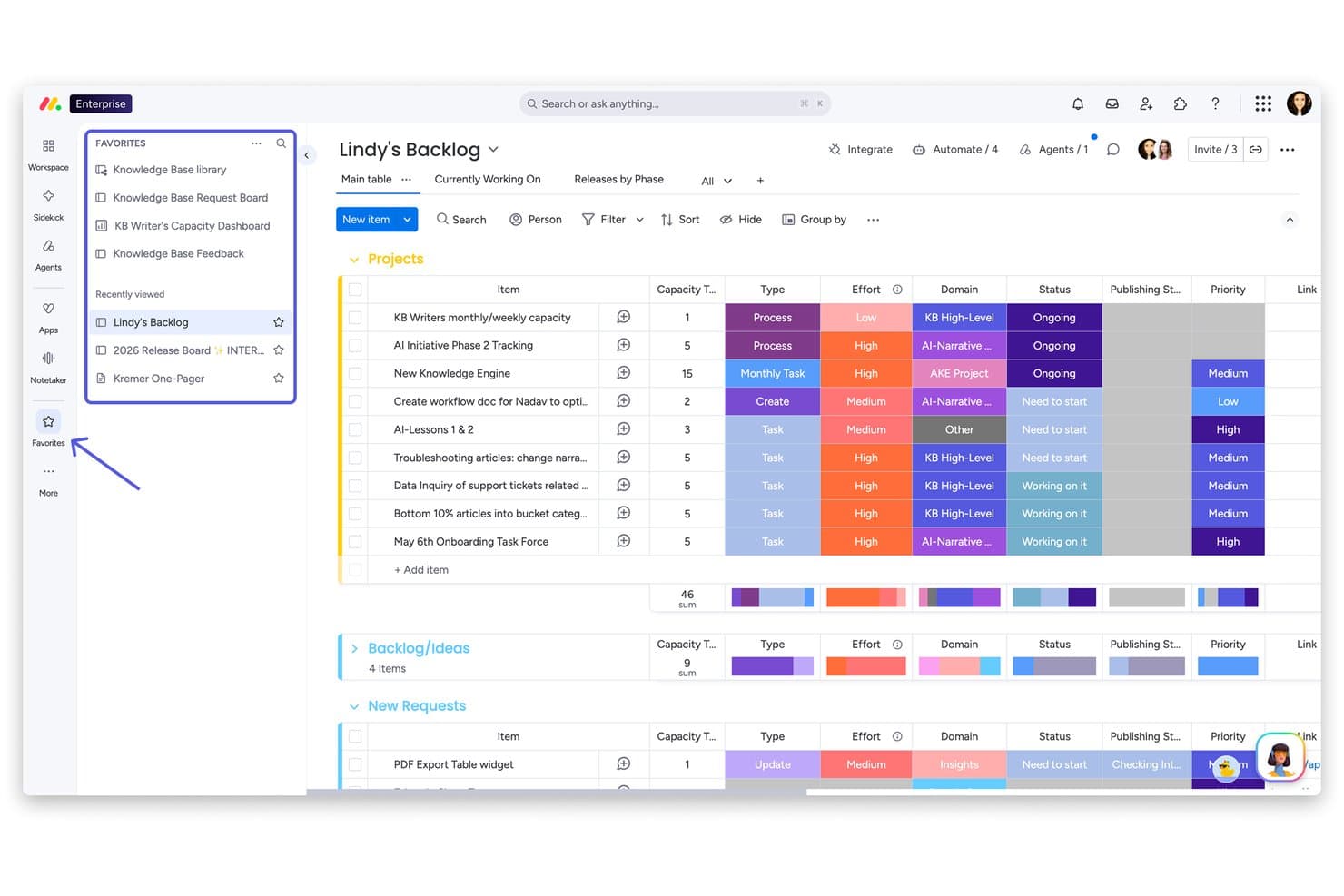
monday AI Workspace offre una scheda dell'elenco delle attività arretrate del progetto con elementi raggruppati, monitoraggio dell'impegno, colonne degli stati, etichette di priorità e una barra laterale dei preferiti per una navigazione rapida. monday AI Workspace è una piattaforma di gestione del lavoro basata sull'intelligenza artificiale che combina monitoraggio dei progetti, automazione dei flussi di lavoro, documenti collaborativi e dashboard con visualizzazioni multiple su schede progettate per i team interfunzionali.
Per chi è più adatto monday AI Workspace?
È una soluzione particolarmente adatta ai team finanziari delle SMB e delle aziende della fascia media che devono automatizzare le approvazioni, i processi di chiusura e la reportistica interfunzionale senza dipendere dai fogli di calcolo.
Perché ho scelto monday AI Workspace
monday AI Workspace si è guadagnato un posto nella mia rosa finale grazie al modo in cui i suoi agenti AI e il generatore di flussi di lavoro AI gestiscono l'automazione finanziaria, con funzionalità che Smartsheet semplicemente non eguaglia. Apprezzo il fatto che gli agenti AI possano instradare autonomamente le richieste di approvazione, aggiornare gli stati delle schede e segnalare le attività di chiusura in ritardo senza attivazioni manuali. Il generatore di flussi di lavoro AI mi consente di configurare una logica di diramazione condizionale nei processi a più fasi, come le approvazioni a cascata di fine mese, senza scrivere una sola riga di codice.
Caratteristiche principali di monday AI Workspace
- Dashboard dei progetti con visualizzazioni multiple: Visualizza i progetti in modalità griglia, Gantt, Kanban, sequenza temporale e calendario per monitorare i progetti finanziari con flessibilità.
- Controlli granulari delle autorizzazioni: Assegna autorizzazioni basate sui ruoli e a livello di scheda per gestire chi può visualizzare, modificare o approvare i dati finanziari sensibili.
- Documenti collaborativi in tempo reale: Crea e aggiorna la documentazione finanziaria e le checklist direttamente all'interno della piattaforma, con la collaborazione in tempo reale del team.
- Integrazione nativa con QuickBooks: Collega direttamente le schede a QuickBooks per sincronizzare le transazioni e i dati contabili senza strumenti di terze parti.
Integrazioni di monday AI Workspace
monday AI Workspace offre integrazioni native con QuickBooks, Salesforce, HubSpot, Slack, Gmail, Google Drive, Microsoft Teams, OneDrive, Trello, Asana e Zapier. È disponibile un'API per le integrazioni personalizzate.
Pros and Cons
Pros:
- Automazione dei flussi di lavoro finanziari basata sull'AI
- Schede con visualizzazioni multiple per i cicli di chiusura e reportistica
- Catene di approvazione personalizzabili per i controlli finanziari
Cons:
- Complessità limitata delle formule dei fogli di calcolo rispetto a Excel
- I registri di audit non sono disponibili nei piani più economici
Learn more about monday AI Workspace:
Altre alternative a Smartsheet
Ecco alcune ulteriori alternative a Smartsheet che non sono entrate nel mio elenco ristretto, ma che vale comunque la pena valutare:
- 11ClickUpIdeale per uno spazio di lavoro tutto-in-uno
- 12WrikeIdeale per flussi di lavoro personalizzabili
- 13ProProfs ProjectIdeale per una gestione semplice dei progetti con registrazione del tempo
Come valuto le alternative a Smartsheet
Divido la mia valutazione in requisiti di base—come visualizzazioni a griglia, automazione dei flussi di lavoro e integrazioni con sistemi ERP—e fattori differenzianti che distinguono uno strumento per i team finanziari.
Funzionalità principali (Requisiti fondamentali per questa lista)
Quando seleziono gli strumenti per la mia lista, valuto ognuno su una scala da 0 (non offre la funzionalità) a 5 (eccelle in quest'area) per ciascuna delle funzionalità principali elencate di seguito. Poi calcolo il punteggio totale dello strumento in percentuale. Ogni strumento deve raggiungere un punteggio totale minimo del 65% per essere preso in considerazione per l'inclusione.
- Vista a griglia stile foglio di calcolo: Cerco un'interfaccia a griglia familiare con formule, formattazione condizionale e riferimenti incrociati tra fogli, così i team finanziari possono passare da Excel.
- Automazione dei flussi di lavoro: Le automazioni per attività ricorrenti sono importanti—come catene di approvazione sulle richieste di budget, promemoria per attività di chiusura o aggiornamenti di stato attivati dalle scadenze.
- Monitoraggio progetti multi-vista: Controllo la presenza di viste Gantt, Kanban, calendario e dashboard che permettano ai team di gestire le scadenze di audit o i cicli di chiusura mensile nel modo preferito.
- Integrazioni di dati finanziari: I connettori nativi a piattaforme come QuickBooks, NetSuite, Xero o Power BI mi dimostrano che uno strumento può adattarsi ai sistemi tecnologici finanziari già esistenti.
- Reportistica & dashboard: Valuto se è possibile creare dashboard personalizzate con dati aggregati in tempo reale, monitoraggio delle variazioni e approfondimenti, invece che affidarsi solo a esportazioni statiche.
- Permessi & controlli di audit: L'accesso granulare basato sui ruoli, il blocco a livello di cella e la cronologia delle versioni sono ciò che cerco per confermare che uno strumento possa gestire dati finanziari sensibili.
Una volta che ho una lista di strumenti che soddisfano questi criteri, considero ciò che differenzia ogni piattaforma.
Fattori differenzianti (Cosa distingue i fornitori)
Ecco come confronto e metto a confronto i diversi fornitori:
Caratteristiche distintive
Un potente motore di formule fa davvero la differenza. Gli strumenti con riferimenti incrociati tra fogli e logica SUMIF consentono ai team di FP&A di costruire previsioni continue senza esportare su Excel. Valuto anche i flussi di lavoro di approvazione, poiché le approvazioni su più livelli su scritture contabili o richieste di budget mantengono chiara la tracciabilità dell'audit. Anche le intuizioni basate sull'IA stanno diventando sempre più rilevanti. Il rilevamento di anomalie nei dati di spesa o la categorizzazione automatica delle transazioni possono ridurre ore di revisione manuale durante i cicli di chiusura.
Oltre le caratteristiche
La conformità normativa e gli standard di sicurezza sono il mio punto di partenza. I team finanziari che gestiscono dati sensibili necessitano almeno della certificazione SOC 2 Type II e di tracciabilità di audit conforme a SOX. Anche la struttura dei prezzi è importante—cerco la divisione tra livelli di visualizzazione e di modifica, poiché la maggior parte dei flussi finanziari coinvolge stakeholder che devono solo visualizzare le dashboard senza modificare i fogli. Un altro elemento che considero è la scalabilità. Uno strumento che gestisce la checklist di chiusura di un team contabile di cinque persone dovrebbe supportare anche la consolidazione multi-entità con la crescita dell'organizzazione.
Perché cercare un’alternativa a Smartsheet?
Sebbene Smartsheet sia una buona scelta per la gestione del lavoro basata sul cloud, esistono diversi motivi per cui alcuni utenti cercano soluzioni alternative. Potresti cercare un’alternativa a Smartsheet perché…
- Hai bisogno di strumenti di automazione o di flussi di lavoro più avanzati
- Il tuo team preferisce funzionalità di collaborazione basate sulla chat o in tempo reale
- Desideri una visualizzazione dei progetti integrata che vada oltre le viste a griglia e Gantt
- Hai bisogno di integrazioni più approfondite con software specifici del settore
- Ritieni che i prezzi o i limiti per gli utenti di Smartsheet siano troppo restrittivi
- Hai bisogno di una soluzione con funzionalità per dispositivi mobili più complete
Se ti riconosci in una di queste situazioni, sei nel posto giusto. Il mio elenco include diverse opzioni software per la gestione del lavoro basata sul cloud, più adatte ai team che affrontano queste difficoltà con Smartsheet e cercano soluzioni alternative.
Funzionalità principali di Smartsheet
Ecco alcune delle funzionalità principali di Smartsheet, per aiutarti a mettere a confronto ciò che offrono le soluzioni alternative:
- Viste dei progetti a griglia, Gantt, a schede e calendario
- Flussi di lavoro automatizzati e processi di approvazione
- Strumenti per la gestione e l'allocazione delle risorse
- Collaborazione e commenti in tempo reale
- Allegati di file e condivisione di documenti
- Dashboard e report personalizzabili
- Formule a livello di cella e formattazione condizionale
- Integrazione con Microsoft, Google e altre applicazioni aziendali
- Registri delle attività e tracce di controllo per la conformità
- Autorizzazioni basate sui ruoli e controlli di accesso degli utenti