

I 10 migliori software fiscali per piccole imprese recensiti nel 2026

Elenco dei migliori software fiscali per piccole imprese


La gestione delle imposte può essere un grattacapo per qualsiasi piccola impresa. In qualità di CFO, devi destreggiarti tra numerose attività e la stagione fiscale aggiunge ulteriore stress. Hai bisogno di soluzioni che semplifichino i processi di preparazione delle dichiarazioni fiscali e garantiscano la precisione.
Nella mia esperienza, i software fiscali per piccole imprese possono davvero cambiare le cose. Ti aiutano a gestire in modo efficiente la presentazione delle dichiarazioni fiscali e a tenere sotto controllo le finanze. Ho esaminato e testato diverse opzioni per offrirti le migliori scelte disponibili.
Questo articolo ti guiderà attraverso una selezione dei migliori software, mettendone in evidenza caratteristiche e vantaggi per aiutarti a decidere quale soddisfa le tue esigenze. Che tu stia cercando soluzioni fai da te convenienti o funzionalità specializzate, troverai ciò che fa per te.
Perché fidarsi dei nostri consigli sui software
Le nostre recensioni riflettono il nostro giudizio indipendente, non un discorso di vendita. Scopri come manteniamo la trasparenza.
Per questa guida, abbiamo valutato gli strumenti attraverso test pratici e ricerche indipendenti, assegnando un punteggio agli strumenti in base ai nostri criteri di selezione.
Le nostre recensioni riflettono il nostro giudizio editoriale umano, non un discorso di vendita.
Riepilogo dei migliori software fiscali per piccole imprese
Questa tabella comparativa riassume i dettagli dei prezzi delle mie migliori selezioni di software fiscali per piccole imprese, per aiutarti a trovare quello più adatto al tuo budget e alle esigenze della tua attività.
| Tool | Best For | Trial Info | Price | ||
|---|---|---|---|---|---|
| 1 | Ideale per tasse personali e aziendali | Piano gratuito disponibile | A partire da $29.99/dichiarazione | Website | |
| 2 | Ideale per dichiarazioni semplici | Piano gratuito disponibile | Da $22.99/dichiarazione | Website | |
| 3 | Ideale per chi è attento al budget | Dichiarazione federale gratuita | Da $15,99/dichiarazione statale | Website | |
| 4 | Ideale per la dichiarazione dei redditi guidata | Piano gratuito disponibile | Da $99/dichiarazione | Website | |
| 5 | Ideale per flussi di lavoro potenziati dall'intelligenza artificiale | Prova gratuita disponibile | Da $3.525/100 dichiarazioni | Website | |
| 6 | Ideale per aziende in crescita | Piano gratuito disponibile | Da $74.99/dichiarazione | Website | |
| 7 | Ideale per supporto in presenza | Non disponibile | Da $25 | Website | |
| 8 | Ideale per la conformità fiscale aziendale | Demo gratuita disponibile | Da $2,606.10/anno | Website | |
| 9 | Ideale per freelance | Piano gratuito + prova gratuita di 30 giorni disponibile | Da $19/mese | Website | |
| 10 | Ideale per professionisti fiscali | Prova gratuita disponibile | Da $1,395/anno | Website |
Recensioni dei migliori software fiscali per piccole imprese
Di seguito trovi i miei riepiloghi dettagliati dei migliori software fiscali per piccole imprese inclusi nel mio elenco. Le mie recensioni offrono un’analisi approfondita delle caratteristiche principali, dei pro e dei contro, delle integrazioni e dei casi d’uso ideali di ogni strumento, per aiutarti a trovare quello più adatto alla tua piccola impresa o al tuo reddito da lavoro autonomo.

Ideale per tasse personali e aziendali
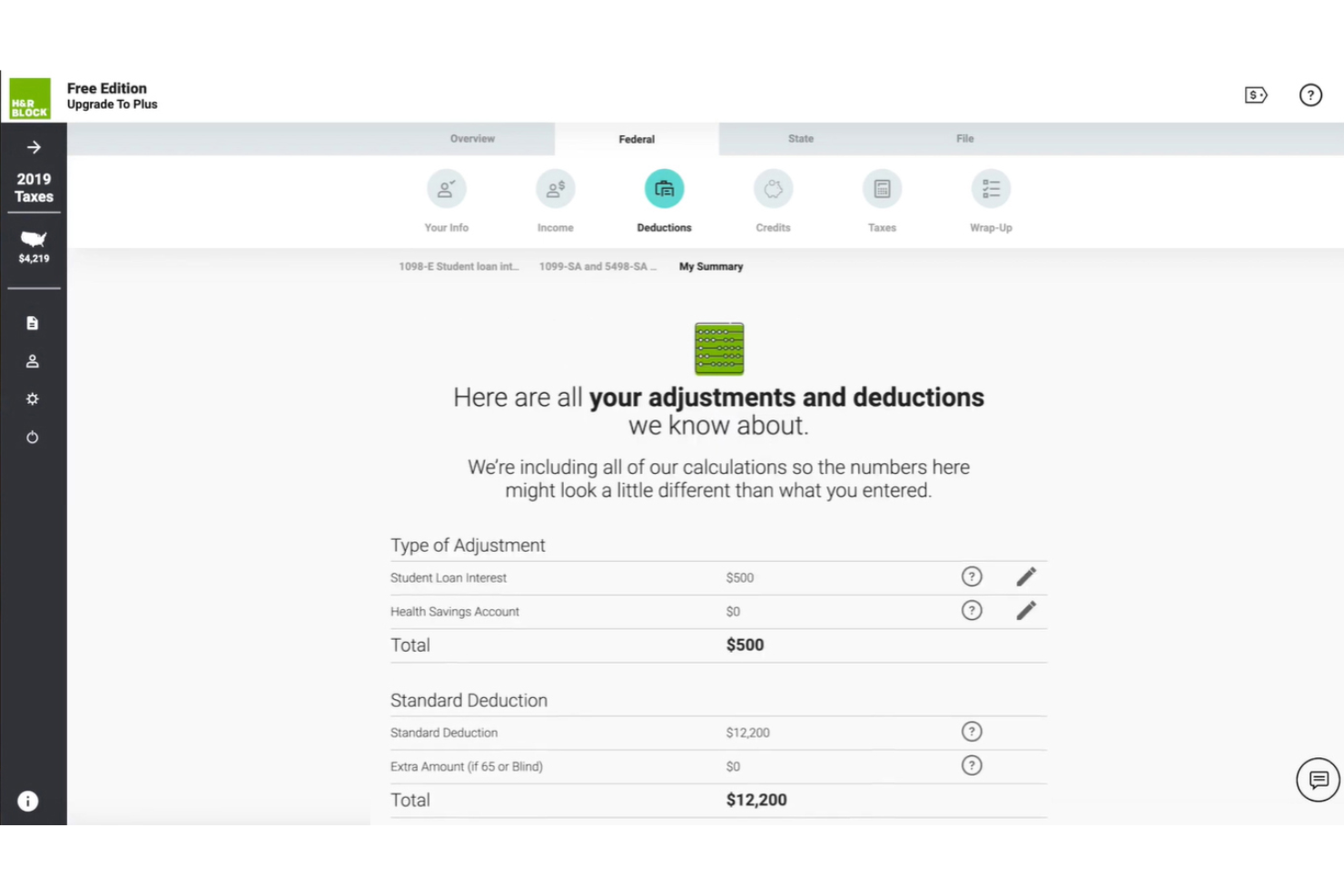
H&R Block offre una soluzione versatile per la dichiarazione dei redditi rivolta a privati e piccoli imprenditori. Fornisce servizi fiscali che aiutano gli utenti a gestire imposte sul reddito, dichiarazione di criptovalute e altri obblighi per finanze personali e aziendali.
Perché ho scelto H&R Block: H&R Block soddisfa le esigenze fiscali sia personali che aziendali, rendendolo una scelta versatile per chi ha diversi obblighi fiscali. Il software propone un'interfaccia intuitiva che guida l'utente nel processo di compilazione della dichiarazione. Offre inoltre consulenza fiscale esperta e supporto in caso di verifica, garantendo il massimo sostegno. La possibilità di passare dalla dichiarazione personale a quella aziendale è un vantaggio unico.
Funzionalità e integrazioni di rilievo:
Funzionalità includono una guida passo-passo per semplificare il processo, consulenza fiscale esperta e la garanzia di rimborso massimo. Il software permette anche di caricare documenti, assicurando che tutte le informazioni fiscali siano raccolte in un unico posto.
Integrazioni non sono elencate pubblicamente.
Pros and Cons
Pros:
- Doppia compilazione fiscale personale-aziendale
- Caricamento documenti semplice
- Offerta la garanzia di rimborso
Cons:
- Richiesta registrazione iniziale
- Costa più di molte piattaforme concorrenti

Ideale per dichiarazioni semplici

TaxSlayer è un software per la dichiarazione dei redditi progettato per privati e piccole imprese che cercano un modo semplice per presentare la dichiarazione dei redditi. Offre funzioni essenziali per la compilazione fiscale, rendendolo una scelta accessibile per chi ha esigenze fiscali semplici.
Perché ho scelto TaxSlayer: TaxSlayer offre un approccio diretto alla compilazione della dichiarazione, ideale se cerchi semplicità. Include istruzioni facili da seguire che ti guidano passo dopo passo nel processo di compilazione. La sua attenzione verso le dichiarazioni semplici lo rende una scelta solida per chi ha situazioni fiscali non complicate.
Funzionalità e integrazioni di rilievo:
Funzionalità includono un rilevatore di detrazioni che aiuta a scoprire i risparmi, un calcolatore di rimborso che stima rapidamente il tuo rimborso fiscale e un archivio delle dichiarazioni per conservare in sicurezza quelle precedenti. Il software offre anche una guida passo-passo durante tutta la procedura di compilazione.
Integrazioni includono QuickBooks Online, TaxDome e altri.
Pros and Cons
Pros:
- Flusso di lavoro semplice per la dichiarazione
- Rilevatore di detrazioni integrato
- Compilazione gratuita per studenti
Cons:
- Funzionalità avanzate limitate
- Personalizzazione minima

Ideale per chi è attento al budget

FreeTaxUSA è un software per la dichiarazione dei redditi ideale per singoli individui e piccoli imprenditori alla ricerca di una soluzione economica. Offre servizi essenziali per la dichiarazione federale e statale, concentrandosi su convenienza e facilità d’uso.
Perché ho scelto FreeTaxUSA: FreeTaxUSA è un’opzione economica. Il software include tutti i principali moduli fiscali, consentendo di compilare le dichiarazioni fiscali federali e statali. La sua interfaccia semplice garantisce che tu possa completare la dichiarazione in modo efficiente. Il servizio supporta inoltre l’importazione delle dichiarazioni degli anni precedenti, particolarmente utile per chi ritorna.
Funzionalità e integrazioni principali:
Funzionalità includono una guida passo dopo passo per aiutarti nel processo di dichiarazione, un calcolatore di rimborso che stima il rimborso in tempo reale e la dichiarazione federale gratuita. Il software offre anche una versione deluxe con supporto e funzionalità aggiuntive.
Le integrazioni non sono elencate pubblicamente.
Pros and Cons
Pros:
- Opzione di dichiarazione a basso costo
- Dichiarazione federale gratuita
- Supporto per l'importazione della dichiarazione dell'anno precedente
Cons:
- Integrazioni limitate
- Assistenza dal vivo minima


TurboTax è un software fiscale pensato per piccole imprese, lavoratori autonomi e freelance. Semplifica il processo di dichiarazione dei redditi guidando gli utenti in ogni fase.
Perché ho scelto TurboTax: TurboTax offre un'interfaccia intuitiva che ti accompagna nella compilazione delle tasse, assicurandoti di non saltare nessun passaggio fondamentale. La sua guida passo dopo passo rende semplice comprendere la propria situazione fiscale. Il software fornisce calcoli in tempo reale, permettendoti di vedere subito come le modifiche incidono sul rimborso o sulle tasse dovute. L'importazione dei dati da QuickBooks è particolarmente utile per i titolari di piccole imprese.
Funzionalità principali e integrazioni:
Funzionalità includono un rilevatore di detrazioni che aiuta a individuare possibili risparmi, una garanzia di supporto in caso di verifica fiscale per assisterti in caso di contatto da parte dell'IRS, e una funzione di importazione dei moduli W-2 per risparmiare tempo mediante inserimento automatico dei dati.
Integrazioni includono QuickBooks, Quicken e altri.
Pros and Cons
Pros:
- Procedura guidata per la compilazione delle tasse
- Calcoli fiscali in tempo reale
- Importazione dati da QuickBooks
Cons:
- Solo tasse U.S.A.
- Assistenza disponibile solo per i piani superiori

Ideale per flussi di lavoro potenziati dall'intelligenza artificiale
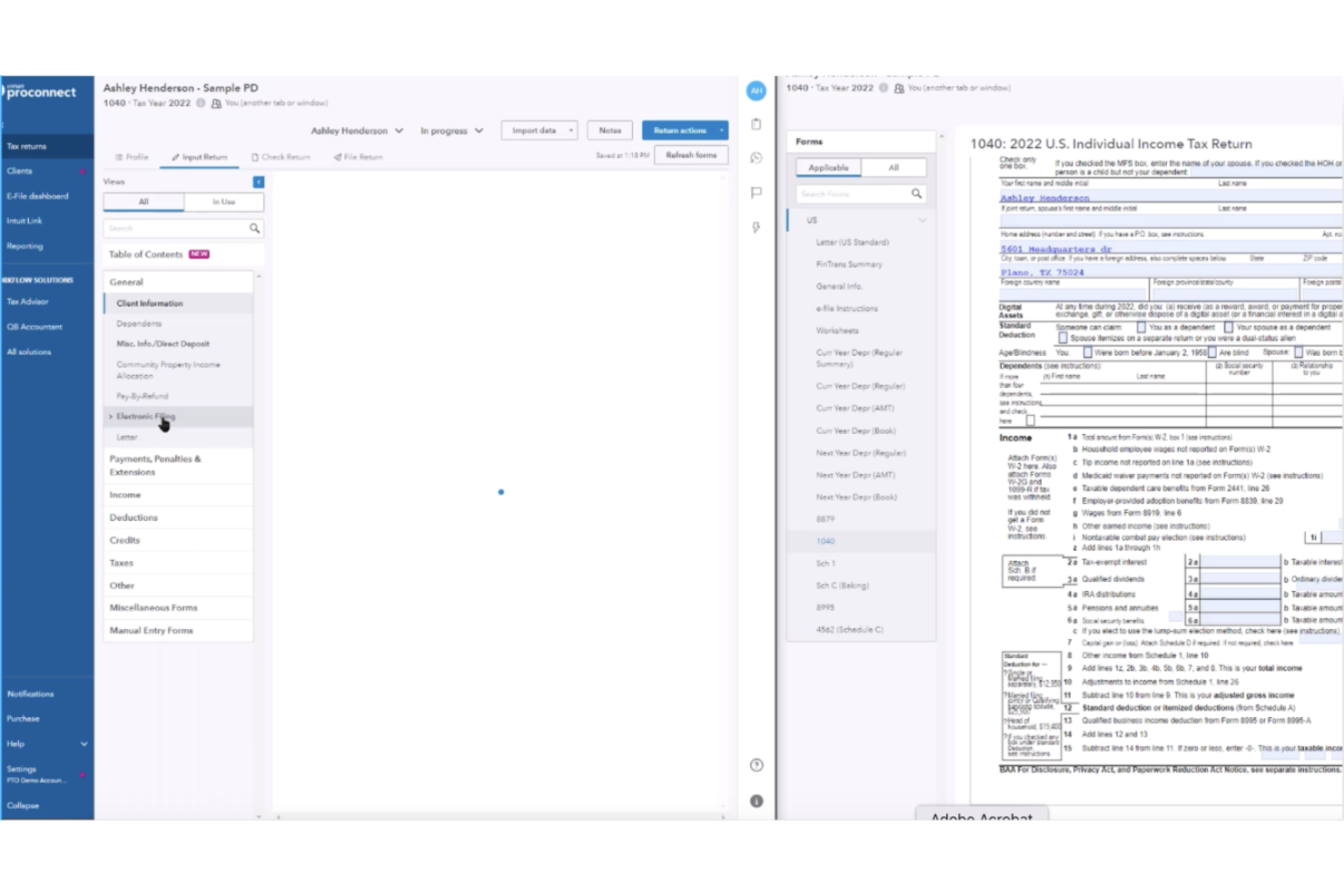
Intuit ProConnect Tax è un software per la preparazione delle dichiarazioni fiscali dedicato ai professionisti del settore e agli studi contabili. Offre una soluzione basata su cloud che consente di accedere, preparare e gestire dichiarazioni fiscali federali e statali, anche per casi più complessi, come redditi da proprietà in affitto e relative detrazioni.
Perché ho scelto Intuit ProConnect: Intuit ProConnect Tax offre una piattaforma cloud che permette al tuo team di commercialisti di lavorare da remoto e accedere ai dati fiscali in modo sicuro. Include funzionalità come la collaborazione in tempo reale, consentendo di lavorare in squadra con i colleghi. Il software fornisce anche moduli fiscali e funzionalità di invio telematico delle dichiarazioni, garantendo la gestione di esigenze fiscali diversificate. L'attenzione alla tecnologia cloud lo rende una scelta flessibile per gli studi fiscali moderni.
Caratteristiche e integrazioni principali:
Caratteristiche includono uno strumento di collaborazione in tempo reale per lavorare simultaneamente con altri, un sistema di archiviazione sicuro dei documenti per mantenere i tuoi file al sicuro, e un cruscotto intuitivo che offre una visione chiara delle attività. Il software offre inoltre aggiornamenti automatici in modo da riflettere i cambiamenti normativi, garantendo la corretta gestione dei crediti d'imposta.
Integrazioni includono QuickBooks Online Accountant, Karbon, Ignition, SmartVault e altri ancora.
Pros and Cons
Pros:
- Accessibilità cloud
- Collaborazione in tempo reale del team
- Archiviazione sicura dei documenti
Cons:
- Accesso offline non disponibile
- Prezzo elevato per i piani professionali

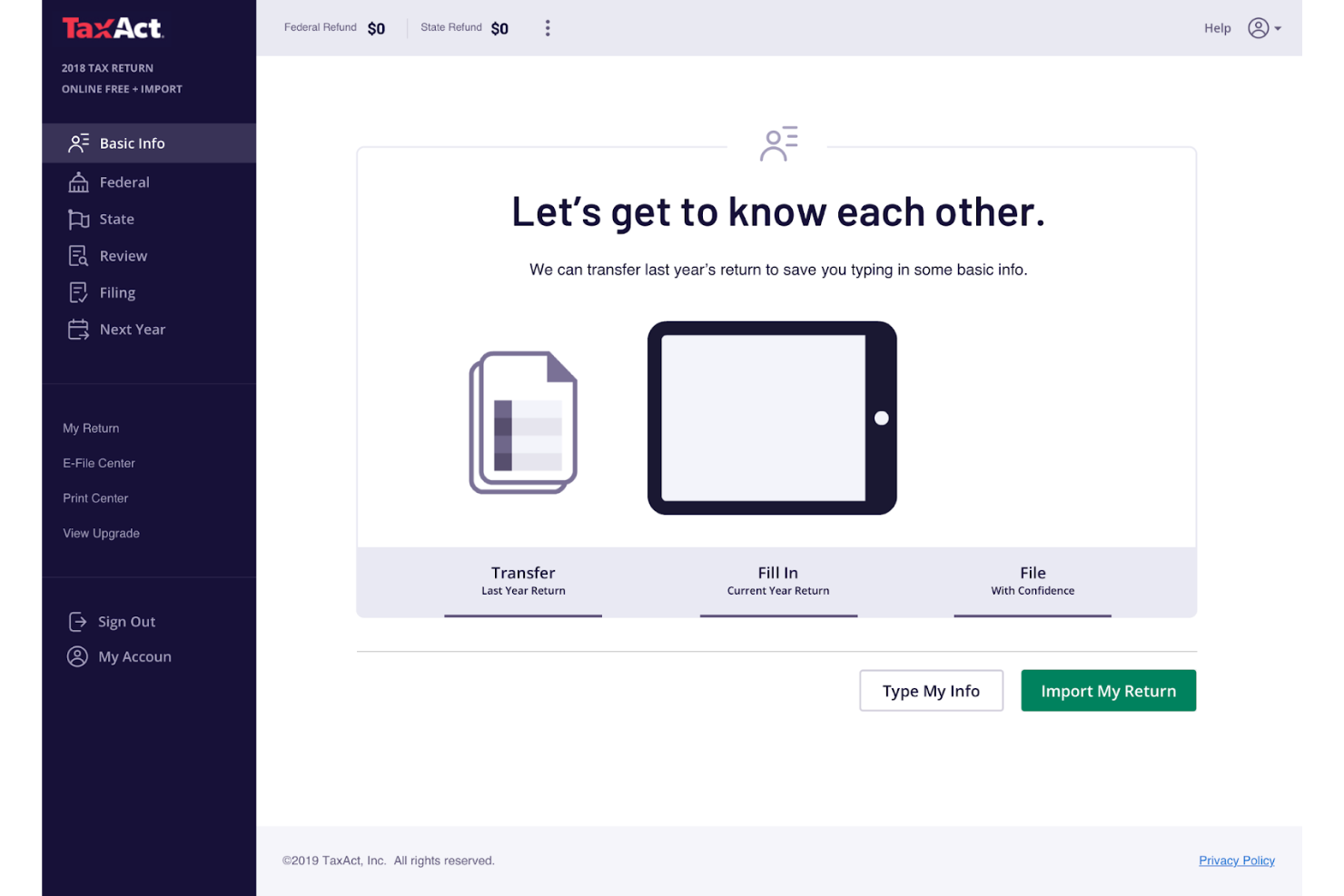
TaxAct Business è una soluzione software fiscale per proprietari di piccole imprese e lavoratori autonomi. Si concentra sull’offrire servizi essenziali per la dichiarazione dei redditi, pensati appositamente per la compilazione delle dichiarazioni aziendali.
Perché ho scelto TaxAct Business: TaxAct Business è in grado di gestire la complessità delle dichiarazioni fiscali delle piccole imprese, offrendo una gamma di moduli e quadri adatti alle tue esigenze. Grazie alla sua interfaccia intuitiva, puoi navigare in modo efficiente nel processo di dichiarazione dei redditi. Il software include uno strumento per massimizzare le detrazioni, aiutandoti a individuare potenziali risparmi. Offre inoltre un sistema di supporto completo per rispondere a qualsiasi domanda o problema.
Funzionalità e integrazioni principali:
Funzionalità includono uno strumento per massimizzare le detrazioni che identifica ogni possibile deduzione, una guida passo-passo che semplifica il processo di dichiarazione e un sistema di assistenza che offre l’accesso a esperti fiscali. Il software mette anche a disposizione uno strumento di tracciamento dei rimborsi per tenerti informato sullo stato della tua dichiarazione.
Integrazioni non sono elencate pubblicamente.
Pros and Cons
Pros:
- Modulistica fiscale dedicata alle aziende
- Ottimo per S Corp e aziende in crescita
- Tracciamento dei rimborsi disponibile
Cons:
- Interfaccia dall’aspetto datato
- I tempi di risposta dell'assistenza variano


Jackson Hewitt offre servizi di preparazione delle tasse che si concentrano nel fornire assistenza personalizzata a privati e piccole imprese. È ideale per chi preferisce l'interazione faccia a faccia e una guida esperta durante la stagione fiscale.
Perché ho scelto Jackson Hewitt: Jackson Hewitt offre supporto in presenza, ideale se dai valore all'interazione diretta con professionisti fiscali. Il servizio mette a disposizione una rete di uffici dove puoi incontrare esperti per soddisfare le tue necessità fiscali. Questo approccio ti garantisce un'assistenza affidabile durante tutto il processo di dichiarazione.
Caratteristiche principali e integrazioni:
Caratteristiche includono un'opzione di anticipo sul rimborso fiscale che permette di accedere in anticipo ai fondi, una garanzia di rimborso massimo per assicurarti di ottenere il massimo possibile e una garanzia di precisione a vita che copre sanzioni e interessi. Il servizio offre anche una pianificazione flessibile degli appuntamenti.
Integrazioni non sono elencate pubblicamente.
Pros and Cons
Pros:
- Assistenza faccia a faccia
- Opzione anticipo rimborso
- Garanzia di precisione a vita
Cons:
- Disponibilità degli appuntamenti variabile
- Necessari frequenti solleciti

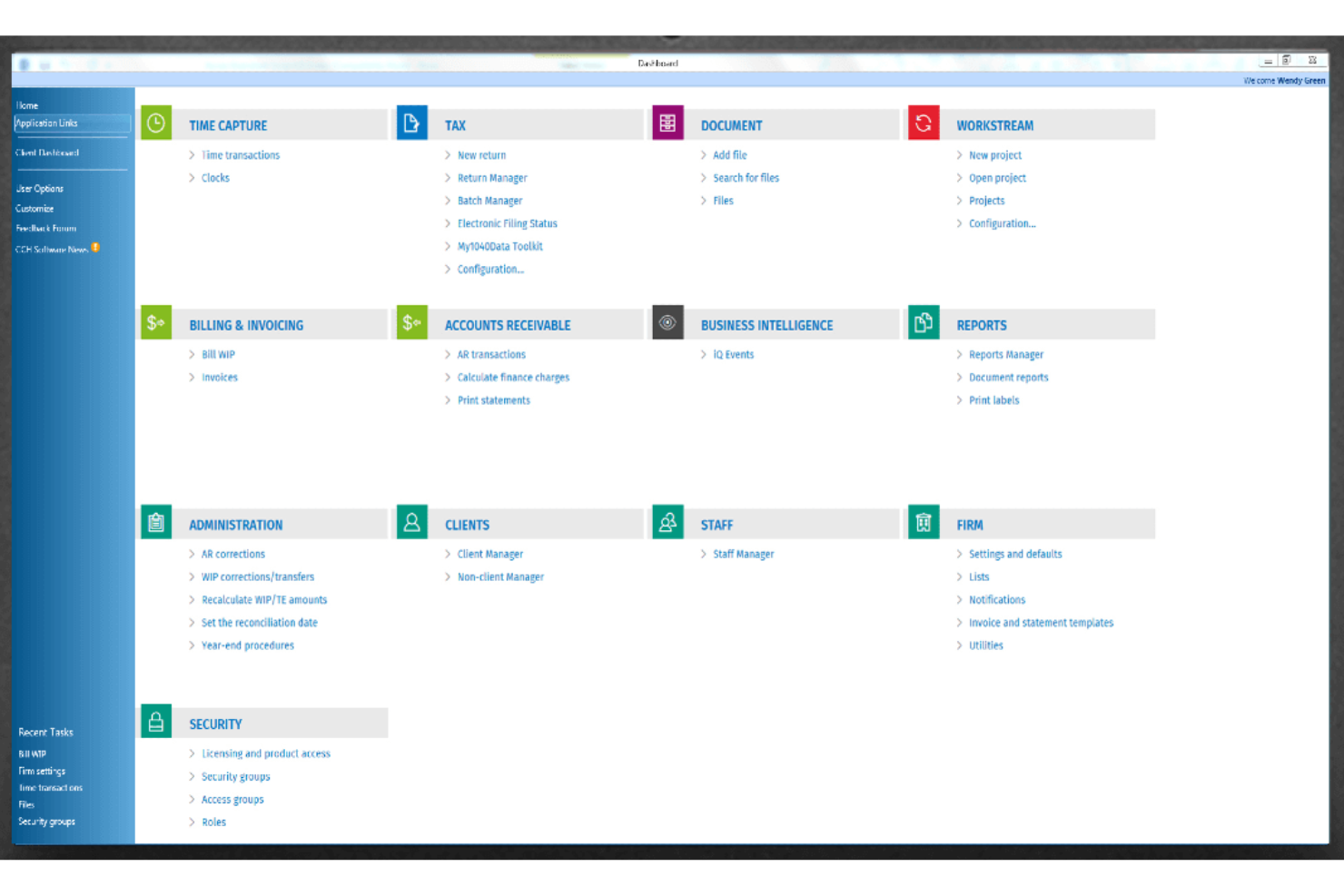
CCH Axcess Tax offre una soluzione software fiscale pensata per commercialisti e professionisti di piccole imprese che necessitano di supporto per la conformità. Aiuta a gestire normative fiscali complesse e garantisce la precisione delle dichiarazioni.
Perché ho scelto CCH Axcess Tax: CCH Axcess Tax è specializzato nel fornire supporto alla conformità, un'esigenza fondamentale per commercialisti e aziende che si destreggiano tra normative fiscali complesse. Il software offre strumenti di reportistica dettagliata che aiutano a rispettare i requisiti di conformità. Include anche un'ampia libreria di contenuti e risorse fiscali. Questa attenzione alla conformità lo rende uno strumento essenziale per i professionisti che devono rispettare regole stringenti.
Caratteristiche principali e integrazioni:
Caratteristiche includono uno strumento di reportistica dettagliata con approfondimenti sugli obblighi fiscali, una libreria di contenuti e risorse che ti tiene aggiornato, e un sistema di monitoraggio della conformità che garantisce il rispetto di tutte le normative necessarie. Il software offre anche aggiornamenti regolari sulle modifiche legislative.
Integrazioni includono AuditMiner, Compass, Empire Suite, Ignition, QuickFee, SurePrep, SafeSend e altro.
Pros and Cons
Pros:
- Contenuti normativi estesi
- Monitoraggio avanzato della conformità
- Reportistica approfondita per aziende
Cons:
- Potrebbe non essere adatto a tutti i settori
- L'elevato utilizzo di risorse può rallentare altre applicazioni

QuickBooks Solopreneur è uno strumento di gestione finanziaria per freelance e lavoratori autonomi. Aiuta gli utenti a monitorare entrate, spese e a gestire la dichiarazione dei redditi in modo efficiente.
Perché ho scelto QuickBooks Solopreneur: QuickBooks Solopreneur si rivolge direttamente ai freelance offrendo strumenti per tracciare i chilometri percorsi, separare spese personali e aziendali e stimare le tasse trimestrali. La possibilità di sincronizzare il software con i conti bancari garantisce che i tuoi dati finanziari siano sempre aggiornati. Inoltre, offre una dashboard semplice che facilita il monitoraggio delle finanze aziendali. Questa attenzione alle esigenze specifiche dei freelance lo rende un'ottima scelta per la gestione delle tasse da lavoro autonomo.
Funzionalità distintive e integrazioni:
Funzionalità includono uno strumento di tracciamento dei chilometri che registra automaticamente i viaggi, una funzione per separare spese personali e aziendali, e la possibilità di stimare le tasse trimestrali. Il software offre anche un report riepilogativo di fine anno che fornisce una panoramica chiara delle tue attività finanziarie.
Integrazioni includono PayPal, Etsy, Amazon, Square, TurboTax e altro ancora.
Pros and Cons
Pros:
- Rilevamento automatico dei chilometri tramite app
- Sincronizzazione automatica con la banca
- Stime delle tasse trimestrali
Cons:
- Solo per freelance
- Scalabilità aziendale limitata


TaxSlayer Pro è un software fiscale pensato per i professionisti delle dichiarazioni fiscali e per gli studi contabili. Offre una suite di strumenti per gestire efficacemente e con precisione le dichiarazioni fiscali di più clienti.
Perché ho scelto TaxSlayer Pro: TaxSlayer Pro mette a disposizione dei professionisti fiscali strumenti per la pianificazione e la compilazione delle dichiarazioni, consentendo di gestire più clienti contemporaneamente. Include funzionalità come l’accesso multi-utente, che permette al team di lavorare su diverse dichiarazioni allo stesso tempo. Il software offre anche la possibilità di inviare le dichiarazioni in formato elettronico, semplificando la presentazione telematica. Il sistema di gestione clienti ti aiuta a tracciare e organizzare le informazioni dei tuoi clienti.
Funzionalità principali e integrazioni:
Funzionalità come uno strumento di comunicazione integrato per facilitare l’interazione con i clienti, una dashboard personalizzabile per adattare il tuo spazio di lavoro e una libreria fiscale di riferimento. Sono presenti anche strumenti di reportistica dettagliata per analizzare i dati dei clienti.
Integrazioni includono QuickBooks Online e altre.
Pros and Cons
Pros:
- Collaborazione multi-utente
- App nativa TaxesToGo
- Strumenti per la gestione dei clienti
Cons:
- Solo per uso professionale
- Nessuna dichiarazione gratuita
Altri software fiscali per piccole imprese
Ecco alcune ulteriori opzioni di software fiscali per piccole imprese che non sono state incluse nel mio elenco, ma che vale comunque la pena valutare:
- CFS Small Business Tools
Ideale per moduli fiscali delle retribuzioni
- TaxAct Professional
Ideale per la gestione multi-cliente
- Taxumo
Ideale per liberi professionisti nelle Filippine


Come Valuto il Software Fiscale per Piccole Imprese
Valuto questi strumenti su due livelli: i requisiti fondamentali—come il supporto al modulo 1120-S e la dichiarazione elettronica multi-statale—e i fattori distintivi, come l'accesso a un commercialista in tempo reale, integrazioni contabili e trasparenza dei prezzi.
Funzionalità di Base (Requisiti Fondamentali per Questa Lista)
Quando seleziono gli strumenti per la mia lista, valuto ciascuno su una scala da 0 (non offre la funzionalità) a 5 (eccelle in quest'area) per ogni funzionalità fondamentale elencata di seguito. Calcolo poi il punteggio totale dello strumento in percentuale. Ogni strumento deve raggiungere un punteggio totale minimo del 65% per essere preso in considerazione.
- Copertura dei Moduli Fiscali Aziendali: Verifico se uno strumento supporta le tipologie di entità effettivamente utilizzate dalle piccole imprese—Schedule C per i lavoratori autonomi, 1120-S per le S-corp, 1065 per le società di persone e così via.
- Capacità di E-Filing: Ogni strumento dovrebbe permetterti di inviare elettronicamente le dichiarazioni fiscali federali e statali, con un tracciamento chiaro delle trasmissioni così da sapere quando l'IRS accetta o rifiuta una dichiarazione.
- Guida a Detrazioni e Crediti: Cerco flussi guidati che evidenzino deduzioni rilevanti come spese per ufficio a casa, chilometraggio del veicolo, ammortamenti e detrazioni per reddito d’impresa qualificato in base al tipo di entità.
- Importazione Dati Contabili: Un buon software fiscale importa i dati da dove già gestisci la contabilità. Valuto se si collega a piattaforme come QuickBooks o Xero e come gestisce gli import da CSV o flussi bancari.
- Supporto Multi-Statale e Aggiornamenti Normativi: Per le imprese che operano su più stati, considero se lo strumento gestisce dichiarazioni multi-statali e se riflette automaticamente i cambiamenti normativi federali e statali dell’anno in corso.
- Supporto Fiscale Trimestrale e Payroll: Molte piccole imprese sono tenute a versare tasse stimate durante l’anno. Cerco strumenti che calcolano i pagamenti trimestrali e supportano i moduli payroll.
Una volta che ho una lista di strumenti che rispettano questi criteri, considero cosa rende unica ogni piattaforma.
Fattori Differenzianti (Cosa Distingue i Fornitori)
Ecco come confronto e metto a confronto i vari fornitori:
Funzionalità Distintive
L’accesso a commercialisti o agenti iscritti in tempo reale può fare davvero la differenza quando non si sa come classificare una spesa complessa o strutturare la dichiarazione di una LLC multi-socio. Cerco anche strumenti di pianificazione fiscale disponibili tutto l’anno—come simulatori di scenari e stime di imposta—che aiutano a prendere decisioni più intelligenti prima dell’arrivo della stagione dichiarativa. Anche la guida specifica per settore viene valutata, perché un consulente freelance e un negoziante devono affrontare regole di deduzione molto diverse.
Oltre le Funzionalità
La trasparenza dei prezzi è fondamentale. Alcune piattaforme applicano costi aggiuntivi per dichiarazioni statali o tipologie di entità extra, quindi verifico se il prezzo pubblicizzato copre effettivamente tutto ciò di cui una piccola impresa ha bisogno per presentare la dichiarazione. Anche l’assistenza clienti è importantissima—cerco fornitori che offrano orari estesi durante la stagione fiscale e ti mettano in contatto con esperti abilitati in campo fiscale, non solo semplici operatori. Anche la sicurezza riceve particolare attenzione, in particolare la qualifica come fornitore e-file autorizzato IRS e gli standard di criptazione per la gestione dei dati finanziari sensibili.
Come scegliere un software fiscale per piccole imprese
È facile perdersi in lunghi elenchi di funzionalità e strutture tariffarie complesse. Per aiutarti a rimanere concentrato mentre affronti il tuo specifico processo di selezione del software, ecco un elenco dei fattori da tenere presenti:
| Fattore | Cosa considerare |
|---|---|
| Scalabilità | Il software può crescere insieme alla tua attività? Considera le esigenze future e verifica se lo strumento è in grado di gestire un aumento delle transazioni o degli utenti senza problemi. |
| Integrazioni | Si integra con gli strumenti che già utilizzi, come QuickBooks o Xero? Verifica che il trasferimento dei dati sia fluido, per evitare errori di inserimento manuale. |
| Personalizzazione | Puoi adattare il software al tuo flusso di lavoro specifico? Cerca impostazioni flessibili che ti permettano di adeguarlo alle esigenze peculiari della tua attività. |
| Facilità d'uso | L'interfaccia è intuitiva per il tuo team? Evita curve di apprendimento ripide scegliendo strumenti che offrano una navigazione semplice e istruzioni chiare. |
| Implementazione e avviamento | Quanto tempo occorrerà per iniziare a utilizzare il software? Considera il supporto offerto durante la configurazione e l'eventuale disponibilità di risorse formative, come video o guide. |
| Costo | Sono previste commissioni nascoste o prezzi a livelli? Assicurati che i prezzi rientrino nel tuo budget e riflettano chiaramente il valore delle funzionalità di cui hai bisogno. |
| Misure di sicurezza | In che modo il software protegge i tuoi dati? Cerca sistemi di crittografia, aggiornamenti regolari e conformità alle normative sulla protezione dei dati. |
| Disponibilità dell'assistenza | L'aiuto è disponibile quando ne hai bisogno? Verifica la presenza di opzioni di assistenza 24 ore su 24, 7 giorni su 7, e di diversi metodi di contatto, come chat, telefono o e-mail, per assicurarti un'assistenza tempestiva. |
Che cos'è un software fiscale per piccole imprese?
Il software fiscale per piccole imprese è uno strumento che aiuta le aziende a gestire e presentare le dichiarazioni fiscali in modo accurato ed efficiente. Commercialisti, contabili e titolari di piccole imprese utilizzano generalmente questi strumenti per semplificare le attività relative alle imposte e garantire la conformità. Funzionalità come la presentazione elettronica, il monitoraggio delle detrazioni e l'integrazione con i sistemi contabili aiutano a garantire dichiarazioni accurate e una gestione finanziaria efficace. Nel complesso, questi strumenti fanno risparmiare tempo e riducono il rischio di errori nelle dichiarazioni fiscali.
Funzionalità del software fiscale per piccole imprese
Quando selezioni un software fiscale per piccole imprese, presta attenzione alle seguenti funzionalità chiave:
- Presentazione elettronica: Consente di inviare le dichiarazioni fiscali elettronicamente, risparmiando tempo e riducendo il lavoro cartaceo.
- Monitoraggio delle detrazioni: Aiuta a identificare e monitorare le detrazioni ammissibili per massimizzare il potenziale risparmio fiscale.
- Funzionalità di integrazione: Si collega a software di contabilità come QuickBooks o Xero per la sincronizzazione dei dati.
- Aggiornamenti in tempo reale: Ti tengono informato sulle modifiche alle leggi e ai regolamenti fiscali per garantire la conformità.
- Report personalizzabili: Forniscono report finanziari personalizzati in base alle esigenze e ai requisiti specifici della tua azienda.
- Archiviazione sicura dei dati: Garantisce la protezione delle tue informazioni finanziarie tramite crittografia e aggiornamenti di sicurezza regolari.
- Interfaccia intuitiva: Offre un design intuitivo che rende semplici la navigazione e la presentazione delle dichiarazioni fiscali.
- Accesso multiutente: Consente a più membri del team di lavorare contemporaneamente sulle dichiarazioni fiscali, aumentando l'efficienza.
- Strumenti di gestione dei clienti: Aiutano a organizzare e conservare le informazioni sui clienti per facilitarne l'accesso e la comunicazione.
- Assistenza durante i controlli: Fornisce supporto durante un controllo fiscale, offrendo tranquillità e indicazioni per tutta la procedura.
Vantaggi del software fiscale per piccole imprese
L'implementazione di un software fiscale per piccole imprese offre diversi vantaggi al tuo team e alla tua azienda. Ecco alcuni dei benefici che puoi aspettarti:
- Risparmio di tempo: Automatizza i calcoli fiscali e la presentazione delle dichiarazioni, liberando tempo per altre attività aziendali.
- Accuratezza: Riduce gli errori grazie a funzionalità come la presentazione elettronica e il monitoraggio delle detrazioni, garantendo dichiarazioni fiscali precise.
- Efficienza dei costi: Aiuta a identificare detrazioni e crediti, riducendo potenzialmente il tuo debito fiscale.
- Conformità: Ti mantiene aggiornato sulle modifiche in tempo reale alla legislazione fiscale, garantendo il rispetto di tutti i requisiti normativi.
- Sicurezza dei dati: Protegge le informazioni finanziarie sensibili tramite crittografia e archiviazione sicura.
- Collaborazione: Supporta l'accesso multiutente, consentendo al tuo team di lavorare insieme in modo efficiente sulle dichiarazioni fiscali.
- Tranquillità: Offre assistenza e indicazioni durante i controlli fiscali, garantendo maggiore sicurezza nel periodo delle dichiarazioni.
Costi e prezzi del software fiscale per piccole imprese
La scelta di un software fiscale per piccole imprese richiede la comprensione dei vari modelli di prezzo e dei piani disponibili. I costi variano in base alle funzionalità, alle dimensioni del team, agli extra e ad altri fattori. La tabella seguente riassume i piani più comuni, i relativi prezzi medi e le funzionalità tipicamente incluse nelle soluzioni software fiscali per piccole imprese:
Tabella comparativa dei piani per il software fiscale per piccole imprese
| Tipo di piano | Prezzo medio | Funzionalità comuni |
|---|---|---|
| Piano gratuito | $0 | Funzionalità di base per la presentazione, assistenza limitata e reportistica di base. |
| Piano personale | $22.99-$52.99/dichiarazione $19-$137.50/mese | Presentazione elettronica, monitoraggio delle detrazioni, assistenza di base e archiviazione sicura dei dati. |
| Piano aziendale | $1,395-$1,695/anno | Accesso multiutente, funzionalità di integrazione, reportistica avanzata e assistenza durante i controlli. |
| Piano aziendale avanzato | $3,477-$9,744/anno | Funzionalità personalizzabili, assistenza prioritaria, strumenti per la conformità e maggiore sicurezza. |
Domande frequenti sul software fiscale per piccole imprese
Ecco alcune risposte alle domande più comuni sul software fiscale per piccole imprese:
Quali tipi di imprese traggono vantaggio dal software fiscale?
Le piccole imprese di qualsiasi dimensione traggono vantaggio dal software fiscale, comprese le ditte individuali, le società di persone e le società di capitali. Se gestisci autonomamente le tue finanze o hai un piccolo team, il software fiscale può semplificare il processo. Ti aiuta a rimanere organizzato e a monitorare le spese, oltre ad assicurare la conformità alle leggi fiscali. Che tu sia un libero professionista o gestisca una piccola azienda, utilizzare un software fiscale può farti risparmiare tempo e ridurre gli errori.
Il software fiscale è sicuro per i dati finanziari sensibili?
Sì, i software fiscali affidabili tengono conto della sicurezza. Assicurati che il software scelto utilizzi la crittografia per proteggere i tuoi dati. Cerca fornitori conformi alle normative sulla protezione dei dati e che offrano aggiornamenti regolari della sicurezza. È importante controllare le recensioni e le funzionalità di sicurezza prima dell’acquisto, per assicurarti che le tue informazioni finanziarie rimangano al sicuro.
Con quale frequenza vengono aggiornati i software fiscali?
Il software fiscale viene generalmente aggiornato ogni anno, ma alcuni fornitori offrono aggiornamenti più frequenti. Questi aggiornamenti garantiscono la conformità alle leggi e ai regolamenti fiscali più recenti. È importante scegliere un fornitore che offra aggiornamenti regolari, soprattutto se gestisci situazioni fiscali complesse. Rimanere aggiornati sugli aggiornamenti assicura che le tue dichiarazioni siano accurate e conformi.
Il software fiscale può integrarsi con altri strumenti contabili?
Sì, la maggior parte dei software fiscali può integrarsi con strumenti contabili diffusi come QuickBooks e Xero. Queste integrazioni consentono un trasferimento fluido dei dati, facendoti risparmiare tempo e riducendo gli errori di inserimento manuale. Prima dell’acquisto, verifica la compatibilità del software con gli strumenti che utilizzi attualmente, per assicurarti un flusso di lavoro senza interruzioni. Questa integrazione può migliorare notevolmente l’efficienza del tuo team.
Cosa succede dopo:
Se stai cercando un software fiscale per piccole imprese, contatta gratuitamente un consulente SoftwareSelect per ricevere consigli.
Compili un modulo e fai una breve conversazione durante la quale verranno analizzate nel dettaglio le tue esigenze. Poi riceverai una lista ristretta di software da esaminare. Ti supporteranno anche durante l'intero processo di acquisto, comprese le trattative sul prezzo.