

Det kan være krevende å håndtere økonomien i et medie- eller avisselskap. Som økonomidirektør må du balansere budsjettbegrensninger, kompleks økonomirapportering og behovet for sanntidsdata. Regnskapsprogramvare for medier og aviser kan bidra til å løse disse utfordringene ved å tilby skreddersydde løsninger for bransjens spesifikke behov.
Som økonomiansvarlig forstår jeg hvordan valg av riktig programvare kan forbedre teamets effektivitet og økonomiske nøyaktighet betydelig. Derfor har jeg gjort forarbeidet for å gi deg en objektiv gjennomgang av de beste alternativene på markedet.
I denne artikkelen går jeg gjennom hvert alternativ og fremhever funksjoner som kan gjøre en forskjell i den daglige driften. Enten du ønsker å forenkle faktureringen eller forbedre rapporteringen, finnes det en løsning for deg.
Hvorfor du kan stole på våre programvareanbefalinger
6,700+
Reviews
20
Industry experts
16+
Evaluation factors
14
Years
Teamet vårt har testet og anmeldt programvare siden 2012. Vi er selv økonomiledere, så vi vet hvor vanskelig og hvor viktig det er å velge riktig programvare.
I denne guiden har vi vurdert verktøyene gjennom praktisk testing og uavhengig research og gitt dem poeng ut fra våre utvelgelseskriterier.
Anmeldelsene våre bygger på vår egen redaksjonelle vurdering. De er ikke et salgsargument.
Sammenligningstabell for regnskapsprogramvare for medier og aviser
Denne sammenligningstabellen oppsummerer prisopplysningene for mine beste utvalgte regnskapsprogrammer for medier og aviser:
| Tool | Best For | Trial Info | Price | ||
|---|---|---|---|---|---|
| 1 | Best for modular ERP across media operations | Free trial available | Free plan available | Website | |
| 2 | Best for Salesforce-native multi-entity accounting | Free demo available | Pricing upon request | Website | |
| 3 | Best for multinational subscription accounting | Free demo available | Pricing upon request | Website | |
| 4 | Best for newspaper ad order-to-cash billing | Free demo available | Pricing upon request | Website | |
| 5 | Best for multi-entity publisher consolidation | Free demo available | Pricing upon request | Website | |
| 6 | Best for multi-entity financial compliance | Free demo available | From £1,200/month | Website | |
| 7 | Best for ad-to-cash billing across print and digital | Free demo available | Pricing upon request | Website | |
| 8 | Best for publisher rights and royalty accounting | Free demo available | Pricing upon request | Website | |
| 9 | Best for multi-entity media group reporting | Free demo available | Pricing upon request | Website | |
| 10 | Best for ad agency media billing workflows | Free demo available | Pricing upon request | Website |


Anmeldelser av den beste regnskapsprogramvaren for medier og aviser
Nedenfor finner du mine detaljerte oppsummeringer av den beste regnskapsprogramvaren for medier og aviser som kom med på kortlisten. Anmeldelsene mine gir et grundig innblikk i de viktigste funksjonene, fordelene og ulempene, integrasjonene og de ideelle bruksområdene for hvert verktøy, slik at du kan finne det som passer best for deg.
 Best for modular ERP across media operations
- Free trial available
- Free plan available
Visit WebsiteCustomer Rating:4.2/5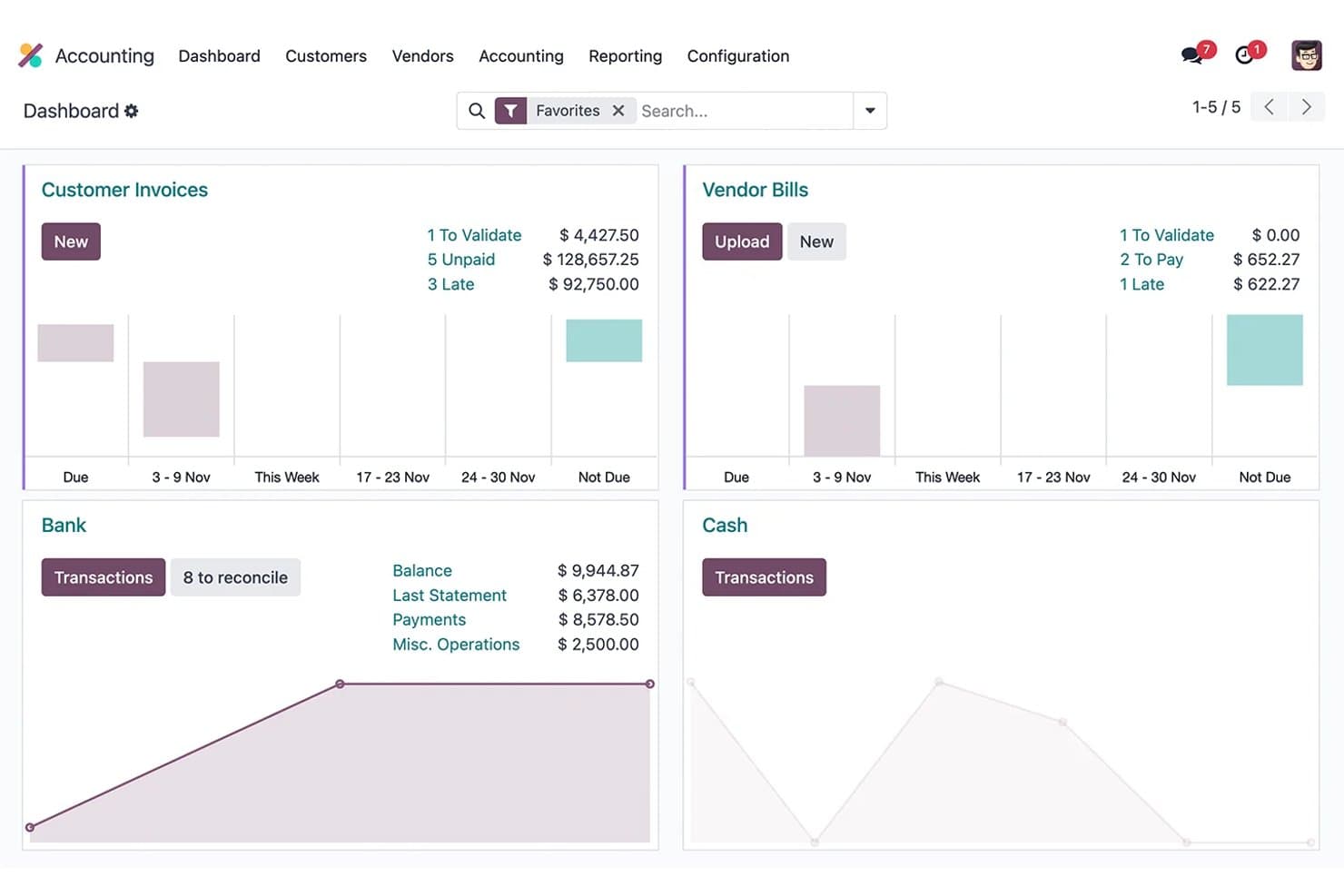
Odoo Accounting tracks invoices, vendor bills, and bank reconciliation. Odoo Accounting is a modular ERP accounting platform that brings together general ledger, subscription billing, deferred revenue, multi-entity consolidation, and analytic reporting within a broader suite of 80+ natively integrated business apps.
Who Is Odoo Accounting Best For?
Odoo Accounting fits growing media companies that want one integrated platform for subscriptions, CRM, HR, and accounting instead of managing several disconnected tools.
Why I Picked Odoo Accounting
I've included Odoo Accounting in my top picks because it's the only option on this list that brings accounting, CRM, subscriptions, and HR into one connected platform without forcing you to stitch together separate tools. I particularly like its dedicated Subscriptions module, which handles recurring billing and automatically feeds deferred revenue schedules directly into the general ledger. Its multi-dimensional analytic accounting also lets you track revenue and costs across publications, channels, or departments without custom workarounds.
Odoo Accounting Key Features
- AI-powered vendor bill capture: Automatically digitizes vendor invoices using OCR with a 98% recognition rate, reducing manual data entry for AP teams.
- 1099 report wizard: Generates 1099-NEC and 1099-MISC reports with CSV export for US-based freelancer and contributor payments directly within the accounting module.
- Analytic distribution models: Automatically allocates costs and revenues across departments, channels, or publications based on configurable rules tied to account prefix or product category.
- Smart bank reconciliation: Matches bank transactions to journal entries automatically, resolving roughly 95% of transactions without manual intervention.
Odoo Accounting Integrations
Odoo Accounting has native integrations across 80+ Odoo apps, including Odoo CRM, Subscriptions, Sales, eCommerce, Purchase, and HR, plus Stripe, PayPal, Adyen, and Avalara AvaTax. It supports REST, JSON-RPC, and XML-RPC APIs, with marketplace integrations but no prebuilt advertising or circulation connectors.
Pros and Cons
Pros:
- Analytic accounting tracks publication or channel performance
- Multi-company consolidation supports complex media groups
- Subscription revenue and deferred revenue features excel
Cons:
- No native connectors to circulation systems
- No built-in advertising billing or workflows
Learn more about Odoo Accounting: Best for Salesforce-native multi-entity accounting
- Free demo available
- Pricing upon request
Visit WebsiteCustomer Rating:4/5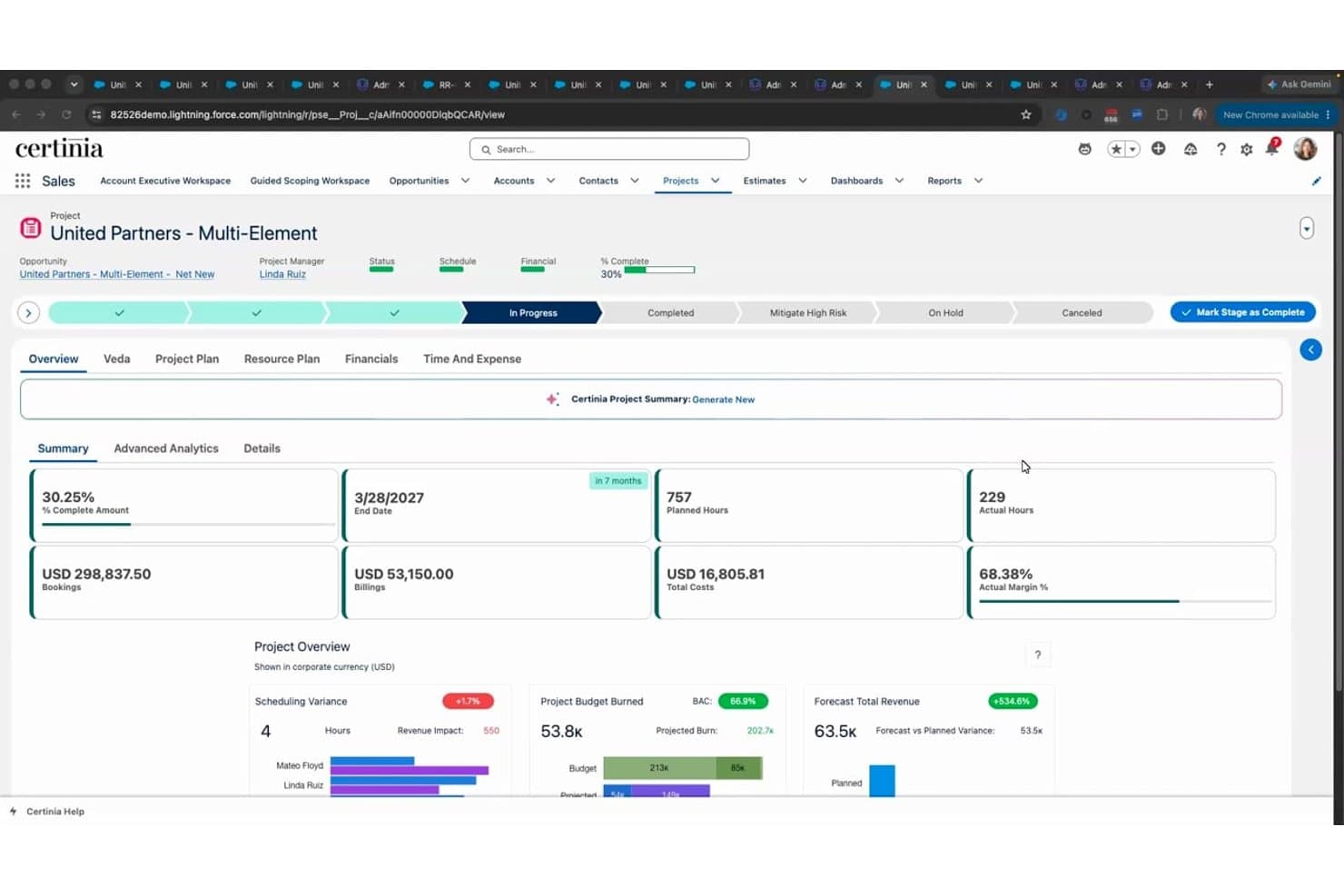
Certinia tracks project financials, margins, and burn rates in real time. Certinia is a Salesforce-native accounting and financial management platform that covers multi-entity general ledger, subscription billing, revenue recognition, accounts payable, procurement, and FP&A.
Who Is Certinia Best For?
Certinia is a strong fit for multi-title media holding companies already running Salesforce that need enterprise-grade multi-entity accounting, ASC 606 revenue recognition, and subscription billing in one platform.
Why I Picked Certinia
I've included Certinia in my top picks because it's the strongest option for multi-title media holding companies already running Salesforce that need enterprise-grade multi-entity accounting. Its "multi-everything" GL handles multi-company, multi-currency, and multi-chart-of-accounts operations with automated intercompany eliminations in one ledger. I also like its ASC 606 revenue recognition engine, which automates deferred revenue schedules across subscription and bundled contract arrangements common in media.
Certinia Key Features
- Subscription and usage-based billing: Manages recurring billing across multiple pricing models and frequencies, with automated invoicing and deferred revenue tracking.
- FP&A with multi-scenario modelling: Supports top-down and bottom-up budgeting with real-time CRM data, enabling revenue forecasting up to 12 months ahead.
- Dimensional GL reporting: Configurable chart of accounts with custom dimensions lets you slice financial data by entity, department, or any reporting segment.
- 1099 vendor reporting: Flags vendor accounts as federally reportable and generates 1099-NEC and 1099-MISC reports for freelancer and contractor payments.
Certinia Integrations
Certinia is built natively on Salesforce and supports REST and SOAP APIs for custom connections. Documented partner integrations include MuleSoft, Celigo, Jitterbit, Avalara, AvidXchange, and Plaid, though no prebuilt ad-server or circulation-platform connectors are listed.
Pros and Cons
Pros:
- Native Salesforce integration with shared data model
- Automated ASC 606 revenue recognition included
- Multi-entity accounting for media holding companies
Cons:
- Lacks prebuilt publisher KPI dashboards
- No native advertising revenue management tools
Learn more about Certinia: Best for multinational subscription accounting
- Free demo available
- Pricing upon request
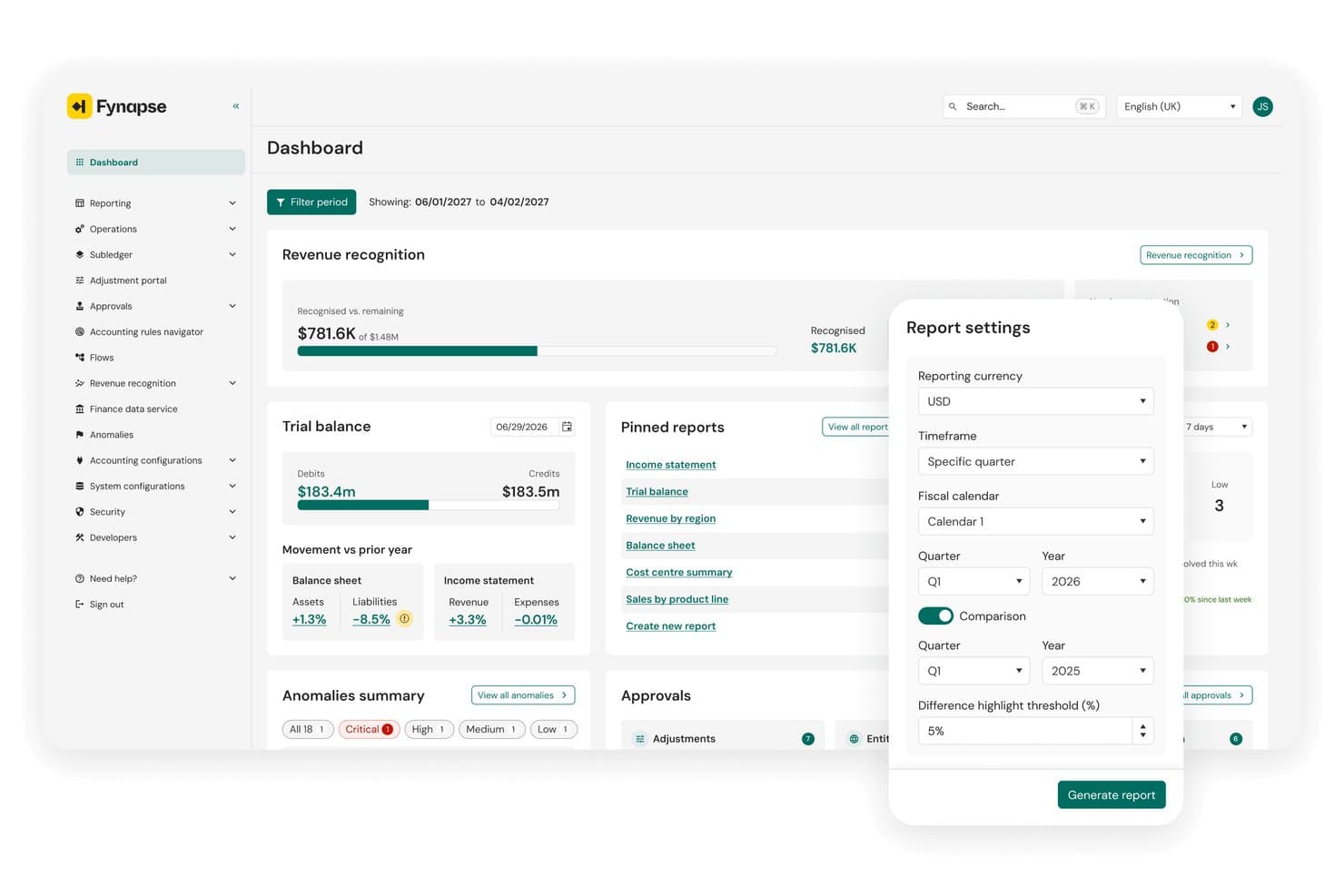
Aptitude lets users generate comparison reports by quarter and fiscal calendar. Aptitude is an enterprise finance platform that combines subscription lifecycle management, automated revenue recognition, and multi-entity accounting for media and publishing organizations.
Who Is Aptitude Best For?
Aptitude fits multinational media holding companies that need to consolidate financials across multiple titles, entities, and currencies under a single, compliance-ready platform.
Why I Picked Aptitude
I picked Aptitude as one of the best because its Fynapse platform handles true multi-GAAP, multi-entity accounting across currencies from a single source, which is exactly what a holding company managing titles like Berliner Zeitung or dmg media's portfolio actually needs. Its eSuite and RevStream combination automates deferred revenue schedules and ASC 606/IFRS 15 compliance for print and digital subscriptions without manual intervention. I also rate its zero-day close capability highly, since real-time P&L across entities removes the consolidation bottleneck that typically defines month-end for multinational media finance teams.
Aptitude Key Features
- Subscriber lifecycle management: eSuite handles acquisition, billing, retry logic, subscription holidays, and churn tools for print, digital, and hybrid subscription bundles from a single platform.
- No-code offer configuration: Commercial teams can launch new subscription products, promotions, and pricing tiers without IT involvement.
- Standalone selling price (SSP) engine: RevStream automates transaction price allocation across multi-element contracts to support accurate revenue recognition.
- Finance-owned chart of accounts: Fynapse lets finance teams modify their chart of accounts and accounting rules directly, without IT dependency.
Aptitude Integrations
Aptitude has documented integrations with SAP S/4HANA, Oracle Fusion Cloud, Microsoft Dynamics 365, NetSuite, BDL, Forward Publishing, and Livingdocs, plus a Brightcove Marketplace integration. Open REST APIs support custom connections.
Pros and Cons
Pros:
- No-code launch of new subscription products
- Automates ASC 606 and IFRS 15 compliance
- Real-time P&L across multiple entities
Cons:
- No royalty or contributor payment engine
- No native advertising order system integration
Learn more about Aptitude: Best for newspaper ad order-to-cash billing
- Free demo available
- Pricing upon request
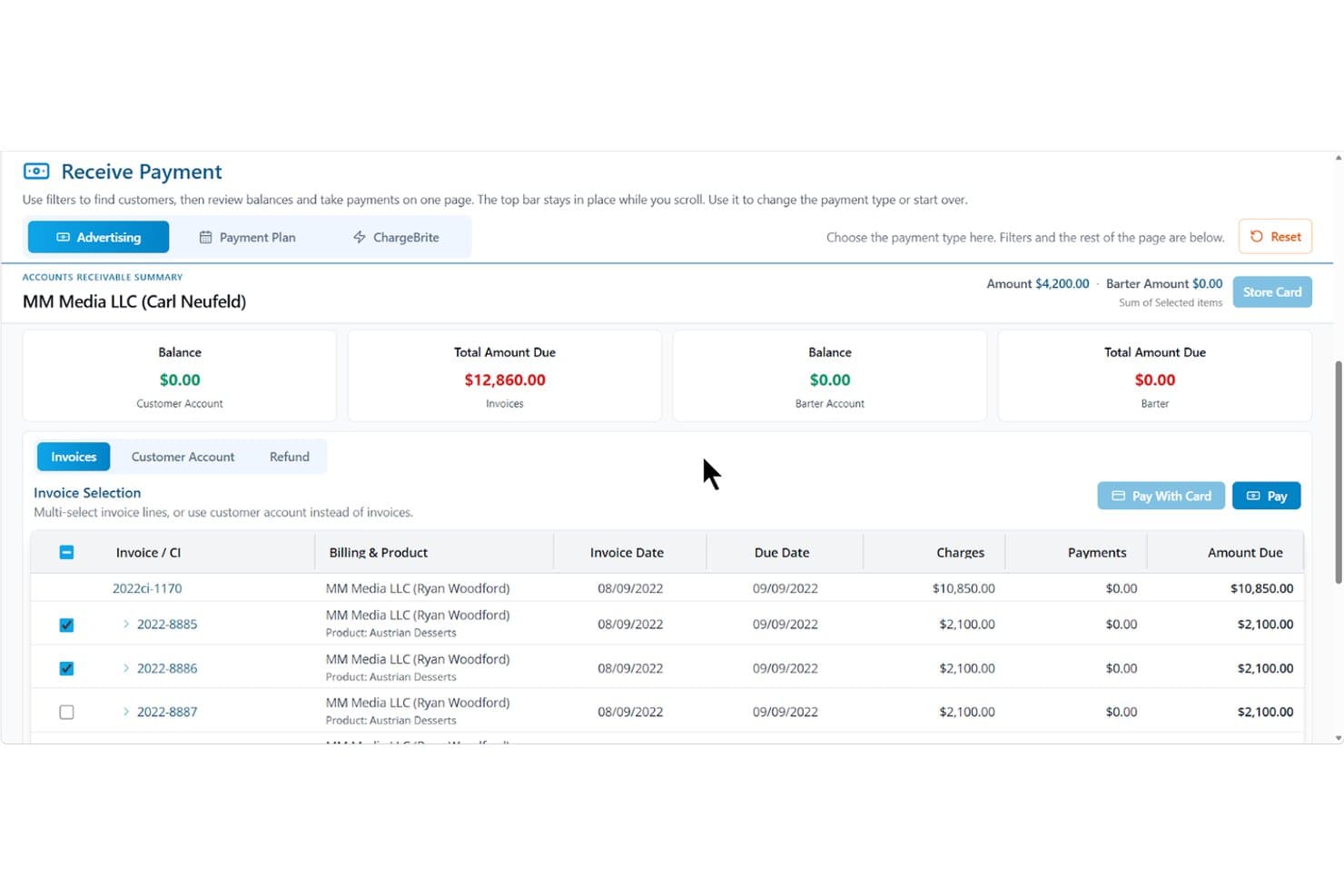
The Newspaper Manager streamlines invoice payments and billing in one view. The Newspaper Manager is a cloud-based publishing CRM and billing platform built specifically for newspaper and media publishers, covering ad order management, subscription billing, accounts receivable, and reporting across print, digital, and bundled media channels.
Who Is The Newspaper Manager Best For?
The Newspaper Manager is a strong fit for advertising billing managers and circulation teams at newspaper publishers who need a dedicated platform to manage the full ad order-to-cash cycle.
Why I Picked The Newspaper Manager
I picked The Newspaper Manager because it's the only tool on my list built exclusively around the newspaper ad order-to-cash cycle. From the moment a proposal is created, it moves through contracts, insertion orders, and invoicing without leaving the platform. I especially like the two-way Google Ad Manager sync, which reconciles digital impression data directly against billing records, so there's no manual cross-referencing when closing out a digital campaign.
The Newspaper Manager Key Features
- Multi-currency billing: Issue proposals, insertion orders, invoices, and statements in multiple currencies, with payment gateways assignable by rate card.
- Flex Reports: Build custom reports by combining any data points and custom fields into configurable views accessible to specific users or your whole team.
- Subscription renewal automation: Configure renewal workflows tied to order renewal dates, including one-click renewals, dunning sequences, and win-back campaigns.
- Rate card management: Set up word, line, flat, inch, and modular size rates to automate pricing across print and digital ad orders.
The Newspaper Manager Integrations
The Newspaper Manager integrates with QuickBooks, Xero, Sage, Epicor, Microsoft Dynamics GP, and Google Ad Manager for accounting, billing, and digital ad reconciliation. It also connects with Stripe, Authorize.net, CardConnect, and Plug'NPay, with API-based flows available for custom exchange.
Pros and Cons
Pros:
- Automated subscription renewal and dunning tools
- Google Ad Manager sync for digital billing
- Ad order-to-cash workflow built for publishers
Cons:
- Limited multi-entity or cross-edition consolidation
- No native general ledger or accounts payable
Learn more about The Newspaper Manager: Best for multi-entity publisher consolidation
- Free demo available
- Pricing upon request
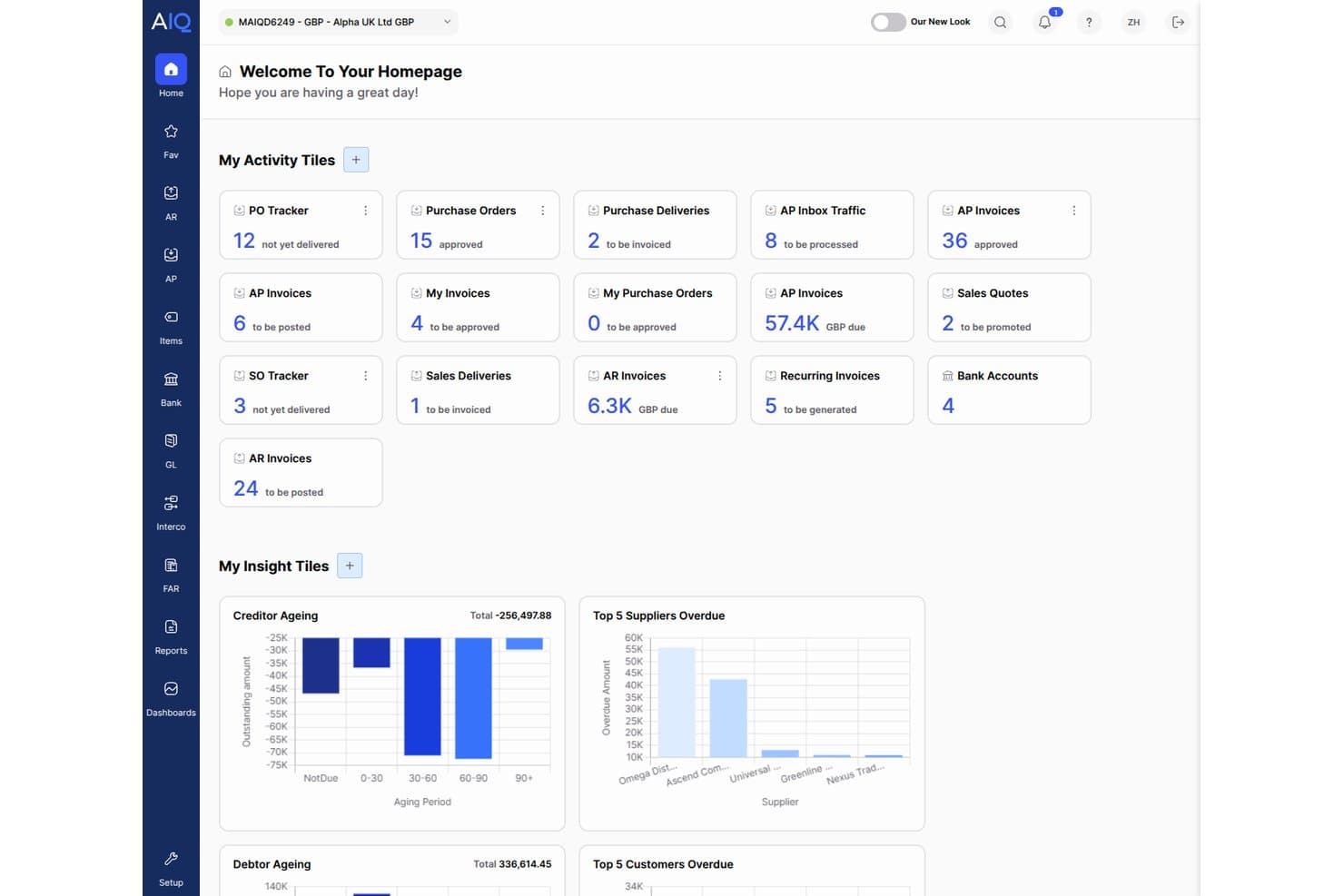
AccountsIQ centralizes financial activity with real-time dashboard tiles. AccountsIQ is a cloud-native group accounting platform that handles multi-entity consolidation, dimensional GL reporting, accounts payable automation, and recurring invoicing across complex publishing and media group structures.
Who Is AccountsIQ Best For?
AccountsIQ is a strong fit for mid-market media groups and multi-title publishers that need to consolidate financials across multiple entities without the cost and complexity of a full ERP.
Why I Picked AccountsIQ
AccountsIQ earns its spot on my shortlist because of how well it handles multi-entity consolidation for media groups managing several publications under one roof. I'm particularly impressed by its one-click consolidation across up to 300 entities, with automated intercompany eliminations and multi-currency FX translation built in. The New Statesman Media Group runs 17 entities through it, with Salesforce feeding ad invoices directly into the ledger, which shows how a real publishing group actually uses it.
AccountsIQ Key Features
- Multi-dimensional GL coding: Assign up to six analysis dimensions per entity—such as publication, channel, or revenue stream—to segment financials without bloating your chart of accounts.
- Recurring sales invoice automation: Generate invoices on weekly, monthly, or custom schedules to support subscription billing workflows across multiple titles.
- Open REST API: Connect advertising booking systems, CRM platforms, or circulation tools to AccountsIQ for automated invoice creation and AR management.
- Power BI OData connector: Pull live financial data directly into Power BI dashboards to build custom media reporting beyond the 250+ prebuilt reports.
AccountsIQ Integrations
AccountsIQ offers 100+ marketplace integrations, including Salesforce, Stripe, GoCardless, Chaser, Power BI, Shopify, and WooCommerce. Its open REST API supports custom connections to advertising booking systems, while the Excel Add-In provides live financial data.
Pros and Cons
Pros:
- Proven in media with real publisher case studies
- Granular financial reporting by publication or revenue stream
- Multi-entity consolidation handles publisher group structures
Cons:
- No native ad server or circulation platform connectors
- No automated deferred revenue or subscription recognition
Learn more about AccountsIQ: Best for multi-entity financial compliance
- Free demo available
- From £1,200/month
Visit WebsiteCustomer Rating:4.3/5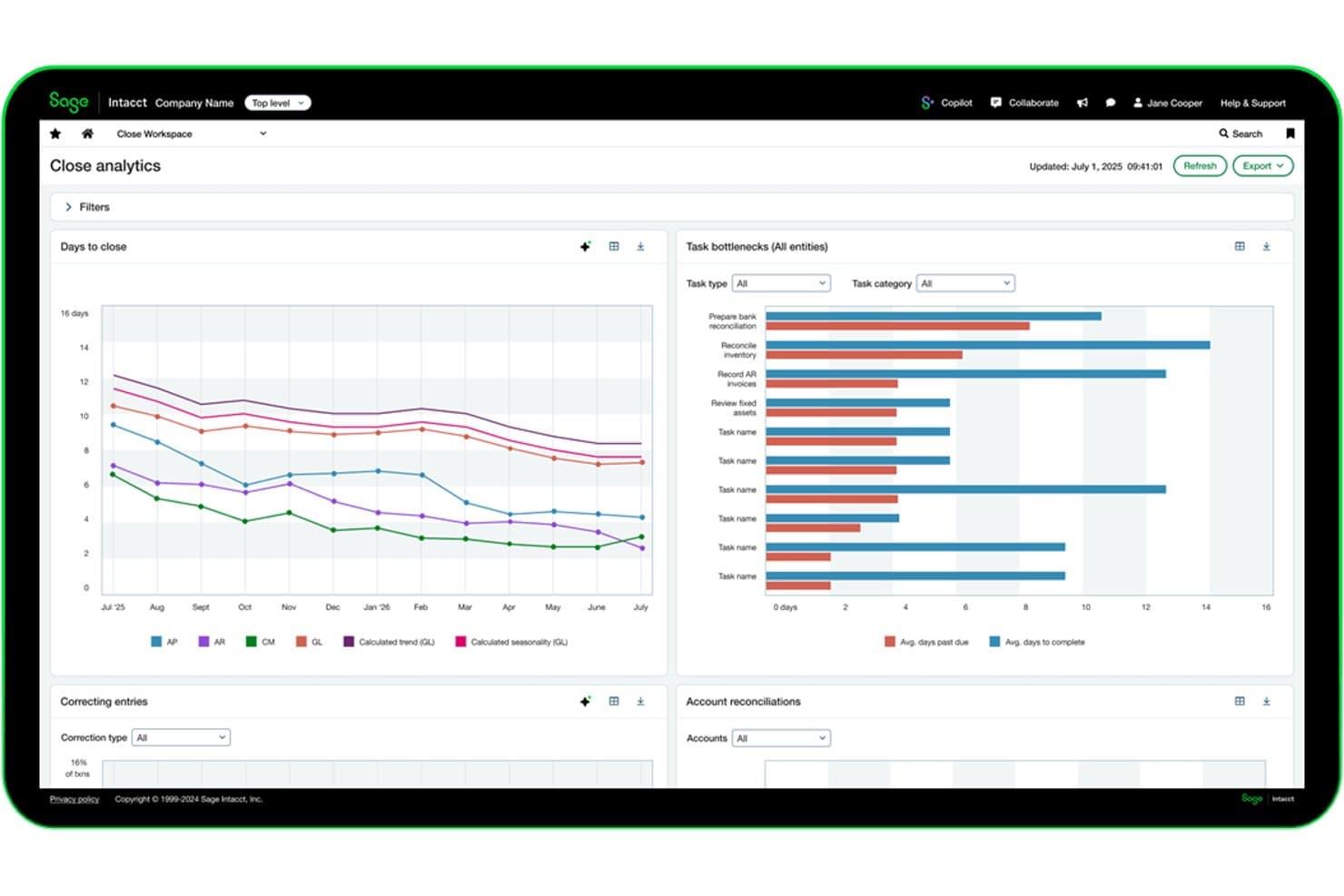
Sage Intacct tracks close cycle bottlenecks and reconciliations in real time. Sage Intacct is a cloud financial management platform built for multi-entity organizations, offering a multi-dimensional general ledger, subscription billing, automated revenue recognition, and consolidated reporting across entities, currencies, and dimensions.
Who Is Sage Intacct Best For?
Sage Intacct is a strong fit for media holding companies and multi-title publishers that need audit-grade financial controls and consolidated reporting across entities.
Why I Picked Sage Intacct
Sage Intacct earns its spot on my shortlist because no other mid-market platform handles multi-entity consolidation at the scale media holding companies actually need. I'm talking about consolidating hundreds of entities in minutes, with automated intercompany eliminations running across currencies and hierarchies simultaneously. Its multi-dimensional GL lets you tag every transaction across titles, platforms, and geographies, so you can pull a publication-level P&L without maintaining a bloated chart of accounts. Add native ASC 606 and IFRS 15 revenue recognition for subscription billing, and you have audit-grade financial compliance built in, not bolted on.
Sage Intacct Key Features
- Subscription billing module: Supports recurring, usage-based, tiered, milestone, and hybrid billing models with automated deferred revenue schedules for subscription publishers.
- ASC 606 and IFRS 15 revenue recognition: Native compliance built in collaboration with FASB, covering multi-element contracts and complex bundled billing arrangements.
- 1099-NEC and 1099-MISC generation: Automates tax form preparation for US-based freelancer and vendor payments, with third-party e-filing integrations available.
- Finance Intelligence Agent: Lets finance teams query financial data using natural language, reducing manual reporting work during close cycles.
Sage Intacct Integrations
Sage Intacct has 350+ marketplace integrations, including Tipalti, Workato, and DataBlend, plus a native Salesforce integration. REST and XML/SOAP APIs support custom connections, but no media-specific ad, circulation, or publishing CRM connectors are documented.
Pros and Cons
Pros:
- Dimensional GL enables segmented publication P&Ls
- Automated ASC 606 and IFRS 15 compliance
- Multi-entity consolidation across publications and brands
Cons:
- Media system integrations require custom development
- No native ad or circulation workflows
Learn more about Sage Intacct: Best for ad-to-cash billing across print and digital
- Free demo available
- Pricing upon request
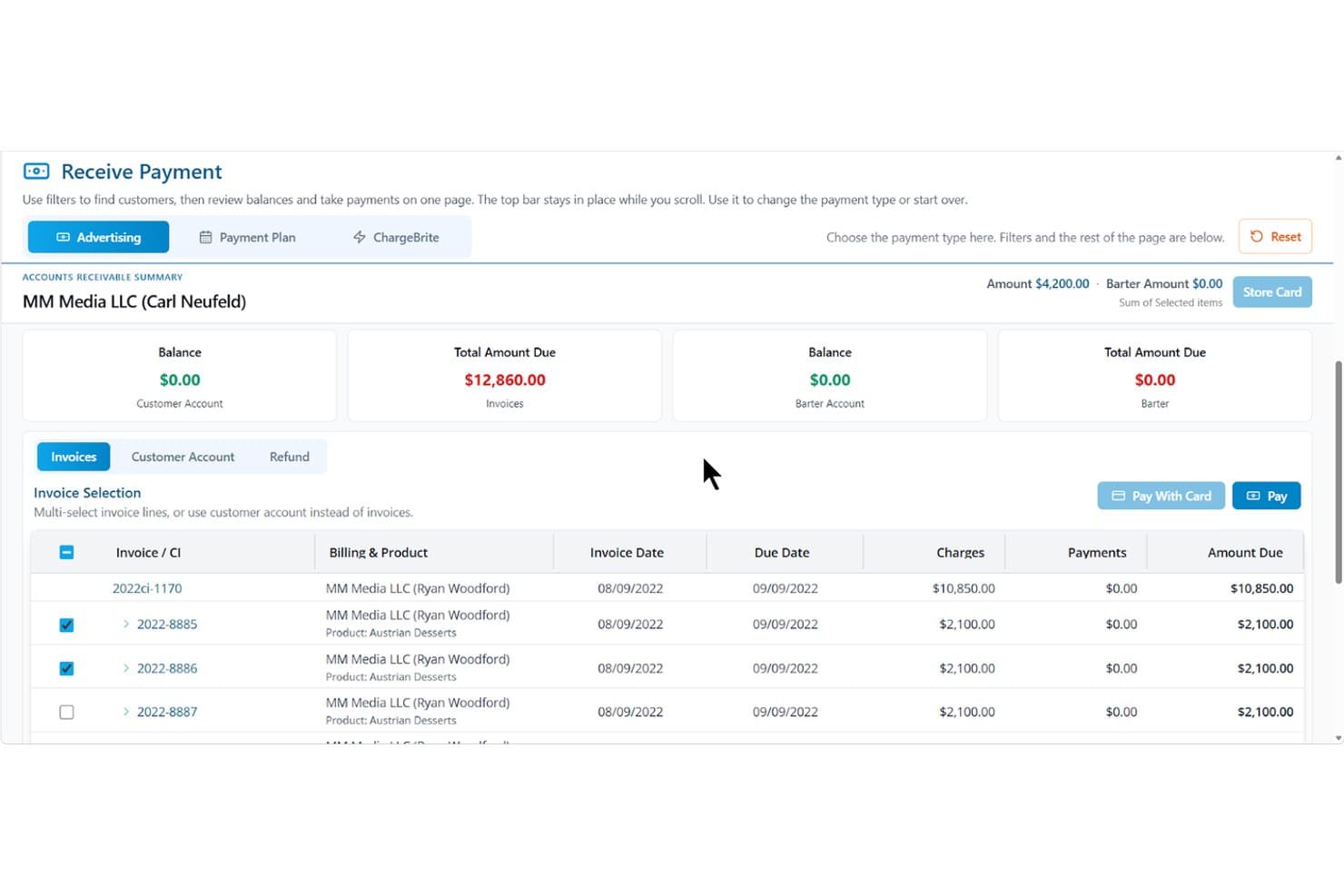
The Magazine Manager streamlines invoice payments and accounts receivable tracking. The Magazine Manager is a publishing-focused revenue management platform that covers ad order management, subscription billing, accounts receivable, and financial reporting for print and digital media operations.
Who Is The Magazine Manager Best For?
The Magazine Manager fits small-to-mid-size magazine publishers whose revenue runs through ad sales and subscriptions—and who need those two billing streams managed in one place.
Why I Picked The Magazine Manager
I picked The Magazine Manager because it's the only tool on my list built specifically around ad-to-cash billing, covering the full cycle from insertion order to invoice to payment collection across both print and digital channels. I especially like how multi-issue ad contracts auto-generate invoices on scheduled run dates, and how the Google Ad Manager two-way sync reconciles billed amounts against actual delivered impressions without any manual re-keying. ChargeBrite, the native subscription billing engine, keeps subscription AR in the same system as ad AR, so nothing falls through the cracks at month-end.
The Magazine Manager Key Features
- Client payment portal: Advertisers can view invoices, upload ad creative, and pay electronically at any time through a secure self-serve portal.
- Sales rep performance tracking: Monitors calls logged, proposals sent, deals closed, and revenue generated against quota targets.
- Issue profitability analysis: Breaks down production costs, ad-to-editorial ratios, and planned vs. actual costs for each print or digital issue.
- Role-based access controls: Restricts data visibility and editing permissions by user role to support segregation of duties across your finance team.
The Magazine Manager Integrations
The Magazine Manager offers 21+ integrations, including QuickBooks, Xero, Sage, Microsoft Dynamics GP, Google Ad Manager, and Stripe. Its REST API supports custom connections to BI tools and data warehouses.
Pros and Cons
Pros:
- Pre-built publishing reports for revenue analysis
- Native subscription billing with unified AR
- Built for ad order-to-cash workflows
Cons:
- Not a true general ledger system
- No native payables or contributor accounting
Learn more about The Magazine Manager: Best for publisher rights and royalty accounting
- Free demo available
- Pricing upon request
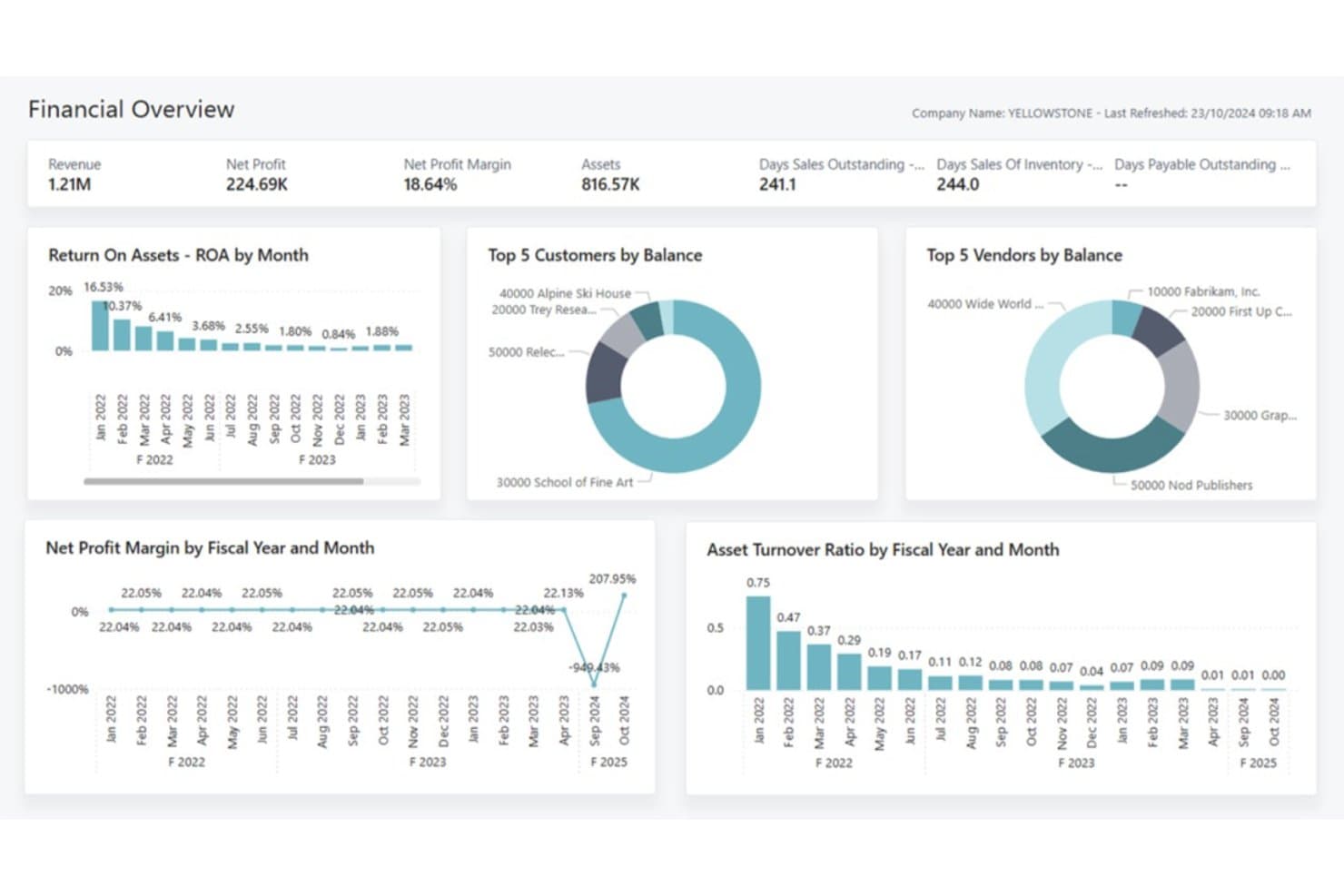
knk Software provides a financial overview dashboard for publishers. knk Software is a publishing-specific ERP built on Microsoft Dynamics 365 Business Central that covers subscription billing, rights and royalty accounting, multi-entity financial consolidation, and advertising campaign management for media and publishing organizations.
Who Is knk Software Best For?
knk Software is a strong fit for multi-title magazine, academic, and specialty publishers that need publishing-specific financial management built on a familiar Microsoft platform.
Why I Picked knk Software
I picked knk Software as one of the best because its rights and royalty engine goes deeper than anything else I've seen in a publishing ERP. It tracks royalties at the chapter and article level, handles multi-currency and multi-territory splits, and automates royalty statements with full auditability tied directly to the GL. I also like that it manages advances, accruals, and reversals in the same system, so there's no reconciliation gap between what authors are owed and what's posted to the books.
knk Software Key Features
- Multi-entity financial consolidation: Automatically consolidates financial statements across subsidiaries and imprints, with intercompany accounting built into the Business Central foundation.
- Subscription lifecycle management: Handles trials, renewals, cancellations, churn forecasting, and deferred revenue posting across print, digital, and hybrid bundle contracts.
- Cost center and cost unit accounting: Tracks profitability continuously at the individual publication, product, or channel level within the general ledger.
- knk Integration Platform (KIP): A no-code interface layer that connects Business Central to external applications via configurable file formats, scheduled imports, and custom field mapping.
knk Software Integrations
knk Software offers native integrations across the Microsoft ecosystem, including Dynamics 365 Business Central, Power BI, Microsoft 365, SharePoint, and Dynamics 365 CRM. Its knk Integration Platform connects external applications through scheduled imports, exports, field mapping, and configurable file formats, including Adobe InDesign, WordPress, and Drupal.
Pros and Cons
Pros:
- Automates subscription lifecycle and deferred revenue
- Built on Microsoft Dynamics 365 platform
- Tracks royalties to chapter and article level
Cons:
- Limited newspaper publisher case studies available
- Lacks native newspaper circulation integrations
Learn more about knk Software: Best for multi-entity media group reporting
- Free demo available
- Pricing upon request
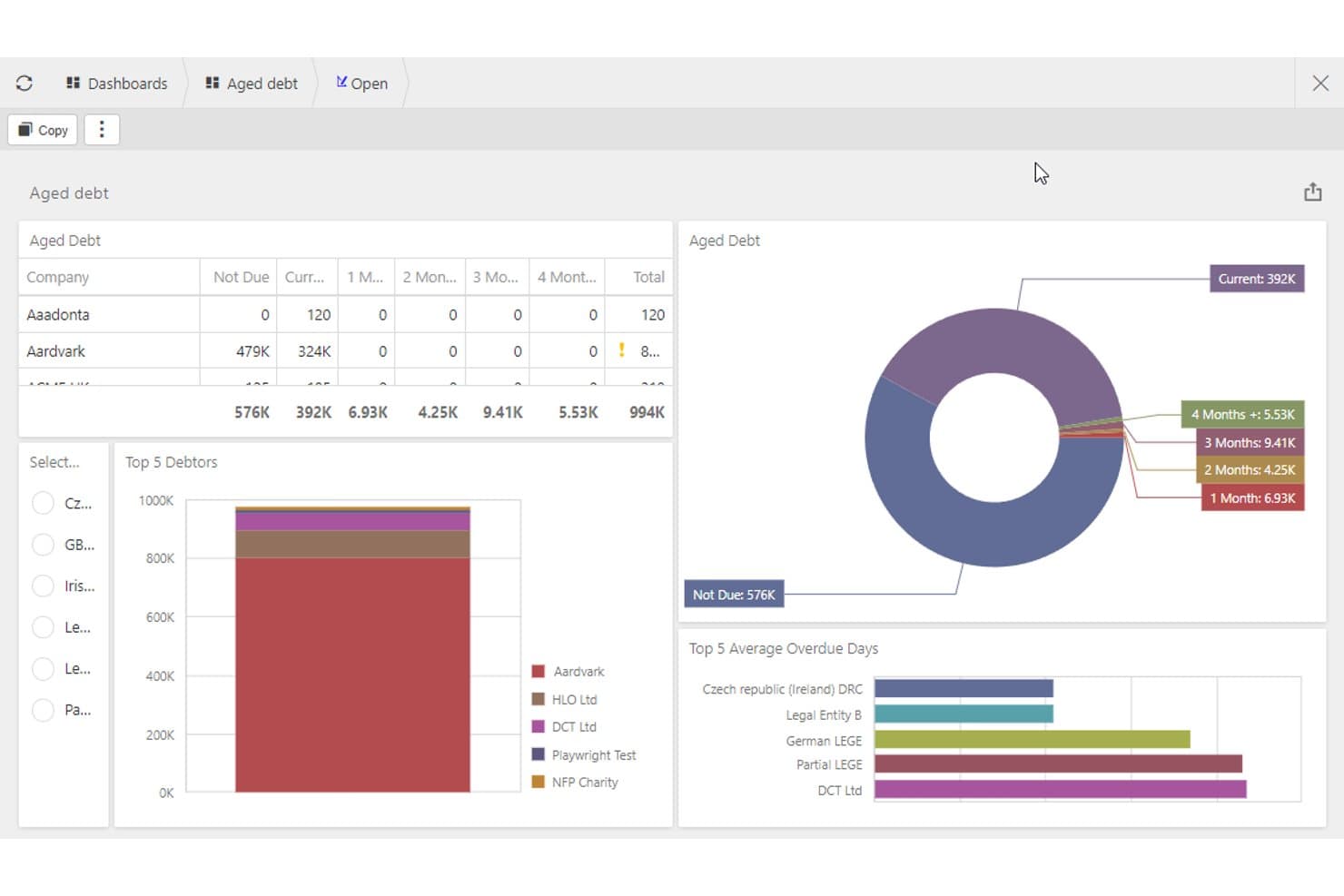
iplicit tracks aged debt and top debtors for media finance teams. iplicit is a cloud accounting platform built for mid-market, multi-entity organizations that combines group consolidation, automated revenue recognition, unlimited accounting dimensions, and project-level cost tracking across unlimited legal entities.
Who Is iplicit Best For?
iplicit is a strong fit for mid-market media holding companies and multi-title publishers that need real-time group consolidation across multiple legal entities.
Why I Picked iplicit
I picked iplicit as one of the best because its multi-entity consolidation is genuinely built for media holding companies running multiple titles under one group. Real-time consolidated reporting with automated intercompany eliminations means a group controller can close the books across every legal entity without chasing spreadsheets. I also like the unlimited accounting dimensions, which let you slice P&L by publication, channel, or project without bloating your chart of accounts.
iplicit Key Features
- Automated revenue recognition: Deferred revenue is applied from the point of data entry, automating monthly revenue spreading and journal postings without manual intervention.
- Project and sub-project accounting: Costs and revenue can be tracked at the individual title, campaign, or content vertical level using granular project hierarchies.
- Live multi-currency consolidation: XE-integrated exchange rate feeds update consolidated group accounts in real time across all currencies and legal entities.
- Open REST API: A fully documented API covers all major financial objects—from sales invoices to batch payments—enabling custom connections to ad, circulation, and subscription systems.
iplicit Integrations
iplicit offers 10 documented native integrations, including Microsoft Excel, Microsoft Power BI, Salesforce, IRIS Payroll Professional, Lightyear, XE, Unleashed, Cin7, IMP Software, and SBS Financial Planner. It also supports custom connections through its REST API, as well as Besyncly and Zapier.
Pros and Cons
Pros:
- Unlimited custom dimensions for reporting
- Automated deferred revenue recognition workflows
- Real-time multi-entity group consolidation
Cons:
- No pre-built media system integrations
- No native advertising billing features
Learn more about iplicit: Best for ad agency media billing workflows
- Free demo available
- Pricing upon request
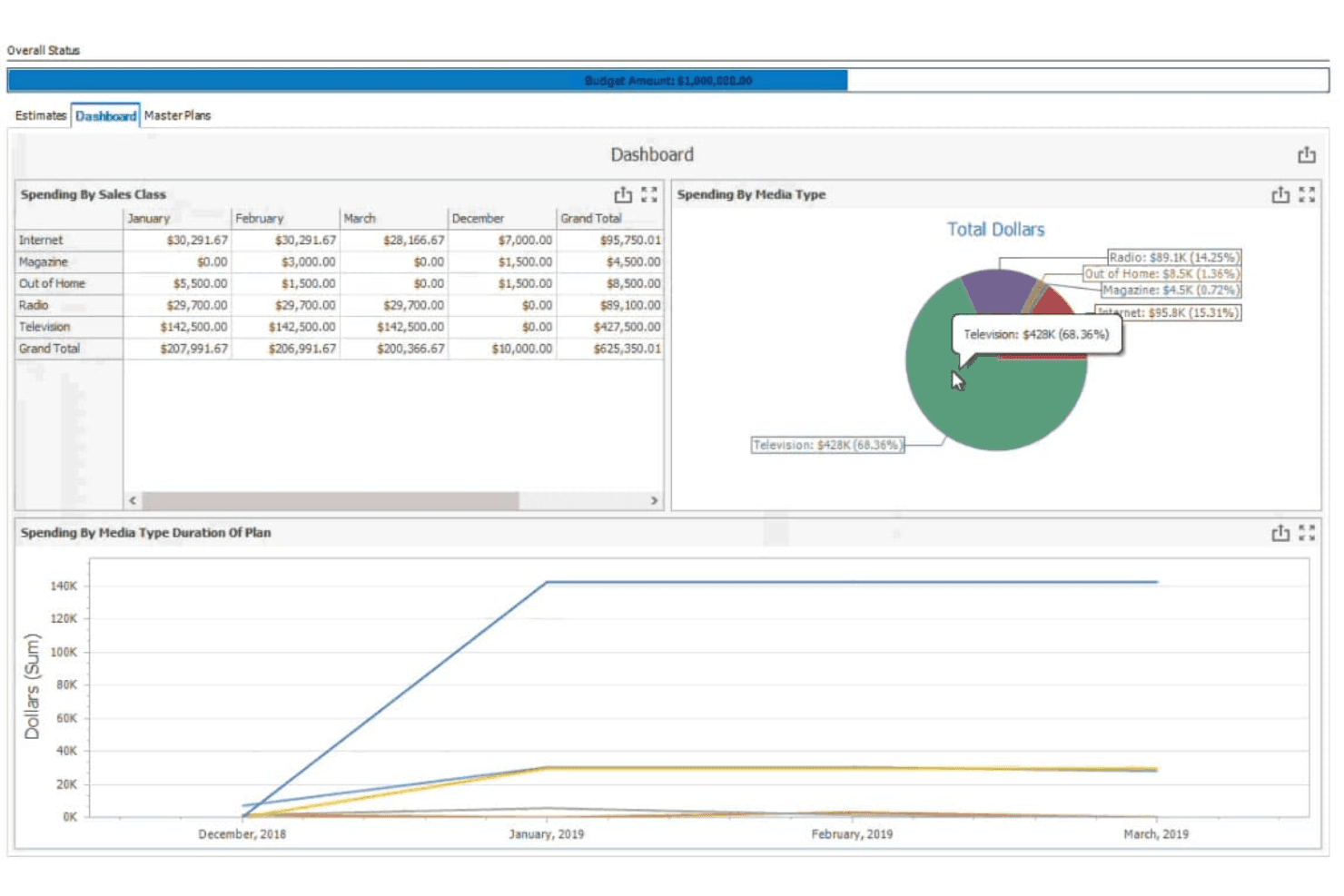
Advantage Media offers accounting solutions for media companies' financial tasks. Advantage Media is an advertising agency ERP that covers media billing, multi-channel order-to-cash, makegood management, and accounts payable within a single platform built specifically for agency and media-buying workflows.
Who Is Advantage Media Best For?
Advantage Media is a strong fit for advertising agencies and in-house media buying teams that need end-to-end billing and reconciliation across broadcast, digital, print, and out-of-home channels.
Why I Picked Advantage Media
I picked Advantage Media because no other tool on this list handles ad agency media billing with this level of specificity. Its Billing Command Center consolidates every billable across broadcast, digital, print, and out-of-home in one place, while the Billing Rate Hierarchy automates the correct billing logic by client, division, or office. I also love the built-in makegood management, where vendors submit proposals through a portal, and approvals automatically update schedules and send revised orders.
Advantage Media Key Features
- 4A's invoice matching: Imports and matches broadcast media invoices in the 4A's standard format, using financial and detail criteria like rate, time, schedule, and ad number.
- Media liability tracking: Automatically accrues and tracks media liability across all active orders in real time.
- Self-service report writer: A built-in dashboard and report editor lets users build custom GAAP-compliant financial reports with full drill-down to source transactions.
- AdvantagePay digital payments: Integrates with Edenred Pay and AvidXchange to automate supplier payments across a network of 70,000+ media vendors.
Advantage Media Integrations
Documented integrations include QuickBooks Online, Strata/StrataConnect, COREMedia, Google DV360, Simpli.fi, Avalara AvaTax, Edenred Pay, AvidXchange, TSYS, Nielsen, Comscore, and Eastlan.
Pros and Cons
Pros:
- Automated 4A's invoice import and matching
- Handles agency commissions and makegood management
- Specializes in multi-channel ad billing workflows
Cons:
- Lacks contributor royalty and syndication tools
- No subscription or circulation revenue features
Learn more about Simpli.fi Advantage:
Annen regnskapsprogramvare for medier og aviser
Her er noen flere alternativer for regnskapsprogramvare for medier og aviser som ikke kom med på kortlisten min, men som likevel er verdt å undersøke:
- 11DualEntryBest for ASC 606 subscription revenue at scale
- 12Zoho BooksBest for automated accounting workflows
- 13ChargebeeBest for digital subscription revenue recognition
- 14WorkamajigBest for agency media buying and commission billing
- 15AccountScoutBest for subscription billing across print and digital
- 16SmartPublisherBest for newspaper ad billing management
- 17NetSuite for Media & PublishersBest for ERP-scale multi-title media consolidation
- 18KlopotekBest for book publisher royalty contract accounting
Related Reviews
How I Evaluate Media and Newspaper Accounting Software
I split my evaluation into baseline criteria every tool must meet—like deferred revenue and multi-entity reporting—and differentiators like ad system integrations and agency commission handling.
Core Functionality (Table Stakes For This List)
When I'm selecting tools for my list, I rank each one on a scale from 0 (does not offer the functionality) to 5 (excels in this area) for each core functionality listed below. I then calculate the tool's total score into a percentage, using 55% as a benchmark to help assess its overall fit for the list.
- Advertising Revenue Management: I look for how well each tool handles campaign-based billing, multi-channel invoicing, and AR workflows—whether natively or through ad-system integrations.
- Subscription Revenue Accounting: I evaluate support for deferred revenue schedules, recurring billing, and credits or refunds tied to subscriber lifecycle events like cancellations and plan changes.
- Multi-Entity & Publication Accounting: I check whether a tool can consolidate financials across multiple titles or imprints—not just store them separately, but actually produce unified reporting.
- Segmented Financial Reporting: How configurable is the GL? I look for the ability to slice P&Ls by publication, channel, or department without needing custom workarounds every reporting cycle.
- Media Payables & Contributor Accounting: I consider how each platform handles payments to freelancers, contributors, and syndication partners—including any support for contract-based or royalty-style payment structures.
- Media Systems Integration: I evaluate whether a tool connects meaningfully with advertising, circulation, or subscription platforms—looking for real data exchange, not just manual file imports.
Once I have a list of tools that meet the criteria, I consider what sets each platform apart.
Differentiating Factors (What Sets Vendors Apart)
Here's how I compare and contrast different vendors:
Standout Features
Ad traffic system sync is where I focus first—I look for bidirectional connectors to platforms like Google Ad Manager or Operative that move insertion orders and delivered impressions directly into AR. I also evaluate agency commission automation, particularly how a tool handles net-vs-gross invoicing and sequential liability rules without manual workarounds. For publishers managing freelancers and syndication partners, I check whether a rights and royalty engine can calculate tiered rates and generate contributor statements tied to actual contract terms.
Beyond Features
Publishing industry fit matters more than most buyers expect. I look for vendors with a real book of newspaper or magazine clients—not just generic SMB references—and check whether they participate in groups like the News Media Alliance or INMA. Compliance depth is another area I dig into: ASC 606 and IFRS 15 support for bundled ad and subscription contracts, SOC 1 and SOC 2 Type II attestations, and high-volume 1099 handling are non-negotiable for PE-backed or publicly traded publishers. I also consider whether the GL architecture can scale across dozens of entities without exploding the chart of accounts.
Slik velger du regnskapsprogramvare for medier og aviser
Det er lett å gå seg vill i lange funksjonslister og kompliserte prismodeller. For å hjelpe deg med å holde fokus mens du arbeider deg gjennom den unike prosessen med å velge programvare, har jeg laget en sjekkliste over faktorer du bør ha i tankene:
| Faktor | Hva du bør vurdere |
| Skalerbarhet | Kontroller at programvaren kan vokse med virksomheten din og håndtere økte datamengder og brukerbehov. |
| Integrasjoner | Sjekk om den kan integreres med eksisterende verktøy, løsninger for annonseadministrasjon og annen faktureringsprogramvare. |
| Tilpasningsmuligheter | Se etter programvare som lar deg tilpasse funksjonene til teamets spesifikke arbeidsflyter. |
| Brukervennlighet | Velg et brukervennlig grensesnitt som teamet raskt kan konfigurere og tilpasse uten omfattende opplæring. |
| Budsjett | Vurder de totale eierkostnadene, inkludert skjulte gebyrer eller ekstra kostnader for brukere. |
| Sikkerhetstiltak | Kontroller at programvaren tilbyr god databeskyttelse og overholder bransjestandarder. |
| Brukerstøtte | Vurder tilgjengeligheten av kundestøtte og opplæringsressurser som kan hjelpe teamet ditt. |
| Rapporteringsfunksjoner | Kontroller at programvaren tilbyr detaljerte økonomirapporter som dekker behovene til medievirksomheten din. |
Trender innen regnskapsprogramvare for medier og aviser
I undersøkelsene mine hentet jeg inn utallige produktoppdateringer, pressemeldinger og lanseringslogger fra ulike leverandører av regnskapsprogramvare for medie- og avisbransjen. Her er noen av de fremvoksende trendene jeg følger med på:
- AI-drevet innsikt: Flere leverandører integrerer AI for å levere handlingsrettet innsikt. Dette hjelper brukere med å ta bedre økonomiske beslutninger ved å analysere mønstre og forutsi trender. Noen verktøy tilbyr nå også AI-drevne prognoser for å hjelpe virksomheter med å planlegge økonomien mer nøyaktig.
- Blokkjede for åpenhet: For tiden tas blokkjede i bruk for å øke åpenheten og sikkerheten rundt transaksjoner. Dette er spesielt nyttig for å spore annonseinntekter og sikre nøyaktige royaltybetalinger.
- Personlig tilpassede dashbord: Dashbord som kan tilpasses, har blitt mer populære de siste årene, slik at brukere kan tilpasse visningen av økonomien sin. Denne typen dashbord hjelper team med å fokusere på det som er viktigst for driften. Alt i alt er de spesielt nyttige for team som trenger å overvåke bestemte nøkkeltall regelmessig.
- Sporing av bærekraft: Noen leverandører legger til funksjoner som sporer miljøpåvirkningen fra økonomiske operasjoner. Denne trenden drives av selskaper som ønsker å samordne økonomien sin med bærekraftsmål.
- Verktøy for fjernsamarbeid: Etter hvert som flere team jobber eksternt, dukker det opp verktøy som støtter samarbeid. Disse funksjonene gjør det mulig for team å samarbeide om økonomiske oppgaver fra ulike steder, noe som forbedrer produktiviteten og kommunikasjonen.
Hva er regnskapsprogramvare for medie- og avisbransjen?
Regnskapsprogramvare for medie- og avisbransjen er utviklet for å håndtere de økonomiske sidene ved medie- og publiseringsvirksomheter. Disse verktøyene brukes vanligvis av regnskapsførere, finansanalytikere og ledere i medieselskaper som trenger å håndtere fakturering, inntektssporing og økonomisk rapportering.
Disse løsningene omfatter generelt viktige funksjoner som automatisert fakturering, abonnementsadministrasjon og sanntidsanalyse for å hjelpe brukere med nøyaktighet, effektivitet og beslutningstaking. Alt i alt gir regnskapsprogramvare for medie- og avisbransjen (enten den er lokalinstallert eller skybasert) viktig støtte for økonomistyring i en kompleks bransje, og hjelper brukere med å holde orden og være informert.
Funksjoner
Her er de viktigste funksjonene all god regnskapsprogramvare for medie- og avisbransjen bør ha:
- Automatisert fakturering: Effektiviserer faktureringsprosessene ved å generere og sende fakturaer automatisk, noe som sparer tid og reduserer feil.
- Abonnementsadministrasjon: Håndterer tilbakevendende faktureringssykluser og abonnentkontoer, slik at inntektsflyten og lønnsomheten blir jevn.
- Sanntidsanalyse: Gir oppdatert innsikt i økonomiske data og hjelper team med å ta informerte beslutninger raskt.
- Tilpassbare dashbord: Lar brukere tilpasse visningen av økonomiske nøkkeltall og fokusere på den mest relevante informasjonen for driften.
- Sporing av annonseinntekter: Overvåker annonseinntekter for å sikre nøyaktig økonomisk rapportering og inntektsfordeling.
- Rapportering av regelverksetterlevelse: Tilbyr verktøy som hjelper virksomheter med å overholde økonomiske regler og standarder, og reduserer risikoen for manglende etterlevelse.
- Rollebasert tilgangskontroll: Sørger for at bare autorisert personell får tilgang til sensitiv økonomisk informasjon, noe som styrker sikkerheten.
- Tidsregistrering for prosjekter: Registrerer tiden som brukes på prosjekter, for å sikre nøyaktig fakturering og ressursfordeling.
- Støtte for flere valutaer: Håndterer transaksjoner i ulike valutaer, noe som gjør funksjonen viktig for virksomheter eller ideelle organisasjoner som opererer globalt.
- Sporing av bærekraft: Måler miljøpåvirkningen fra økonomiske operasjoner og støtter selskapenes bærekraftsmål.
Fordeler
Implementering av regnskapsprogramvare for medie- og avisbransjen gir flere fordeler for teamet og virksomheten din. Her er noen av fordelene du kan se frem til:
- Økt effektivitet: Automatisert fakturering og abonnementsadministrasjon sparer tid og reduserer manuelle feil, slik at teamet ditt kan fokusere på mer strategiske oppgaver.
- Bedre økonomisk innsikt: Sanntidsanalyse og tilpassbare instrumentbord gir oppdaterte økonomiske data, slik at du raskt kan ta velinformerte beslutninger.
- Forbedret sikkerhet: Rollebaserte tilgangskontroller beskytter sensitiv økonomisk informasjon og sikrer at bare autoriserte brukere får tilgang til den.
- Bedre etterlevelse: Verktøy for rapportering av etterlevelse hjelper virksomheten din med å overholde økonomiske regler og reduserer risikoen for manglende etterlevelse.
- Global rekkevidde: Støtte for flere valutaer gjør det enkelt å håndtere internasjonale transaksjoner og utvide virksomhetens globale drift.
- Fokus på bærekraft: Funksjoner for bærekraftssporing hjelper deg med å overvåke og redusere virksomhetens miljøpåvirkning, i tråd med målene for samfunnsansvar.
- Nøyaktig fakturering: Tidsregistrering for prosjekter sikrer presis fakturering og forbedrer både kundetilfredsheten og nøyaktigheten i inntektsføringen.
Kostnader og priser
Valg av regnskapsprogramvare for medier og aviser krever en forståelse av de ulike prismodellene og abonnementene som er tilgjengelige. Kostnadene varierer basert på funksjoner, teamstørrelse, tillegg og mer. Tabellen nedenfor oppsummerer vanlige abonnementer, gjennomsnittsprisene deres og typiske funksjoner som er inkludert i regnskapsløsninger for medier og aviser:
Sammenligningstabell for regnskapsprogramvare for medier og aviser
| Abonnementstype | Gjennomsnittspris | Vanlige funksjoner |
| Gratisabonnement | $0 | Grunnleggende fakturering, begrenset rapportering og brukerstøtte fra fellesskapet. |
| Privatabonnement | $5-$25/bruker/måned | Automatisert fakturering, abonnementsadministrasjon og brukerstøtte via e-post. |
| Bedriftsabonnement | $30-$60/bruker/måned | Sanntidsanalyse, støtte for flere valutaer og prioritert brukerstøtte. |
| Virksomhetsabonnement | $75-$150/bruker/måned | Tilpassbare instrumentbord, rapportering av etterlevelse og dedikert kundeansvarlig. |
Vanlige spørsmål
Her er noen svar på vanlige spørsmål om regnskapsprogramvare for medier og aviser:
Kan regnskapsprogramvare for medier håndtere flere valutaer?
Ja, mange regnskapsløsninger for medier tilbyr støtte for flere valutaer. Denne funksjonen er viktig for virksomheter som opererer internasjonalt, ettersom den lar deg håndtere transaksjoner i ulike valutaer uten manuell omregning. Kontroller om programvaren oppdaterer valutakursene automatisk for å sikre mest mulig nøyaktig rapportering.
Hvor viktig er skyintegrasjon for regnskapsprogramvare for medier?
Skyintegrasjon er avgjørende fordi den lar teamet ditt få tilgang til økonomiske data fra hvor som helst, noe som legger til rette for fjernarbeid og samarbeid. Den sikrer også at data sikkerhetskopieres på en trygg måte og oppdateres i sanntid. Velg programvare med solide skyfunksjoner for å øke produktiviteten.
Hvilke typer rapporter kan jeg generere med regnskapsprogramvare for medier?
Du kan generere et bredt utvalg av rapporter, fra finansregnskap til analyser av annonseinntekter og abonnementsoversikter. Disse rapportene gir innsikt i virksomhetens økonomiske situasjon og hjelper deg med å ta velinformerte beslutninger. Sørg for at programvaren tilbyr tilpassbar rapportering for å dekke dine spesifikke behov.
Hvor sikker er regnskapsprogramvare for medier?
Sikkerhet har høyeste prioritet, og mange løsninger tilbyr funksjoner som rollebaserte tilgangskontroller og datakryptering. Disse tiltakene beskytter sensitiv økonomisk informasjon mot uautorisert tilgang. Gå gjennom sikkerhetsfunksjonene i hver programvareløsning for å sikre at den oppfyller virksomhetens standarder.
Hvilke brukerstøttealternativer er tilgjengelige for regnskapsprogramvare for medier?
De fleste leverandører tilbyr ulike brukerstøttealternativer, inkludert hjelpesentre på nettet, brukerstøtte via e-post og direktechat. Noen tilbyr dedikerte kundeansvarlige for personlig hjelp. Vurder brukerstøtten som er inkludert i abonnementet, for å sikre at du får hjelpen du trenger når du trenger den.