

De beste alternativene til Ramp gir økonomiteam fleksibiliteten de trenger for å skalere driften uten voksesmerter – enten det gjelder bedre arbeidsflyter for godkjenning, bedre internasjonal støtte eller mer omfattende tilpasningsmuligheter. Selv om Ramp er et kraftig verktøy, er det ikke utviklet for alle forretningsmodeller eller globale teamoppsett, og da kan det være verdt å undersøke hvilke andre alternativer som finnes.
Med mer enn 15 års erfaring som økonomiansvarlig har jeg håndtert alt fra budsjettgjennomganger til månedsavslutninger og det daglige kaoset med utgiftsrapporter. Jeg vet hvor avgjørende det er å ha et verktøy som effektiviserer prosessene, integreres sømløst med regnskapssystemet og reduserer manuelt arbeid.
Her er mine beste anbefalinger av alternativer til Ramp, slik at du kan finne en løsning som støtter teamets økonomiske drift, sparer tid og skalerer sømløst med virksomheten.
Hva er Ramp?
Ramp er en plattform for utgiftsstyring som hjelper bedrifter med å automatisere, spore og kontrollere selskapets utgifter. Plattformen er utviklet for økonomiteam og ledere, og samler utgiftsrapportering, firmakort og innsikt i sanntid på ett sted for å forbedre den økonomiske oversikten. Ved å redusere manuelle prosesser og gi bedre oversikt gjør Ramp det mulig for organisasjoner å spare tid, redusere sløsing og ta smartere beslutninger om pengebruk.
Sammenligningstabell for alternativer til Ramp
Denne sammenligningstabellen oppsummerer prisdetaljene for mine beste utvalgte alternativer til Ramp:
Score legend (out of 5)
- Excellent4.5–5
- Good4–4.4
- Average3–3.9
- Below average2–2.9
- Poor1–1.9
Sorted by: Default
| Tool | Starting Price | Website | |||||||
|---|---|---|---|---|---|---|---|---|---|
Best for enforcing spend rules | Not rated | 4 | 4 | 2 | Not rated | 4 | 2 | Pricing upon request Free demo available | Website |
Best for expense tracking on your current cards | Not rated | 4 | 1 | 4 | Not rated | 3 | 3 | $11.99/user/month Free demo available | Website |
Best for flexible payout options | 3.0 out of 5 | 1 | 3 | 4 | 4 | 3 | 3 | Pricing upon request Free plan + free demo available | Website |
Best for ERP integrations | 4.0 out of 5 | 4 | 4 | 4 | 5 | 4 | 3 | Pricing upon request Free demo available | Website |
Best for automated invoicing | 3.8 out of 5 | 4 | 4 | 3 | 4 | 4 | 4 | £8/user/month Free trial + free demo available | Website |
Best for travel management | Not rated | 4 | 4 | 3 | Not rated | 4 | 3 | $15/user/month Free plan + Free demo available | Website |
Best for real-time visibility | 3.7 out of 5 | 4 | 4 | 3 | 4 | 4 | 3 | Pricing upon request Free demo available | Website |
Best for global payments | 3.5 out of 5 | 3 | 3 | 4 | 5 | 2 | 4 | $99/month Free demo available | Website |
Best for high credit limits | 4.0 out of 5 | 4 | 4 | 4 | 4 | 4 | 4 | $12/user/month Free plan + demo available | Website |
Best for supply chain management | 2.3 out of 5 | 2 | 1 | 3 | 3 | 2 | 3 | Pricing upon request Free plan + 30-day free trial + free demo available | Website |


Hvorfor du kan stole på våre programvareanbefalinger
6,700+
Reviews
20
Industry experts
16+
Evaluation factors
14
Years
Teamet vårt har testet og anmeldt programvare siden 2012. Vi er selv økonomiledere, så vi vet hvor vanskelig og hvor viktig det er å velge riktig programvare.
I denne guiden har vi vurdert verktøyene gjennom praktisk testing og uavhengig research og gitt dem poeng ut fra våre utvelgelseskriterier.
Anmeldelsene våre bygger på vår egen redaksjonelle vurdering. De er ikke et salgsargument.
Anmeldelser av de beste alternativene til Ramp
Nedenfor finner du mine detaljerte sammendrag av de beste alternativene til Ramp som kom med på kortlisten. Anmeldelsene mine gir en grundig gjennomgang av de viktigste funksjonene, fordeler & ulemper, integrasjoner og ideelle bruksområder for hvert verktøy, slik at du kan finne det som passer best for deg.
 Best for enforcing spend rules
- Free demo available
- Pricing upon request
Visit WebsiteCustomer Rating:4.8/5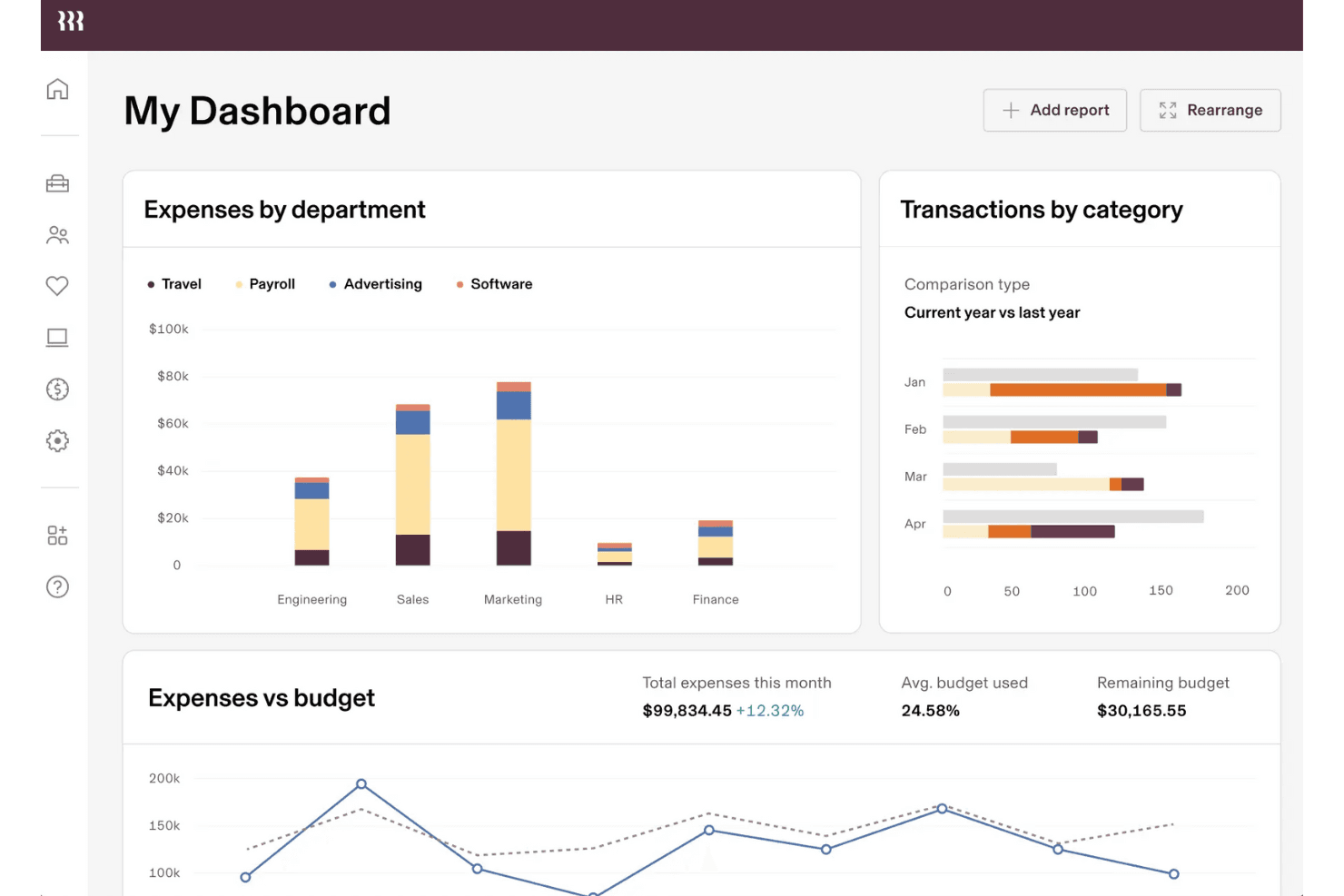
Rippling Spend tracks expenses by department and budget in real time. Rippling Spend is an expense management product built into Rippling's Finance suite, designed for finance teams that want to automate receipt capture, enforce policy-based approvals, and connect employee data directly to card controls and reimbursements.
Who Is Rippling Spend Best For?
Rippling Spend is a strong fit for finance teams that already use—or plan to use—Rippling's HR and payroll platform and want expense policies that automatically adjust as employees change roles or departments.
Why I Picked Rippling Spend
I picked Rippling Spend because its spend enforcement goes deeper than a simple per-category limit. Expense policies are built directly on employee attributes like role, department, and level, so when someone gets promoted or moves teams, their card rules and approval chains update automatically. I also like that out-of-policy transactions are blocked in real time before they process, not flagged after the fact for someone to chase down.
Rippling Spend Key Features
- Employee-attribute-based card controls: Card spend limits, purchase-category rules, and approval chains are configured using employee data like role, department, and level, and update automatically when those attributes change.
- Global reimbursements: Finance teams can reimburse employees and contractors in 100+ countries, with payouts processed in local currencies through Rippling Payroll.
- Receipt translation and cross-currency reconciliation: Submitted receipt line items are translated for reviewers, and expenses are converted into each user's local currency for reconciliation.
- Duplicate and mismatch detection: Rippling flags duplicate expense submissions and mismatches between entered transaction details and uploaded receipts, including cross-currency discrepancies.
Rippling Spend Integrations
Rippling Spend connects with QuickBooks, NetSuite, and Xero for general-ledger syncing and expense-field categorization. Rippling reports 650+ platform integrations, but an Expense Management-specific total and API availability aren’t documented.
Pros and Cons
Pros:
- Real-time policy blocks prevent noncompliant card spend
- Receipt capture reduces spreadsheet follow-up work
- Employee-linked controls adjust with role changes
Cons:
- Reporting falls short for advanced forecasting
- Approval chains can require trial-and-error setup
Learn more about Rippling Spend: Best for expense tracking on your current cards
- Free demo available
- From $11.99/user/month (billed annually)
Visit WebsiteCustomer Rating:4.6/5
Sage Expense Management captures receipts and codes expenses via SMS chat. Sage Expense Management is an AI-powered expense tool built for finance teams that want automated receipt capture, card reconciliation, and accounting sync without replacing their existing corporate cards.
Who Is Sage Expense Management Best For?
Finance teams at small to mid-sized businesses that want automated expense tracking and accounting sync without switching away from their existing corporate cards.
Why I Picked Sage Expense Management
I picked Sage Expense Management because it's built specifically for finance teams that want automated expense tracking without touching their existing corporate cards. What I find most practical is the text-based receipt capture: a card swipe triggers a text to the employee, they reply with a photo, and OCR matches the receipt to the transaction automatically. I also like the two-way real-time sync with QuickBooks, Xero, and Sage Intacct, which marks reports as paid the moment ACH reimbursement goes through.
Sage Expense Management Key Features
- Multi-stage approval routing: Business plan users can configure policy-driven, project-based, and department-led approval chains for submitted expenses.
- AI spend copilot: An AI assistant that answers questions about burn rate, merchant trends, and department budgets directly within the platform.
- Budget tracking: Monitors budget usage, remaining spend, and historical spend data across categories and departments.
- Role-based access control: Assign distinct roles—Verifier, Payment Processor, and Auditor—to give team members appropriate levels of access and visibility.
Sage Expense Management Integrations
Sage Expense Management offers native integrations with QuickBooks Online, Xero, Sage Intacct, Sage 300 CRE, Sage 50, and QuickBooks Desktop. Business plans also include an API for custom integrations.
Pros and Cons
Pros:
- Faster reconciliation can shorten close cycles
- Keep existing cards and their rewards
- Text-based receipt capture earns user praise
Cons:
- Policy alerts flag spending after purchase
- No native card issuance or bill pay
Learn more about Sage Expense Management (formerly Fyle): Best for flexible payout options
- Free plan + free demo available
- Pricing upon request
Visit WebsiteCustomer Rating:4.5/5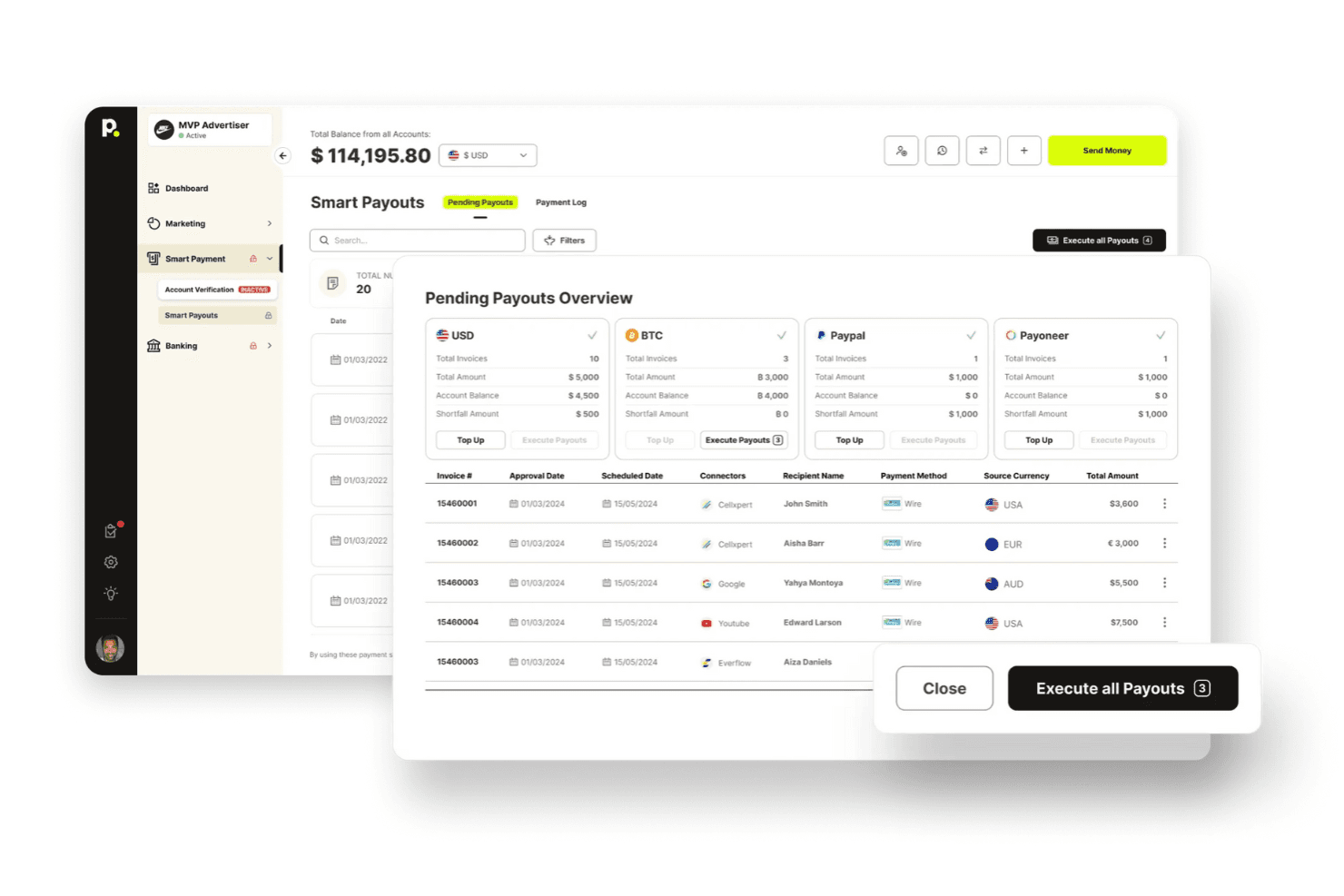
The platform lets users review and execute bulk payouts across multiple payment methods. Payouts.com is a financial operations platform built for finance teams that need to manage global vendor payments, AP automation, multi-currency accounts, and card issuing from a single ledger.
Who Is Payouts.com Best For?
Finance teams managing high-volume global vendor payments will get the most from Payouts.com, especially if multi-currency payouts, AP automation, and ERP sync are your core needs.
Why I Picked Payouts.com
Payouts.com earns its spot on my shortlist because of how many ways it lets you get money to vendors and recipients: bank rails, SWIFT, eWallets, push-to-card, prepaid cards, stablecoins, and even gift cards, all from one platform. I particularly like that the smart routing engine automatically selects the best rail by cost, speed, and destination, then falls back to another if a network is down. When I'm running a global payout batch across dozens of currencies, that kind of built-in redundancy means fewer failed transfers to chase down manually.
Payouts.com Key Features
- AP invoice capture via OCR: Automatically extracts vendor name, amount, tax ID, dates, and payment terms from invoices received by email, synced inbox, manual entry, or API.
- Three-way PO matching: Matches invoices against purchase orders and goods receipts before routing for approval, with duplicate detection and period-overlap flagging.
- Multi-currency global accounts: Hold balances in 40+ currencies across named local accounts in 16 markets, with live FX conversion and balance reservations for future obligations.
- Tax form collection and TIN matching: Collects digitally signed W-9 and W-8 series forms from vendors and verifies taxpayer name and ID against IRS records in real time.
Payouts.com Integrations
Payouts.com offers documented integrations with NetSuite, QuickBooks, Xero, Sage Intacct, SAP, and Microsoft Dynamics, including two-way accounting sync where supported. It also provides REST APIs, webhooks, CSV, SFTP, and SDKs for custom integrations.
Pros and Cons
Pros:
- Reviewers praise fast transfers and payment tracking
- Invoice OCR and three-way purchase-order matching
- Global payout rails with automatic failover
Cons:
- Some reviewers report card delivery problems
- Employee expense and reimbursement workflows remain unavailable
Learn more about Payouts:
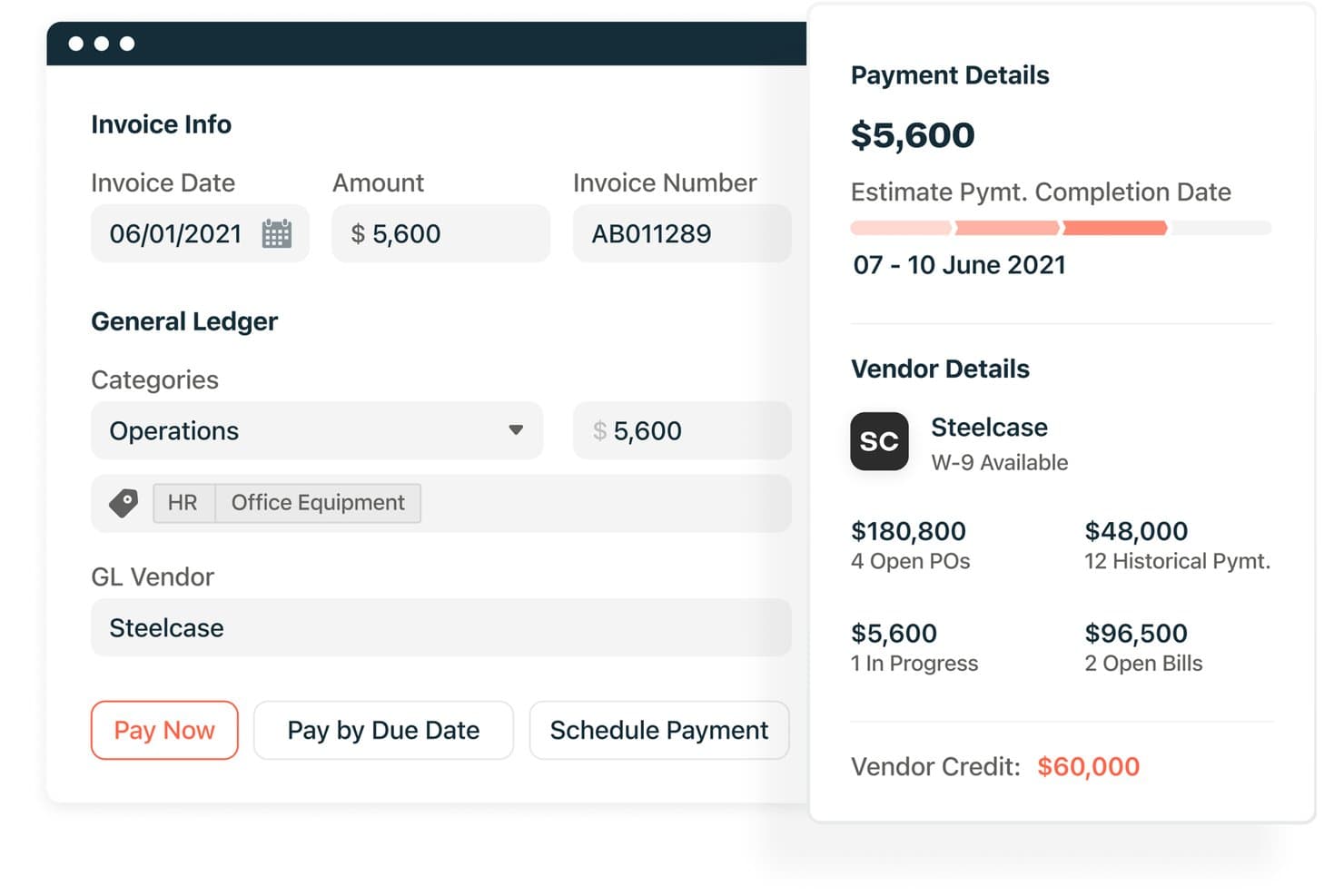
Airbase lets users review invoice details and vendor payment info. Airbase (now Paylocity for Finance) is a spend management platform that unifies corporate cards, expense management, AP automation, and procurement into one system—making it a strong fit for finance teams that need end-to-end spend control alongside deep ERP connectivity.
Who Is Airbase Best For?
Airbase is a strong fit for finance teams that need their AP automation, corporate cards, expense management, and procurement workflows connected to an existing ERP in one place.
Why I Picked Airbase
Airbase earns its spot on my shortlist because of how deeply it connects to your existing ERP. I particularly like that virtual-card transactions sync to Oracle NetSuite, Sage Intacct, QuickBooks Online, QuickBooks Desktop, and Microsoft Dynamics Business Central in real time, while AP automation handles vendor onboarding, PO matching, and payment execution without leaving that same connected system. If your close process depends on accurate, timely ERP data, that end-to-end sync across cards, bills, and approvals is what sets Airbase apart.
Airbase Key Features
- AI-powered invoice capture: Automatically extracts and codes invoice data for touchless AP processing, reducing manual data entry.
- Guided procurement workflows: Routes employee purchase requests through Finance, Legal, IT, and Procurement stakeholders before any spend is approved.
- Multi-currency vendor payments: Supports vendor payments in more than 145 currencies across 200+ countries via ACH, wire, virtual card, or check.
- Spend analytics dashboard: Breaks down card, PO, and expense-reimbursement spend by department, vendor, category, or subsidiary in one view.
Airbase Integrations
Airbase offers native integrations with Oracle NetSuite, Sage Intacct, QuickBooks Online, QuickBooks Desktop, and Microsoft Dynamics Business Central. It also lists 350+ marketplace integrations and supports APIs and webhooks for custom connectivity.
Pros and Cons
Pros:
- Virtual-card requests show approval chains
- Reviewers praise quick receipt entry
- Automates invoice capture, approvals, and payment
Cons:
- Trip expenses may require separate submissions
- GL uploads can complicate reconciliation
- Approval rerouting can require advanced options
 5Best for automated invoicing
Pleo
- Free trial + free demo available
- From £8/user/month
Visit WebsiteCustomer Rating:4.8/5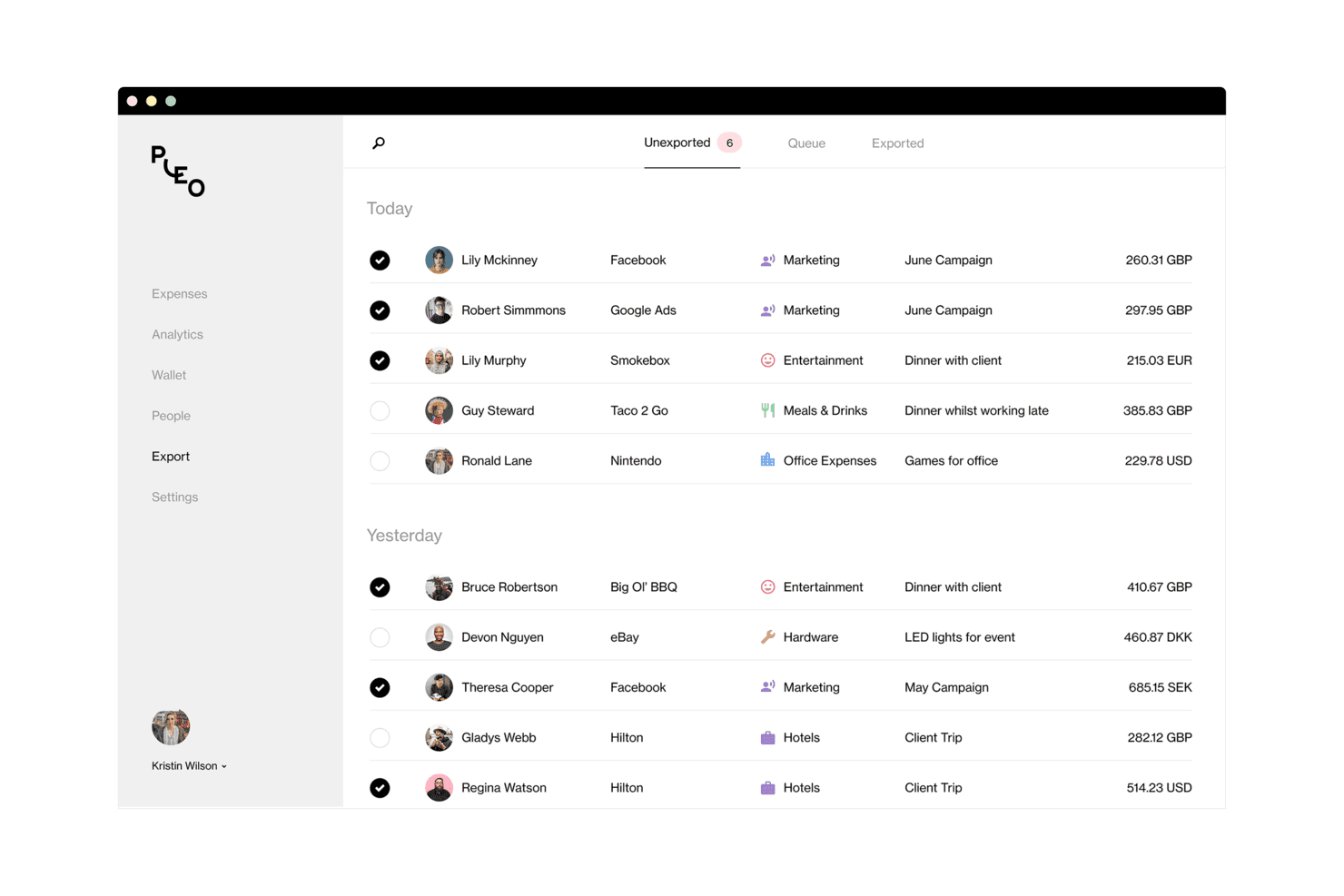
Pleo lets users review and export categorized team expenses. Pleo is a business spend management platform built for finance teams and growing businesses that want to consolidate company cards, invoice processing, reimbursements, and accounting sync into a single system.
Who Is Pleo Best For?
Pleo is a strong fit for finance teams at growing European businesses that want to consolidate invoicing, card spend, and reimbursements in one place.
Why I Picked Pleo
I picked Pleo as one of the best because its invoice automation genuinely handles the full AP cycle in one place: OCR extracts supplier name, VAT, due date, and invoice number on capture, then configurable approval rules route the invoice before Pleo executes payment in 50+ currencies. I also like that duplicate detection flags repeat invoices before they're processed, which is the kind of control that matters most during a close cycle.
Pleo Key Features
- Multi-currency card payments: Use your Pleo card to pay in a local currency automatically, with foreign-exchange fees that decrease as you move to higher plans.
- Configurable spending limits: Set per-purchase, weekly, monthly, and temporary limits per employee, plus restrictions on spending days and merchant categories.
- Receipt chasing and inbox fetch: Pleo automatically retrieves receipts from employee inboxes and sends reminders for any that are still missing before close.
- Role-based access controls: Assign distinct roles—admin, controller, reviewer, or external bookkeeper—each with scoped permissions across cards, approvals, and exports.
Pleo Integrations
Pleo offers native integrations with Xero, NetSuite, QuickBooks, FreeAgent, XLedger, and Twinfield. It also supports SAP SuccessFactors and BambooHR for employee onboarding and offboarding.
Pros and Cons
Pros:
- Multi-currency balances support overseas spending
- Invoice approvals connect directly to payment
- OCR flags duplicate invoices early
Cons:
- Support response times vary across reviews
- Receipt scanning and uploads can lag
Learn more about Pleo: Best for travel management
- Free plan + Free demo available
- From $15/user/month
Visit WebsiteCustomer Rating:4.7/5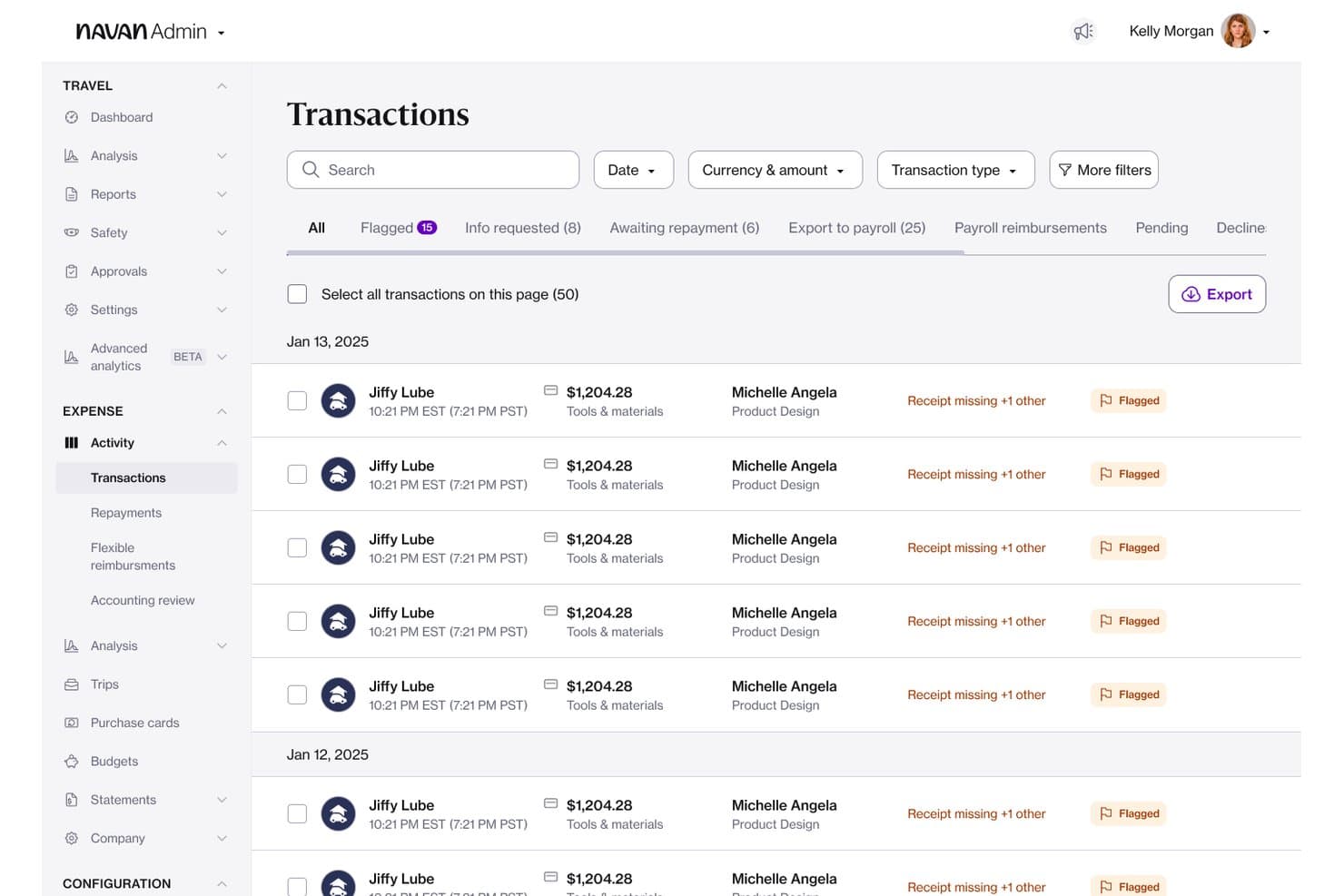
Navan lets admins review and manage flagged expense transactions. Navan is a travel and expense management platform that brings corporate card controls, automated expense workflows, and business travel booking into one place—making it a strong fit for finance teams that need to manage T&E spend together rather than across separate tools.
Who Is Navan Best For?
Navan is a strong fit for finance teams at mid-size companies where travel is a significant spend category and managing T&E together matters more than having a full AP automation suite.
Why I Picked Navan
Navan earns its spot on my shortlist because travel and expense are genuinely inseparable in its platform, which is rare among Ramp alternatives. I appreciate how Navan cards can be configured to activate only when a trip is booked, automatically going live 24 hours before departure and deactivating after the last day, so spend control is tied directly to travel intent. The Audit Agent checks expenses against 45+ configurable rules and clears compliant ones automatically, which cuts the manual review load significantly during close.
Navan Key Features
- Trip-based card activation: Physical cards can be configured to activate 24 hours before a booked trip and deactivate automatically after the last travel day.
- Navan Connect: Links eligible existing Visa and Mastercard corporate cards to bring transaction data into Navan in real time, without replacing your current card program.
- Per diem and mileage tracking: Admins can set per diem rates by location and trip type, and employees can log mileage directly in the app.
- Reimbursements in 25+ currencies: Out-of-pocket expenses can be reimbursed across 49 countries, with approved payments grouped and processed weekly.
Navan Integrations
Navan offers native integrations with Oracle NetSuite, QuickBooks Online, Xero, Sage Intacct, Workday, ADP, Visa, and Mastercard. It also provides the Navan Expense API and Navan Booking API for custom integrations.
Pros and Cons
Pros:
- Receipt OCR reduces manual expense chasing
- Travel and expense share one workflow
- Trip-linked card activation controls travel spend
Cons:
- Travel disruption support receives mixed reviews
- No end-to-end vendor bill payment
Learn more about Navan: Best for real-time visibility
- Free demo available
- Pricing upon request
Visit WebsiteCustomer Rating:4.7/5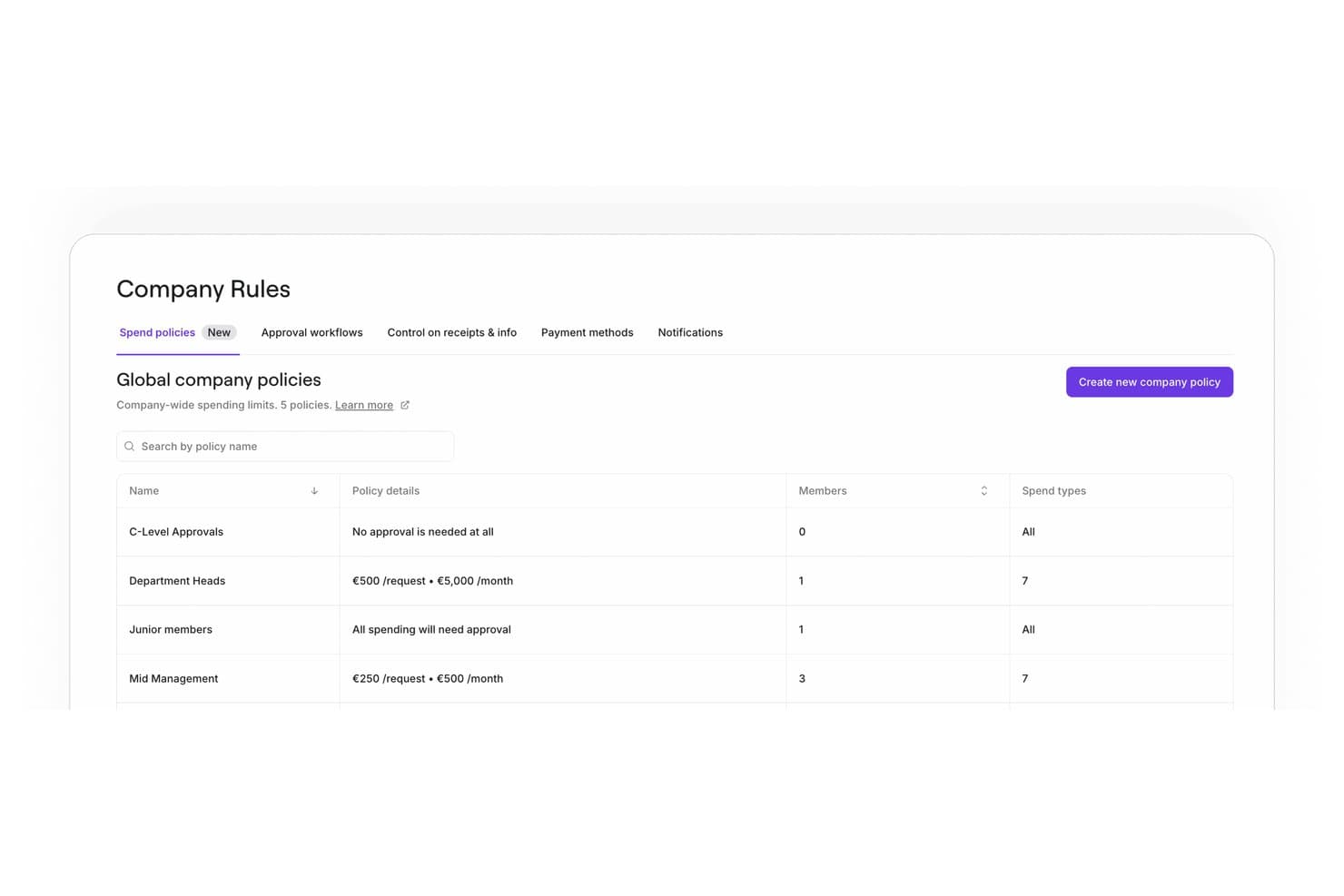
Spendesk lets users manage company-wide spend policies by role. Spendesk is a spend management platform built for finance teams that want unified control over corporate cards, expense claims, accounts payable, and procurement budgets in one place.
Who Is Spendesk Best For?
Spendesk is a strong fit for finance teams at mid-market companies that need unified visibility across cards, expenses, AP, and procurement budgets in one place.
Why I Picked Spendesk
Spendesk earns its spot on my shortlist because real-time budget visibility is genuinely baked into how the platform works, not bolted on as a report. I appreciate that every card payment, submitted expense claim, invoice, and approved commitment updates the relevant budget the moment it's created or approved, so budget owners see live remaining spend without waiting for a close cycle.
Spendesk Key Features
- AI invoice data capture: Automatically extracts supplier name, amount, due date, and line items from uploaded invoices and pre-fills fields for review.
- Procurement approval workflows: Routes purchase requests to relevant approvers—procurement, legal, IT, or finance—based on configurable rules before a purchase order is issued.
- Subscription card management: Creates dedicated recurring virtual cards for SaaS and subscription payments, with the ability to pause, update, or cancel them directly in the platform.
- Spend anomaly detection: Surfaces unusual spending patterns and transactions for finance teams to investigate before they become larger issues.
Spendesk Integrations
Spendesk lists 50+ integrations, including NetSuite, Xero, QuickBooks, DATEV, Sage 100, Odoo, Microsoft Business Central, Slack, and TravelPerk. It also offers a public API for custom integrations.
Pros and Cons
Pros:
- Virtual cards offer configurable spending controls
- Receipt matching cuts missing-receipt follow-up
- Live budgets include approved spending commitments
Cons:
- Some users report card funding interruptions
- Accounting-field updates sync overnight, not continuously
Learn more about Spendesk:
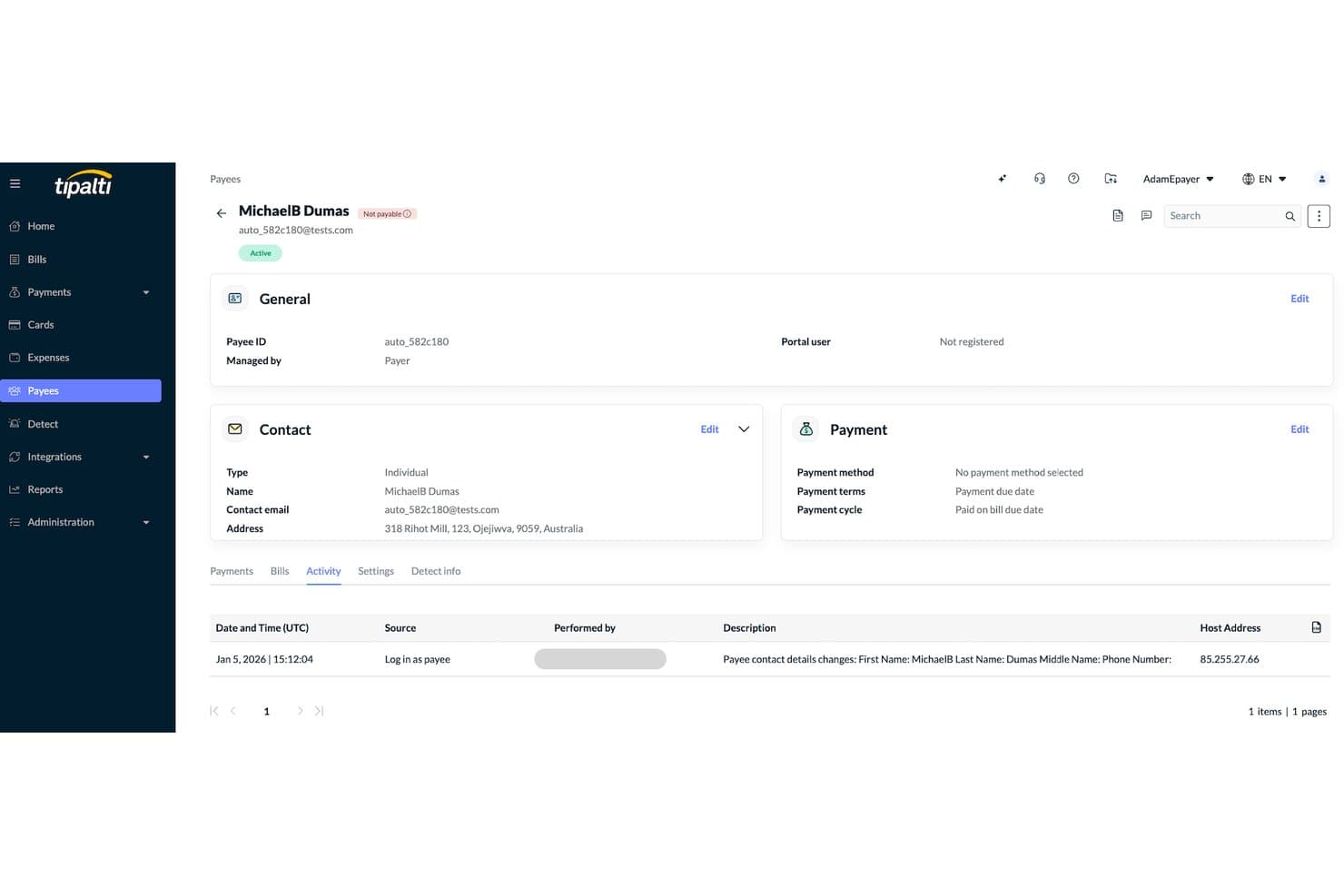
Tipalti tracks payee activity logs including contact detail changes. Tipalti is an AP automation platform built for finance teams managing high-volume, cross-border supplier payments, bringing invoice processing, approval workflows, and global payment execution together in one place.
Who Is Tipalti Best For?
Tipalti is a strong fit for finance teams at mid-market and enterprise companies managing high-volume supplier payments across multiple countries and entities.
Why I Picked Tipalti
I picked Tipalti as one of the best Ramp alternatives because it's genuinely built for teams paying suppliers across borders at scale. Where Ramp centers on cards and spend control, Tipalti shines in global AP: it processes payments across 200+ countries and territories in 120 local currencies through 50+ payment methods, all from one platform. I especially appreciate the supplier self-onboarding through Supplier Hub, which lets vendors enter their own banking and tax details in 27 languages, cutting the back-and-forth that slows down international payables.
Tipalti Key Features
- AI-powered invoice coding: Assigns GL accounts, departments, locations, and tax codes to invoices based on similar bills, with results available for team review and editing.
- Two- and three-way PO matching: Matches invoices against purchase orders and receipts, flags quantity and price discrepancies, and applies configurable tolerance thresholds at header and line-item levels.
- Multi-entity AP management: Processes payables for multiple subsidiaries from one headquarters account, with entity-specific approval flows, GL accounts, and ERP sub-ledger sync kept separate per entity.
- Built-in tax compliance: Collects and validates W-9 and W-8 forms, supports tax-ID collection across 62 countries, and prepares 1099 and 1042-S reports with KPMG-reviewed US tax capabilities.
Tipalti Integrations
Tipalti offers native integrations with Oracle NetSuite, Sage Intacct, QuickBooks Online, Xero, SAP S/4HANA, Oracle Fusion, Workday, and Microsoft Dynamics 365 Business Central. It also provides an API for custom integrations.
Pros and Cons
Pros:
- Supplier self-onboarding cuts banking-detail follow-up
- Invoice approvals reduce manual payable work
- Global supplier payments across 200+ countries
Cons:
- Complex setup can slow initial deployment
- Payment arrival timing can remain uncertain
Learn more about Tipalti: 9Best for high credit limits
Brex
- Free plan + demo available
- From $12/user/month
Visit WebsiteCustomer Rating:4.5/5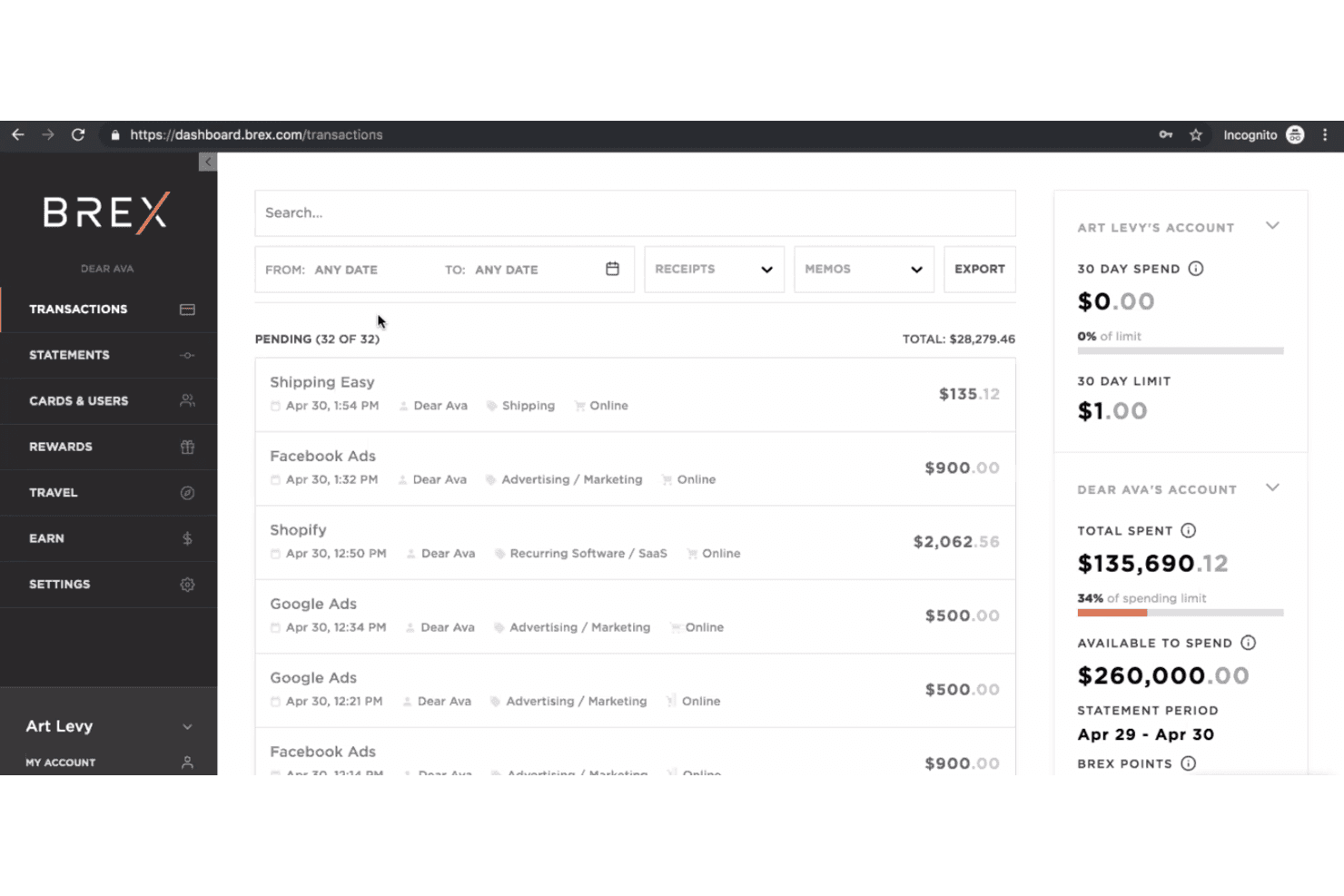
Brex lets users track pending transactions and spending limits in real time. Brex is a business finance platform that bundles corporate cards, expense management, bill pay, travel, and banking—making it a strong fit for growth-stage and venture-backed companies that need global spend control in one place.
Who Is Brex Best For?
Brex is a strong fit for growth-stage and venture-backed companies that need high credit limits tied to revenue or funds raised—not personal guarantees.
Why I Picked Brex
Brex earns its spot on my shortlist because its credit limits are tied to revenue or funds raised, not personal guarantees, which matters a lot when you're running a growth-stage company and need meaningful purchasing power from day one. I appreciate that those limits extend across multiple entities under one card program, so subsidiary spend rolls up in real time without requiring separate credit lines.
Brex Key Features
- AI-powered expense automation: Brex automatically collects receipts, generates memos, populates expense fields, and assigns departments, projects, and GL codes to transactions.
- Built-in travel booking: Employees can search and book flights and hotels directly in Brex within preset travel policies and spend limits, with expenses grouped by trip automatically.
- Bidirectional ERP sync: Brex syncs transaction data to and from NetSuite, QuickBooks, Sage Intacct, and Microsoft Dynamics 365, with custom field mapping and auto-categorization.
- Configurable bill pay: Invoices can be imported by email or upload, matched to purchase orders, routed through approval flows, and paid by ACH, wire, check, or virtual card.
Brex Integrations
Brex offers 1,000s of native integrations, including NetSuite, QuickBooks Online, Sage Intacct, Microsoft Dynamics 365 Business Central, Workday, ADP Workforce Now, Okta, Slack, and Navan. Its API supports custom workflows, with Zapier also available.
Pros and Cons
Pros:
- Shared limits keep subsidiary spend visible
- Receipt capture cuts manual expense entry
- Revenue-based limits suit venture-backed growth
Cons:
- Support and account resolutions feel inconsistent
- Underwriting can exclude smaller businesses
 10Best for supply chain management
Coupa
- Free plan + 30-day free trial + free demo available
- Pricing upon request
Visit WebsiteCustomer Rating:4.2/5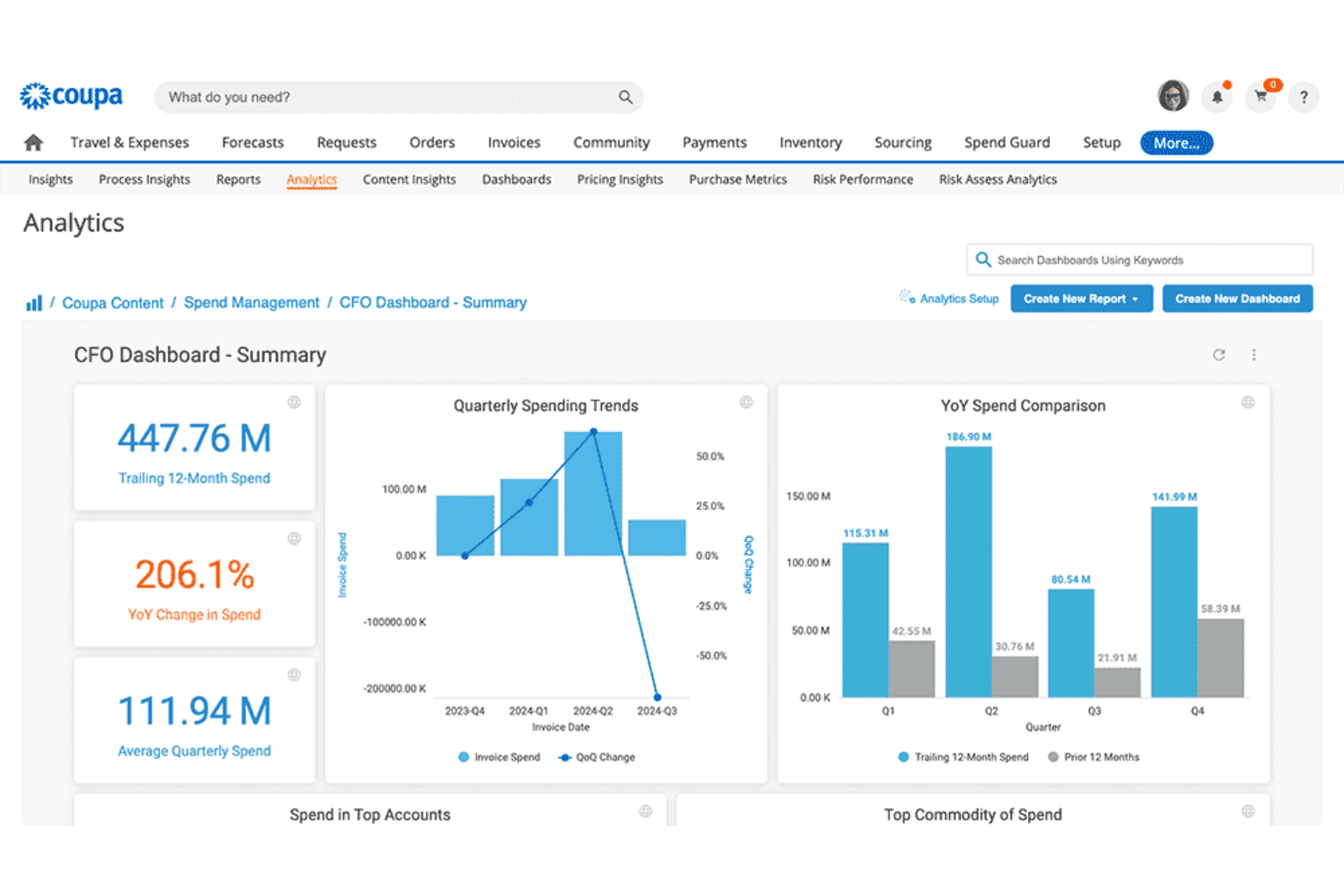
Coupa delivers real-time spend analytics and trends. Coupa is an enterprise spend management platform built for AP and procurement teams that need to centralize sourcing, supplier management, invoicing, and purchasing controls across complex operations.
Who Is Coupa Best For?
Coupa is a strong fit for enterprise AP and procurement teams managing complex supplier networks, sourcing, and indirect spend at scale.
Why I Picked Coupa
I picked Coupa as one of the best because it goes deeper into supply chain management than any other tool on this list. I particularly like its Supply Chain Optimization module, which lets you model scenarios and predict disruptions before they hit your operations. Pair that with its Supply Chain Collaboration capabilities for tracking materials down to the purchase-order line item, and you get visibility that procurement teams managing complex supplier networks genuinely need.
Coupa Key Features
- AI-powered fraud detection: Coupa's AP automation module uses AI to flag suspected fraudulent activity across invoices and payments.
- Process Automator: A rules-based automation tool that evaluates supplier invoices and routes approved documents to third-party systems via API, with up to 10 sequential steps per process.
- Treasury and cash management: Tools for tracking cash flows, identifying liquidity positions, and supporting allocation and forecasting decisions across the business.
- Business Trade Network catalog access: Procurement teams can browse and purchase from millions of items at pre-negotiated prices through Coupa's connected supplier network.
Coupa Integrations
Coupa claims up to 160 ERP connections, including a documented NetSuite integration, plus native Slack integration for approvals. It offers marketplace integrations and a REST API for custom connectivity.
Pros and Cons
Pros:
- Supply-chain scenarios support disruption planning
- Reviewers report faster individual invoice processing
- Centralizes purchasing, invoices, and spend visibility
Cons:
- Expense feeds can require manual reassignment
- No documented employee card issuance
Learn more about Coupa:
Andre alternativer til Ramp
Her er noen flere alternativer til Ramp som ikke kom med på kortlisten, men som likevel er verdt å sjekke ut:
- 11ExpensifyBest for receipt scanning
- 12RhoBest for cashback rewards
- 13SAP ConcurBest for travel bookings
- 14SlashBest for multi-entity financial operations
- 15Mesh PaymentsBest for real-time expense management
- 16BILLBest for accounts payable automation
- 17PaylocityBest for payroll processing
- 18ProcurifyBest for purchase order management
- 19Float ForecastingBest for cash flow forecasting
- 20ExpensePointBest for expense workflows
- 21TripLogBest for mileage tracking
How I Evaluate Ramp Alternatives
I evaluate Ramp alternatives in two layers: the baseline any spend platform must hit, and the differentiators—like global card controls or ERP sync depth—that set the best options apart.
Core Functionality (Table Stakes For This List)
When I'm selecting tools for my list, I rank each one on a scale from 0 (does not offer the functionality) to 5 (excels in this area) for each core functionality listed below. Then, I calculate the tool's total score into a percentage. Each tool needs to achieve a minimum total score of 75% to be considered for inclusion.
- Corporate Card Issuance: I check whether a platform offers both physical and virtual cards with real-time controls, like locking a card to a single vendor or capping a marketing team's monthly ad spend.
- Expense Management: Receipt capture, auto-categorization, and policy enforcement matter here—I look at how each tool handles things like flagging out-of-policy meals or routing reimbursements.
- AP & Bill Pay Automation: I evaluate how each platform handles invoice ingestion, approval routing, and payment execution across rails like ACH, wire, and check for recurring vendor bills.
- Accounting/ERP Integration: Syncing transactions to your GL shouldn't require manual CSV uploads. I look for native connections to systems like QuickBooks, Xero, NetSuite, and Sage Intacct with field-level mapping.
- Approval Workflows & Policies: Multi-tier approvals that route by amount, department, or project are what I evaluate—for example, auto-approving purchases under a set threshold while escalating larger requests.
- Spend Reporting & Analytics: I look for real-time dashboards that break down spend by department, vendor, or category so your finance team can spot trends without building reports from scratch.
Once I have a list of tools that meet this criteria, I consider what sets each platform apart.
Differentiating Factors (What Sets Vendors Apart)
Here's how I compare and contrast different vendors:
Standout Features
Multi-currency card issuance and cross-border payments matter if your team operates across regions—I look at how each platform handles FX fees and local payment rails. Working capital options also vary widely; some vendors offer flexible credit lines tied to revenue, while others use traditional underwriting. For teams managing high vendor spend volumes, I evaluate whether a platform includes upstream procurement features like purchase request intake and PO matching.
Beyond Features
Pricing models in this space range from free platforms that monetize through interchange to tiered subscriptions—I evaluate whether the cost structure aligns with your transaction volume and team size. Business stage matters too; a seed-stage startup needs fast self-serve onboarding, while a mid-market company with SOX obligations needs audit trails and role-based access controls. I also check for SOC 2 Type II certification and SSO support, since finance platforms handle sensitive data your security team will scrutinize.
Hvorfor se etter et alternativ til Ramp?
Selv om Ramp er et godt valg for programvare til utgiftsstyring, finnes det flere grunner til at noen brukere ser etter alternative løsninger. Det kan hende du ser etter et alternativ til Ramp fordi …
- Teamet ditt trenger mer avanserte rapporteringsfunksjoner
- Du ønsker bedre integrasjon med verktøyene du allerede bruker
- Du trenger støtte for flere valutaer
- Virksomheten din opererer i regioner Ramp ikke dekker
- Du trenger mer fleksible arbeidsflyter for godkjenning av utgifter
Viktige funksjoner i Ramp
Her er noen av de viktigste funksjonene i Ramp, slik at du kan sammenligne hva alternative løsninger tilbyr:
- Automatisert innsending av utgifter: Ansatte kan enkelt sende inn utgifter via SMS og mobilapper, noe som sparer tid og reduserer feil.
- Ferdigdefinerte budsjetter: Tilpassede arbeidsflyter lar teamet ditt be om å bruke penger fra forhåndsdefinerte budsjetter, noe som sikrer riktige godkjenninger og budsjettkontroll.
- Håndheving av retningslinjer: Innebygde kontroller bidrar til å forhindre uautoriserte utgifter og opprettholde etterlevelse med automatisk håndhevede grenser.
- Rapportering i sanntid: Få umiddelbar tilgang til utgiftsdata, slik at teamet ditt kan gjøre justeringer i tide og unngå overforbruk på firmakredittkort.
- ERP-integrasjon: Synkroniserer med eksisterende systemer for å fremskynde månedlige avslutninger og sikre etterlevelse uten manuell gjennomgang.
- Identifisering av kostnadsbesparelser: Ramp identifiserer dupliserte abonnementer og ubrukte tjenester, slik at du kan finne muligheter for å kutte kostnader og fordele dem.