

A gestão financeira é um desafio. Com inúmeros relatórios, requisitos de conformidade e muito mais, precisa de software que facilite o seu trabalho, não que o torne mais difícil. Embora o FreeAgent seja um software de contabilidade valioso, poderá precisar de uma solução com mais funcionalidades, melhor integração ou informações adaptadas às suas necessidades.
Na minha experiência, diferentes softwares de contabilidade podem oferecer benefícios únicos que se alinham melhor com os objetivos da sua empresa. Por isso, vou apresentar-lhe as minhas principais escolhas de alternativas ao FreeAgent. Cada solução oferece algo distinto para responder aos seus desafios e melhorar a sua gestão financeira.
Acompanhe-me e apresentarei uma análise imparcial e bem fundamentada para o ajudar a tomar uma decisão informada. O sucesso financeiro da sua equipa pode estar apenas a uma mudança de software de distância.
O que é o FreeAgent?
O FreeAgent é um software de contabilidade concebido para simplificar a gestão financeira de pequenas empresas e trabalhadores independentes. É habitualmente utilizado por profissionais independentes e proprietários de pequenas empresas que precisam de uma forma simples de gerir as suas finanças.
O software oferece funcionalidades essenciais, como faturação, acompanhamento de despesas e capacidades de gestão de projetos, para o ajudar a gerir eficazmente as finanças da sua empresa. De um modo geral, o FreeAgent oferece valor ao facilitar a concentração no crescimento da sua empresa, em vez de ficar preso a tarefas de contabilidade.
Why Trust Our Software Recommendations
6,700+
Reviews
20
Industry experts
16+
Evaluation factors
14
Years
Our team has been testing and reviewing software since 2012. As finance leaders ourselves, we know how difficult—and important—it is to choose the right software.
For this guide, we evaluated tools using hands-on testing and independent research, scoring tools using our selection criteria.
Our reviews reflect our human editorial judgment, not a sales pitch.
Tabela comparativa de alternativas ao FreeAgent
Esta tabela comparativa resume os detalhes de preços das minhas principais escolhas de alternativas ao FreeAgent.
Score legend (out of 5)
- Excellent4.5–5
- Good4–4.4
- Average3–3.9
- Below average2–2.9
- Poor1–1.9
Sorted by: Default
| Tool | Starting Price | Website | |||||||
|---|---|---|---|---|---|---|---|---|---|
Best for real-time finance management | 3.5 out of 5 | 3 | 4 | 4 | 3 | 3 | 4 | $27/month 1-month free trial available | Website |
Best for time-saving invoicing | 2.8 out of 5 | 3 | 3 | 4 | 1 | 3 | 3 | $15/month Free plan + free trial available | Website |
Best for integrated inventory | 4.2 out of 5 | 4 | 4 | 5 | 4 | 4 | 4 | $20/month Free plan + 14-day trial + demo available | Website |
Best for project-based businesses | 3.3 out of 5 | 3 | 4 | 4 | 2 | 4 | 3 | Pricing upon request Free demo available | Website |
Best for AI-driven automation | 3.5 out of 5 | 3 | 4 | 3 | 3 | 4 | 4 | £1,200/month Free demo available | Book Demo |
Best for Indian GST compliance | 2.8 out of 5 | 3 | 4 | 3 | 3 | 3 | 1 | $169.99/year Not available | Website |
Best for unlimited expert advice | 3.2 out of 5 | 3 | 2 | 4 | 4 | 3 | 3 | £4/month Free plan + 14-day free trial available | Website |
Best for small business invoicing | 3.3 out of 5 | 3 | 3 | 4 | 3 | 4 | 3 | $19/month Free plan + 30-day trial available | Website |
Best for UK VAT management | 3.5 out of 5 | 3 | 4 | 4 | 3 | 4 | 3 | £13.50/month 14-day free trial available | Website |
Best free open-source option | 3.0 out of 5 | 3 | 3 | 4 | 2 | 4 | 2 | $12/month Free plan available | Website |


Análises das melhores alternativas ao FreeAgent
Seguem-se os meus resumos detalhados das melhores alternativas ao FreeAgent que entraram na minha lista restrita. As minhas análises apresentam uma visão aprofundada das principais funcionalidades, vantagens & desvantagens, integrações e casos de utilização ideais de cada ferramenta, para o ajudar a encontrar a melhor opção para si.
 1Best for real-time finance management
Xero
- 1-month free trial available
- From $27/month
Visit WebsiteCustomer Rating:4.4/5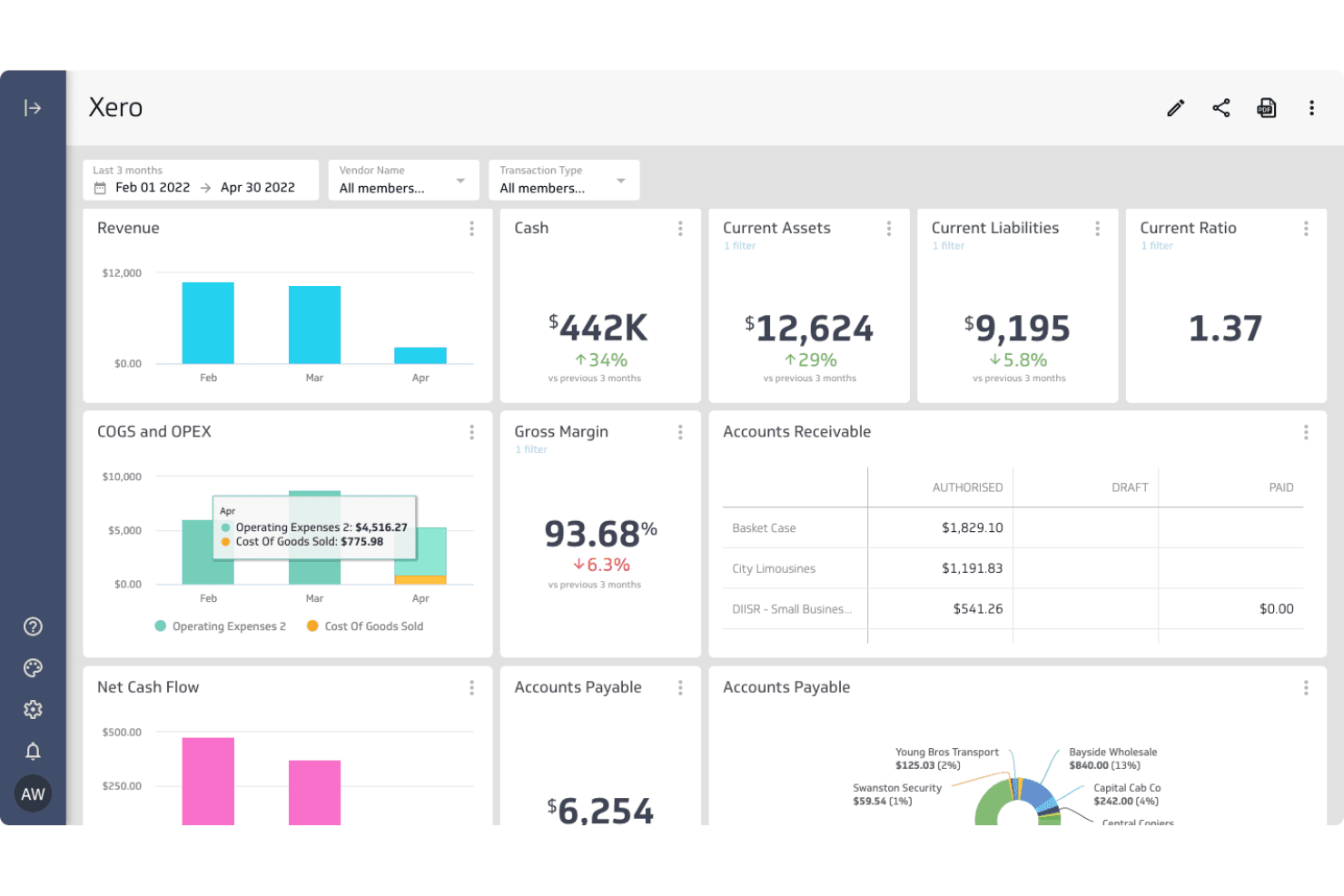
Xero centralizes financial metrics like cash, margins, and payables in one dashboard. Xero is cloud-based accounting software that suits freelancers, small business owners, and finance teams who need invoicing, bank reconciliation, expense tracking, and financial reporting in one connected platform.
Who Is Xero Best For?
Xero suits small business owners and finance teams who need real-time visibility across invoicing, bank reconciliation, and reporting as their operations grow.
Why I Picked Xero
I picked Xero as one of the best FreeAgent alternatives because it gives you real-time financial visibility that FreeAgent simply doesn't match at scale. I love how JAX automatically reconciles imported bank transactions against your records, flagging only the ones it can't confidently match, so your books stay current without constant manual input. The 180-day cash-flow forecasting on the Established plan also means I can see exactly where my business stands, not just where it was last month.
Xero Key Features
- Multi-currency support: Manage transactions, invoices, and reports in more than 160 currencies from within the Established plan.
- Sales tax calculation: Xero calculates sales tax across 13,000+ US jurisdictions via Avalara and includes W-9 and 1099 contractor management.
- Smart budgeting: Set and track budgets with AI-assisted suggestions available on Growing and Established plans.
- App marketplace: Browse and connect over 1,000 third-party apps, including Shopify, Stripe, and Dext, through the Xero App Store.
Xero Integrations
Xero offers over 1,000 marketplace integrations, including Shopify, Stripe, Gusto, Dext, Revolut Business, and PayPal. Its Accounting API, Bank Feeds API, Files API, Finance API, and Projects API support custom integrations.
Pros and Cons
Pros:
- Converts up to two years of FreeAgent data
- Cash-flow forecasts support forward planning
- Automated transaction matching cuts reconciliation work
Cons:
- No customer-callable phone support
- Costs more than FreeAgent’s basic package
Learn more about Xero: Best for time-saving invoicing
- Free plan + free trial available
- From $15/month
Visit WebsiteCustomer Rating:4.6/5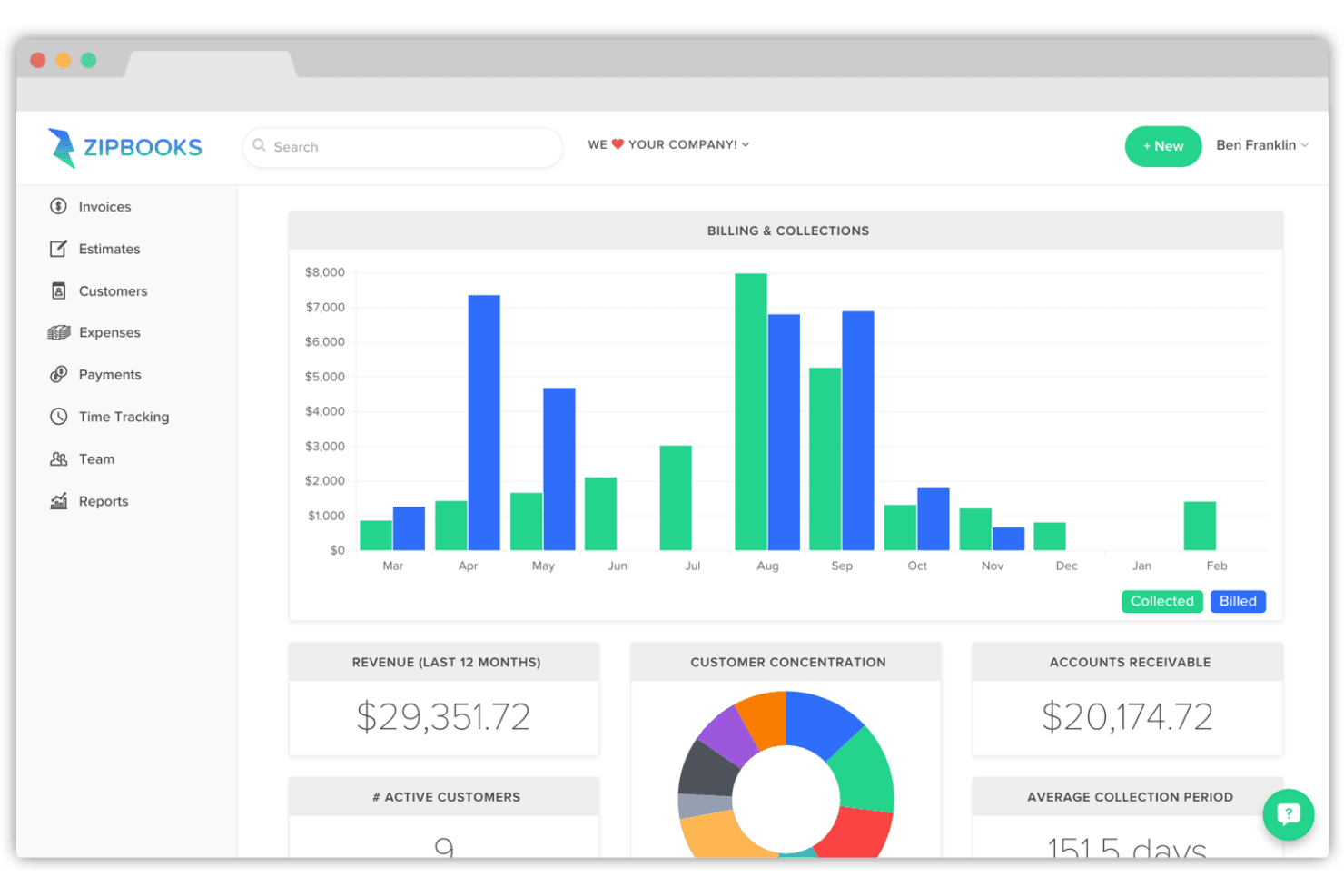
ZipBooks tracks billing, collections, and receivables on one dashboard. ZipBooks is accounting software for freelancers, small businesses, and bookkeepers that handles invoicing, expense tracking, bank reconciliation, and financial reporting under one affordable, tiered pricing model.
Who Is ZipBooks Best For?
ZipBooks suits freelancers and small business owners who need fast, straightforward invoicing and basic bookkeeping without paying for features they won't use.
Why I Picked ZipBooks
I picked ZipBooks as one of the best FreeAgent alternatives because of how fast it moves from time entry to paid invoice. I love that you can track billable hours by project and task, then pull those entries directly into an invoice without rebuilding anything from scratch. The Invoice Quality Score, which analyzes your invoice details against patterns from over 200,000 invoices, helps you catch gaps before you send.
ZipBooks Key Features
- Double-entry bookkeeping: Records every transaction across a standard chart of accounts, with an Advanced view for users who want direct debit-and-credit control.
- Smart transaction tagging: Tags transactions by location, project, or custom categories so you can filter and generate reports based on those groupings.
- Account reconciliation: Compares your ZipBooks transaction records against bank statements, letting you verify entries individually or in bulk and lock completed books.
- Automated payment reminders: Schedules and sends overdue invoice reminders automatically, reducing the manual follow-up needed to collect from clients.
ZipBooks Integrations
ZipBooks offers documented integrations with Gusto, Stripe, Square, and PayPal for payroll and invoice payments. It also provides an API for custom integrations.
Pros and Cons
Pros:
- Accountant dashboard supports multi-client workflows
- Core reports clarify cash inflows and outflows
- Billable hours flow directly into invoices
Cons:
- Bank feeds can need reconnecting and monitoring
- Tax reporting tracks invoiced taxes, not filings
Learn more about ZipBooks: Best for integrated inventory
- Free plan + 14-day trial + demo available
- From $20/month
Visit WebsiteCustomer Rating:4.3/5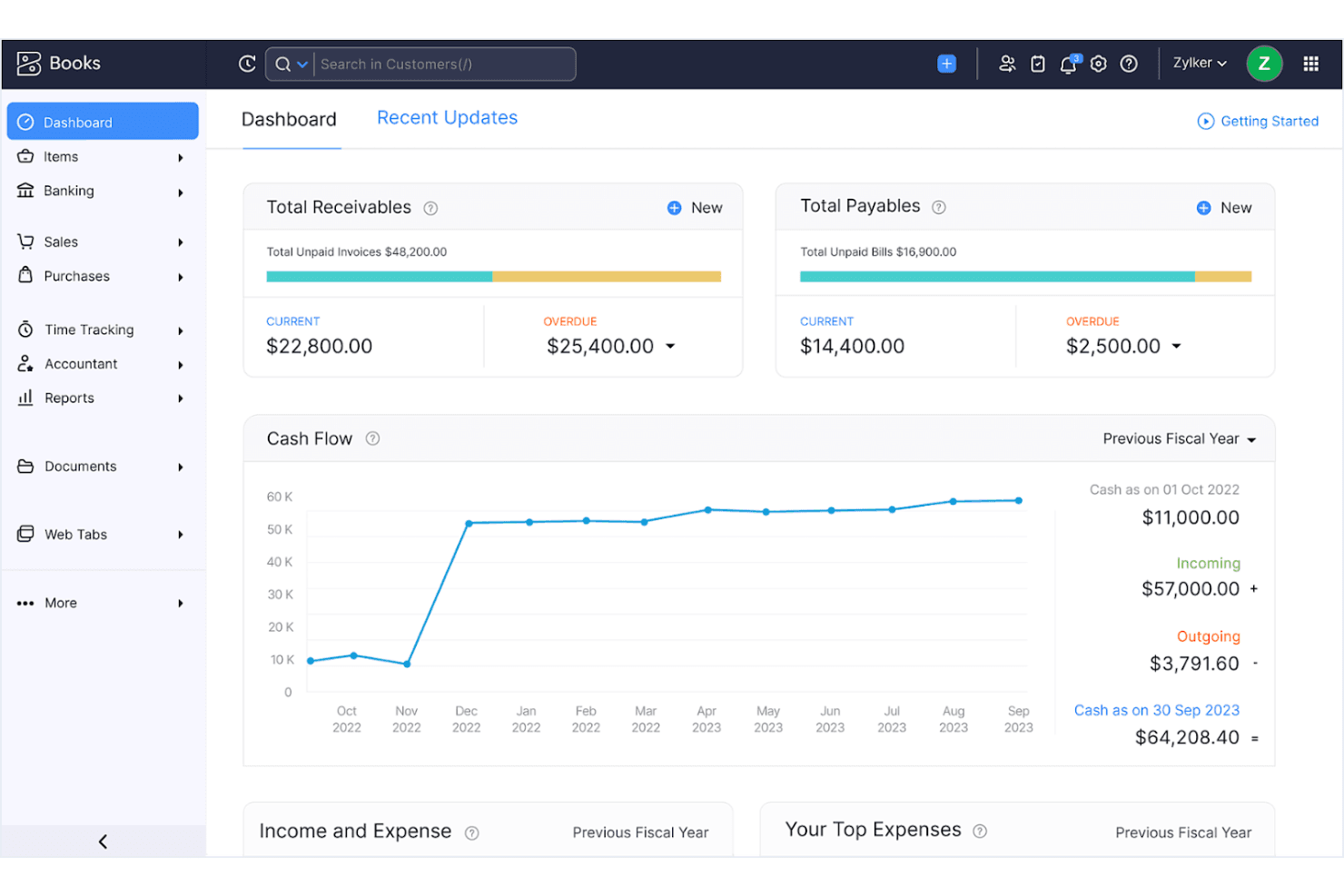
Zoho Books gives users a real-time financial overview via its dashboard. Zoho Books is cloud accounting software that covers invoicing, expense tracking, bank reconciliation, inventory, and financial reporting—making it a strong fit for small business owners and finance teams who need more depth than a basic bookkeeping tool.
Who Is Zoho Books Best For?
Zoho Books is a strong fit for small businesses that sell physical products and need accounting and inventory management in one place.
Why I Picked Zoho Books
I picked Zoho Books as one of the best FreeAgent alternatives because it handles inventory alongside accounting in a way most bookkeeping tools simply don't. I like that stock levels update automatically as invoices, sales orders, and purchase orders are recorded, so there's no manual syncing between separate systems. At the Elite tier, I can track serial numbers, manage multiple warehouses, and connect sales channels like Shopify, Amazon, and eBay directly from within the same platform where I'm running reconciliations and generating P&L reports.
Zoho Books Key Features
- Customer portal: Customers can view invoices and quotes, accept or decline quotes, make online payments, and communicate through comments directly in the portal.
- 1099 e-filing: Track contractor payments, collect W-9 forms, and e-file 1099-MISC and 1099-NEC forms without leaving the platform.
- Transaction period locking: Set an end-of-period lock date to prevent changes to closed transactions and protect the integrity of your records.
- Multi-currency invoicing: Create and send invoices in multiple currencies, with amounts automatically calculated in your base currency.
Zoho Books Integrations
Zoho Books has native integrations with Zoho Payroll, Zoho CRM, Zoho Expense, Shopify, Amazon, Etsy, and eBay, plus integrations with Stripe, PayPal, and Square. Its REST API, OAuth, and OpenAPI document support custom integrations.
Pros and Cons
Pros:
- Recurring invoices and reminders reduce collection chasing
- Customer portal tracks invoice views and payments
- Inventory levels update with sales and purchasing
Cons:
- UK tax workflows may fit less naturally
- Bank feeds can drop or delay transactions
 Best for project-based businesses
- Free demo available
- Pricing upon request
Visit WebsiteCustomer Rating:4.5/5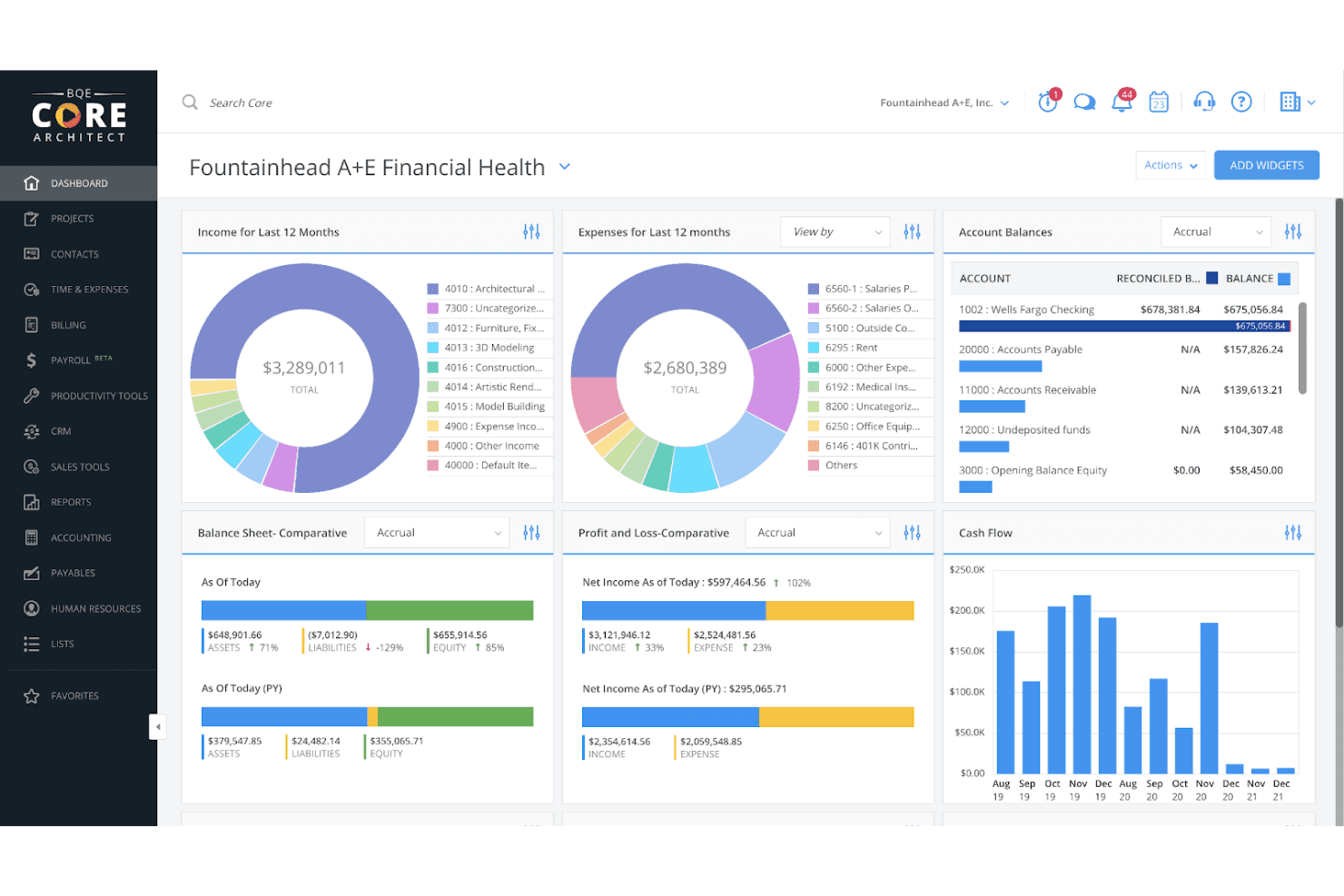
BQE Core centralizes financial health metrics in one dashboard. BQE CORE is a practice management platform built for architecture and engineering firms that brings project tracking, billing, time and expense management, and full accounting into one place.
Who Is BQE CORE Best For?
BQE CORE is a strong fit for architecture and engineering firms that need project management, billing, and accounting in a single platform.
Why I Picked BQE CORE
I picked BQE CORE because it's built specifically for project-based businesses like architecture and engineering firms, where billing and project delivery are inseparable. I appreciate how phased billing ties directly to project milestones, so invoices reflect actual work completed rather than arbitrary dates. The real-time budget and profitability dashboards give finance leads a live view of where each project stands financially, which is something FreeAgent simply doesn't offer at that depth.
BQE CORE Key Features
- Chart of accounts customization: Configure a pre-filled chart of accounts by adding, editing, or deleting accounts and sub-accounts to match your firm's structure.
- Audit trail: Automatically records every addition, update, and deletion in the system, including who made the change and when.
- Configurable tax rates: Set up named tax rates for GST, HST, PST, VAT, and other jurisdiction-specific taxes directly within the platform.
- Yodlee-powered bank feeds: Connect bank accounts through Cloud Feeds to automatically download transactions for reconciliation.
BQE CORE Integrations
BQE CORE offers 100+ pre-built integrations, including QuickBooks, Xero, Microsoft Power BI, and Gusto-powered payroll. It also uses Yodlee for bank feeds, supports an open API, and connects with Zapier.
Pros and Cons
Pros:
- Mobile receipt capture supports project expense records
- Dashboards expose project budgets and profitability
- Project-phase billing ties invoices to completed work
Cons:
- Setup and configuration demand substantial staff training
- Invoice layouts and drafts can require workarounds
Learn more about BQE Core:
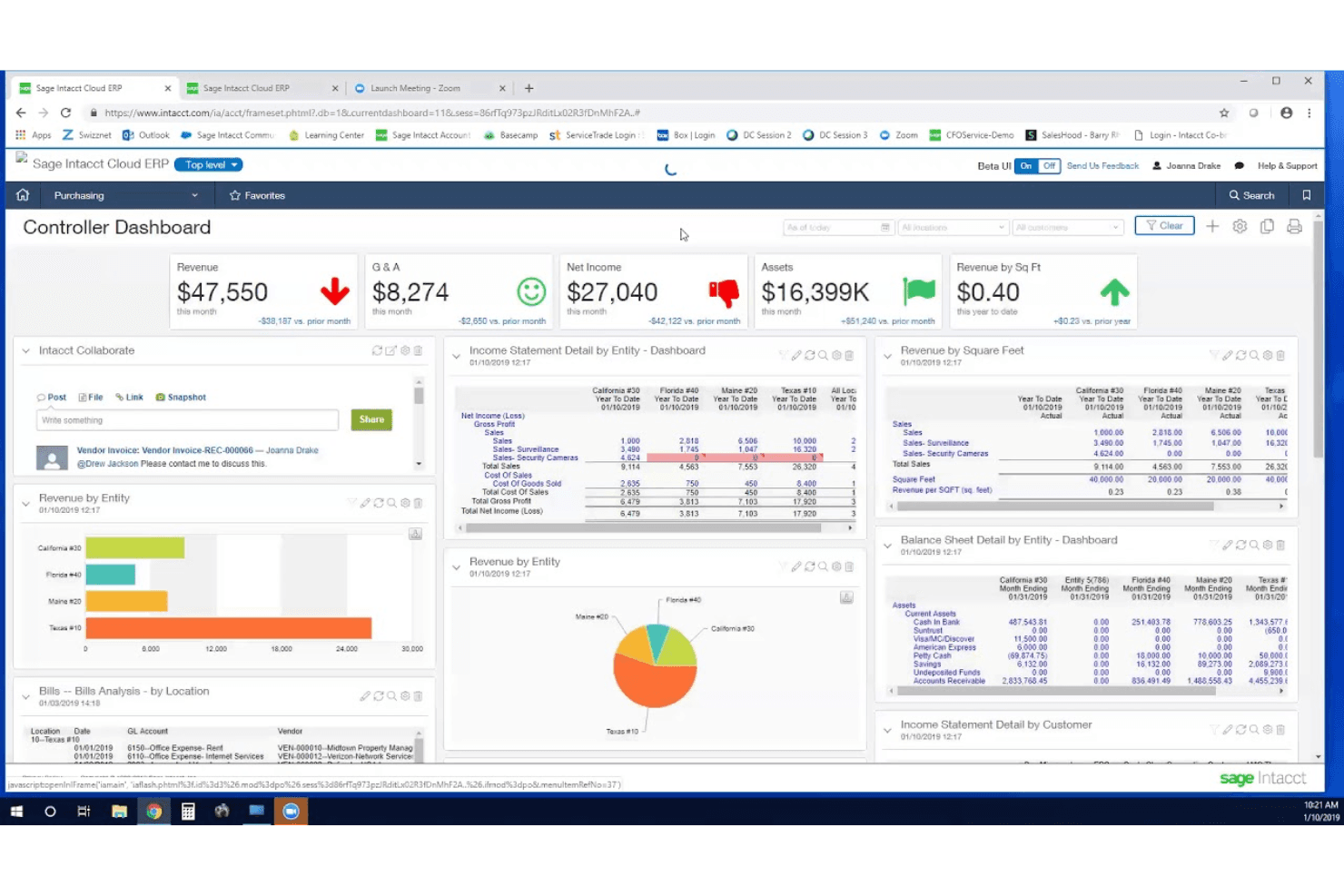
Sage Intacct centralizes financial KPIs and multi-entity reports on one dashboard. Sage Intacct is a cloud-based financial management platform built for mid-sized and growing businesses that need multi-entity consolidation, advanced reporting, and AI-driven automation across their core accounting workflows.
Who Is Sage Intacct Best For?
Sage Intacct is built for mid-sized and growing businesses whose finance teams need multi-entity consolidation, AI-driven automation, and advanced reporting across complex accounting workflows.
Why I Picked Sage Intacct
I've included Sage Intacct in my top picks because its AI-driven automation goes well beyond basic bookkeeping. The AP Automation agent reads incoming bills, matches vendors and purchase orders, and flags duplicates before creating draft bills for review. The Financial Assurance agent scans journal entries for anomalies and coding errors before they ever hit the ledger, which is the kind of pre-posting catch that saves hours of correction work at month-end close.
Sage Intacct Key Features
- Multi-entity consolidation: Consolidates financials across 2 to hundreds of entities in real time, with support for intercompany eliminations, adjustments, and multi-currency reporting.
- Financial Report Writer: Builds and edits income statements, balance sheets, and custom reports using dimensions, filters, and scheduling, with drill-down into underlying transactions.
- Bank feeds and transaction matching: Connects bank accounts, imports transactions, and applies manual or rule-based matching to reconcile payments against open items.
- MTD VAT filing integration: Automates UK VAT-rate setup and connects with Sage Regulatory Reporting to calculate and submit MTD VAT returns directly to HMRC.
Sage Intacct Integrations
Sage Intacct offers a native Salesforce integration and access to more than 350 marketplace integration partners. Its XML-RPC web services API and SDKs support custom integrations, with responses available in XML, JSON, or CSV.
Pros and Cons
Pros:
- Automated approvals reduce repetitive accounting work
- Custom reports improve financial visibility
- Multi-entity consolidation supports growing businesses
Cons:
- Support response quality varies by user
- Custom reports can still require spreadsheet work
Learn more about Sage Intacct: Best for Indian GST compliance
- Not available
- From $169.99/year (billed annually)
Visit WebsiteCustomer Rating:4.3/5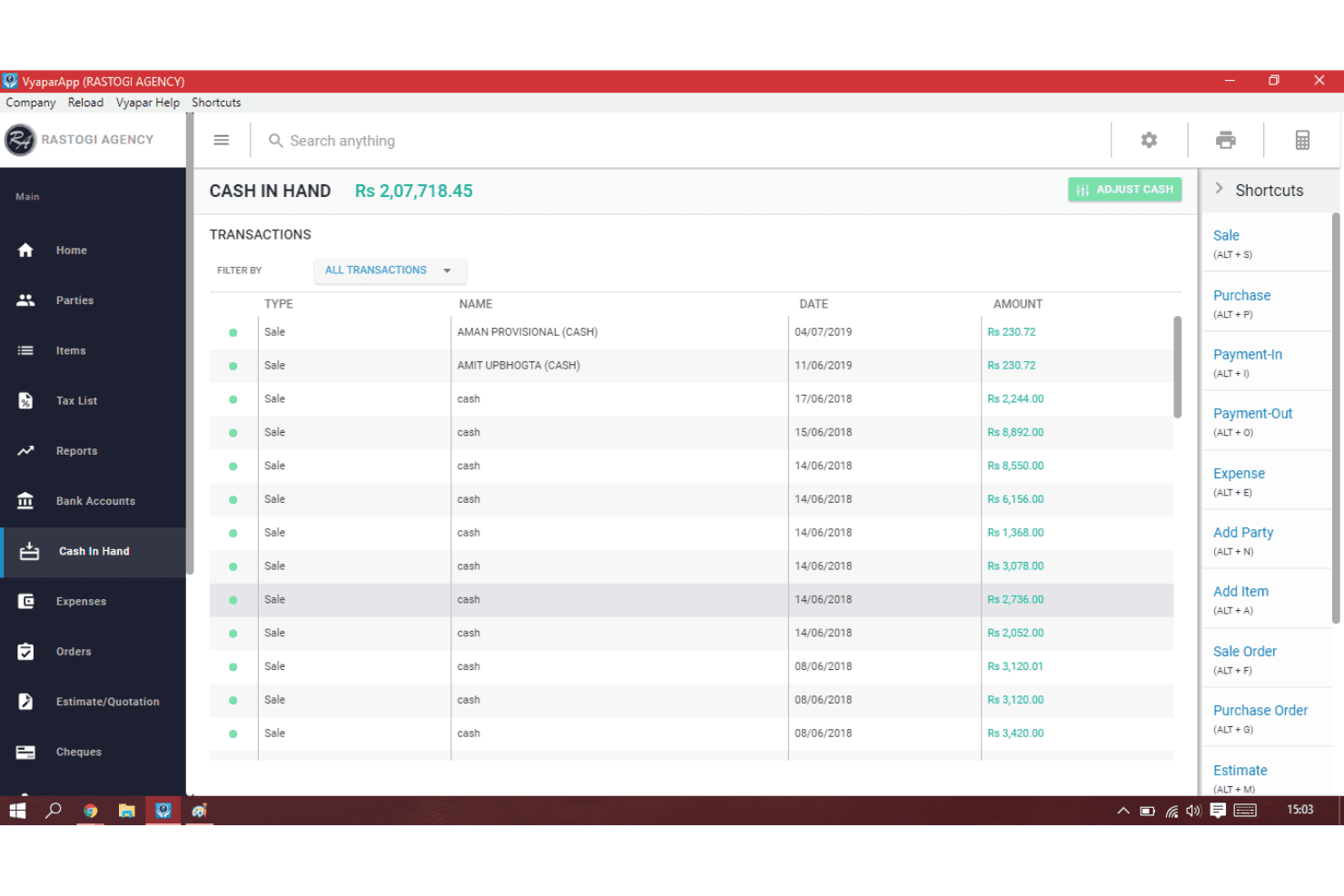
Vyapar tracks all cash-in-hand transactions with running balances. Vyapar is GST billing and accounting software built for Indian small businesses that need to manage invoicing, inventory, and tax compliance in one place.
Who Is Vyapar Best For?
Vyapar is a strong fit for Indian small business owners who need GST-compliant billing, inventory tracking, and basic accounting in one affordable tool.
Why I Picked Vyapar
I picked Vyapar as one of the best because it handles Indian GST compliance in a way that few billing tools match. Every invoice automatically calculates GST with the correct HSN/SAC codes, and the tool generates GSTR-1, GSTR-2A, and GSTR-3B reports ready to upload directly to the GST portal. I also like that its e-invoicing workflow submits data through a GST Suvidha Provider to the Invoice Registration Portal, returning an IRN and signed QR code without manual intervention.
Vyapar Key Features
- Inventory tracking: Monitor stock levels across locations with low-stock alerts, batch tracking, and automatic updates when sales or purchases are recorded.
- Multi-device sync: Access and sync business data across Android, iOS, Windows, and macOS devices under a single paid account.
- Expense recording: Log expenses by category, attach receipt images or documents, and generate expense reports filtered by expense, category, or item.
- Multi-company management: Create and manage up to five separate companies on the Gold plan, or unlimited companies on the Platinum plan, from one account.
Vyapar Integrations
Vyapar has documented native integrations with Google Drive, Tally, WhatsApp, GST Suvidha Providers, and the Invoice Registration Portal. A public API for custom integrations isn't documented.
Pros and Cons
Pros:
- Offline billing suits unreliable connectivity
- Inventory and billing share live stock
- Indian GST reports support compliant billing
Cons:
- Bank reconciliation availability remains unclear
- No documented UK VAT or self-assessment
Learn more about Vyapar: Best for unlimited expert advice
- Free plan + 14-day free trial available
- From £4/month
Visit WebsiteCustomer Rating:4.4/5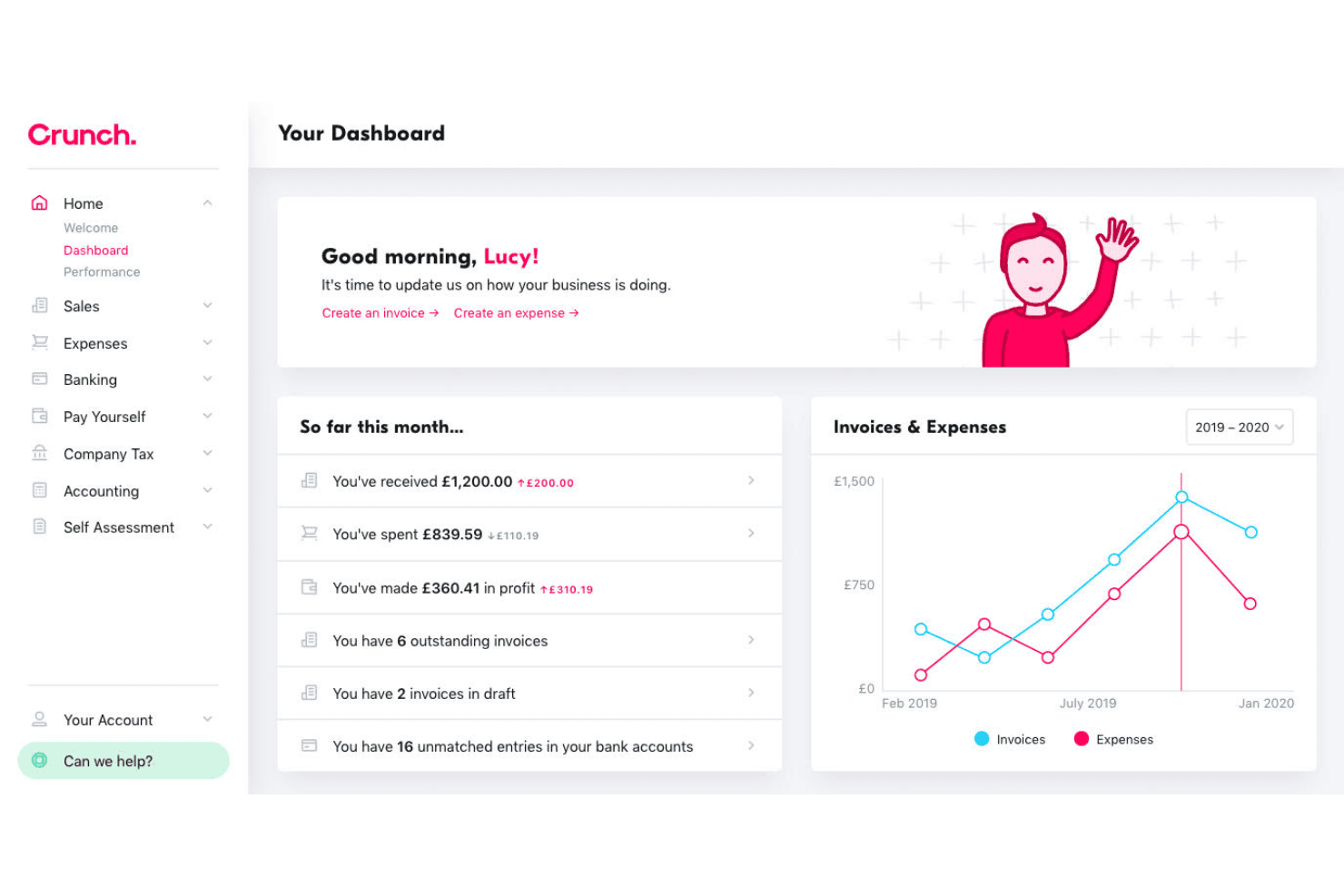
Crunch gives users a real-time financial dashboard with invoices and expenses. Crunch is a UK accounting platform that pairs cloud-based software with access to qualified accountants, making it a strong fit for freelancers, sole traders, and small limited companies that want invoicing, expense tracking, tax filing, and professional guidance in one place.
Who Is Crunch Best For?
Crunch is a strong fit for UK freelancers and sole traders who want cloud accounting software backed by access to qualified accountants for tax and compliance questions.
Why I Picked Crunch
I've included Crunch in my top picks because it's the only tool on this list that pairs cloud accounting software with unlimited access to qualified accountants, so you're never stuck interpreting a tax position or VAT obligation on your own. I particularly like that MTD VAT and Income Tax submissions go directly to HMRC through the platform, and the personal tax estimator updates your position in real time as you work. When something genuinely needs a human answer, a qualified accountant is there without an extra per-question charge.
Crunch Key Features
- Open Banking connections: Link accounts from major UK banks—including Barclays, Monzo, Starling, and Revolut—to sync transactions into Crunch daily.
- CrunchPay payment links: Add a "Pay Now" button to invoices so clients can pay by card, Apple Pay, Google Pay, or Direct Debit.
- Multi-currency invoicing: Issue sales invoices in GBP, USD, CAD, AUD, or EUR, with exchange rates applied automatically at the time of payment.
- Luca AI auto-match: Use Crunch's AI tool to suggest and bulk-approve transaction matches during bank reconciliation.
Crunch Integrations
Crunch offers native HMRC filing and Open Banking connections for Barclays, HSBC, Lloyds, NatWest, Monzo, Starling, Wise, and Revolut. It also connects with Brixx and provides a REST API using JSON and OAuth 2.0 for custom integrations.
Pros and Cons
Pros:
- Reviewers praise straightforward invoice creation
- Tax support helps clarify filing obligations
- Accountant guidance alongside bookkeeping software
Cons:
- Reconciliation can require manual matching work
- Reporting and cash-flow forecasting feel limited
Learn more about Crunch: 8Best for small business invoicing
Wave
- Free plan + 30-day trial available
- From $19/month
Visit WebsiteCustomer Rating:4.3/5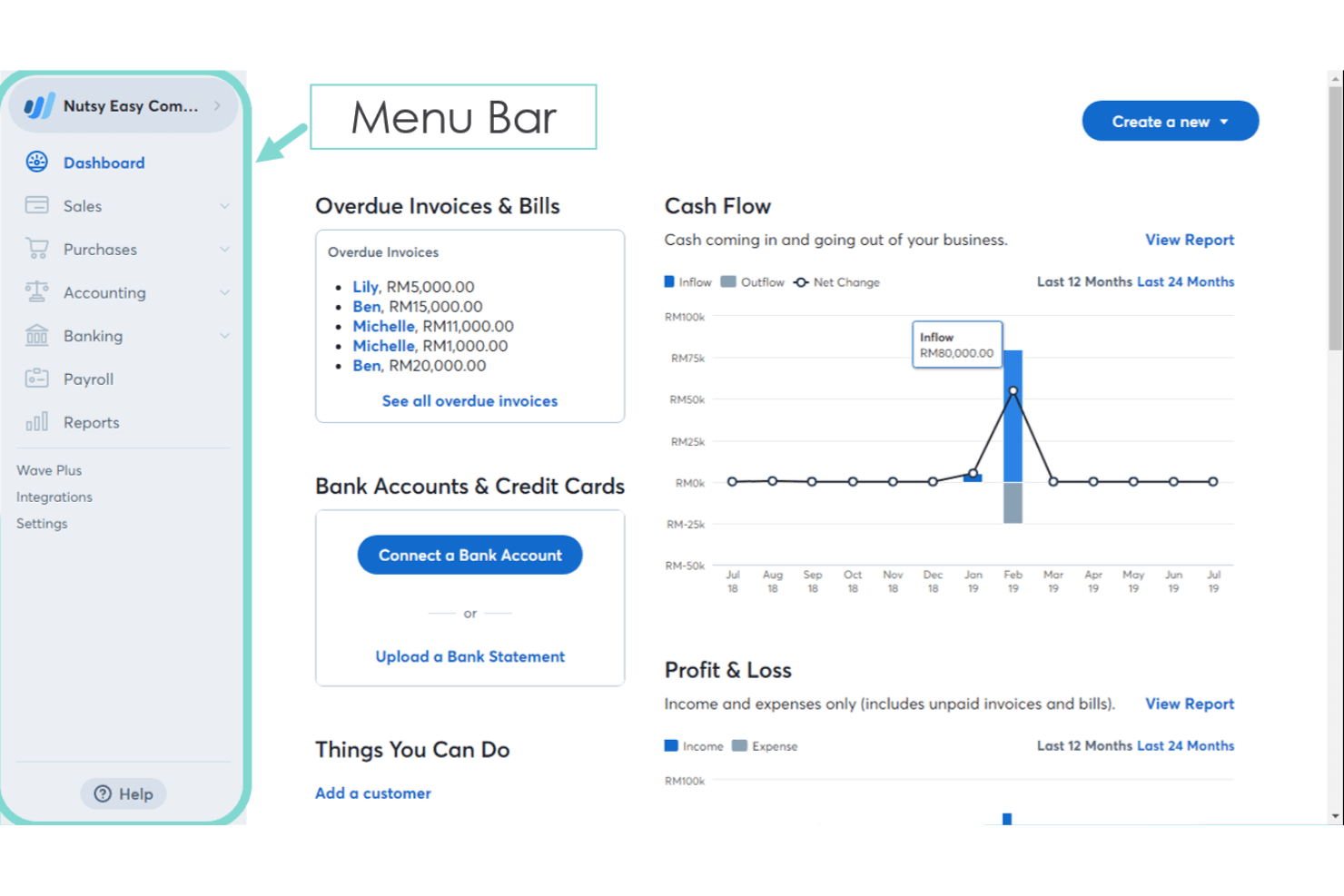
Wave's dashboard gives users a real-time snapshot of finances. Wave is a free-to-start accounting platform built for freelancers and small business owners who need bookkeeping, invoicing, and expense tracking without the overhead of a full-featured accounting suite.
Who Is Wave Best For?
Wave suits freelancers and micro-business owners who want to handle invoicing and basic bookkeeping without paying for features they'll never use.
Why I Picked Wave
I picked Wave as one of the best because its invoicing is genuinely built for small businesses that need to look professional without a lot of setup. I love that you can create unlimited invoices on the free Starter plan, and Pro adds automated late-payment reminders and reusable message templates so chasing overdue invoices doesn't eat up your day. Customers pay directly through an emailed Review & Pay link, accepting card, bank payment, or Apple Pay.
Wave Key Features
- Double-entry bookkeeping: Wave records all transactions using a full double-entry system, with a General Ledger and Trial Balance available on the web.
- Bank and credit card connections: Pro accounts connect unlimited bank and credit card accounts via Plaid to automatically import and categorize transactions.
- Sales tax calculation: Wave calculates sales tax per line item, supports tax-inclusive pricing, and generates a Sales Tax report summarizing amounts collected and paid.
- Collaborator access roles: Pro accounts can invite accountants or business partners as Admin, Editor, or Viewer collaborators.
Wave Integrations
Wave offers 13+ app integrations, including direct connections with Google Sheets, Amazon, Etsy, and MinuteDock, plus Make.com workflows. Its public API includes query and mutation examples and webhooks for custom integrations.
Pros and Cons
Pros:
- Core reports support year-end checks
- Invoice creation and tracking feel straightforward
- Free bookkeeping covers basic freelancer needs
Cons:
- Unsupported outside the US and Canada
- Bank feeds can miscategorize transactions
Learn more about Wave: Best for UK VAT management
- 14-day free trial available
- From £13.50/month
Visit WebsiteCustomer Rating:4.1/5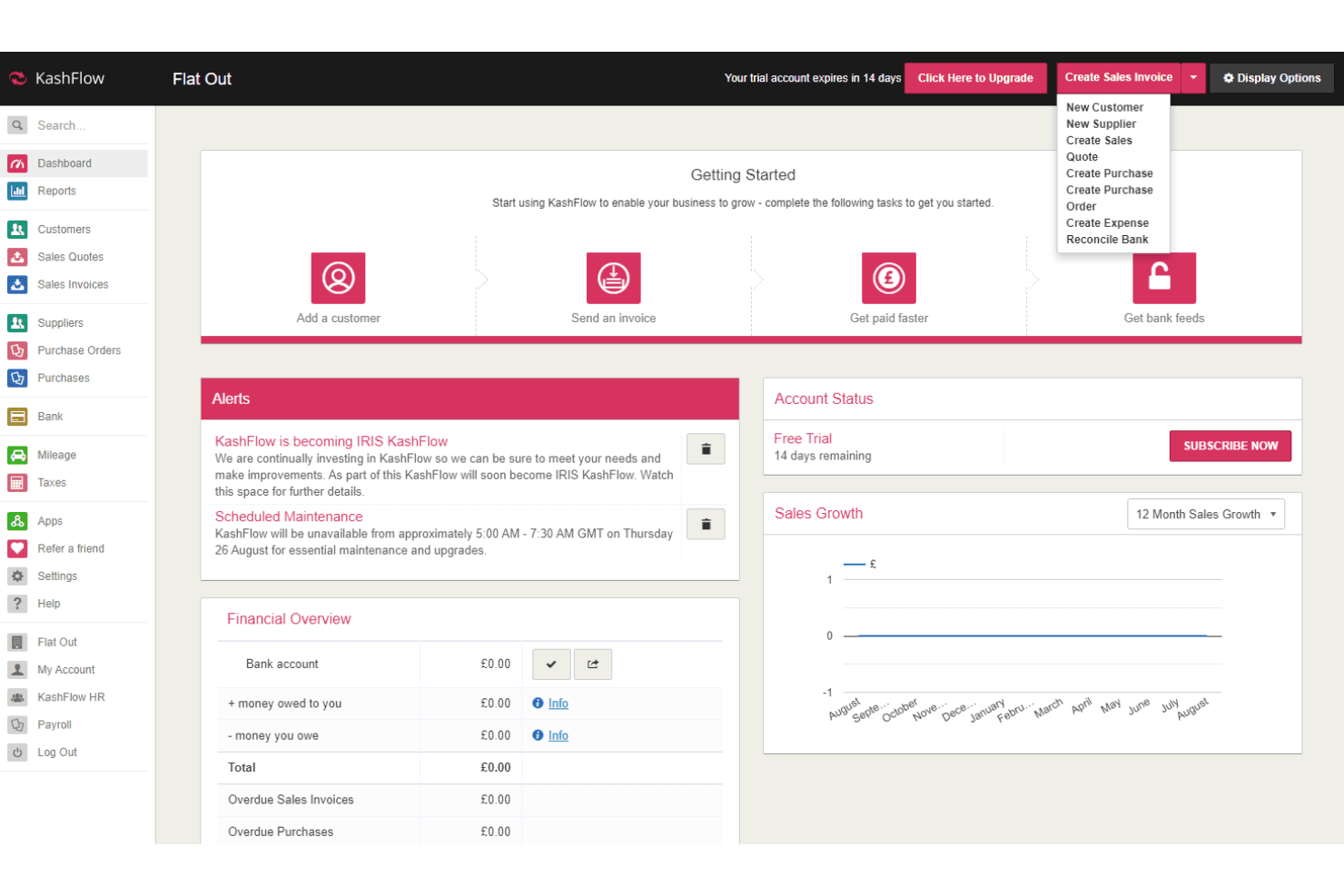
KashFlow lets users quickly create invoices, quotes, and expenses from the dashboard. KashFlow is UK-focused accounting software built for sole traders, contractors, and small businesses that need to manage invoicing, bank reconciliation, and VAT compliance in one place.
Who Is KashFlow Best For?
KashFlow suits UK-based sole traders and small businesses that need straightforward VAT filing, invoicing, and bank reconciliation without a steep learning curve.
Why I Picked KashFlow
I picked KashFlow because its VAT management tools are genuinely built around how UK tax compliance works in practice. You can file VAT returns directly to HMRC through Making Tax Digital from inside the platform, and the dashboard shows a live VAT liability total so you're never caught off guard at quarter-end. I also appreciate that setting a business as VAT-registered automatically applies the correct tax to every invoice you raise.
KashFlow Key Features
- Automated invoice reminders: Set custom intervals for chasing unpaid invoices so overdue payments get flagged without manual follow-up.
- Bank reconciliation rules: Create matching rules that automatically pair incoming transactions with invoices, purchases, or bank entries.
- Over 50 financial reports: Run reports covering balance sheet, profit and loss, aged debtors, and trial balance, with PDF and CSV export.
- Mobile expense and mileage tracking: Log expenses, attach receipt photos, and record mileage directly from the KashFlow Go app.
KashFlow Integrations
KashFlow offers integrations with WorldPay, GoCardless, PayPal, and ConnectMyApps, which connects eBay, Amazon, Shopify, Salesforce, ZohoCRM, and Vend HQ. It also supports SOAP/XML and REST APIs for custom integrations.
Pros and Cons
Pros:
- Reviewers praise straightforward invoice creation and sending
- Live VAT liability supports quarter-end planning
- Direct VAT filing to HMRC
Cons:
- Reviewers report inconsistent figures across financial reports
- Users report reconciliation issues and disappearing transactions
Learn more about KashFlow:
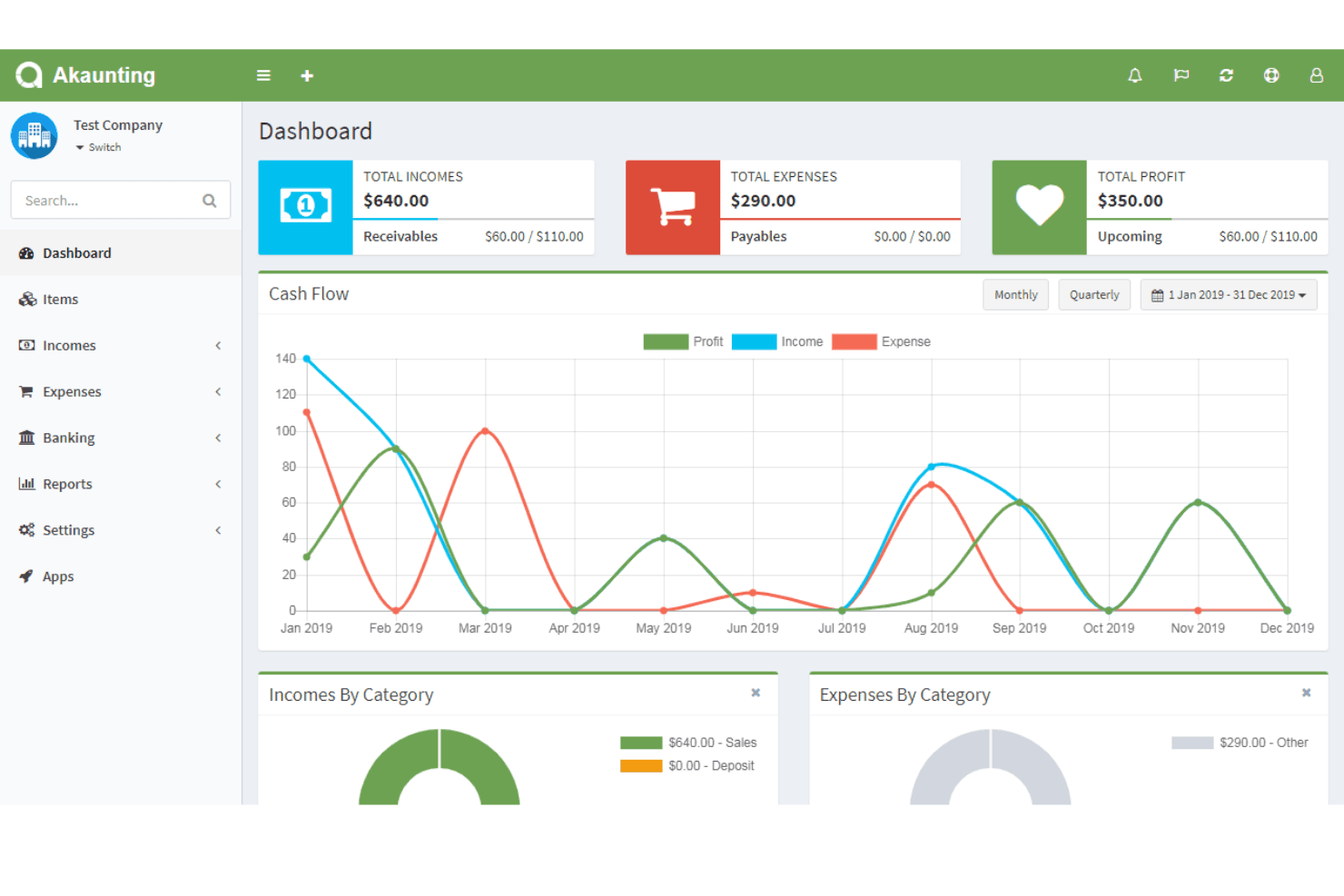
Akaunting gives users a real-time financial dashboard with cash flow trends. Akaunting is free, open-source accounting software built for freelancers, sole traders, and small businesses that want full control over their financial data without being locked into a proprietary platform.
Who Is Akaunting Best For?
Akaunting is a strong fit for freelancers and small business owners who want a free, self-hostable accounting tool and don't mind managing feature add-ons as their needs grow.
Why I Picked Akaunting
I picked Akaunting as one of the best because it's the only genuinely free, self-hostable option on this list, which matters if you want full ownership of your financial data without a recurring subscription. I appreciate that it ships with a dedicated FreeAgent migration app that pulls across invoices, recurring invoices, bills, customers, vendors, Chart of Accounts, and journal entries, so switching doesn't mean rebuilding from scratch. The double-entry engine, general ledger, and accountant role access are all there once you're on Premium Cloud.
Akaunting Key Features
- Multi-currency invoicing: Create and send invoices in different currencies, with automatic conversion to your main currency and live exchange rate syncing.
- Tax Summary report: View sales tax collected and paid across invoices and expenses, filterable by financial year and cash or accrual basis, with print and export options.
- Client portal: Give customers a dedicated login to view invoices, manage payments, and make bulk payments online.
- App marketplace: Browse and install over 100 apps directly from the admin panel to extend functionality across payments, ecommerce, and more.
Akaunting Integrations
Akaunting offers over 100 marketplace apps, including FreeAgent, Shopify, WooCommerce, Stripe, PayPal, and Mollie. It also provides a RESTful API for custom integrations.
Pros and Cons
Pros:
- Reviewers praise quick invoice creation
- Self-hosting keeps financial data in-house
- FreeAgent records import through guided migration
Cons:
- Support and module reliability face criticism
- Bank-feed setup draws recurring complaints
Learn more about Akaunting:
Outras alternativas ao FreeAgent
Eis algumas alternativas adicionais ao FreeAgent que não entraram na minha lista restrita, mas que ainda assim vale a pena conhecer:
- 11SlashBest for real-time spending insights
- 12Instabooks Best for cost-effective bookkeeping
- 13QuickBooks OnlineBest for streamlining financial processes
- 14Odoo AccountingBest for customizable workflows
- 15HoneyBookBest for creative industry professionals
- 16KeeperBest for team collaboration features
- 17BudgytBest for budgeting and forecasting
- 18NetSuite Cloud AccountingBest for large-scale enterprise solutions
- 19Netgain Best for cloud-based hosting services
Related Reviews
How I Evaluate FreeAgent Alternatives
I split my evaluation into baseline criteria—invoicing, tax compliance, bank reconciliation—and differentiators like mobile functionality, pricing transparency, and accountant collaboration tools.
Core Functionality (Table Stakes For This List)
When I'm selecting tools for my list, I rank each one on a scale from 0 (does not offer the functionality) to 5 (excels in this area) for each core functionality listed below. Then, I calculate the tool's total score into a percentage. Each tool needs to achieve a minimum total score of 65% to be considered for inclusion.
- Invoicing & Billing: I check whether each tool supports recurring invoices, automated reminders, and multi-currency billing—features freelancers and small agencies rely on daily.
- Expense Tracking: Receipt capture, bank feed categorization, and mileage logging all factor in, since manual expense entry is a dealbreaker for busy solo operators.
- Tax Compliance: I evaluate how well each platform handles VAT returns, Self Assessment, or regional equivalents, including direct filing to tax authorities.
- Bank Reconciliation: Automated bank feeds and transaction matching matter here—I look for smart rules that learn from past categorizations over time.
- Time & Project Tracking: For consultants and freelancers billing by the hour, I consider whether tracked time flows directly into invoices and project profitability reports.
- Financial Reporting: Each tool should generate profit & loss, balance sheet, and cash flow reports at a minimum, with enough flexibility to support year-end prep.
Once I have a list of tools that meet this criteria, I consider what sets each platform apart.
Differentiating Factors (What Sets Vendors Apart)
Here's how I compare and contrast different vendors:
Standout Features
A strong mobile app makes a real difference for freelancers who snap receipts, send invoices, or check cash flow between client meetings. I also evaluate accountant collaboration tools—platforms like Xero and QuickBooks let your bookkeeper log in with their own access role, which simplifies year-end prep. AI-powered categorization and automated workflows are worth looking at too, since they cut down on repetitive bookkeeping tasks that eat into billable hours.
Beyond Features
Pricing transparency matters—I look for plans that clearly state what's included so freelancers and small teams aren't surprised by per-user or per-transaction fees as they grow. Integration ecosystems are just as important, especially connections to payment processors like Stripe or GoCardless and project management tools your team already uses. I also consider industry and use case fit, since a sole trader's needs differ sharply from a limited company managing payroll and contractor payments.
Por que razão procurar uma alternativa ao FreeAgent?
Embora o FreeAgent seja um software de contabilidade sólido, há várias razões pelas quais alguns utilizadores procuram soluções alternativas. Poderá estar à procura de uma alternativa ao FreeAgent porque…
- Precisa de ferramentas de elaboração de relatórios mais avançadas
- A sua empresa está a expandir-se para além da área geográfica onde está disponível
- Pretende uma melhor integração com outro software
- A sua equipa necessita de suporte para várias moedas
- Precisa de mais opções de personalização
- Procura opções de menor custo para equipas pequenas
Se alguma destas situações lhe é familiar, veio ao lugar certo. A minha lista inclui várias opções de software de contabilidade mais adequadas para equipas que enfrentam estes desafios.
Principais funcionalidades das alternativas ao FreeAgent
Eis algumas das principais funcionalidades do FreeAgent para o ajudar a determinar quais os componentes de que a sua alternativa necessitará:
- Estimativas e faturação: Crie e acompanhe estimativas e faturas profissionais, tornando a faturação fácil para si e para a sua equipa.
- Gestão de despesas: Carregue e gira recibos facilmente através do telemóvel, ajudando-o a acompanhar as despesas da empresa.
- Controlo de tempo: Utilize o cronómetro integrado e as folhas de horas para um registo preciso do tempo, garantindo que fatura corretamente as suas horas.
- Painel: Monitorize o fluxo de caixa e os prazos fiscais num relance, obtendo uma visão clara da sua situação financeira.
- Integração bancária: Importe transações automaticamente ligando as suas contas bancárias, reduzindo a introdução manual de dados.
- Gestão de projetos: Obtenha uma visão geral dos rendimentos, das despesas e da rentabilidade de cada projeto, ajudando-o a gerir eficazmente as finanças da sua empresa.