

Gestionarea bugetelor proiectelor poate fi o adevărată bătaie de cap pentru directorii financiari și echipele lor. Monitorizarea cheltuielilor, estimarea costurilor și evitarea depășirilor de buget sunt doar câteva dintre provocările cu care vă confruntați zilnic. Aici intervine software-ul pentru gestionarea bugetelor proiectelor.
Din experiența mea, aceste instrumente pot face o diferență reală, ajutându-vă pe dumneavoastră și echipa să obțineți controlul asupra planificării financiare și să îmbunătățiți procesul decizional. Am testat independent diverse soluții software pentru a vă oferi informații imparțiale.
În acest articol, voi prezenta alegerile mele principale pentru cel mai bun software de bugetare a proiectelor disponibil. Veți găsi informații practice care vă vor ajuta să alegeți instrumentul potrivit pentru nevoile dumneavoastră. Să începem și să găsim soluția potrivită pentru echipa dumneavoastră.
Why Trust Our Software Recommendations
6,700+
Reviews
20
Industry experts
16+
Evaluation factors
14
Years
Our team has been testing and reviewing software since 2012. As finance leaders ourselves, we know how difficult—and important—it is to choose the right software.
For this guide, we evaluated tools using hands-on testing and independent research, scoring tools using our selection criteria.
Our reviews reflect our human editorial judgment, not a sales pitch.
Tabel comparativ pentru software-ul de bugetare a proiectelor
Acest tabel comparativ sintetizează detaliile privind prețurile pentru selecțiile mele principale de software pentru bugetarea proiectelor:
Sorted by: Default
| Tool | Starting Price | Website | |
|---|---|---|---|
Best for professional services budget visibility | 4.5 out of 5 | $17/user/month 14-day free trial | Book Demo |
Best for construction projects | 4.5 out of 5 | $149/month Free trial + free demo available | Website |
Best for small to medium teams | 4.4 out of 5 | $3/user/month Free plan available; 14-day free trial | Website |
Best for service businesses | Not rated | Pricing upon request Free demo available | Website |
Best for cost management | Not rated | $9/user/month 14-day free trial + free demo available | Website |
Best for cloud support | 4.4 out of 5 | $12/user/month 30-day free trial available | Website |
Best for customizable dashboards | 4.3 out of 5 | $10/user/month Free plan + 14-day free trial + demo available | Book Demo |
Best for project resource reconciliation | 4.5 out of 5 | $20/user/month Free demo available | Website |
Best for agency profit margin tracking | 4.6 out of 5 | $10/user/month 14-day free trial + demo available | Book Demo |
Best for construction management | 4.5 out of 5 | Pricing upon request 14-day free trial for Procore Estimating + free demo available | Website |


Recenzii ale celor mai bune software-uri pentru bugetarea proiectelor
Mai jos sunt rezumatele mele detaliate ale celor mai bune software-uri pentru bugetarea proiectelor care au ajuns pe lista mea scurtă. Recenziile mele oferă o privire detaliată asupra funcțiilor principale, avantajelor & dezavantajelor, integrărilor și cazurilor de utilizare ideale ale fiecărui instrument, pentru a vă ajuta să îl găsiți pe cel mai potrivit pentru dumneavoastră.
 Best for professional services budget visibility
- 14-day free trial
- From $17/user/month
Visit WebsiteCustomer Rating:4.5/5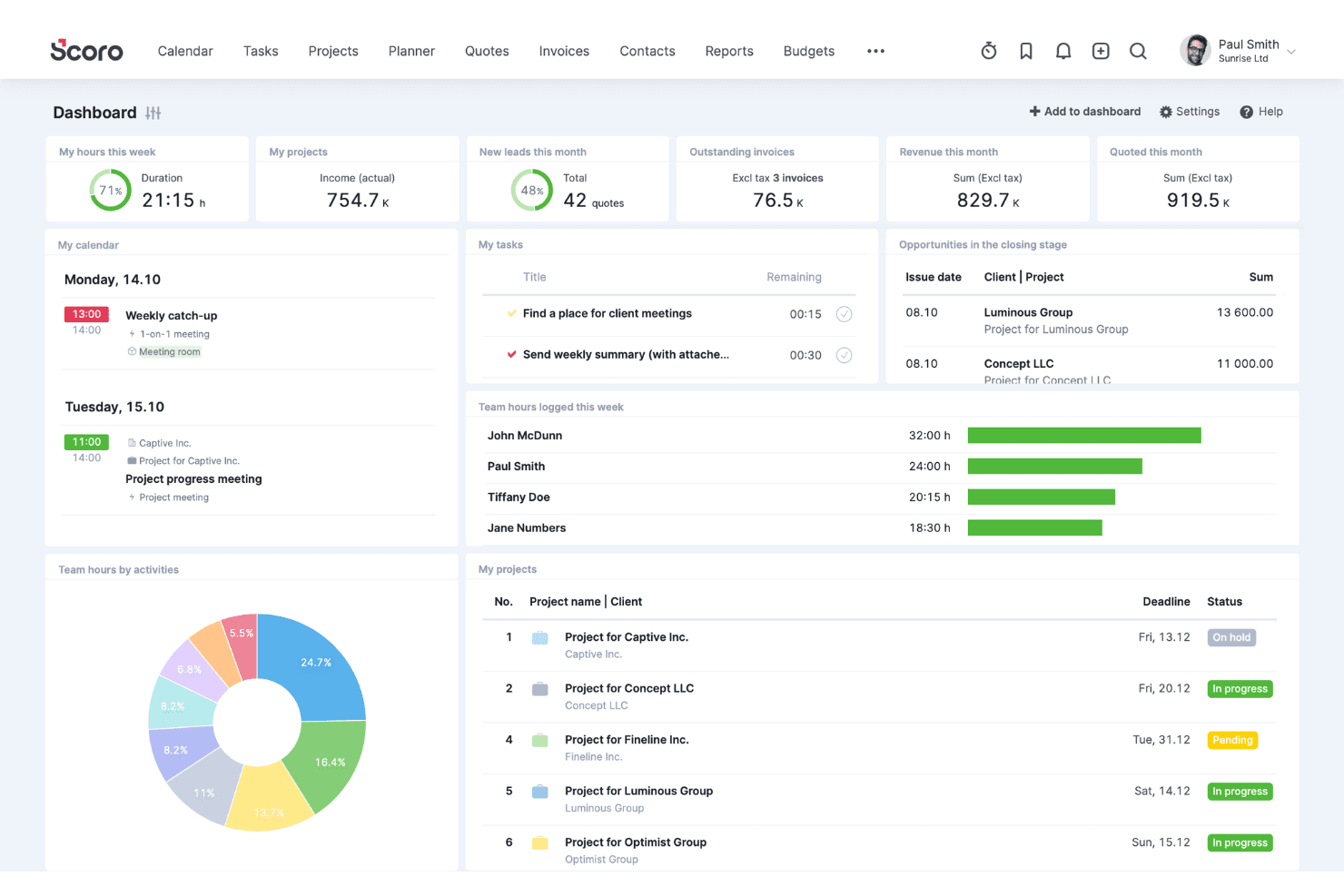
Scoro coordinates clients, sales, projects, resources, time, and billing. Scoro is a professional services automation (PSA) platform that combines project budgeting, resource and labor cost management, time tracking, invoicing, and financial reporting in a single system.
Who Is Scoro Best For?
Scoro is a strong fit for agencies, consultancies, and professional services firms that need to connect project budgets, resource costs, and client billing in one place.
Why I Picked Scoro
I picked Scoro as one of the best because it gives professional services teams a genuinely clear view of project finances from quote to invoice. The Quote Estimation Matrix lets you scope work by role and effort with cost and margin visibility before a project starts, so you're not guessing at profitability. The Budget Health tab then tracks burn against actuals at the service and role level in real time, surfacing overservicing early.
Scoro Key Features
- Multi-currency financial management: Run project finances in multiple currencies with entity-level reporting and group-level consolidation for international operations.
- Retainer budget automation: Set up recurring retainer budgets with automated invoicing cycles to manage ongoing client engagements without manual overhead.
- Revenue recognition and WIP reporting: Track unbilled work and allocate revenue across billing periods to support accurate, period-based financial reporting.
- Role-based rate cards: Assign different cost and billing rates by team role, with support for multiple price lists across clients or project types.
Scoro Integrations
Scoro offers native integrations with QuickBooks Online, Sage Intacct, and Stripe, plus integrations with Xero, Exact, and Salesforce. It also provides a JSON REST API for custom connections and supports Zapier.
Pros and Cons
Pros:
- Automates retainer and recurring budget cycles
- Supports multi-currency project financial management
- Tracks project margins and burn in real time
Cons:
- No native support for earned value management
- Approval workflows only on highest-tier plan
 Best for construction projects
- Free trial + free demo available
- From $149/month
Visit WebsiteCustomer Rating:4.5/5
Knowify supports job costing and project tracking for construction teams. Knowify is a project management software tailored for construction businesses needing tools for job costing and project tracking. It serves contractors and subcontractors by providing features that optimize project management and budgeting.
Why I picked Knowify: It is particularly well-suited for construction projects, offering features that integrate job costing with project management. Your team can use Knowify to track project budgets and timelines.
The platform's contract management and invoicing capabilities ensure smooth financial operations. Knowify's focus on the construction industry makes it a valuable asset for managing complex projects.
Standout features & integrations:
Features include job costing, contract management, and invoicing tools. These features help you manage construction projects and finances. Knowify also offers project tracking to keep your team informed about progress and deadlines.
Integrations include QuickBooks Online, Zapier, Xero, Stripe, PayPal, Docusign, Google Workspace, Outlook, Dropbox, and Slack.
Pros and Cons
Pros:
- Supports multiple invoicing methods
- Tools for creation proposals, bids, and estimates
- Real-time job costing tools for tracking against project budgets
Cons:
- QuickBooks dependency
- Limited options for creating highly customized reports
Learn more about Knowify: Best for small to medium teams
- Free plan available; 14-day free trial
- From $3/user/month
Visit WebsiteCustomer Rating:4.4/5
Project Insight helps small teams manage tasks, budgets, and resources. Project Insight is a project management software designed for small to medium-sized teams needing project planning and execution tools. It helps manage tasks, resources, and budgets, making it ideal for teams looking for a broad project management solution.
Why I picked Project Insight: Project Insight is particularly well-suited for small to medium teams, offering features that facilitate efficient project management. Your team can benefit from its task management and resource allocation capabilities.
Its intuitive interface helps you track project progress and deadlines. Project Insight's focus on providing tools for smaller teams ensures that you have the resources needed to succeed without unnecessary complexity.
Standout features & integrations:
Features include task management, resource allocation, and deadline tracking. These features help your team stay organized and meet project goals. Project Insight also offers reporting tools to keep you informed about project status.
Integrations include QuickBooks, Salesforce, Microsoft Project, Jira, Slack, Google Drive, Box, Microsoft Teams, SharePoint, and Dropbox.
Pros and Cons
Pros:
- Client view portal for sharing status, documents, and approvals with clients
- Integrated time tracking and expense tools
- Customizable collaborative views for task management
Cons:
- Dated user interface
- Cumbersome setup for advanced security permissions
Learn more about Project Insight:

Accelo unifies project tracking and client management for service teams. Accelo is a business management software tailored for service businesses needing project management and client relationship tools. It helps teams organize operations and manage client interactions.
Why I picked Accelo: Accelo is particularly suited for service businesses, offering features that integrate project management with client relationship management. Your team can use Accelo to track billable hours and manage client communications with ease.
Accelo’s automatic time tracking ensures accurate billing and resource allocation. Its focus on service-oriented features makes it ideal for businesses that rely heavily on client interactions.
Standout features & integrations:
Features include automatic time tracking, client communication management, and billing tools. These features help you manage projects and client relationships. Accelo also offers project planning capabilities to keep projects on track.
Integrations include QuickBooks, Xero, Microsoft 365, Google Workspace, HubSpot, Zendesk, Mailchimp, Gusto, and Salesforce.
Pros and Cons
Pros:
- Detailed project planning features
- Integrates billing and project management
- 360-degree client view
Cons:
- Mixed experiences reported with customer service
- Difficult to locate certain functions
Learn more about Accelo: Best for cost management
- 14-day free trial + free demo available
- From $9/user/month (billed annually)

Birdview PSA manages project costs, resources, and timelines for teams. Birdview PSA is a professional services automation software aimed at businesses needing project cost management solutions. It helps teams manage project budgets, resources, and timelines.
Why I picked Birdview PSA: Birdview PSA excels in cost management, providing tools that help your team maintain control over project expenses. Features like budget tracking and expense forecasting ensure you stay within financial limits.
The platform's resource management capabilities enable oversight of team member allocations. Birdview PSA's focus on financial oversight makes it a valuable tool for managing project costs.
Standout features & integrations:
Features include budget tracking, expense forecasting, and resource management. These features help you keep projects on budget and allocate resources. Birdview PSA also offers timeline management to ensure projects are completed on schedule.
Integrations include Salesforce, QuickBooks, Adobe, Microsoft Teams, Jira, SharePoint, HubSpot, and Outlook.
Pros and Cons
Pros:
- Detailed expense forecasting
- Time tracking and expense approval workflows
- Integrated cost monitoring tools
Cons:
- Integration complexity likely requires support
- Complex features take time to master
Learn more about Birdview PSA: Best for cloud support
- 30-day free trial available
- From $12/user/month
Visit WebsiteCustomer Rating:4.4/5
Smartsheet offers budgeting and collaboration tools for project teams. Smartsheet is a work management platform designed for teams needing project budgeting and collaboration tools. It serves various industries by offering solutions for project and portfolio management.
Why I picked Smartsheet: Smartsheet excels in cloud support, allowing your team to access project data and collaborate from anywhere. Features like real-time collaboration and workflow automation enhance its usability for remote teams.
The platform integrates with a range of applications, ensuring your team stays connected. Smartsheet's focus on security and efficiency makes it a reliable choice for managing projects online.
Standout features & integrations:
Features include project dashboards, automated workflows, and real-time collaboration tools. These help you keep track of project progress and make adjustments as needed. Smartsheet also offers AI capabilities to enhance decision-making and efficiency.
Integrations include Microsoft Teams, Google Workspace, Slack, Dropbox, Salesforce, Jira, Docusign, Box, Tableau, and Adobe Creative Cloud.
Pros and Cons
Pros:
- Extensive integration ecosystem
- High availability and disaster recovery
- AWS partnership that leverages enterprise-grade support
Cons:
- Feature-gated plans
- No automatic autosave
 Best for customizable dashboards
- Free plan + 14-day free trial + demo available
- From $10/user/month (billed annually)
Visit WebsiteCustomer Rating:4.3/5
Wrike centralizes task management and collaboration for project teams. Wrike is a versatile project management tool designed for teams across various industries. It helps manage tasks, projects, and collaborations, providing a centralized platform for project planning and execution.
Why I picked Wrike: Known for its customizable dashboards, Wrike lets you tailor your workspace to fit your team's needs. You can easily modify views to track project progress and priorities.
Features like time tracking and workload management enhance its functionality. Wrike's flexibility in dashboard customization ensures that you have the information you need at your fingertips.
Standout features & integrations:
Features include time tracking, workload management, and Gantt charts. These features help you plan and monitor projects effectively. With Wrike, you can also manage resources and set project milestones.
Integrations include Microsoft Teams, Slack, Google Drive, Dropbox, Salesforce, Jira, Adobe Creative Cloud, Box, GitHub, and Zendesk.
Pros and Cons
Pros:
- Advanced planning tools, including Gantt charts and workload views
- Diverse visualization options with data widgets
- Highly customizable dashboards
Cons:
- Complicated interface
- Missing built-in time tracking in lower tiers
 Best for project resource reconciliation
- Free demo available
- From $20/user/month
Visit WebsiteCustomer Rating:4.5/5
BigTime's dashboard shows real-time project profitability across your entire portfolio. BigTime is a professional services automation (PSA) platform designed to bridge the gap between project delivery and financial oversight. It provides CFOs and finance leaders with a unified environment to manage time tracking, complex billing, and resource allocation in one ecosystem.
Why I picked BigTime: I chose BigTime because it excels at reconciling resource costs with project budgets. While many tools focus on task completion, BigTime links every hour logged directly to your billing logic and margin targets. This ensures that you aren't just seeing if a project is on time, but if the current staffing model is actually protecting your bottom line.
Standout features & integrations:
Features include multi-entity budgeting, WIP reporting, skills-based resource leveling, and revenue projection AI.
Integrations include QuickBooks, Sage Intacct, Salesforce, HubSpot, Jira, Slack, Zapier, Lacerte, and more.
Pros and Cons
Pros:
- Automated invoice generation workflows
- Granular project profitability insights
- Highly flexible billing rate logic
Cons:
- Clunky mobile expense entry
- Intensive initial setup process
Learn more about BigTime: Best for agency profit margin tracking
- 14-day free trial + demo available
- From $10/user/month
Visit WebsiteCustomer Rating:4.6/5
Productive's profitability view monitors real-time billable hours and expenses. Productive is an all-in-one agency management platform designed to integrate project delivery with deep financial oversight. It serves professional service firms—like creative agencies and IT consultancies—by linking resource scheduling directly to budget burn and revenue forecasting.
Why I picked Productive: I chose Productive because it calculates your real-time profit margins by weighing billable rates against your internal overhead and staff costs. This makes it a standout choice for agency leaders who need to know exactly which clients or project types are the most lucrative.
Standout features & integrations:
Features include multi-model budgeting (fixed price, hourly, or retainers), automated heatmaps for resource availability, and a built-in sales CRM that converts deals directly into project budgets.
Integrations include QuickBooks Online, Xero, Slack, Jira, Google Calendar, Microsoft Outlook, Zapier, Memtime, and HubSpot.
Pros and Cons
Pros:
- Easy transition from sales to project
- Supports recurring retainer management
- Real-time margin and profitability tracking
Cons:
- Minimum three-user seat requirement
- Steep learning curve for reporting
Learn more about Productive: 10Best for construction management
Procore
- 14-day free trial for Procore Estimating + free demo available
- Pricing upon request
Visit WebsiteCustomer Rating:4.5/5
Procore's budget dashboard monitors real-time cost predictable across multiple job sites. Procore is an expansive construction management platform designed to connect field teams with office-based financial controllers. It serves general contractors and large-scale developers by providing a centralized source of truth for project health, safety, and multi-million dollar budgets.
Why I picked Procore: I chose Procore because it is the industry standard for managing high-stakes construction financials. It excels at linking field updates, like labor hours and material deliveries, directly to the master budget, allowing you to see committed versus actual costs in real-time. This level of granular oversight is critical for enterprise builders who need to mitigate risk across complex, multi-year portfolios.
Standout features & integrations:
Features include real-time cost tracking, automated change order management, and progress-based invoicing tools. These features help you maintain financial transparency and prevent disputes by providing a clear audit trail for every budget adjustment.
Integrations include QuickBooks Online, Sage Intacct, Oracle Primavera, Microsoft Project, Docusign, Bluebeam, Xero, and Salesforce.
Pros and Cons
Pros:
- Enterprise-grade document control
- Supports field-to-office communication
- Unlimited user seats per license
Cons:
- Steep learning curve for admins
- High entry cost
Learn more about Procore:
Related Reviews
Related Reviews
How I Evaluate Project Budgeting Software
I evaluate project budgeting tools in two layers: baseline requirements like EAC tracking and GL sync that every tool must meet, and differentiators that separate the best from the rest.
Core Functionality (Table Stakes For This List)
When I'm selecting tools for my list, I rank each one on a scale from 0 (does not offer the functionality) to 5 (excels in this area) for each core functionality listed below. Then, I calculate the tool's total score into a percentage. Each tool needs to achieve a minimum total score of 65% to be considered for inclusion.
- Project Budget Creation: I look for multi-line budgets broken down by cost categories, labor rates, and expense types—like separating contractor fees from materials on a fixed-fee engagement.
- Budget vs. Actuals Tracking: Real-time variance tracking matters here, especially the ability to drill into transaction-level data when actuals start drifting from plan mid-project.
- Cost Forecasting & EAC: I evaluate whether the tool supports estimate-at-completion and estimate-to-complete calculations, since rolling forecasts are essential for multi-phase projects.
- Resource & Labor Cost Management: Each tool should connect timesheets to budgets with billable and non-billable rate tracking, so you can spot utilization issues before margin erodes.
- Financial Reporting & Dashboards: I check for project-level P&L, burn rate, and margin reports that finance teams can filter and share with stakeholders without manual spreadsheet work.
- Accounting System Integration: The tool should sync with your GL or ERP—whether that's NetSuite, Sage Intacct, QuickBooks, or another platform—to avoid duplicate data entry and reconciliation gaps.
Once I have a list of tools that meet the criteria, I consider what sets each platform apart.
Differentiating Factors (What Sets Vendors Apart)
Here's how I compare and contrast different vendors:
Standout Features
Scenario modeling is a big differentiator—I look for tools that let you run best-case and worst-case budget projections before committing resources to a new project phase. Portfolio-level rollups also matter when you're overseeing dozens of active projects and need a consolidated margin view for leadership reporting. Approval workflows with full audit trails round things out, since multi-tier budget sign-offs and change history logs make a real difference during internal and external audits.
Beyond Features
Industry fit is one of the first things I evaluate—a tool built for professional services firms handles T&M and fixed-fee projects very differently than one designed for construction or software delivery. ERP and tech stack integrations also weigh heavily, since a project budgeting tool that doesn't sync cleanly with your GL creates reconciliation headaches at month-end. I also consider pricing structure, especially whether licensing scales by user count, project volume, or modules, which affects total cost as your portfolio grows.
Cum să alegeți software-ul pentru bugetarea proiectelor
Este ușor să vă pierdeți în liste lungi de funcții și structuri complexe de prețuri. Pentru a vă ajuta să rămâneți concentrat în timp ce parcurgeți procesul unic de selectare a software-ului, iată o listă de verificare a factorilor de care trebuie să țineți cont:
| Factor | Ce trebuie avut în vedere |
|---|---|
| FactorScalabilitate | Ce trebuie avut în vederePoate software-ul să se dezvolte odată cu afacerea dumneavoastră? Verificați dacă acceptă utilizatori sau proiecte suplimentare fără creșteri semnificative ale costurilor. Căutați soluții care oferă niveluri de preț sau module flexibile. |
| FactorIntegrări | Ce trebuie avut în vedereFuncționează cu instrumentele pe care le utilizați deja? Verificați dacă se integrează cu software-ul de contabilitate, CRM-ul sau alte sisteme esențiale. Căutați API-uri sau conectori predefiniți pentru a reduce introducerea manuală a datelor. |
| FactorPosibilitate de personalizare | Ce trebuie avut în vederePuteți adapta software-ul pentru a se potrivi fluxurilor dumneavoastră de lucru? Asigurați-vă că vă permite să personalizați tablourile de bord, rapoartele și câmpurile. Evitați instrumentele cu structuri rigide care nu se aliniază proceselor dumneavoastră. |
| FactorUșurință în utilizare | Ce trebuie avut în vedereEste intuitiv pentru echipa dumneavoastră? Testați interfața și navigarea. O curbă de învățare abruptă poate încetini adoptarea. Căutați recenzii ale utilizatorilor care evidențiază ușurința de utilizare, în special pentru personalul fără cunoștințe tehnice. |
| FactorImplementare și integrare inițială | Ce trebuie avut în vedereCât timp va dura să începeți să îl utilizați? Evaluați asistența oferită de furnizor pentru integrarea inițială, materialele de instruire și resursele disponibile. Implementarea rapidă reduce timpul de nefuncționare și accelerează recuperarea investiției. |
| FactorCost | Ce trebuie avut în vedereSe încadrează în bugetul dumneavoastră? Luați în considerare atât costurile reale inițiale, cât și pe cele recurente, inclusiv eventualele taxe ascunse pentru asistență sau actualizări. Comparați valoarea oferită la fiecare nivel de preț. |
| FactorMăsuri de securitate | Ce trebuie avut în vedereCum vă protejează datele? Verificați conformitatea cu standardele din industrie, precum GDPR sau ISO. Căutați funcții precum criptarea datelor, permisiunile utilizatorilor și audituri de securitate regulate. |
| FactorDisponibilitatea asistenței | Ce trebuie avut în vedereCe tip de asistență oferă furnizorul? Căutați asistență disponibilă non-stop, manageri de cont dedicați sau forumuri ale comunității. Luați în considerare timpul de răspuns și disponibilitatea ajutorului atunci când apar probleme. |
Ce este software-ul pentru bugetarea proiectelor?
Software-ul pentru bugetarea proiectelor este un instrument conceput pentru a ajuta echipele să planifice, să monitorizeze și să gestioneze costurile proiectelor. Profesioniști precum managerii de proiect, analiștii financiari și coordonatorii de echipă folosesc de obicei aceste instrumente pentru a se asigura că proiectele rămân în limitele bugetului și că obiectivele financiare sunt atinse.
Funcțiile de monitorizare a bugetului, prognozare a cheltuielilor și alocare a resurselor ajută la gestionarea costurilor și oferă informații despre finanțele proiectului și performanța sa financiară. În general, aceste instrumente oferă un sprijin valoros pentru menținerea controlului financiar, luarea unor decizii informate și atingerea succesului proiectului.
Funcționalități
Atunci când selectați un software pentru bugetarea proiectelor, urmăriți următoarele funcționalități esențiale:
- Monitorizarea bugetului: Vă permite să urmăriți cheltuielile în raport cu bugetul proiectului, asigurându-vă că rămâneți pe drumul cel bun din punct de vedere financiar.
- Prognoza cheltuielilor: Ajută la estimarea costurilor viitoare pe baza tiparelor actuale de cheltuieli, sprijinind planificarea financiară și luarea deciziilor.
- Alocarea resurselor: Gestionează atribuirea membrilor echipei și a resurselor pentru a optimiza productivitatea și a controla costurile.
- Panouri de control personalizabile: Vă permit să adaptați vizualizările și rapoartele la nevoile specifice ale proiectului, oferind dintr-o privire informații relevante și rapoarte în timp real.
- Capacități de integrare: Se conectează la alte instrumente, precum software-ul de contabilitate și sistemele CRM, pentru a simplifica fluxul de date și a reduce introducerea manuală.
- Monitorizarea timpului: Urmărește numărul de ore petrecute pentru sarcini, pentru a îmbunătăți acuratețea facturării și respectarea calendarului proiectului.
- Rapoarte financiare: Generează rapoarte detaliate care oferă informații despre situația financiară și performanța proiectului.
- Suport pentru mai multe valute: Facilitează bugetarea și gestionarea financiară a proiectelor din țări și în valute diferite.
- Gestionarea contractelor: Supraveghează termenii și condițiile contractuale, asigurând conformitatea și responsabilitatea financiară.
- Măsuri de securitate: Protejează datele financiare sensibile prin criptare și asigură conformitatea cu standardele industriei.
Beneficii
Implementarea unui software de bugetare a proiectelor oferă numeroase beneficii echipei și companiei dumneavoastră. Iată câteva dintre acestea:
- Control financiar îmbunătățit: Monitorizarea bugetului și prognoza cheltuielilor vă ajută să gestionați costurile și să evitați depășirea bugetului.
- Luarea deciziilor îmbunătățită: Panourile de control personalizabile și rapoartele financiare oferă informații care contribuie la luarea unor decizii de afaceri mai bune.
- Eficiență în utilizarea timpului: Capacitățile de integrare și alocarea resurselor reduc sarcinile manuale și îmbunătățesc gestionarea proiectelor.
- Facturare precisă: Monitorizarea timpului asigură o facturare exactă, contribuind la menținerea unui buget precis și a profitabilității generale a proiectului.
- Reducerea riscurilor: Gestionarea contractelor și măsurile de securitate oferă protecție împotriva riscurilor financiare și de conformitate.
- Gestionarea proiectelor globale: Suportul pentru mai multe valute permite gestionarea eficientă a proiectelor și bugetelor internaționale.
Costuri și prețuri
Selectarea unui software de bugetare a proiectelor necesită înțelegerea diferitelor modele și planuri de preț disponibile. Costurile variază în funcție de caracteristici, dimensiunea echipei, suplimente și alți factori. Tabelul de mai jos prezintă un rezumat al planurilor obișnuite, al prețurilor lor medii și al caracteristicilor incluse de regulă în soluțiile software de bugetare a proiectelor:
Tabel comparativ al planurilor pentru software-ul de bugetare a proiectelor
| Tipul planului | Preț mediu | Caracteristici comune |
|---|---|---|
| Tipul planuluiPlan gratuit | Preț mediu$0 | Caracteristici comuneMonitorizarea de bază a bugetului, rapoarte limitate și asistență din partea comunității. |
| Tipul planuluiPlan personal | Preț mediu$5-$12/utilizator/lună | Caracteristici comuneMonitorizarea bugetului, monitorizarea timpului, opțiuni de personalizare și integrări de bază. |
| Tipul planuluiPlan pentru companii | Preț mediu$12-$55/utilizator/lună | Caracteristici comuneRapoarte avansate, alocarea resurselor, suport pentru mai multe valute și integrări îmbunătățite. |
| Tipul planuluiPlan pentru întreprinderi | Preț mediu$30+/utilizator/lună - Preț personalizat | Caracteristici comunePersonalizare completă, asistență dedicată, funcții de securitate și acces API. |
Întrebări frecvente despre software-ul de bugetare a proiectelor
Iată câteva răspunsuri la întrebările frecvente despre software-ul de bugetare a proiectelor:
Cum se integrează software-ul de bugetare a proiectelor cu instrumentele de contabilitate?
Software-ul de bugetare a proiectelor se integrează adesea cu instrumente de contabilitate populare, precum QuickBooks sau Xero. Această integrare ajută la automatizarea fluxului de date financiare și reduce introducerea manuală a datelor și erorile. Aceasta permite echipei să sincronizeze bugetele și cheltuielile direct cu sistemul de contabilitate, asigurând raportări financiare exacte.
Poate software-ul de bugetare a proiectelor să gestioneze proiecte în mai multe monede?
Da, multe instrumente de bugetare a proiectelor acceptă proiecte în mai multe monede, ceea ce este esențial pentru companiile care operează la nivel global. Această funcție vă permite să gestionați bugete în monede diferite și convertește automat cheltuielile folosind cursuri de schimb în timp real, ajutându-vă să mențineți acuratețea financiară în cadrul proiectelor internaționale.
La ce capacități de raportare ar trebui să mă aștept?
Căutați un software care oferă funcții de raportare personalizabile, permițându-vă să generați rapoarte financiare detaliate. Aceste rapoarte ar trebui să ofere informații despre bugetele proiectelor, cheltuieli și alocarea resurselor. Posibilitatea de a crea rapoarte vizuale ajută părțile interesate să înțeleagă dintr-o privire performanța financiară.
Cât de sigur este software-ul de bugetare a proiectelor?
Majoritatea instrumentelor de bugetare a proiectelor acordă prioritate securității prin implementarea criptării datelor, a permisiunilor utilizatorilor și a auditurilor de securitate regulate. Este important să verificați dacă software-ul respectă standarde din industrie, precum GDPR sau ISO. Astfel, datele dumneavoastră financiare rămân protejate împotriva accesului neautorizat.
Cum funcționează monitorizarea timpului în software-ul de bugetare a proiectelor?
Monitorizarea timpului în software-ul de bugetare a proiectelor vă permite să urmăriți numărul de ore petrecute pentru fiecare sarcină. Această funcție ajută la facturarea exactă și la gestionarea resurselor, asigurând menținerea proiectelor în grafic și în limitele bugetului. Oferă informații despre productivitatea echipei și calendarul proiectului.
Este disponibilă asistență pentru clienți pentru configurare și depanare?
Da, mulți furnizori oferă asistență pentru clienți, inclusiv chat live, asistență prin e-mail și telefonică. Unii oferă, de asemenea, resurse pentru integrare, precum seminare online și videoclipuri de instruire. Accesul la o asistență promptă vă asigură că puteți rezolva rapid orice problemă și că puteți profita la maximum de software.