

A strong Smartsheet alternative gives your team flexible project tracking, real-time collaboration, and customizable workflows—all in a cloud-based project management software platform. If you’re searching for Smartsheet alternatives available, you’re likely looking for tools that can handle complex work management, support cross-functional teams, and adapt to your organization’s unique processes. Many platforms also offer API access, forecasting capabilities, and a mix of paid plans or open-source options depending on your technical needs and budget. With so many options available, it’s essential to find software that fits your reporting needs, integrates with your existing systems, and keeps your projects moving without disruption. This list will help you compare leading alternatives so you can confidently choose the right solution for your team’s work management challenges in 2026.
What Is Smartsheet?
Smartsheet is a cloud-based work management platform designed for project tracking, collaboration, and workflow automation. It helps teams organize tasks, manage resources, and share real-time updates in one centralized space. Smartsheet supports customizable templates, reporting, and integrations with popular business tools. Finance professionals often use it to coordinate projects, monitor deadlines, and maintain visibility across multiple initiatives, making it a popular choice for organizations needing flexible, scalable work management.
Why Trust Our Software Recommendations
6,700+
Reviews
20
Industry experts
16+
Evaluation factors
14
Years
Our team has been testing and reviewing software since 2012. As finance leaders ourselves, we know how difficult—and important—it is to choose the right software.
For this guide, we evaluated tools using hands-on testing and independent research, scoring tools using our selection criteria.
Our reviews reflect our human editorial judgment, not a sales pitch.
Smartsheet Alternatives Comparison Table
This comparison table highlights pricing and free trial options for my top Smartsheet alternatives to help you find the right fit for your budget and business needs.
| Tool | Best For | Trial Info | Price | ||
|---|---|---|---|---|---|
| 1 | Best for simple task organization | Free plan + free trial available | From $5/user/month (billed annually) | Website | |
| 2 | Best for combining notes, databases, and project planning | Free plan + Free trial + Free demo available | From $10/user/month | Website | |
| 3 | Best for client-focused project management | Free plan + 14-day free trial + free demo available | From $9.99/user/month (billed annually) | Website | |
| 4 | Best for secure cloud file sharing | 14-day free trial | From CAD$21/user/month (billed annually) | Website | |
| 5 | Best for centralized team communication | Free plan + 30-day free trial (45-day Unlimited trial) + free demo available | From $25/month | Website | |
| 6 | Best for real-time project tracking | 30-day free trial + demo available | From $15/user/month (billed annually) | Website | |
| 7 | Best for managing tasks and projects with timeline views | Free plan available | From $10.99/user/month (billed annually) | Website | |
| 8 | Best for advanced issue and project tracking | Free plan available | From $8.48/user/month (billed annually) | Website | |
| 9 | Best for team messaging with project tool integrations | Free plan available | From $7.25/user/month (billed annually) | Website | |
| 10 | Best with AI-powered finance workflow automation | Free plan + 14-day trial available | From $9/user/month (billed annually) | Website |


Smartsheet Alternatives Reviews
Below are my detailed summaries of the Smartsheet alternatives that made it onto my shortlist. My reviews offer a detailed look at the features, integrations, and best use cases of each platform to help you find the best one for you.
 Best for simple task organization
- Free plan + free trial available
- From $5/user/month (billed annually)
Visit WebsiteCustomer Rating:4.5/5
Trello organizes tasks and workflows with a visual, drag-and-drop interface. Teams looking for a highly visual, card-based approach to managing work often turn to Trello. Its Kanban-style boards and drag-and-drop interface make it especially appealing for small teams, marketing teams, creative agencies, and businesses that need flexible workflows. Unlike Smartsheet, Trello stands out for its intuitive user interface and the ability to automate repetitive tasks with no-code rules and triggers. It also offers a free version for basic project tracking. While it doesn’t provide advanced features like relational databases found in more complex platforms, its simplicity means there’s little to no steep learning curve for new users.
Why Trello Is a Good Smartsheet Alternative
If you want a more visual way to organize projects, Trello’s Kanban boards offer a clear alternative to spreadsheet-style tools like Smartsheet. I picked Trello because its card-based system lets you map out workflows, assign tasks, and track progress at a glance. You can also automate repetitive actions using built-in rules and triggers, which helps teams keep work moving without manual updates. For anyone who prefers visual project management and flexible workflow automation, Trello brings a different approach to cloud-based work management.
Trello Key Features
Some other features in Trello that may be useful for managing work include:
- Custom Fields: Add extra data points to cards for tracking project-specific information.
- Calendar View: Visualize tasks and deadlines on a shared calendar.
- Card Checklists: Break down tasks into smaller, actionable steps within each card.
- Power-Ups Marketplace: Extend board functionality with add-ons for reporting, communication, and more.
Trello Integrations
Integrations include Slack, Jira Cloud, Miro, Dropbox, Clockify, Twitter, and more.
Pros and Cons
Pros:
- Custom fields track project data
- Card attachments enable file sharing
- Power-Ups add calendar and reporting
Cons:
- Task dependencies require add-ons
- Reporting is limited without Power-Ups
Learn more about Trello: Best for combining notes, databases, and project planning
- Free plan + Free trial + Free demo available
- From $10/user/month
Visit WebsiteCustomer Rating:4.6/5
Notion centralizes notes, tasks, and projects for flexible team collaboration. Notion brings together documents, project management, and databases in a single, flexible workspace. It’s a strong fit for teams that want to blend structured project tracking with unstructured knowledge sharing, such as creative agencies, product teams, and startups. Unlike Smartsheet, Notion lets you build custom workflows and knowledge bases side by side, so you can manage projects and documentation without switching tools.
Why Notion Is a Good Smartsheet Alternative
If you want a workspace that combines project management with flexible documentation, Notion stands out as a strong option. I picked Notion because it lets you create custom databases, wikis, and project boards all in one place, so you can manage structured and unstructured work together. Its drag-and-drop page builder and linked databases make it easy to design workflows that fit your team’s unique needs. For teams that need more than just spreadsheets, Notion’s all-in-one approach offers a level of customization and knowledge management that Smartsheet doesn’t match.
Notion Key Features
Some other features in Notion that may be useful for managing work include:
- Real-Time Collaboration: Multiple users can edit pages and databases at the same time.
- Permissions and Sharing Controls: Set granular access levels for pages, databases, and workspaces.
- Template Gallery: Access a library of pre-built templates for project management, meeting notes, and more.
- Version History: Track changes and restore previous versions of any page or database.
Notion Integrations
Integrations include Box, Outlook, Slack, VibeFlow, Dropbox, GitHub, GitLab, Loom, Lucidchart, and more.
Pros and Cons
Pros:
- Real-time collaboration supports simultaneous editing
- Rich text embeds images and media
- Linked databases connect information across pages
Cons:
- Permissions are complex for large teams
- Gantt views are less advanced
Learn more about Notion: Best for client-focused project management
- Free plan + 14-day free trial + free demo available
- From $9.99/user/month (billed annually)
Visit WebsiteCustomer Rating:4.4/5
Teamwork.com improves project delivery and client collaboration for service teams. If your team manages client projects and needs built-in billing tools, Teamwork.com is worth a close look. Agencies, consultancies, and finance teams that track billable hours or handle client invoicing will find its advanced time tracking and billing features especially useful. Unlike Smartsheet, Teamwork.com brings project management and client financials together in one platform.
Why Teamwork.com Is a Good Smartsheet Alternative
Unlike many work management tools, Teamwork.com is built with client-focused project delivery in mind. I picked Teamwork.com because it combines advanced time tracking with integrated billing and invoicing, which is something Smartsheet doesn’t offer natively. You can log billable hours directly on tasks, generate invoices from tracked time, and manage client budgets all within the same platform. For teams that need to connect project work with client financials, Teamwork.com brings these workflows together in a way that’s hard to find elsewhere.
Teamwork.com Key Features
Some other features in Teamwork.com that may be helpful for project-based teams include:
- Portfolio View: See progress and status across multiple projects in one place.
- Task Dependencies: Set and manage relationships between tasks to control project flow.
- Document Management: Store, share, and collaborate on files directly within projects.
- Workload Planner: Visualize team capacity and allocate resources based on availability.
Teamwork.com Integrations
Integrations include Harvest, Slack, ChatGPT, Whid, BugHerd, Xero, Stripe, and more.
Pros and Cons
Pros:
- Workload planner shows team capacity
- Task dependencies enable detailed scheduling
- Portfolio view manages multiple projects
Cons:
- Gantt view less interactive than Smartsheet
- Notification customization options limited
Learn more about Teamwork.com: 4Best for secure cloud file sharing
Box
- 14-day free trial
- From CAD$21/user/month (billed annually)
Visit WebsiteCustomer Rating:4.3/5
Box secures cloud file storage and sharing to support enterprise collaboration. If your business needs secure, centralized content management with advanced collaboration controls, Box is worth considering. Box is designed for organizations that handle sensitive documents and require strict compliance, making it a strong fit for finance, legal, and enterprise teams. Unlike Smartsheet, Box stands out for its granular file permissions, automated workflows, and integrations with document editing and e-signature tools.
Why Box Is a Good Smartsheet Alternative
When secure content management is your top priority, Box offers a different approach than spreadsheet-based work management tools. I picked Box because it provides enterprise-grade file encryption, granular permission settings, and detailed audit trails, which are essential for teams handling sensitive or regulated information. The platform also supports automated document workflows and integrates with e-signature tools, making it easier to manage contracts and approvals in one place. If your organization needs to control access and maintain compliance while collaborating in the cloud, Box delivers features that go beyond what Smartsheet offers.
Box Key Features
Some other features in Box that may be useful for managing work include:
- Box Notes: Collaborate on meeting notes, project plans, and documents in real time.
- Version History: Track and restore previous versions of files to prevent data loss.
- Task Assignment: Assign tasks to team members directly within files and folders.
- Mobile Access: Access, edit, and share files securely from mobile devices.
Box Integrations
Integrations include ServiceNow, Slack, Adobe, Salesforce, ChatGPT, and more.
Pros and Cons
Pros:
- Native e-signatures simplify contract management
- Version history tracks file changes
- Compliance certifications support regulated industries
Cons:
- Collaboration focused on documents
- No spreadsheet grid for data
Learn more about Box: Best for centralized team communication
- Free plan + 30-day free trial (45-day Unlimited trial) + free demo available
- From $25/month
Visit WebsiteCustomer Rating:4.2/5
Basecamp simplifies project organization and team communication in one platform. Basecamp offers a unified space for project communication, task tracking, and file sharing. It’s especially useful for teams that want to keep all project discussions, documents, and schedules in one place without relying on email or scattered tools. Unlike Smartsheet, Basecamp emphasizes centralized messaging and team visibility, making it a strong fit for agencies, consultancies, and cross-functional groups that need to stay aligned. Its user-friendly interface and overall ease of use help teams adopt it quickly, while third-party integrations and advanced features support more complex workflows as projects grow.
Why Basecamp Is a Good Smartsheet Alternative
For teams that want to centralize project communication and task management, Basecamp offers a focused approach that’s different from spreadsheet-based tools. I picked Basecamp because it brings together message boards, to-do lists, and file storage in a single workspace, so your team can keep all project details and conversations organized. The built-in group chat and automatic check-ins help everyone stay updated without relying on scattered emails or external chat apps. If you’re looking for a Smartsheet alternative that prioritizes team visibility and communication, Basecamp’s structure makes it easy to keep everyone on the same page.
Basecamp Key Features
Some other features in Basecamp that may be helpful for managing work include:
- Schedule Tool: Create and share project calendars with key dates and milestones.
- Document and File Storage: Upload, organize, and share files directly within each project.
- Client Access: Invite clients to specific projects with customizable permissions.
- Hill Charts: Visualize project progress with a unique charting tool for tracking work stages.
Basecamp Integrations
Integrations are not publicly listed.
Pros and Cons
Pros:
- Client access shares projects externally
- Hill Charts visualize project progress
- To-do lists track assigned tasks
Cons:
- No spreadsheet grid view
- No task dependencies or automation
Learn more about Basecamp: Best for real-time project tracking
- 30-day free trial + demo available
- From $15/user/month (billed annually)
Visit WebsiteCustomer Rating:4.2/5
ProjectManager handles project planning, time tracking, resource management, and collaboration. ProjectManager offers real-time project tracking and resource management designed for teams that need up-to-the-minute visibility across multiple projects. It’s a strong fit for finance professionals and project leads who manage distributed teams or complex workflows. As a comprehensive project management solution, it provides detailed reporting, live dashboards, and easy resource allocation, with plans that support unlimited users for collaborative project environments.
Why ProjectManager Is a Good Smartsheet Alternative
ProjectManager stands out for teams that need real-time project tracking and resource management, making it a strong alternative to Smartsheet. I picked it because its live dashboards let you monitor project progress and resource allocation as changes happen, which is essential for fast-paced finance and operations teams. The platform’s workload management tools help you balance assignments and avoid bottlenecks across multiple projects. If you’re looking for a solution that keeps everyone aligned with up-to-date data, ProjectManager delivers on that need.
ProjectManager Key Features
Some other features in ProjectManager that may interest finance and operations teams include:
- Gantt Charts: Build and adjust project timelines visually to map dependencies and track milestones.
- Timesheets: Log and approve time entries directly in the platform for accurate project costing.
- Document Management: Store, share, and collaborate on project files within a secure, centralized location.
- Portfolio Management: View and manage multiple projects at once to prioritize resources and align with business goals.
ProjectManager Integrations
Integrations include Microsoft Teams, Slack, Power BI, Jira, Azure DevOps, Trello, and more.
Pros and Cons
Pros:
- Built-in Gantt charts support planning
- Resource tools balance team workloads
- Real-time dashboards show project status
Cons:
- Large project files load slowly
- Custom reporting is less flexible
Learn more about ProjectManager: Best for managing tasks and projects with timeline views
- Free plan available
- From $10.99/user/month (billed annually)

Asana coordinates tasks, tracks progress, and improves team productivity. Designed for teams that want clarity and accountability, Asana offers a visual approach to managing projects and tasks. It’s especially useful for cross-functional teams, marketing departments, and organizations that need to coordinate work across multiple projects. Unlike Smartsheet, Asana emphasizes intuitive task tracking, flexible project views, and built-in collaboration tools that help teams stay aligned without relying on spreadsheets.
Why Asana Is a Good Smartsheet Alternative
For teams that want a more visual and collaborative way to manage work, Asana offers a clear advantage over spreadsheet-based tools. I picked Asana because its task and project management features are designed for transparency and accountability, making it easy to assign work, set deadlines, and track progress. The platform’s board, list, and timeline views let you organize projects in the way that best fits your team’s workflow. If you’re looking for a Smartsheet alternative that puts intuitive task tracking and cross-team collaboration front and center, Asana is worth considering.
Asana Key Features
Some other features in Asana that may be helpful for managing work include:
- Custom Fields: Add specific data points to tasks for tracking and reporting.
- Workload Management: Visualize team capacity and balance assignments across projects.
- Automated Rules: Set up triggers and actions to automate routine task updates.
- Project Templates: Use pre-built templates to quickly launch new projects with best-practice structures.
Asana Integrations
Integrations include Microsoft Teams, Okta, Claude, Salesforce, Power BI, Zapier, Looker, ServiceNow, Outlook, and more.
Pros and Cons
Pros:
- Comments and files centralize communication
- Automation rules reduce repetitive updates
- Multiple views support list and board
Cons:
- Reporting lacks advanced customization
- Spreadsheet editing is limited
Learn more about Asana: 8Best for advanced issue and project tracking
Jira
- Free plan available
- From $8.48/user/month (billed annually)
Visit WebsiteCustomer Rating:4.3/5
Jira supports agile project planning, bug tracking, and release management for dev teams. Jira is purpose-built for teams that need advanced issue tracking and agile project management in a cloud-based environment. It’s especially well-suited for software development, IT, and product teams who need to manage complex backlogs, sprints, and releases. Unlike Smartsheet, Jira offers deep support for agile methodologies, custom workflows, and granular issue tracking that can handle even the most technical projects.
Why Jira Is a Good Smartsheet Alternative
For teams that need more than spreadsheet-based project tracking, Jira’s advanced issue tracking and agile project management tools offer a clear advantage. I picked Jira because it lets you create custom workflows, manage detailed backlogs, and track issues with fields and statuses tailored to your process. Its agile boards support Scrum and Kanban, making it easy to plan sprints, assign tasks, and monitor progress in real time. If your projects require granular tracking and agile methodology support, Jira is a strong alternative to Smartsheet.
Jira Key Features
Some other features in Jira that may be valuable for managing work include:
- Advanced Reporting: Generate detailed reports on project progress, team performance, and issue resolution.
- Custom Issue Types: Define and configure unique issue types to match your team’s workflow.
- Automation Rules: Set up automated actions for repetitive tasks, notifications, and status changes.
- Permissions Management: Control user access and project visibility with granular permission settings.
Jira Integrations
Integrations include Slack, Google Calendar, Confluence, and more.
Pros and Cons
Pros:
- Automation rules reduce manual updates
- Custom issue types fit complex projects
- Agile boards support Scrum and Kanban
Cons:
- Interface overwhelming for non-developers
- Permissions complex for non-technical admins
Learn more about Jira: Best for team messaging with project tool integrations
- Free plan available
- From $7.25/user/month (billed annually)
Visit WebsiteCustomer Rating:4.6/5
Slack improves team collaboration with real-time messaging, channels, and file sharing. For teams that need fast, organized communication across projects, Slack offers a flexible messaging platform built for real-time collaboration. Slack is especially useful for distributed teams, finance professionals, and organizations that rely on quick decision-making and frequent updates. Unlike Smartsheet, Slack stands out for its channel-based messaging, extensive app integrations, and ability to centralize conversations, files, and notifications in one place.
Why Slack Is a Good Smartsheet Alternative
If your team relies on fast, ongoing communication to keep projects moving, Slack offers a different approach than spreadsheet-based work management. I picked Slack because its real-time messaging, organized channels, and direct messaging features help teams stay aligned and respond quickly to changes. You can create dedicated channels for projects, departments, or topics, making it easy to separate conversations and reduce noise. For organizations that need to centralize discussions, share files instantly, and keep everyone in the loop, Slack provides a level of immediacy and collaboration that Smartsheet doesn’t focus on.
Slack Key Features
Some other features in Slack that may be helpful for managing work include:
- Workflow Builder: Automate routine tasks and processes with custom workflows inside Slack.
- Message Search: Quickly find past conversations, files, or decisions using advanced search filters.
- Pinned Items: Pin important messages or files to channels for easy reference by the team.
- Guest Access: Invite external partners or clients to specific channels without giving them full workspace access.
Slack Integrations
Integrations include ChatGPT, Claude, Cursor, DocuSign, Loom, Donut, Zoom, Google Drive, Zapier, Outlook, and more.
Pros and Cons
Pros:
- Workflow automation reduces manual follow-ups
- Real-time notifications speed team responses
- Channel messaging organizes project discussions
Cons:
- High message volume hides decisions
- No visual timelines or dependencies
Learn more about Slack: Best with AI-powered finance workflow automation
- Free plan + 14-day trial available
- From $9/user/month (billed annually)
Visit WebsiteCustomer Rating:4.6/5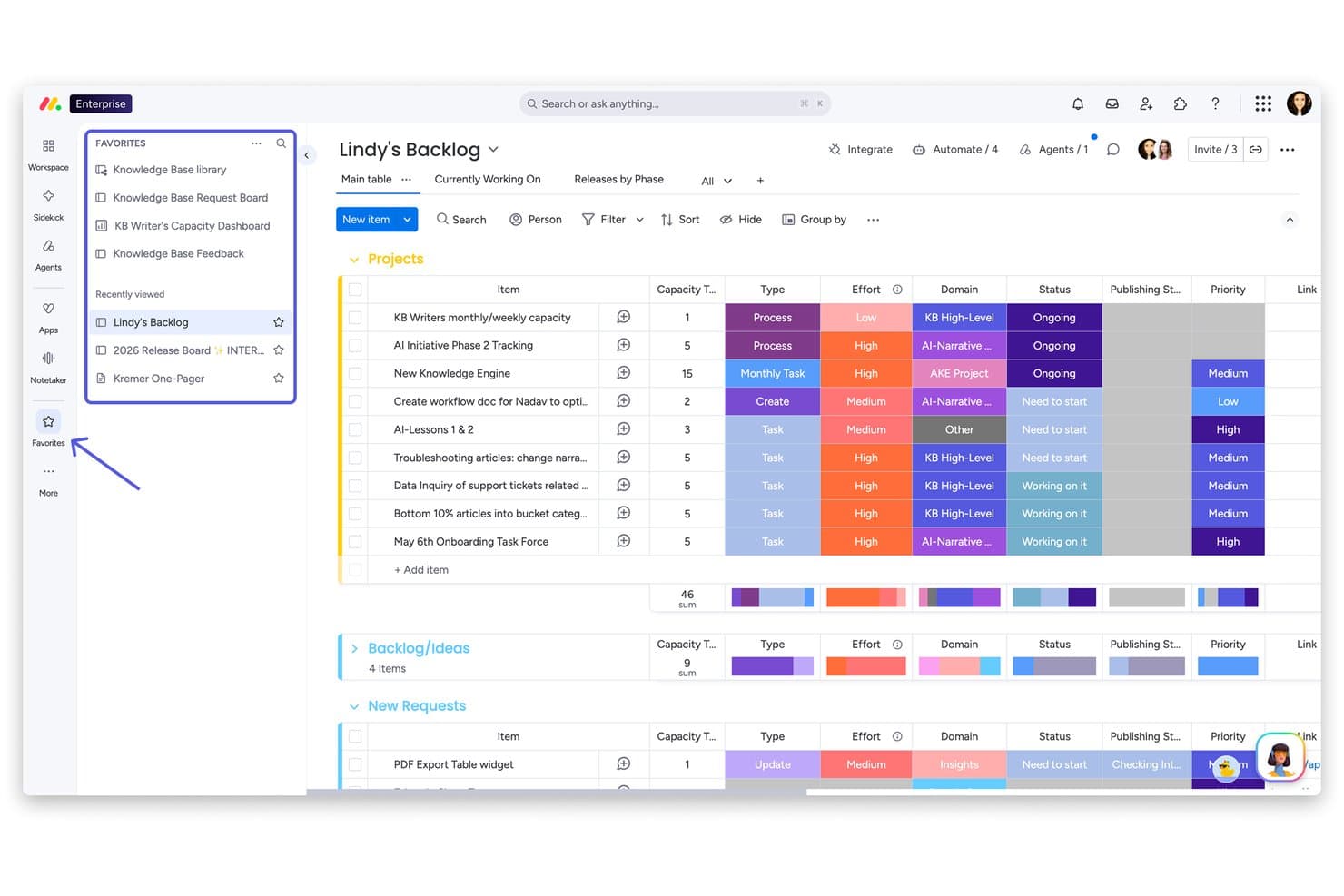
monday AI Workspace offers a project backlog board with grouped items, effort tracking, status columns, priority labels, and a favorites sidebar for quick navigation. monday AI Workspace is an AI-powered work management platform that combines project tracking, workflow automation, collaborative docs, and multi-view dashboards across boards built for cross-functional teams.
Who Is monday AI Workspace Best For?
It's a strong fit for SMB and mid-market finance teams that need to automate approvals, close workflows, and cross-functional reporting without relying on spreadsheets.
Why I Picked monday AI Workspace
monday AI Workspace earns its spot on my shortlist because of how its AI agents and AI workflow builder handle finance automation in ways Smartsheet simply doesn't match. I like that AI agents can autonomously route approval requests, update board statuses, and flag overdue close tasks without manual triggers. The AI workflow builder lets me set up conditional branching logic across multi-step processes, like cascading month-end sign-offs, without writing a single line of code.
monday AI Workspace Key Features
- Multi-view project dashboards: View projects in grid, Gantt, Kanban, timeline, and calendar modes for flexible finance project tracking.
- Granular permissions controls: Assign role-based, board-level permissions to manage who can view, edit, or approve sensitive financial data.
- Real-time collaborative docs: Create and update finance documentation and checklists directly inside the platform with live team collaboration.
- Native QuickBooks integration: Connect boards directly to QuickBooks to sync transactions and accounting data without third-party tools.
monday AI Workspace Integrations
monday AI Workspace offers native integrations with QuickBooks, Salesforce, HubSpot, Slack, Gmail, Google Drive, Microsoft Teams, OneDrive, Trello, Asana, and Zapier. An API is available for custom integrations.
Pros and Cons
Pros:
- Customizable approval chains for financial controls
- Multi-view boards for close and reporting cycles
- AI-powered workflow automation for finance processes
Cons:
- Audit logs unavailable on lowest plans
- Limited spreadsheet formula complexity vs Excel
Learn more about monday AI Workspace:
Other Smartsheet Alternatives
Here are some additional Smartsheet alternatives that didn’t make it onto my shortlist, but are still worth checking out:
- 11ClickUpBest for an all-in-one workspace
- 12WrikeBest for customizable workflows
- 13ProProfs ProjectBest for simple project management with time logging
- 14ScoroBest for all-in-one work management with built-in budgeting
Related Reviews
How I Evaluate Smartsheet Alternatives
I split my evaluation into baseline requirements—like grid views, workflow automation, and ERP integrations—and the differentiators that set one tool apart for finance teams.
Core Functionality (Table Stakes For This List)
When I'm selecting tools for my list, I rank each one on a scale from 0 (does not offer the functionality) to 5 (excels in this area) for each core functionality listed below. Then, I calculate the tool's total score into a percentage. Each tool needs to achieve a minimum total score of 65% to be considered for inclusion.
- Spreadsheet-Style Grid View: I look for a familiar grid interface with formulas, conditional formatting, and cross-sheet references so finance teams can transition from Excel.
- Workflow Automation: Automations for recurring tasks matter—think approval chains on budget requests, close-task reminders, or status updates triggered by due dates.
- Multi-View Project Tracking: I check for Gantt, Kanban, calendar, and dashboard views that let teams manage audit timelines or month-end close cycles their preferred way.
- Financial Data Integrations: Native connectors to platforms like QuickBooks, NetSuite, Xero, or Power BI show me a tool can fit into existing finance tech stacks.
- Reporting & Dashboards: I evaluate whether you can build custom dashboards with real-time roll-ups, variance tracking, and drill-downs instead of relying on static exports.
- Permissions & Audit Controls: Granular role-based access, cell-level locking, and version history are what I look for to confirm a tool can handle sensitive financial data.
Once I have a list of tools that meet this criteria, I consider what sets each platform apart.
Differentiating Factors (What Sets Vendors Apart)
Here's how I compare and contrast different vendors:
Standout Features
A strong formula engine makes a real difference. Tools with cross-sheet references and SUMIF logic let FP&A teams build rolling forecasts without exporting to Excel. I also evaluate approval workflows, since multi-tier sign-offs on journal entries or budget requests keep audit trails clean. AI-powered insights are increasingly worth considering too. Anomaly detection on spend data or auto-categorization of transactions can cut hours of manual review during close cycles.
Beyond Features
Compliance and security standards are where I start. Finance teams handling sensitive data need SOC 2 Type II certification and SOX-compliant audit trails at a minimum. Pricing structure matters too—I look for viewer/editor tier splits, since most finance workflows involve stakeholders who only need to review dashboards, not edit sheets. Scalability is another factor I weigh. A tool that handles a five-person accounting team's close checklist should also support multi-entity consolidation as the organization grows.
Why Look For a Smartsheet Alternative?
While Smartsheet is a good choice of Cloud-Based Work Management software, there are a number of reasons why some users seek out alternative solutions. You might be looking for a Smartsheet alternative because…
- You need more advanced automation or workflow tools
- Your team prefers chat-based or real-time collaboration features
- You want built-in project visualization beyond grid and Gantt views
- You require deeper integrations with industry-specific software
- You find Smartsheet’s pricing or user limits restrictive
- You need a solution with stronger mobile functionality
If any of these sound like you, you’ve come to the right place. My list contains several Cloud-Based Work Management software options that are better suited for teams facing these challenges with Smartsheet and looking for alternative solutions.
Smartsheet Key Features
Here are some of the key features of Smartsheet, to help you contrast and compare what alternative solutions offer:
- Grid, Gantt, card, and calendar project views
- Automated workflows and approval processes
- Resource management and allocation tools
- Real-time collaboration and commenting
- File attachments and document sharing
- Customizable dashboards and reporting
- Cell-level formulas and conditional formatting
- Integration with Microsoft, Google, and other business apps
- Activity logs and audit trails for compliance
- Role-based permissions and user access controls