

Software-ul pentru gestionarea bugetului este un atu valoros pentru orice companie. Cu software-ul potrivit, echipele pot îmbunătăți monitorizarea financiară și planificarea bugetului. Totuși, găsirea software-ului potrivit pentru gestionarea bugetului poate fi dificilă, mai ales când există atât de multe opțiuni disponibile.
Folosindu-mi experiența cu software-ul financiar și de contabilitate, am testat și comparat câteva dintre cele mai bune programe software disponibile pentru gestionarea bugetului. Apoi, mi-am compilat rezultatele în recenzii detaliate pentru a vă ajuta să găsiți cel mai bun software pentru nevoile dumneavoastră.
Why Trust Our Software Recommendations
6,700+
Reviews
20
Industry experts
16+
Evaluation factors
14
Years
Our team has been testing and reviewing software since 2012. As finance leaders ourselves, we know how difficult—and important—it is to choose the right software.
For this guide, we evaluated tools using hands-on testing and independent research, scoring tools using our selection criteria.
Our reviews reflect our human editorial judgment, not a sales pitch.
Tabel comparativ pentru software-ul de gestionare a bugetului
Acest tabel comparativ rezumă detaliile privind prețurile pentru selecțiile mele de top de software pentru gestionarea bugetului:
Sorted by: Default
| Tool | Starting Price | Website | |
|---|---|---|---|
Best for Excel integration for enterprises | 4.5 out of 5 | Pricing upon request Free demo available | Website |
Best for purchase-order budget control | 4.8 out of 5 | $499/month Free demo available | Website |
Best for freelancers | 4.4 out of 5 | $27/month 1-month free trial available | Website |
Best for automating workflows | 4.5 out of 5 | Pricing upon request Free demo available | Website |
Best for financial modeling | 4.4 out of 5 | Pricing upon request Not available | Website |
Best for mid-sized enterprises | 4.2 out of 5 | Pricing upon request Free trial available | Website |
Best for data visualization | 5.0 out of 5 | Pricing upon request Free demo available | Website |
Best for SaaS companies | Not rated | Pricing upon request Free demo available | Website |
Best for cloud-based reporting | Not rated | Pricing upon request Free demo available | Website |
Best for healthcare providers | Not rated | Pricing upon request Free demo available | Website |


Recenzii despre cel mai bun software pentru gestionarea bugetului
Mai jos sunt rezumatele mele detaliate despre cel mai bun software pentru gestionarea bugetului din lista mea scurtă. Recenziile mele oferă o analiză detaliată a principalelor caracteristici, avantajelor și dezavantajelor, integrărilor și cazurilor de utilizare ideale pentru fiecare instrument, pentru a vă ajuta să îl găsiți pe cel mai potrivit.
 1Best for Excel integration for enterprises
Vena
- Free demo available
- Pricing upon request
Visit WebsiteCustomer Rating:4.5/5
Vena enhances Excel with collaboration, data consolidation, and workflows. Vena is the preferred choice for businesses that rely heavily on spreadsheets. Its integration with Excel allows it to maintain a user’s familiarity with Excel while enhancing collaboration, data consolidation, and reporting.
Why I picked Vena: Its Excel integration allows your team to leverage existing spreadsheet models while gaining advanced budgeting features. Vena provides automation options that reduce manual tasks and improve accuracy. The software’s reporting capabilities are enhanced, making data visualization and analysis straightforward. Its adaptability to existing workflows makes it a practical choice for many businesses.
Standout features & integrations:
Features include Excel integration, automation options, and enhanced reporting capabilities. These features allow your team to reduce manual tasks and improve accuracy. The software provides straightforward data visualization and analysis.
Integrations include Microsoft Excel, Salesforce, NetSuite, QuickBooks, Sage Intacct, Workday, Dynamics 365, Oracle, SAP, and Google Sheets.
Pros and Cons
Pros:
- Multi-scenario planning options
- Customizable workflow automation
- Deep Excel integration
Cons:
- No built-in expense tracking
- Complex advanced customization
Learn more about Vena: Best for purchase-order budget control
- Free demo available
- From $499/month (billed annually)
Visit WebsiteCustomer Rating:4.8/5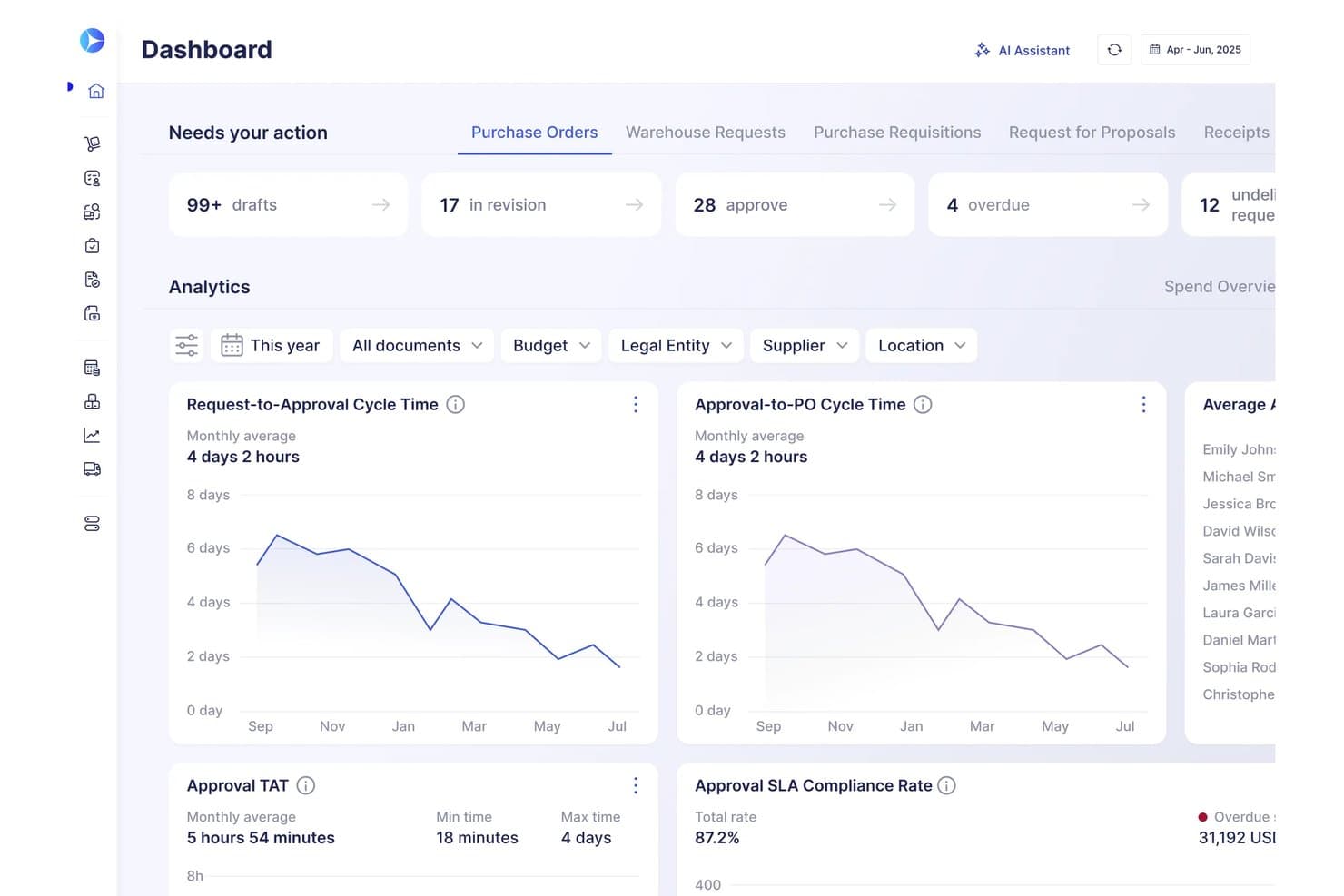
Precoro tracks purchase order approvals and cycle times in one dashboard. Precoro is a procurement and accounts payable platform that centralizes purchasing workflows, purchase-order management, invoice processing, expense tracking, and budget monitoring across departments, projects, and legal entities.
Who Is Precoro Best For?
Precoro fits mid-market finance and procurement teams that need real-time budget visibility tied directly to purchase orders, invoices, and approval workflows.
Why I Picked Precoro
Precoro earns its spot on my shortlist because of how tightly it connects budget visibility to the purchase-order workflow. I love that budget availability updates in real time as purchase orders are created and approved, so my team can see exactly how much is Reserved versus Available before a single invoice lands. The Budget vs. Actual report breaks spending down by period, department, project, and legal entity, which makes it easy to catch overruns at the source rather than after the fact.
Precoro Key Features
- Budget vs. Actual report: Compares planned, used, reserved, and available amounts by document and budget period, with monthly or quarterly breakdowns you can export or schedule.
- Multi-entity budget management: Organizes budgets across multiple legal entities, departments, and projects, with legal-entity filters available in predefined procurement and spend reports.
- Budget XLSX import: Lets you import and update budget data using a downloadable template, with selectable fields, periods, locations, and custom fields.
- Approval workflow automation: Routes purchase orders, invoices, expenses, and requisitions through configurable approval chains, with Slack and Microsoft Teams notifications built in.
Precoro Integrations
Precoro offers dozens of native integrations, including NetSuite, QuickBooks Online, Xero, Power BI, Slack, and Microsoft Teams, plus SFTP for file-based data exchange. An API is available for custom integrations.
Pros and Cons
Pros:
- Organizes budgets by department and entity
- Compares planned, used, and available spend
- Tracks reserved and available PO budgets
Cons:
- Budget alerts lack documented configurable thresholds
- No documented forecasting or projections
Learn more about Precoro: 3Best for freelancers
Xero
- 1-month free trial available
- From $27/month
Visit WebsiteCustomer Rating:4.4/5
Xero simplifies invoicing, expense tracking, and cash flow for freelancers. Xero simplifies budgeting, invoicing, expense tracking, and cash flow management. It provides real-time financial data and automated bank feeds, making it an ideal and user-friendly tool for freelancers and small businesses.
Why I picked Xero: It’s tailored for freelancers, offering features like invoicing and expense tracking that are essential for managing individual finances. Xero tracks your cash flow in real-time, helping you make informed financial decisions. Its user-friendly interface makes navigation easy for those without accounting experience. The software's automated bank feeds ensure your financial data is always up to date.
Standout features & integrations:
Features include invoicing, expense tracking, and real-time cash flow management. These features help your team manage individual finances. Xero’s automated bank feeds keep your financial data current.
Integrations include PayPal, Stripe, Shopify, Square, HubSpot, Mailchimp, Gusto, Bill.com, Expensify, and Vend.
Pros and Cons
Pros:
- Real-time cash flow tracking
- Multi-currency budgeting
- Automated bank feeds
Cons:
- No detailed budget breakdowns
- Limited forecasting tools
Learn more about Xero: Best for automating workflows
- Free demo available
- Pricing upon request
Visit WebsiteCustomer Rating:4.5/5
Prophix automates financial tasks, streamlining budgeting and increasing efficiency. Prophix is known for its automation features, allowing businesses to streamline their budgeting and reporting processes. It automates routine financial tasks like data entry, report generation, and variance analysis, reducing manual errors and promoting efficiency.
Why I picked Prophix: Prophix’ workflow automation ensures that everyone stays on the same page, making approvals and reviews faster and more efficient. You can create multi-scenario budgets and customize dashboards for a clear view of financial data. With Prophix’s built-in variance analysis, you’ll see where your budget stands compared to actual performance.
Standout features & integrations:
Features include workflow automation, customizable dashboards, and scenario planning capabilities. These features help your team save time and reduce errors. Prophix provides a clear view of financial data for better decision-making.
Integrations include Microsoft Dynamics 365, SAP, Oracle, QuickBooks, NetSuite, Salesforce, Sage Intacct, Workday, Xero, and Google Sheets.
Pros and Cons
Pros:
- Automated financial reporting
- Supports top-down planning
- Multi-level approvals
Cons:
- Complex budget adjustments
- Requires a learning curve
Learn more about Prophix:

Jedox provides complex financial modeling, forecasting, and scenario planning. Jedox offers advanced modeling capabilities, allowing users to create complex financial models for long-term strategic planning and day-to-day operations. It easily handles sophisticated models, forecasting, and scenario planning for companies.
Why I picked Jedox: Jedox offers a financial modeling system that allows you to build customized models tailored to your needs. With its built-in planning and forecasting functions, you can simplify the entire budgeting process. The tool's multidimensional database supports detailed data analysis, while its cloud capabilities enable real-time collaboration, making financial data management faster and more efficient for your team.
Standout features & integrations:
Features include financial modeling, a unified platform, and flexible planning capabilities. These features enable your team to create and analyze complex financial scenarios. Jedox supports a wide range of financial processes for strategic optimization.
Integrations include SAP, Oracle, Microsoft Dynamics 365, Salesforce, NetSuite, QuickBooks, Xero, Workday, Google Sheets, and Sage Intacct.
Pros and Cons
Pros:
- Strategic financial optimization
- Flexible planning tools
- Supports complex scenarios
Cons:
- Less intuitive reporting dashboard
- Limited audit trail features
Learn more about Jedox: Best for mid-sized enterprises
- Free trial available
- Pricing upon request
Visit WebsiteCustomer Rating:4.2/5
Planful simplifies financial planning, automates processes, and enhances collaboration. Planful is a financial planning and analysis platform that simplifies budgeting, forecasting, and reporting for mid-sized enterprises. It provides real-time insights, automates routine financial processes, and fosters department collaboration.
Why I picked Planful: Planful’s intuitive interface offers planning and scenario analysis for budgeting and forecasting. Its reporting tools let you create customized reports for insights into financial data. The platform also supports multi-year forecasting to help you plan as your business grows and collaborate tools for teams to communicate more effectively.
Standout features & integrations:
Features include dynamic planning, scenario analysis, and flexible reporting options. These features help your team efficiently manage budgeting and forecasting. The intuitive interface makes financial planning accessible to everyone.
Integrations include NetSuite, QuickBooks, Salesforce, SAP, Oracle, Microsoft Dynamics 365, Workday, Xero, Sage Intacct, and Google Sheets.
Pros and Cons
Pros:
- Built-in variance analysis
- Real-time financial visibility
- Supports multi-year forecasting
Cons:
- No cash flow forecasting
- Slow with large data sets
Learn more about Planful:

insightsoftware delivers real-time dashboards and reports that simplify data with ERP integration. insightsoftware features data visualization capabilities and integrates with ERP systems, suitable for organizations seeking actionable financial insights. It offers real-time dashboards, charts, and reports that simplify complex data.
Why I picked Insightsoftware: insightsoftware provides powerful data visualization tools that allow you to create detailed financial reports and dashboards. It offers real-time reporting, giving your team up-to-date insights. Its user-friendly interface and Excel-based functionality make complex financial data easy to interpret, improving accuracy and speeding up decision-making.
Standout features & integrations:
Features include data visualization, customizable dashboards, and real-time reporting tools. These features enable your team to transform financial data into clear visuals. insightsoftware helps teams get real-time insights for quick decision-making.
Integrations include Microsoft Dynamics 365, SAP, Oracle, NetSuite, QuickBooks, Salesforce, Sage Intacct, Xero, Workday, and Google Sheets.
Pros and Cons
Pros:
- Support multi-year planning
- Automated variance tracking
- Real-time financial insights
Cons:
- Restrictive user permissions
- Limited automation features
Learn more about insightsoftware:

Mosaic Planning provides SaaS companies with tools for budgeting and real-time insights. Mosaic Planning offers a strategic finance platform for SaaS companies. It provides budgeting, forecasting, and financial planning tools and integrates with SaaS-specific metrics like ARR and churn, offering insights to help companies improve financial performance.
Why I picked Mosaic Planning: Mosaic Planning’s tools allow you to track key SaaS metrics like ARR and churn, ensuring you get detailed, real-time insights specific to your business model. It manages complex financial models and forecasts and is focused on SaaS KPIs to help your team stay aligned with your financial goals while optimizing performance. Mosaic Planning also makes it easy to run different scenarios, helping you plan for the future in a rapidly changing market.
Standout features & integrations:
Features include revenue modeling, KPI tracking, and real-time analytics. These allow your team to make data-driven financial decisions, and dashboards provide a clear view of your financial performance metrics.
Integrations include NetSuite, QuickBooks, Salesforce, Xero, Stripe, Slack, Google Sheets, Microsoft Excel, Oracle, and Workday.
Pros and Cons
Pros:
- Scenario planning
- Real-time budget adjustments
- SaaS-specific metrics tracking
Cons:
- Limited data exportation options
- Limited non-SaaS use cases
Learn more about Mosaic Planning:

Solver offers real-time financial insights with cloud-based reporting and ERP integration. Solver is a cloud-based budgeting and reporting platform that provides real-time financial insights, planning, forecasting, and data analysis tools. It integrates with various ERP systems, allowing users to create detailed reports and dashboards.
Why I picked Solver: Solver’s cloud-based nature ensures instant access to financial reports and easier collaboration across departments. It offers a flexible way to consolidate data from various sources and simplifies budget planning through dynamic templates. Solver provides detailed insights with automated reporting functioning, making it well-suited for managing complex financial data in the cloud.
Standout features & integrations:
Features include cloud-based reporting, flexible report creation, and data visualization tools. These give your team real-time access to financial data, and Solver's intuitive dashboards make complex data easy to understand.
Integrations include Microsoft Dynamics 365, SAP, Oracle, QuickBooks, NetSuite, Salesforce, Sage Intacct, Xero, Workday, and Google Sheets.
Pros and Cons
Pros:
- Automated budget forecasts
- Pre-built financial templates
- Real-time data access
Cons:
- Time-consuming approvals process
- Limited custom budget views
Learn more about Solver:

Syntellis provides real-time insights and automates finance for healthcare providers. Syntellis offers specialized financial planning and analysis tools for healthcare providers. It integrates with existing healthcare systems to provide real-time insights, automate processes, ensure compliance with regulatory requirements, and handle healthcare finance.
Why I picked Syntellis: Syntellis simplifies healthcare-specific budgeting with features like rolling forecasts and long-range financial planning. It offers detailed encounter data for budget modeling and integrates financial results with healthcare operations. The software also supports health plan budgeting for managing the organization’s provider and payer.
Standout features & integrations:
Features include detailed budgeting, regulatory compliance support, and real-time analytics tools. These features help your team make informed decisions and ensure compliance. Syntellis focuses on meeting the unique demands of healthcare providers.
Integrations include Epic, Cerner, Meditech, Allscripts, McKesson, Oracle, SAP, Microsoft Dynamics 365, Workday, and QuickBooks.
Pros and Cons
Pros:
- Integrated clinic-financial data
- Real-time operational insights
- Long-range financial planning
Cons:
- Limited audit trail features
- Complex multi-entity budgeting
Learn more about Syntellis:
Alte software-uri pentru gestionarea bugetului
Iată câteva opțiuni suplimentare de software pentru gestionarea bugetului care nu au ajuns în lista mea scurtă, dar merită totuși luate în considerare:
- 11KepionBest for integrated planning
- 12BudgetPakBest for higher education budgeting
- 13CentageBest for small businesses
- 14Workday Adaptive PlanningBest for dynamic forecasting
- 15Sage IntacctBest for scalable cloud solutions
- 16AnaplanBest for connected planning
- 17IBM Planning AnalyticsBest for AI-driven insights
- 18NetSuiteBest for large enterprise needs
How I Evaluate Budget Management Software
I split my evaluation into two layers: the baseline functionality a tool must cover—like ERP sync, variance reporting, and approval workflows—and the differentiators that separate one vendor from another.
Core Functionality (Table Stakes For This List)
When I'm selecting tools for my list, I rank each one on a scale from 0 (does not offer the functionality) to 5 (excels in this area) for each core functionality listed below. I then calculate the tool's total score into a percentage, using 75% as a benchmark to help assess its overall fit for the list.
- Budget Creation & Templates: I look for multi-dimensional budget structures that support departments, cost centers, and GL lines with reusable templates and driver-based models.
- Actuals vs. Budget Reporting: Real-time variance analysis with drill-down capability matters here, especially how well a tool syncs actuals from your GL without manual CSV wrangling.
- Forecasting & Scenario Modeling: I evaluate whether you can run multiple what-if scenarios side by side, like modeling a hiring freeze against a planned expansion in the same forecast cycle.
- Collaborative Workflows & Approvals: Multi-step approval routing with role-based permissions is what I check for, since budget cycles typically involve dozens of contributors across departments.
- Financial Data Integrations: Native connectors to major ERPs and GLs like QuickBooks, NetSuite, Xero, and Sage are baseline, along with open API access and bi-directional sync.
- Reporting & Dashboards: I evaluate whether dashboards are interactive and configurable, with the ability to build board-ready P&L, balance sheet, and cash flow views without exporting to another tool.
Once I have a list of tools that meet the criteria, I consider what sets each platform apart.
Differentiating Factors (What Sets Vendors Apart)
Here's how I compare and contrast different vendors:
Standout Features
Driver-based modeling is the first thing I check because it determines whether your forecast actually responds to business changes. I want budget lines tied to operational drivers like headcount or units sold, so updating one assumption cascades across the entire model. Workforce planning deserves its own look since payroll is typically the largest line item. I evaluate whether a tool can model salaries, benefits, and hiring timelines directly within the operating budget rather than requiring a separate spreadsheet. I also look for a native Excel add-in, since most FP&A analysts still build in spreadsheets and need bi-directional sync with the central database.
Beyond Features
I look at how deeply a tool connects to your existing GL, because a native NetSuite or Sage Intacct connector with automated chart of accounts mapping is a different experience from a generic CSV import that adds hours of reconciliation each month. Implementation timelines matter just as much—if your fiscal year starts in January and you're evaluating tools in October, a platform that requires a six-month deployment with a certified partner won't get you there. I also check how contributor seats are priced, since budget owners outside finance often need limited access and shouldn't cost the same as a full FP&A license.
Cum să alegeți software-ul pentru gestionarea bugetului
Este ușor să vă pierdeți în liste lungi de caracteristici și structuri complexe de prețuri. Iată o listă de verificare a factorilor de care trebuie să țineți cont, pentru a vă ajuta să rămâneți concentrați în timp ce parcurgeți procesul unic de selectare a software-ului pentru bugetare.
| Factor | Ce trebuie luat în considerare |
| Scalabilitate | Va crește software-ul odată cu afacerea dumneavoastră? |
| Integrări | Se conectează la instrumentele pe care le utilizați deja? |
| Personalizare | Poate fi adaptat pentru a răspunde nevoilor echipei dumneavoastră? |
| Ușurință în utilizare | Este software-ul ușor de utilizat pentru echipa dumneavoastră? |
| Buget | Se aliniază costul cu planul dumneavoastră financiar? |
| Măsuri de securitate | Sunt satisfăcute nevoile dumneavoastră de protecție a datelor? |
| Funcții de raportare | Oferă instrumentele de raportare de care aveți nevoie? |
| Asistență pentru clienți | Cât de promptă și utilă este echipa lor de asistență? |
Tendințe în software-ul pentru gestionarea bugetului
În cercetarea mea, am colectat nenumărate actualizări de produse, comunicate de presă și jurnale de lansări de la diferiți furnizori de software pentru gestionarea bugetului. Iată câteva dintre tendințele emergente pe care le urmăresc.
- Analize bazate pe inteligență artificială: Tot mai multe instrumente integrează inteligența artificială pentru a îmbunătăți analiza datelor, oferind informații care ajută companiile să ia decizii informate. Această tendință le permite utilizatorilor să identifice tipare și să anticipeze mai eficient rezultatele financiare viitoare.
- Bugetare colaborativă: Furnizorii se concentrează pe funcții care permit echipelor să lucreze împreună în timp real. Această tendință face gestionarea bugetului mai dinamică, permițând oferirea imediată de feedback și efectuarea de ajustări.
- Raportare personalizabilă: Utilizatorii se așteaptă acum să poată adapta rapoartele la nevoile unice ale afacerii lor. Această tendință se dezvoltă pe măsură ce companiile solicită un control mai mare asupra modului în care vizualizează și analizează datele financiare, multe instrumente oferind generatoare de rapoarte cu funcție de glisare și plasare.
- Modelarea scenariilor: Tot mai mulți furnizori oferă funcții pentru simularea diferitelor scenarii financiare. Această tendință este valoroasă deoarece ajută companiile să se pregătească pentru diverse rezultate, testând ipoteze și evaluând riscurile și oportunitățile potențiale.
- Monitorizarea sustenabilității: Există o cerere tot mai mare pentru funcții care urmăresc impactul asupra mediului și indicatorii de sustenabilitate în cadrul instrumentelor de gestionare a bugetului.
Această tendință reflectă o conștientizare și o responsabilitate tot mai mari față de practicile de afaceri sustenabile.
Ce este software-ul pentru gestionarea bugetului?
Software-ul pentru gestionarea bugetului este un instrument pentru planificarea, monitorizarea și gestionarea resurselor financiare din cadrul unei companii. Profesioniștii din domeniul financiar, contabilii și managerii de afaceri îl folosesc pentru a îmbunătăți supravegherea și controlul financiar.
Crearea bugetului, prognoza, urmărirea cheltuielilor și capacitățile de raportare contribuie la o planificare financiară, colaborare și luare a deciziilor precise. Aceste instrumente oferă companiilor o vizibilitate și un control financiar mai bune.
Funcționalități
Iată funcționalitățile de bază pe care ar trebui să le aibă orice software excelent de gestionare a bugetului:
- Crearea bugetului: Permite utilizatorilor să configureze bugete detaliate pentru a controla eficient resursele financiare.
- Prognoza financiară: Ajută la anticiparea rezultatelor financiare viitoare pe baza datelor istorice și a tendințelor.
- Urmărirea cheltuielilor: Monitorizează cheltuielile, precum datoriile către furnizori, pentru a se asigura că acestea corespund bugetului și obiectivelor financiare.
- Raportare și analiză: Oferă informații prin rapoarte vizuale și analiza datelor pentru a sprijini luarea deciziilor.
- Modelarea scenariilor: Simulează diferite scenarii financiare pentru a vă pregăti pentru riscuri și oportunități potențiale. Acest lucru este foarte benefic atunci când gestionați portofolii.
- Instrumente de colaborare: Permite membrilor echipei să lucreze la bugete în timp real, îmbunătățind comunicarea.
- Tablouri de bord personalizabile: Permite utilizatorilor să își adapteze modul de vizualizare a datelor financiare pentru a răspunde nevoilor specifice ale companiei.
- Analiză bazată pe inteligență artificială: Utilizează inteligența artificială pentru a identifica tipare și a genera informații utile.
- Urmărirea sustenabilității: Măsoară și urmărește impactul asupra mediului și indicatorii de sustenabilitate în cadrul bugetelor.
- Asistență pentru conformitatea cu reglementările: Se asigură că procesele financiare respectă standardele și reglementările din industrie.
Beneficii
Implementarea unui software de gestionare a bugetului oferă mai multe beneficii pentru echipa și compania dumneavoastră. Iată câteva dintre acestea.
- Precizie îmbunătățită: Prognoza financiară și urmărirea cheltuielilor operaționale și a cheltuielilor de capital reduc erorile din planificarea financiară.
- Luarea unor decizii mai bune: Raportarea și analiza oferă informații care contribuie la orientarea alegerilor strategice în ceea ce privește gestionarea veniturilor.
- Colaborare îmbunătățită: Instrumentele de colaborare în timp real permit membrilor echipei să lucreze eficient la bugete.
- Flexibilitate în planificare: Modelarea scenariilor vă permite să vă adaptați la diferite situații financiare pe măsură ce apar.
- Eficiență crescută: Procesele automatizate economisesc timp și reduc volumul de muncă manuală al echipei.
- Accent pe sustenabilitate: Urmărirea indicatorilor de sustenabilitate ajută la alinierea obiectivelor financiare cu responsabilitatea față de mediu.
- Conformitatea cu reglementările: Asistența pentru conformitate asigură respectarea standardelor din industrie de către procesele financiare.
Costuri și prețuri
Alegerea unui software de gestionare a bugetului necesită înțelegerea diferitelor modele și planuri de preț disponibile. Costurile variază în funcție de funcționalități, dimensiunea echipei, suplimente și alți factori. Tabelul de mai jos prezintă pe scurt planurile comune, prețurile medii ale acestora și funcționalitățile incluse de obicei în soluțiile software de gestionare a bugetului:
Tabel comparativ al planurilor pentru software-ul de gestionare a bugetului
| Tipul planului | Preț mediu | Funcționalități comune |
| Plan gratuit | $0/utilizator/lună | Bugetare de bază, urmărirea cheltuielilor și raportare limitată. |
| Plan personal | $5-$25/utilizator/lună | Prognoză financiară, urmărirea cheltuielilor, tablouri de bord personalizate și raportare de bază. |
| Plan pentru companii | $25-$50/utilizator/lună | Raportare avansată, instrumente de colaborare, modelarea scenariilor și integrarea datelor. |
| Plan pentru întreprinderi | $50-$100/utilizator/lună | Funcționalități personalizabile, analiză bazată pe inteligență artificială, conformitatea cu reglementările și asistență completă. |
Prezentare detaliată a tipurilor de planuri pentru software-ul de gestionare a bugetului, precum și a costurilor și funcționalităților acestora.
Întrebări frecvente
Iată câteva răspunsuri la întrebările frecvente despre software-ul de gestionare a bugetului.
Cum ajută software-ul de gestionare a bugetului la controlul costurilor proiectului?
Software-ul de gestionare a bugetului vă oferă informații în timp real despre cheltuielile proiectului. Puteți urmări cheltuielile pe măsură ce apar și le puteți compara cu bugetul, ceea ce facilitează identificarea depășirilor de costuri. Astfel, dumneavoastră și echipa dumneavoastră puteți lua rapid decizii pentru a menține costurile sub control.
Se poate integra software-ul de gestionare a bugetului cu instrumentele de contabilitate?
Da, majoritatea programelor software de gestionare a bugetului se pot integra cu instrumente de contabilitate populare. Aceste integrări permit partajarea fluentă a datelor, reducând introducerea manuală și menținând sincronizate evidențele financiare. Astfel, echipa dumneavoastră poate economisi timp și poate preveni erorile din rapoartele financiare.
Este software-ul de gestionare a bugetului util pentru întreprinderile mici?
Absolut. Software-ul de gestionare a bugetului nu este destinat doar companiilor mari; este util și pentru întreprinderile mici. Vă ajută să urmăriți cheltuielile, să gestionați fluxul de numerar și să vă mențineți în limita bugetului, aspecte esențiale pentru întreprinderile mici care doresc să se dezvolte fără cheltuieli excesive.
Cât de personalizabile sunt funcțiile de raportare din software-ul de gestionare a bugetului?
Multe instrumente de gestionare a bugetului oferă opțiuni de raportare personalizabile. Puteți adapta rapoartele pentru a afișa datele specifice de care aveți nevoie, fie că sunt organizate după proiect, departament sau perioadă. Această flexibilitate ajută echipa să se concentreze asupra indicatorilor care contează cel mai mult pentru obiectivele dumneavoastră financiare.
Pot mai mulți utilizatori să acceseze același buget în software-ul de gestionare a bugetului?
Da, majoritatea programelor software de gestionare a bugetului acceptă mai mulți utilizatori. Astfel, diferiți membri ai echipei pot accesa și actualiza bugetul, ceea ce facilitează colaborarea. De asemenea, puteți stabili permisiuni pentru a controla cine poate face modificări sau vizualiza informații sensibile.
Care este, de obicei, curba de învățare pentru software-ul de gestionare a bugetului?
Curba de învățare depinde de complexitatea software-ului ales, însă multe instrumente sunt concepute pentru a fi ușor de utilizat. Majoritatea oferă tutoriale sau asistență pentru clienți pentru a vă ajuta să începeți. Cu puțin timp și exercițiu, echipa dumneavoastră ar trebui să poată utiliza software-ul în mod eficient.