

Jedox Review: Pros, Cons, Features, and Pricing
I tested Jedox’s financial forecasting features and found its user-friendly interface and easy integration options to be a standout choice for your team.

We review tools independently, and commissions help fund our testing. See our transparency policy, our methodology, or suggest a tool.
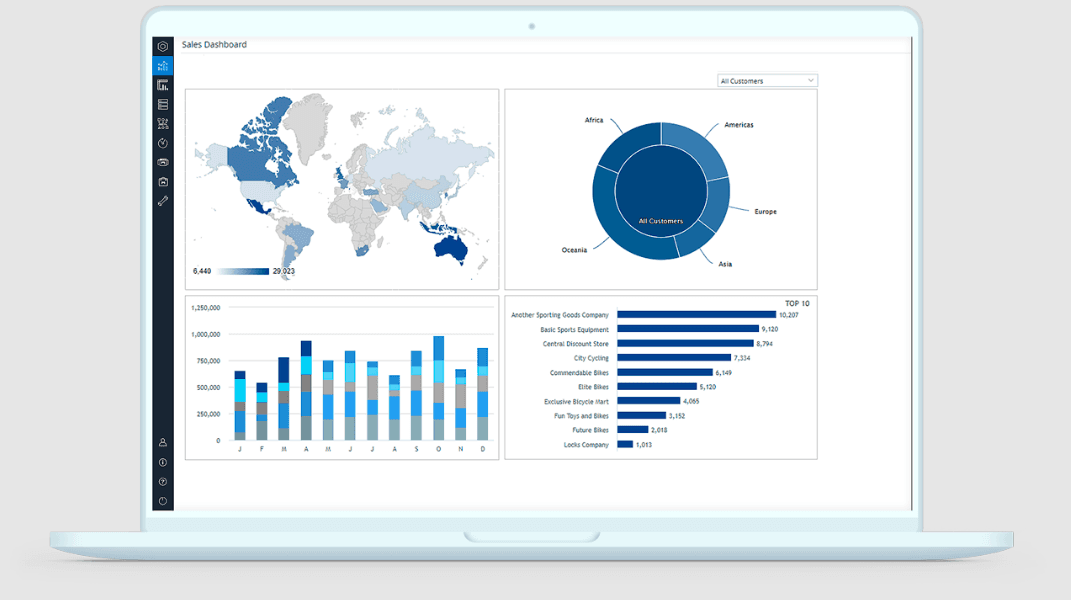
Jedox is a forecasting software built for finance teams that need to plan, budget, and forecast across multiple business units from a single platform. I'd mainly consider it if your team is outgrowing spreadsheets but wants to avoid the steep implementation curve that comes with something like Anaplan—Jedox gives you a familiar, Excel-like environment paired with the collaboration, workflow automation, and model management that spreadsheets simply can't support at scale.
Jedox Evaluation Summary
4.4/5
- Pricing upon request
- Free demo available
Why Trust Our Software Recommendations
6,700+
Reviews
20
Industry experts
16+
Evaluation factors
14
Years
Our team has been testing and reviewing software since 2012. As finance leaders ourselves, we know how difficult—and important—it is to choose the right software.
For this guide, we evaluated tools using hands-on testing and independent research, scoring tools using our selection criteria.
Our reviews reflect our human editorial judgment, not a sales pitch.
Jedox Overview
In my opinion, Jedox is a solid choice for financial forecasting and budgeting, especially for large enterprises and complex financial environments. It excels with its data integration capabilities and user-friendly interface, making it ideal for financial institutions that need robust business intelligence and data management. While its onboarding process could be smoother, the support and training resources are commendable.
Jedox’s pricing is competitive, offering good value for the functionality provided. Compared to other providers, it stands out in handling large data sets efficiently with powerful performance management tools. However, it might not be the best fit for small businesses due to its complexity and cost. If your team values integration with existing ERP systems, strong financial reporting, and comprehensive data analysis, Jedox is worth considering.
Pros
- It offers powerful data analysis tools for your team’s forecasting and financial planning needs.
- The intuitive interface and ease of use make it simple for your team to navigate and work with Excel integration and dashboards effectively.
- It provides excellent customization options to fit your specific business requirements and workflows, supporting a scalable EPM ecosystem.
Cons
- The learning curve can be steep for your team when adapting to advanced EPM and automation features.
- Some user reviews find the initial setup to be time-consuming due to connecting multiple data sources and connectors.
- Advanced features might overwhelm smaller teams that don’t require extensive consolidation or visualization capabilities.
Is Jedox Right For Your Needs?
Who Would be a Good Fit for Jedox?
Jedox is a great fit for large enterprises needing complex financial forecasting and budgeting tools. If your team works in industries like manufacturing or retail, you’ll appreciate its strong data integration and analysis capabilities. Jedox’s customizable dashboards help your finance teams tailor reports to specific needs, making data-driven decisions easier. Its powerful analytics tools are ideal for departments that handle large data sets and require detailed insights through real-time financial reporting and business intelligence visualization.
- Large EnterprisesJedox handles complex data and provides detailed insights, making it ideal for large organizations with extensive financial reporting and performance management needs within an enterprise environment.
- Manufacturing IndustryIf you manage complex supply chains, Jedox’s data integration and automation capabilities help streamline your financial planning process.
- Retail CompaniesYour team can use Jedox to analyze sales data and forecast trends, aiding in inventory and financial management through intuitive dashboards and visualization tools.
- Finance TeamsJedox offers comprehensive tools for budgeting and planning, perfect for finance departments needing precise financial forecasts and workflows that connect across ERP systems.
- Data AnalystsJedox helps you with in-depth data analysis, providing insights needed for strategic business decisions and integrating seamlessly with BI tools.
- IT DepartmentsYour IT team can leverage Jedox’s integration capabilities to connect various data sources, simplifying data management and ensuring consistent real-time access to information through built-in connectors and APIs.
Who Would be a Bad Fit for Jedox?
Jedox might not be suitable for small businesses or startups due to its complexity and cost. If your team cannot manage a steep learning curve, you will likely struggle with Jedox’s setup and automation. It’s not the best choice for teams needing simple, quick solutions, as its powerful functionality and dashboards could overwhelm smaller operations. For those who don’t require extensive data analysis, financial consolidation, or business intelligence features, Jedox’s capabilities may be more than you need.
- Small BusinessesJedox’s complexity and cost might be too much for small operations with limited resources or minimal financial reporting requirements.
- StartupsIf your startup needs quick and simple solutions, Jedox’s advanced performance management features could be too much for your team.
- FreelancersAs a freelancer, you might find Jedox’s extensive capabilities unnecessary for your individual projects or Excel-based forecasting needs.
- Simple ForecastingFor basic forecasting tasks, Jedox offers more functionality than is needed, complicating your work.
- Limited IT SupportWithout strong IT support, your team could struggle with Jedox’s setup, data integration, and workflows.
- Non-Technical TeamsIf your team lacks technical expertise, Jedox’s advanced features might pose a challenge to use effectively, even though the platform offers several tutorials and an intuitive, user friendly interface with strong ease of use.
How We Test & Score Tools
We’ve spent years building, refining, and improving our software testing and scoring system. The rubric is designed to capture the nuances of software selection and what makes a tool effective, focusing on critical aspects of the decision-making process.
Below, you can see exactly how our testing and scoring works across seven criteria. It allows us to provide an unbiased evaluation of the software based on core functionality, standout features, ease of use, onboarding, customer support, integrations, customer reviews, and value for money.
Core Functionality (25% of final scoring)
The starting point of our evaluation is always the core functionality of the tool. Does it have the basic features and functions that a user would expect to see? Are any of those core features locked to higher-tiered pricing plans? At its core, we expect a tool to stand up against the baseline capabilities of its competitors.
Standout Features (25% of final scoring)
Next, we evaluate uncommon standout features that go above and beyond the core functionality typically found in tools of its kind. A high score reflects specialized or unique features that make the product faster, more efficient, or offer additional value to the user.
We also evaluate how easy it is to integrate with other tools typically found in the tech stack to expand the functionality and utility of the software. Tools offering plentiful native integrations, 3rd party connections, and API access to build custom integrations score best.
Ease of Use (10% of final scoring)
We consider how quick and easy it is to execute the tasks defined in the core functionality using the tool. High scoring software is well designed, intuitive to use, offers mobile apps, provides templates, and makes relatively complex tasks seem simple.
Onboarding (10% of final scoring)
We know how important rapid team adoption is for a new platform, so we evaluate how easy it is to learn and use a tool with minimal training. We evaluate how quickly a team member can get set up and start using the tool with no experience. High scoring solutions indicate little or no support is required.
Customer Support (10% of final scoring)
We review how quick and easy it is to get unstuck and find help by phone, live chat, or knowledge base. Tools and companies that provide real-time support score best, while chatbots score worst.
Customer Reviews (10% of final scoring)
Beyond our own testing and evaluation, we consider the net promoter score from current and past customers. We review their likelihood, given the option, to choose the tool again for the core functionality. A high scoring software reflects a high net promoter score from current or past customers.
Value for Money (10% of final scoring)
Lastly, in consideration of all the other criteria, we review the average price of entry level plans against the core features and consider the value of the other evaluation criteria. Software that delivers more, for less, will score higher.
Core Features
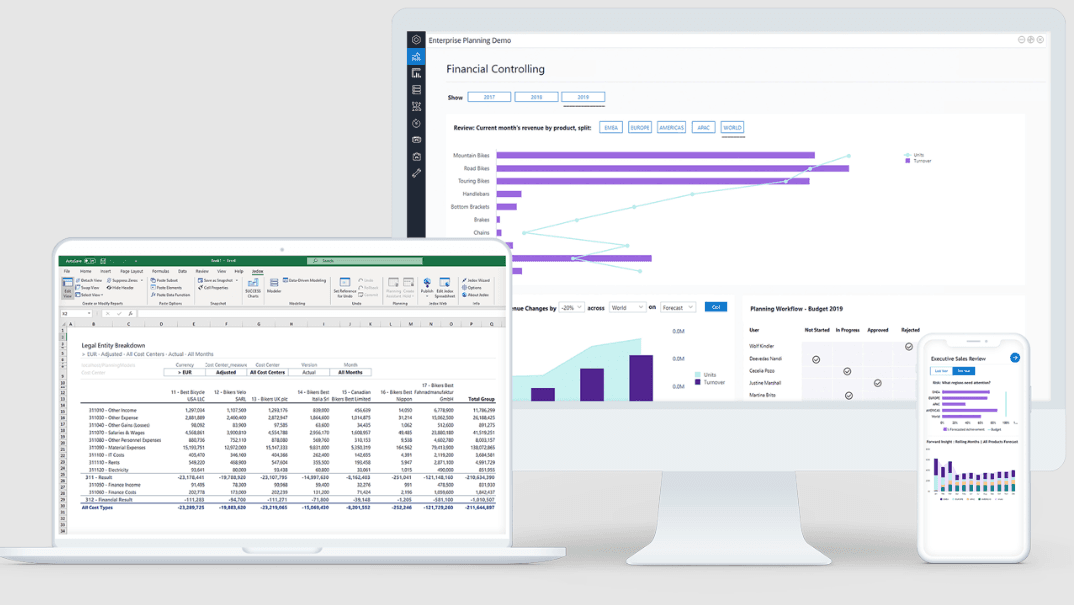
Budgeting and Planning: Jedox lets your team create detailed budgets and plans with ease, using customizable templates and Excel integration. This feature helps you align financial goals with strategic business objectives and improve financial reporting accuracy.
Data Visualization: With Jedox, you can turn complex data into easy-to-understand charts, graphs, and dashboards. This makes it simple for your team to spot trends and make informed decisions through visualization and business intelligence tools.
Scenario Analysis: Jedox allows you to run various financial scenarios to see potential outcomes in real-time. This feature helps your team prepare for different market conditions, enhancing performance management and financial planning.
Collaboration Tools: Jedox enables your team to collaborate in real-time, improving communication and decision-making. You can easily share data and gather input from different departments, ensuring connected workflows.
Automated Reporting: Jedox streamlines financial reporting by automating data collection and report generation. Your team saves time and reduces errors with this efficient automation, delivering accurate insights from consolidated data sources.
User-Friendly Interface: Jedox’s intuitive interface is easy for your team to navigate, minimizing learning time and maximizing productivity. The platform’s ease of use supports all end users, making financial forecasting and budgeting simpler across departments.
Ease of Use
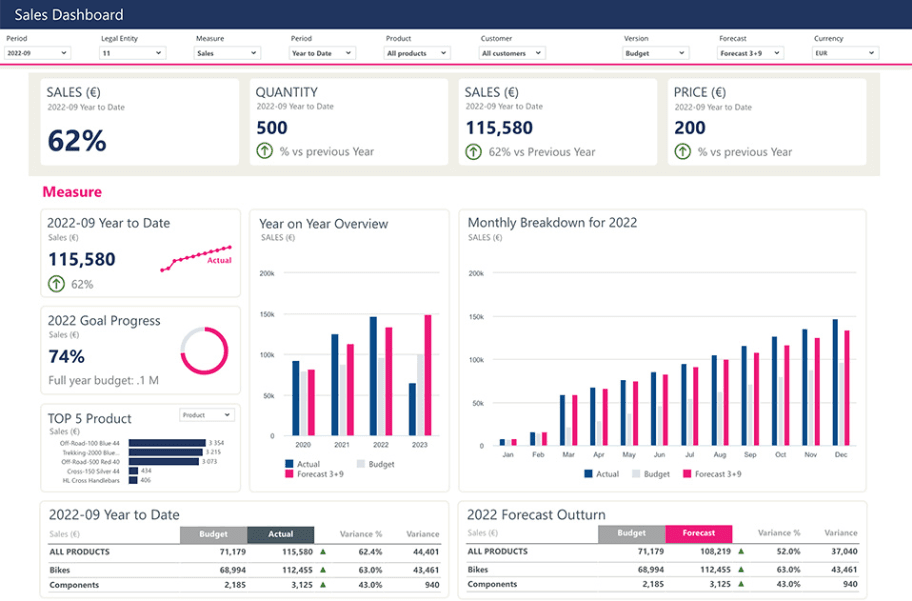
Jedox offers a user-friendly interface that makes it accessible for your team, even if they’re new to financial forecasting or financial planning. Its intuitive design helps you navigate features without feeling overloaded. While there is an adaptation period, the customizable dashboards and real-time collaboration tools simplify your work. Compared to other platforms, Jedox excels in its ability to tailor functionalities to your specific needs, enhancing overall usability and user experience.
Integrations
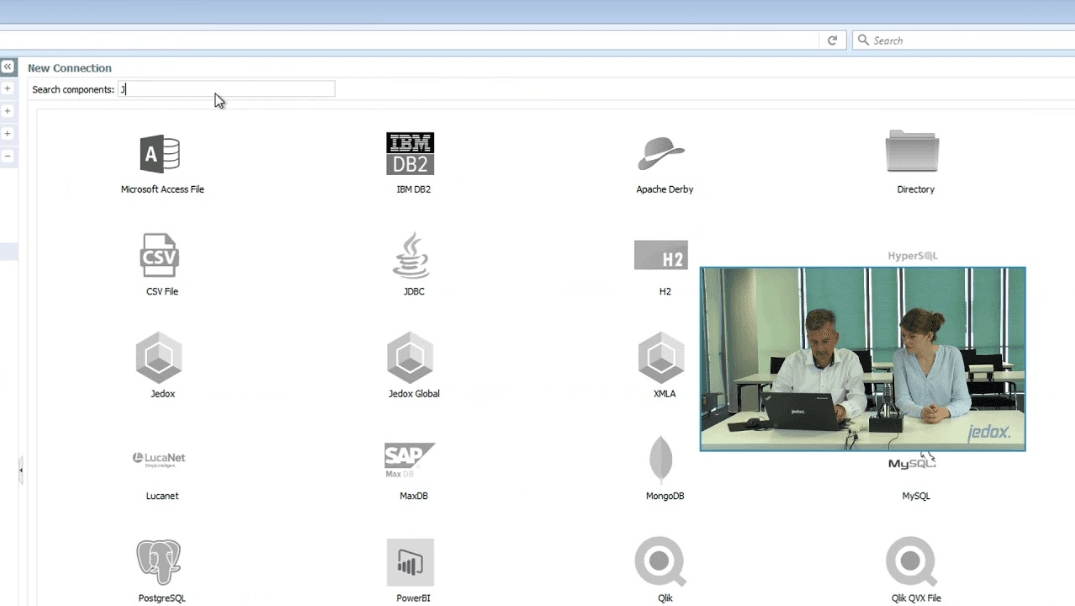
Jedox integrates with Salesforce, Power BI, Qlik, Tableau, SAP, Microsoft Excel, Oracle, IBM DB2, MS SQL Server, and Google Sheets. It also supports deep Excel integration, allowing finance teams to continue using familiar tools within a modern EPM and CPM framework.
Jedox also offers an API, connecting with third-party BI tools and ERP systems for enhanced data integration, automation, and workflows. Its cloud-based architecture and flexible connectors enable organizations to streamline processes and unify their financial data for improved financial reporting and analysis.
Jedox Specs
- 2-Factor Authentication: Yes
- Accounts Payable: Yes
- Accounts Receivable: Yes
- API: Yes
- Approval Workflows: Yes
- Balance Sheet: Yes
- Billing/Invoicing: Yes
- Budgeting: Yes
- Calendar Management: Yes
- Comparative Reporting: Yes
- CRM Integration: Yes
- Custom Reports: Yes
- Customer Management: Yes
- Dashboard: Yes
- Data Export: Yes
- Data Import: Yes
- Data Visualization: Yes
- Expense Tracking: Yes
- External Integrations: Yes
- Forecasting: Yes
- General Account Ledger: Yes
- Historical Data Analysis: Yes
- Inventory Tracking: Yes
- Multi-Currency: Yes
- Multi-User: Yes
- Notifications: Yes
- P&L: Yes
- Payroll: Yes
- Scenario Planning: Yes
- Scheduling: Yes
- Supplier Management: Yes
- Tax Management: Yes
- Time Management: Yes


