

Software-ul de gestionare a cheltuielilor pentru organizații nonprofit vă ajută organizația să urmărească, să controleze și să raporteze cheltuielile, donațiile și granturile, respectând în același timp cerințele specifice de conformitate și contabilitate a fondurilor. Dacă sunteți în căutarea celui mai bun software de gestionare a cheltuielilor pentru organizații nonprofit, probabil aveți nevoie de instrumente care oferă rapoarte exacte, susțin transparența față de donatori și vă ajută să administrați fondurile restricționate fără a adăuga muncă manuală.
Alegerea platformei potrivite poate facilita respectarea obligațiilor de reglementare, menținerea informării părților interesate și asigurarea evidenței fiecărui leu. În acest ghid veți găsi o listă scurtă atent selecționată de soluții concepute pentru a răspunde provocărilor financiare specifice cu care se confruntă organizațiile nonprofit, astfel încât să puteți alege cu încredere varianta potrivită pentru echipa dumneavoastră.
Why Trust Our Software Recommendations
6,700+
Reviews
20
Industry experts
16+
Evaluation factors
14
Years
Our team has been testing and reviewing software since 2012. As finance leaders ourselves, we know how difficult—and important—it is to choose the right software.
For this guide, we evaluated tools using hands-on testing and independent research, scoring tools using our selection criteria.
Our reviews reflect our human editorial judgment, not a sales pitch.
Tabel comparativ al software-urilor de gestionare a cheltuielilor
Aveți puțin timp la dispoziție? Treceți peste analiza detaliată. Iată o comparație rapidă a principalelor mele opțiuni de software pentru gestionarea cheltuielilor:
Sorted by: Default
| Tool | Starting Price | Website | |
|---|---|---|---|
Best for automated policy violation detection | 4.6 out of 5 | $11.99/user/month Free demo available | Website |
Best for HR-connected spend controls at scale | 4.8 out of 5 | Pricing upon request Free demo available | Website |
Best for automated accounts payable processing | 4.5 out of 5 | $49/user/month Free plan available | Book Demo |
Best for donor and fund reporting | 4.7 out of 5 | $38/month 30-day free trial | Website |
Best for multi-currency donation management | 4.4 out of 5 | $27/month 1-month free trial available | Website |
Best for free accounting essentials | 4.6 out of 5 | $15/month Free plan + free trial available | Website |
Best for nonprofit-specific budgeting | 4.5 out of 5 | $79/month 15-day free trial | Website |
Best for automated receipt scanning | 4.5 out of 5 | $5/user/month Not available | Website |
Best for integrated fund accounting tools | Not rated | $119/month Free plan + 14-day trial + demo available | Website |
Best for managing restricted funds | Not rated | $25/transaction Free trial available | Website |


Recenzii ale software-urilor de gestionare a cheltuielilor pentru organizații nonprofit
Mai jos sunt rezumatele mele detaliate ale software-urilor de gestionare a cheltuielilor pentru organizații nonprofit care au ajuns pe lista mea scurtă. Recenziile mele oferă o analiză detaliată a funcțiilor, celor mai potrivite cazuri de utilizare și integrărilor fiecărui software, pentru a vă ajuta să îl găsiți pe cel mai potrivit pentru organizația dumneavoastră.
 Best for automated policy violation detection
- Free demo available
- From $11.99/user/month (billed annually)
Visit WebsiteCustomer Rating:4.6/5
Sage Expense Management offers automated policy violation detection and routes them for approval during credit card reconciliation. Sage Expense Management (formerly Fyle) is a nonprofit expense management platform that handles credit card transaction tracking, receipt capture, policy enforcement, multi-level approvals, and accounting integrations with tools like QuickBooks, Sage Intacct, and Xero.
Who Is Sage Expense Management Best For?
Sage Expense Management is a good fit for nonprofit finance teams that need grant-level spend tracking and audit-ready expense records.
Why I Picked Sage Expense Management
Sage Expense Management earns its spot on my shortlist because of how it handles policy enforcement before a violation can slip through the approval process. The real-time violation checks flag, warn, or block a submission the moment an employee files an expense that breaks a rule, whether that's a receipt missing from a category, a spend amount over the limit, or a duplicate charge. The fraud detection layer adds another check by automatically catching duplicate, fictitious, or weekend submissions at the point of entry.
Sage Expense Management Key Features
- Custom expense categories: Create organization-specific expense categories that map directly to your chart of accounts and fund accounting structure.
- Project and cost center coding: Tag expenses to specific projects, departments, or cost centers at the point of submission.
- Mobile receipt capture: Snap and upload receipts from the mobile app with automatic data extraction for merchant, date, and amount.
- Employee reimbursement tracking: Monitor reimbursement status from approval through payment in a single dashboard view.
Sage Expense Management Integrations
Sage Expense Management has two-way integrations with QuickBooks Online, QuickBooks Desktop, NetSuite, Sage Intacct, Sage 50, Xero, and Sage 300 CRE. An API is available for custom integrations.
Pros and Cons
Pros:
- Only charges for active users monthly
- Tracks grant-level budget
- Real-time card feed via text notifications
Cons:
- Report export formatting options are limited
- Delayed sync for email receipts
Learn more about Sage Expense Management (formerly Fyle): Best for HR-connected spend controls at scale
- Free demo available
- Pricing upon request
Visit WebsiteCustomer Rating:4.8/5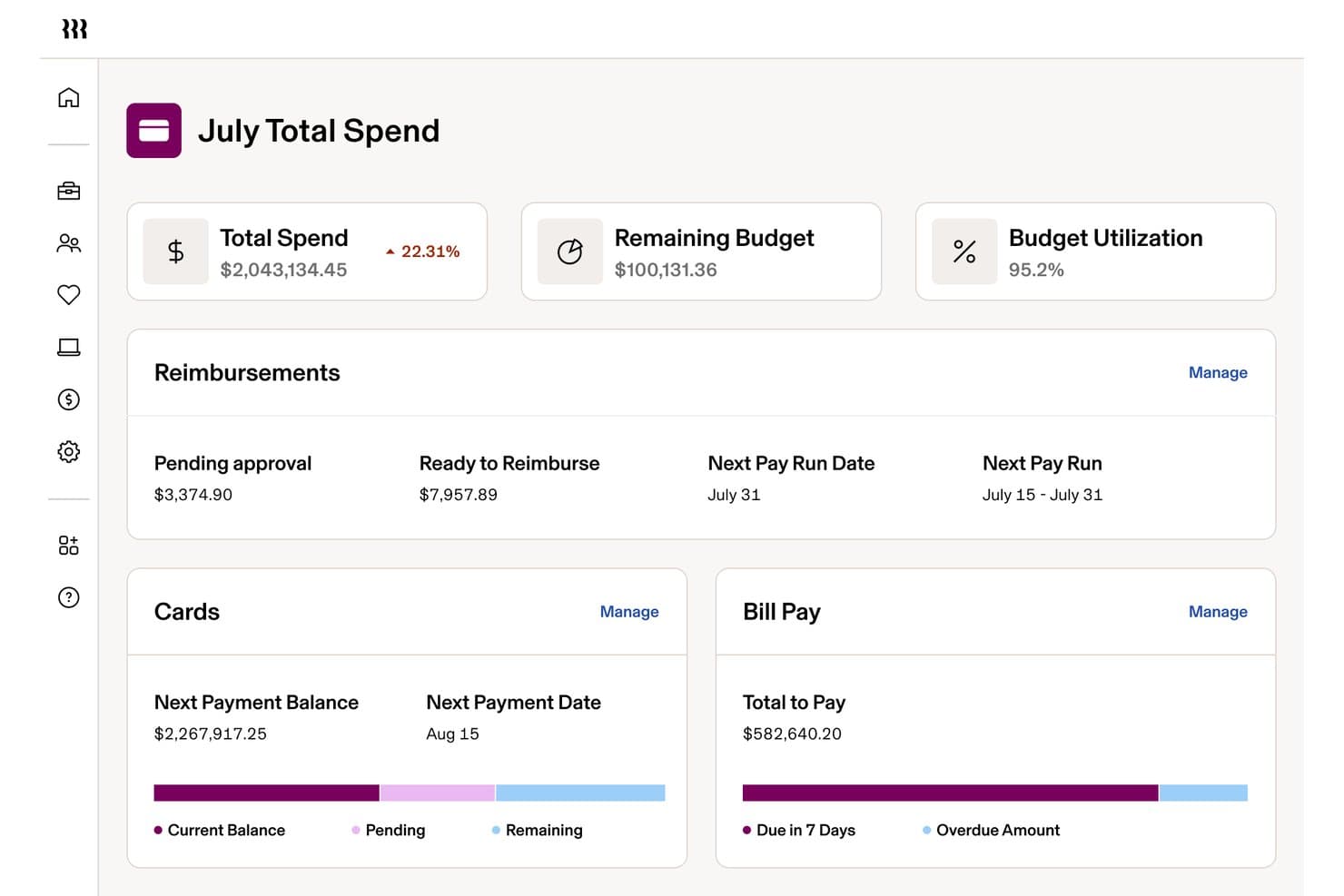
Rippling Spend tracks nonprofit monthly spend, budgets, and reimbursements. Rippling Spend is a spend management platform that unifies expense tracking, corporate card controls, reimbursement workflows, and accounting integrations within a broader HR and payroll system.
Who Is Rippling Spend Best For?
Mid-sized to large nonprofits that already use QuickBooks Online, NetSuite, or Sage Intacct and need tight, HR-connected approval controls across a salaried employee base.
Why I Picked Rippling Spend
I've included Rippling Spend in my top picks because its HR-connected approval engine is genuinely unlike anything else I've seen at this scale. When an employee changes roles or departments, spend policies and card controls update automatically, without anyone touching a settings menu. I also rate its pre-purchase card enforcement highly: category and merchant restrictions block non-compliant transactions at the point of sale, which keeps salaried nonprofit staff within budget before the charge ever posts.
Rippling Spend Key Features
- AI-powered receipt capture: Employees submit receipts via email forwarding, text message, or mobile upload, and the system auto-matches and categorizes each one.
- Multi-currency reimbursement: Rippling processes reimbursements in 100+ currencies across 185+ countries, with automatic currency conversion and foreign-language receipt translation.
- Automated card lifecycle management: Corporate cards are auto-issued at onboarding and revoked at offboarding, with spend policies updating automatically when employees change roles.
- Native accounting integrations: Rippling syncs bidirectionally with QuickBooks Online, NetSuite, Xero, and Sage Intacct, automating GL categorization and reducing manual reconciliation at month-end close.
Rippling Spend Integrations
Rippling Spend offers native integrations with QuickBooks Online, NetSuite, Xero, and Sage Intacct. It lacks documented native integrations with Blackbaud, Aplos, and QuickBooks Nonprofit.
Pros and Cons
Pros:
- Pre-purchase controls update with employee changes
- AI-powered receipt capture and matching
- Unified HR and spend approval workflows
Cons:
- No volunteer or non-employee reimbursement
- No restricted fund or grant accounting
Learn more about Rippling Spend: 3Best for automated accounts payable processing
BILL
- Free plan available
- From $49/user/month
Visit WebsiteCustomer Rating:4.5/5
BILL dashboard shows company credit balances, expense tracking, payment details, and virtual card management across desktop and mobile views for controlling nonprofit spending and budgets. BILL is a cloud-based accounts payable automation and expense management platform that handles invoice capture, multi-step approval workflows, corporate card spend tracking, and domestic and international vendor payments for organizations, including nonprofits.
Who Is BILL Best For?
BILL is a good fit for small to mid-sized nonprofits that need structured AP controls, spend visibility, and payment processing across multiple departments or fund categories.
Why I Picked BILL
I picked BILL as one of the best because its AI-powered invoice capture is genuinely impressive for nonprofit AP teams. BILL's AI reads and codes multi-line item invoices with 99% accuracy, automatically handles 2- and 3-way PO matching, and routes each bill through your custom approval workflows without manual hand-holding. For a nonprofit juggling vendor payments across multiple programs or grant-funded cost centers, that level of automated control over the full AP cycle—from invoice receipt to payment—is hard to come by in one platform.
BILL Key Features
- Corporate card controls: Issue virtual and physical cards with category-level spending limits and real-time transaction visibility across your team.
- Separation of duties: Assign distinct roles to approvers, payers, and administrators to maintain internal controls and audit readiness.
- Receipt capture: Photograph and attach receipts to transactions directly using the BILL mobile app.
- Multi-method payments: Pay vendors via ACH, check, virtual card, or international wire from a single platform.
BILL Integrations
BILL offers native two-way sync with QuickBooks Online, QuickBooks Desktop, QuickBooks Enterprise, Xero, Oracle NetSuite, Sage Intacct, and Microsoft Dynamics, plus data integration support for Acumatica and other ERPs via customizable file templates.
Pros and Cons
Pros:
- Free corporate cards with spend limits
- AI-powered invoice data extraction
- Multi-step approval chains for bill payments
Cons:
- Customer support relies heavily on chat
- No built-in grant tracking or reporting
Learn more about BILL:

Nonprofits use QuickBooks to manage donations, grants, and reports with transparency. Nonprofit organizations looking for clear financial oversight often turn to QuickBooks for its specialized nonprofit accounting features. The platform helps you manage donations, grants, and fund allocations with tools designed for nonprofit workflows. Finance teams can use QuickBooks to streamline reporting and maintain transparency for boards and donors.
Who Is QuickBooks Best For?
QuickBooks is a strong choice for nonprofit finance teams that need to manage and report on donations, grants, and fund balances.
Why I Picked QuickBooks
I picked QuickBooks because it offers dedicated tools for tracking donations, grants, and fund balances, which are essential for nonprofit reporting. The platform lets you create donor and fund-specific reports, making it easier to show stakeholders exactly how funds are allocated and spent. I also appreciate that QuickBooks supports class and location tracking, so you can break down expenses and income by program, campaign, or funding source. These features help nonprofit finance teams maintain transparency and accountability in their financial management.
QuickBooks Key Features
Some other features that support nonprofit accounting and expense management include:
- Bank feeds: Connect your bank accounts to automatically import and categorize transactions for up-to-date records.
- Receipt capture: Upload and attach digital receipts to expenses using the mobile app or web interface.
- Custom chart of accounts: Set up and manage a chart of accounts tailored to nonprofit needs, including funds, grants, and programs.
- Recurring transactions: Schedule and automate regular expenses or income entries to reduce manual data entry.
QuickBooks Integrations
Integrations include PayPal, Square, Shopify, Amazon, eBay, Etsy, SOS Inventory, QuickBooks Time, and Gusto.
Pros and Cons
Pros:
- Offers recurring transaction scheduling
- Allows attaching receipts to transactions
- Supports audit trails for compliance needs
Cons:
- Limited multi-entity or chapter support
- Lacks built-in volunteer management tools
 5Best for multi-currency donation management
Xero
- 1-month free trial available
- From $27/month
Visit WebsiteCustomer Rating:4.4/5
Xero is a cloud accounting platform that helps nonprofits manage grants and finances efficiently. Nonprofit finance teams looking for a flexible, cloud-based accounting platform often turn to Xero. The software appeals to organizations that need to manage grants, donations, and expenses across multiple projects or locations. Xero helps nonprofits simplify bookkeeping, improve financial oversight, and stay organized as they grow.
Who Is Xero Best For?
Xero is a good fit for mid-sized nonprofits that manage international donations and need multi-currency accounting capabilities.
Why I Picked Xero
I picked Xero because it offers built-in multi-currency support, which is essential for nonprofits that receive donations or incur expenses in different currencies. The platform automatically converts and tracks foreign currency transactions, so finance teams can manage global funding and spending without manual calculations. I also appreciate that Xero lets you generate reports that show real-time currency gains and losses, helping organizations maintain transparency and compliance. These features make Xero a strong choice for nonprofits with international operations or donor bases.
Xero Key Features
In addition to its multi-currency capabilities, Xero offers several other features that support nonprofit expense management:
- Bank reconciliation: Automatically match bank transactions with your records to keep accounts accurate and up to date.
- Expense claim management: Allow staff and volunteers to submit expenses for review and reimbursement directly within the platform.
- Budget tracking: Set up and monitor budgets for different projects, grants, or funds to maintain financial control.
- Customizable chart of accounts: Tailor account categories to fit your nonprofit’s unique reporting and compliance needs.
Xero Integrations
Integrations include Hubdoc, Syft, Stripe, Shopify, Gusto, Expensify, and Capsule CRM.
Pros and Cons
Pros:
- Unlimited users for board and staff
- Audit-ready reports for donor trust
- Snap receipts via mobile for auto-scan
Cons:
- No phone support only email or chat
- Starter plan has tight invoice limits
Learn more about Xero: Best for free accounting essentials
- Free plan + free trial available
- From $15/month
Visit WebsiteCustomer Rating:4.6/5
ZipBooks is cloud accounting software for nonprofits to track expenses and donations easily. ZipBooks offers cloud-based accounting software designed for small nonprofits and organizations with limited budgets. It appeals to teams that need straightforward tools for tracking expenses, managing donations, and handling basic bookkeeping. The platform helps simplify financial oversight without requiring advanced accounting expertise.
Who Is ZipBooks Best For?
ZipBooks is a good fit for small nonprofit organizations that need essential accounting and expense tracking features without a large financial investment.
Why I Picked ZipBooks
I picked ZipBooks because it offers a genuinely free plan with core accounting features that many small nonprofits need to manage expenses. The platform lets you track spending, categorize transactions, and generate basic financial reports without requiring a paid upgrade. I also like that ZipBooks includes invoicing and donor tracking tools, which help nonprofits keep their finances organized. For organizations with limited resources, these essentials make it possible to maintain transparency and accountability without extra costs.
ZipBooks Key Features
In addition to its core accounting essentials, I also found several features that help nonprofits manage their finances more easily:
- Bank reconciliation: Match transactions from your bank account with those in ZipBooks to keep records accurate.
- Time tracking: Track billable hours for staff or volunteers directly within the platform.
- Customizable invoicing: Create and send branded invoices with custom fields and payment options.
- Basic reporting: Generate simple financial reports, such as profit and loss statements and balance sheets, for board meetings or audits.
ZipBooks Integrations
Integrations include Square, Stripe, and PayPal.
Pros and Cons
Pros:
- Discounts on paid tiers for nonprofits
- Direct bank sync for real-time tracking
- Auto-categorizes expenses with AI
Cons:
- No built-in donor management system
- Advanced features gated by monthly fee
Learn more about ZipBooks: Best for nonprofit-specific budgeting
- 15-day free trial
- From $79/month
Visit WebsiteCustomer Rating:4.5/5
Aplos is cloud accounting software for nonprofits managing funds and donations. Aplos is a cloud-based financial management platform designed specifically for nonprofits and faith-based organizations. It appeals to finance professionals who need to manage fund accounting, donations, and compliance in one place. The platform helps organizations track restricted funds, generate nonprofit-specific reports, and simplify day-to-day accounting tasks.
Who Is Aplos Best For?
Aplos is a strong fit for nonprofit finance teams that need dedicated fund accounting and budgeting tools tailored to nonprofit compliance requirements.
Why I Picked Aplos
I chose Aplos because it offers budgeting tools designed specifically for nonprofit organizations, which is rare among expense management platforms. The software lets you create and manage budgets by fund, program, or project, making it easier to track restricted and unrestricted funds separately. I also appreciate that Aplos provides real-time budget-to-actual reporting, so finance teams can monitor spending and adjust allocations as needed. These features help nonprofits maintain compliance and transparency with donors and grantors.
Aplos Key Features
Some other features that help nonprofits manage their finances and operations include:
- Fund accounting: Track income and expenses by fund to ensure proper allocation and reporting for grants and donations.
- Donation tracking: Record, acknowledge, and report on donations with integrated donor management tools.
- Bank integration: Connect bank accounts for automatic transaction imports and easier reconciliation.
- Event registration: Manage event sign-ups and payments directly within the platform.
Aplos Integrations
Integrations include Gusto, PEX, Stripe, Keela, Raisely, DonorElf, Church Community Builder, and Ramp.
Pros and Cons
Pros:
- Tracks grants and restricted funds easily
- Free expert support for nonprofit teams
- Generates audit-ready financial reports
Cons:
- Extra fees for advanced budgeting tools
- Complex reporting needs a learning curve
Learn more about Aplos: Best for automated receipt scanning
- Not available
- From $5/user/month
Visit WebsiteCustomer Rating:4.5/5
Expensify is cloud expense software for tracking and controlling team spending. Expensify is a cloud-based expense management platform designed for organizations that need to track and control spending across teams or projects. Nonprofit finance teams often choose Expensify to simplify expense reporting, automate policy enforcement, and reduce manual data entry. The platform helps organizations stay audit-ready and maintain transparency in how funds are spent.
Who Is Expensify Best For?
Expensify is a strong choice for nonprofit finance teams that need to automate expense tracking and receipt management across multiple staff or volunteers.
Why I Picked Expensify
What sets Expensify apart for nonprofits is its automated receipt scanning, which eliminates the hassle of manual data entry and reduces errors in expense reporting. I picked Expensify because its SmartScan technology lets users snap a photo of a receipt and have the details automatically extracted and matched to expenses. This is especially useful for nonprofits with distributed teams or volunteers who need to submit receipts on the go. The platform also supports automated policy enforcement, so finance teams can ensure compliance with grant or donor requirements without extra administrative work.
Expensify Key Features
Some other features that make Expensify useful for nonprofit expense management include:
- Multi-level approval workflows: Route expense reports through customizable approval chains to match your organization’s internal controls.
- Grant and fund tracking: Tag expenses to specific grants or funding sources for easier reporting and compliance.
- Corporate card reconciliation: Automatically match card transactions with submitted expenses to simplify month-end close.
- Mileage tracking: Allow users to log and reimburse mileage for volunteer or staff travel directly within the platform.
Expensify Integrations
Integrations include QuickBooks, Xero, NetSuite, Uber, Lyft, Oracle, and Workday.
Pros and Cons
Pros:
- Mobile app simplifies volunteer uploads
- Syncs well with QuickBooks and Xero
- SmartScan OCR is top-tier for receipts
Cons:
- Requires pre-funding for card benefits
- Concierge AI support is often generic
 Best for integrated fund accounting tools
- Free plan + 14-day trial + demo available
- From $119/month

Springly is nonprofit accounting software for managing funds and tracking project expenses. Springly offers nonprofit organizations a dedicated platform for managing accounting and expenses in one place. It’s designed for teams that need to handle multiple funding sources and track spending across projects or programs. If your nonprofit requires clear separation of funds and transparent financial reporting, Springly addresses these needs with nonprofit-specific workflows.
Who Is Springly Best For?
Springly is a good fit for small to mid-sized nonprofits that need to manage multiple funds and track program-specific expenses.
Why I Picked Springly
I chose Springly because its integrated fund accounting tools address a core challenge for nonprofits: managing restricted and unrestricted funds with accuracy. The platform lets you create and track multiple funds, ensuring that each donation or grant is allocated and reported according to donor intent. I appreciate how Springly’s accounting workflows are tailored for nonprofit compliance, including features for tracking expenses by project or program. This makes it easier for finance teams to maintain transparency and meet reporting requirements without manual workarounds.
Springly Key Features
Some other features in Springly that support nonprofit financial management include:
- Automated bank reconciliation: This feature matches transactions from your bank account to your accounting records, reducing manual entry and errors.
- Customizable chart of accounts: You can tailor your chart of accounts to reflect your organization’s unique structure and reporting needs.
- Document storage: Store and organize receipts, invoices, and supporting documents directly within the platform for easy access during audits.
- Member and donor management: Track contact details, contributions, and engagement history for both members and donors in one place.
Springly Integrations
Integrations include QuickBooks.
Pros and Cons
Pros:
- Integrated donor and member management tools
- Customizable chart of accounts for nonprofits
- Built-in document storage for receipts and invoices
Cons:
- Limited multi-currency support for international nonprofits
- Invoicing features are basic compared to peers
Learn more about Springly: Best for managing restricted funds
- Free trial available
- $25/transaction (pay-as-you-go)

Serenic Navigator is financial management software for nonprofits and public sector teams handling funds and compliance. Serenic Navigator is a financial management platform designed specifically for nonprofit organizations and public sector entities. It appeals to finance teams that need to handle complex fund accounting, grant management, and compliance requirements. The software helps organizations track expenses, manage budgets, and maintain transparency for stakeholders and auditors.
Who Is Serenic Navigator Best For?
Serenic Navigator is a strong choice for nonprofit finance teams that need to manage complex fund restrictions and grant compliance.
Why I Picked Serenic Navigator
I picked Serenic Navigator because it’s purpose-built for nonprofits that need to manage restricted funds with precision. The platform lets you set up detailed fund structures, track expenses against specific grants or funding sources, and enforce spending rules at the transaction level. I also appreciate how it supports compliance by providing clear audit trails and real-time reporting on fund balances. These features make it much easier for nonprofit finance teams to ensure every dollar is used according to donor intent and regulatory requirements.
Serenic Navigator Key Features
Some other features that make Serenic Navigator valuable for nonprofit expense management include:
- Automated approval workflows: Route expense submissions through multi-level, customizable approval chains to maintain internal controls.
- Budget management tools: Set, monitor, and adjust budgets for projects, programs, or departments directly within the platform.
- Document attachment: Attach receipts, invoices, and supporting files to transactions for easier audits and recordkeeping.
- Role-based dashboards: Give users tailored dashboards with real-time financial and operational data relevant to their responsibilities.
Serenic Navigator Integrations
Native integrations are not currently listed by Serenic Navigator.
Pros and Cons
Pros:
- Real-time visibility into donor funds
- FASB compliant audit trails and reports
- Automated multi-entity fund accounting
Cons:
- Requires significant initial training
- Interface feels dated to some users
Learn more about Serenic Navigator:
Alte software-uri de gestionare a cheltuielilor pentru organizații nonprofit
Iată câteva opțiuni suplimentare de software pentru gestionarea cheltuielilor în organizații nonprofit care nu au ajuns pe lista mea scurtă, dar merită totuși analizate:
- 11DATABASICSBest for grant compliance tracking
- 12GivefrontBest for donation and expense integration
- 13ClickTimeBest for tracking program-specific expenses
- 14NetSuiteBest for customizable approval workflows
- 15WaveBest with unlimited collaborators for tracking
- 16HarvestBest for visualizing project-based spending
Related Reviews
How I Evaluate Expense Management Software for Nonprofits
I evaluate every tool on two levels: the baseline requirements a grant accountant needs to reconcile restricted funds and prepare for an audit, and the differentiators that separate the best fits.
Core Functionality (Table Stakes For This List)
When I'm selecting tools for my list, I rank each one on a scale from 0 (does not offer the functionality) to 5 (excels in this area) for each core functionality listed below. Then, I calculate the tool's total score into a percentage. Each tool needs to achieve a minimum total score of 55% to be considered for inclusion.
- Fund & Grant Expense Tracking: I check whether expenses can be tagged and split across specific grants, programs, or restricted funds—like allocating a shared office lease across three federal grants by percentage.
- Receipt Capture & Digitization: A good tool lets staff snap a photo of a lunch receipt on-site and have OCR pull the vendor, amount, and date automatically rather than requiring manual data entry later.
- Configurable Approval Workflows: I look for multi-level routing that adapts to real scenarios, such as sending anything over a set threshold to a finance director while program leads approve smaller day-to-day purchases.
- Accounting System Integration: The platform should connect with accounting tools nonprofits actually use—Sage Intacct, QuickBooks, Blackbaud—with proper GL and fund dimension mapping, not just a generic CSV export.
- Corporate Card Issuance & Controls: I evaluate whether the tool offers virtual and physical cards with spend limits and merchant restrictions, so a program coordinator can only use their card at approved vendors.
- Audit-Ready Reporting: Reports should include full audit trails with timestamps and approver details, plus exportable formats that align with what auditors and grantors expect during annual reviews or 990 preparation.
Once I have a list of tools that meet the criteria, I consider what sets each platform apart.
Differentiating Factors (What Sets Vendors Apart)
Here's how I compare and contrast different vendors:
Standout Features
Budget vs. actual alerts matter a lot here—I want to see real-time notifications when a program's spending nears its grant ceiling, so finance directors can course-correct before compliance becomes an issue. Volunteer reimbursement workflows are another differentiator, since many nonprofits need to process mileage and out-of-pocket claims for board members who aren't on payroll. For organizations with chapters or affiliates, I also evaluate multi-entity consolidation to see how well the tool rolls up expenses across separate legal entities into one view.
Beyond Features
Pricing structure matters here more than in most categories. I look for nonprofit-specific plans or discounts through programs like TechSoup, since many organizations work with grant-funded budgets that leave little room for high per-seat costs. Ecosystem integrations also weigh heavily—a tool that syncs with Bloomerang or Salesforce NPSP alongside the accounting system saves finance teams from manually reconciling donor-related expenses. I also evaluate onboarding support, because a two-person finance team at a mid-sized nonprofit rarely has bandwidth to self-implement a new platform.
Cum să alegeți software-ul de gestionare a cheltuielilor pentru organizații nonprofit
Este ușor să vă pierdeți în liste lungi de funcții și structuri complexe de prețuri. Pentru a vă ajuta să rămâneți concentrat pe parcursul procesului de selectare a software-ului, iată o listă de verificare a factorilor de care trebuie să țineți cont:
| Factor | Ce trebuie avut în vedere |
| Scalabilitate | Va putea software-ul să susțină creșterea organizației dumneavoastră, cum ar fi un număr mai mare de utilizatori, programe sau locații? Verificați limitele privind utilizatorii și opțiunile de upgrade. |
| Integrări | Se conectează nativ la sistemele dumneavoastră de contabilitate, strângere de fonduri sau CRM? Evitați introducerea manuală a datelor confirmând existența integrărilor directe. |
| Posibilități de personalizare | Puteți adapta categoriile, fluxurile de aprobare și rapoartele pentru a corespunde structurii organizației nonprofit și cerințelor granturilor? |
| Ușurință în utilizare | Vor putea angajații și voluntarii cu niveluri diferite de competențe tehnice să îl utilizeze cu încredere? Căutați fluxuri de lucru clare și nevoi minime de instruire. |
| Implementare și integrare inițială | Cât timp va dura până când veți putea începe să îl utilizați? Întrebați despre asistența pentru migrare, resursele de instruire și durata obișnuită a integrării inițiale. |
| Cost | Există reduceri pentru organizații nonprofit, prețuri transparente sau taxe ascunse? Comparați costul total de deținere, nu doar tarifele lunare. |
| Măsuri de securitate | Oferă instrumentul criptarea datelor, permisiuni pentru utilizatori și piste de audit pentru a proteja informațiile financiare și despre donatori sensibile? |
| Cerințe de conformitate | Vă va ajuta software-ul să respectați standardele de raportare ale IRS, ale granturilor sau ale donatorilor? Căutați controale integrate și asistență pentru audit. |
Ce este software-ul de gestionare a cheltuielilor pentru organizații nonprofit?
Software-ul de gestionare a cheltuielilor pentru organizații nonprofit este un instrument digital care ajută organizațiile să urmărească, să categorizeze și să controleze cheltuielile asociate programelor, operațiunilor și activităților lor de strângere de fonduri. Acesta permite organizațiilor nonprofit să gestioneze într-un singur loc chitanțele, aprobările și rapoartele, susținând transparența și conformitatea cu cerințele donatorilor, granturilor și reglementărilor. Acest software este conceput pentru a răspunde nevoilor unice de supraveghere financiară ale organizațiilor nonprofit.
Funcțiile software-ului de gestionare a cheltuielilor pentru organizații nonprofit
Atunci când selectați un software de gestionare a cheltuielilor pentru organizații nonprofit, urmăriți următoarele funcții esențiale:
- Categorizarea cheltuielilor: Organizați cheltuielile în funcție de program, grant sau proiect pentru a asigura urmărirea și raportarea corectă pentru fiecare sursă de finanțare.
- Capturarea chitanțelor: Încărcați și stocați copii digitale ale chitanțelor, facilitând documentarea cheltuielilor și pregătirea pentru audituri.
- Fluxuri de aprobare: Configurați procese de aprobare în mai mulți pași, astfel încât cheltuielile să fie verificate și autorizate în conformitate cu politicile organizației.
- Urmărirea bugetului: Monitorizați cheltuielile în raport cu bugetele prestabilite în timp real pentru a preveni depășirea bugetului și a sprijini planificarea financiară.
- Urmărirea granturilor și fondurilor: Alocați cheltuielile unor granturi sau fonduri cu destinație restricționată specifice, ajutându-vă să respectați cerințele donatorilor și acordurile de grant.
- Acces pentru mai mulți utilizatori: Permiteți angajaților, voluntarilor și membrilor consiliului de administrație să trimită, să verifice sau să aprobe cheltuieli în funcție de rolurile și permisiunile lor.
- Raportare personalizabilă: Generați rapoarte detaliate adaptate nevoilor organizației dumneavoastră nonprofit, de exemplu în funcție de program, finanțator sau an fiscal.
- Integrarea cu sistemele de contabilitate: Sincronizați direct datele despre cheltuieli cu software-ul de contabilitate pentru a reduce introducerea manuală și a menține evidențe financiare corecte.
- Jurnal de audit: Păstrați un istoric complet al trimiterilor, aprobărilor și modificărilor cheltuielilor pentru a sprijini transparența și conformitatea.
- Acces mobil: Permiteți utilizatorilor să trimită cheltuieli și chitanțe de oriunde, folosind un dispozitiv mobil, pentru a sprijini activitatea pe teren și echipele aflate la distanță.
Funcții comune bazate pe inteligență artificială ale software-ului de gestionare a cheltuielilor pentru organizații nonprofit
Pe lângă funcțiile standard ale software-ului de gestionare a cheltuielilor pentru organizații nonprofit enumerate mai sus, multe dintre aceste soluții integrează inteligența artificială prin funcții precum:
- Extragerea automată a datelor din chitanțe: Inteligența artificială scanează chitanțele încărcate, recunoaște detalii esențiale precum data, furnizorul și suma și completează automat formularele de cheltuieli pentru a reduce introducerea manuală și erorile.
- Detectarea anomaliilor: Inteligența artificială monitorizează tiparele de cheltuieli și semnalează tranzacțiile neobișnuite sau potențialele încălcări ale politicilor, ajutând organizațiile să identifice din timp erorile sau fraudele.
- Categorizarea inteligentă a cheltuielilor: Inteligența artificială învață din înregistrările anterioare pentru a aloca automat cheltuielile categoriilor corecte, îmbunătățind acuratețea și economisind timp pentru echipele financiare.
- Alerte predictive privind bugetul: Inteligența artificială analizează cheltuielile istorice și tendințele actuale pentru a prognoza momentul în care un program sau un grant riscă să depășească bugetul, determinând gestionarea proactivă a bugetului.
- Interogări privind cheltuielile în limbaj natural: Inteligența artificială le permite utilizatorilor să pună întrebări despre cheltuieli sau bugete în limbaj obișnuit și să primească răspunsuri instantanee bazate pe date, făcând raportarea mai accesibilă.
Beneficiile software-ului de gestionare a cheltuielilor pentru organizații nonprofit
Implementarea software-ului de gestionare a cheltuielilor pentru organizații nonprofit oferă mai multe beneficii echipei și organizației dumneavoastră. Iată câteva dintre acestea:
- Transparență financiară îmbunătățită: Urmărirea centralizată a cheltuielilor și jurnalele de audit facilitează demonstrarea gestionării responsabile a fondurilor în fața donatorilor și finanțatorilor.
- Cicluri de rambursare mai rapide: Fluxurile automate de aprobare și capturarea digitală a chitanțelor accelerează procesul de rambursare a cheltuielilor angajaților și voluntarilor.
- Raportare corectă a granturilor și fondurilor: Etichetarea specifică granturilor și raportarea personalizabilă contribuie la asigurarea conformității cu cerințele donatorilor și ale autorităților de reglementare.
- Reducerea introducerii manuale a datelor: Integrările cu sistemele de contabilitate și extragerea datelor bazată pe inteligență artificială reduc la minimum sarcinile repetitive și riscul de erori.
- Supravegherea bugetului în timp real: Urmărirea în timp real a bugetului și alertele predictive ajută la prevenirea depășirii bugetului și sprijină gestionarea financiară proactivă.
- Securitate și conformitate îmbunătățite: Permisiunile utilizatorilor, criptarea datelor și controalele de conformitate protejează informațiile sensibile și sprijină pregătirea pentru audit.
- Accesibilitate sporită pentru echipele distribuite: Accesul mobil și suportul pentru mai mulți utilizatori le permit angajaților și voluntarilor să trimită și să aprobe cheltuieli de oriunde.
Costurile și prețurile software-ului de gestionare a cheltuielilor pentru organizații nonprofit
Selectarea software-ului de gestionare a cheltuielilor pentru organizații nonprofit necesită înțelegerea diferitelor modele și planuri de preț disponibile. Costurile variază în funcție de funcții, dimensiunea echipei, suplimente și alți factori. Tabelul de mai jos rezumă planurile comune, prețurile medii ale acestora și funcțiile incluse de obicei în soluțiile software de gestionare a cheltuielilor pentru organizații nonprofit:
Tabel comparativ al planurilor pentru software-ul de gestionare a cheltuielilor pentru organizații nonprofit
| Tipul planului | Preț mediu | Funcții comune |
| Plan gratuit | $0 | Urmărirea de bază a cheltuielilor, încărcarea limitată a chitanțelor, acces pentru un singur utilizator și raportare simplă. |
| Plan personal | $5-$13/utilizator/lună (sau $15 - $45 tarif fix/lună) | Acces pentru mai mulți utilizatori, capturarea chitanțelor, fluxuri de aprobare de bază și raportare standard. |
| Plan de afaceri | $15-$35/utilizator/lună (sau $25 - $199 tarif fix/lună) | Fluxuri avansate de aprobare, urmărirea granturilor și fondurilor, integrări cu software-ul de contabilitate și rapoarte personalizate. |
| Plan pentru întreprinderi | Personalizat | Fluxuri de lucru personalizabile, controale avansate de securitate, asistență dedicată, acces API și gestionarea conformității. |
Întrebări frecvente despre software-ul de gestionare a cheltuielilor pentru organizații nonprofit
Iată câteva răspunsuri la întrebările frecvente despre software-ul de gestionare a cheltuielilor pentru organizații nonprofit:
Cum ajută software-ul de gestionare a cheltuielilor la respectarea condițiilor granturilor?
Software-ul de gestionare a cheltuielilor ajută la respectarea condițiilor granturilor, permițându-vă să etichetați și să urmăriți cheltuielile în funcție de grant, să limitați cheltuielile la categoriile aprobate și să generați rapoarte care corespund cerințelor finanțatorilor. Astfel, este mai ușor să documentați modul în care sunt utilizate fondurile și să vă pregătiți pentru audituri.
Pot organizațiile nonprofit să utilizeze software-ul de gestionare a cheltuielilor pentru rambursarea cheltuielilor voluntarilor?
Da, organizațiile nonprofit pot utiliza software-ul de gestionare a cheltuielilor pentru a gestiona rambursarea cheltuielilor voluntarilor. Majoritatea soluțiilor le permit voluntarilor să trimită cheltuieli, să încarce chitanțe și să urmărească stadiul aprobării, facilitând rambursarea costurilor plătite din fonduri proprii și menținerea unor evidențe exacte.
Ce aspecte ar trebui să urmărească organizațiile nonprofit atunci când evaluează securitatea software-ului de gestionare a cheltuielilor?
Organizațiile nonprofit ar trebui să urmărească funcții precum criptarea datelor, permisiunile utilizatorilor, pistele de audit și certificările de conformitate. Aceste măsuri de protecție ajută la securizarea informațiilor financiare și despre donatori și sprijină respectarea cerințelor de reglementare și ale finanțatorilor.
Este posibilă integrarea software-ului de gestionare a cheltuielilor cu sistemele de contabilitate ale organizațiilor nonprofit?
Da, multe soluții software de gestionare a cheltuielilor oferă integrări cu sisteme de contabilitate populare pentru organizații nonprofit. Acest lucru reduce introducerea manuală a datelor, îmbunătățește acuratețea și asigură transferul direct al datelor despre cheltuieli în evidențele financiare.
Cât timp este necesar pentru implementarea software-ului de gestionare a cheltuielilor într-o organizație nonprofit?
Durata implementării variază, însă majoritatea organizațiilor nonprofit pot începe în câteva zile până la câteva săptămâni. Printre factorii implicați se numără necesitățile de migrare a datelor, instruirea utilizatorilor și complexitatea fluxurilor de aprobare. Mulți furnizori oferă asistență și resurse pentru integrare, pentru a accelera procesul.