

Managing your company's finances can be quite challenging, especially when it comes to billing and invoicing. If you’re dealing with financials, especially billing and invoicing, you know the frustration of chasing late payments and dealing with complex billing cycles. That's where the right software can make a world of difference.
In my experience, the best billing and invoicing tools simplify these processes, giving you and your team more time to focus on strategic initiatives. These solutions can minimize errors and improve cash flow, making your job easier.
In this article, I'll share my top picks for billing and invoicing software. This list includes dedicated invoicing tools as well as broader billing, payments, and revenue platforms where invoicing is a core workflow. Some tools here are better suited to freelancers and small teams, while others support enterprise finance operations. I've backed each selection with thorough research and practical insights to ensure you find the best fit for your team's needs.
Why Trust Our Software Recommendations
6,700+
Reviews
20
Industry experts
16+
Evaluation factors
14
Years
Our team has been testing and reviewing software since 2012. As finance leaders ourselves, we know how difficult—and important—it is to choose the right software.
For this guide, we evaluated tools using hands-on testing and independent research, scoring tools using our selection criteria.
Our reviews reflect our human editorial judgment, not a sales pitch.
Billing and Invoicing Software Comparison Table
The table below compares pricing details for my top billing and invoicing software selections.
| Tool | Best For | Trial Info | Price | ||
|---|---|---|---|---|---|
| 1 | Best with AI-driven AP and AR automation | Free plan available | Pricing upon request | Website | |
| 2 | Best for complex contract management | Free demo available | Pricing upon request | Website | |
| 3 | Best for complex deal flow automation | Free demo available | Pricing upon request | Website | |
| 4 | Best for open-source options | Free plan available | From $11.67/month (billed annually) | Website | |
| 5 | Best for online payment processing | Free plan + free demo available | From $0.30/transaction | Website | |
| 6 | Best for ERP integration | Free demo available | Pricing upon request | Website | |
| 7 | Best for accounting integration | 30-day free trial | From $38/month | Website | |
| 8 | Best for simple invoicing solutions | Free plan available | From $9.99/month | Website | |
| 9 | Best for freelancers and startups | Free plan available | From $19/month | Website | |
| 10 | Best for automated expense management | 14-day free trial | From $7/company/month + $0.15/additional document | Website |


Best Billing and Invoicing Software Review
Below are my detailed summaries of the best billing and invoicing software that made it onto my shortlist. My reviews offer a detailed look at the key features, pros and cons, integrations, and ideal use cases of each tool to help you find the best one for you.
 Best with AI-driven AP and AR automation
- Free plan available
- Pricing upon request
Visit WebsiteCustomer Rating:4.5/5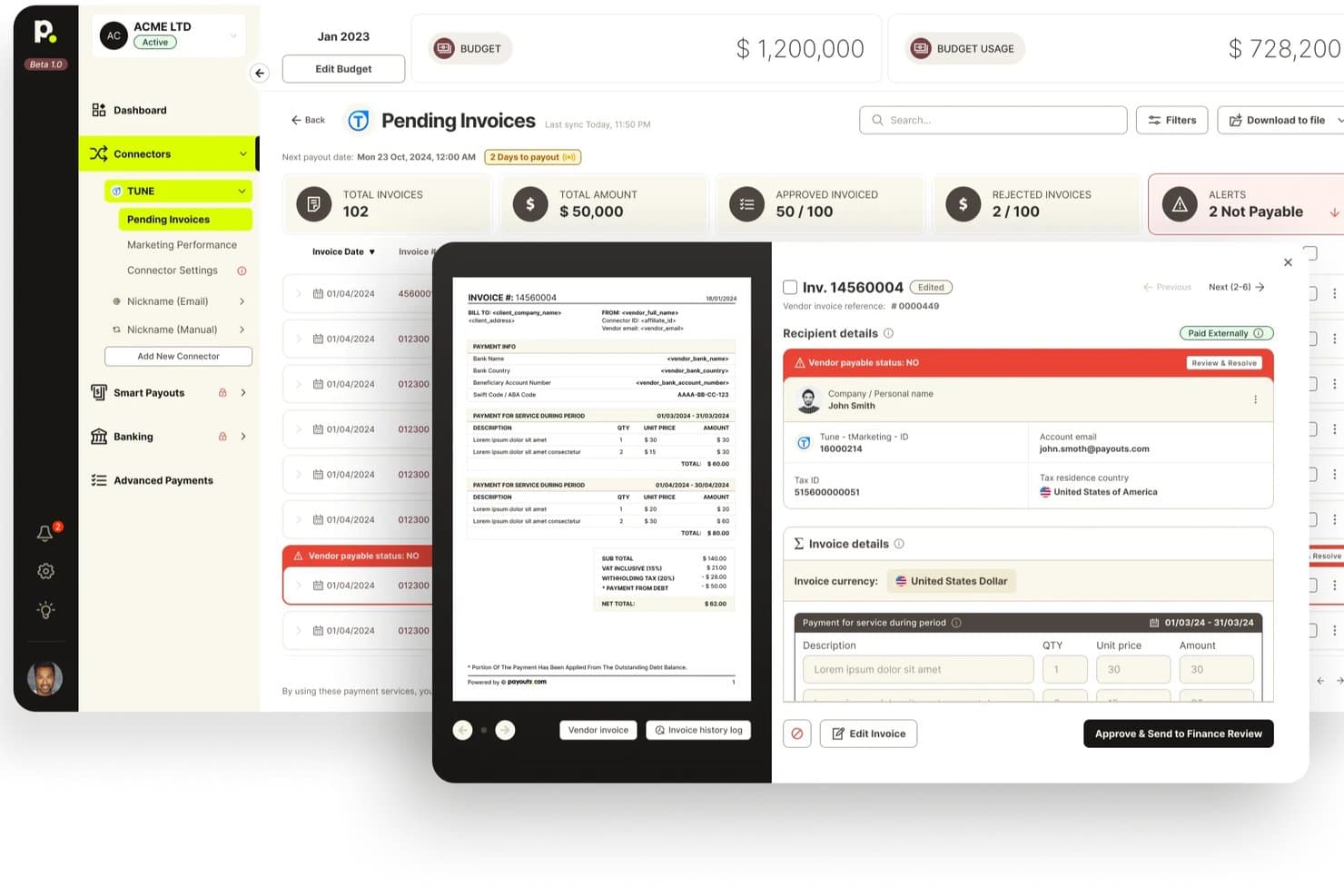
Payouts offers a pending invoices dashboard with invoice previews, vendor payable status alerts, and approval workflows for billing management. Payouts is an AP and AR automation platform that combines AI-driven invoice processing, global payment disbursement, automated dunning, tax compliance, and reconciliation in a single system.
Who Is Payouts Best For?
Payouts suits mid-market finance teams managing high-volume, cross-border vendor payments alongside accounts receivable operations.
Why I Picked Payouts
Payouts earns its spot on my shortlist because the AI automation it applies to both AP and AR is genuinely differentiated. I picked it specifically for the AI Digital Employees feature, which chases missing documents and follows up on blocked payouts over email, WhatsApp, and voice. On the AR side, I like that automated dunning runs alongside cash application, so overdue invoices get chased and matched in the same workflow.
Payouts Key Features
- OCR invoice capture: Invoices can be imported by email, inbox sync, manual entry, or API, with automatic data extraction.
- Three-way PO matching: The system matches purchase orders, invoices, and receipts to prevent payment errors.
- Global multi-rail payment support: Enables payouts in 135+ currencies across 190+ countries using 40+ payment rails.
- Real-time tax ID verification: Instantly checks tax identification numbers against IRS records and supports tax form collection.
Payouts Integrations
Payouts offers native integrations with NetSuite, Priority ERP, PayPal, Venmo, Everflow, Outlook, Awin, Outbrain, and provides an API for custom integrations.
Pros and Cons
Pros:
- Automates tax ID verification at scale
- Supports cross-border payments in 135+ currencies
- AI agents chase overdue invoices autonomously
Cons:
- Setup requires significant onboarding support
- Not ideal for freelancers or small teams
Learn more about Payouts: Best for complex contract management
- Free demo available
- Pricing upon request
Visit WebsiteCustomer Rating:4.2/5
Younium automates subscription billing, invoicing, and revenue management. Younium is a subscription billing and invoicing platform built for B2B companies with recurring revenue models. It combines automated invoicing, subscription management, revenue recognition, and contract lifecycle management in a single system.
Who Is Younium Best For?
Younium is a strong fit for mid-market and enterprise SaaS companies that manage recurring subscriptions, complex pricing structures, and high volumes of contract-driven billing.
Why I Picked Younium
I picked Younium because it handles contract changes without creating additional work for finance teams. When customers upgrade plans, add products, or make mid-term changes, the platform automatically updates billing schedules, invoices, and revenue recognition records. I also like that every contract adjustment is tracked through a detailed audit trail, making it easier to maintain accuracy and support compliance requirements as subscription businesses scale.
Key Features
- Billing and revenue sync: Automatically updates invoices, billing schedules, and revenue recognition records when subscription changes occur.
- Subscription management: Supports recurring billing models, contract amendments, renewals, and usage-based pricing structures.
- Revenue recognition: Helps finance teams comply with ASC 606 and IFRS 15 requirements through automated revenue tracking.
- Contract lifecycle management: Tracks contract versions, amendments, and customer changes throughout the subscription lifecycle.
Integrations
Younium integrates with Salesforce, HubSpot, NetSuite, QuickBooks, Xero, Stripe, Microsoft Dynamics 365, Avalara, Fortnox, Exact Online, and Slack. It also supports Zapier, webhooks, and a REST API for custom integrations.
Pros and Cons
Pros:
- Supports multi-entity subscription billing
- Built-in ASC 606 and IFRS 15 compliance
- Tracks MRR, ARR, and churn metrics
Cons:
- Payment plans require detailed setup
- Cannot credit the same invoice twice
Learn more about Younium: Best for complex deal flow automation
- Free demo available
- Pricing upon request
Visit WebsiteCustomer Rating:4.7/5
DealHub AI offers a guided interface where sales reps can select solutions and define project duration. DealHub AI is a quote-to-revenue platform that brings CPQ, contract management, subscription management, and automated billing into one AI-powered workflow.
Who Is DealHub AI Best For?
DealHub AI is a strong fit for B2B sales and revenue operations teams at mid-market to enterprise companies managing high-volume or complex deal cycles.
Why I Picked DealHub AI
I picked DealHub AI as one of the best because of how it handles the full arc of a complex deal without dropping the baton between stages. What I find genuinely useful is the automated approval workflow engine: parallel approvals run simultaneously, so a deal requiring sign-off from legal, finance, and sales leadership doesn't move in a single-file queue. On the billing side, every mid-cycle amendment, like an upsell or co-term, updates the billing schedule automatically from the effective date, with no manual finance ticket required.
DealHub AI Key Features
- Subscription billing scheduler: Automates recurring billing across monthly, annual, usage-based, and milestone payment schedules.
- Multi-currency billing: Generates invoices in local currencies and handles exchange rates for international deals.
- Revenue recognition: Maps billing events to recognized revenue to support ASC 606 and IFRS 15 compliance.
- DealRoom: A shared digital workspace where buyers and sellers track deal milestones, documents, and approvals.
DealHub AI Integrations
DealHub AI integrates with Salesforce, Microsoft Dynamics, HubSpot, and SugarCRM, as well as Stripe and Avalara for billing and tax compliance.
Pros and Cons
Pros:
- Includes ASC 606/IFRS 15 revenue recognition
- Consolidates all pricing into one document
- Supports usage-based, tiered, and fixed pricing
Cons:
- Frequent UI bugs require page refreshes
- Advanced customization options are quite limited
Learn more about DealHub AI: Best for open-source options
- Free plan available
- From $11.67/month (billed annually)
Visit WebsiteCustomer Rating:4.7/5
Invoice Ninja provides solutions for invoicing, time tracking, and expenses Invoice Ninja is a highly flexible billing and invoicing platform ideal for budget-conscious freelancers and small businesses. It provides customizable invoice tracking and expense management at a lower cost.
Why I picked Invoice Ninja: Invoice Ninja is unique for its open-source options, making it highly customizable for tech-savvy users. The invoicing feature supports multiple currencies and languages, which is great for international clients. Time tracking is integrated, allowing you to bill clients accurately, while expense management ensures your spending stays within budget.
Standout features and integrations:
Features include customizable invoice templates that let you align them with your brand identity. The client portal is a convenient way for your clients to view their invoices and make card payments (via credit card or debit card) or bank transfers. Automatic billing for recurring payments saves you time.
Integrations include Zapier, Slack, Stripe, PayPal, Authorize.net, WePay, Mailchimp, Google Analytics, QuickBooks Online, Xero, and more.
Pros and Cons
Pros:
- Supports multiple currencies
- Generous free plan
- Highly customizable open-source options
Cons:
- Limited customer support options
- Requires technical knowledge for customization
Learn more about Invoice Ninja: Best for online payment processing
- Free plan + free demo available
- From $0.30/transaction
Visit WebsiteCustomer Rating:4.6/5
PayPal supports online payment methods, invoicing, and transaction management PayPal is a widely used online payment processing platform serving individuals and businesses of all sizes. It facilitates online transactions, invoicing, and payment collection, making it easy for you to manage financial transactions.
Why I picked PayPal: PayPal excels in online payment processing, offering a reliable and secure method for handling transactions. Its invoicing feature allows you to send professional invoices quickly and receive payments online, and it supports multiple currencies, which is ideal for businesses with international clients. PayPal's buyer and seller protection ensures that your transactions are safe and secure.
Standout features and integrations:
Features include the ability to set up recurring payments using custom-branded invoices, which is useful for subscription-based services. You can manage your transactions on the go using your mobile device, providing flexibility and convenience.
Integrations include Shopify, WooCommerce, BigCommerce, Xero, QuickBooks, Adobe Commerce, Squarespace, Wix, Salesforce, HubSpot, and more.
Pros and Cons
Pros:
- Mobile app for transactions
- Secure buyer and seller protection
- Global acceptance
Cons:
- Complex dispute resolution
- High transaction fees
Learn more about PayPal:

NetSuite manages finance, billing, and orders in one system NetSuite is cloud-based enterprise resource planning (ERP) software that serves mid-sized to large businesses. It covers financial management, billing, and order management, providing an all-in-one platform for your business operations.
Why I picked NetSuite: NetSuite excels in ERP integration, offering extensive solutions for businesses needing unified operations management. Its billing feature automates invoicing and payment processing, reducing manual effort. Financial management tools give you a real-time overview of your financial status, helping you make the correct choices. Order management ensures efficient processing and fulfillment, enhancing your operational efficiency.
Standout features and integrations:
Features include advanced financial reporting that gives you insights into your financial performance. You can manage your entire order-to-cash process within the platform, simplifying operations. Customizable dashboards provide real-time data, helping you track key performance indicators effectively.
Integrations include Salesforce, Shopify, Adobe Commerce, HubSpot, Expensify, Avalara, Concur, Adaptive Insights, Docusign, PayPal, and more.
Pros and Cons
Pros:
- Efficient order management
- Real-time data dashboards
- Strong ERP integration
Cons:
- Costly for small businesses
- Complex implementation process


QuickBooks helps SMBs integrate invoicing, payroll, and expenses QuickBooks is a complete accounting software solution designed for small- to medium-sized businesses. It manages invoicing, payroll, and expense tracking, allowing you to concentrate on growing your business.
Why I picked QuickBooks: QuickBooks excels in accounting integration, making it a top choice for SMBs needing seamless financial management. Its invoicing feature is straightforward, allowing you to create and send invoices quickly, while an expense tracking tool monitors your spending, ensuring you stay within budget. The payroll management system simplifies employee payments and merges smoothly with your existing accounts.
Standout features and integrations:
Features include the ability to generate detailed financial reports, giving you insights into your business's performance, and also manage your cash flow effectively with its budgeting tools. The tax preparation feature helps you prepare for tax season with minimal stress.
Integrations include PayPal, Shopify, Amazon, Square, TSheets, BILL, Expensify, HubSpot, Salesforce, Mailchimp, and more.
Pros and Cons
Pros:
- Extensive reporting capabilities
- Tax preparation tools
- Strong financial management features
Cons:
- Steep learning curve
- Limited industry features
 Best for simple invoicing solutions
- Free plan available
- From $9.99/month
Visit WebsiteCustomer Rating:4.6/5
Invoicely helps small teams manage invoicing, expenses, and time tracking Invoicely is an online invoicing software program designed for small businesses and freelancers. It offers invoicing, expense tracking, and time tracking, making it easier for you to manage your billing needs.
Why I picked Invoicely: Invoicely provides simple invoicing solutions that are easy to use and efficient for small businesses. The invoicing feature lets you create and send invoices with just a few clicks, and expense tracking keeps a close eye on your spending, ensuring you stay within your budget. Time tracking integrates seamlessly, allowing you to bill clients accurately for your work hours.
Standout features and integrations:
Features include invoice generation and time tracking to track billable hours and ensure accurate client billing. Reporting tools provide insights into your company's financial health, helping you make informed decisions.
Integrations include PayPal, Stripe, Mollie, Authorize.net, WePay, Dropbox, and more.
Pros and Cons
Pros:
- User-friendly for small businesses
- Complete payment integration
- Simple setup process
Cons:
- No mobile app
- Limited advanced features
Learn more about Invoicely: 9Best for freelancers and startups
Wave
- Free plan available
- From $19/month
Visit WebsiteCustomer Rating:4.4/5
Wave helps freelancers and startups manage invoicing, accounting, and receipts Wave is a financial software suite designed for freelancers, entrepreneurs, and small startups. It handles invoicing, accounting, and receipt scanning, making your financial management straightforward and efficient.
Why I picked Wave: Wave is tailored for freelancers and startups that need a simple yet effective financial management solution. The invoicing feature allows you to easily generate invoices, while receipt scanning helps you keep track of your expenses. The accounting component lends you a full view of your finances in one place.
Standout features and integrations:
Features include customizable invoice templates to elevate brand consciousness. Monitoring your payments and income helps you understand your cash flow better, while the reporting tools offer details about your financial health, which guides your business decisions.
Integrations include PayPal, Etsy, Zapier, Google Sheets, Slack, Mailchimp, Stripe, Shopify, HubSpot, and more.
Pros and Cons
Pros:
- Free invoicing software
- Easy invoice generator
- Tailored for small businesses
Cons:
- Occasional syncing issues
- Limited advanced features
Learn more about Wave: 10Best for automated expense management
Envoice
- 14-day free trial
- From $7/company/month + $0.15/additional document
Visit WebsiteCustomer Rating:4.7/5
Envoice automates invoice capture, expense processing, and receipt management Envoice is a billing- and expense-focused financial automation tool designed for businesses that need to process incoming invoices, track expenses, and manage receipts with minimal manual effort. It’s best suited for teams that deal with high volumes of supplier invoices and want better visibility into payables.
Why I picked Envoice: Envoice is particularly strong in automating invoice intake and expense documentation. Its invoice processing tools extract data from uploaded or emailed invoices, reducing manual data entry and helping speed up approvals. Receipt capture allows teams to digitize and store expense records centrally, while consolidated expense reports make it easier to monitor spend across vendors and departments. For finance teams focused on controlling incoming costs rather than customer billing, Envoice helps keep payables organized and auditable.
Standout features and integrations:
Features include automated invoice data extraction to speed up accounts payable workflows, customizable expense categories for clearer cost tracking, and approval workflows to route invoices and expenses for review before payment. The dashboard provides a real-time view of pending invoices, approved expenses, and overall spend, helping teams avoid missed or delayed payments.
Integrations include Xero, QuickBooks, Sage, FreshBooks, Microsoft Dynamics, NetSuite, SAP, Oracle, Dropbox, Google Drive, OneDrive, and more.
Pros and Cons
Pros:
- Approval workflows for invoice and expense control
- Centralized receipt and expense management
- Automated invoice capture and data extraction
Cons:
- Not designed for complex billing scenarios (e.g., subscriptions or usage-based billing)
- Limited support for outgoing customer invoicing
Learn more about Envoice:
Other Billing and Invoicing Software
Here are some additional billing and invoicing software options that didn’t make it onto my shortlist but are still worth checking out:
- 11Zoho InvoiceBest for global invoicing
- 12Zoho BillingBest for subscription management
- 13Bill4timeBest for legal professionals
- 14FlexpriceBest for on-premise billing infrastructure
- 15SquareBest for small retail businesses
- 16TipaltiBest for built-in compliance
- 17MinuteDockBest for flexible time tracking
How I Evaluate Billing and Invoicing Software
My evaluation has two layers: the baseline every billing tool must clear—like recurring invoicing and payment gateway support—and the differentiators that separate the best fits.
Core Functionality (Table Stakes For This List)
When I'm selecting tools for my list, I rank each one on a scale from 0 (does not offer the functionality) to 5 (excels in this area) for each core functionality listed below. Then, I calculate the tool's total score into a percentage. Each tool needs to achieve a minimum total score of 75% to be considered for inclusion.
- Invoice Creation & Customization: I check whether you can build branded, professional invoices with flexible templates, multi-currency support, and configurable line items for different client types.
- Recurring & Automated Billing: Platforms should handle scheduled billing cycles for retainers, subscriptions, or fixed-interval contracts with auto-send and adjustable frequency options.
- Online Payment Processing: I evaluate which payment gateways each tool supports and whether customers can pay directly from the invoice via credit card, ACH, or other methods.
- Accounts Receivable Tracking: Real-time invoice status (sent, viewed, overdue) matters, along with automated reminder sequences that reduce the manual chase for outstanding payments.
- Tax Calculation & Compliance: I look for automated tax logic that handles VAT, GST, and sales tax across multiple jurisdictions rather than forcing manual rate entry on every invoice.
- Accounting System Integration: Each tool should sync invoices, payments, and customer records with platforms like QuickBooks, Xero, or NetSuite to avoid double-entry and reconciliation headaches.
Once I have a list of tools that meet this criteria, I consider what sets each platform apart.
Differentiating Factors (What Sets Vendors Apart)
Here's how I compare and contrast different vendors:
Standout Features
A client self-service portal is a big differentiator—it lets customers view invoices, download receipts, and update payment details on their own, which cuts down on back-and-forth for AR teams. I also evaluate multi-entity management, especially for firms billing across subsidiaries that need consolidated reporting. Built-in time and expense tracking is another factor I weigh, since agencies and consultancies benefit from converting billable hours directly into invoices without toggling between tools.
Beyond Features
Pricing structure matters—I look at whether a vendor charges per user, per invoice, or a flat rate, and how those costs scale as your volume grows. Compliance is another key factor; finance teams need SOC 2, PCI DSS, and role-based access controls to protect sensitive payment data. I also consider industry fit, since a tool built for SaaS subscription billing handles very different workflows than one designed for professional services firms billing by the hour.
How to Choose Billing and Invoicing Software
It’s easy to get bogged down in long feature lists and complex pricing structures. To help you stay focused as you work through your unique software selection process, here’s a checklist of factors to keep in mind:
| Factor | What to Consider |
|---|---|
| FactorScalability | What to ConsiderWill the software grow with your business? Consider if it can handle more clients, transactions, and users as you expand. Look for flexible plans. |
| FactorIntegrations | What to ConsiderCheck compatibility with your existing tools. Ensure it connects with accounting, CRM, and payment systems to avoid data silos. |
| FactorCustomizability | What to ConsiderCan you tailor the software to fit your workflows? Look for options to modify templates and automate tasks to match your needs. |
| FactorEase of use | What to ConsiderIs the interface intuitive? Your team should navigate it without extensive training. Test it yourself to check user-friendliness. |
| FactorImplementation and onboarding | What to ConsiderHow long does setup take? Look for tools with guided tutorials or support during onboarding to minimize disruption. |
| FactorCost | What to ConsiderDoes the pricing fit your budget? Compare plans and check for hidden fees. Ensure you get value for what you pay. |
| FactorSecurity safeguards | What to ConsiderAre data protection measures in place? Check for encryption and compliance with data regulations to safeguard sensitive information. |
| FactorSupport availability | What to ConsiderWhat support options are there? Ensure you have access to timely help through chat, email, or phone, especially during critical times. |
What Is Billing and Invoicing Software?
Billing and invoicing software is a tool that automates the process of creating and sending invoices, tracking payments, and managing billing cycles. Accountants, finance professionals, and small business owners commonly use these tools to ensure accurate billing and efficient payment collection.
Automated invoicing, payment tracking, and customizable templates help reduce errors, save time, and maintain a professional appearance. Overall, these tools simplify financial management and improve cash flow.
Features
When selecting billing and invoicing software, keep an eye out for the following key features:
- Automated invoicing: Automatically generates and sends invoices, saving time and reducing manual errors.
- Payment tracking: Monitors payments and outstanding balances to ensure timely collections and maintain cash flow.
- Customizable templates: Create invoices to align with your brand, enhancing professionalism and client recognition.
- Recurring billing: Sets up automated billing cycles for subscription services, ensuring consistent revenue streams.
- Expense tracking: Records business expenses to manage budgets and improve financial planning.
- Multi-currency support: Handles transactions in different currencies, making it beneficial for businesses with international clients.
- Client portal: Provides clients with a platform to view invoices, make payments, and manage their bank accounts.
- Financial reporting: Generates reports to gain an understanding of financial performance, aiding in decision-making.
- Time tracking: Accurately tracks billable hours to ensure precise client billing and optimize resource allocation.
- Security measures: Protects sensitive financial data through encryption and adherence to data protection regulations.
Benefits
Implementing billing and invoicing software provides several benefits for your team and your business. Here are a few you can look forward to:
- Time savings: Automatic invoicing and payment tracking free up valuable time, enabling your team to focus on other tasks.
- Accuracy: Reduces manual errors in billing and financial reporting, ensuring precise financial records.
- Cash flow management: Monitors outstanding payments and tracks expenses to maintain a healthy cash flow.
- Professional appearance: Customized invoice templates reflect your brand, elevating your business image.
- Client convenience: Client portals allow customers to view and pay invoices, improving their experience and satisfaction.
- Scalability: Increased transactions and clients are easily accommodated due to automated processes.
- Data security: Secure safeguards and compliance with regulations ensure that sensitive financial information is well-protected.
Costs and Pricing
Selecting billing and invoicing software requires an understanding of the various pricing models and plans available. Costs vary based on features, team size, add-ons, and more. The table below summarizes common plans, their average prices, and typical features included in billing and invoicing software solutions:
Plan Comparison Table for Billing and Invoicing Software
| Plan Type | Average Price | Common Features |
|---|---|---|
| Plan TypeFree Plan | Average Price$0 | Common FeaturesBasic invoicing, payment tracking, and limited client management. |
| Plan TypePersonal Plan | Average Price$5-$25/user/month | Common FeaturesCustomizable invoices, expense tracking, and basic reporting. |
| Plan TypeBusiness Plan | Average Price$30-$60/user/month | Common FeaturesAutomated billing, multi-currency support, and advanced reporting. |
| Plan TypeEnterprise Plan | Average Price$70-$150/user/month | Common FeaturesComprehensive analytics, custom integrations, and dedicated support. |
Billing and Invoicing Software FAQs
Here are some answers to common questions about billing and invoicing software:
How can billing and invoicing software help reduce manual errors in financial processes?
Billing and invoicing software minimizes manual errors by automating routine tasks such as data entry and calculations. This results in fewer mistakes in invoices and a more streamlined reconciliation process. Automation also enforces standardization, helping you maintain consistency across all financial documents.
Can billing and invoicing software handle multi-currency or international transactions?
Yes, many billing platforms process multi-currency invoices and support international taxation. You can set exchange rates, manage tax rules by region, and ensure your global business stays organized and accurate across borders.
How often should financial data be reconciled when using billing and invoicing platforms?
You should reconcile financial data at least monthly, however, many CFOs choose weekly or daily reconciliation when dealing with higher transaction volumes. Frequent reconciliation allows for quicker identification of discrepancies, ensuring your records are up-to-date for audits and reporting.
Related Reviews