

An enterprise payment platform is a digital system that lets your business send, receive, and track high-volume payments securely, at scale, and across multiple channels. If you’re looking for the best options, you probably face tangled payment workflows, pressure for compliance, and growing global operations that legacy tools can’t handle.
The right solution can help you gain control, meet audit requirements, and keep your team focused on business—not just on fixing payment issues. In this list, you’ll find the top enterprise payment platforms for 2026, plus key features that matter most for finance teams.
Why Trust Our Software Recommendations
6,700+
Reviews
20
Industry experts
16+
Evaluation factors
14
Years
Our team has been testing and reviewing software since 2012. As finance leaders ourselves, we know how difficult—and important—it is to choose the right software.
For this guide, we evaluated tools using hands-on testing and independent research, scoring tools using our selection criteria.
Our reviews reflect our human editorial judgment, not a sales pitch.
Enterprise Payment Platforms Comparison Table
Use this comparison table to review pricing details for my top enterprise payment platform selections.
| Tool | Best For | Trial Info | Price | ||
|---|---|---|---|---|---|
| 1 | Best for AI-native global payout automation | Free plan available | Pricing upon request | Website | |
| 2 | Best for extensive supplier network reach | Free demo available | Pricing upon request | Website | |
| 3 | Best for SaaS payment operations | Free demo available | From $599/month | Website | |
| 4 | Best for multi-currency international payments | Free plan + free demo available | From $12/user/month | Website | |
| 5 | Best for payment insights | Free demo available | Pricing upon request | Website | |
| 6 | Best for unified global payment acceptance | Not available | From $620/month | Website | |
| 7 | Best for global multi-entity payment automation | Free demo available | From $99/month | Website | |
| 8 | Best for treasury-led payment control | Free demo available | Pricing upon request | Website | |
| 9 | Best for cross-border transaction routing | Free demo available | Pricing upon request | Website | |
| 10 | Best for digital wallet payouts | Not available | Pricing upon request | Website |


Best Enterprise Payment Platforms Reviews
Below are my detailed summaries of the best enterprise payment platforms that made it onto my shortlist. My reviews offer a detailed look at the features, integrations, and pricing of each platform to help you find the best one for you.
 Best for AI-native global payout automation
- Free plan available
- Pricing upon request
Visit WebsiteCustomer Rating:4.5/5
Smart Payouts lets users execute bulk payments across multiple currencies at once. Payouts.com is an AI-native enterprise payment platform that consolidates global payouts, AP and AR automation, multi-currency treasury management, corporate card issuing, tax filing, and reconciliation across 40+ payment rails and 190+ countries.
Who Is Payouts.com Best For?
Payouts.com is a strong fit for enterprise finance teams managing high-volume, cross-border disbursements across multiple vendors, entities, or currencies.
Why I Picked Payouts.com
Payouts.com earns its spot on my shortlist because its AI-native architecture goes well beyond typical payment automation. I'm particularly impressed by how its AI Digital Employees autonomously handle invoice approvals, vendor onboarding, and payout releases across 40+ rails spanning ACH, SEPA, PIX, and crypto. The three-gate payout lifecycle (Approval, Authorization, Execution) enforces true separation of duties programmatically, so no single user can approve and release a $48M vendor batch.
Payouts.com Key Features
- Multi-currency wallet management: Hold, convert, and sweep funds across 40+ currencies in ring-fenced wallets per entity or agent.
- Vendor self-serve portal: Recipients manage their own payout methods, tax form submissions, and banking details without AP team involvement.
- 1099 and 1042-S tax filing: The platform collects W-9 and W-8BEN forms, verifies TINs in real time, and files contractor tax forms across 190+ jurisdictions.
- Batch payout API: Send payments to up to 50,000 recipients in a single API call across multiple rails simultaneously.
Payouts.com Integrations
Payouts.com lists 52 active connectors, including NetSuite, QuickBooks, Xero, SAP, Workday, Salesforce, Plaid, ComplyAdvantage, Persona, and Very Good Security. It also offers a REST API, webhooks, SFTP, and universal connectors for custom integrations.
Pros and Cons
Pros:
- Advanced compliance and fraud protections included
- AI automates invoice and payout workflows
- Handles 40+ payment rails worldwide
Cons:
- Mobile app only accessible in some regions
- Limited user and peer reviews available
Learn more about Payouts: Best for extensive supplier network reach
- Free demo available
- Pricing upon request
Visit WebsiteCustomer Rating:4.4/5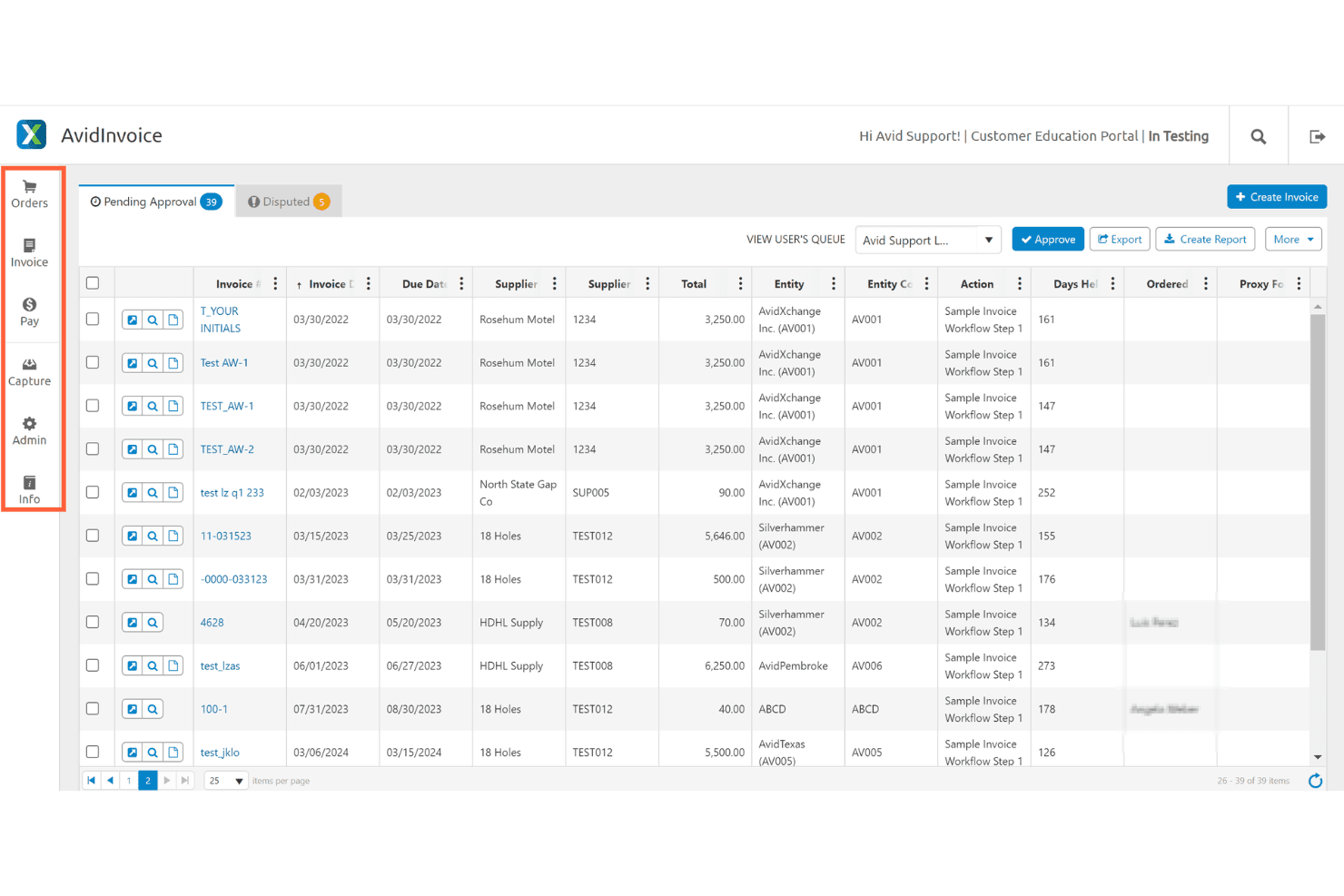
AvidXchange's AvidInvoice displays a pending approval queue with invoice details, supplier info, and workflow actions for accounts payable management. AvidXchange is an AP automation and payment platform that combines invoice capture, multi-tier approval workflows, and electronic payment execution across a supplier network of over 700,000 vendors.
Who Is AvidXchange Best For?
AvidXchange is a strong fit for middle-market AP teams in real estate, construction, and property management who handle high invoice volumes domestically.
Why I Picked AvidXchange
I picked AvidXchange as one of the best because its supplier network is genuinely unmatched in the middle market. The AvidPay Network connects over 700,000 suppliers who can receive payment via virtual card, AvidPay Direct, or check directly through the Supplier Hub portal. When a supplier isn't already enrolled, AvidXchange handles the outreach and onboarding, so my team isn't stuck chasing vendors to accept electronic payments.
AvidXchange Key Features
- Multi-tier approval workflows: Configure complex approval paths with role-based controls for invoice and payment processing.
- ERP and accounting integrations: Connect natively with NetSuite, Sage, QuickBooks, Microsoft Dynamics, Workday, and over 260 additional platforms.
- Invoice automation: Digitize invoice capture, coding, and approval using AI-powered data extraction.
- Audit trail and reporting dashboard: Track all AP activity with centralized logs and visualize metrics through a built-in dashboard.
AvidXchange Integrations
AvidXchange offers native integrations with NetSuite, Sage, Microsoft Dynamics, QuickBooks, Acumatica, MRI Software, Yardi, and Workday, with more than 260 total ERP and accounting system integrations. An API is available for custom integrations.
Pros and Cons
Pros:
- Strong domestic AP invoice automation and coding
- Configurable multi-tier payment approval workflows available
- Large pre-enrolled supplier base for electronic payments
Cons:
- Implementation and onboarding require significant time investment
- Limited cross-border and multi-currency payment options
Learn more about AvidXchange: Best for SaaS payment operations
- Free demo available
- From $599/month
Visit WebsiteCustomer Rating:4.3/5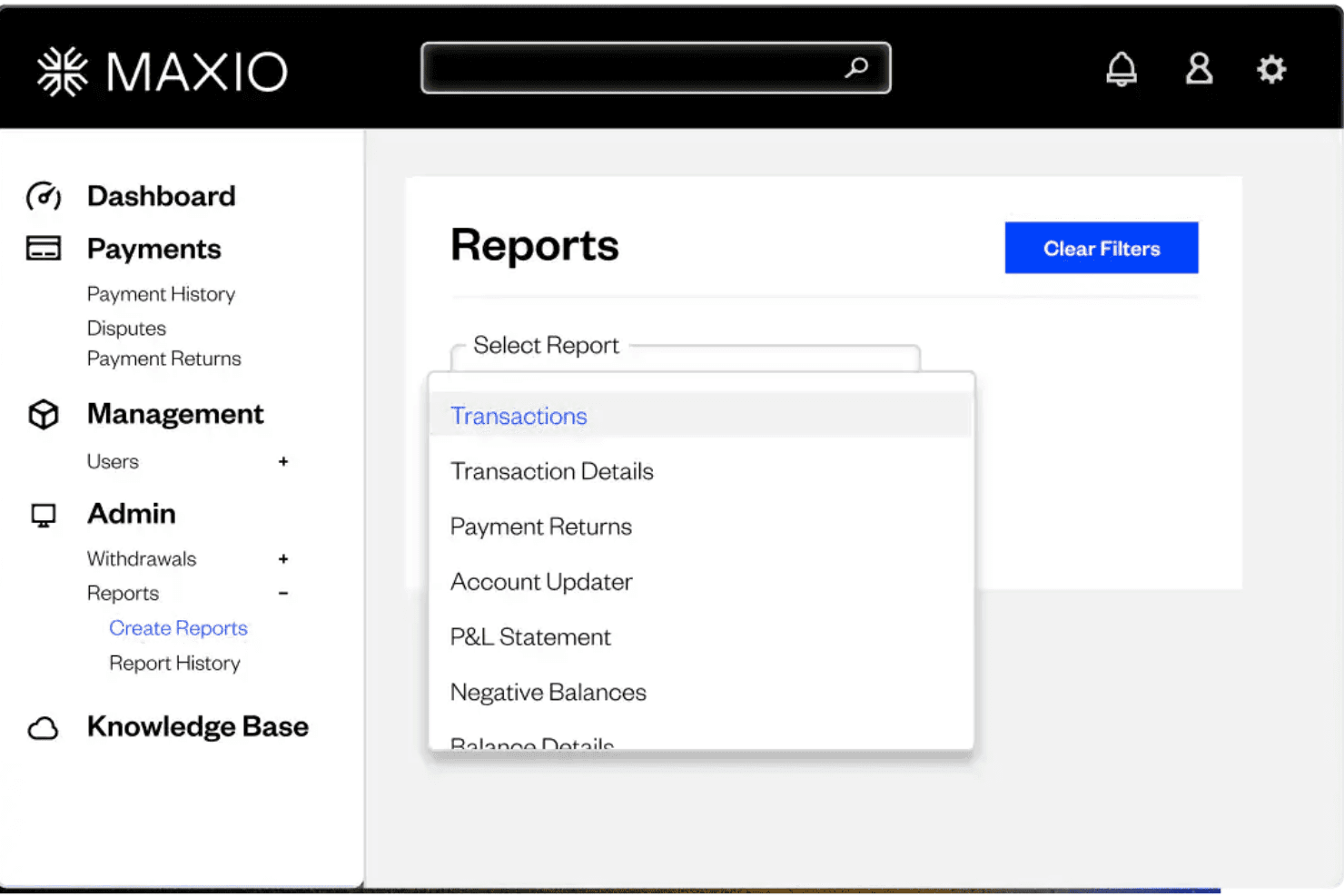
Maxio offers a Reports section with a dropdown menu featuring report types such as Transactions, Transaction Details, Payment Returns, Account Updater, P&L Statement, and Negative Balances. Maxio is a subscription billing and revenue management platform built for B2B SaaS and AI companies, combining usage-based billing, automated invoicing, revenue recognition, and SaaS metrics reporting in a single system.
Who Is Maxio Best For?
Maxio is a strong fit for finance teams at B2B SaaS and AI companies managing complex subscription models, particularly at the growth stage where billing and revenue recognition are becoming harder to handle manually.
Why I Picked Maxio
I picked Maxio as one of the best because of how it handles usage-based billing alongside traditional subscription models. I like that you can meter and rate live usage events, set minimum commitments, and trigger overages automatically, all without custom billing logic. The 30+ canned SaaS metrics reports, covering ARR, DSO, and deferred revenue, give finance teams real visibility into what's actually happening inside the subscription portfolio.
Maxio Key Features
- Multi-entity management: Configure separate catalogs, gateways, and settings for multiple subsidiaries from one central platform.
- Native NetSuite, QuickBooks, and Xero integration: Sync customer, contract, and revenue data directly with leading accounting and ERP systems.
- Automated dunning and collections: Create rules-based payment reminders and escalations to manage overdue receivables.
- Customizable financial reporting: Access a library of 30+ pre-built financial and SaaS metrics reports with drill-down and dashboard options.
Maxio Integrations
Maxio offers native integrations with NetSuite, QuickBooks Online, QuickBooks Desktop, Xero, Sage Intacct, Rillet, and Salesforce. An API is available for custom integrations.
Pros and Cons
Pros:
- Supports hybrid subscription and usage pricing
- Built-in SaaS revenue recognition reporting
- Handles complex usage-based billing natively
Cons:
- Not built for AP disbursement workflows
- Limited multi-currency and cross-border support
Learn more about Maxio: Best for multi-currency international payments
- Free plan + free demo available
- From $12/user/month
Visit WebsiteCustomer Rating:4.4/5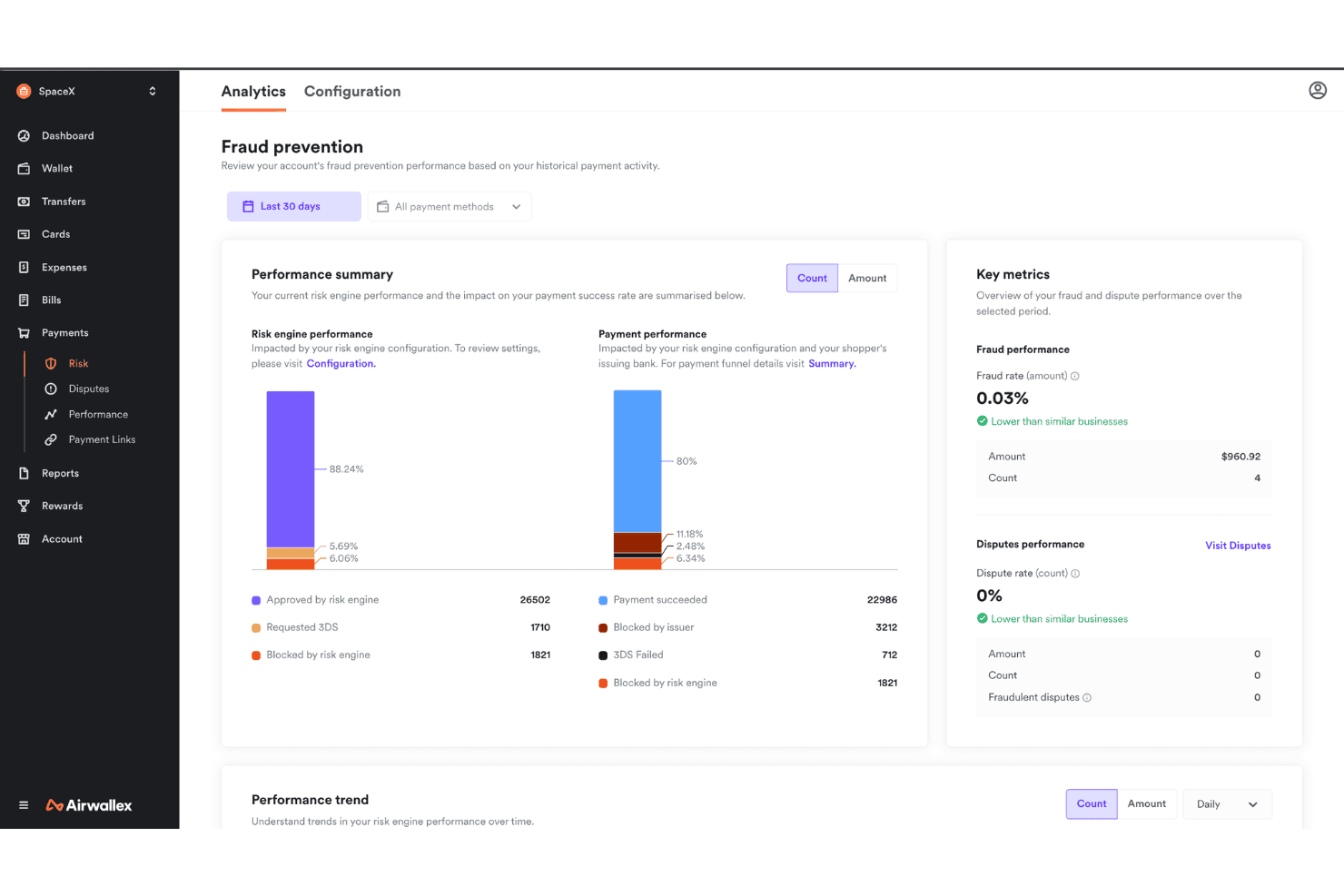
Airwallex offers a fraud prevention analytics dashboard that displays risk engine performance, payment success rates, and key fraud metrics. Airwallex is a global enterprise payments platform that combines multi-currency accounts, cross-border payment execution, AP automation, spend management, and embedded finance APIs in one unified system.
Who Is Airwallex Best For?
Airwallex is a strong fit for mid-market and enterprise finance teams managing payments across multiple countries, currencies, and legal entities.
Why I Picked Airwallex
I picked Airwallex as one of the best because of how it handles like-for-like currency settlement. Instead of forcing FX conversion on every incoming payment, my team can collect and hold funds in 20+ currencies, then pay out via local rails across 120+ countries at 0.5% above interbank rates. The Optimize 360 engine also routes card transactions through local acquiring in 35+ markets, which meaningfully improves authorization rates on international volume.
Airwallex Key Features
- Global payment method acceptance: Accepts 160+ local payment methods across 180+ countries through a single checkout.
- ERP integration suite: Provides native connectors for NetSuite, Microsoft Dynamics 365, Xero, and QuickBooks for synchronized accounting and spend data.
- AI-powered fraud engine: Uses machine learning for transaction monitoring, pattern analysis, and automated anomaly detection to reduce manual intervention.
- Multi-entity account management: Centralizes management of multiple legal entities with configurable permissions and consolidated reporting.
Airwallex Integrations
Airwallex offers native integrations with NetSuite, Microsoft Dynamics 365 Business Central, Xero, and QuickBooks. An API is available for custom integrations.
Pros and Cons
Pros:
- Multi-currency wallets without forced conversion
- Local acquiring in 35+ markets
- Competitive FX rates on cross-border payments
Cons:
- Onboarding verification can be slow
- Limited phone support for account issues

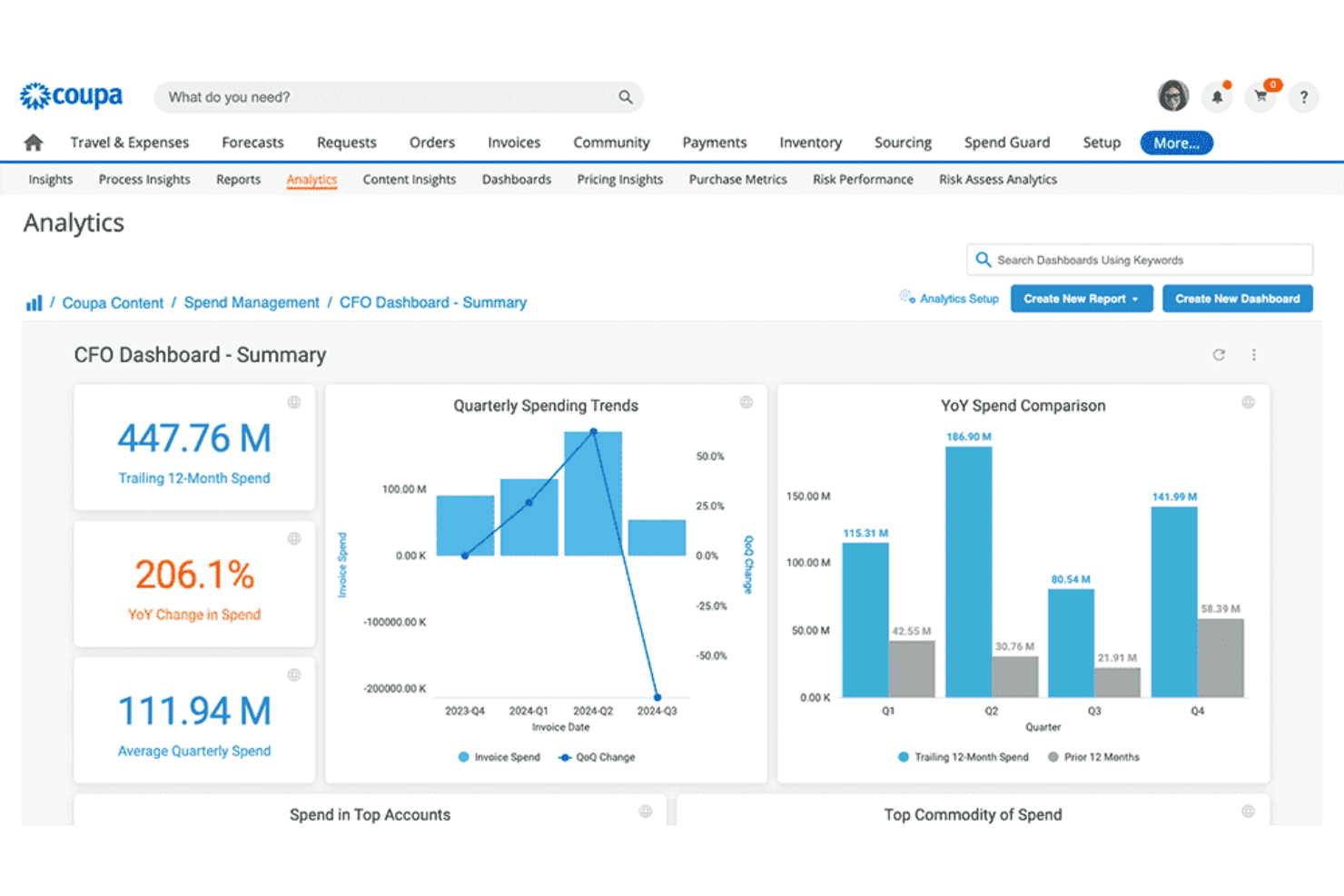
Coupa offers a CFO Dashboard with analytics including quarterly spending trends, YoY spend comparison, and key financial KPIs. Coupa Pay is an enterprise AP payments platform embedded within Coupa's spend management suite, supporting multi-rail disbursements, virtual cards, cross-border payments, fraud controls, and AI-driven invoice reconciliation across multiple entities and currencies.
Who Is Coupa Best For?
Coupa Pay is built for large enterprises managing high-volume, multi-entity AP operations where payment visibility, ERP integration, and working capital control are priorities.
Why I Picked Coupa
Coupa earns its spot on my shortlist because of how it surfaces payment data across the entire AP workflow. I love that real-time payment tracking and AI-driven document intelligence feed reconciled, enriched invoice data directly into a single dashboard, so my team can see where every payment stands without hunting through multiple systems. The fraud detection layer also flags suspicious transactions before they clear, adding a risk control dimension most standalone payment tools don't offer.
Coupa Key Features
- Multi-rail payment execution: Handle ACH, wires, checks, digital wallets, and virtual cards from a single unified workspace.
- ERP and accounting integration: Connect natively to major ERPs including SAP, Oracle, NetSuite, and Microsoft Dynamics.
- Working capital optimization tools: Leverage early pay discounts, dynamic discounting, and extend DPO with virtual card programs.
- Supplier risk and compliance management: Monitor supplier performance, run sanctions screening, and enforce audit trails directly within the payments flow.
Coupa Integrations
Coupa Pay provides native integrations with SAP, Oracle, NetSuite, Workday, and Microsoft Dynamics. An API is available for custom integrations.
Pros and Cons
Pros:
- Virtual card program extends supplier payment terms
- AI-driven fraud detection on outgoing payments
- Real-time payment visibility across all entities
Cons:
- Steep configuration requirements for multi-entity setups
- Long implementation timelines for enterprise rollouts
Learn more about Coupa: Best for unified global payment acceptance
- Not available
- From $620/month
Visit WebsiteCustomer Rating:4.6/5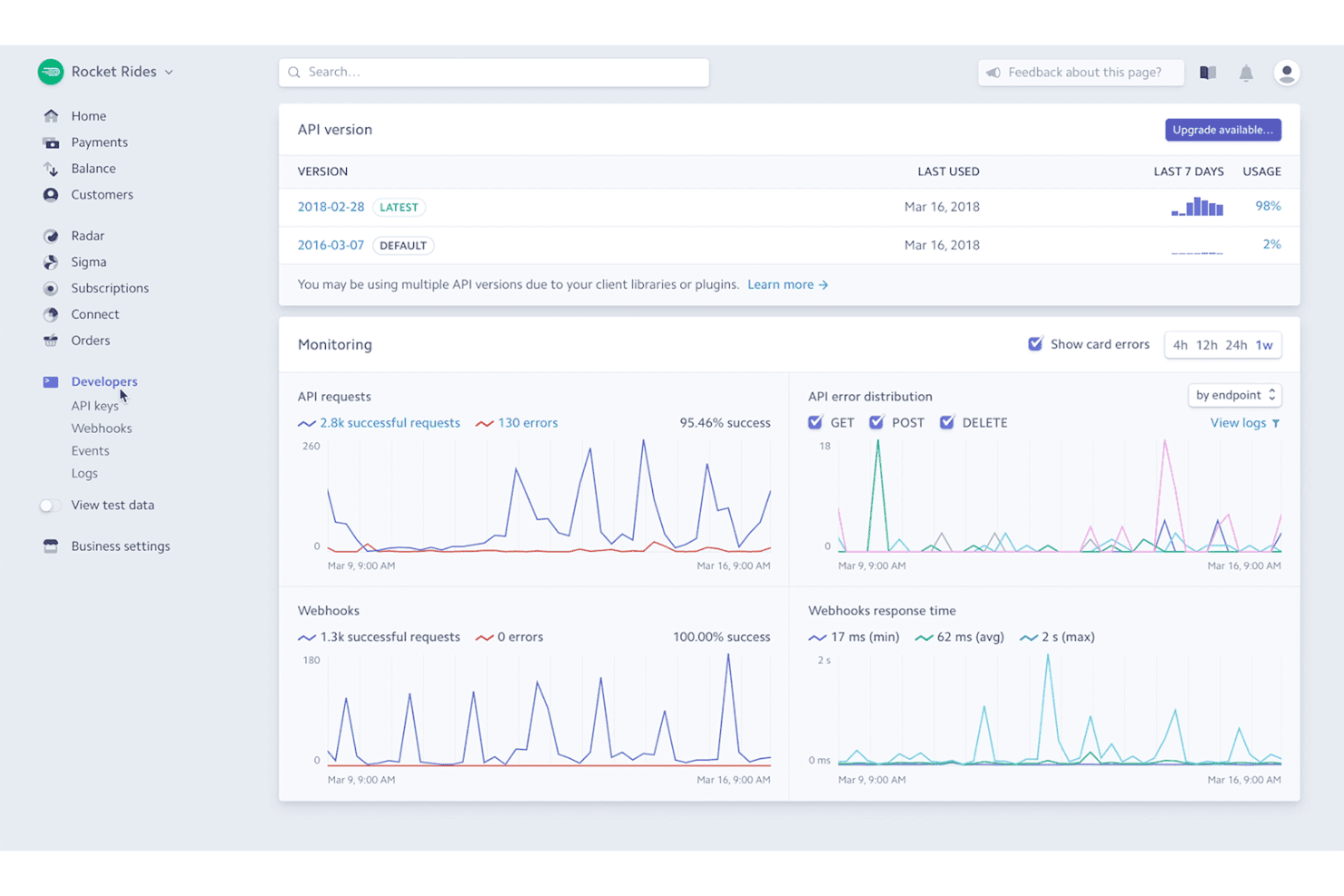
Stripe offers a developer dashboard with API version tracking, request monitoring, webhook stats, and error distribution charts. Stripe is a global payments platform that supports online, in-person, and embedded payment acceptance across 135+ currencies, paired with billing, tax automation, fraud detection, and financial reporting tools.
Who Is Stripe Best For?
Stripe is a strong fit for technology companies, SaaS businesses, and digital platforms that need developer-configurable payment infrastructure across multiple markets.
Why I Picked Stripe
I've included Stripe in my top picks because no other platform comes close to its breadth of global payment acceptance under one integration. Supporting 100+ payment methods across 195 countries (from iDEAL in the Netherlands to Alipay in China to BNPL options globally), Stripe lets enterprises accept payments the way local customers actually prefer. Its Managed Payments option also handles merchant-of-record responsibilities across 75+ countries, removing significant compliance overhead.
Stripe Key Features
- Revenue recognition compliance: Automates ASC 606 and IFRS 15 revenue recognition with built-in policy controls.
- ERP and financial data connectors: Integrates natively with NetSuite and synchronizes payment data to ERPs and analytics systems.
- Programmable workflows: Offers no-code automation with 600+ event triggers for payment and accounting processes.
- Data warehouse sync: Streams transaction and reporting data directly to Snowflake, Amazon Redshift, or BigQuery for analysis.
Stripe Integrations
Stripe offers native integrations with NetSuite, Salesforce, Xero, QuickBooks, and Snowflake, and provides an API for custom integrations.
Pros and Cons
Pros:
- Supports processor-agnostic card vaulting
- ML-based fraud detection adapts to real-time patterns
- Supports 135+ currencies and local payment methods
Cons:
- Complex chargeback management
- Limited outbound AP and disbursement capabilities
Learn more about Stripe: Best for global multi-entity payment automation
- Free demo available
- From $99/month
Visit WebsiteCustomer Rating:4.5/5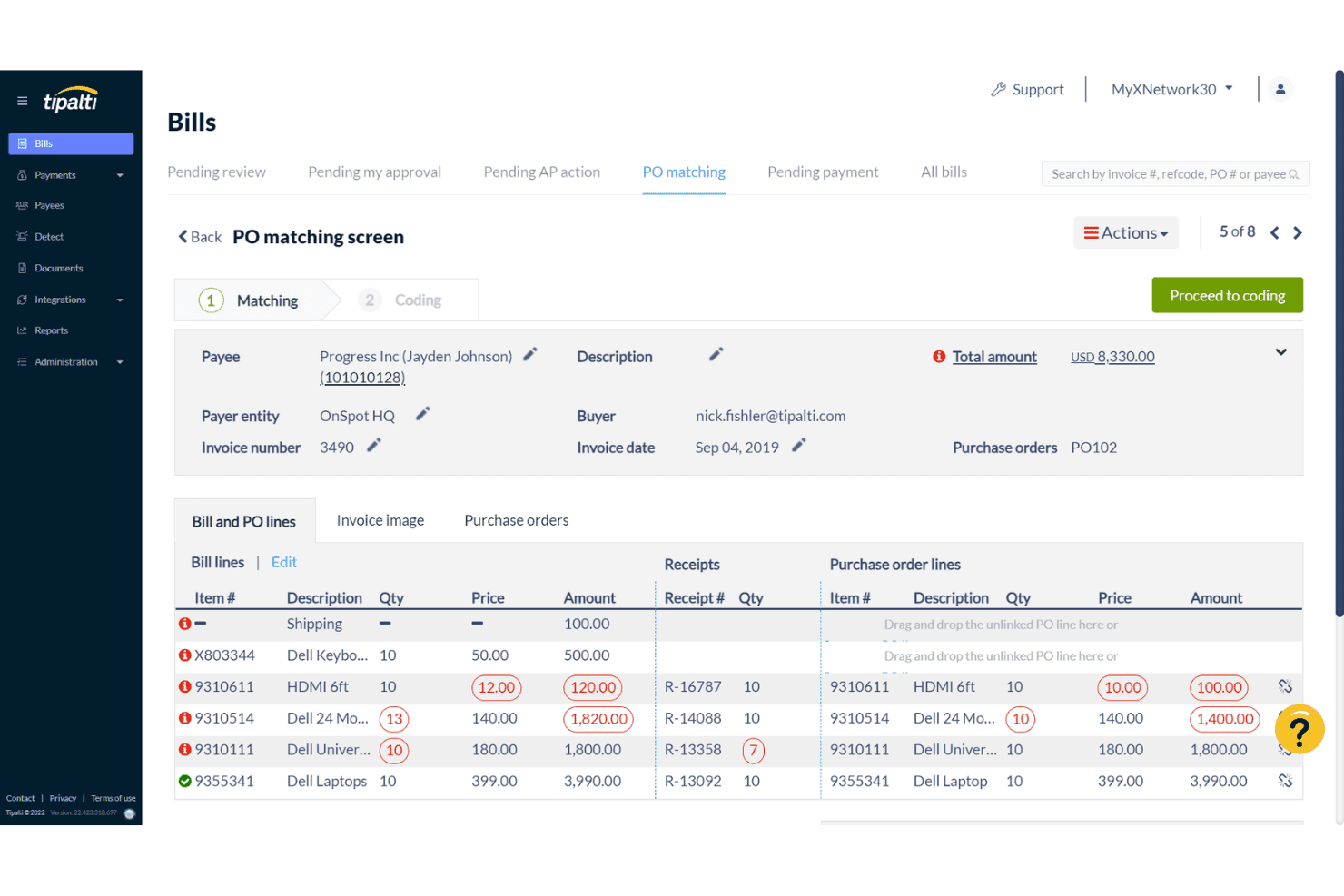
Tipalti offers a PO matching screen within its Bills module, allowing users to compare bill lines against purchase order lines and receipts for accurate invoice reconciliation. Tipalti is an AP automation and global payments platform that covers accounts payable, mass payments, procurement, expenses, and treasury across multiple entities and currencies.
Who Is Tipalti Best For?
Tipalti is a strong fit for mid-market and enterprise finance teams that manage AP and vendor payments across multiple legal entities and international markets.
Why I Picked Tipalti
I picked Tipalti as one of the best because its multi-entity architecture is built for real complexity. Each entity gets its own approval workflows, payment rules, and branded supplier communications, while I still see a consolidated view across all of them. What I find most useful is local payment rails across 200+ countries paired with tax ID validation across 62 countries, which cuts significant manual compliance work from cross-border vendor payments.
Tipalti Key Features
- AI-powered invoice capture and coding: Scan and code invoices automatically in 146 languages using built-in AI agents.
- Native ERP integrations: Sync with NetSuite, Sage, Microsoft Dynamics, SAP, Oracle, QuickBooks, and Xero through certified, bi-directional connectors.
- Global tax validation: Validate tax IDs in 62 countries against thousands of compliance rules for cross-border vendor onboarding.
- SAML/SSO and user permissions controls: Integrate with Okta, Azure, or Google Workspace for centralized role-based access and secure authentication.
Tipalti Integrations
Tipalti offers native integrations with NetSuite, Sage Intacct, Microsoft Dynamics 365 Business Central, QuickBooks Online, Xero, SAP S/4HANA, Oracle Fusion Cloud, and Workday. An API is available for custom integrations.
Pros and Cons
Pros:
- Built-in sanctions screening across 62 countries
- Supplier self-service onboarding portal included
- Strong multi-entity AP and payment controls
Cons:
- Custom reporting options are fairly limited
- Implementation takes several months to complete
Learn more about Tipalti: Best for treasury-led payment control
- Free demo available
- Pricing upon request
Visit WebsiteCustomer Rating:4.2/5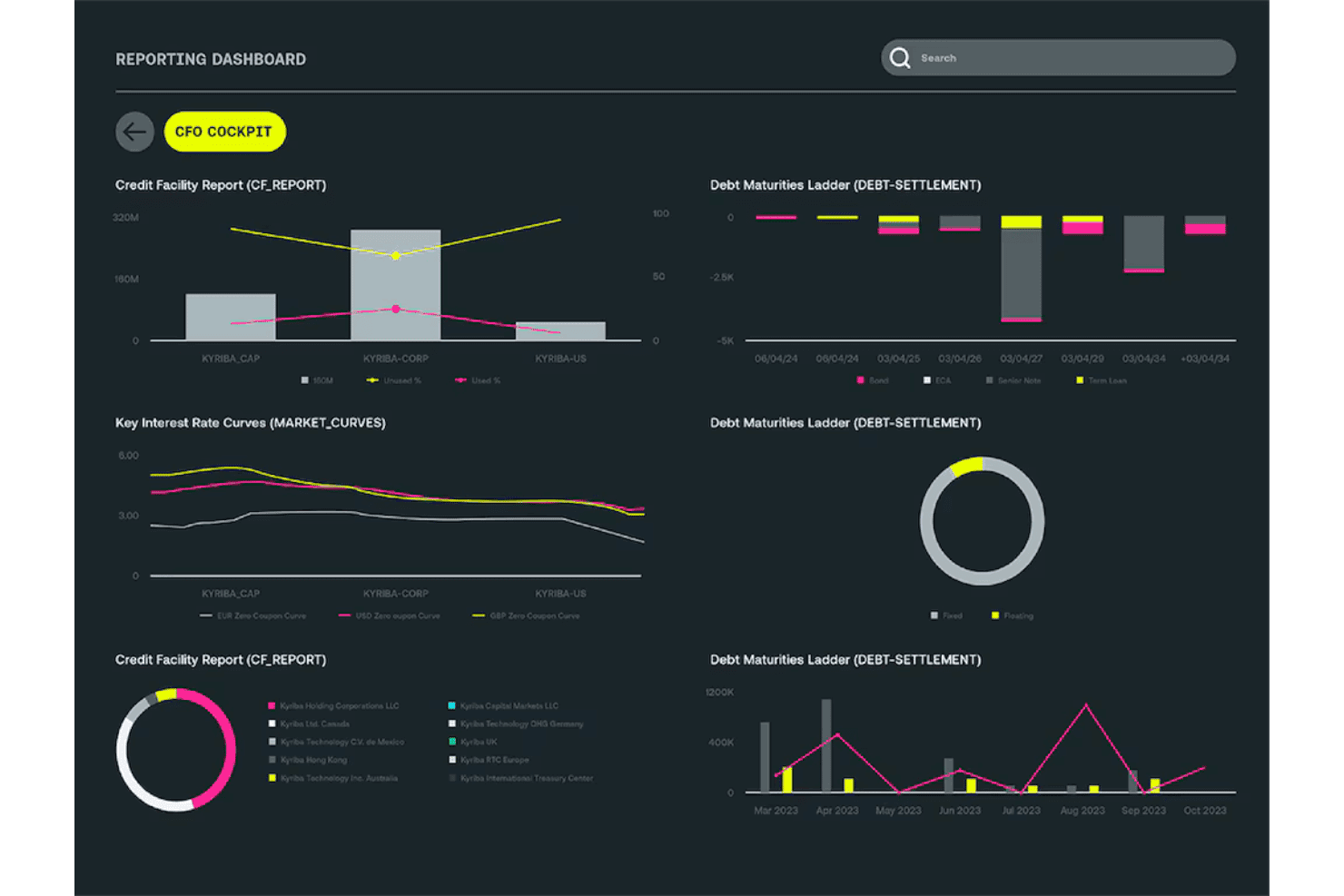
Kyriba offers a CFO Cockpit reporting dashboard featuring credit facility reports, debt maturities ladders, and key interest rate curves. Kyriba is a cloud-based treasury and payment platform that centralizes outbound payment execution, approval workflows, bank connectivity, fraud controls, and automated reconciliation across multiple entities and ERPs.
Who Is Kyriba Best For?
Kyriba is a strong fit for large enterprise organizations with complex, multi-entity treasury operations managed by a dedicated treasury or finance team.
Why I Picked Kyriba
Kyriba earns its spot on my shortlist because of how it handles payment control at the treasury level. I particularly like the multi-level, rule-based approval workflows with digital signatures that enforce segregation of duties across every entity and geography. On top of that, the AI-powered fraud detection and automated sanctions screening run on every payment before it clears, which is the kind of pre-execution control a global payment factory genuinely requires.
Kyriba Key Features
- Certified ERP integrations: Connect natively with SAP, Oracle, NetSuite, Workday, and Microsoft Dynamics for real-time data synchronization.
- Bank connectivity platform: Access over 9,900 banks worldwide using a library of 66,000+ payment formats and local payment rails.
- Automated reconciliation engine: Match payments to invoices and bank files automatically, supporting cash visibility and financial close.
- Multi-currency transaction support: Process payments and manage cash positions in 100+ currencies with FX exposure management.
Kyriba Integrations
Kyriba offers native integrations with SAP, Oracle, NetSuite, Workday, and Microsoft Dynamics, plus connects to over 9,900 banks worldwide. An API is available for custom integrations.
Pros and Cons
Pros:
- Connects to thousands of banks globally
- AI fraud detection flags payments pre-execution
- Granular approval rules enforce payment-level controls
Cons:
- Configuration requires significant technical involvement
- Long, complex implementation for new clients
Learn more about Kyriba: Best for cross-border transaction routing
- Free demo available
- Pricing upon request
Visit WebsiteCustomer Rating:3.8/5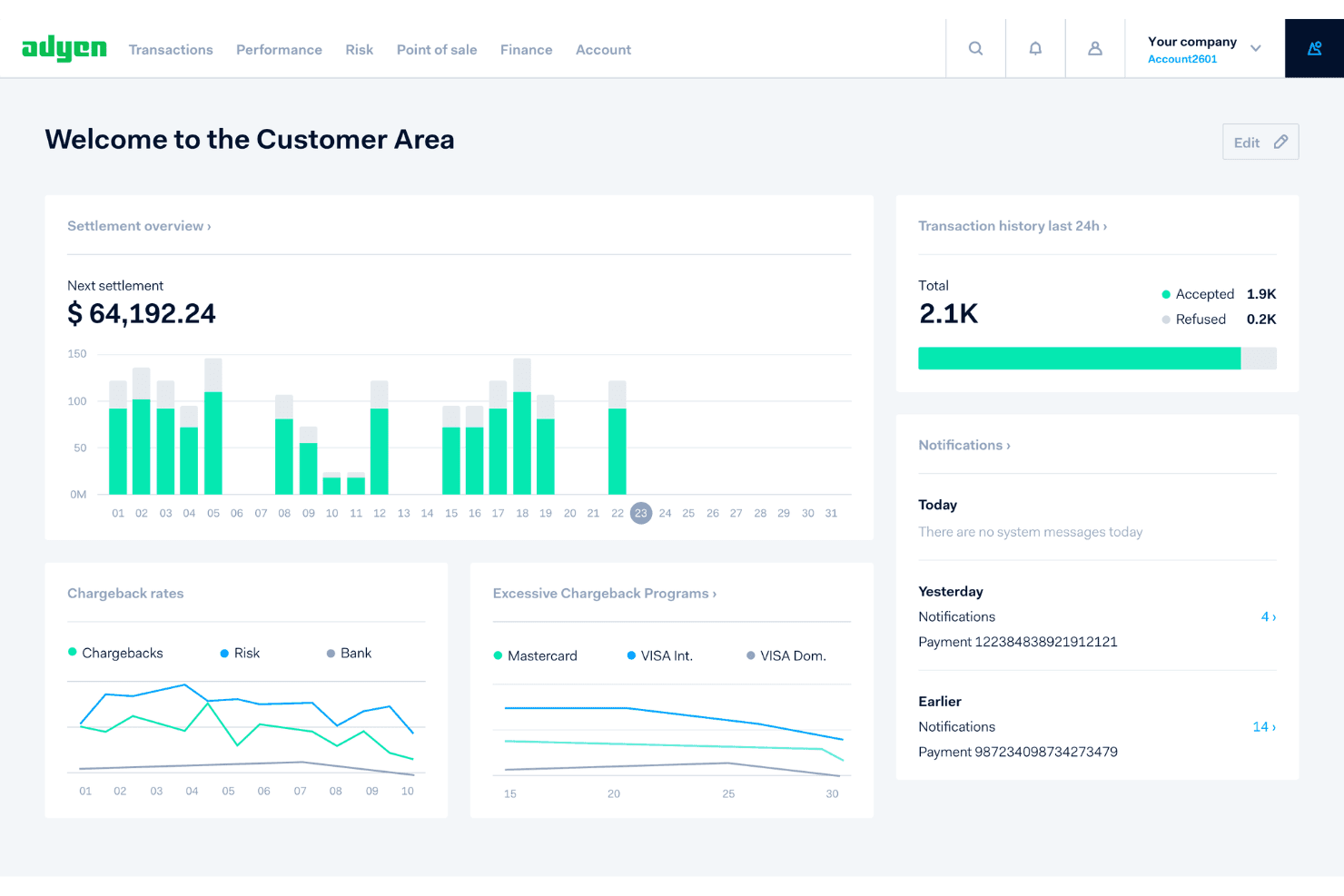
Adyen's Customer Area dashboard displays settlement overviews, chargeback rates, transaction history, and real-time notifications in one centralized interface. Adyen is a unified financial technology platform that combines payment acceptance across online, in-store, and mobile channels with built-in acquiring, multi-currency settlement, fraud prevention, and embedded financial products in a single integration.
Who Is Adyen Best For?
Adyen is a strong fit for large, global enterprises running high transaction volumes across multiple markets, currencies, and sales channels.
Why I Picked Adyen
I picked Adyen as one of the best because its cross-border routing logic is genuinely sophisticated. Rather than funneling every international transaction through a single hub, Adyen uses local acquiring in key markets, which meaningfully improves authorization rates across regions. I also appreciate the Interchange++ pricing model, which breaks down interchange and scheme fees at the individual transaction level, giving full visibility into exactly what cross-border processing costs across 150+ currencies.
Adyen Key Features
- Local payment method support: Accepts over 200 country-specific payment methods across online and in-person channels.
- Real-time reconciliation and reporting: Provides detailed transaction and settlement reporting with automated reconciliation tools.
- Integrated risk management suite: Includes configurable fraud filters, velocity checks, and PCI-compliant transaction monitoring by default.
- Single API for global payments: Enables payment acceptance, settlement, and disbursement through one integration for multiple regions and currencies.
Adyen Integrations
Adyen offers native integrations with platforms like Salesforce Commerce Cloud, Adobe Commerce, Shopify, WooCommerce, BigCommerce, SAP Commerce Cloud, Oracle Commerce Cloud, Wix, and PrestaShop. An API is available for custom integrations.
Pros and Cons
Pros:
- PCI DSS Level 1 certified by default
- Enables processor-agnostic vault portability
- High authorization rates via intelligent routing
Cons:
- Implementation requires significant developer resources
- No dedicated AP disbursement workflow tools
Learn more about Adyen:
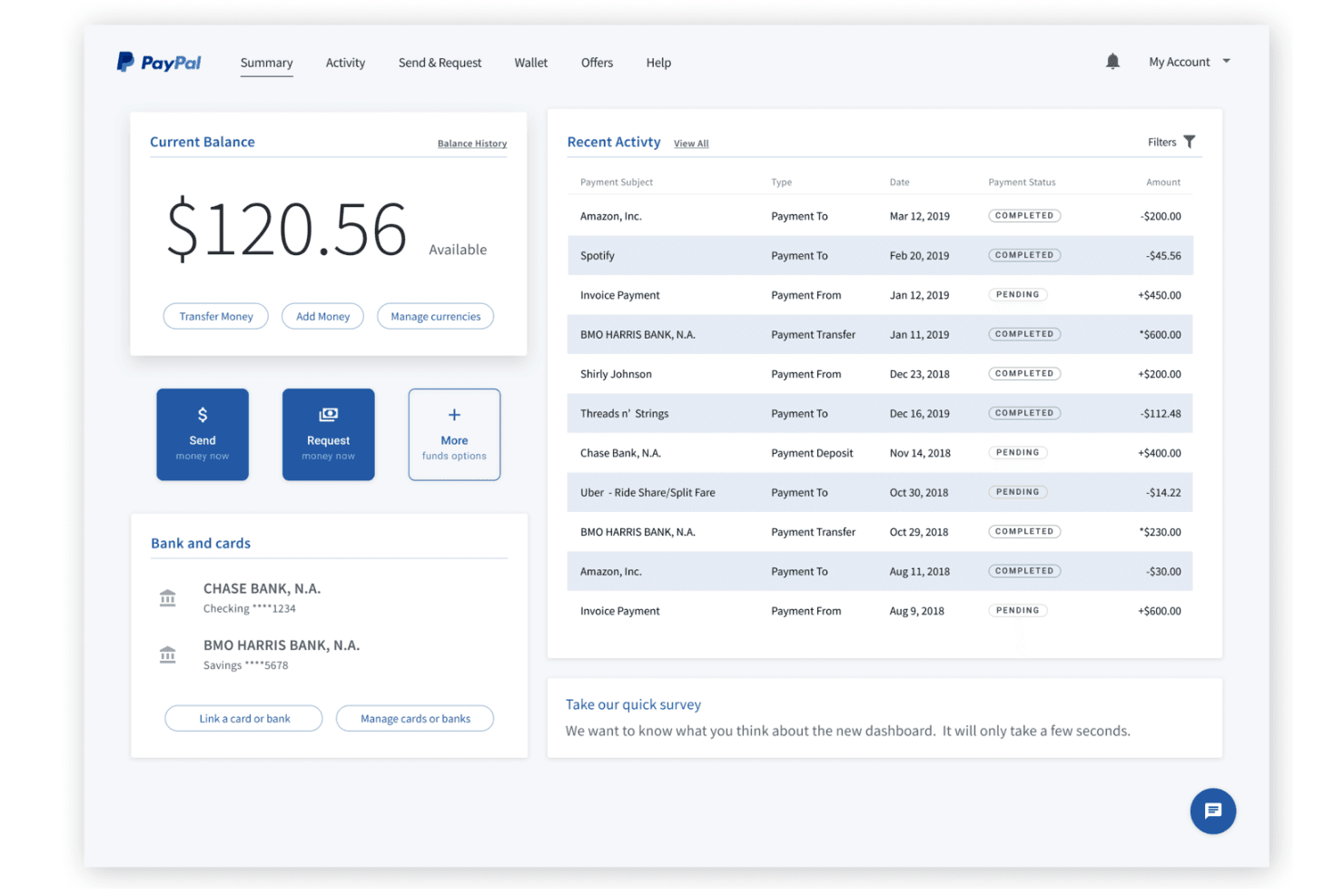
PayPal Open displays a summary dashboard with current balance, recent activity, and linked bank accounts for easy financial management. PayPal Open is a unified merchant payment platform that consolidates payment acceptance, global payouts, fraud protection, and payment orchestration across 200+ markets and 130+ currencies through a single integration.
Who Is PayPal Open Best For?
PayPal Open suits high-volume digital commerce businesses and marketplace platforms that need to send mass payouts to global recipients across PayPal and Venmo wallets.
Why I Picked PayPal Open
PayPal Open earns its spot on my shortlist because of its unmatched digital wallet payout reach. I can push payments directly to PayPal and Venmo wallets across 200+ markets in 50+ currencies using 30+ transfer methods. The batch payout capability is what I find most useful in practice: my team can send mass payouts to thousands of recipients simultaneously, which is genuinely hard to replicate at this scale through most competing platforms.
PayPal Open Key Features
- Enterprise payments platform: Offers unified payment acceptance and processing across cards, wallets, and local payment methods in 200+ markets.
- Fraud protection advanced: Delivers AI-powered risk screening, chargeback protection, and dispute automation to support compliance needs.
- Payment orchestration tools: Enables smart transaction routing, tokenization, and network token management for greater control and security.
- Omnichannel POS support: Includes in-person payment hardware options like Verifone terminals and PayPal card readers for retail and on-the-go sales.
PayPal Open Integrations
PayPal Open offers native integrations with Shopify, WooCommerce, BigCommerce, Magento, Salesforce Commerce Cloud, and Adobe Commerce. An API is available for custom integrations.
Pros and Cons
Pros:
- Broad consumer wallet recognition boosts payout acceptance
- Built-in fraud detection with chargeback protection
- Mass payouts reach 200+ global markets
Cons:
- Customer support response times frustrate high-volume users
- Limited ERP native connectors for enterprise finance
Learn more about PayPal Open:
Other Enterprise Payment Platforms
Here are some additional enterprise payment platform options that didn’t make it onto my shortlist, but are still worth checking out:
- 11ZuoraBest for subscription billing
- 12HighRadiusBest for AI-powered cash and bank reconciliation
- 13BILLBest for invoice-to-pay workflow integration
- 14StampliBest for AP team collaboration
- 15CorpayBest for integrated AP payments and FX management
- 16PayoneerBest for mass payouts to global partners
- 17BilltrustBest for automated B2B payment matching
- 18SerralaBest for embedded SAP payment workflows
- 19BottomlineBest for compliance-driven payment operations
- 20FlywireBest for global receivables and payer experience
How I Evaluate Enterprise Payment Platforms
I split my evaluation into must-have controls—like multi-rail execution and ERP sync—and the differentiators that separate tools built for global treasury complexity from basic AP automation.
Core Functionality (Table Stakes For This List)
When I'm selecting tools for my list, I rank each one on a scale from 0 (does not offer the functionality) to 5 (excels in this area) for each core functionality listed below. Then, I calculate the tool's total score into a percentage. Each tool needs to achieve a minimum total score of 65% to be considered for inclusion.
- Multi-rail payment execution: I check whether a platform supports ACH, wire, SWIFT, virtual card, and RTP from one interface so AP teams aren't juggling separate banking portals.
- ERP and accounting integration: Native connectors to SAP, Oracle, NetSuite, and Workday matter most. I look for bidirectional sync that keeps invoices, vendors, and GL data aligned.
- Cross-border payments: Currency coverage and FX handling are key, especially for teams disbursing to suppliers across dozens of countries simultaneously.
- Approval workflows: Configurable multi-tier approvals with role-based access let AP directors enforce segregation of duties across entities and payment thresholds.
- Fraud and compliance controls: I look for automated sanctions screening, payment validation, and full audit trails that hold up during internal controls reviews.
- Reconciliation and reporting: Auto-matching payments to invoices and bank feeds saves hours during close. I check for dashboards that surface exceptions quickly.
Once I have a list of tools that meet the criteria, I consider what sets each platform apart.
Differentiating Factors (What Sets Vendors Apart)
Here's how I compare and contrast different vendors:
Standout Features
Payment orchestration is a big differentiator—I look for platforms that dynamically route transactions across acquirers based on cost and geography, which directly impacts authorization rates. An embedded fraud engine matters too, especially one that adapts to transaction patterns using machine learning rather than static rules. I also evaluate tokenization and vault portability, since the ability to migrate processors without re-collecting card data gives your team real leverage during vendor negotiations.
Beyond Features
Compliance certifications like PCI DSS Level 1, SOC 2 Type II, and ISO 27001 are table stakes at enterprise scale—I check whether each vendor holds current attestations. Pricing transparency also matters: I evaluate whether a platform clearly breaks out FX markups, gateway fees, and chargeback costs so your team can model true total cost of ownership. For multi-entity organizations, I look at geographic coverage and whether the platform supports consolidated reporting across subsidiaries without requiring separate instances.
How to Choose an Enterprise Payment Platform
It’s easy to get bogged down in long feature lists and complex pricing structures. To help you stay focused as you work through your unique software selection process, here’s a checklist of factors to keep in mind:
| Factor | What to Consider |
|---|---|
| FactorScalability | What to ConsiderCan the platform handle spikes in transaction volume and multi-entity growth without excessive maintenance? Consider current and projected business scale. |
| FactorIntegrations | What to ConsiderWill the platform natively connect with your ERP, accounting, and treasury systems? Check for true bidirectional sync and supported connectors. |
| FactorCustomizability | What to ConsiderCan you tailor workflows, approval hierarchies, and reporting to your internal controls? Rigid systems can create bottlenecks or compliance gaps. |
| FactorEase of use | What to ConsiderHow intuitive is navigation for both AP teams and executives? Consider time to onboard, learning curve, and ongoing admin needs. |
| FactorImplementation and onboarding | What to ConsiderWhat resources and timeline are required for rollout? Ask about data migration, training, sandbox access, and support from the vendor’s team. |
| FactorCost | What to ConsiderHow clear is the fee structure, including FX markups or minimums? Make sure you can estimate total spend before signing a contract. |
| FactorSecurity safeguards | What to ConsiderAre certification levels and encryption standards up-to-date? Evaluate vendor documentation and check if requirements (PCI DSS, SOC 2, ISO) are met. |
| FactorCompliance requirements | What to ConsiderDoes the platform support audit logging, segregation of duties, sanctions screening, and region-specific mandates? Assess controls for your industry. |
What Are Enterprise Payment Platforms?
Enterprise payment platforms are software systems that let businesses send, receive, and manage large volumes of payments across multiple methods, currencies, and locations. These platforms connect directly with ERPs and accounting systems, automate approval workflows, and enforce compliance controls to help finance teams simplify payment operations, reduce risk, and support global business needs.
Features
When selecting an enterprise payment platform, keep an eye out for the following key features:
- Multi-rail execution: Lets your team send payments via ACH, wire, SWIFT, check, RTP, and virtual cards from a single interface, reducing complexity and banking portals.
- ERP integration: Connects directly to common ERP and accounting systems to sync vendor records, invoices, approvals, and payment data with your financial processes.
- Multi-currency support: Handles global and cross-border payments in dozens of currencies with built-in FX management, rate locking, and transparent conversion processes.
- Role-based workflows: Allows you to build multi-tier, configurable approval processes with custom roles and limits to help maintain strong controls and compliance.
- Fraud prevention tools: Includes automated sanctions screening, transaction monitoring, and audit trails to help prevent unauthorized payments and support regulatory compliance.
- Automated reconciliation: Matches payments to invoices, bank statements, and general ledger automatically, reducing manual effort during monthly and quarterly closes.
- Real-time reporting: Provides live dashboards and detailed transaction insights that help finance teams monitor payment status, exceptions, and outstanding disbursements.
- Access controls: Lets you tightly manage permissions and restrict sensitive payment functions to the right people at the right time.
- Document management: Stores supporting documents and payment details securely within the platform for audit readiness and easy retrieval during reviews.
- API extensibility: Supports custom integrations and workflow automations through open APIs, helping your tech team connect the platform with other business systems.
Benefits
Implementing an enterprise payment platform provides several benefits for your team and your business. Here are a few you can look forward to:
- Centralized control: Manage all payment processes, methods, and entities from a single platform, making oversight and approval easier for finance leaders.
- Stronger compliance: Enforce sanctions screening, audit trails, and approval workflows to reduce risk and support regulatory demands.
- Greater efficiency: Automate manual tasks like payment matching, approvals, and reporting, freeing staff to focus on higher-value analysis.
- Improved cash visibility: Real-time dashboards and auto-reconciliation give you up-to-date insight into cash position and outgoing payments.
- Lower processing costs: Optimize payment routing and FX conversions, minimizing transaction fees and unnecessary banking overhead.
- Easy scalability: Support growth—whether it’s adding new entities, currencies, or payment routes—without introducing more complexity or switching systems.
- Better vendor relationships: Faster, more accurate payments and transparent communications help maintain strong supplier trust and reduce disputes.
Costs and Pricing
Selecting an enterprise payment platform requires an understanding of the various pricing models and plans available. Costs vary based on features, team size, add-ons, and more. The table below summarizes common plans, their average prices, and typical features included in enterprise payment platform solutions:
Plan Comparison Table
| Plan Type | Average Price | Common Features |
|---|---|---|
| Plan TypeFree Plan | Average Price$0 | Common FeaturesLimited payment methods, basic reporting, and entry-level support. |
| Plan TypePersonal Plan | Average Price$10-$50/user/month | Common FeaturesSingle-user access, expanded payment rails, basic approval workflows, and standard support. |
| Plan TypeBusiness Plan | Average Price$50-$150/user/month | Common FeaturesMulti-user support, ERP integration, multi-currency capabilities, role-based approvals, and moderate reporting tools. |
| Plan TypeEnterprise Plan | Average Price$150+/user/month | Common FeaturesCustom integrations, advanced compliance, dedicated onboarding, enhanced security, full API access, and 24/7 support. |
Enterprise Payment Platform FAQs
Here are some answers to common questions about enterprise payment platforms:
How do enterprise payment platforms handle global payments?
Most platforms support payments in multiple currencies and offer built-in FX conversion, letting you send funds to vendors in different countries without using separate systems.
Leading fintech infrastructure and payment processor technology allow you to accept diverse payment types across the entire payment ecosystem. Check if local online payment methods, support for international credit cards and debit cards, and compliance with cross-border regulations are included to deliver a frictionless global payment experience.
What integration options should I expect?
You should find native connectors for major ERPs, accounting platforms, and tools provided by your primary financial institutions. Modern digital payments infrastructure relies on APIs and custom integrations to help connect specialized or legacy payment systems directly into your financial services network.
Can approval workflows be customized?
Yes, leading platforms let you set up multi-tier, role-based approval chains to match your company’s spending policies. As your business grows, flexible payment solutions allow you to assign dollar thresholds, add reviewers, and manage approval stages throughout the entire transaction lifecycle.
How secure are enterprise payment platforms?
Most reputable vendors maintain PCI DSS, SOC 2, and ISO certifications. End-to-end encryption, audit trails, and regularly updated permission controls are standard for protecting customer data and supporting compliance. Partnering with an established enterprise service provider—such as Fiserv or other leading processors—ensures strict security standards are maintained across every transaction.
What should I know about ongoing platform costs?
Expect variable pricing based on user count, payment volume, and feature usage. Whether you are running an ecommerce platform or a new payment model, watch for FX markups, additional integration fees, and minimum commitment clauses that could affect total cost of ownership throughout your contract. Optimizing these terms helps drive operational efficiency and improves the overall customer experience.