

10 Best ERP Alternatives to Consider in 2026

Best ERP Alternatives Shortlist


ERP systems integrate various business processes, such as finance, HR, and supply chain, into a single platform, providing improved efficiency and data accuracy. However, finding the right solution for your team may require you to sift through several alternative solutions.
With my combined experience in ERP software and financial operations, I tested and compared several ERP solutions to help teams find the top tools on the market. By compiling my results into in-depth reviews, I hope to guide you towards your next software that will effectively drive business growth and manage operations.
What is an ERP?
Enterprise resource planning (ERP) software is a type of software that integrates various business processes and functions into a single system. With an ERP, companies can manage finance, human resources, supply chain, and other core business activities all from one central location, boosting productivity and reducing costs.
Why Trust Our Software Recommendations
Our team has been testing and reviewing software since 2012. As finance leaders ourselves, we know how difficult—and important—it is to choose the right software.
For this guide, we evaluated tools using hands-on testing and independent research, scoring tools using our selection criteria.
Our reviews reflect our human editorial judgment, not a sales pitch.
ERP Alternatives Comparison Table
This comparison table summarizes pricing details for my top ERP alternative selections:
| Tool | Best For | Trial Info | Price | ||
|---|---|---|---|---|---|
| 1 | Best for small manufacturers needing precise, on-time deliveries | 30-day free trial | From $49/user/month | Website | |
| 2 | Best for CPA-led onboarding & support | Free demo available | Pricing upon request | Website | |
| 3 | Best with built-in CRM and sales pipeline tools | 90-day free trial | From $35/user/month | Website | |
| 4 | Best for full lifecycle, people-centric resourcing | Free demo available | Pricing upon request | Website | |
| 5 | Best with 1,000+ prebuilt app connectors | 30-day free trial | Pricing upon request | Website | |
| 6 | Best for small and midsized business management | Free demo available | Pricing upon request | Website | |
| 7 | Best for cloud-based ERP with real-time insights | Free demo available | Pricing upon request | Website | |
| 8 | Best for finance and HR management with continuous recalibration | Free demo available | Pricing upon request | Website | |
| 9 | Best for financial and operations management | Free demo available | Pricing upon request | Website | |
| 10 | Best for connected inventory performance with real-time insights | Free demo available | Pricing upon request | Website |

Best ERP Alternatives Reviews
In this section, I’ll provide an in-depth analysis and overview of each ERP alternative. I’ll walk you through the pros and cons of each tool, their features, and their best use cases.

MRPeasy
Best for small manufacturers needing precise, on-time deliveries
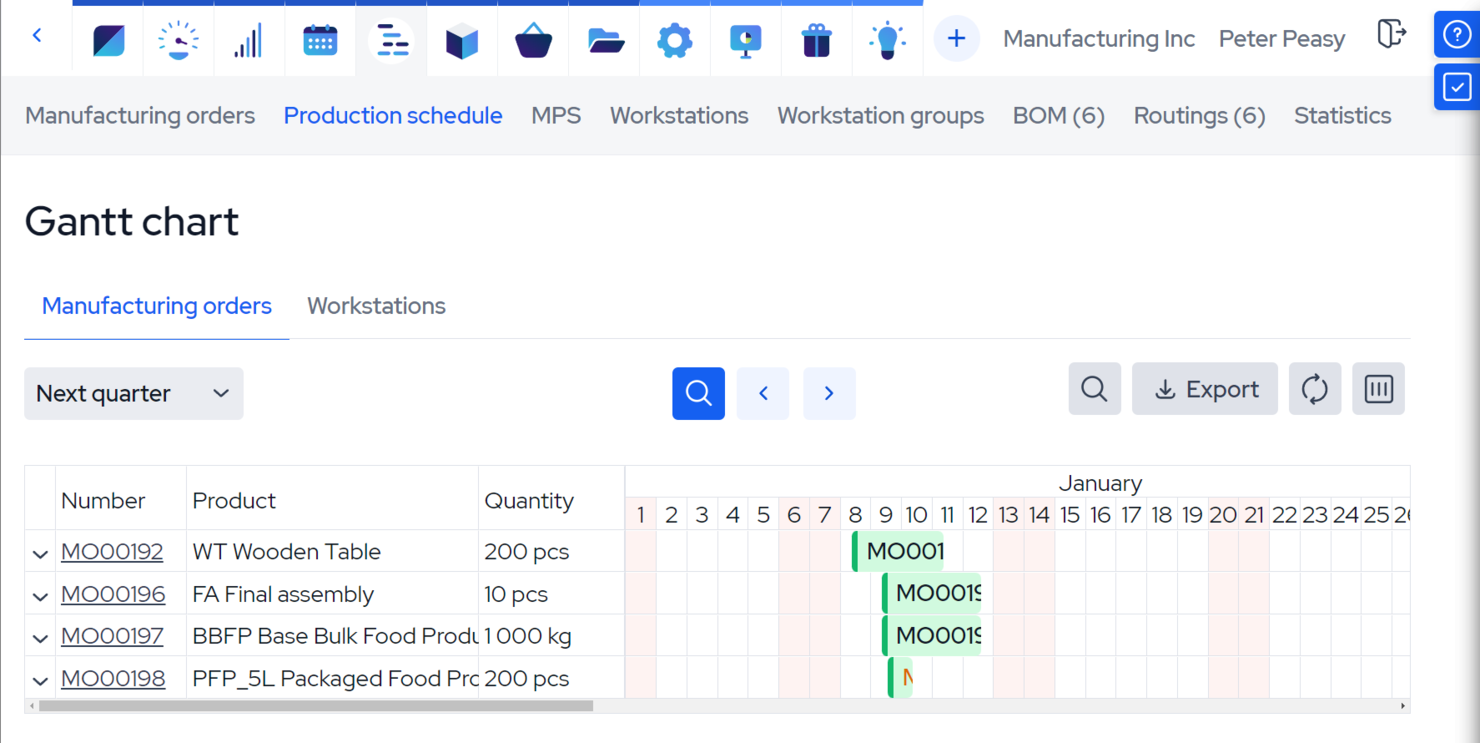
MRPeasy is a manufacturing software designed for small manufacturers. It excels in providing precise, on-time deliveries, improving customer satisfaction, and streamlining production processes.
Why I chose MRPeasy: MRPeasy’s focus on small manufacturers who need precise, on-time deliveries helps it stand out as a top ERP solution. Its advanced features are tailored for small-scale production environments, making it a reliable alternative to traditional ERP systems.
Standout features & integrations:
Features include accurate production planning, real-time inventory management, complete view of business operations, BOM management, drag-and-drop rescheduling, and lot traceability.
Integrations include QuickBooks Online, Xero, Shopify, Magento, BigCommerce, WooCommerce, Pipedrive, ShipStation, Zapier, Ware2Go.
Pros and Cons
Pros:
- Real-time inventory management
- Comprehensive production planning tools
- User-friendly interface
Cons:
- Infrequent software updates can delay access to new features
- Limited mobile functionality and accessibility
New Product Updates from MRPeasy
MRPeasy Expands REST API v2 With New Data Endpoints
MRPeasy expands REST API v2 with new endpoints for reports, dashboard data, production resources, stock, and settings. This gives users broader programmatic access to operational data. For more information, visit MRPeasy’s official site.
 .
.
Best for CPA-led onboarding & support

DualEntry is an AI-driven financial management platform that helps mid-market businesses automate complex accounting tasks. The software combines financial controls, transaction processing, and real-time reporting to offer a modern ERP alternative.
Why I Picked DualEntry: I picked DualEntry for its AI-driven automation that simplifies financial processes like bank matching and transaction categorization. It also offers CPA-led onboarding and support, plus strong multi-entity and multi-currency management for global operations. Its revenue recognition and tax management features can help maintain accuracy and compliance as you scale.
Standout features & integrations:
Features include close management to help you finalize financial periods accurately, audit readiness with built-in traceability, and fixed asset management for automating depreciation schedules. DualEntry’s dashboards and reporting tools also offer live insights across your financial data.
Integrations include BambooHR, Bill.com, Brex, Deel, Google SSO, Gusto, HubSpot, Ramp, Rippling, Salesforce, Stripe Billing, and Stripe Invoicing.
Pros and Cons
Pros:
- Automated revenue recognition ensures compliance with standards
- Supports multi-entity and multi-currency operations
- Advanced AI features help with complex accounting tasks
Cons:
- As an ERP, it may offer more features than needed for simpler accounting needs
- Customization options require careful setup

Striven
Best with built-in CRM and sales pipeline tools
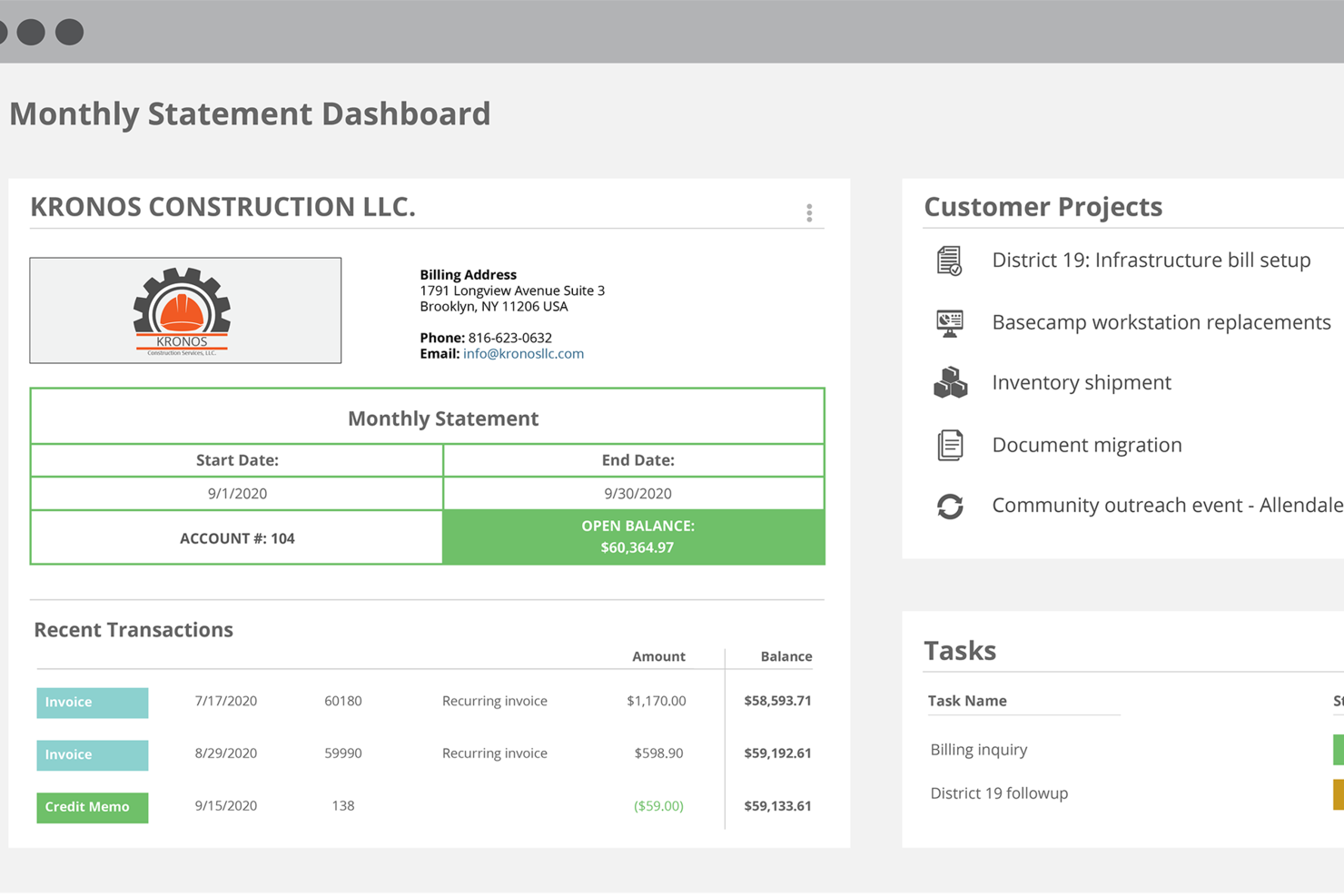
Striven is an all-in-one ERP software for growing businesses that brings together accounting, CRM, HR, project management, sales, and inventory functionality in a single cloud platform.
Who Is Striven Best For?
Striven is a good fit for small to mid-sized businesses that need a single platform to manage operations across finance, sales, projects, and HR.
Why I Picked Striven
Striven is one of my top picks because I love that its CRM is built directly into the same platform as its accounting and operations tools—not bolted on as an afterthought. I can track leads through a visual sales pipeline, manage customer contacts, and then watch those deals flow straight into project creation and invoicing without switching systems. The connected contact management also links customer history across quotes, jobs, and payments, so my team always has full context on an account. That kind of native integration between sales and back-office operations is exactly what makes Striven a strong ERP alternative.
Striven Key Features
- Accounting and financial management: Manage general ledger, accounts payable and receivable, bank reconciliation, and financial reporting in one place.
- Project management tools: Create and assign tasks, track project milestones, log time, and monitor budgets against actuals.
- Inventory management: Track stock levels, manage purchase orders, and link inventory directly to sales and fulfillment workflows.
- HR and employee management: Store employee records, manage onboarding, and track time and attendance across your workforce.
Striven Integrations
Striven offers native integrations with QuickBooks, Gmail, Microsoft Outlook, and Mailchimp. An API is available for custom integrations.
Pros and Cons
Pros:
- Customizable dashboards for cross-department insights
- Includes document management and customer portals
- Direct payroll processing connected to timesheets
Cons:
- Fewer industry-specific templates than larger ERPs
- Some users report slower page load times

Kantata
Best for full lifecycle, people-centric resourcing

Kantata is a cloud-based platform purpose-built for professional services firms that need an ERP alternative tailored to their unique workflows. Unlike traditional ERP systems that focus heavily on finance and operations, Kantata brings people, projects, and financials together in one unified solution.
Why I chose Kantata: What sets Kantata apart is how it combines people-centric resource planning with full lifecycle project delivery. Its forecasting and capacity tools help you align skills and availability with project demand, so your team stays balanced and engaged. At the same time, it unifies project planning, delivery, financial oversight, and reporting, giving you a single source of truth across the entire services lifecycle. This makes Kantata a strong ERP alternative for firms that want holistic visibility without sacrificing a human-focused approach to resourcing.
Standout features & integrations:
Features include skills inventories, automated staffing suggestions, project budgeting and invoicing, time and expense tracking, utilization and profitability reporting, and customizable dashboards for portfolio health.
Integrations include NetSuite, Slack, Xero, HubSpot, Jira, Concur, Expensify, Intacct, Salesforce, Google Workspace, Microsoft 365, and QuickBooks.
Pros and Cons
Pros:
- Good integration options
- Range of resource management capabilities
- Good business intelligence reporting
Cons:
- Initial configuration may take time to get used to
- Could have more customization options
New Product Updates from Kantata

Kantata Adds Access Group Change History
Kantata adds Access Groups History, letting account administrators track changes to group details, membership, and permissions in Recent History. The update also makes these events available through the Subscribed Events API for broader monitoring. For more information, visit Kantata’s official site.
 .
.
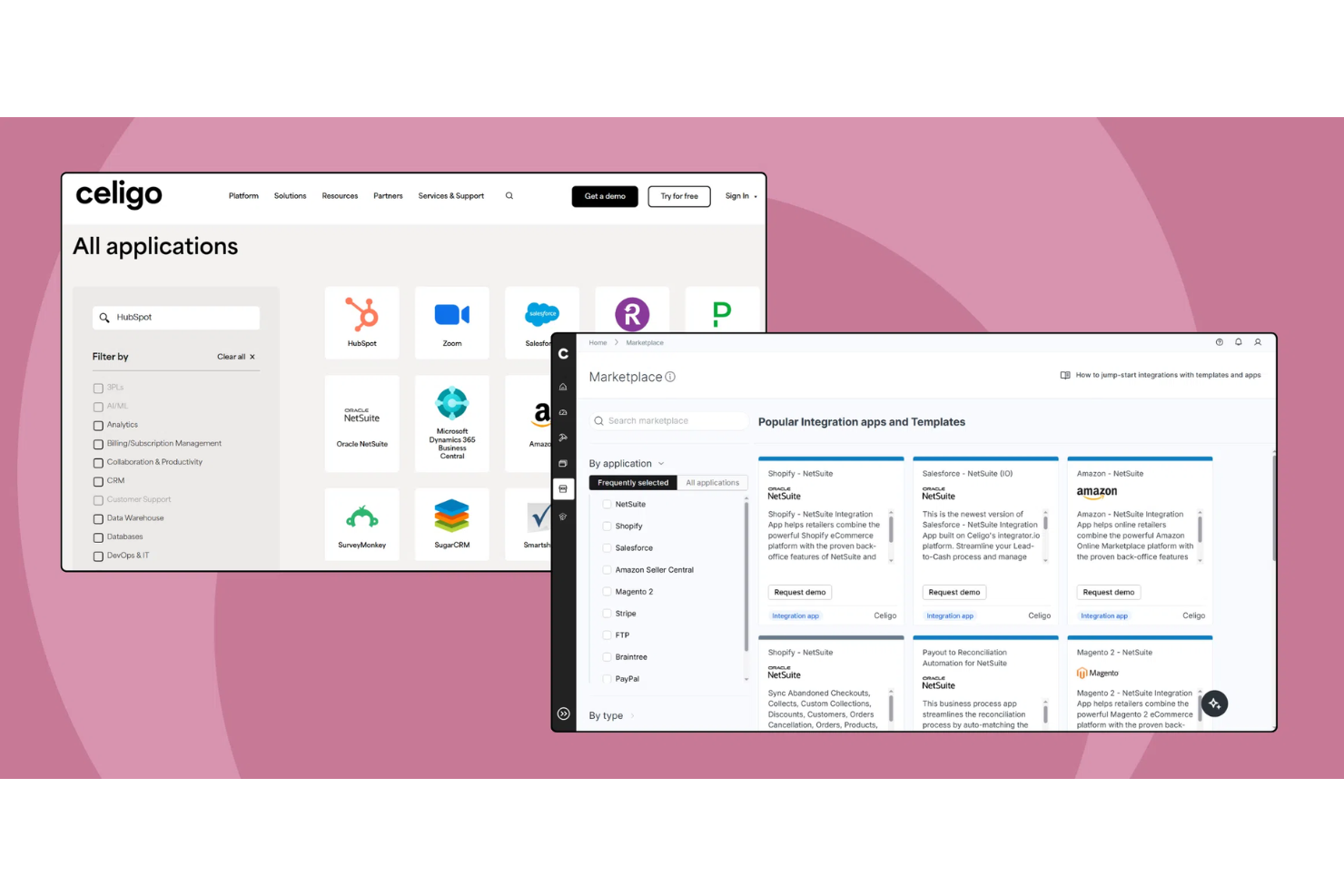
Celigo is an integration platform as a service (iPaaS) that connects and automates workflows across ERP, finance, HR, CRM, and ecommerce systems for businesses seeking ERP alternatives.
Who Is Celigo Best For?
IT and operations teams at mid-sized to large businesses that need to connect and automate multiple business applications across departments.
Why I Picked Celigo
I picked Celigo as one of the best because its library of 1,000+ prebuilt app connectors lets my team quickly connect ERP, CRM, ecommerce, and finance systems without custom development. I use these connectors to automate order-to-cash and procure-to-pay workflows across platforms like NetSuite, Salesforce, and Shopify. This saves us from building and maintaining point-to-point integrations for every new tool we add.
Celigo Key Features
- Flow builder: Design and manage integration workflows using a visual, drag-and-drop interface.
- Error management dashboard: Monitor, troubleshoot, and resolve integration errors from a centralized dashboard.
- Role-based access controls: Set user permissions and manage access to integrations and data.
- Audit logs: Track changes and monitor activity across all integrations for compliance and transparency.
Celigo Integrations
Celigo offers 1,000+ native prebuilt connectors, including NetSuite, Microsoft Dynamics 365, SAP, Sage Intacct, Acumatica, QuickBooks, Shopify, Salesforce, HubSpot, and Snowflake. An API is available for custom integrations.
Pros and Cons
Pros:
- Visual error management dashboard for troubleshooting
- SOC 2 Type II and GDPR compliance supported
- Supports field-level data encryption and audit trails
Cons:
- Some connectors require additional configuration effort
- Limited offline or on-premises deployment options
New Product Updates from Celigo
Celigo Adds API Group Assignment During API Setup
Celigo adds API group assignment during create, clone, and move actions. This reduces extra setup steps by letting teams organize APIs before the relative URI is defined. For more information, visit Celigo’s official site.
 .
.
Best for small and midsized business management

SAP Business One is an affordable ERP solution designed to help small and midsized businesses manage various aspects of their operations, including accounting, financials, purchasing, inventory, sales, and customer relationships.
Why I chose SAP Business One: SAP Business One offers a strong set of features tailored specifically for small and midsized businesses. Its ability to integrate various business functions into a single platform and real-time analytics features makes it a standout alternative for companies looking to streamline their operations and improve efficiency.
Standout features & integrations:
Features include on-premise or cloud deployment, integrated business intelligence, quick deployment, and real-time reporting and analytics.
Integrations include SAP HANA, Microsoft Excel, Microsoft Outlook, Shopify, Magento, WooCommerce, QuickBooks, Salesforce, HubSpot, and Mailchimp.
Pros and Cons
Pros:
- Flexible deployment options
- Real-time analytics and reporting
- Comprehensive business management features
Cons:
- Limited to small and midsized businesses
- May require customization for specific needs
Best for cloud-based ERP with real-time insights

Acumatica is a cloud ERP solution designed to provide real-time insights and advanced business management capabilities. It’s best for businesses seeking a flexible, scalable ERP system that offers real-time data and analytics.
Why I chose Acumatica: Acumatica offers a strong cloud-based architecture and real-time insights, which are vital for dynamic business environments. Its flexible pricing model and advanced feature set make it a standout choice for businesses looking to scale efficiently.
Standout features & integrations:
Features include financial management, project accounting, CRM, industry-specific solutions, real-time data capabilities, and flexible licensing options.
Integrations include Amazon, BigCommerce, Shopify, Microsoft Dynamics 365, Salesforce, HubSpot, Avalara, Docusign, Adobe Sign, and Magento.
Pros and Cons
Pros:
- Comprehensive feature set
- Flexible, usage-based pricing
- Real-time data and analytics
Cons:
- Limited offline capabilities
- Complexity in setup

Workday
Best for finance and HR management with continuous recalibration

Workday is cloud-based enterprise software that offers financial and human capital management solutions. Due to its advanced integration capabilities and real-time insights, it’s best for large companies with over 2,000 employees and complex operations across multiple regions or entities.
Why I chose Workday: Workday combines finance and HR functionalities into a single platform, which provides a unified solution for complex business needs. Judging by its extensive integration options and AI-driven tools, it stands out as a strong ERP alternative, particularly for large enterprises looking to streamline and optimize their operations.
Standout features & integrations:
Features include modern cloud-based interface and extensive pre-built integrations with third-party business tools.
Integrations include Salesforce, Microsoft Azure, ServiceNow, Slack, Adobe Sign, Google Workspace, Okta, Docusign, IBM, and SAP.
Pros and Cons
Pros:
- Unified finance and HR functionalities
- Advanced reporting and analytics capabilities
- Comprehensive integration with over 600 third-party tools
Cons:
- Persistent notifications
- No back button on pages

Best for financial and operations management
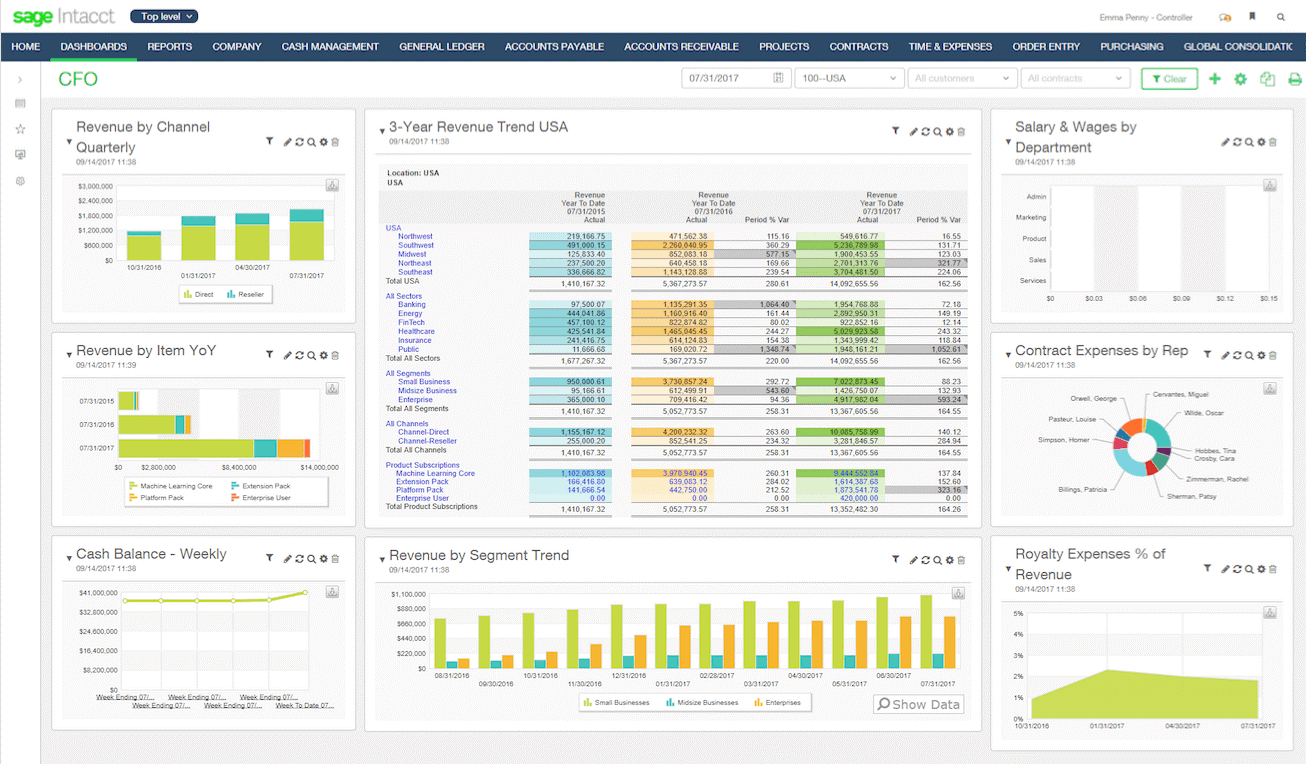
Sage Intacct is a cloud-based financial management solution designed for growing businesses. It’s best for cloud financials and operations for midsized businesses due to its advanced suite of features that streamline financial processes and provide real-time insights.
Why I chose Sage Intacct: Sage Intacct offers advanced financial management capabilities tailored for midsized businesses. Its cloud-based nature ensures scalability and flexibility, making it a strong contender for businesses looking to enhance their financial operations without the need for extensive IT infrastructure.
Standout features & integrations:
Features include multi-entity and multi-currency support, real-time reporting, and automated workflows.
Integrations include Salesforce, ADP, Expensify, Bill.com, Avalara, American Express, Stripe, PayPal, Square, and Shopify.
Pros and Cons
Pros:
- Strong integration capabilities
- Scalable cloud-based solution
- Comprehensive financial management features
Cons:
- May require training for full utilization
- Slow load times during peak usage

Cin7
Best for connected inventory performance with real-time insights

Cin7 is a cloud-based inventory and order management software designed for multi-channel retail and wholesale businesses. It’s best for businesses looking to streamline inventory management and enhance multi-channel sales capabilities due to its advanced integration features and automation tools.
Why I chose Cin7: Cin7 offers strong inventory and order management functionalities that are vital for multi-channel businesses. In my opinion, its extensive integration capabilities and automation features make it a strong contender for businesses aiming to improve operational efficiency and scalability.
Standout features & integrations:
Features include inventory management, order management, point of sale system, warehouse management, e-commerce integration, multi-channel sales, supplier management, production management, customer relationship management, and customizable reporting.
Integrations include QuickBooks, Shopify, Power BI, SAP, Oracle, Shipcaddie, Salesforce, Microsoft Office 365, Docusign, and Magento.
Pros and Cons
Pros:
- Supports multi-channel sales
- Automates inventory management
- Integrates with over 700 apps
Cons:
- Occasional bugs in system updates
- Initial setup can be complex
Other ERP Alternatives
Below is a list of additional ERP alternatives that I shortlisted. While they didn’t make the top 10, they’re still valuable and worth further research.
- Epicor
For industry-specific ERP solutions
- Microsoft Dynamics 365 Business Central
For seamless integration with Microsoft 365
- Fulfil
For direct-to-consumer brands
- QuickBooks Enterprise
For advanced inventory and pricing features
- Infor
For cloud capabilities and functionality
- NEX
For advanced enterprise management with modular solutions
- Fulcrum
For job shop and make-to-order manufacturers
- Float Forecasting
For managing team expenses efficiently
- TallyPrime
For small businesses needing robust accounting
- SYSPRO
For manufacturing and operational efficiency
- Odoo
For customizable business applications
- Cube
For financial planning and analysis
- IFS Cloud
For asset-intensive industries
- SAP S/4HANA Cloud
For large enterprises needing comprehensive solutions
- HoneyBook
For creative professionals managing projects and clients


How I Evaluate ERP Alternatives
I evaluate ERP alternatives in two layers: the baseline capabilities—like multi-entity GL and AP automation—that qualify a tool, and the differentiators that set the best apart.
Core Functionality (Table Stakes For This List)
When I'm selecting tools for my list, I rank each one on a scale from 0 (does not offer the functionality) to 5 (excels in this area) for each core functionality listed below. Then, I calculate the tool's total score into a percentage. Each tool needs to achieve a minimum total score of 65% to be considered for inclusion.
- Core Accounting & GL: I look for a full general ledger with AP, AR, and journal entry management—enough to serve as a team's financial system of record.
- Financial Reporting & Analytics: Each tool should offer standard financial statements, custom report builders, and dashboards that let controllers drill into variance details.
- Multi-Entity & Multi-Currency: I evaluate whether the platform handles consolidations across subsidiaries and currencies, since this is a key reason teams outgrow basic accounting tools.
- Automated Financial Workflows: Approval chains, bank reconciliations, and close task management all factor in—I check whether these processes run with minimal manual intervention.
- Integrations & API Access: The tool needs to connect with CRMs, payroll, billing, and banking systems, whether through prebuilt connectors or an open API.
- Compliance & Audit Controls: I look for GAAP/IFRS alignment, role-based permissions, and detailed audit trails that support internal controls during external audits.
Once I have a list of tools that meet this criteria, I consider what sets each platform apart.
Differentiating Factors (What Sets Vendors Apart)
Here's how I compare and contrast different vendors:
Standout Features
Embedded FP&A is a major differentiator. Tools like Sage Intacct and Oracle NetSuite offer budgeting, forecasting, and scenario planning natively, so finance teams avoid stitching together a separate planning platform. Composable architecture also matters—some teams only need AP automation and reporting now but want to add consolidation as they scale. I check for AI-powered close capabilities too, since platforms that auto-match transactions and flag anomalies can shave days off month-end.
Beyond Features
Total cost of ownership is one of the first things I evaluate. Traditional ERPs often carry hidden consulting and customization fees, so I look at whether a vendor's pricing scales predictably as you add entities or users. Implementation timelines also weigh heavily—a platform that takes six months to deploy can stall a growing finance team. I check for SOC 1/SOC 2 and ISO 27001 certifications as well, since auditors increasingly ask for proof that your financial systems meet those standards.
Why Look for an ERP Alternative
As your business grows, it’s likely that you’ll go through several ERP solutions and at one point or another, end up looking for an alternative software. Here are some common reasons why you may be looking for an alternate solution:
- Cost: Depending on your chosen ERP, these software types can get rather expensive, especially if you opt into add-ons. An ERP alternative might have lower costs compared to your current option, or offer a free trial.
- Complexity: Some ERPs require extensive training in order to use all of their functionalities. If you’re a SMB or rather don’t require all of the advanced features included in your ERP, an alternative might be better.
- Flexibility: Does your current ERP fit your business needs? If not, you might be searching for an ERP alternative.
- Scalability: Your software should always be able to scale with your business. For example, if you're a small bank who recently acquired a lot of customers, you'll need a stronger ERP to manage accounts.
- Customization: Limited customization options can hinder business processes, but an ERP alternative with enhanced customization, like open-source solutions, can help make your business stand out and become memorable.
Alternative ERPs can provide more affordable, user-friendly, and adaptable solutions that better meet specific business needs and growth requirements. By considering a range of options, you can find a system that offers improved flexibility, scalability, and efficiency, ultimately enhancing your company's overall performance and growth.
Key Features of ERP Alternatives
Here are some key features of ERP that your alternative software should be able to replicate or improve upon in order to be a good fit.
- Integration: ERP software alternatives combine various business processes into a single, unified system, ensuring seamless data flow and communication across different departments. This consolidation eliminates data silos and enhances operational efficiency.
- Automation: These systems reduce manual tasks through automated workflows, streamlining operations and minimizing the risk of human error. Companies, like Gusto, for example, realize that automation saves time and allows employees to focus on more strategic activities.
- Data Analysis: ERP alternatives provide robust tools for analyzing business data, enabling companies to make informed decisions based on accurate and comprehensive insights. This capability supports strategic planning and performance improvement.
- Real-Time Reporting: By offering up-to-date reports on business performance, ERP systems ensure that stakeholders have immediate access to critical information.
- Scalability: ERP solutions are designed to adapt to the growth of your business, accommodating increasing data volumes and expanding operations without compromising performance.
- Customization: These systems allow for tailored solutions to meet specific organizational needs, providing flexibility to adjust functionalities according to unique business processes.
- User Access Control: Managing user permissions and access levels is a key feature of ERP software, ensuring data security and compliance. With user access control, companies in data sensitive industries (i.e. healthcare and aviation sectors) can protect sensitive information and enforce organizational policies.
- Inventory Management: Efficient inventory management contributes to cost savings and customer satisfaction. As a result, top ERP alternatives track and manage inventory levels accurately, optimizing stock control and reducing the risk of overstocking or stockouts.
- Customer Relationship Management: These systems manage customer interactions and data, improving customer service and relationship management.
- Financial Management: Effective financial management supports strategic planning and regulatory compliance. The best ERP software handles accounting, budgeting, forecasting, and financial reporting, providing a comprehensive view of the company's financial health.
From advanced inventory and order management to comprehensive CRM and e-commerce integration, these solutions provide the flexibility and scalability necessary for optimizing operations and driving growth. By exploring various ERP alternatives, businesses can find the perfect fit to enhance efficiency and achieve their strategic goals.