

A finance AI agent is an autonomous software that performs finance and accounting tasks across data, workflows, and controls with limited human direction. The best agents can support close management, reconciliation, bookkeeping, forecasting, planning, accounts payable, and financial reporting.
This guide compares leading options by workflow fit, audit requirements, integrations, review controls, and scalability so you can choose the right system for your finance team.
Why Trust Our Software Recommendations
6,700+
Reviews
20
Industry experts
16+
Evaluation factors
14
Years
Our team has been testing and reviewing software since 2012. As finance leaders ourselves, we know how difficult—and important—it is to choose the right software.
For this guide, we evaluated tools using hands-on testing and independent research, scoring tools using our selection criteria.
Our reviews reflect our human editorial judgment, not a sales pitch.
Comparison Table: Finance AI Agents
Compare pricing and specs side by side for the best AI agents in finance that made it onto my shortlist.
| Tool | Best For | Trial Info | Price | ||
|---|---|---|---|---|---|
| 1 | Best for mid-market planning and analysis | Free demo available | Pricing upon request | Website | |
| 2 | Best for hospitality accounting | Free demo available | From $299/property/month (billed annually) | Website | |
| 3 | Best for AI bookkeeping with audit-proof reconciliation | Free demo + 30-day free trial available | From $65/month | Website | |
| 4 | Best for multi-entity close | Free demo available | Piricing upon request | Website | |
| 5 | Best for bookkeeping and insights | Free demo available | From $549/month (billed annually) | Website | |
| 6 | Best for confidence-scored audit trails | Free demo available | Pricing upon request | Website | |
| 7 | Best for AP and expense managament | Free demo available | Pricing upon request | Website | |
| 8 | Best for multi-agent ERP finance | Free demo available | From $625/user/month | Website | |
| 9 | Best for NetSuite agentic subledgers | Free demo available | Pricing upon request | Website | |
| 10 | Best for GL-native materiality approvals | Free demo available | Pricing upon request | Website |


Finance AI Agents Reviews
Below are my detailed summaries of the best finance AI agents on my shortlist. My reviews offer a detailed look at the features, best use cases, and capabilities of each finance AI tool to help you find the best one for you.
 Best for mid-market planning and analysis
- Free demo available
- Pricing upon request
Visit WebsiteCustomer Rating:4.5/5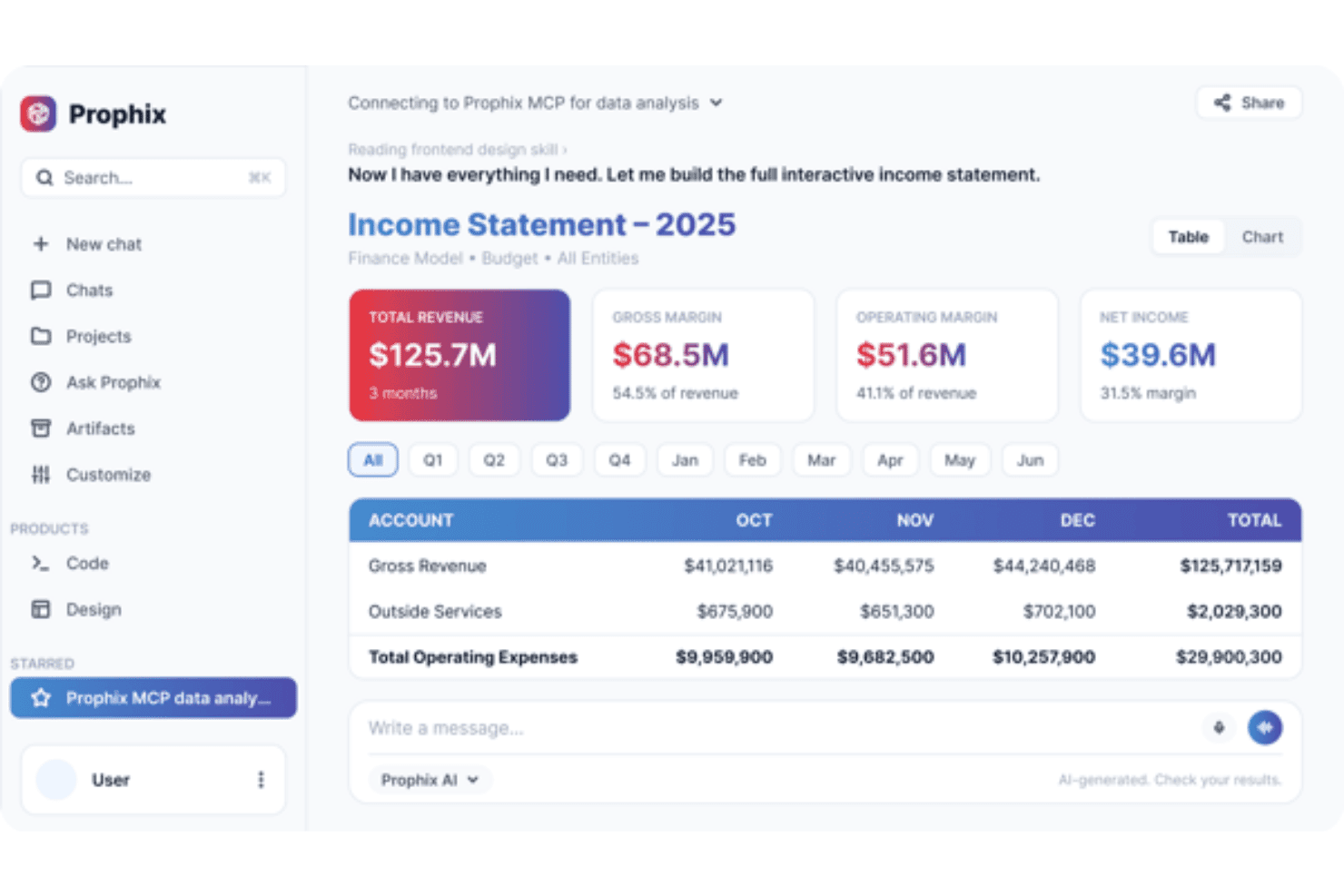
Prophix lets users query financial data to build interactive income statements. Prophix is an autonomous finance platform covering FP&A, financial consolidation and close, account reconciliation, and reporting through a suite of AI agents that execute multi-step workflows.
Who Is Prophix Best For?
Prophix fits mid-market finance teams managing multi-entity planning, consolidation, and close.
Why I Picked Prophix
I've included Prophix because it covers the full planning-to-close cycle with dedicated agents. The Budgeting Agent updates personnel and OPEX budgets when underlying data changes, validates submissions, and fills missing fields with an audit trail behind each change. I also like the Consolidation Agent, which delivers instant, audit-ready answers to consolidation questions without rerunning trial balance variants or exporting to Excel.
Prophix Key Features
- Prophix Copilot: A conversational AI interface built into the platform that lets you query financial data, generate variance analysis, and surface trends using natural language.
- AI-powered transaction matching: Automatically matches high-volume transactions for bank reconciliations and sub-ledger matching, flagging unmatched items for your review.
- Prophix One MCP Server: Exposes governed Prophix data and agents to any MCP-enabled AI platform, including Claude and Microsoft Copilot, so you can act on finance data outside the platform.
- Financial consolidation: Automate multi-entity eliminations and currency translations.
Prophix Integrations
Prophix offers integrations with SAP, Microsoft Dynamics 365, Oracle NetSuite, UKG Pro, Salesforce, Zoho CRM, and HubSpot. It also supports an API for custom connections.
Pros and Cons
Pros:
- Sized for mid-market team structures
- Finance owns the connectors, no IT tickets
- Planning through close in one platform
Cons:
- Advanced reports require admin expertise
- No dedicated AP or AR agent
Learn more about Prophix: Best for hospitality accounting
- Free demo available
- From $299/property/month (billed annually)
Visit WebsiteCustomer Rating:4.7/5
Docyt lets users connect PMS or POS revenue systems directly. Docyt is an AI-native ERP built on a 16-agent architecture covering AP, revenue reconciliation, multi-entity close, and financial reporting.
Who Is Docyt Best For?
Docyt is built for accounting managers and controllers at hospitality and multi-unit businesses—hotel portfolios, restaurant groups, franchises—where nightly revenue reconciliation is routine.
Why I Picked Docyt
I picked Docyt as one of the best because its agents are mapped to hospitality accounting. The Revenue Reconciliation Agent posts night-audit and Point of Sale (POS) revenue daily by 7 am with USALI mapping, while the Revenue Leakage Agent flags short payments and Online Travel Agency (OTA) discrepancies before they compound. The Quality of Books Agent scans for miscoding and variances across ledgers, which is the morning check a controller managing a property portfolio actually runs.
Docyt Key Features
- Multi-entity consolidation: Manage intercompany entries, management fees, and consolidated financials across portfolios of 5–500+ properties from a single ledger.
- GARY reporting agent: Query your financials in plain English and get report outputs with supporting evidence, without building manual exports.
- Forecast Agent: Generates multi-scenario budgets and rolling forecasts in the ledger.
- Immutable audit trail: Every ledger entry logs its source document, confidence score, and reviewer identity, with corrections posted as new entries rather than overwrites.
Docyt Integrations
Docyt integrates with Oracle OPERA Cloud, Toast, Square, Paychex Flex, Dayforce, NetSuite, Xero, and Plaid. An API for custom connections is also available.
Pros and Cons
Pros:
- USALI mapping handled without manual exports
- Scales well across multiple properties
- Daily revenue posted before the morning review
Cons:
- Vendor management and check payments draw complaints
- Built around hospitality workflows only
Learn more about Docyt: Best for AI bookkeeping with audit-proof reconciliation
- Free demo + 30-day free trial available
- From $65/month
Visit WebsiteCustomer Rating:4.9/5
Digits gives users a detailed ledger view of all transactions by account. Digits is an AI-native general ledger covering continuous bookkeeping, automated month-end close, accounts payable, invoicing, and real-time reporting in one platform.
Who Is Digits Best For?
Digits is a good fit for accounting firms and small-to-midsize businesses that want a full general ledger rather than a layer on top of QuickBooks or Xero.
Why I Picked Digits
I picked Digits because its Agentic Close runs continuously rather than as a scheduled batch. Every reconciliation match links to a bounding-box reference on the source statement PDF, so audit evidence is built as the work happens. Exceptions arrive with a plain-language note on what the agent attempted and why, which keeps the review queue readable.
Digits Key Features
- Ask Digits: A conversational AI assistant included on every plan that lets you query your financials and get answers in plain language.
- AI Bill Pay: Extracts bill details via OCR, detects vendor remittance information, and routes payments through customizable approval policies before auto-reconciling to the ledger.
- Category manager: Lets you define and enforce coding logic across transactions for a consistent chart of accounts.
- Live financial statements: Always-current P&L, balance sheet, and cash flow reports that pull from the ledger, with drill-down to individual transactions.
Digits Integrations
Digits connects to 12,000+ financial institutions through the Digits Connect API and offers native integrations with Mercury, Ramp, Gusto, Stripe, Arc, Ignition, Karbon, and Reach Reporting.
Pros and Cons
Pros:
- AI assistant included on every plan
- Replaces the ledger rather than layering on it
- Audit evidence builds as work happens
Cons:
- No scenario forecasting for FP&A
- Complex accruals need manual cleanup
Learn more about Digits:
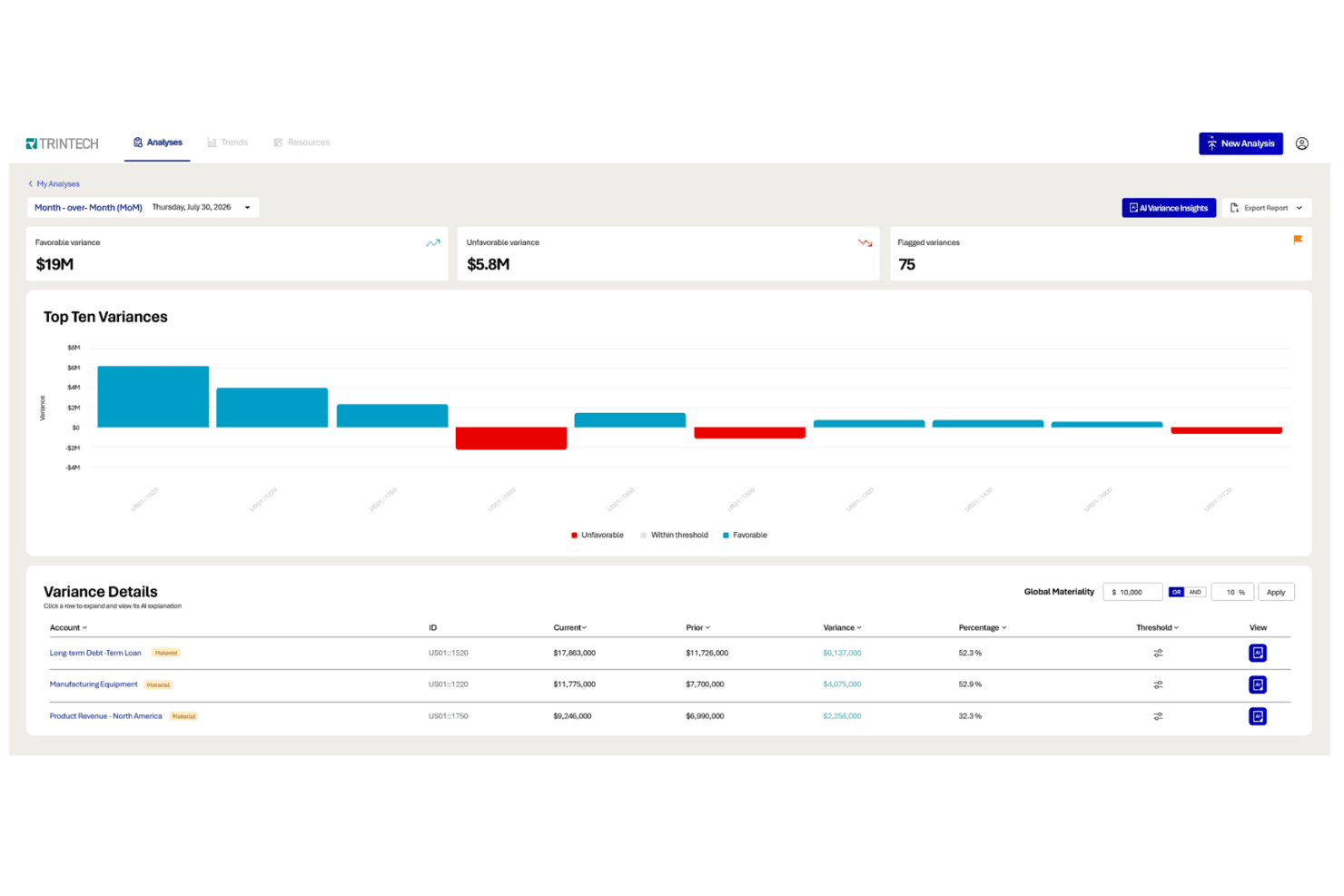
Trintech surfaces AI-driven variance insights for faster financial close. Trintech is a finance AI agent platform focused on the record-to-report cycle, offering named agentic AI for variance analysis, flux analysis, exception management, accruals, and transaction matching across multi-entity, multi-ERP environments.
Who Is Trintech Best For?
Trintech is a strong fit for controllers and finance directors running complex close cycles across several ERPs and currencies.
Why I Picked Trintech
Trintech made my shortlist because of its close-cycle agents. The Accruals Intelligence Agent auto-generates accruals across entities, cost centers, and currencies, and flags estimates that fall outside historical ranges. The Variance Analysis Agent then produces reviewer-ready narratives with audit documentation attached, so sign-off does not need a manual write-up per entity.
Trintech Key Features
- Flux Agent: Runs period-over-period flux analysis across entities, currencies, and hierarchies, with AI-generated explanations and evidence collection.
- Risk-based auto-certification: Automatically certifies low-risk accounts based on configurable thresholds, routing only flagged items to reviewers for sign-off.
- AI-generated reconciliation narratives: Produces documentation for completed reconciliations directly within the platform, ready for audit review without manual write-ups.
- Data Access Agent: Pulls and transforms data from cloud, on-premises, MFA-gated, and login-only sources without requiring API access.
Trintech Integrations
Trintech integrates with SAP, Oracle NetSuite, Workday, and Microsoft. It also provides a Boomi Connector and Developer Portal for custom connectivity.
Pros and Cons
Pros:
- Audit documentation attached by default
- Cuts manual variance write-ups at sign-off
- Handles multi-ERP and multi-currency close
Cons:
- Large reconciliations can experience slower performance
- No forecasting or planning agents
Learn more about Trintech:

Zeni's AI-powered dashboard gives real-time cash, burn, and close insights. Zeni is an agentic AI platform that helps with transaction coding, reconciliation, month-end close, and financial modeling.
Who Is Zeni Best For?
Zeni is a strong fit for accounting managers and finance ops analysts at startups and SMBs that run on QuickBooks Online Plus and need continuous, automated bookkeeping alongside real-time financial insights.
Why I Picked Zeni
I picked Zeni as one of the best because its dual-agent setup is why I included it: bookkeeping execution and financial insight are handled separately. The AI Accountant Agent codes transactions, reconciles, and runs AP/AR as they arrive, and the AI CFO Agent runs runway projections and scenario modeling on top of books that are already current. The confidence score dashboard auto-approves high-certainty items and routes ambiguous ones to human accountants with a visible explanation per decision.
Zeni Key Features
- AI Month-End Close automation: Automates 80% of close tasks, including recurring journal entry scheduling for prepaids, accruals, and amortizing contracts, plus GL-vs-bank reconciliation with mismatch flagging.
- Flux analysis: Flags real month-over-month variances—such as vendor spend increases above 200%—so your team can investigate actual anomalies rather than sifting through every line.
- Scenario modeling: Runs side-by-side what-if comparisons across strategies, letting you stress-test financial decisions against live book data.
- Zeni MCP integration: Connects your live Zeni books to Claude, OpenAI Codex, and Google Antigravity for natural-language querying across reports, cash, AR/AP, and vendor data.
Zeni Integrations
Zeni integrates with QuickBooks Online Pro, Avalara, Plaid, Stripe, PayPal, and Square through its API. It also offers Zeni MCP that connects live books to Claude, OpenAI Codex, and Google Antigravity.
Pros and Cons
Pros:
- Runway scenarios pair with current books
- Confidence scores explain escalated accounting decisions
- Continuous coding and reconciliation reduce backlogs
Cons:
- Customer support response times draw complaints
- Human review remains for ambiguous transactions
Learn more about Zeni: Best for confidence-scored audit trails
- Free demo available
- Pricing upon request
Visit WebsiteCustomer Rating:4.5/5
BlackLine centralizes outstanding payment tracking and aging data in one dashboard. BlackLine is an agentic financial operations platform combining a multi-agent AI suite (Verity) with workflow orchestration, ERP integration, and governance tools across record-to-report and invoice-to-cash.
Who Is BlackLine Best For?
BlackLine fits controllers and accounting managers at large, multi-entity organizations that need close and AR workflows backed by auditable, explainable controls.
Why I Picked BlackLine
BlackLine makes my list on audit transparency at the AI level rather than only the workflow level. Every action Verity takes during reconciliation prep carries a confidence score, its reasoning, and a complete audit trail, so a reviewer can see why the AI flagged or matched something. Verity Prepare splits the work across agents that analyze supporting documentation, draft reconciling items, and generate variance explanations, with human sign-off reserved for exceptions.
BlackLine Key Features
- Multi-agent orchestration: Vera acts as an AI team lead, assigning tasks to specialized sub-agents and tracking progress across close and AR workflows with full auditability.
- Natural-language financial querying: Verity Insights lets you explore financial data using plain-language questions, surfacing analysis without manual report building.
- Automated accruals drafting: Verity Accruals gathers source data and vendor confirmations, then drafts audit-ready journal entries for your team to review.
- Prebuilt process blueprints: Studio360 Blueprint includes 70+ ready-to-use workflow templates built on industry best practices for financial close and AR processes.
BlackLine Integrations
BlackLine integrates with SAP, Oracle NetSuite, Microsoft Dynamics, and Acumatica. An open API is also available for custom integrations.
Pros and Cons
Pros:
- Human approval remains central for exceptions
- Multi-agent workflows cover close and AR
- Confidence-scored actions support audit review
Cons:
- Implementation requires careful planning and training
- Agent features have limited independent validation
Learn more about BlackLine: Best for AP and expense managament
- Free demo available
- Pricing upon request
Visit WebsiteCustomer Rating:4.4/5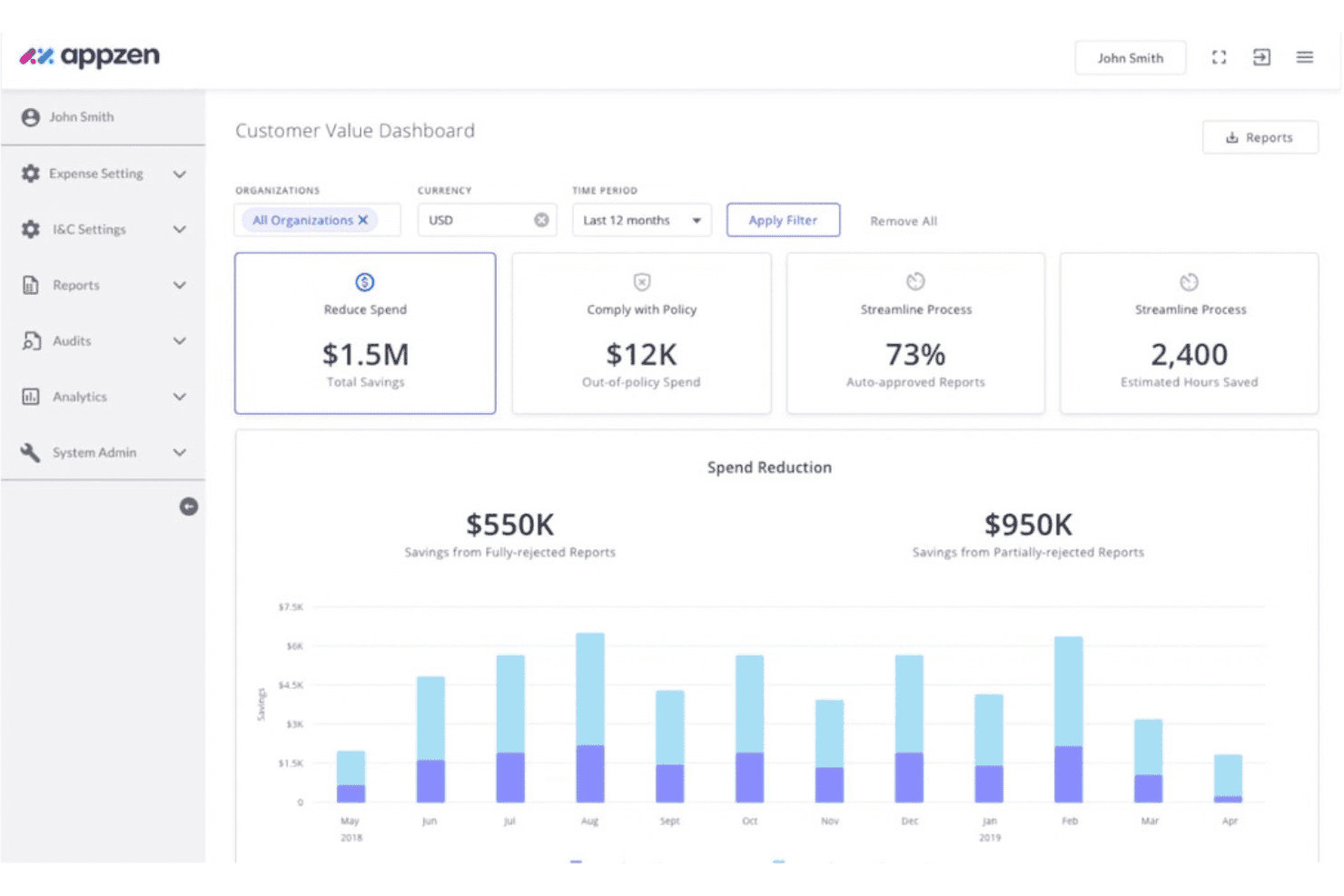
AppZen tracks expense savings, policy compliance, and hours saved. AppZen is an AP and expense management platform with autonomous invoice processing, pre-payment expense auditing, corporate card transaction review, and a no-code agent builder for custom AP and T&E workflows.
Who Is AppZen Best For?
AppZen fits enterprise finance and accounting teams that own AP and T&E and need audit-ready processing at volume.
Why I Picked AppZen
AppZen earns a spot on my shortlist because AP and expense are the full scope of what it does. The pre-payment expense audit screens every report before money moves, catching AI-generated fake receipts, blocklisted merchants, and cross-report duplicates. The no-code AI Agent Studio also lets finance ops staff turn an existing SOP document into a live AP workflow without involving IT.
AppZen Key Features
- GL code prediction: Automatically assigns general ledger codes to non-PO invoices by learning from your historical data and chart of accounts.
- E-invoicing compliance: Validates invoices against global mandates including VAT, OFAC, and Peppol requirements across 40+ languages.
- AI Analytics dashboard: Delivers real-time spend visibility with drill-down reporting and natural-language Q&A for on-demand answers.
- Sandbox testing environment: Lets you test new agents against historical or live data before activation, with pre- and post-launch performance dashboards.
AppZen Integrations
AppZen offers integrations with Oracle NetSuite, Workday, SAP Concur, Coupa, Rydoo, American Express, Mastercard, and Visa card networks. A REST API for custom integrations is also available.
Pros and Cons
Pros:
- Finance ops team can build workflows without IT
- Screens expenses before money moves
- Deepest coverage of AP and T&E on this list
Cons:
- Analytics cannot trigger finance actions
- Scoped to AP and expense only
Learn more about AppZen: Best for multi-agent ERP finance
- Free demo available
- From $625/user/month

Oracle Fusion Cloud ERP lets users monitor ledger prompts by priority. Oracle Fusion Cloud ERP is a cloud-based ERP platform with embedded, finance-specific AI agents spanning accounts payable, accounts receivable, general ledger, expenses, payments, cash processing, reconciliation, and financial planning.
Who Is Oracle Fusion Cloud ERP Best For?
Oracle Fusion Cloud ERP suits large, multi-entity organizations that already run Oracle as their system of record and need agents across the whole finance function.
Why I Picked Oracle Fusion Cloud ERP
Oracle Fusion Cloud ERP is on this list for the breadth of its agent coverage. The Payables Agent handles invoice ingestion through to payment, and the Ledger Agent surfaces GL exceptions and auto-creates adjustment journals, both working on live data in the same system of record. AI Agent Studio also lets finance ops teams build and extend custom agents without developer support, which really matters at enterprise scale.
Oracle Fusion Cloud ERP Key Features
- Planning Agent: Analyzes trends and variances and runs what-if simulations via natural language.
- Expenses Agent: Processes receipts forwarded by email, matches card charges, validates policy, and triggers reimbursement.
- Cash Processing Agent: Matches bank statement lines to AR receipts and auto-creates entries for straight-through cash application.
- Continuous transaction monitoring: Runs 300-plus algorithms across Fusion transactions to detect anomalies, duplicates, and fraud.
Oracle Fusion Cloud ERP Integrations
Oracle Fusion Cloud ERP has native integrations across Fusion Financials, EPM, Procurement, SCM, HCM, CX, J.P. Morgan, Box, and Stripe. An API for custom integrations is also available.
Pros and Cons
Pros:
- Runs on live ERP data in place
- Finance ops can build agents without developers
- Agent coverage spans the full finance function
Cons:
- Agent maturity varies across workflows
- Implementation requires lengthy enterprise projects
Learn more about Oracle Fusion Cloud ERP:

Numeric lets users embed SQL queries and rich text into close checklists. Numeric is an AI-native financial data platform combining agentic subledgers, close management, reconciliation, cash matching, and billing automation into end-to-end accounting workflows.
Who Is Numeric Best For?
Numeric fits accounting teams at growth-stage and mid-market companies on NetSuite that want subledger, close, and cash-matching automation.
Why I Picked Numeric
Numeric earns its spot on my shortlist because its Agentic Subledgers handle NetSuite accounting end-to-end. I've used it to ingest lease agreements and commission plans, and the agent derives the accounting treatment, builds the schedule, and updates balances automatically. When a document changes, it applies the previously approved treatment to correct the downstream accounting on its own, and Prism surfaces the overnight agent actions and exceptions that need sign-off.
Numeric Key Features
- Transaction monitors: Set plain-language rules that flag duplicate transactions, unusual balances, and policy violations against live transaction data before close.
- Cash matching rules engine: Configure rules on any field—memo, amount, date range—to match 90%+ of bank, AR, and AP transactions, including many-to-many scenarios.
- App Studio: Build custom dashboards and workbooks using plain-language prompts, with every app versioned and logged.
- Real-time cycle analytics: Tracks operational trends, cycle times, workflow bottlenecks, and workload distribution to optimize overall close efficiency period-over-period.
Numeric Integrations
Numeric offers integrations with Xero, Stripe, Anrik, Salesforce, HubSpot, Snowflake, Carta, HSBC, Chase Connect, and Databricks. It also offers an MCP server to connect with LLMs like Claude and ChatGPT.
Pros and Cons
Pros:
- Overnight agent work surfaced for sign-off
- MCP actions land in audit logs
- Keeps your existing NetSuite in place
Cons:
- Limited forecasting and scenario modeling
- Full agentic modules need ERP replacement
Learn more about Numeric:

Rillet centralizes financial metrics, close checklists, and AI workflows in one dashboard. Rillet is an AI-native ERP with a general ledger at its core, embedding agents in the ledger for natural-language GL queries, automated close workflows, continuous anomaly monitoring, and materiality-tiered approval routing.
Who Is Rillet Best For?
Rillet fits mid-market and scaling SaaS companies that want a GL-native system with structured approval governance around their existing close workflows.
Why I Picked Rillet
Rillet earns its place on materiality-tiered approval routing. When an agent proposes a journal entry above a set threshold, it routes to the controller, and above a higher one it escalates to the CFO, so the level of review scales with the size of the entry. Every agent action is logged in the Aura Audit Trail with timestamped data snapshots and step-by-step reasoning, which gives approvers a full evidence chain they can export.
Rillet Key Features
- Aura Flow workflow builder: Define multi-step finance workflows in plain English—Rillet breaks them into parallel sub-processes, handles scheduling, and remembers your accounts and dimensions across runs.
- Continuous AI monitoring: Always-on scanning of your books flags anomalies, surfaces exceptions, and proposes accruals as transactions occur, not just during close.
- Aura MCP connectivity: Connects Rillet's live GL data to external tools like Salesforce, Snowflake, and Claude for reads and writes without leaving those environments.
- Automated revenue recognition: Native ASC 606 support handles flat-rate, usage-based, milestone, and hybrid billing models, with auto-generated rev-rec analyses pulled directly from contracts.
Rillet Integrations
Rillet offers native integrations with Salesforce, Snowflake, Stripe, Tipalti, Procurify, Justworks, ADP, Zapier, and Anaplan. An API and MCP are also available for custom workflows.
Pros and Cons
Pros:
- Plain-English workflows support multi-step close tasks
- Audit trails include snapshots and reasoning
- Materiality-based approvals route agent proposals
Cons:
- No native scenario planning
- Human approval prevents fully unattended posting
Learn more about Rillet:
Other Finance AI Agents
Here are a few additional options that didn’t make my top list, but are still worth checking out:
- 11SAP JouleBest for SAP-native finance ops
- 12CampfireBest for AI-native General Ledger
- 13Sage IntacctBest for close-to-consolidation workflows
- 14RampBest for agents built on real transaction data
- 15HighRadiusBest for AP/AR coverage
- 16PayhawkBest for natural-language spend playbooks
- 17LedgeBest for approval-gated ERP posting
- 18NominalBest for automated account reconciliation
- 19Close AI by FloQastBest for COSO-aligned governance
Related Reviews
How I Evaluate Finance AI Agents
To make this list, a tool's AI must handle real finance work, like reconciling transactions or flagging anomalies. From there, I evaluate three things. Core functionality carries the most weight, like connecting systems and logging actions. Then I look at standout features, like approval controls, and what it offers beyond features, like implementation time.
Core Functionality (Table Stakes For This List)
When I'm selecting tools for my list, I score each one on a scale from 0 (does not offer the functionality) to 5 (excels in this area) for each core functionality listed below. I then convert the total into a percentage to help assess each tool's overall fit, with extra weight on any functionalities I’ve deemed essential.
- Autonomous Task Execution (Essential): I look for multi-step workflows such as reconciliation, invoice processing, and reporting that run with limited human direction.
- Financial Data Integration (Essential): I assess connections to ERP, accounting, banking, payroll, and billing systems, including how data moves between them.
- Natural Language Interaction: I check whether finance teams can query balances, explain variances, or initiate tasks using conversational language.
- Anomaly Detection: I look for discrepancies across transactions, accounts, and reports, with clear exceptions for human review.
- Adaptive Decisioning: I assess whether recommendations improve from historical outcomes, corrections, and recurring finance workflows.
- Audit Trail And Explainability: I review logs, supporting evidence, approvals, and decision context for reconciliations, postings, and other actions.
Once I have a list of tools that meet the criteria, I consider what sets each platform apart.
Differentiating Factors (What Sets Vendors Apart)
Here's how I compare and contrast different vendors:
Standout Features
I look for human-in-the-loop approval controls that let teams set dollar or risk thresholds where an agent pauses for sign-off before posting. A miscoded intercompany entry can cascade across entities, so configurable checkpoints matter more than raw automation speed. I also evaluate multi-agent orchestration—whether AP, AR, and close agents hand off tasks to each other without manual sequencing. Low-code customization is important too; controllers should be able to adjust agent rules without filing engineering tickets.
Beyond Features
I check whether a vendor holds SOC 2 certification and supports role-based access controls, since an agent posting journal entries needs the same permission guardrails you'd apply to a staff accountant. Scalability matters just as much—a tool that works for one entity but buckles across currencies and subsidiaries will force you back to spreadsheets during consolidation. I also evaluate release cadence and roadmap clarity to gauge whether the vendor will keep pace as agentic capabilities evolve.
How to Choose a Finance AI Agent
Choose the right agent by testing whether it can produce reviewable accounting work without weakening your control environment.
| If your priority is | Look for |
|---|---|
| If your priority isFaster close reviews | Look forReconciliations with supporting evidence, reviewer sign-off, and exception status |
| If your priority isAudit readiness | Look forImmutable activity logs, decision rationale, source records, and exportable evidence |
| If your priority isSafer journal posting | Look forConfigurable approval thresholds, role-based permissions, and posting restrictions |
| If your priority isMulti-entity reporting | Look forEntity, currency, intercompany, and consolidation handling verified with your data |
| If your priority isFewer manual corrections | Look forException queues that identify mismatches and preserve correction history |
How to Vet Your Shortlist
- Run a close trial: Give each vendor ten representative reconciliations and request completed workpapers within five business days.
- Request an audit packet: Ask for one sample activity log, evidence attachment, approval record, and export format before signing.
- Test escalation rules: Submit transactions above two approval thresholds and confirm the agent pauses, routes, and records each decision.
- Verify data handling: Request a written data-flow diagram covering retention, access roles, customer-data use, and deletion procedures.
- Choose the tradeoff: Decide whether broader workflow coverage outweighs tighter human review, because finance AI agents rarely maximize both.
What Are Finance AI Agents?
AI finance agents are software that performs accounting and financial tasks with limited human direction. They can reconcile transactions, process invoices, explain variances, detect anomalies, prepare reports, and support forecasting. Finance teams still review exceptions, approve sensitive actions, and maintain control over postings and financial data.
Features
Here are the main features I look for in any great finance AI agent:
- Autonomous task execution: Runs multi-step workflows such as invoice processing, account reconciliation, journal preparation, and report generation with limited human direction.
- Financial data integration: Connects with accounting software, ERP systems, banks, payroll platforms, billing tools, and data warehouses to collect and compare financial information.
- Natural language interaction: Lets you ask questions about balances, transactions, variances, and forecasts using everyday language. It can also initiate supported finance tasks from conversational requests.
- Anomaly detection: Reviews transactions and account activity to identify unusual amounts, duplicate entries, missing data, policy exceptions, and unexpected changes for human review.
- Reconciliation workflows: Matches transactions, invoices, payments, and account records against defined rules. It highlights unmatched items and preserves the evidence behind each suggested match.
- Approval controls: Pauses sensitive actions until an authorized person reviews them. Configurable thresholds can route journal entries, payments, and adjustments based on value or risk.
- Audit trails: Records agent actions, source data, recommendations, approvals, corrections, and posting outcomes. Reviewers can trace each result back to its supporting evidence.
- Forecasting and variance analysis: Uses historical financial data, budgets, actuals, and business assumptions to prepare forecasts and explain differences between expected and reported results.
Benefits
In my experience, finance AI agents offer several practical benefits, including:
- Faster close reviews: Automated reconciliations, variance analysis, and exception queues help reviewers assess financial work sooner.
- Fewer manual corrections: Anomaly detection identifies duplicates, missing data, mismatches, and unusual transactions before posting.
- Better audit readiness: Activity logs preserve source records, agent recommendations, approvals, corrections, and posting outcomes for later review.
- Safer journal posting: Approval thresholds and role-based permissions pause sensitive entries until authorized reviewers sign off.
- Clearer financial visibility: Natural-language queries help teams investigate balances, transactions, forecasts, and variances without navigating multiple systems.
- More consistent workflows: Integrations with accounting, ERP, banking, payroll, and billing systems apply repeatable rules across finance processes.
Costs and Pricing
Costs vary based on features, team size, add-ons, and deployment needs. Here are the pricing ranges you can typically expect from finance AI agents:
Plan Comparison Table For Finance AI Agents
| Plan Type | Average Price | Common Features |
|---|---|---|
| Plan TypeFree Plan | Average Price$0/month | Common FeaturesLimited queries, basic financial analysis, sample workflows, and individual use |
| Plan TypePersonal Plan | Average Price$10–$50/user/month | Common FeaturesNatural-language questions, transaction analysis, basic anomaly detection, and limited integrations |
| Plan TypeBusiness Plan | Average Price$50–$200/user/month | Common FeaturesAutomated reconciliations, approval workflows, audit trails, reporting, and multiple integrations |
| Plan TypeEnterprise Plan | Average Price$500–$5,000+/month | Common FeaturesMulti-entity support, custom workflows, advanced permissions, dedicated implementation, and enterprise support |
FAQs
Some answers to common questions about finance AI agents:
Can finance AI agents post journal entries without approval?
No, finance AI agents should pause journal entries that require human approval. Set thresholds by amount, account type, entity, or risk assessment level. The agent can prepare the entry, attach source records, and explain its recommendation. An authorized reviewer then approves, rejects, or requests changes. Your accounting system should preserve each decision and posting result. Test these controls with entries above and below each threshold before deploying the agent during a live close.
How do finance AI agents connect with accounting systems?
AI agents in finance connect through application programming interfaces, file imports, direct database access, or built-in connectors. Confirm which systems the agent supports before selecting a platform. Check whether it can read your chart of accounts, transaction history, approval rules, and entity structure. You should also verify how often data syncs and what happens when a connection fails. Run a controlled test with representative records before granting write access.
Are finance AI agents safe for confidential financial data?
AI agents in finance can support confidential data, but you must verify their security controls first. Ask about encryption, data retention, access roles, audit logs, and customer-data use. Confirm whether the vendor uses your data to train shared models. Request documentation for SOC 2 status and deletion procedures. Limit access to the records each agent needs. Start with read-only permissions, then expand access after reviewing test results and control evidence.
What happens when a finance AI agent makes a mistake?
When an agent makes a mistake, route the result to an exception queue and preserve the correction history. A reviewer should identify the source of the error, correct the accounting record, and document the decision. Check whether the agent updates future recommendations after approved corrections. Never erase the original suggestion or supporting evidence. Instead, retain both versions for review. Test duplicate transactions, unusual amounts, and missing source records before production use.
How should a finance team introduce an AI agent?
Start with one repeatable workflow, such as account reconciliation or invoice matching. Define success measures, approval points, permitted data, and escalation rules before configuration. Run the agent in read-only mode against historical transactions. Compare its recommendations with completed workpapers and reviewer decisions. Then expand to live processing with limited permissions. Assign an owner for exception review, model feedback, access changes, and periodic control testing. This approach exposes errors before they affect financial reporting.