

When it comes to choosing the right business management software, Odoo is a popular choice known for its advanced suite of applications. However, it might not be the right fit for every use case.
Using my extensive experience in financial management software, I sourced, tested, and reviewed several Odoo alternatives to help teams find the best ERP. Whether you're looking for more specialized tools or a different user experience, use my reviews to guide you through the shopping process, and to aid you in choosing the right alternative for you and your team.
What is Odoo ERP?
Odoo ERP is an open-source enterprise resource planning software that offers a suite of integrated applications to manage various business functions, including sales, inventory, accounting, human resources, and project management. It’s used by accountants, inventory sales, human resources, and customer relationship management to streamline their operations, improve efficiency, and gain real-time insights into their business performance.
Why Trust Our Software Recommendations
6,700+
Reviews
20
Industry experts
16+
Evaluation factors
14
Years
Our team has been testing and reviewing software since 2012. As finance leaders ourselves, we know how difficult—and important—it is to choose the right software.
For this guide, we evaluated tools using hands-on testing and independent research, scoring tools using our selection criteria.
Our reviews reflect our human editorial judgment, not a sales pitch.
Odoo ERP Alternatives Comparison Table
This comparison table summarizes pricing details for my top Odoo ERP alternative selections:
| Tool | Best For | Trial Info | Price | ||
|---|---|---|---|---|---|
| 1 | Best for small to medium-sized manufacturers | 15 + 15-day free trial available | From $49/user/month | Website | |
| 2 | Best for audit-readiness features | Free demo available | Pricing upon request | Website | |
| 3 | Best for material traceability | 30-day free trial + demo available | From $50/user/month | Website | |
| 4 | Best for global project management | Free trial available | From $16/user/month (billed annually) | Website | |
| 5 | Best for integrated business applications | 30-day free trial available | From $8/user/month (billed annually) | Website | |
| 6 | Best for AI-powered ERP with modular solutions | Not available | Pricing upon request | Website | |
| 7 | Best for growing teams without per-user fees | Free demo available | From $2,185/month | Website | |
| 8 | Best for connected inventory performance | 14-day free trial + demo available | From $349/month | Website | |
| 9 | Best for industry-specific ERP solutions | Free demo available | Pricing upon request | Website | |
| 10 | Best for customizable open-source ERP and CRM | Free plan + 15-day free trial + free demo available | From €5/month | Website |


Best Odoo ERP Alternatives Reviews
Below, I will provide an in-depth analysis and overview of each Odoo ERP alternative. I’ll walk through the pros and cons, key features, integrations, and best use cases of each tool.
 Best for small to medium-sized manufacturers
- 15 + 15-day free trial available
- From $49/user/month
Visit WebsiteCustomer Rating:4.5/5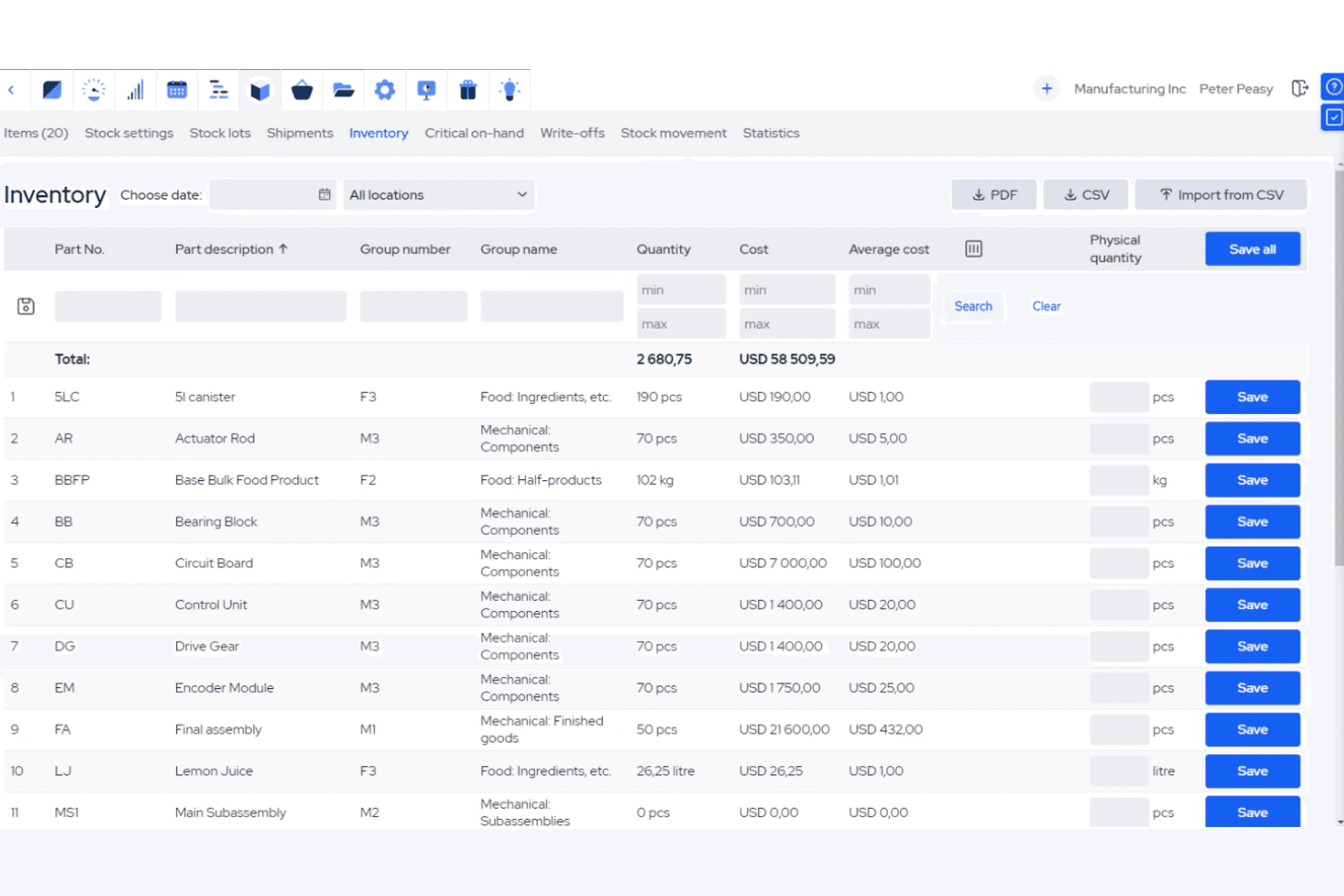
MRPeasy lets users track inventory costs and quantities across all stock items. MRPeasy is a cloud-based manufacturing ERP built for small manufacturers, covering production planning, BOMs, inventory, procurement, shop-floor reporting, and standard accounting in a single platform.
Who Is MRPeasy Best For?
MRPeasy is a strong fit for small manufacturers who need production planning, inventory, and accounting in one place without the complexity of a large ERP.
Why I Picked MRPeasy
I picked MRPeasy as one of the best because its manufacturing depth is genuinely hard to replicate with Odoo's modular setup. Where Odoo requires separate modules to reach comparable MRP functionality, MRPeasy includes finite-capacity MRP II scheduling, multi-level BOMs, and lot traceability in every plan. I especially like how production transactions post automatically to the general ledger, so your accounting stays current as manufacturing orders move through the shop floor without any manual reconciliation.
MRPeasy Key Features
- Lot and serial number traceability: Track materials and finished goods by lot or serial number from receipt through production and shipment.
- Native QuickBooks Online and Xero integration: Sync invoices and financial data directly between MRPeasy and your existing accounting software.
- B2B customer portal: Give business customers a self-service portal to view orders, pricing, and delivery status.
- CSV import templates for Odoo data: Import inventory items, BOMs, vendors, customers, and production data from Odoo using pre-built CSV templates.
MRPeasy Integrations
MRPeasy offers native integrations with QuickBooks Online, Xero, Shopify, BigCommerce, WooCommerce, Magento, HubSpot, Salesforce, Pipedrive, and Microsoft Power BI. REST API and webhooks are available on paid Unlimited accounts, and Zapier is also supported.
Pros and Cons
Pros:
- Operational transactions post automatically to accounting
- Lot traceability links finished goods to materials
- Finite-capacity scheduling supports production planning
Cons:
- Payroll requires manual journal entries
- No documented multi-entity consolidation
Learn more about MRPeasy: Best for audit-readiness features
- Free demo available
- Pricing upon request
Visit WebsiteCustomer Rating:4.9/5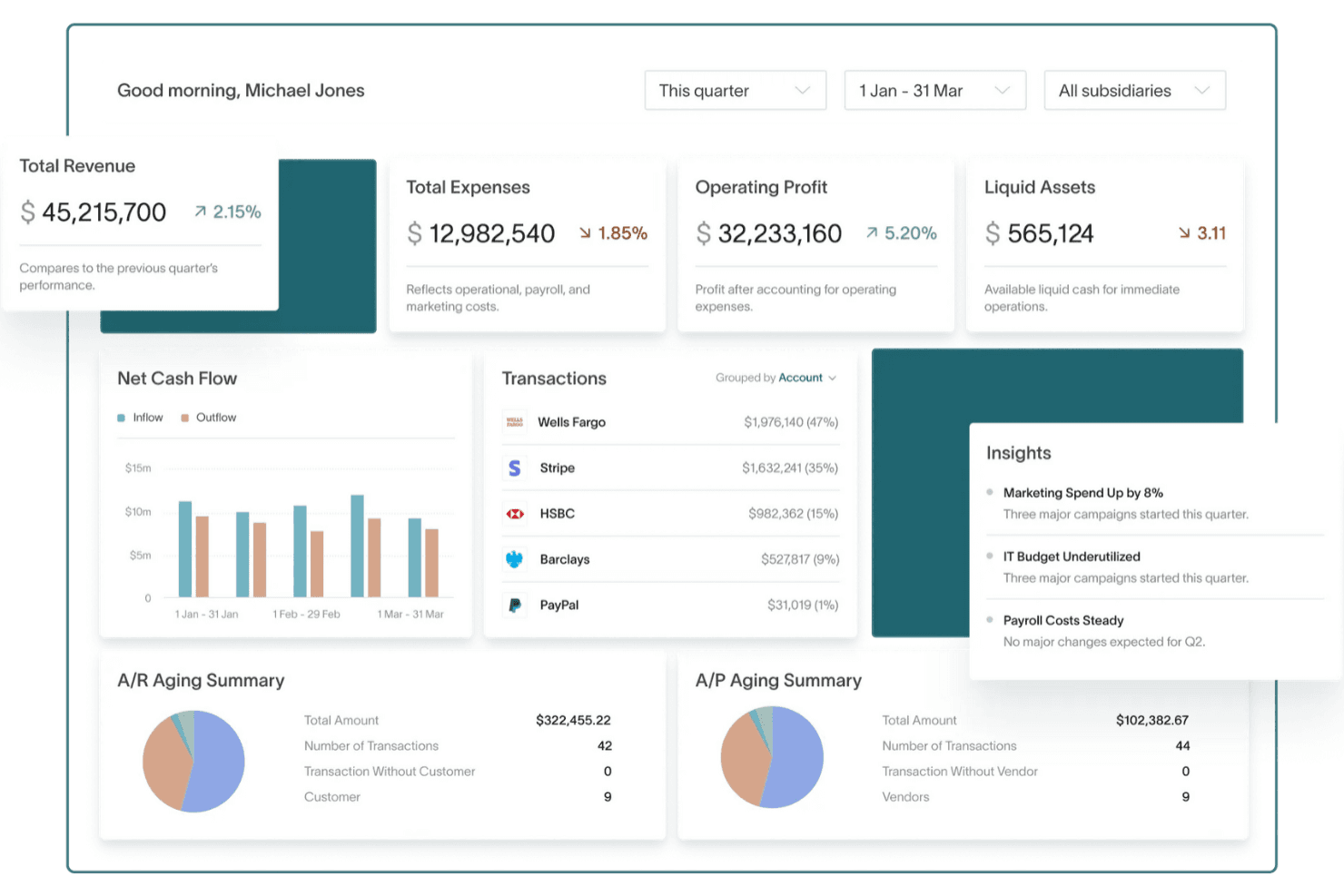
DualEntry gives users a real-time financial dashboard with key metrics. DualEntry is an AI-powered accounting and ERP platform built for finance teams, covering general ledger, multi-entity consolidation, AP/AR, audit trails, and compliance management across global entities and currencies.
Who Is DualEntry Best For?
DualEntry is a strong fit for controllers and CFOs at mid-market companies who need deep audit trails, multi-entity consolidation, and compliance-ready financials.
Why I Picked DualEntry
I've included DualEntry in my top picks because its audit-readiness features go deeper than most alternatives I've evaluated. The append-only general ledger captures every change with a timestamp, the user who made it, and a link to the supporting document, so your audit trail is never reconstructed after the fact. I also like that multi-book accounting lets you run GAAP, IFRS, and tax-basis books side by side, which makes consolidation across global entities far less painful at period-end.
DualEntry Key Features
- AI-powered transaction categorization: Suggests and applies transaction categories before entries post to the general ledger, reducing manual classification work.
- Global tax calculation: Automatically calculates VAT, GST, and sales tax across 240+ countries and 13,000+ tax jurisdictions on transactions and invoices.
- Purchase order management: Supports PO creation, multi-stage approval routing, and spend-threshold controls within the accounting platform.
- Subscription billing: Handles recurring billing workflows natively, including revenue recognition synced to your general ledger.
DualEntry Integrations
DualEntry reports 13,000+ native integrations, including Salesforce, HubSpot, Stripe, Bill.com, Ramp, Brex, Gusto, Deel, and Avalara. It also offers a public API for custom integrations.
Pros and Cons
Pros:
- Append-only audit trails link changes to evidence
- Multi-entity consolidation simplifies intercompany accounting
- Automated reconciliation reduces close-time manual work
Cons:
- Reviewers want more flexible reporting options
- No native inventory or manufacturing modules
Learn more about DualEntry: Best for material traceability
- 30-day free trial + demo available
- From $50/user/month
Visit WebsiteCustomer Rating:4.3/5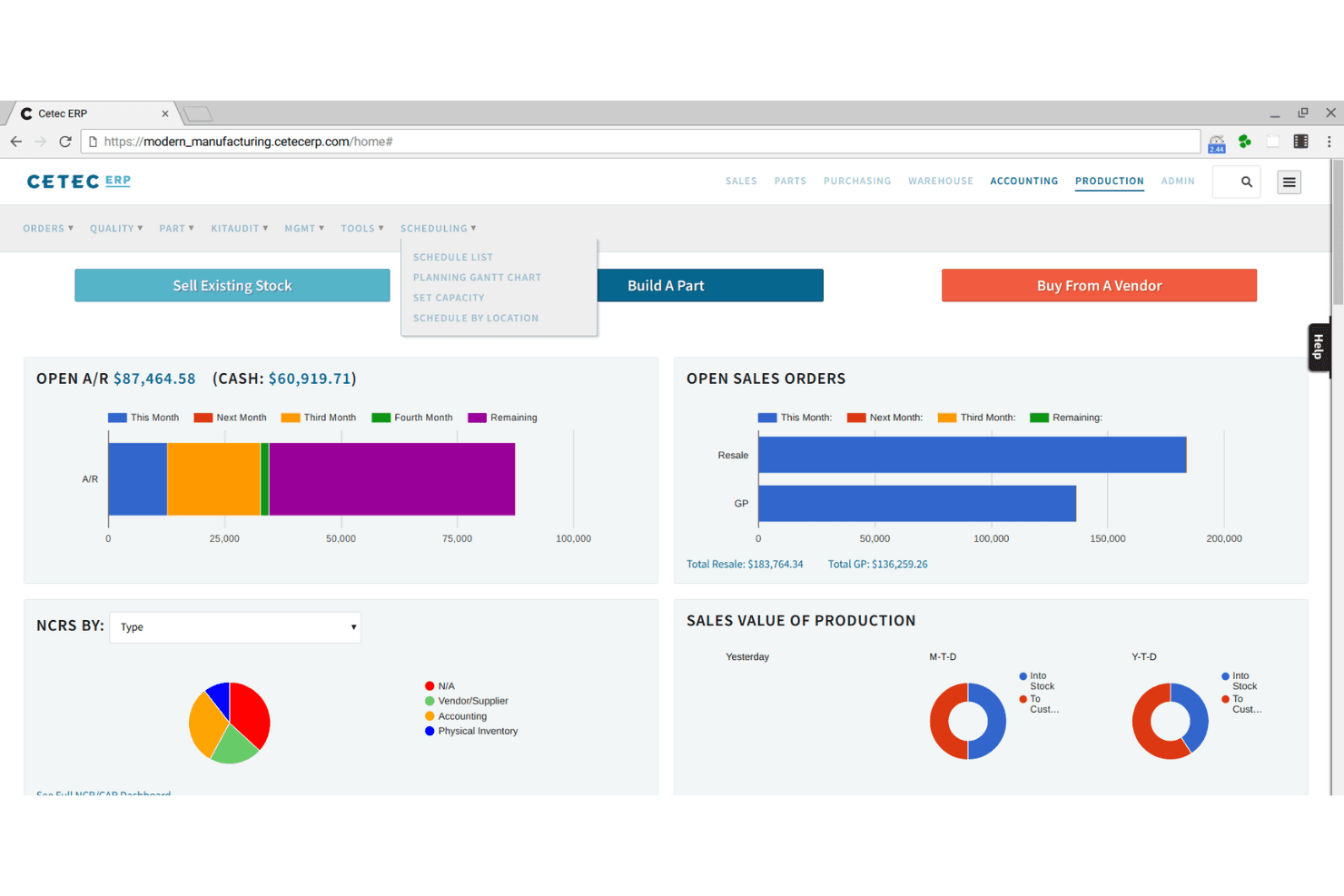
Cetec ERP's dashboard centralizes sales, production, and financial KPIs. Cetec ERP is a cloud-based manufacturing ERP that covers quoting, inventory, shop-floor control, quality management, material planning, and integrated financials in a single platform built specifically for manufacturers.
Who Is Cetec ERP Best For?
Cetec ERP is a strong fit for small to mid-sized manufacturers—particularly in electronics, aerospace, and job-shop environments—who need tight lot and serial traceability across the full production cycle.
Why I Picked Cetec ERP
Cetec ERP earns its spot on my shortlist because of how deeply lot and serial traceability runs through every layer of the system. I love that you can capture vendor lot codes at receiving, carry them through subassemblies and work-in-progress, and then trace finished goods all the way back to the specific supplier receipt and certificate of conformance—without ever leaving the platform. For electronics or aerospace job shops where a single nonconforming lot can trigger a full production review, that end-to-end traceability isn't a nice-to-have.
Cetec ERP Key Features
- Shop floor control: Create and manage electronic work orders with step-by-step work instructions, labor tracking, and real-time WIP visibility across production.
- Quality management: Log receiving, in-process, and final inspections, generate nonconformance reports, and manage CAPA workflows with root-cause analysis.
- Multi-warehouse inventory: Track stock across multiple warehouses and bin locations with FIFO and FEFO rotation rules and real-time availability checks.
- Integrated financials: Run a perpetual general ledger with automatic transaction posting from inventory, purchasing, production, and sales workflows.
Cetec ERP Integrations
Cetec ERP integrates with QuickBooks Online, ShipStation, Avalara AvaTax via EFS Networks, QBuild CADLink, CalcuQuote, and SPS Commerce for accounting, shipping, tax, CAD-to-BOM, EMS, and EDI workflows. Its JSON-based REST API supports custom integrations.
Pros and Cons
Pros:
- Barcode inventory controls support shop-floor traceability
- Production costs post directly to general ledger
- End-to-end lot tracing reaches shipped goods
Cons:
- Separate legal entities require multiple instances
- Financial reports often need Excel refinement
Learn more about Cetec ERP: Best for global project management
- Free trial available
- From $16/user/month (billed annually)
Visit WebsiteCustomer Rating:4.6/5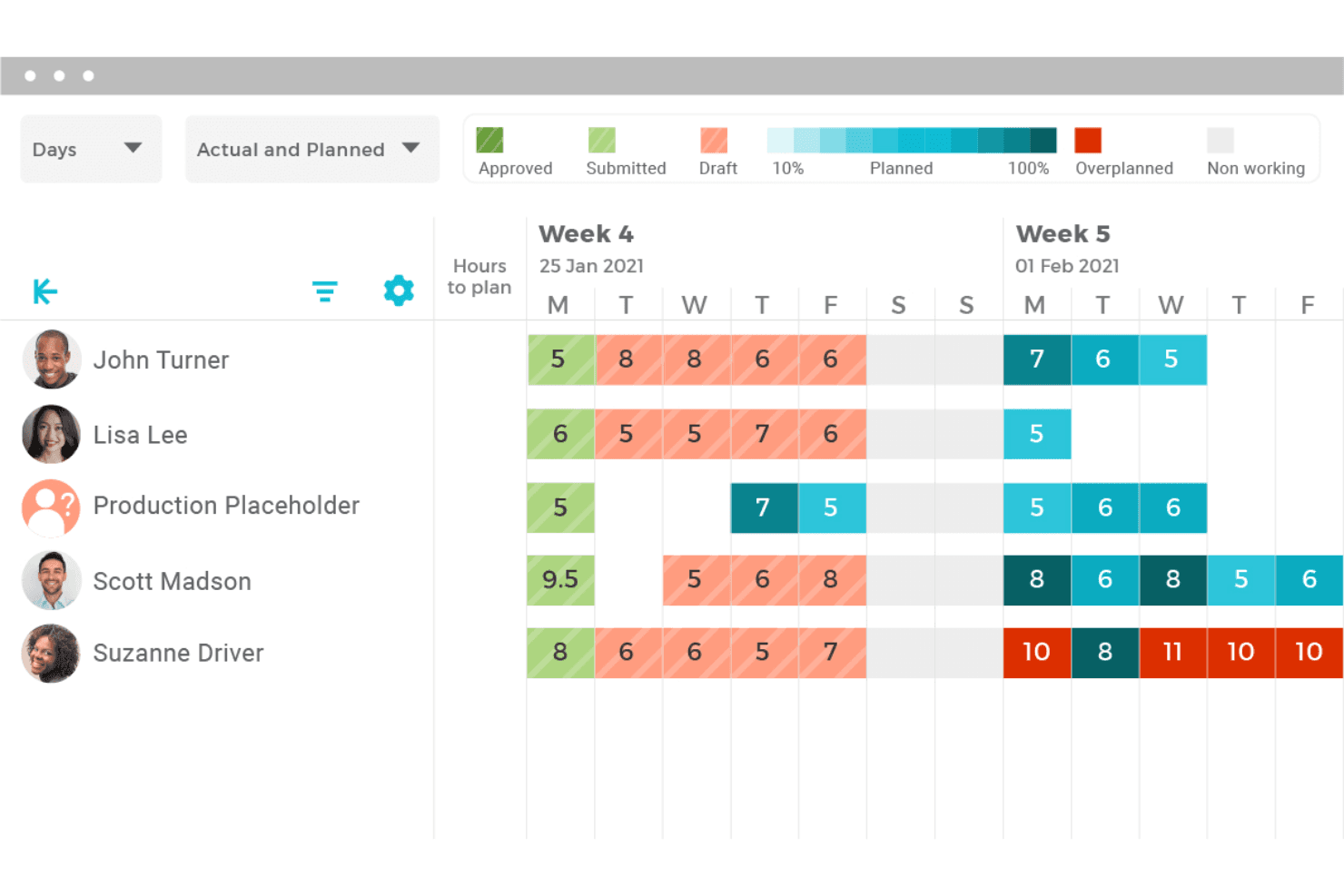
VOGSY visualizes team capacity with actual and planned hours per week. VOGSY is a professional services ERP that connects sales, project management, resource planning, time and expense tracking, and project accounting into a single quote-to-cash workflow.
Who Is VOGSY Best For?
VOGSY suits mid-sized professional services firms—consultancies, agencies, and managed-service providers—that need to manage projects, resources, and finances across multiple countries and currencies.
Why I Picked VOGSY
I picked VOGSY as one of the best because it handles global project management in a way few tools match, connecting multi-company structures, local currencies, and intercompany invoicing inside a single quote-to-cash workflow. I love how its multi-entity resource planning lets teams share staff across companies at preset intercompany rates, while base-currency consolidation rolls everything up for financial reporting. The revenue and margin forecasting across entities gives finance teams the cross-border visibility that's genuinely hard to get from a standard ERP.
VOGSY Key Features
- AI invoicing agent: Reviews draft invoice lines against timesheets, rates, deliverables, and billing schedules, flagging each line as pass, warn, or fail before invoices go out.
- Quote-to-project workflow: Converts a won opportunity into a resourced project with deliverables, activities, and a billing model, ready for user approval.
- Jira plug-in time tracking: Lets developers log time directly on Jira issues, which rolls up automatically to the matching VOGSY activity and deliverable.
- P&L reporting: Reports actual financial performance against budgets in both base and operating-company currencies, covering revenue, margins, and costs.
VOGSY Integrations
VOGSY offers native integrations with Xero, Sage, NetSuite, QuickBooks Online, Jira, Trello, Microsoft 365, Google Workspace, and Google Cloud Looker. It also provides a REST API for custom connections.
Pros and Cons
Pros:
- Reviewers report smooth onboarding and data loading
- Reviewers praise connected quote-to-cash workflows
- Cross-entity project margin visibility
Cons:
- Legacy ERP migration mapping remains undocumented
- No inventory or manufacturing modules
Learn more about VOGSY: Best for integrated business applications
- 30-day free trial available
- From $8/user/month (billed annually)
Visit WebsiteCustomer Rating:4.6/5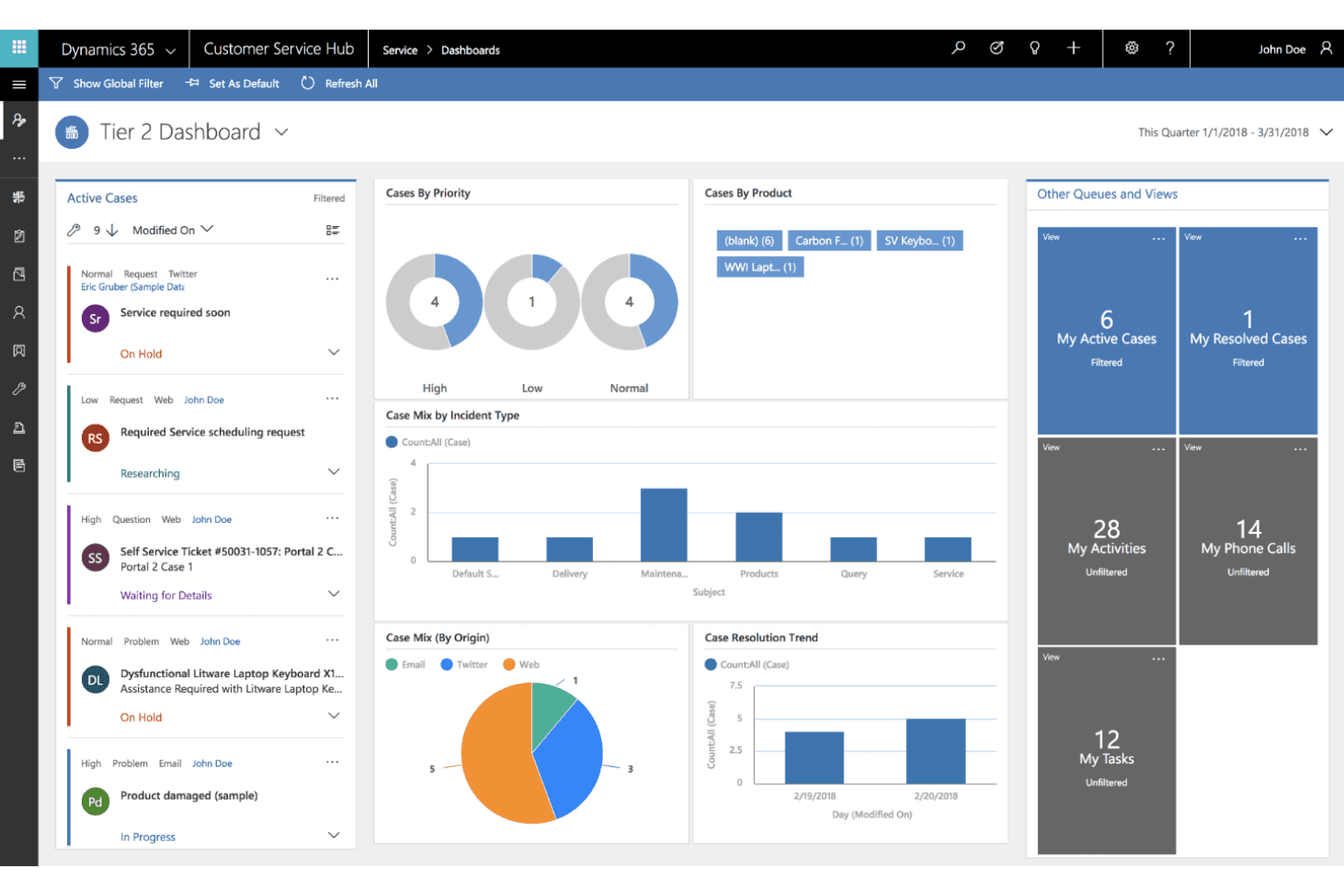
Microsoft Dynamics 365 centralizes customer service cases and analytics in one dashboard. Microsoft Dynamics 365 is a cloud and on-premises ERP suite that covers financial management, inventory, purchasing, supply chain, manufacturing, and project operations for small and midsize businesses.
Who Is Microsoft Dynamics 365 Best For?
Microsoft Dynamics 365 Business Central is a strong fit for small and midsize businesses that need finance, inventory, and operations managed in a single system with deep Microsoft 365 integration.
Why I Picked Microsoft Dynamics 365
Microsoft Dynamics 365 Business Central earns its spot on my shortlist because it genuinely unifies finance, inventory, purchasing, and operations in one system without requiring you to bolt on separate tools. I especially like how the Payables Agent automatically captures, matches, and routes invoices for approval, and the Sales Order Agent converts emailed purchase requests directly into quotes and sales orders. For businesses running manufacturing alongside finance, the Premium plan adds production BOMs, routings, and production order management all within the same environment.
Microsoft Dynamics 365 Key Features
- Cash-flow forecasting: AI analyzes your financial position and generates cash-flow projections to support planning decisions.
- Multi-company consolidation: Combines general ledger entries across companies with different charts of accounts, fiscal years, and currencies into a single consolidated view.
- Production order management: Generates and tracks production orders using bills of materials, routings, machine centers, and work centers, with manual or flushing-based output recording.
- Granular permission sets: Assigns read, insert, modify, delete, and execute permissions at the database-object level, with security filters to restrict access to specific records.
Microsoft Dynamics 365 Integrations
Microsoft Dynamics 365 offers native integrations with Outlook, Excel, Teams, Power BI, Dynamics 365 Sales, Customer Service, Field Service, and Shopify. It also supports marketplace integrations through AppSource and REST API connections for custom integrations.
Pros and Cons
Pros:
- Invoice and sales-order agents cut rekeying
- Production orders connect BOMs, routings, work centers
- Reviewers value unified finance and operations
Cons:
- Manual eliminations and non-live consolidation snapshots
- No documented Odoo migration path or playbook
Learn more about Microsoft Dynamics 365: Best for AI-powered ERP with modular solutions
- Not available
- Pricing upon request
Visit WebsiteCustomer Rating:4.4/5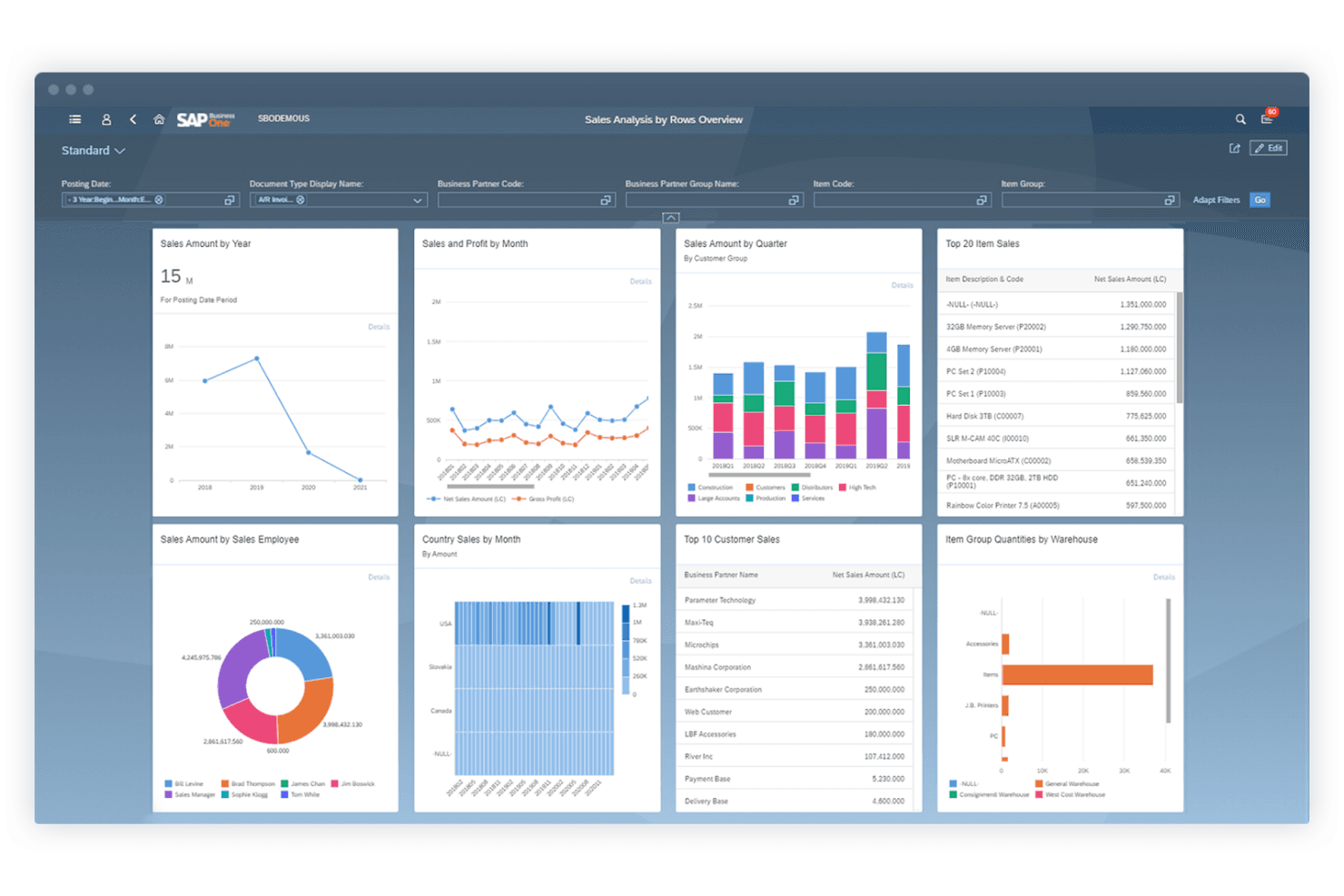
SAP Business One centralizes sales analytics across charts and tables. SAP Business One is an ERP solution for small and midsize businesses that brings together accounting, inventory, purchasing, sales, and customer management in a single platform, with native AI tools and modular industry capabilities for manufacturing, retail, and professional services.
Who Is SAP Business One Best For?
SAP Business One is a strong fit for small and midsize businesses that need a single system covering finance, inventory, purchasing, and sales—with room to grow into manufacturing or multi-entity operations.
Why I Picked SAP Business One
SAP Business One earns its spot on my shortlist because its native AI tools set it apart from most SMB ERP options. I particularly like the AI User-Defined Query feature, which lets you type a plain-language question and get a reviewable SQL query back, making ad hoc financial analysis accessible without a data team. The modular industry capabilities for manufacturing, retail, and professional services also mean you're not forcing a generic system to fit your operations.
SAP Business One Key Features
- Data Transfer Workbench: Imports legacy master and transaction data across financials, sales, purchasing, and inventory using a guided wizard, predefined templates, and field mapping.
- Intercompany integration: Replicates transactions across multiple SAP Business One company databases with support for consolidation hierarchies and both manual and automatic consolidation functions.
- Service Layer API: Provides REST and OData-based API access for connecting SAP Business One to third-party tools, cloud extensions, and electronic data interchange workflows.
- Audit Trail Report: Logs all changes to master data and transactions, filterable by user, date, and document or object category for financial oversight and compliance review.
SAP Business One Integrations
SAP Business One offers native integrations with Microsoft Outlook, Microsoft Excel, and SAP AI Core. Its Service Layer API supports REST and OData custom integrations, while its integration framework connects third-party solutions, cloud extensions, EDI, and web services.
Pros and Cons
Pros:
- Intercompany consolidation supports multi-company growth
- Audit trails support financial oversight
- Connected finance and inventory reduce reconciliation
Cons:
- Advanced shop-floor manufacturing may need add-ons
- Odoo migration requires manual field mapping
Learn more about SAP Business One: Best for growing teams without per-user fees
- Free demo available
- From $2,185/month
Visit WebsiteCustomer Rating:4.4/5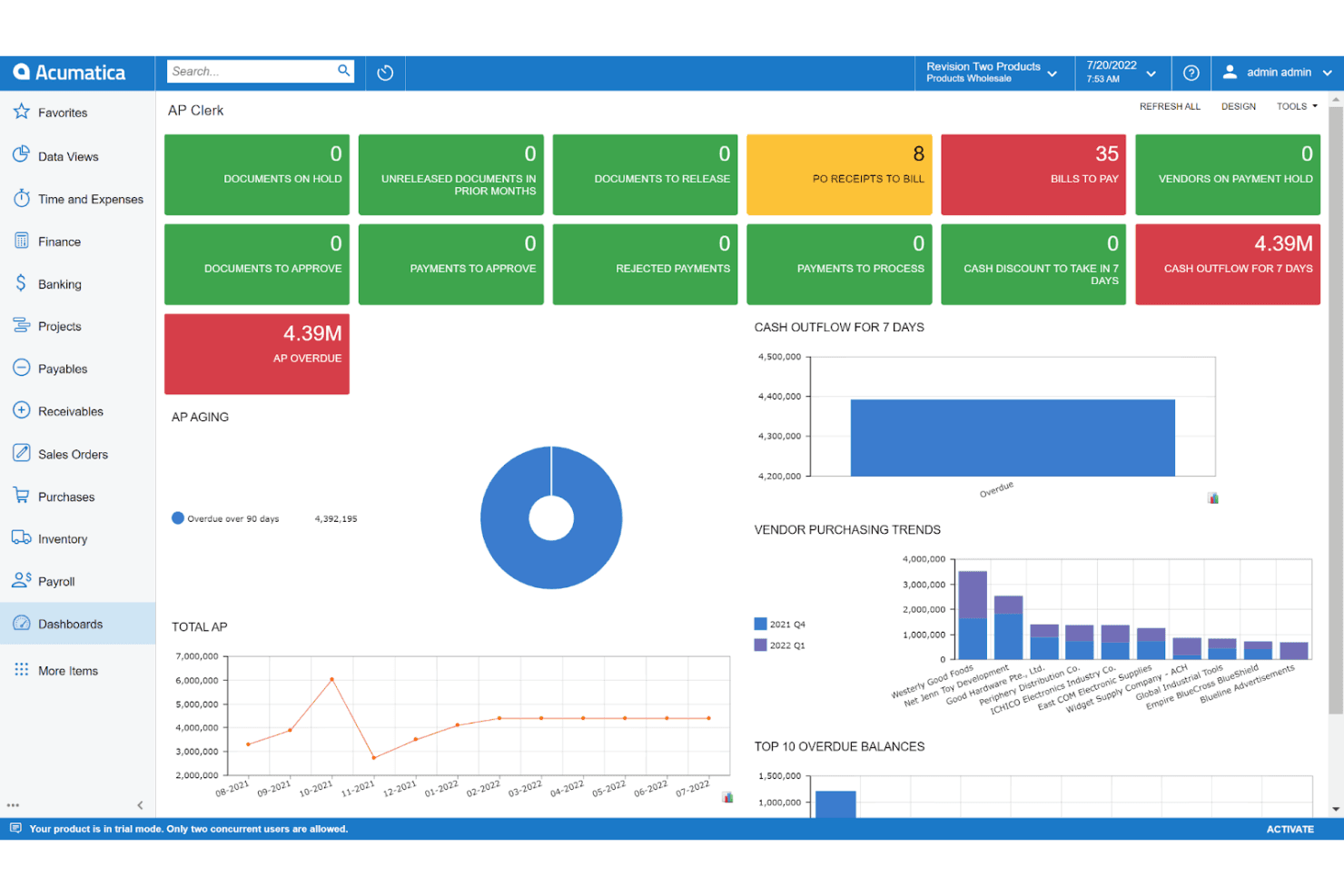
Acumatica's AP Clerk dashboard centralizes payables tracking and cash flow. Acumatica is a cloud ERP platform built for small and mid-market businesses, covering financial management, inventory, manufacturing, distribution, construction, CRM, and project accounting in a single system.
Who Is Acumatica Best For?
Acumatica is a strong fit for small and mid-market businesses that need to unify finance, inventory, manufacturing, or distribution operations in a single cloud platform without paying per user.
Why I Picked Acumatica
Acumatica earns its spot on my shortlist because its customer satisfaction scores on G2 (4.4 from over 2,000 reviews) are among the highest I've seen for a mid-market cloud ERP. I particularly like how its multi-entity accounting lets you track financials across unlimited related companies in a single database, which is a genuine advantage when you're outgrowing Odoo's structure. Its built-in MRP and production management also cover shop-floor scheduling, BOM revisions, and demand-based purchasing plans without bolting on a separate system.
Acumatica Key Features
- Low-code/no-code customization: Business users can tailor workflows, reports, dashboards, and screens without writing code.
- Role-based, field-level, and row-level security: Administrators can set access rights at the form, module, or suite level for individual users or roles.
- Integrated payment processing: Connects credit card, ACH, and electronic payments directly with accounts receivable, invoices, and sales orders.
- REST, SOAP, and webhook APIs: Developers can build custom integrations or extend the platform beyond the 300+ apps available on the Acumatica Marketplace.
Acumatica Integrations
Acumatica offers native integrations with Amazon, BigCommerce, and Shopify, plus HubSpot through its Marketplace. It supports 300+ Marketplace apps and REST, SOAP, and webhook APIs for custom integrations.
Pros and Cons
Pros:
- Configurable reports support changing business processes
- Connects finance, inventory, and manufacturing operations
- Tracks unlimited related companies in one database
Cons:
- Odoo migration requires partner-led data mapping
- Some financial reports need add-ons
Learn more about Acumatica: 8Best for connected inventory performance
Cin7
- 14-day free trial + demo available
- From $349/month
Visit WebsiteCustomer Rating:4.3/5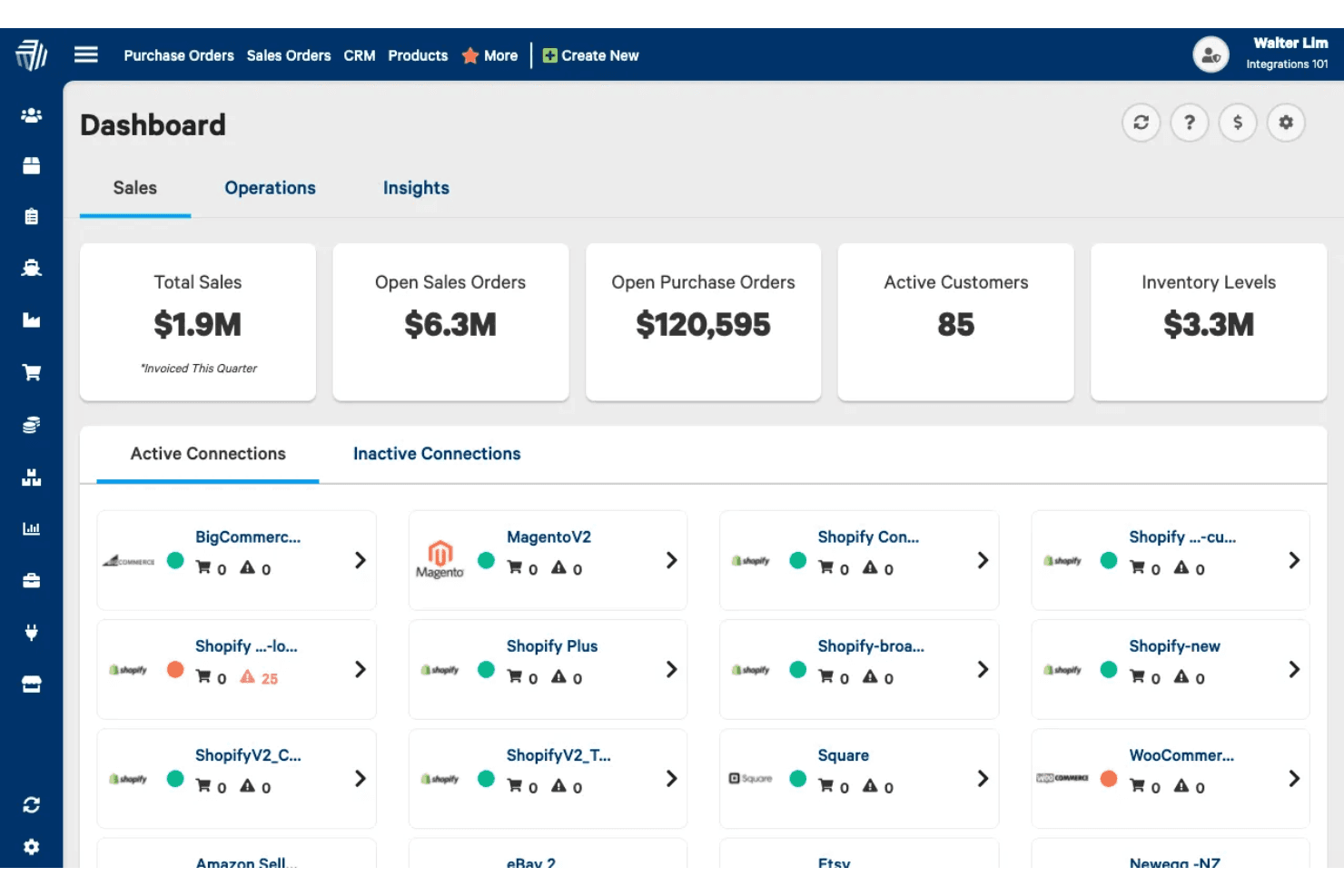
Cin7 centralizes sales, inventory, and multi-channel integrations in one dashboard. Cin7 Core is an inventory and order management system for product businesses that connects multichannel sales, purchasing, warehouse operations, manufacturing, and financial reporting in one platform.
Who Is Cin7 Best For?
Cin7 Core is a strong fit for growing product businesses—retailers, wholesalers, and manufacturers—that need multichannel inventory and order management connected to their accounting system.
Why I Picked Cin7
Cin7 Core earns its spot on my shortlist because its connected inventory performance isn't just a tagline—it's built into how the platform actually works. I love that real-time stock visibility flows across every sales channel simultaneously, so when a Shopify order drops, warehouse picks update and your accounting sync fires without manual intervention. The Advanced Manufacturing module adds production scheduling, work centers, and a mobile MES app that handles shop-floor execution in ways most inventory tools don't come close to matching.
Cin7 Key Features
- Multichannel inventory synchronization: Syncs stock levels across online stores, marketplaces, and POS channels in real time as orders are placed.
- Purchase order approval workflows: Routes purchase orders through configurable authorization and approval steps, with options to approve, reject, or return orders to draft.
- Cin7 Pay: Processes invoice and B2B Portal payments directly within Cin7 Core, with a dashboard for tracking payments, refunds, disputes, and payouts.
- CSV data import tools: Imports suppliers, customers, inventory lists, stock balances, and production BOMs using structured templates with field mapping and error reporting.
Cin7 Integrations
Cin7 Core has native integrations with QuickBooks Online and Xero, plus marketplace integrations for Shopify, Amazon, BigCommerce, WooCommerce, HubSpot, and ShipStation. Cin7 cites 700+ integrations or platforms and offers an API for custom connections.
Pros and Cons
Pros:
- Bulk imports speed serial-number updates
- BOM tracking supports multi-build production
- Real-time stock visibility across channels
Cons:
- Sync delays can disrupt high-volume orders
- Setup demands careful configuration and training
 Best for industry-specific ERP solutions
- Free demo available
- Pricing upon request
Visit WebsiteCustomer Rating:3.9/5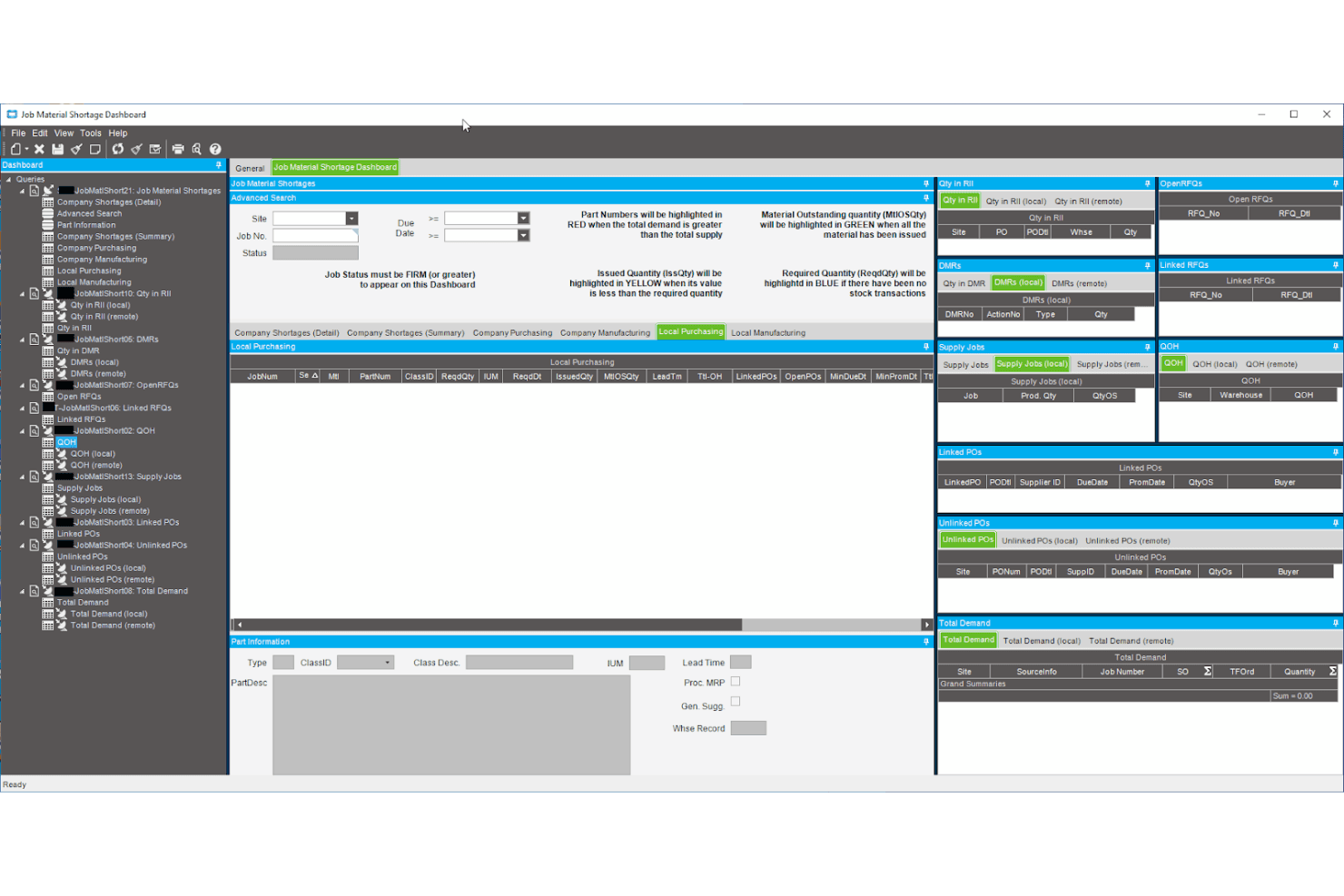
Epicor tracks job material shortages across purchasing and supply jobs. Epicor Kinetic is an industry-tailored ERP built for manufacturers, covering financials, supply chain, production management, planning and scheduling, CRM, and project management across cloud, on-premises, and hybrid deployments.
Who Is Epicor Best For?
Epicor Kinetic is a strong fit for mid-market manufacturers who need deep MRP, multi-site operations, and tightly connected financials in a single system.
Why I Picked Epicor Kinetic
I've included Epicor Kinetic in my top picks because it's purpose-built for manufacturers in a way that Odoo simply isn't. Where Odoo handles manufacturing as one module among many, Kinetic runs MRP, multi-site production scheduling, and shop-floor control as core functions, so your GL entries trace directly back to job costs, inventory movements, and production orders. I also like that it ships with more than 30 country-specific compliance packages, which matters if your operations span multiple jurisdictions with different local requirements.
Epicor Kinetic Key Features
- Global business management: Supports multi-company, multi-currency, and multi-language operations with more than 30 country-specific compliance packages and intercompany transaction management.
- Governance, risk, and compliance (GRC) controls: Provides role-based access at user and group levels with form-, field-, and report-level visibility controls, automated change tracking, and audit logs.
- Epicor Automation Studio: Connects external applications through REST API with recipe-based data flows, event triggers, and pre-built automation templates.
- Epicor Cash Collect: A cloud-based AR credit and collections tool that automates customer reminders, invoice presentment, dispute management, and cash forecasting with a customer self-service payment portal.
Epicor Integrations
Epicor Kinetic has documented integrations with Avalara, ADP, Salesforce, QuickBooks, and Microsoft Azure IoT Hub, plus Epicor Automation Studio powered by Workato. Its OData v4 REST API supports custom integrations with API keys, access scopes, and ERP permission controls.
Pros and Cons
Pros:
- Multi-site books support cross-company reporting
- GL traces connect inventory and job costs
- MRP connects production, inventory, and job costs
Cons:
- Rigid revisions challenge weak SKU/BOM structures
- Reporting often requires specialist expertise
Learn more about Epicor: 10Best for customizable open-source ERP and CRM
Dolibarr
- Free plan + 15-day free trial + free demo available
- From €5/month
Visit WebsiteCustomer Rating:4.5/5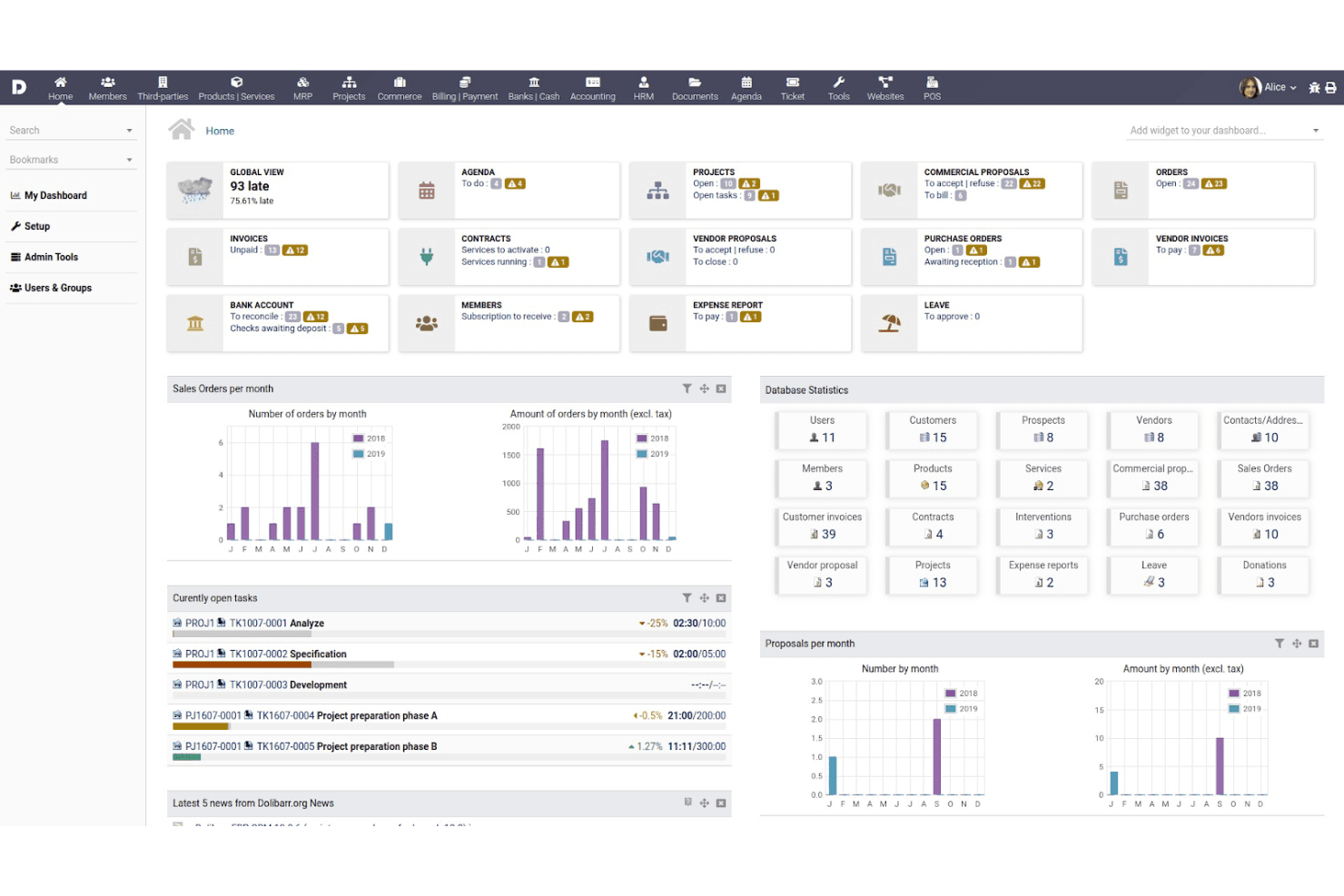
Dollibarr provides a modular, open-source ERP and CRM solution for small to medium-sized businesses. Dolibarr is an open-source ERP and CRM suite that covers finance and billing, inventory, sales, manufacturing, HR, and project management within a modular, self-hosted or cloud-deployable platform.
Who Is Dolibarr Best For?
Dolibarr is a strong fit for small businesses and IT-savvy teams that want a free, self-hosted ERP and CRM they can shape module by module to match their operations.
Why I Picked Dolibarr
I've included Dolibarr in my top picks because it's the rare open-source ERP that lets you activate only the modules you need, so you're not paying for or configuring features that don't apply to your business. I particularly like how its accounting module binds directly to invoicing, stock, and CRM data, meaning a sales order flows through to stock movements and journal entries without manual re-entry. Its Module Builder also lets developer-savvy teams extend the codebase to fit workflows Dolibarr doesn't cover out of the box.
Dolibarr Key Features
- Double-entry accounting module: Records transactions in a full general ledger with journalization, trial balance, income statement, and balance sheet outputs, plus FEC and CSV export formats.
- REST API with triggers and hooks: Lets developers extract, insert, update, or delete records via REST and run custom code in response to business events using triggers and hooks.
- Multi-currency invoicing: Configures currencies against a main accounting currency, supports foreign-currency quotes, orders, and invoices, and allows document-specific exchange-rate overrides.
- Leave request management: Lets employees submit leave requests that route to a supervisor for approval, with leave-balance updates and filter or export options.
Dolibarr Integrations
Dolibarr offers native integrations with PayPal, Stripe, Paybox, and PayZen. Marketplace integrations connect it with WooCommerce, Magento, PrestaShop, Google Calendar, Google Contacts, and Google Maps; its REST API supports custom integrations.
Pros and Cons
Pros:
- Self-hosting gives technical teams deployment control
- Reviewers praise adaptable modules for varied workflows
- Modular workflows connect sales, stock, and invoicing
Cons:
- Setup and invoice layouts need hands-on tuning
- Finance reporting lacks budgeting and consolidation depth
Learn more about Dolibarr:
Other Odoo ERP Alternatives
Below is a list of additional Odoo ERP alternatives that I shortlisted. While they didn’t make the top 10, they’re still valuable and worth further research.
- 11FulfilBest for retail and ecommerce businesses
- 12ZendeskBest for AI-driven customer service and team performance
- 13Sage 300Best for AI-enhanced financial decision-making
- 14ERPNextBest for free and open-source ERP with extensive features
- 15JD Edwards ERPBest for low total cost of ownership
- 16DR. ERPBest for AI-driven ERP solutions
- 17StrivenBest for all-in-one business management for SMBs
- 18Bitrix24Best for team collaboration
- 19ClickUpBest for project management and task tracking
- 20MuleSoftBest for integration and API management
Related ERP Software Reviews
If you still haven't found what you're looking for here, check out these tools closely related to ERP software, that we've tested and evaluated.
- Accounting Software
- POS Systems
- Billing Software
- Payroll Services
- Merchant Account Services
- Inventory Management Software
How I Evaluate Odoo ERP Alternatives
I evaluate each tool against two layers: baseline must-haves like a native GL and multi-entity consolidation, and differentiating factors that separate strong finance ERPs from generalist tools.
Core Functionality (Table Stakes For This List)
When I'm selecting tools for my list, I rank each one on a scale from 0 (does not offer the functionality) to 5 (excels in this area) for each core functionality listed below. Then, I calculate the tool's total score into a percentage. Each tool needs to achieve a minimum total score of 65% to be considered for inclusion.
- Integrated General Ledger: I look for a full double-entry GL with configurable chart of accounts, journal entries, and period management that supports real closing cycles.
- Accounts Payable & Receivable: Full AP/AR workflow matters here, from invoice creation and bill capture to payment processing, aging schedules, and vendor/customer management.
- Financial Reporting & Compliance: Each tool should produce standard financial statements (P&L, balance sheet, cash flow) and support compliance with frameworks like GAAP or IFRS.
- Multi-Module ERP Coverage: I check whether the platform bundles finance with operational modules like inventory, CRM, HR, or procurement to serve as a true Odoo replacement.
- Multi-Entity & Multi-Currency: Teams running subsidiaries or operating across borders need consolidated reporting, intercompany transactions, and multi-currency handling baked in.
- Automation & Integrations: I evaluate workflow automation for tasks like bank reconciliation and approval routing, plus API access and prebuilt connectors to payment and banking tools.
Once I have a list of tools that meet this criteria, I consider what sets each platform apart.
Differentiating Factors (What Sets Vendors Apart)
Here's how I compare and contrast different vendors:
Standout Features
Continuous close tools are a big differentiator. Platforms like NetSuite and Sage Intacct offer task checklists and reconciliation automation that can cut days off your month-end cycle. I also evaluate whether a vendor provides industry-specific modules—a manufacturing firm and a professional services company have very different ERP needs. Embedded analytics matter too, since finance teams that can build their own dashboards and run ad-hoc queries spend less time waiting on IT for custom reports.
Beyond Features
Total cost of ownership is something I weigh carefully. Odoo's à la carte pricing can surprise teams at scale, so I look at how each alternative structures licensing and implementation fees over time. Compliance readiness also factors in—I check for SOC certifications, built-in audit trails, and segregation of duties controls that auditors expect to see. The implementation partner ecosystem matters too, since ERP migrations are complex and vendors like SAP Business One and Acumatica maintain deep partner networks that give you more options when choosing an implementation fit.
Why Look for an Odoo ERP Alternative
While Odoo is a valuable open source ERP software, it may not be the ideal fit for your team. As a result, you might be looking for an alternative for the following reasons:
- Cost: Odoo ERP's pricing may exceed your budget, making it difficult to justify the expense. Exploring alternatives could help you find a more cost-effective solution that meets your needs. Some vendors even offer free ERP software plans to help you trial the solution before you buy.
- Complexity: The system might be too complex for your needs, leading to inefficiencies and wasted resources. Seeking a simpler alternative could enhance productivity and ease of use.
- Customization Limits: You need more customization options than Odoo ERP offers, which could restrict your ability to tailor the software to your specific requirements. Looking for alternatives may provide the flexibility you need to fully optimize your processes.
- Support Issues: You require more reliable or accessible customer support, as Odoo ERP's support may not meet your expectations. Finding an alternative with better support options could improve your overall experience and problem resolution.
- Integration Needs: You may need better integration with other software tools to streamline your operations. Choosing an alternative that offers superior integration capabilities could enhance your workflow and efficiency.
Exploring alternatives to Odoo ERP can lead to finding a solution that better aligns with your budget, needs, and business goals. By considering different options, you can ensure that your ERP system maximizes efficiency, customization, and support, ultimately driving your business forward.
Key Features of Odoo ERP Alternatives
Here are some key features of Odoo ERP that your alternative software should be able to replicate or improve upon to be a good fit.
- Modular Structure: A modular structure allows businesses to add or remove modules as needed, ensuring they only use what is necessary. This flexibility can lead to cost savings and a more streamlined system tailored to specific business operations.
- All-in-One Solution: An all-in-one solution integrates various business functions into a single platform, simplifying management and reducing the need for multiple disparate systems. This consolidation enhances efficiency and provides a cohesive view of business operations.
- Customization Capabilities: Highly customizable ERP systems can be tailored to fit specific business needs, ensuring optimal performance and relevance. Customization enables businesses to address unique challenges and leverage opportunities effectively.
- User-Friendly Interface: An intuitive and easy-to-navigate interface ensures that users can quickly learn and efficiently operate the system. This ease of use reduces training time and enhances productivity.
- Integration and Compatibility: Seamlessly integrating with other software and platforms ensures that data flows smoothly across systems. This compatibility eliminates silos and supports unified business processes.
- Reporting and Analytics: Comprehensive reporting and analytics tools provide deep insights into business performance. These features help in making informed decisions, identifying trends, and optimizing strategies.
- Mobile Accessibility: Accessibility via mobile devices allows for on-the-go management, ensuring that business operations can be monitored and managed from anywhere. This mobility enhances responsiveness and flexibility in decision-making.
- Automation and Workflows: Automating routine tasks and workflows improves efficiency and reduces the likelihood of errors. Automation frees up resources for more strategic activities, driving overall productivity.
- E-commerce: Robust e-commerce capabilities support online sales, enabling businesses to expand their market reach. This feature is vital for tapping into the growing digital marketplace and enhancing customer experiences.
- CRM: Comprehensive CRM features help in managing and nurturing customer interactions. Effective CRM tools are essential for building strong customer relationships and driving sales growth.