

Gusto HR- und Lohnabrechnungssoftware Testbericht für 2026


Gusto is a HR and payroll provider that helps you manage employee pay, benefits, and compliance. It integrates easily with leading accounting tools like QuickBooks, Xero, and FreshBooks, ensuring efficient data flow across systems.
Gusto is ideal for small to medium-sized businesses—especially those in tech companies or creative agencies who need an efficient way to manage employee details and payroll without the hassle. Overall, the software helps finance professionals maintain payroll accuracy, minimize manual input, and speed up the month-end close.
In this Gusto review, you’ll get a quick breakdown of the software’s core features, pros and cons, ideal use cases, pricing, and more. If payroll tasks slow down your month-end process, this one’s worth a closer look.
Why Trust Our Software Reviews
Gusto Evaluation Summary
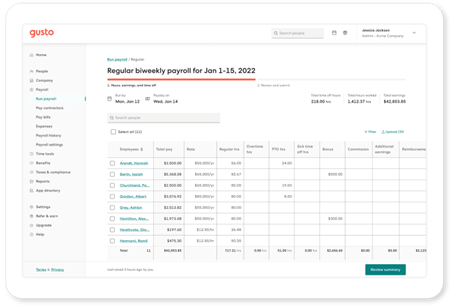
- From $49/month + $6/user/month (billed annually)
- Free demo available
Gusto Overview
Gusto excels as an HR and payroll software with its intuitive interface and advanced feature set. Compared to other tools, it offers excellent value with seamless integration options and competitive pricing.
The software offers a strong core feature set, including automated payroll processing, contractor payments, and benefits administration. These capabilities make it an ideal fit for service-based firms or companies with hybrid workforces. However, businesses that require in-depth customization or niche compliance tools may find its offerings less advanced than those of more specialized enterprise platforms.
Overall, Gusto stands out as a reliable, efficient HR solution that prioritizes simplicity and user experience—making it a smart choice for growing businesses focused on operational efficiency.
pros
-
Simplifies benefits management by offering integrated access to health insurance, 401(k) plans, and commuter benefit.
-
The platform streamlines payroll processing with automatic calculations, direct deposits, and end-to-end tax filing.
-
Well-organized dashboard makes it easy for finance teams to onboard quickly.
cons
-
Limited flexibility for tailoring workflows, fields, or integrations.
-
Reporting lacks the customization and depth of data analytics required for larger corporations and enterprises.
-
While support is generally helpful, users may experience delays in response during peak periods.
Sind Sie ein guter Kandidat für Gusto?
Für wen ist Gusto besonders geeignet?
Kleine bis mittelgroße Unternehmen werden Gusto als ideal empfinden, vor allem wegen der einfachen Bedienung und der breiten Integration. Die Software ermöglicht ein effizientes Management von Mitarbeiterleistungen und eignet sich perfekt für Unternehmen, die ihre HR-Prozesse verbessern möchten, ohne eine steile Lernkurve zu bewältigen. Gusto ist zudem ein Vorteil, wenn Ihr Team Wert auf benutzerfreundliche Gehaltsabrechnungen und schrittweise, automatisierte Steuererklärungen/-vorlagen legt.
-
Kleine Unternehmen
Gusto vereinfacht die komplette Lohnbuchhaltung und das Mitarbeiterleistungsmanagement und ist damit ideal für kleine Teams mit begrenzten HR-Ressourcen.
-
Technologie-Start-ups
Die automatisierten Funktionen und die einfache Bedienung helfen Tech-Startups, sich auf die Entwicklung statt auf Verwaltung zu konzentrieren.
-
Einzelhandelsunternehmen
Dank der Fähigkeit der Software, verschiedene Mitarbeitertypen zu verwalten, eignet sie sich besonders für Handelsunternehmen mit vielfältiger Belegschaft.
-
Remote-Teams
Die Online-Plattform von Gusto macht die Gehalts- und Leistungsabrechnung für Remote-Mitarbeiter unkompliziert.
-
Personalabteilungen
Die Automatisierungen, die intuitiven Workflows und die zentrale Mitarbeiterdatenverwaltung der Software erleichtern mehrere zentrale HR-Aufgaben.
-
Non-Profit-Organisationen
Mit der benutzerfreundlichen Oberfläche unterstützt Gusto Non-Profits bei der effizienten Verwaltung beschränkter Ressourcen.
Für wen ist Gusto weniger geeignet?
Große Unternehmen mit komplexen HR-Anforderungen könnten bei Gusto fortschrittliche Anpassungs- und Berichtsfunktionen vermissen. Wenn Ihr Team sehr detaillierte Analysen und spezialisierte HR-Funktionen benötigt, reichen Gusto’s Möglichkeiten eventuell nicht aus. Insgesamt könnten Firmen mit komplexen Organisationsstrukturen oder starkem Skalierungsbedarf das Angebot als zu einfach empfinden.
-
Großunternehmen
Gustos grundlegende Berichtsfunktionen bieten eventuell nicht die Tiefe, Anpassbarkeit und Skalierbarkeit, die für komplexe Finanzanalysen und Einblicke in die Belegschaft benötigt werden.
-
Fertigungsindustrien
Fertigungsunternehmen könnten Gustos begrenzte Anpassbarkeit für ihre eigenen HR-Prozesse, wie komplexe Arbeitsabläufe und schichtbasierte Einsatzplanung, als unzureichend empfinden.
-
Stark regulierte Branchen
Gusto kann für Unternehmen in stark regulierten Sektoren zu wenig bieten, da fortschrittliche Audit-Kontrollen fehlen und die Einhaltung branchenspezifischer Auflagen erschweren.
-
Internationale Unternehmen
Gustos Infrastruktur ist speziell für die Gehaltsabrechnung, Steuerregulationen und Leistungsverwaltung in den USA konzipiert und dadurch weniger geeignet für globale Unternehmen.
-
Finanzinstitute
Das Fehlen branchenspezifischer HR-Funktionen wie komplexe Vergütungsstrukturen und regulatorische Berichte macht die Software weniger geeignet für Banken.
-
Gesundheitsorganisationen
Gusto bietet für Gesundheitsorganisationen, die oft erweiterte Einsatzplanung und Nachverfolgung von Qualifikationen benötigen, nur begrenzte Funktionen.
How We Test & Score Tools
We’ve spent years building, refining, and improving our software testing and scoring system. The rubric is designed to capture the nuances of software selection and what makes a tool effective, focusing on critical aspects of the decision-making process.
Below, you can see exactly how our testing and scoring works across seven criteria. It allows us to provide an unbiased evaluation of the software based on core functionality, standout features, ease of use, onboarding, customer support, integrations, customer reviews, and value for money.
Core Functionality (25% of final scoring)
The starting point of our evaluation is always the core functionality of the tool. Does it have the basic features and functions that a user would expect to see? Are any of those core features locked to higher-tiered pricing plans? At its core, we expect a tool to stand up against the baseline capabilities of its competitors.
Standout Features (25% of final scoring)
Next, we evaluate uncommon standout features that go above and beyond the core functionality typically found in tools of its kind. A high score reflects specialized or unique features that make the product faster, more efficient, or offer additional value to the user.
We also evaluate how easy it is to integrate with other tools typically found in the tech stack to expand the functionality and utility of the software. Tools offering plentiful native integrations, 3rd party connections, and API access to build custom integrations score best.
Ease of Use (10% of final scoring)
We consider how quick and easy it is to execute the tasks defined in the core functionality using the tool. High scoring software is well designed, intuitive to use, offers mobile apps, provides templates, and makes relatively complex tasks seem simple.
Onboarding (10% of final scoring)
We know how important rapid team adoption is for a new platform, so we evaluate how easy it is to learn and use a tool with minimal training. We evaluate how quickly a team member can get set up and start using the tool with no experience. High scoring solutions indicate little or no support is required.
Customer Support (10% of final scoring)
We review how quick and easy it is to get unstuck and find help by phone, live chat, or knowledge base. Tools and companies that provide real-time support score best, while chatbots score worst.
Customer Reviews (10% of final scoring)
Beyond our own testing and evaluation, we consider the net promoter score from current and past customers. We review their likelihood, given the option, to choose the tool again for the core functionality. A high scoring software reflects a high net promoter score from current or past customers.
Value for Money (10% of final scoring)
Lastly, in consideration of all the other criteria, we review the average price of entry level plans against the core features and consider the value of the other evaluation criteria. Software that delivers more, for less, will score higher.
Core Features
Automated Payroll Processing: Gusto handles all your payroll calculations automatically, saving you time and reducing errors. You can run payroll with just a few clicks, ensuring employees are paid accurately and on time.
Tax Filing: Gusto automatically calculates and files your payroll taxes, keeping you compliant with government regulations. This helps take the hassle out of tax season and bookkeeping by managing quarterly and annual filings.
Employee Benefits Management: Easily manage health insurance, retirement plans, and more through Gusto's benefits platform. Your team can enroll in benefits with minimal effort, enhancing employee satisfaction.
Time Tracking: Gusto offers built-in time tracking so your employees can clock in and out seamlessly. This feature also ensures accurate payroll by integrating directly with your timesheets.
Direct Deposit: With Gusto, you can pay your employees through direct deposit quickly and securely. In such, you eliminate the need for paper checks and pay stubs, and simplify payday for everyone.
HR Tools: Gusto provides essential HR tools for onboarding, employee self-service, and document management. This way, you can streamline your HR processes by keeping everything in one place.

Standout Features
Employee Self-Serve Portal: Gusto's portal allows employees to manage their own benefits and personal information, including bank accounts. This empowers your team and reduces the administrative load on your HR staff.
Compliance Assistance: Gusto offers compliance support to help you navigate labor laws and regulations. As a result, your business stays up-to-date with the latest requirements, reducing legal risks.
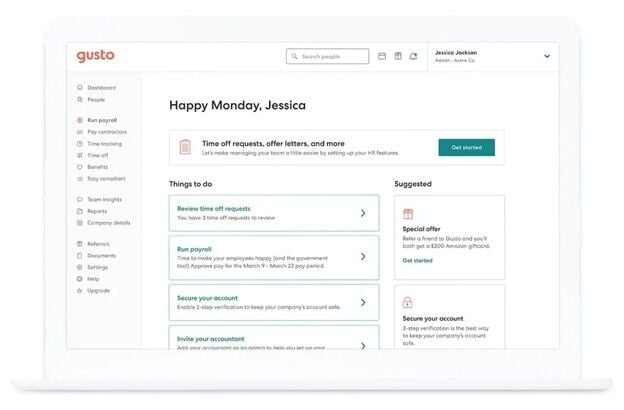
Ease of Use
Gusto offers a user-friendly experience, designed to make payroll and human resources tasks simple for your team. Its intuitive layout makes navigation effortless, helping users quickly find what they need without confusion. Plus, with easy-to-use tools for payroll, benefits administration, and onboarding, Gusto minimizes the learning curve, making it accessible even for first-time users. Additional features like automated tax filing and employee self-onboarding also contribute to its ease of use, helping teams save time and avoid common administrative headaches.
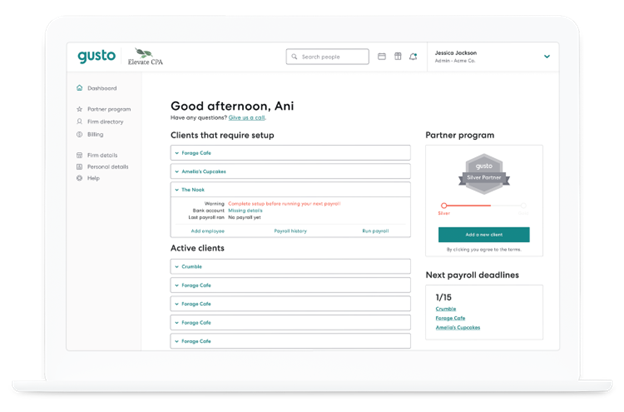
Onboarding
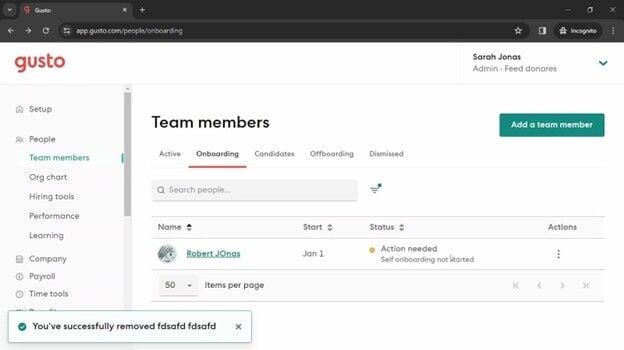
Gusto offers a smooth onboarding process with clear instructions and helpful resources to get you started. You and your team can quickly set up accounts and begin using the platform with minimal hassle. The availability of tutorials and support articles also ensures you have the guidance needed to navigate the system efficiently. All in all, Gusto's onboarding tools and flow are designed to be straightforward and user-centric, helping you integrate the software into your operations seamlessly.
Customer Support
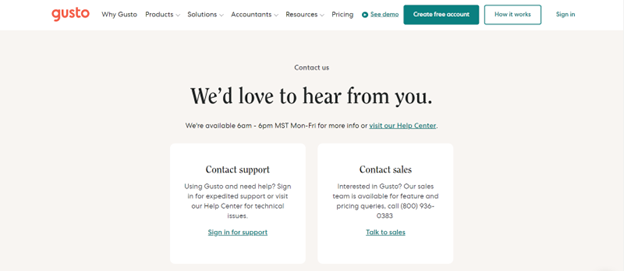
Gusto provides reliable customer support with multiple channels, including phone and email, to assist you and your team. While some users report occasional delays, the support team is generally helpful and knowledgeable. Gusto also offers an advanced help center with articles and guides, ensuring you have access to necessary information when you need it. The availability of these resources aids in resolving issues efficiently, though improvements in response times would enhance the overall experience.
Value for Money
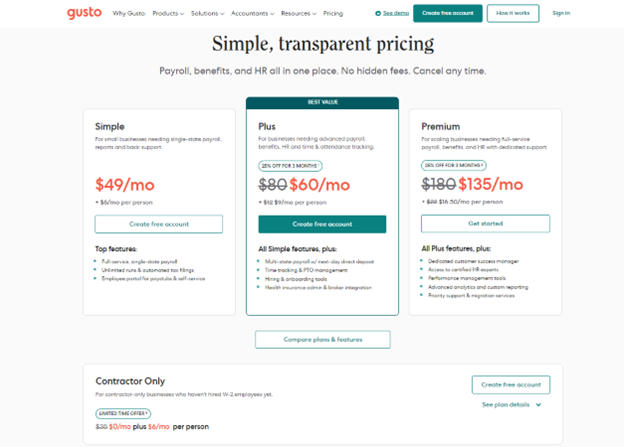
Gusto plans come at a competitive value, making it a solid investment for small to medium-sized businesses. The software provides a transparent pricing model and a good range of features included in each tier. Each of the available plans cater to different needs, ensuring you only pay for what your team requires.
- Simple Plan: Basic payroll processing and employee self-service.
- Plus Plan: Adds benefits administration and time tracking.
- Premium Plan: Includes HR resource center and priority support.
New Product Updates from Gusto

Gusto Enhances Benefits Renewals with Personalized Insights
Gusto enhances benefits renewals by providing personalized recommendations based on cost, coverage, and provider preferences, along with new dental and vision benchmarks. This improves decision-making and helps businesses select more competitive and suitable benefits plans. Highlights include:
- Personalized Insights: The new system leverages your business's unique cost and coverage data to recommend the most appropriate benefit plans.
- Dedicated Benefits Advisor: A dedicated advisor provides tailored recommendations, considering provider preferences for an optimized benefits solution.
- Dental and Vision Benchmarks: Updated benchmarks allow you to compare your dental and vision packages with those of similar businesses, ensuring competitive advantage and informed decision-making.
Visit Gusto's official site for more details.
 for more details.
Gusto Adds Compliance and Savings Insights for Accountants
Gusto introduces a new feature for accountants that provides real-time visibility into client compliance requirements and potential savings opportunities. This improves efficiency and enables accountants to deliver more proactive, data-driven guidance. Highlights include:
- Client Compliance View: Accountants can instantly access a detailed view of client compliance needs, streamlining monitoring processes.
- Health Benefits Overview: This allows for quick insights into client health benefits, aiding in delivering better-informed advice.
- Savings Opportunities Identification: Helps identify potential savings for clients, enhancing the value accountants can offer.
Visit Gusto's official site for more details.
Gusto Adds Hour-Based Waiting Periods for Time Off
Gusto enhances time off accrual by enabling waiting periods based on hours worked instead of fixed timeframes. This improves flexibility and ensures policies better reflect actual work patterns while supporting state compliance requirements. Benefits include:
- Hour-based Accruals: This feature allows setting waiting periods based on hours worked, providing a more accurate reflection of how the team operates.
- Alignment with State Requirements: Enables businesses to comply with varying state requirements more effectively without added manual processes.
- Reduced Manual Effort: By using hour-based accrual systems, Gusto reduces the need for manual calculations, thus streamlining operations.
Visit Gusto's official site for more details.
Gusto Enhances Payroll Flexibility and Time Off Policies
Gusto adds a three-day financing fee waiver for Payroll Bridge repayments and updates time off policies to support both paid and unpaid leave options. These enhancements give businesses more control over short-term cash flow and greater flexibility in managing employee time off. Highlights include:
- Payroll Bridge Grace Period: Waives financing fees if the outstanding balance is repaid in full within three days, offering short-term repayment flexibility.
- Paid and Unpaid Time Off Options: Allows administrators to configure time off policies that include both paid and unpaid leave settings.
Visit Gusto’s official site for more details.

Gusto Introduces Autosync Time to Payroll
Gusto has launched a new feature called Autosync Time to Payroll, designed to enhance payroll efficiency by ensuring approved timesheets are synced smoothly into payroll systems. This release aims to simplify payroll management for administrators and ensure accurate employee compensation. Here are the details of the update:
- Automatic Timesheet Synchronization: Once timesheets are approved, they are automatically synced with payroll, eliminating manual entry and reducing errors.
- Timely Payments: Ensures that all employees are paid on time by automating the link between time tracking and payroll.
Visit Gusto's official site for more details.

Gusto Adds S Corp Election and Retirement Plan Tax Credit Automation
Gusto now offers built-in S Corp Election filing and automated Retirement Plan Tax Credit calculations to reduce paperwork and improve tax accuracy. These updates help solopreneurs and small businesses make smarter tax decisions faster while staying compliant. Here are the details of the update:
- S Corp Election with AI Advisor: Guides users through IRS Form 2553 filing with eligibility checks and step-by-step assistance.
- Retirement Plan Tax Credit Automation: Automatically estimates credits and generates ready-to-file documents using payroll data.
Visit Gusto’s official site for more details.

Gusto Integrates Payroll Tools Into ChatGPT
Gusto has launched an integration of its payroll platform with ChatGPT, marking a significant leap in convenience and efficiency for small businesses. This integration allows users to leverage AI to manage payroll tasks seamlessly within ChatGPT. Here are the details of the update:
- Integration with ChatGPT: Users can now connect their Gusto accounts with ChatGPT, enabling the use of natural language to access and analyze payroll and business data directly.
- Real-time Data Querying: Business owners can query real payroll data, making data-driven decisions easier through intuitive language inputs.
- Trend Analysis: The feature offers analysis of business trends, providing actionable insights through AI.
- Running Payroll: The ability to run payroll directly in ChatGPT enhances operational efficiency by reducing the need to switch between platforms.
Visit Gusto's official site for more details.
Gusto Specs
- API
- Application Tracking
- Approval Workflows
- Attendance Tracking
- Budgeting
- Calendar Management
- Compliance Tracking
- Dashboard
- Data Export
- Data Import
- Data Visualization
- Employee Database
- Employee Incentive Management
- Employee Onboarding
- Expense Tracking
- External Integrations
- Feedback Management
- Forecasting
- Multi-Currency
- Multi-User
- Notifications
- Payroll
- Scheduling
- Tax Management
- Time Management
- Timesheets
- Travel Management
- Vacation & Absence Calendar
Gusto FAQs
How does Gusto handle employee onboarding?
Can I customize payroll schedules with Gusto?
Is Gusto compliant with labor laws?
How secure is my data with Gusto?
Can Gusto support remote teams?
How does Gusto handle tax filings?
What kind of customer support does Gusto offer?
Does Gusto offer mobile access?
Gusto Company Overview & History
Gusto, originally founded as ZenPayroll in November 2011, is headquartered in San Francisco and specializes in payroll, benefits, and HR management software for U.S. businesses.
The company launched its services in 2012 and rebranded to Gusto in 2015, expanding its offerings to include health benefits and workers' compensation. As of recent reports, Gusto serves over 400,000 businesses nationwide and processes tens of billions of dollars in payroll annually.
They currently employ over 2,400 people and are recognized for their innovative and user-friendly services.
Gusto Major Milestones
- 2011: Founded as ZenPayroll in November.
- 2012: Launched payroll services.
- 2015: Rebranded to Gusto, adding health benefits and workers' compensation.
- 2020: Developed new products, including tools for the Paycheck Protection Program.
Wie geht es weiter?
Bereit, Ihre Fähigkeiten als Finanzfachkraft zu erweitern? Abonnieren Sie unseren kostenlosen Newsletter.