

El software de contabilidad de ingeniería es un recurso valioso para cualquier empresa. Con el software adecuado, los equipos pueden mejorar la gestión de los costes de los proyectos y aumentar la precisión de los informes financieros. Sin embargo, encontrar el software de contabilidad de ingeniería adecuado puede ser complicado, especialmente debido a la gran cantidad de opciones disponibles.
Gracias a mi experiencia con software financiero y de contabilidad, probé y comparé varios de los principales programas de contabilidad de ingeniería disponibles. A partir de ahí, recopilé mis resultados en reseñas detalladas para ayudarte a encontrar el mejor software para tus necesidades.
Por qué confiar en nuestras recomendaciones de software
6,700+
Reviews
20
Industry experts
16+
Evaluation factors
14
Years
Nuestras reseñas reflejan nuestro criterio independiente, no un discurso de ventas. Descubra cómo mantenemos la transparencia.
Para esta guía, evaluamos las herramientas mediante pruebas prácticas e investigación independiente, puntuando las herramientas según nuestros criterios de selección.
Nuestras reseñas reflejan nuestro criterio editorial humano, no un discurso de ventas.
Tabla comparativa del software de contabilidad de ingeniería
Esta tabla comparativa resume los detalles de precios de mi selección del mejor software de contabilidad de ingeniería.
| Tool | Best For | Trial Info | Price | ||
|---|---|---|---|---|---|
| 1 | La mejor opción para la facturación de empresas de ingeniería con múltiples entidades | Demostración gratuita disponible | Precios disponibles previa solicitud | Website | |
| 2 | La mejor opción para la integración del seguimiento del tiempo | Demostración gratuita disponible | Precios previa solicitud | Website | |
| 3 | La mejor opción para obtener información financiera en tiempo real | Demostración gratuita disponible | Precio bajo solicitud | Website | |
| 4 | La mejor opción para automatizar los flujos de trabajo de proyectos entre entidades | Demostración gratuita disponible | Precios disponibles previa solicitud | Website | |
| 5 | La mejor opción para empresas de A&E que amplían su facturación de proyectos | Demo gratuita disponible | Precio bajo solicitud | Website | |
| 6 | Ideal para empresas de AEC que gestionan proyectos de principio a fin para obtener beneficios | Demostración gratuita disponible | Precios disponibles previa solicitud | Website | |
| 7 | Ideal para empresas de ingeniería que trabajan con contratos gubernamentales | Demostración gratuita disponible | Precio bajo solicitud | Website | |
| 8 | La mejor opción para la escalabilidad global | Demostración gratuita disponible | Precio bajo solicitud | Website | |
| 9 | Ideal para la contabilidad de proyectos nativa de Microsoft 365 | Prueba gratuita disponible | Desde $135/usuario/mes (facturado anualmente) | Website | |
| 10 | Ideal para grandes empresas de ingeniería | Demostración gratuita disponible | Precio disponible previa solicitud | Website |


Reseñas del mejor software de contabilidad de ingeniería
A continuación encontrarás mis resúmenes detallados del mejor software de contabilidad de ingeniería que incluí en mi selección. Mis reseñas ofrecen un análisis detallado de las características principales, las ventajas y desventajas, las integraciones y los casos de uso ideales de cada herramienta para ayudarte a encontrar la mejor opción para ti.
 La mejor opción para la facturación de empresas de ingeniería con múltiples entidades
- Demostración gratuita disponible
- Precios disponibles previa solicitud
Visit WebsiteCustomer Rating:4.4/5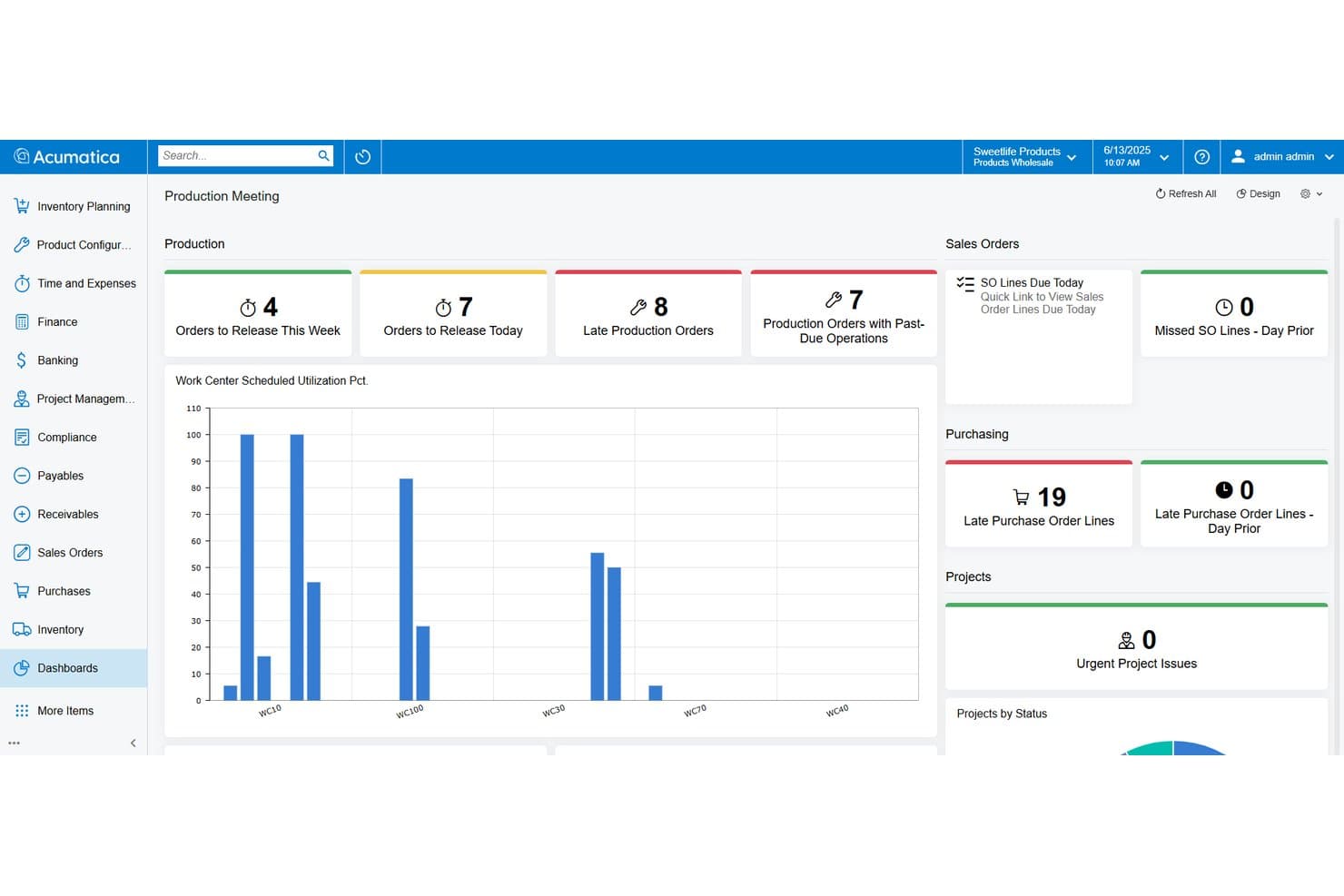
Acumatica realiza el seguimiento de las órdenes de producción, las compras y el estado de los proyectos en un solo panel de control. Acumatica es una plataforma ERP en la nube con una Edición de Servicios Profesionales dedicada, diseñada para empresas de ingeniería, arquitectura y consultoría, que ofrece contabilidad de proyectos, facturación de contratos con múltiples métodos, informes de trabajo en curso, seguimiento del tiempo y los gastos, y gestión financiera de múltiples entidades.
¿Para quién es más adecuada Acumatica?
Acumatica es adecuada para empresas de ingeniería del mercado medio que gestionan varias oficinas o filiales y necesitan unificar la facturación, la contabilidad entre empresas y las finanzas de los proyectos en una sola plataforma.
Por qué elegí Acumatica
Elegí Acumatica como una de las mejores opciones porque sus capacidades de contabilidad entre empresas y de múltiples entidades están realmente diseñadas para empresas de ingeniería que operan varias oficinas o filiales. Las transacciones automatizadas entre empresas, los estados consolidados con eliminaciones y los informes detallados entre entidades están disponibles en una sola plataforma. También me gusta que su panel de control Project 360 ofrece visibilidad en tiempo real de la facturación de cada proyecto activo, para que nada se pase por alto al gestionar contratos complejos y simultáneos.
Características principales de Acumatica
- Facturación de contratos con múltiples métodos: Admite de forma nativa estructuras de facturación por tiempo y materiales, precio fijo, costo más margen, hitos y porcentaje de finalización dentro de la misma plataforma.
- Temporizador de trabajo basado en la web: Permite a los empleados registrar directamente la entrada y salida en tareas específicas de los proyectos, con registros que se incorporan automáticamente a la contabilidad de proyectos y la nómina.
- Informe de antigüedad de los ingresos de proyectos no facturados: Muestra los importes facturables que aún no se han facturado, lo que ayuda a detectar deficiencias de ingresos antes de que afecten al flujo de caja.
- Estados financieros consolidados con eliminaciones: Genera estados financieros entre entidades con eliminaciones automatizadas de operaciones entre empresas, facilitando los informes de varias oficinas o filiales.
Integraciones de Acumatica
Acumatica cuenta con una integración nativa con Procore, además de integraciones del marketplace con ProjectManager y JAMIS Prime. También incluye conexiones con Autodesk Construction Cloud y BuildingConnected, junto con una API abierta para integraciones personalizadas.
Pros and Cons
Pros:
- Seguimiento en tiempo real de la rentabilidad de los proyectos y del trabajo en curso
- Usuarios ilimitados sin cargos por puesto
- Facturación flexible para contratos de ingeniería complejos
Cons:
- No incluye paneles nativos de gestión del valor ganado
- El cumplimiento de DCAA requiere un complemento de pago
Learn more about Acumatica: La mejor opción para la integración del seguimiento del tiempo
- Demostración gratuita disponible
- Precios previa solicitud
Visit WebsiteCustomer Rating:4.5/5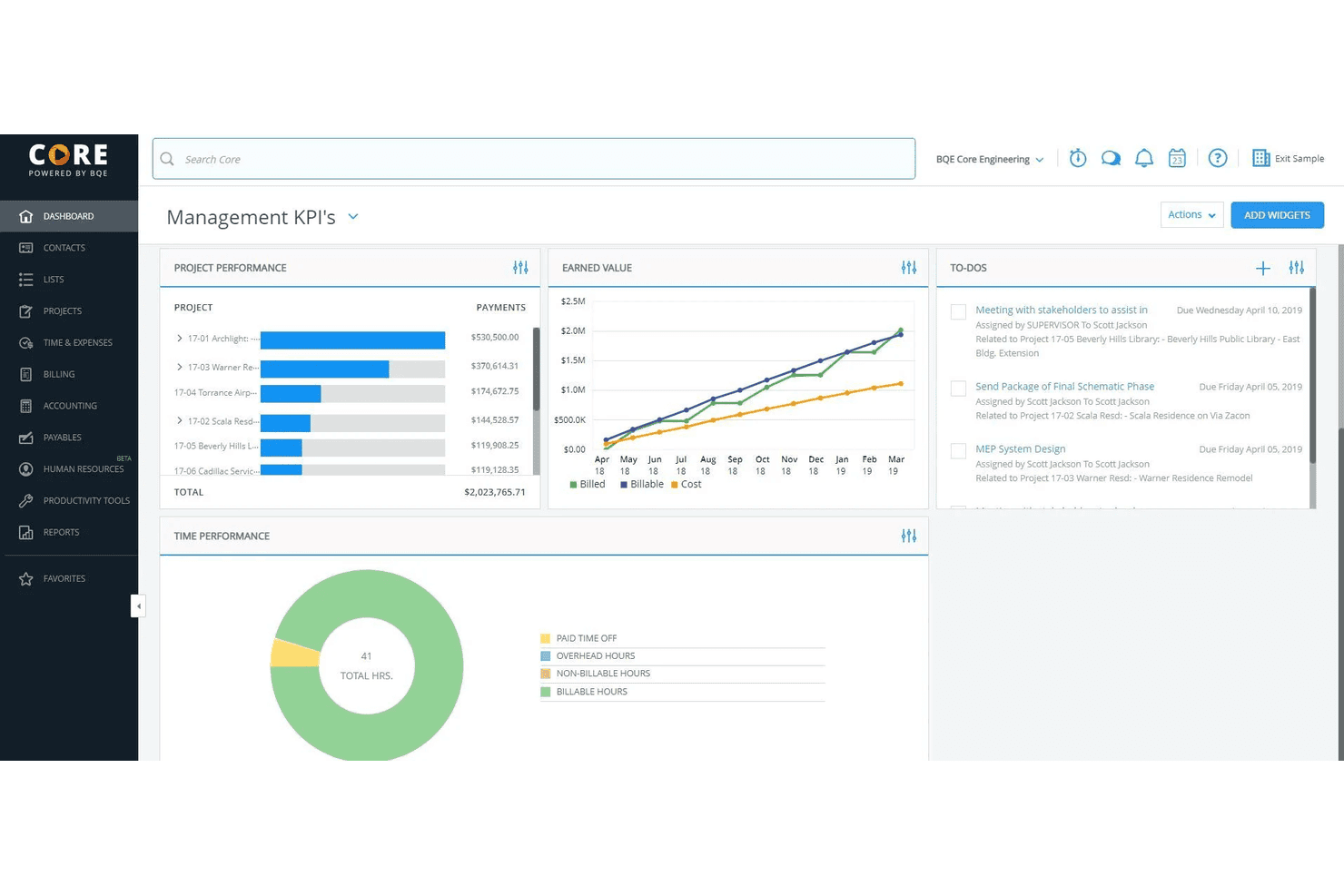
BQE Core ayuda a las empresas de servicios con el seguimiento del tiempo, la facturación y la gestión de proyectos. BQE Core es una plataforma integral de gestión y contabilidad para empresas, creada específicamente para firmas de arquitectura e ingeniería. Incluye contabilidad de proyectos, seguimiento del tiempo y los gastos, gestión de cobros, facturación e informes financieros.
¿Para quién es más adecuado BQE Core?
BQE Core es una excelente opción para firmas pequeñas y medianas de arquitectura, ingeniería y consultoría que gestionan proyectos, realizan un seguimiento del tiempo facturable y necesitan una contabilidad integrada en una sola plataforma.
Por qué elegí BQE Core
He incluido BQE Core entre mis principales opciones porque sus funciones de seguimiento del tiempo no funcionan de forma aislada, sino que se integran directamente y en tiempo real con los presupuestos de los proyectos, la facturación y el libro mayor. Cuando se registran horas en un proyecto, el seguimiento del presupuesto se actualiza automáticamente, por lo que no hay diferencia entre lo que registra el equipo y lo que reflejan los datos financieros. También me gusta que Core admita temporizadores de pausa y reanudación, recordatorios automáticos de hojas de horas y hojas de horas rellenadas previamente a partir de la actividad reciente, lo que reduce la introducción manual de datos que provoca registros incompletos al momento de facturar.
Características principales de BQE Core
- Contabilidad de proyectos: Gestiona un libro mayor completo, estados de pérdidas y ganancias, balances generales y balances de comprobación dentro de los flujos de trabajo de los proyectos.
- Facturación flexible: Genera facturas con distintas estructuras de tarifas, incluidas tarifas fijas, por tiempo y materiales, y por hora.
- Seguimiento de gastos: Registra y clasifica los gastos de los proyectos, con carga de recibos vinculados directamente a la facturación de los clientes.
- Gestión de recursos: Asigna personal a los proyectos, supervisa los índices de utilización y ajusta las asignaciones según la carga de trabajo de cada proyecto.
Pros and Cons
Pros:
- Sólida integración de facturación
- Informes detallados de proyectos
- Seguimiento automatizado del tiempo
Cons:
- Conjunto de funciones complejo
- Curva de aprendizaje pronunciada
Learn more about BQE Core: La mejor opción para obtener información financiera en tiempo real
- Demostración gratuita disponible
- Precio bajo solicitud
Visit WebsiteCustomer Rating:4.3/5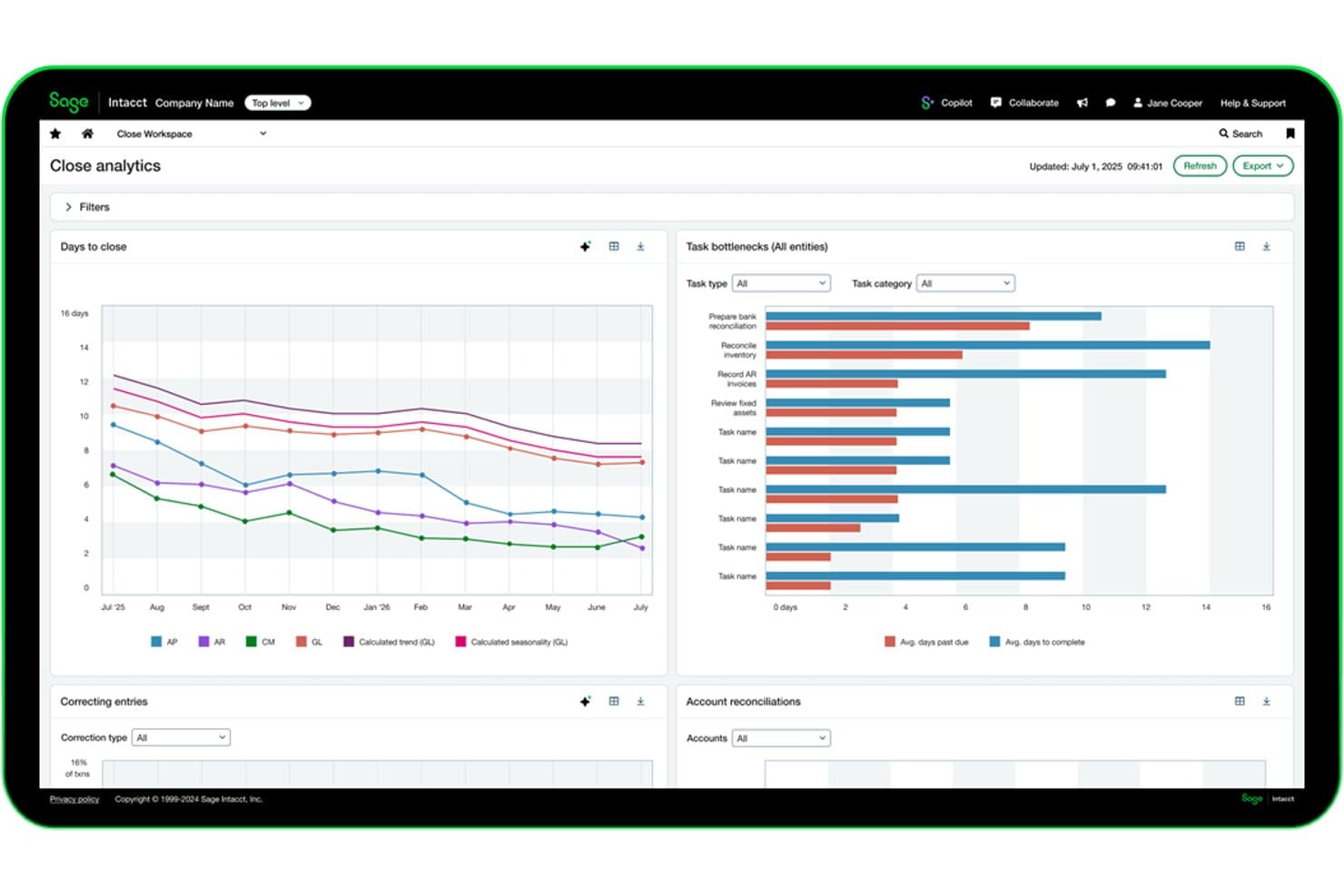
Sage Intacct realiza un seguimiento en tiempo real de los análisis del ciclo de cierre y los cuellos de botella de las tareas. Sage Intacct es una plataforma de gestión financiera en la nube diseñada para organizaciones basadas en proyectos, que combina el libro mayor general, la contabilidad de proyectos, la facturación de contratos, el seguimiento del trabajo en curso (WIP), el reconocimiento de ingresos y la consolidación de múltiples entidades en un solo sistema.
¿Para quién es más adecuado Sage Intacct?
Sage Intacct es una opción excelente para empresas de ingeniería y de arquitectura, ingeniería y construcción (AEC) del mercado medio que necesitan visibilidad financiera en tiempo real de los proyectos en múltiples entidades, contratos y estructuras de facturación.
Por qué elegí Sage Intacct
Sage Intacct se ha ganado un lugar en mi lista de preseleccionados porque la visibilidad financiera en tiempo real no es simplemente una función del panel de control; está integrada en la forma en que el sistema gestiona los datos de los proyectos. Me gusta especialmente cómo los informes dimensionales permiten desglosar el estado de pérdidas y ganancias en tiempo real por proyecto, cliente o departamento sin esperar a una extracción manual. Sage Intelligent Time reconstruye automáticamente las horas facturables a partir de la actividad del calendario y del correo electrónico, lo que cierra la brecha entre el tiempo trabajado y el tiempo facturado en los contratos activos.
Características principales de Sage Intacct
- Consolidación de múltiples entidades: Consolida cientos de entidades legales en cuestión de minutos, con eliminaciones interempresariales automatizadas y conversión multimoneda.
- Reconocimiento de ingresos ASC 606/IFRS 15: Los calendarios de reconocimiento configurables vinculados a hitos del proyecto o al porcentaje de avance permiten realizar un seguimiento de los ingresos devengados por separado de la facturación en efectivo.
- Seguimiento del calendario de WIP: Supervisa la sobrefacturación, la subfacturación y las acumulaciones de subproyectos, con una liberación automatizada del WIP para eliminar los asientos contables manuales en contratos de larga duración.
- Planificación de recursos y capacidad de PSA: Pronóstico impulsado por IA de la demanda de recursos y la carga de trabajo, vinculado directamente a los plazos de entrega de los proyectos y a los objetivos de rentabilidad.
Integraciones de Sage Intacct
Sage Intacct ofrece más de 350 integraciones del mercado de aplicaciones, incluidas BigTime, Kimble PSA, Salesforce, Expensify y Nexonia. Su API de servicios web admite integraciones personalizadas con sistemas de proyectos y operaciones de ingeniería.
Pros and Cons
Pros:
- Paneles financieros de proyectos en tiempo real para responsables de control financiero
- Las hojas de horas impulsadas por IA capturan las horas facturables omitidas
- Consolidación de múltiples entidades con eliminaciones automatizadas
Cons:
- No incluye flujos de trabajo listos para usar para el cumplimiento de la normativa DCAA
- No incluye herramientas nativas de gestión del valor ganado
Learn more about Sage Intacct: La mejor opción para automatizar los flujos de trabajo de proyectos entre entidades
- Demostración gratuita disponible
- Precios disponibles previa solicitud
Visit WebsiteCustomer Rating:4.5/5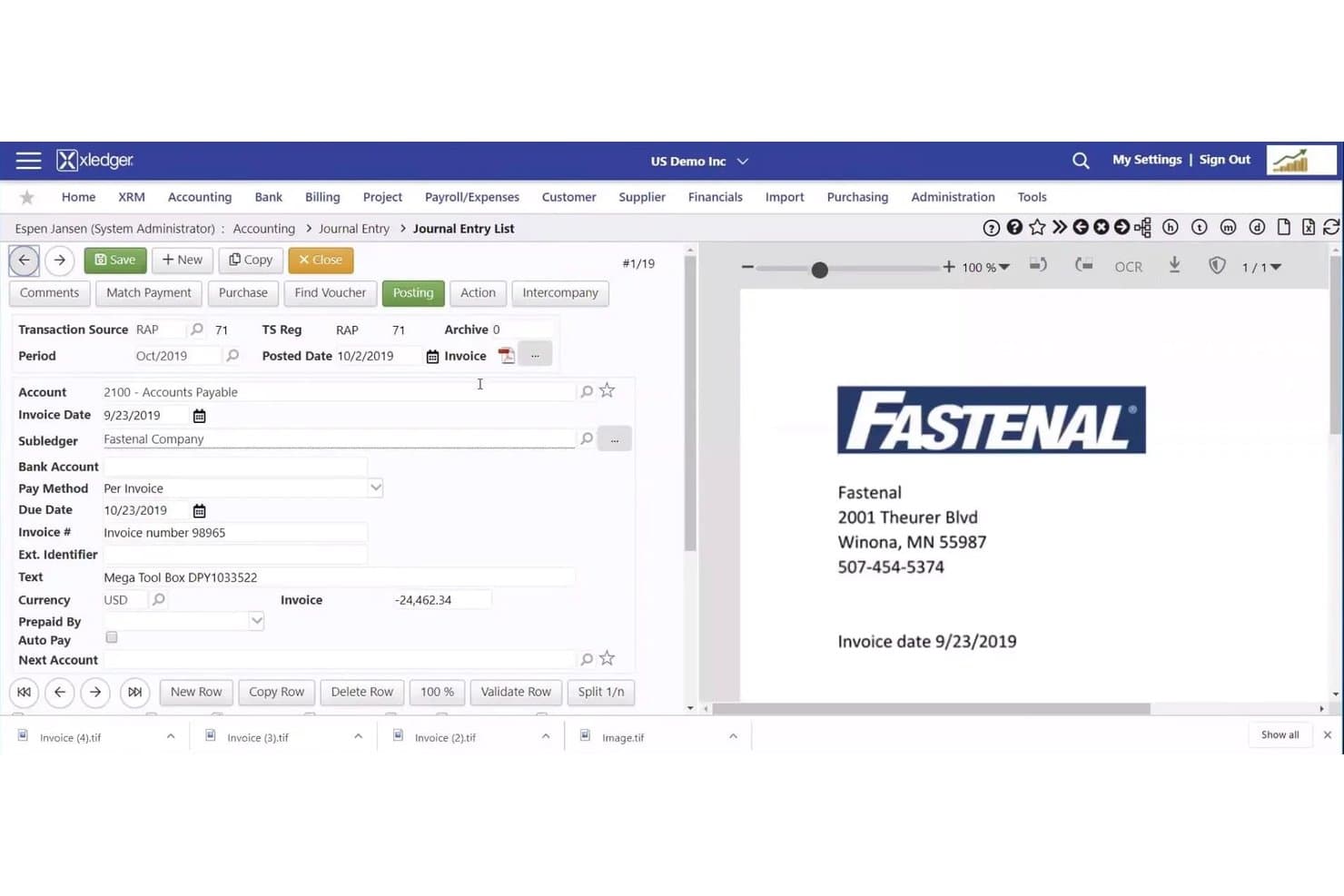
Xledger agiliza la introducción de facturas con los datos del proveedor y del pago. Xledger es una plataforma de contabilidad de proyectos basada en la nube que combina la gestión financiera de múltiples entidades, la facturación automatizada, el registro de horas, el seguimiento de gastos y un planificador de recursos integrado para empresas de servicios profesionales e ingeniería del mercado intermedio.
¿Para quién es más adecuado Xledger?
Xledger es adecuado para consultorías de ingeniería y empresas de servicios profesionales del mercado intermedio que gestionan varias entidades y necesitan flujos de trabajo de facturación automatizados e informes financieros consolidados en toda una estructura empresarial.
Por qué elegí Xledger
Xledger ocupa un lugar en mi lista de opciones por lo bien que gestiona la automatización de los flujos de trabajo de proyectos en estructuras con varias entidades. Me gusta especialmente que los registros de horas se conviertan automáticamente en conceptos facturables y pasen por cadenas de aprobación configurables, de modo que las facturas se generen sin transferencias manuales entre entidades. El Planificador de recursos integrado vincula directamente la asignación de personal con las finanzas de los proyectos, lo que significa que los datos de utilización y los flujos de trabajo de facturación residen en el mismo sistema, en lugar de estar repartidos entre herramientas desconectadas.
Características principales de Xledger
- Facturación de proyectos entre varias entidades: Emite facturas en cualquier nivel de proyecto o subproyecto entre entidades, con contabilizaciones interempresariales automatizadas que gestionan la contabilidad subyacente.
- Procesamiento de cuentas por pagar basado en OCR: Captura y valida las facturas de proveedores mediante hasta tres pasadas asistidas por IA, con una precisión declarada superior al 95 % antes de enviarlas al flujo de aprobación.
- Dimensiones configurables del libro mayor: Las dimensiones definidas por el usuario para departamentos, proyectos y fondos permiten segmentar los datos financieros sin reestructurar el plan contable.
- Informes de presupuesto frente a resultados reales: Casi 300 informes configurables muestran datos de variación en tiempo real en los niveles de proyecto, tarea y actividad para supervisar continuamente el rendimiento.
Integraciones de Xledger
Las integraciones documentadas de Xledger incluyen Salesforce, Microsoft Dynamics CRM, HubSpot, Microsoft Power BI, Stripe, PayPal, GoCardless, JPMorgan Chase Bank, Wells Fargo y Bank of America. También ofrece una API abierta y Zapier.
Pros and Cons
Pros:
- Jerarquía completa de proyectos con seguimiento del margen en tiempo real
- El flujo de trabajo automatizado convierte las horas en facturas facturables
- El planificador de recursos vincula la asignación de personal con las finanzas de los proyectos
Cons:
- No cumple de forma nativa con la facturación conforme a DCAA o AIA
- No ofrece herramientas nativas de gestión del valor ganado
Learn more about Xledger: La mejor opción para empresas de A&E que amplían su facturación de proyectos
- Demo gratuita disponible
- Precio bajo solicitud
Visit WebsiteCustomer Rating:3.9/5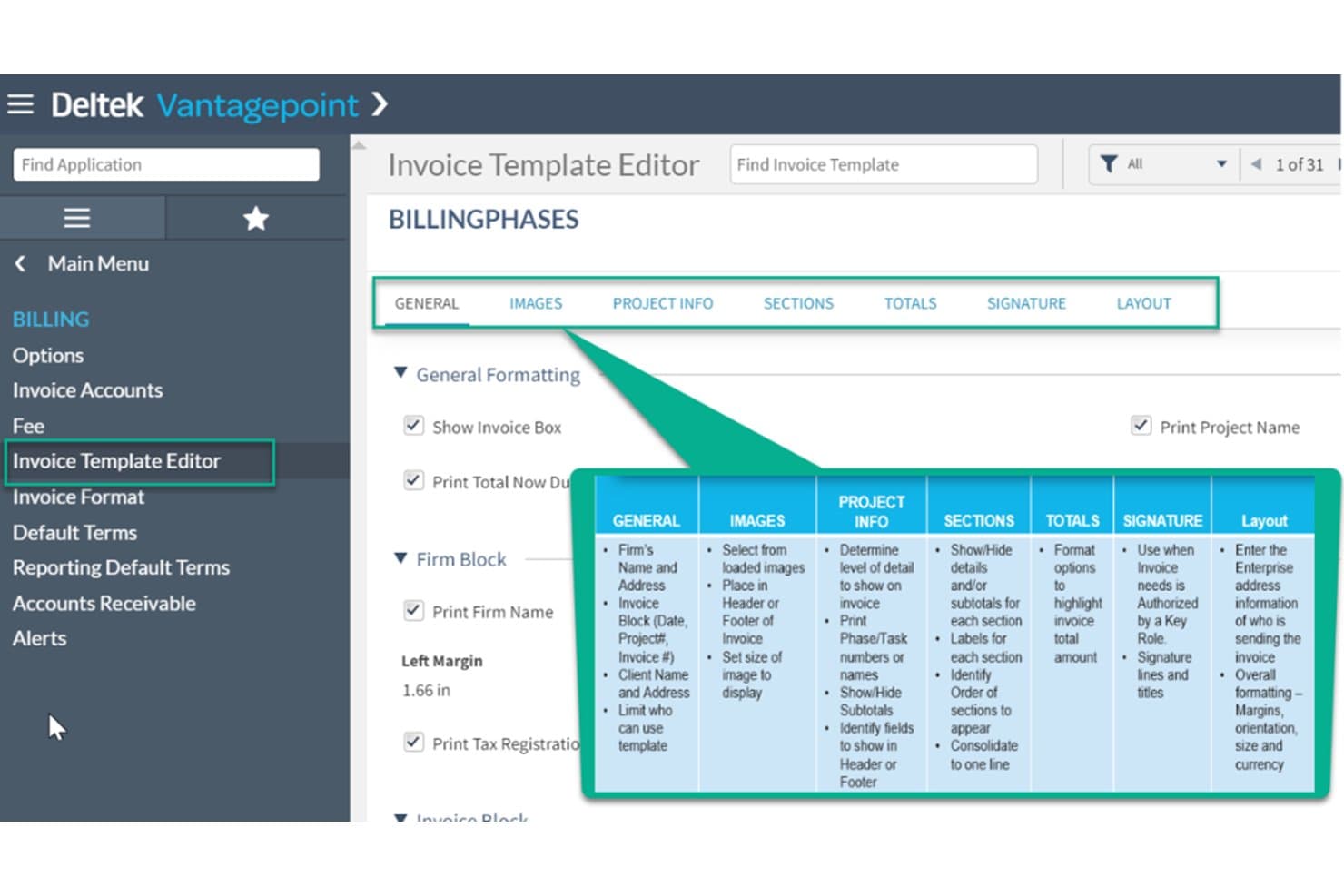
Deltek Vantagepoint agiliza la facturación con plantillas de facturas personalizables. Deltek Vantagepoint es un ERP diseñado específicamente para empresas de arquitectura, ingeniería y consultoría que cubre la contabilidad de proyectos, la facturación basada en WBS, la gestión de recursos, el CRM y las finanzas principales en una sola plataforma.
¿Para quién es más adecuado Deltek Vantagepoint?
Deltek Vantagepoint está diseñado para empresas medianas y grandes de arquitectura e ingeniería que necesitan facturación de proyectos, planificación de recursos y gestión financiera en un sistema conectado.
Por qué elegí Deltek Vantagepoint
Deltek Vantagepoint ocupa un lugar en mi lista de favoritos porque ninguna otra plataforma se acerca a igualar la profundidad de su flexibilidad de facturación de proyectos para empresas de A&E. Me encanta que las condiciones de facturación se configuren en el nivel de WBS, lo que significa que un solo proyecto puede utilizar T&M en una fase, una tarifa fija en otra y un porcentaje de construcción en una tercera. La funcionalidad de pago cuando se recibe el pago para subconsultores es igualmente impresionante: retiene automáticamente los comprobantes de cuentas por pagar hasta que el cliente paga, que es exactamente la forma en que operan realmente las empresas de ingeniería.
Características principales de Deltek Vantagepoint
- Grupos de cuentas multiempresa: Consulte y gestione las finanzas de varias entidades u oficinas en un único panel consolidado.
- Asistente de IA Dela: Una herramienta de IA integrada que sugiere entradas de hojas de horas, captura recibos de gastos, redacta comunicaciones para clientes y responde consultas sobre proyectos en lenguaje natural.
- Asignación de recursos basada en habilidades: Busque y asigne personal a proyectos según sus cualificaciones, disponibilidad y utilización para gestionar la carga de trabajo en toda la empresa.
- Módulo de generación de ingresos: Admite varios métodos de reconocimiento de ingresos —incluidos porcentaje completado, acumulado del proyecto y hitos— registrados en el nivel del proyecto, la fase o la tarea.
Integraciones de Deltek Vantagepoint
Deltek Vantagepoint cuenta con integraciones nativas con GovWin IQ, Deltek PIM, Deltek ArchiSnapper, UKG, Microsoft Outlook, Gmail y Deltek Talent Management. Su API abierta y sus conectores compatibles con iPaaS permiten crear integraciones personalizadas.
Pros and Cons
Pros:
- Condiciones de facturación basadas en WBS por fase del proyecto
- Flujos de trabajo nativos de pago cuando se recibe el pago para subconsultores
- Datos de cartera, recursos y finanzas unificados
Cons:
- La configuración de informes es complicada y confusa
- La aplicación móvil se limita al registro de horas y gastos
Learn more about Deltek Vantagepoint: Ideal para empresas de AEC que gestionan proyectos de principio a fin para obtener beneficios
- Demostración gratuita disponible
- Precios disponibles previa solicitud
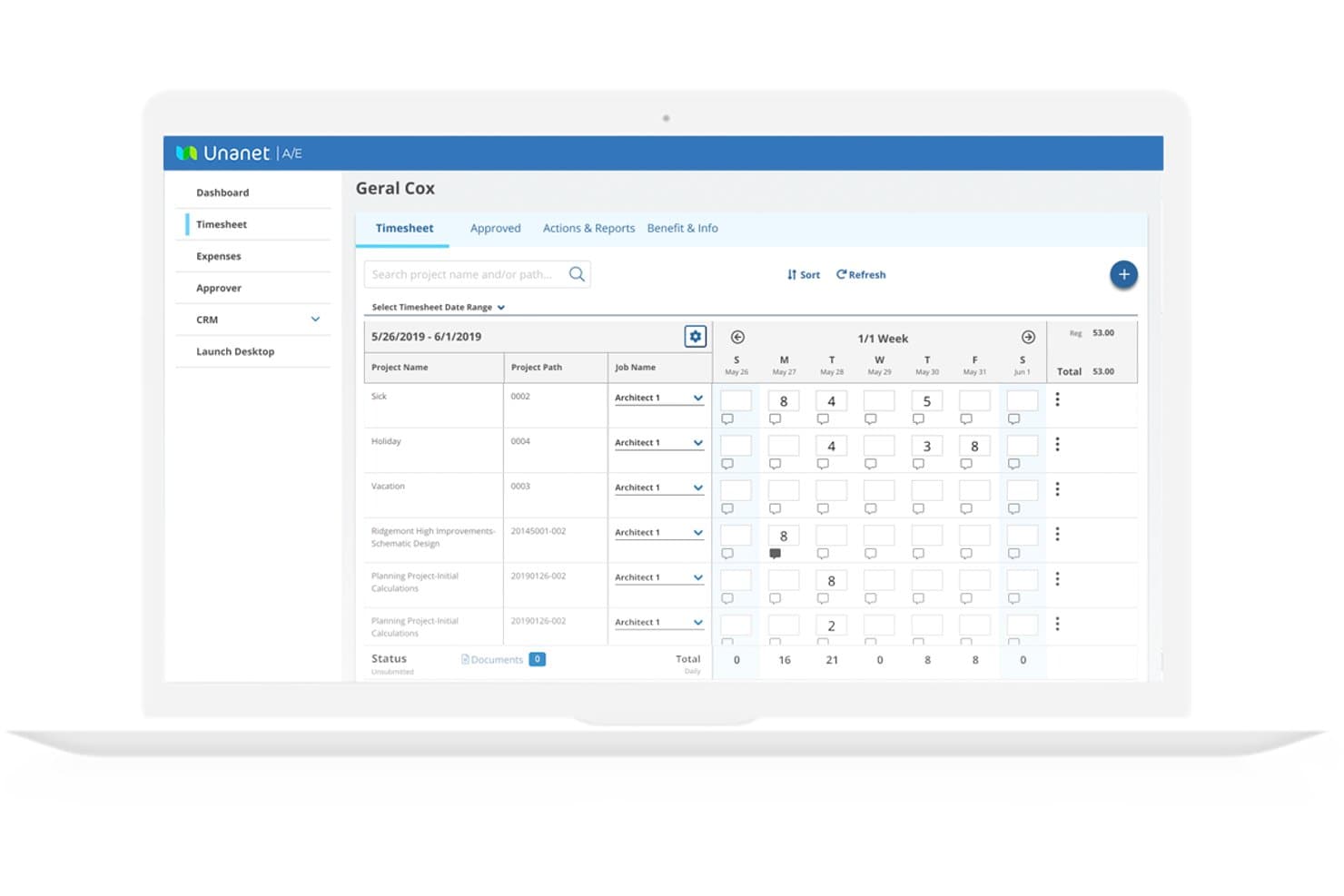
Unanet permite a los ingenieros registrar las horas dedicadas a los proyectos en una vista semanal de la hoja de horas. Unanet es una plataforma ERP diseñada específicamente para empresas de AEC y contratación gubernamental, que unifica la contabilidad de proyectos, el seguimiento del tiempo y los gastos, la facturación, la gestión de WIP, la planificación de recursos y las finanzas principales en un solo sistema.
¿Para quién es más adecuado Unanet?
Unanet es una opción ideal para empresas medianas de AEC y contratación gubernamental que necesitan un único sistema para conectar las finanzas de los proyectos, la facturación y el cumplimiento normativo desde la búsqueda de oportunidades hasta la factura.
Por qué elegí Unanet
Unanet ocupa un lugar en mi lista de favoritos porque está completamente diseñado en torno a la forma en que las empresas de AEC pasan de la búsqueda de proyectos a la factura final, sin necesidad de integrar sistemas independientes para conectar ese recorrido. Me gustan especialmente sus paneles de WIP, que señalan en tiempo real el riesgo de facturación cuando el trabajo no facturado permanece demasiado tiempo sin una factura, así como su compatibilidad nativa con la facturación de tarifa fija, por tiempo y materiales, de costo más y por hitos en un solo lugar. El seguimiento de EVM con cálculos de ETC y EAC resulta realmente útil para proyectos de larga duración, en los que los sobrecostos pueden acumularse silenciosamente antes de que alguien los detecte.
Funciones principales de Unanet
- Planificación de recursos y capacidad: Las herramientas integradas muestran la disponibilidad, las habilidades y la carga de trabajo del personal en tiempo real en toda la empresa, vinculadas directamente a los presupuestos y las finanzas de los proyectos.
- Gestión de tasas indirectas: Las asignaciones configurables de grupos de costos y el modelado de escenarios hipotéticos calculan las tasas indirectas para garantizar el cumplimiento normativo y una determinación precisa de los costos de los proyectos.
- Contabilidad multiempresa: Realiza el seguimiento de las transacciones entre empresas, las asignaciones y las finanzas consolidadas de varias entidades jurídicas dentro de un solo sistema.
- Integración de CRM y del embudo de ventas: El CRM nativo de AEC de Unanet conecta las oportunidades de desarrollo empresarial directamente con los registros de proyectos, lo que proporciona visibilidad desde la búsqueda de oportunidades hasta la facturación final.
Integraciones de Unanet
Unanet Connect ofrece más de 100 integraciones prediseñadas, incluidas Salesforce, ADP, Newforma Project Center, Procore, Power BI y Tableau. Una API abierta admite integraciones personalizadas y sincronizaciones de datos multidireccionales.
Pros and Cons
Pros:
- Diseñado específicamente para los flujos de trabajo de AEC y GovCon
- Gestión detallada de WIP y del valor ganado
- Realiza el seguimiento de todas las estructuras de facturación en un solo sistema
Cons:
- Los informes personalizados requieren ajustes manuales considerables
- Se han informado problemas de rendimiento durante la facturación y el seguimiento del tiempo
Learn more about Unanet: Ideal para empresas de ingeniería que trabajan con contratos gubernamentales
- Demostración gratuita disponible
- Precio bajo solicitud
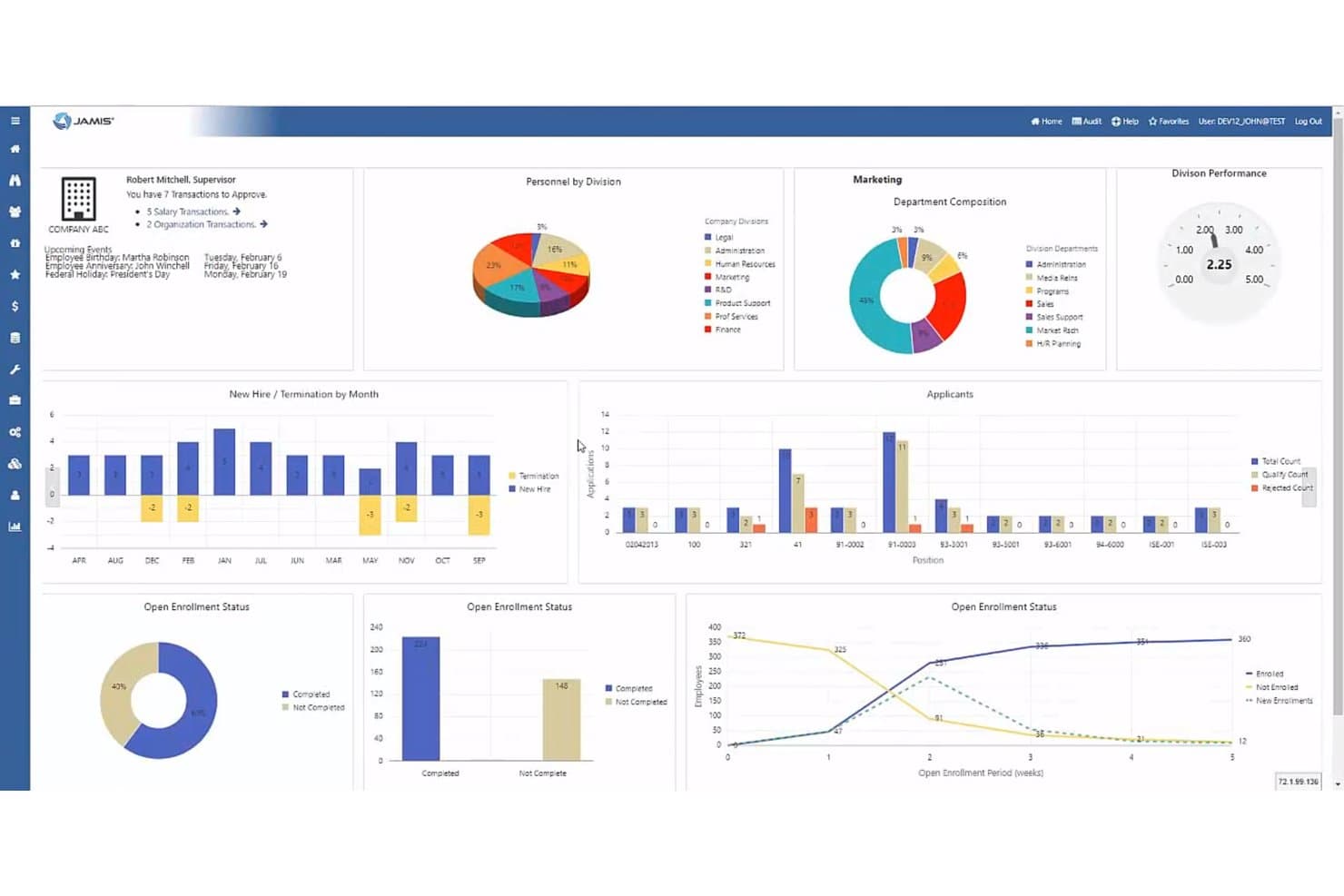
Jamis Prime ERP centraliza los datos de HR, inscripción y contratación en un solo panel de control. Jamis Prime ERP es una plataforma ERP y de contabilidad de proyectos enfocada en contratistas gubernamentales que abarca la facturación de contratos, el registro de horas conforme a la DCAA, la asignación de costos indirectos, la gestión financiera de múltiples entidades y la gestión del valor ganado.
¿Para quién es más adecuado Jamis Prime ERP?
Jamis Prime ERP está diseñado para empresas de ingeniería que tienen contratos con el gobierno federal y necesitan contabilidad de proyectos conforme a la DCAA, facturación de contratos y asignación de costos en una sola plataforma.
Por qué elegí Jamis Prime ERP
He incluido Jamis Prime ERP entre mis principales opciones porque es la única herramienta de esta lista creada desde cero para contratistas del gobierno federal, donde el cumplimiento de la DCAA y la contabilidad de costos conforme a la Parte 31 de las FAR no son complementos opcionales, sino elementos fundamentales de su arquitectura. Me gusta especialmente cómo gestiona la asignación de costos indirectos entre trabajos indirectos independientes a nivel de contrato, proyecto y subtarea, que es exactamente lo que necesitan las empresas de ingeniería al separar los costos directos, indirectos y no permitidos para fines de auditoría. Su compatibilidad nativa con la facturación de costos reembolsables, T&M y FFP, junto con el seguimiento de fondos ACRN y las retenciones automatizadas, cubre estructuras contractuales que la mayoría de las herramientas contables de propósito general simplemente no pueden gestionar.
Características principales de Jamis Prime ERP
- Registro de horas conforme a la DCAA: Aplica las reglas de imputación de mano de obra, impide registrar cargos fuera del período de ejecución de un contrato y admite la contabilidad del tiempo total, incluidos los cálculos de horas extra no remuneradas.
- Gestión del valor ganado (EVM) mediante la WBS: Permite configurar trabajos directos como tareas y subtareas de EVM dentro de la estructura de desglose del trabajo para realizar un seguimiento del cronograma y del rendimiento de los costos.
- Suite de planificación empresarial: Proporciona previsiones de EAC con versiones guardadas ilimitadas, planificación de escenarios hipotéticos y previsiones de ingresos ponderadas por la probabilidad de adjudicación para nuevas licitaciones comerciales.
- Analítica avanzada de JAMIS: Combina un almacén de datos SQL automatizado con paneles nativos de Microsoft Power BI para generar informes basados en roles sobre datos de proyectos, contratos y finanzas.
Integraciones de Jamis Prime ERP
Entre las integraciones documentadas se incluyen Microsoft Power BI, SharePoint, Box.com, Deltek GovWin IQ, BambooHR, Paylocity, Workday HCM y GovConPay. Jamis Prime ERP también admite API REST y SOAP, además del ecosistema de integración de Acumatica para conectividad personalizada.
Pros and Cons
Pros:
- Registro de horas conforme a la DCAA con historial de auditoría
- Tipos automatizados de facturación de contratos y proyectos
- Amplio soporte para el cumplimiento normativo de contratistas gubernamentales
Cons:
- Soporte limitado para flujos de trabajo comerciales de AEC
- No todos los módulos están incluidos en el producto base
Learn more about Jamis Prime ERP: La mejor opción para la escalabilidad global
- Demostración gratuita disponible
- Precio bajo solicitud
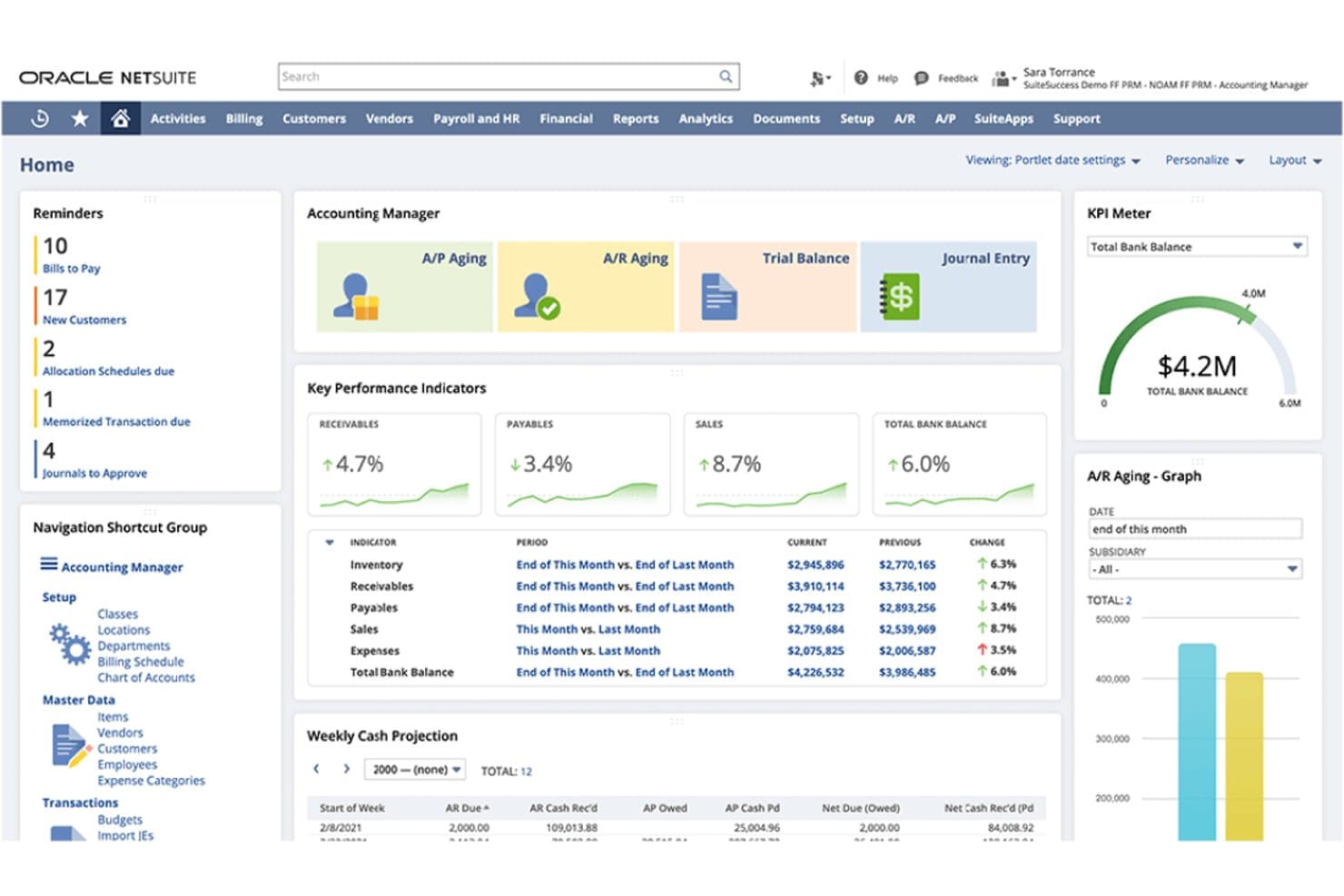
NetSuite ofrece a los responsables de contabilidad una vista centralizada de los indicadores financieros clave, las cuentas por cobrar y por pagar, las proyecciones de efectivo y las tareas pendientes. NetSuite Cloud Accounting es una plataforma de contabilidad de nivel ERP que combina el libro mayor, la contabilidad basada en proyectos, las consolidaciones de múltiples entidades, la facturación flexible, el reconocimiento de ingresos y el seguimiento del tiempo y los gastos en una única suite en la nube.
¿Para quién es más adecuado NetSuite Cloud Accounting?
NetSuite Cloud Accounting es especialmente adecuado para empresas de ingeniería del mercado medio y grandes empresas que gestionan múltiples entidades, divisas o estructuras jurídicas en más de una región geográfica.
Por qué elegí NetSuite Cloud Accounting
NetSuite Cloud Accounting se ha ganado un lugar en mi lista de opciones principales porque ninguna otra plataforma que haya revisado gestiona las consolidaciones de múltiples entidades y divisas de forma tan nativa como esta. Me impresiona especialmente cómo permite a las empresas de ingeniería que operan oficinas en varios países generar estados financieros consolidados en tiempo real, sin soluciones manuales alternativas. Su motor de reglas de facturación también admite toda la variedad de estructuras contractuales, desde T&M hasta tarifas fijas y facturación por progreso, dentro de un único registro de proyecto.
Características principales de NetSuite Cloud Accounting
- Módulo de gestión de recursos: Asigna ingenieros a proyectos según sus habilidades, disponibilidad y experiencia, con una cronología en tiempo real para equilibrar la carga de trabajo.
- Reconocimiento de ingresos conforme a ASC 606/IFRS 15: Reconoce los ingresos por separado de la facturación mediante métodos basados en mano de obra, de tarifa fija, de porcentaje de avance o basados en cargos, para cada proyecto.
- Gestión automatizada del cierre: Automatiza los asientos contables, las conciliaciones, el análisis de variaciones y las transacciones entre empresas para acelerar el ciclo de cierre financiero.
- Mercado de SuiteApp: Ofrece complementos de terceros certificados, incluido DCAA-On-Demand para el cumplimiento normativo de contratistas gubernamentales e integraciones de PLM para herramientas de Autodesk.
Integraciones de NetSuite Cloud Accounting
NetSuite Cloud Accounting cuenta con un conector nativo documentado para Salesforce, mientras que su mercado de SuiteApp ofrece integraciones de PLM de Autodesk y DCAA-On-Demand. Las API REST y SOAP de SuiteTalk, SuiteCloud y socios de iPaaS como Celigo admiten conexiones personalizadas con sistemas de ingeniería y finanzas.
Pros and Cons
Pros:
- Información financiera en tiempo real entre entidades globales
- Facturación de proyectos y reconocimiento de ingresos flexibles
- Planificación de recursos vinculada a las finanzas del proyecto
Cons:
- Alta complejidad de configuración e implementación
- No está diseñado específicamente para los flujos de trabajo de ingeniería
Learn more about NetSuite Cloud Accounting: Ideal para la contabilidad de proyectos nativa de Microsoft 365
- Prueba gratuita disponible
- Desde $135/usuario/mes (facturado anualmente)
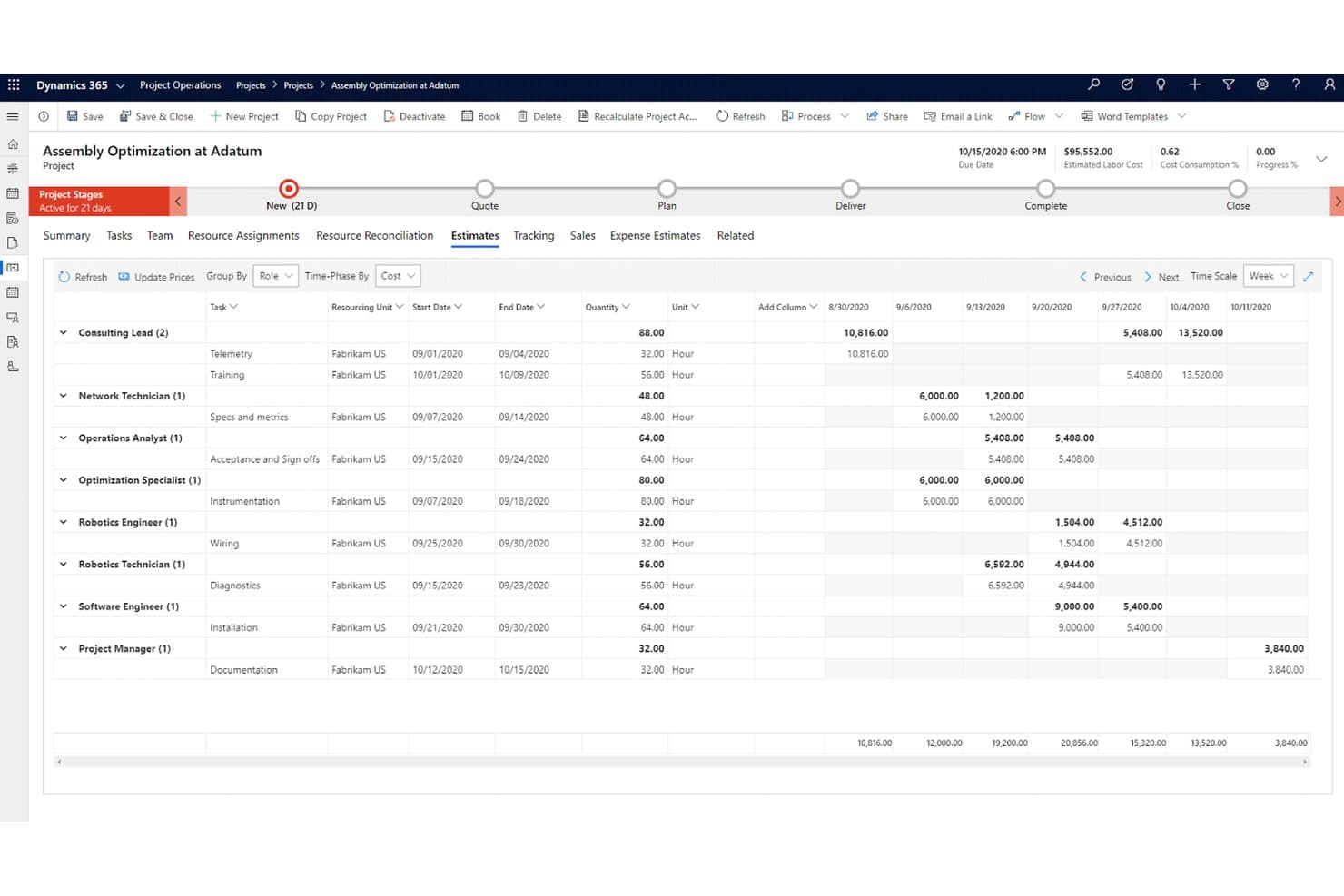
Dynamics 365 Project Operations realiza un seguimiento semanal de los costes laborales y las estimaciones por función y tarea. Dynamics 365 Project Operations es una plataforma de contabilidad de proyectos de Microsoft que cubre todo el ciclo de vida del proyecto, desde la gestión de acuerdos y la programación de recursos hasta el seguimiento del tiempo y los gastos, la facturación de contratos, la contabilidad de trabajos en curso (WIP) y el reconocimiento de ingresos.
¿Para quién es más adecuado Dynamics 365 Project Operations?
Es una opción especialmente adecuada para empresas de ingeniería y de arquitectura, ingeniería y construcción (AEC) del mercado medio y empresarial que ya utilizan Microsoft 365 y necesitan una contabilidad de proyectos de nivel ERP en un entorno conectado.
Por qué elegí Dynamics 365 Project Operations
Dynamics 365 Project Operations ocupa un lugar en mi lista de opciones principales porque es la única herramienta de aquí que ejecuta la contabilidad de proyectos directamente dentro del entorno de Microsoft 365 en el que tu equipo ya trabaja. Me gusta que el reconocimiento de ingresos, la acumulación de trabajos en curso (WIP) y las métricas del valor ganado (CPI, SPI) no sean complementos, sino funciones integradas en la misma plataforma que gestiona tu GL, AP y AR mediante Dynamics 365 Finance. En un contrato de precio fijo, eso significa que los cálculos del porcentaje de finalización y la facturación proforma se realizan en un único flujo de trabajo conectado, no en dos sistemas.
Funciones principales de Dynamics 365 Project Operations
- Programación universal de recursos: Un motor de programación integrado que asigna recursos a las necesidades del proyecto según sus habilidades, niveles de competencia, disponibilidad y carga de trabajo en toda tu cartera de proyectos.
- Gestión de subcontratistas: Un módulo específico para la incorporación de proveedores, el seguimiento de líneas de subcontratos y la conciliación de facturas en tres vías entre órdenes de compra, recepciones y facturas de proveedores.
- Contabilidad interempresarial multientidad: Admite entidades legales independientes con contabilización automatizada de costes e ingresos interempresariales, lo que permite la consolidación financiera de operaciones de ingeniería con varias oficinas.
- Gestión del valor ganado (EVM): Calcula la variación de costes (CV), la variación del cronograma (SV), el CPI y el SPI a nivel de proyecto, con datos de EVM que pueden contabilizarse directamente en cuentas del libro mayor para un control financiero estructurado del proyecto.
Integraciones de Dynamics 365 Project Operations
Dynamics 365 Project Operations ofrece integraciones nativas en todo el ecosistema de Microsoft, incluidos Dynamics 365 Finance, Dynamics 365 Sales, Teams, Power BI, SharePoint y Microsoft Planner. Las API de Dataverse y Power Automate permiten establecer conexiones personalizadas, mientras que las soluciones del marketplace incluyen OnePlan, GovCon365 y aec360.
Pros and Cons
Pros:
- Gestiona de forma nativa la contabilidad de proyectos y los trabajos en curso (WIP)
- Admite transacciones multientidad e interempresariales
- Incluye gestión del valor ganado integrada
Cons:
- Las funciones completas requieren la integración con Dynamics Finance
- No incluye conectores nativos para Deltek o Autodesk
Learn more about Dynamics 365 Project Operations: Ideal para grandes empresas de ingeniería
- Demostración gratuita disponible
- Precio disponible previa solicitud
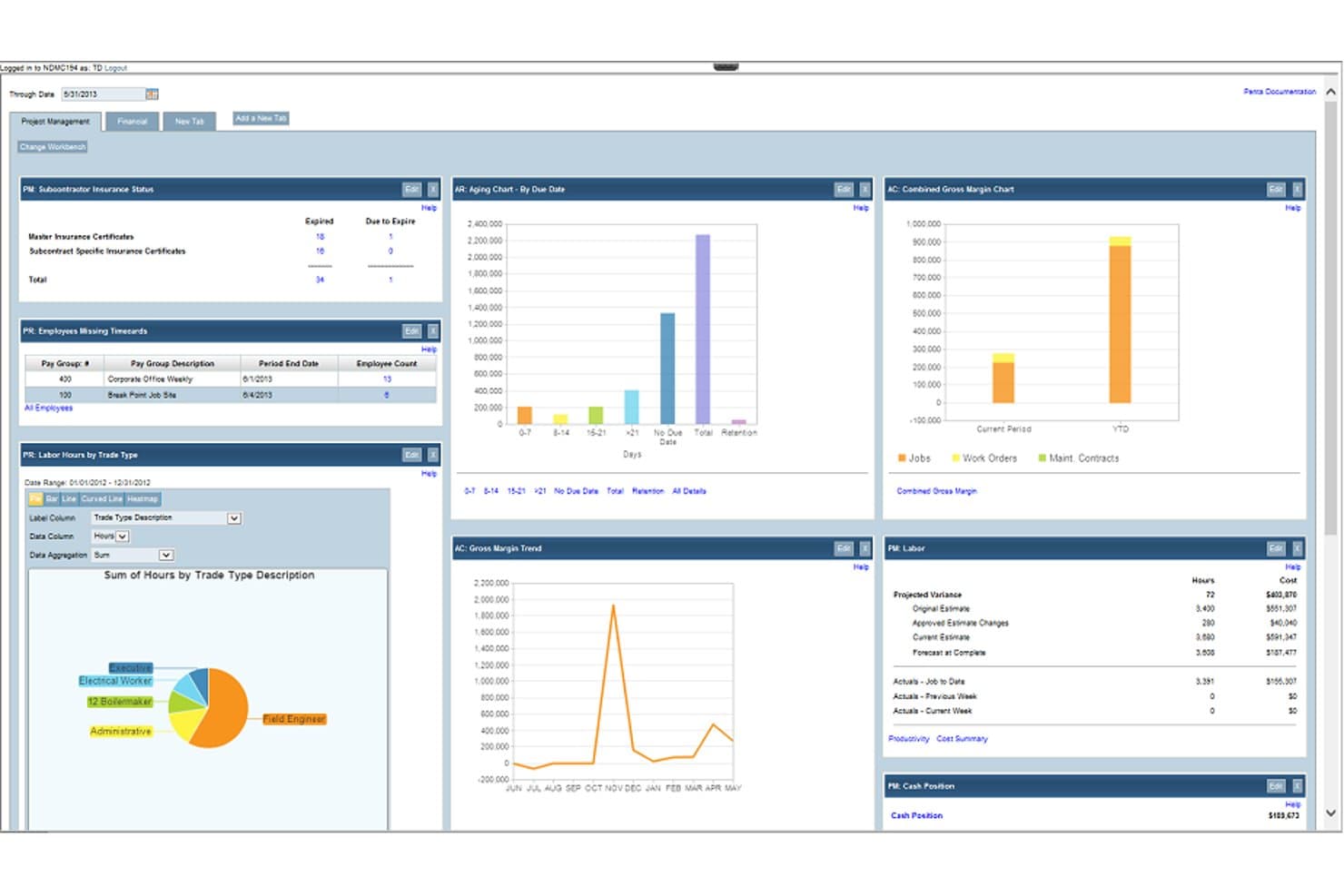
La contabilidad de proyectos de PENTA simplifica la gestión de múltiples proyectos, el control de costes y el seguimiento. PENTA es una plataforma de contabilidad de proyectos y ERP diseñada específicamente para contratistas especializados, con módulos que abarcan el cálculo de costes de obras, la gestión financiera, las nóminas de construcción y la gestión de servicios de campo.
¿Para quién es más adecuada la contabilidad de proyectos de PENTA?
PENTA es una opción excelente para grandes contratistas especializados y empresas de ingeniería que necesitan contabilidad de proyectos integrada, finanzas multiempresa y nóminas de construcción en una sola plataforma.
Por qué elegí PENTA para la contabilidad de proyectos
Elegí PENTA como una de las mejores opciones porque está diseñada específicamente para la escala y complejidad a las que realmente se enfrentan las grandes empresas de ingeniería. Me gusta especialmente la generación de informes multinivel con relaciones padre/hijo ilimitadas, que permite profundizar desde los estados financieros consolidados hasta los códigos de costes individuales sin alcanzar ningún límite. Si a esto le añadimos la automatización entre empresas, que registra asientos en todas las unidades de negocio en tiempo real, las grandes operaciones de ingeniería con múltiples entidades obtienen un nivel de control financiero que las herramientas de contabilidad genéricas sencillamente no pueden igualar.
Características clave de PENTA para la contabilidad de proyectos
- Cálculo diario de costes de obras: Realiza el seguimiento de los costes de mano de obra, materiales y equipos a medida que se generan, y produce previsiones automatizadas de costes pendientes.
- Reconocimiento automatizado de ingresos: Calcula los ingresos obtenidos y los importes facturados de más o de menos utilizando datos de costes pendientes vinculados directamente a cada proyecto.
- Nóminas de construcción: Gestiona las nóminas de múltiples sindicatos, los cálculos salariales conforme a los salarios vigentes y los informes de nóminas certificadas, con integración directa de los costes de las obras.
- Paneles de trabajo basados en roles: Muestra los datos financieros relevantes para el rol específico de cada usuario, desde los directores de proyectos hasta los ejecutivos.
Pros and Cons
Pros:
- Información en tiempo real mediante paneles
- Gestión avanzada de costes
- Gestiona la contabilidad de múltiples empresas
Cons:
- Requiere una formación extensa
- Proceso de implementación complejo
Learn more about PENTA Project Accounting:
Otros programas de contabilidad de ingeniería
Estas son algunas opciones adicionales de software de contabilidad de ingeniería que no incluí en mi selección, pero que merece la pena conocer:
- 11BigTimeLa mejor opción para la facturación de cotización a cobro en contratos por tiempo y materiales
- 12KantataLa mejor opción para la contabilidad de proyectos vinculada a los recursos y las finanzas
- 13SYSPROMejor para industrias manufactureras
- 14ProjectworksIdeal para la facturación y la asignación de recursos de consultorías de ingeniería
Related Reviews
Cómo evalúo el software de contabilidad para ingeniería
Divido mi evaluación entre los requisitos básicos—como el seguimiento de costos a nivel de proyecto y la facturación contractual flexible—y los factores diferenciadores que separan una buena opción de la opción adecuada.
Funcionalidad principal (requisitos esenciales para esta lista)
Cuando selecciono herramientas para mi lista, califico cada una en una escala de 0 (no ofrece la funcionalidad) a 5 (sobresale en esta área) para cada funcionalidad principal que se indica a continuación. Después calculo la puntuación total de la herramienta como un porcentaje, utilizando el 65 % como referencia para ayudar a evaluar su adecuación general para la lista.
- Contabilidad basada en proyectos: Busco comprobar si la plataforma realiza un seguimiento de los ingresos, costos, presupuestos y márgenes a nivel de proyecto y fase, no solo en el libro mayor general.
- Seguimiento de tiempo y gastos: Evalúo qué tan bien la plataforma registra las horas facturables y los gastos reembolsables asociados con proyectos, fases o tareas específicas para calcular los costos del trabajo con precisión.
- Facturación de proyectos y contratos: Compruebo que ofrezca compatibilidad nativa con múltiples estructuras de facturación—por tiempo y materiales, tarifa fija, por hitos y basada en costos más margen—ya que las empresas de ingeniería rara vez trabajan con un solo tipo de contrato.
- Gestión del trabajo en curso y los ingresos: Evalúo si la plataforma gestiona el seguimiento del trabajo en curso y el reconocimiento de ingresos del proyecto para compromisos de larga duración o con múltiples fases, y no solo en el momento de emitir la factura.
- Gestión financiera principal: Busco un sistema financiero completo como fuente de registro—libro mayor general, cuentas por pagar, cuentas por cobrar e informes financieros estándar—en lugar de una herramienta de proyectos con la contabilidad añadida posteriormente.
- Multiempresa y controles financieros: Considero la compatibilidad con la complejidad organizativa, incluida la contabilidad multiempresa, la asignación de costos indirectos, los registros de auditoría y, cuando corresponde, marcos regulatorios como el cumplimiento de DCAA.
Una vez que tengo una lista de herramientas que cumplen los criterios, considero qué distingue a cada plataforma.
Factores diferenciadores (qué distingue a los proveedores)
Así es como comparo y contrasto a los distintos proveedores:
Funciones destacadas
La gestión de subconsultores es uno de los aspectos que analizo detenidamente—específicamente, si la plataforma automatiza los cálculos de márgenes y los flujos de trabajo de pago condicionado al cobro, ya que conciliar manualmente las facturas de los subconsultores con las facturaciones a los clientes es el punto en el que suelen aparecer errores. También evalúo la profundidad de la gestión del valor ganado: no solo si existe EVM, sino si los paneles de CPI y SPI son nativos y permiten tomar medidas. Por último, compruebo qué tan bien conecta el flujo de oportunidades del CRM con las finanzas de los proyectos—las herramientas que convierten las oportunidades en planes de asignación de personal y previsiones de ingresos ahorran a los contadores de proyectos un esfuerzo considerable de coordinación.
Más allá de las funciones
El tamaño de la empresa y la adecuación a su práctica importan más de lo que la mayoría de los compradores espera. Una herramienta que funciona bien para una empresa de ingeniería civil de 10 personas a menudo no soporta la complejidad de una empresa AEC con varias oficinas que gestiona decenas de proyectos simultáneos. También analizo detenidamente el cumplimiento y la preparación para auditorías—específicamente, si una plataforma admite el registro de horas conforme con DCAA y la estructuración de costos indirectos según la Parte 31 de FAR, ya que las empresas que trabajan para el gobierno no pueden permitirse deficiencias en estos aspectos. El modelo de implementación y el costo total de propiedad completan mi evaluación, porque los precios basados en módulos pueden hacer que una plataforma que parece asequible resulte costosa una vez que se añaden las funciones que realmente se necesitan.
Cómo elegir un software de contabilidad de ingeniería
Es fácil perderse entre largas listas de características y complejas estructuras de precios. Para ayudarte a mantener la atención mientras avanzas en tu proceso particular de selección de software, aquí tienes una lista de factores que debes tener en cuenta:
| Factor | ¿Qué debes tener en cuenta? |
| Escalabilidad | ¿Crecerá este software junto con tu equipo? |
| Integraciones | ¿Se integra con tus herramientas actuales (por ejemplo, software ERP de ingeniería y sistemas CRM)? |
| Personalización | ¿Puedes adaptar el software a tus necesidades? |
| Facilidad de uso | ¿Es el software fácil de usar para tu equipo? |
| Presupuesto | ¿El precio se ajusta a las limitaciones de tu presupuesto? |
| Medidas de seguridad | ¿Están tus datos financieros adecuadamente protegidos? |
| Asistencia | ¿Está disponible la asistencia al cliente cuando la necesitas? |
| Cumplimiento normativo | ¿Se ajusta a las normativas de tu sector? |
Tendencias del software de contabilidad de ingeniería
Durante mi investigación, recopilé innumerables actualizaciones de productos, comunicados de prensa y registros de lanzamiento de distintos proveedores de software de contabilidad de ingeniería. Estas son algunas de las tendencias emergentes que estoy siguiendo:
- Información basada en IA: Los proveedores están incorporando IA para ofrecer información en tiempo real y análisis predictivos. Esto ayuda a los usuarios a tomar decisiones fundamentadas mediante el análisis rápido de grandes conjuntos de datos. Por ejemplo, algunas herramientas utilizan IA para identificar patrones de gasto y sugerir medidas de ahorro de costes.
- Integración de la cadena de bloques: La tecnología de cadena de bloques se utiliza para mejorar la seguridad y la transparencia de los datos. Cada vez resulta más útil para realizar un seguimiento de las transacciones y garantizar la integridad de los registros financieros. Los proveedores están explorando cómo puede aplicarse la cadena de bloques para mejorar la confianza y la precisión de los sistemas contables.
- Colaboración en la nube: Cada vez más herramientas se centran en mejorar la colaboración a distancia mediante el uso de tecnología en la nube. Esto permite a los equipos trabajar juntos desde cualquier lugar y compartir datos e informes financieros en tiempo real. Algunas soluciones ofrecen funciones de gestión de proyectos basadas en la nube para facilitar esta tendencia.
- Seguimiento de la sostenibilidad: Existe una demanda creciente de funciones que permitan a las empresas realizar un seguimiento y elaborar informes sobre las métricas de sostenibilidad. Esta tendencia está impulsada por el aumento de los requisitos normativos y los objetivos de responsabilidad corporativa. Los proveedores están añadiendo módulos que ayudan a las empresas a medir su impacto medioambiental.
- Informes personalizables: Los usuarios buscan una mayor flexibilidad a la hora de generar y visualizar informes. Los informes personalizables permiten a las empresas adaptar los estados financieros a sus necesidades específicas. Algunos programas ofrecen interfaces de arrastrar y soltar para crear paneles e informes personalizados.
¿Qué es el software de contabilidad para ingeniería?
El software de contabilidad para ingeniería está diseñado para gestionar el aspecto financiero de los proyectos de ingeniería. Normalmente lo utilizan los gestores de proyectos, los contratistas empresariales, los contables y los analistas financieros de las empresas de ingeniería para realizar un seguimiento de los gastos, los presupuestos y el rendimiento financiero general.
Funciones clave como el seguimiento del tiempo, la facturación y la elaboración de informes ayudan a gestionar los costes de los proyectos, garantizar el cumplimiento y proporcionar información sobre la salud financiera. Estas herramientas mejoran la precisión de los datos financieros y favorecen una gestión de proyectos más eficiente.
Funciones
Al seleccionar un software de contabilidad para ingeniería, presta atención a las siguientes funciones clave:
- Presupuestación de proyectos: Ayuda a realizar un seguimiento y gestionar los costes de los proyectos para garantizar que se mantengan dentro del presupuesto.
- Seguimiento del tiempo: Supervisa las horas dedicadas a los proyectos, lo que contribuye a una facturación y asignación de recursos precisas.
- Facturación: Automatiza la creación y gestión de facturas para agilizar los procesos de facturación.
- Informes financieros: Genera informes financieros detallados para ofrecer información sobre el rendimiento de los proyectos y de la empresa.
- Cumplimiento normativo: Garantiza el cumplimiento de las normativas y estándares específicos del sector. Esto resulta valioso si trabajas en los sectores aeroespacial, de petróleo y gas o del transporte por carretera.
- Gestión de gastos: Realiza un seguimiento y controla el gasto para mantener la disciplina financiera dentro de los proyectos.
- Paneles personalizables: Permite a los usuarios adaptar los paneles para mostrar las métricas financieras relevantes.
- Información basada en IA: Proporciona análisis predictivos para ayudar a tomar decisiones financieras fundamentadas.
- Compatibilidad con varias divisas: Facilita las transacciones y la elaboración de informes en varias divisas para proyectos internacionales.
- Colaboración en la nube: Permite a los equipos trabajar juntos a distancia compartiendo datos financieros en tiempo real.
Ventajas
La implementación de un software de contabilidad para ingeniería ofrece varias ventajas para tu equipo y tu empresa. Estas son algunas de las que puedes esperar:
- Mejor gestión de costes: Ayuda a mantener bajo control los gastos de los proyectos mediante una presupuestación y un seguimiento de gastos eficaces.
- Mayor precisión financiera: Reduce los errores en los datos financieros mediante funciones automatizadas de facturación y elaboración de informes.
- Ahorro de tiempo: Automatiza tareas rutinarias como el seguimiento del tiempo y la facturación, lo que permite a tu equipo centrarse en el trabajo estratégico.
- Mejor cumplimiento: Garantiza el cumplimiento de las normativas del sector mediante funciones diseñadas para gestionar los requisitos de cumplimiento. Para las empresas de ingeniería petrolera, como las empresas de petróleo y gas, esto supone una gran ventaja.
- Mayor colaboración: Facilita el trabajo en equipo mediante herramientas de colaboración en la nube que permiten compartir datos en tiempo real.
- Toma de decisiones fundamentada: Proporciona información y análisis predictivos para ayudar a tomar decisiones financieras estratégicas.
- Informes flexibles: Ofrece paneles e informes personalizables que se adaptan a las necesidades específicas de tu empresa.
Costes y precios
Seleccionar un software de contabilidad para empresas de ingeniería requiere comprender los diversos modelos de precios y planes disponibles. Los costes varían en función de las características, el tamaño del equipo, los complementos y otros factores. La siguiente tabla resume los planes habituales, sus precios medios y las características que suelen incluir las soluciones de software de contabilidad para empresas de ingeniería:
Tabla comparativa de planes de software de contabilidad para empresas de ingeniería
| Tipo de plan | Precio medio | Características habituales |
| Plan gratuito | $0 | Facturación básica, seguimiento de gastos e informes limitados |
| Plan personal | $10-$30/usuario/mes | Seguimiento del tiempo, informes básicos, facturación y asistencia básica al cliente |
| Plan empresarial | $30-$60/usuario/mes | Presupuestación de proyectos, compatibilidad con varias divisas, funciones financieras y asistencia avanzada al cliente |
| Plan para empresas | $60-$100/usuario/mes | Análisis avanzados, paneles personalizables, funciones de cumplimiento normativo y asistencia prioritaria al cliente |
Preguntas frecuentes sobre el software de contabilidad para empresas de ingeniería
Estas son algunas respuestas a preguntas frecuentes sobre el software de contabilidad para empresas de ingeniería.
¿Por qué elegir un software de contabilidad diseñado específicamente para empresas de ingeniería?
El software de contabilidad diseñado para empresas de ingeniería ofrece funciones especializadas que responden a las necesidades únicas de estas empresas. Puede beneficiarse de una contabilidad basada en proyectos, que ayuda a gestionar los costes y la rentabilidad de cada proyecto. Estas herramientas suelen incluir funciones como el seguimiento del tiempo, la gestión de presupuestos y la asignación de recursos. Esta especificidad garantiza que el software sea compatible con el flujo de trabajo operativo de su empresa de forma sencilla.
¿Cómo puede ayudar el software de contabilidad para empresas de ingeniería con el cumplimiento normativo?
El software de contabilidad para empresas de ingeniería puede ayudar a garantizar el cumplimiento normativo proporcionando herramientas para gestionar los requisitos normativos específicos del sector. Suele incluir funciones para realizar un seguimiento de los gastos y generar informes que cumplen las normas del sector. Esto puede ser fundamental para las auditorías y para garantizar el cumplimiento de la normativa financiera. Al automatizar los procesos de generación de informes, reduce el riesgo de errores e incumplimientos.
¿Cómo puede mejorar el software de contabilidad para empresas de ingeniería la presupuestación de proyectos?
El software de contabilidad para empresas de ingeniería puede mejorar significativamente la presupuestación de proyectos al proporcionar herramientas para supervisar y controlar los costes en tiempo real. Permite establecer presupuestos para proyectos específicos y realizar un seguimiento de los gastos con respecto a dichos presupuestos. Esto ayuda a identificar las áreas en las que podría gastar más de lo previsto y realizar los ajustes necesarios. El software también puede generar informes financieros detallados que ofrecen información sobre la situación financiera del proyecto.
Related Reviews