

Recensione di Epicor Kinetic: Pro, Contro, Caratteristiche e Prezzi
Epicor Kinetic si distingue per il suo profondo focus sulla produzione e le opzioni cloud flessibili, rendendolo ideale per produttori di medie dimensioni che cercano un ERP su misura, ma potrebbe risultare complesso per team più piccoli.

Recensiamo gli strumenti in modo indipendente e le commissioni aiutano a finanziare i nostri test. Consulta la nostra politica sulla trasparenza, la nostra metodologia, oppure suggerisci uno strumento.
Epicor Kinetic is a CFO ERP software built for mid-market manufacturers and distributors that need production, supply chain, and financial management in one system. I'd consider it over a general-purpose tool like NetSuite if your business runs complex manufacturing operations—Epicor Kinetic goes much deeper on shop floor controls, production scheduling, and bill of materials management than a platform designed to serve every industry equally.
Epicor Kinetic Evaluation Summary
3.9/5
- Pricing upon request
- Free demo available
Perché fidarsi dei nostri consigli sui software
6,700+
Reviews
20
Industry experts
16+
Evaluation factors
14
Years
Le nostre recensioni riflettono il nostro giudizio indipendente, non un discorso di vendita. Scopri come manteniamo la trasparenza.
Per questa guida, abbiamo valutato gli strumenti attraverso test pratici e ricerche indipendenti, assegnando un punteggio agli strumenti in base ai nostri criteri di selezione.
Le nostre recensioni riflettono il nostro giudizio editoriale umano, non un discorso di vendita.
Epicor Kinetic Overview
Epicor Kinetic stands out for its manufacturing-centric features, flexible cloud and on-premise options, and strong customization capabilities, making it a top choice for organizations with complex production needs. Its modern interface and deep industry integrations support detailed financial and operational workflows, though onboarding can be demanding for teams new to ERP.
Pricing is competitive for midsize businesses, but smaller companies may find it less accessible. When comparing ERP options, Epicor Kinetic excels in advanced manufacturing, compliance, and analytics, but may require more training and IT resources than simpler platforms.
Pros
- Flexible deployment with cloud, on-premise, or hybrid options.
- Strong financial reporting and analytics tools.
- Advanced manufacturing and production management capabilities.
Cons
- Smaller businesses may find pricing less accessible.
- Customization and setup require significant IT resources.
- Browser-only version can have stability issues.
Is Epicor Kinetic Right For Your Needs?
Who Would be a Good Fit for Epicor Kinetic?
Epicor Kinetic is best suited for organizations with complex manufacturing, distribution, or supply chain needs that require deep industry functionality and advanced process automation. Its strong financial controls, compliance features, and flexible deployment options make it a solid choice for midsize to large enterprises with dedicated IT resources.
Teams that need detailed production tracking, multi-site management, or regulatory reporting will find Epicor Kinetic’s capabilities especially valuable.
- Regulated IndustriesBuilt-in compliance and traceability tools address strict industry standards.
- Project-Based FirmsIntegrated project management and costing features track profitability and resources.
- Finance DepartmentsRobust financial reporting and compliance tools support audit and regulatory needs.
- Multi-Site EnterprisesCentralized data and process standardization help manage multiple locations efficiently.
- Industrial DistributionThe platform offers advanced inventory, warehouse, and order management features.
- Discrete ManufacturingEpicor Kinetic supports complex bill of materials, shop floor control, and production scheduling.
Who Would be a Bad Fit for Epicor Kinetic?
Epicor Kinetic may not be ideal for small businesses, startups, or organizations with simple operational needs due to its complexity, resource requirements, and pricing. Companies seeking lightweight, out-of-the-box ERP solutions or those without dedicated IT support may find implementation and ongoing management challenging. Service-based firms or teams with minimal manufacturing or inventory needs may not fully utilize its advanced features.
- Simple InventoryNeeds Basic inventory operations don’t justify the platform’s advanced capabilities.
- Minimal IT ResourcesImplementation and customization require ongoing technical support.
- Nonprofit OrganizationsAdvanced manufacturing and compliance features are unnecessary for most nonprofits.
- Service-Only FirmsLimited tools for pure service delivery or consulting workflows.
- Retail-Only BusinessesEpicor Kinetic lacks specialized retail POS and merchandising features.
- Small StartupsThe platform’s complexity and cost can overwhelm lean teams.
Come testiamo e valutiamo gli strumenti
Abbiamo impiegato anni a costruire, perfezionare e migliorare il nostro sistema di test e valutazione dei software. Il nostro schema è progettato per cogliere le sfumature della scelta del software e ciò che rende uno strumento efficace, concentrandosi sugli aspetti critici del processo decisionale. Di seguito puoi vedere esattamente come funzionano i nostri test e le nostre valutazioni in base a sette criteri. Questo ci permette di offrire una valutazione imparziale del software basata su funzionalità di base, caratteristiche distintive, facilità d’uso, onboarding, assistenza clienti, integrazioni, recensioni dei clienti e rapporto qualità-prezzo.
Funzionalità principali (25% del punteggio finale)
Il punto di partenza della nostra valutazione è sempre la funzionalità principale dello strumento. Dispone delle funzionalità base che un utente si aspetterebbe di trovare? Alcune di queste funzionalità sono riservate ai piani a pagamento più elevati? In sostanza, ci aspettiamo che uno strumento sia all’altezza delle capacità minime dei concorrenti.
Caratteristiche distintive (25% del punteggio finale)
Successivamente, valutiamo le caratteristiche distintive che vanno oltre la funzionalità principale normalmente presente negli strumenti di questo tipo. Un punteggio elevato riflette funzionalità specializzate o uniche che rendono il prodotto più rapido, efficiente o offrono valore aggiunto all’utente. Valutiamo inoltre quanto sia semplice integrare il software con altri strumenti tipicamente presenti nello stack tecnologico, per estenderne la funzionalità e l’utilità. Gli strumenti che offrono numerose integrazioni native, connessioni di terze parti e accesso API per creare integrazioni personalizzate ottengono il punteggio migliore.
Facilità d’uso (10% del punteggio finale)
Consideriamo quanto sia rapido e semplice eseguire le attività fondamentali previste dallo strumento. Un software con punteggio elevato è ben progettato, intuitivo da usare, offre app mobile, modelli predefiniti e semplifica operazioni complesse.
Onboarding (10% del punteggio finale)
Sappiamo quanto sia importante l’adozione rapida da parte del team quando si introduce una nuova piattaforma: per questo valutiamo quanto sia facile imparare e utilizzare lo strumento con una formazione minima. Valutiamo la rapidità con cui un membro del team può impostare e iniziare a utilizzare lo strumento senza esperienza pregressa. Le soluzioni con punteggio alto richiedono poco o nessun supporto.
Assistenza clienti (10% del punteggio finale)
Analizziamo quanto sia semplice e veloce ottenere aiuto tramite telefono, live chat o knowledge base. Gli strumenti e le aziende che offrono supporto in tempo reale ottengono i punteggi migliori, mentre i chatbot ricevono i punteggi più bassi.
Recensioni dei clienti (10% del punteggio finale)
Oltre ai nostri test e valutazioni, consideriamo il net promoter score dei clienti attuali e passati. Verifichiamo la probabilità che i clienti scelgano nuovamente lo strumento per le funzionalità di base. Un software con punteggio elevato riflette un net promoter score alto da parte dei clienti vecchi e attuali.
Rapporto qualità-prezzo (10% del punteggio finale)
Infine, considerando tutti gli altri criteri, valutiamo il prezzo medio dei piani base rispetto alle funzionalità principali e agli altri criteri di valutazione. I software che offrono di più, a un costo inferiore, ottengono punteggi migliori.
Core Features
Advanced Production Management
Manage complex manufacturing processes with real-time shop floor control and scheduling. Users can track work orders, materials, and labor across multiple sites.
Financial Management
Handle general ledger, accounts payable, receivable, and fixed assets in one system. Built-in compliance and audit tools support regulatory requirements.
Inventory and Warehouse Control
Monitor inventory levels, automate replenishment, and manage multiple warehouses. Barcode scanning and lot tracking improve accuracy and traceability.
Supply Chain Management
Coordinate purchasing, supplier management, and demand planning from a central dashboard. Automated workflows help reduce lead times and stockouts.
Project Management
Plan, budget, and track project costs, resources, and timelines. Integrated reporting links project performance directly to financial outcomes.
Quality Management
Enforce quality standards with inspection plans, nonconformance tracking, and corrective actions. Real-time dashboards help identify and resolve quality issues quickly.
Ease of Use
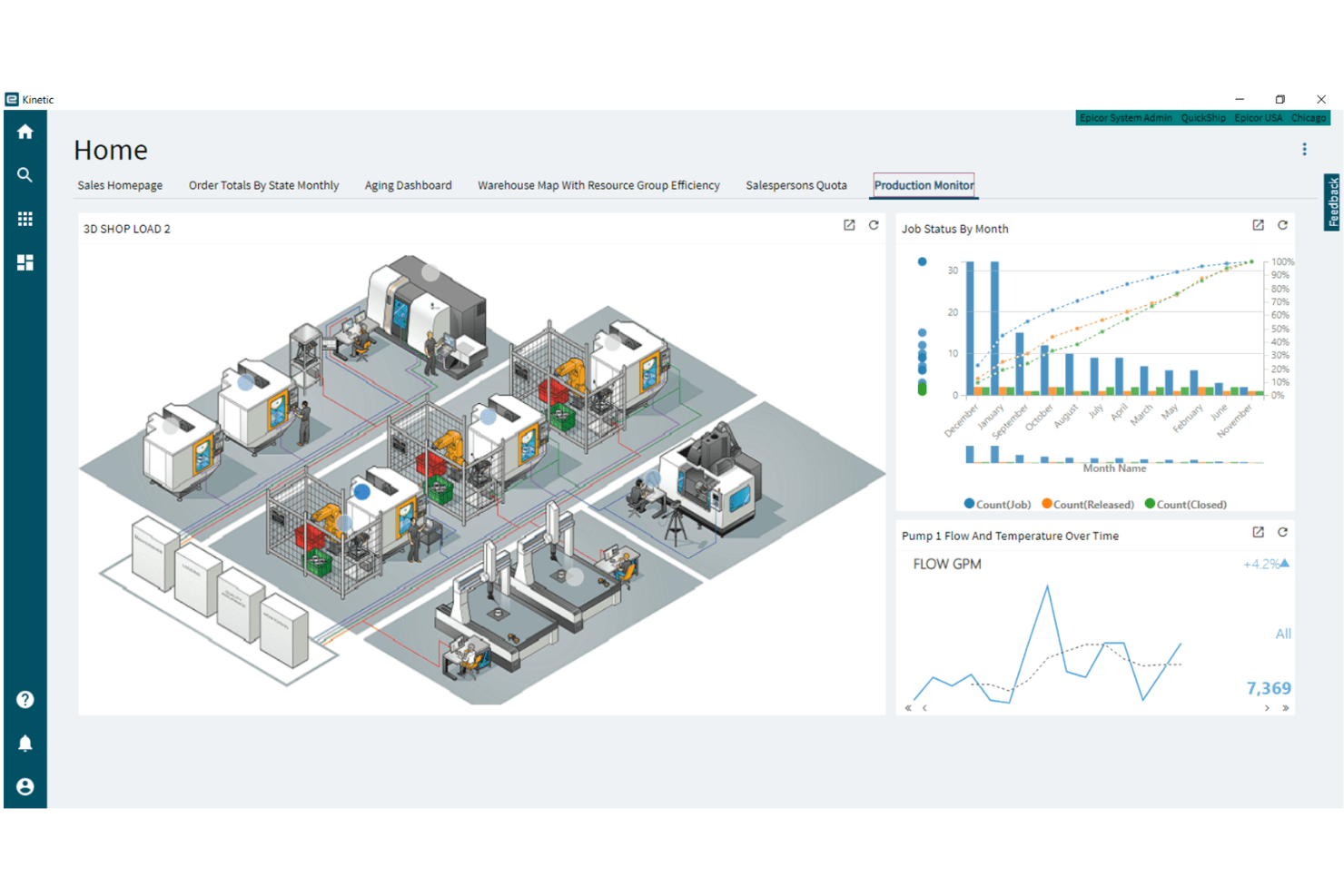
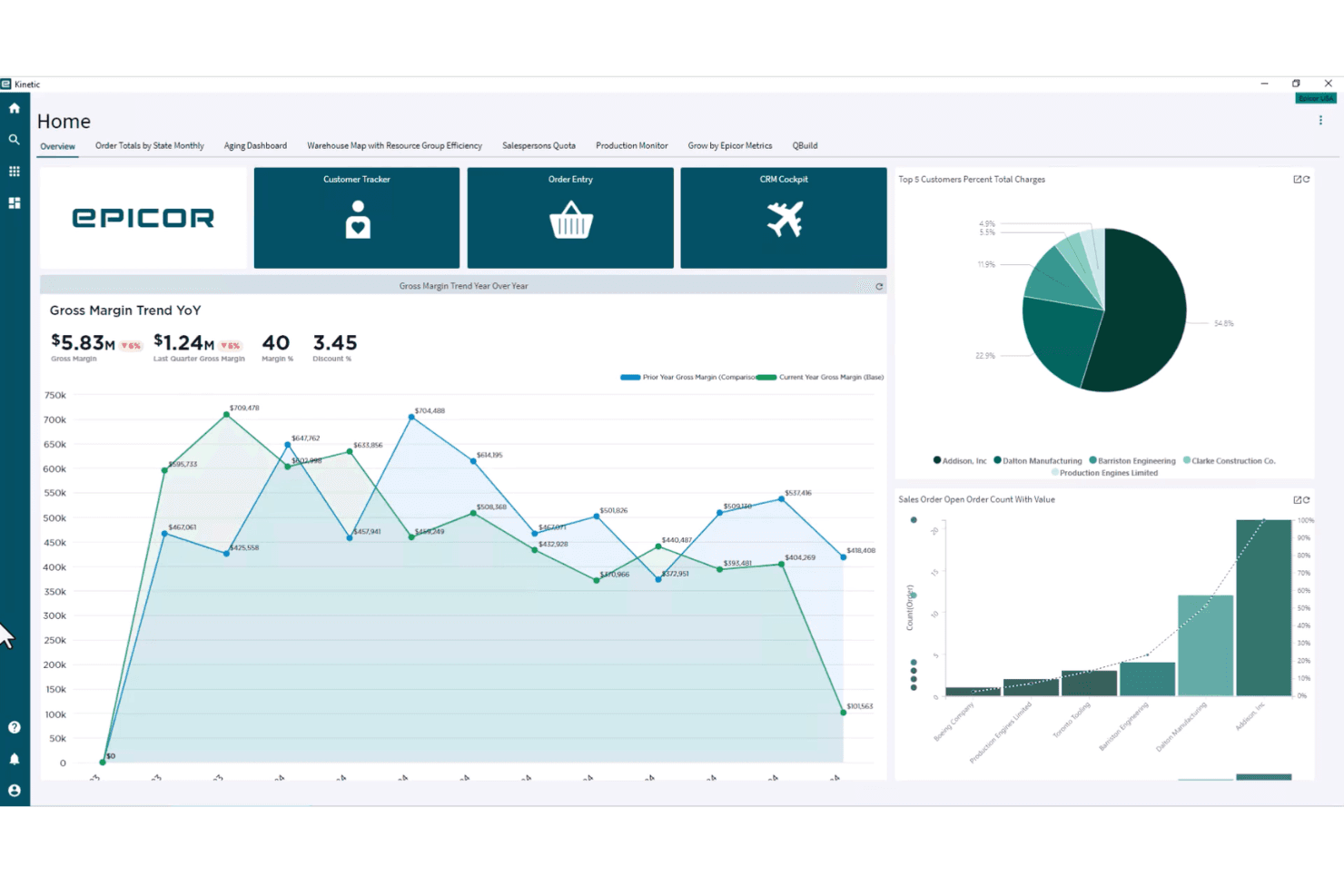
Epicor Kinetic offers a modern, browser-based interface with customizable dashboards, but its depth and complexity can be challenging for new users. Many reviewers note that navigation and workflow setup require training, especially for teams without prior ERP experience.
However, the low-code designer and in-app guidance help users adapt the system to their needs, making it more approachable over time for organizations with dedicated resources.
Integrations
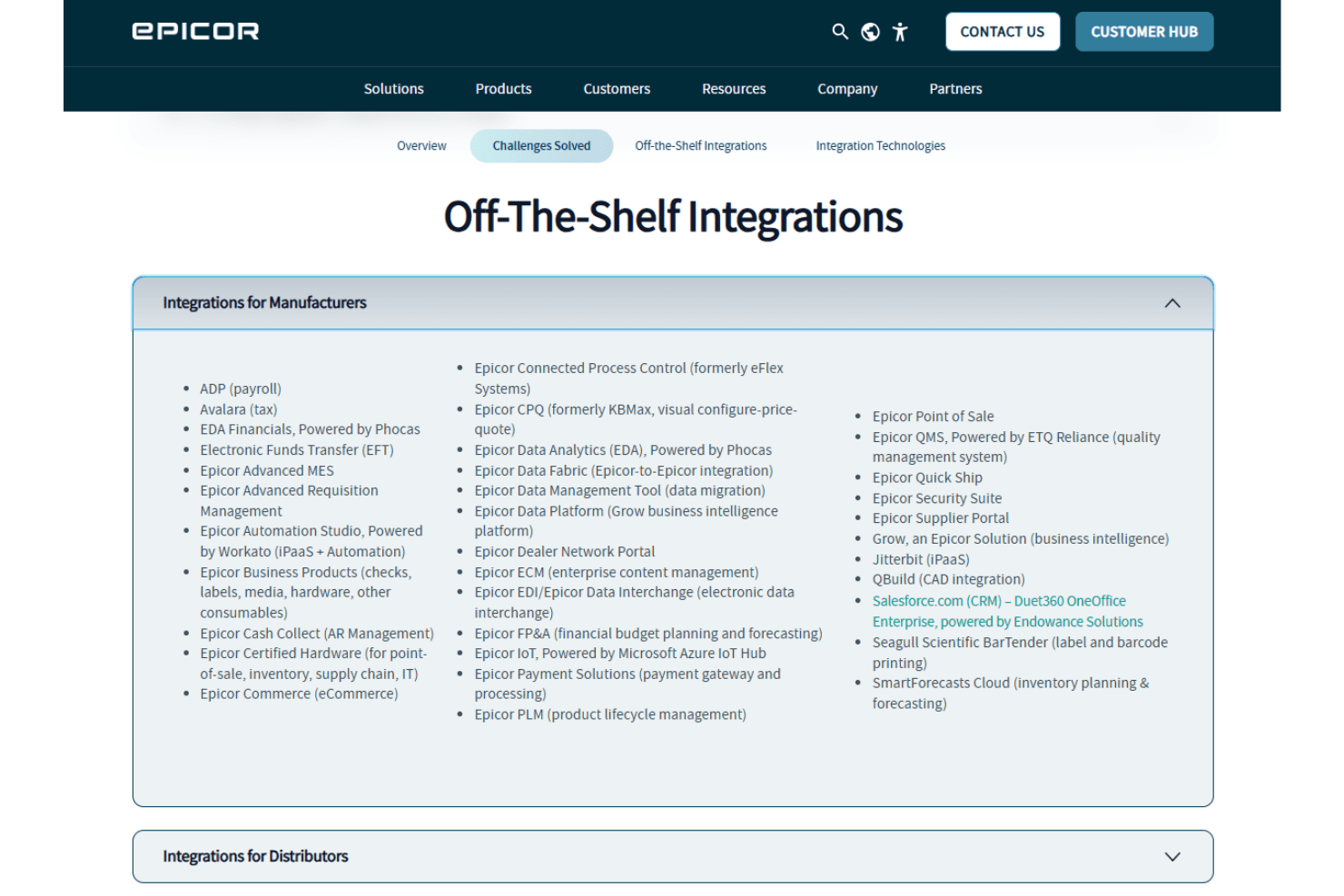
Epicor Kinetic integrates with Salesforce, Avalara, Microsoft Office 365, ADP, DocStar, CADLink, Shopify, Magento, Amazon, and SPS Commerce, among others.
Epicor Kinetic also offers a REST API and supports connections with third-party integration tools for custom workflows and data exchange.
Epicor Kinetic Specs
- Accounts Payable: Yes
- Accounts Receivable: Yes
- API: Yes
- Budgeting: Yes
- Calendar Management: No
- Compliance Tracking: Yes
- Customer Management: Yes
- Dashboard: Yes
- Data Export: Yes
- Data Import: Yes
- Data Visualization: Yes
- Expense Tracking: Yes
- External Integrations: Yes
- Financial Analysis: Yes
- Forecasting: Yes
- Inventory Tracking: Yes
- Multi-Currency: Yes
- Multi-User: Yes
- Notifications: Yes
- Order Management: Yes
- Payroll: Yes
- Project Management: Yes
- Purchase Orders: Yes
- Resource Management: Yes
- Scheduling: Yes
- Supplier Management: Yes
- Task Scheduling/Tracking: Yes
- Third-Party Plugins/Add-Ons: Yes
- Warehouse Management: Yes
- Workflow Management: Yes


