

Regnskapsprogramvare for juridisk sektor hjelper advokatfirmaer og juridiske avdelinger med å automatisere fakturering, sikre samsvar med regler for klientmidler og opprettholde økonomiske rapporter som er klare for revisjon. For økonomidirektører i juridiske teknologiselskaper i vekst eller virksomheter med flere juridiske enheter reduserer disse verktøyene manuelt arbeid og bidrar til å skalere driften med kontroll og oversikt.
Jeg har gjennomgått og evaluert dusinvis av regnskapsverktøy for juridisk sektor, med fokus på dem som integreres godt med bredere teknologistakker, overholder IOLTA- og klientmiddelregler og støtter rapportering i sanntid.
Enten du håndterer komplekse saker på tvers av jurisdiksjoner eller effektiviserer et slankt internt økonomiteam, inneholder denne listen de beste verktøyene for å effektivisere økonomiske prosesser og holde deg etterlevelsesdyktig uten å kaste bort tid på leverandører som ikke forstår de juridiske nyansene.
Hvorfor du kan stole på våre programvareanbefalinger
6,700+
Reviews
20
Industry experts
16+
Evaluation factors
14
Years
Teamet vårt har testet og anmeldt programvare siden 2012. Vi er selv økonomiledere, så vi vet hvor vanskelig og hvor viktig det er å velge riktig programvare.
I denne guiden har vi vurdert verktøyene gjennom praktisk testing og uavhengig research og gitt dem poeng ut fra våre utvelgelseskriterier.
Anmeldelsene våre bygger på vår egen redaksjonelle vurdering. De er ikke et salgsargument.
Sammenligningstabell for regnskapsprogramvare for juridisk sektor
Denne sammenligningstabellen oppsummerer prisdetaljene for mine beste utvalgte regnskapsprogrammer for juridisk sektor:
| Tool | Best For | Trial Info | Price | ||
|---|---|---|---|---|---|
| 1 | Best for audit readiness & revenue recognition | Free demo available | Pricing upon request | Website | |
| 2 | Best for billing-integrated trust reconciliation | Free trial available | From $49/user/month (billed annually) | Website | |
| 3 | Best for small to medium law firms | 10-day free trial | From $50/user/month (billed annually) | Website | |
| 4 | Best for small law firm accounting | 1-month free trial available | From $27/month | Website | |
| 5 | Best for international legal practices | Free plan + 14-day trial + demo available | From $20/month | Website | |
| 6 | Best for secure client communication | Free demo available | Pricing upon request | Website | |
| 7 | Best for integrated practice management | 10-day free trial | From $59/user/month (billed annually) | Website | |
| 8 | Best for account automation | Free demo available | Pricing upon request | Website | |
| 9 | Best for mobile management and time tracking | Free demo available | Pricing upon request | Website | |
| 10 | Best for all-in-one legal management | Free demo available | Pricing upon request | Website |


Anmeldelser av de beste regnskapsprogrammene for juridisk sektor
Nedenfor finner du en rask gjennomgang av de beste regnskapsprogrammene for juridisk sektor som kom med på kortlisten min. Jeg har brutt ned de viktigste funksjonene, fordelene og ulempene, integrasjonene og hvem hvert verktøy passer best for – slik at du enkelt kan finne det som dekker behovene dine.
 Best for audit readiness & revenue recognition
- Free demo available
- Pricing upon request
Visit WebsiteCustomer Rating:4.9/5
DualEntry gives your team a real-time financial snapshot across revenue, expenses, cash flow, and operational insights—all in one dashboard. DualEntry is an AI-native ERP designed for mid-market businesses that need advanced accounting capabilities. It offers audit-ready tools, revenue recognition, and deep financial controls that support legal compliance and multi-entity operations.
Why I Picked DualEntry: I picked DualEntry because it’s built for firms that need high-level accounting support, particularly in audit readiness and revenue recognition. It’s designed to meet complex legal standards like ASC 606 and IFRS 15, which can help legal professionals manage financial compliance with confidence. I also liked that it offers automated bank matching and transaction reconciliations, helping your team close books faster and reduce manual workloads.
Standout Features & Integrations
Features include approval controls to enforce compliance, automatic bank matching to accelerate reconciliations, and detailed revenue recognition to support complex billing structures. You can also manage tax compliance using built-in integrations with Avalara and Vertex.
Integrations include BambooHR, Bill.com, Brex, Deel, Google SSO, Gusto, HubSpot, Ramp, Rippling, Salesforce, Stripe Billing, and Stripe Invoicing.
Pros and Cons
Pros:
- Automated revenue recognition ensures compliance with standards
- Supports multi-entity and multi-currency operations
- Advanced AI features help with complex accounting tasks
Cons:
- As an ERP, it may offer more features than needed for simpler accounting needs
- Customization options require careful setup
Learn more about DualEntry: Best for billing-integrated trust reconciliation
- Free trial available
- From $49/user/month (billed annually)
Visit WebsiteCustomer Rating:4.3/5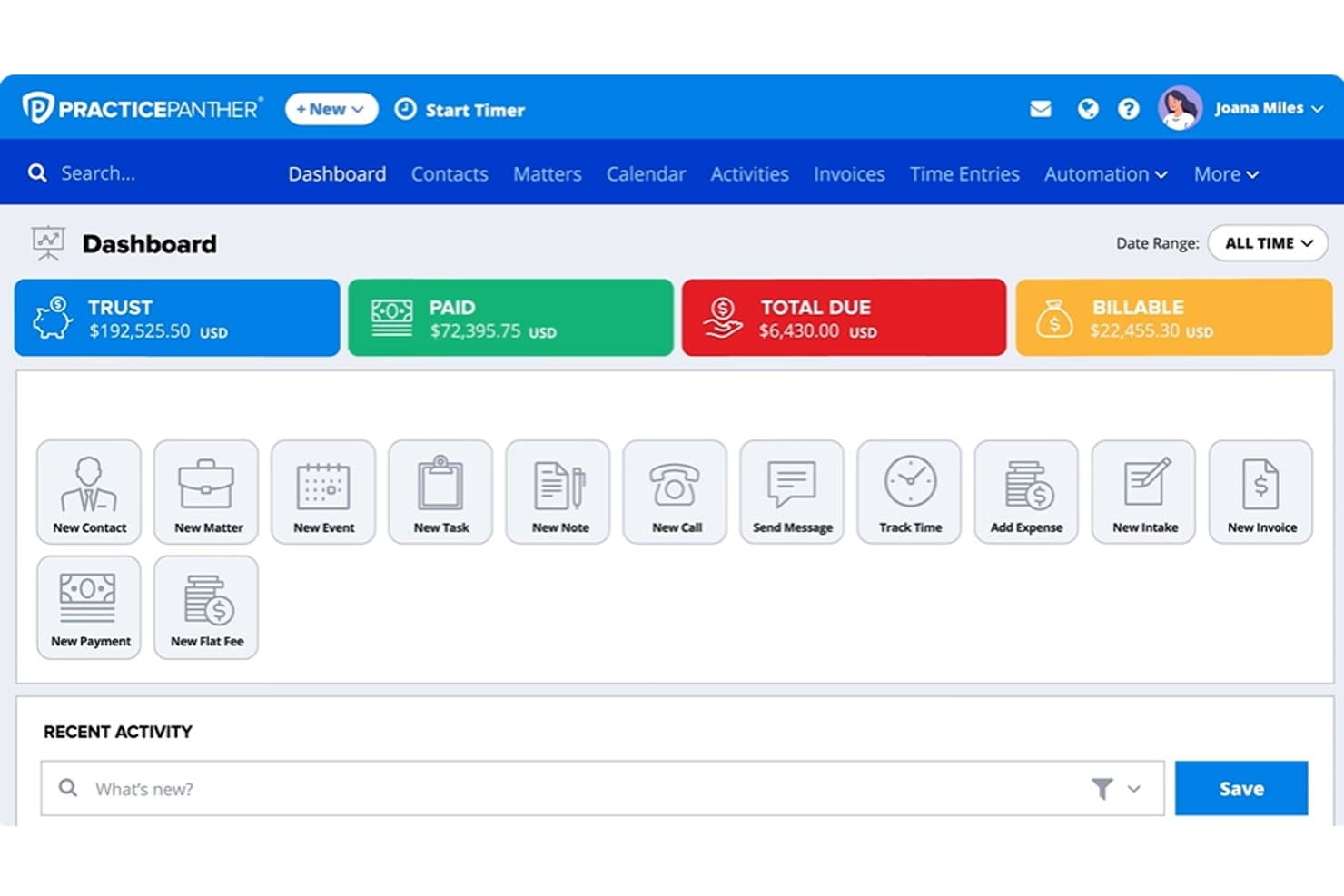
PracticePanther dashboard showing trust balances, payments, billable amounts, matters, and legal billing tools PracticePanther is legal practice management software that combines matter management, time tracking, billing, client payments, and trust accounting in a single platform.
Who Is PracticePanther Best For?
PracticePanther suits law firms that want trust reconciliation and client billing managed inside a single platform, without juggling separate accounting software.
Why I Picked PracticePanther
I picked PracticePanther as one of the best because its billing and trust reconciliation live inside the same platform, which means time entries flow directly into invoices and trust deposits without any manual handoff. I especially like PantherAccounting Plus's guided three-way reconciliation, which automatically matches bank transactions against both the client ledger and trust account balances in one workflow. The built-in safeguards against commingling and overdrafts, plus one-click reconciliation reports designed to meet IOLTA, ABA, and state bar requirements, make it genuinely practical for firms that need audit-ready records without a separate accounting tool.
PracticePanther Key Features
- MoneyFinder: Scans your matters and flags any time entries or activities that have been recorded but not yet billed on an invoice.
- LEDES billing: Generates LEDES bills with UTBMS coding for clients or insurers that require structured electronic billing formats.
- Matter-specific rate overrides: Sets a custom hourly rate at the matter level for the whole firm, a specific user, or a user role, overriding default rates on future time entries.
- Financial statement reporting: Produces Profit & Loss, Balance Sheet, Trial Balance, Cash Flow Statement, and General Ledger reports, filterable by date, contact, matter, account, or payee.
PracticePanther Integrations
Marketplace integrations include QuickBooks and TrustBooks, while Plaid connects bank and credit-card transactions to PantherAccounting Plus. PracticePanther also provides an API and lists Zapier.
Pros and Cons
Pros:
- Reviewers praise combined trust and billing
- Time entries flow into matter invoices
- Guided three-way trust reconciliation
Cons:
- Retainer alerts don’t replenish funds
- Advanced reconciliation requires Business Pro
Learn more about PracticePanther: Best for small to medium law firms
- 10-day free trial
- From $50/user/month (billed annually)
Visit WebsiteCustomer Rating:4.6/5
MyCase streamlines case management, billing, and communication for law firms. MyCase is a legal practice management software designed to simplify case management, billing, and communication for law firms. It enables users to handle document storage, time tracking, and client collaboration in one place.
Why I picked MyCase: MyCase lets you manage all aspects of your cases with a centralized dashboard for quick access to important files and client communications. You can also automate billing and set up recurring invoices with ease. The software offers built-in time tracking to ensure accurate billing for billable hours, while its secure client portal streamlines communication, making it easy for your clients to stay in the loop.
Standout features & integrations:
Features include document management, billing automation, and a secure client portal to streamline communication. You can track time and expenses easily while keeping client information organized. The platform also offers reporting tools to give insights into your firm's financials and case progress.
Integrations include LawPay, QuickBooks, Google Calendar, Dropbox, Google Drive, Outlook, Microsoft Office, Zapier, NetDocuments, and Box.
Pros and Cons
Pros:
- Simple time-tracking tools
- Easy to customize billing templates
- Fast setup and onboarding
Cons:
- Mobile app lacks full functionality
- Some learning curve for features
Learn more about MyCase: 4Best for small law firm accounting
Xero
- 1-month free trial available
- From $27/month
Visit WebsiteCustomer Rating:4.4/5
Xero manages finances, from invoicing to expense tracking and financial reporting. Xero is a cloud-based accounting software that helps businesses manage finances, from invoicing to expense tracking and financial reporting. It supports key functions like cash flow management and bank reconciliation, making it ideal for small businesses.
Why I picked Xero: Xero provides easy-to-use tools for tracking your law firm’s financials, allowing you to automate tasks like invoicing and bank reconciliation. You can manage expenses, create detailed reports, and monitor your firm’s cash flow in real-time. Overall, the software’s business accounting features are designed to simplify the financial side of your operations, helping you stay organized and compliant, making it a reliable solution for small law firms looking to streamline their accounting processes.
Standout features & integrations:
Features include automated invoicing, expense tracking, and detailed financial reporting to simplify your firm's accounting tasks. Xero also offers tools to help with payroll processing and tax compliance, making it easy to handle financial operations.
Integrations include Gusto, Hubdoc, Avalara, Stripe, PayPal, Square, Shopify, WooCommerce, Vend, and Bill.com.
Pros and Cons
Pros:
- Scalable for growing firms
- Detailed financial reporting options
- Strong multi-currency support
Cons:
- Lacks advanced automation tools
- Slow syncing with external accounts
Learn more about Xero: Best for international legal practices
- Free plan + 14-day trial + demo available
- From $20/month
Visit WebsiteCustomer Rating:4.3/5
Zoho Books manages finances, tracks expenses, and handles billing for businesses. Zoho Books is a cloud-based accounting solution that helps businesses manage their finances, track expenses, and handle billing. It automates key financial tasks like invoicing, reporting, and cash flow management.
Why I picked Zoho Books: Zoho Books supports multi-currency transactions, making it ideal for international law practices. You can automate invoicing and payments while the built-in tax compliance tools ensure you follow local regulations. The software also offers real-time collaboration, so your team can work together, regardless of location. With its detailed financial reporting, you can easily monitor your firm's performance and make data-driven decisions.
Standout features & integrations:
Features include customizable financial reports, giving you deeper insights into your firm’s performance. It also includes client and vendor portals, making it easier to collaborate and manage transactions securely. Plus, with workflow automation, you can streamline approvals and routine accounting tasks, saving your team valuable time.
Integrations include Zoho CRM, Zoho Projects, Zoho Inventory, Zoho Analytics, Zoho Expense, Zoho Subscriptions, PayPal, Stripe, and Microsoft Office 365.
Pros and Cons
Pros:
- Strong tax compliance tools
- Flexible invoicing customization options
- Multi-currency support for international firms
Cons:
- Limited advanced customization for workflows
- Steeper learning curve for reports
 Best for secure client communication
- Free demo available
- Pricing upon request
Visit WebsiteCustomer Rating:4.4/5
CARET Legal streamlines case management, billing, and client communication. CARET Legal is legal practice management software designed to streamline case management, billing, and client communication. It provides law firms with tools to manage documents, track time, and secure client interactions all in one platform.
Why I picked CARET Legal: CARET Legal offers a secure client portal where your team can safely communicate with clients and share important case information. The platform also includes time tracking, allowing you to manage billable hours easily. You can create detailed invoices and manage trust accounts, ensuring your firm's finances are always accurate. Additionally, the software’s document management tools keep your case files organized and accessible from anywhere.
Standout features & integrations:
Features include custom workflow automation, helping your firm streamline repetitive tasks and improve efficiency. The platform also offers advanced reporting tools, giving you real-time insights into your firm’s financial health. Additionally, its built-in calendar and scheduling system ensures you never miss important deadlines or court dates.
Integrations include Google Calendar, Microsoft Outlook, QuickBooks, LawPay, NetDocuments, Microsoft Office, Box, Dropbox, and Docusign.
Pros and Cons
Pros:
- Strong document management tools
- Flexible time-tracking features
- Secure client portal for communication
Cons:
- Lack of advanced automation tools
- Limited reporting customization options
Learn more about CARET Legal: Best for integrated practice management
- 10-day free trial
- From $59/user/month (billed annually)
Visit WebsiteCustomer Rating:4.4/5
Rocket Matter enables law firms to manage cases, billing, and time tracking. Rocket Matter is a legal practice management software designed to manage cases, billing, and time tracking for law firms. It offers a centralized platform for managing all aspects of legal operations, making it easier to track work and manage documents.
Why I picked Rocket Matter: Rocket Matter allows you to track billable time and generate invoices. With built-in document management, you can securely store and organize your firm’s important files. The software also includes tools for managing billing, trust accounting, and matter budgets, ensuring financial accuracy.
Standout features & integrations:
Features include customizable workflow automation, allowing firms to streamline repetitive tasks and improve efficiency. The platform includes integrated payment processing, making it easy to collect client payments securely. Additionally, Rocket Matter provides client communication tools, helping law firms manage emails, notes, and appointments all in one place.
Integrations include QuickBooks, LawPay, NetDocuments, Dropbox, Box, Microsoft OneDrive, Google Drive, Outlook, Gmail, and Microsoft Office 365.
Pros and Cons
Pros:
- Reliable trust accounting tools
- Customizable matter management features
- Easy setup for new users
Cons:
- Lacks advanced workflow automation
- Limited advanced reporting features
Learn more about Rocket Matter: Best for account automation
- Free demo available
- Pricing upon request
Visit WebsiteCustomer Rating:4.3/5
Sage Accounting handles invoicing, expense tracking, and cash flow management. Sage Accounting is a cloud-based software designed to handle financial management tasks like invoicing, expense tracking, and cash flow management for businesses. It helps users manage their accounts with tools to automate various processes and create financial reports.
Why I picked Sage Accounting: Sage Accounting offers AI-powered data capture capabilities to reduce the time you spend on manual data entry. You can automate your invoicing and track payments effortlessly. Along with these features, the software provides real-time insights into your finances, helping you stay on top of your cash flow. Sage Accounting also makes handling compliance and tax-related tasks simple, ensuring accuracy in your financial reporting.
Standout features & integrations:
Features include AI-powered data capture, invoice creation, payment tracking, and expense management. Sage Accounting also provides multi-user access, making collaboration easier for teams handling financial data.
Integrations include AutoEntry, Stripe, PayPal, A2X, Satago, GoCardless, TransferMate, Shopify, and Zapier.
Pros and Cons
Pros:
- Real-time financial insights
- Flexible invoicing options
- Fast onboarding with minimal setup
Cons:
- Occasional lag in processing data
- Limited customization for reports
Learn more about Sage Accounting: Best for mobile management and time tracking
- Free demo available
- Pricing upon request
Visit WebsiteCustomer Rating:4.5/5
Centerbase enables law firms to manage billing, time tracking, and client management. Centerbase is a cloud-based legal management software designed to help law firms handle billing, time tracking, and client management from anywhere. It provides tools to track billable hours, manage cases, and streamline administrative tasks.
Why I picked Centerbase: Centerbase lets you track time from any device, making it easy to capture billable hours on the go. You can manage billing, create customized invoices, and automate your firm’s accounting processes. The software also offers mobile access to case information and client details so your team can stay connected wherever they are, while its billing and time-tracking tools help keep your firm organized and efficient.
Standout features & integrations:
Features include automated trust accounting, ensuring compliance with industry regulations while simplifying fund management. Its document management system keeps case files organized and easily accessible. Additionally, the platform includes workflow automation, helping law firms streamline repetitive tasks and improve efficiency.
Integrations include Microsoft 365, QuickBooks, LawPay, NetDocuments, Docusign, Worldox, Box, Dropbox, Google Drive, and Salesforce.
Pros and Cons
Pros:
- Easy setup for billing automation
- Fast time-tracking on any device
- Mobile access to case files
Cons:
- Some manual entry for reports
- Complex onboarding for larger firms
Learn more about Centerbase: 10Best for all-in-one legal management
PCLaw
- Free demo available
- Pricing upon request
Visit WebsiteCustomer Rating:3.4/5
PCLaw helps law firms manage billing, accounting, and matter management. PCLaw is an on-premise and cloud-based legal software solution for law firms to handle billing, accounting, and matter management. It helps legal professionals manage their cases, track time, and maintain compliance with legal regulations.
Why I picked PCLaw: PCLaw excels in combining case management, billing, and accounting in one platform, so your team can handle all key aspects of running a law firm. You can generate detailed financial reports, manage trust accounts, and track billable hours without switching between multiple tools. The software’s matter management features ensure you stay on top of case progress while maintaining compliance with legal standards. Furthermore, its built-in document management also keeps all legal files organized and accessible.
Standout features & integrations:
Features include mobile timekeeping, compliance with Canadian trust accounting, and a centralized case management system. You can also customize workflows to suit your needs and use document templates to save time.
Integrations include Microsoft Office 365, QuickBooks, Worldox, NetDocuments, LawPay, Juris, Tabs3, Outlook, and Word.
Pros and Cons
Pros:
- Detailed financial reporting options
- Strong trust accounting features
- Fast implementation for small firms
Cons:
- Lacks advanced workflow automation
- Learning curve for reporting tools
Learn more about PCLaw:
Annen regnskapsprogramvare for juridisk sektor
Her er noen flere alternativer for regnskapsprogramvare for juridisk sektor som ikke kom med på kortlisten min, men som likevel er verdt å undersøke:
- 11LeanLawBest for QuickBooks integration
- 12Unity AccountingBest for Canadian legal compliance
- 13CosmoLexBest for integrated trust accounting
- 14ClioBest for over 250 integrations
- 15QuickBooksBest for advanced accounting
- 16TimeSolvBest for real-time invoicing and payments
- 17SolunoBest for real-time docketing
- 18AiwynBest for automating revenue processes
How I Evaluate Legal Accounting Software
I split my evaluation into baseline requirements—like IOLTA compliance and matter-based ledgers—and the differentiators, like payment processing and firm-size fit, that separate the best options.
Core Functionality (Table Stakes For This List)
When I'm selecting tools for my list, I rank each one on a scale from 0 (does not offer the functionality) to 5 (excels in this area) for each core functionality listed below. Then, I calculate the tool's total score into a percentage. Each tool needs to achieve a minimum total score of 55% to be considered for inclusion.
- Trust/IOLTA Account Management: I look for proper fund segregation, three-way reconciliation between bank statements, client ledgers, and the trust ledger, plus safeguards that prevent overdrafts on individual client balances.
- Matter-Based Financial Tracking: Each tool should let you tie every dollar of income and expense to a specific client matter, so you can pull profitability reports per case rather than just at the firm level.
- Legal-Specific Billing & Invoicing: I evaluate whether the platform supports LEDES billing formats, retainer drawdowns, split billing across parties, and fee structures like contingency or blended rates.
- Time & Expense Capture: Timekeepers need quick entry options—timers, mobile apps, or passive tracking—that post hours and reimbursable costs directly to the right matter without manual re-entry.
- General Ledger & Financial Reporting: I check for a true double-entry GL with standard financial statements, along with reports tailored to law firms like partner compensation summaries and revenue-by-practice-area breakdowns.
- Trust Compliance Reporting: The platform should produce audit-ready trust reports, including client trust ledgers and reconciliation summaries, that align with bar association requirements for periodic trust account reviews.
Once I have a list of tools that meet this criteria, I consider what sets each platform apart.
Differentiating Factors (What Sets Vendors Apart)
Here's how I compare and contrast different vendors:
Standout Features
Practice management integration matters a lot here. A tool that syncs with platforms like Clio or MyCase means your matter data, contacts, and financials stay connected without duplicate entry. I also evaluate how the platform handles client payments—specifically whether funds from credit cards or ACH are routed to the correct trust or operating account automatically. For multi-partner firms, origination and compensation tracking is a differentiator worth checking, since it simplifies profit-sharing calculations at year-end.
Beyond Features
Jurisdictional compliance coverage is a big one—trust accounting rules vary widely, so I check whether a platform keeps pace with bar requirements across multiple jurisdictions. Firm size and practice area fit also shape my evaluation. A solo personal injury attorney has very different needs than a 50-partner corporate firm managing thousands of open matters. Finally, I look at data security, especially SOC 2 certification and role-based permissions, since these platforms hold privileged client information.
Slik velger du regnskapsprogramvare for juridisk sektor
Det er lett å bli overveldet av endeløse funksjoner og forvirrende priser. For å holde ting enkelt mens du går gjennom alternativene dine, får du her en rask sjekkliste som hjelper deg med å holde fokus på det som virkelig betyr noe:
| Faktor | Hva bør vurderes |
| Skalerbarhet | Vil denne programvaren vokse sammen med firmaet ditt? |
| Integrasjoner | Integreres den med de eksisterende systemene dine (ERPs, CRM-systemer osv.)? |
| Tilpasningsmuligheter | Kan den tilpasses for å dekke dine spesifikke behov? |
| Brukervennlighet | Er den brukervennlig for teamet ditt? |
| Budsjett | Passer den innenfor de økonomiske rammene dine? |
| Sikkerhetstiltak | Finnes det robuste sikkerhetstiltak? |
| Støtte | Er det tilgjengelig pålitelig kundestøtte? |
| Etterlevelse | Er den i samsvar med juridiske og regulatoriske standarder? |
Trender innen regnskapsprogramvare for juridisk sektor
Da jeg undersøkte det nyeste fra leverandører av regnskapsprogramvare for juridisk sektor, gikk jeg gjennom store mengder produktoppdateringer, pressemeldinger og versjonsnotater. Her er noen trender som virkelig skilte seg ut for meg, og som det er verdt å følge med på:
- AI-drevne innsikter: Leverandører integrerer AI for å analysere økonomiske data og tilby prediktive innsikter. Dette hjelper firmaer og ideelle virksomheter med å forutse problemer med kontantstrøm eller avvik i faktureringen før de blir et problem. Noen verktøy bruker til og med AI for å forbedre nøyaktigheten i tillitsregnskap.
- Tilpassbare dashbord: Flere programvareleverandører lar brukerne utforme dashbordene sine slik at de kan se dataene som betyr mest. Denne trenden er verdifull fordi den lar advokatfirmaer tilpasse arbeidsflyter basert på deres spesifikke behov for økonomisk sporing.
- Innebygde samsvarsverktøy: Juridisk regnskapsprogramvare legger i økende grad til innebygde verktøy for samsvarsovervåking. Disse funksjonene sporer automatisk regionale skattelover, etiske retningslinjer og regler for klientmidler, noe som reduserer risikoen for sanksjoner.
- Åpenhet for klienter: Flere leverandører tilbyr nå klientportaler der klienter kan se fakturaene og betalingene sine direkte i sanntid. Denne trenden bygger tillit mellom firmaer og klienter og kan til og med fremskynde innbetalingen ved å gjøre transaksjonene mer transparente.
- Blokkjede for transaksjonssikkerhet: Noen verktøy eksperimenterer med blokkjede for å sikre transaksjoner med klientmidler. Dette gir juridiske firmaer et ekstra sikkerhetslag, spesielt når de håndterer sensitive kontoer eller kontoer med høy verdi.
Hva er juridisk regnskapsprogramvare?
Juridisk regnskapsprogramvare er programvare for økonomistyring utviklet for advokatfirmaer og juridiske avdelinger.
Den inneholder funksjoner som tillitsregnskap, tidsregistrering, fakturering og skattesamsvar for å sikre nøyaktig dokumentasjon og overholdelse av regelverket. Juridiske fagpersoner bruker den til å administrere klientmidler, effektivisere faktureringen og støtte samsvar med standarder som IOLTA.
Disse plattformene er spesielt verdifulle for firmaer som trenger revisjonsklar dokumentasjon, støtte for flere valutaer og sikre økonomiske arbeidsflyter.
Funksjoner
Her er de viktigste funksjonene all god juridisk regnskapsprogramvare bør ha:
- Tillitsregnskap: Sikrer samsvar ved å administrere klientmidler som holdes på klientkontoer, på en nøyaktig måte.
- Tidsregistrering: Gjør det mulig å registrere fakturerbare timer nøyaktig for å sikre korrekt fakturering av klienter.
- Fakturering: Automatiserer oppretting og distribusjon av fakturaer, noe som reduserer administrasjonsarbeidet.
- Kostnadssporing: Overvåker og registrerer alle sakrelaterte kostnader, noe som bidrar til nøyaktig fakturering og økonomistyring.
- Økonomirapportering: Genererer detaljerte økonomirapporter som gir innsikt i firmaets økonomiske helse og resultater. Dette er nyttig ved oppretting av hovedbok.
- Nettbetalinger: Legger til rette for mottak av nettbetalinger, noe som gjør transaksjoner raskere og mer praktiske for klientene.
- Lønn: Administrerer de ansattes lønn og sikrer rettidig og nøyaktig utbetaling.
- Skattesamsvar: Bidrar til å sikre at firmaets økonomiske praksis er i samsvar med skattereglene, noe som reduserer risikoen for juridiske problemer.
- Integrasjon med programvare for praksisadministrasjon: Muliggjør sømløs deling av data mellom regnskaps- og praksisadministrasjonssystemer, noe som forbedrer den samlede effektiviteten.
- Sikkerhetsfunksjoner: Beskytter sensitive økonomiske data med sterke sikkerhetstiltak og sikrer klientkonfidensialitet og dataintegritet.
Fordeler
Å legge til riktig juridisk regnskapsprogramvare i verktøykassen kan gjøre en stor forskjell for teamet og firmaet ditt. Her er noen fordeler du vil begynne å se med en gang:
- Bedre nøyaktighet: Juridisk regnskapsprogramvare bidrar til å redusere feil i økonomiske registre ved å automatisere beregninger og dataregistrering.
- Tidsbesparelser: Automatisering av oppgaver som fakturering, kostnadssporing og lønn frigjør tid til viktigere arbeid.
- Bedre samsvar: Funksjoner som er tilpasset advokatfirmaer, sikrer at du overholder bransjespesifikke økonomiske regler.
- Forbedret økonomisk innsikt: Generer enkelt detaljerte økonomirapporter som hjelper deg med å ta informerte forretningsbeslutninger.
- Effektivisert fakturering: Forenkle faktureringsprosessen med automatisert oppretting av fakturaer og betalingssporing, noe som fører til raskere betalinger.
- Tillitsregnskap: Administrer klientmidler nøyaktig med funksjoner for tillitsregnskap som forhindrer overtrekk og sikrer korrekt håndtering.
- Økt klienttillit: Åpenhet i fakturering og økonomistyring bygger tillit hos klientene, siden de kan se detaljerte kostnadsoversikter.
Kostnader og priser
Å velge riktig regnskapsprogramvare for advokatfirmaer innebærer å forstå hvordan prisingen fungerer. Kostnadene kan variere avhengig av hvilke funksjoner du trenger, hvor stort teamet ditt er, og hvilke tillegg du velger. For å gjøre det enklere får du her en rask oversikt over vanlige abonnementer, hva de vanligvis inkluderer, og hva du kan forvente å betale.
Sammenligningstabell for abonnementer for juridisk regnskapsprogramvare
| Abonnementstype | Gjennomsnittspris | Vanlige funksjoner |
| Gratisabonnement | $0 | Grunnleggende tidsregistrering, begrenset fakturering og viktig oppgavehåndtering. |
| Personlig abonnement | $10-$50/bruker/måned | Avansert tidsregistrering, grunnleggende IOLTA-samsvar, tilpassbar fakturering og mobiltilgang. |
| Forretningsabonnement | $50-$150/bruker/måned | Fullt IOLTA-samsvar, avansert rapportering, klientportal og integrasjon med andre verktøy. |
| Virksomhetsabonnement | $150+/bruker/måned | Tilpassbare arbeidsflyter, prioritert brukerstøtte, avansert sikkerhet og dedikert kontoadministrasjon. |
Vanlige spørsmål
Her er noen svar på vanlige spørsmål om regnskapsprogramvare for advokatfirmaer:
Hvordan bidrar regnskapsprogramvare for advokatfirmaer til samsvar med reglene for klientmiddelhåndtering?
Regnskapsprogramvare for juridisk klientmiddelhåndtering hjelper deg med å administrere klientmiddelkonti ved å holde klientmidler og firmaets midler atskilt og gjøre det enklere å overholde IOLTA-reglene.rnrnDu får automatisert treveisavstemming, detaljerte oppføringer og nyttige varsler som hindrer sammenblanding av midler og varsler om lave saldoer. Dette sparer deg for tid og beskytter firmaet mot kostbare feil knyttet til regelverket.
Kan regnskapsprogramvare for advokatfirmaer integreres med andre verktøy for praksisadministrasjon?
Ja, de fleste ledende regnskapsprogrammene for advokatfirmaer kan integreres med systemer for administrasjon av advokatpraksis. Det betyr at du kan synkronisere saker, kontakter, tidsregistrering og fakturering mellom plattformer som Clio, MyCase eller PracticePanther. Alt i alt sparer integrasjon deg for tid og reduserer behovet for manuell dataregistrering.
Hvordan håndterer regnskapsprogramvare for advokatfirmaer fakturering og utsendelse av fakturaer?
Regnskapsprogramvare for advokatfirmaer automatiserer fakturering og utsendelse av fakturaer ved at du kan registrere fakturerbare timer, sette opp delt fakturering eller fastprisfakturering og opprette tilpassbare fakturaer. Du kan administrere forskuddsbetalinger, motta betalinger på nett og håndtere klientinnskudd i samsvar med reglene. Dette effektiviserer betalingsprosessen og reduserer feil.
Er det enkelt å bytte fra generell regnskapsprogramvare til regnskapsprogramvare spesielt utviklet for advokatfirmaer?
Ja, mange leverandører av regnskapsprogramvare for advokatfirmaer tilbyr nå migreringsstøtte og hjelp med oppstart. Du kan vanligvis importere firmaets kontakter, kontoer, saldoer og transaksjonsdata med støtte eller importverktøy. Beregn noe tid til oppsett, men fokuset på juridiske behov gjør overgangen verdt innsatsen.
Hvilke sikkerhetsfunksjoner bør jeg se etter i regnskapsprogramvare for advokatfirmaer?
Se etter juridiske regnskapsplattformer med kryptering på banknivå, sikre sikkerhetskopier i skyen og rollebaserte brukertillatelser. God programvare tilbyr revisjonsspor, tofaktorautentisering og overvåking av datainnbrudd. Disse funksjonene holder sensitive klientdata og data om klientmiddelkonti trygge mot uautorisert tilgang.
Kan jeg tilpasse regnskapsprogramvare for advokatfirmaer slik at den passer firmaets arbeidsflyt?
Ja, mange regnskapsløsninger for advokatfirmaer lar deg tilpasse brukerroller, kontoplaner, kontrollpaneler og fakturamaler. Noen lar deg også automatisere gjentakende fakturering, sette opp egendefinerte varsler og integrere med betalingsformidlerne du foretrekker.
Hvordan hjelper regnskapsprogramvare for advokatfirmaer med praksiser som omfatter flere enheter eller jurisdiksjoner?
Den beste regnskapsprogramvaren for advokatfirmaer kan håndtere flere klientmiddelkonti, enheter eller jurisdiksjoner ved å støtte separate hovedbøker og regelverk. Funksjoner som flere valutaer, stedsbasert rapportering og tilpassbare avgiftskoder hjelper deg med å holde hver enhet i samsvar med regelverket. Den forenkler også konsolidert rapportering når firmaet ditt dekker ulike regioner.
Hvilken regnskapsprogramvare for advokatfirmaer passer best for små firmaer?
For små advokatfirmaer tilbyr alternativer som CosmoLex, ZipBooks eller Xero brukervennlige grensesnitt, god håndtering av klientmidler og rimelige priser. Disse verktøyene gir viktige funksjoner uten kompleksiteten eller kostnadene som kjennetegner løsninger for store firmaer, og hjelper små team med å holde orden og overholde regelverket etter hvert som de vokser.