

Programvare for kvitteringshåndtering lar deg registrere, organisere og spore kvitteringer digitalt, noe som reduserer manuell dataregistrering og hjelper deg med å være klar for revisjon. Hvis du leter etter den beste programvaren for kvitteringshåndtering, ønsker du sannsynligvis å forenkle utgiftssporingen, forbedre nøyaktigheten og sørge for at virksomheten overholder regelverket – uten å legge mer arbeid på teamet ditt. Denne listen hjelper deg med å sammenligne ledende verktøy, forstå de unike funksjonene deres og velge den riktige løsningen for å holde økonomiske oppføringer organiserte og tilgjengelige.
Hvorfor du kan stole på våre programvareanbefalinger
6,700+
Reviews
20
Industry experts
16+
Evaluation factors
14
Years
Teamet vårt har testet og anmeldt programvare siden 2012. Vi er selv økonomiledere, så vi vet hvor vanskelig og hvor viktig det er å velge riktig programvare.
I denne guiden har vi vurdert verktøyene gjennom praktisk testing og uavhengig research og gitt dem poeng ut fra våre utvelgelseskriterier.
Anmeldelsene våre bygger på vår egen redaksjonelle vurdering. De er ikke et salgsargument.
Sammenligningstabell for programvare for kvitteringshåndtering
Denne sammenligningstabellen oppsummerer prisopplysningene for den beste programvaren for kvitteringshåndtering:
| Tool | Best For | Trial Info | Price | ||
|---|---|---|---|---|---|
| 1 | Best for text-based receipt submission | Free demo available | From $11.99/user/month (billed annually) | Website | |
| 2 | Best for automated approval routing | Free plan available | From $49/user/month | Website | |
| 3 | Best for policy-based spend controls | Free plan available; 30-day free trial | From $15/user/month | Website | |
| 4 | Best for bulk receipt import and automation | 14-day free trial | From $3/user/month (billed annually) | Website | |
| 5 | Best for automated bank and card transaction matching | 30-day free trial | From $38/month | Website | |
| 6 | Best for mail-in paper receipt digitization | 30-day free trial + free demo available | From $97/year (billed annually) | Website | |
| 7 | Best for AI-powered compliance auditing | Free demo available | From $8/user/month (billed annually) | Website | |
| 8 | Best for multi-currency global reimbursements | Not available | From $5/user/month | Website | |
| 9 | Best with real-time accounting software sync | 14-day free trial + free demo available | From $20.80/client/month (billed annually) | Website | |
| 10 | Best for secure digital document storage | 14-day free trial available | From $200 (billed annually) | Website |


Anmeldelser av programvare for kvitteringshåndtering
Nedenfor finner du mine detaljerte sammendrag av programvaren for kvitteringshåndtering som kom med på kortlisten. Anmeldelsene mine gir en detaljert gjennomgang av funksjonene, integrasjonene og de beste bruksområdene for hver programvare, slik at du kan finne den beste løsningen for deg.
 Best for text-based receipt submission
- Free demo available
- From $11.99/user/month (billed annually)
Visit WebsiteCustomer Rating:4.6/5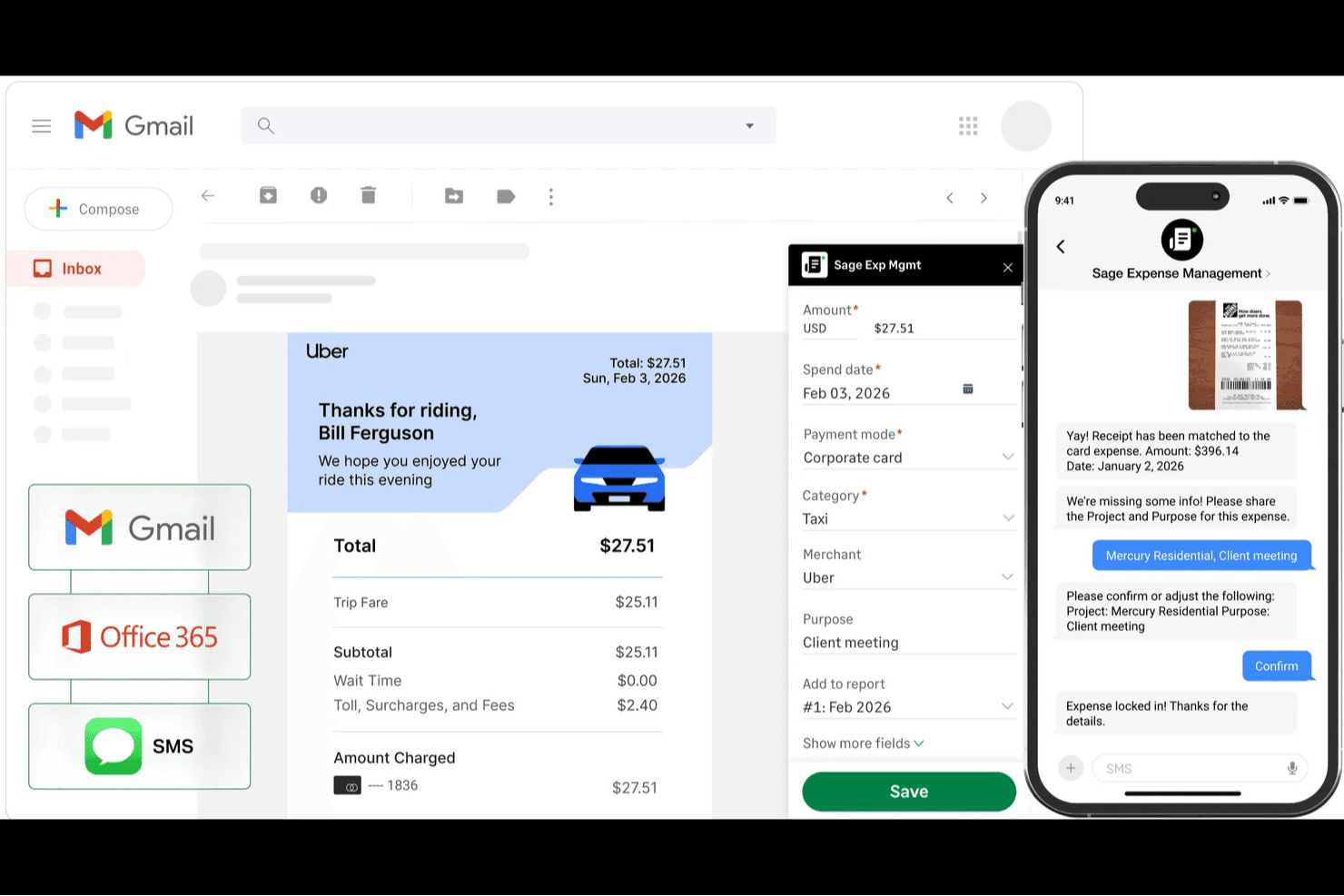
Sage Expense Management auto-captures receipts from Gmail and SMS into expense reports. Sage Expense Management offers a digital platform for businesses that need to organize, track, and process receipts efficiently. The software is a good fit for finance teams and accountants who want to simplify expense documentation and reduce manual entry. Its flexible submission options and automation features help address common bottlenecks in expense reporting.
Who Is Sage Expense Management Best For?
Sage Expense Management suits small to mid-sized businesses and finance teams that need flexible, digital receipt capture and expense tracking.
Why I Picked Sage Expense Management
I picked Sage Expense Management because its text-based receipt submission stands out for teams that handle receipts in multiple formats. The platform lets users forward receipts directly from email or upload them as text, which is especially useful for businesses that receive digital receipts or invoices in plain text or email body content. I also appreciate that Sage Expense Management automatically extracts and categorizes data from these submissions, reducing manual entry. This approach helps finance teams capture more receipts accurately, even when they don’t come as image attachments.
Sage Expense Management Key Features
Some other features in Sage Expense Management that may be valuable for your workflow include:
- Automated policy enforcement: Apply company expense policies automatically to submitted receipts and flag non-compliant entries.
- Credit card integration: Sync business credit card transactions directly with the platform for easier reconciliation.
- Custom approval workflows: Design multi-level approval processes to match your organization’s expense management structure.
- Analytics dashboard: Access a visual dashboard to monitor spending trends and identify areas for cost control.
Sage Expense Management Integrations
Integrations include Sage Intacct, Sage 300 CRE, Sage 50, QuickBooks Online, QuickBooks Desktop, and Mastercard.
Pros and Cons
Pros:
- Integrates with major accounting platforms
- Flags duplicate and non-compliant receipts
- Accepts receipts via email, text, or upload
Cons:
- Some users report slow customer support
- Occasional delays in syncing with accounting
Learn more about Sage Expense Management (formerly Fyle): 2Best for automated approval routing
BILL
- Free plan available
- From $49/user/month
Visit WebsiteCustomer Rating:4.5/5
BILL lets you capture, sync, and match receipts in real-time on your device. BILL is an AP automation and expense management platform built for finance teams, with receipt capture, OCR-based data extraction, and spend controls built into a single system.
Who Is BILL Best For?
BILL is a good fit for small to midsize businesses with dedicated finance or accounting teams managing high volumes of payables, expenses, and receipts across multiple approvers.
Why I Picked BILL
BILL earns its spot on my shortlist because every touchpoint on a receipt or invoice, from the moment it enters the system to final payment, is logged and time-stamped in a permanent audit trail. I love that this isn't just a log of who approved what; it captures every back-and-forth conversation and stores it directly alongside the transaction record. If an auditor or loan officer ever asks about a specific expense, I can pull up the full history in seconds, including PO matching flags and duplicate invoice alerts, without digging through email threads.
BILL Key Features
- Mobile receipt capture: Upload receipts directly from your phone via the BILL mobile app by taking a photo or forwarding a text.
- OCR data extraction: BILL automatically reads and pulls key data fields from uploaded receipts, including vendor name, date, and amount.
- AI receipt matching: The system automatically matches captured receipts to the correct transactions without manual intervention.
- Spend policy enforcement: Set and apply custom spend rules that flag or block out-of-policy expenses before they're submitted.
BILL Integrations
BILL offers native integrations with QuickBooks Online, QuickBooks Pro/Premier, QuickBooks Enterprise, Xero, Oracle NetSuite, and Sage Intacct. It offers HR syncs, a Slack integration, and an API for building custom integrations.
Pros and Cons
Pros:
- Unlimited cloud-based document storage
- Multi-level approval chains with rules
- AI-powered receipt capture and matching
Cons:
- No inline PDF preview for invoices
- Occasional sync errors can duplicate data
Learn more about BILL: 3Best for policy-based spend controls
Ramp
- Free plan available; 30-day free trial
- From $15/user/month
Visit WebsiteCustomer Rating:4.8/5
Ramp is an expense platform that automates tracking and enforces spending policies. Ramp offers an expense management platform designed for finance teams at growing businesses that need to control and track company spending. The software appeals to organizations looking for automated receipt collection, real-time expense visibility, and centralized policy enforcement. Ramp helps businesses reduce manual work and improve compliance by digitizing expense workflows and documentation.
Who Is Ramp Best For?
Ramp suits mid-sized and larger businesses that need centralized control over employee spending and expense policies.
Why I Picked Ramp
I picked Ramp because it offers granular policy-based spend controls that go beyond basic receipt capture. Ramp lets you set custom rules for spending by department, role, or vendor, so you can enforce compliance before expenses even occur. I also like that Ramp automatically matches receipts to transactions and flags out-of-policy spend in real time. These features help finance teams maintain tight control over company expenses while reducing manual review and reconciliation work.
Ramp Key Features
Some other features that make Ramp useful for receipt management include:
- Automatic receipt reminders: The platform sends automated notifications to employees to upload missing receipts for card transactions.
- Mobile receipt capture: Users can snap photos of receipts and upload them directly from their mobile devices.
- Real-time transaction feed: All company card transactions appear instantly in a centralized dashboard for easy tracking and reconciliation.
- Direct accounting software sync: Ramp connects natively with accounting platforms like QuickBooks Online, NetSuite, and Xero to push expense data automatically.
Ramp Integrations
Integrations include NetSuite, Sage Intacct, QuickBooks, Microsoft Dynamics Business Central, Xero, Workday Financial Management, and Oracle Fusion Cloud.
Pros and Cons
Pros:
- Card locks if receipts are missing
- Quick uploads via SMS email or app
- Auto-matches receipts to transactions
Cons:
- Occasional lag in transaction visibility
- Difficult to bulk update categories
 Best for bulk receipt import and automation
- 14-day free trial
- From $3/user/month (billed annually)
Visit WebsiteCustomer Rating:4.5/5
Zoho Expense automates expense tracking and approvals for finance teams. Zoho Expense is a digital expense management platform designed for finance teams and businesses that process high volumes of receipts. It appeals to organizations looking for automation and control over expense documentation and approvals. The software helps reduce manual entry and supports compliance with company policies.
Who Is Zoho Expense Best For?
Zoho Expense suits finance teams at mid-sized businesses that need to automate and manage large volumes of receipt data.
Why I Picked Zoho Expense
I chose Zoho Expense because its bulk receipt import and automation features address a real need for finance teams that handle large volumes of receipts. The platform lets users upload multiple receipts at once, whether through email, mobile app, or direct file import, which speeds up the documentation process. I also like that Zoho Expense uses OCR to automatically extract data from receipts and match them to expenses, reducing manual entry. These automation tools help businesses keep up with high transaction volumes and maintain accurate records.
Zoho Expense Key Features
Some other features in Zoho Expense that may support your finance operations include:
- Mileage expense tracking: Log and calculate mileage expenses using GPS or manual entry for business travel.
- Per diem automation: Set up and manage per diem rates for employees based on location and company policy.
- Multi-level approval workflows: Configure custom approval chains to match your organization’s expense authorization process.
- Audit trail: Maintain a detailed log of all actions taken on receipts and reports for compliance and transparency.
Zoho Expense Integrations
Integrations include QuickBooks Online, Xero, Sage Accounting, Zoho Books,and Slack.
Pros and Cons
Pros:
- Flagging of duplicate receipt entries
- Strong mileage and GPS tracking
- Direct sync with Zoho Books and CRM
Cons:
- Free plan has low monthly scan limits
- OCR can misread faded or messy text
Learn more about Zoho Expense: Best for automated bank and card transaction matching
- 30-day free trial
- From $38/month
Visit WebsiteCustomer Rating:4.4/5
QuickBooks helps track expenses, manage receipts, and keep financial records organized. QuickBooks offers a digital platform for tracking expenses, managing receipts, and organizing financial records in one place. It’s a strong fit for small businesses and accountants who want to automate expense capture and keep audit trails clear. The tool helps reduce manual entry and supports accurate recordkeeping for tax and compliance needs.
Who Is QuickBooks Best For?
QuickBooks suits small businesses and accountants who need automated expense tracking and receipt management.
Why I Picked QuickBooks
I picked QuickBooks because it automates the process of matching receipts to bank and card transactions, which is a major challenge for finance teams handling high transaction volumes. The platform imports transactions directly from connected accounts and uses built-in logic to match them with uploaded receipts, reducing manual reconciliation work.
I also appreciate that QuickBooks flags unmatched or duplicate transactions, so you can quickly spot discrepancies and maintain accurate records. This level of automation is especially valuable for businesses that want to keep their expense tracking and audit trails up to date with minimal manual effort.
QuickBooks Key Features
Some other features that make QuickBooks useful for receipt management include:
- Receipt capture via mobile app: Snap photos of receipts on the go and upload them directly to your QuickBooks account.
- Automatic expense categorization: The system assigns expenses to the correct chart of accounts based on receipt details.
- Audit log tracking: Every change to receipts and expenses is logged for compliance and transparency.
- Multi-user access controls: Set permissions for who can upload, view, or edit receipts within your organization.
QuickBooks Integrations
Integrations include Amazon Business, PayPal, Square, Etsy, Amazon Seller, eBay, and Gusto.
Pros and Cons
Pros:
- Mobile app supports on-the-go receipt capture
- Imports bank and card data in real time
- Matches receipts to transactions automatically
Cons:
- Multi-currency receipt support is restricted
- No bulk receipt upload from desktop
 Best for mail-in paper receipt digitization
- 30-day free trial + free demo available
- From $97/year (billed annually)
Visit WebsiteCustomer Rating:4.4/5
Shoeboxed digitizes and organizes paper receipts for tax and expense reporting. Shoeboxed offers a receipt management solution designed for businesses and professionals who handle large volumes of paper receipts. The platform is especially useful for accountants, bookkeepers, and small business owners who need to digitize and organize physical receipts for tax or expense reporting. Shoeboxed helps users convert paper clutter into searchable, categorized digital records.
Who Is Shoeboxed Best For?
Shoeboxed is a good fit for small businesses, accountants, and consultants who need to digitize and organize large volumes of paper receipts.
Why I Picked Shoeboxed
What makes Shoeboxed unique in the receipt management space is its mail-in paper receipt digitization service. I picked Shoeboxed because it lets you send physical receipts in prepaid envelopes, which their team then scans, categorizes, and uploads to your account as searchable digital records. This approach is especially helpful for businesses or professionals who still receive a lot of paper receipts and want to avoid manual data entry. Shoeboxed’s ability to handle physical paperwork sets it apart from most digital-only receipt management tools.
Shoeboxed Key Features
In addition to its mail-in digitization service, Shoeboxed offers several other features worth noting:
- Business card management: Scan and organize business cards, turning them into digital contacts within your account.
- Expense report generation: Create detailed expense reports with attached receipt images for easy sharing and recordkeeping.
- Mileage tracking: Use the mobile app to track and log mileage for business travel directly alongside your receipts.
- Multi-user access: Invite team members to your Shoeboxed account and set permissions for collaborative receipt management.
Shoeboxed Integrations
Integrations include QuickBooks, Xero, Evernote, WorkingPoint, Bench, RightSignature, and HP.
Pros and Cons
Pros:
- Searchable cloud storage for all documents
- Business card scanning for contact management
- Batch upload supports multiple receipt imports
Cons:
- Lacks advanced analytics or dashboarding tools
- Limited approval workflow for expense reports
Learn more about Shoeboxed: Best for AI-powered compliance auditing
- Free demo available
- From $8/user/month (billed annually)
Visit WebsiteCustomer Rating:4.4/5
Rydoo is a cloud-based expense platform that automates receipts and ensures global compliance. Rydoo offers a cloud-based expense management platform designed for finance teams that need to automate receipt capture and expense workflows. The software appeals to organizations with global operations or strict compliance requirements. Rydoo helps businesses reduce manual review, improve audit readiness, and keep expense documentation organized in one place.
Who Is Rydoo Best For?
Rydoo fits finance teams at mid-sized to large companies that need automated compliance checks and global business expenses management.
Why I Picked Rydoo
I chose Rydoo because its AI-powered compliance auditing stands out for finance teams that need to enforce policy and reduce manual review. Rydoo automatically checks receipts and expenses against company policies, flagging potential issues before they reach approvers. I also appreciate that the platform uses machine learning to detect duplicates and suspicious activity, which helps teams catch errors and fraud early. These features make Rydoo a strong fit for organizations with strict audit requirements or complex approval chains.
Rydoo Key Features
Some other features in Rydoo that may help your finance team include:
- Real-time expense submission: Submit expenses instantly through the mobile app or web platform for faster processing.
- Per diem management: Set up and manage per diem allowances for business travel based on location and company policy.
- Integration with ERP systems: Connect Rydoo with ERP platforms like SAP and Microsoft Dynamics to sync expense data automatically.
- Multi-language interface: Access the platform in several languages to support global teams and users.
Rydoo Integrations
Integrations include NetSuite, SAP S/4HANA, Microsoft Dynamics 365 Business Central, QuickBooks, and Uber.
Pros and Cons
Pros:
- Real-time policy compliance checks
- Automatic currency & tax detection
- Easy multi-receipt batch uploading
Cons:
- Limited offline mode functionality
- Missing receipts can block submissions
Learn more about Rydoo: Best for multi-currency global reimbursements
- Not available
- From $5/user/month
Visit WebsiteCustomer Rating:4.5/5
Expensify streamlines receipt capture, expense tracking, and reimbursements for teams. Expensify offers a digital platform for managing business receipts, expenses, and reimbursements in one place. It’s a strong fit for finance teams and businesses with distributed or traveling employees who need to track spending across different locations. The tool helps simplify receipt capture, automate expense reporting, and reduce manual work for busy professionals.
Who Is Expensify Best For?
Expensify suits finance teams and businesses that manage global or multi-currency employee reimbursements.
Why I Picked Expensify
I picked Expensify because it handles multi-currency global reimbursements with features that directly address the challenges of international expense management. The platform automatically converts receipts into your home currency and supports reimbursement workflows for employees in different countries. I also appreciate that Expensify tracks exchange rates and applies them to each transaction, so finance teams can maintain accurate records without manual calculations. This makes it a strong choice for businesses with global operations or remote teams who regularly deal with cross-border expenses.
Expensify Key Features
Some other features that make Expensify useful for receipt management include:
- SmartScan receipt capture: Upload receipts by snapping a photo, and Expensify automatically extracts and categorizes the data.
- Corporate card reconciliation: Link company cards to automatically match receipts and transactions for easier expense tracking.
- Policy enforcement tools: Set custom rules for expense approvals, spending limits, and compliance checks within the platform.
- Automated receipt forwarding: Forward emailed receipts directly to Expensify for instant processing and attachment to expense reports.
Expensify Integrations
Integrations include QuickBooks, Xero, NetSuite, Sage Intacct, Oracle, and Lyft.
Pros and Cons
Pros:
- Allows receipt forwarding via email
- Offers direct corporate card integration
- Supports automatic receipt data extraction
Cons:
- Lacks granular reporting on receipt-level data
- Mobile app can be slow with large uploads
 9Best with real-time accounting software sync
Dext
- 14-day free trial + free demo available
- From $20.80/client/month (billed annually)

Dext automates receipt capture and expense processing for businesses and accountants. Dext offers a digital solution for businesses and accountants who need to capture, organize, and process receipts with minimal manual effort. The platform is designed for teams that want to automate data extraction and reduce time spent on expense documentation. It’s especially useful for firms managing high volumes of receipts and looking to improve accuracy in their financial workflows.
Who Is Dext Best For?
Dext suits accountants, bookkeepers, and small to mid-sized businesses that need to automate receipt capture and integrate expense data directly with their accounting systems.
Why I Picked Dext
I chose Dext because its real-time accounting software sync addresses a common challenge for finance teams: keeping expense data up to date across platforms. Dext lets you capture receipts and automatically push extracted data directly into your accounting system, reducing manual entry and reconciliation work. I appreciate how the tool supports live syncing with popular accounting platforms, so your records reflect the latest transactions without delay. This makes Dext especially valuable for businesses that need accurate, current expense data for reporting and compliance.
Dext Key Features
Some other features in Dext that support receipt management include:
- Mobile receipt capture: Snap photos of receipts using the mobile app for instant upload and processing.
- Multi-user access: Allow multiple team members to submit receipts and manage expenses within a single account.
- Automated expense categorization: Assigns receipts to the correct expense categories based on predefined rules.
- Export to multiple formats: Download receipt data and reports in formats like PDF, CSV, or Excel for further analysis or sharing.
Dext Integrations
Integrations include Xero, QuickBooks, Sage, PayPal, Shopify, and Stripe.
Pros and Cons
Pros:
- Handles multi-page and long receipts easily
- Secure cloud storage for all documents
- Mobile app supports offline receipt capture
Cons:
- Misreads or omits receipt line items
- Occasional errors in currency recognition
Learn more about Dext: 10Best for secure digital document storage
Neat
- 14-day free trial available
- From $200 (billed annually)

Neat is a document management platform for securely organizing receipts and financial records. Neat offers a digital document management platform designed for small businesses and self-employed professionals who need to organize and store receipts securely. The tool helps users centralize financial documents, making it easier to find, share, and prepare records for accounting or tax purposes. Neat is especially useful for those who want to reduce paper clutter and improve document accessibility.
Who Is Neat Best For?
Neat is a strong fit for small businesses and self-employed professionals who need secure, centralized storage for financial documents and receipts.
Why I Picked Neat
What stands out about Neat for receipt management is its focus on secure digital document storage. I picked Neat because it offers bank-level encryption and role-based access controls, which help protect sensitive financial documents from unauthorized access. The platform also lets you organize, tag, and search receipts and other documents, making it easy to retrieve records during audits or tax season. For finance professionals who need to keep documents safe and accessible, Neat’s security and organization features are especially valuable.
Neat Key Features
Some other features in Neat that may interest your team include:
- Bank account integration: Connect your business bank accounts to automatically import and reconcile transactions within the platform.
- Custom expense categorization: Create and manage custom categories to organize receipts and expenses according to your business needs.
- Mobile receipt capture: Use the mobile app to snap photos of receipts and upload them directly to your Neat account.
- Export to accounting software: Export your financial data in formats compatible with QuickBooks, Excel, and other accounting platforms.
Neat Integrations
Integrations include QuickBooks Online, H&R Block, Quicken, TurboTax, Outlook, and Constant Contact.
Pros and Cons
Pros:
- Direct export to QuickBooks and TurboTax
- Custom expense categories for detailed tracking
- Batch upload for multiple receipt imports
Cons:
- Occasional data extraction errors with faded receipt
- No mobile app for on-the-go capture
Learn more about Neat:
Annen programvare for kvitteringshåndtering
Her er noen flere alternativer for programvare for kvitteringshåndtering som ikke kom med på kortlisten, men som likevel er verdt å se nærmere på:
- 11VeryfiBest with line-item data extraction for receipts
- 12SimplyWiseBest for automatic email receipt imports
- 13ForeceiptBest for IRS and CRA-compliant expense categories
- 14WaveBest for freelancers managing digital receipts
- 15XeroBest with mobile expense claim submissions
- 16BILL Spend & ExpenseBest for customizable approval workflows
How I Evaluate Receipt Management Software
I evaluate each tool against baseline criteria—OCR accuracy, accounting integrations, and audit-ready receipt storage—then weigh differentiators like approval workflows and mobile capture quality.
Core Functionality (Table Stakes For This List)
When I'm selecting tools for my list, I rank each one on a scale from 0 (does not offer the functionality) to 5 (excels in this area) for each core functionality listed below. Then, I calculate the tool's total score into a percentage. Each tool needs to achieve a minimum total score of 65% to be considered for inclusion.
- Receipt Capture & Scanning: I check whether each tool supports mobile photo capture, email forwarding, and file uploads so field workers and office staff can both get receipts into the system fast.
- OCR Data Extraction: Each tool's OCR needs to pull vendor name, date, amount, and tax from a receipt image—not just attach a photo and leave the data entry to you.
- Digital Storage & Search: I evaluate whether stored receipts are searchable by vendor, date, or amount, which matters when an auditor asks for a specific transaction from two years ago.
- Expense Categorization & Tagging: I look for the ability to assign GL codes, project tags, or client labels to each receipt, similar to how Expensify and Dext let you map spend to your chart of accounts.
- Accounting Software Integration: Native sync with platforms like QuickBooks, Xero, and Sage is essential, so I confirm each tool connects with major accounting systems via two-way data flow.
- Transaction Matching & Reconciliation: The tool should match uploaded receipts against bank or card transactions automatically, reducing the manual hunt during month-end close.
Once I have a list of tools that meet this criteria, I consider what sets each platform apart.
Differentiating Factors (What Sets Vendors Apart)
Here's how I compare and contrast different vendors:
Standout Features
Multi-currency and regional tax recognition matters for teams processing receipts across borders—I look for tools that auto-detect VAT or GST without manual input. Approval workflows are another differentiator, especially when finance teams need configurable routing that flags out-of-policy spend before reimbursement. I also evaluate AI-powered duplicate detection, which catches the same receipt submitted twice across different expense reports.
Beyond Features
Compliance and audit readiness is a big one—I check whether tools maintain timestamped audit trails and configurable retention schedules that align with regional tax authority requirements. Integration depth also matters beyond just connecting to an accounting platform; I evaluate whether a tool syncs with HRIS, payroll, or travel booking systems to support the full expense lifecycle. Pricing transparency is worth examining too, since per-user models can balloon fast for growing finance teams.
Slik velger du programvare for kvitteringshåndtering
Det er lett å gå seg vill i lange funksjonslister og kompliserte prisstrukturer. For å hjelpe deg med å holde fokus mens du går gjennom den unike prosessen for valg av programvare, har vi laget en sjekkliste over faktorer du bør ha i tankene:
| Faktor | Hva bør du vurdere? |
| Skalerbarhet | Vil programvaren håndtere det nåværende og forventede kvitteringsvolumet ditt etter hvert som virksomheten vokser? |
| Integrasjoner | Kan den kobles direkte til regnskaps-, ERP-, HR- og kortsystemene dine uten manuelle omveier? |
| Tilpasningsmuligheter | Kan du tilpasse godkjenningsarbeidsflyter, utgiftskategorier og brukertillatelser slik at de passer til retningslinjene dine? |
| Brukervennlighet | Vil teamet ditt ta i bruk verktøyet raskt, eller vil opplæring og brukerstøtte være et konstant behov? |
| Implementering og introduksjon | Hvor lang tid vil det ta å komme i gang, og hvilke ressurser eller hvilken støtte vil du trenge? |
| Kostnad | Er prisnivåene tydelige, og samsvarer de med bruksmønstrene og budsjettbegrensningene dine? |
| Sikkerhetstiltak | Tilbyr leverandøren kryptering, revisjonsspor og tilgangskontroller som oppfyller kravene til regelverksetterlevelse? |
| Tilgjengelig brukerstøtte | Kan du kontakte brukerstøtten i arbeidstiden din, og er tjenestenivåavtaler eller eskaleringsrutiner tydelig definert? |
Hva er programvare for kvitteringshåndtering?
Programvare for kvitteringshåndtering er et digitalt verktøy som registrerer, lagrer og organiserer kvitteringer for utgiftssporing og økonomisk rapportering. Disse plattformene bruker funksjoner som datauttrekking, kategorisering og dokumentlagring for å hjelpe økonomiteam med å redusere manuell registrering og opprettholde nøyaktige oppføringer. Ved å samle kvitteringsdata på ett sted kan virksomheter effektivisere revisjoner, støtte regelverksetterlevelse og forenkle prosesser for refusjon eller avstemming.
Funksjoner i programvare for kvitteringshåndtering
Når du velger programvare for kvitteringshåndtering, bør du se etter følgende viktige funksjoner:
- Digital kvitteringsregistrering: Lar brukere laste opp eller fotografere kvitteringer med en mobil enhet eller datamaskin, slik at det opprettes en digital registrering for hver transaksjon.
- Datauttrekking: Henter automatisk ut viktig informasjon – som dato, beløp og leverandør – fra opplastede kvitteringer for å redusere manuell registrering.
- Kategorisering av utgifter: Tildeler kvitteringer til forhåndsdefinerte utgiftskategorier, noe som bidrar til å opprettholde organiserte registreringer og nøyaktig rapportering.
- Lagring av kvitteringer: Lagrer digitale kopier av kvitteringer i et søkbart, sentralisert arkiv for enkel gjenfinning og klargjøring for revisjon.
- Godkjenningsarbeidsflyter: Sender innsendte utgiftskvitteringer gjennom tilpassbare godkjenningskjeder for å sikre samsvar med virksomhetens retningslinjer.
- Integrasjon med regnskapssystemer: Kobler seg direkte til regnskaps- eller ERP-plattformer og synkroniserer kvitteringsdata for mer effektiv avstemming og rapportering.
- Støtte for flere valutaer: Håndterer kvitteringer i ulike valutaer, konverterer beløp og støtter internasjonale forretningsbehov.
- Revisjonsspor: Sporer alle handlinger som utføres på kvitteringer, og gir en transparent historikk for samsvar og internkontroll.
- Tilgang via mobilapp: Tilbyr en dedikert mobilapplikasjon slik at brukere kan administrere kvitteringer og utgifter mens de er på farten.
- Verktøy for eksport og rapportering: Lar brukere generere rapporter eller eksportere kvitteringsdata i ulike formater for videre analyse eller deling.
Vanlige AI-funksjoner i programvare for kvitteringshåndtering
I tillegg til standardfunksjonene i programvare for kvitteringshåndtering som er nevnt ovenfor, tar mange av disse løsningene i bruk AI med funksjoner som:
- Smart kvitteringsklassifisering: Bruker AI til automatisk å gjenkjenne og tilordne kvitteringer til riktige utgiftskategorier basert på historiske data og kontekst.
- Avviksdeteksjon: Flagger uvanlige eller potensielt falske kvitteringer ved å analysere utgiftsmønstre og identifisere avvik som kan kreve nærmere gjennomgang.
- Automatisert håndheving av retningslinjer: Bruker AI til å kontrollere kvitteringer mot virksomhetens retningslinjer i sanntid og varsle brukere eller godkjennere om innsendinger som ikke er i samsvar med kravene.
- Utvidelse av kontekstuelle data: Beriker kvitteringsregistreringer ved å hente inn ytterligere informasjon – som forhandlerdetaljer eller stedsdata – ved hjelp av AI-drevet datasamsvar.
- Prediktive utgiftsforslag: Anbefaler sannsynlige utgiftskategorier eller godkjennere for nye kvitteringer basert på tidligere brukeratferd og organisatoriske trender.
Fordeler med programvare for kvitteringshåndtering
Implementering av programvare for kvitteringshåndtering gir flere fordeler for teamet og virksomheten. Her er noen av fordelene du kan se frem til:
- Mindre manuell dataregistrering: Automatisert datauttrekking fra kvitteringer reduserer tiden som brukes på manuell registrering, og minimerer risikoen for feil.
- Bedre samsvar: Tilpassbare godkjenningsarbeidsflyter og revisjonsspor bidrar til å sikre etterlevelse av virksomhetens retningslinjer og lovpålagte krav.
- Raskere refusjonssykluser: Digital registrering og effektiviserte godkjenningsprosesser fremskynder utgiftsrapportering og refusjoner til ansatte.
- Sentralisert dokumentlagring: Alle kvitteringer lagres i et søkbart og sikkert arkiv, noe som gjør revisjoner og gjenfinning mye enklere.
- Bedre økonomisk oversikt: Rapportering i sanntid og integrasjon med regnskapssystemer gir oppdatert innsikt i utgiftsmønstre.
- Bedre svindeloppdagelse: AI-drevet avviksdeteksjon og håndheving av retningslinjer bidrar til å identifisere mistenkelige utgifter eller utgifter som ikke er i samsvar med kravene, på et tidlig tidspunkt.
- Skalerbarhet for team i vekst: Skybaserte plattformer og funksjoner for masseimport støtter økende kvitteringsmengder etter hvert som virksomheten vokser.
Kostnader og priser for programvare for kvitteringshåndtering
Ved valg av programvare for kvitteringshåndtering er det nødvendig å forstå de ulike prismodellene og tilgjengelige abonnementene. Kostnadene varierer avhengig av funksjoner, teamstørrelse, tillegg og mer. Tabellen nedenfor oppsummerer vanlige abonnementer, gjennomsnittsprisene deres og typiske funksjoner som er inkludert i løsninger for programvare for kvitteringshåndtering:
Sammenligningstabell for abonnementer for programvare for kvitteringshåndtering
| Abonnementstype | Gjennomsnittspris | Vanlige funksjoner |
| Gratisabonnement | $0 | Grunnleggende registrering av kvitteringer, begrenset lagring, manuell dataregistrering og grunnleggende eksportalternativer. |
| Personlig abonnement | $5-$15/user/month | Digital registrering av kvitteringer, datauttrekking, kategorisering av utgifter og tilgang til mobilapp. |
| Bedriftsabonnement | $15-$40/user/month | Automatiserte godkjenningsarbeidsflyter, integrasjoner med regnskapssystemer, masseimport, revisjonsspor og rapporteringsverktøy. |
| Foretaksabonnement | $40-$80/user/month | Tilpassede arbeidsflyter, avansert sikkerhet, støtte for flere enheter, dedikert onboarding og prioritert kundestøtte. |
Vanlige spørsmål om programvare for kvitteringshåndtering
Her er noen svar på vanlige spørsmål om programvare for kvitteringshåndtering:
Kan programvare for kvitteringshåndtering håndtere kvitteringer i flere valutaer?
Ja, de fleste løsninger for kvitteringshåndtering støtter kvitteringer i flere valutaer. Dette er viktig for virksomheter med internasjonal drift eller ansatte som reiser, siden det sikrer nøyaktig konvertering og rapportering av utgifter i ulike valutaer.
Hvor sikker er programvare for kvitteringshåndtering når det gjelder lagring av sensitive økonomiske dokumenter?
De fleste løsninger bruker kryptering, tilgangskontroller og revisjonsspor for å beskytte sensitive data. Når du vurderer alternativer, bør du undersøke om de følger standarder som SOC 2 eller ISO 27001, samt spørre om retningslinjer for datalagring og sikkerhetskopiering.
Hvilke typer integrasjoner bør jeg se etter i programvare for kvitteringshåndtering?
Se etter integrasjoner med regnskapssystemet, ERP-systemet, lønnssystemet og leverandører av firmakort. Sømløse integrasjoner reduserer manuelt arbeid og bidrar til å opprettholde nøyaktige og oppdaterte økonomiske poster.
Hvor lang tid tar det å implementere programvare for kvitteringshåndtering?
Implementeringstiden varierer etter leverandør og virksomhetens størrelse, men de fleste skybaserte løsninger kan settes opp på noen dager til et par uker. Ta hensyn til tilgjengelig onboardingstøtte, opplæringsressurser og verktøy for datamigrering.
Kan programvare for kvitteringshåndtering bidra til forberedelser til revisjon?
Ja, disse verktøyene sentraliserer og organiserer kvitteringer, tilbyr søkbar lagring og opprettholder revisjonsspor. Dette gjør det enklere å hente frem dokumenter og dokumentere samsvar under interne eller eksterne revisjoner.