

Programvare for utgiftsstyring for ideelle organisasjoner hjelper organisasjonen din med å spore, kontrollere og rapportere utgifter, donasjoner og tilskudd, samtidig som den oppfyller unike krav til samsvar og fondsregnskap. Hvis du leter etter den beste programvaren for utgiftsstyring for ideelle organisasjoner, trenger du sannsynligvis verktøy som gir nøyaktig rapportering, støtter åpenhet overfor givere og hjelper deg med å administrere øremerkede midler uten å tilføre manuelt arbeid.
Ved å velge riktig plattform blir det enklere å oppfylle regulatoriske forpliktelser, holde interessenter informert og sørge for at hver krone er gjort rede for. I denne veiledningen finner du en kuratert kortliste over løsninger som er utviklet for å håndtere de spesifikke økonomiske utfordringene ideelle organisasjoner står overfor, slik at du trygt kan velge det som passer best for teamet ditt.
Hvorfor du kan stole på våre programvareanbefalinger
6,700+
Reviews
20
Industry experts
16+
Evaluation factors
14
Years
Teamet vårt har testet og anmeldt programvare siden 2012. Vi er selv økonomiledere, så vi vet hvor vanskelig og hvor viktig det er å velge riktig programvare.
I denne guiden har vi vurdert verktøyene gjennom praktisk testing og uavhengig research og gitt dem poeng ut fra våre utvelgelseskriterier.
Anmeldelsene våre bygger på vår egen redaksjonelle vurdering. De er ikke et salgsargument.
Sammenligningstabell for programvare for utgiftsstyring
Har du dårlig tid? Hopp over fordypningen. Her er en rask sammenligning av mine beste anbefalinger for programvare for utgiftsstyring:
| Tool | Best For | Trial Info | Price | ||
|---|---|---|---|---|---|
| 1 | Best for automated policy violation detection | Free demo available | From $11.99/user/month (billed annually) | Website | |
| 2 | Best for HR-connected spend controls at scale | Free demo available | Pricing upon request | Website | |
| 3 | Best for automated accounts payable processing | Free plan available | From $49/user/month | Website | |
| 4 | Best for donor and fund reporting | 30-day free trial | From $38/month | Website | |
| 5 | Best for multi-currency donation management | 1-month free trial available | From $27/month | Website | |
| 6 | Best for free accounting essentials | Free plan + Free trial available | From $15/month | Website | |
| 7 | Best for nonprofit-specific budgeting | 15-day free trial | From $79/month | Website | |
| 8 | Best for automated receipt scanning | Not available | From $5/user/month | Website | |
| 9 | Best for integrated fund accounting tools | Free plan available | From $45/month | Website | |
| 10 | Best for managing restricted funds | Free trial available | $25/transaction (pay-as-you-go) | Website |


Omtaler av programvare for utgiftsstyring for ideelle organisasjoner
Nedenfor finner du mine detaljerte sammendrag av programvare for utgiftsstyring for ideelle organisasjoner som kom med på kortlisten. Omtalene mine gir en detaljert gjennomgang av funksjonene, de beste bruksområdene og integrasjonene til hver programvare, slik at du kan finne den beste løsningen for organisasjonen din.
 Best for automated policy violation detection
- Free demo available
- From $11.99/user/month (billed annually)
Visit WebsiteCustomer Rating:4.6/5
Sage Expense Management offers automated policy violation detection and routes them for approval during credit card reconciliation. Sage Expense Management (formerly Fyle) is a nonprofit expense management platform that handles credit card transaction tracking, receipt capture, policy enforcement, multi-level approvals, and accounting integrations with tools like QuickBooks, Sage Intacct, and Xero.
Who Is Sage Expense Management Best For?
Sage Expense Management is a good fit for nonprofit finance teams that need grant-level spend tracking and audit-ready expense records.
Why I Picked Sage Expense Management
Sage Expense Management earns its spot on my shortlist because of how it handles policy enforcement before a violation can slip through the approval process. The real-time violation checks flag, warn, or block a submission the moment an employee files an expense that breaks a rule, whether that's a receipt missing from a category, a spend amount over the limit, or a duplicate charge. The fraud detection layer adds another check by automatically catching duplicate, fictitious, or weekend submissions at the point of entry.
Sage Expense Management Key Features
- Custom expense categories: Create organization-specific expense categories that map directly to your chart of accounts and fund accounting structure.
- Project and cost center coding: Tag expenses to specific projects, departments, or cost centers at the point of submission.
- Mobile receipt capture: Snap and upload receipts from the mobile app with automatic data extraction for merchant, date, and amount.
- Employee reimbursement tracking: Monitor reimbursement status from approval through payment in a single dashboard view.
Sage Expense Management Integrations
Sage Expense Management has two-way integrations with QuickBooks Online, QuickBooks Desktop, NetSuite, Sage Intacct, Sage 50, Xero, and Sage 300 CRE. An API is available for custom integrations.
Pros and Cons
Pros:
- Only charges for active users monthly
- Tracks grant-level budget
- Real-time card feed via text notifications
Cons:
- Report export formatting options are limited
- Delayed sync for email receipts
Learn more about Sage Expense Management (formerly Fyle): Best for HR-connected spend controls at scale
- Free demo available
- Pricing upon request
Visit WebsiteCustomer Rating:4.8/5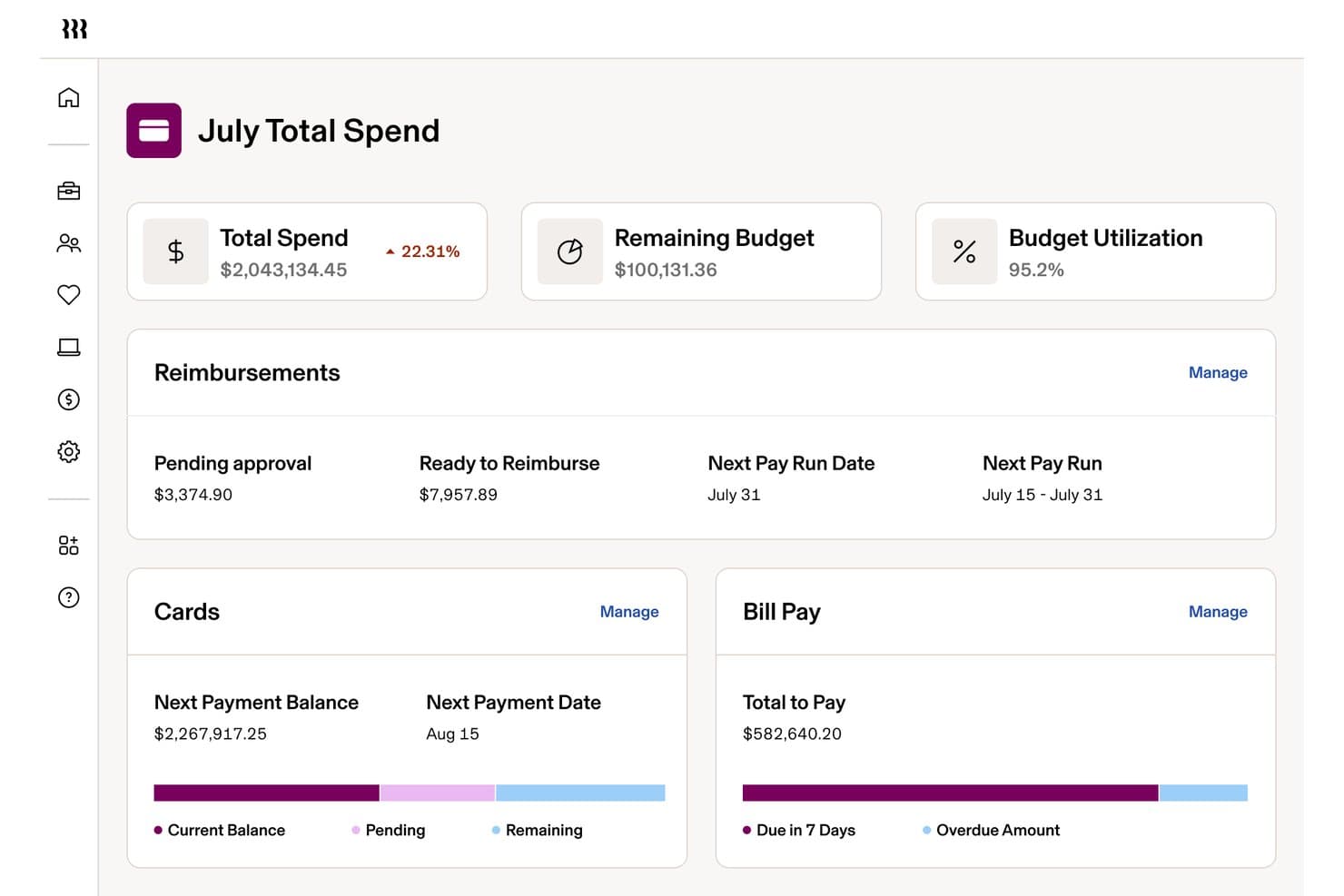
Rippling Spend tracks nonprofit monthly spend, budgets, and reimbursements. Rippling Spend is a spend management platform that unifies expense tracking, corporate card controls, reimbursement workflows, and accounting integrations within a broader HR and payroll system.
Who Is Rippling Spend Best For?
Mid-sized to large nonprofits that already use QuickBooks Online, NetSuite, or Sage Intacct and need tight, HR-connected approval controls across a salaried employee base.
Why I Picked Rippling Spend
I've included Rippling Spend in my top picks because its HR-connected approval engine is genuinely unlike anything else I've seen at this scale. When an employee changes roles or departments, spend policies and card controls update automatically, without anyone touching a settings menu. I also rate its pre-purchase card enforcement highly: category and merchant restrictions block non-compliant transactions at the point of sale, which keeps salaried nonprofit staff within budget before the charge ever posts.
Rippling Spend Key Features
- AI-powered receipt capture: Employees submit receipts via email forwarding, text message, or mobile upload, and the system auto-matches and categorizes each one.
- Multi-currency reimbursement: Rippling processes reimbursements in 100+ currencies across 185+ countries, with automatic currency conversion and foreign-language receipt translation.
- Automated card lifecycle management: Corporate cards are auto-issued at onboarding and revoked at offboarding, with spend policies updating automatically when employees change roles.
- Native accounting integrations: Rippling syncs bidirectionally with QuickBooks Online, NetSuite, Xero, and Sage Intacct, automating GL categorization and reducing manual reconciliation at month-end close.
Rippling Spend Integrations
Rippling Spend offers native integrations with QuickBooks Online, NetSuite, Xero, and Sage Intacct. It lacks documented native integrations with Blackbaud, Aplos, and QuickBooks Nonprofit.
Pros and Cons
Pros:
- Pre-purchase controls update with employee changes
- AI-powered receipt capture and matching
- Unified HR and spend approval workflows
Cons:
- No volunteer or non-employee reimbursement
- No restricted fund or grant accounting
Learn more about Rippling Spend: 3Best for automated accounts payable processing
BILL
- Free plan available
- From $49/user/month
Visit WebsiteCustomer Rating:4.5/5
BILL dashboard shows company credit balances, expense tracking, payment details, and virtual card management across desktop and mobile views for controlling nonprofit spending and budgets. BILL is a cloud-based accounts payable automation and expense management platform that handles invoice capture, multi-step approval workflows, corporate card spend tracking, and domestic and international vendor payments for organizations, including nonprofits.
Who Is BILL Best For?
BILL is a good fit for small to mid-sized nonprofits that need structured AP controls, spend visibility, and payment processing across multiple departments or fund categories.
Why I Picked BILL
I picked BILL as one of the best because its AI-powered invoice capture is genuinely impressive for nonprofit AP teams. BILL's AI reads and codes multi-line item invoices with 99% accuracy, automatically handles 2- and 3-way PO matching, and routes each bill through your custom approval workflows without manual hand-holding. For a nonprofit juggling vendor payments across multiple programs or grant-funded cost centers, that level of automated control over the full AP cycle—from invoice receipt to payment—is hard to come by in one platform.
BILL Key Features
- Corporate card controls: Issue virtual and physical cards with category-level spending limits and real-time transaction visibility across your team.
- Separation of duties: Assign distinct roles to approvers, payers, and administrators to maintain internal controls and audit readiness.
- Receipt capture: Photograph and attach receipts to transactions directly using the BILL mobile app.
- Multi-method payments: Pay vendors via ACH, check, virtual card, or international wire from a single platform.
BILL Integrations
BILL offers native two-way sync with QuickBooks Online, QuickBooks Desktop, QuickBooks Enterprise, Xero, Oracle NetSuite, Sage Intacct, and Microsoft Dynamics, plus data integration support for Acumatica and other ERPs via customizable file templates.
Pros and Cons
Pros:
- Free corporate cards with spend limits
- AI-powered invoice data extraction
- Multi-step approval chains for bill payments
Cons:
- Customer support relies heavily on chat
- No built-in grant tracking or reporting
Learn more about BILL:

Nonprofits use QuickBooks to manage donations, grants, and reports with transparency. Nonprofit organizations looking for clear financial oversight often turn to QuickBooks for its specialized nonprofit accounting features. The platform helps you manage donations, grants, and fund allocations with tools designed for nonprofit workflows. Finance teams can use QuickBooks to streamline reporting and maintain transparency for boards and donors.
Who Is QuickBooks Best For?
QuickBooks is a strong choice for nonprofit finance teams that need to manage and report on donations, grants, and fund balances.
Why I Picked QuickBooks
I picked QuickBooks because it offers dedicated tools for tracking donations, grants, and fund balances, which are essential for nonprofit reporting. The platform lets you create donor and fund-specific reports, making it easier to show stakeholders exactly how funds are allocated and spent. I also appreciate that QuickBooks supports class and location tracking, so you can break down expenses and income by program, campaign, or funding source. These features help nonprofit finance teams maintain transparency and accountability in their financial management.
QuickBooks Key Features
Some other features that support nonprofit accounting and expense management include:
- Bank feeds: Connect your bank accounts to automatically import and categorize transactions for up-to-date records.
- Receipt capture: Upload and attach digital receipts to expenses using the mobile app or web interface.
- Custom chart of accounts: Set up and manage a chart of accounts tailored to nonprofit needs, including funds, grants, and programs.
- Recurring transactions: Schedule and automate regular expenses or income entries to reduce manual data entry.
QuickBooks Integrations
Integrations include PayPal, Square, Shopify, Amazon, eBay, Etsy, SOS Inventory, QuickBooks Time, and Gusto.
Pros and Cons
Pros:
- Offers recurring transaction scheduling
- Allows attaching receipts to transactions
- Supports audit trails for compliance needs
Cons:
- Limited multi-entity or chapter support
- Lacks built-in volunteer management tools
 5Best for multi-currency donation management
Xero
- 1-month free trial available
- From $27/month
Visit WebsiteCustomer Rating:4.4/5
Xero is a cloud accounting platform that helps nonprofits manage grants and finances efficiently. Nonprofit finance teams looking for a flexible, cloud-based accounting platform often turn to Xero. The software appeals to organizations that need to manage grants, donations, and expenses across multiple projects or locations. Xero helps nonprofits simplify bookkeeping, improve financial oversight, and stay organized as they grow.
Who Is Xero Best For?
Xero is a good fit for mid-sized nonprofits that manage international donations and need multi-currency accounting capabilities.
Why I Picked Xero
I picked Xero because it offers built-in multi-currency support, which is essential for nonprofits that receive donations or incur expenses in different currencies. The platform automatically converts and tracks foreign currency transactions, so finance teams can manage global funding and spending without manual calculations. I also appreciate that Xero lets you generate reports that show real-time currency gains and losses, helping organizations maintain transparency and compliance. These features make Xero a strong choice for nonprofits with international operations or donor bases.
Xero Key Features
In addition to its multi-currency capabilities, Xero offers several other features that support nonprofit expense management:
- Bank reconciliation: Automatically match bank transactions with your records to keep accounts accurate and up to date.
- Expense claim management: Allow staff and volunteers to submit expenses for review and reimbursement directly within the platform.
- Budget tracking: Set up and monitor budgets for different projects, grants, or funds to maintain financial control.
- Customizable chart of accounts: Tailor account categories to fit your nonprofit’s unique reporting and compliance needs.
Xero Integrations
Integrations include Hubdoc, Syft, Stripe, Shopify, Gusto, Expensify, and Capsule CRM.
Pros and Cons
Pros:
- Unlimited users for board and staff
- Audit-ready reports for donor trust
- Snap receipts via mobile for auto-scan
Cons:
- No phone support only email or chat
- Starter plan has tight invoice limits
Learn more about Xero: Best for free accounting essentials
- Free plan + Free trial available
- From $15/month
Visit WebsiteCustomer Rating:4.6/5
ZipBooks is cloud accounting software for nonprofits to track expenses and donations easily. ZipBooks offers cloud-based accounting software designed for small nonprofits and organizations with limited budgets. It appeals to teams that need straightforward tools for tracking expenses, managing donations, and handling basic bookkeeping. The platform helps simplify financial oversight without requiring advanced accounting expertise.
Who Is ZipBooks Best For?
ZipBooks is a good fit for small nonprofit organizations that need essential accounting and expense tracking features without a large financial investment.
Why I Picked ZipBooks
I picked ZipBooks because it offers a genuinely free plan with core accounting features that many small nonprofits need to manage expenses. The platform lets you track spending, categorize transactions, and generate basic financial reports without requiring a paid upgrade. I also like that ZipBooks includes invoicing and donor tracking tools, which help nonprofits keep their finances organized. For organizations with limited resources, these essentials make it possible to maintain transparency and accountability without extra costs.
ZipBooks Key Features
In addition to its core accounting essentials, I also found several features that help nonprofits manage their finances more easily:
- Bank reconciliation: Match transactions from your bank account with those in ZipBooks to keep records accurate.
- Time tracking: Track billable hours for staff or volunteers directly within the platform.
- Customizable invoicing: Create and send branded invoices with custom fields and payment options.
- Basic reporting: Generate simple financial reports, such as profit and loss statements and balance sheets, for board meetings or audits.
ZipBooks Integrations
Integrations include Square, Stripe, and PayPal.
Pros and Cons
Pros:
- Discounts on paid tiers for nonprofits
- Direct bank sync for real-time tracking
- Auto-categorizes expenses with AI
Cons:
- No built-in donor management system
- Advanced features gated by monthly fee
Learn more about ZipBooks: Best for nonprofit-specific budgeting
- 15-day free trial
- From $79/month
Visit WebsiteCustomer Rating:4.5/5
Aplos is cloud accounting software for nonprofits managing funds and donations. Aplos is a cloud-based financial management platform designed specifically for nonprofits and faith-based organizations. It appeals to finance professionals who need to manage fund accounting, donations, and compliance in one place. The platform helps organizations track restricted funds, generate nonprofit-specific reports, and simplify day-to-day accounting tasks.
Who Is Aplos Best For?
Aplos is a strong fit for nonprofit finance teams that need dedicated fund accounting and budgeting tools tailored to nonprofit compliance requirements.
Why I Picked Aplos
I chose Aplos because it offers budgeting tools designed specifically for nonprofit organizations, which is rare among expense management platforms. The software lets you create and manage budgets by fund, program, or project, making it easier to track restricted and unrestricted funds separately. I also appreciate that Aplos provides real-time budget-to-actual reporting, so finance teams can monitor spending and adjust allocations as needed. These features help nonprofits maintain compliance and transparency with donors and grantors.
Aplos Key Features
Some other features that help nonprofits manage their finances and operations include:
- Fund accounting: Track income and expenses by fund to ensure proper allocation and reporting for grants and donations.
- Donation tracking: Record, acknowledge, and report on donations with integrated donor management tools.
- Bank integration: Connect bank accounts for automatic transaction imports and easier reconciliation.
- Event registration: Manage event sign-ups and payments directly within the platform.
Aplos Integrations
Integrations include Gusto, PEX, Stripe, Keela, Raisely, DonorElf, Church Community Builder, and Ramp.
Pros and Cons
Pros:
- Tracks grants and restricted funds easily
- Free expert support for nonprofit teams
- Generates audit-ready financial reports
Cons:
- Extra fees for advanced budgeting tools
- Complex reporting needs a learning curve
Learn more about Aplos: Best for automated receipt scanning
- Not available
- From $5/user/month
Visit WebsiteCustomer Rating:4.5/5
Expensify is cloud expense software for tracking and controlling team spending. Expensify is a cloud-based expense management platform designed for organizations that need to track and control spending across teams or projects. Nonprofit finance teams often choose Expensify to simplify expense reporting, automate policy enforcement, and reduce manual data entry. The platform helps organizations stay audit-ready and maintain transparency in how funds are spent.
Who Is Expensify Best For?
Expensify is a strong choice for nonprofit finance teams that need to automate expense tracking and receipt management across multiple staff or volunteers.
Why I Picked Expensify
What sets Expensify apart for nonprofits is its automated receipt scanning, which eliminates the hassle of manual data entry and reduces errors in expense reporting. I picked Expensify because its SmartScan technology lets users snap a photo of a receipt and have the details automatically extracted and matched to expenses. This is especially useful for nonprofits with distributed teams or volunteers who need to submit receipts on the go. The platform also supports automated policy enforcement, so finance teams can ensure compliance with grant or donor requirements without extra administrative work.
Expensify Key Features
Some other features that make Expensify useful for nonprofit expense management include:
- Multi-level approval workflows: Route expense reports through customizable approval chains to match your organization’s internal controls.
- Grant and fund tracking: Tag expenses to specific grants or funding sources for easier reporting and compliance.
- Corporate card reconciliation: Automatically match card transactions with submitted expenses to simplify month-end close.
- Mileage tracking: Allow users to log and reimburse mileage for volunteer or staff travel directly within the platform.
Expensify Integrations
Integrations include QuickBooks, Xero, NetSuite, Uber, Lyft, Oracle, and Workday.
Pros and Cons
Pros:
- Mobile app simplifies volunteer uploads
- Syncs well with QuickBooks and Xero
- SmartScan OCR is top-tier for receipts
Cons:
- Requires pre-funding for card benefits
- Concierge AI support is often generic


Springly is nonprofit accounting software for managing funds and tracking project expenses. Springly offers nonprofit organizations a dedicated platform for managing accounting and expenses in one place. It’s designed for teams that need to handle multiple funding sources and track spending across projects or programs. If your nonprofit requires clear separation of funds and transparent financial reporting, Springly addresses these needs with nonprofit-specific workflows.
Who Is Springly Best For?
Springly is a good fit for small to mid-sized nonprofits that need to manage multiple funds and track program-specific expenses.
Why I Picked Springly
I chose Springly because its integrated fund accounting tools address a core challenge for nonprofits: managing restricted and unrestricted funds with accuracy. The platform lets you create and track multiple funds, ensuring that each donation or grant is allocated and reported according to donor intent. I appreciate how Springly’s accounting workflows are tailored for nonprofit compliance, including features for tracking expenses by project or program. This makes it easier for finance teams to maintain transparency and meet reporting requirements without manual workarounds.
Springly Key Features
Some other features in Springly that support nonprofit financial management include:
- Automated bank reconciliation: This feature matches transactions from your bank account to your accounting records, reducing manual entry and errors.
- Customizable chart of accounts: You can tailor your chart of accounts to reflect your organization’s unique structure and reporting needs.
- Document storage: Store and organize receipts, invoices, and supporting documents directly within the platform for easy access during audits.
- Member and donor management: Track contact details, contributions, and engagement history for both members and donors in one place.
Springly Integrations
Integrations include QuickBooks.
Pros and Cons
Pros:
- Integrated donor and member management tools
- Customizable chart of accounts for nonprofits
- Built-in document storage for receipts and invoices
Cons:
- Limited multi-currency support for international nonprofits
- Invoicing features are basic compared to peers
Learn more about Springly: Best for managing restricted funds
- Free trial available
- $25/transaction (pay-as-you-go)

Serenic Navigator is financial management software for nonprofits and public sector teams handling funds and compliance. Serenic Navigator is a financial management platform designed specifically for nonprofit organizations and public sector entities. It appeals to finance teams that need to handle complex fund accounting, grant management, and compliance requirements. The software helps organizations track expenses, manage budgets, and maintain transparency for stakeholders and auditors.
Who Is Serenic Navigator Best For?
Serenic Navigator is a strong choice for nonprofit finance teams that need to manage complex fund restrictions and grant compliance.
Why I Picked Serenic Navigator
I picked Serenic Navigator because it’s purpose-built for nonprofits that need to manage restricted funds with precision. The platform lets you set up detailed fund structures, track expenses against specific grants or funding sources, and enforce spending rules at the transaction level. I also appreciate how it supports compliance by providing clear audit trails and real-time reporting on fund balances. These features make it much easier for nonprofit finance teams to ensure every dollar is used according to donor intent and regulatory requirements.
Serenic Navigator Key Features
Some other features that make Serenic Navigator valuable for nonprofit expense management include:
- Automated approval workflows: Route expense submissions through multi-level, customizable approval chains to maintain internal controls.
- Budget management tools: Set, monitor, and adjust budgets for projects, programs, or departments directly within the platform.
- Document attachment: Attach receipts, invoices, and supporting files to transactions for easier audits and recordkeeping.
- Role-based dashboards: Give users tailored dashboards with real-time financial and operational data relevant to their responsibilities.
Serenic Navigator Integrations
Native integrations are not currently listed by Serenic Navigator.
Pros and Cons
Pros:
- Real-time visibility into donor funds
- FASB compliant audit trails and reports
- Automated multi-entity fund accounting
Cons:
- Requires significant initial training
- Interface feels dated to some users
Learn more about Serenic Navigator:
Annen programvare for utgiftsstyring for ideelle organisasjoner
Her er noen flere alternativer for programvare for utgiftsstyring for ideelle organisasjoner som ikke kom med på kortlisten, men som likevel er verdt å se nærmere på:
- 11DATABASICSBest for grant compliance tracking
- 12GivefrontBest for donation and expense integration
- 13ClickTimeBest for tracking program-specific expenses
- 14NetSuiteBest for customizable approval workflows
- 15WaveBest with unlimited collaborators for tracking
- 16HarvestBest for visualizing project-based spending
How I Evaluate Expense Management Software for Nonprofits
I evaluate every tool on two levels: the baseline requirements a grant accountant needs to reconcile restricted funds and prepare for an audit, and the differentiators that separate the best fits.
Core Functionality (Table Stakes For This List)
When I'm selecting tools for my list, I rank each one on a scale from 0 (does not offer the functionality) to 5 (excels in this area) for each core functionality listed below. Then, I calculate the tool's total score into a percentage. Each tool needs to achieve a minimum total score of 55% to be considered for inclusion.
- Fund & Grant Expense Tracking: I check whether expenses can be tagged and split across specific grants, programs, or restricted funds—like allocating a shared office lease across three federal grants by percentage.
- Receipt Capture & Digitization: A good tool lets staff snap a photo of a lunch receipt on-site and have OCR pull the vendor, amount, and date automatically rather than requiring manual data entry later.
- Configurable Approval Workflows: I look for multi-level routing that adapts to real scenarios, such as sending anything over a set threshold to a finance director while program leads approve smaller day-to-day purchases.
- Accounting System Integration: The platform should connect with accounting tools nonprofits actually use—Sage Intacct, QuickBooks, Blackbaud—with proper GL and fund dimension mapping, not just a generic CSV export.
- Corporate Card Issuance & Controls: I evaluate whether the tool offers virtual and physical cards with spend limits and merchant restrictions, so a program coordinator can only use their card at approved vendors.
- Audit-Ready Reporting: Reports should include full audit trails with timestamps and approver details, plus exportable formats that align with what auditors and grantors expect during annual reviews or 990 preparation.
Once I have a list of tools that meet the criteria, I consider what sets each platform apart.
Differentiating Factors (What Sets Vendors Apart)
Here's how I compare and contrast different vendors:
Standout Features
Budget vs. actual alerts matter a lot here—I want to see real-time notifications when a program's spending nears its grant ceiling, so finance directors can course-correct before compliance becomes an issue. Volunteer reimbursement workflows are another differentiator, since many nonprofits need to process mileage and out-of-pocket claims for board members who aren't on payroll. For organizations with chapters or affiliates, I also evaluate multi-entity consolidation to see how well the tool rolls up expenses across separate legal entities into one view.
Beyond Features
Pricing structure matters here more than in most categories. I look for nonprofit-specific plans or discounts through programs like TechSoup, since many organizations work with grant-funded budgets that leave little room for high per-seat costs. Ecosystem integrations also weigh heavily—a tool that syncs with Bloomerang or Salesforce NPSP alongside the accounting system saves finance teams from manually reconciling donor-related expenses. I also evaluate onboarding support, because a two-person finance team at a mid-sized nonprofit rarely has bandwidth to self-implement a new platform.
Slik velger du programvare for utgiftsstyring for ideelle organisasjoner
Det er lett å gå seg vill i lange funksjonslister og komplekse prismodeller. For å holde fokus mens du går gjennom den unike prosessen med å velge programvare, finner du her en sjekkliste over faktorer du bør ha i tankene:
| Faktor | Hva du bør vurdere |
| Skalerbarhet | Vil programvaren håndtere organisasjonens vekst, for eksempel flere brukere, programmer eller lokasjoner? Sjekk begrensninger på antall brukere og muligheter for oppgradering. |
| Integrasjoner | Kan den kobles direkte til regnskaps-, innsamlings- eller CRM-systemene dine? Unngå manuell dataregistrering ved å bekrefte direkte integrasjoner. |
| Tilpasningsmuligheter | Kan du tilpasse kategorier, godkjenningsflyter og rapportering slik at de samsvarer med strukturen og tilskuddskravene til den ideelle organisasjonen din? |
| Brukervennlighet | Vil ansatte og frivillige med ulik teknisk kompetanse kunne bruke den på en trygg måte? Se etter tydelige arbeidsflyter og et minimalt opplæringsbehov. |
| Implementering og oppstart | Hvor lang tid vil det ta å komme i gang? Spør om støtte ved migrering, opplæringsressurser og typiske tidsrammer for oppstart. |
| Kostnad | Finnes det rabatter for ideelle organisasjoner, åpen prissetting eller skjulte gebyrer? Sammenlign de totale eierkostnadene, ikke bare månedsprisene. |
| Sikkerhetstiltak | Tilbyr verktøyet datakryptering, brukertillatelser og revisjonsspor for å beskytte sensitiv økonomisk informasjon og giverinformasjon? |
| Krav til samsvar | Vil programvaren hjelpe deg med å oppfylle rapporteringsstandarder fra IRS, tilskuddsgivere eller givere? Se etter innebygde kontroller og støtte for revisjon. |
Hva er programvare for utgiftsstyring for ideelle organisasjoner?
Programvare for utgiftshåndtering i ideelle organisasjoner er et digitalt verktøy som hjelper organisasjoner med å spore, kategorisere og kontrollere utgifter knyttet til programmene, driften og innsamlingsaktivitetene deres. Den gjør det mulig for ideelle organisasjoner å håndtere kvitteringer, godkjenninger og rapportering på ett sted, og støtter åpenhet og samsvar med krav fra givere, tilskuddsgivere og myndigheter. Denne programvaren er utviklet for å ivareta de unike behovene ideelle organisasjoner har når det gjelder økonomisk kontroll.
Funksjoner i programvare for utgiftshåndtering i ideelle organisasjoner
Når du velger programvare for utgiftshåndtering i ideelle organisasjoner, bør du se etter følgende viktige funksjoner:
- Kategorisering av utgifter: Organiser utgifter etter program, tilskudd eller prosjekt for å sikre nøyaktig sporing og rapportering for hver finansieringskilde.
- Registrering av kvitteringer: Last opp og lagre digitale kopier av kvitteringer, slik at det blir enklere å dokumentere utgifter og forberede seg til revisjoner.
- Godkjenningsflyter: Sett opp godkjenningsprosesser i flere trinn, slik at utgifter blir gjennomgått og godkjent i henhold til organisasjonens retningslinjer.
- Budsjettsporing: Følg med på utgiftene opp mot forhåndsdefinerte budsjetter i sanntid for å forhindre overforbruk og støtte økonomisk planlegging.
- Sporing av tilskudd og midler: Knytt utgifter til spesifikke tilskudd eller øremerkede midler, slik at du kan overholde krav fra givere og tilskuddsavtaler.
- Tilgang for flere brukere: La ansatte, frivillige og styremedlemmer sende inn, gjennomgå eller godkjenne utgifter basert på rollene og tillatelsene deres.
- Tilpassbar rapportering: Generer detaljerte rapporter tilpasset behovene til den ideelle organisasjonen, for eksempel etter program, finansieringskilde eller regnskapsår.
- Integrasjon med regnskapssystemer: Synkroniser utgiftsdata direkte med regnskapsprogramvaren for å redusere manuell registrering og opprettholde nøyaktige økonomiske opplysninger.
- Revisjonsspor: Oppretthold en fullstendig historikk over innsendinger, godkjenninger og endringer knyttet til utgifter for å støtte åpenhet og samsvar.
- Mobil tilgang: Gjør det mulig for brukere å sende inn utgifter og kvitteringer hvor som helst fra en mobilenhet, slik at feltarbeid og eksterne team støttes.
Vanlige KI-funksjoner i programvare for utgiftshåndtering i ideelle organisasjoner
I tillegg til standardfunksjonene i programvare for utgiftshåndtering i ideelle organisasjoner som er nevnt ovenfor, tar mange av disse løsningene i bruk KI med funksjoner som:
- Automatisk uttrekking av kvitteringsdata: KI skanner opplastede kvitteringer, gjenkjenner viktige detaljer som dato, leverandør og beløp, og fyller automatisk ut utgiftsskjemaer for å redusere manuell registrering og feil.
- Avviksdeteksjon: KI overvåker utgiftsmønstre og flagger uvanlige transaksjoner eller mulige brudd på retningslinjer, slik at organisasjoner kan oppdage feil eller svindel tidlig.
- Smart utgiftskategorisering: KI lærer av tidligere registreringer for automatisk å tilordne utgifter til riktige kategorier, noe som forbedrer nøyaktigheten og sparer tid for økonomiteamene.
- Forutseende budsjettvarsler: KI analyserer historiske utgifter og aktuelle trender for å forutsi når et program eller tilskudd står i fare for å overskride budsjettet, slik at proaktiv budsjettstyring blir mulig.
- Utgiftsspørringer på naturlig språk: KI gjør det mulig for brukere å stille spørsmål om utgifter eller budsjetter med et vanlig språk og få umiddelbare, datadrevne svar, noe som gjør rapportering mer tilgjengelig.
Fordeler med programvare for utgiftshåndtering i ideelle organisasjoner
Implementering av programvare for utgiftshåndtering i ideelle organisasjoner gir flere fordeler for teamet og organisasjonen din. Her er noen av fordelene du kan se frem til:
- Bedre økonomisk åpenhet: Sentralisert utgiftssporing og revisjonsspor gjør det enklere å vise givere og tilskuddsgivere at midlene forvaltes ansvarlig.
- Raskere refusjon: Automatiserte godkjenningsflyter og digital registrering av kvitteringer gjør prosessen med å refundere ansatte og frivillige raskere.
- Nøyaktig rapportering av tilskudd og midler: Tilskuddsspesifikk merking og tilpassbar rapportering bidrar til å sikre samsvar med krav fra givere og myndigheter.
- Mindre manuell dataregistrering: Integrasjoner med regnskapssystemer og KI-drevet datauttrekking reduserer repetitive oppgaver og risikoen for feil.
- Oversikt over budsjettet i sanntid: Løpende budsjettsporing og forutseende varsler bidrar til å forhindre overforbruk og støtter proaktiv økonomistyring.
- Bedre sikkerhet og samsvar: Brukertillatelser, datakryptering og kontrollmekanismer for samsvar beskytter sensitiv informasjon og støtter revisjonsberedskap.
- Bedre tilgjengelighet for distribuerte team: Mobil tilgang og støtte for flere brukere gjør det mulig for ansatte og frivillige å sende inn og godkjenne utgifter hvor som helst.
Kostnader og priser for programvare for utgiftsstyring for ideelle organisasjoner
Valg av programvare for utgiftsstyring for ideelle organisasjoner krever en forståelse av de ulike prismodellene og abonnementene som er tilgjengelige. Kostnadene varierer basert på funksjoner, teamstørrelse, tillegg og mer. Tabellen nedenfor oppsummerer vanlige abonnementer, gjennomsnittsprisene deres og typiske funksjoner som er inkludert i løsninger for programvare for utgiftsstyring for ideelle organisasjoner:
Sammenligningstabell for abonnementer for programvare for utgiftsstyring for ideelle organisasjoner
| Abonnementstype | Gjennomsnittspris | Vanlige funksjoner |
| Gratisabonnement | $0 | Grunnleggende utgiftssporing, begrenset opplasting av kvitteringer, tilgang for én bruker og enkel rapportering. |
| Personlig abonnement | $5-$13 per bruker/måned (eller $15–$45 fast månedspris) | Tilgang for flere brukere, kvitteringsregistrering, grunnleggende godkjenningsarbeidsflyter og standardrapportering. |
| Bedriftsabonnement | $15-$35 per bruker/måned (eller $25–$199 fast månedspris) | Avanserte godkjenningsarbeidsflyter, sporing av tilskudd og fond, integrasjoner med regnskapsprogramvare og tilpassede rapporter. |
| Virksomhetsabonnement | Tilpasset | Tilpassbare arbeidsflyter, avanserte sikkerhetskontroller, dedikert brukerstøtte, API-tilgang og samsvarsadministrasjon. |
Vanlige spørsmål om programvare for utgiftsstyring for ideelle organisasjoner
Her er noen svar på vanlige spørsmål om programvare for utgiftsstyring for ideelle organisasjoner:
Hvordan bidrar programvare for utgiftsstyring til samsvar med tilskuddskrav?
Programvare for utgiftsstyring bidrar til samsvar med tilskuddskrav ved at du kan merke og spore utgifter etter tilskudd, begrense forbruket til godkjente kategorier og generere rapporter som samsvarer med kravene fra tilskuddsgivere. Dette gjør det enklere å dokumentere hvordan midlene brukes og forberede seg til revisjoner.
Kan ideelle organisasjoner bruke programvare for utgiftsstyring til refusjon av utgifter for frivillige?
Ja, ideelle organisasjoner kan bruke programvare for utgiftsstyring til å håndtere refusjon av utgifter for frivillige. De fleste løsninger lar frivillige sende inn utgifter, laste opp kvitteringer og spore godkjenningsstatus, noe som gjør det enklere å refundere utgifter de har lagt ut for selv og opprettholde nøyaktige registre.
Hva bør ideelle organisasjoner se etter når de vurderer sikkerheten til programvare for utgiftsstyring?
Ideelle organisasjoner bør se etter funksjoner som datakryptering, brukertillatelser, revisjonsspor og samsvarssertifiseringer. Disse sikkerhetstiltakene bidrar til å beskytte sensitiv økonomisk informasjon og giverinformasjon, samt støtte krav fra myndigheter og tilskuddsgivere.
Er det mulig å integrere programvare for utgiftsstyring med regnskapssystemer for ideelle organisasjoner?
Ja, mange løsninger for programvare for utgiftsstyring tilbyr integrasjoner med populære regnskapssystemer for ideelle organisasjoner. Dette reduserer manuell dataregistrering, forbedrer nøyaktigheten og sørger for at utgiftsdata overføres direkte til de økonomiske postene dine.
Hvor lang tid tar det å implementere programvare for utgiftsstyring for en ideell organisasjon?
Implementeringstiden varierer, men de fleste ideelle organisasjoner kan komme i gang i løpet av noen dager til noen uker. Faktorer inkluderer behov for datamigrering, brukeropplæring og kompleksiteten i godkjenningsarbeidsflytene. Mange leverandører tilbyr støtte og ressurser for oppstart for å fremskynde prosessen.