

Programvare for håndtering av kredittkortutgifter hjelper teamet ditt med å spore, kontrollere og avstemme bedriftens kredittkortbruk på ett sted. Hvis du ser etter en alt-i-ett-løsning for å redusere manuelt arbeid, forbedre overholdelsen av retningslinjer og få sanntidsinnsikt i bedriftens utgifter, kan den riktige plattformen utgjøre en målbar forskjell. Med et økende press om å avslutte regnskapet raskere og oppfylle komplekse rapporteringskrav er det viktig å velge riktig verktøy for å sikre nøyaktighet og kontroll. Denne listen hjelper deg med å sammenligne ledende alternativer for 2026, slik at du kan finne en løsning som passer organisasjonens behov og støtter målene til økonomiteamet ditt.
Hvorfor du kan stole på våre programvareanbefalinger
6,700+
Reviews
20
Industry experts
16+
Evaluation factors
14
Years
Teamet vårt har testet og anmeldt programvare siden 2012. Vi er selv økonomiledere, så vi vet hvor vanskelig og hvor viktig det er å velge riktig programvare.
I denne guiden har vi vurdert verktøyene gjennom praktisk testing og uavhengig research og gitt dem poeng ut fra våre utvelgelseskriterier.
Anmeldelsene våre bygger på vår egen redaksjonelle vurdering. De er ikke et salgsargument.
Sammenligningstabell for programvare for håndtering av kredittkortutgifter
Denne sammenligningstabellen oppsummerer prisdetaljene for mine fremste utvalg av programvare for håndtering av kredittkortutgifter:
| Tool | Best For | Trial Info | Price | ||
|---|---|---|---|---|---|
| 1 | Best for automated credit card reconciliation | Free demo available | From $11.99/user/month (billed annually) | Website | |
| 2 | Best for customizable spending limits | Free plan available | From $49/user/month | Website | |
| 3 | Best for unified spend approvals and controls | Free demo available | Pricing upon request | Website | |
| 4 | Best for automated receipt matching | Free plan available; 30-day free trial | From $15/user/month | Website | |
| 5 | Best for integrated travel and expense workflows | Free plan available | Pricing upon request | Website | |
| 6 | Best for fast-growing tech and life sciences companies | Free plan available | From $12/user/month | Website | |
| 7 | Best for multi-entity expense reconciliation | Free demo available | From $8.50 to $12/active user | Website | |
| 8 | Best for mobile-first expense submissions | Free demo available | From $8/user/month (billed annually) | Website | |
| 9 | Best for enterprise-grade ERP integrations | Free demo available | Pricing upon request | Website | |
| 10 | Best for multinational compliance management | Free demo available | From €8/user/month | Website |


Anmeldelser av programvare for håndtering av kredittkortutgifter
Nedenfor finner du mine detaljerte sammendrag av programvaren for håndtering av kredittkortutgifter som kom med på kortlisten min. Anmeldelsene mine gir et detaljert innblikk i funksjonene, integrasjonene og de beste bruksområdene for hver plattform, slik at du kan finne den som passer best for deg.
 Best for automated credit card reconciliation
- Free demo available
- From $11.99/user/month (billed annually)
Visit WebsiteCustomer Rating:4.6/5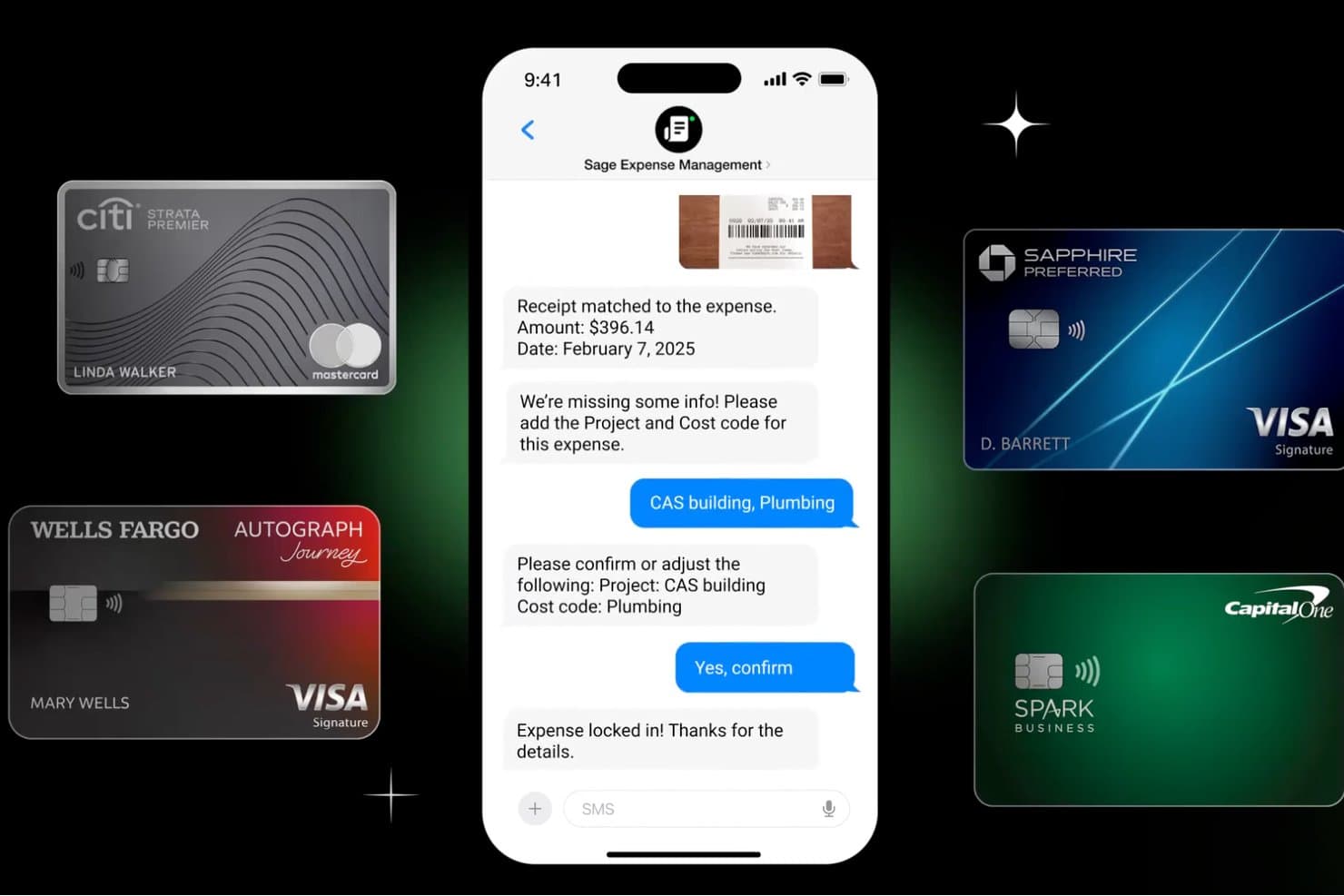
Sage Expense Management captures receipts and codes expenses via SMS chat. Sage Expense Management is an expense management platform that connects to your existing corporate cards—Visa, Mastercard, and Amex—to automate receipt capture, transaction categorization, multi-stage approval workflows, and reconciliation with your accounting system.
Who Is Sage Expense Management Best For?
Finance controllers and AP teams at mid-sized companies who need automated reconciliation on top of existing corporate cards will get the most from Sage Expense Management.
Why I Picked Sage Expense Management
I picked Sage Expense Management as one of the best because it's built around the cards your team already carries. Rather than asking you to switch card programs, it connects directly to Visa and Mastercard networks to pull transactions in real time, then prompts employees via text to reply with a photo receipt that matches automatically. That text-to-receipt workflow is what sets it apart: card swipe triggers a text, employee replies with a photo, and reconciliation is done.
Sage Expense Management Key Features
- Multi-stage approval workflows: Route expense reports through single or multiple approval layers, with policy-driven rules based on department, role, or spend amount.
- Spend policy enforcement: Configure soft flags or hard blocks on expenses at submission, covering amount limits, receipt thresholds, payment methods, and category restrictions.
- ACH reimbursements: Pay employees directly via ACH from within the platform, with approved reports automatically marked as paid in connected accounting systems.
- Amex virtual card issuance: Generate unlimited virtual cards tied to an existing Amex credit line, each with its own spend limit, usage period, and nickname for project or vendor-specific purchases.
Sage Expense Management Integrations
Sage Expense Management offers native integrations with QuickBooks Online, Xero, QuickBooks Desktop, Sage 50, Sage Intacct, and Sage 300 CRE. It also supports Gmail, Outlook, and API access for custom integrations.
Pros and Cons
Pros:
- Employees praise mobile and email receipt options
- Transaction feeds give finance near-real-time visibility
- Texted receipts match card swipes automatically
Cons:
- Policies don't block purchases at the register
- No physical cards or independent credit line
Learn more about Sage Expense Management (formerly Fyle): 2Best for customizable spending limits
BILL
- Free plan available
- From $49/user/month
Visit WebsiteCustomer Rating:4.5/5
BILL spend management dashboard displays company credit balances, account payment details, expense tracking, and virtual card management BILL Spend & Expense is a corporate card and expense management platform that pairs physical and virtual Visa cards with budget controls, automated receipt matching, approval workflows, and direct accounting software sync.
Who Is BILL Best For?
BILL Spend & Expense is a strong fit for small to midsize businesses that need corporate card controls and expense tracking without a large finance team.
Why I Picked BILL
I've included BILL in my top picks because of how granular its spending controls actually get. You can set limits at the card level, the budget level, and the employee level simultaneously, which means a sales rep's card can be capped at $200 for meals while a department budget holds a separate ceiling for travel. I also like that virtual cards can be issued for a specific vendor or project and frozen the moment spend is complete, cutting off any unintended future charges before they happen.
BILL Key Features
- AI receipt matching: Automatically pairs uploaded receipts to the correct transaction using AI, reducing manual data entry.
- Approval workflows: Route expense requests through a configurable multi-step approval chain before spend is approved.
- Real-time transaction feed: View all employee card transactions as they occur across every active budget.
- Employee reimbursements: Submit and process out-of-pocket expense claims directly within BILL alongside card spend.
BILL Integrations
BILL offers native two-way sync with QuickBooks Online, QuickBooks Desktop, QuickBooks Enterprise, Xero, Oracle NetSuite, Sage Intacct, and Microsoft Dynamics, plus data integration support for Acumatica and other ERPs via customizable file templates.
Pros and Cons
Pros:
- Combined AP and card spend platform
- Instant virtual card creation per vendor
- Budget-based cards stop overspending before it happens
Cons:
- Accounting sync errors reported during month-end close
- Rewards require minimum spend thresholds to qualify
Learn more about BILL: Best for unified spend approvals and controls
- Free demo available
- Pricing upon request
Visit WebsiteCustomer Rating:4.8/5
Airbase card management dashboard showing spend limits and receipt compliance. Airbase is a spend management platform designed for finance teams that want to centralize and control company card expenses. It appeals to businesses looking for real-time visibility into spending and automated workflows for approvals and reconciliation. The platform helps organizations reduce manual work and improve compliance by bringing all expense processes into one system.
Who Is Airbase Best For?
Airbase fits mid-sized to large companies that need centralized control over company card spending and approval workflows.
Why I Picked Airbase
What sets Airbase apart for credit card expense management is its unified approach to spend approvals and controls. I picked Airbase because it lets you set up custom approval workflows for every card transaction, so finance teams can enforce policy before spend happens. The platform also provides real-time visibility into all card activity, making it easier to spot issues and maintain compliance. With centralized controls, you can manage virtual and physical cards, set spending limits, and automate receipt collection—all from one dashboard.
Airbase Key Features
Some other features that make Airbase valuable for credit card expense management include:
- Automated transaction categorization: The platform automatically assigns GL codes to card transactions based on your accounting rules.
- Receipt compliance monitoring: Airbase tracks missing receipts and sends reminders to cardholders for timely submission.
- Multi-entity support: Manage expenses and cards across multiple subsidiaries or business units from a single account.
- Real-time spend analytics: Access up-to-date dashboards and reports that break down card spend by user, department, or vendor.
Airbase Integrations
Integrations include NetSuite, QuickBooks Online, Sage Intacct, Xero, Slack, Google Workspace, and an API for custom integrations.
Pros and Cons
Pros:
- Offers virtual and physical cards
- Advanced custom approval workflows
- Strong NetSuite and ERP integrations
Cons:
- Some users report delays in bank feed syncing
- Approval workflow setup can be time-consuming
 4Best for automated receipt matching
Ramp
- Free plan available; 30-day free trial
- From $15/user/month
Visit WebsiteCustomer Rating:4.8/5
Ramp dashboard and mobile app showing company spend and reporting insights. Ramp is a corporate card and expense management platform designed for finance teams that want to automate manual expense tasks. It appeals to businesses looking for real-time visibility into company spend and tighter control over employee purchases. Ramp helps organizations reduce time spent on reconciliation and policy enforcement by connecting card usage directly to expense workflows.
Who Is Ramp Best For?
Ramp fits mid-sized and larger businesses that want automated controls over corporate card spending and expense reconciliation.
Why I Picked Ramp
What stands out about Ramp is how it automates receipt matching for every card transaction, which directly addresses one of the most tedious parts of expense management. The platform uses AI to scan, match, and verify receipts as soon as they’re uploaded, reducing manual review and missing documentation. I also like that Ramp automatically flags transactions without receipts and sends reminders to cardholders, helping finance teams close the loop quickly. This level of automation is especially useful for organizations with high transaction volumes or strict compliance requirements.
Ramp Key Features
In addition to automated receipt matching, Ramp offers several other features that support credit card expense management:
- Real-time spend controls: Set granular limits on card usage by merchant, category, or amount to prevent out-of-policy spending.
- Automatic transaction categorization: Transactions are auto-coded to the correct general ledger accounts based on your accounting rules.
- Integrated bill payments: Pay vendors directly from Ramp and sync payment data with your accounting system.
- Custom approval workflows: Configure multi-level approval processes for expenses and card requests to match your organization’s policies.
Ramp Integrations
Integrations include NetSuite, Sage Intacct, QuickBooks, Microsoft Dynamics Business Central, Xero, Microsoft Dynamics 365 Finance and Operations, and Oracle Fusion Cloud.
Pros and Cons
Pros:
- Built-in custom spend controls
- Automated AI receipt matching
- High limits based on cash flow
Cons:
- Reporting exports limited to certain formats
- Travel booking features are not included
 Best for integrated travel and expense workflows
- Free plan available
- Pricing upon request
Visit WebsiteCustomer Rating:4.7/5
Navan dashboard showing travel spend overview, trips, savings, and analytics. Navan offers a unified platform for managing both business travel and credit card expenses. It’s a strong fit for finance teams and travel managers who want to connect spend data with travel bookings in one place. The tool helps organizations gain better visibility into employee expenses and streamline reconciliation.
Who Is Navan Best For?
Navan suits mid-sized to large organizations with frequent business travel and a need to manage credit card expenses alongside travel bookings.
Why I Picked Navan
What drew me to Navan is how it brings travel booking and credit card expense management together in a single workflow. The platform automatically matches card transactions to travel bookings, which helps finance teams reconcile expenses without manual cross-checking. I also like that Navan provides real-time policy enforcement during both booking and expense submission, reducing out-of-policy spend before it happens. This integrated approach is especially useful for organizations that want to control travel costs and simplify expense reporting at the same time.
Navan Key Features
Some other features that make Navan useful for credit card expense management include:
- Automated receipt capture: Users can upload receipts via mobile app, which are then matched to card transactions for faster reconciliation.
- Custom approval workflows: Finance teams can configure multi-level approval processes to fit their organizational structure.
- Real-time spend analytics: The platform provides dashboards and reports that break down card spend by category, department, or user.
- Mobile policy reminders: Employees receive in-app notifications about policy requirements when submitting expenses on the go.
Navan Integrations
Integrations include NetSuite, QuickBooks Online, Xero, Sage Intacct, and American Express.
Pros and Cons
Pros:
- Detailed spend analytics by department or user
- Multi-level approval workflows for expenses
- Real-time policy enforcement during expense submission
Cons:
- Limited customization for expense categories
- No built-in virtual card issuing
Learn more about Navan: 6Best for fast-growing tech and life sciences companies
Brex
- Free plan available
- From $12/user/month
Visit WebsiteCustomer Rating:4.5/5
Brex compliance report dashboard showing spend tracking and documentation status. Brex offers a unified spend management platform designed for startups and high-growth companies that need to manage credit card expenses at scale. Finance teams can use Brex to issue cards, automate expense tracking, and enforce policies across distributed teams. Its focus on real-time controls and automation helps businesses keep spending aligned with company goals.
Who Is Brex Best For?
Brex is a strong choice for finance teams at fast-growing tech, life sciences, and venture-backed companies that need scalable expense controls.
Why I Picked Brex
I picked Brex because it’s built to support the rapid pace and complexity of spend management in tech and life sciences companies. The platform lets you issue unlimited virtual and physical cards instantly, with customizable controls for each department or project. I also like how Brex automates expense categorization and policy enforcement, which helps fast-moving teams stay compliant without slowing down. Its real-time spend visibility and centralized dashboard make it easier for finance leaders to manage distributed teams and shifting budgets.
Brex Key Features
Some other features that make Brex useful for credit card expense management include:
- Automated receipt matching: The platform automatically matches uploaded receipts to card transactions for faster reconciliation.
- Global currency support: Brex cards and expense tracking work across multiple currencies for international teams.
- Mobile app for on-the-go management: Users can submit expenses, capture receipts, and manage cards directly from their mobile devices.
- Real-time alerts and notifications: The system sends instant alerts for policy violations, large transactions, or suspicious activity.
Brex Integrations
Integrations include NetSuite, QuickBooks, Xero, Sage Intacct, and Zoom.
Pros and Cons
Pros:
- Auto-matches receipts to charges
- Built-in custom spending limits
- Unlimited virtual & physical cards
Cons:
- Custom reporting options are somewhat restricted
- Mobile app can be slow to sync
 Best for multi-entity expense reconciliation
- Free demo available
- From $8.50 to $12/active user
Visit WebsiteCustomer Rating:4.4/5
Webexpenses dashboard showing expense categories, spenders, and travel claims. Finance teams managing expenses across multiple business units often turn to Webexpenses for its flexible approach to credit card expense management. The platform is designed for organizations that need to handle complex approval structures and detailed spend tracking. Webexpenses helps businesses gain better control over card transactions, policy compliance, and reconciliation processes.
Who Is Webexpenses Best For?
Webexpenses suits finance teams at mid-sized to large organizations that need to manage credit card expenses across multiple entities or departments.
Why I Picked Webexpenses
I picked Webexpenses because it’s one of the few platforms that truly supports multi-entity expense reconciliation for credit card spend. The tool lets you allocate transactions to different business units, departments, or cost centers, which is essential for organizations with complex structures. I also like that you can set up tailored approval workflows and reporting for each entity, making it easier to maintain clear audit trails. This level of flexibility helps finance teams keep card expenses organized and compliant across multiple parts of the business.
Webexpenses Key Features
Some other features that make Webexpenses useful for credit card expense management include:
- Automated receipt matching: The platform automatically matches uploaded receipts to card transactions for faster reconciliation.
- Real-time policy violation alerts: Users and approvers receive instant notifications when a transaction falls outside company policy.
- Mobile expense capture: Employees can submit card expenses and receipts directly from their mobile devices.
- Audit-ready reporting: Generate detailed, exportable reports that support compliance and audit requirements.
Webexpenses Integrations
Integrations include Sage Intacct, Sage 200, Sage 50, Oracle, NetSuite, and Mastercard.
Pros and Cons
Pros:
- Customizable approval workflows
- Automated mileage tracking tools
- Mobile app for fast receipt capture
Cons:
- OCR receipt scanner can make errors
- Initial setup can be time-consuming
Learn more about Webexpenses: Best for mobile-first expense submissions
- Free demo available
- From $8/user/month (billed annually)
Visit WebsiteCustomer Rating:4.4/5
Rydoo dashboard showing expense approvals, submissions, and spending overview. Rydoo is an expense management platform designed for finance teams that want to simplify and speed up expense submissions. It appeals to organizations with distributed or traveling employees who need to capture and process expenses on the go. The platform helps reduce manual entry and accelerates reimbursement cycles by digitizing receipts and automating policy checks.
Who Is Rydoo Best For?
Rydoo suits finance teams at mid-sized businesses with frequent travelers or remote employees who need to submit expenses from anywhere.
Why I Picked Rydoo
I chose Rydoo because it puts mobile expense capture at the center of its platform, which is especially valuable for teams that are always on the move. The mobile app lets users snap photos of receipts, submit expenses instantly, and even match transactions to corporate card charges in real time. I also appreciate how Rydoo automates policy checks and approvals directly from the app, so finance teams can maintain control without slowing down employees. This mobile-first approach makes Rydoo a strong fit for businesses that need fast, accurate credit card expense management from anywhere.
Rydoo Key Features
Some other features that make Rydoo useful for credit card expense management include:
- Corporate card transaction matching: Automatically links card transactions to submitted expenses for easier reconciliation.
- Multi-currency support: Handles expenses in multiple currencies with automatic conversion and exchange rate tracking.
- Custom approval workflows: Lets you set up multi-level approval chains based on your company’s policies.
- Real-time spend analytics: Provides dashboards and reports to monitor card usage and spending trends.
Rydoo Integrations
Integrations include NetSuite, SAP S/4HANA, QuickBooks, Xero, Sage, Microsoft Dynamics 365, Workday, Slack, Egencia, and Uber.
Pros and Cons
Pros:
- Strong global tax compliance
- Integrates well with ERP systems
- Automated per diem calculations
Cons:
- Custom reporting is limited
- Initial setup is time-consuming
Learn more about Rydoo: Best for enterprise-grade ERP integrations
- Free demo available
- Pricing upon request

SAP Concur dashboard showing travel booking, expense reports, and requests. SAP Concur is a cloud-based platform that optimizes the expense management process for organizations with complex financial operations and global reach. It appeals to finance teams that need to manage high volumes of credit card transactions while maintaining compliance and audit trails. The platform helps businesses automate expense capture, enforce policy controls, and integrate spend data across multiple departments.
Who Is SAP Concur Best For?
SAP Concur suits large enterprises and multinational organizations that require advanced expense controls and deep ERP integrations.
Why I Picked SAP Concur
What makes SAP Concur a strong choice for credit card expense management is its ability to connect seamlessly with major ERP systems, which is essential for organizations with complex financial infrastructures. I picked SAP Concur because it offers native integrations with platforms like SAP, Oracle, and Microsoft Dynamics, allowing finance teams to sync expense data directly with their core accounting and procurement systems. This level of integration helps automate reconciliation, enforce company-wide policies, and maintain a single source of truth for spend data. For businesses that need to manage expenses across multiple entities or regions, these ERP connections are a significant advantage.
SAP Concur Key Features
Some other features that make SAP Concur valuable for credit card expense management include:
- Automated receipt capture: Users can upload receipts via mobile app or email, and the system matches them to transactions automatically.
- Policy enforcement engine: Administrators can set granular spend rules and flag out-of-policy expenses in real time.
- Mobile expense reporting: Employees can submit, review, and approve expenses directly from their smartphones.
- Audit trail tracking: Every transaction and change is logged for compliance and audit readiness.
SAP Concur Integrations
Integrations include SAP, Oracle NetSuite, QuickBooks, Xero, Microsoft Dynamics 365, and Uber.
Pros and Cons
Pros:
- Scales well for large enterprises
- Mobile app for receipt capture
- Strong global travel compliance
Cons:
- Expensive for smaller businesses
- Implementation is very complex
Learn more about SAP Concur: Best for multinational compliance management
- Free demo available
- From €8/user/month

Mobilexpense app showing receipt scanning and mobile expense entry screens. Mobilexpense is a credit card expense management platform designed for organizations operating across multiple countries. It appeals to finance teams that need to handle complex regulatory requirements and local tax rules. The tool helps businesses simplify expense tracking, automate compliance checks, and manage card spend in diverse regulatory environments.
Who Is Mobilexpense Best For?
Mobilexpense fits multinational finance teams that need to manage credit card expenses while meeting local compliance and tax requirements.
Why I Picked Mobilexpense
What stands out about Mobilexpense is its strong focus on multinational compliance management for credit card expenses. The platform supports automated VAT and tax calculations for different countries, which helps finance teams stay compliant with local regulations. I also appreciate that Mobilexpense offers built-in policy enforcement and real-time checks for cross-border transactions, reducing the risk of non-compliant spend. These features make it a practical choice for organizations that operate in multiple jurisdictions and need to manage card expenses within complex regulatory frameworks.
Mobilexpense Key Features
Some other features that make Mobilexpense useful for credit card expense management include:
- Automated receipt capture: Users can snap photos of receipts with their mobile device and link them directly to card transactions.
- Multi-language support: The platform is available in multiple languages to accommodate global teams.
- Card transaction import: Credit card transactions can be imported automatically for faster reconciliation.
- Custom approval workflows: Finance teams can set up multi-level approval processes tailored to their organizational structure.
Mobilexpense Integrations
Integrations include Exact, DATEV, d.velop, Twinfield, QuickBooks Online, SAP, and Oracle.
Pros and Cons
Pros:
- Intuitive and simple user interface
- Speeds up the reimbursement process
- Strong European regulatory compliance
Cons:
- Mobile app experiences occasional bugs
- Lacks a recurring expenses feature
Learn more about Mobilexpense:
Annen programvare for håndtering av kredittkortutgifter
Her er noen flere alternativer for programvare for håndtering av kredittkortutgifter som ikke kom med på kortlisten min, men som likevel er verdt å se nærmere på:
How I Evaluate Credit Card Expense Management Software
I look at these tools in two layers: whether they cover the core card management loop—issuance, transaction feeds, receipt matching, reconciliation—and what sets top options apart.
Core Functionality (Table Stakes For This List)
When I'm selecting tools for my list, I rank each one on a scale from 0 (does not offer the functionality) to 5 (excels in this area) for each core functionality listed below. Then, I calculate the tool's total score into a percentage. Each tool needs to achieve a minimum total score of 65% to be considered for inclusion.
- Corporate Card Issuance: I check whether a platform issues its own physical and virtual cards or relies on connecting external cards from other providers.
- Transaction Feed & Reconciliation: Real-time transaction feeds matter here—I look at how quickly charges appear and how much of the GL coding and matching is automated.
- Receipt Capture & Matching: Teams shouldn't chase down receipts at month-end, so I evaluate mobile capture, email forwarding, and OCR-based auto-matching capabilities.
- Spend Controls & Policy Enforcement: I look for granular controls like per-card limits, merchant category restrictions, and rules that block out-of-policy purchases before they go through.
- Approval Workflows: Multi-level routing that adapts based on amount, department, or policy exception is what I evaluate—single-approver setups rarely hold up for growing teams.
- Accounting System Integration: Native connections to systems like QuickBooks, Xero, NetSuite, and Sage Intacct are what I check for, along with bi-directional sync and custom field mapping.
Once I have a list of tools that meet the criteria, I consider what sets each platform apart.
Differentiating Factors (What Sets Vendors Apart)
Here's how I compare and contrast different vendors:
Standout Features
Automated expense categorization is a big differentiator—I look for platforms where AI learns your GL mapping over time, reducing manual coding during close. Real-time budget tracking also matters, especially when department heads need visibility into remaining spend before approving new card purchases. I evaluate vendor and subscription management too, since recurring SaaS charges on corporate cards often go unnoticed until someone audits months of statements.
Beyond Features
Compliance and security certifications are where I start—SOC 2 Type II and PCI-DSS compliance tell me a platform treats cardholder data with the rigor finance teams expect. The underlying card network matters more than most buyers realize. Visa and Mastercard rails differ in merchant acceptance and FX handling, and the sponsoring bank determines credit limits and funding models. I also evaluate company size fit, since a platform built for 20-person startups rarely scales to multi-entity organizations with complex approval hierarchies.
Slik velger du programvare for håndtering av kredittkortutgifter
Det er lett å gå seg vill i lange funksjonslister og komplekse prisstrukturer. For å hjelpe deg med å holde fokus mens du arbeider deg gjennom den unike programvarevalgsprosessen din, får du her en sjekkliste over faktorer du bør ha i tankene:
| Faktor | Hva bør du vurdere? |
|---|---|
| FaktorSkalerbarhet | Hva bør du vurdere?Vil programvaren håndtere dagens og forventede transaksjonsvolum og antall brukere etter hvert som virksomheten vokser? |
| FaktorIntegrasjoner | Hva bør du vurdere?Kan den kobles direkte til regnskaps-, ERP-, HR- og banksystemene dine uten manuelle omveier? |
| FaktorTilpasningsmuligheter | Hva bør du vurdere?Kan du tilpasse godkjenningsflyter, utgiftskategorier og regler for retningslinjer slik at de samsvarer med organisasjonens behov? |
| FaktorBrukervennlighet | Hva bør du vurdere?Vil ansatte og godkjennere ta i bruk verktøyet raskt, eller vil opplæring og brukerstøtte bli en vedvarende belastning? |
| FaktorImplementering og oppstart | Hva bør du vurdere?Hvor lang tid vil det ta å komme i gang, og hvilke ressurser eller hvilken støtte tilbyr leverandøren under utrullingen? |
| FaktorKostnad | Hva bør du vurdere?Er prisnivåene gjennomsiktige, og samsvarer de med bruksmønstrene og budsjettbegrensningene dine? |
| FaktorSikkerhetstiltak | Hva bør du vurdere?Tilbyr plattformen kryptering, rollebasert tilgang og revisjonsspor for å beskytte sensitive økonomiske data? |
| FaktorOverholdelseskrav | Hva bør du vurdere?Vil programvaren hjelpe deg med å oppfylle bransje-, skatte- og revisjonskrav som er relevante for virksomheten og regionen din? |
Hva er programvare for håndtering av kredittkortutgifter?
Programvare for håndtering av kredittkortutgifter er et digitalt verktøy som hjelper bedrifter med å spore, avstemme og kontrollere utgifter som gjøres med bedriftens kredittkort. Disse plattformene automatiserer innsamlingen av kvitteringer, kobler transaksjoner til kortutskrifter, håndhever utgiftspolicyer og effektiviserer godkjenninger. Økonomiteam bruker dem til å få bedre oversikt, redusere manuelle feil og sikre overholdelse av interne og eksterne rapporteringskrav.
Funksjoner
Her er de viktigste funksjonene all god programvare for håndtering av kredittkortutgifter bør ha:
- Kvitteringsregistrering: Lar brukere laste opp eller fotografere kvitteringer og kobler dem automatisk til riktig utgift, slik at dokumentasjon og revisjonsspor blir enklere.
- Transaksjonsavstemming: Kobler automatisk kredittkorttransaksjoner til innsendte utgifter, noe som reduserer manuelt avstemmingsarbeid og minimerer feil.
- Håndheving av retningslinjer: Bruker virksomhetens regler for pengebruk på hver transaksjon og flagger eller blokkerer utgifter som bryter med retningslinjene, før de går videre til godkjenning.
- Godkjenning på flere nivåer: Støtter tilpassbare arbeidsflyter for godkjenning og sikrer at utgifter blir vurdert av riktige personer på hvert trinn.
- Støtte for flere valutaer: Håndterer utgifter i ulike valutaer, konverterer beløp og sporer valutakurser for nøyaktig rapportering.
- Integrasjon med regnskapssystemer: Kobler seg direkte til regnskaps- eller ERP-plattformer og synkroniserer utgiftsdata for raskere månedsavslutning og mer nøyaktige regnskapsdata.
- Dashbord i sanntid: Gir oppdaterte visualiseringer av forbruksmønstre, kortbruk og ventende godkjenninger for bedre økonomisk oversikt.
- Mobil tilgang: Tilbyr en mobilapp eller et responsivt webgrensesnitt slik at ansatte kan sende inn, vurdere og godkjenne utgifter hvor som helst.
- Revisjonsspor: Opprettholder en detaljert logg over alle handlinger som er utført for hver utgift, noe som støtter etterlevelse og forenkler revisjoner.
- Administrasjon av firmakort: Lar administratorer utstede, deaktivere og overvåke virksomhetens kredittkort i plattformen, slik at kontroll og oversikt samles på ett sted.
Vanlige AI-funksjoner i programvare for håndtering av kredittkortutgifter
I tillegg til standardfunksjonene i programvare for håndtering av kredittkortutgifter som er nevnt ovenfor, tar mange av disse løsningene i bruk AI med funksjoner som:
- Automatisk uttrekking av kvitteringsdata: Bruker AI-basert optisk tegngjenkjenning til å lese og hente ut viktige opplysninger fra kvitteringer, noe som reduserer manuell registrering og feil.
- Avviksdeteksjon: Flagger uvanlige eller mistenkelige forbruksmønstre ved å analysere transaksjonsdata og sammenligne dem med historiske normalverdier.
- Smart kategorisering av utgifter: Tildeler automatisk utgifter til riktige kategorier basert på transaksjonsdetaljer og innlært brukeradferd.
- Forutseende varsler om brudd på retningslinjer: Forutser mulige brudd på retningslinjene ved å analysere forbrukstrender og varsle brukere proaktivt før innsending.
- Oppdagelse av duplikatutgifter: Identifiserer og flagger mulige doble innsendinger ved å sammenligne bilder av kvitteringer, beløp og transaksjonsdatoer ved hjelp av AI-algoritmer.
Fordeler
Implementering av programvare for håndtering av kredittkortutgifter gir flere fordeler for teamet og virksomheten din. Her er noen av fordelene du kan se frem til:
- Raskere avstemming: Automatisk transaksjonsavstemming og registrering av kvitteringer reduserer manuelt arbeid og fremskynder månedsavslutningen.
- Bedre etterlevelse av retningslinjer: Innebygd håndheving av retningslinjer og varsler i sanntid bidrar til å sikre at pengebruken holder seg innenfor virksomhetens retningslinjer.
- Bedre økonomisk oversikt: Dashbord og rapporteringsverktøy i sanntid gir økonomiteamene et tydelig bilde av forbruksmønstre og ventende godkjenninger.
- Færre feil og mindre svindel: AI-basert avviksdeteksjon og revisjonsspor bidrar til å avdekke feil og flagge mistenkelig aktivitet før det blir et problem.
- Forenklede godkjenninger: Godkjenningsarbeidsflyter på flere nivåer og mobil tilgang gjør det enkelt for ledere å vurdere og godkjenne utgifter hvor som helst.
- Effektiviserte integrasjoner: Direkte koblinger til regnskaps- og ERP-systemer eliminerer dobbeltregistrering og holder regnskapsdataene nøyaktige.
- Bedre revisjonsberedskap: Sentralisert dokumentasjon og detaljerte logger gjør det enklere å forberede seg til revisjoner og dokumentere etterlevelse.
Kostnader og priser
Valg av programvare for håndtering av kredittkortutgifter krever en forståelse av de ulike prismodellene og abonnementene som er tilgjengelige. Kostnadene varierer basert på funksjoner, teamstørrelse, tillegg og mer. Tabellen nedenfor oppsummerer vanlige abonnementer, gjennomsnittsprisene deres og typiske funksjoner som er inkludert i løsninger for håndtering av kredittkortutgifter:
Sammenligningstabell for abonnementer for programvare for håndtering av kredittkortutgifter
| Plantype | Gjennomsnittspris | Vanlige funksjoner |
|---|---|---|
| PlantypeGratisplan | Gjennomsnittspris$0 | Vanlige funksjonerGrunnleggende kvitteringsregistrering, begrenset transaksjonsmatching, manuelle godkjenninger og grunnleggende rapportering. |
| PlantypePersonlig plan | Gjennomsnittspris$11-$15/user/month | Vanlige funksjonerKvitteringsregistrering, transaksjonsmatching, håndheving av retningslinjer for enkeltbrukere og eksport til regnskap. |
| PlantypeBedriftsplan | Gjennomsnittspris$15-$25/user/month | Vanlige funksjonerStøtte for flere brukere, godkjenninger på flere nivåer, håndheving av retningslinjer, integrasjoner og dashbord i sanntid. |
| PlantypeVirksomhetsplan | Gjennomsnittspris$35-$60/user/month | Vanlige funksjonerAvansert analyse, tilpassede arbeidsflyter, dedikert kundestøtte, forbedret sikkerhet og revisjonsspor. |
Vanlige spørsmål om programvare for håndtering av kredittkortutgifter
Her er noen svar på vanlige spørsmål om programvare for håndtering av kredittkortutgifter:
Hvordan bidrar programvare for håndtering av kredittkortutgifter til månedsavslutningen?
Programvare for håndtering av kredittkortutgifter automatiserer matching av transaksjoner og dataeksport, noe som reduserer manuelt avstemmingsarbeid. Dette fremskynder månedsavslutningen og bidrar til å sikre at alle utgifter registreres og kategoriseres korrekt.
Kan disse verktøyene integreres med det eksisterende regnskaps- eller ERP-systemet mitt?
Ja, de fleste løsninger for håndtering av kredittkortutgifter tilbyr direkte integrasjoner med populære regnskaps- og ERP-plattformer. Dette gjør at du kan synkronisere utgiftsdata automatisk, redusere dobbeltregistrering og holde regnskapet oppdatert.
Hvilke typer kontroller kan jeg sette for ansattes utgifter?
Du kan sette utgiftsgrenser, begrense leverandørkategorier, kreve godkjenninger på flere nivåer og håndheve virksomhetens utgiftsretningslinjer. Disse kontrollene bidrar til å forhindre uautoriserte kjøp og holde utgiftene i tråd med organisasjonens retningslinjer.
Er det mulig å administrere flere firmakort på én plattform?
Ja, de fleste løsninger lar deg utstede, deaktivere og overvåke flere kredittkort for virksomheten fra ett enkelt dashbord. Dette sentraliserer kortadministrasjonen og gir bedre oversikt over all kortaktivitet.
Hvordan støtter disse plattformene etterlevelse og revisjonsberedskap?
Programvare for håndtering av kredittkortutgifter opprettholder detaljerte revisjonsspor, lagrer digitale kvitteringer og håndhever regler for retningslinjer. Denne dokumentasjonen støtter etterlevelse av krav til skatt, regelverk og internrevisjon.