

10 Best Cash Application Software in 2026

Best Cash Application Software Shortlist


Cash application software automates the process of matching incoming payments to open invoices, speeding up reconciliation for finance teams managing high transaction volumes. If you need tools that eliminate manual effort, work with complex ERPs, and scale with your operations, these are the options I’d suggest you look at.
With so many choices claiming AI matching, bank integrations, and advanced reporting, it’s easy to end up with software that creates more problems than it solves. This guide will help you compare the best cash application tools, confidently navigate the buying process, and find a solution that fits your team’s specific needs.
Why Trust Our Software Recommendations
Our team has been testing and reviewing software since 2012. As finance leaders ourselves, we know how difficult—and important—it is to choose the right software.
For this guide, we evaluated tools using hands-on testing and independent research, scoring tools using our selection criteria.
Our reviews reflect our human editorial judgment, not a sales pitch.
Best Cash Application Software Summary
This comparison chart summarizes pricing details for my top cash application software selections to help you find the best one for your budget and business needs.
| Tool | Best For | Trial Info | Price | ||
|---|---|---|---|---|---|
| 1 | Best for multi-ERP enterprise environments | Free demo available | Pricing upon request | Website | |
| 2 | Best for mid-market AR teams | Free demo available | Pricing upon request | Website | |
| 3 | Best for AI matching | Free demo available | Pricing upon request | Website | |
| 4 | Best for complex multi-ERP environments | Free demo available | Pricing upon request | Website | |
| 5 | Best for fast-deploying application | Not available | Pricing upon request | Website | |
| 6 | Best for end-to-end accounting closure | Free demo available | Pricing upon request | Website | |
| 7 | Best for AI-driven explainable payment matching | Free demo available | Pricing upon request | Website | |
| 8 | Best for advanced cash application reporting | Free demo available | Pricing upon request | Website | |
| 9 | Best for AI-driven enterprise automation | Free demo available | Pricing upon request | Website | |
| 10 | Best for native SAP ecosystem integration | Free demo available | Pricing upon request | Website |
Cash Application Software Reviews
Below are my detailed summaries of the best cash application software that made it onto my shortlist. My reviews offer a detailed look at the features, best use cases, and integrations of each software to help you find the best one for you.
Emagia
Best for multi-ERP enterprise environments
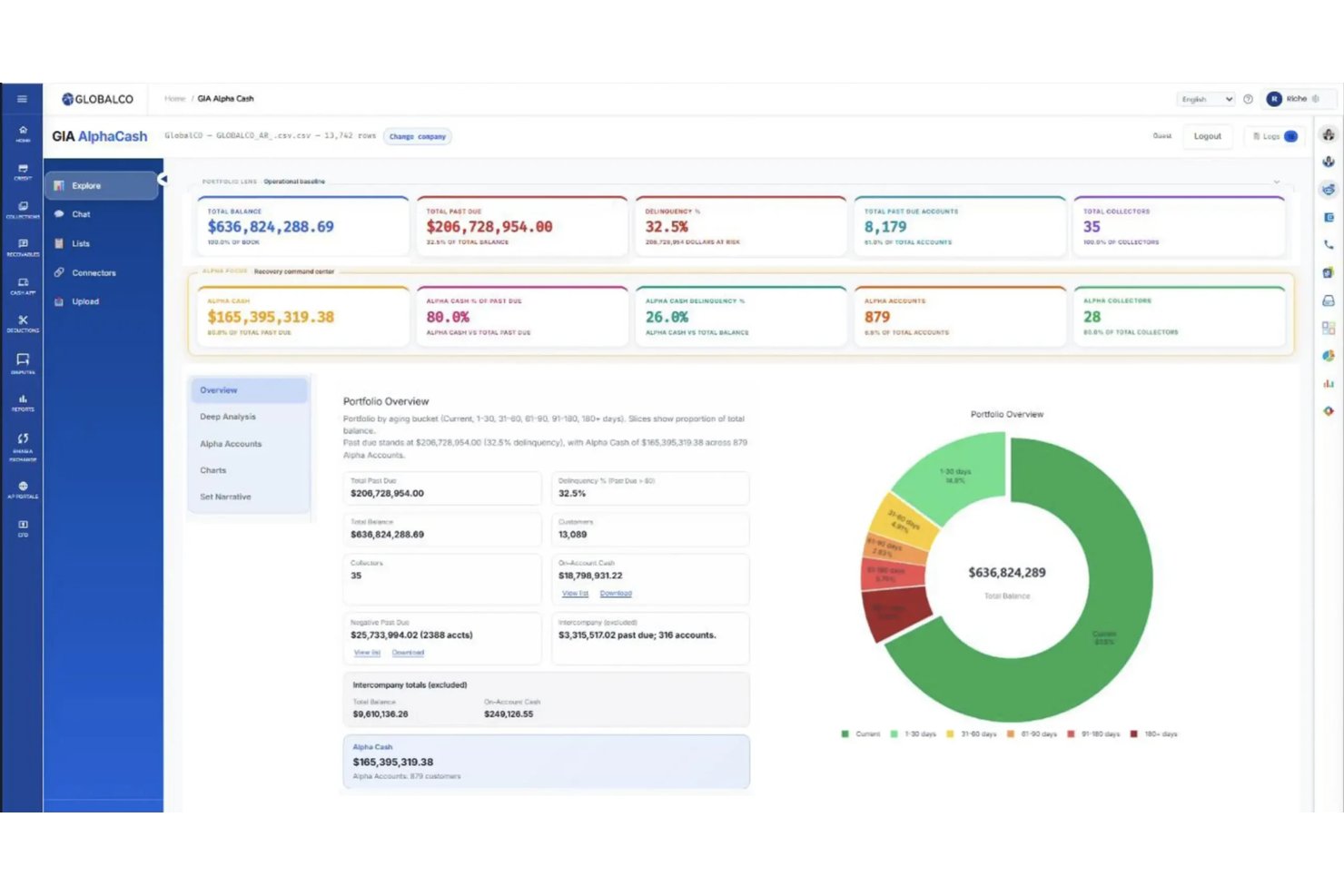
Emagia is an AI-powered cash application platform that handles automated payment matching, remittance aggregation, deduction coding, and cash posting across 15+ ERP systems and 170+ global banking integrations.
Who Is Emagia Best For?
Emagia is a strong fit for large enterprises running multiple ERPs that need centralized cash application across complex, high-volume AR environments.
Why I Picked Emagia
I picked Emagia as one of the best because it's purpose-built to handle the exact complexity that breaks other cash application tools: running multiple ERPs at once. Its single-platform architecture supports 15+ ERP systems simultaneously, with AI managing the differences between them, so your team isn't manually reconciling data across SAP, Oracle, and NetSuite in parallel. I'm also impressed by the remittance auto-aggregation feature, which pulls remittance data from customer AP portals and logistics portals automatically, which is a real bottleneck in high-volume environments. ConvaTec processed $4B in receivables across 44 countries using Emagia, hitting over 95% automated cash application in 15 months.
Emagia Key Features
- Touchless data capture: Emagia automatically captures payment, remittance, and lockbox data from multiple sources and languages, covering over 97% of incoming items without manual input.
- Digital assistant Gia: An AI copilot that handles voice, chat, and email outreach to customers to collect missing remittance information directly.
- Intelligent exception handling: When a payment can't be matched automatically, Gia surfaces smart suggestions to help your team resolve exceptions and disputes faster.
- Multi-currency and multi-language support: Emagia processes payments across multiple currencies, languages, and lockboxes simultaneously within a single platform instance.
Emagia Integrations
Emagia offers pre-built native integrations with 15+ ERP systems, including SAP, Oracle, JD Edwards, PeopleSoft, Microsoft Dynamics, NetSuite, and Sage, plus connectivity to 170+ global and local banks through formats like Open Banking APIs, BAI2, MT940, CAMT.053, and EDI. It also connects with customer AP portals and logistics POD/BOL portals for remittance aggregation, and supports custom integrations through its API.
Pros and Cons
Pros:
- AI assistant manages unmatched payments outreach
- Automated remittance capture from customer portals
- Handles complex multi-ERP reconciliation workflows
Cons:
- Reporting dashboards lack advanced customization options
- Setup for highly custom ERP landscapes takes time

Quadient
Best for mid-market AR teams
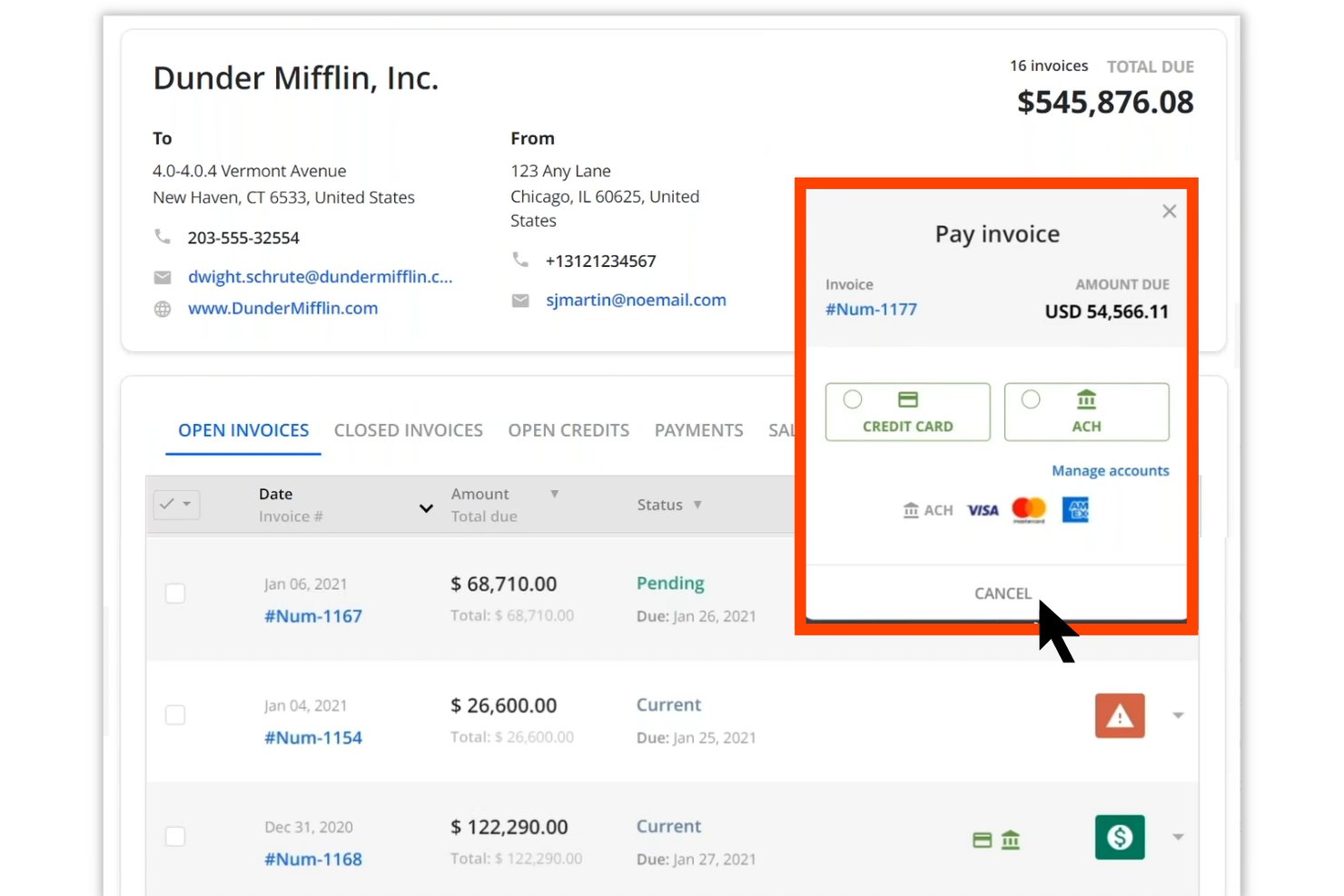
Quadient AR Automation is an end-to-end accounts receivable platform that covers cash application, credit management, collections workflows, dispute management, and customer payment processing in one centralized system.
Who Is Quadient Best For?
Quadient AR is a strong fit for mid-market B2B finance teams that need a full order-to-cash platform with multi-ERP connectivity and structured collections workflows.
Why I Picked Quadient
Quadient AR earns its spot on my list because its AI-based cash application module handles one of the messiest parts of mid-market AR: matching payments when remittance data is incomplete. The machine learning engine analyzes payment type, amount, and any available remittance details to suggest a customer match, so your team reviews and approves rather than manually re-keys every transaction. Combined with collections workflows, dispute management, and credit controls in one platform, mid-market finance teams get full order-to-cash coverage without stitching together separate tools.
Quadient Key Features
- Customer self-service payment portal: Gives your customers a secure, branded portal to view invoices, schedule payments, and pay on their own timeline without contacting your team.
- Configurable rules engine: Lets you set automated reminder sequences and escalation triggers based on your own business rules, so follow-ups go out consistently without manual intervention.
- AI-powered payment behavior prediction: Analyzes historical payment data to flag at-risk accounts and surface collection priorities before invoices go overdue.
- Multi-ERP connectivity: Integrates natively with NetSuite, SAP, Microsoft Dynamics, Sage, QuickBooks, Acumatica, and Xero, so AR data syncs across your existing systems without manual exports.
Quadient Integrations
Quadient AR offers native integrations with major ERP and accounting systems, including NetSuite, SAP, Microsoft Dynamics, Sage Intacct, QuickBooks, Acumatica, and Xero. An API is available for custom integrations, and it connects to payment processors and banking data feeds to support cash application workflows.
Pros and Cons
Pros:
- Configurable workflows for mid-market requirements
- Full order-to-cash platform in one system
- AI-based payment matching reduces manual review
Cons:
- Dispute management features may lack depth
- Initial configuration can be time-consuming

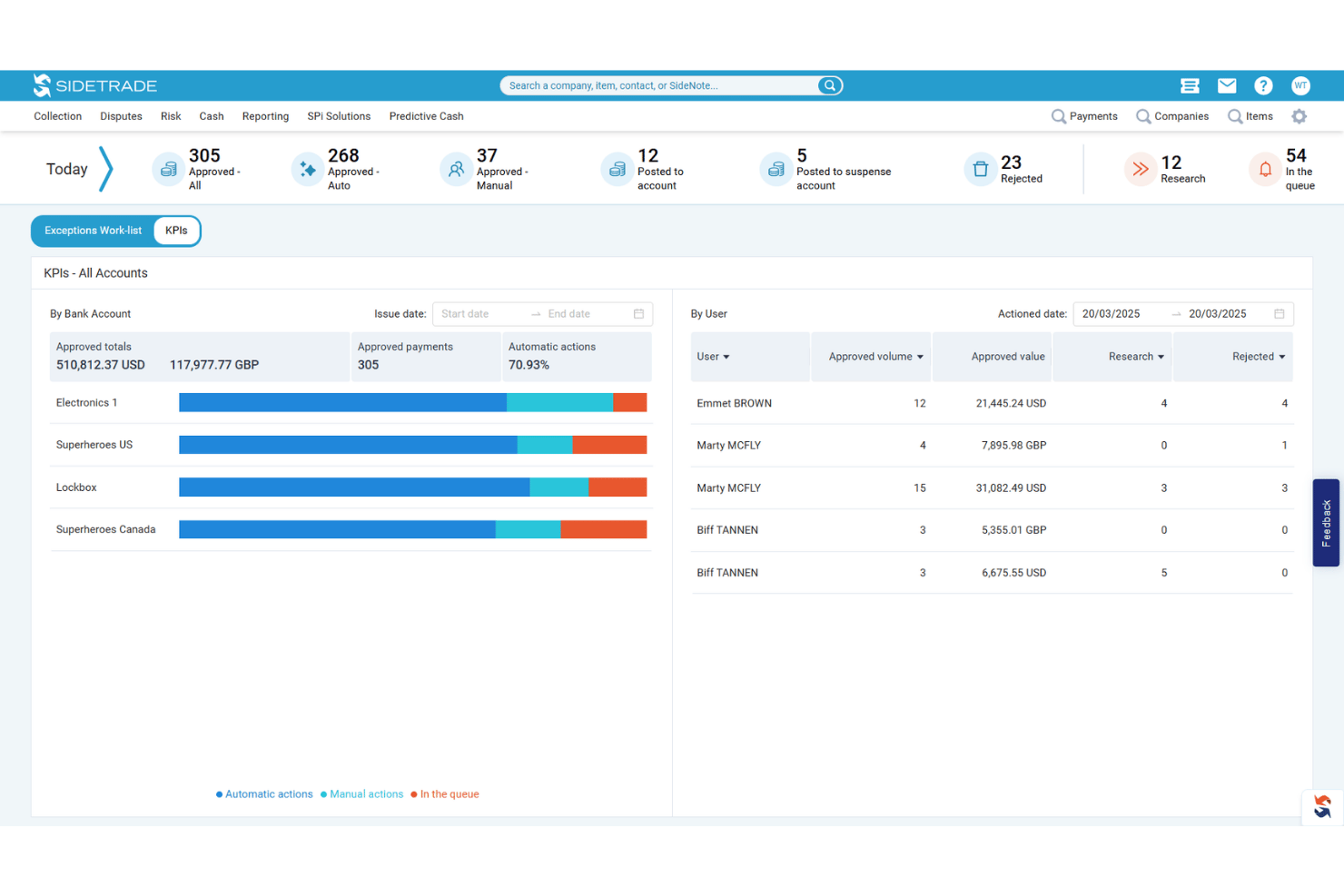
Sidetrade Cash App is an AI-powered cash application platform that automates remittance consolidation, invoice matching, and payment posting directly to your ERP across multi-entity, multi-currency, and multi-channel payment environments.
Who Is Sidetrade Best For?
Sidetrade Cash App is a strong fit for mid-market and enterprise finance teams managing high payment volumes across multiple entities, currencies, and ERP systems.
Why I Picked Sidetrade
Sidetrade Cash App earns its spot on my list because its AI matching engine genuinely sets it apart from rules-based systems. The AI handles remittance data from virtually any source, including banks, email, portals, and EDI, without requiring template setup, then matches payments across partial, multi-currency, and multi-entity scenarios at 90%+ accuracy. I also like that the system continuously learns from historical match data, so it gets sharper over time rather than plateauing at a fixed hit rate.
Sidetrade Key Features
- Same-day ERP posting: Payments post directly to your ERP in real time, without manual data entry, enabling same-day cash application.
- Exception management workflow: Unmatched payments are flagged automatically and routed into guided workflows that surface contextual insights and suggested matches for resolution.
- Real-time dashboards: Built-in dashboards give your team live visibility into posted amounts, unapplied cash balances, and open exceptions across all entities.
- Audit trail tracking: The system maintains a complete audit trail across both automated and manually resolved transactions, supporting process controls and compliance.
Sidetrade Integrations
Sidetrade Cash App integrates with major ERP systems, including SAP, Oracle, NetSuite, Microsoft Dynamics, Workday, and Sage, through prebuilt bi-directional connectors, and it ingests remittance data from banks, AP portals, email, EDI, and PDF sources without template setup. A REST API is available for custom integrations.
Pros and Cons
Pros:
- Guided exception workflows speed up resolution
- Handles multi-entity, multi-currency environments reliably
- AI matches payments with minimal manual work
Cons:
- Dashboards could be more customizable
- Requires upfront configuration for exception routing
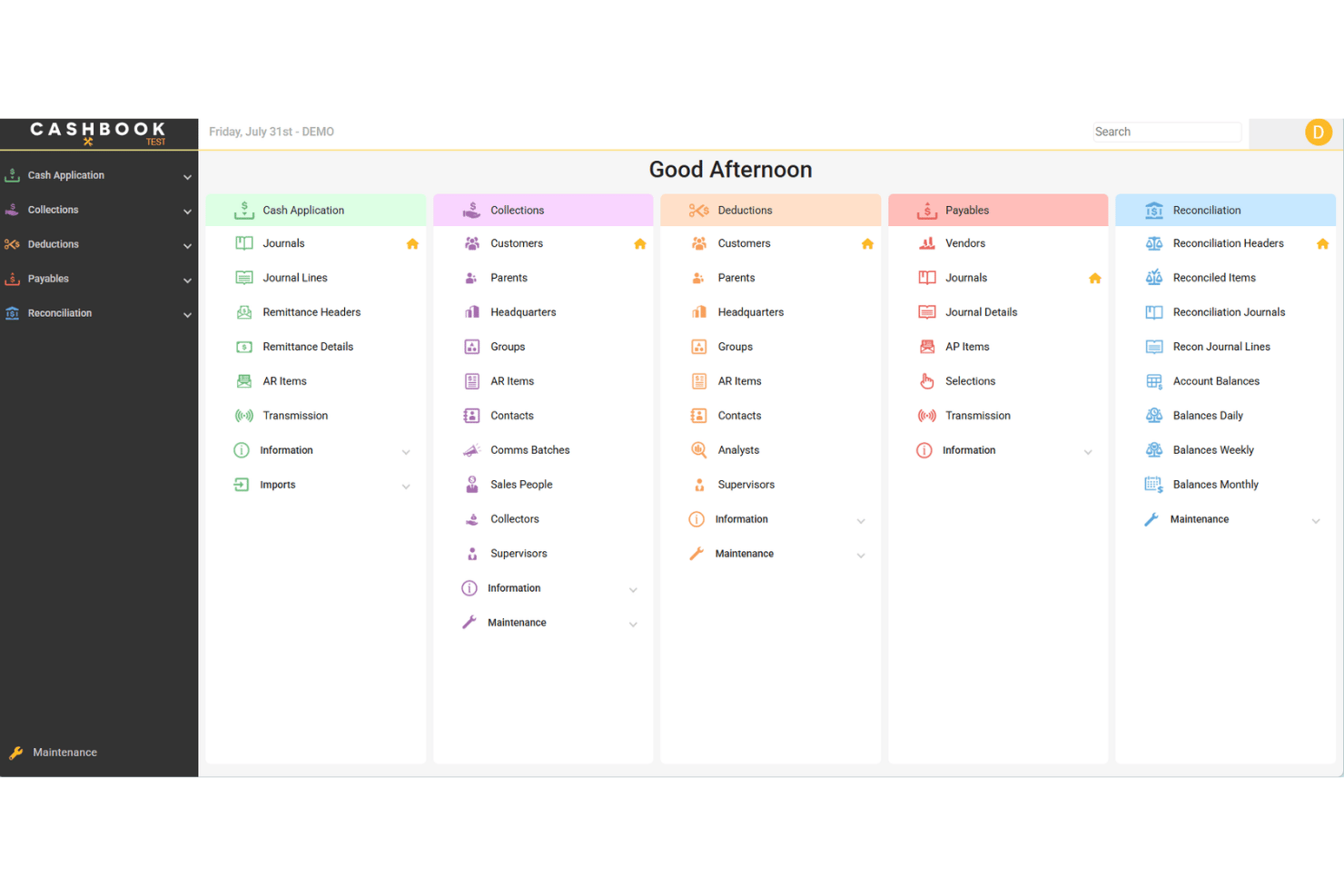
Cashbook is a cash application and accounts receivable automation platform that handles cash matching, deductions management, bank reconciliation, and collections across multiple ERPs and bank formats.
Who Is Cashbook Best For?
Cashbook is a strong fit for large enterprises running multiple ERPs simultaneously and needing a single platform to handle cash matching and bank reconciliation across all of them.
Why I Picked Cashbook
Cashbook earns its spot on my shortlist because of how it handles cash application across 16 different ERPs without requiring your team to toggle between separate systems. I'm particularly impressed by its remittance-to-invoice auto-matching, which processes over 95% of transactions automatically, and its deductions engine that adapts to any bank file format and generates reason codes directly from remittance data. If your organization runs JD Edwards alongside Infor M3 or Dynamics 365, Cashbook is built specifically for that complexity.
Cashbook Key Features
- Collections management hub: Log notes, view lockbox images, add attachments, and track overdue accounts from a single interface linked to live AR data.
- Payment forecasting: Uses historical payment data to predict incoming payments, giving your team visibility into expected cash before it lands.
- Bank reconciliation automation: Applies configurable matching rules to auto-match bank and credit card statements against GL data, then auto-creates the corresponding GL entries.
- Accounts payable payment file automation: Generates electronic payment files for any ERP, bank, or geography, with built-in approval workflows and vendor bank account management.
Cashbook Integrations
Cashbook offers native integrations with 16 ERP systems, including Infor BPCS/LX, Infor M3, Infor MAPICS/XA, JD Edwards World, JD Edwards EnterpriseOne, Oracle, Microsoft Dynamics 365, Sun Systems, TIMS, and SmartStream. It also connects directly to bank systems for remittance and lockbox data ingestion, and APIs are available for custom integrations.
Pros and Cons
Pros:
- Flexible deductions engine for any bank file
- Auto-matches over 95% of transactions
- Handles cash matching across multiple ERPs
Cons:
- Implementation can require significant change management
- Best suited for large, complex enterprises

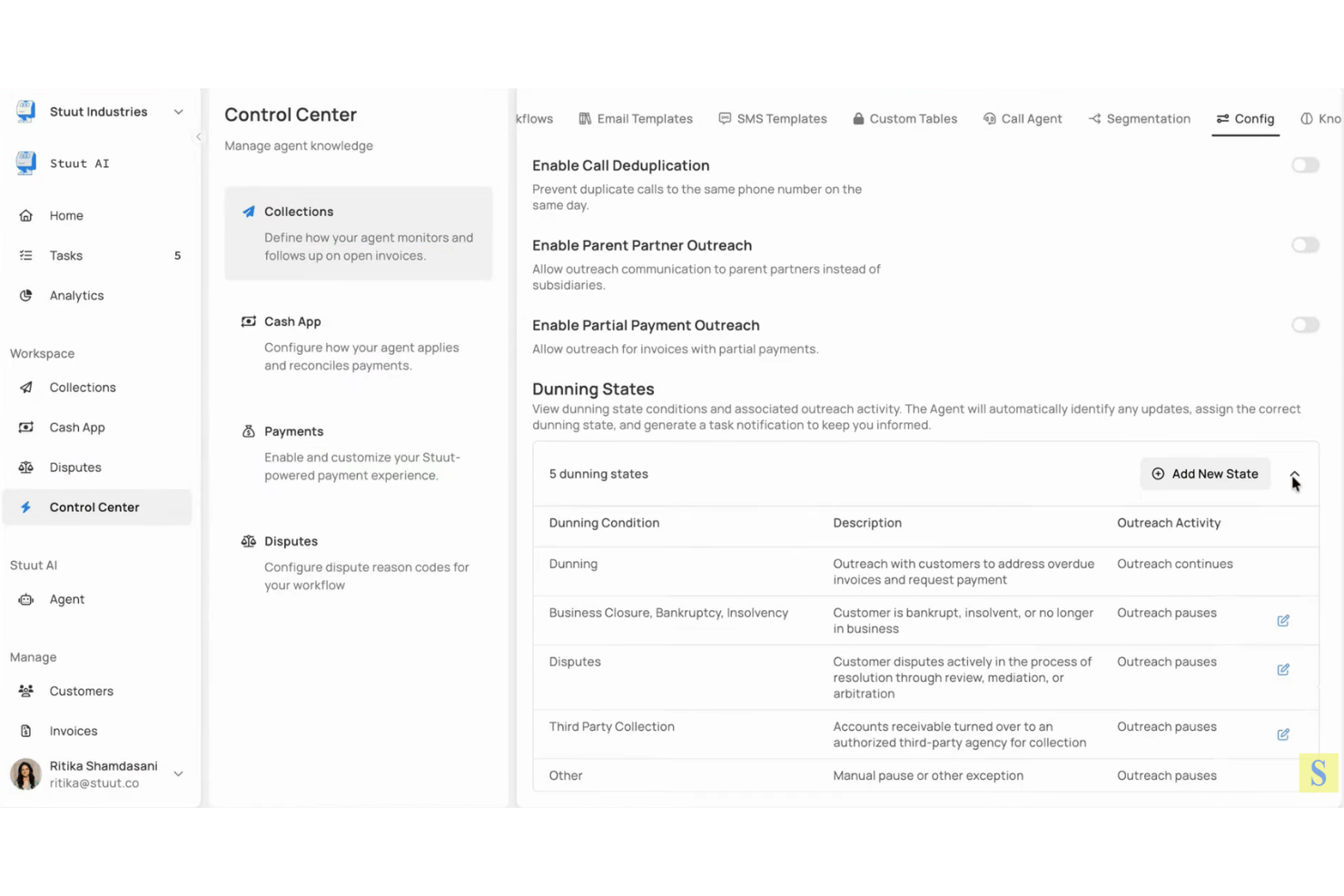
Stuut is an AI-driven accounts receivable automation platform with a cash application module that automatically matches payments to invoices across ERP systems, eliminating manual reconciliation across collections, payments, disputes, and deductions.
Who Is Stuut Best For?
Stuut is a strong fit for mid-to-large enterprises that need a cash application solution up and running in days rather than months, particularly those already on SAP, Oracle, NetSuite, or Dynamics.
Why I Picked Stuut
I picked Stuut as one of the best because its cash application module goes live in 3 to 4 days, compared to the 6 to 18 months traditional implementations typically demand. The AI automatically matches incoming payments to open invoices across SAP, Oracle, NetSuite, and Dynamics without requiring a parallel reconciliation process. What I find genuinely useful is that the same AI layer also carries customer payment history and behavior context into cash application, so it gets more accurate as your transaction volume grows.
Stuut Key Features
- Disputes and deductions management: Stuut autonomously identifies dispute and deduction claims and works to resolve them without manual intervention.
- Multi-channel collections outreach: AI agents contact customers before invoice due dates via email, SMS, and voice calls to accelerate payment.
- Click-to-pay payments processing: Stuut automatically processes incoming payments and gives customers a click-to-pay option directly from outreach communications.
- Persistent customer context: Customer interaction history, preferences, and behavior are retained across collections, payments, and cash application modules to inform every future touchpoint.
Stuut Integrations
Stuut offers native integrations with major ERP systems, including SAP, Oracle, NetSuite, and Microsoft Dynamics. A broader integrations marketplace and public API are not clearly documented, and Zapier support is not listed.
Pros and Cons
Pros:
- Retains customer context across transactions
- Automatically matches payments to invoices
- Deploys in days, not months
Cons:
- No free trial option available
- Limited documentation on broader integrations

Best for end-to-end accounting closure
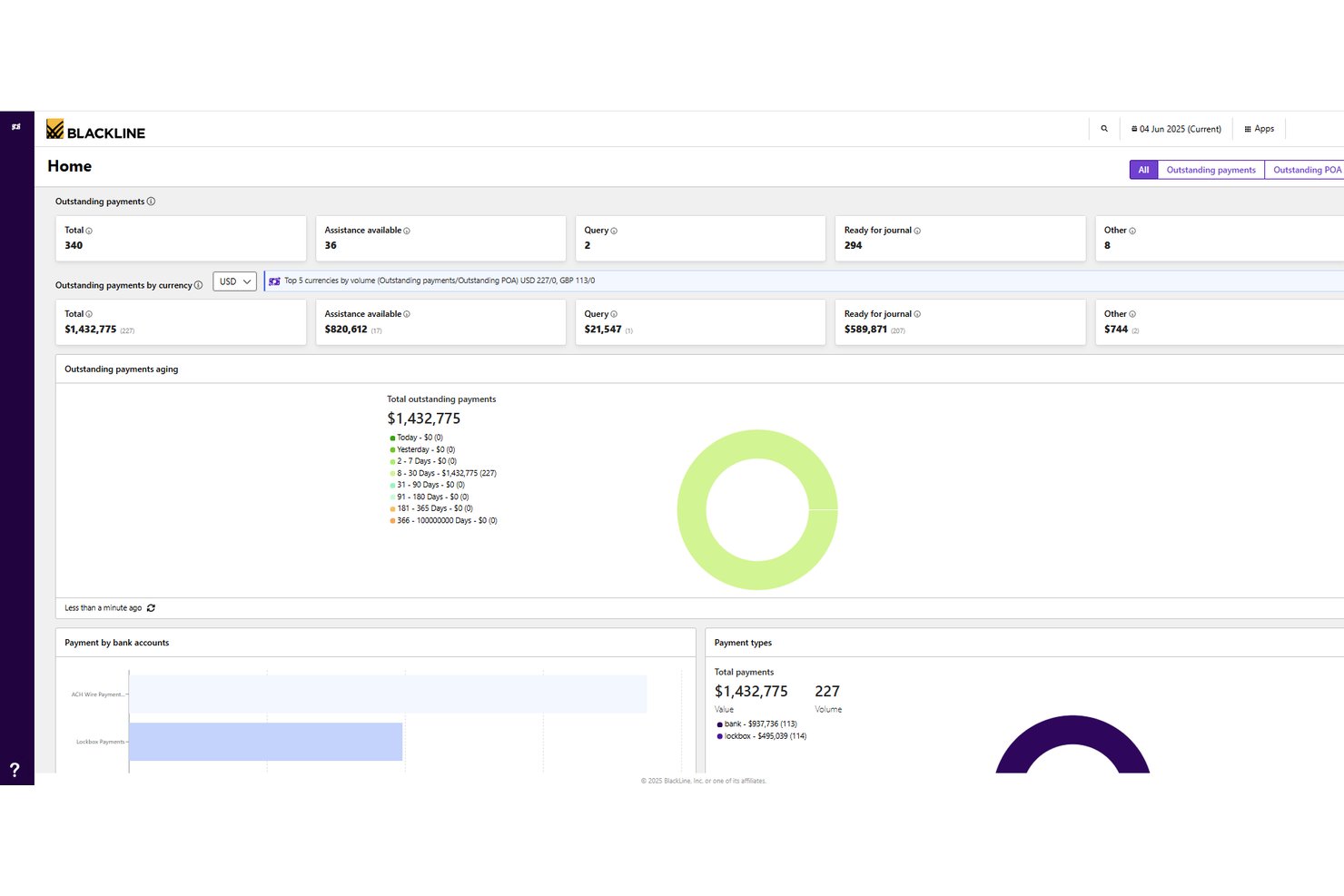
BlackLine is an AI-powered invoice-to-cash platform that covers cash application, collections management, disputes and deductions, credit and risk management, and AR intelligence across ERP, banking, and CRM systems.
Who Is BlackLine Best For?
BlackLine is a strong fit for enterprise finance teams that need to manage the full accounting close cycle, from cash application and collections to reconciliation and reporting, across multiple ERPs and systems.
Why I Picked BlackLine
BlackLine earns its spot on my shortlist because it covers the entire accounting close cycle, not just cash application in isolation. I'm particularly drawn to Verity AI, which automates remittance data capture and applies payments in real time by pulling banking and ERP data together, cutting unapplied cash by up to 99%. On top of that, the platform ties cash application directly into reconciliation, disputes, and AR intelligence, so my team isn't bouncing between disconnected tools at month-end.
BlackLine Key Features
- Verity Collect: Automates routine collections outreach based on customer payment behavior and risk data.
- Credit and risk management: Tracks real-time customer behavior changes using integrated external credit agency data.
- Self-service customer portal: Lets customers access invoices, statements, and make online payments through a dedicated portal.
- Dynamic task distribution: Automatically adjusts work assignments across your team based on staff availability and outstanding actions.
BlackLine Integrations
BlackLine offers native ERP connectors for SAP, Oracle, NetSuite, Microsoft Dynamics, Workday, Sage Intacct, and Acumatica, and it ingests bank files and remittance data to feed cash application and reconciliation workflows. An API is available for custom integrations, and Zapier support is not clearly documented.
Pros and Cons
Pros:
- Dynamic work assignment for high-volume teams
- AI remittance capture reduces unapplied cash
- Covers entire accounting close cycle
Cons:
- Full value realized mainly by large teams
- Requires ERP connectors for optimal results

Esker
Best for AI-driven explainable payment matching
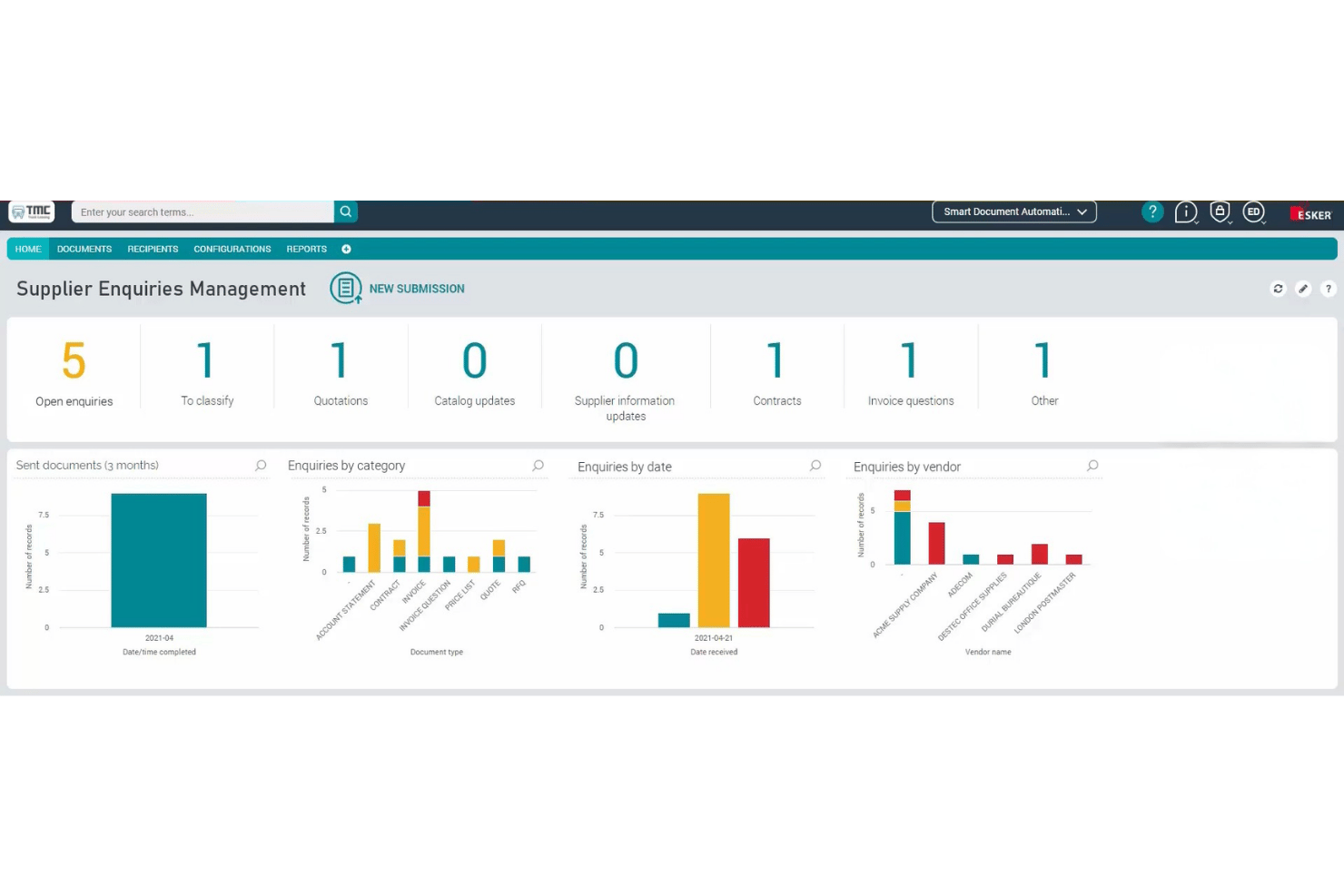
Esker is a cash application platform that automates remittance capture, payment matching, and exception handling using its Synergy AI engine, with built-in ERP reconciliation and a guided exception workspace for human-in-the-loop validation.
Who Is Esker Best For?
Esker is a strong fit for mid-to-large enterprises managing high payment volumes across multiple ERPs or customer payment channels.
Why I Picked Esker
I've included Esker in my top picks because its Synergy AI engine doesn't just match payments—it explains why it made each match, which makes exception review far faster and more auditable. I particularly like the guided exception workspace, where the AI surfaces intelligent suggestions so your team can resolve short payments, deductions, and multi-currency allocations without digging through raw remittance data. The real-time ERP reconciliation, including a prebuilt SAP connector, means matched payments post directly to customer accounts without manual rekeying.
Esker Key Features
- Centralized payment data capture: Pulls payment and remittance data from all incoming channels into a single, unified workflow for processing.
- Configurable automation rules: Handles discounts, short payments, cross-company allocations, and multi-currency scenarios through flexible, rule-based settings.
- Deductions management integration: Automatically extracts deductions from remittance data and triggers dedicated deduction workflows within the Esker AR suite.
- Customizable KPI dashboards: Tracks automation performance and receivables metrics in real time so your team can monitor touchless rates and unapplied cash at a glance.
Esker Integrations
Esker offers 100+ prebuilt ERP and back-end integrations, including native connectors for SAP, Microsoft Dynamics 365, Oracle, and Sage, plus partner-built integrations with QAD, Sage X3, Oracle JD Edwards, Oracle NetSuite, and Epicor Prophet 21. REST APIs and Esker File Exchange are available for custom integrations and legacy system connectivity.
Pros and Cons
Pros:
- Handles multi-currency and high payment volumes
- Offers guided exception workspace for faster review
- Explains payment matches with transparent AI logic
Cons:
- Some exception cases may still need manual input
- Demo required before seeing full functionality

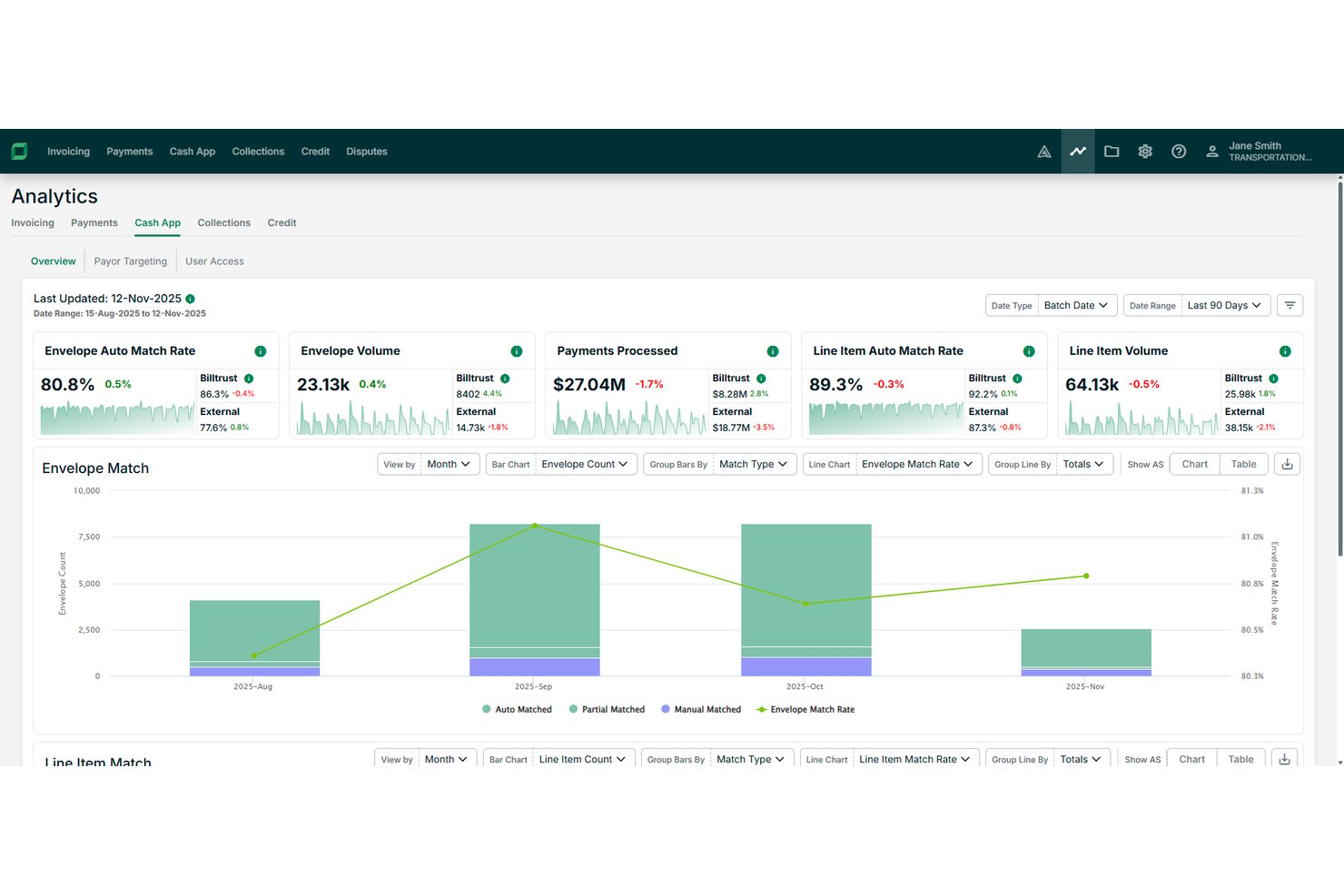
Billtrust is an AI-powered cash application platform that automates payment-to-invoice matching using confidence-based scoring, OCR, and machine learning, with built-in analytics that track KPIs like line-item match rates, exception volumes, and days to cash application.
Who Is Billtrust Best For?
Billtrust is a strong fit for mid-to-large finance teams that need detailed visibility into cash application performance across high transaction volumes.
Why I Picked Billtrust
I've included Billtrust in my top picks because its reporting capabilities go deeper than most cash application tools I've used. It tracks KPIs like line-item match rates, exception volumes, and days to cash application, giving finance teams a clear picture of where delays and errors are occurring. The confidence-based scoring engine also flags low-certainty matches before they hit the ledger, so your team isn't flying blind on high-volume days.
Billtrust Key Features
- Multi-format payment matching: Billtrust matches payments across ACH, wire, credit card, check, and AP portal payments to the correct invoice or account.
- OCR-based remittance capture: The platform uses optical character recognition to read and extract remittance data from varying invoice and payment formats.
- Exception queue management: Billtrust automatically categorizes and routes exceptions so your team can resolve mismatches faster without manual triage.
- Payor targeting: The system flags specific customers who generate the highest volume of manual work, so you can prioritize outreach and fix upstream data issues.
Billtrust Integrations
Billtrust offers 40+ ERP connectors and integrates with SAP, Oracle (including JD Edwards, PeopleSoft, and E-Business Suite), Infor, Epicor, Microsoft Dynamics, NetSuite, Acumatica, QAD, Karmak, and Procede, plus direct connections to 200+ banks and lockboxes (including Wells Fargo, US Bank, PNC, and Bank of America) and 260+ AP portals like SAP Ariba, Coupa, and Taulia. It also connects to Anthropic Claude and Microsoft Copilot through an MCP server, and supports custom integrations for ERPs not covered by ready-made connectors.
Pros and Cons
Pros:
- Flags customers driving high exception volume
- Tracks line-item match rates for KPIs
- Exception queue auto-routing reduces manual intervention
Cons:
- Confidence scoring may require manual review
- Detailed analytics can overwhelm new users

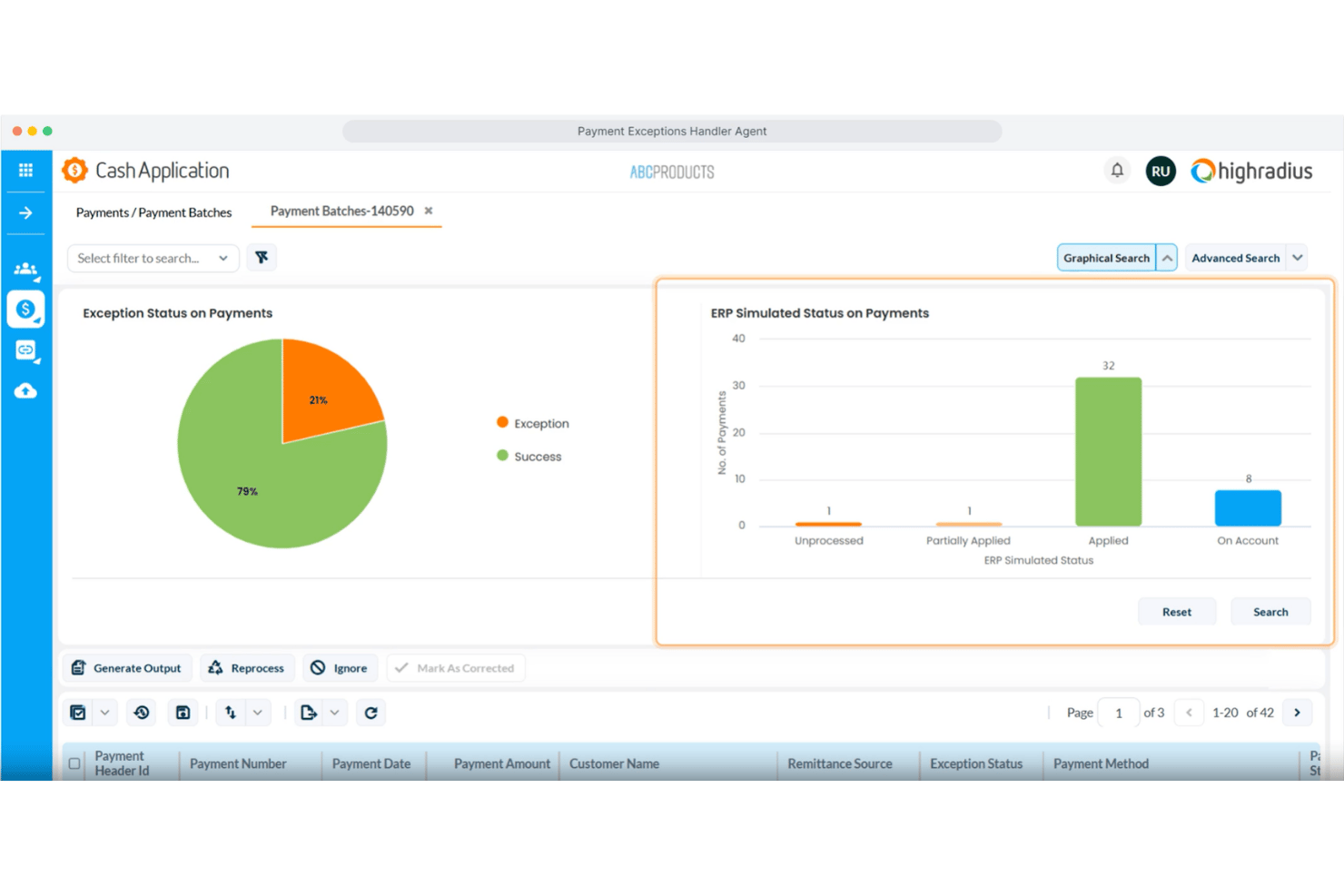
HighRadius is an AI-powered cash application platform that automates payment remittance aggregation, invoice matching, deductions coding, and exception handling across 300+ banks and ERP integrations.
Who Is HighRadius Best For?
HighRadius is built for large enterprises that need to automate high-volume cash application across multiple ERPs, banks, and payment channels.
Why I Picked HighRadius
HighRadius earns its spot on my shortlist because its AI-powered cash application goes beyond basic automation, deploying dedicated agents for each step of the process. I particularly like the AP Portal Remittance Capture agent, which pulls and parses remittance data from 500+ supplier portals automatically, and the Payment Invoice Matching agent, which resolves 87% of remittances that would otherwise require manual intervention. The Deductions Coding agent is also impressive, detecting short payments and mapping them directly to ERP reason codes without analyst involvement.
HighRadius Key Features
- Email remittance capture: Uses machine learning and NLP to extract invoice data from email bodies and attachments in PDF, Word, and Excel formats.
- Payment exceptions handler: Identifies missing remittances based on payment patterns and automatically sends information request emails to resolve gaps.
- EDI remittance processing: Parses and processes EDI remittance files directly, reducing manual handling for high-volume electronic payment formats.
- ERP and bank connectivity: Connects to 50+ ERP systems, 100+ banks, and 10+ payment processors through pre-built integrations, covering check, ACH, wire, and card payments.
HighRadius Integrations
HighRadius offers native integrations with 50+ ERP systems, 100+ banks, and 10+ payment processors, including SAP, Oracle, Microsoft Dynamics, NetSuite, Workday, JD Edwards, Sage, Bank of America, JPMorgan Chase, and Citibank. An API is available for custom integrations.
Pros and Cons
Pros:
- Handles high-volume email and EDI remittances
- Supports 300+ banks and ERPs
- Resolves most remittance exceptions automatically
Cons:
- Manual intervention needed for rare payment types
- Setup is complex for smaller organizations

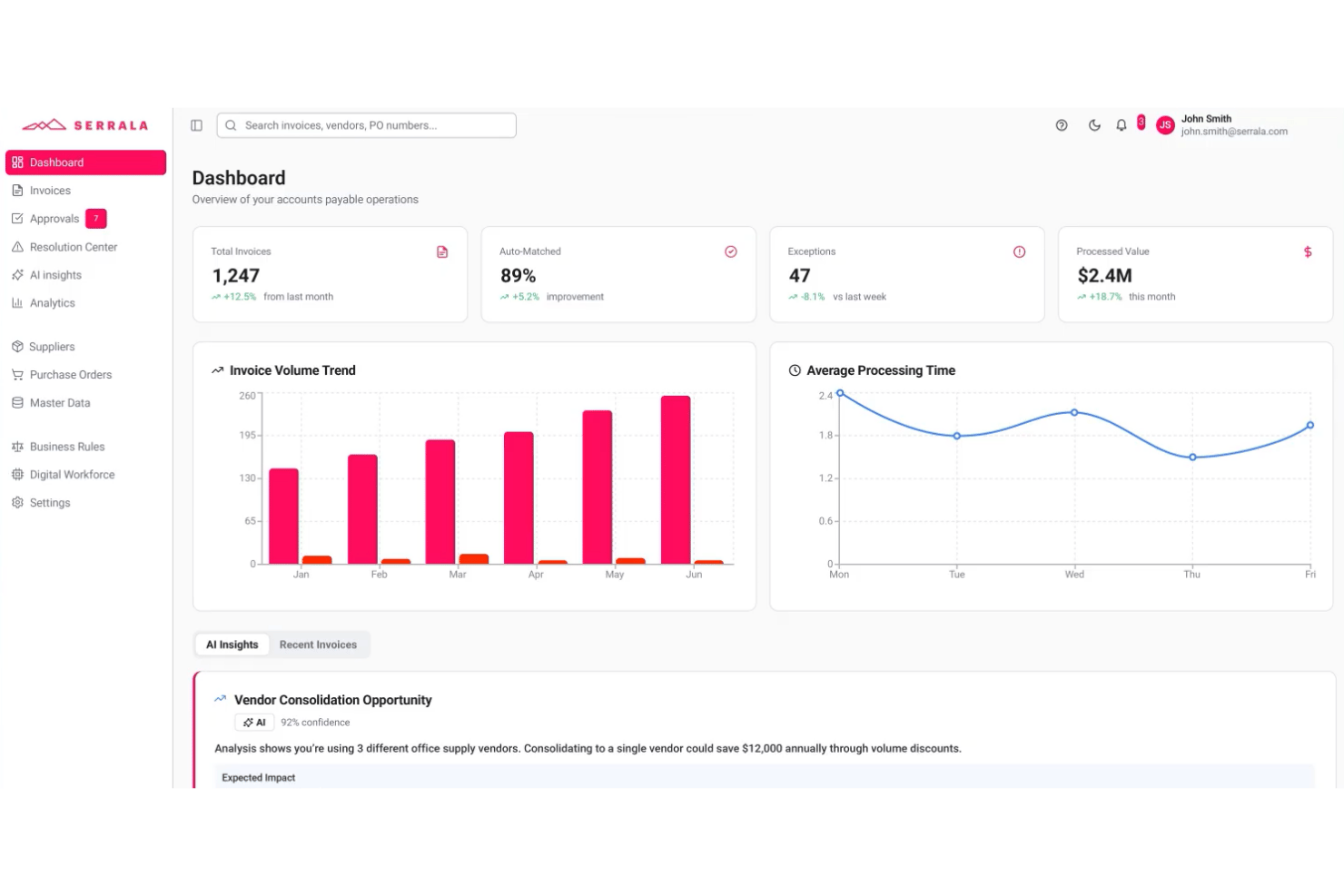
Serrala is an AI-powered cash application platform that automates payment matching, remittance processing, and exception handling across bank file formats and ERP systems, with a native SAP-embedded deployment option.
Who Is Serrala Best For?
Serrala is a strong fit for large enterprises running SAP that need a cash application solution embedded directly in their ERP environment rather than bolted on.
Why I Picked Serrala
Serrala earns its spot on my shortlist because of how deeply it embeds into SAP rather than sitting alongside it as a separate layer. I like that the SAP-embedded deployment gives AR teams full native access to auto-matching and exception handling directly within the ERP, so there's no data handoff or reconciliation between systems. Serrala's smart data capture handles classification, extraction, and posting of payment data inside SAP, and real-time KPI monitoring surfaces cash application performance without leaving the environment your team already works in.
Serrala Key Features
- Multi-format payment support: Processes ACH, wire, and lockbox payment types across all bank file formats for payment identification and retrieval.
- Unapplied cash tracking: Surfaces real-time visibility into unmatched payment balances so your AR team can identify and resolve open items quickly.
- Compliance and audit controls: Built-in controls enforce accuracy and auditability at the payment posting level across all transactions.
- Customer self-service portal: Lets customers independently view invoices, check outstanding balances, and submit payments through a dedicated portal.
Serrala Integrations
Serrala integrates with major ERP systems, including SAP (with a native SAP-embedded deployment option), Microsoft Dynamics, Oracle NetSuite, and Sage, and it supports connectivity with all major bank file formats for payment retrieval. A Microsoft Teams app is also available, and Serrala can connect to additional systems through its cloud platform.
Pros and Cons
Pros:
- Built-in audit controls for compliance needs
- Real-time tracking of unapplied cash balances
- Native SAP-embedded deployment for AR teams
Cons:
- May be complex for smaller finance teams
- Initial SAP setup can require IT resources
Other Cash Application Software
Here are some additional cash application software options that didn’t make it onto my shortlist, but are still worth checking out:
- Global PayEX
For AI-driven multi-bank reconciliation
- Versapay
For collaborative buyer-seller reconciliation
- Tesorio
For self-improving AR matching
- Flywire
For cross-border B2B global payments
- Peakflo
For growing APAC mid-markets
- Kolleno
For AI-native cash application across global AR
- Growfin
For NetSuite-anchored mid-market cash application
- Corcentric
For guaranteed DSO results
- Gaviti
For cutting unapplied cash volume
- Cforia
For complex parent-child AR hierarchies


How I Evaluate Cash Application Software
I split every evaluation into baseline criteria—the core capabilities a tool must cover, like multi-channel payment matching and ERP posting—and the differentiators that separate vendors worth recommending from those that just check boxes.
Core Functionality (Table Stakes for This List)
When I'm selecting tools for my list, I rank each one on a scale from 0 (does not offer the functionality) to 5 (excels in this area) for each core functionality listed below. I then calculate the tool's total score into a percentage, using 65% as a benchmark to help assess its overall fit for the list.
- Automated payment matching: I evaluate how well each tool handles one-to-one, one-to-many, and many-to-many invoice matching, including whether AI or ML models improve match rates over time.
- Remittance capture and processing: The tool should ingest remittance data from emails, PDFs, EDI feeds, lockbox files, and customer portals rather than relying on manual uploads or a single source.
- Multi-payment channel support: I check whether the platform reconciles across ACH, wire, check, lockbox, credit card, and virtual card payments, especially for teams handling multi-currency transactions.
- ERP and accounting integration: Pre-built connectors for systems like SAP, Oracle, NetSuite, and Microsoft Dynamics matter here, along with open API access for posting cash updates back to AR ledgers in real time.
- Deductions and exceptions management: I look at how each tool codes short pays, routes disputes to the right team members, and whether it offers root cause tracking to reduce repeat exceptions.
- Cash posting and AR reporting: Dashboards should cover match rates, AR aging, and exception volumes with drill-down capability, not just static exports that require manual cleanup before review.
Once I have a list of tools that meet the criteria, I consider what sets each platform apart.
Differentiating Factors (What Sets Vendors Apart)
Here's how I compare and contrast different vendors:
Standout Features
I check whether a tool's ML models actually learn from clerk decisions over time, improving match rates on recurring payment patterns without manual rule rewrites. Vendors like HighRadius and Versapay handle this differently, but the goal is the same: fewer exceptions each cycle. I also evaluate how well each platform scrapes remittance advice from buyer AP portals like Coupa or Ariba, since suppliers serving large retailers often lose days chasing ACH deposit details. Straight-through posting analytics round out my review—real-time dashboards that break down hit rates by clerk, customer, and payment channel help controllers spot exactly where unapplied cash is building up.
Beyond Features
I check whether a vendor holds SOC 1 Type II and SOC 2 Type II certifications, since any tool posting directly to your GL needs airtight audit trails and SOX-aligned role-based permissions. ERP connector depth matters just as much—certified, bi-directional integrations with your specific ERP determine posting reliability and how much manual reconciliation your team still carries. I also evaluate implementation timelines, because enterprise deployments with HighRadius or Serrala can run six to twelve months, while mid-market options like Versapay or Billtrust often go live in weeks.
How to Choose a Cash Application Software
Choosing the right cash application software comes down to your core operational priorities and the complexity of your finance stack:
| If your priority is… | Look for… |
|---|---|
| Global or multi-entity operations | Pre-built, multi-ERP and multi-currency integrations |
| Reducing manual payment matching | AI-driven reconciliation and machine learning match logic |
| Closing the books fast | Real-time cash posting and AR aging dashboards |
| Handling large payment and remittance volumes | Automated remittance capture from email, EDI, and customer portals |
| Managing compliance and audit rigor | SOC 1/SOC 2 certification and detailed audit logging |
How to Vet Your Shortlist
- Test integration claims: Ask for a demo showing live posting to your ERP or accounting system with 2 sample remittance files.
- Validate AI match rates: Request recent customer match rate reports or run a scripted trial with 100+ payment scenarios.
- Inspect exception workflows: Have vendors demo how their tool routes and tracks at least 10 sample deduction or dispute cases.
- Audit certifications: Require copies of SOC 1/SOC 2 certificates and internal audit trail screenshots from the last 12 months.
- Pick your tradeoff: Choose between faster deployment with limited ERP depth or deeper, certified integrations that require longer rollouts.
What Is Cash Application Software?
Cash application software is a financial tool that automatically matches incoming payments to corresponding invoices, helping your team reconcile accounts receivable accurately and quickly. These systems capture payment and remittance data from multiple channels, connect with your accounting or ERP platform, and offer clear dashboards to monitor cash flow. Finance teams rely on cash application software to reduce manual data entry, minimize unapplied cash, and improve the speed and accuracy of the month-end close.
Features of Cash Application Software
When selecting cash application software, keep an eye out for the following key features:
- Automated payment matching: Links incoming payments to open invoices based on set rules and data patterns, reducing the manual effort required for reconciliation and lowering the risk of human error.
- Remittance data capture: Collects remittance details from multiple sources like emails, portals, and file uploads, helping your team connect payments with the right invoices.
- Multi-channel payment support: Reconciles payments from sources such as ACH, wire transfer, credit card, check, and lockbox, supporting your business’s payment mix and customer preferences.
- ERP and accounting integration: Connects directly to your ERP or accounting system to update receivables and cash balances in real time, keeping your financial records accurate.
- Exception and deduction management: Flags underpayments, overpayments, and unmatched transactions, then routes them to the right team members for quick investigation and resolution.
- Cash posting: Automatically posts resolved payments to your general ledger or AR module, minimizing manual entry and supporting faster close cycles.
- Audit trails and permissions: Tracks every match, adjustment, and posting with user-level logs, supporting accountability and compliance with audit requirements.
- Reporting and dashboards: Provides clear views of match rates, outstanding exceptions, and cash positions so you always understand your receivables process at a glance.
- Multi-currency handling: Supports transactions in different currencies for companies operating across borders, helping you manage global operations without manual conversion hassles.
- User access controls: Lets you customize permissions so that only the right team members can approve matches, edit transactions, or export financial data.
Common Cash Application Software AI Features
Beyond the standard cash application software features listed above, many of these solutions are incorporating AI with features like:
- Predictive invoice matching: Uses AI models to analyze historical payment and remittance data, predicting the most likely invoice matches for incoming payments—even when remittance details are incomplete or ambiguous.
- Automated remittance extraction: Applies natural language processing to emails, PDFs, and portal downloads, pulling remittance details without manual review and mapping them to the correct transactions.
- Exception pattern recognition: Identifies recurring exception types and root causes by analyzing large volumes of unmatched payments, helping your team prioritize fixes and reduce future exceptions.
- Dynamic workflow routing: Learns from user actions and exception resolutions to automatically assign complex cases to the right team members, improving speed and accuracy in handling disputes or deductions.
- Continuous match rate optimization: Monitors match outcomes and clerk interventions, retraining its algorithms to improve future match rates and reduce manual touchpoints over time.
Benefits of Cash Application Software
Implementing cash application software provides several benefits for your team and your business. Here are a few you can look forward to:
- Faster payment reconciliation: Automate matching payments to invoices so your team spends less time on manual data entry and clears cash faster.
- Reduced unapplied cash: Use automated remittance capture from email, EDI, and portals to minimize unallocated payments and prevent delays in closing accounts.
- Improved AR visibility: Access real-time dashboards that break down match rates, aging, and exceptions so you always know where your cash stands.
- Fewer manual errors: Leverage AI models that learn from user decisions and improve match accuracy over time, helping avoid mistakes that lead to reconciliation issues.
- Enhanced ERP integration: Rely on certified, bi-directional connections with systems like SAP, Oracle, and NetSuite to keep your records current without manual uploads.
- Better exception and deduction management: Automatically flag and route disputes, short pays, or unmatched items so they reach the right team quickly for resolution.
- Stronger compliance and audit trails: Track every adjustment, approval, and cash posting with detailed user logs, supporting internal controls and audit requirements.
Costs and Pricing of Cash Application Software
Selecting cash application software requires an understanding of the various pricing models and plans available. Costs vary based on features, team size, add-ons, and more. The table below summarizes common plans, their average prices, and typical features included in cash application software solutions:
Plan Comparison Table for Cash Application Software
| Plan Type | Average Price | Common Features |
|---|---|---|
| Free Plan | $0 | Basic payment matching, limited remittance capture, and simple AR reporting. |
| Personal Plan | $50-$150/user/month | Automated payment matching, multi-channel support, ERP integration, basic exception handling, and dashboard access. |
| Business Plan | $200-$600/user/month | AI-driven matching, advanced remittance extraction, multi-currency support, enhanced ERP integrations, and role-based permissions. |
| Enterprise Plan | $700-$2000+/user/month | Predictive analytics, dynamic workflow routing, custom reporting, SOC compliance, API access, and dedicated support. |
Cash Application Software FAQs
Here are some answers to common questions about cash application software:
How does cash application software handle incomplete remittance information?
Most cash application software uses AI models to match payments even when remittance advice is missing or vague. This includes predictive matching based on historical payment patterns and buyer behavior. If there’s still uncertainty, the tool often flags the payment for user review, so nothing falls through the cracks.
Can cash application software integrate with multiple ERP systems at once?
Yes, many cash application software tools connect with more than one ERP or accounting system, either via pre-built integrations or APIs. This is key for teams managing global or multi-entity operations who need every payment posted to the right ledger without manual intervention.
What security certifications should I look for in cash application software?
Look for platforms with SOC 1 Type II and SOC 2 Type II certifications. These prove the software follows internal control, audit, and security standards for handling finance data. You should also ask to review recent certification reports and see samples of user-level audit logs.
How long does it typically take to implement a cash application solution?
Implementation timelines can range from a few weeks to over six months. Mid-market tools like Versapay or Billtrust usually deploy in under two months, while enterprise platforms such as HighRadius or Serrala may need six to twelve months for full ERP integration and testing.
Can I test real AI match rates before buying?
Yes, you should request a demo using your own remittance data or ask for recent customer match rate reports before buying. Some vendors will also run scripted trials with sample payment files so you can verify how their AI matches in real, complex scenarios.
What should I request during a demo to make sure the tool handles my exceptions process?
Ask the vendor to route and resolve at least 10 sample deduction or dispute cases using real or anonymized data. Watch closely to see how exceptions are coded, how the tool assigns responsibility, and if it shows clear root cause tracking and resolution steps.
Do these tools support multi-currency transactions?
Yes, most leading cash application software supports payments and reporting in multiple currencies. This is a must-have if your business operates globally or invoices clients in different countries. Always confirm the platform supports your specific currencies and FX workflows.