

Managing project budgets can be a headache for CFOs and their teams. Keeping track of expenses, forecasting cost estimates, and avoiding budget overruns are just a few of the challenges you face daily. That's where project budget management software comes in.
In my experience, these tools can make a real difference, helping you and your team gain control over financial planning and improve decision-making. I've independently tested various software solutions to provide you with unbiased insights.
In this article, I'll share my top picks for the best project budgeting software available. You’ll find practical information to help you choose the right tool for your needs. Let's dive in and find the solution that fits your team.
Why Trust Our Software Recommendations
6,700+
Reviews
20
Industry experts
16+
Evaluation factors
14
Years
Our team has been testing and reviewing software since 2012. As finance leaders ourselves, we know how difficult—and important—it is to choose the right software.
For this guide, we evaluated tools using hands-on testing and independent research, scoring tools using our selection criteria.
Our reviews reflect our human editorial judgment, not a sales pitch.
Project Budgeting Software Comparison Table
This comparison table summarizes pricing details for my top project budgeting software selections:
| Tool | Best For | Trial Info | Price | ||
|---|---|---|---|---|---|
| 1 | Best for professional services budget visibility | 14-day free trial | From $17/user/month | Website | |
| 2 | Best for construction projects | Free trial + free demo available | From $149/month | Website | |
| 3 | Best for small to medium teams | Free plan available; 14-day free trial | From $3/user/month | Website | |
| 4 | Best for service businesses | Free demo available | Pricing upon request | Website | |
| 5 | Best for cost management | 14-day free trial + free demo available | From $9/user/month (billed annually) | Website | |
| 6 | Best for cloud support | 30-day free trial | From $12/user/month | Website | |
| 7 | Best for customizable dashboards | Free plan available; 14-day free trial | From $10/user/month (billed annually) | Website | |
| 8 | Best for project resource reconciliation | Free demo available | From $20/user/month | Website | |
| 9 | Best for agency profit margin tracking | 14-day free trial | From $10/user/month | Website | |
| 10 | Best for construction management | Free demo available | Pricing upon request | Website |


Best Project Budgeting Software Reviews
Below are my detailed summaries of the best project budgeting software that made it onto my shortlist. My reviews offer a detailed look at the key features, pros & cons, integrations, and ideal use cases of each tool to help you find the best one for you.
 Best for professional services budget visibility
- 14-day free trial
- From $17/user/month
Visit WebsiteCustomer Rating:4.5/5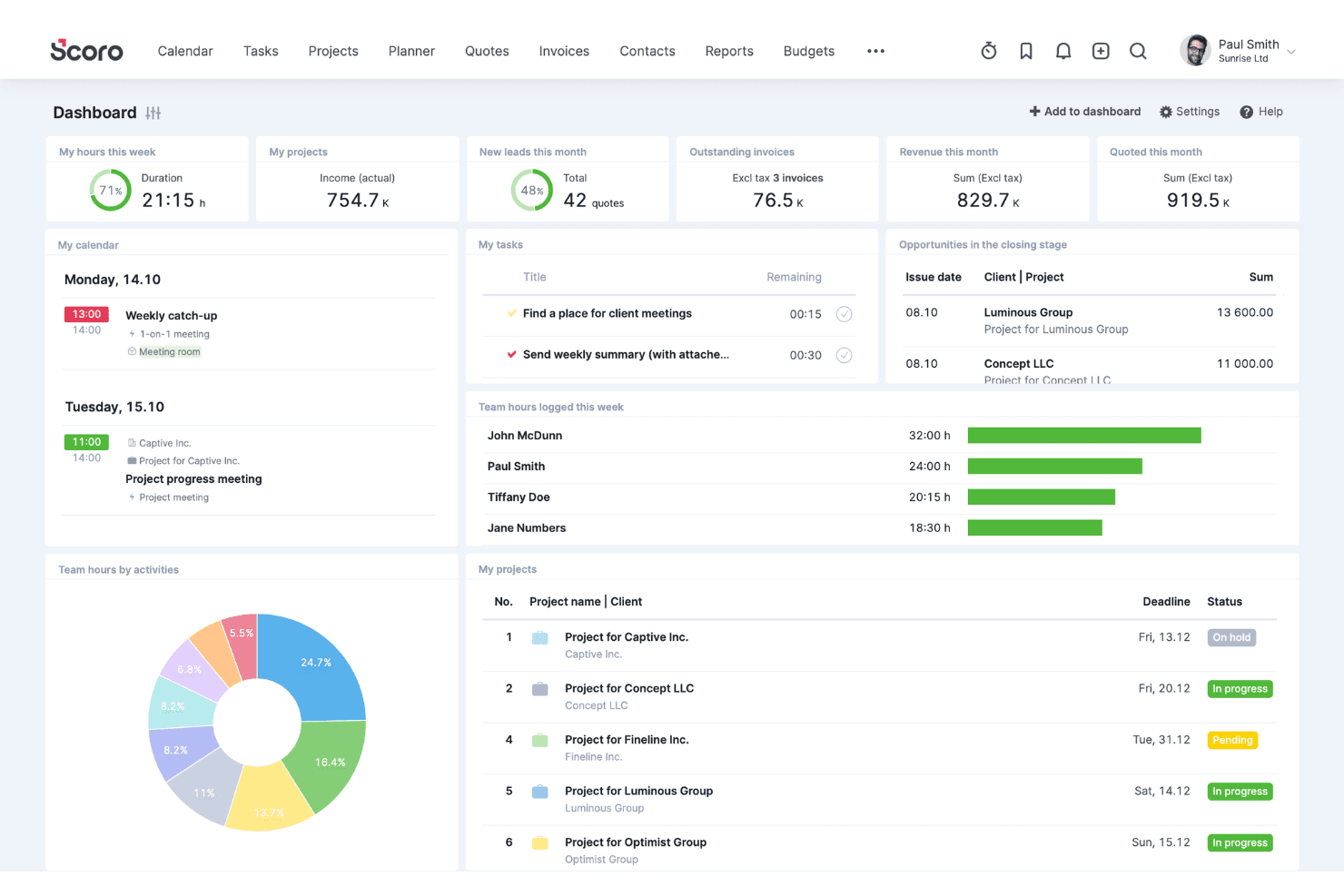
Scoro coordinates clients, sales, projects, resources, time, and billing. Scoro is a professional services automation (PSA) platform that combines project budgeting, resource and labor cost management, time tracking, invoicing, and financial reporting in a single system.
Who Is Scoro Best For?
Scoro is a strong fit for agencies, consultancies, and professional services firms that need to connect project budgets, resource costs, and client billing in one place.
Why I Picked Scoro
I picked Scoro as one of the best because it gives professional services teams a genuinely clear view of project finances from quote to invoice. The Quote Estimation Matrix lets you scope work by role and effort with cost and margin visibility before a project starts, so you're not guessing at profitability. The Budget Health tab then tracks burn against actuals at the service and role level in real time, surfacing overservicing early.
Scoro Key Features
- Multi-currency financial management: Run project finances in multiple currencies with entity-level reporting and group-level consolidation for international operations.
- Retainer budget automation: Set up recurring retainer budgets with automated invoicing cycles to manage ongoing client engagements without manual overhead.
- Revenue recognition and WIP reporting: Track unbilled work and allocate revenue across billing periods to support accurate, period-based financial reporting.
- Role-based rate cards: Assign different cost and billing rates by team role, with support for multiple price lists across clients or project types.
Scoro Integrations
Scoro offers native integrations with QuickBooks Online, Sage Intacct, and Stripe, plus integrations with Xero, Exact, and Salesforce. It also provides a JSON REST API for custom connections and supports Zapier.
Pros and Cons
Pros:
- Automates retainer and recurring budget cycles
- Supports multi-currency project financial management
- Tracks project margins and burn in real time
Cons:
- No native support for earned value management
- Approval workflows only on highest-tier plan
 Best for construction projects
- Free trial + free demo available
- From $149/month
Visit WebsiteCustomer Rating:4.5/5
Knowify supports job costing and project tracking for construction teams. Knowify is a project management software tailored for construction businesses needing tools for job costing and project tracking. It serves contractors and subcontractors by providing features that optimize project management and budgeting.
Why I picked Knowify: It is particularly well-suited for construction projects, offering features that integrate job costing with project management. Your team can use Knowify to track project budgets and timelines.
The platform's contract management and invoicing capabilities ensure smooth financial operations. Knowify's focus on the construction industry makes it a valuable asset for managing complex projects.
Standout features & integrations:
Features include job costing, contract management, and invoicing tools. These features help you manage construction projects and finances. Knowify also offers project tracking to keep your team informed about progress and deadlines.
Integrations include QuickBooks Online, Zapier, Xero, Stripe, PayPal, Docusign, Google Workspace, Outlook, Dropbox, and Slack.
Pros and Cons
Pros:
- Supports multiple invoicing methods
- Tools for creation proposals, bids, and estimates
- Real-time job costing tools for tracking against project budgets
Cons:
- QuickBooks dependency
- Limited options for creating highly customized reports
Learn more about Knowify: Best for small to medium teams
- Free plan available; 14-day free trial
- From $3/user/month
Visit WebsiteCustomer Rating:4.4/5
Project Insight helps small teams manage tasks, budgets, and resources. Project Insight is a project management software designed for small to medium-sized teams needing project planning and execution tools. It helps manage tasks, resources, and budgets, making it ideal for teams looking for a broad project management solution.
Why I picked Project Insight: Project Insight is particularly well-suited for small to medium teams, offering features that facilitate efficient project management. Your team can benefit from its task management and resource allocation capabilities.
Its intuitive interface helps you track project progress and deadlines. Project Insight's focus on providing tools for smaller teams ensures that you have the resources needed to succeed without unnecessary complexity.
Standout features & integrations:
Features include task management, resource allocation, and deadline tracking. These features help your team stay organized and meet project goals. Project Insight also offers reporting tools to keep you informed about project status.
Integrations include QuickBooks, Salesforce, Microsoft Project, Jira, Slack, Google Drive, Box, Microsoft Teams, SharePoint, and Dropbox.
Pros and Cons
Pros:
- Client view portal for sharing status, documents, and approvals with clients
- Integrated time tracking and expense tools
- Customizable collaborative views for task management
Cons:
- Dated user interface
- Cumbersome setup for advanced security permissions
Learn more about Project Insight:

Accelo unifies project tracking and client management for service teams. Accelo is a business management software tailored for service businesses needing project management and client relationship tools. It helps teams organize operations and manage client interactions.
Why I picked Accelo: Accelo is particularly suited for service businesses, offering features that integrate project management with client relationship management. Your team can use Accelo to track billable hours and manage client communications with ease.
Accelo’s automatic time tracking ensures accurate billing and resource allocation. Its focus on service-oriented features makes it ideal for businesses that rely heavily on client interactions.
Standout features & integrations:
Features include automatic time tracking, client communication management, and billing tools. These features help you manage projects and client relationships. Accelo also offers project planning capabilities to keep projects on track.
Integrations include QuickBooks, Xero, Microsoft 365, Google Workspace, HubSpot, Zendesk, Mailchimp, Gusto, and Salesforce.
Pros and Cons
Pros:
- Detailed project planning features
- Integrates billing and project management
- 360-degree client view
Cons:
- Mixed experiences reported with customer service
- Difficult to locate certain functions
Learn more about Accelo: Best for cost management
- 14-day free trial + free demo available
- From $9/user/month (billed annually)

Birdview PSA manages project costs, resources, and timelines for teams. Birdview PSA is a professional services automation software aimed at businesses needing project cost management solutions. It helps teams manage project budgets, resources, and timelines.
Why I picked Birdview PSA: Birdview PSA excels in cost management, providing tools that help your team maintain control over project expenses. Features like budget tracking and expense forecasting ensure you stay within financial limits.
The platform's resource management capabilities enable oversight of team member allocations. Birdview PSA's focus on financial oversight makes it a valuable tool for managing project costs.
Standout features & integrations:
Features include budget tracking, expense forecasting, and resource management. These features help you keep projects on budget and allocate resources. Birdview PSA also offers timeline management to ensure projects are completed on schedule.
Integrations include Salesforce, QuickBooks, Adobe, Microsoft Teams, Jira, SharePoint, HubSpot, and Outlook.
Pros and Cons
Pros:
- Detailed expense forecasting
- Time tracking and expense approval workflows
- Integrated cost monitoring tools
Cons:
- Integration complexity likely requires support
- Complex features take time to master
Learn more about Birdview PSA:

Smartsheet offers budgeting and collaboration tools for project teams. Smartsheet is a work management platform designed for teams needing project budgeting and collaboration tools. It serves various industries by offering solutions for project and portfolio management.
Why I picked Smartsheet: Smartsheet excels in cloud support, allowing your team to access project data and collaborate from anywhere. Features like real-time collaboration and workflow automation enhance its usability for remote teams.
The platform integrates with a range of applications, ensuring your team stays connected. Smartsheet's focus on security and efficiency makes it a reliable choice for managing projects online.
Standout features & integrations:
Features include project dashboards, automated workflows, and real-time collaboration tools. These help you keep track of project progress and make adjustments as needed. Smartsheet also offers AI capabilities to enhance decision-making and efficiency.
Integrations include Microsoft Teams, Google Workspace, Slack, Dropbox, Salesforce, Jira, Docusign, Box, Tableau, and Adobe Creative Cloud.
Pros and Cons
Pros:
- Extensive integration ecosystem
- High availability and disaster recovery
- AWS partnership that leverages enterprise-grade support
Cons:
- Feature-gated plans
- No automatic autosave
Learn more about Smartsheet: Best for customizable dashboards
- Free plan available; 14-day free trial
- From $10/user/month (billed annually)
Visit WebsiteCustomer Rating:4.3/5
Wrike centralizes task management and collaboration for project teams. Wrike is a versatile project management tool designed for teams across various industries. It helps manage tasks, projects, and collaborations, providing a centralized platform for project planning and execution.
Why I picked Wrike: Known for its customizable dashboards, Wrike lets you tailor your workspace to fit your team's needs. You can easily modify views to track project progress and priorities.
Features like time tracking and workload management enhance its functionality. Wrike's flexibility in dashboard customization ensures that you have the information you need at your fingertips.
Standout features & integrations:
Features include time tracking, workload management, and Gantt charts. These features help you plan and monitor projects effectively. With Wrike, you can also manage resources and set project milestones.
Integrations include Microsoft Teams, Slack, Google Drive, Dropbox, Salesforce, Jira, Adobe Creative Cloud, Box, GitHub, and Zendesk.
Pros and Cons
Pros:
- Advanced planning tools, including Gantt charts and workload views
- Diverse visualization options with data widgets
- Highly customizable dashboards
Cons:
- Complicated interface
- Missing built-in time tracking in lower tiers
 Best for project resource reconciliation
- Free demo available
- From $20/user/month
Visit WebsiteCustomer Rating:4.5/5
BigTime's dashboard shows real-time project profitability across your entire portfolio. BigTime is a professional services automation (PSA) platform designed to bridge the gap between project delivery and financial oversight. It provides CFOs and finance leaders with a unified environment to manage time tracking, complex billing, and resource allocation in one ecosystem.
Why I picked BigTime: I chose BigTime because it excels at reconciling resource costs with project budgets. While many tools focus on task completion, BigTime links every hour logged directly to your billing logic and margin targets. This ensures that you aren't just seeing if a project is on time, but if the current staffing model is actually protecting your bottom line.
Standout features & integrations:
Features include multi-entity budgeting, WIP reporting, skills-based resource leveling, and revenue projection AI.
Integrations include QuickBooks, Sage Intacct, Salesforce, HubSpot, Jira, Slack, Zapier, Lacerte, and more.
Pros and Cons
Pros:
- Automated invoice generation workflows
- Granular project profitability insights
- Highly flexible billing rate logic
Cons:
- Clunky mobile expense entry
- Intensive initial setup process
Learn more about BigTime: Best for agency profit margin tracking
- 14-day free trial
- From $10/user/month
Visit WebsiteCustomer Rating:4.6/5
Productive's profitability view monitors real-time billable hours and expenses. Productive is an all-in-one agency management platform designed to integrate project delivery with deep financial oversight. It serves professional service firms—like creative agencies and IT consultancies—by linking resource scheduling directly to budget burn and revenue forecasting.
Why I picked Productive: I chose Productive because it calculates your real-time profit margins by weighing billable rates against your internal overhead and staff costs. This makes it a standout choice for agency leaders who need to know exactly which clients or project types are the most lucrative.
Standout features & integrations:
Features include multi-model budgeting (fixed price, hourly, or retainers), automated heatmaps for resource availability, and a built-in sales CRM that converts deals directly into project budgets.
Integrations include QuickBooks Online, Xero, Slack, Jira, Google Calendar, Microsoft Outlook, Zapier, Memtime, and HubSpot.
Pros and Cons
Pros:
- Easy transition from sales to project
- Supports recurring retainer management
- Real-time margin and profitability tracking
Cons:
- Minimum three-user seat requirement
- Steep learning curve for reporting
Learn more about Productive: 10Best for construction management
Procore
- Free demo available
- Pricing upon request
Visit WebsiteCustomer Rating:4.5/5
Procore's budget dashboard monitors real-time cost predictable across multiple job sites. Procore is an expansive construction management platform designed to connect field teams with office-based financial controllers. It serves general contractors and large-scale developers by providing a centralized source of truth for project health, safety, and multi-million dollar budgets.
Why I picked Procore: I chose Procore because it is the industry standard for managing high-stakes construction financials. It excels at linking field updates, like labor hours and material deliveries, directly to the master budget, allowing you to see committed versus actual costs in real-time. This level of granular oversight is critical for enterprise builders who need to mitigate risk across complex, multi-year portfolios.
Standout features & integrations:
Features include real-time cost tracking, automated change order management, and progress-based invoicing tools. These features help you maintain financial transparency and prevent disputes by providing a clear audit trail for every budget adjustment.
Integrations include QuickBooks Online, Sage Intacct, Oracle Primavera, Microsoft Project, Docusign, Bluebeam, Xero, and Salesforce.
Pros and Cons
Pros:
- Enterprise-grade document control
- Supports field-to-office communication
- Unlimited user seats per license
Cons:
- Steep learning curve for admins
- High entry cost
Learn more about Procore:
Related Reviews
Related Reviews
How I Evaluate Project Budgeting Software
I evaluate project budgeting tools in two layers: baseline requirements like EAC tracking and GL sync that every tool must meet, and differentiators that separate the best from the rest.
Core Functionality (Table Stakes For This List)
When I'm selecting tools for my list, I rank each one on a scale from 0 (does not offer the functionality) to 5 (excels in this area) for each core functionality listed below. Then, I calculate the tool's total score into a percentage. Each tool needs to achieve a minimum total score of 65% to be considered for inclusion.
- Project Budget Creation: I look for multi-line budgets broken down by cost categories, labor rates, and expense types—like separating contractor fees from materials on a fixed-fee engagement.
- Budget vs. Actuals Tracking: Real-time variance tracking matters here, especially the ability to drill into transaction-level data when actuals start drifting from plan mid-project.
- Cost Forecasting & EAC: I evaluate whether the tool supports estimate-at-completion and estimate-to-complete calculations, since rolling forecasts are essential for multi-phase projects.
- Resource & Labor Cost Management: Each tool should connect timesheets to budgets with billable and non-billable rate tracking, so you can spot utilization issues before margin erodes.
- Financial Reporting & Dashboards: I check for project-level P&L, burn rate, and margin reports that finance teams can filter and share with stakeholders without manual spreadsheet work.
- Accounting System Integration: The tool should sync with your GL or ERP—whether that's NetSuite, Sage Intacct, QuickBooks, or another platform—to avoid duplicate data entry and reconciliation gaps.
Once I have a list of tools that meet the criteria, I consider what sets each platform apart.
Differentiating Factors (What Sets Vendors Apart)
Here's how I compare and contrast different vendors:
Standout Features
Scenario modeling is a big differentiator—I look for tools that let you run best-case and worst-case budget projections before committing resources to a new project phase. Portfolio-level rollups also matter when you're overseeing dozens of active projects and need a consolidated margin view for leadership reporting. Approval workflows with full audit trails round things out, since multi-tier budget sign-offs and change history logs make a real difference during internal and external audits.
Beyond Features
Industry fit is one of the first things I evaluate—a tool built for professional services firms handles T&M and fixed-fee projects very differently than one designed for construction or software delivery. ERP and tech stack integrations also weigh heavily, since a project budgeting tool that doesn't sync cleanly with your GL creates reconciliation headaches at month-end. I also consider pricing structure, especially whether licensing scales by user count, project volume, or modules, which affects total cost as your portfolio grows.
How to Choose Project Budgeting Software
It’s easy to get bogged down in long feature lists and complex pricing structures. To help you stay focused as you work through your unique software selection process, here’s a checklist of factors to keep in mind:
| Factor | What to Consider |
|---|---|
| FactorScalability | What to ConsiderCan the software grow with your business? Consider if it supports additional users or projects without significant cost increases. Look for solutions that offer flexible pricing tiers or modules. |
| FactorIntegrations | What to ConsiderDoes it work with your current tools? Check if it integrates with your accounting software, CRM, or other essential systems. Look for APIs or pre-built connectors to reduce manual data entry. |
| FactorCustomizability | What to ConsiderCan you tailor the software to fit your workflows? Ensure it allows you to customize dashboards, reports, and fields. Avoid tools with rigid structures that don't align with your processes. |
| FactorEase of use | What to ConsiderIs it intuitive for your team? Test the user interface and navigation. A steep learning curve can slow adoption. Look for user reviews that highlight usability, especially for non-technical staff. |
| FactorImplementation and onboarding | What to ConsiderHow long will it take to get up and running? Assess the vendor's onboarding support, training materials, and resources. Quick implementation reduces downtime and speeds up ROI. |
| FactorCost | What to ConsiderDoes it fit your budget? Consider both upfront and ongoing actual costs, including any hidden fees for support or upgrades. Compare the value offered at each price point. |
| FactorSecurity safeguards | What to ConsiderHow does it protect your data? Verify compliance with industry standards like GDPR or ISO. Check for features like data encryption, user permissions, and regular security audits. |
| FactorSupport availability | What to ConsiderWhat kind of support does the vendor offer? Look for 24/7 support, dedicated account managers, or community forums. Consider the response time and availability of help when issues arise. |
What Is Project Budgeting Software?
Project budgeting software is a tool designed to help teams plan, track, and manage project costs. Professionals like project managers, financial analysts, and team leads typically use these tools to ensure projects stay within budget and that financial goals are met.
Budget tracking, expense forecasting, and resource allocation features help manage costs and provide insights into project finances and financial performance. Overall, these tools offer valuable support in maintaining financial control, making informed decisions, and achieving project success.
Features
When selecting project budgeting software, keep an eye out for the following key features:
- Budget tracking: Allows you to monitor spending against your project budget, ensuring you stay on track financially.
- Expense forecasting: Helps predict future costs based on current spending patterns, aiding in financial planning and decision-making.
- Resource allocation: Manages team and resource assignments to optimize productivity and control costs.
- Customizable dashboards: Let you tailor views and reports to fit your specific project needs, providing relevant insights and real-time reporting at a glance.
- Integration capabilities: Connect with other tools like accounting software and CRMs to simplify data flow and reduce manual entry.
- Time tracking: Monitors hours spent on tasks to improve billing accuracy and project timelines.
- Financial reporting: Generates detailed reports that provide insights into project financial health and performance.
- Multi-currency support: Facilitates budgeting and financial management for projects across different countries and currencies.
- Contract management: Oversees contract terms and conditions, ensuring compliance and financial accountability.
- Security safeguards: Protect sensitive financial data with encryption and ensure compliance with industry standards.
Benefits
Implementing project budgeting software provides several benefits for your team and your business. Here are a few you can look forward to:
- Improved financial control: Budget tracking and expense forecasting help you manage costs and avoid overspending.
- Enhanced decision-making: Customizable dashboards and financial reporting provide insights that inform better business decisions.
- Time efficiency: Integration capabilities and resource allocation reduce manual tasks and refine project management.
- Accurate billing: Time tracking ensures precise billing, helping to maintain an accurate budget and overall project profitability.
- Risk reduction: Contract management and security safeguards protect against financial and compliance risks.
- Global project management: Multi-currency support allows for effective management of international projects and budgets.
Costs & Pricing
Selecting project budgeting software requires an understanding of the various pricing models and plans available. Costs vary based on features, team size, add-ons, and more. The table below summarizes common plans, their average prices, and typical features included in project budgeting software solutions:
Plan Comparison Table for Project Budgeting Software
| Plan Type | Average Price | Common Features |
|---|---|---|
| Plan TypeFree Plan | Average Price$0 | Common FeaturesBasic budget tracking, limited reporting, and community support. |
| Plan TypePersonal Plan | Average Price$5-$12/user/month | Common FeaturesBudget tracking, time tracking, customization options, and basic integrations. |
| Plan TypeBusiness Plan | Average Price$12-$55/user/month | Common FeaturesAdvanced reporting, resource allocation, multi-currency support, and enhanced integrations. |
| Plan TypeEnterprise Plan | Average Price$30+/user/month - Custom pricing | Common FeaturesFull customization, dedicated support, security features, and API access. |
Project Budgeting Software FAQs
Here are some answers to common questions about project budgeting software:
How does project budgeting software integrate with accounting tools?
Project budgeting software often integrates with popular accounting tools like QuickBooks or Xero. This integration helps automate financial data flow and reduces manual entry and errors. It allows your team to sync budgets and expenses directly with your accounting system, ensuring accurate financial reporting.
Can project budgeting software handle multi-currency projects?
Yes, many project budgeting tools support multi-currency projects, which is essential for businesses operating globally. This feature lets you manage budgets in different currencies and automatically converts expenses using real-time exchange rates, helping you maintain financial accuracy across international projects.
What kind of reporting capabilities should I expect?
Look for software that offers customizable reporting features, allowing you to generate detailed financial reports. These reports should provide insights into project budgets, expenses, and resource allocation. The ability to create visual reports helps stakeholders understand financial performance at a glance.
How secure is project budgeting software?
Most project budgeting tools prioritize security by implementing data encryption, user permissions, and regular security audits. It’s important to verify that the software complies with industry standards like GDPR or ISO. This ensures your financial data remains protected from unauthorized access.
How does time tracking work in project budgeting software?
Time tracking in project budgeting software lets you monitor the hours spent on each task. This feature helps in accurate billing and resource management, ensuring projects stay on schedule and within budget. It provides insights into team productivity and project timelines.
Is customer support available for setup and troubleshooting?
Yes, many providers offer customer support, including live chat, email, and phone assistance. Some also provide onboarding resources like webinars and training videos. Access to responsive support ensures you can resolve any issues quickly and make the most of your software.