

Los 10 mejores sistemas ERP para empresas emergentes analizados en 2026

Mejor ERP para startups: lista de preselección


Dirigir una startup no es tarea fácil y, cuando tus sistemas están descentralizados, solo se suma al caos. A medida que crecen las transacciones y evolucionan las necesidades de informes, las ineficiencias comienzan a acumularse y, aunque un ERP para startups es el siguiente paso lógico, encontrar el software adecuado puede parecer otro quebradero de cabeza.
Como controller financiero, entiendo lo importante que es encontrar un equilibrio entre funcionalidad, escalabilidad y facilidad de uso, especialmente cuando tu equipo es reducido y cada dólar cuenta.
Por eso elaboré esta lista. Probé y revisé personalmente cada ERP para startups, centrándome en las funciones financieras principales, los datos en tiempo real, la experiencia de usuario y la flexibilidad de integración. Esta selección está diseñada para ayudarte a encontrar un sistema que funcione ahora y crezca contigo. Empecemos.
Por qué confiar en nuestras recomendaciones de software
Nuestras reseñas reflejan nuestro criterio independiente, no un discurso de ventas. Descubra cómo mantenemos la transparencia.
Para esta guía, evaluamos las herramientas mediante pruebas prácticas e investigación independiente, puntuando las herramientas según nuestros criterios de selección.
Nuestras reseñas reflejan nuestro criterio editorial humano, no un discurso de ventas.
Resumen de los mejores ERP para startups
Este cuadro comparativo resume los detalles de precios de mi selección de los mejores ERP para startups para ayudarte a encontrar el más adecuado para tu presupuesto y las necesidades de tu empresa.
| Tool | Best For | Trial Info | Price | ||
|---|---|---|---|---|---|
| 1 | Ideal para acceso basado en la nube | Demostración gratuita disponible | Precio bajo solicitud | Website | |
| 2 | Mejor para empresas manufactureras | Demostración gratuita disponible | Precios bajo solicitud | Website | |
| 3 | Mejor para pequeñas empresas | Demostración gratuita disponible | Precios bajo solicitud | Website | |
| 4 | Mejor para empresas orientadas a proyectos | Demostración gratuita disponible | Precio a consultar | Website | |
| 5 | Ideal para la integración con Office 365 | Prueba gratuita de 30 días disponible | Desde $80/usuario/mes | Website | |
| 6 | Mejor para la gestión de activos | Demo gratis disponible | Precio bajo consulta | Website | |
| 7 | Ideal para automatización impulsada por IA | Demo gratuita disponible | Precio bajo solicitud | Website | |
| 8 | Mejor para análisis en tiempo real | Demo gratuita disponible | Precio bajo consulta | Website | |
| 9 | Ideal para flexibilidad de código abierto | Prueba gratuita + plan gratuito disponible | Desde $31.10/usuario/mes (facturado anualmente) | Website | |
| 10 | Ideal para empresas de distribución | Demostración gratuita disponible | Precio bajo solicitud | Website |
Análisis de los mejores ERP para startups
A continuación encontrarás mis resúmenes detallados de los mejores ERP para startups que llegaron a mi lista de preselección. Mis análisis ofrecen una visión profunda de las funciones principales, las ventajas & desventajas, las integraciones y los casos de uso ideales de cada herramienta para ayudarte a encontrar la más adecuada para ti.
Ideal para acceso basado en la nube

Acumatica es un sistema ERP basado en la nube diseñado para empresas medianas de sectores como manufactura, distribución y comercio minorista. Ayuda a las empresas a gestionar finanzas, inventario y relaciones con clientes de manera eficiente.
Por qué elegí Acumatica: Acumatica está construido completamente sobre una arquitectura moderna en la nube, lo que permite que tu equipo trabaje desde cualquier lugar sin sacrificar velocidad ni integridad de los datos. El software ofrece la flexibilidad que la mayoría de las startups requieren, con acceso en tiempo real a finanzas, operaciones y datos de clientes desde cualquier dispositivo. A diferencia de los sistemas heredados con acceso remoto poco intuitivo, la plataforma basada en navegador de Acumatica también se escala fácilmente a medida que tu empresa crece, con paneles de control basados en roles y herramientas de colaboración integradas que mantienen a todos alineados e informados.
Funciones destacadas e integraciones:
Funciones incluyen información de producción en tiempo real, gestión financiera avanzada e integración con comercio electrónico. Tu equipo también puede beneficiarse de la solución de Gestión de Servicios Profesionales, pensada para empresas orientadas a proyectos.
Integraciones incluyen QuickBooks, Microsoft Dynamics, Salesforce, Shopify, Avalara, Magento, HubSpot, Docusign, Office 365 y PayPal.
Pros and Cons
Pros:
- Licencias flexibles
- Información en tiempo real
- Flexibilidad basada en la nube
Cons:
- Capacidades limitadas fuera de línea
- Implementación compleja para algunos usuarios

SYSPRO
Mejor para empresas manufactureras

SYSPRO es un sistema de planificación de recursos empresariales diseñado para los sectores de manufactura y distribución. Ayuda a las empresas a gestionar operaciones, finanzas y procesos de la cadena de suministro de manera eficiente.
Por qué elegí SYSPRO: SYSPRO está diseñado específicamente para gestionar la complejidad de las operaciones de producción sin sobrecargar a los equipos más pequeños. Ofrece una funcionalidad avanzada en áreas como el control de inventario, la planificación de necesidades de materiales (MRP) y la programación de piso de producción, aspectos que a menudo faltan en los ERP más genéricos. El software también ofrece un enfoque modular, permitiéndote ampliar capacidades a medida que tus procesos evolucionan.
Características destacadas e integraciones:
Características incluyen una gestión avanzada de inventarios, que te ayuda a rastrear y optimizar los niveles de stock. La funcionalidad de planificación de la producción también facilita la programación y asignación de recursos.
Integraciones incluyen Microsoft Office, Salesforce, Sage, Shopify, Magento, Amazon, EDI, CADLink, Crystal Reports y ABBYY.
Pros and Cons
Pros:
- Fuerte control de producción
- Flujos de trabajo personalizables
- A medida para manufactura
Cons:
- Se requieren actualizaciones frecuentes
- Curva de aprendizaje pronunciada

Mejor para pequeñas empresas
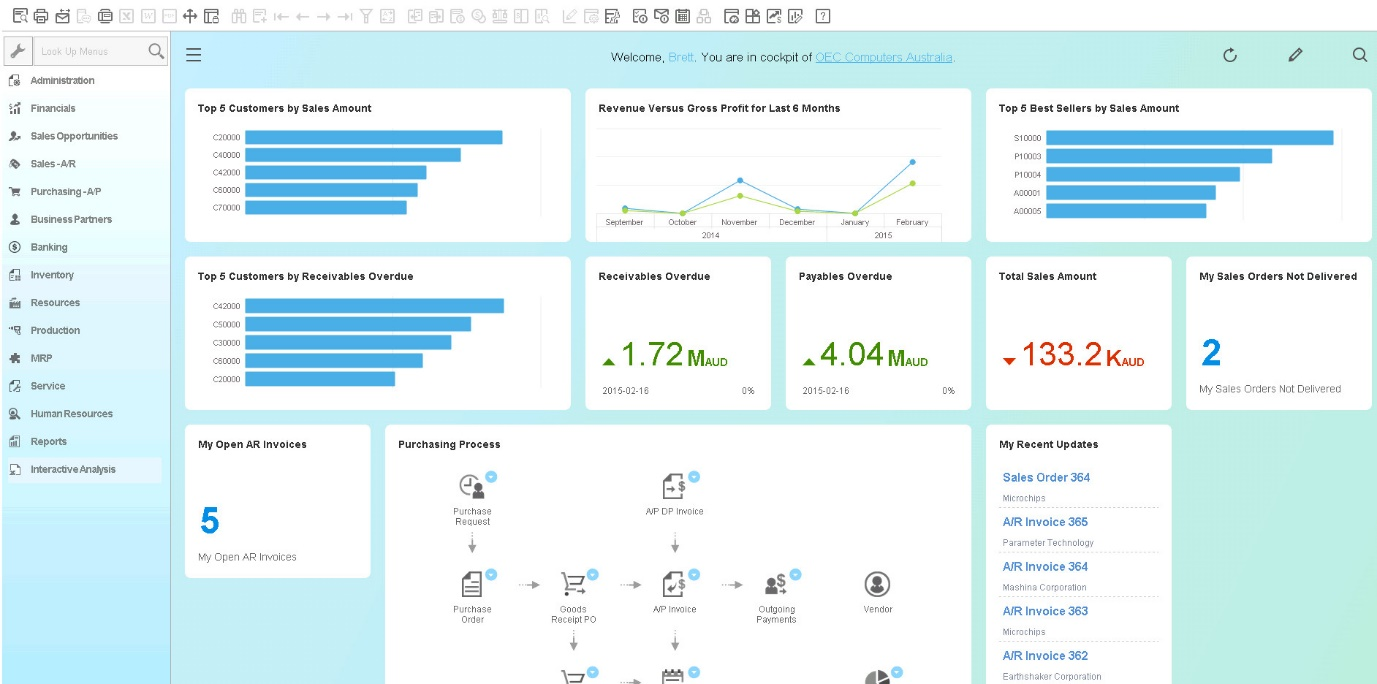
SAP Business One es una solución ERP diseñada para pequeñas y medianas empresas, que ayuda a gestionar las finanzas, ventas y operaciones de manera eficiente. Está adaptada para respaldar negocios en crecimiento al mejorar sus procesos operativos.
Por qué elegí SAP Business One: SAP Business One ofrece capacidades a nivel empresarial en un paquete accesible para startups. Lo que lo hace ideal para emprendimientos es su flexibilidad para escalar a medida que el negocio crece, mientras sigue siendo lo suficientemente liviano como para implementarse sin un departamento de TI interno. Con perspectivas en tiempo real, sólidas opciones de integración y una trayectoria comprobada ayudando a que equipos pequeños se organicen rápidamente, SAP Business One es una base sólida para construir operaciones más inteligentes desde el primer día.
Funciones destacadas e integraciones:
Funciones incluyen herramientas de gestión financiera que ayudan a optimizar los procesos contables. La función de gestión de ventas respalda las interacciones con los clientes y el procesamiento de pedidos. Además, su gestión de inventario asegura un manejo eficiente del stock y la logística.
Integraciones incluyen Microsoft Office, Salesforce, Shopify, Magento, QuickBooks, PayPal, Amazon, FedEx, UPS y Adobe.
Pros and Cons
Pros:
- Adaptado para pequeñas empresas
- Admite seguimiento de ventas
- Herramientas financieras completas
Cons:
- Requiere actualizaciones regulares
- La configuración puede ser compleja

Deltek
Mejor para empresas orientadas a proyectos

Deltek es una solución ERP diseñada principalmente para empresas orientadas a proyectos, como las de arquitectura, ingeniería y consultoría. Ayuda a gestionar el ciclo de vida de los proyectos, las finanzas y la planificación de recursos de manera efectiva.
Por qué elegí Deltek: Deltek ofrece herramientas especializadas para negocios basados en proyectos, ayudando a los equipos a gestionar los proyectos de principio a fin. A diferencia de los ERP generales, Deltek brinda a las startups en áreas como consultoría, ingeniería o servicios creativos las herramientas para monitorear la rentabilidad de los proyectos en tiempo real, asignar el personal de manera eficiente y cumplir con los requisitos del cliente. Además, su enfoque en la inteligencia de proyectos facilita que las empresas jóvenes crezcan sin perder el control sobre los márgenes o plazos.
Funcionalidades destacadas e integraciones:
Funcionalidades incluyen contabilidad de proyectos para agilizar tus procesos de facturación y finanzas. La función de gestión de recursos te ayuda a asignar y optimizar la carga de trabajo de tu equipo. Además, el seguimiento de tiempo y gastos garantiza una facturación precisa al cliente.
Integraciones incluyen Microsoft Outlook, Salesforce, QuickBooks, Microsoft Excel, Adobe, Oracle, SAP, Workday, Slack y HubSpot.
Pros and Cons
Pros:
- Funciones de programación de recursos
- Informes detallados de proyectos
- Seguimiento de tiempo sólido
Cons:
- Opciones de personalización limitadas
- Puede ser complejo de implementar

Ideal para la integración con Office 365

Microsoft Dynamics 365 Business Central es una solución ERP diseñada para empresas pequeñas y medianas. Ayuda a gestionar las finanzas, las ventas y las operaciones, ofreciendo una visión completa de los procesos empresariales.
Por qué elegí Microsoft Dynamics 365 Business Central: Microsoft Dynamics 365 Business Central se integra de forma nativa y sin fisuras en todo el ecosistema de Microsoft, por lo que tu equipo puede trabajar en el entorno al que ya está acostumbrado. Puedes enviar cotizaciones, gestionar facturas y aprobar flujos de trabajo directamente desde Outlook sin cambiar de plataforma, mientras que los datos financieros en tiempo real fluyen directamente a Excel para su análisis e informes instantáneos.
Características y conectores destacados:
Características incluyen herramientas detalladas de gestión financiera que te ayudan a supervisar los procesos contables. La función de gestión de ventas y servicios facilita las interacciones con clientes y el procesamiento de pedidos. Además, sus herramientas de gestión de la cadena de suministro aseguran un control eficiente del inventario y la logística.
Integraciones incluyen Microsoft Office 365, Power BI, Shopify, PayPal, Docusign, LinkedIn, Microsoft Teams, Azure, Salesforce y Outlook.
Pros and Cons
Pros:
- Escalable para empresas en crecimiento
- Funciones mejoradas de colaboración
- Herramientas financieras completas
Cons:
- No es ideal para quienes no usan el ecosistema Microsoft
- Complejidad en la configuración inicial

IFS
Mejor para la gestión de activos

IFS es una solución ERP diseñada para industrias como aeroespacial, defensa y manufactura, centrada en la gestión de activos y servicios. Ayuda a gestionar operaciones, proyectos y cadenas de suministro, ofreciendo valor a través de un seguimiento detallado de activos y mantenimiento.
Por qué elegí IFS: IFS es ideal para empresas que gestionan activos de alto valor, ya sea en manufactura, energía o servicios de campo. Ofrece herramientas avanzadas para el seguimiento de ciclos de vida de activos, mantenimiento predictivo y optimización de costos, todo dentro de un entorno ERP unificado. A diferencia de muchos sistemas sobrecargados, IFS es lo suficientemente flexible como para implementar solo lo que necesitas, evitando sobrecostos innecesarios y brindando visibilidad en tiempo real del rendimiento de los activos y el retorno de inversión.
Funciones y conexiones destacadas:
Funciones incluyen programación avanzada de mantenimiento para mantener el equipo funcionando eficientemente. La función de monitoreo de activos en tiempo real proporciona información sobre el rendimiento y estado de los activos. Además, sus herramientas de gestión de proyectos apoyan la planificación y ejecución en entornos complejos.
Conexiones incluyen Microsoft Azure, Microsoft Dynamics, Salesforce, SAP, Oracle, IBM Maximo, Google Workspace, Autodesk, QuickBooks y Slack.
Pros and Cons
Pros:
- Soporta gestión de proyectos complejos
- Monitoreo de activos en tiempo real
- Programación detallada de mantenimiento
Cons:
- Se requieren actualizaciones de software frecuentes
- Puede ser complejo de implementar

Fulfil
Ideal para automatización impulsada por IA

Fulfil es una plataforma nativa de IA creada para startups de comercio electrónico y ventas al por mayor que necesitan escalar rápidamente sin añadir complejidad operativa. Centraliza las finanzas, inventario, fabricación y cumplimiento en un solo lugar, brindándote una única fuente de información confiable para todo tu negocio. Con visibilidad en tiempo real y automatización integrada en su diseño, Fulfil ayuda a las empresas en etapas tempranas a moverse rápido mientras mantienen el control sobre el flujo de caja, los pedidos y la producción.
Por qué elegí Fulfil: Elegí Fulfil porque proporciona la automatización y velocidad que las startups necesitan cuando cada recurso cuenta. Sus flujos de trabajo impulsados por IA te ayudan a eliminar tareas manuales como la elaboración de informes, conciliaciones y actualización de pedidos, para que puedas centrarte en el crecimiento y no en la administración. También me gusta que ofrece una gestión financiera robusta con información detallada a nivel de transacciones, lo que significa que puedes tomar decisiones seguras y respaldadas por datos en cualquier momento. Para startups que fabrican o personalizan productos, su seguimiento de producción integrado y soporte EDI hacen que las operaciones complejas sean muy sencillas.
Principales características e integraciones de Fulfil:
Características incluyen generación de informes impulsada por IA, gestión automatizada de pedidos y almacenes, y seguridad compatible con SOC 1/SOC 2 que ofrece permisos granulares y autenticación multifactor. El sistema también ofrece soporte para transacciones EDI facilitando la colaboración B2B eficiente e integra supervisión de fabricación para startups que ofrecen productos personalizados.
Integraciones incluyen Amazon Shipping, DHL, FedEx, UPS, PayPal, Stripe, Amazon, Shopify y eBay, así como socios principales de contabilidad y logística como Avalara y Gusto.
Pros and Cons
Pros:
- La IA automatiza flujos de trabajo diarios
- Potentes herramientas de visibilidad financiera
- Implementación rápida
Cons:
- Detalles de precios públicos limitados
- Requiere un proceso de incorporación para configuración


SAP S/4 HANA es una solución ERP diseñada para empresas que buscan procesamiento de datos y análisis en tiempo real. Atiende a empresas de diversos sectores, ayudando a gestionar eficientemente las finanzas, operaciones y cadenas de suministro.
Por qué elegí SAP S/4 HANA: SAP S/4 HANA ofrece una base de datos en memoria que procesa grandes volúmenes de datos al instante, eliminando los retrasos por lotes comunes en los sistemas ERP tradicionales. Para startups que necesitan información rápida para adaptarse ágilmente—ya sea para monitorear flujo de caja, tendencias de clientes o movimientos de inventario—S/4HANA proporciona datos accionables en tiempo real, directamente dentro de los flujos de trabajo.
Funciones destacadas e integraciones:
Funciones incluyen análisis predictivo que te ayudan a anticipar tendencias y resultados. Las herramientas de gestión financiera permiten informes avanzados y cumplimiento normativo. Además, la funcionalidad de gestión de la cadena de suministro optimiza la logística y las operaciones.
Integraciones incluyen Microsoft Office, Salesforce, Amazon Web Services, Google Cloud, Microsoft Azure, Slack, ServiceNow, Concur, Ariba y SuccessFactors.

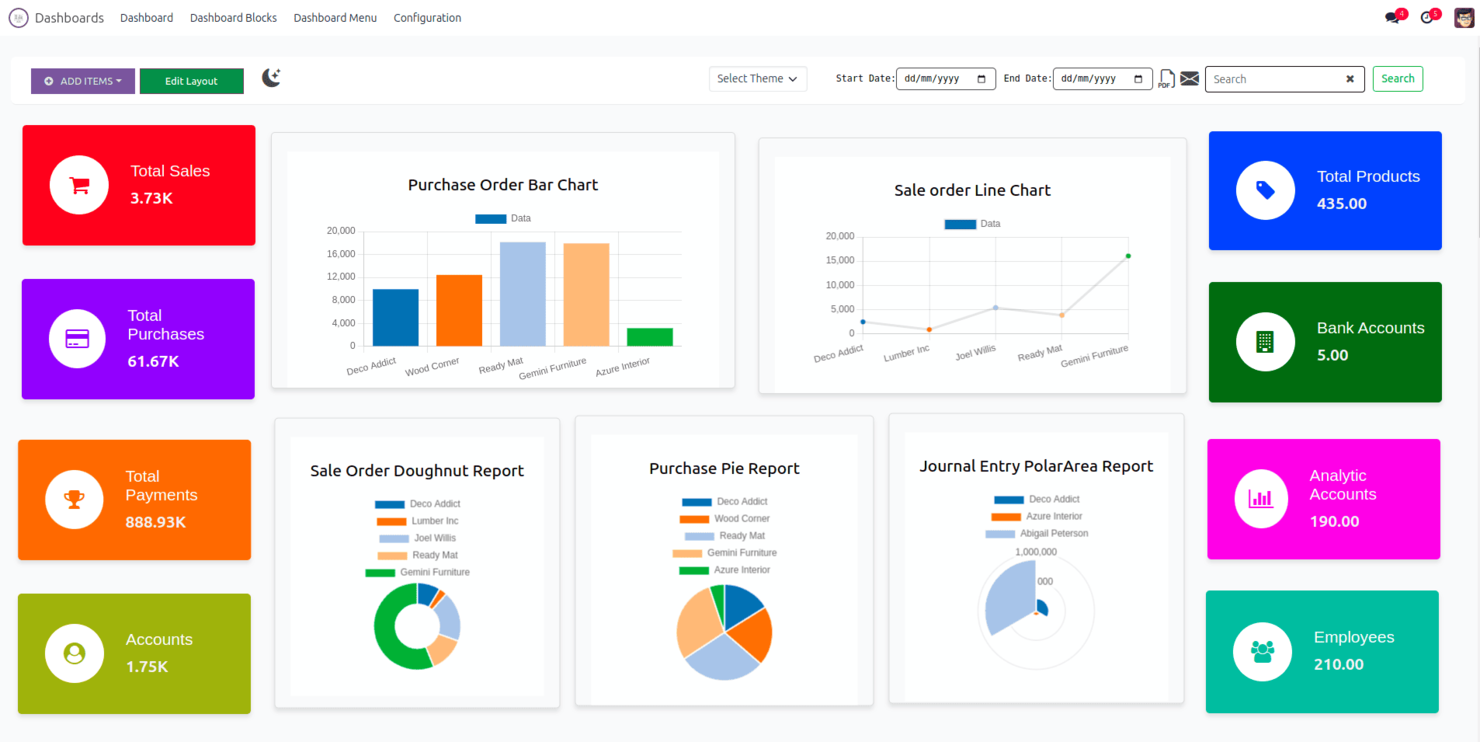
Odoo es un sistema ERP de código abierto diseñado para empresas de todos los tamaños, que ofrece una amplia gama de aplicaciones empresariales. Admite funciones como CRM, contabilidad y gestión de inventario, proporcionando una plataforma personalizable para diversas necesidades empresariales.
Por qué elegí Odoo: Odoo te da control total sin atarte a licencias caras ni funcionalidades rígidas. A medida que tu startup evoluciona, puedes comenzar con módulos básicos como facturación o CRM, y luego expandirte a inventario, fabricación o RRHH según tus necesidades, todo mientras personalizas los flujos de trabajo y las interfaces para adaptarlos a tus procesos. Su naturaleza de código abierto significa que no estás atado a la hoja de ruta de un proveedor; puedes adaptar, integrar o escalar según las demandas de tu negocio.
Características destacadas e integraciones:
Características incluyen un sistema CRM avanzado que ayuda a gestionar eficazmente las relaciones con los clientes. La función de contabilidad proporciona herramientas para la gestión financiera y la elaboración de informes. Además, su sistema de gestión de inventario garantiza un control eficiente del stock y la logística.
Integraciones incluyen PayPal, eBay, Amazon, QuickBooks, WooCommerce, Shopify, Magento, Microsoft Office 365, Google Workspace y Slack.
Pros and Cons
Pros:
- Amplio conjunto de funciones para todos los tipos de negocios
- Escalable para diferentes tamaños de empresas
- Personalización de código abierto
Cons:
- La personalización puede requerir mucho tiempo
- Funcionalidad limitada de forma predeterminada

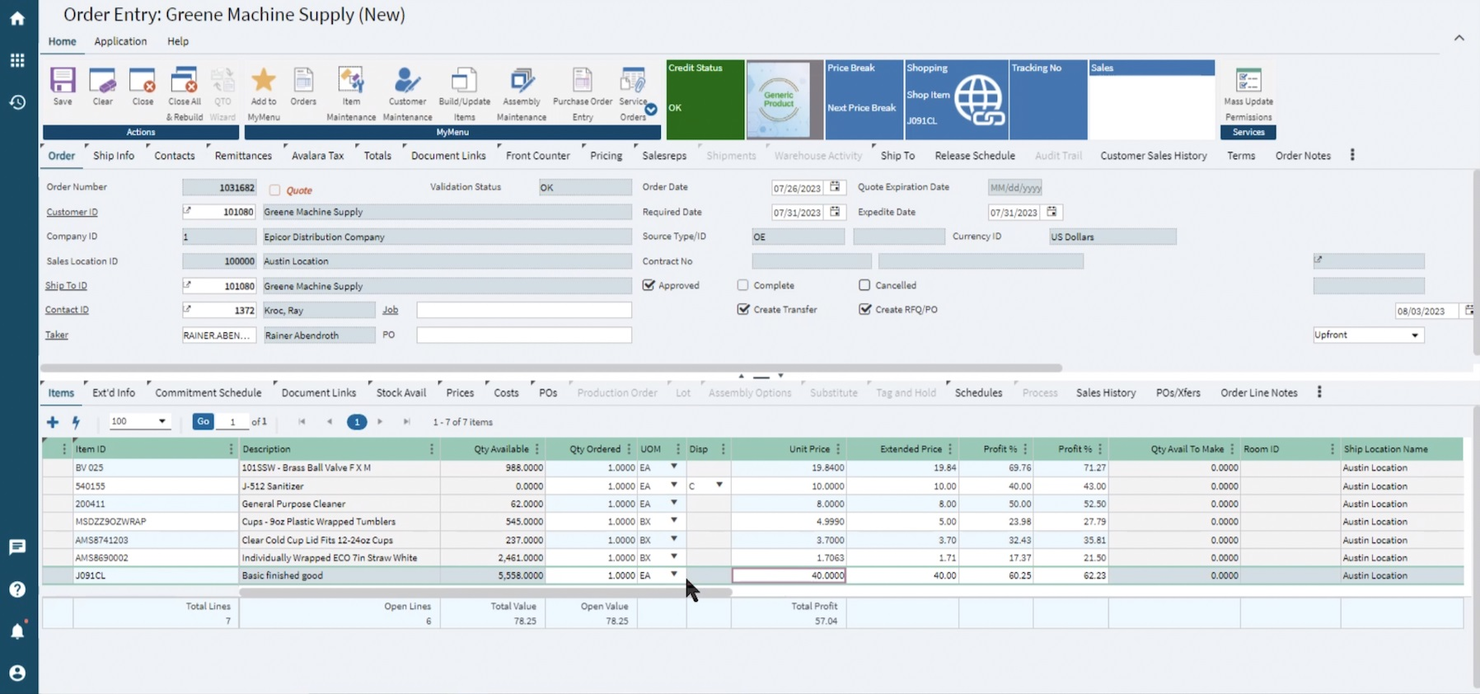
Epicor Prophet 21 es una solución ERP diseñada para empresas de distribución, compatible con funciones como la gestión de inventario y el procesamiento de pedidos. Ayuda a las empresas a optimizar su cadena de suministro y mejorar el servicio al cliente.
Por qué elegí Epicor Prophet 21: Epicor Prophet 21 ofrece herramientas especializadas para la distribución, incluidas funciones avanzadas de gestión de inventario y cumplimiento de pedidos. Su arquitectura basada en la nube permite la escalabilidad, mientras que las herramientas integradas del sector, como la previsión de la demanda, la gestión de inventario en varias ubicaciones y los precios específicos para cada cliente, ayudan a evitar el caos de los sistemas descentralizados. Esto lo hace especialmente valioso para equipos reducidos que necesitan automatización y análisis sin contratar un departamento de TI completo.
Funciones e integraciones destacadas:
Las funciones incluyen el procesamiento de pedidos, que permite cumplirlos de forma rápida y precisa. Además, sus análisis en tiempo real ofrecen información sobre el rendimiento de su cadena de suministro.
Las integraciones incluyen Salesforce, Microsoft Dynamics, Amazon Web Services, Shopify, Magento, PayPal, QuickBooks, Microsoft Office, Avalara y Docusign.
Pros and Cons
Pros:
- Mejora el servicio al cliente
- Admite logística compleja
- Información en tiempo real sobre la cadena de suministro
Cons:
- Requiere capacitación para los nuevos usuarios
- La configuración puede llevar tiempo
Otros ERP para startups
Estas son algunas opciones adicionales de ERP para startups que no llegaron a mi lista de preselección, pero que vale la pena consultar:
- ECI Macola
Ideal para automatización en manufactura
- Unit4
Ideal para organizaciones centradas en las personas
- Priority
Mejor para empresas medianas


Cómo evalúo los ERP para Startups
Cuando una startup en etapa semilla necesita pasar de QuickBooks o una empresa en Serie B se está preparando para una auditoría, evalúo las opciones de ERP en dos niveles: funcionalidad básica y lo que diferencia a cada herramienta.
Funcionalidad Básica (Requisitos Fundamentales para Esta Lista)
Al seleccionar las herramientas para mi lista, califico cada una en una escala del 0 (no ofrece la funcionalidad) al 5 (sobresale en esta área) para cada funcionalidad básica que detallo a continuación. Después, calculo el puntaje total de la herramienta en porcentaje. Cada herramienta debe lograr un puntaje mínimo total de 65% para ser considerada para su inclusión.
- Gestión Financiera Central: Verifico que tenga libro mayor completo, cuentas por pagar, cuentas por cobrar e informes financieros. Por ejemplo, poder generar un balance para reuniones de junta sin exportar a Excel.
- Soporte Escalable para Múltiples Entidades: A medida que las startups crecen, busco eliminaciones intercompañía automáticas y consolidación multi-divisa entre subsidiarias.
- Implementación Adaptada para Startups: Plataformas cloud nativas con implementación rápida son clave. Analizo si un equipo financiero reducido puede estar operativo en semanas, no en trimestres.
- Módulos Operativos Integrados: Busco módulos integrados más allá de la contabilidad—inventario, compras, gestión de pedidos—para que el ERP funcione como un verdadero sistema operativo.
- Integraciones Nativas y API: El ecosistema de una startup cambia rápido. Evalúo conectores preconstruidos para herramientas como Stripe, Gusto, Salesforce y Shopify, además de acceso abierto por API.
- Reportes Automatizados y Dashboards: Aquí entran en juego los dashboards en tiempo real y el seguimiento personalizado de KPIs, especialmente para la visibilidad de burn rate y runway antes de una ronda de inversión.
Una vez que tengo una lista de herramientas que cumplen con estos criterios, analizo qué hace única a cada plataforma.
Factores Diferenciadores (Qué Distingue a los Proveedores)
Así es como comparo y contrasto los diferentes proveedores:
Características Destacadas
La automatización en el reconocimiento de ingresos es clave cuando tu startup gestiona diferentes niveles de suscripción, facturación por uso y contratos anuales. Evalúo qué tan bien cada plataforma maneja los cronogramas ASC 606 sin forzar asientos manuales. Métricas SaaS integradas como MRR, churn y burn rate son otro aspecto diferenciador—le ahorran a tu CFO mantener un tablero separado en una hoja de cálculo. También busco herramientas de planeación de escenarios que modelan la runway bajo diferentes suposiciones de contratación o recaudación directamente dentro del ERP.
Más Allá de las Características
La estructura de precios es esencial—verifico si el proveedor ofrece niveles modulares y transparentes que permiten añadir usuarios o entidades sin sorpresas de costos a mitad de una ronda de inversión. La velocidad de implementación también pesa mucho. Una empresa en Serie A con dos personas en finanzas no puede permitirse un despliegue de seis meses; por eso, busco una incorporación guiada y rutas de migración desde herramientas como QuickBooks o Xero. Por último, la preparación para cumplimiento y auditoría es fundamental. La certificación SOC 2 Tipo II y los registros de auditoría compatibles con GAAP/IFRS facilitan mucho la debida diligencia cuando los inversionistas llegan.
Cómo elegir un ERP para startups
Es fácil perderse entre largas listas de funciones y estructuras de precios complejas. Para ayudarte a mantenerte enfocado mientras avanzas en tu proceso único de selección de software, aquí tienes una lista de factores que debes tener en cuenta:
| Factor | Qué considerar |
| Escalabilidad | Asegúrate de que el software pueda crecer con tu negocio. Busca soluciones que puedan manejar mayores volúmenes de datos y usuarios adicionales sin comprometer el rendimiento. |
| Integraciones | Comprueba si el ERP se integra con las herramientas existentes que utiliza tu equipo, como sistemas CRM, software de contabilidad o plataformas de comercio electrónico, para garantizar un flujo de datos fluido. |
| Personalización | Evalúa con qué facilidad puedes adaptar el software para ajustarlo a tus procesos empresariales únicos. Los paneles y flujos de trabajo personalizables son fundamentales para la eficiencia. |
| Facilidad de uso | Considera la curva de aprendizaje de tu equipo. Una interfaz intuitiva y unas instrucciones claras pueden reducir el tiempo de capacitación y mejorar la productividad. |
| Presupuesto | Alinea el precio del software con tus limitaciones financieras. Considera el costo total, incluidos los costos de implementación, la capacitación y las posibles actualizaciones. |
| Medidas de seguridad | Verifica las medidas de protección de datos del software. Busca cifrado, controles de acceso de usuarios y cumplimiento de los estándares del sector para proteger tu información. |
| Soporte | Evalúa la disponibilidad y la calidad del servicio de atención al cliente. El soporte las 24 horas, los 7 días de la semana, y varios canales de comunicación pueden ser fundamentales durante problemas críticos. |
| Tiempo de implementación | Comprende el tiempo necesario para implementar completamente el software. Una implementación rápida puede minimizar las interrupciones del negocio y acelerar el retorno de la inversión. |
Tendencias de los ERP para startups
Durante mi investigación, recopilé innumerables actualizaciones de productos, comunicados de prensa y registros de lanzamiento de diferentes proveedores de ERP para startups. Estas son algunas de las tendencias emergentes que estoy observando:
- Información basada en IA: Cada vez más sistemas ERP incorporan IA para ofrecer análisis predictivos e información útil. Estas herramientas ayudan a las empresas a anticipar las tendencias del mercado y a tomar decisiones basadas en datos.
- Soluciones basadas en la nube: Las startups, especialmente en el sector SaaS, optan cada vez más por ERP en la nube en lugar de soluciones locales para reducir los costos de TI y mejorar la accesibilidad. Esta tendencia permite a las empresas acceder a sus datos desde cualquier lugar, garantizando flexibilidad y escalabilidad.
- Interfaces de usuario mejoradas: Los proveedores, como Microsoft Dynamics, se están centrando en mejorar el diseño de la interfaz de usuario para mejorar la experiencia del usuario. Con una interfaz limpia e intuitiva, los equipos pueden navegar por el sistema de forma más eficiente sin necesidad de una capacitación exhaustiva.
- Enfoque en la sostenibilidad: Los sistemas ERP están empezando a incluir funciones que ayudan a las empresas a realizar un seguimiento de su huella de carbono y a reducirla. Esta tendencia se alinea con los objetivos globales de sostenibilidad y proporciona herramientas para una mejor gestión de los recursos.
- Soluciones específicas para cada sector: Existe una tendencia creciente hacia sistemas ERP adaptados a sectores específicos, como organizaciones sin fines de lucro o el comercio electrónico. Estas soluciones ofrecen funciones especializadas que responden directamente a las necesidades del sector, como los requisitos normativos y de cumplimiento.
¿Qué es un ERP para startups?
Un ERP para startups es un tipo de solución de software diseñada para ayudar a las empresas nuevas y en crecimiento a gestionar diversas operaciones, como las finanzas, las ventas y el inventario. Por lo general, estas herramientas son utilizadas por propietarios de empresas, gerentes y profesionales financieros que necesitan coordinar de forma eficiente distintas áreas de su negocio.
Los ERP para startups suelen incluir funciones clave, como gestión financiera, control de inventario y gestión de relaciones con los clientes, para ayudar a optimizar las operaciones, mejorar la toma de decisiones y aumentar la productividad. En general, estas herramientas proporcionan a las startups la infraestructura necesaria para crecer y tener éxito en un mercado competitivo.
Funciones de los ERP para startups
Al seleccionar un ERP para startups, presta atención a las siguientes funciones clave:
- Gestión financiera: Ayuda a gestionar la contabilidad y los informes financieros, garantizando datos financieros precisos y el cumplimiento normativo.
- Control de inventario: Permite hacer un seguimiento de los niveles de existencias y optimizar el inventario, reduciendo el desperdicio y las faltas de existencias.
- Gestión de relaciones con los clientes: Gestiona las interacciones con los clientes, mejorando los esfuerzos de ventas y atención al cliente.
- Análisis en tiempo real: Proporciona información sobre las operaciones empresariales, ayudando a tomar decisiones fundamentadas y a planificar estrategias.
- Gestión de proyectos: Facilita la planificación y ejecución de proyectos, garantizando que se mantengan encaminados y dentro del presupuesto.
- Escalabilidad: Permite que el sistema crezca junto con su empresa, adaptándose al aumento de datos y a las mayores demandas de los usuarios.
- Personalización: Permite adaptar el software a procesos empresariales específicos, mejorando la eficiencia y la eficacia.
- Accesibilidad en la nube: Ofrece acceso al sistema desde cualquier lugar, facilitando el trabajo remoto y la flexibilidad.
- Información basada en IA: Utiliza inteligencia artificial para predecir tendencias y proporcionar información empresarial práctica.
- Medidas de seguridad: Garantiza la protección de los datos mediante cifrado y controles de acceso, salvaguardando la información de su empresa.
Beneficios del ERP para empresas emergentes
Implementar un ERP para empresas emergentes ofrece varios beneficios para su equipo y su empresa. Estos son algunos de los que puede esperar:
- Mayor eficiencia: Automatizar tareas como los informes financieros y la gestión de inventario ahorra tiempo y reduce los errores.
- Mejor toma de decisiones: Los análisis en tiempo real proporcionan información valiosa sobre las operaciones de su empresa, ayudándole a tomar decisiones fundamentadas.
- Mayor satisfacción del cliente: Las funciones de CRM ayudan a gestionar las interacciones con los clientes, lo que se traduce en un mejor servicio y relaciones más sólidas.
- Escalabilidad: A medida que crece su empresa, el sistema ERP puede ampliarse para admitir más datos y usuarios sin perder rendimiento.
- Ahorro de costes: Optimizar el inventario y automatizar los procesos puede reducir los costes operativos y mejorar sus resultados.
- Mayor colaboración: La accesibilidad en la nube permite que los miembros del equipo trabajen juntos desde cualquier lugar, fomentando una mejor comunicación y colaboración.
- Seguridad y cumplimiento: Las medidas de seguridad integradas protegen sus datos y ayudan a garantizar el cumplimiento de las normativas del sector.
Costes y precios del ERP para empresas emergentes
Seleccionar un ERP para empresas emergentes requiere comprender los diversos modelos de precios y planes disponibles. Los costes varían en función de las funciones, el tamaño del equipo, los complementos y otros factores. La tabla siguiente resume los planes habituales, sus precios medios y las funciones que suelen incluir las soluciones ERP para empresas emergentes:
Tabla comparativa de planes de ERP para empresas emergentes
| Tipo de plan | Precio medio | Funciones habituales |
| Plan gratuito | $0 | Gestión financiera básica, CRM limitado e informes básicos. |
| Plan personal | $5-$25/usuario/mes | Herramientas financieras mejoradas, control de inventario básico y análisis sencillos. |
| Plan empresarial | $30-$60/usuario/mes | Gestión avanzada de inventario, funciones completas de CRM e informes exhaustivos. |
| Plan para empresas | $75-$150/usuario/mes | Flujos de trabajo personalizables, análisis en tiempo real y funciones completas de integración. |
Preguntas frecuentes sobre ERP para startups
Aquí tienes respuestas a algunas preguntas frecuentes sobre ERP para startups:
¿Qué ERP utilizan las startups?
Las startups suelen utilizar software ERP basado en la nube, como Oracle NetSuite u Odoo, debido a su flexibilidad y escalabilidad. Estas plataformas ofrecen funciones esenciales para las empresas en crecimiento, como la gestión financiera y el control de inventario, y permiten una integración sencilla con otras herramientas.
¿Cuáles son los tres desafíos de un ERP?
Los principales desafíos de la implementación de un ERP incluyen la seguridad de los datos, los altos costos iniciales y las dificultades de personalización. Garantizar la protección de los datos, gestionar la inversión inicial y adaptar el sistema para que se ajuste a los procesos puede ser complejo, pero es fundamental para el éxito.
¿Cuáles son las reglas de oro de un ERP?
Las reglas de oro de un ERP incluyen avanzar paso a paso, centrarse primero en los procesos principales y garantizar la colaboración entre los equipos. Comienza con las funciones básicas, amplía gradualmente las capacidades y mantén una comunicación abierta para garantizar que el sistema se ajuste a las necesidades de tu empresa.
¿Cómo se garantiza una implementación exitosa de un ERP?
Para garantizar una implementación exitosa de un ERP, planifica minuciosamente, involucra a las partes interesadas clave y proporciona la capacitación adecuada. Desarrolla una hoja de ruta clara, involucra a tu equipo desde el principio del proceso e invierte en capacitación para minimizar las interrupciones y maximizar la adopción.
¿Qué sectores se benefician más de los sistemas ERP?
Sectores como la manufactura, la distribución y el comercio minorista se benefician considerablemente de los sistemas ERP. Estos sectores requieren una gestión eficiente del inventario, las cadenas de suministro y las interacciones con los clientes, aspectos que los sistemas ERP pueden optimizar, lo que se traduce en una mayor productividad y rentabilidad.
¿Qué sigue?
¿Listo para ampliar tus capacidades como profesional de finanzas? Suscríbete a nuestro boletín gratuito.