Hay muchísimas soluciones diferentes para el seguimiento de gastos, por lo que seleccionar la mejor puede resultar complicado. Necesitas agilizar el proceso de seguimiento y categorización de los gastos para permitir un análisis y unos informes financieros precisos, además de contar con la herramienta adecuada para tus proyectos y tu equipo.
¡Yo te ayudo! En esta publicación, utilizo mi experiencia personal con el seguimiento de gastos en equipos grandes para analizar una lista seleccionada de los mejores programas de seguimiento de gastos.
Por qué confiar en nuestras recomendaciones de software
6,700+
Reviews
20
Industry experts
16+
Evaluation factors
14
Years
Nuestras reseñas reflejan nuestro criterio independiente, no un discurso de ventas. Descubra cómo mantenemos la transparencia.
Para esta guía, evaluamos las herramientas mediante pruebas prácticas e investigación independiente, puntuando las herramientas según nuestros criterios de selección.
Nuestras reseñas reflejan nuestro criterio editorial humano, no un discurso de ventas.
Tabla comparativa de programas de seguimiento de gastos
Esta tabla comparativa resume los detalles de precios de mis principales selecciones de programas de seguimiento de gastos:
| Tool | Best For | Trial Info | Price | ||
|---|---|---|---|---|---|
| 1 | Ideal para equipos globales | Demo gratuita disponible | Desde $29/empleado/mes | Website | |
| 2 | Ideal para gastos de proveedores | Demostración gratuita disponible | Precio a consultar | Website | |
| 3 | Mejor para el seguimiento de gastos impulsado por IA | Demostración gratuita disponible. | Desde $8.99/usuario/mes | Website | |
| 4 | Ideal para el seguimiento de gastos vinculado a la nómina | Demostración gratuita disponible | Precio a consultar | Website | |
| 5 | Ideal para la gestión de gastos | Demostración gratuita disponible. | Precios bajo solicitud | Website | |
| 6 | Ideal para la automatización de informes de gastos | Plan gratuito + prueba gratuita de 30 días + demo gratis disponible | Desde $15/usuario/mes | Website | |
| 7 | Mejor para el seguimiento de gastos de viaje | Plan gratuito disponible | Precio bajo solicitud | Website | |
| 8 | Mejor herramienta integral para el seguimiento de gastos | Plan gratuito disponible | Desde $99/mes | Website | |
| 9 | El mejor software gratuito de seguimiento de gastos | Completamente gratuito, pero también hay una demostración disponible | Desde $0 | Website | |
| 10 | Mejor para integraciones | Plan gratuito disponible | Desde $5/usuario/mes | Website |


Análisis de los mejores programas de seguimiento de gastos
A continuación se incluyen mis resúmenes detallados de los mejores programas de seguimiento de gastos que han llegado a mi lista de selección. Mis análisis ofrecen una visión detallada de las características clave, ventajas & desventajas, integraciones y casos de uso ideales de cada herramienta para ayudarte a encontrar la mejor opción para ti.
 Ideal para equipos globales
- Demo gratuita disponible
- Desde $29/empleado/mes
Visit WebsiteCustomer Rating:4.9/5
El panel de gestión de gastos de Deel permite a los usuarios supervisar, aprobar y administrar los gastos. Deel es una plataforma que ayuda a las empresas a gestionar la contratación, nómina y cumplimiento para equipos globales. Ofrece herramientas para manejar contratos, pagos y regulaciones fiscales en diferentes países.
Por qué elegí Deel: El sistema de gestión de gastos de Deel te permite crear categorías de gastos personalizadas y establecer límites específicos para cada una. Esto significa que puedes adaptar las políticas de gastos a las necesidades de tu empresa, asegurando que el gasto se mantenga dentro del presupuesto. Además, puedes requerir recibos para las presentaciones de gastos, agregando una capa extra de supervisión. Otra función útil es la capacidad de gestionar y aprobar gastos directamente a través de la plataforma. Los gerentes pueden revisar los gastos pendientes, aprobarlos o rechazarlos y llevar un registro de todos los gastos en un solo lugar.
Características y integraciones destacadas de Deel:
Características incluyen la opción de agregar gastos por kilometraje mediante una calculadora incorporada que estima los costos según la distancia y el tipo de vehículo. Deel también ofrece cálculos de viáticos, lo que permite a los empleados reclamar fácilmente asignaciones diarias para viajes de negocios.
Integraciones incluyen Expensify, QuickBooks, Google Workspace, Slack, JIRA, HubSpot, BambooHR, Workday, Xero, Salesforce, Microsoft Teams, Zendesk y Jira Software Cloud.
Pros and Cons
Pros:
- Simplifica la contratación y los pagos globales
- Ofrece diversas opciones de pago
- Políticas de gastos personalizables
Cons:
- No hay opción para tarjetas de gasto corporativas
- Retrasos ocasionales en el procesamiento de pagos
Learn more about Deel Payroll: Ideal para gastos de proveedores
- Demostración gratuita disponible
- Precio a consultar
Visit WebsiteCustomer Rating:4.5/5
El panel de control de Payouts ofrece seguimiento y gestión en tiempo real de facturas y pagos pendientes. Payouts es una plataforma financiera que automatiza y optimiza los pagos globales y la gestión de proveedores. Simplifica los flujos de trabajo financieros, facilitando a las empresas el manejo eficiente de los gastos relacionados con proveedores.
Por qué elegí Payouts: Payouts ofrece procesamiento automatizado de facturas, reduciendo la entrada manual de datos y minimizando errores. Su tecnología inteligente de captura de facturas extrae datos con precisión de facturas en cualquier formato, acelerando los tiempos de procesamiento y garantizando la exactitud. Esta función es especialmente beneficiosa para el seguimiento de gastos relacionados con proveedores, ya que asegura que todas las facturas se procesen de manera puntual y correcta. Además, Payouts proporciona visibilidad en tiempo real del gasto a través de paneles completos e informes personalizados. Esto te permite monitorear tus gastos en el momento en que ocurren, brindándote mayor control sobre tu flujo de caja y permitiéndote tomar decisiones financieras informadas.
Características y Integraciones Destacadas de Payouts:
Las características incluyen flujos de trabajo de aprobación flexibles que puedes personalizar según las necesidades de tu negocio, asegurando que todos los pagos a proveedores estén debidamente autorizados antes de su procesamiento. El portal colaborativo para proveedores mejora la comunicación permitiendo que los proveedores envíen facturas directamente y consulten el estado de los pagos, reduciendo la carga administrativa de tu equipo. Payouts también admite diversas opciones de pago, incluyendo transferencias bancarias tradicionales, monederos electrónicos y criptomonedas, ofreciendo flexibilidad para gestionar pagos a proveedores en diferentes plataformas.
Las integraciones incluyen Everflow, CJ Affiliate, Awin, PayPal, Venmo, Payoneer, NetSuite, Priority, Workday, Skrill y Tune.
Pros and Cons
Pros:
- Captura y procesamiento inteligente de facturas
- Múltiples métodos de pago
- Flujos de aprobación para pagos a proveedores
Cons:
- Posibles desafíos de integración con sistemas existentes
- No rastrea gastos que no estén relacionados con proveedores
Learn more about Payouts: Mejor para el seguimiento de gastos impulsado por IA
- Demostración gratuita disponible.
- Desde $8.99/usuario/mes
Visit WebsiteCustomer Rating:4.6/5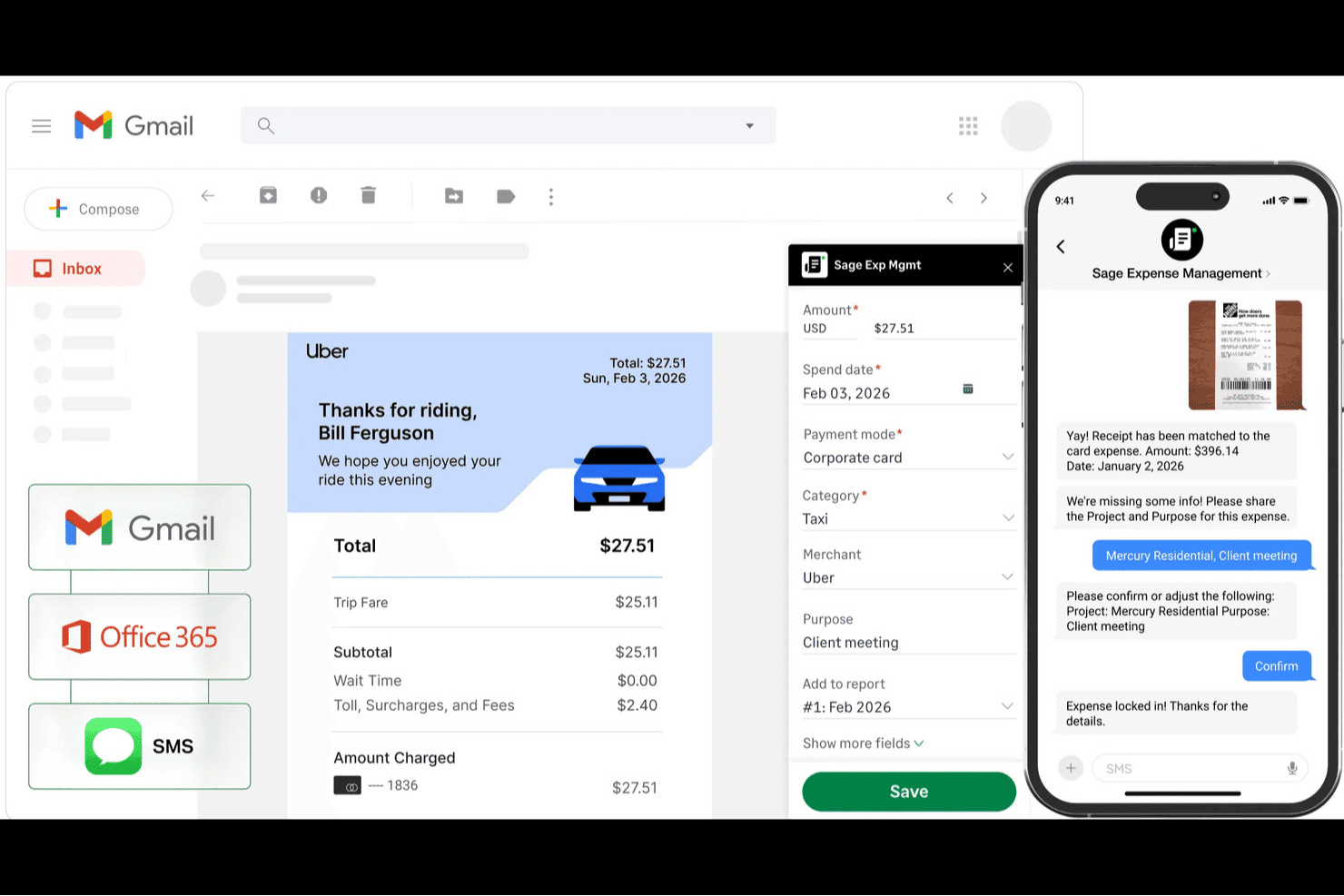
Sage Expense Management (anteriormente Fyle) permite un fácil seguimiento y recopilación de recibos. Sage Expense Management (anteriormente Fyle) es un software de seguimiento de gastos con aprendizaje automático e inteligencia artificial.
Por qué elegí Sage Expense Management: Me parece que Sage Expense Management es el software de control de gastos más actualizado en cuanto a las tecnologías más recientes.
Características destacadas e integraciones de Sage Expense Management:
Las funcionalidades incluyen informes de gastos flexibles. Me encanta que Sage Expense Management funcione dentro de aplicaciones cotidianas como Slack, Gmail y Outlook. Los empleados pueden enviar sus recibos de la manera que prefieran y Sage Expense Management extraerá y codificará los datos. Puedes reembolsar a los empleados utilizando pagos ACH dentro del software y ellos mismos pueden rastrear el estado del pago.
También me gusta que Sage Expense Management se integre con la mayoría de las compañías de tarjetas de crédito y software de contabilidad populares para ayudar a automatizar las conciliaciones de cuentas.
Las integraciones incluyen Office 365, Slack, Xero, QuickBooks, NetSuite, Microsoft Teams y TravelPerk.
Pros and Cons
Pros:
- Funciones de automatización
- Posibilidad de enviar pagos ACH
- Se pueden enviar los gastos de muchas formas diferentes
Cons:
- Sin plan para un solo usuario (mínimo cinco usuarios)
- Integraciones limitadas en el plan estándar
Learn more about Sage Expense Management (formerly Fyle): Ideal para el seguimiento de gastos vinculado a la nómina
- Demostración gratuita disponible
- Precio a consultar
Visit WebsiteCustomer Rating:4.3/5
El panel de gestión de gastos de Paylocity vincula los reembolsos con la nómina para un seguimiento financiero sencillo. Paylocity es una plataforma integral de recursos humanos y nómina que también ofrece una sólida solución de gestión de gastos. Su sistema integrado de seguimiento de gastos te ayuda a gestionar reembolsos, capturar recibos y mantener el cumplimiento normativo, todo dentro del mismo entorno que utilizas para la nómina y los datos de empleados. Esto la hace ideal para organizaciones que buscan una supervisión financiera unificada entre las funciones de RRHH y finanzas.
Por qué elegí Paylocity: Elegí Paylocity porque combina el seguimiento de gastos directamente con el procesamiento de nómina, lo que puede ahorrarte horas cada mes. Puedes establecer políticas de gastos personalizadas, automatizar las aprobaciones de reembolsos y permitir que los gastos aprobados fluyan directamente a la nómina para un procesamiento más rápido. También me gusta que las herramientas de IA de Paylocity capturen automáticamente los recibos y categoricen las transacciones, lo que te permite reducir la entrada manual y mejorar la precisión. Su aplicación móvil añade aún más comodidad, permitiéndote enviar, revisar o aprobar gastos desde cualquier lugar.
Funciones destacadas e integraciones de Paylocity
Las funciones destacadas incluyen captura de recibos impulsada por IA, flujos de aprobación personalizables y detección de fraude integrada para garantizar el cumplimiento. La plataforma también admite el seguimiento de kilometraje y la importación de transacciones con tarjeta, lo que te brinda una visibilidad total del gasto empresarial.
Las integraciones incluyen Indeed, Ironclad, Jira Software, OneTrust, PARiM, Rain, Tilt, Timeero, VICTIG, When, 15Five y 401GO.
Pros and Cons
Pros:
- Aplicación móvil para el seguimiento de gastos en tiempo real
- Captura y categorización automatizada de recibos
- Integración directa con la nómina
Cons:
- Curva de aprendizaje debido a la amplia gama de funciones
- Precio solo disponible a consulta
Learn more about Paylocity: Ideal para la gestión de gastos
- Demostración gratuita disponible.
- Precios bajo solicitud
Visit WebsiteCustomer Rating:4.8/5
Airbase permite que tus empleados envíen solicitudes de reembolso desde un ordenador de escritorio o a través de su aplicación. Airbase es una plataforma de gestión de gastos que te brinda una visión de alto nivel sobre cuánto está gastando tu empresa y en qué lo está haciendo.
Por qué elegí Airbase: Me gusta que tiene funciones que te permiten gestionar proactivamente los gastos y el presupuesto. En lugar de descubrir gastos inesperados después de que hayan ocurrido, Airbase te ofrece controles de gasto y políticas de gastos basadas en reglas para prevenirlos desde el principio.
Características e integraciones destacadas de Airbase:
Características incluyen límites de gasto y presupuestos, que puedes establecer para diferentes departamentos o equipos. Pienso que esta sería una gran herramienta para hacer que las personas rindan cuentas, así como para brindar a los gerentes una mejor comprensión de cuánto dinero tienen disponible. Creo que la aplicación móvil de Airbase facilita la captura de recibos. También proporciona una trazabilidad detallada de auditoría para cada gasto.
Integraciones incluyen NetSuite, QuickBooks, Xero, Jira, Ironclad y Slack.
Pros and Cons
Pros:
- Fácil de reembolsar a los empleados
- Reportes y análisis avanzados
- Fuerte enfoque en el control y el cumplimiento
Cons:
- Integraciones limitadas
- Sin conectividad offline
 6Ideal para la automatización de informes de gastos
Ramp
- Plan gratuito + prueba gratuita de 30 días + demo gratis disponible
- Desde $15/usuario/mes
Visit WebsiteCustomer Rating:4.8/5
Ramp proporciona un panel de control contable automatizado que categoriza transacciones, sincroniza gastos y señala memos faltantes para su revisión. Ramp es un software de seguimiento de gastos que simplifica la gestión financiera para las empresas. Ofrece un conjunto de herramientas, incluidas tarjetas corporativas y cuentas por pagar, para agilizar tus procesos de gastos.
Por qué elegí Ramp: Elegí Ramp porque automatiza la presentación de informes de gastos, evitando la entrada manual al capturar y categorizar gastos por ti. También obtienes monitoreo de transacciones en tiempo real para rastrear el gasto a medida que ocurre y flujos de aprobación personalizables para adaptarse a las necesidades de tu empresa, ayudándote a mantenerte dentro del presupuesto y mantener los procesos en movimiento sin problemas.
Características y integraciones destacadas de Ramp:
Entre sus características se incluye el soporte para pagos globales, lo que te permite manejar transacciones en múltiples monedas, siendo ideal para empresas con operaciones internacionales. Otra característica es el proceso de implementación rápida, que te permite comenzar a trabajar en solo 30 días. Además, Ramp proporciona herramientas gratuitas como plantillas de políticas de gastos para ayudarte a gestionar tus finanzas de manera más eficaz.
Las integraciones incluyen NetSuite, Sage, Xero, QuickBooks, Microsoft Dynamics Business Central, Acumatica, Uber, Lyft, Okta, Google, Rippling y Gmail.
Pros and Cons
Pros:
- Funciones de informes completas
- Capacidad para emitir múltiples tarjetas virtuales con controles personalizables
- Automatización de informes de gastos y conciliación de recibos
Cons:
- Principalmente centrado en cuentas por pagar y gestión de gastos
- Podría ofrecer características contables más avanzadas
 Mejor para el seguimiento de gastos de viaje
- Plan gratuito disponible
- Precio bajo solicitud
Visit WebsiteCustomer Rating:4.7/5
El panel de gestión de gastos de Navan proporciona una visión general del gasto de tu organización. Navan (anteriormente llamado TripActions) es un software que ayuda a las empresas a gestionar tarjetas corporativas, administrar los gastos de viaje y seguir otros costos operativos.
Por qué elegí Navan: Creo que Navan destaca como la mejor solución para el seguimiento de gastos de viaje. Me impresionaron sus funciones de viajes en grupo y su interfaz fácil de usar.
Funciones destacadas e integraciones de Navan:
Las funciones incluyen reservas simplificadas en línea. Me gusta cómo se pueden hacer reservas de vuelos y hoteles para empleados dentro del propio software. Las opciones de viajes en grupo permiten reservar arreglos de viaje para hasta 50 empleados al mismo tiempo.
Me impresionó la gestión automatizada de gastos de Navan. Clasifica y concilia automáticamente los detalles de las transacciones cada vez que se usa la tarjeta de la empresa, ya sea en persona o en línea.
Las integraciones incluyen Slack, QuickBooks, NetSuite, Okta, Expensify y Sage Intacct.
Pros and Cons
Pros:
- Interfaz intuitiva
- Fácil de integrar con varias plataformas de reservas de viajes
- La conciliación automática simplifica el proceso de reporte de gastos
Cons:
- Los detalles de precios no son transparentes
- Puede ser demasiado complejo para pequeñas empresas
Learn more about Navan: 8Mejor herramienta integral para el seguimiento de gastos
Perk
- Plan gratuito disponible
- Desde $99/mes
Visit WebsiteCustomer Rating:4.6/5
El panel de informes de viajes de TravelPerk proporciona una visión general del gasto mensual en viajes. A pesar de su nombre, TravelPerk no solo gestiona gastos de viaje. Ofrece una variedad de herramientas y funciones para la gestión de gastos.
Por qué elegí TravelPerk: Si buscas un software de control de gastos con muchas funcionalidades, creo que TravelPerk es una opción que vale la pena considerar. Me gusta que se incluya un número ilimitado de usuarios, ya que el costo por usuario en otros softwares puede aumentar rápidamente.
Funciones e integraciones destacadas de TravelPerk:
Funciones incluyen una única interfaz para la reserva de viajes, seguimiento de gastos y reembolsos. Personalmente, me gusta tener acceso a todo en un lugar centralizado. TravelPerk te permite reservar dentro de la aplicación, capturar y gestionar tus gastos mientras reservas vuelos, alojamientos y transporte.
Las integraciones incluyen Slack, Divvy, Rydoo, WeWork, Ramp, Expensify, Fyle, Zoom y algunos otros.
Pros and Cons
Pros:
- Tarifa plana
- Herramientas de reserva
- Interfaz fácil de usar
Cons:
- La aplicación móvil podría ser más intuitiva
- Las opciones de personalización son limitadas
Learn more about Perk: El mejor software gratuito de seguimiento de gastos
- Completamente gratuito, pero también hay una demostración disponible
- Desde $0
Visit WebsiteCustomer Rating:4.6/5
Divvy ofrece una aplicación de escritorio y móvil, así como tarjetas virtuales. Divvy es un software gratuito de seguimiento de gastos.
Por qué elegí Divvy: Divvy es completamente gratuito. No ofrecen ningún plan de pago. Entonces, ¿cómo gana dinero Divvy? Reciben una parte de la comisión del comerciante que normalmente iría a Visa o al banco emisor cada vez que usas su tarjeta de crédito.
Características destacadas e integraciones de Divvy:
Las características incluyen un software completamente gratuito de seguimiento de gastos y una tarjeta corporativa que incluso ofrece recompensas. Me gusta la idea de poder gestionar todas las tarjetas y los gastos de la empresa en un solo lugar. El software de Divvy permite crear presupuestos y controlar los gastos. Creo que el panel de Divvy facilita la visualización de todas las transacciones de gastos en tiempo real.
Las integraciones incluyen QuickBooks, NetSuite, Sage Intacct y Slack.
Pros and Cons
Pros:
- Completamente gratuito
- Aplicación móvil fácil de usar
- Incluye tarjetas corporativas físicas y virtuales gratuitas
Cons:
- Integraciones limitadas
- Menos características que las alternativas de pago
Learn more about Divvy: Mejor para integraciones
- Plan gratuito disponible
- Desde $5/usuario/mes
Visit WebsiteCustomer Rating:4.3/5
La sección de viajes dentro de la app Zoho Expense. Zoho Expense es un software independiente de gestión de viajes y gastos creado por la misma empresa que el popular software de contabilidad Zoho Books.
Por qué elegí Zoho Expense: Zoho Expense te da acceso a una enorme biblioteca de integraciones y complementos de terceros que se pueden utilizar junto con su software.
Funciones e integraciones destacadas de Zoho Expense:
Las funciones incluyen la capacidad de Zoho Expense para escanear recibos e importarlos en lote. Me gusta que tus recibos se almacenen digitalmente dentro del software, así no tienes que preocuparte por perder copias en papel.
Zoho Expense también cuenta con algunas de las mejores herramientas de seguimiento de kilometraje que he visto. Los empleados tienen la opción de registrar su kilometraje mediante Android, iPhone o Apple Watch.
Para las empresas que ya utilizan Zoho Books para la contabilidad, creo que Zoho Expense puede ser una buena opción.
Las integraciones incluyen QuickBooks, Xero, GetThere, Lyft, Uber, HSBC, Slack, Dropbox, Office 365 y algunas más.
Pros and Cons
Pros:
- Opciones de integración
- Fácil de aprender y usar
- App móvil para escanear y rastrear recibos
Cons:
- No hay plan para un solo usuario (mínimo 3 usuarios)
- Funciones limitadas en el plan gratuito
Learn more about Zoho Expense:
Otros programas de seguimiento de gastos
Estas son algunas opciones adicionales de programas de seguimiento de gastos que no han llegado a mi lista de selección, pero que aún merece la pena conocer:
- 11BrexMejor para startups y pequeñas empresas
- 12RydooMejor para usuarios móviles
- 13CoupaMejor para integraciones con proveedores
- 14PuzzleMejor para precisión en la categorización potenciada por IA
- 15ExpensifyMejor para funciones automatizadas de escaneo de recibos
- 16SAP ConcurMejor para grandes empresas
- 17SlashIdeal para gestionar gastos multi-entidad
- 18LicenceOneIdeal para la gestión del gasto en SaaS y la seguridad
- 19ExpensePointMejor para equipos internacionales
- 20Rippling SpendIdeal para controles automatizados de políticas
Cómo evalúo el software de seguimiento de gastos
Divido mi evaluación en dos capas: las capacidades imprescindibles—captura de recibos, flujos de aprobación, controles de políticas—y los diferenciadores que distinguen una herramienta de otra.
Funcionalidad básica (Requisitos indispensables para esta lista)
Cuando selecciono herramientas para mi lista, califico cada una en una escala de 0 (no ofrece la funcionalidad) a 5 (sobresale en esta área) para cada funcionalidad básica indicada a continuación. Luego, calculo la puntuación total de la herramienta en un porcentaje. Cada herramienta debe lograr una puntuación mínima total del 75% para ser considerada para inclusión.
- Captura de recibos y OCR: Verifico si una foto desde el móvil o el reenvío por correo extrae con precisión el nombre del proveedor, la fecha y el monto—o si tu equipo todavía introduce los datos manualmente.
- Flujos de trabajo para reportes de gastos: Aquí importan las rutas de aprobación en varios pasos, especialmente para equipos donde una comida de $200 va al gerente pero un viaje a una conferencia de $5,000 se eleva a un director.
- Aplicación de políticas y señalización: Busco herramientas que señalen automáticamente las violaciones en el momento del envío—como límites por comida o proveedores no aprobados—en lugar de depender de que los aprobadores las detecten manualmente.
- Conciliación de tarjetas corporativas: Los feeds de tarjetas Visa, Mastercard o Amex deberían igualar automáticamente los recibos enviados para que tu equipo de cuentas por pagar no tenga que cruzar estados de cuenta en una hoja de cálculo cada mes.
- Integración con sistemas contables: Evalúo conexiones nativas con plataformas como QuickBooks, Xero, NetSuite y Sage Intacct, comprobando si los códigos de gasto y dimensiones se mapean correctamente a tu libro mayor.
- Procesamiento de reembolsos: Las herramientas deben permitir depósitos directos o reembolsos integrados en la nómina, y reviso si gestionan pagos en varias monedas para equipos distribuidos.
Una vez tengo una lista de herramientas que cumplen con este criterio, considero lo que diferencia a cada plataforma.
Factores diferenciadores (Qué distingue a los proveedores)
Así comparo y contrasto diferentes proveedores:
Funciones destacadas
La auditoría potenciada por IA detecta recibos duplicados y montos inflados antes de que el aprobador siquiera abra el reporte, lo que ahorra horas de revisión manual en cada cierre. Los paneles de control de gastos en tiempo real con desglose por departamento, proyecto o proveedor dan a los encargados de planificación financiera y análisis la visibilidad para corregir el rumbo a mitad de trimestre. También evalúo si una herramienta ofrece emisión nativa de tarjetas corporativas con límites de gasto por tarjeta y restricciones de comercio aplicadas al momento de la compra.
Más allá de las funciones
La conformidad es importante—verifico la certificación SOC 2 Tipo II y si la plataforma retiene los recibos digitales el tiempo suficiente para cumplir los requisitos locales de auditoría. La conectividad con ERP es otro factor clave, especialmente si el mapeo de dimensiones en el libro mayor funciona sin problemas con tu plan de cuentas o requiere limpieza manual tras la sincronización. Para organizaciones en crecimiento, evalúo la consolidación multi-entidad y multi-moneda para que los equipos financieros puedan gestionar subsidiarias desde una sola instancia sin tener que cambiar de entorno.
Cómo elegir un programa de seguimiento de gastos
Es fácil perderse entre largas listas de funciones y estructuras de precios complejas. Para ayudarte a mantener la concentración mientras avanzas en tu proceso único de selección de software, aquí tienes una lista de factores que debes tener en cuenta:
| Factor | Qué debes tener en cuenta |
|---|---|
| FactorEscalabilidad | Qué debes tener en cuenta¿Puede el software crecer junto con tu empresa? Considera si admite usuarios, transacciones y datos adicionales a medida que tu empresa se expande. |
| FactorIntegraciones | Qué debes tener en cuenta¿Se conecta con tus sistemas actuales? Comprueba la compatibilidad con tus herramientas contables actuales y otros programas esenciales. |
| FactorPersonalización | Qué debes tener en cuenta¿Puedes adaptar la herramienta a tus necesidades? Busca opciones de personalización en los flujos de trabajo, los informes y los roles de usuario para ajustarlos a tus procesos. |
| FactorFacilidad de uso | Qué debes tener en cuenta¿El software es intuitivo para tu equipo? Evalúa la interfaz de usuario y la rapidez con la que los miembros del equipo pueden navegar por la herramienta y utilizarla eficazmente. |
| FactorImplementación e incorporación | Qué debes tener en cuenta¿Cuánto tiempo se tardará en empezar? Considera el tiempo de configuración, los materiales de formación y la asistencia ofrecida durante la fase inicial. |
| FactorCoste | Qué debes tener en cuenta¿Cuál es el coste total de propiedad? Compara los modelos de precios, incluidas las tarifas de suscripción, los cargos adicionales y cualquier posible coste oculto. |
| FactorMedidas de seguridad | Qué debes tener en cuenta¿Cómo protege el software tus datos? Asegúrate de que cuenta con un cifrado sólido, controles de acceso y cumplimiento de las normas del sector. |
¿Qué es un programa de seguimiento de gastos?
El software de seguimiento de gastos es una herramienta que ayuda a las empresas a registrar, gestionar y analizar sus gastos. Suelen utilizarlo profesionales de finanzas, contables y responsables para obtener información sobre los patrones de gasto y tomar decisiones financieras fundamentadas. Funciones como el seguimiento de gastos en tiempo real, el escaneo automatizado de recibos y las capacidades de integración ayudan a mejorar la eficiencia y la precisión en la gestión de gastos. Estas herramientas aportan valor global al simplificar la supervisión financiera y mejorar el control presupuestario.
Características
Estas son las características principales que debería tener cualquier buen software de seguimiento de gastos:
- Seguimiento en tiempo real: Permite supervisar los gastos a medida que se producen, garantizando que los registros financieros estén actualizados.
- Escaneo automatizado de recibos: Convierte los recibos en papel en datos digitales, ahorrando tiempo y reduciendo los errores de introducción manual.
- Capacidades de integración: Se conecta con los sistemas contables y empresariales existentes para agilizar el flujo de datos y mejorar la precisión.
- Informes personalizables: Ofrece informes adaptados para proporcionar información específica sobre las necesidades y los objetivos financieros de tu empresa.
- Compatibilidad con múltiples divisas: Permite realizar el seguimiento y gestionar los gastos en varias divisas, algo esencial para las operaciones internacionales.
- Flujos de trabajo de aprobación: Agilizan el proceso de aprobación de gastos, garantizando el cumplimiento y el control del gasto.
- Acceso móvil: Proporciona acceso a los datos de gastos desde cualquier lugar, permitiendo a los usuarios gestionar las finanzas estén donde estén.
- Seguridad de los datos: Garantiza la protección de la información financiera confidencial mediante cifrado y controles de acceso.
- Interfaz fácil de usar: Ofrece un diseño intuitivo que facilita a los usuarios la navegación y el uso eficaz del software.
Ventajas
La implementación de un software de seguimiento de gastos proporciona varias ventajas para tu equipo y tu empresa. Estas son algunas de las que puedes esperar:
- Mayor precisión: El escaneo automatizado de recibos reduce los errores manuales y garantiza unos registros financieros precisos.
- Ahorro de tiempo: El seguimiento en tiempo real y el acceso móvil permiten a los usuarios gestionar los gastos de forma rápida y eficaz.
- Mayor visibilidad: Los informes personalizables proporcionan información sobre los patrones de gasto, lo que ayuda a tomar decisiones fundamentadas.
- Mejor cumplimiento: Los flujos de trabajo de aprobación garantizan que los gastos se revisen y aprueben, manteniendo el control del gasto.
- Gestión de costes: La compatibilidad con múltiples divisas y las capacidades de integración ayudan a supervisar y gestionar los gastos en diversas plataformas y regiones.
- Seguridad de los datos: Un cifrado sólido y los controles de acceso protegen la información financiera confidencial frente al acceso no autorizado.
Costes y precios
Seleccionar un software de seguimiento de gastos requiere comprender los distintos modelos de precios y planes disponibles. Los costes varían en función de las características, el tamaño del equipo, los complementos y otros factores. La tabla siguiente resume los planes habituales, sus precios medios y las características que suelen incluir las soluciones de software de seguimiento de gastos:
Tabla comparativa de planes de software de seguimiento de gastos
| Tipo de plan | Precio medio | Características habituales |
|---|---|---|
| Tipo de planPlan gratuito | Precio medio$0 | Características habitualesSeguimiento básico de gastos, cargas limitadas de recibos e informes esenciales. |
| Tipo de planPlan personal | Precio medio$5-$25/usuario/mes | Características habitualesCargas ilimitadas de recibos, acceso móvil e integraciones básicas. |
| Tipo de planPlan empresarial | Precio medio$25-$50/usuario/mes | Características habitualesInformes avanzados, compatibilidad con múltiples divisas y flujos de trabajo de aprobación. |
| Tipo de planPlan para grandes empresas | Precio medio$50-$100/usuario/mes | Características habitualesCaracterísticas personalizables, integración con sistemas empresariales y asistencia especializada. |
Preguntas frecuentes
Aquí tienes algunas respuestas a preguntas frecuentes sobre el software de seguimiento de gastos:
¿Puede el software de seguimiento de gastos sincronizarse con las tarjetas de crédito corporativas?
Sí, muchas herramientas de software de seguimiento de gastos permiten sincronizarse con tarjetas corporativas. Esto permite a tu equipo hacer un seguimiento automático de los gastos sin introducir cada transacción. Asegúrate de que el proveedor de tu tarjeta sea compatible con el software que utilizas. Una vez vinculados, los gastos suelen aparecer en tiempo real o en el plazo de un día.
¿Cuál es la diferencia entre el software de seguimiento de gastos y el software de cuentas por pagar?
El software de seguimiento de gastos está especializado en registrar, categorizar y gestionar los gastos de los empleados. Incluye funciones para capturar recibos y enviar informes de gastos para su reembolso.
El software de cuentas por pagar tiene un alcance más amplio. Implica gestionar los pagos a proveedores y vendedores. Esto incluye procesar facturas, programar y emitir pagos, y realizar conciliaciones bancarias.
¿Cómo gestiona el software de seguimiento de gastos los recibos duplicados?
La mayoría de los programas de seguimiento de gastos detectan los duplicados mediante los metadatos de los recibos o la coincidencia de los importes de las transacciones. Si subes el mismo recibo dos veces, el sistema puede avisarte o bloquear el duplicado. Normalmente puedes revisar las entradas marcadas y decidir si quieres conservarlas o eliminarlas. Algunas herramientas también permiten combinar duplicados si es necesario.
¿Permite el software de seguimiento de gastos establecer límites de gasto?
Sí, muchas herramientas permiten establecer límites por categoría, proyecto o empleado. Si alguien supera el límite, el software puede marcar el gasto o bloquear el envío. Estos límites ayudan a tu equipo a mantenerse dentro del presupuesto sin necesidad de comprobaciones manuales. Puedes ajustar los umbrales cuando cambien las políticas.
¿Es necesario formar a mi equipo en el nuevo software de seguimiento de gastos?
Sí, formar a tu equipo en el nuevo software de seguimiento de gastos es necesario para que su adopción sea satisfactoria. Aunque la herramienta sea fácil de usar, la formación ayuda a los miembros del equipo a comprender todas sus funciones y a utilizarlas de forma eficaz. Busca proveedores que ofrezcan recursos completos de incorporación, como tutoriales, seminarios web y materiales de asistencia. Esta inversión en formación ayudará a tu equipo a sacar el máximo partido del software y garantizará una transición fluida.