
13 meilleures alternatives à HoneyBook évaluées en 2026

10 Meilleures alternatives à HoneyBook : la sélection rapide
Voici ma sélection des meilleures alternatives à HoneyBook :


Gérer les relations clients, les projets et les tâches administratives peut s’avérer complexe, surtout pour les directeurs financiers devant jongler avec de multiples responsabilités. Il se peut que HoneyBook ne réponde pas entièrement à vos besoins, qu’il manque de fonctionnalités précises ou qu’il ne soit pas adapté aux exigences propres à votre secteur.
J’ai analysé de nombreux outils de gestion de la relation client, en étudiant leurs points forts et leurs faiblesses. Dans cet article, je partage mes meilleures alternatives à HoneyBook et souligne la façon dont elles peuvent répondre à vos besoins.
Mon objectif est de vous aider à trouver l’outil correspondant à votre modèle d’entreprise et qui améliorera l’efficacité de votre équipe. Vous obtiendrez un aperçu de chaque solution pour vous permettre de faire un choix éclairé. Découvrons ensemble les meilleurs outils pour optimiser vos processus de gestion client.
Qu’est-ce que HoneyBook ?
HoneyBook est une plateforme de gestion client conçue pour vous aider à piloter vos projets, gérer vos réservations et envoyer vos factures. Elle est utilisée par les freelances, les entrepreneurs créatifs et les petites entreprises ayant besoin d’une solution tout-en-un pour gérer leurs interactions avec leurs clients.
Des fonctionnalités comme le suivi de projet, la facturation et la planification facilitent l’organisation de votre flux de travail et le maintien de relations professionnelles. Dans l’ensemble, HoneyBook centralise l’ensemble de vos opérations pour piloter votre activité efficacement.
Table of Contents
Résumé des meilleures alternatives à HoneyBook
Ce tableau récapitulatif présente les informations tarifaires de mes principales alternatives à HoneyBook afin de vous aider à trouver celle adaptée à votre budget et à vos besoins business.
| Tool | Best For | Trial Info | Price | ||
|---|---|---|---|---|---|
| 1 | Best for all-in-one client portals | Free trial available | From $19/month | Website | |
| 2 | Best for project tracking | Free plan + free demo available | From $7/user/month (billed annually) | Website | |
| 3 | Best for solo entrepreneurs | 7-day free trial + free demo available | From $60/month | Website | |
| 4 | Best for freelancers | Free demo + 7-day free trial available | From $9/user/month (billed annually) | Website | |
| 5 | Best for sales processes | 14-day free trial + free demo available | From $14/user/month (billed annually) | Website | |
| 6 | Best for sales pipeline and project tracking | Free demo + 14-day free trial available | From $29/user/month (billed annually) | Website | |
| 7 | Best for creatives | 21-day free trial available | From $35/month | Website | |
| 8 | Best for small teams | 14-day free trial available | From $19/month | Website | |
| 9 | Best for team collaboration | Free plan available | From $9/user/month (billed annually) | Website | |
| 10 | Best for service businesses | Free demo available | Pricing upon request | Website |


Why Trust Our Software Reviews
-

LiveFlow
Visit WebsiteThis is an aggregated rating for this tool including ratings from Crozdesk users and ratings from other sites.4.9 -
Float Financial
Visit WebsiteThis is an aggregated rating for this tool including ratings from Crozdesk users and ratings from other sites.4.1 -
Rippling Spend
Visit WebsiteThis is an aggregated rating for this tool including ratings from Crozdesk users and ratings from other sites.4.8


Avis sur les meilleures alternatives à HoneyBook
Vous trouverez ci-dessous mes analyses détaillées des meilleures alternatives à HoneyBook listées dans ma sélection. Mes avis proposent un aperçu approfondi des fonctionnalités clés, avantages et limites, intégrations, et cas d’usage idéals pour chaque outil, afin de vous aider à choisir le meilleur.

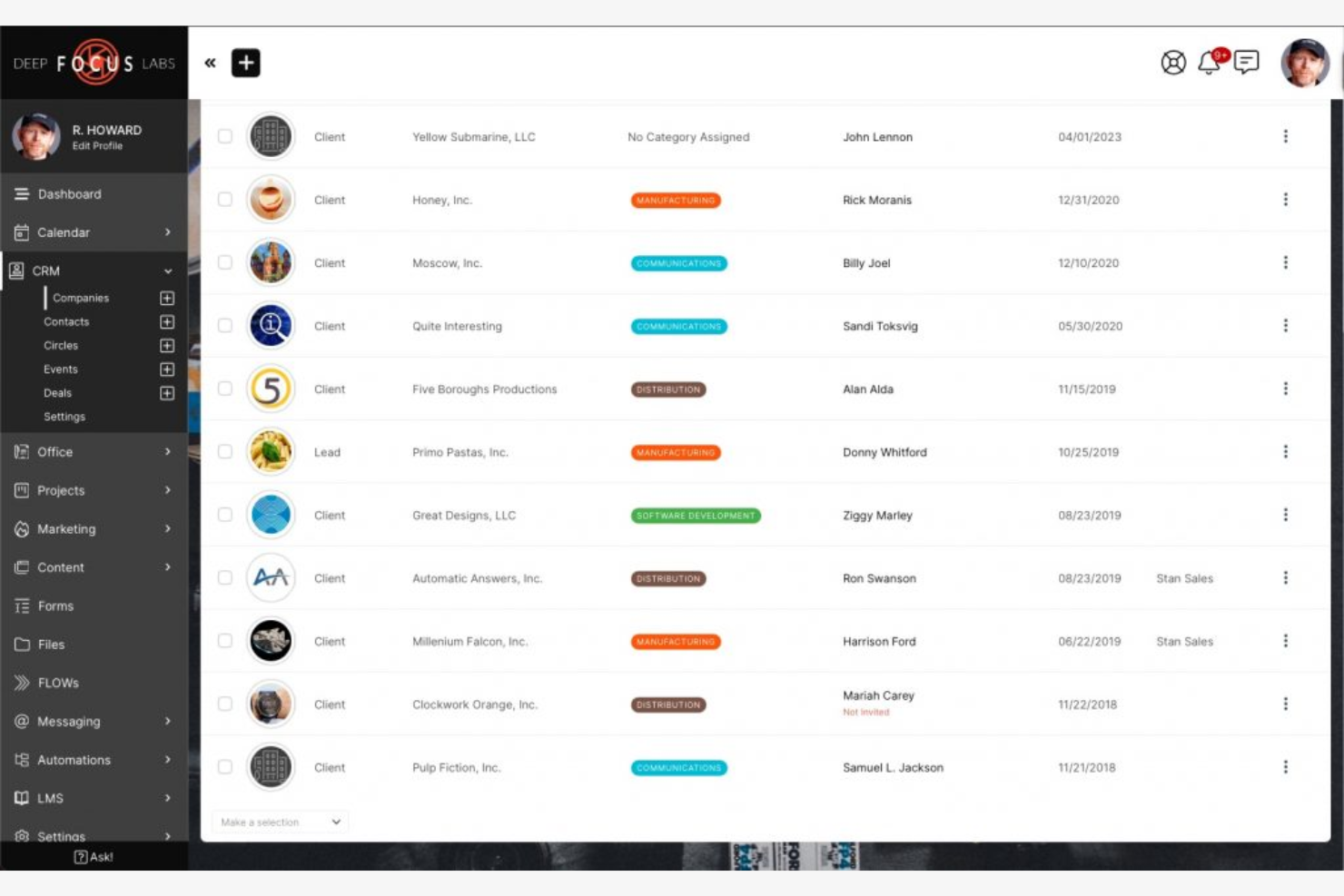
SuiteDash is an all-in-one powerhouse that allows finance firms to create a fully branded, end-to-end ecosystem. It replaces the cobbled-together feel of using separate tools for secure file transfer, CRM, and billing.
Why it's a good HoneyBook alternative: SuiteDash is ideal for teams that need an integrated platform. It offers customizable client portals, project management tools, and automation features to simplify workflows. Its well-rounded suite caters to diverse business needs, making it a versatile alternative to HoneyBook.
Standout Features and Integrations:
Features include white-label branding that enables you to create professional branding. The platform’s secure file sharing allows for protected document exchange and e-signature capabilities.
Integrations include Zapier, QuickBooks Online, Stripe, PayPal, Google Calendar, Zoom, Twilio, and more.
Pros and Cons
Pros:
- Professional brand authority
- Institutional Security
- Integrated platform for small teams
Cons:
- Limited customization
- Rigid billing and communication

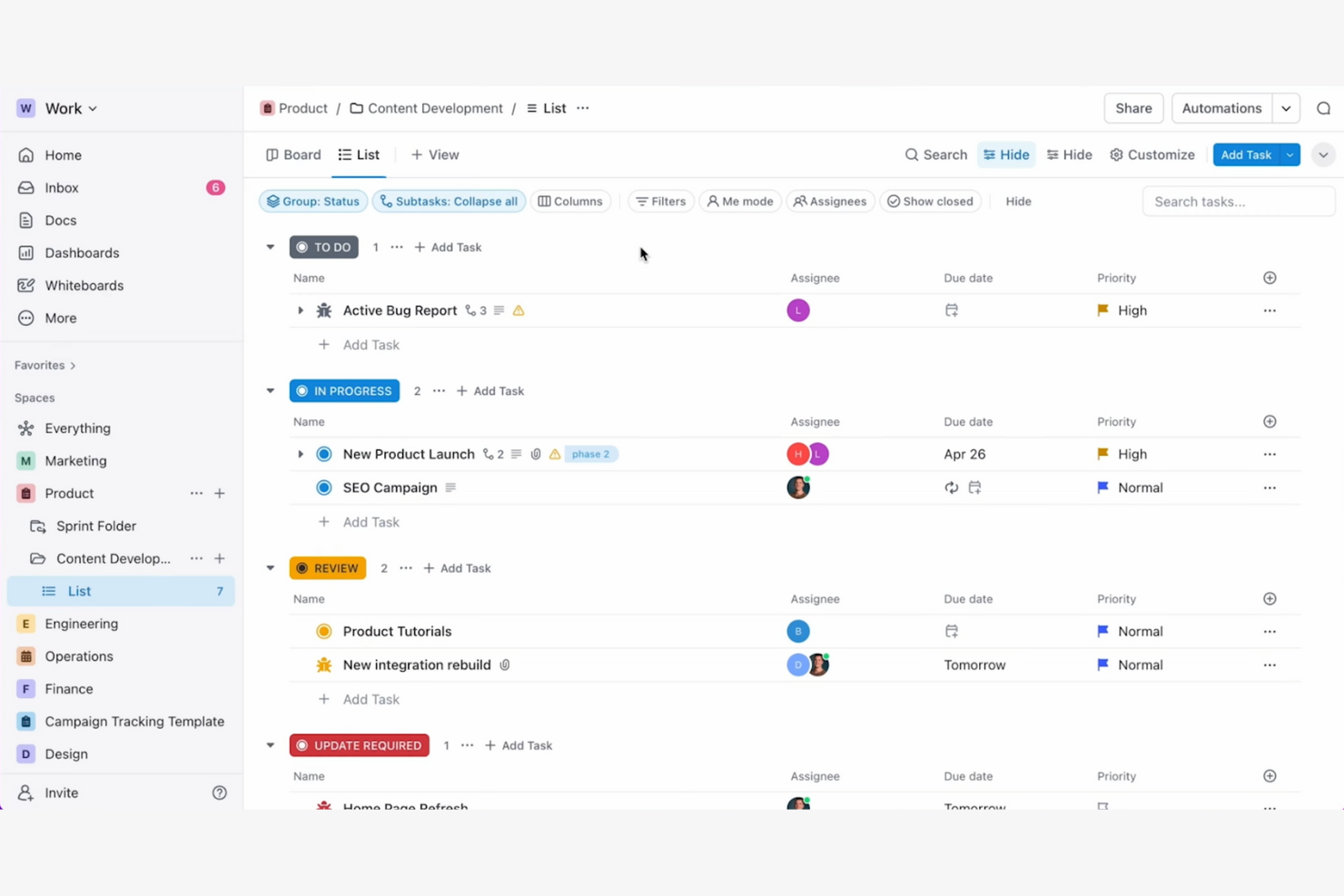
ClickUp is a powerful Work OS that offers the deep hierarchy and automation required to manage high-volume financial operations.
Why it's a good HoneyBook alternative: ClickUp excels in tracking client projects. The platform offers customizable task views, Kanban boards, goal-setting tools, and time tracking to help your team stay organized.
Standout Features and Integrations:
Features include teamwork tools that enable real-time collaboration on client docs. ClickUp’s mind maps and dashboards provide idea visualization and give your team a clear view of project progress and goals.
Integrations include Slack, Google Calendar, Microsoft Teams, Zoom, Dropbox, GitHub, Outlook, Figma, YouTube, Vimeo, Loom, Zapier, Unito, and more.
Pros and Cons
Pros:
- Detailed goal setting
- Project tracking tools
- Customizable task views
Cons:
- Requires setup time
- Intimidating for first-time users

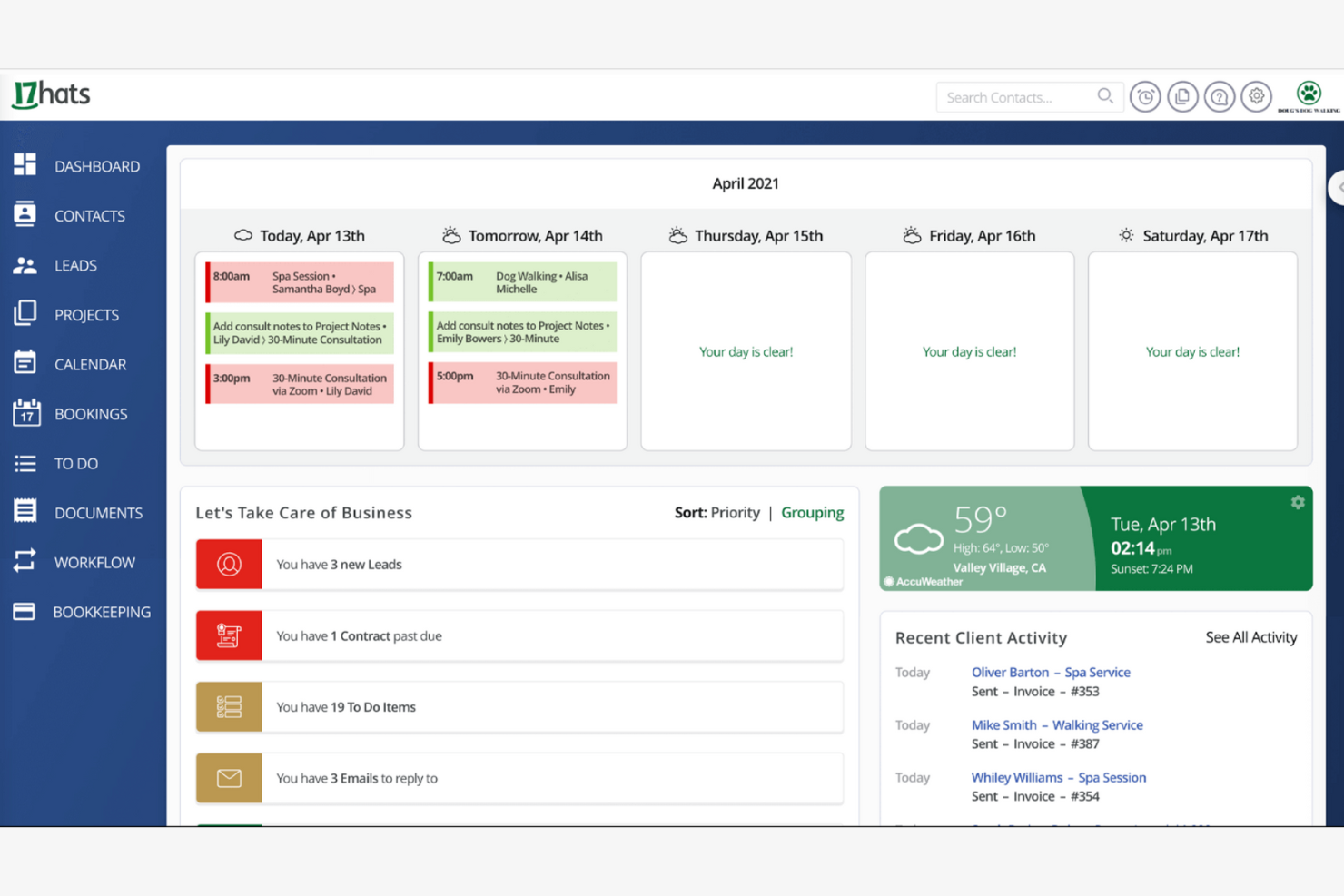
17hats is a business management platform for solo entrepreneurs and freelancers. It offers tools for invoicing, client management, and project tracking.
Why it's a good HoneyBook alternative: 17hats is a highly structured practice management tool that combines CRM, project tracking, and a dedicated bookkeeping module, unlike most competitors. It is designed for independent professionals needing a disciplined financial organization. The platform has automated workflows, online contracts, and scheduler tools in a centralized dashboard.
Standout Features and Integrations:
Features include task management tools and calendar syncing to stay on top of your business processes. 17hats also has customer relationship management (CRM) features to help you track potential leads and manage new clients.
Integrations include QuickBooks, Google Calendar, Zoom, Stripe, and more.
Pros and Cons
Pros:
- Online contract management
- All-in-one dashboard
- Automated workflow features
Cons:
- Basic reporting tools
- Weak data visualization

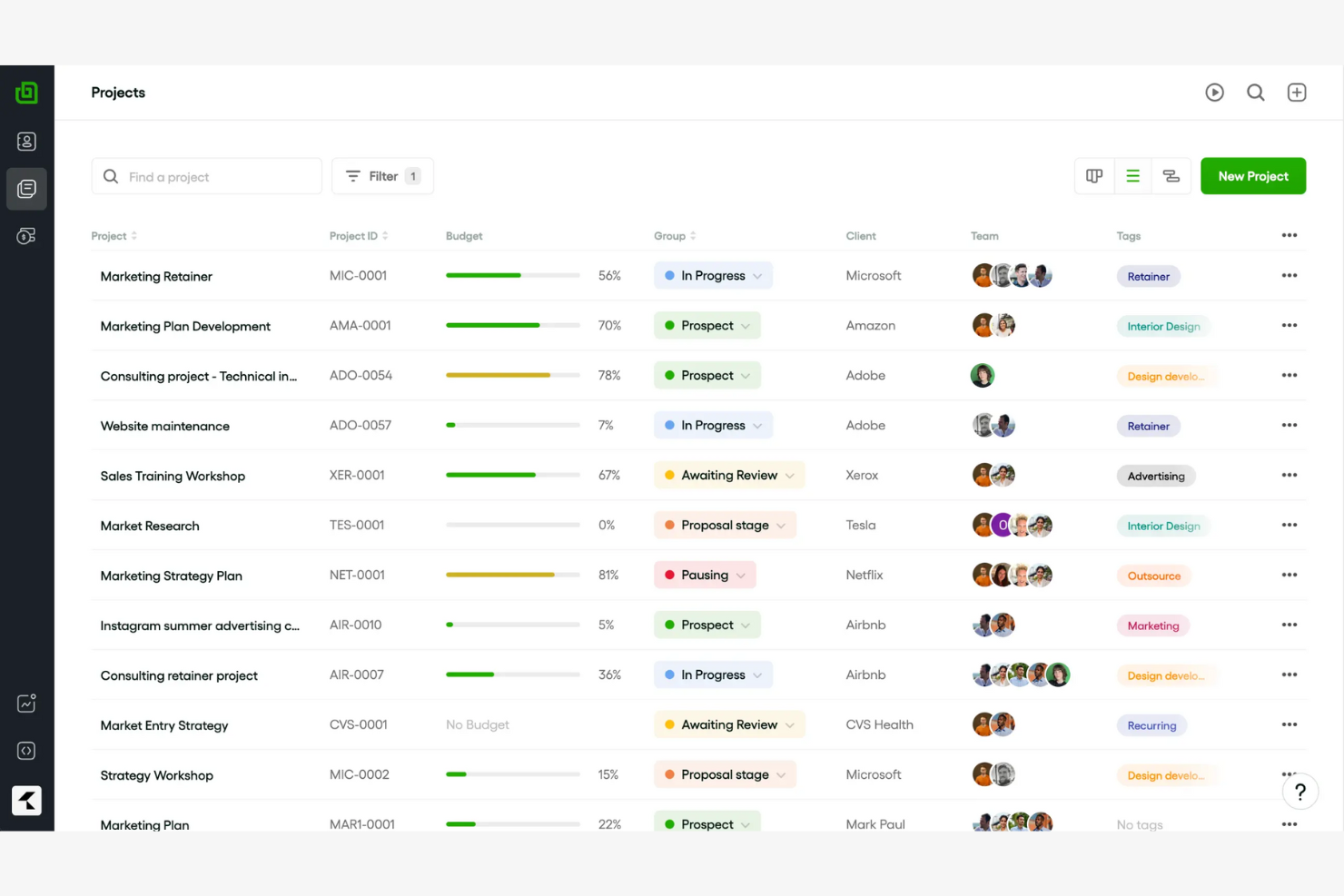
Bonsai is an all-in-one business operations suite that goes beyond simple project tracking by integrating legal-vetted contracts, professional invoicing, and basic bookkeeping into a single, high-end dashboard.
Why it's a good HoneyBook alternative: Bonsai is ideal for freelancers looking for a tailored solution. It offers attorney-vetted contract templates and automated workflows tailored to individual freelancers' needs. The platform's simplicity and focus on specific tasks help freelancers manage their work on client projects efficiently, without overwhelming features.
Standout Features and Integrations:
Features include time tracking tools and expense management capabilities. The platform’s task automation feature helps you save time on routine tasks so you can focus on your core activities.
Integrations include QuickBooks Online, Zapier, Calendly, Xero, HiBob, and more.
Pros and Cons
Pros:
- Customizable templates
- Automated invoicing
- Contract management tools
Cons:
- Few advanced project management tools
- Basic reporting features

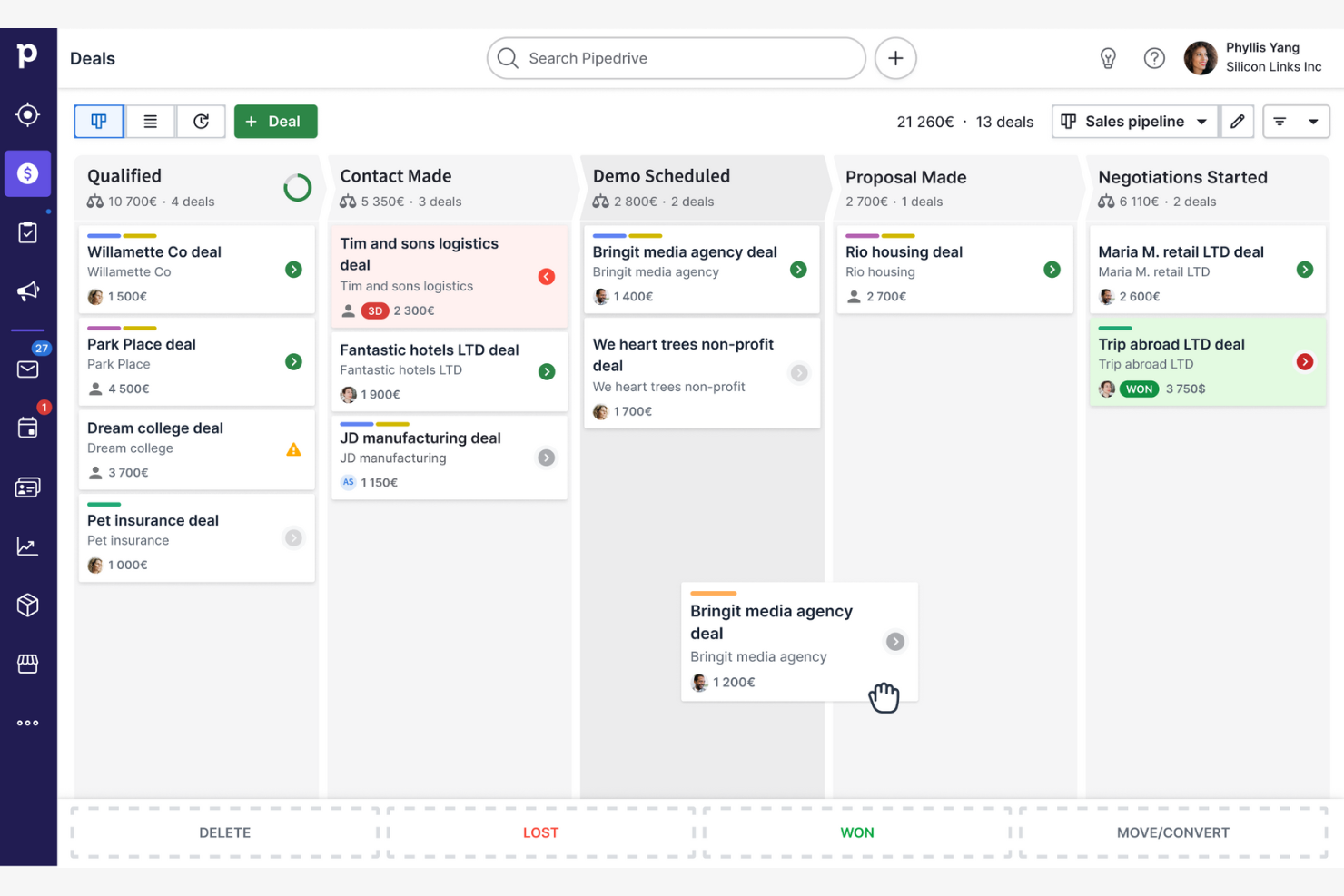
Pipedrive is a sales-focused CRM platform for sales teams and managers. It helps with sales pipeline management, activity tracking, and deal forecasting.
Why it's a good HoneyBook alternative: Pipedrive is ideal for teams that need a sales-focused CRM. Its visual pipeline and customizable stages help keep deals organized, while activity tracking and reminders support day-to-day follow-up. With a clear emphasis on deal management, Pipedrive is a strong alternative to HoneyBook.
Standout Features and Integrations:
Features include goal-setting tools that make it easier to track progress. The email tracking and reporting dashboards allow you to monitor engagement and review sales performance.
Integrations include Zapier, Slack, Trello, Zoom, HubSpot, Asana, and more.
Pros and Cons
Pros:
- Strong deal management features
- Customizable sales stages
- Visual sales pipelines
Cons:
- Can be complex for beginners
- Limited non-sales functions

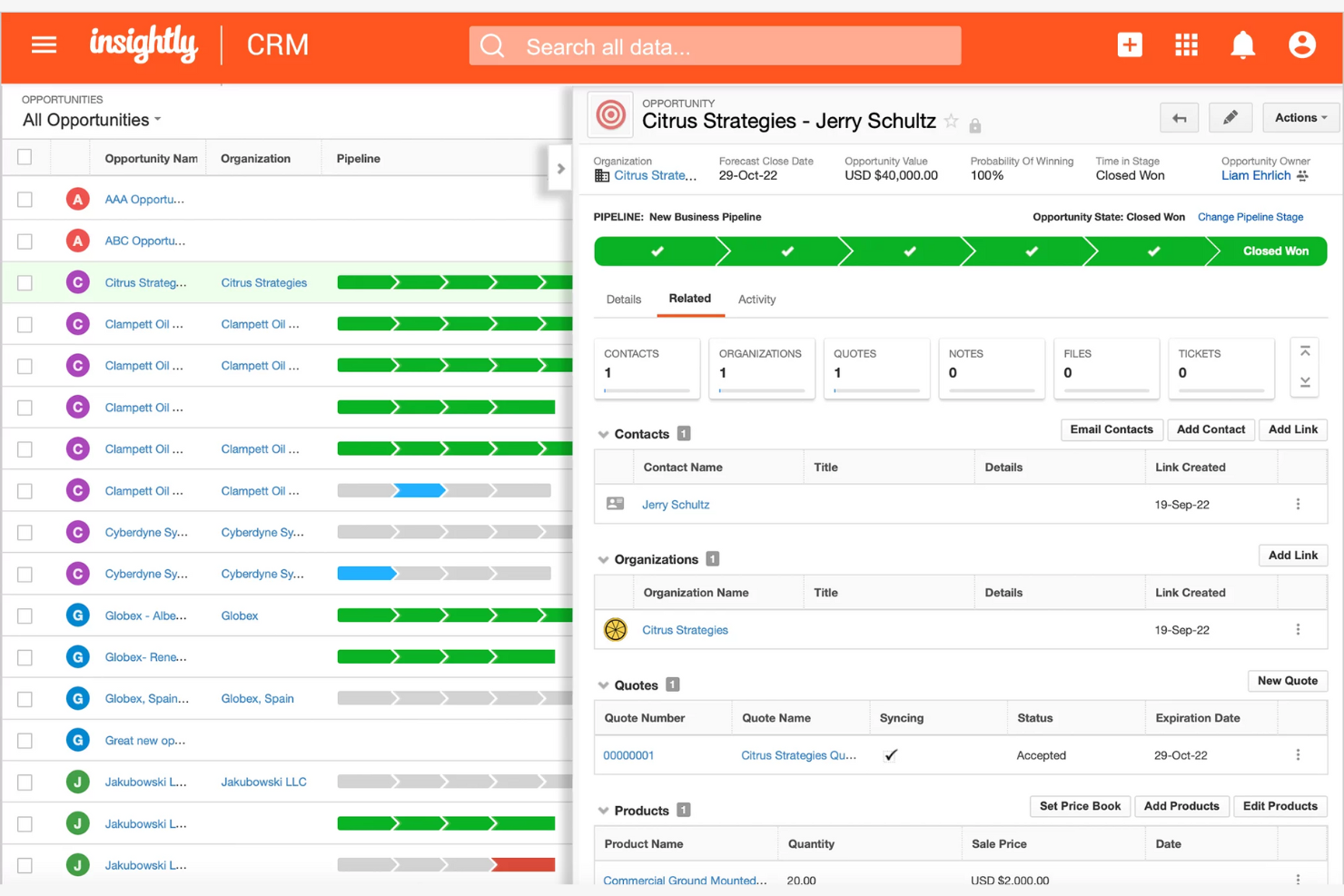
Insightly is a customer relationship management tool for small to medium-sized businesses. It uniquely integrates project management and deep financial connectivity.
Why it's a good HoneyBook alternative: If your team needs a CRM with marketing capabilities, Insightly offers lead routing, email tracking, and automation features to simplify tasks. Its integrated CRM features and email marketing tools make it a strong alternative to HoneyBook.
Standout Features and Integrations:
Features include custom dashboards that provide performance insights. The platform also offers time-saving task automation, and its lead capture management tools allow you to nurture potential clients.
Integrations include QuickBooks Online, Workday, Unbounce, WordPress, Slack, Jira, Shopify, Xero, WooCommerce, DocuSign, and more.
Pros and Cons
Pros:
- Automation for repetitive tasks
- Marketing tools
- Strong CRM capabilities
Cons:
- UI feels outdated
- Limited workflow flexibility

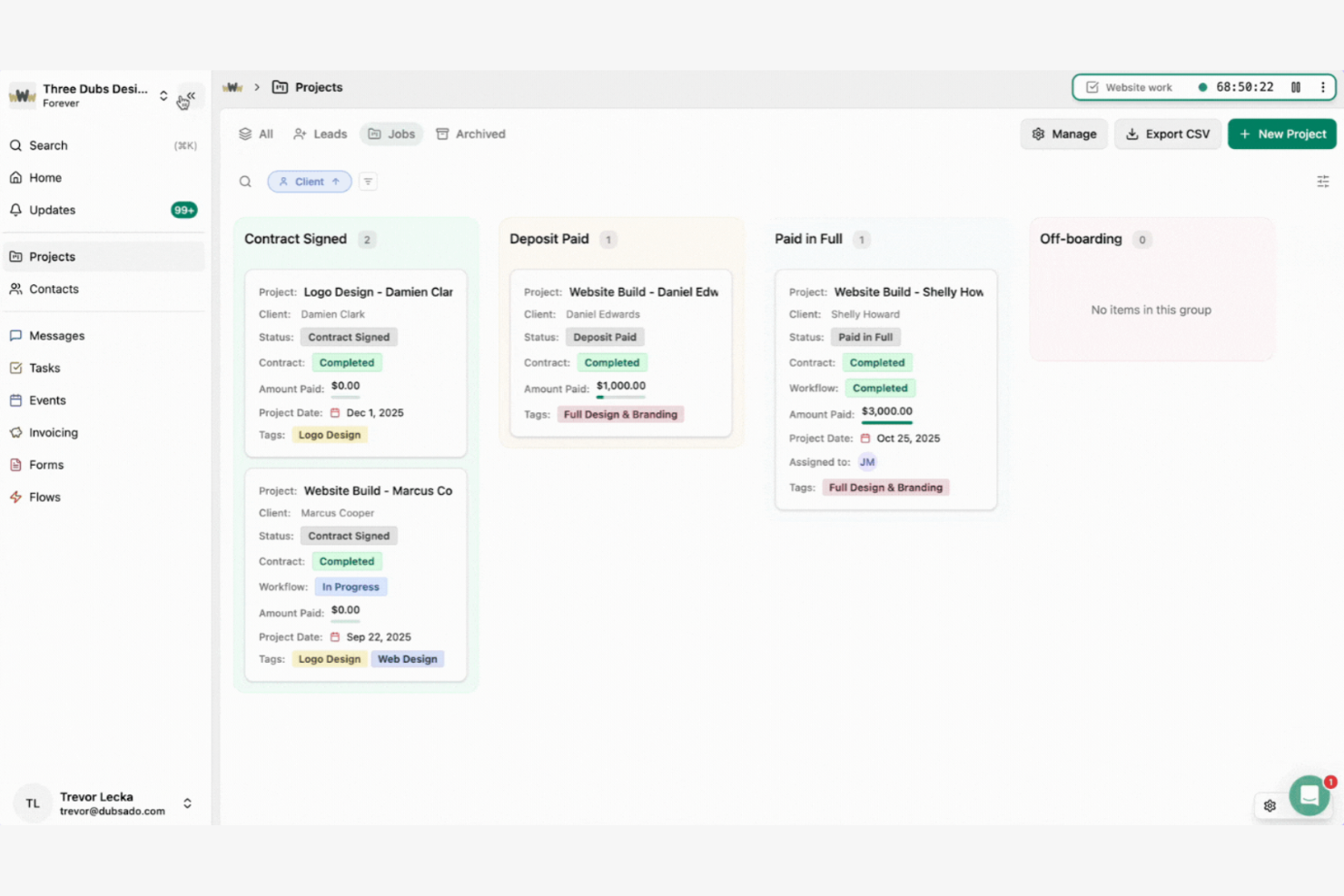
Dubsado is a business management software for creative service-based businesses. It helps with invoicing, payment processing, appointment scheduling, and contract management.
Why it's a good HoneyBook alternative: Dubsado is ideal for creative professionals, offering branded forms, customizable email templates, smart scheduling, and professional proposals. The platform also has online payment capabilities. Dubsado’s focus on creative service businesses makes it a strong HoneyBook alternative.
Standout Features and Integrations:
Features include branded invoicing to help you maintain a professional appearance. Dubsado also offers client portals and automated workflow management tools.
Integrations include QuickBooks Online, Zapier, Stripe, Xero, Google Meet, Microsoft Teams, Zoom, and more.
Pros and Cons
Pros:
- Central client portal
- Customizable email templates
- Tailored for creative businesses
Cons:
- May not be ideal for large teams
- Limited mobile usability

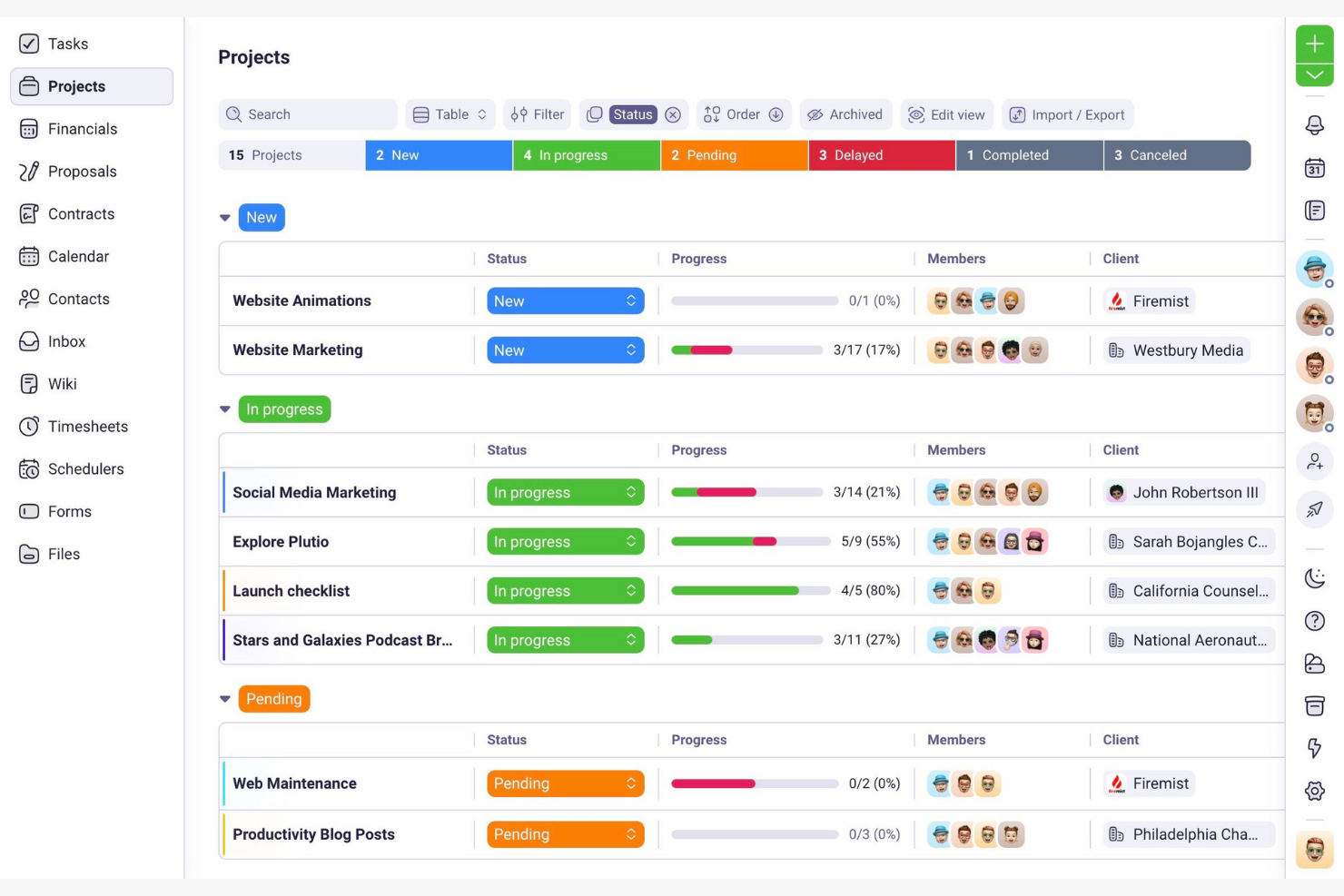
Plutio is a business management platform for freelancers and small teams. It manages tasks such as project management and invoicing.
Why it's a good HoneyBook alternative: Plutio is ideal for small teams because it offers task collaboration features, client portals, project management and communication tools. Its focus on team collaboration sets it apart from HoneyBook.
Standout Features and Integrations:
Features include white-label branding so you can present a professional image. Plutio’s proposal creation tools can help secure new business, and the time tracking capabilities help you stay on top of your billable hours.
Integrations include Zapier, Stripe, PayPal, Square, QuickBooks, Xero, Google Calendar, Google Meet, Slack, Zoom, and more.
Pros and Cons
Pros:
- White-label branding options
- Customizable client portals
- Flexible project management
Cons:
- Occasional performance lag
- Limited advanced features

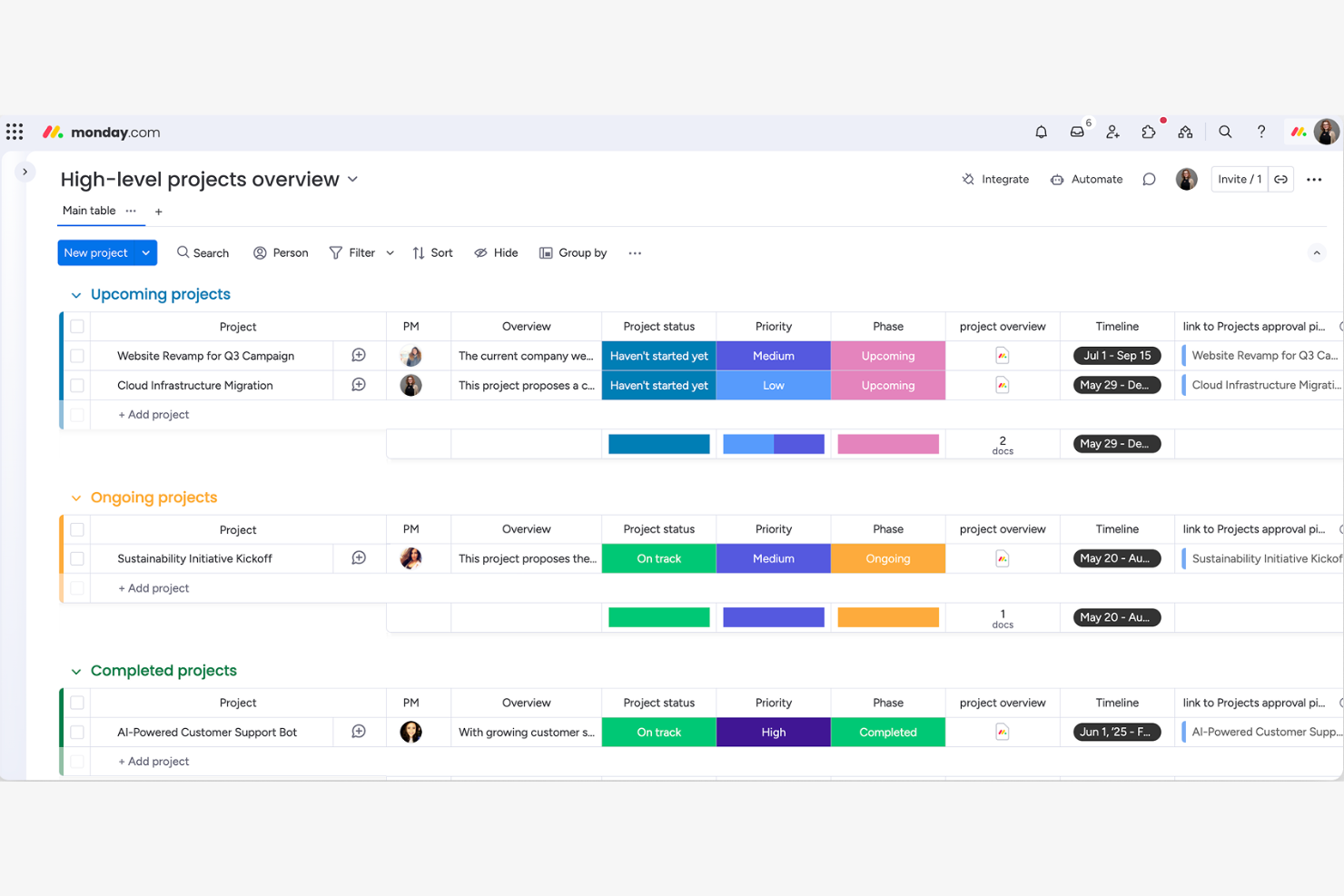
monday.com is a work operating system designed for teams across various industries. It allows high-growth finance firms to build a customized infrastructure for managing multi-entity financial operations. It is the bridge between your CRM and your General Ledger.
Why it's a good HoneyBook alternative: If your team needs a collaborative platform, monday.com includes collaboration tools, visual project tracking, customizable workflows, and automation features to reduce repetitive tasks and improve efficiency. Its focus on collaboration tools and flexibility makes it a strong alternative to HoneyBook.
Standout Features and Integrations:
Features include timeline views for visual project tracking. The platform also has workload management capabilities to ensure teams can balance task distribution. monday.com’s reporting dashboards offer insights into team performance and project status.
Integrations include Slack, Microsoft Teams, Gmail, Dropbox, GitLab, Mailchimp, Excel, Outlook, DocuSign, and more.
Pros and Cons
Pros:
- Strong automation capabilities
- Customizable workflows
- Visual project tracking
Cons:
- Dashboard clutter at scale
- May need another tool for invoicing
New Product Updates from monday.com

monday.com Adds Time Range Support to Calendar Widget
monday.com introduces time range support in the Calendar Widget. This update allows users to visualize events across their full duration instead of single dates, improving scheduling clarity. For more information, visit monday.com’s official site.


Accelo is a cloud-based business management platform for service businesses. It focuses on automating project management, client relationships, and billing processes.
Why it's a good HoneyBook alternative: Accelo is ideal for service businesses that need a thorough project management solution. The platform offers real-time project tracking and client billing to keep operations running smoothly. It also has workflow automation tools that help reduce repetitive tasks and improve productivity. Accelo's focus on service delivery and project oversight makes it a strong alternative to HoneyBook.
Standout Features and Integrations:
Features include time tracking and resource management capabilities that make it easier to track billable hours and plan team member capacity. Accelo provides a client portal so you can effectively manage client communications.
Integrations include QuickBooks, Xero, Stripe, Continuum, Google Workspace, Salesforce, Mailchimp, HubSpot, PayPal, and more.
Pros and Cons
Pros:
- Automation of repetitive tasks
- Client billing features
- Real-time project tracking
Cons:
- High implementation friction
- Heavy admin configuration
Autres alternatives à HoneyBook
Voici d’autres alternatives à HoneyBook qui ne figurent pas dans ma sélection principale mais qui valent le détour :
- Productive
For agency management
- Assembly
For team recognition


Critères de sélection des alternatives à HoneyBook
Pour choisir les meilleures alternatives à HoneyBook pour cette liste, j’ai pris en compte les besoins courants et les difficultés des acheteurs en matière de plateformes de gestion client, comme l’efficacité en gestion de projet et la facilité de communication client. J’ai également utilisé une grille d’évaluation pour garantir un processus objectif :
Fonctionnalités essentielles (25 % de la note globale)
Pour figurer dans cette sélection, chaque solution devait couvrir ces cas d’usage quotidiens :
- Gérer les contacts clients
- Suivre l’avancement des projets
- Automatiser la facturation
- Planifier des rendez-vous
- Générer des rapports
Fonctionnalités distinctives supplémentaires (25 % de la note globale)
Pour affiner davantage la sélection, j’ai recherché des atouts spécifiques tels que :
- Portails clients personnalisables
- Automatisation avancée des workflows
- Suivi du temps intégré
- Outils de retour client
- Accessibilité via application mobile
Facilité d’utilisation (10 % du score total)
Pour évaluer la facilité d’utilisation de chaque système, j’ai pris en compte les éléments suivants :
- Interface conviviale
- Tableaux de bord personnalisables
- Facilité de navigation
- Processus d’installation convivial
- Accessibilité sur tous les appareils
Intégration des nouveaux utilisateurs (10 % du score total)
Pour évaluer l’expérience d’intégration sur chaque plateforme, j’ai pris en compte les aspects suivants :
- Disponibilité de vidéos de formation
- Modèles préconçus
- Visites guidées interactives du produit
- Accès à des webinaires
- Assistance via chatbots
Support client (10 % du score total)
Pour évaluer les services d’assistance des fournisseurs de logiciels, j’ai pris en considération :
- Disponibilité 24h/24 et 7j/7
- Multiples canaux de support
- Efficacité du temps de réponse
- Qualité des ressources d’assistance
- Disponibilité d’un gestionnaire de compte dédié
Rapport qualité/prix (10 % du score total)
Pour évaluer le rapport qualité/prix de chaque plateforme, j’ai pris en compte les critères suivants :
- Transparence des tarifs
- Formules payantes concurrentielles
- Options de paiement flexibles
- Potentiel de retour sur investissement
- Fonctionnalités incluses dans le prix de base
Avis clients (10 % du score total)
Pour me faire une idée de la satisfaction globale des utilisateurs, j’ai pris en compte les points suivants lors de la lecture des avis :
- Notes de satisfaction globale
- Avantages et inconvénients les plus souvent cités
- Retours sur l’efficacité des fonctionnalités
- Commentaires sur le service client
- Témoignages sur la facilité d’utilisation
Pourquoi chercher une alternative à HoneyBook ?
Bien que HoneyBook soit une bonne solution pour la gestion des clients, plusieurs raisons poussent certains utilisateurs à rechercher d’autres solutions. Vous pourriez chercher une alternative à HoneyBook si :
- Vous avez besoin de plus d’options de personnalisation
- Votre équipe se développe au-delà de ses capacités
- Vous souhaitez de meilleures intégrations avec d’autres outils
- Vous recherchez une solution plus abordable
- Vous avez besoin de fonctionnalités propres à votre secteur
- Vous souhaitez un support dans votre fuseau horaire
Si vous vous reconnaissez dans l’une de ces situations, vous êtes au bon endroit. Ma sélection comprend plusieurs plateformes de gestion de clientèle mieux adaptées aux équipes confrontées à ces limites avec HoneyBook et à la recherche d’alternatives.
Fonctionnalités clés de HoneyBook
Voici quelques-unes des fonctionnalités principales de HoneyBook, pour vous aider à comparer et à évaluer les solutions alternatives :
- Outils CRM : Gérez les relations et interactions clients.
- Propositions : Créez et envoyez facilement des propositions professionnelles à vos clients.
- Planification : Coordonnez les rendez-vous et réunions clients avec un minimum d’effort.
- Contrats : Rédigez et signez vos contrats directement sur la plateforme.
- Traitement des paiements : Facturez vos clients et acceptez les paiements, y compris via Google et Apple Pay.
- Assistant de rédaction IA : Générez des brouillons d’e-mails adaptés à vos besoins professionnels.
- Champs personnalisés : Personnalisez les informations projets et clients selon votre activité.
- Formulaires de contact intégrés : Collectez des prospects directement depuis votre site web.
- Fonctionnalités d’automatisation : Automatisez les tâches répétitives comme les rappels et l’attribution des missions.
- Communauté et ressources : Échangez avec d’autres entrepreneurs et accédez à des ressources éducatives.
Et ensuite :
Si vous recherchez une plateforme de gestion de clientèle, contactez gratuitement un conseiller SoftwareSelect pour obtenir des recommandations personnalisées.
Vous remplissez un formulaire et discutez rapidement afin qu'ils comprennent précisément vos besoins. Ensuite, vous recevrez une liste restreinte de logiciels à examiner. Ils vous accompagneront même tout au long du processus d'achat, y compris lors des négociations tarifaires.