

Le app di pagamento mobile sono strumenti digitali che consentono di inviare, ricevere e gestire denaro utilizzando lo smartphone o il tablet. Se stai cercando le migliori app di pagamento mobile, probabilmente cerchi metodi sicuri e affidabili per gestire le transazioni, supportare le attività aziendali o semplificare i pagamenti personali, senza il fastidio di utilizzare contanti o carte.
Con così tante opzioni disponibili, è difficile sapere quale app soddisfi le tue esigenze, offra le funzionalità giuste e mantenga al sicuro i tuoi dati. Questo elenco ti aiuterà a confrontare le migliori app di pagamento mobile per il 2026, così potrai prendere decisioni informate e rimanere al passo in un panorama finanziario in rapida evoluzione.
Perché fidarsi dei nostri consigli sui software
6,700+
Reviews
20
Industry experts
16+
Evaluation factors
14
Years
Le nostre recensioni riflettono il nostro giudizio indipendente, non un discorso di vendita. Scopri come manteniamo la trasparenza.
Per questa guida, abbiamo valutato gli strumenti attraverso test pratici e ricerche indipendenti, assegnando un punteggio agli strumenti in base ai nostri criteri di selezione.
Le nostre recensioni riflettono il nostro giudizio editoriale umano, non un discorso di vendita.
Tabella comparativa delle app di pagamento mobile
Questa tabella comparativa riassume i dettagli dei prezzi delle mie migliori selezioni di app di pagamento mobile:
| Tool | Best For | Trial Info | Price | ||
|---|---|---|---|---|---|
| 1 | Ideale per approvare pagamenti globali da dispositivi mobili | Piano gratuito disponibile | Prezzi su richiesta | Website | |
| 2 | Ideale per il tracciamento sociale dei pagamenti | Nessuna demo o prova gratuita | I piani partono da 1,9% + $0,10 per transazione | Website | |
| 3 | Ideale per il supporto alle transazioni globali | Piano gratuito + demo gratuita disponibile | Da $0.30/transazione | Website | |
| 4 | Ideale per pagamenti internazionali a basso costo | Piano gratuito disponibile | Da $0.43/transfer (varia in base a località/valuta) | Website | |
| 5 | Ideale per l'autenticazione biometrica sicura | Non disponibile | Prezzo su richiesta | Website | |
| 6 | Ideale per l'elaborazione di pagamenti a livello enterprise | Non disponibile | Prezzi su richiesta | Website | |
| 7 | Ideale per trasferimenti diretti da banca a banca | Piano gratuito disponibile | Prezzo su richiesta | Website | |
| 8 | Ideale per l'integrazione con strumenti aziendali Android | Gratuito | Gratuito | Website | |
| 9 | Ideale per trasferimenti istantanei tra pari | Piano gratuito disponibile | Gratuito | Website | |
| 10 | Ideale per la compatibilità con terminali a banda magnetica | Piano gratuito disponibile | Gratis da usare | Website |


Recensioni delle app di pagamento mobile
Di seguito trovi le mie sintesi dettagliate delle app di pagamento mobile incluse nel mio elenco ristretto. Le mie recensioni offrono una panoramica approfondita delle funzionalità, dei migliori casi d’uso e delle integrazioni di ogni piattaforma, per aiutarti a trovare quella più adatta a te.
 Ideale per approvare pagamenti globali da dispositivi mobili
- Piano gratuito disponibile
- Prezzi su richiesta
Visit WebsiteCustomer Rating:4.5/5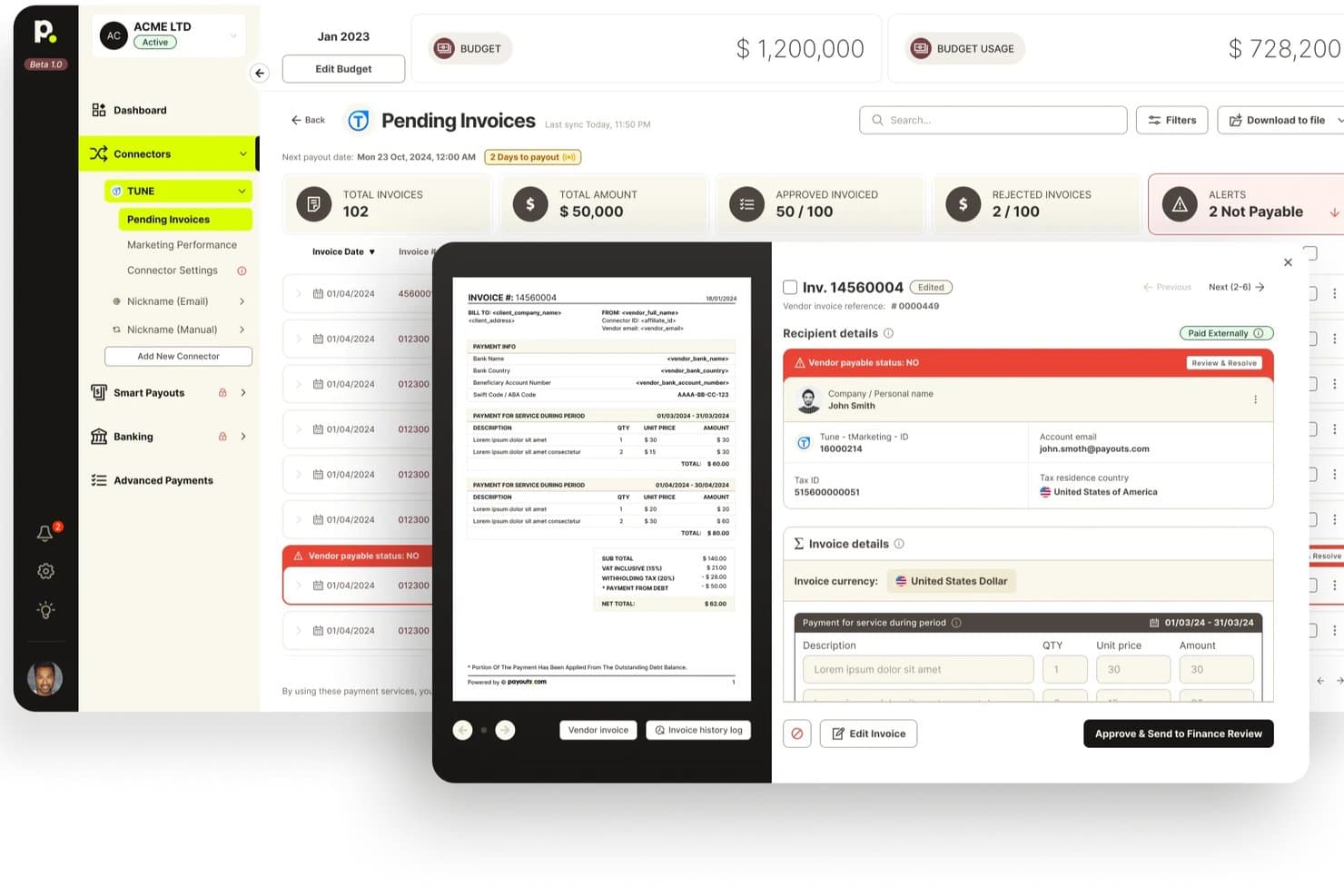
Payouts offre un pannello di controllo delle fatture in sospeso con anteprime delle fatture, avvisi sullo stato dei pagamenti dovuti ai fornitori e flussi di lavoro di approvazione per la gestione della fatturazione. Payouts è un sistema operativo finanziario che combina l'automazione globale dei debiti verso fornitori, l'esecuzione dei pagamenti su più circuiti, i flussi di lavoro per le approvazioni da dispositivi mobili e la gestione dei conti multivaluta in oltre 190 Paesi.
Per chi è più indicato Payouts?
Payouts è una soluzione ideale per i team finanziari di aziende di medie e grandi dimensioni che devono approvare e gestire pagamenti globali di volume elevato da qualsiasi luogo si trovino.
Perché ho scelto Payouts
Payouts è entrato nella mia rosa di finalisti per la sua efficacia nella gestione delle approvazioni dei pagamenti globali da un dispositivo mobile. Apprezzo particolarmente la possibilità di configurare catene di approvazione multilivello con delega e obbligo di doppia approvazione, per poi gestirle dal telefono con un'autorizzazione protetta da OTP. In pratica, ciò significa che un responsabile della tesoreria in viaggio tra diversi fusi orari può approvare in pochi secondi un pagamento SWIFT o SEPA Instant di importo elevato, con una traccia di audit completa che registra automaticamente ogni azione.
Funzionalità principali di Payouts
- Esecuzione dei pagamenti su più circuiti: Invia pagamenti tramite oltre 40 circuiti, tra cui ACH, SEPA Instant, SWIFT, RTP, FedNow, PayPal, Venmo e criptovalute, da un'unica piattaforma.
- Emissione di carte virtuali e prepagate: Genera su richiesta carte virtuali Visa e Mastercard con limiti di spesa per transazione, blocchi per categoria di esercente e limiti di frequenza in 38 valute.
- Dipendenti digitali IA: Agenti autonomi che possono registrare i fornitori, eseguire controlli KYC/KYB, sollecitare le fatture e programmare i pagamenti tramite e-mail, WhatsApp o voce.
- Rendicontazione fiscale 1099 e di fine anno: Genera i moduli fiscali per i collaboratori e gli adempimenti di fine anno direttamente all'interno della piattaforma, senza bisogno di uno strumento di rendicontazione separato.
Integrazioni di Payouts
Payouts offre oltre 50 integrazioni preconfigurate, tra cui NetSuite, QuickBooks, Xero, SAP, Plaid, Salesforce, Slack, Persona e ComplyAdvantage. Supporta inoltre connessioni REST API, webhook, CSV e SFTP per flussi di lavoro personalizzati.
Pros and Cons
Pros:
- Le approvazioni da dispositivi mobili includono un'autorizzazione protetta da OTP
- Gestisce oltre 40 circuiti di pagamento a livello globale
- Controlli e registri di audit solidi, di livello aziendale
Cons:
- Nessuna app mobile nativa dedicata
- Accessibilità limitata per i pagamenti POS sul campo
Learn more about Payouts: Ideale per il tracciamento sociale dei pagamenti
- Nessuna demo o prova gratuita
- I piani partono da 1,9% + $0,10 per transazione
Visit WebsiteCustomer Rating:4.7/5
Venmo offre una dashboard mobile con saldi, criptovalute e suddivisione delle spese di gruppo. Se stai cercando un'app di pagamento mobile che renda semplice tracciare e condividere i pagamenti con gli altri, vale la pena considerare Venmo. Il suo feed sociale e le note di pagamento rendono facile per piccoli team, freelance o gruppi tenere sotto controllo le spese condivise e dividere i costi con trasparenza. Questo approccio aiuta gli utenti a gestire i pagamenti di gruppo e i rimborsi in modo visibile e facile da consultare in seguito.
Perché ho scelto Venmo
Il tracciamento sociale dei pagamenti di Venmo lo distingue dalle altre app di pagamento mobile. Il feed delle transazioni permette agli utenti di vedere, commentare e tenere traccia dei pagamenti condivisi, particolarmente utile per i gruppi che gestiscono spese insieme. Ho scelto Venmo perché le sue note di pagamento e le opzioni di condivisione pubbliche o private aiutano gli utenti a chiarire lo scopo di ogni transazione e mantenere tutti aggiornati. Per chiunque abbia bisogno di trasparenza e di un modo semplice per monitorare i pagamenti di gruppo, le funzioni social di Venmo rappresentano una scelta vincente.
Funzionalità principali di Venmo
Altre funzionalità che rendono Venmo interessante per i pagamenti da mobile includono:
- Trasferimento istantaneo verso la banca: Trasferisci i fondi dal saldo Venmo al tuo conto bancario in pochi minuti pagando una piccola commissione.
- Carta di debito Venmo: Usa una carta fisica collegata al saldo Venmo per acquisti in negozio e online.
- Profili aziendali: Crea un profilo dedicato per le transazioni commerciali e accetta pagamenti dai clienti.
- Pagamenti tramite codice QR: Genera e scansiona codici QR per inviare o ricevere pagamenti rapidamente di persona.
Integrazioni di Venmo
Le integrazioni includono PayPal, Braintree, Mastercard, Visa, Hulu, Uber, Shopify, The Bancorp Bank, Synchrony Bank, MoneyPass e alcune app e siti web di commercianti autorizzati selezionati.
Pros and Cons
Pros:
- Il feed sociale rende trasparente l'attività di pagamento
- Supporta trasferimenti istantanei su conti bancari
- Offre profili aziendali per piccoli commercianti
Cons:
- Limiti di transazione per importi elevati
- Nessuna protezione per acquirenti o venditori sugli acquisti
Learn more about Venmo: Ideale per il supporto alle transazioni globali
- Piano gratuito + demo gratuita disponibile
- Da $0.30/transazione
Visit WebsiteCustomer Rating:4.6/5
PayPal consente un checkout mobile sicuro con autenticazione tramite codice una tantum. Se la tua azienda deve inviare o ricevere pagamenti transfrontalieri, PayPal offre una piattaforma affidabile per le transazioni globali. È particolarmente utile per venditori e-commerce, liberi professionisti e organizzazioni che lavorano con clienti o fornitori internazionali. Il supporto multivaluta di PayPal e le funzioni di protezione dell'acquirente aiutano a ridurre attriti e rischi nella gestione dei pagamenti in tutto il mondo.
Perché ho scelto PayPal
Quando devo gestire pagamenti che attraversano i confini internazionali, cerco strumenti che rendano le transazioni globali semplici e sicure. PayPal è una soluzione affidabile perché supporta pagamenti in oltre 25 valute ed è disponibile in più di 200 paesi, rendendo semplice fare affari con clienti e fornitori in tutto il mondo. Apprezzo il fatto che PayPal offra protezione integrata sia per acquirenti che per venditori, aiutando a ridurre i rischi per entrambe le parti nelle transazioni internazionali. Queste caratteristiche rendono PayPal una scelta affidabile per aziende e professionisti che devono gestire pagamenti internazionali senza complessità aggiuntive.
Caratteristiche principali di PayPal
Altre funzionalità che rendono PayPal utile per i pagamenti da dispositivo mobile includono:
- Pagamenti tramite QR Code: Accetta pagamenti di persona generando e scansionando codici QR.
- Impostazione di pagamenti ricorrenti: Pianifica e gestisci pagamenti ricorrenti automatici per abbonamenti o servizi.
- Link PayPal.Me: Crea link di pagamento personalizzati per richiedere denaro a chiunque.
- Trasferimento istantaneo su conto bancario: Trasferisci fondi istantaneamente dal saldo PayPal a un conto bancario o carta di debito collegati.
Integrazioni PayPal
Le integrazioni includono BigCommerce, Etsy, QuickBooks, Salesforce, Paymentus, Woo, Miva, Wix, GoFundMe Pro e Otter.
Pros and Cons
Pros:
- Supporta pagamenti in oltre 25 valute
- Offre politiche di protezione per acquirenti e venditori
- Si integra con le principali piattaforme e-commerce
Cons:
- Trattiene fondi per la verifica dell'account
- Applicazione di commissioni elevate per trasferimenti internazionali
Learn more about PayPal: 4Ideale per pagamenti internazionali a basso costo
Wise
- Piano gratuito disponibile
- Da $0.43/transfer (varia in base a località/valuta)
Visit WebsiteCustomer Rating:3.8/5
Wise offre una dashboard multivaluta con saldi, transazioni e opzioni di guadagno. Se la tua azienda ha bisogno di inviare o ricevere pagamenti internazionali senza costi elevati, Wise è la soluzione ideale. I team finanziari e i responsabili operativi di startup, PMI e aziende globali utilizzano Wise per trasferire denaro a livello internazionale ai tassi di cambio reali. La sua tariffazione trasparente e le funzionalità del conto multivaluta aiutano ad evitare costi nascosti e semplificano le transazioni globali.
Perché ho scelto Wise
Ciò che distingue Wise dalle app di pagamento mobile è l’attenzione alla riduzione dei costi dei trasferimenti internazionali. Ho scelto Wise perché utilizza tassi di cambio reali e commissioni basse e trasparenti, aspetto particolarmente importante per le aziende che effettuano frequenti pagamenti transfrontalieri. Il conto multivaluta consente di detenere e pagare in decine di valute, riducendo la necessità di diversi conti bancari. Per i team finanziari che gestiscono fornitori globali o personale remoto, Wise aiuta a mantenere i costi dei pagamenti internazionali prevedibili e facili da monitorare.
Caratteristiche principali di Wise
Altre funzionalità che rendono Wise utile per le aziende che gestiscono pagamenti mobili includono:
- Pagamenti in batch: Invia pagamenti a più destinatari contemporaneamente tramite un unico caricamento di file.
- Carta di debito business: Emissione di carte di debito fisiche o virtuali per le spese del team in diverse valute.
- Integrazione con Xero e QuickBooks: Sincronizza le transazioni direttamente con i più noti software di contabilità per facilitare la riconciliazione.
- Permessi utente: Imposta diversi livelli di accesso per i membri del team per controllare chi può visualizzare, inviare o approvare i pagamenti.
Integrazioni di Wise
Le integrazioni includono QuickBooks, Xero, Sage Business Cloud Accounting, Oracle NetSuite, Wave, Zoho Books, FreeAgent, Odoo e altri.
Pros and Cons
Pros:
- Tassi di cambio trasparenti di mercato
- Funzione di pagamento in batch per pagamenti massivi
- L'app mobile consente la gestione completa dell'account
Cons:
- Funzionalità di pagamento in presenza limitate
- Disponibilità limitata della carta di debito
Learn more about Wise: Ideale per l'autenticazione biometrica sicura
- Non disponibile
- Prezzo su richiesta

Apple Pay consente agli utenti iOS di effettuare pagamenti sicuri in negozio, nelle app e sul web. Per aziende e professionisti che danno priorità alla sicurezza, Apple Pay offre una soluzione di pagamento mobile basata sull'autenticazione biometrica. È particolarmente utile per i team che utilizzano iPhone o iPad, consentendo agli utenti di autorizzare i pagamenti con Face ID o Touch ID. Questo approccio aiuta le organizzazioni a ridurre il rischio di frodi e a semplificare le transazioni senza dipendere da carte fisiche.
Perché ho scelto Apple Pay
La sicurezza è una delle principali preoccupazioni per molte aziende che gestiscono pagamenti mobili, ed è per questo che ho scelto Apple Pay per la sua avanzata autenticazione biometrica. Con Face ID e Touch ID, gli utenti possono autorizzare i pagamenti utilizzando le proprie caratteristiche fisiche uniche, riducendo il rischio di transazioni non autorizzate. Apple Pay utilizza inoltre numeri specifici per dispositivo e codici di sicurezza dinamici per ogni transazione o acquisto, aggiungendo un ulteriore livello di protezione. Per le organizzazioni che desiderano dare priorità a transazioni sicure e senza carta, queste funzionalità rendono Apple Pay una scelta solida.
Caratteristiche principali di Apple Pay
Oltre alla sua autenticazione incentrata sulla sicurezza, Apple Pay offre diverse altre funzionalità degne di nota:
- Pagamenti contactless nei negozi: Effettua acquisti presso terminali abilitati NFC utilizzando iPhone o Apple Watch.
- Acquisti online e in-app: Paga rapidamente all'interno di app e siti web supportati senza inserire i dati della carta.
- Archiviazione carte fedeltà e premi: Aggiungi e utilizza carte fedeltà e programmi premi direttamente dal tuo dispositivo.
- Pagamenti peer-to-peer: Invia e ricevi denaro tramite Apple Cash all'interno di Messaggi.
Integrazioni di Apple Pay
Le integrazioni includono Apple Wallet, Apple Watch, iPhone, iPad, Mac, Safari, App Store, Apple Music, Apple TV+, iMessage e carte di trasporto PRESTO.
Pros and Cons
Pros:
- Autenticazione biometrica tramite Face ID o Touch ID
- Nessun dato della carta condiviso con i commercianti
- Notifiche in tempo reale per le transazioni
Cons:
- Disponibile solo su dispositivi Apple
- Non è possibile archiviare carte di trasporto non Apple
Learn more about Apple Pay: Ideale per l'elaborazione di pagamenti a livello enterprise
- Non disponibile
- Prezzi su richiesta

Worldpay è un servizio globale di elaborazione pagamenti per aziende con molteplici metodi di pagamento. Worldpay è pensato per grandi organizzazioni che hanno bisogno di gestire volumi elevati di pagamenti attraverso molteplici canali e aree geografiche. I team finanziari aziendali e i responsabili delle operazioni di pagamento possono utilizzare Worldpay come sistema di pagamento per gestire flussi complessi, supportare valute globali e mantenere la conformità. I suoi strumenti avanzati per la prevenzione delle frodi e per la liquidazione dei servizi finanziari aiutano le aziende a ridurre i rischi e a garantire la fluidità delle transazioni su larga scala.
Perché ho scelto Worldpay
Per le organizzazioni che gestiscono esigenze di pagamento su larga scala e complesse, Worldpay spicca per le sue capacità di elaborazione a livello enterprise. Ho scelto Worldpay perché supporta transazioni multivaluta e accettazione di pagamenti omnicanale, fondamentali per le aziende che operano a livello globale o su molteplici canali di vendita. I suoi strumenti avanzati per la rilevazione delle frodi e la gestione dei rischi aiutano i team finanziari a mantenere sicurezza e conformità, anche con l'aumentare dei volumi di transazione. Se hai bisogno di una soluzione in grado di gestire grandi volumi di transazioni e di adattarsi alle esigenze aziendali, Worldpay è progettato proprio per questo.
Caratteristiche principali di Worldpay
Altre caratteristiche che rendono Worldpay prezioso per l'elaborazione dei pagamenti aziendali includono:
- Gateway di pagamento personalizzabili: Configura i gateway di pagamento per adattarli ai requisiti e ai flussi di lavoro specifici dell'azienda.
- Supporto per la fatturazione ricorrente: Automatizza i pagamenti per abbonamenti e iscrizioni con strumenti di fatturazione ricorrente integrati.
- Report dettagliati sulle transazioni: Accedi a dati granulari sulle transazioni ed esporta report per riconciliazione e analisi.
- Strumenti di gestione dei chargeback: Monitora, rispondi e gestisci i chargeback direttamente dalla piattaforma.
Integrazioni di Worldpay
Le integrazioni includono Shopify, Sage Intacct, NMI Payments, AestheticsPro, CXT Software, HungerRush, Revaly, Juspay, Gr4vy e altre ancora.
Pros and Cons
Pros:
- Supporta pagamenti multivaluta e transfrontalieri
- Strumenti avanzati per la rilevazione delle frodi
- Conformità PCI DSS e tokenizzazione per la sicurezza
Cons:
- Supporto limitato per le esigenze delle piccole imprese
- Occasionali ritardi nella liquidazione dei fondi
Learn more about Worldpay: Ideale per trasferimenti diretti da banca a banca
- Piano gratuito disponibile
- Prezzo su richiesta

Zelle è un servizio di pagamento mobile per trasferimenti bancari istantanei. Per i team finanziari e i professionisti che necessitano di spostare denaro rapidamente tra conti bancari, Zelle offre una soluzione di trasferimento diretto integrata in molte app bancarie. I suoi pagamenti in tempo reale attirano aziende e privati che desiderano evitare portafogli di terze parti o tempi di attesa. Zelle è particolarmente utile per chi dà priorità alla velocità e alla semplicità nell'invio o nella ricezione di fondi direttamente dal proprio conto bancario.
Perché ho scelto Zelle
Zelle si distingue per la capacità di inviare denaro direttamente tra conti bancari senza richiedere un portafoglio separato o un conto di deposito. Ho scelto Zelle perché, grazie all'integrazione con le principali banche, permette agli utenti di trasferire fondi in tempo reale, spesso nel giro di pochi minuti. Questo approccio diretto tra banche elimina la necessità di trasferimenti manuali o periodi di attesa, il che è particolarmente prezioso per i professionisti della finanza che necessitano di accesso immediato ai fondi. Per chiunque valorizzi velocità e immediatezza nei pagamenti mobili, le funzionalità principali di Zelle lo rendono una scelta pratica.
Caratteristiche principali di Zelle
Altre caratteristiche che rendono Zelle utile per i pagamenti mobili includono:
- Nessuna condivisione del numero di conto: Gli utenti hanno bisogno solo di un indirizzo email o di un numero di cellulare per inviare o ricevere denaro.
- Accesso tramite app mobile: Zelle offre un'app standalone per gli utenti le cui banche non supportano Zelle nativamente.
- Funzionalità di richiesta pagamento: Gli utenti possono richiedere pagamenti da altri direttamente tramite l'app sul proprio telefono cellulare o tramite l'interfaccia della banca.
- Notifiche sulle transazioni: Sia chi invia sia chi riceve riceve avvisi in tempo reale per ogni transazione.
Integrazioni Zelle
Le integrazioni includono Bank of America, Wells Fargo, Chase, Capital One, U.S. Bank, PNC, Truist, TD Bank, Navy Federal Credit Union, QuickBooks Online, Expensify e altri.
Pros and Cons
Pros:
- Nessuna commissione per inviare o ricevere denaro
- Accessibile tramite la maggior parte delle principali app bancarie
- Utilizza email o numero di telefono per i pagamenti
Cons:
- Funziona solo con conti bancari statunitensi
- Non può essere collegato alle carte di credito per i pagamenti
Learn more about Zelle: Ideale per l'integrazione con strumenti aziendali Android
- Gratuito
- Gratuito

Google Wallet ti consente di memorizzare e utilizzare pass per eventi con codici QR su diverse app di Google. Se il tuo team si affida a dispositivi Android, Google Wallet offre una soluzione di pagamento che si integra direttamente nei tuoi flussi di lavoro esistenti. È pensata per utenti che desiderano gestire pagamenti, carte fedeltà, numeri di carte diversi e pass tutto in un unico posto, con un’integrazione completa con la suite di strumenti aziendali di Google. Questa app aiuta le aziende e i professionisti a mantenere tutti i pagamenti digitali organizzati e accessibili direttamente dai loro telefoni Android.
Perché ho scelto Google Wallet
Ho scelto Google Wallet perché è progettato per funzionare con gli strumenti aziendali Android, rappresentando una scelta naturale per i team che già utilizzano l’ecosistema Google. L’app ti consente di memorizzare e gestire carte di pagamento, programmi fedeltà e abbonamenti per i trasporti, tutto accessibile dal tuo dispositivo Android. Apprezzo il modo in cui si sincronizza con Google Workspace, permettendo un facile monitoraggio delle spese e l’integrazione con altri servizi Google. Per le aziende che si affidano ad Android, queste funzionalità aiutano a centralizzare la gestione dei pagamenti e a ridurre gli ostacoli nelle transazioni quotidiane.
Funzionalità principali di Google Wallet
Altre funzionalità di Google Wallet che si distinguono per la gestione dei pagamenti da mobile includono:
- Pagamenti contactless: Effettua pagamenti sicuri ai terminali utilizzando la comunicazione near-field e il tuo dispositivo Android.
- Archiviazione carte regalo digitali: Conserva e accedi alle carte regalo digitali direttamente nell'app per riscattarle facilmente.
- Storico delle transazioni: Visualizza un registro dettagliato di tutti i tuoi ultimi pagamenti e trasferimenti per una migliore gestione delle registrazioni.
- Controlli di sicurezza in-app: Imposta l’autenticazione tramite impronta digitale o PIN per aggiungere un ulteriore livello di sicurezza alle tue transazioni.
Integrazioni di Google Wallet
Le integrazioni includono Google Pay, Google Maps, Gmail, Google Search, Family Link, Android, chiavi digitali per auto BMW e altro ancora.
Pros and Cons
Pros:
- Si integra direttamente con gli strumenti aziendali Android
- Consente pagamenti con un tocco sulla maggior parte dei dispositivi Android
- Offre potenti funzionalità di sicurezza a livello dispositivo
Cons:
- Non disponibile su dispositivi iOS
- Nessuna funzionalità di fatturazione o creazione di ricevute integrata
Learn more about Google Wallet: Ideale per trasferimenti istantanei tra pari
- Piano gratuito disponibile
- Gratuito

Cash App ti permette di inviare e ricevere denaro istantaneamente con amici e familiari. Se hai bisogno di un'app portafoglio mobile specializzata in trasferimenti rapidi e diretti, Cash App è progettata per pagamenti istantanei tra pari. È una scelta eccellente per piccole imprese, freelance o team che devono inviare o ricevere denaro rapidamente senza aspettare i tempi di elaborazione bancaria. Cash App supporta anche funzioni come l'accredito diretto e una carta di debito collegata, rendendola più versatile rispetto alle app di trasferimento di base.
Perché ho scelto Cash App
Per chiunque abbia bisogno di spostare denaro istantaneamente tra persone, Cash App si distingue per le sue capacità di trasferimento peer-to-peer in tempo reale. L'ho scelta perché gli utenti possono inviare e ricevere fondi in pochi secondi, particolarmente utile per dividere spese, pagare collaboratori o rimborsare colleghi all'istante. L'app inoltre permette di accedere immediatamente ai fondi trasferiti tramite una carta di debito collegata, eliminando l'attesa per l'elaborazione bancaria. Queste caratteristiche rendono Cash App una soluzione pratica per team e professionisti che danno valore a velocità e comodità nei pagamenti mobili.
Caratteristiche principali di Cash App
Altre funzionalità che rendono Cash App interessante per i pagamenti mobili includono:
- Supporto accredito diretto: Ricevi stipendi o altri accrediti direttamente sul tuo conto Cash App.
- Acquisto e vendita Bitcoin: Acquista, vendi e conserva Bitcoin direttamente nell'app.
- Integrazione con Cash Card: Usa una carta di debito fisica o virtuale collegata al saldo Cash App per acquisti.
- Link di pagamento personalizzabili: Crea link di pagamento unici per richiedere denaro ad altri.
Integrazioni di Cash App
Le integrazioni includono Square, Afterpay, Shopify, WooCommerce, Adobe Commerce, Jotform e altro ancora.
Pros and Cons
Pros:
- Trasferimenti immediati tra utenti senza attese
- Offre una Cash Card fisica per gli acquisti
- Consente l'accredito diretto degli stipendi
Cons:
- Limitata solo a utenti negli Stati Uniti e nel Regno Unito
- Nessuna funzione di fatturazione business integrata
Learn more about Cash App: Ideale per la compatibilità con terminali a banda magnetica
- Piano gratuito disponibile
- Gratis da usare

Samsung Pay offre più metodi di verifica prima di attivare le carte virtuali. Le aziende che necessitano di un'app di pagamento mobile compatibile con i vecchi sistemi di punto vendita potrebbero prendere in considerazione Samsung Pay. La sua tecnologia di trasmissione magnetica sicura (MST) consente agli utenti di pagare presso terminali che accettano solo carte con banda magnetica, non solo NFC. Questo la rende una scelta pratica per commercianti e fornitori di servizi che lavorano con hardware di pagamento datato.
Perché ho scelto Samsung Pay
A differenza della maggior parte delle app di pagamento mobile, Samsung Pay si distingue per la sua capacità di funzionare con terminali a banda magnetica, non solo quelli abilitati NFC. Questo è possibile grazie alla sua tecnologia di trasmissione magnetica sicura (MST), che permette agli utenti di pagare su lettori di carte non ancora aggiornati per i pagamenti contactless. Ho incluso Samsung Pay in questa lista perché aiuta aziende e professionisti ad accettare pagamenti mobili in ambienti dove altri wallet potrebbero non funzionare. Per chiunque abbia bisogno di un’ampia compatibilità con hardware di pagamento nuovo e datato, questa caratteristica può essere un vero vantaggio.
Caratteristiche principali di Samsung Pay
Oltre alla sua compatibilità con i terminali a banda magnetica, ho trovato queste funzioni degne di nota:
- Archiviazione carte fedeltà: Conserva e accedi alle versioni digitali delle carte fedeltà e di iscrizione all’interno dell’app.
- Programma Samsung Rewards: Guadagna punti per ogni acquisto effettuato con Samsung Pay, riscattabili per vari premi.
- Pagamenti online in-app: Effettua acquisti direttamente all’interno di app e siti supportati utilizzando Samsung Pay.
- Autenticazione biometrica: Usa impronta digitale o scansione dell’iride per autorizzare i pagamenti in sicurezza.
Integrazioni Samsung Pay
Le integrazioni includono TD Bank, RBC, CIBC, Scotiabank, American Express, Mastercard, Visa, Interac, Tangerine e Simplii Financial.
Pros and Cons
Pros:
- Funziona sia con terminali NFC che MST
- Supporta le principali banche canadesi e internazionali
- Offre Samsung Rewards per gli acquisti
Cons:
- Disponibile solo su dispositivi Samsung
- Non accettato da tutti i commercianti internazionali
Learn more about Samsung Pay:
Altre app di pagamento mobile
Ecco alcune ulteriori opzioni di app di pagamento mobile che non sono state incluse nel mio elenco ristretto, ma che vale comunque la pena valutare:
- 11Square PaymentsIdeale per soluzioni POS integrate
- 12MonzoIdeale per notifiche di spesa in tempo reale
- 13CommBankIdeale per l'integrazione con il banking aziendale australiano
- 14Currency CloudIdeale per la gestione di conti in valute multiple
Come Valuto le App di Pagamento Mobile
Che si tratti di un controller che deve approvare un pagamento a un fornitore mentre è in viaggio o di un team operativo che deve accettare pagamenti con carta sul posto, divido la mia valutazione in caratteristiche imprescindibili di base e veri fattori differenzianti.
Funzionalità di Base (Requisiti Fondamentali per Questa Lista)
Quando seleziono gli strumenti per la mia lista, valuto ciascuno su una scala da 0 (non offre la funzionalità) a 5 (eccelle in questa area) per ogni funzionalità di base elencata qui sotto. Successivamente, calcolo il punteggio totale dello strumento come percentuale. Ogni strumento deve raggiungere un punteggio minimo totale del 65% per essere considerato per l'inclusione.
- Elaborazione di Transazioni Mobile: Verifico se l'app supporta completamente l'invio, la ricezione e la richiesta di pagamenti in modo nativo su iOS e Android—non solo una versione mobile di un pannello di controllo desktop.
- Supporto per Metodi di Pagamento Multipli: Ogni app dovrebbe gestire carte, bonifici ACH/bancari e portafogli digitali così che il tuo team possa pagare i fornitori o ricevere dai clienti nel modo che preferiscono.
- Sicurezza & Crittografia dei Pagamenti: Valuto il livello di conformità PCI-DSS, la tokenizzazione e le opzioni MFA, poiché i team finanziari che gestiscono transazioni in tempo reale da dispositivi personali necessitano di protezioni a più livelli.
- Storico Transazioni & Reportistica: Log ricercabili con filtri e report esportabili sono fondamentali qui—il tuo team AP deve poter recuperare i pagamenti ai fornitori dell’ultimo trimestre in pochi secondi, senza dover scorrere all’infinito.
- Integrazione con Software di Contabilità: Cerco collegamenti nativi con piattaforme come QuickBooks, Xero o NetSuite con sincronizzazione bidirezionale affinché le transazioni vengano registrate nel GL senza necessità di reinserimento manuale.
- Notifiche & Conferme in Tempo Reale: Avvisi push per completamenti di pagamento, transazioni fallite e approvazioni in sospeso mantengono i gestori di tesoreria informati, senza dover aprire ripetutamente l’app.
Una volta che ho una lista di strumenti che soddisfano questi criteri, considero cosa distingue ciascuna piattaforma.
Fattori Differenzianti (Cosa Distingue i Fornitori)
Ecco come confronto e metto a confronto i diversi fornitori:
Funzionalità Distintive
I workflow di approvazione multilivello sono molto importanti quando controller o responsabili di tesoreria devono autorizzare pagamenti da remoto prima che i fondi escano dal conto. Inoltre, cerco il supporto multivaluta con tassi FX in tempo reale, soprattutto per i team che pagano fornitori o collaboratori all’estero. La cattura delle ricevute con OCR è un’altra funzione che valuto attentamente—scattare una foto di una fattura e allegare automaticamente i dati delle singole voci a una transazione fa risparmiare agli AP l’inserimento manuale dei dati in fase di riconciliazione.
Oltre le Funzionalità
La trasparenza dei prezzi è una delle prime cose che valuto—commissioni nascoste per transazione o maggiorazioni FX possono erodere silenziosamente i margini, quindi controllo se i fornitori pubblicano strutture tariffarie chiare e tutto incluso. Anche la velocità di regolamento conta per la previsione del flusso di cassa; analizzo se una piattaforma offre pagamenti nello stesso giorno o istantanei rispetto alle classiche finestre di più giorni. Infine, considero la scalabilità, in particolare il supporto multi-ente e i permessi basati su ruoli, poiché uno strumento adatto a un team di cinque persone ma che cede sotto operazioni multi-sede non servirà a lungo a un’azienda finanziaria in crescita.
Come scegliere le app di pagamento mobile
È facile perdersi in lunghi elenchi di funzionalità e strutture tariffarie complesse. Per aiutarti a rimanere concentrato mentre affronti il tuo specifico processo di selezione del software, ecco un elenco di fattori da tenere a mente:
| Fattore | Cosa valutare |
|---|---|
| FattoreScalabilità | Cosa valutareL’app supporterà il volume delle tue transazioni man mano che la tua attività cresce? Verifica la presenza di limiti per utenti o transazioni. |
| FattoreIntegrazioni | Cosa valutareL’app si collega nativamente ai tuoi sistemi di contabilità, POS o ERP? Eventuali lacune in questo ambito possono creare lavoro manuale. |
| FattorePersonalizzazione | Cosa valutarePuoi adattare i flussi di pagamento, il marchio o i rapporti alle esigenze della tua attività, oppure l’esperienza è fissa? |
| FattoreSemplicità d’uso | Cosa valutareIl tuo team e i tuoi clienti troveranno l’interfaccia intuitiva? Esegui dei test con utenti reali prima di impegnarti. |
| FattoreImplementazione e configurazione iniziale | Cosa valutareQuanto tempo occorrerà per iniziare a operare? Cerca guide di configurazione chiare, supporto alla migrazione e risorse per la formazione. |
| FattoreCosti | Cosa valutareTutte le commissioni sono trasparenti, comprese quelle sulle transazioni, mensili e accessorie? Confronta il costo totale di possesso. |
| FattoreMisure di sicurezza | Cosa valutareL’app soddisfa gli standard PCI DSS e offre strumenti di prevenzione delle frodi? Informati sulla crittografia e sulla conformità. |
| FattoreDisponibilità dell’assistenza | Cosa valutareL’assistenza è disponibile quando ne hai bisogno, soprattutto al di fuori dell’orario lavorativo o nei periodi di maggiore affluenza? |
Cosa sono le app di pagamento mobile?
Le app di pagamento mobile sono strumenti software che consentono alle aziende di accettare pagamenti utilizzando smartphone o tablet, in genere tramite transazioni senza contatto con carta o portafogli digitali. Questo tipo di piattaforma di pagamento trasforma i dispositivi mobili in terminali di pagamento, consentendo di accettare pagamenti in modo rapido, sicuro e flessibile. Sono ampiamente utilizzate da rivenditori, fornitori di servizi e squadre sul campo che devono elaborare transazioni in mobilità senza dispositivi dedicati.
Caratteristiche
Quando selezioni le app per i pagamenti mobili, presta attenzione alle seguenti caratteristiche principali:
- Accettazione dei pagamenti contactless: consente di elaborare pagamenti con carte contactless o portafogli digitali utilizzando dispositivi abilitati NFC, rendendo le transazioni rapide e pratiche sia per le aziende sia per i clienti.
- Ricevute digitali: invia ricevute elettroniche ai clienti tramite email o SMS, riducendo l'uso della carta e semplificando il monitoraggio e l'archiviazione dei registri delle transazioni.
- Storico delle transazioni: fornisce registri consultabili di tutti i pagamenti, rimborsi e annullamenti, agevolando la riconciliazione, la reportistica e le registrazioni di controllo.
- Elaborazione dei rimborsi: consente di emettere rimborsi totali o parziali direttamente dall'app, semplificando il servizio clienti e la gestione dei resi.
- Accesso multiutente: supporta più accessi del personale o ruoli utente, così i team possono elaborare pagamenti utilizzando un unico account aziendale, mantenendo al contempo il controllo.
- Controlli di sicurezza: include funzionalità come protezione tramite PIN, accesso biometrico e crittografia per proteggere i dati di pagamento sensibili e impedire gli accessi non autorizzati.
- Integrazione con sistemi di contabilità o POS: si collega direttamente al software aziendale esistente, riducendo l'inserimento manuale dei dati e migliorando l'accuratezza finanziaria.
- Branding personalizzabile: consente di aggiungere il logo o il nome dell'azienda alle ricevute e alle schermate di pagamento, rafforzando il tuo marchio con ogni transazione.
- Funzionalità di pagamento offline: consente di accettare pagamenti anche senza una connessione Internet, sincronizzando le transazioni una volta ripristinata la connettività.
Vantaggi
L'implementazione di app per i pagamenti mobili offre diversi vantaggi al tuo team e alla tua azienda. Eccone alcuni che puoi aspettarti:
- Elaborazione più rapida dei pagamenti: accettare pagamenti contactless e tramite portafogli digitali velocizza le transazioni e riduce i tempi di attesa per i clienti.
- Maggiore mobilità: i team possono elaborare pagamenti ovunque utilizzando smartphone o tablet, supportando le vendite sul campo, gli eventi e i servizi in mobilità.
- Monitoraggio migliorato delle transazioni: lo storico integrato delle transazioni e le ricevute digitali semplificano la riconciliazione dei pagamenti e il mantenimento di registri accurati.
- Sicurezza avanzata: i controlli di sicurezza come la crittografia, la protezione tramite PIN e la conformità agli standard di pagamento contribuiscono a proteggere i dati sensibili.
- Rimborsi e resi semplificati: l'elaborazione dei rimborsi nell'app semplifica il servizio clienti e riduce il lavoro manuale del personale.
- Integrazione semplice con i sistemi aziendali: i collegamenti diretti al software di contabilità o POS riducono l'inserimento manuale e migliorano l'accuratezza finanziaria.
- Esperienza cliente personalizzabile: funzionalità come le ricevute con il marchio e l'accesso multiutente consentono di adattare il processo di pagamento alle esigenze della tua azienda.
Costi e prezzi
La selezione di app per i pagamenti mobili richiede la comprensione dei vari modelli di prezzo e dei piani disponibili. I costi variano in base alle funzionalità, alle dimensioni del team, agli extra e ad altri fattori. La tabella seguente riassume i piani più comuni, i relativi prezzi medi e le funzionalità tipicamente incluse nelle soluzioni per app di pagamento mobili:
Tabella comparativa dei piani per app di pagamento mobili
| Tipo di piano | Prezzo medio | Funzionalità comuni |
|---|---|---|
| Tipo di pianoPiano gratuito | Prezzo medio$0 | Funzionalità comuniAccetta pagamenti di base, fornisce ricevute digitali, offre uno storico limitato delle transazioni e controlli di sicurezza di base. |
| Tipo di pianoPiano personale | Prezzo medio$5-$15/utente/mese | Funzionalità comuniInclude tutte le funzionalità gratuite, aggiunge l'elaborazione dei rimborsi, supporta integrazioni limitate e offre reportistica di base. |
| Tipo di pianoPiano aziendale | Prezzo medio$20-$40/utente/mese | Funzionalità comuniAggiunge l'accesso multiutente, uno storico avanzato delle transazioni, l'integrazione con sistemi di contabilità o POS e il branding personalizzabile. |
| Tipo di pianoPiano per grandi aziende | Prezzo medio$50-$100/utente/mese | Funzionalità comuniOffre tutte le funzionalità aziendali, garantisce sicurezza avanzata, supporto prioritario, onboarding personalizzato e gestione della conformità. |
Domande frequenti sulle app di pagamento mobile
Ecco alcune risposte alle domande più comuni sulle app di pagamento mobile:
Le app di pagamento mobile sono sicure per le transazioni aziendali?
Sì, la maggior parte delle app di pagamento mobile utilizza la crittografia e la tokenizzazione. La maggior parte delle app è inoltre conforme agli standard PCI DSS per proteggere i dati di pagamento sensibili. Verifica sempre che l’app offra l’autenticazione a più fattori e aggiornamenti di sicurezza regolari per ridurre il rischio di frodi o violazioni dei dati.
Le app di pagamento mobile possono funzionare senza una connessione Internet?
Sì, alcune app di pagamento mobile offrono funzionalità di pagamento offline, consentendo di accettare pagamenti quando la connessione non è disponibile. Le transazioni vengono memorizzate localmente ed elaborate quando il dispositivo si riconnette a Internet, ma non tutte le app supportano questa funzione, quindi è opportuno verificarlo prima di effettuare una scelta.
In che modo le app di pagamento mobile si integrano con i sistemi contabili?
Molte app di pagamento mobile offrono integrazioni dirette o opzioni di esportazione per i software di contabilità. Ciò contribuisce ad automatizzare la sincronizzazione delle transazioni, riduce l’inserimento manuale dei dati e migliora la precisione delle riconciliazioni. Prima di effettuare una scelta, verifica la compatibilità con gli strumenti contabili già in uso.
Quali tipi di pagamento posso accettare con le app di pagamento mobile?
In genere puoi accettare pagamenti con carte di credito, carte di debito, pagamenti contactless e portafogli digitali come Apple Pay o Google Pay. Alcune app supportano anche i pagamenti tramite codice QR o i bonifici bancari, quindi verifica i metodi di pagamento supportati per soddisfare le preferenze dei tuoi clienti.
Le app di pagamento mobile applicano commissioni sulle transazioni?
Sì, la maggior parte delle app di pagamento mobile applica una commissione per transazione, che può variare in base al tipo di pagamento e al piano. Alcune possono prevedere anche costi mensili o addebiti aggiuntivi per le funzionalità premium. Esamina il tariffario completo per comprendere il costo totale di possesso.