

Il budgeting a base zero può aiutarti a riprendere il controllo di ogni dollaro del tuo budget, ma gestirlo manualmente è lento e soggetto a errori. È qui che entra in gioco il software di budgeting a base zero.
In qualità di controller finanziario, ho affrontato gli stessi problemi: fogli di calcolo disordinati, numeri poco chiari e un continuo scambio di comunicazioni, motivo per cui ho preparato questo elenco.
Grazie alla mia esperienza nelle operazioni finanziarie, ho testato e recensito personalmente questi strumenti per aiutarti a evitare tentativi ed errori e trovare una soluzione che funzioni davvero. Iniziamo.
Perché fidarsi dei nostri consigli sui software
6,700+
Reviews
20
Industry experts
16+
Evaluation factors
14
Years
Le nostre recensioni riflettono il nostro giudizio indipendente, non un discorso di vendita. Scopri come manteniamo la trasparenza.
Per questa guida, abbiamo valutato gli strumenti attraverso test pratici e ricerche indipendenti, assegnando un punteggio agli strumenti in base ai nostri criteri di selezione.
Le nostre recensioni riflettono il nostro giudizio editoriale umano, non un discorso di vendita.
Tabella comparativa dei software di budgeting a base zero
Questa tabella comparativa riassume i dettagli dei prezzi delle mie migliori selezioni di software di budgeting a base zero:
| Tool | Best For | Trial Info | Price | ||
|---|---|---|---|---|---|
| 1 | Ideale per la scalabilità nelle grandi aziende | Demo gratuita disponibile | Prezzo su richiesta | Website | |
| 2 | Ideale per approfondimenti di budget guidati dall'IA | Demo gratuita disponibile | Prezzi su richiesta | Website | |
| 3 | Ideale per la reportistica finanziaria integrata | Demo gratuita disponibile | Prezzo su richiesta | Website | |
| 4 | Ideale per la pianificazione della forza lavoro | Demo gratuita disponibile | Prezzi su richiesta | Website | |
| 5 | Ideale per processi di pianificazione continua | Demo gratuita disponibile | Prezzo su richiesta | Website | |
| 6 | Ideale per l'integrazione con i fogli di calcolo | Demo gratuita disponibile | Prezzo su richiesta | Website | |
| 7 | Ideale per il budgeting basato su cloud | Demo gratuita disponibile | Prezzi su richiesta | Website | |
| 8 | Ideale per interfaccia utente intuitiva | Demo gratuita disponibile | Prezzo su richiesta | Website | |
| 9 | Ideale per la pianificazione basata su Excel | Demo gratuita disponibile | Prezzi su richiesta | Website | |
| 10 | Ideale per le capacità di visualizzazione dei dati | Demo gratuita disponibile | Prezzo su richiesta | Website |


Recensioni dei migliori software di budgeting a base zero
Di seguito trovi le mie analisi dettagliate dei migliori software di budgeting a base zero inclusi nella mia selezione. Le mie recensioni offrono una panoramica approfondita delle funzionalità principali, dei pro & contro, delle integrazioni e dei casi d’uso ideali di ogni strumento, per aiutarti a trovare quello più adatto a te.
 Ideale per la scalabilità nelle grandi aziende
- Demo gratuita disponibile
- Prezzo su richiesta
Visit WebsiteCustomer Rating:4.5/5
Anaplan supporta la pianificazione aziendale con modelli dinamici di budgeting a base zero. Anaplan è una piattaforma di pianificazione basata su cloud progettata per grandi aziende che devono gestire pianificazioni finanziarie, budget e previsioni complesse. È destinata ai team finanziari che cercano una soluzione scalabile per affrontare processi aziendali articolati.
Perché ho scelto Anaplan: Anaplan è ideale se lavori con operazioni complesse o su larga scala. Permette di costruire e modificare facilmente modelli finanziari affinché si adattino davvero al funzionamento della tua azienda e ti aiutino a gestire il tuo denaro. Gli aggiornamenti dei dati in tempo reale significano anche che il tuo team non rimane bloccato in attesa: puoi prendere decisioni rapide e informate man mano che le cose cambiano. E dato che si adatta facilmente, cresce insieme al tuo business, rendendolo una scelta solida per team ampi o grandi aziende.
Funzionalità e integrazioni di spicco:
Funzionalità includono pianificazione di scenari avanzati per aiutarti a esplorare diversi risultati aziendali. La piattaforma offre anche strumenti di collaborazione in tempo reale per migliorare la comunicazione del team. Inoltre, propone analisi dettagliate per una comprensione più approfondita dei dati finanziari.
Integrazioni includono Salesforce, Workday, Microsoft Azure, SAP, Oracle, Slack, Tableau, Docusign, ServiceNow e Google Workspace.
Pros and Cons
Pros:
- Elaborazione dati in tempo reale
- Supporta operazioni su larga scala
- Capacità di modellazione flessibile
Cons:
- Richiede competenze tecniche
- Curva di apprendimento ripida
Learn more about Anaplan: Ideale per approfondimenti di budget guidati dall'IA
- Demo gratuita disponibile
- Prezzi su richiesta
Visit WebsiteCustomer Rating:4.8/5
Drivetrain allinea i piani con la strategia utilizzando strumenti di modellazione finanziaria in tempo reale. Drivetrain è una piattaforma di finanza strategica progettata per le aziende moderne, con l'obiettivo di potenziare la pianificazione e l'analisi finanziaria. Si rivolge ai team finanziari che vogliono automatizzare i principali flussi di lavoro e migliorare il processo decisionale strategico.
Perché ho scelto Drivetrain: Drivetrain utilizza l'intelligenza artificiale per semplificare la pianificazione e l'analisi finanziaria. Ti aiuta a creare rapidamente solidi forecast di flusso di cassa e piani di ricavo—senza perdersi in fogli di calcolo complessi. Ma ciò che colpisce di più è la capacità di integrare dati in tempo reale per mantenere le previsioni sempre aggiornate. Quando le cose cambiano, anche i tuoi piani possono cambiare, rendendo Drivetrain uno strumento intelligente per mantenere la strategia sempre al passo coi tempi.
Funzionalità e integrazioni principali:
Funzionalità includono la consolidazione finanziaria per una visione unificata delle finanze. Le sue previsioni di flusso di cassa aiutano anche il team a gestire efficacemente la liquidità. Inoltre, la pianificazione dell'organico permette di pianificare con precisione le esigenze di personale.
Integrazioni includono NetSuite, QuickBooks, Salesforce, Xero, SAP, Microsoft Dynamics, Workday, Slack e Google Workspace.
Pros and Cons
Pros:
- Report personalizzabili
- Accesso ai dati in tempo reale
- Approfondimenti guidati dall'IA
Cons:
- Pochi modelli specifici per settore
- Processo di configurazione complesso
Learn more about Drivetrain: Ideale per la reportistica finanziaria integrata
- Demo gratuita disponibile
- Prezzo su richiesta
Visit WebsiteCustomer Rating:4.5/5
Prophix automatizza il budgeting a base zero grazie a strumenti di workflow e approvazione. Prophix è uno strumento di gestione delle performance aziendali progettato per aziende di medie e grandi dimensioni. Aiuta i team finanziari nella pianificazione, nel budgeting e nella reportistica finanziaria integrata.
Perché ho scelto Prophix: Prophix eccelle nel riunire tutta la reportistica finanziaria in un unico posto. Dispone di funzionalità utili come report automatizzati e dashboard personalizzabili, così il tuo team può creare report chiari e dettagliati senza tutto il lavoro manuale. Se cerchi uno strumento che centralizzi tutte le informazioni e ti dia una visione completa delle tue finanze, Prophix merita sicuramente una prova.
Funzionalità e integrazioni principali:
Funzionalità includono workflow integrati per snellire le approvazioni e mantenere i processi di budgeting sotto controllo. Gli strumenti di pianificazione degli scenari ti permettono inoltre di testare diversi esiti finanziari, così puoi pianificare con maggiore sicurezza.
Integrazioni includono Microsoft Dynamics, Sage, NetSuite, SAP, QuickBooks, Salesforce, Workday, Google Workspace e Microsoft Office 365.
Pros and Cons
Pros:
- Riduce l'inserimento manuale dei dati
- Supporta la pianificazione collaborativa
- Reportistica finanziaria integrata
Cons:
- Accesso mobile limitato
- Configurazione iniziale complessa
Learn more about Prophix: Ideale per la pianificazione della forza lavoro
- Demo gratuita disponibile
- Prezzi su richiesta
Visit WebsiteCustomer Rating:4.4/5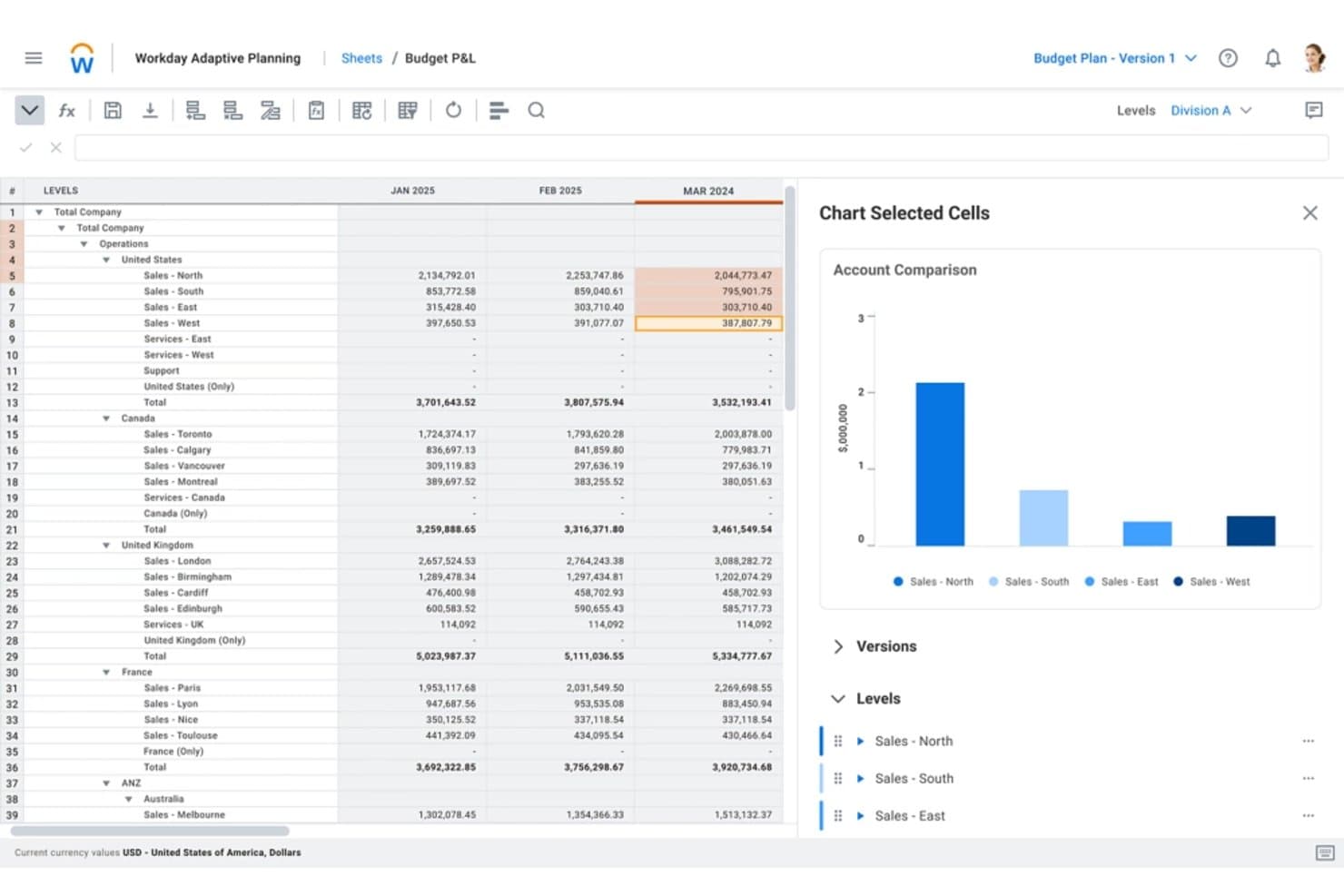
Workday Adaptive Planning monitora i budget delle vendite regionali tra i reparti per periodo. Workday Adaptive Planning è una piattaforma aziendale di FP&A ed EPM che supporta la pianificazione del budget a base zero e basata sui driver, la pianificazione della forza lavoro, la modellazione degli scenari e la collaborazione interfunzionale sul budget.
Per chi è più adatto Workday Adaptive Planning?
Workday Adaptive Planning è una soluzione particolarmente adatta ai team di FP&A delle aziende di medie e grandi dimensioni che devono collegare la pianificazione finanziaria e quella della forza lavoro in un'unica piattaforma.
Perché ho scelto Workday Adaptive Planning
Workday Adaptive Planning si è guadagnato un posto nella mia lista ristretta perché il suo modulo per la pianificazione della forza lavoro fa qualcosa che la maggior parte degli strumenti di FP&A non è in grado di fare: collega direttamente le decisioni sull'organico al loro impatto sui costi in tempo reale. Quando preparo un budget a base zero, posso modellare ipotesi di assunzione basate sui driver per centro di costo e vedere immediatamente come ogni decisione influisce sul risultato finale. Inoltre, Adaptive Decision Intelligence genera automaticamente narrazioni sulle varianze, consentendomi di individuare esattamente dove la spesa si discosta e perché.
Funzionalità principali di Workday Adaptive Planning
- Pianificazione delle spese basata sui driver: Crea piani di spesa collegati a specifici driver aziendali, con regole integrate per le allocazioni tra i centri di costo.
- Scenari ipotetici illimitati: Crea e condividi un numero illimitato di modelli di scenario per confrontare i risultati del budget con gli obiettivi strategici.
- Esplorazione dei dati in linguaggio naturale: Interroga i dati dei piani e i report utilizzando domande in linguaggio comune tramite il livello Adaptive Decision Intelligence.
- Pianificazione del budget dall'alto verso il basso e dal basso verso l'alto: Imposta obiettivi dirigenziali di alto livello raccogliendo contemporaneamente gli input operativi dai responsabili dei centri di costo.
Integrazioni di Workday Adaptive Planning
Workday Adaptive Planning supporta oltre 4.000 integrazioni con più di 350 sistemi di origine, tra cui Oracle, SAP, NetSuite, Microsoft Dynamics, Sage Intacct, QuickBooks, Xero, Deltek, Epicor e Workday HCM. Il suo Integration Cloud supporta lo scambio di dati ERP e HRIS per la pianificazione del budget.
Pros and Cons
Pros:
- Modella in tempo reale l'impatto dei costi della forza lavoro
- Confronta scenari illimitati con gli obiettivi strategici
- Supporta la collaborazione sul budget dall'alto verso il basso e dal basso verso l'alto
Cons:
- Non dispone di flussi di lavoro strutturati per la giustificazione delle singole voci
- Richiede il supporto di un amministratore per le configurazioni complesse
Learn more about Workday Adaptive Planning: Ideale per processi di pianificazione continua
- Demo gratuita disponibile
- Prezzo su richiesta
Visit WebsiteCustomer Rating:4.2/5
Planful consente una pianificazione dettagliata del budget con simulazioni di scenario e automazione. Planful è una piattaforma di pianificazione e analisi finanziaria progettata per aziende di tutte le dimensioni. Assiste i team finanziari nella gestione del budget, delle previsioni e della pianificazione continua per migliorare le performance finanziarie.
Perché ho scelto Planful: Planful rende semplice mantenere budget e previsioni sempre aggiornati con modifiche in tempo reale. Puoi regolare rapidamente i piani, eseguire diversi scenari e restare sempre un passo avanti. Questo, unito a un'interfaccia pulita e intuitiva, aiuta a rendere meno impegnativi anche i compiti e gli obiettivi finanziari più complessi.
Caratteristiche e integrazioni principali:
Caratteristiche includono reportistica dinamica che offre informazioni finanziarie sempre aggiornate. Sono disponibili anche strumenti di collaborazione integrati che facilitano la partecipazione di team interfunzionali alla definizione di budget e previsioni.
Integrazioni includono NetSuite, QuickBooks, Salesforce, Workday, Microsoft Dynamics, SAP, Google Workspace, Microsoft Office 365 e Dropbox.
Pros and Cons
Pros:
- Regolazioni di budget in tempo reale
- Strategie finanziarie flessibili
- Supporta la pianificazione continua
Cons:
- Pochi modelli specifici per settore
- Opzioni di personalizzazione limitate
Learn more about Planful: 6Ideale per l'integrazione con i fogli di calcolo
Cube
- Demo gratuita disponibile
- Prezzo su richiesta
Visit WebsiteCustomer Rating:4.6/5
Cube collega i fogli di calcolo ai sistemi finanziari per una creazione del budget agile. Cube è uno strumento di pianificazione e analisi finanziaria progettato per le aziende che fanno grande affidamento sui fogli di calcolo. Aiuta i team finanziari a semplificare i processi di budgeting, forecasting e reporting.
Perché ho scelto Cube: Cube mantiene la sensazione di usare un foglio di calcolo—solo che è più intelligente. Si integra perfettamente con la tua configurazione esistente, così puoi continuare a utilizzare i tuoi workflow e i tuoi dati come preferisci. Il software offre anche una chiara visibilità su ogni dollaro, permettendoti di costruire il budget da zero, monitorare le spese in tempo reale e apportare rapide modifiche—senza dover ricominciare da capo i tuoi progetti.
Caratteristiche distintive & integrazioni:
Funzionalità includono la sincronizzazione automatica dei dati che assicura che i tuoi fogli di calcolo siano sempre aggiornati. Il controllo delle versioni aiuta inoltre a tracciare le modifiche e mantenere l'integrità dei dati, mentre le capacità di reporting avanzate forniscono approfondimenti sulle performance finanziarie.
Integrazioni includono Microsoft Excel, Google Sheets, NetSuite, QuickBooks, Xero, Salesforce, SAP, Workday e Microsoft Dynamics.
Pros and Cons
Pros:
- Funzionalità avanzate di reporting
- Sincronizzazione automatica dei dati
- Integrazione perfetta con i fogli di calcolo
Cons:
- Accesso mobile limitato
- Processo di configurazione complesso
Learn more about Cube: Ideale per il budgeting basato su cloud
- Demo gratuita disponibile
- Prezzi su richiesta

Solver crea budget dettagliati e specifici per reparto con integrazioni di dati. Solver è uno strumento di gestione delle prestazioni aziendali basato sul cloud, progettato per le aziende che desiderano potenziare le proprie capacità di budgeting, reporting e analisi. Serve i team finanziari offrendo una piattaforma avanzata per la gestione dei processi finanziari.
Perché ho scelto Solver: Solver offre al tuo team un accesso cloud da qualsiasi luogo—non sarete più legati a un solo computer o ufficio. È ricco di funzionalità utili come report automatizzati e analisi dettagliate, così potrai prendere decisioni più intelligenti senza dover scavare tra i fogli di calcolo. L'architettura cloud consente inoltre a tutto il team di collaborare in tempo reale, sia da remoto che in ufficio. Se cerchi uno strumento moderno e flessibile per gestire il processo di budgeting a base zero in modo più efficiente, Solver è una scelta solida.
Caratteristiche e integrazioni principali:
Caratteristiche includono il budgeting basato su driver, che consente di pianificare in base ai principali indicatori aziendali anziché solo ai dati storici. Puoi anche creare workflow personalizzati per semplificare gli iter di approvazione e mantenere fluido il processo di budgeting.
Integrazioni includono Microsoft Dynamics 365, Sage, NetSuite, SAP, QuickBooks, Xero, Acumatica, Salesforce, Workday e Google Workspace.
Pros and Cons
Pros:
- Gestione finanziaria flessibile
- Funzionalità di reportistica automatizzata
- Accesso cloud
Cons:
- Curva di apprendimento elevata per i nuovi utenti
- Richiede competenze tecniche
Learn more about Solver: Ideale per interfaccia utente intuitiva
- Demo gratuita disponibile
- Prezzo su richiesta

Pigment supporta la pianificazione basata su driver con la modellazione collaborativa del budget. Pigment è uno strumento di pianificazione aziendale e previsione rivolto alle imprese che cercano funzionalità intuitive di visualizzazione e pianificazione dei dati. Serve ai team finanziari semplificando dati finanziari complessi e migliorando i processi decisionali.
Perché ho scelto Pigment: Pigment si distingue per quanto sia facile da usare: è davvero intuitivo, così il tuo team può iniziare subito senza una lunga curva di apprendimento. Offre collaborazione in tempo reale e dashboard interattive che rendono la pianificazione e l’analisi molto meno complicate. Inoltre, il software ti permette di costruire facilmente modelli finanziari dettagliati per ogni conto bancario, rendendolo uno strumento ideale per il budgeting a base zero.
Caratteristiche principali & integrazioni:
Funzionalità includono dashboard interattive che ti consentono di personalizzare e visualizzare i dati in modo chiaro. La piattaforma offre anche strumenti di pianificazione di scenari per esplorare vari risultati aziendali.
Integrazioni includono Salesforce, NetSuite, QuickBooks, Xero, SAP, Google Workspace, Microsoft Excel, Slack e Workday.
Pros and Cons
Pros:
- Supporta la pianificazione di scenari
- Dashboard interattive
- Collaborazione in tempo reale
Cons:
- Richiede tempo iniziale di configurazione
- Analisi avanzate limitate
Learn more about Pigment: 9Ideale per la pianificazione basata su Excel
Vena
- Demo gratuita disponibile
- Prezzi su richiesta
Visit WebsiteCustomer Rating:4.5/5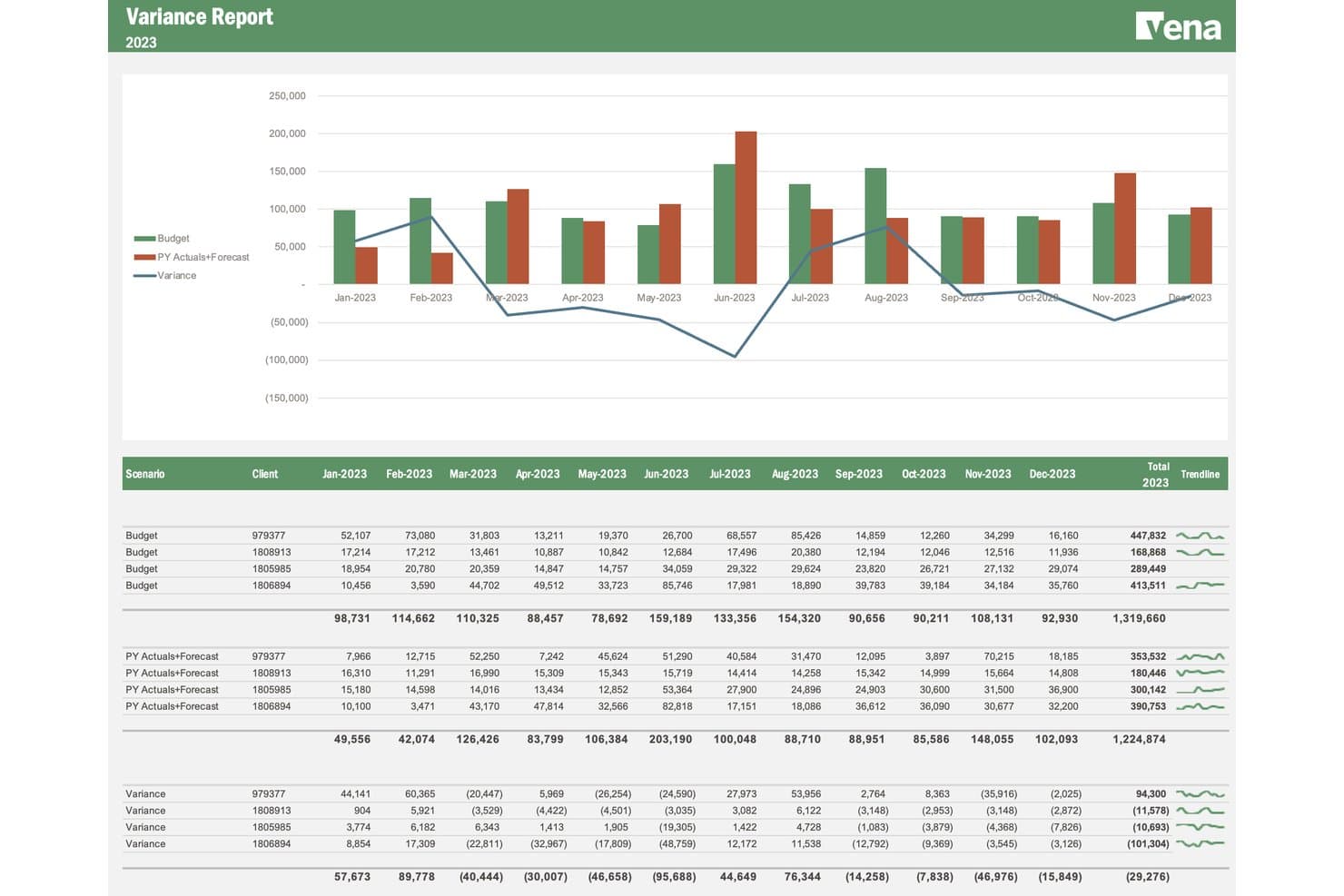
Vena monitora la varianza tra budget e dati consuntivi per cliente nell'arco dei mesi. Vena è una piattaforma FP&A nativa di Excel che supporta la pianificazione a base zero attraverso la pianificazione basata sui fattori determinanti, modelli di budget collaborativi, la pianificazione della forza lavoro e la modellazione degli scenari, il tutto basato su un'interfaccia Excel in tempo reale.
Per chi è più indicata Vena?
Vena è particolarmente adatta ai team FP&A che lavorano già in Excel e desiderano aggiungere struttura, flussi di lavoro e modellazione basata sui fattori determinanti senza abbandonare l'ambiente dei fogli di calcolo.
Perché ho scelto Vena
Ho scelto Vena come una delle migliori soluzioni perché mantiene il team all'interno di Excel, aggiungendo al contempo la struttura di cui la pianificazione a base zero ha effettivamente bisogno. Apprezzo il fatto che la sua pianificazione basata sui fattori determinanti consenta di collegare ogni voce di costo a un input reale, come il numero di dipendenti o il volume delle unità, così da costruire il budget partendo dai principi fondamentali anziché copiare i numeri dell'anno precedente. Il modulo di pianificazione della forza lavoro è particolarmente approfondito: modella stipendi, imposte e aumenti meritocratici a livello di singolo dipendente, in modo che i costi del personale vengano ricostruiti da zero a ogni ciclo.
Funzionalità principali di Vena
- Modellazione degli scenari: Crea e confronta fianco a fianco un numero illimitato di scenari ipotetici, sottoponendo a prove di stress le ipotesi relative a tempistiche, domanda, assunzioni e variabili di spesa.
- Tipo di licenza Collaboratore: Assegna ai responsabili dei budget dei dipartimenti un ruolo dedicato di Collaboratore, affinché possano inviare i dati sui costi e seguire i flussi di approvazione all'interno dei propri centri di costo.
- Agente di pianificazione IA di Vena: Usa il linguaggio naturale all'interno di Excel per generare piani e budget basati sui fattori determinanti senza creare manualmente le formule.
- Connettori ERP e HRIS: Importa direttamente i dati consuntivi e quelli relativi al numero di dipendenti da sistemi come NetSuite, Workday e ADP, per basare ogni ciclo di budget sui dati aggiornati dei sistemi di origine.
Integrazioni di Vena
Vena offre integrazioni native con NetSuite, SAP, Sage Intacct, Microsoft Dynamics 365, Workday, ADP, Salesforce, SharePoint, Snowflake e Google BigQuery. Le API bidirezionali, l'automazione tramite file flat e i connettori Microsoft Fabric supportano flussi di dati personalizzati.
Pros and Cons
Pros:
- La ricostruzione del budget nativa di Excel è adatta ai team finanziari
- La modellazione della forza lavoro basata sui fattori determinanti ricostruisce i costi del personale
- I flussi di lavoro per i Collaboratori raccolgono i dati dai vari dipartimenti
Cons:
- Le implementazioni possono richiedere più tempo rispetto alle stime iniziali
- Non è disponibile un flusso di lavoro dedicato alla giustificazione delle spese
Learn more about Vena: 10Ideale per le capacità di visualizzazione dei dati
Phocas
- Demo gratuita disponibile
- Prezzo su richiesta
Visit WebsiteCustomer Rating:4.6/5
Phocas crea budget dettagliati utilizzando dati aziendali storici e in tempo reale. Phocas è uno strumento di business intelligence e analisi dei dati progettato per le aziende che vogliono migliorare il processo decisionale basato sui dati. Aiuta i team a visualizzare i dati e monitorare i principali indicatori di performance in tempo reale.
Perché ho scelto Phocas: Phocas rende facile trasformare dati finanziari complessi in informazioni comprensibili a colpo d'occhio. I suoi dashboard personalizzabili e i semplici strumenti di reportistica consentono al tuo team di creare report chiari e visivi senza dover coinvolgere il reparto IT. L'interfaccia è inoltre molto intuitiva, permettendoti di trovare rapidamente ciò di cui hai bisogno e immergerti subito nei numeri durante il ciclo di budgeting.
Funzionalità principali e integrazioni:
Funzionalità includono il monitoraggio dei KPI in tempo reale per mantenere aggiornato il team sulle metriche finanziarie. La piattaforma offre anche strumenti di reportistica dettagliati per supportare decisioni informate.
Integrazioni includono Microsoft Dynamics, Sage, Xero, MYOB, NetSuite, SAP, Epicor, QuickBooks, Salesforce e Google Sheets.
Pros and Cons
Pros:
- Strumenti di report intuitivi
- Monitoraggio dei KPI in tempo reale
- Potente visualizzazione dei dati
Cons:
- Funzionalità mobile limitata
- Analisi avanzate limitate
Learn more about Phocas:
Altri software di budgeting a base zero
Ecco alcune opzioni aggiuntive di software di budgeting a base zero che non sono entrate nella mia selezione, ma che vale comunque la pena considerare:
- 11FarseerIdeale per la pianificazione di scenari finanziari
- 12TeamworkIdeale per strumenti finanziari basati su progetto
- 13MosaicIdeale per organizzazioni startup
- 14NetSuite Cloud AccountingIdeale per l'integrazione ERP
- 15MoneyPatrolIdeale per il monitoraggio delle finanze personali
Come Valuto i Software di Budgeting a Base Zero
Divido la mia valutazione in due livelli: la base specifica ZBB che ogni strumento deve superare—pensa ai flussi di lavoro a base zero e alla giustificazione delle spese—e i fattori differenzianti che distinguono i buoni dai migliori.
Funzionalità di Base (Requisiti Minimi per Questa Lista)
Quando seleziono gli strumenti per la mia lista, valuto ciascuno su una scala da 0 (non offre la funzionalità) a 5 (eccelle in quest'area) per ogni funzionalità di base elencata di seguito. Poi, calcolo il punteggio totale dello strumento in percentuale. Ogni strumento deve ottenere un punteggio totale minimo del 65% per essere preso in considerazione.
- Costruzione del Budget a Base Zero: Cerco un flusso di lavoro ZBB dedicato che obblighi ogni centro di costo a ricostruire il budget da zero ad ogni ciclo, non solo a copiare e modificare l'approccio dell'anno precedente.
- Modellazione dei Fattori di Costo: Ogni strumento dovrebbe consentire ai responsabili di budget di collegare le voci di spesa a reali motori di business come personale, volumi di transazione o unità prodotte invece che a semplici importi in dollari.
- Flusso di Lavoro per la Giustificazione delle Spese: Valuto se la piattaforma offre campi strutturati per la giustificazione e routing per le approvazioni, così che i responsabili finanziari possano esaminare i business case voce per voce durante la creazione del budget.
- Ownership Collaborativa del Budget: I responsabili di dipartimento devono presentare e difendere i propri budget; verifico quindi la presenza di accesso basato su ruoli, controllo delle versioni e chiari passaggi dalla presentazione all'approvazione.
- Analisi di Scenario e Scostamento: Il confronto affiancato degli scenari è importante qui—valuto quanto bene ogni strumento consenta di modellare trade-off e tracciare la spesa effettiva rispetto al piano zero-based approvato.
- Integrazione Dati ERP/GL: Importare dati effettivi, struttura dei piani dei conti e dati sul personale da sistemi come NetSuite, SAP o Sage Intacct è fondamentale per ricostruire i budget da zero ogni periodo.
Una volta che ho una lista di strumenti che rispettano i criteri, considero cosa distingue ciascuna piattaforma.
Fattori Differenzianti (Cosa Distingue i Fornitori)
Ecco come confronto e metto a confronto i diversi fornitori:
Funzionalità Distintive
Il ranking delle iniziative è fondamentale—cerco strumenti che valutino le attività proposte in base a ROI o rilevanza strategica, così il team finanziario può finanziare ciò che conta di più. Anche l'integrazione con i forecast a rotazione spicca, perché un piano a base zero perde rapidamente valore se non può evolvere nel corso dell'anno. Valuto anche la profondità della pianificazione della forza lavoro, in particolare se uno strumento collega direttamente dati su organico e compensi a livello di posizione nel budget a base zero.
Oltre le Funzionalità
I tempi di implementazione contano molto in questo settore. ZBB richiede una configurazione metodologica significativa, quindi valuto se i fornitori offrono onboarding guidato, template pre-costruiti o consulenti FP&A dedicati per ridurre il time-to-value. Considero anche l'adattabilità alla dimensione aziendale—un team di fascia media con cinque centri di costo ha esigenze molto diverse rispetto a un'impresa multi-entità che ne gestisce dozzine in varie regioni. La sicurezza e la conformità completano l'analisi; verifico la certificazione SOC 2, i controlli di accesso basati su ruoli e i log di audit che supportano i flussi di lavoro SOX.
Come scegliere un software di budgeting a base zero
È facile perdersi in lunghi elenchi di funzionalità e strutture tariffarie complesse. Per aiutarti a rimanere concentrato mentre affronti il tuo specifico processo di selezione del software, ecco un elenco dei fattori da tenere a mente:
| Fattore | Cosa considerare |
| Scalabilità | Assicurati che il software possa crescere insieme al tuo team. Verifica se supporta l'aumento del volume di dati e degli utenti con l'espansione della tua attività. |
| Integrazioni | Cerca un'integrazione fluida con gli strumenti esistenti, come software di contabilità, CRM e sistemi ERP, per semplificare il flusso dei dati e ridurre l'inserimento manuale. |
| Personalizzazione | Verifica se lo strumento consente di personalizzare dashboard, report e flussi di lavoro in base ai tuoi specifici processi e alle tue preferenze di budgeting. |
| Facilità d'uso | Valuta l'interfaccia utente e la navigazione. Il tuo team dovrebbe poter imparare a usare il software senza una formazione approfondita. |
| Budget | Confronta i piani tariffari e assicurati che siano compatibili con i tuoi vincoli finanziari. Considera il costo totale di proprietà, comprese eventuali commissioni nascoste. |
| Misure di sicurezza | Assicurati che il software offra solide misure di sicurezza, come la crittografia dei dati e i controlli degli accessi degli utenti, per proteggere le informazioni finanziarie sensibili. |
| Assistenza | Valuta la disponibilità e la qualità dell'assistenza clienti, inclusi chat dal vivo, supporto telefonico e risorse online, per aiutare il tuo team quando necessario. |
| Reportistica | Cerca funzionalità avanzate di reportistica che consentano di generare report finanziari dettagliati e ottenere informazioni sulle prestazioni del budget. |
Tendenze nei software di budgeting a base zero
Durante la mia ricerca, ho raccolto innumerevoli aggiornamenti di prodotto, comunicati stampa e registri delle versioni di diversi fornitori di software di budgeting a base zero. Ecco alcune delle tendenze emergenti che sto tenendo d'occhio:
- Analisi basate sull'intelligenza artificiale: un numero sempre maggiore di strumenti utilizza l'intelligenza artificiale per fornire analisi predittive e informazioni utili ad aiutare i team ad anticipare le esigenze di budget e a prendere decisioni informate. Ad esempio, fornitori come Drivetrain stanno ora integrando l'intelligenza artificiale per migliorare le previsioni finanziarie.
- Budgeting collaborativo: gli strumenti si concentrano sempre più sulle funzionalità di collaborazione, consentendo a più utenti di lavorare contemporaneamente sui budget aziendali. Questo è fondamentale per i team distribuiti in sedi diverse, poiché garantisce che tutti rimangano allineati sui metodi di budgeting.
- Aggiornamenti dei dati in tempo reale: oggi gli utenti si aspettano dati in tempo reale per apportare modifiche agili al budget. Questa tendenza supporta gli ambienti aziendali dinamici, nei quali sono necessarie decisioni finanziarie rapide per raggiungere i propri obiettivi di risparmio. Questo può inoltre aiutare nelle previsioni dei flussi di cassa e altro ancora.
- Pianificazione degli scenari: un numero sempre maggiore di software offre la pianificazione degli scenari per aiutare i team a visualizzare diversi risultati finanziari. Questa funzionalità consente alle aziende di prepararsi a varie situazioni potenziali, migliorando la pianificazione strategica.
- Design incentrato sull'utente: si pone sempre più l'accento su interfacce intuitive che danno priorità all'esperienza dell'utente, mentre i fornitori si concentrano sulla possibilità di rendere i propri strumenti più accessibili e facili da usare. In definitiva, questo riduce la curva di apprendimento complessiva, rende gli utenti più autonomi e aumenta la produttività.
Che cos'è un software di budgeting a base zero?
Un software di budgeting a base zero è uno strumento progettato per aiutare le aziende ad allocare il budget da zero in ogni periodo, assicurando che ogni spesa sia giustificata. Questi strumenti vengono generalmente utilizzati da professionisti della finanza e responsabili del budget per ottenere un maggiore controllo sulle proprie finanze e ottimizzare la spesa.
I software di budgeting a base zero includono spesso funzionalità chiave come analisi basate sull'intelligenza artificiale, aggiornamenti dei dati in tempo reale e pianificazione degli scenari, per contribuire a previsioni e processi decisionali accurati. Nel complesso, offrono alle aziende un modo strutturato per gestire le finanze e migliorare l'efficienza dei costi.
Funzionalità
Ecco le funzionalità principali che qualsiasi ottimo software di budgeting a base zero dovrebbe avere:
- Aggiornamenti dei dati in tempo reale: fornisce accesso immediato ai dati finanziari relativi ai conti correnti e ai fondi di emergenza, consentendo di apportare rapidamente modifiche al budget e prendere decisioni informate.
- Pianificazione degli scenari: consente agli utenti di visualizzare diversi risultati finanziari, aiutando le aziende a prepararsi a varie situazioni potenziali nelle diverse categorie di spesa.
- Analisi basate sull'intelligenza artificiale: offre analisi predittive per anticipare le esigenze di budget e migliorare le previsioni finanziarie.
- Budgeting collaborativo: consente a più utenti di lavorare contemporaneamente sui budget, garantendo l'allineamento e l'efficienza del team.
- Dashboard personalizzabili: consente agli utenti di adattare la propria interfaccia per concentrarsi sulle metriche e sui report finanziari più pertinenti.
- Monitoraggio delle spese: tiene sotto controllo la spesa rispetto al budget per evitare spese eccessive e individuare opportunità di riduzione dei costi.
- Funzionalità di integrazione: si connette agli strumenti finanziari esistenti per semplificare il flusso dei dati e ridurre l'inserimento manuale.
- Interfaccia intuitiva: semplifica la navigazione e riduce la curva di apprendimento, aumentando la produttività e la soddisfazione degli utenti.
- Reportistica automatizzata: genera report finanziari dettagliati con il minimo sforzo manuale, facendo risparmiare tempo e riducendo gli errori.
- Misure di sicurezza: protegge le informazioni finanziarie sensibili mediante la crittografia dei dati e i controlli degli accessi.
Vantaggi
L'implementazione di un software di budgeting a base zero offre numerosi vantaggi al tuo team e alla tua azienda. Eccone alcuni:
- Migliore controllo dei costi: allocando i budget da zero, assicuri che ogni spesa sia giustificata, evitando spese non necessarie.
- Analisi finanziarie più approfondite: le analisi basate sull'intelligenza artificiale e gli aggiornamenti dei dati in tempo reale forniscono informazioni preziose per prendere decisioni migliori.
- Maggiore collaborazione: le funzionalità di budgeting collaborativo consentono ai membri del team di lavorare insieme, assicurando che tutti siano allineati.
- Flessibilità nella pianificazione: la pianificazione degli scenari aiuta ad adattarsi alle variazioni delle condizioni finanziarie, preparandosi a risultati diversi.
- Risparmio di tempo: la reportistica automatizzata riduce il tempo dedicato alla generazione manuale dei report, consentendo al team di concentrarsi sulle attività strategiche.
- Personalizzazione in base alle esigenze: le dashboard personalizzabili consentono di adattare la visualizzazione per concentrarsi sulle informazioni finanziarie più pertinenti.
- Sicurezza dei dati: le misure di sicurezza proteggono i dati finanziari, offrendo maggiore tranquillità riguardo alle informazioni sensibili.
Costi e prezzi
La scelta di un software di budgeting a base zero richiede una comprensione dei vari modelli di prezzo e dei piani disponibili. I costi variano in base alle funzionalità, alle dimensioni del team, ai componenti aggiuntivi e ad altro ancora. La tabella seguente riassume i piani più comuni, i relativi prezzi medi e le funzionalità tipicamente incluse nelle soluzioni software di budgeting a base zero:
Tabella comparativa dei piani per il software di budgeting a base zero
| Tipo di piano | Prezzo medio | Funzionalità comuni |
| Piano gratuito | $0/utente/mese | Strumenti di budgeting di base, report limitati e assistenza di base. |
| Piano personale | $5-$25/utente/mese | Budgeting personale, monitoraggio delle spese, pannelli di controllo personalizzabili e assistenza via email. |
| Piano aziendale | $30-$60/utente/mese | Reportistica avanzata, strumenti di collaborazione, aggiornamenti in tempo reale e assistenza via chat. |
| Piano aziendale avanzato | $70-$150/utente/mese | Personalizzazione completa, capacità di integrazione, analisi basate sull'IA e assistenza dedicata. |
Domande frequenti
Ecco alcune risposte alle domande comuni sul software di budgeting a base zero:
Quali sono i limiti del budgeting a base zero?
Il budgeting a base zero può richiedere molto tempo, poiché impone di ripartire da zero a ogni periodo. Questo processo richiede molta manodopera per giustificare ogni spesa. Sebbene offra un controllo dettagliato, l’impegno e le risorse necessari possono rappresentare una difficoltà per alcuni team.
Quanto è efficace il budgeting a base zero?
Il budgeting a base zero è efficace per tenere sotto controllo le spese. Ripartendo da zero a ogni periodo, garantisce che tutti i costi siano necessari e giustificati. Questo approccio offre ai manager una supervisione maggiore, ma richiede rigore nel mantenere e rivedere regolarmente i budget.
Cosa richiede il budgeting a base zero?
Il budgeting a base zero richiede una giustificazione approfondita di tutte le spese, sia vecchie sia nuove. A differenza dei metodi tradizionali, questo approccio prevede un esame scrupoloso delle spese ricorrenti e di quelle nuove. I manager devono giustificare ogni costo, garantendo che vengano approvate solo le spese essenziali.
In che modo il software di budgeting a base zero facilita la definizione del budget?
Il software di budgeting a base zero semplifica il processo automatizzando le attività ripetitive e fornendo strumenti per la giustificazione e l’analisi. Aiuta gli utenti a monitorare le spese in modo efficiente, garantendo che ogni importo sia contabilizzato. Il software offre inoltre informazioni e analisi per prendere decisioni migliori.
Il software di budgeting a base zero può integrarsi con altri strumenti finanziari?
Sì, molte soluzioni software di budgeting a base zero offrono funzionalità di integrazione con gli strumenti finanziari esistenti. Ciò consente un flusso continuo dei dati e riduce l’inserimento manuale, rendendo il processo di budgeting più efficiente e accurato per il team.
Il budgeting a base zero è adatto a tutti i tipi di aziende?
Sebbene il budgeting a base zero offra un controllo finanziario dettagliato, potrebbe non essere adatto a tutte le aziende a causa della sua natura impegnativa in termini di tempo. Funziona al meglio per le organizzazioni che necessitano di una rigorosa supervisione del budget e dispongono delle risorse per gestire il processo dettagliato.