I migliori software per gli approvvigionamenti consentono ai CFO di aziende in forte crescita di ridurre i costi, eliminare le inefficienze negli acquisti e mantenere l'agilità finanziaria mentre le loro organizzazioni si espandono rapidamente.
La gestione manuale degli approvvigionamenti può diventare rapidamente un collo di bottiglia, facendo aumentare i costi e sottraendo tempo al tuo team. Nella mia esperienza di collaborazione con aziende tecnologiche in rapida crescita, ho visto in prima persona come la soluzione di approvvigionamento giusta possa influire significativamente sulla redditività e sulla velocità operativa.
Dopo un'attenta valutazione e numerosi test, ho selezionato i migliori software per gli approvvigionamenti, in grado di rispondere alle tue principali esigenze, come il controllo dei costi e l'efficienza, così potrai prendere decisioni informate in modo rapido e sicuro.
Perché fidarsi dei nostri consigli sui software
6,700+
Reviews
20
Industry experts
16+
Evaluation factors
14
Years
Le nostre recensioni riflettono il nostro giudizio indipendente, non un discorso di vendita. Scopri come manteniamo la trasparenza.
Per questa guida, abbiamo valutato gli strumenti attraverso test pratici e ricerche indipendenti, assegnando un punteggio agli strumenti in base ai nostri criteri di selezione.
Le nostre recensioni riflettono il nostro giudizio editoriale umano, non un discorso di vendita.
Tabella comparativa dei software per gli approvvigionamenti
Questa tabella comparativa riassume i dettagli dei prezzi delle mie migliori selezioni di software per gli approvvigionamenti:
| Tool | Best For | Trial Info | Price | ||
|---|---|---|---|---|---|
| 1 | Ideale per approvazioni multilivello | Demo gratuita disponibile | Da $499/mese (fatturazione annuale) | Website | |
| 2 | Ideale per il monitoraggio delle prestazioni dei fornitori | Demo gratuita disponibile | Prezzo su richiesta | Website | |
| 3 | Ideale per approvazioni degli acquisti da mobile | Demo gratuita disponibile | Prezzo su richiesta | Website | |
| 4 | Ideale per la pulizia automatizzata dei dati degli acquisti | Demo gratuita disponibile | Prezzi su richiesta | Website | |
| 5 | Ideale per l'approvvigionamento SaaS gestito tramite IA | Demo gratuita disponibile | Prezzo su richiesta | Website | |
| 6 | Ideale per integrazione nell'automazione finanziaria | Demo gratuita disponibile | Da $99/mese | Website | |
| 7 | Ideale per flussi di lavoro personalizzabili | Prova gratuita + demo gratuita disponibile | Da $225/utente/mese (fatturato annualmente) | Website | |
| 8 | Ideale per processi unificati dalla fonte al pagamento | Demo gratuita disponibile | Prezzo su richiesta | Website | |
| 9 | Ideale per l'elaborazione rapida dei flussi di lavoro | Demo gratuita disponibile | Da $1500/mese | Website | |
| 10 | Ideale per la conformità EDI | Chiamata conoscitiva disponibile | Prezzo su richiesta | Website |


Recensioni dei migliori software per gli approvvigionamenti
Di seguito trovi le mie sintesi dettagliate dei migliori software per gli approvvigionamenti inclusi nel mio elenco. Le mie recensioni offrono una panoramica dettagliata delle funzionalità principali, dei pro e dei contro, delle integrazioni e dei casi d’uso ideali di ogni strumento, per aiutarti a trovare quello più adatto a te.
 Ideale per approvazioni multilivello
- Demo gratuita disponibile
- Da $499/mese (fatturazione annuale)
Visit WebsiteCustomer Rating:4.8/5
La dashboard di Precoro visualizza dati sugli approvvigionamenti, inclusi spese totali, richieste di acquisto, fatture e costi. Per chi cerca una soluzione di approvvigionamento che migliori il controllo sui processi di acquisto, Precoro offre un'opzione versatile. Progettato per soddisfare le esigenze di organizzazioni di diversi settori, mette a disposizione strumenti che affrontano le sfide nella gestione dei budget, nella conformità e nel coordinamento con i fornitori. Con funzionalità quali la gestione dei fornitori e l'approvazione delle fatture, Precoro è pensato per ottimizzare i flussi di lavoro dell'approvvigionamento, risultando una scelta interessante per le aziende che vogliono perfezionare le proprie strategie di acquisto.
Perché ho scelto Precoro
Ho scelto Precoro per la sua straordinaria capacità di gestire approvazioni multilivello, una necessità fondamentale per le aziende che cercano flussi di lavoro di approvvigionamento strutturati. Grazie alla configurazione senza codice, è possibile impostare facilmente percorsi di approvazione su misura in base al reparto, soglie di budget o richiedente, assicurando che ogni acquisto sia conforme alle politiche aziendali. Questa funzione risponde direttamente alle sfide di mantenere conformità e supervisione in team numerosi o realtà multidipartimentali. Inoltre, il monitoraggio del budget in tempo reale e l'automazione nell'elaborazione delle fatture di Precoro semplificano i processi di procurement, aiutando a prevenire colli di bottiglia e garantendo approvazioni tempestive.
Funzionalità principali di Precoro
Oltre al punto di forza delle approvazioni multilivello, Precoro offre varie funzionalità chiave che ne aumentano il valore come software di approvvigionamento.
- Richieste di acquisto: Questa funzione permette al tuo team di inviare richieste di acquisto con facilità, assicurando che tutti i dettagli necessari siano raccolti per un'elaborazione fluida degli ordini.
- Gestione dei fornitori: Con questo strumento puoi organizzare e monitorare le informazioni dei fornitori, favorendo relazioni migliori e comunicazioni semplificate con i partner commerciali.
- Gestione delle RFP: Precoro supporta la gestione delle richieste di offerta, consentendo di gestire in modo efficiente le gare e scegliere i fornitori migliori.
- Accesso da app mobile: Puoi gestire le attività di approvvigionamento anche in movimento grazie all'applicazione mobile di Precoro, che offre flessibilità e aggiornamenti in tempo reale ovunque si trovi il tuo team.
Integrazioni di Precoro
Le integrazioni comprendono NetSuite, QuickBooks Online, QuickBooks Desktop, Xero, Sage Intacct, Sage 300, Microsoft Dynamics 365 Business Central, Sage 50 UK, Power BI e Slack.
Pros and Cons
Pros:
- I flussi di lavoro di approvazione personalizzabili aumentano il controllo sulla spesa
- La gestione completa dei fornitori centralizza le informazioni
- La corrispondenza a tre vie riduce gli errori nei pagamenti
Cons:
- Integrazioni ERP native limitate
- L'app mobile potrebbe essere migliorata
Learn more about Precoro: Ideale per il monitoraggio delle prestazioni dei fornitori
- Demo gratuita disponibile
- Prezzo su richiesta
Visit WebsiteCustomer Rating:4.5/5
I report di Gatekeeper mostrano analisi dettagliate e approfondimenti sulle prestazioni di fornitori e contratti per supportare le decisioni di approvvigionamento. Per chi cerca un software di approvvigionamento, Gatekeeper risponde alle tue esigenze affinando i processi di gestione dei fornitori, del ciclo di vita dei contratti e della gestione della spesa. È un'opzione interessante per i team di approvvigionamento e le organizzazioni che mirano a migliorare le operazioni grazie a funzionalità come il monitoraggio della conformità dei fornitori e i rinnovi automatici dei contratti. Integrandosi con le tue applicazioni esistenti, Gatekeeper consente di gestire le esigenze di approvvigionamento, aumentando l'efficienza e riducendo i costi.
Perché ho scelto Gatekeeper
Ho scelto Gatekeeper perché eccelle nel monitoraggio delle prestazioni dei fornitori, un elemento cruciale per i team di approvvigionamento che puntano a ottimizzare le relazioni con i fornitori. La piattaforma automatizza il controllo delle prestazioni, risparmiandoti molto tempo grazie all'eliminazione di fino a 40 ore di lavoro manuale e offrendo un monitoraggio continuo dei rischi. Con funzionalità come le schede di valutazione automatiche e il monitoraggio dei rischi 24/7, Gatekeeper garantisce informazioni in tempo reale sulle prestazioni dei fornitori, consentendo una gestione proattiva e decisioni informate. La sua capacità di unificare dati relativi a rischi, contratti e spese in un'unica fonte attendibile permette al tuo team di mantenere la conformità e aumentare efficacemente il valore dei fornitori.
Funzionalità principali di Gatekeeper
Oltre al monitoraggio delle prestazioni dei fornitori, Gatekeeper offre una suite di funzionalità che potenziano le tue capacità di approvvigionamento:
- Gestione della conformità e del rischio dei fornitori: Questa funzione semplifica il processo di onboarding e monitora le prestazioni dei fornitori per assicurare la conformità e la preparazione agli audit.
- Gestione dei contratti: Facilita richieste di contratto, negoziazioni, approvazioni e firme elettroniche, rendendo più semplice la gestione del ciclo di vita dei contratti.
- Strato dati unificato: Fornisce una visione completa dell'intelligence sui fornitori centralizzando tutti i dati rilevanti in un unico sistema accessibile.
- Workflow e automazione: Sono disponibili workflow personalizzati e strumenti di automazione per migliorare l'efficienza e rafforzare i processi di approvvigionamento.
Integrazioni di Gatekeeper
Le integrazioni includono Microsoft Dynamics 365 CRM, Google Sheets, Slack, Microsoft Teams, Gmail, Microsoft Outlook, Xero, DocuSign, HubSpot, Microsoft Excel e Jira Software Cloud.
Pros and Cons
Pros:
- Funzionalità integrate di gestione dei fornitori
- Archiviazione sicura per documenti sensibili
- Workflow personalizzabili
Cons:
- Il prezzo può essere elevato per le piccole imprese
- I workflow complessi possono essere difficili da configurare
Learn more about Gatekeeper: Ideale per approvazioni degli acquisti da mobile
- Demo gratuita disponibile
- Prezzo su richiesta
Visit WebsiteCustomer Rating:4.6/5
Il processo procure-to-pay di Procurify offre una visione completa di budget, richieste in sospeso e approfondimenti finanziari. Se desideri migliorare i tuoi processi di approvvigionamento, Procurify potrebbe essere la soluzione giusta per te. Progettata per aziende di medie dimensioni appartenenti a settori come tecnologia, sanità ed istruzione, offre una piattaforma integrata che migliora la gestione del budget e le relazioni con i fornitori. Con funzionalità come i flussi di lavoro automatizzati e l’accesso mobile, Procurify fornisce visibilità in tempo reale sulle spese, aiutando il tuo team a prendere decisioni informate e a ottimizzare le operazioni.
Perché ho scelto Procurify
Ho scelto Procurify per le sue eccezionali capacità di approvazione degli acquisti da mobile, essenziali per i team che necessitano di flessibilità nei processi di approvvigionamento. Con la sua app mobile, puoi gestire richieste di acquisto e approvazioni direttamente dallo smartphone, assicurandoti di non perdere mai decisioni di spesa critiche anche quando sei in movimento. L’app invia notifiche in tempo reale e consente di caricare le ricevute, rendendo più semplice tenere traccia di spese e approvazioni. Questa funzione è particolarmente preziosa per i team dinamici che richiedono accesso immediato e controllo sulle attività di approvvigionamento, garantendo conformità ed efficienza decisionale ovunque ti trovi.
Funzionalità Principali di Procurify
Oltre alla capacità di approvazione degli acquisti da mobile, Procurify offre una gamma di funzionalità pensate per soddisfare le diverse esigenze dei team di procurement:
- Gestione dell’Approvvigionamento: Strumenti semplificati per la gestione delle richieste d’acquisto, la gestione degli ordini e la gestione dei fornitori, assicurando processi di acquisto efficienti.
- Automazione dei Conti da Pagare: Gestione efficiente dell’elaborazione delle fatture e dei pagamenti delle bollette, riducendo il carico amministrativo e aumentando l’accuratezza.
- Gestione delle Spese: Rendicontazione delle spese semplificata con accesso mobile, permettendo al tuo team di gestire le spese comodamente ovunque si trovi.
- Gestione dei Contratti e del Budget: Archiviazione centralizzata dei contratti e monitoraggio in tempo reale del budget, aiutando il team a mantenere la conformità e il controllo finanziario.
Integrazioni di Procurify
Le integrazioni includono QuickBooks Online, QuickBooks Desktop, Netsuite, Sage Intacct e Microsoft Dynamics 365.
Pros and Cons
Pros:
- Monitoraggio del budget in tempo reale
- Il supporto per dispositivi mobili consente approvazioni e richieste in qualsiasi momento.
- Offre reportistica personalizzabile
Cons:
- La modifica delle richieste d’ordine può risultare macchinosa
- Potrebbe disporre di funzionalità di analisi più avanzate
Learn more about Procurify: Ideale per la pulizia automatizzata dei dati degli acquisti
- Demo gratuita disponibile
- Prezzi su richiesta
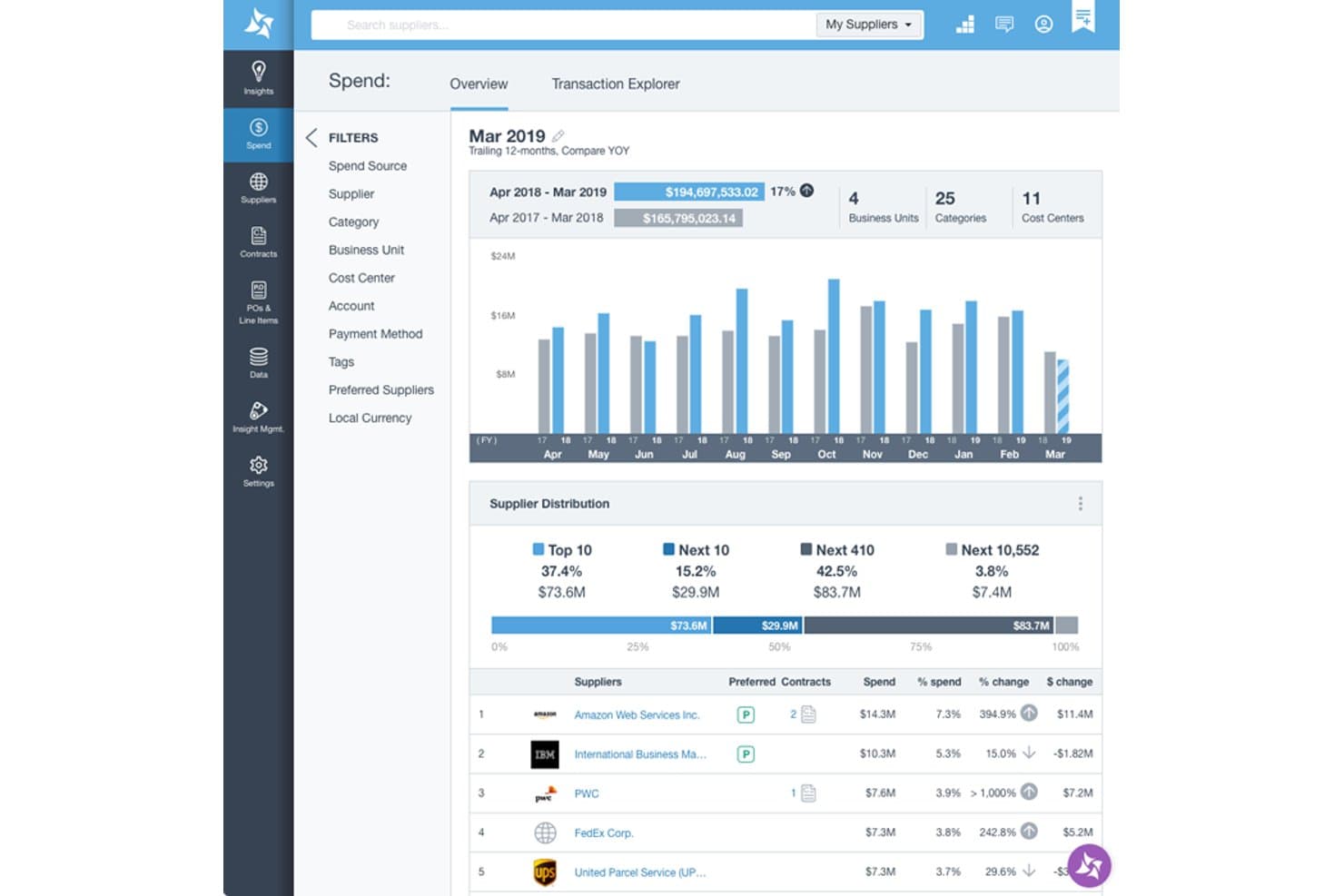
Suplari fornisce un cruscotto panoramico delle spese con la distribuzione dei fornitori, il confronto delle spese anno su anno e la classifica dei principali fornitori in base alla percentuale di spesa. Suplari è una piattaforma di analisi per gli acquisti che utilizza l'IA per acquisire, pulire, classificare e analizzare i dati relativi a spese, fornitori e contratti provenienti dai sistemi ERP, P2P e AP.
A chi è più adatto Suplari?
Suplari è progettato per i team acquisti delle aziende di medie e grandi dimensioni che gestiscono dati di spesa frammentati tra più sistemi ERP e dalla fonte al pagamento.
Perché ho scelto Suplari
Suplari si è guadagnato un posto nella mia lista ristretta perché considera i dati degli acquisti disordinati come il punto di partenza, non come un ostacolo. L'ho scelto in particolare per il suo Assistente dati Suplari, che legge automaticamente i file grezzi (Excel, CSV, PDF), rileva quando i connettori dei sistemi di origine si disallineano e corregge lacune come i codici mancanti delle unità aziendali o gli identificatori danneggiati di collegamento tra ordini d'acquisto e fatture, senza intervento manuale. Questo aumenta la precisione della classificazione delle spese rispetto a quella tipica degli strumenti tradizionali.
Caratteristiche principali di Suplari
- Analisi delle spese basata sull'IA: Utilizza l'apprendimento automatico per classificare e analizzare le spese tra categorie, fornitori e unità aziendali.
- Monitoraggio dei rischi dei fornitori: Monitora continuamente i fornitori alla ricerca di segnali di rischio utilizzando fonti di dati esterne e interne.
- Intelligence sui contratti: Convalida la conformità confrontando i termini fatturati con quelli concordati nei contratti e segnala le eccezioni.
- Cruscotto per il monitoraggio dei risparmi: Tiene traccia delle opportunità di risparmio dall'identificazione alla realizzazione, con report pronti per la verifica.
Integrazioni di Suplari
Suplari offre integrazioni native con SAP, Oracle, Coupa, Workday, NetSuite, Microsoft Dynamics e Ariba, oltre a fornire un'API per integrazioni personalizzate.
Pros and Cons
Pros:
- Classificazione dei dati di spesa provenienti da più fonti
- Elevata precisione nella categorizzazione delle spese fin dal primo giorno
- L'IA individua opportunità di risparmio nei dati esistenti
Cons:
- Strumenti nativi limitati per gli acquisti o la creazione di ordini d'acquisto
- Richiede sistemi di approvvigionamento esistenti per funzionare correttamente
Learn more about Suplari: Ideale per l'approvvigionamento SaaS gestito tramite IA
- Demo gratuita disponibile
- Prezzo su richiesta
Visit WebsiteCustomer Rating:4.6/5
Il dashboard per i dirigenti in Spendflo offre approfondimenti sui modelli di spesa e aiuta nei processi decisionali. Per le aziende che mirano a ottimizzare i processi di approvvigionamento, Spendflo offre una soluzione alimentata dall'intelligenza artificiale che centralizza e semplifica la gestione degli acquisti SaaS e dei contratti con i fornitori. È pensata per le organizzazioni che desiderano aumentare l'efficienza e ridurre i costi, fornendo approfondimenti sulle prestazioni dei fornitori e sui modelli di spesa. Con funzionalità come l'orchestrazione dei flussi di lavoro e servizi di negoziazione esperti, Spendflo consente al tuo team di prendere decisioni basate sui dati e di massimizzare il ROI.
Perché ho scelto Spendflo
Ho scelto Spendflo per le sue capacità di approvvigionamento SaaS gestite tramite IA, che supervisionano in modo efficiente il processo di acquisto del software. Sfruttando analisi avanzate e automazione, Spendflo centralizza i dati sulle spese SaaS, permettendo al tuo team di monitorare l'utilizzo ed eliminare i costi nascosti. Le funzioni dinamiche di gestione delle licenze e di intelligence sui fornitori assicurano che tu possa recuperare licenze non utilizzate e negoziare condizioni migliori con i fornitori, massimizzando infine il ROI. La capacità di Spendflo di integrarsi con oltre 100 strumenti semplifica ulteriormente il processo di approvvigionamento, rendendolo una scelta eccellente per le organizzazioni che desiderano ottimizzare le spese software.
Funzionalità principali di Spendflo
Oltre alle sue capacità di approvvigionamento gestite con IA, Spendflo offre una serie di funzionalità che migliorano i tuoi processi di acquisto.
- Gestione automatizzata dei fornitori: Semplifica la selezione, valutazione e approvazione dei fornitori, garantendo processi decisionali coerenti.
- Ottimizzazione del budget: Centralizza la visibilità delle spese, permettendo un efficace monitoraggio del budget e l'identificazione delle risorse sottoutilizzate.
- Collaborazione potenziata: Collega finanza, approvvigionamento e responsabili di reparto su un'unica piattaforma, riducendo ritardi ed errori costosi.
- Approfondimenti basati sui dati: Fornisce analisi in tempo reale su spese, prestazioni dei fornitori e utilizzo dei contratti per orientare le decisioni future.
Integrazioni Spendflo
Le integrazioni includono NetSuite, Adobe, Asana, BambooHR, Figma, FreeAgent, Freshdesk, GitHub, Google, HiBob, HubSpot e Jira.
Pros and Cons
Pros:
- Visibilità completa della spesa
- Ottime funzionalità di gestione dei fornitori
- Gestione dell'onboarding e dei rinnovi
Cons:
- La configurazione iniziale può richiedere tempo
- Potrebbe avere più opzioni di personalizzazione per esigenze aziendali specifiche
Learn more about Spendflo: Ideale per integrazione nell'automazione finanziaria
- Demo gratuita disponibile
- Da $99/mese
Visit WebsiteCustomer Rating:4.5/5
Tipalti automatizza pagamenti, conti da pagare e gestione delle spese per le imprese. Tipalti offre una soluzione avanzata per l'automazione dei pagamenti pensata per le aziende in crescita, concentrandosi sulla semplificazione dei conti da pagare, dei pagamenti di massa, dell'approvvigionamento e della gestione delle spese.
Perché ho scelto Tipalti: Tipalti automatizza l'elaborazione delle fatture e gestisce pagamenti globali in oltre 120 valute. Si integra efficientemente con i più diffusi software di contabilità come Oracle NetSuite, QuickBooks e Microsoft Dynamics, consentendo ai team finanziari di concentrarsi sulla crescita. La piattaforma include anche flussi di approvazione basati su intelligenza artificiale e una gestione avanzata degli ordini di acquisto. Inoltre, la Tipalti Card offre un maggiore controllo sulle spese aziendali.
Funzionalità e integrazioni principali:
Funzionalità comprendono l'automazione dell'elaborazione delle fatture, processi di approvazione guidati dall'IA e capacità di pagamenti globali in 120 valute. È possibile anche gestire le informazioni dei fornitori e automatizzare la corrispondenza degli ordini di acquisto. La piattaforma offre un modulo di autofatturazione per garantire la conformità.
Integrazioni disponibili per NetSuite, QuickBooks, Microsoft Dynamics, Xero, Sage Intacct, SAP, BlackLine, Bill.com, Expensify e Zoho Books.
Pros and Cons
Pros:
- Processi di approvazione guidati dall'IA
- Capacità di pagamenti globali
- Pagamenti di massa scalabili
Cons:
- Curva di apprendimento
- Complessità per piccole imprese
Learn more about Tipalti: Ideale per flussi di lavoro personalizzabili
- Prova gratuita + demo gratuita disponibile
- Da $225/utente/mese (fatturato annualmente)
Visit WebsiteCustomer Rating:4.5/5
Tradogram semplifica gli acquisti e migliora la visibilità delle spese in vari settori. Tradogram è un software di gestione degli approvvigionamenti tutto-in-uno che semplifica i processi di acquisto e migliora la visibilità delle spese. Serve settori come l'istruzione, la sanità e la produzione.
Perché ho scelto Tradogram: Tradogram offre gestione dei fornitori, monitoraggio del budget e ordini di acquisto personalizzabili per ottimizzare le attività di approvvigionamento. Permette di controllare l'inventario e di applicare le politiche di budget direttamente sulla piattaforma. Inoltre, l'interfaccia intuitiva favorisce una collaborazione efficiente tra i team e i fornitori.
Funzionalità principali & integrazioni:
Funzionalità includono gestione dei fornitori, monitoraggio del budget e ordini di acquisto personalizzabili. È possibile controllare l'inventario e gestire i budget all'interno della piattaforma. Il software supporta anche il processo procure-to-pay e il sourcing strategico.
Integrazioni includono QuickBooks, Xero, SAP, Microsoft Dynamics, NetSuite, Dropbox, Box, Google Drive e OneDrive.
Pros and Cons
Pros:
- Monitoraggio del budget
- Strumenti per la gestione dei fornitori
- Ordini di acquisto personalizzabili
Cons:
- Nessuna app mobile
- Funzionalità avanzate limitate
Learn more about Tradogram: Ideale per processi unificati dalla fonte al pagamento
- Demo gratuita disponibile
- Prezzo su richiesta
Visit WebsiteCustomer Rating:4.4/5
GEP SMART offre soluzioni per la supply chain supportate dall’IA e strumenti di analisi avanzata. GEP SMART è un fornitore globale di soluzioni per la gestione degli acquisti e della supply chain basate sull'intelligenza artificiale, rivolto a settori come l'automotive, le scienze della vita e il retail. Le sue principali offerte includono la gestione degli acquisti, la gestione della supply chain con GEP NEXXE e analisi avanzate supportate da GEP QUANTUM.
Perché ho scelto GEP SMART: GEP SMART offre soluzioni integrate che combinano strategia, software e servizi gestiti, adattate per soddisfare esigenze aziendali uniche. I suoi strumenti sono progettati per migliorare l'efficienza operativa e la redditività. Il software pone inoltre un forte accento su soluzioni incentrate sul cliente che favoriscono la resilienza e la sostenibilità nelle catene di approvvigionamento, sfruttando la profonda esperienza settoriale per supportare gli obiettivi strategici e finanziari.
Caratteristiche principali e integrazioni:
Le funzionalità includono strumenti per la gestione degli acquisti, la gestione della supply chain e analisi avanzate. Con GEP SMART puoi gestire gli acquisti in modo più efficiente. GEP NEXXE ti aiuta a semplificare le operazioni della tua supply chain e GEP QUANTUM offre analisi avanzate per supportare il processo decisionale.
Le integrazioni comprendono SAP, Microsoft Dynamics, Coupa, Ariba, Workday, NetSuite, Salesforce, JD Edwards e Infor.
Pros and Cons
Pros:
- Suite di strumenti completa
- Competenza specifica per settore
- Soluzioni basate sull’IA
Cons:
- Comunità di utenti limitata
- Implementazione complessa
Learn more about GEP SMART: Ideale per l'elaborazione rapida dei flussi di lavoro
- Demo gratuita disponibile
- Da $1500/mese
Visit WebsiteCustomer Rating:4.2/5
Kissflow Procurement Cloud offre source-to-pay, gestione dei fornitori, gestione dei contratti e analisi. Kissflow Procurement Cloud è una piattaforma flessibile da source-to-pay che si adatta alle esigenze aziendali uniche. Offre approvvigionamento strategico, gestione completa dal procurare al pagare, gestione dei fornitori, gestione dei contratti, gestione dell'inventario, automatizzazione delle fatture e analisi della spesa.
Perché ho scelto Kissflow Procurement Cloud: Kissflow Procurement Cloud utilizza strumenti low-code e no-code per una facile personalizzazione e un'implementazione rapida. Automatizza i processi di approvvigionamento, migliorando la visibilità e l'efficienza operativa. Con la sua interfaccia intuitiva e il supporto clienti affidabile, è la scelta preferita da molte organizzazioni. Inoltre, la piattaforma può essere completamente implementata in otto settimane, permettendo un'adozione più veloce.
Funzionalità principali & integrazioni:
Le funzionalità includono approvvigionamento strategico, gestione completa dal procurare al pagare, gestione dei fornitori, gestione dei contratti, gestione dell'inventario, automatizzazione delle fatture e analisi della spesa. È inoltre possibile personalizzare i flussi di lavoro in base alle esigenze specifiche utilizzando strumenti low-code e no-code.
Le integrazioni includono SAP, Oracle, Microsoft Dynamics, QuickBooks, Xero, NetSuite, Salesforce, Zoho CRM, HubSpot e Slack.
Pros and Cons
Pros:
- Analisi della spesa completa
- Implementazione rapida
- Personalizzazione flessibile
Cons:
- Accesso limitato offline
- Complessità della configurazione iniziale
Learn more about Kissflow Procurement Cloud: Ideale per la conformità EDI
- Chiamata conoscitiva disponibile
- Prezzo su richiesta
Visit WebsiteCustomer Rating:4.2/5
La suite Supply Chain Performance di SPS Commerce Fulfillment fornisce analytics in tempo reale per ottimizzare l’approvvigionamento e la gestione dei fornitori. Fonte: SPS Commerce SPS Commerce Fulfillment è una soluzione software per la gestione degli approvvigionamenti progettata per migliorare le operazioni di vendita al dettaglio grazie a una solida conformità EDI e a un onboarding dei partner senza soluzione di continuità. Supporta una vasta gamma di settori, offrendo una piattaforma robusta per la gestione delle transazioni, il mantenimento della conformità e il garantire operazioni della supply chain fluide ed efficienti.
Perché ho scelto SPS Commerce: Ho scelto SPS Commerce per le sue ampie capacità EDI, essenziali per la gestione degli approvvigionamenti moderna. Con oltre 200 integrazioni EDI predefinite, la piattaforma consente collegamenti senza sforzo con i partner commerciali, assicurando che i processi di approvvigionamento rimangano conformi ed efficienti anche in supply chain complesse.
Un altro grande vantaggio è la sua funzionalità completa di gestione degli ordini. Lo strumento Order Central della piattaforma consolida l'elaborazione degli ordini in un'unica dashboard in tempo reale, consentendo ai team di prendere decisioni consapevoli e basate sui dati che rafforzano le strategie di approvvigionamento e migliorano le prestazioni della supply chain.
Caratteristiche e integrazioni eccezionali:
Le funzionalità includono la funzione Assortment per mantenere informazioni accurate sui prodotti attraverso i canali, garantendo che i team di approvvigionamento abbiano sempre dati affidabili. La suite Supply Chain Performance offre approfondimenti e analisi per ottimizzare le catene di approvvigionamento retail, mentre la funzionalità di fatturazione elettronica semplifica la conformità e la gestione delle transazioni.
Le integrazioni comprendono Oracle NetSuite, Microsoft Dynamics 365, QuickBooks, SAP, Shopify, Sage, Infor CloudSuite, Sage 500, Sage X3, Deposco, Acctivate e Acumatica.
Pros and Cons
Pros:
- Rete di integrazioni EDI estesa
- Gestione centralizzata e in tempo reale degli ordini
- Potenti strumenti di analisi della supply chain
Cons:
- Flessibilità di personalizzazione limitata
- Richiede coordinamento attivo con i partner
Learn more about SPS Commerce Fulfillment:
Altri software per gli approvvigionamenti
Ecco alcune ulteriori opzioni di software per gli approvvigionamenti che non sono state incluse nel mio elenco, ma che vale comunque la pena prendere in considerazione:
- 11CoupaIdeale per la gestione delle spese guidata dall’IA
- 12MediusIdeale per l'integrazione di AP e procurement
- 13BaswareIdeale per la fatturazione elettronica e l'automazione dei processi contabili
- 14JaggaerIdeale per la gestione completa dei fornitori
- 15BonfireIdeale per gli approvvigionamenti del settore pubblico
- 16IvaluaIdeale per il sourcing strategico
- 17ProcolIdeale per l'analisi degli acquisti
- 18FraxionIdeale per visibilità e controllo della spesa
- 19ProcbayIdeale per la creazione di richieste guidata dall'IA
Come Valuto il Software di Procurement
Valuto gli strumenti di procurement su due livelli: i requisiti di base come i flussi di approvazione degli ordini di acquisto (PO) e il controllo a 3 vie, e i fattori di differenziazione che separano le piattaforme veramente utili dal resto.
Funzionalità di Base (Prerequisiti per Questa Lista)
Quando seleziono gli strumenti per la mia lista, assegno a ciascuno un punteggio da 0 (non offre la funzionalità) a 5 (eccelle in questo ambito) per ogni funzionalità chiave elencata di seguito. Successivamente, calcolo il punteggio totale dello strumento come percentuale. Ogni soluzione deve raggiungere un punteggio minimo totale del 75% per essere presa in considerazione.
- Richieste e Flussi di Lavoro PO: Valuto come ogni strumento gestisce le approvazioni multilivello—ad esempio, l'instradamento di una richiesta di acquisto da un responsabile di reparto alla finanza fino al CFO in base alle soglie di spesa.
- Gestione dei Fornitori e dei Vendor: Una directory fornitori efficace archivia documenti fiscali, certificati di conformità e contratti in un unico luogo, quindi verifico la presenza di profili centralizzati dei fornitori e capacità di onboarding.
- Abbinamento delle Fatture e Integrazione AP: Controllo se l'abbinamento va oltre il semplice controllo a 2 vie fino a comprendere il matching a 3 vie con ordini di acquisto e ricevute di beni, oltre a quanto sia fluida l'integrazione dei dati con ERP come NetSuite o SAP.
- Controlli di Budget e Spesa: L'applicazione in tempo reale è fondamentale—verifico se il sistema segnala o blocca una richiesta che farebbe superare il budget approvato di un centro di costo.
- Analisi della Spesa e Reportistica: I dashboard dovrebbero scomporre la spesa per fornitore, categoria e reparto come minimo, quindi valuto la profondità dei filtri e se sono inclusi i dati a livello di impegno.
- Conformità a Cataloghi e Contratti: Cerco cataloghi interni o supporto punch-out che indirizzano gli acquirenti verso prezzi pre-negoziati invece di consentire loro di inviare richieste a testo libero per articoli fuori contratto.
Una volta che ho una lista di strumenti che soddisfano questi criteri, considero cosa distingue ciascuna piattaforma.
Fattori di Differenziazione (Cosa Distingue i Fornitori)
Ecco come confronto e metto a confronto i diversi fornitori:
Caratteristiche Distintive
L'automazione guidata dall'IA è un fattore di differenziazione importante che cerco—gli strumenti che codificano automaticamente le voci contabili o segnalano le fatture duplicate fanno risparmiare ore ai team finanziari durante la chiusura mensile. Anche i portali di richiesta sono rilevanti. Moduli guidati che instradano le richieste tra procurement, legale e IT facilitano molto l'adozione da parte di dipendenti non finanziari che devono inviare richieste. Controllo anche la possibilità di emettere carte virtuali collegate a PO approvati, poiché chiude il cerchio tra approvazione e pagamento senza uscire dalla piattaforma.
Oltre le Caratteristiche
La profondità dell'integrazione con l'ERP è una delle prime cose che valuto. Uno strumento di procurement che sincronizza codici contabili, centri di costo e anagrafiche fornitori bidirezionalmente con sistemi come NetSuite o SAP evita doppie registrazioni e difficoltà di riconciliazione. Anche la conformità ha grande peso—verifico la presenza della certificazione SOC 2 Type II, dei log di audit e dei controlli di segregazione dei compiti che supportano la conformità SOX. La trasparenza dei prezzi completa la mia valutazione, dato che alcuni fornitori addebitano per transazione o bloccano moduli chiave nei livelli più costosi, il che può far aumentare rapidamente il costo totale di proprietà.
Come scegliere il software per gli approvvigionamenti
È facile perdersi in lunghi elenchi di funzionalità e strutture tariffarie complesse. Per aiutarti a rimanere concentrato mentre affronti il tuo specifico processo di selezione del software, ecco una lista di fattori da tenere presenti:
| Fattore | Cosa considerare? |
| Scalabilità | Il software crescerà insieme alla tua azienda? |
| Integrazioni | Si integra con i sistemi che già utilizzi? |
| Personalizzazione | Puoi adattare il software alle tue esigenze specifiche? |
| Facilità d'uso | Quanto velocemente può imparare il tuo team a utilizzare il software? |
| Budget | Il software rientra nei tuoi limiti finanziari? |
| Misure di sicurezza | Offre funzionalità di sicurezza solide per proteggere i tuoi dati? |
| Assistenza del fornitore | Che tipo di assistenza clienti offre il fornitore? |
| Reportistica | Offre funzionalità complete di reportistica e analisi |
Utilizza questa lista di controllo per mantenere organizzato e mirato il processo di selezione del software.
Tendenze nei software per gli approvvigionamenti
Durante la mia ricerca, ho esaminato innumerevoli aggiornamenti dei prodotti, comunicati stampa e registri delle versioni di diversi fornitori di software per gli approvvigionamenti. Ecco alcune delle tendenze emergenti che sto monitorando:
- Intelligenza artificiale (AI) e apprendimento automatico: queste tecnologie vengono utilizzate sempre più spesso per automatizzare le attività di routine e supportare processi decisionali più informati. Ad esempio, l'AI può migliorare la previsione della domanda attraverso l'analisi predittiva.
- Focus sulla sostenibilità: si presta sempre maggiore attenzione alle pratiche di approvvigionamento sostenibile, incluso l'uso di software per monitorare e comunicare i parametri di sostenibilità. I fornitori stanno sviluppando strumenti che aiutano le aziende a garantire che i propri fornitori rispettino gli standard ambientali e sociali.
- Analisi avanzata: i software per gli approvvigionamenti utilizzano i big data per fornire informazioni più approfondite sui modelli di spesa e sulle prestazioni dei fornitori. Piattaforme come GEP SMART offrono analisi avanzate per aiutare le aziende a ottimizzare le proprie strategie di approvvigionamento.
- Tecnologia blockchain: la blockchain viene utilizzata per migliorare la trasparenza e la sicurezza nelle catene di approvvigionamento, poiché aiuta a verificare l'autenticità delle merci e garantisce la conformità ai contratti.
- Gestione del rischio: in un contesto caratterizzato da crescenti incertezze globali, le funzionalità di gestione del rischio stanno diventando sempre più importanti. Molte soluzioni software per gli approvvigionamenti includono ora strumenti per valutare e mitigare i rischi legati ai fornitori. SAP Ariba, ad esempio, offre solide funzionalità di gestione del rischio all'interno della propria piattaforma.
Che cos'è un software per gli approvvigionamenti?
Il software per gli approvvigionamenti è uno strumento che aiuta le aziende a gestire gli acquisti in modo efficiente, controllare i costi e ottimizzare i rapporti con i fornitori.
Utilizzate principalmente dai CFO, dai responsabili degli approvvigionamenti e dai team finanziari, queste soluzioni semplificano le operazioni, riducono i tempi del ciclo di approvvigionamento e migliorano la visibilità sulla spesa. Le funzionalità principali includono l'automazione degli ordini di acquisto, la gestione dei fornitori, l'analisi della spesa e la garanzia della conformità, assicurando operazioni di approvvigionamento più fluide e redditizie nei quattro principali tipi di approvvigionamento.
Funzionalità
Ecco le funzionalità fondamentali che ogni ottimo software per gli approvvigionamenti dovrebbe offrire:
- Gestione degli ordini di acquisto: gestisci l'intero ciclo di vita degli ordini di acquisto, dalla creazione e dall'invio degli ordini al monitoraggio delle approvazioni e delle consegne. Questo semplifica il processo di ordinazione e aiuta a evitare la perdita di documenti cartacei.
- Gestione dei fornitori: archivia e organizza tutti i dati dei fornitori in un unico luogo. Questa funzionalità consente di confrontare facilmente le prestazioni dei fornitori, gestire i contatti e negoziare condizioni migliori.
- Elaborazione delle fatture: digitalizza e automatizza la ricezione, l'approvazione e il pagamento delle fatture. Ciò non solo riduce gli errori manuali, ma aiuta anche a tenere traccia delle spese ed evitare commissioni per i ritardi.
- Analisi della spesa: ottieni una suddivisione dettagliata delle attività di approvvigionamento aziendali. Analizzando i dati di spesa, puoi individuare tendenze, trovare opportunità di risparmio e prendere decisioni di acquisto più intelligenti.
- Gestione dei contratti: archivia, organizza e monitora i contratti con i fornitori per non perdere mai le date di rinnovo o di scadenza. Ciò consente di mantenere la conformità e di preservare solidi rapporti con i fornitori.
- Flussi di lavoro per le approvazioni: imposta regole personalizzate per l'approvazione degli acquisti. Puoi stabilire chi deve approvare gli acquisti, assicurandoti che tutto sia autorizzato e in linea con le politiche aziendali.
- Gestione dei cataloghi: accedi e gestisci un catalogo digitale di beni e servizi approvati. Questo aiuta il tuo team ad acquistare gli articoli giusti e a rivolgersi ai fornitori preferiti.
- Report e analisi: visualizza report in tempo reale sulle prestazioni degli approvvigionamenti e sui KPI. In questo modo è facile misurare i risultati, dimostrare la conformità e pianificare a livello strategico.
Funzionalità comuni dei software per gli approvvigionamenti basate sull'AI
Oltre alle funzionalità standard dei software per gli approvvigionamenti elencate sopra, molte di queste soluzioni includono ora anche funzionalità di AI presenti nei software per gli acquisti basati sull'AI, come:
- Previsione intelligente della spesa: l'IA analizza i dati sulle spese passate e le tendenze del mercato per prevedere le future esigenze di approvvigionamento. Questo ti aiuta a evitare l'esaurimento delle scorte e a gestire i budget con maggiore sicurezza.
- Abbinamento automatizzato delle fatture: gli strumenti basati sull'IA abbinano automaticamente le fatture agli ordini di acquisto e alle ricevute, segnalando le discrepanze e riducendo i controlli manuali. Risparmi tempo e rilevi gli errori prima che diventino costosi.
- Valutazione del rischio dei fornitori: l'IA valuta i dati dei fornitori, i modelli di prestazione e persino le fonti di notizie esterne per valutare i livelli di rischio. Ti consente di prendere decisioni di approvvigionamento più sicure e di anticipare i problemi.
- Informazioni dinamiche sui prezzi: l'IA esamina continuamente i prezzi dei fornitori e del mercato, avvisandoti delle variazioni e delle opportunità di negoziazione. Questo ti mette in una posizione più forte per negoziare le offerte migliori.
- Revisione intelligente dei contratti: l'IA analizza i contratti per verificare la conformità, individuare clausole mancanti e potenziali rischi. Questo rende il processo di revisione legale molto più rapido e approfondito.
Vantaggi
L'implementazione del software per gli acquisti offre diversi vantaggi al tuo team e alla tua azienda. Ecco alcuni vantaggi che puoi aspettarti:
- Risparmio di tempo: automatizza attività ripetitive come la creazione degli ordini di acquisto e i flussi di lavoro per l'approvazione.
- Riduzione dei costi: individua opportunità di risparmio analizzando i modelli di spesa e le prestazioni dei fornitori.
- Maggiore precisione: riduce gli errori standardizzando i processi di approvvigionamento e minimizzando l'inserimento manuale dei dati.
- Migliore gestione dei fornitori: centralizza le informazioni sui fornitori, semplificando il monitoraggio delle prestazioni e la gestione dei rapporti.
- Conformità rafforzata: garantisce il rispetto delle politiche di approvvigionamento e dei requisiti normativi attraverso controlli e verifiche automatizzati.
- Maggiore visibilità: fornisce informazioni in tempo reale sulle attività di approvvigionamento, aiutandoti a prendere decisioni informate.
- Report semplificati: genera report dettagliati sulle metriche di approvvigionamento e sugli indicatori KPI, facilitando la valutazione delle prestazioni e la pianificazione strategica.
Costi e prezzi
La scelta del software per gli acquisti richiede la comprensione dei vari modelli e piani tariffari disponibili. I costi variano in base alle funzionalità, alle dimensioni del team, ai componenti aggiuntivi e ad altro ancora. La tabella seguente riassume i piani comuni, i relativi prezzi medi e le funzionalità tipicamente incluse nelle soluzioni software per gli acquisti:
Tabella di confronto dei piani del software per gli acquisti
| Tipo di piano | Prezzo medio | Funzionalità comuni |
| Piano gratuito | $0/user/month | Approvvigionamento di base, integrazioni limitate e report di base |
| Piano personale | $5-$25/user/month | Approvvigionamento avanzato, integrazioni personalizzate, report avanzati e assistenza via e-mail |
| Piano aziendale | $30-$75/user/month | Approvvigionamento completo, automazione dei flussi di lavoro, integrazioni premium e assistenza |
| Piano per aziende | $80-$150/user/month | Suite completa per l'approvvigionamento, analisi avanzate, assistenza dedicata e SLA personalizzati |
Una panoramica dei tipi di piano del software per gli acquisti, dei relativi costi e delle funzionalità.
Domande frequenti
Ecco alcune risposte alle domande comuni sul software di approvvigionamento:
In che modo il software di approvvigionamento si integra con i sistemi ERP esistenti?
La maggior parte dei software di approvvigionamento si integra direttamente con i sistemi ERP tramite API o connettori preconfigurati. È possibile associare i dati di approvvigionamento ai moduli di contabilità, inventario e finanza per ottenere un flusso di dati senza interruzioni. Chiedi ai fornitori informazioni sull’integrazione con le tue piattaforme specifiche per ridurre il lavoro manuale e gli errori.
Che tipo di supporto possiamo aspettarci dai fornitori di software di approvvigionamento?
Di solito sono disponibili una combinazione di supporto via e-mail, chat e telefono, assistenza per l’avvio e risorse per la formazione. Alcuni fornitori offrono un account manager dedicato o un servizio di assistenza aziendale premium. Questi servizi aiutano a risolvere rapidamente i problemi e garantiscono che il tuo team sfrutti al meglio lo strumento.
Il software di approvvigionamento è in grado di gestire requisiti multivaluta e multilingua?
Sì, molti strumenti di approvvigionamento supportano esigenze multivaluta e multilingua, consentendo di gestire fornitori e acquisti internazionali. Se operi a livello internazionale, cerca soluzioni con conversione dinamica delle valute, regole fiscali e interfacce localizzate.
Quanto è personalizzabile il software di approvvigionamento per processi aziendali specifici?
I migliori software di approvvigionamento consentono di personalizzare i flussi di approvazione, i ruoli degli utenti e i report in base alle esigenze dell’azienda. È possibile automatizzare le attività, impostare autorizzazioni granulari e apportare modifiche man mano che i processi evolvono.
Quali sono le funzionalità di sicurezza comuni nei software di approvvigionamento?
Con le soluzioni software per l’approvvigionamento, in genere sono disponibili le seguenti funzionalità:
- Controlli degli accessi basati sui ruoli
- Crittografia
- Registri di controllo
- Autenticazione a due fattori
Queste funzionalità proteggono i dati finanziari e dei fornitori della tua organizzazione.
In che modo il software di gestione degli approvvigionamenti può migliorare l'efficienza aziendale?
Il software di gestione degli approvvigionamenti automatizza le richieste di acquisto, le approvazioni e il monitoraggio dei fornitori. Riduce il lavoro manuale e gli errori e accelera i cicli di approvvigionamento. Una maggiore visibilità aiuta a individuare risparmi e a prendere decisioni di spesa più ponderate.
Quali KPI o metriche del ROI dovrei monitorare utilizzando il software di approvvigionamento?
Monitora metriche come la durata del ciclo degli ordini di acquisto, i risparmi derivanti dai contratti negoziati, le prestazioni dei fornitori, la spesa gestita e i tassi di conformità. L’analisi di questi KPI aiuta a dimostrare il ROI e indica al tuo team le aree da ottimizzare.
Quanto tempo richiede l'implementazione del software di approvvigionamento?
L’implementazione può richiedere da alcune settimane a diversi mesi, a seconda delle dimensioni dell’organizzazione, della complessità del software e delle esigenze di integrazione. Pianifica la formazione, la migrazione dei dati e la configurazione personalizzata per garantire un’implementazione fluida.