

ERP-systemer integrerer ulike forretningsprosesser, som økonomi, HR og forsyningskjede, i én plattform, noe som gir bedre effektivitet og datanøyaktighet. Det kan imidlertid være nødvendig å gå gjennom flere alternative løsninger for å finne den rette løsningen for teamet ditt.
Med min samlede erfaring innen ERP-programvare og økonomidrift testet og sammenlignet jeg flere ERP-løsninger for å hjelpe team med å finne de beste verktøyene på markedet. Ved å samle resultatene mine i grundige vurderinger håper jeg å veilede deg mot din neste programvare, som effektivt kan fremme forretningsvekst og håndtere driften.
Hva er et ERP-system?
Programvare for virksomhetsressursplanlegging (ERP) er en type programvare som integrerer ulike forretningsprosesser og funksjoner i ett enkelt system. Med et ERP-system kan virksomheter administrere økonomi, menneskelige ressurser, forsyningskjede og andre sentrale forretningsaktiviteter fra ett sentralt sted, noe som øker produktiviteten og reduserer kostnadene.
Hvorfor du kan stole på våre programvareanbefalinger
6,700+
Reviews
20
Industry experts
16+
Evaluation factors
14
Years
Teamet vårt har testet og anmeldt programvare siden 2012. Vi er selv økonomiledere, så vi vet hvor vanskelig og hvor viktig det er å velge riktig programvare.
I denne guiden har vi vurdert verktøyene gjennom praktisk testing og uavhengig research og gitt dem poeng ut fra våre utvelgelseskriterier.
Anmeldelsene våre bygger på vår egen redaksjonelle vurdering. De er ikke et salgsargument.
Sammenligningstabell for ERP-alternativer
Denne sammenligningstabellen oppsummerer prisopplysningene for mine beste utvalgte ERP-alternativer:
| Tool | Best For | Trial Info | Price | ||
|---|---|---|---|---|---|
| 1 | Best for small manufacturers needing precise, on-time deliveries | 30-day free trial | From $49/user/month | Website | |
| 2 | Best for CPA-led onboarding & support | Free demo available | Pricing upon request | Website | |
| 3 | Best with built-in CRM and sales pipeline tools | Free plan + 7-day trial + demo available | From $35/user/month | Website | |
| 4 | Best for full lifecycle, people-centric resourcing | Not available | Pricing upon request | Website | |
| 5 | Best with 1,000+ prebuilt app connectors | 30-day free trial available | Pricing upon request | Website | |
| 6 | Best for small and midsized business management | 31-day free trial available | Pricing upon request | Website | |
| 7 | Best for cloud-based ERP with real-time insights | Free demo available | Pricing upon request | Website | |
| 8 | Best for linking workforce plans to budgets | 30-day free trial + demo available | Pricing upon request | Website | |
| 9 | Best for financial and operations management | Free demo available | From £1,200/month | Website | |
| 10 | Best for inventory-led product businesses | 14-day free trial + free demo available | From $349/month | Website |


Vurderinger av de beste ERP-alternativene
I denne delen vil jeg gi en grundig analyse og oversikt over hvert ERP-alternativ. Jeg vil gå gjennom fordeler og ulemper ved hvert verktøy, funksjonene deres og de beste bruksområdene.
 Best for small manufacturers needing precise, on-time deliveries
- 30-day free trial
- From $49/user/month
Visit WebsiteCustomer Rating:4.5/5
MRPeasy is a user-friendly, cloud-based ERP solution designed for small manufacturers, streamlining production, inventory, and supply chain management. MRPeasy is a cloud-based ERP/MRP platform built for small manufacturers, combining production planning, inventory control, procurement, shop-floor reporting, and standard accounting in one system.
Who Is MRPeasy Best For?
MRPeasy is a strong fit for small manufacturing companies that need to connect production planning, inventory, and financials in one place without a heavy IT lift.
Why I Picked MRPeasy
MRPeasy earns its spot on my shortlist because it's purpose-built for small manufacturers who can't afford missed delivery windows or inventory surprises. I particularly like how its backward scheduling and finite-capacity MRP II work together: the system calculates exactly when production must start to hit a customer's delivery date, then balances that against real workstation capacity. Lot traceability is baked into the Starter plan, so my team can trace any batch from raw material receipt through finished-goods shipment without any add-ons.
MRPeasy Key Features
- Standard accounting module: Tracks income and expenses with a built-in chart of accounts, general ledger, balance sheet, and profit-and-loss statement.
- Multi-currency support: Manages transactions and financial records across multiple currencies, available from the Starter plan.
- Configurable dashboard: Displays financial and operational KPIs—including cash flow, stock value, and late invoices—with customizable widgets you can add, remove, or rearrange.
- B2B customer portal: Gives customers direct access to order and account information through a self-service portal, available on Professional and above.
MRPeasy Integrations
MRPeasy offers native integrations with QuickBooks Online, Xero, Shopify, Microsoft Power BI, ShipStation, and other listed platforms. Paid accounts can use its REST API and webhooks for custom integrations, and Zapier is supported.
Pros and Cons
Pros:
- Real-time inventory management
- Comprehensive production planning tools
- User-friendly interface
Cons:
- Infrequent software updates can delay access to new features
- Limited mobile functionality and accessibility
Learn more about MRPeasy: Best for CPA-led onboarding & support
- Free demo available
- Pricing upon request
Visit WebsiteCustomer Rating:4.9/5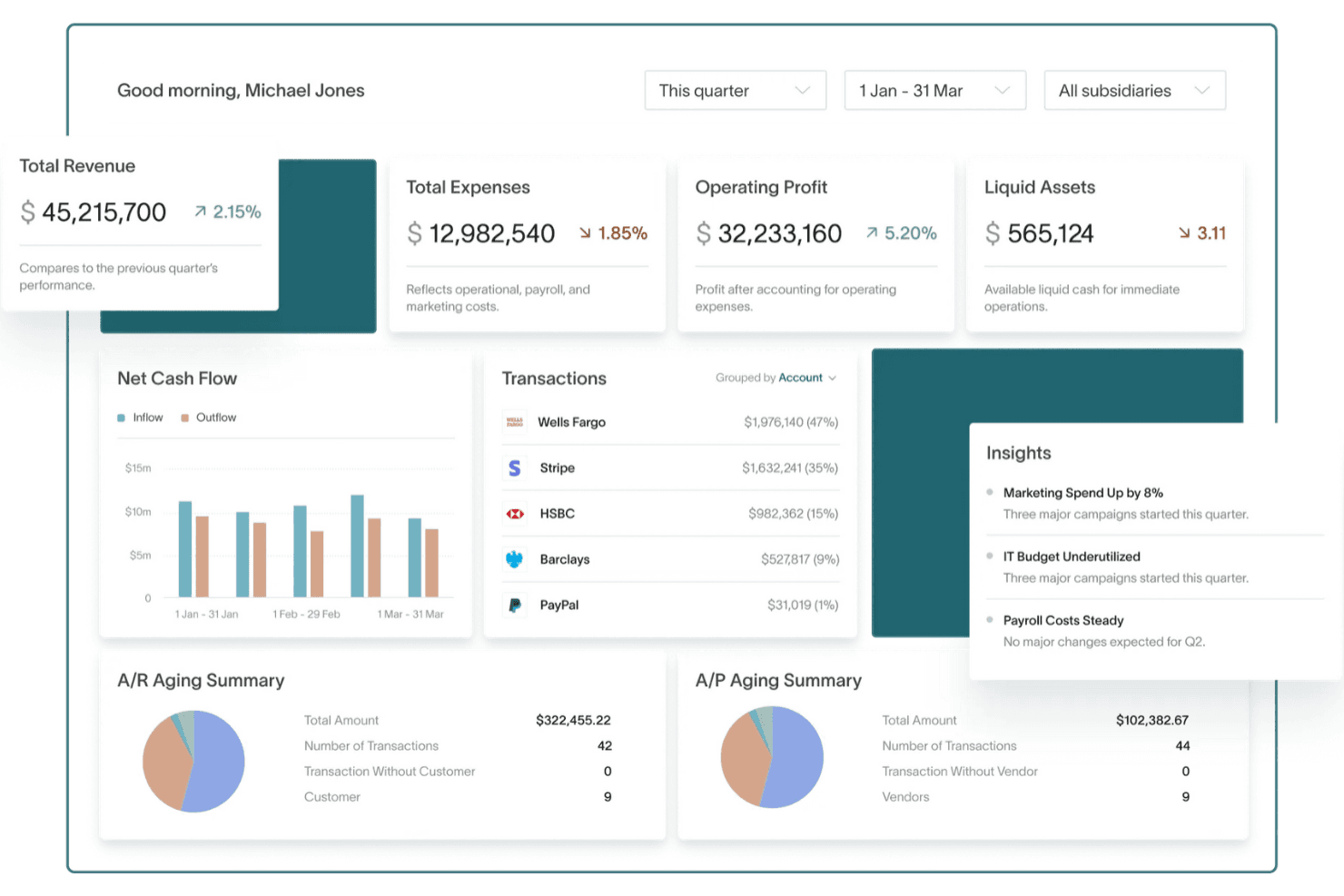
DualEntry gives users a real-time financial overview with key metrics and insights. DualEntry is an AI-native ERP built for finance teams, covering general ledger, AP/AR, multi-entity consolidation, revenue recognition, and close management in a single platform.
Who Is DualEntry Best For?
DualEntry suits finance and accounting teams managing multiple entities who want CPA-guided implementation rather than a self-serve setup experience.
Why I Picked DualEntry
I picked DualEntry as one of the best because every implementation is led by a US-based CPA, which means you're not configuring the system alone or relying on a generic onboarding doc. I especially like how intercompany transactions are handled: DualEntry posts both the AR and AP sides simultaneously, so multi-entity books stay in sync without manual journal entry cleanup. The automated intercompany eliminations and currency translation at consolidation make it a strong fit for finance teams replacing NetSuite or managing multiple entities across currencies.
DualEntry Key Features
- AI-assisted transaction categorization: Automatically categorizes imported transactions and suggests categories tailored to your business based on existing patterns.
- Configurable approval workflows: Lets you set approval rules by transaction type, assigning approvers by role or user with amount-threshold conditions.
- Multi-book reporting: Supports parallel reporting across GAAP, IFRS, tax, cash-basis, and custom books simultaneously within a single ledger.
- Actual-vs-budget variance analysis: Tracks income statement and balance sheet budgets by period with drill-down to the underlying transactions behind any variance.
DualEntry Integrations
DualEntry lists 13,000+ native integrations, including Gusto, Ramp, Stripe, HubSpot, Salesforce, Bill.com, Avalara AvaTax, Deel, Rippling, and SAP Concur. It also provides an API for custom integrations.
Pros and Cons
Pros:
- Automated reconciliation eases close workload
- Intercompany entries post on both sides
- CPA-led migrations reduce cutover guesswork
Cons:
- Report customization remains limited for some
- No inventory or warehouse management
Learn more about DualEntry: Best with built-in CRM and sales pipeline tools
- Free plan + 7-day trial + demo available
- From $35/user/month
Visit WebsiteCustomer Rating:4.7/5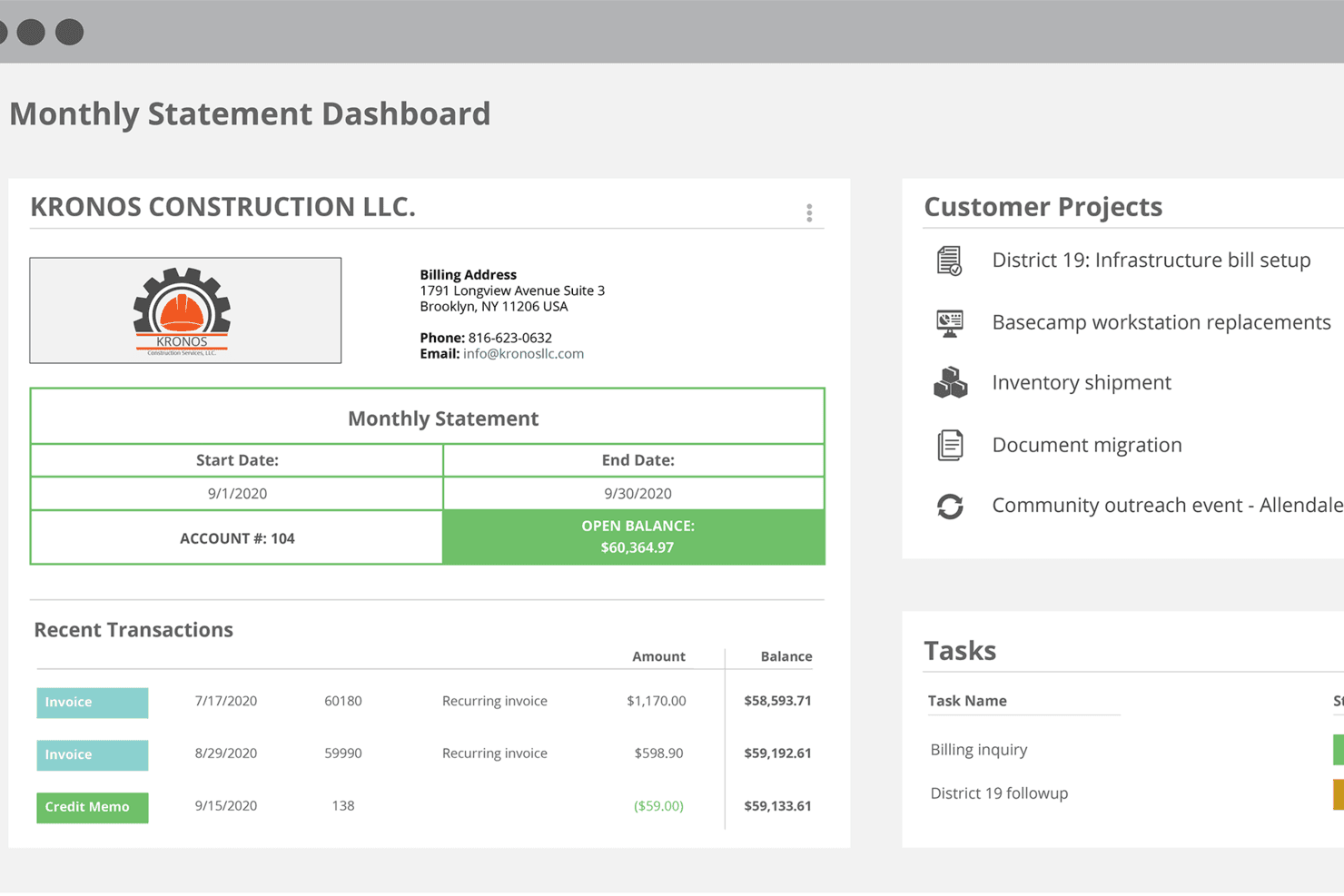
Striven centralizes billing, transactions, and project tasks in one dashboard. Striven is an all-in-one business management ERP alternative that combines accounting, CRM, inventory, HR, project management, and customer and vendor portals in a single platform.
Who Is Striven Best For?
Striven is a strong fit for small to midsize businesses that want their CRM, sales pipeline, and accounting working together in one system.
Why I Picked Striven
I picked Striven as one of the best because its CRM and accounting modules share the same data layer, so your sales pipeline and your books are never out of sync. I love that you can track an opportunity from prospect to close, then watch that revenue flow directly into your financial reports without any manual re-entry. The sales pipeline dashboards and revenue analysis tools let you filter customer contributions by month, quarter, or a custom period, which is genuinely useful when you're building a forecast against actual closed business.
Striven Key Features
- Budgets and forecasts: Create annual budgets or forecasts by GL account and month, then compare actuals against them directly in financial reports.
- Customer and vendor portals: Give customers and vendors their own portal to approve documents, submit bills, pay invoices, and exchange messages.
- Automated billing and invoicing: Set up recurring invoices, auto-billing, and automatic payment reminders for customer accounts.
- Transaction history audit trail: Review a full log of transaction changes, including who made each change and when, with access to prior versions.
Striven Integrations
Striven offers native integrations with Microsoft Office 365 and Google Workspace for calendar and appointment management. It also provides a REST API with OAuth access tokens for custom integrations.
Pros and Cons
Pros:
- Cutover migration supports balance reconciliation
- Reviewers value fewer disconnected business tools
- Connects accounting with CRM sales pipelines
Cons:
- Onboarding can take time during migration
- Reviewers report difficulty combining report details
Learn more about Striven: Best for full lifecycle, people-centric resourcing
- Not available
- Pricing upon request
Visit WebsiteCustomer Rating:4.2/5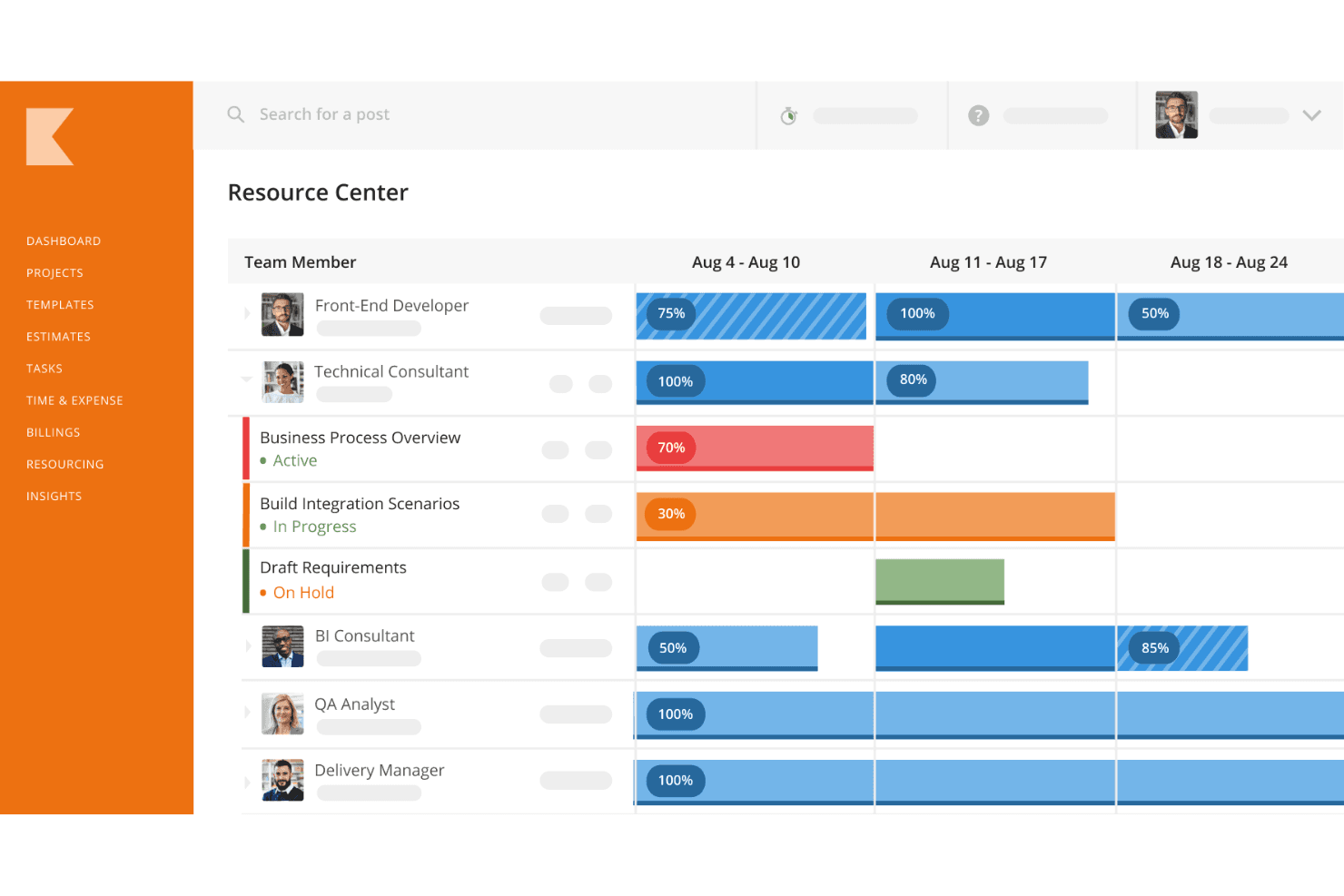
Kantata tracks team availability and workload allocation across weeks. Kantata is a professional services automation (PSA) platform that combines project management, resource management, project financial tracking, invoicing, and accounts receivable into a single system for services-focused organizations.
Who Is Kantata Best For?
Kantata is a strong fit for professional services firms—like agencies and consulting practices—that need to manage people, projects, and project finances in one place.
Why I Picked Kantata
Kantata earns its spot on my shortlist because of how it handles full lifecycle, people-centric resourcing for services teams. I love that resource demand forecasting and skills matching happen in the same platform where project budgets, invoicing, and accounts receivable live. In practice, that means my team can staff a project based on real capacity data and then track that project's financial performance without jumping between tools.
Kantata Key Features
- Time and expense tracking: Log billable hours and expenses across clients and projects directly within the platform.
- Client and employee feedback collection: Kantata Pulse gathers structured feedback from clients and team members during project delivery.
- Role-based access controls: Configure system, project, and field-level permissions to manage who can view or edit project data.
- Prebuilt workflow automation: Use Kantata Connect recipes with triggers, conditions, and actions to automate data flows between Kantata and external tools like QuickBooks, NetSuite, or Salesforce.
Kantata Integrations
Kantata reports over 1,200 prebuilt connectors, including Salesforce, QuickBooks, NetSuite, Sage Intacct, MuleSoft, and Workato. Its REST API with OAuth 2.0 supports custom integrations.
Pros and Cons
Pros:
- Project invoicing supports receivables workflows
- Resource forecasts align staffing with demand
- Project budgets expose margins and burn rates
Cons:
- No inventory, procurement, or supply-chain controls
- No documented general ledger or payables
Learn more about Kantata: Best with 1,000+ prebuilt app connectors
- 30-day free trial available
- Pricing upon request
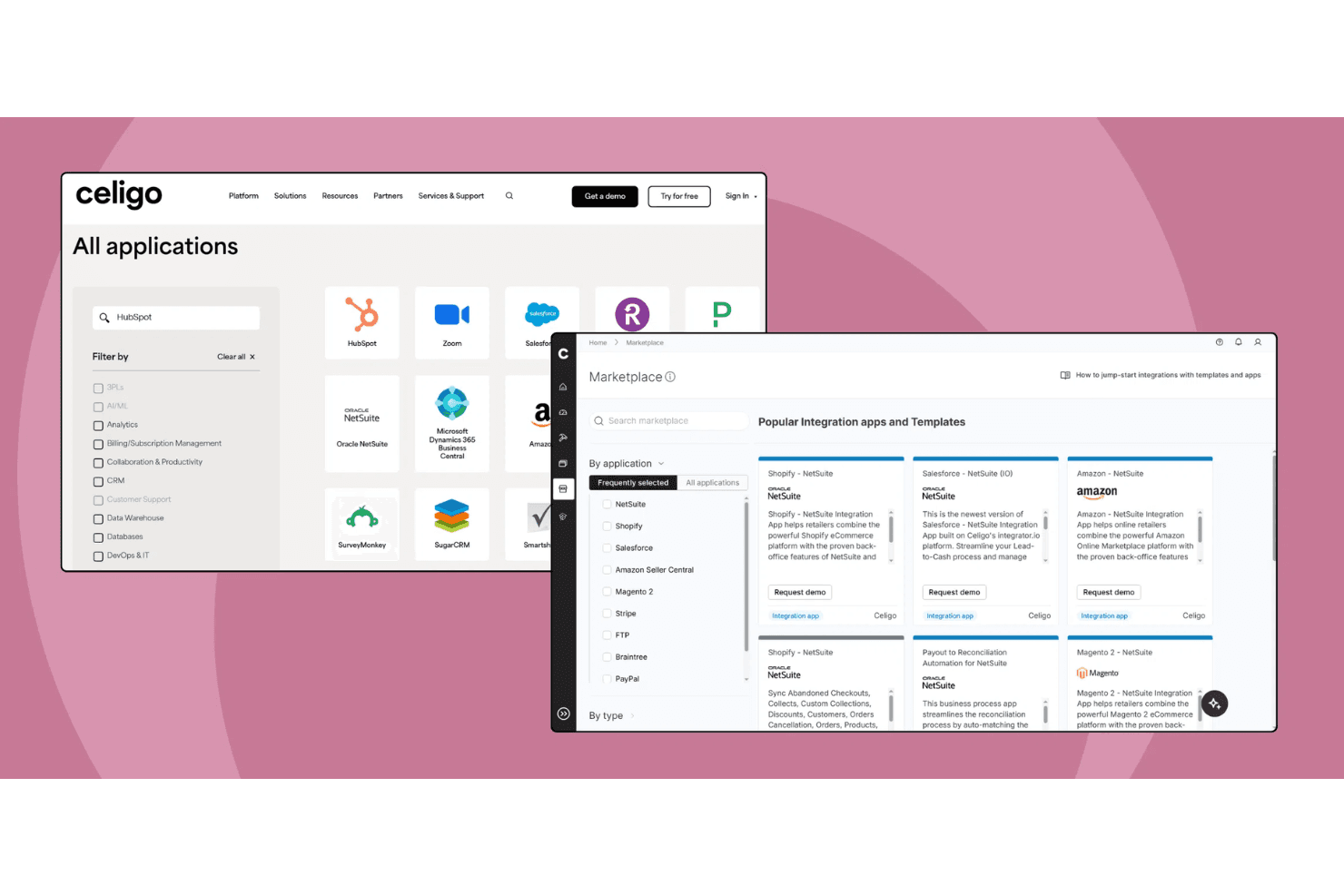
Celigo connects hundreds of apps via a searchable integration marketplace. Celigo is an intelligent automation platform that connects business applications through integration flows, EDI, APIs, and data pipelines, with a marketplace of 1,000+ prebuilt app connectors spanning ERP, ecommerce, CRM, and analytics systems.
Who Is Celigo Best For?
Celigo is a strong fit for IT and operations teams at mid-market or enterprise companies that need to connect NetSuite, Salesforce, or similar platforms without building integrations from scratch.
Why I Picked Celigo
I've included Celigo in my top picks because its marketplace of 1,000+ prebuilt app connectors makes it genuinely practical for mid-market and enterprise teams running NetSuite, Salesforce, or SAP alongside ecommerce and 3PL systems. I particularly like its B2B Manager for EDI, which handles purchase orders, invoices, and advance ship notices without custom code. The prebuilt Shopify–NetSuite template alone covers 32 flows spanning orders, inventory, fulfillment, and payout reconciliation against the NetSuite GL.
Celigo Key Features
- API Builder: A low-code graphical interface for creating APIs and composite services, available on Professional Edition and above.
- B2B Manager for EDI: A dedicated module for managing trading partner onboarding, document validation rules, and EDI monitoring across X12 and EDIFACT standards.
- Agent Builder: A low-code tool for defining AI agent instructions, multi-step logic, and governance guardrails across connected systems, included in all editions.
- Data ingestion pipelines: Syncs data from 600+ sources into a warehouse or data lake, with adaptive schema mapping to keep syncs current as source applications change.
Celigo Integrations
Celigo offers 1,000+ marketplace integrations, including Oracle NetSuite, Salesforce, SAP, Microsoft Dynamics 365 Business Central, Acumatica, Shopify, and Snowflake. It also supports REST, SOAP, GraphQL, and WebSocket APIs for custom integrations.
Pros and Cons
Pros:
- Configurable flows move data across departments
- Monitoring logs help teams trace sync errors
- EDI automates purchase and fulfillment workflows
Cons:
- Complex flow failures can take time to debug
- No native general ledger or accounts payable
Learn more about Celigo: Best for small and midsized business management
- 31-day free trial available
- Pricing upon request
Visit WebsiteCustomer Rating:4.4/5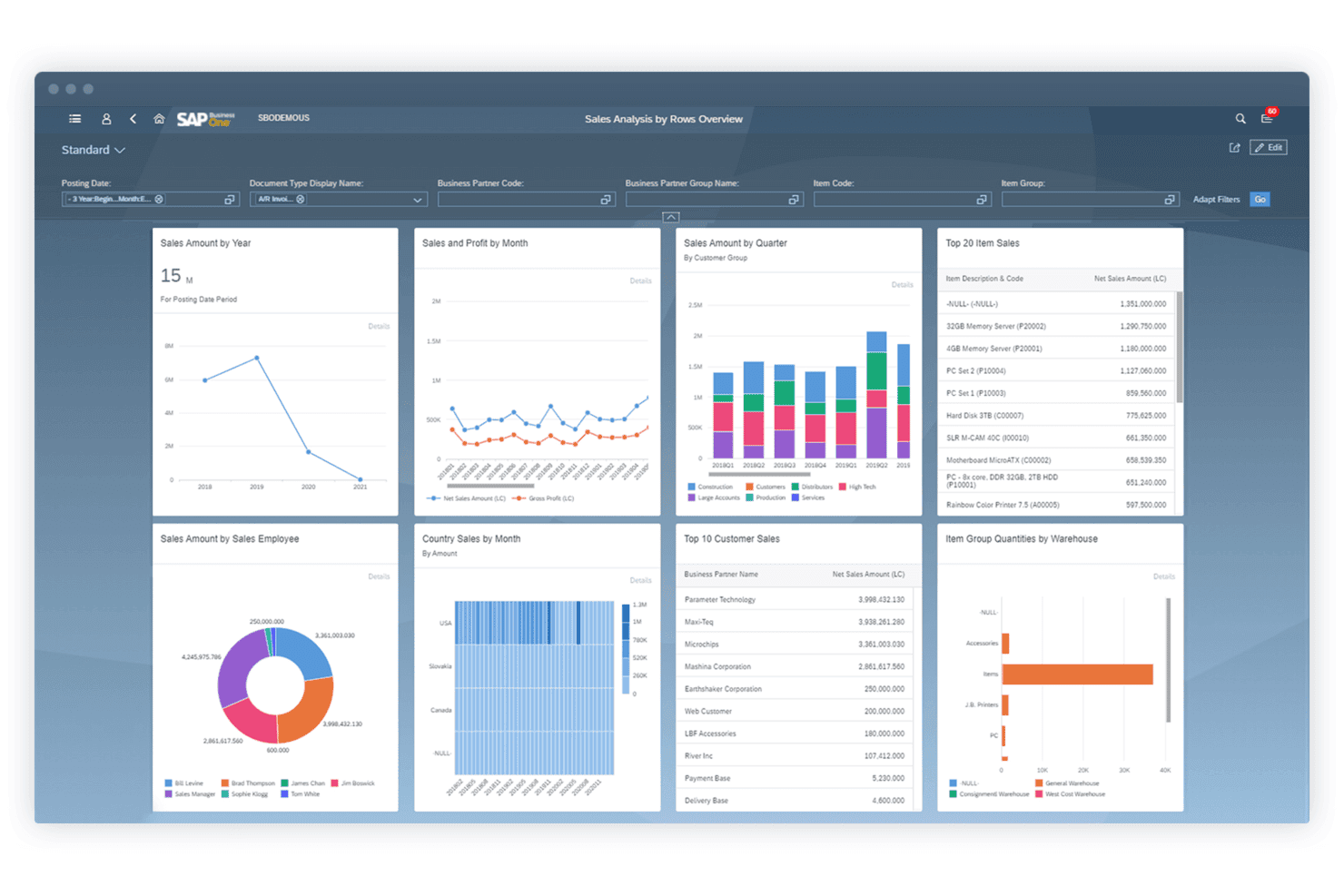
SAP Business One centralizes sales analytics into one visual dashboard. SAP Business One is an ERP system built for small and midsize businesses that unifies accounting, purchasing, inventory, sales, customer relationship management, and reporting in a single platform.
Who Is SAP Business One Best For?
SAP Business One is a strong fit for small and midsize businesses that need finance, inventory, purchasing, and sales managed in a single system rather than across multiple disconnected tools.
Why I Picked SAP Business One
SAP Business One earns its spot on my shortlist because it's one of the few ERP systems genuinely built for small and midsize businesses that doesn't sacrifice depth to get there. I like how it unifies accounting, inventory, purchasing, and sales in a single system, so finance teams aren't manually reconciling data across disconnected tools. The real-time warehouse and accounts payable sync is particularly useful: a goods receipt automatically updates inventory levels and can generate an AP invoice from the same transaction.
SAP Business One Key Features
- Budget-to-actual comparison: Define budget scenarios with distribution methods and compare budgets against real business activity directly within the system.
- Mobile sales app: Access and manage leads, customer accounts, stock levels, and orders from iOS and Android devices.
- User-defined fields: Add custom fields to form categories with specific data types, valid values, defaults, and validation rules to match your business data needs.
- Query Generator: Build SQL-based queries to retrieve business data, create custom report forms, and save reusable queries to a personal library.
SAP Business One Integrations
SAP Business One has documented integrations with Microsoft Outlook, Microsoft Excel, and SAP AI Core. It also provides an API for custom integrations.
Pros and Cons
Pros:
- Reviewers praise batch tracking and stock reports
- Goods receipts update stock and support AP invoicing
- Finance, inventory, and purchasing share data
Cons:
- Advanced reports often require technical expertise
- Dated navigation takes time to learn
Learn more about SAP Business One: Best for cloud-based ERP with real-time insights
- Free demo available
- Pricing upon request
Visit WebsiteCustomer Rating:4.4/5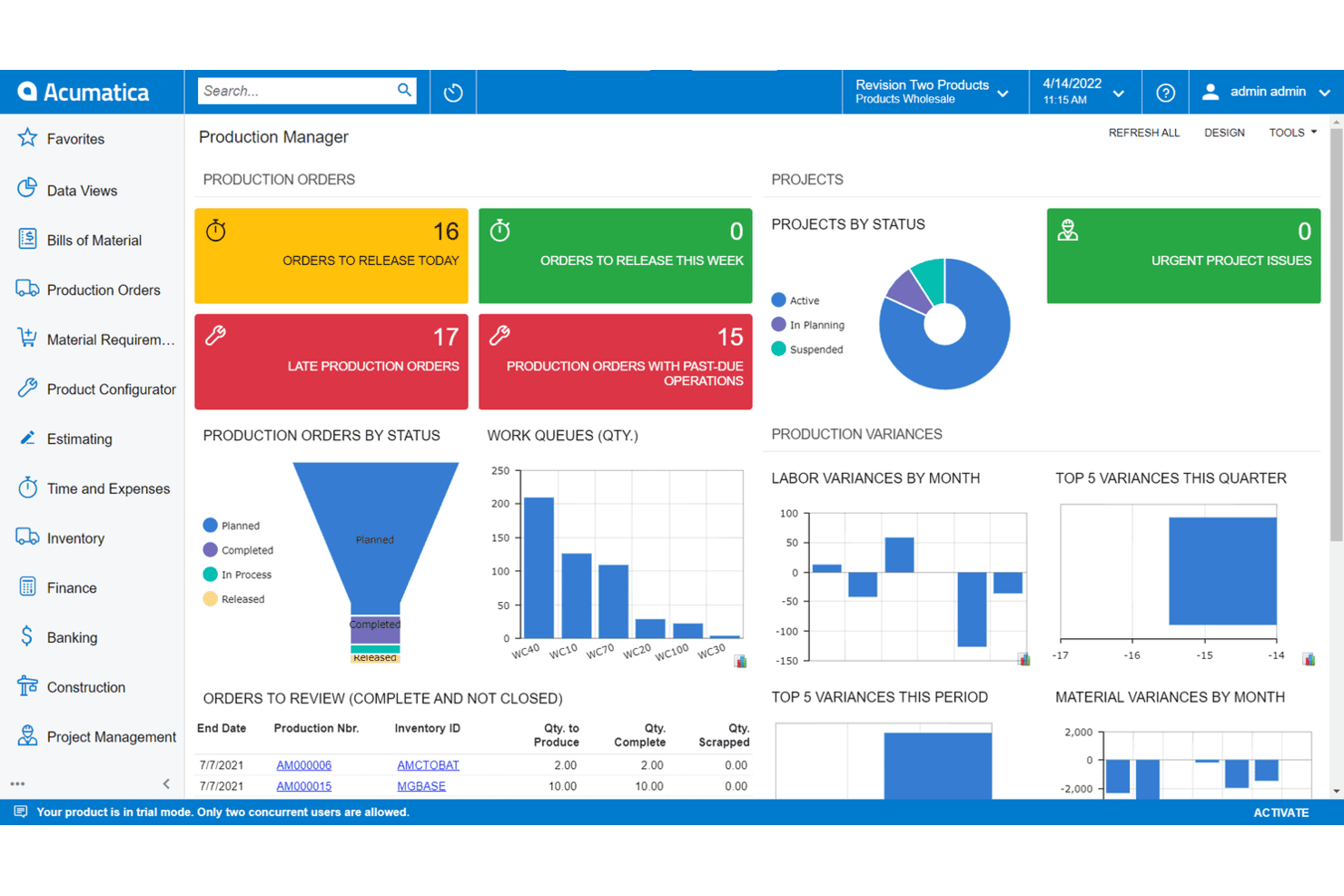
Acumatica gives production managers a real-time manufacturing overview. Acumatica is a cloud-based ERP system that unifies financial management, CRM, inventory, procurement, and industry-specific operations—including manufacturing, construction, distribution, and professional services—in a single platform.
Who Is Acumatica Best For?
Acumatica is a strong fit for mid-market companies in manufacturing, distribution, or construction that need a unified cloud ERP without paying per-user licensing fees.
Why I Picked Acumatica
I've included Acumatica in my top picks because it's one of the few cloud ERP platforms that ties financials, operations, and CRM into a single database with real-time visibility across every entity. I particularly like how its AI anomaly detection monitors financial and operational data continuously, surfacing exceptions by severity before they become problems. Its intercompany automation links purchase orders, sales orders, shipments, receipts, and invoices across related companies in one tenant, which is genuinely useful when you're managing multi-entity accounting at close.
Acumatica Key Features
- Multi-entity accounting: Tracks financials for an unlimited number of related companies within a single SaaS database, with security settings controlling what data is shared or separated across entities.
- Revenue recognition configuration: Supports IFRS 15 and ASC 606 compliance, including transaction price allocation across performance obligations and an ASC 606 residual allocation method.
- No-code workflow and screen customization: Lets business users configure workflows, personalize screens, and build dashboards without writing code.
- AP document recognition: Extracts information from vendor invoices automatically and creates bills for review and approval using AI.
Acumatica Integrations
Acumatica has native integrations with Amazon, BigCommerce, and Shopify, plus marketplace integrations such as BILL, REPAY AR & AP Payments Integration, Workforce Go!, and ShipEngine. REST, SOAP, and webhooks support custom integrations.
Pros and Cons
Pros:
- AI invoice capture reduces manual AP entry
- Intercompany workflows connect related entities
- Unlimited-user licensing supports operational growth
Cons:
- Implementations depend heavily on partner quality
- Native reporting often needs customization
Learn more about Acumatica: Best for linking workforce plans to budgets
- 30-day free trial + demo available
- Pricing upon request
Visit WebsiteCustomer Rating:4.3/5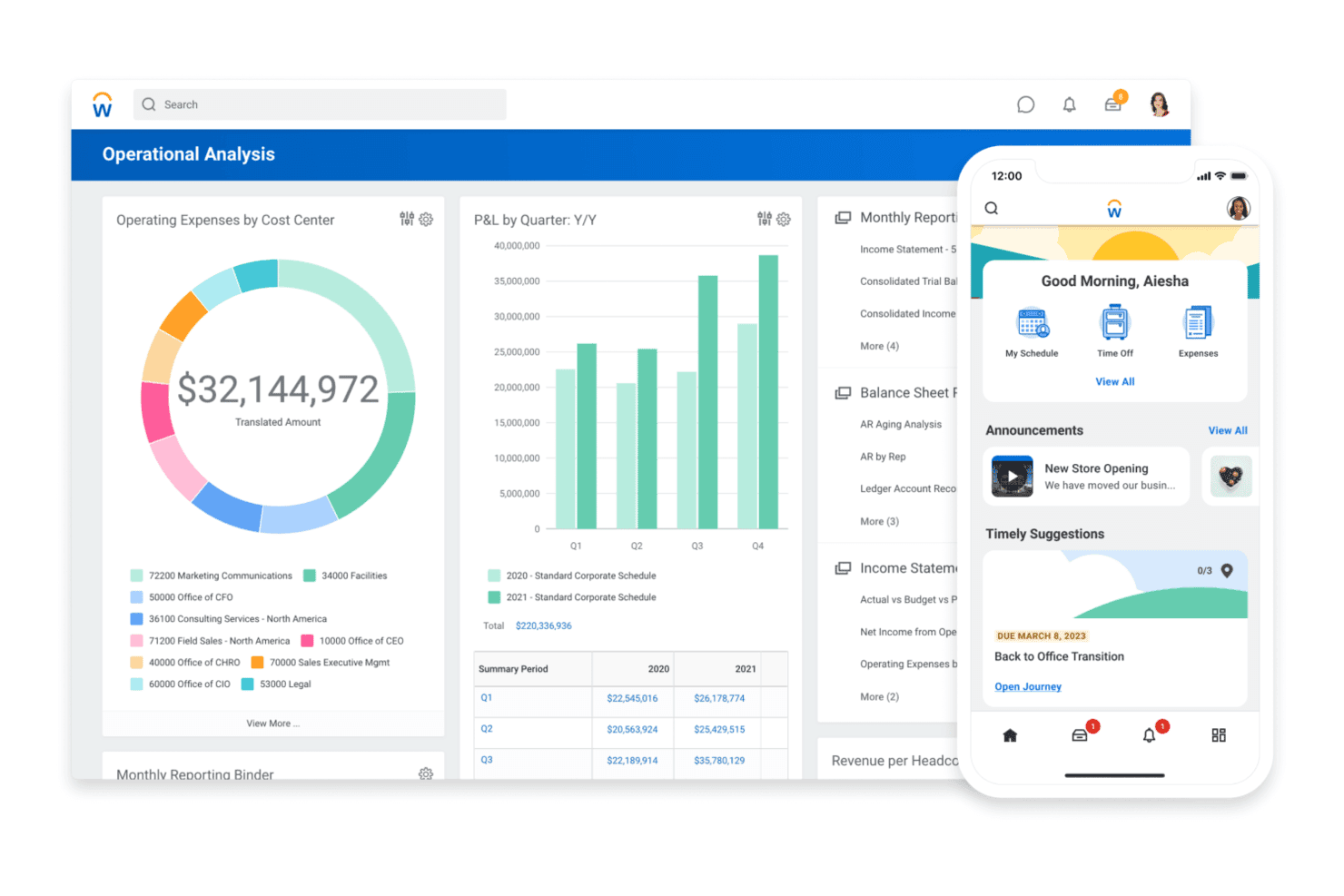
Workday displays financial dashboards and a mobile home screen side by side. Workday is a cloud-native ERP platform that unifies finance, HR, procurement, and operations management on a single shared-data system, with built-in reporting, planning, and workflow automation tools across the enterprise.
Who Is Workday Best For?
Workday fits mid-to-large enterprises that need finance and HR unified on a single platform, particularly in services, government, and education sectors.
Why I Picked Workday
Workday earns its spot on my shortlist because of how well it unifies finance and HR on a single shared data model, which makes continuous recalibration between headcount plans and financial forecasts actually practical. I like that finance teams can see real-time budget impact as HR decisions happen, without manually reconciling across separate systems. The close and consolidation module also supports AI-driven reconciliation and real-time consolidation across multiple entities, which matters when you're managing a complex, multi-country operation.
Workday Key Features
- Global multi-entity management: Supports multicurrency, multilanguage, multibook, and multi-entity operations with country-specific local configurations across 55 countries.
- Drag-and-drop ad hoc reporting: Lets users build custom reports and drill from summarized results down to underlying transactions without requiring technical support.
- Procure-to-pay workflow automation: Automates approvals, expense management, and procurement workflows with built-in audit trails and reduced manual handoffs.
- Role-based access controls: Security administrators configure roles, security groups, and business-process permissions to control exactly what each user can access and do.
Workday Integrations
Workday identifies connectors for Salesforce, Snowflake, AWS, and Google Cloud through Workday Build. It supports APIs, A2A, MCP connectivity, low-code integrations, event-driven workflows, and batch data processing.
Pros and Cons
Pros:
- Multi-entity operations span 55 countries
- Real-time reporting supports faster close decisions
- Shared finance and headcount budget visibility
Cons:
- Module-siloed teams can hinder implementation coordination
- Legacy depreciation mappings can complicate setup
 Best for financial and operations management
- Free demo available
- From £1,200/month
Visit WebsiteCustomer Rating:4.3/5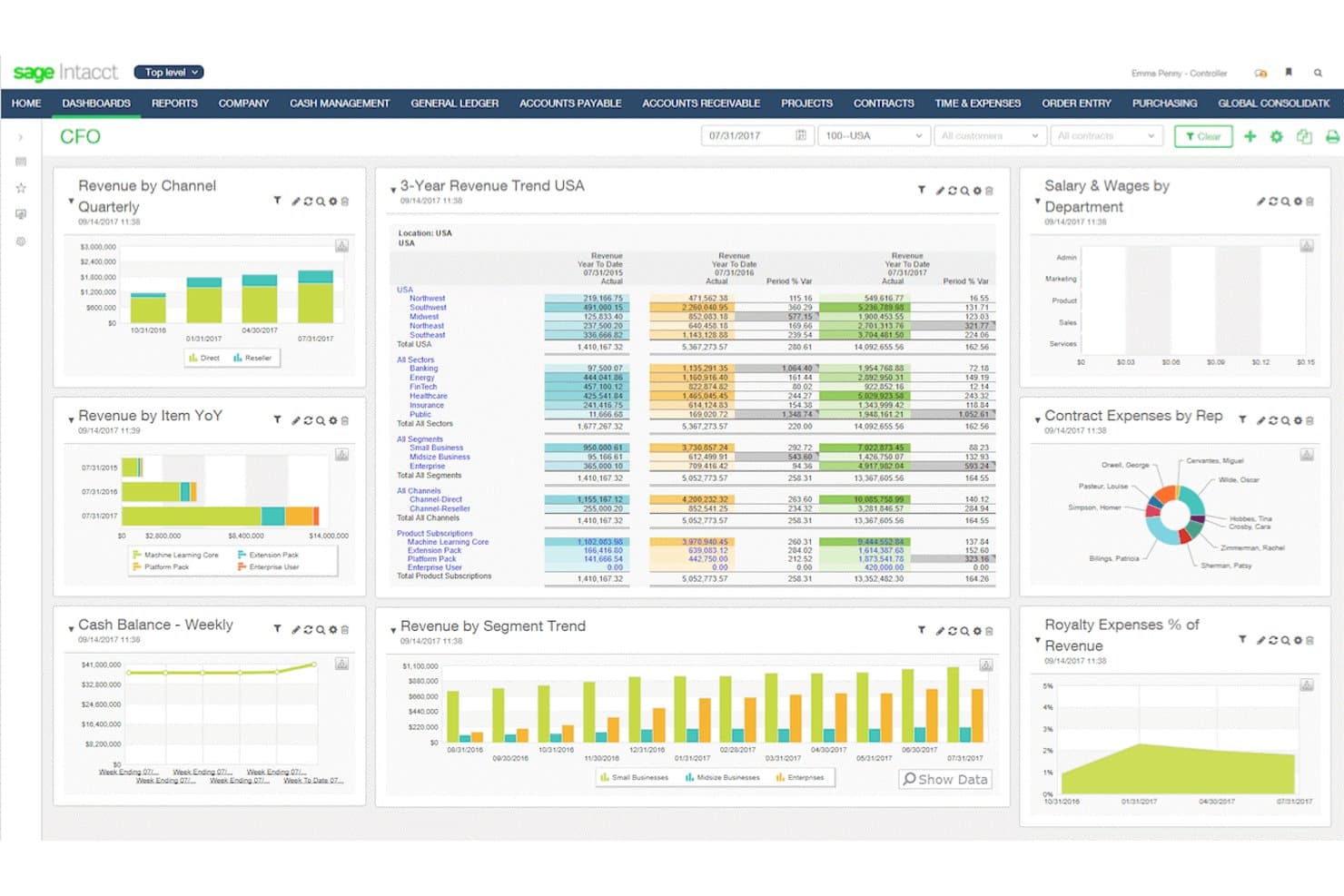
Sage Intacct gives CFOs a real-time financial performance dashboard. Sage Intacct is a cloud-based financial management platform built for mid-sized and growing businesses, covering general ledger, accounts payable and receivable, multi-entity consolidation, revenue recognition, and AI-assisted reporting.
Who Is Sage Intacct Best For?
Sage Intacct is a strong fit for mid-sized and growing businesses that need multi-entity financial management and are ready to move beyond entry-level accounting tools.
Why I Picked Sage Intacct
Sage Intacct earns its spot on my shortlist because it handles financial and operations management at a depth that mid-sized and growing businesses genuinely need. I particularly like the multi-entity consolidation, which automates eliminations and adjustments across subsidiaries, and the revenue recognition engine that maps directly to ASC 606/IFRS 15 contract steps. The AI-powered General Ledger scans transactions for anomalies in real time, which I find valuable when managing high-volume close cycles across multiple entities.
Sage Intacct Key Features
- Sage Copilot AI agents: Dedicated AI agents handle tasks like reading bills, matching vendors and purchase orders, flagging duplicate bills, tracking close tasks, and monitoring data for reconciliation mismatches.
- Platform Services customization: Full administrators can build custom objects, fields, workflows, triggers, and applications that connect directly with standard records like invoices and vendors.
- Data Cloud sync: Automatically synchronizes Intacct financial data with HR, CRM, operational, and industry-specific datasets to support cross-functional analytics and reporting.
- Custom Report Writer: A wizard-based report-building tool included in the core subscription for creating tailored financial reports without needing developer support.
Sage Intacct Integrations
Sage Intacct has over 350 Marketplace integrations, including a documented native Salesforce integration for quote-to-cash workflows. It also supports REST and XML-RPC APIs, SDKs, and an MCP Server for custom connectivity.
Pros and Cons
Pros:
- Delivers detailed dimensional financial reporting
- Maps revenue schedules to ASC 606/IFRS 15
- Automates multi-entity eliminations and adjustments
Cons:
- Deep warehouse operations may need specialist tools
- Data migration can demand substantial effort
Learn more about Sage Intacct: 10Best for inventory-led product businesses
Cin7
- 14-day free trial + free demo available
- From $349/month
Visit WebsiteCustomer Rating:4.3/5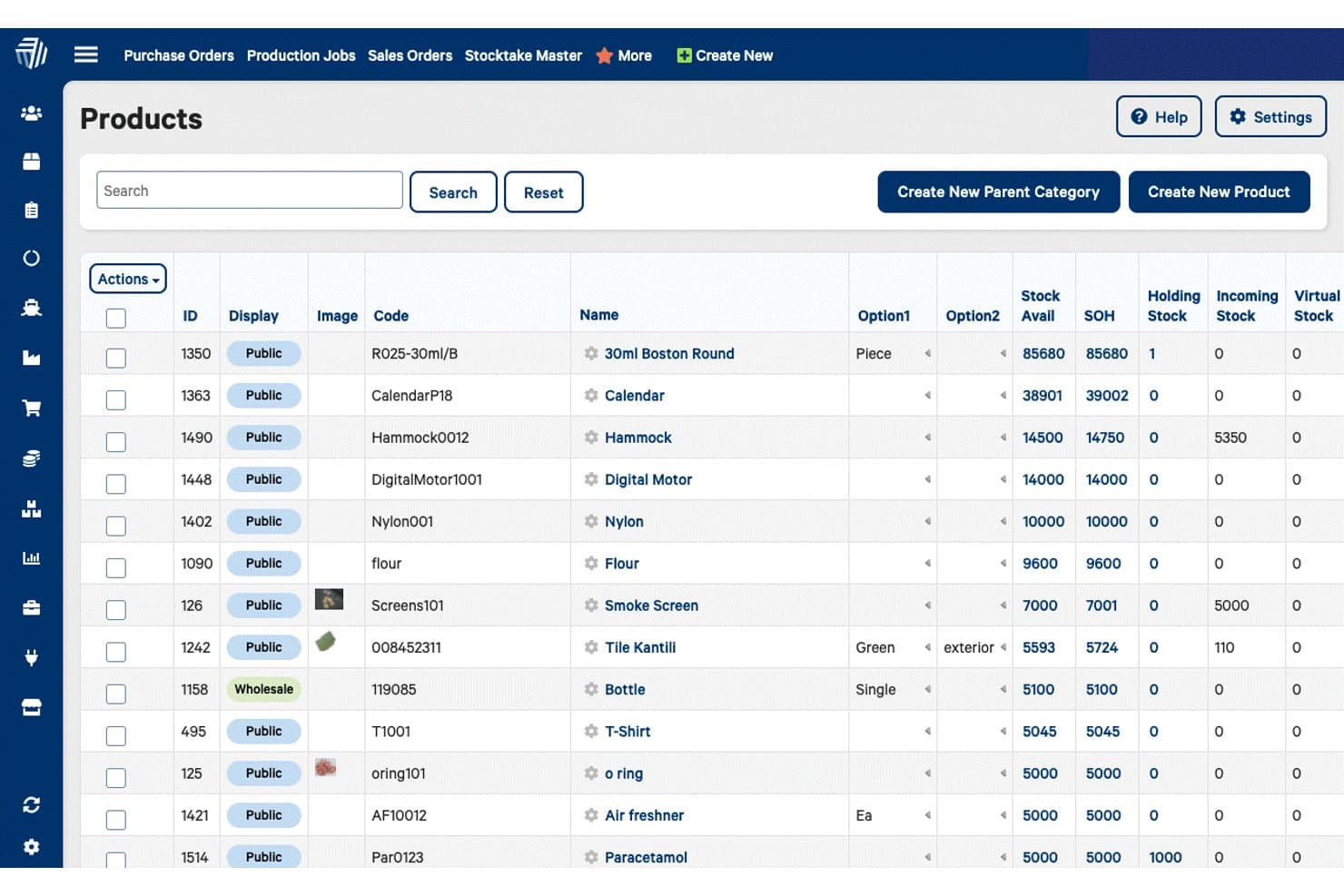
Cin7 lets users manage and view inventory stock levels across all products. Cin7 Core is an inventory and order management platform that unifies purchasing, warehouse workflows, multi-channel sales, manufacturing, and accounting integrations for product-based businesses.
Who Is Cin7 Best For?
Cin7 Core is a strong fit for small to mid-sized product businesses that need to manage inventory, orders, and fulfillment across multiple sales channels from one place.
Why I Picked Cin7
Cin7 Core earns its spot on my shortlist because of how it connects inventory performance to real-time decision-making across the full order cycle. I particularly like ForesightAI, which uses historical sales data and seasonal patterns to generate demand forecasts and reorder plans, so you're not caught short mid-quarter. Cin7's accounting dimensions let me tag transactions by cost center or product region across purchases, sales, and production, giving me a live view of where margin is moving.
Cin7 Key Features
- Multi-channel order management: Manage and track orders from multiple sales channels within a single system.
- Bill of materials (BOM) tracking: Track production components and BOMs across assembly, kitting, and manufacturing workflows.
- Accounting dimensions: Tag transactions by up to 10 user-defined dimensions—such as cost center or business group—across purchases, sales, and production.
- Intelligent Document Recognition (IDR): Extract data from supplier and purchase documents automatically to reduce manual data entry.
Cin7 Integrations
Cin7 supports integrations through 700+ app partners, including QuickBooks, Xero, Shopify, Amazon, BigCommerce, WooCommerce, Avalara, ShipStation, and SPS Commerce. An API is available as an add-on for custom integrations.
Pros and Cons
Pros:
- Links cost centers to operational transactions
- Tracks BOMs across assembly and manufacturing
- Centralizes multichannel inventory and order visibility
Cons:
- Setup and balance conversion can delay go-live
- Users report occasional synchronization delays
Andre ERP-alternativer
Nedenfor finner du en liste over flere ERP-alternativer som jeg valgte ut. Selv om de ikke kom med blant de 10 beste, er de fortsatt verdifulle og verdt å undersøke nærmere.
- 11EpicorBest for industry-specific ERP solutions
- 12Microsoft Dynamics 365 Business CentralBest for seamless integration with Microsoft 365
- 13FulfilBest for direct-to-consumer brands
- 14QuickBooks EnterpriseBest for advanced inventory and pricing features
- 15InforBest for cloud capabilities and functionality
- 16NEXBest for advanced enterprise management with modular solutions
- 17FulcrumBest for job shop and make-to-order manufacturers
- 18Float ForecastingBest for managing team expenses efficiently
- 19TallyPrimeBest for small businesses needing robust accounting
- 20SYSPROBest for manufacturing and operational efficiency
- 21OdooBest for customizable business applications
- 22CubeBest for financial planning and analysis
- 23IFS CloudBest for asset-intensive industries
- 24SAP S/4HANA CloudBest for large enterprises needing comprehensive solutions
- 25HoneyBookBest for creative professionals managing projects and clients
How I Evaluate ERP Alternatives
I evaluate ERP alternatives in two layers: the baseline capabilities—like multi-entity GL and AP automation—that qualify a tool, and the differentiators that set the best apart.
Core Functionality (Table Stakes For This List)
When I'm selecting tools for my list, I rank each one on a scale from 0 (does not offer the functionality) to 5 (excels in this area) for each core functionality listed below. Then, I calculate the tool's total score into a percentage. Each tool needs to achieve a minimum total score of 65% to be considered for inclusion.
- Core Accounting & GL: I look for a full general ledger with AP, AR, and journal entry management—enough to serve as a team's financial system of record.
- Financial Reporting & Analytics: Each tool should offer standard financial statements, custom report builders, and dashboards that let controllers drill into variance details.
- Multi-Entity & Multi-Currency: I evaluate whether the platform handles consolidations across subsidiaries and currencies, since this is a key reason teams outgrow basic accounting tools.
- Automated Financial Workflows: Approval chains, bank reconciliations, and close task management all factor in—I check whether these processes run with minimal manual intervention.
- Integrations & API Access: The tool needs to connect with CRMs, payroll, billing, and banking systems, whether through prebuilt connectors or an open API.
- Compliance & Audit Controls: I look for GAAP/IFRS alignment, role-based permissions, and detailed audit trails that support internal controls during external audits.
Once I have a list of tools that meet this criteria, I consider what sets each platform apart.
Differentiating Factors (What Sets Vendors Apart)
Here's how I compare and contrast different vendors:
Standout Features
Embedded FP&A is a major differentiator. Tools like Sage Intacct and Oracle NetSuite offer budgeting, forecasting, and scenario planning natively, so finance teams avoid stitching together a separate planning platform. Composable architecture also matters—some teams only need AP automation and reporting now but want to add consolidation as they scale. I check for AI-powered close capabilities too, since platforms that auto-match transactions and flag anomalies can shave days off month-end.
Beyond Features
Total cost of ownership is one of the first things I evaluate. Traditional ERPs often carry hidden consulting and customization fees, so I look at whether a vendor's pricing scales predictably as you add entities or users. Implementation timelines also weigh heavily—a platform that takes six months to deploy can stall a growing finance team. I check for SOC 1/SOC 2 and ISO 27001 certifications as well, since auditors increasingly ask for proof that your financial systems meet those standards.
Hvorfor se etter et alternativ til ERP?
Etter hvert som virksomheten din vokser, er det sannsynlig at du vil gå gjennom flere ERP-løsninger og før eller siden ende opp med å se etter en alternativ programvare. Her er noen vanlige grunner til at du kan være på utkikk etter en alternativ løsning:
- Kostnad: Avhengig av hvilket ERP-system du velger, kan denne typen programvare bli ganske dyr, særlig hvis du velger tillegg. Et ERP-alternativ kan ha lavere kostnader enn alternativet du bruker nå, eller tilby en gratis prøveperiode.
- Kompleksitet: Noen ERP-systemer krever omfattende opplæring for at du skal kunne bruke alle funksjonene. Hvis du er en SMB eller ikke har behov for alle de avanserte funksjonene som er inkludert i ERP-systemet ditt, kan et alternativ være bedre.
- Fleksibilitet: Dekker det nåværende ERP-systemet ditt virksomhetens behov? Hvis ikke, kan det hende du ser etter et alternativ til ERP-systemet.
- Skalerbarhet: Programvaren din bør alltid kunne skaleres i takt med virksomheten din. Hvis du for eksempel driver en liten bank som nylig har fått mange nye kunder, trenger du et kraftigere ERP-system for å administrere kontoene.
- Tilpasning: Begrensede tilpasningsmuligheter kan hindre forretningsprosessene, men et ERP-alternativ med utvidede tilpasningsmuligheter, som løsninger med åpen kildekode, kan bidra til at virksomheten din skiller seg ut og blir minneverdig.
Alternative ERP-systemer kan tilby rimeligere, mer brukervennlige og mer tilpasningsdyktige løsninger som bedre oppfyller spesifikke forretningsbehov og krav til vekst. Ved å vurdere en rekke alternativer kan du finne et system som gir bedre fleksibilitet, skalerbarhet og effektivitet, og som til syvende og sist forbedrer virksomhetens samlede resultater og vekst.
Viktige funksjoner ved ERP-alternativer
Her er noen viktige funksjoner ved ERP som den alternative programvaren din bør kunne gjenskape eller forbedre for å passe godt.
- Integrasjon: Alternative ERP-programmer kombinerer ulike forretningsprosesser i ett enkelt, enhetlig system, noe som sikrer sømløs dataflyt og kommunikasjon på tvers av ulike avdelinger. Denne konsolideringen eliminerer datasiloer og forbedrer driftseffektiviteten.
- Automatisering: Disse systemene reduserer manuelle oppgaver gjennom automatiserte arbeidsflyter, effektiviserer driften og minimerer risikoen for menneskelige feil. Selskaper som for eksempel Gusto innser at automatisering sparer tid og lar ansatte fokusere på mer strategiske aktiviteter.
- Dataanalyse: ERP-alternativer tilbyr robuste verktøy for analyse av forretningsdata, slik at selskaper kan ta informerte beslutninger basert på nøyaktig og omfattende innsikt. Denne funksjonen støtter strategisk planlegging og forbedret ytelse.
- Rapportering i sanntid: Ved å tilby oppdaterte rapporter om virksomhetens resultater sørger ERP-systemer for at interessenter får umiddelbar tilgang til kritisk informasjon.
- Skalerbarhet: ERP-løsninger er utviklet for å tilpasse seg virksomhetens vekst og håndtere økende datamengder og utvidet drift uten at det går på bekostning av ytelsen.
- Tilpasning: Disse systemene gjør det mulig å skreddersy løsninger for å dekke spesifikke organisatoriske behov, og gir fleksibilitet til å justere funksjonaliteten i henhold til unike forretningsprosesser.
- Brukertilgangskontroll: Administrasjon av brukertillatelser og tilgangsnivåer er en viktig funksjon i ERP-programvare, og sikrer datasikkerhet og etterlevelse av regelverk. Med brukertilgangskontroll kan selskaper i datatunge bransjer (dvs. helsetjenester og luftfartssektoren) beskytte sensitiv informasjon og håndheve organisatoriske retningslinjer.
- Lagerstyring: Effektiv lagerstyring bidrar til kostnadsbesparelser og kundetilfredshet. Derfor sporer og administrerer de beste ERP-alternativene lagernivåene nøyaktig, optimaliserer lagerkontrollen og reduserer risikoen for overfylte lagre eller lagerutsolgt.
- Administrasjon av kunderelasjoner: Disse systemene administrerer kundeinteraksjoner og kundedata, og forbedrer kundeservice og relasjonsstyring.
- Økonomistyring: Effektiv økonomistyring støtter strategisk planlegging og overholdelse av regelverk. Den beste ERP-programvaren håndterer regnskap, budsjettering, prognoser og økonomisk rapportering, og gir et helhetlig bilde av selskapets økonomiske situasjon.
Fra avansert lager- og ordreadministrasjon til omfattende CRM- og e-handelsintegrasjon gir disse løsningene fleksibiliteten og skalerbarheten som trengs for å optimalisere driften og skape vekst. Ved å utforske ulike ERP-alternativer kan virksomheter finne den perfekte løsningen for å øke effektiviteten og nå sine strategiske mål.