

O melhor software de contas a pagar ajuda os CFOs de empresas em rápido crescimento a simplificar o processamento de faturas, controlar as despesas e expandir as operações — sem aumentar a equipa. Se a sua equipa está soterrada em aprovações e cadeias de emails, está na altura de fazer uma atualização.
Tenho passado os últimos anos a testar ferramentas financeiras concebidas para eliminar obstáculos dos fluxos de trabalho administrativos. As ferramentas de contas a pagar desta lista destacam-se porque automatizam tarefas demoradas, reduzem o risco de fraude e integram-se facilmente com os sistemas que já utiliza. São rápidas de implementar e suficientemente flexíveis para acompanhar a trajetória de crescimento da sua empresa.
Quer esteja a trabalhar com uma estrutura reduzida ou a planear a sua próxima ronda de financiamento, esta lista irá ajudá-lo a encontrar uma solução de contas a pagar que poupe tempo, aumente a visibilidade e amplie o impacto da sua equipa financeira.
Why Trust Our Software Recommendations
6,700+
Reviews
20
Industry experts
16+
Evaluation factors
14
Years
Our team has been testing and reviewing software since 2012. As finance leaders ourselves, we know how difficult—and important—it is to choose the right software.
For this guide, we evaluated tools using hands-on testing and independent research, scoring tools using our selection criteria.
Our reviews reflect our human editorial judgment, not a sales pitch.
Tabela de comparação de software de contas a pagar
A tabela abaixo compara os detalhes de preços das minhas principais seleções de software de contas a pagar.
| Tool | Best For | Trial Info | Price | ||
|---|---|---|---|---|---|
| 1 | Best for AP fraud detection | Free demo available | Pricing upon request | Website | |
| 2 | Best for diverse payout methods | Free plan available | Pricing upon request | Website | |
| 3 | Best for flexible payments and approval workflows | Free plan available; 90-day free trial | From $25/month | Website | |
| 4 | Best for automating bill entry | 21-day free trial available | From $99/month | Website | |
| 5 | Best for spend management | Not available | Pricing upon request | Website | |
| 6 | Best for AI-driven invoice automation | Free demo available | Pricing upon request | Website | |
| 7 | Best for customizable AP workflow automation | Free trial available + free demo | Pricing upon request | Website | |
| 8 | Best for automated expense management | Free plan available; 30-day free trial | From $15/user/month | Website | |
| 9 | Best for small businesses | 1-month free trial available | From $27/month | Website | |
| 10 | Best for automation | Free demo available | From $99/month | Website |


Avaliações do melhor software de contas a pagar
Abaixo, analiso mais detalhadamente cada uma das minhas opções de software de contas a pagar. Para cada uma, encontrará um resumo rápido das principais funcionalidades, das integrações disponíveis e das informações sobre preços (quando disponíveis), além de algumas vantagens e desvantagens para o ajudar a comparar.

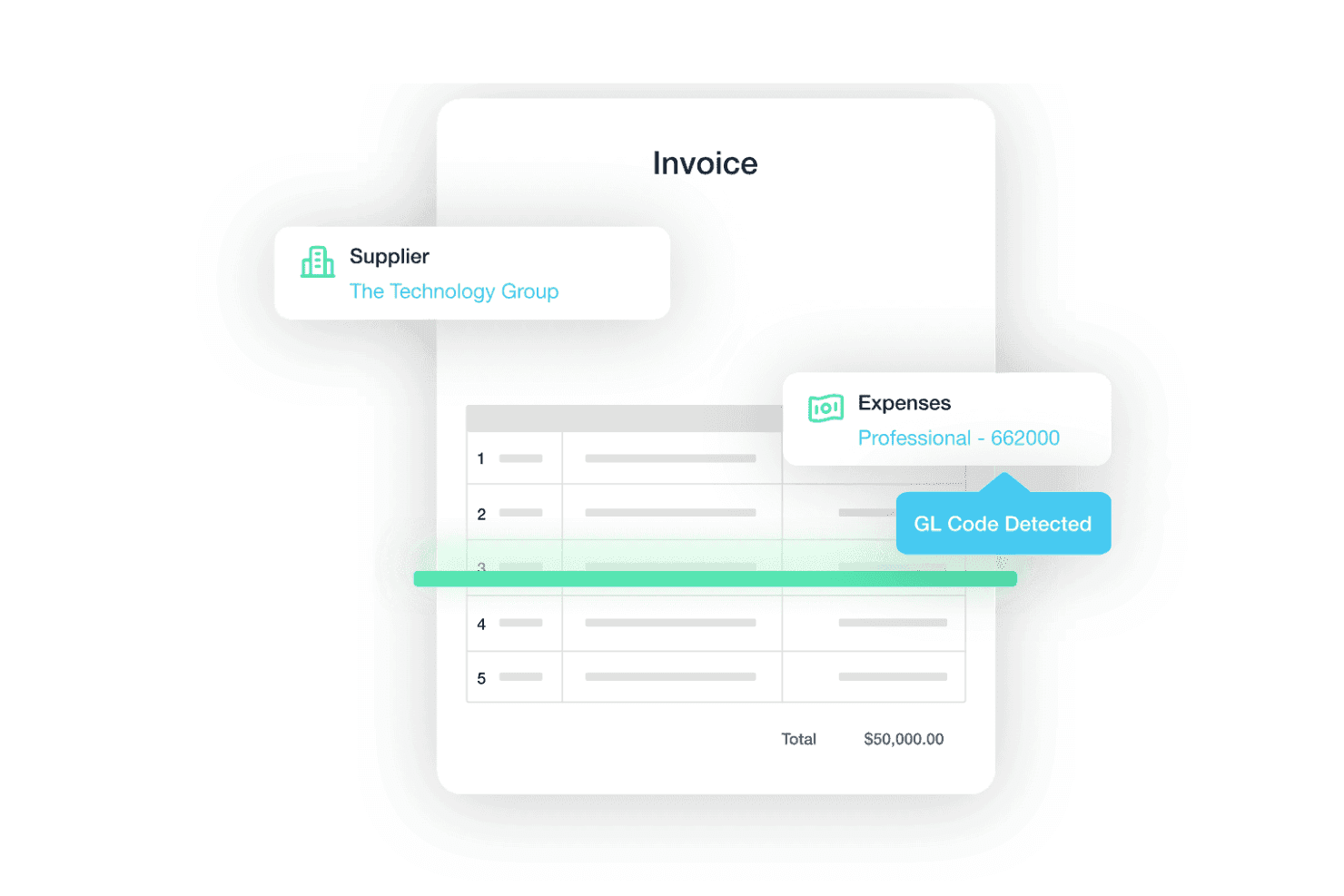
Traild uses AI to extract supplier details, expense categories, and GL codes from invoices, helping reduce manual AP processing. Traild is an accounts payable platform that layers AI-powered invoice processing, configurable approval workflows, multi-rail payment execution, and fraud detection directly within major ERP environments.
Who Is Traild Best For?
Traild is a strong fit for mid-market finance teams running ERP systems like Acumatica, NetSuite, or SAP Business One who need AP automation with serious fraud controls built in.
Why I Picked Traild
I picked Traild as one of the best because its fraud detection goes well beyond a simple duplicate check. The platform builds a behavioral fingerprint of your normal invoice and payment patterns, then flags anomalies like altered bank details, phantom vendors, or modified payment terms in real time. I also like how Vendor Verification runs as a continuous background check, catching compromised supplier accounts before a payment batch ever clears.
Traild Key Features
- AI-powered invoice capture and coding: Traild uses machine learning to extract and code header and line-item data from invoices received by email or upload.
- Error and fraud detection: Always-on anomaly detection continuously monitors invoices for unusual behaviour, identifying potential errors or fraud before payments are processed.
- Vendor verification: Built-in supplier verification helps validate vendors and detect compromised payment details before funds are released.
- Unified approval workflows: Configurable approval routing presents invoice details alongside fraud insights to support informed approvals.
Traild Integrations
Traild offers native integrations with Acumatica, NetSuite, SAP Business One, Syspro, IFS, MYOB, and Xero.
Pros and Cons
Pros:
- Multi-currency payments in 150+ countries
- Bi-directional sync with multiple ERPs
- AI-powered fraud and anomaly detection tools
Cons:
- Smaller set of integrations
- Advanced fraud capabilities may require configuration
Learn more about Traild: Best for diverse payout methods
- Free plan available
- Pricing upon request
Visit WebsiteCustomer Rating:4.5/5
Payouts' dashboard facilitates the management of pending invoices, allowing users to keep track of outstanding payments and manage cash flow effectively. For those navigating the complexities of accounts payable, Payouts.com provides a platform designed to simplify global financial operations. Tailored for high-growth businesses and industries that rely on precise vendor management, it automates invoice processing and enhances payment accuracy. With support for diverse transaction methods like fiat and cryptocurrencies, Payouts.com helps you reduce manual errors and gain real-time financial insights, fostering stronger supplier relationships and better cash flow management.
Why I Picked Payouts
I chose Payouts because it excels in offering diverse payout methods that cater to the modern needs of accounts payable processes. This platform supports both fiat and cryptocurrency transactions, simplifying global transfers across 150+ countries, which is ideal for businesses dealing with international vendors. The ability to use virtual and prepaid cards adds flexibility, allowing you to manage global expenses without traditional banking constraints. Additionally, the integration of eWallets and gift cards ensures seamless payouts, providing you with a comprehensive solution to manage diverse payment requirements efficiently.
Payouts Key Features
In addition to its diverse payout methods, Payouts offers several other features that enhance your accounts payable operations:
- Automated Invoice Processing: This feature uses OCR technology to extract data from various invoice formats, streamlining data entry and reducing manual work.
- Streamlined Approvals: With customizable approval workflows and mobile app access, this feature ensures timely invoice approvals, keeping your processes efficient.
- Automatic Invoice Matching: By matching invoices to purchase orders and receipts, this feature minimizes manual reconciliation efforts, enhancing accuracy.
- Collaborative Vendor Portal: This feature allows vendors to submit invoices and check payment statuses, improving communication and transparency in vendor relationships.
Payouts Integrations
Native integrations with Payouts include Global Smart Payouts, Vendor Relationship Suite, AP Automation, AI Payout Automation, Dynamic Tax Engine, Flexible Payout Methods, Crypto Pay-Ins, Global Payment Acceptance, Virtual and Prepaid Cards, and eWallets.
Pros and Cons
Pros:
- Supports scaling operations
- Multiple payout methods
- Comprehensive automation of accounts payable processes
Cons:
- May require time to fully customize
- Potential challenges integrating with existing systems
Learn more about Payouts: Best for flexible payments and approval workflows
- Free plan available; 90-day free trial
- From $25/month
Visit WebsiteCustomer Rating:4.2/5
Melio lets you manage your invoices and payments to help organize the accounts payable process. For small business owners looking to simplify their accounts payable processes, Melio offers a user-friendly platform that integrates seamlessly with systems like QuickBooks and Xero. You can manage bills and vendors with ease, using features such as free ACH bank transfers and online payment scheduling. Melio allows you to enhance your financial operations and cash flow management without the burden of monthly fees.
Why I Picked Melio
I picked Melio for its standout ability to offer flexible payment options and efficient approval workflows, crucial for optimizing accounts payable processes. With features like customizable approval workflows, you can involve team members or accountants in the payment process, ensuring secure and streamlined operations. Melio's platform allows you to manage payments with various methods, including free ACH transfers, making it a versatile tool for businesses. These capabilities support better cash flow management and provide a straightforward solution for handling your financial operations.
Melio Key Features
In addition to flexible payment options and approval workflows, Melio offers a range of features that enhance its utility as an Accounts Payable Software.
- Bill Capture: You can upload and manage your bills effortlessly by simply snapping a photo or forwarding an email, which are then automatically organized in the system.
- Vendor Management: This feature allows you to keep track of all your vendors and their payment preferences in one place, making it easier to manage relationships.
- Payment Scheduling: Schedule payments in advance to ensure that your bills are paid on time without any manual intervention.
- Two-Way Sync with Accounting Software: Melio offers real-time sync with popular accounting software like QuickBooks, ensuring that your financial records are always up-to-date and accurate.
Melio Integrations
Integrations include QuickBooks Online, QuickBooks Desktop, and Xero. Native integrations are not currently listed by Melio beyond these options.
Pros and Cons
Pros:
- ACH bank transfers are completely free to send
- Users can schedule and automate payments
- Offers deferred payment options
Cons:
- International payments can only be made in USD
- Could offer more integrations
 Best for automating bill entry
- 21-day free trial available
- From $99/month
Visit WebsiteCustomer Rating:4.9/5
A digital invoice from MakersHub displaying itemized purchase details, payment terms, and total amount due. For those of you navigating the complexities of accounts payable within industries such as construction and manufacturing, MakersHub offers a tailored solution that transforms your workflow. This innovative software automates invoice capture and processing, reducing the need for manual data entry while enhancing accuracy. By integrating seamlessly with platforms like QuickBooks, MakersHub allows your team to focus on strategic tasks rather than tedious paperwork, ultimately saving time and improving vendor relationships.
Why I Picked MakersHub
I picked MakersHub for its exceptional capability in automating bill entry, which is a critical factor for those managing accounts payable. The software's Smart Data Capture feature eliminates the need for manual data entry by accurately capturing over 39 data fields from various bill formats. Additionally, the integration with QuickBooks ensures seamless synchronization and efficient payment processing. These features not only save time but also enhance accuracy, making MakersHub an invaluable tool for industries like construction and manufacturing where managing complex workflows is crucial.
MakersHub Key Features
In addition to its standout capability in automating bill entry, MakersHub offers a suite of features that enhance your accounts payable operations.
- Approval Flows: Facilitates the review and authorization of payables within a secure and dedicated hub.
- MakersHub Pay: Provides flexible payment options without requiring vendor account sign-ups, offering full control over your payment processes.
- Centralized Bills & Receipts Inbox: Offers a dedicated space for processing documents efficiently, enhancing organization and accessibility.
- Auto-Mapping Rules: Ensures correct coding for expenses and items with a one-time configuration, reducing errors in financial reporting.
MakersHub Integrations
Integrations include Sage Intacct and QuickBooks.
Pros and Cons
Pros:
- Automation of bills and payments
- Multi-layered approval process
- Integration with QuickBooks
Cons:
- Certain features are limited to higher-tier plans
- Steep learning curve for new users
Learn more about MakersHub:

Procurify is all about helping your business reduce waste. For mid-market businesses aiming to refine their financial operations, Procurify offers a solution that integrates seamlessly with existing accounting systems like QuickBooks and NetSuite. Your team can benefit from improved invoice processing and bill management, which enhances accuracy and provides valuable insights. By modernizing spend management, Procurify aids in making informed financial decisions with ease.
Why I Picked Procurify
I picked Procurify because it excels in spend management by integrating procurement and finance through its AI-driven, centralized procure-to-pay platform. This solution simplifies the procurement process and streamlines accounts payable reconciliation, allowing your team to manage spending without hassle. Key features like invoice processing and insightful analytics are designed to boost productivity and save time. Additionally, its seamless integration with various accounting software makes it a comprehensive tool for modern spend management.
Procurify Key Features
In addition to its spend management capabilities, Procurify offers several other features that can enhance your accounts payable processes:
- Automated Purchase Order Management: Streamlines the creation and tracking of purchase orders, ensuring all orders are accurately documented and easily accessible.
- Vendor Management: Provides tools to manage vendor relationships and performance, offering insights into vendor reliability and pricing.
- Expense Reporting: Simplifies the submission and approval of expense reports, allowing for quick reimbursement and accurate tracking of expenditures.
- Real-Time Reporting and Analytics: Offers dashboards and reports that provide visibility into spending patterns and financial performance, helping you make informed decisions.
Procurify Integrations
Integrations include QuickBooks Online, QuickBooks Desktop, NetSuite, Sage Intacct, and Microsoft Dynamics 365.
Pros and Cons
Pros:
- Real-time, customizable dashboards
- No hidden fees
- Custom workflows and approval processes
Cons:
- Limited integration options
- No free trial
Learn more about Procurify: Best for AI-driven invoice automation
- Free demo available
- Pricing upon request
Visit WebsiteCustomer Rating:4.8/5
DOKKA's automated invoice processing feature streamlines and automates the extraction and organization of invoice data. For finance professionals seeking to simplify their accounts payable processes, DOKKA offers an AI-powered solution that integrates smoothly with existing ERP systems. It caters to CFOs and accounts payable managers by automating invoice processing and reducing manual tasks. This allows your team to prioritize strategic financial management over routine paperwork.
Why I Picked DOKKA
I picked DOKKA for its AI-driven invoice automation, which addresses the core challenges of accounts payable management. DOKKA's platform automates the entire invoice processing workflow, from capture to approvals, significantly reducing manual intervention. Its rapid invoice processing and automated approval workflows integrate directly with existing ERP systems, eliminating the need for double data entry. These features provide a centralized workspace for managing invoices and approvals, making it an ideal choice for finance teams aiming to improve their operations.
DOKKA Key Features
In addition to its standout AI-driven invoice automation, DOKKA offers several other features that enhance the accounts payable process:
- Google-Style Document Search: Quickly locate invoices, comments, or approval histories with powerful indexing and keyword searches.
- Automated Purchase Order Matching: Reconcile purchase orders with invoices accurately, minimizing payment errors and visualizing discrepancies.
- Line Item Extraction: Extract detailed information from invoices into journal entries, improving processing speed and record accuracy.
- Multi-Level Approval Workflows: Set up complex approval processes to ensure compliance and control over financial transactions.
DOKKA Integrations
Integrations include NetSuite, SAP Business One, QuickBooks, Xero, Acumatica, Microsoft Dynamics 365, Sage Intacct, FreshBooks, MYOB, and Oracle Financials.
Pros and Cons
Pros:
- Offers enhanced collaboration features
- Provides customizable workflows
- Highly accurate data extraction
Cons:
- Price may be too high for small businesses
- Steep initial learning curve
Learn more about DOKKA: Best for customizable AP workflow automation
- Free trial available + free demo
- Pricing upon request
Visit WebsiteCustomer Rating:4.9/5
Nanonets lets you upload, review, and approve invoices all in one place. For businesses aiming to simplify their accounts payable processes, Nanonets presents an intelligent automation platform tailored to streamline financial operations. Utilizing advanced AI, Nanonets manages documents such as invoices and receipts, automating workflows while integrating with your existing ERP and accounting tools. This platform is ideal for industries focused on optimizing financial management, reducing manual tasks, and enhancing data accuracy, ultimately saving time and resources.
Why I Picked Nanonets
I picked Nanonets for its unique ability to offer customizable Accounts Payable workflow automation, a feature that stands out in the crowded AP software market. By enabling users to tailor workflows using natural language and integrate seamlessly with existing systems, Nanonets addresses the need for personalized automation in financial operations. The platform's AI-driven document processing ensures high accuracy in data extraction from invoices and receipts, which significantly reduces manual entry and errors. This customization capability allows businesses to optimize their AP processes, saving time and improving overall efficiency.
Nanonets Key Features
In addition to its customizable workflow automation, Nanonets offers several other features that enhance its utility as an Accounts Payable Software.
- AI Document Extraction: This feature employs sophisticated AI models to accurately capture and convert data from documents such as invoices and receipts, ensuring precision in data handling.
- Automated Email Workflows: By automating email processes, Nanonets facilitates seamless communication and document transfer, reducing the time spent on manual email management.
- Financial Reconciliation: Nanonets supports automated financial reconciliation, allowing you to match transactions and resolve discrepancies without manual intervention.
- Detailed Data Analysis and Reporting: This feature enables the generation of comprehensive reports and analyses, providing insights into financial operations and aiding in strategic decision-making.
Nanonets Integrations
Integrations include QuickBooks, Salesforce, Xero, Sage, NetSuite, Yardi, Google Drive, SharePoint, Notion, Gmail, Airtable, Dropbox, Microsoft D365, Google Sheets, and Zapier.
Pros and Cons
Pros:
- Real-time tracking of invoices
- Customizable approval workflows
- Accurate data extraction from invoices
Cons:
- Initial setup can take time
- Occasional processing delays for large documents
Learn more about TrailHQ: 8Best for automated expense management
Ramp
- Free plan available; 30-day free trial
- From $15/user/month
Visit WebsiteCustomer Rating:4.8/5
Ramp provides an automated accounting dashboard that categorizes transactions, syncs expenses, and flags missing memos for review. For those looking to enhance financial operations, Ramp offers an AI-driven Accounts Payable Software that simplifies the bill payment process. It's ideal for finance teams aiming to manage invoices, approvals, and payments with precision, while reducing costs through its free tier with no processing fees for ACH and check payments. By integrating with existing accounting systems and providing features like fraud detection and customizable approval workflows, Ramp addresses challenges in accounts payable management, making it a compelling choice for companies focusing on their financial workflows.
Why I Picked Ramp
I picked Ramp because it stands out in the realm of Accounts Payable Software with its automated expense management capabilities that directly address the need for efficiency and accuracy. Ramp's AI-powered invoice processing, which employs OCR technology, significantly reduces manual data entry and accelerates the handling of invoices. Additionally, its approval orchestration automatically routes bills to appropriate approvers, expediting decision-making and minimizing delays. These features, combined with payment automation that supports multiple methods and identifies cashback opportunities, make Ramp an excellent choice for finance teams looking to streamline their accounts payable processes.
Ramp Key Features
In addition to its automated expense management capabilities, Ramp offers a range of features that enhance its utility as an Accounts Payable Software.
- Real-Time Spend Tracking: This feature allows you to monitor expenses as they occur, providing immediate insight into your financial activities.
- Customizable Spending Controls: You can set specific limits and restrictions on transactions to ensure compliance and prevent overspending.
- Vendor Management Tools: These tools help you organize and manage vendor information and payments, streamlining your interactions with suppliers.
- Detailed Reporting and Analytics: With comprehensive reports, you can analyze spending patterns and make informed financial decisions based on data.
Ramp Integrations
Integrations include Xero, QuickBooks, Netsuite, Sage, Slack, Dropbox, Google Workspace, Microsoft 365, Stripe, and Salesforce. An API is also available for custom integrations.
Pros and Cons
Pros:
- Automated expense reporting and receipt matching
- Ability to issue multiple virtual cards with customizable controls
- Comprehensive reporting features
Cons:
- Could offer more advanced accounting features
- Mostly focuses on accounts payable and spend management
 9Best for small businesses
Xero
- 1-month free trial available
- From $27/month
Visit WebsiteCustomer Rating:4.4/5
Xero doesn’t include every feature, but it’s enough for small businesses to get started. For those looking to simplify financial operations, Xero offers a solution tailored for small businesses. Its Accounts Payable Software features automated bill entry and approval workflows, helping you manage payments and maintain cash flow clarity. With a user-friendly interface and integration capabilities, Xero reduces manual errors and enhances financial oversight.
Why I Picked Xero
I picked Xero for its ability to automate accounts payable processes, making it an ideal choice for small businesses. Features like automated data capture and digital workflows help reduce manual tracking errors and late payments. The software's ability to decrease processing costs significantly, from roughly $12.88 to $2.78 per invoice, translates into substantial monthly savings. Additionally, Xero's integration with third-party tools enhances its functionality, allowing for a tailored fit to your business needs.
Xero Key Features
In addition to its automation capabilities, Xero offers a variety of features to enhance your accounts payable process:
- 3-Way Matching: Automates the comparison of purchase orders, invoices, and delivery receipts to maintain accurate financial records.
- Automated Workflows: Streamlines approval processes by reducing manual tasks and syncing data directly with Xero.
- Expense Categorization: Ensures expenses are accurately and consistently categorized, with seamless integration back into the Xero platform.
- AI-Powered Automation: Utilizes advanced technology to automate invoice processing and document management, minimizing manual data entry.
Xero Integrations
Integrations include Hubdoc, Syft, Stripe, Xero Inventory Plus, Shopify integration by Xero, Xero Practice Manager, HubSpot CRM integration, Xero Analytics Plus, GoCardless, and ApprovalMax.
Pros and Cons
Pros:
- Inexpensive
- Scalable for growing businesses
- Makes bank reconciliation easy to understand
Cons:
- Cheapest plan has a limit of 20 invoices and five bills per month
- No annual billing option
Learn more about Xero:

Tipalti can help you set up rules for complex automation. For businesses seeking a solution to simplify their payables process, Tipalti offers an Accounts Payable Software that stands out with its automation capabilities. It caters to various industries by providing global payment options, self-service supplier management, and automated tax compliance, all of which reduce manual workloads. By integrating with accounting systems like Oracle NetSuite and QuickBooks, Tipalti ensures accuracy and control over financial operations, making it an ideal choice for organizations aiming to streamline their accounts payable processes.
Why I Picked Tipalti
I picked Tipalti for its standout automation capabilities that address the complexities of accounts payable processes. With its AI-driven invoice management, you can automate invoice approvals and reduce manual errors, freeing up your team to focus on strategic tasks. The platform's global payment solutions simplify transactions across 200+ countries, ensuring compliance and security in every transaction. Additionally, the self-service supplier management feature allows for efficient onboarding and communication, enhancing supplier relationships and providing you with real-time insights into your cash flow.
Tipalti Key Features
In addition to its exceptional automation capabilities, Tipalti offers a range of features that enhance the accounts payable process:
- Global Payments: Facilitates quick and accurate transactions in over 120 currencies, supporting international business operations.
- Tax Compliance: Automates the capture and validation of supplier tax IDs and forms, ensuring adherence to regulatory requirements.
- Payment Reconciliation: Seamlessly integrates with ERP systems to provide accurate and real-time financial data, enhancing transparency and control.
- PO Matching: Employs 2-way and 3-way matching to verify purchase orders against invoices, reducing discrepancies and preventing fraud.
Tipalti Integrations
Integrations include Oracle NetSuite, Intuit QuickBooks, Sage, Microsoft Dynamics 365, Acumatica, Xero, SAP Business One, SAP S/4HANA, BlackLine, and Bill.com.
Pros and Cons
Pros:
- Reduces risk of errors, fraud, and compliance issues
- Provides real-time visibility into your payment performance
- Supplier portal lets vendors update their own info, saves you time
Cons:
- Payment processing delays can impact cash flow management
- Occasional syncing issues reported by multiple users
Learn more about Tipalti:
Outras opções de software de contas a pagar
Eis algumas outras opções de software de contas a pagar que não chegaram a entrar na minha lista, mas que poderá valer a pena conhecer.
- 11Zoho BooksBest for vendor management
- 12AvidXchangeBest for integrations
- 13Sage IntacctBest for nonprofits
- 14CentimeBest all-in-one solution
- 15QuickBooks EnterpriseBest for payroll functions
- 16SAP ConcurBest for travel and expense management
- 17Rippling SpendBest for reimbursing employees
- 18PrecoroBest for automated three-way matching
- 19Doxis SpendControlBest for advanced OCR technology
- 20BILLBest for international payments
- 21DualEntryBest for growing businesses
- 22MineralTreeBest for time-saving
- 23SAP AribaBest spend management features
- 24CoupaBest for tracking features and managing purchase orders
- 25Microsoft Dynamics 365Best for modular, prebuilt applications and features
- 26AirbaseBest corporate credit card program features
- 27LightyearBest for bookkeeping teams
- 28BaswareBest for procurement teams
Software financeiro relacionado
Se ainda não encontrou o que procura, consulte estas ferramentas estreitamente relacionadas com software de contas a pagar, que testámos e avaliámos.
- Software de contabilidade
- Software de faturação
- Software de ERP
- Sistemas de POS
- Software de relatórios financeiros
- Software de previsão
- Serviços de contas de comerciante
- Software de relatórios de despesas
How I Evaluate Accounts Payable Software
I look at AP tools in two layers: the baseline capabilities—like whether an invoice can move from email to payment without manual rekeying—and the differentiators that distinguish the best options.
Core Functionality (Table Stakes For This List)
When I'm selecting tools for my list, I rank each one on a scale from 0 (does not offer the functionality) to 5 (excels in this area) for each core functionality listed below. Then, I calculate the tool's total score into a percentage. Each tool needs to achieve a minimum total score of 75% to be considered for inclusion.
- Invoice Capture & OCR: I check whether the tool can ingest invoices from email, upload, or EDI and extract header and line-item data accurately enough to reduce manual keying.
- Approval Workflows: Configurable routing matters here—I look for multi-step approvals with role-based rules, threshold triggers, and delegation so invoices reach the right approver.
- Vendor Payment Execution: I evaluate which payment methods the platform supports natively, such as ACH, check, wire, or virtual card, and whether batch runs can be triggered in-app.
- ERP & Accounting Integration: A good AP tool syncs GL codes, bills, and payment data bi-directionally with systems like QuickBooks, NetSuite, Sage, or Xero without manual re-entry.
- PO & Invoice Matching: I look for automated 2-way or 3-way matching that flags discrepancies against purchase orders and receipts before an invoice moves to approval.
- Vendor Management & Compliance: The platform should maintain a vendor master that handles onboarding, tax form collection (W-9/W-8), and year-end reporting like 1099 preparation.
Once I have a list of tools that meet this criteria, I consider what sets each platform apart.
Differentiating Factors (What Sets Vendors Apart)
Here's how I compare and contrast different vendors:
Standout Features
AI-powered GL coding is a big differentiator—I look for tools that learn from past invoice patterns and auto-suggest accounts and cost centers, which saves AP teams hours during month-end. Multi-entity and multi-currency support matters for organizations managing subsidiaries across regions, so I check whether a platform handles intercompany allocations natively. I also evaluate virtual card rebate programs, which can turn your AP function from a pure cost center into a source of cashback revenue.
Beyond Features
Security and compliance posture is a major consideration—I check for SOC 1 and SOC 2 Type II certifications, SOX-ready audit trails, and fraud controls like duplicate invoice detection and bank account verification. Pricing transparency also shapes my evaluation, especially whether a vendor charges per user, per invoice, or per transaction, and whether payment rail fees are clearly disclosed. I also consider scalability, since a platform that works for a 50-person company processing a few hundred invoices monthly may not suit a multi-entity operation handling thousands.
Como escolher software de contas a pagar
Para o ajudar a manter-se no caminho certo enquanto escolhe o software adequado, eis uma lista rápida de aspetos que vale a pena ter em consideração:
| Fator | O que considerar |
|---|---|
| FatorEscalabilidade | O que considerarO software acompanhará as necessidades da sua equipa? |
| FatorIntegrações | O que considerarIntegra-se com os seus sistemas atuais (ou seja, sistemas ERP ou CRM)? |
| FatorPersonalização | O que considerarPode adaptar o software ao seu fluxo de trabalho? |
| FatorFacilidade de utilização | O que considerarO software é fácil de utilizar pela sua equipa? |
| FatorOrçamento | O que considerarEnquadra-se nas suas limitações financeiras? |
| FatorProteções de segurança | O que considerarCumpre os seus requisitos de segurança? |
| FatorApoio ao cliente | O que considerarExiste apoio fiável quando precisa de ajuda? |
| FatorFuncionalidades de relatórios | O que considerarDisponibiliza as análises de que necessita? |
Tendências no software de contas a pagar
Ao analisar diferentes ferramentas de contas a pagar, consultei inúmeras atualizações de produtos, comunicados de imprensa e registos de funcionalidades de todo o tipo de fornecedores. Eis algumas tendências que se destacaram e que vale a pena acompanhar:
- Informações baseadas em IA: A IA está a ser utilizada para fornecer informações mais aprofundadas sobre os padrões de despesas e prever as necessidades de fluxo de caixa. Ajuda as empresas a tomar decisões informadas ao analisar rapidamente grandes volumes de dados. Isto é especialmente útil para pequenas empresas e startups focadas na trajetória de crescimento.
- Desconto dinâmico: Esta tendência permite às empresas negociar melhores condições com os fornecedores, oferecendo descontos por pagamento antecipado. Beneficia tanto os compradores como os fornecedores, ao melhorar a gestão de tesouraria. Algumas plataformas disponibilizam funcionalidades de desconto dinâmico para otimizar as relações com os fornecedores.
- Contratos inteligentes baseados em cadeia de blocos: Os contratos inteligentes automatizam a execução de acordos, garantindo que todas as condições contratuais são cumpridas sem intervenção manual. Isto reduz os atrasos e melhora a precisão dos contratos. Alguns fornecedores estão a explorar contratos inteligentes para melhorar os processos de gestão de contratos.
- Monitorização da sustentabilidade: A monitorização do impacto ambiental está a ganhar importância à medida que as empresas procuram operações mais ecológicas. Algumas soluções de contas a pagar disponibilizam métricas de sustentabilidade para ajudar as empresas a monitorizar e reduzir a sua pegada de carbono. Embora não diria que isto seja assim tão importante (ainda) do ponto de vista da conformidade, sabe bem trabalhar nesta área da sua empresa.
O que é o software de contas a pagar?
O software de contas a pagar é uma ferramenta que automatiza o processamento de faturas, as aprovações de pagamentos e a gestão de fornecedores, permitindo transações atempadas e precisas com menos trabalho manual. As equipas financeiras utilizam-no para reduzir erros, prevenir fraudes e melhorar a visibilidade do fluxo de caixa.
Estes sistemas integram-se normalmente com plataformas de contabilidade, disponibilizam fluxos de trabalho de aprovação e suportam pagamentos em várias moedas. Para empresas em rápido crescimento, facilitam a expansão das operações financeiras sem aumentar o número de colaboradores.
Funcionalidades do software de contas a pagar
Ao escolher software de contas a pagar, procure ferramentas que simplifiquem o tratamento de faturas, reforcem os controlos internos e melhorem a visibilidade em todo o seu fluxo de trabalho de contas a pagar. As principais funcionalidades incluem:
- Processamento automatizado de faturas: As plataformas de AP robustas capturam, encaminham e validam faturas automaticamente, reduzindo a introdução manual de dados e minimizando erros. Isto acelera as aprovações e mantém o ciclo de contas a pagar a funcionar sem problemas.
- Informações baseadas em IA: Muitas ferramentas modernas disponibilizam análises integradas para ajudar a antecipar as necessidades de fluxo de caixa, identificar padrões de despesas e tomar melhores decisões financeiras. O resultado é uma visão mais clara das responsabilidades e um calendário de pagamentos mais estratégico.
- Segurança baseada em blockchain: Alguns sistemas de AP incorporam tecnologia blockchain para criar registos de transações à prova de adulteração. Isto acrescenta transparência e protege contra a fraude, garantindo que todas as alterações são registadas de forma segura.
- Descontos dinâmicos: Com funcionalidades de descontos dinâmicos, pode tirar partido de descontos por pagamento antecipado ou negociar condições flexíveis com os fornecedores. É uma forma eficaz de melhorar a gestão de tesouraria e reforçar as parcerias com os fornecedores.
- Contratos inteligentes: As funcionalidades de contratos inteligentes automatizam a aplicação das condições acordadas — como os acionadores de pagamento ou as confirmações de entrega — sem verificações manuais. Isto ajuda a reduzir o trabalho administrativo e garante o cumprimento das condições contratuais.
- Acompanhamento da sustentabilidade: Se a sua organização dá prioridade aos objetivos ESG, o software de AP com acompanhamento da pegada de carbono pode ajudar a monitorizar as métricas de sustentabilidade dos fornecedores e a tomar decisões de despesas ambientalmente conscientes.
- Gestão de fornecedores: Os perfis centralizados dos fornecedores, as condições de pagamento e as ferramentas de comunicação facilitam a manutenção de registos organizados, a integração eficiente de fornecedores e a criação de relações mais fortes.
- Relatórios e análises: Os painéis abrangentes e os relatórios personalizáveis fornecem aos CFOs informações sobre responsabilidades, resumos de antiguidade, bloqueios nas aprovações e tendências de despesas, apoiando uma melhor supervisão e planeamento.
- Suporte para várias moedas: Para as organizações que operam a nível global, as funcionalidades para várias moedas simplificam os pagamentos transfronteiriços e ajudam a gerir facilmente as flutuações das taxas de câmbio.
- Acesso através de aplicações móveis: As ferramentas de AP compatíveis com dispositivos móveis permitem aos gestores analisar faturas, aprovar pagamentos e aceder a informações financeiras importantes a partir de qualquer lugar, garantindo a continuidade do fluxo de trabalho mesmo fora do escritório.
Funcionalidades comuns de IA dos softwares de contas a pagar
Além das capacidades essenciais de AP, muitas plataformas de contas a pagar incluem agora funcionalidades baseadas em IA, tais como:
- Captura automatizada de dados: A IA lê e extrai os detalhes das faturas — como nomes dos fornecedores, montantes e itens — com elevada precisão. Isto elimina a introdução manual de dados e acelera o processamento.
- Encaminhamento inteligente para aprovação: A IA aprende os padrões de aprovação e encaminha automaticamente as faturas para as partes interessadas certas. Pode até detetar anomalias e sinalizar faturas para uma análise adicional quando algo parece fora do normal.
- Agendamento preditivo de pagamentos: Os modelos de IA preveem o momento ideal para efetuar pagamentos com base no fluxo de caixa, no comportamento histórico dos fornecedores e nas oportunidades de desconto. Isto ajuda a maximizar o capital circulante e a minimizar taxas por atraso ou descontos não aproveitados.
- Deteção de anomalias e fraude: A aprendizagem automática monitoriza as transações em busca de atividades invulgares — como faturas duplicadas, alterações inesperadas ou fornecedores suspeitos — para que possa detetar problemas antes de afetarem os resultados financeiros.
- Integração automatizada de fornecedores: A IA acelera a integração dos fornecedores ao verificar a documentação, preencher automaticamente os perfis dos fornecedores e validar os dados com fontes externas, reduzindo os erros de configuração.
Vantagens do software de contas a pagar
O software de contas a pagar pode não revolucionar a sua empresa, mas irá certamente reduzir as suas dores de cabeça. Eis algumas das vantagens que pode esperar:
- Maior precisão: O processamento automatizado de faturas reduz os erros manuais e garante registos financeiros mais precisos.
- Segurança reforçada: A tecnologia blockchain oferece uma forma segura e transparente de processar transações, protegendo os dados sensíveis.
- Melhor gestão de tesouraria: As funcionalidades de descontos dinâmicos ajudam a negociar condições de pagamento favoráveis, otimizando o fluxo de caixa.
- Poupança de tempo: As informações baseadas em IA e os contratos inteligentes automatizam tarefas rotineiras, poupando tempo para atividades mais estratégicas.
- Operações ecológicas: O acompanhamento da sustentabilidade apoia os objetivos ambientais ao monitorizar e reduzir a pegada de carbono da empresa.
- Alcance global: O suporte para várias moedas permite realizar transações internacionais sem problemas, expandindo as oportunidades de negócio.
- Tomada de decisões informada: Os relatórios e as análises abrangentes fornecem informações valiosas para o planeamento estratégico e a supervisão financeira.
Custos e preços do software de contas a pagar
A tabela abaixo dá-lhe uma ideia aproximada do que pode esperar pagar — e do que receberá em troca — por cada tipo de software de contas a pagar. Pense nela como um guia rápido para o ajudar a comparar as suas opções.
Tabela de comparação de planos de software de contas a pagar
| Tipo de plano | Preço médio | Funcionalidades comuns |
|---|---|---|
| Tipo de planoPlano gratuito | Preço médio$0 | Funcionalidades comunsProcessamento básico de faturas, gestão de fornecedores e apoio por e-mail. |
| Tipo de planoPlano pessoal | Preço médio$10-$30/utilizador/mês | Funcionalidades comunsProcessamento avançado de faturas, relatórios básicos e integrações limitadas. |
| Tipo de planoPlano empresarial | Preço médio$50-$100/utilizador/mês | Funcionalidades comunsFluxos de trabalho automatizados, relatórios melhorados, suporte para várias moedas e apoio ao cliente. |
| Tipo de planoPlano empresarial de grande dimensão | Preço médio$150-$300/utilizador/mês | Funcionalidades comunsFuncionalidades personalizáveis, análises baseadas em IA, apoio premium e gestão da conformidade. |
Perguntas frequentes sobre software de contas a pagar
Aqui encontrará algumas respostas a perguntas comuns sobre software de contas a pagar:
Como é que o software de contas a pagar captura os dados?
A maioria dos softwares de contas a pagar utiliza reconhecimento ótico de carateres (OCR) e aprendizagem automática para extrair dados de faturas e recibos. Esta automatização elimina a introdução manual, poupando-lhe tempo e reduzindo os erros humanos no seu fluxo de trabalho de contas a pagar.
Como pode o software de contas a pagar ajudar a prevenir a fraude?
Os principais softwares de automatização de contas a pagar ajudam a prevenir a fraude através da verificação de fornecedores, de fluxos de trabalho de aprovação e de registos de auditoria. Assinalam transações suspeitas e restringem os pagamentos a fornecedores autorizados. Isto proporciona-lhe um controlo mais rigoroso e uma maior transparência.
O software de contas a pagar pode integrar-se no meu sistema de contabilidade atual?
Sim, os melhores softwares de contas a pagar integram-se em sistemas de contabilidade populares, como o QuickBooks ou o Xero. Isto permite-lhe sincronizar os dados automaticamente, evitar a introdução duplicada e manter os seus registos financeiros exatos.
Como posso começar a automatizar o meu processo de contas a pagar?
Para começar a automatizar o seu processo de contas a pagar, siga estes passos:
- Mapeie o seu processo atual de contas a pagar
- Defina quem precisa de rever ou aprovar as faturas
- Estabeleça regras claras para os prazos de pagamento e as exceções.
Por último, procure um software que lhe permita personalizar estes fluxos de trabalho e que ofereça integração com as suas ferramentas de contabilidade atuais.
Que erros comuns devo evitar ao implementar software de contas a pagar?
Não apresse a configuração nem ignore a formação. Certifique-se de que envolve a sua equipa na implementação, elimina os dados antigos antes da migração e testa os fluxos de trabalho antes da implementação completa. Isto ajudá-lo-á a evitar interrupções ou problemas de conformidade.
Como posso garantir que o software de contas a pagar cumpre as necessidades de auditoria e conformidade da minha empresa?
Verifique se o software disponibiliza um registo de auditoria detalhado, regista todas as aprovações e permite o armazenamento seguro de documentos. Certifique-se de que cumpre os regulamentos relevantes, como a SOX ou o RGPD, caso sejam necessários para o seu setor.
Quais são as melhores práticas para passar de sistemas manuais para sistemas automatizados de contas a pagar?
Comece por digitalizar as suas faturas em papel e esclarecer o seu processo atual de contas a pagar. Além disso, comunique claramente as alterações à sua equipa, prepare uma formação abrangente e mantenha os sistemas em paralelo durante um curto período. Isto pode ajudá-lo a detetar problemas antes de passar totalmente à automatização.
Como é que o software de contas a pagar melhora a eficiência?
O software de automatização de contas a pagar acelera o processamento de faturas, reduz os erros manuais e automatiza tarefas repetitivas. Com ele, passará menos tempo a acompanhar aprovações, terá uma melhor supervisão e encerrará os seus livros contabilísticos mais rapidamente.